

Las mejores herramientas de pruebas BDD ayudan a los equipos a reducir la distancia entre el desarrollo técnico y los objetivos empresariales al convertir los requisitos de los usuarios en escenarios claros y comprobables. Garantizan que todos, desde los desarrolladores hasta las partes interesadas no técnicas, comprendan qué se está desarrollando y por qué, reduciendo el trabajo repetido y la confusión durante el desarrollo.
Muchos equipos buscan estas herramientas después de enfrentarse a criterios de aceptación poco claros, constantes intercambios durante las revisiones de los sprints o pruebas que no reflejan las necesidades reales de los usuarios. Sin un marco compartido para la colaboración, es fácil que los proyectos se desvíen y ofrezcan resultados que no cumplan las expectativas.
He trabajado con equipos de ingeniería y producto que implementaban marcos BDD en entornos ágiles, probando cómo gestionan distintas herramientas la automatización, la integración y los informes en condiciones reales de proyecto. Esa experiencia ha demostrado qué plataformas hacen que las pruebas orientadas al comportamiento sean prácticas y eficaces, y no solo teóricas.
En esta guía descubrirás qué herramientas de pruebas BDD facilitan la definición de escenarios fiables, mejoran la comunicación entre equipos y mantienen un proceso de pruebas coherente desde el desarrollo hasta la entrega.
Por qué confiar en nuestras recomendaciones de software
6,700+
Reviews
20
Industry experts
16+
Evaluation factors
14
Years
Nuestro equipo lleva probando y evaluando software desde 2012. Como líderes tecnológicos, sabemos lo difícil —y lo importante— que es elegir el software adecuado.
Para esta guía, evaluamos las herramientas mediante pruebas prácticas e investigación independiente, puntuando las herramientas según nuestros criterios de selección.
Nuestras reseñas reflejan nuestro criterio editorial humano, no un discurso de ventas.
Revisores expertos:
- Paulo Gardini MiguelDirector técnico
 Tim FisherVP de IA
 Gabriel RosasTech Lead y arquitecto de software
 Christhian GruhnTech Lead y arquitecto de plataforma

Tabla comparativa de herramientas de pruebas BDD
Esta tabla comparativa resume los detalles de precios de mi selección de las mejores herramientas de pruebas BDD.
| Tool | Best For | Trial Info | Price | ||
|---|---|---|---|---|---|
| 1 | Lo mejor para automatización avanzada y modular sin código | Prueba gratuita de 14 días + demostración gratuita disponible | Precios bajo solicitud | Website | |
| 2 | Lo mejor para automatización de pasos con Gherkin | Prueba gratuita disponible | Precio bajo consulta | Website | |
| 3 | Ideal para la gestión empresarial de pruebas | Prueba gratuita de 14 días + Demostración gratuita | Precio bajo petición | Website | |
| 4 | Mejor integración con Jira | Prueba gratuita de 30 días | Precios a consultar | Website | |
| 5 | Mejor para soporte multilenguaje | Demo gratuita disponible | Precio bajo solicitud | Website | |
| 6 | Ideal para desarrollo guiado por comportamiento | Plan gratuito disponible | Desde $4/usuario/mes | Website | |
| 7 | Ideal para la automatización temprana de pruebas | Demostración gratuita disponible | Precios bajo consulta | Website | |
| 8 | Ideal para inyección de dependencias | Gratis para usar | Website | ||
| 9 | Mejor para entornos .NET | Gratis para usar | Website | ||
| 10 | Lo mejor para pruebas estilo wiki | Gratis para usar | Website |


Análisis de las mejores herramientas de pruebas BDD
A continuación encontrarás mis resúmenes detallados de las mejores herramientas de pruebas BDD que han llegado a mi selección. Mis análisis ofrecen una visión detallada de las funciones clave, ventajas y desventajas, integraciones y casos de uso ideales de cada herramienta para ayudarte a encontrar la más adecuada para ti.
 Lo mejor para automatización avanzada y modular sin código
- Prueba gratuita de 14 días + demostración gratuita disponible
- Precios bajo solicitud
Visit WebsiteCustomer Rating:4.8/5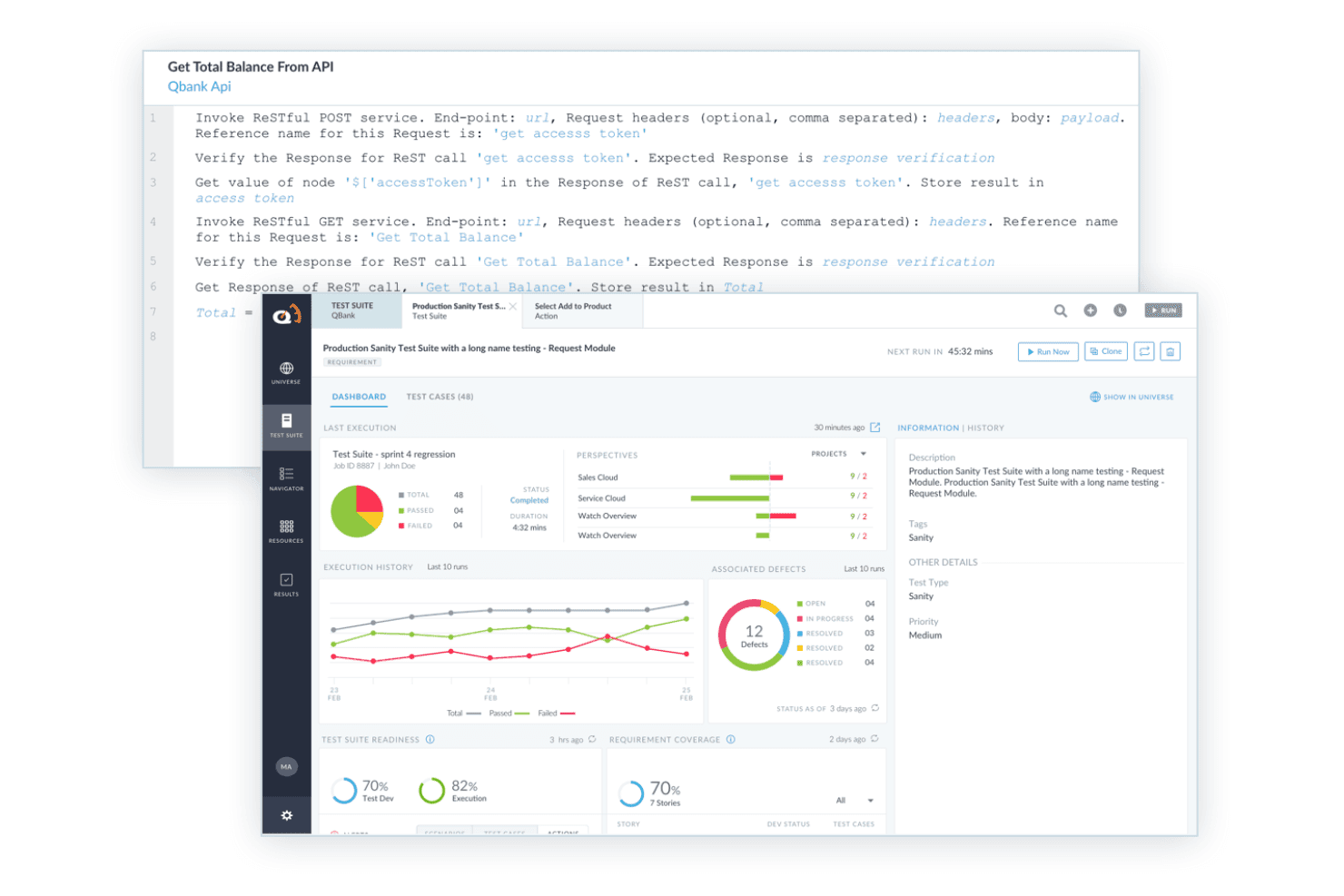
ACCELQ admite pruebas BDD con pasos de prueba API legibles, ejecución automatizada e informes de suites de prueba. ACCELQ es una plataforma de automatización de pruebas sin código que admite el diseño de escenarios orientados al comportamiento para aplicaciones web, API, móviles, de escritorio y empaquetadas, sin requerir programación en ningún nivel.
¿Para quién es mejor ACCELQ?
ACCELQ es ideal para equipos de control de calidad empresariales que necesitan ampliar la automatización de pruebas en múltiples tipos de aplicaciones sin depender de desarrolladores para escribir y mantener scripts de prueba.
Por qué elegí ACCELQ
ACCELQ se gana un lugar en mi lista porque su Diseñador de Escenarios Orientados al Comportamiento permite a los equipos de QA crear escenarios Dado-Cuando-Entonces en inglés sencillo, sin escribir una sola línea de código. Lo que particularmente me gusta es la modularidad: las bibliotecas de acciones reutilizables permiten que, cuando tu aplicación cambia, actualices un solo componente y la corrección se propaga a todas las pruebas que lo referencian. He visto que este enfoque reduce significativamente el tiempo de mantenimiento de pruebas en grandes suites de regresión para web, API y móvil dentro de un único entorno de ejecución.
Funciones clave de ACCELQ
- Automatización multiplataforma: Automatiza pruebas en aplicaciones web, API, móviles, de escritorio y empaquetadas desde una sola plataforma.
- Pruebas de API y backend: Permite pruebas para REST, SOAP, GraphQL, bases de datos, middleware e integraciones ETL.
- Integraciones con Jira y CI/CD: Se conecta con Jira, Jenkins, Azure DevOps y otras herramientas de CI comunes para una alineación completa del flujo de trabajo.
- Colaboración basada en roles: Permite que usuarios de negocio, testers y desarrolladores contribuyan a la creación y revisión de escenarios con permisos específicos por rol.
Integraciones de ACCELQ
ACCELQ ofrece integraciones nativas con Jenkins, Jira, ClickUp, Bamboo, TeamCity, Slack y Microsoft Teams, y proporciona una API para integraciones personalizadas.
Pros and Cons
Pros:
- Permite automatización BDD sin código para aplicaciones complejas
- Bibliotecas de acciones reutilizables que favorecen un diseño modular de pruebas
- Elementos de prueba autocurativos que reducen el esfuerzo de mantenimiento
Cons:
- No tiene autoría nativa para archivos de características Gherkin
- Los tableros de escenarios pueden volverse desordenados a gran escala
Learn more about ACCELQ: Lo mejor para automatización de pasos con Gherkin
- Prueba gratuita disponible
- Precio bajo consulta
Visit WebsiteCustomer Rating:4.3/5
Squish soporta el Desarrollo Guiado por Comportamiento (BDD), permitiendo que las pruebas sean escritas en un lenguaje comprensible para humanos. Squish está en mi lista por cómo soporta directamente la automatización BDD a nivel de pasos con Gherkin, algo que la mayoría de las herramientas de automatización de pruebas aún no logran correctamente. Cuando los equipos necesitan unir escenarios legibles y orientados al negocio con la automatización real de la interfaz de usuario—especialmente en sistemas de escritorio, móviles o embebidos multiplataforma—he comprobado que Squish es una buena solución.
Lo que me gusta es cómo asocias los pasos en lenguaje natural de Gherkin con las interacciones GUI, lo que hace que la reutilización de casos de prueba y el control de versiones sea mucho menos doloroso a medida que la interfaz evoluciona.
Lo mejor de Squish
- Equipos que necesitan pruebas automatizadas de interfaz de usuario y funcionalidad basadas en Gherkin
- Proyectos que cubren interfaces de aplicaciones de escritorio, móviles y embebidas
Squish no es ideal para
- Usuarios que buscan automatización BDD orientada a la web o solo para API
- Equipos sin tiempo para el mantenimiento de pruebas o la configuración inicial
Qué distingue a Squish
Squish adopta un enfoque directo para los equipos que quieren automatizar pruebas BDD en Gherkin sin acoplarlo a otra herramienta. A diferencia de las herramientas clásicas de scripting o los marcos web-first como Cypress, mapeas los pasos de lenguaje natural directamente sobre pruebas UI interactivas de pila completa en dispositivos de escritorio, móviles y embebidos. Esto es ideal cuando necesitas casos de prueba legibles para el negocio que realmente se ejecuten contra aplicaciones reales.
Compromisos con Squish
Squish está optimizado para la automatización de UI y a nivel de pasos, por lo que pierdes la velocidad y simplicidad de herramientas diseñadas solo para pruebas web o API sin interfaz. Esta capacidad adicional implica una configuración y mantenimiento extra, especialmente cuando las aplicaciones o sus interfaces cambian con frecuencia.
Pros and Cons
Pros:
- Soporta muchos lenguajes de scripting como Python y JavaScript
- Integración BDD efectiva con mapeo automático de pasos
- Funciona en una amplia variedad de plataformas
Cons:
- Las pruebas automatizadas no siempre son fáciles de crear
- Puede tomar tiempo aprender las funciones avanzadas de Squish
Learn more about Squish: Ideal para la gestión empresarial de pruebas
- Prueba gratuita de 14 días + Demostración gratuita
- Precio bajo petición
Visit WebsiteCustomer Rating:4.3/5
Tricentis qTest ofrece más de 60 métricas listas para usar, junto con funciones de arrastrar y soltar para crear paneles personalizados. Tricentis qTest es una opción destacada para equipos empresariales que necesitan soporte BDD integrado directamente en su proceso de gestión de pruebas. Yo confío en él cuando los equipos deben coordinar el diseño, la ejecución y la trazabilidad de los casos de prueba a gran escala, especialmente con escenarios complejos mapeados en Gherkin. Lo que más aprecio es lo bien que qTest centraliza los requisitos, los escenarios BDD y la automatización en grandes organizaciones de QA, proporcionando a todos una única fuente de verdad.
Lo mejor de Tricentis qTest
- Grandes equipos de QA que gestionan BDD empresarial y la trazabilidad de pruebas
- Organizaciones que necesitan gestión centralizada de pruebas y automatización a escala
Cuándo no es recomendable Tricentis qTest
- Pequeños equipos que buscan herramientas BDD simples o ligeras
- Grupos que no requieren funciones avanzadas de nivel empresarial
Qué distingue a Tricentis qTest
Tricentis qTest está diseñado para organizaciones donde la gestión de pruebas, BDD y automatización deben convivir en un espacio centralizado. A diferencia de Jira, que añade pruebas a través de plugins, qTest espera que los equipos de QA gestionen conjuntamente los requisitos, los escenarios BDD y la ejecución de pruebas a escala total. Lo considero especialmente útil cuando se necesita trazabilidad entre los requisitos, las pruebas y los resultados, especialmente en entornos regulados o de alta complejidad.
Compensaciones de Tricentis qTest
qTest está optimizado para la escala y la gobernanza centralizada, así que se sacrifica velocidad y simplicidad. Los equipos pequeños sin grandes necesidades de cumplimiento normalmente consideran que la carga administrativa es innecesaria.
Pros and Cons
Pros:
- Soporta varias metodologías
- Potentes funciones analíticas
- Mejora la colaboración entre equipos
Cons:
- Se necesita formación para un uso óptimo
- Algunas integraciones requieren configuración manual
Learn more about Tricentis qTest: Mejor integración con Jira
- Prueba gratuita de 30 días
- Precios a consultar
Visit WebsiteCustomer Rating:4.2/5
AssertThat ofrece una visión integral de tus escenarios de pruebas BDD automatizadas, para que puedas monitorear fácilmente las métricas de rendimiento de un vistazo. AssertThat gana un lugar en mi lista por la forma en que lleva directamente las pruebas BDD a los entornos de Jira. Si trabajas estrechamente con partes interesadas que usan Jira, AssertThat es la primera herramienta que sugiero para sincronizar scripts en Gherkin y sus resultados directamente en Épicas y Historias.
Lo que la distingue para mí es la manera en que puedes gestionar pruebas cucumber, mapear escenarios y hacer seguimiento de los resultados sin salir del flujo de trabajo principal de Jira. Esto facilita mucho que los equipos mantengan la gestión de pruebas alineada con el trabajo de entrega.
AssertThat es ideal para
- Equipos que usan Jira y gestionan BDD con Gherkin y cucumber
- Organizaciones que buscan mantener la gestión de pruebas y el seguimiento de proyectos en un solo lugar
AssertThat no es recomendable para
- Equipos que no utilizan Jira como plataforma principal
- Proyectos que necesitan reportes visuales avanzados de pruebas o análisis
Qué diferencia a AssertThat
AssertThat trata la gestión de pruebas BDD como una parte nativa de Jira, no como un complemento. Escribes y gestionas archivos de características en Gherkin junto con tus issues de Jira, de modo que probadores, desarrolladores y partes interesadas no técnicas colaboran utilizando la misma plataforma que ya conocen. A diferencia de herramientas independientes como SpecFlow, AssertThat integra la documentación de pruebas y su trazabilidad directamente en tu flujo de trabajo de Jira. Esto funciona bien si necesitas que tus activos BDD estén vinculados a tus sprints y al seguimiento de issues.
Compromisos al usar AssertThat
AssertThat está optimizado para equipos que priorizan Jira, pero pierdes análisis más profundos o reportes flexibles que pueden aportar plataformas BDD especializadas. Si buscas datos en profundidad o visibilidad de pruebas entre múltiples proyectos, probablemente sentirás esas limitaciones.
Pros and Cons
Pros:
- Se integra bien con Jira
- Soporta sintaxis BDD
- Funciones de reportes en tiempo real
Cons:
- Funciones independientes limitadas
- Soporte limitado fuera de Jira
Learn more about AssertThat: Mejor para soporte multilenguaje
- Demo gratuita disponible
- Precio bajo solicitud
Visit WebsiteCustomer Rating:4.2/5
Plugin de Cucumber para Java IDE Cucumber está en mi lista corta porque permite que los equipos escriban escenarios BDD en más de 30 lenguajes de programación, lo que lo convierte en una opción sólida para proyectos que no están atados a una sola pila tecnológica. Cuando necesitas prácticas BDD consistentes a través de diferentes lenguajes o entornos mixtos, esta herramienta se adapta fácilmente. Aprecio la sintaxis Gherkin abierta y legible, y cómo mantiene alineados tanto a los perfiles técnicos como a los no técnicos.
Cucumber es mejor para
- Equipos que utilizan varios lenguajes de programación en flujos de trabajo BDD
- Grupos multifuncionales que necesitan definiciones de escenarios en lenguaje natural
Cucumber no es ideal para
- Proyectos limitados a una sola pila de lenguaje estrechamente integrada
- Equipos a los que no les gusta mantener archivos de funcionalidades basados en texto
Qué diferencia a Cucumber
Cucumber espera que impulsen el desarrollo a través de conversaciones y comprensión compartida, no solo especificaciones escritas. Veo que fomenta la colaboración entre perfiles técnicos y no técnicos mucho más que herramientas clásicas como Jira o incluso SpecFlow. En lugar de incrustar requisitos en campos de tickets o comentarios en el código, se escriben escenarios ejecutables en Gherkin que viven en tu base de código. Esto funciona mejor cuando deseas que la comprensión y las pruebas permanezcan alineadas a medida que evoluciona tu producto.
Compromisos con Cucumber
Cucumber optimiza escenarios legibles y compartidos, pero cedes cierta velocidad y simplicidad en comparación con herramientas que solo generan pruebas a partir del código. En la práctica, se invierte más tiempo escribiendo y manteniendo documentación en lenguaje natural.
Pros and Cons
Pros:
- Soporta múltiples lenguajes de programación
- Conecta equipos técnicos y no técnicos
- Se adapta a varios entornos
Cons:
- Puede requerir configuración adicional
- Funciones avanzadas limitadas
Learn more about Cucumber: Ideal para desarrollo guiado por comportamiento
- Plan gratuito disponible
- Desde $4/usuario/mes

JDave se ha ganado un lugar en mi lista corta de pruebas BDD porque aplica un enfoque de especificación mediante ejemplos en Java que sigue siendo legible incluso para quienes no son desarrolladores. Considero que su estructuración basada en contextos permite a los equipos expresar el comportamiento, los resultados y las especificaciones en lenguaje sencillo, lo que facilita la colaboración con las partes interesadas.
Lo que más valoro es lo clara que es la separación entre contexto, evento y resultado al escribir especificaciones en JDave. Esto funciona especialmente bien en equipos que buscan consenso sobre los requisitos antes de que se envíe cualquier código.
Ideal para
- Equipos de Java que practican desarrollo guiado por el comportamiento y especificación mediante ejemplos
- Desarrolladores que colaboran estrechamente con expertos de dominio y personas no técnicas
No es recomendable para
- Equipos que desean una interfaz moderna o interfaces web avanzadas
- Organizaciones que usan tecnologías que no son Java (Python, .NET, JS)
¿Qué hace único a JDave?
JDave destaca porque dirige la atención hacia la descripción del comportamiento del software en lenguaje sencillo, con una estructura que se alinea directamente con ejemplos del mundo real. En comparación con herramientas como Cucumber o SpecFlow, JDave integra los principios orientados al comportamiento directamente en el lenguaje Java en lugar de depender de la sintaxis Gherkin u otra configuración externa. Tiendes a trabajar muy cerca de los expertos de dominio y a mantener los detalles técnicos fuera de la conversación hasta el momento de implementar.
Compromisos de JDave
JDave está optimizado para especificaciones centradas en Java y en el comportamiento, pero pierdes soporte comercial, interfaz moderna y pulida. En la práctica, los equipos que buscan herramientas gráficas o soporte para tecnologías que no sean Java no encontrarán lo que necesitan aquí.
Pros and Cons
Pros:
- Se centra en especificaciones orientadas al comportamiento
- Mejora la colaboración con las partes interesadas
- Soporta pruebas narrativas
Cons:
- Limitado a entornos Java
- Requiere comprensión de los principios BDD
Learn more about JDave: Ideal para la automatización temprana de pruebas
- Demostración gratuita disponible
- Precios bajo consulta

Interfaz de TestLeft resaltando un objeto en el panel de árbol de objetos TestLeft entra en mi lista porque integra BDD en los flujos de trabajo de los desarrolladores desde el principio, para que puedas automatizar las pruebas a medida que se escribe el código. Lo recomiendo cuando quieres que las pruebas sean programables dentro de Visual Studio o los IDEs de JetBrains, permitiendo a los equipos usar C# o Java tanto para los pasos como para la automatización.
Lo que más destaco es cómo TestLeft permite disparar y gestionar escenarios BDD directamente en tu canal de CI. Me gusta que puedas mantener los esfuerzos de automatización sincronizados con la rápida iteración, lo que lo hace especialmente útil para su adopción temprana en el ciclo de desarrollo.
Lo Mejor de TestLeft Para
- Desarrolladores que quieren automatizar pruebas BDD centradas en el código
- Equipos que integran BDD automatizado en sus canales de CI
TestLeft No Es Ideal Para
- No desarrolladores que necesitan herramientas BDD sin código
- Organizaciones que buscan reportes de prueba avanzados y listos para usar
Qué distingue a TestLeft
TestLeft espera que los desarrolladores mantengan las pruebas BDD automatizadas cerca de la base del código, integrándose directamente en IDEs como Visual Studio y JetBrains. Este diseño mantiene el proceso de automatización alineado con el trabajo diario de desarrollo. En lugar de gestionar BDD en herramientas separadas como Cucumber o SpecFlow, noto que TestLeft es mejor cuando quieres ejecutar y mantener tus pruebas directamente donde escribes el código.
Compromisos con TestLeft
TestLeft está optimizado para automatización basada en código, pero eso significa que los testers que prefieren herramientas visuales o necesitan informes integrados y detallados suelen sentirse limitados.
Pros and Cons
Pros:
- Soporta ejecución paralela de pruebas
- Genera scripts en varios lenguajes
- Integración temprana en la automatización
Cons:
- Requiere conocimientos de IDEs
- Soporte limitado para entornos fuera de IDEs
Learn more about TestLeft:

BeanSpec es una solución de pruebas basada en Java que se utiliza para especificar, comprobar y resumir el comportamiento de un componente de manera declarativa y narrativa. BeanSpec está en mi lista por su enfoque hacia la inyección de dependencias y cómo ayuda a construir escenarios de prueba confiables para BDD. En lugar de codificar las dependencias de forma rígida, puedes inyectar mocks y stubs fácilmente en tiempo de ejecución, lo cual he encontrado especialmente útil para aislar los casos de prueba. Al probarlo, aprecié la resolución de parámetros con tipado seguro y lo mucho que agiliza la configuración de grafos de objetos complejos en pruebas automatizadas orientadas al comportamiento.
BeanSpec es ideal para
- Desarrolladores que automatizan la inyección de dependencias en suites de pruebas BDD
- Equipos que necesitan un control detallado sobre la configuración de objetos de prueba
BeanSpec no es ideal para
- Usuarios que necesitan marcos BDD de extremo a extremo desde el inicio
- Equipos de QA que evitan la inyección de dependencias personalizada o herramientas basadas en JVM
Qué distingue a BeanSpec
BeanSpec está diseñado para desarrolladores que quieren un control directo sobre cómo se inyectan las dependencias durante las pruebas. Omite los marcos más grandes que ves con herramientas como Spring o Guice y, en cambio, te brinda visibilidad granular en la resolución de argumentos y la conexión de objetos. En la práctica, encuentro que funciona mejor cuando deseas configurar casos de prueba precisos para BDD y necesitas intercambiar implementaciones reales por mocks en el momento. A diferencia de las herramientas de inyección de dependencias más pesadas, BeanSpec espera que estés cerca del código y ajustes tus dependencias por escenario sin mucha configuración adicional.
Compromisos con BeanSpec
BeanSpec optimiza la inyección manual y flexible, pero se renuncia a definiciones de pasos integradas y gestión de pruebas. Deberás incorporar otro motor BDD y coordinar las herramientas por tu cuenta.
Pros and Cons
Pros:
- Inyección de dependencias sencilla
- Reduce el código repetitivo
- Soporta alcances de beans personalizados
Cons:
- Limitado a entornos Java
- Carece de documentación extensa
Learn more about BeanSpec:

Resultado de prueba de SpecFlow con desglose de la ejecución de escenarios individuales SpecFlow está en esta lista porque está diseñado para equipos que trabajan en entornos .NET y buscan un sólido soporte BDD directamente en su flujo de trabajo. Lo utilizo cuando necesito automatizar pruebas de aceptación usando Gherkin con integraciones nativas de C#; la configuración resulta natural si ya formas parte del ecosistema Microsoft.
Lo que más destaco es la integración rica en funciones con Visual Studio y el soporte de documentación viva, que ayuda a los equipos a mantener los escenarios comprensibles y sincronizados con el código.
Para quién es mejor SpecFlow
- Equipos de desarrollo .NET que quieren BDD con sintaxis Gherkin
- Organizaciones que utilizan Visual Studio para la automatización de pruebas
Para quién no es ideal SpecFlow
- Proyectos de automatización basados en JavaScript o Python
- Equipos que necesitan soporte multiplataforma o de navegador integrado
Qué distingue a SpecFlow
SpecFlow destaca porque está diseñado para equipos .NET que desean que los escenarios BDD sean una parte fluida de su flujo de trabajo. A diferencia de Cucumber, que suele sentirse más natural en entornos Ruby o JavaScript, SpecFlow espera que trabajes dentro de Visual Studio y aproveches las herramientas familiares de C#. En la práctica, esto funciona mejor si deseas que tu proceso BDD encaje en los hábitos de desarrollo .NET ya establecidos, sin necesidad de traducir entre marcos o lenguajes.
Compromisos con SpecFlow
SpecFlow está optimizado para una profunda integración con .NET y Visual Studio, pero pierdes flexibilidad en la elección de lenguaje y automatización multiplataforma de navegadores. Si te alejas de C# o trabajas en diferentes stacks, encontrarás obstáculos.
Pros and Cons
Pros:
- Ideal para entornos .NET
- Alinea equipos técnicos y no técnicos
- Experiencia fluida en Visual Studio
Cons:
- Limitado al framework .NET
- No es adecuado para proyectos que no sean .NET
Learn more about SpecFLow:

Plugin de FitNesse funcionando con IntelliJ FitNesse está en mi lista porque es poco común ver una herramienta que combine documentación y desarrollo de casos de prueba de manera tan natural. Es ideal para escribir criterios de aceptación en wikis y convertirlos en pruebas ejecutables sin salir de ese flujo de trabajo.
Valoro cómo puedes colaborar en las especificaciones de pruebas directamente en el navegador y luego ejecutar esas páginas wiki como pruebas BDD vivas. Para equipos multifuncionales que desean mantener unidas las especificaciones legibles para el negocio y las pruebas automatizadas, esta es una excelente opción.
Lo mejor de FitNesse
- Equipos que redactan especificaciones ejecutables junto con la documentación en wikis
- Analistas de calidad y de negocio que desean pruebas BDD compartidas y legibles
No es ideal para
- Usuarios que necesitan integraciones modernas con IDE o retroalimentación rápida de la interfaz
- Equipos que buscan gestión de flujos de trabajo o pruebas muy visuales
Qué diferencia a FitNesse
FitNesse aborda BDD integrando documentación y especificaciones de prueba en un wiki de navegador, en lugar de mantener los requisitos en tickets como Jira o historias de usuario fuera del conjunto de pruebas. Esto funciona bien para equipos que ya usan wikis para escribir especificaciones y quieren conectarlas directamente con pruebas automatizadas y ejecutables para una mayor alineación.
La interacción se realiza a través de un wiki compartido en vez de un IDE, lo cual fomenta una mayor colaboración entre testers y usuarios de negocio.
Compromisos con FitNesse
FitNesse prioriza la colaboración y transparencia, pero careces de características modernas en el flujo de trabajo y retroalimentación rápida que se espera en herramientas de pruebas integradas en los IDE actuales. Esto puede ralentizar a algunos equipos cuando las pruebas o las bases de código se vuelven grandes.
Pros and Cons
Pros:
- Integra documentación con pruebas
- Admite pruebas de aceptación
- Refleja directamente los requisitos del negocio
Cons:
- No es ideal para proyectos complejos
- Carece de funciones avanzadas de pruebas
Learn more about FitNesse:
Otras herramientas de pruebas BDD
Estas son algunas opciones adicionales de herramientas de pruebas BDD que no han llegado a mi selección, pero que aún merece la pena consultar:
- 11JBehaveEl mejor para desarrolladores Java
- 12ConcordionIdeal para la especificación mediante ejemplos
- 13testRigorIdeal para automatización de pruebas sin código
- 14Zephyr ScaleIdeal para la gestión de pruebas en Jira
Related Reviews
Cómo evalúo las herramientas de pruebas BDD
Evalúo cada herramienta en dos niveles: las capacidades BDD de base (soporte Gherkin, vinculación de pasos, integración con CI) que un equipo necesita para entregar, y los diferenciadores que determinan el ajuste.
Funcionalidad principal (Requisitos mínimos para esta lista)
Cuando selecciono las herramientas para mi lista, puntúo cada una en una escala del 0 (no ofrece la funcionalidad) al 5 (destaca en este área) para cada funcionalidad principal mencionada abajo. Luego, calculo el puntaje total de la herramienta en un porcentaje. Cada herramienta debe lograr una puntuación total mínima del 65% para poder ser considerada para su inclusión.
- Sintaxis Gherkin/Lenguaje natural: Reviso si la herramienta soporta constructos Gherkin completos como Scenario Outlines, tablas de datos y etiquetas, no solo la estructura básica Given-When-Then.
- Vinculación de definición de pasos: El enfoque de cada herramienta para mapear los pasos en lenguaje natural a código ejecutable es importante; por eso, evalúo la parametrización, el soporte para expresiones regulares y la reutilización entre diferentes archivos de features.
- Ejecución de automatización de pruebas: Busco ejecución confiable en varios tipos de aplicación (web, API y móvil) y si la herramienta permite ejecuciones en paralelo para mantener prácticas las suites BDD grandes.
- Integración con CI/CD: La herramienta debe integrarse con pipelines como Jenkins, GitHub Actions o GitLab CI, ya sea mediante plugins nativos o comandos CLI bien documentados.
- Documentación viva e informes: Buenas herramientas BDD convierten los resultados de las pruebas en documentación lista para los interesados, así que evalúo la calidad de los reportes, la trazabilidad de funcionalidades y la visibilidad de tendencias históricas.
- Colaboración en archivos de features: Analizo cómo la herramienta fomenta la autoría colaborativa, ya sea con un editor web para responsables de producto o flujos sincronizados con Git para transferencias entre desarrollo y QA.
Una vez tengo una lista de herramientas que cumplen estos criterios, considero qué distingue a cada plataforma.
Factores diferenciadores (Qué distingue a los proveedores)
Así es como comparo y contrasto a los distintos proveedores:
Características destacadas
La trazabilidad de requisitos es fundamental: busco herramientas que vinculen escenarios Gherkin directamente con historias en Jira o Azure DevOps para mapear los resultados de pruebas a los criterios de aceptación. Los localizadores autoreparables también ahorran un tiempo real al equipo; cuando cambia un elemento del frontend, la herramienta se adapta en vez de fallar la suite completa. También evalúo la autoría de escenarios asistida por IA, donde la herramienta sugiere o genera pasos Gherkin a partir de historias de usuario, acelerando la creación de archivos de features para grandes acumulaciones de trabajo.
Más allá de las funcionalidades
La compatibilidad con el lenguaje y el framework es lo primero que reviso; una herramienta basada en Java y Cucumber JVM no servirá para un equipo que desarrolla en TypeScript con Playwright. El modelo de precios también es relevante, en especial la diferencia entre frameworks open-source y plataformas comerciales que cobran por usuario o por ejecución en paralelo. Además, valoro el nivel de integración de cada herramienta con el stack DevOps, desde Jira y TestRail para gestión de pruebas hasta Slack y ReportPortal para la visibilidad de resultados en todo el equipo.
Cómo elegir herramientas de pruebas BDD
Es fácil perderse entre largas listas de funciones y complejas estructuras de precios. Para ayudarte a mantener la atención mientras avanzas en tu proceso específico de selección de software, aquí tienes una lista de factores que debes tener en cuenta:
| Factor | Qué debes tener en cuenta |
| Escalabilidad | Asegúrate de que la herramienta pueda crecer con tu equipo y gestionar eficazmente un volumen cada vez mayor de pruebas. |
| Integraciones | Comprueba si se integra correctamente con tus herramientas actuales, como las canalizaciones de CI/CD y los sistemas de control de versiones. |
| Personalización | Busca funciones que te permitan adaptar la herramienta a tus flujos de trabajo y necesidades de pruebas específicos. |
| Facilidad de uso | Elige una herramienta con una interfaz intuitiva que reduzca al mínimo la curva de aprendizaje de tu equipo. |
| Presupuesto | Evalúa el coste total de propiedad, incluidas las posibles tarifas ocultas, para asegurarte de que se ajusta a tu presupuesto. |
| Medidas de seguridad | Asegúrate de que la herramienta cumpla los estándares de tu sector y proteja tus datos. |
| Asistencia | Ten en cuenta la disponibilidad y la calidad del servicio de atención al cliente y de los recursos de la comunidad. |
| Documentación | Busca una documentación completa y clara que te ayude con la configuración y la resolución de problemas. |
Tendencias en las herramientas de pruebas BDD
En mi investigación, recopilé innumerables actualizaciones de productos, comunicados de prensa y registros de lanzamientos de distintos proveedores de herramientas de pruebas BDD. Estas son algunas de las tendencias emergentes que estoy siguiendo de cerca:
- Creación de pruebas mediante IA: Cada vez más herramientas utilizan la IA para generar automáticamente casos de prueba basados en historias de usuario. Esto ahorra tiempo a los desarrolladores y garantiza una cobertura de pruebas completa. Proveedores como testRigor están liderando esta tendencia al integrar la creación de pruebas basada en IA en sus plataformas.
- Colaboración en tiempo real: Las herramientas están mejorando las funciones que permiten a los equipos colaborar en tiempo real, garantizando que todas las partes interesadas estén alineadas. Esto resulta especialmente útil para equipos distribuidos que trabajan en proyectos complejos.
- Capacidades mejoradas de generación de informes: Existe una demanda creciente de funciones detalladas de análisis y generación de informes que proporcionen información sobre los resultados de las pruebas y el estado del proyecto. Los proveedores están incorporando paneles personalizables para ayudar a los equipos a visualizar los datos de forma eficaz.
- Desarrollo dirigido por el comportamiento para personas no desarrolladoras: Cada vez más herramientas se centran en hacer que el BDD sea accesible para quienes no desarrollan software, simplificando la sintaxis y proporcionando interfaces intuitivas. Esta tendencia ayuda a reducir la brecha entre los miembros técnicos y no técnicos del equipo.
- Enfoque en las pruebas de seguridad: A medida que la seguridad se convierte en una prioridad principal, las herramientas BDD comienzan a incorporar funciones de pruebas de seguridad para identificar vulnerabilidades en una fase temprana del ciclo de vida del desarrollo de software. Esta tendencia está ganando fuerza, especialmente en sectores con estrictos requisitos de cumplimiento.
¿Qué son las herramientas de pruebas BDD?
Las herramientas de pruebas BDD son aplicaciones que ayudan a los equipos a escribir y automatizar pruebas utilizando descripciones en lenguaje sencillo sobre cómo debería comportarse el software. Los desarrolladores, probadores y analistas de negocio utilizan estas herramientas para crear una comprensión compartida de los requisitos y confirmar que las funciones funcionan según lo esperado.
La escritura de escenarios, la integración de la automatización y las funciones de generación de informes ayudan a mejorar la colaboración y la precisión, además de proporcionar comentarios más rápidos durante el desarrollo. En general, las herramientas de pruebas BDD facilitan la conexión entre los objetivos empresariales y la implementación técnica, así como el mantenimiento de una calidad de software uniforme.
Características de las herramientas de pruebas BDD
Al seleccionar herramientas de pruebas BDD, presta atención a las siguientes características clave:
- Compatibilidad con la sintaxis Gherkin: Permite a los equipos escribir pruebas en lenguaje sencillo, lo que facilita su comprensión para todas las partes interesadas.
- Creación de pruebas mediante IA: Genera automáticamente casos de prueba basados en historias de usuario, ahorrando tiempo y garantizando una cobertura completa.
- Colaboración en tiempo real: Permite a los equipos trabajar juntos simultáneamente, garantizando la alineación y una comunicación eficaz.
- Capacidades mejoradas de generación de informes: Proporciona análisis detallados y paneles para visualizar los resultados de las pruebas y el estado del proyecto.
- Compatibilidad con varios lenguajes: Ofrece flexibilidad al admitir múltiples lenguajes de programación, adaptándose a equipos de desarrollo diversos.
- Documentación viva: Mantiene la documentación actualizada con las pruebas más recientes, garantizando que todos los miembros del equipo tengan acceso a información vigente.
- Funciones de pruebas de seguridad: Identifica vulnerabilidades en una fase temprana del proceso de desarrollo, algo importante para los sectores con requisitos de cumplimiento.
- Paneles personalizables: Permite a los equipos adaptar los informes y análisis a sus necesidades específicas, facilitando una mejor toma de decisiones.
- Integración con herramientas de CI/CD: Garantiza que las pruebas se ejecuten automáticamente en el flujo de desarrollo, mejorando la eficiencia.
- Especificaciones dirigidas por el comportamiento: Ayuda a alinear el desarrollo con las necesidades de los usuarios al centrarse en los principios del desarrollo dirigido por el comportamiento.
Ventajas de las herramientas de pruebas BDD
La implementación de herramientas de pruebas BDD ofrece varias ventajas para tu equipo y tu empresa. Estas son algunas de las que puedes esperar:
- Colaboración mejorada: Al utilizar la sintaxis Gherkin, estas herramientas facilitan que tanto los miembros técnicos como los no técnicos del equipo comprendan las pruebas y contribuyan a ellas.
- Creación de pruebas más rápida: Las funciones de creación de pruebas basadas en IA ahorran tiempo al generar automáticamente casos de prueba, lo que permite que el equipo se centre en el desarrollo.
- Mejor alineación: Las funciones de colaboración en tiempo real garantizan que todas las partes interesadas estén informadas y alineadas, reduciendo los malentendidos y los errores.
- Mayor conocimiento: Las capacidades mejoradas de generación de informes proporcionan análisis y paneles valiosos, ayudando al equipo a tomar decisiones fundamentadas.
- Seguridad mejorada: Las funciones de pruebas de seguridad identifican las vulnerabilidades en una fase temprana, lo que resulta esencial para mantener el cumplimiento normativo y proteger la empresa.
- Documentación actualizada: La documentación viva mantiene informados a todos los miembros del equipo sobre las últimas actualizaciones de las pruebas, garantizando que todos tengan acceso a información actualizada.
- Desarrollo flexible: La compatibilidad con varios lenguajes permite que el equipo trabaje con sus lenguajes de programación preferidos, adaptándose a distintos niveles de experiencia.
Costes y precios de las herramientas de pruebas BDD
Para seleccionar herramientas de pruebas BDD es necesario comprender los distintos modelos de precios y planes disponibles. Los costes varían en función de las funcionalidades, el tamaño del equipo, los complementos y otros factores. La tabla siguiente resume los planes habituales, sus precios medios y las funciones que suelen incluir las soluciones de herramientas de pruebas BDD:
Tabla comparativa de planes para herramientas de pruebas BDD
| Tipo de plan | Precio medio | Funciones habituales |
| Plan gratuito | $0 | Creación básica de pruebas, integraciones limitadas y asistencia de la comunidad. |
| Plan personal | $10-$30/user/month | Creación avanzada de pruebas, integraciones esenciales y asistencia por correo electrónico. |
| Plan empresarial | $30-$60/user/month | Suite completa de pruebas, generación de informes mejorada, herramientas de colaboración y asistencia estándar. |
| Plan empresarial avanzado | $60-$120/user/month | Funciones personalizables, asistencia prioritaria, seguridad avanzada y gestión de cuentas dedicada. |
Herramientas de pruebas BDD (preguntas frecuentes)
Estas son algunas respuestas a preguntas frecuentes sobre las herramientas de pruebas BDD:
¿Qué herramientas se pueden utilizar en BDD?
Entre las herramientas de BDD se incluyen opciones populares como Cucumber, JBehave y pytest-bdd. Estas herramientas permiten escribir pruebas en un lenguaje que todos los miembros del equipo pueden comprender, garantizando la claridad y la colaboración. Son compatibles con varios lenguajes de programación, por lo que puedes elegir el que mejor se adapte a las necesidades de tu proyecto.
¿Cuáles son las tres prácticas de BDD?
Las tres prácticas fundamentales de BDD son los escenarios colaborativos, los criterios de aceptación automatizados y la documentación viva. Estas prácticas garantizan que el equipo se comunique eficazmente y que las pruebas estén alineadas con los objetivos empresariales. Al utilizar un lenguaje común, BDD fomenta una mejor comprensión entre desarrolladores, evaluadores y partes interesadas del negocio.
¿Qué tipo de pruebas se asocia habitualmente con BDD?
Las pruebas de aceptación se asocian habitualmente con BDD. Garantizan que el software cumpla los requisitos empresariales y las necesidades de los usuarios. Las herramientas de BDD, como Cucumber, ayudan a automatizar estas pruebas, facilitando la verificación de que la aplicación se comporta según lo esperado.
¿Cómo se implementa un marco de BDD?
Para implementar un marco de BDD, comienza por planificar las pruebas y escribirlas en Gherkin. Define funcionalidades con escenarios claros que describan el comportamiento esperado. Automatiza estos escenarios mediante una herramienta de BDD como Cucumber para garantizar que se ejecuten de forma coherente como parte del proceso de desarrollo.
¿Cómo mejora BDD la colaboración?
BDD mejora la colaboración mediante un lenguaje compartido que pueden comprender tanto los miembros técnicos como los no técnicos del equipo. Este enfoque ayuda a reducir la distancia entre los desarrolladores y las partes interesadas del negocio, garantizando que todos estén alineados con los objetivos y requisitos del proyecto.
¿Se puede utilizar BDD en proyectos no ágiles?
Sí, BDD se puede utilizar en proyectos no ágiles. Aunque complementa las metodologías ágiles, su enfoque en la comunicación y la claridad lo hace valioso en cualquier proceso de desarrollo. BDD garantiza que el equipo comprenda los requisitos, independientemente de la metodología que se siga.