

Las mejores herramientas de pruebas entre navegadores ayudan a los equipos de desarrollo a identificar problemas de diseño, scripts dañados y experiencias de usuario inconsistentes en distintos navegadores y dispositivos antes de que lleguen a producción. Estas herramientas simulan condiciones del mundo real para que los equipos puedan verificar el rendimiento, la accesibilidad y la capacidad de respuesta en distintos entornos sin depender de pruebas manuales.
Muchos equipos comienzan a buscar mejores soluciones cuando las pruebas dejan de ser fiables, la cobertura de navegadores es incompleta o la depuración de inconsistencias visuales en Chrome, Safari y Edge ralentiza los ciclos de lanzamiento. Los flujos de trabajo fragmentados y los resultados de pruebas poco claros suelen provocar defectos que pasan desapercibidos y frustración en los equipos de control de calidad.
He trabajado directamente con desarrolladores web e ingenieros de control de calidad para evaluar herramientas de pruebas entre navegadores en canalizaciones de CI/CD activas, midiendo su capacidad para gestionar la escalabilidad, la precisión de los informes y la colaboración.
En esta guía, descubrirás qué plataformas de pruebas entre navegadores ofrecen realmente resultados coherentes, reducen el trabajo manual repetido y dan a tu equipo confianza en cada lanzamiento.
Por qué confiar en nuestras recomendaciones de software
6,700+
Reviews
20
Industry experts
16+
Evaluation factors
14
Years
Nuestro equipo lleva probando y evaluando software desde 2012. Como líderes tecnológicos, sabemos lo difícil —y lo importante— que es elegir el software adecuado.
Para esta guía, evaluamos las herramientas mediante pruebas prácticas e investigación independiente, puntuando las herramientas según nuestros criterios de selección.
Nuestras reseñas reflejan nuestro criterio editorial humano, no un discurso de ventas.
Revisores expertos:
- Paulo Gardini MiguelDirector técnico
 Tim FisherVP de IA
 Gabriel RosasTech Lead y arquitecto de software
 Christhian GruhnTech Lead y arquitecto de plataforma

Resumen de las mejores herramientas de pruebas entre navegadores
Este cuadro comparativo resume los detalles de precios de mi selección de las mejores herramientas de pruebas entre navegadores para ayudarte a encontrar la más adecuada para tu presupuesto y las necesidades de tu empresa.
| Tool | Best For | Trial Info | Price | ||
|---|---|---|---|---|---|
| 1 | Mejor para automatización con modularidad avanzada | Prueba gratuita de 14 días | Precio a consultar | Website | |
| 2 | Ideal para pruebas de aplicaciones móviles | Prueba gratuita disponible | Desde $199/mes/año (mínimo de 4 plazas) | Website | |
| 3 | Ideal para pruebas en vivo de navegadores | Plan gratuito disponible + demostración gratuita | Desde $15/usuario/mes (facturado anualmente) | Website | |
| 4 | Ideal para la colaboración en equipo | Demostración gratuita disponible | Precio a consultar | Website | |
| 5 | Mejor para infraestructura en la nube | Prueba gratuita disponible | Desde $39/usuario/mes (facturado anualmente) | Website | |
| 6 | Mejor para pruebas impulsadas por IA | Prueba gratuita disponible + demo gratuita | Precio bajo solicitud | Website | |
| 7 | Ideal para grabación de pruebas en múltiples navegadores | Prueba gratuita de 14 días | Desde $212/mes | Website | |
| 8 | Mejor para pruebas en dispositivos reales | Demo gratis disponible | Desde $39/mes (facturado anualmente) | Website | |
| 9 | Mejor para pruebas autorreparables | Prueba gratuita de 14 días + demo gratis | Desde $175/mes | Website | |
| 10 | Ideal para el monitoreo del rendimiento | Plan gratuito disponible | Desde $49/usuario/mes | Website |


Reseñas de las mejores herramientas de pruebas entre navegadores
A continuación encontrarás mis resúmenes detallados de las mejores herramientas de pruebas entre navegadores que llegaron a mi lista. Mis reseñas ofrecen un análisis detallado de las funciones clave, las ventajas & desventajas, las integraciones y los casos de uso ideales de cada herramienta para ayudarte a encontrar la más adecuada para ti.
 Mejor para automatización con modularidad avanzada
- Prueba gratuita de 14 días
- Precio a consultar
Visit WebsiteCustomer Rating:4.8/5This rating combines scores from multiple user review sites to reflect overall customer sentiment about the product.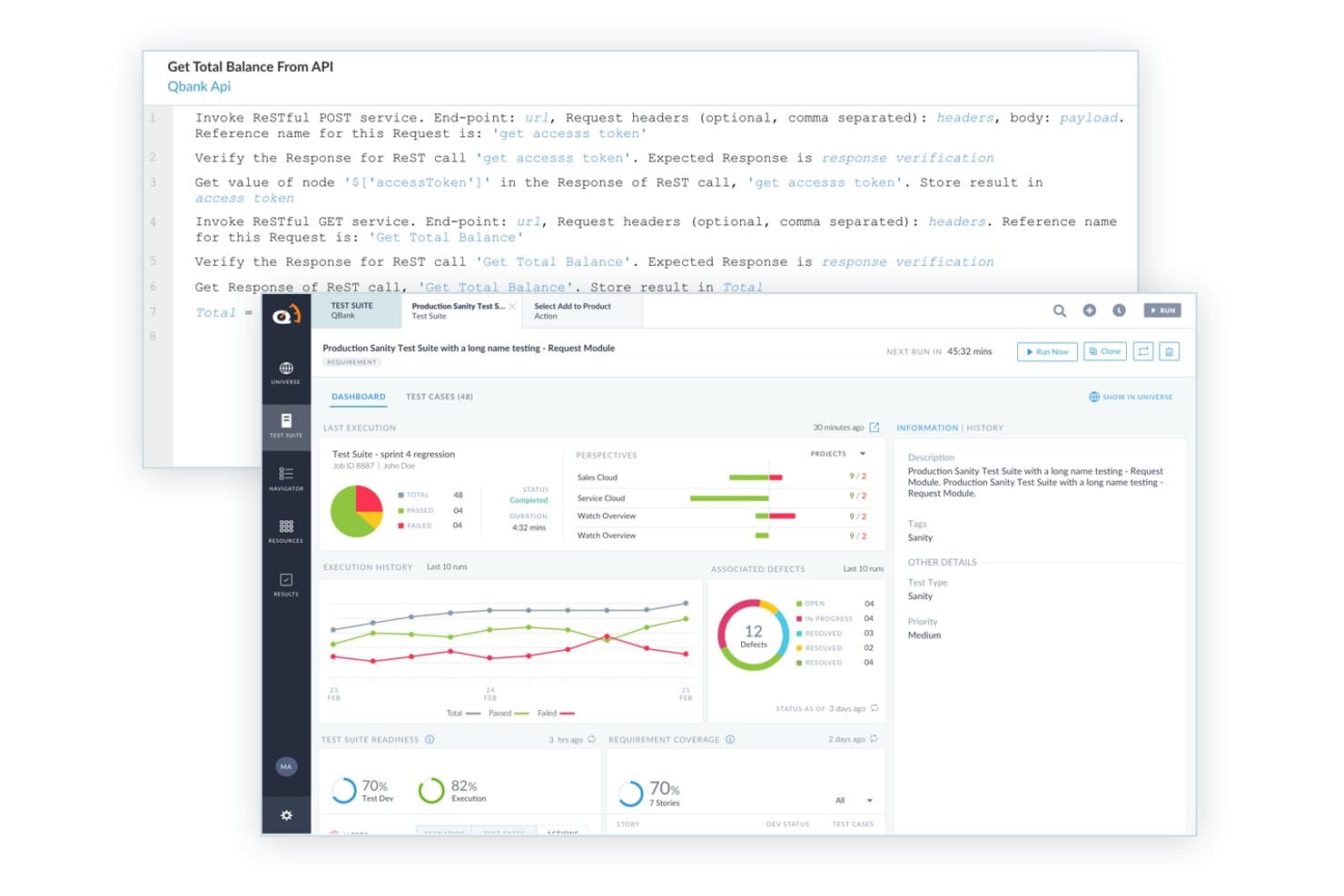
ACCELQ ofrece una interfaz de pruebas API sin código con invocación de servicios RESTful, paneles de suites de pruebas, historial de ejecuciones y seguimiento de defectos integrados. ACCELQ es una plataforma de automatización de pruebas sin código impulsada por IA que admite pruebas cruzadas de navegador, móviles, API y de escritorio a través de un diseño de pruebas basado en lenguaje natural y flujos de trabajo de automatización modulares.
¿Para Quién Es Mejor ACCELQ?
ACCELQ es ideal para equipos de aseguramiento de calidad (QA) empresariales y SDETs que necesitan escalar la automatización cruzada de navegadores sin escribir o mantener grandes volúmenes de código de prueba.
Por Qué Elegí ACCELQ
ACCELQ se gana su lugar como uno de los mejores en mi lista porque su diseño modular de pruebas realmente cambia cómo se escala la cobertura cruzada de navegadores. Me encanta que un solo flujo de prueba se ejecute en Chrome, Firefox, Safari y Edge sin tocar la lógica subyacente de las pruebas, lo cual es el enfoque de ACCELQ de “diseñar una vez, ejecutar en cualquier lugar” en la práctica. Combinado con la identificación de elementos sin necesidad de localizadores y un mecanismo de autocuración, no estoy reescribiendo pruebas constantemente cuando una interfaz cambia entre versiones o lanzamientos del navegador.
Características Principales de ACCELQ
- Automatización dentro del sprint: Crea y ejecuta pruebas dentro de los sprints ágiles mientras los requisitos y la interfaz siguen evolucionando.
- Ejecución en laboratorio en la nube: Ejecuta pruebas automatizadas en laboratorios de navegadores y dispositivos bajo demanda sin tener que mantener tu propia parrilla.
- Análisis de impacto y alertas: Obtén análisis de impacto automatizados ante cambios en la aplicación, notificándote los scripts afectados y riesgos de regresión.
- Automatización de pruebas de API y bases de datos: Automatiza la validación de API, backend y bases de datos todo en la misma plataforma que las pruebas de navegador.
Integraciones de ACCELQ
ACCELQ ofrece integraciones nativas con Jenkins, Azure DevOps, GitHub, CircleCI, Bamboo, TeamCity, Jira y Slack. Está disponible una API para integraciones personalizadas.
Pros and Cons
Pros:
- Creación de pruebas sin código sin necesidad de conocimientos de programación
- Localizadores autocurativos reducen el esfuerzo de mantenimiento entre navegadores
- El diseño modular de pruebas permite reutilización entre navegadores
Cons:
- Nube limitada de dispositivos reales frente a plataformas dedicadas
- Los paneles de reportes carecen de profundidad para grandes suites
Learn more about ACCELQ: Ideal para pruebas de aplicaciones móviles
- Prueba gratuita disponible
- Desde $199/mes/año (mínimo de 4 plazas)
Visit WebsiteCustomer Rating:4.9/5This rating combines scores from multiple user review sites to reflect overall customer sentiment about the product.
El panel de TestGrid te brinda información instantánea sobre tus pruebas fallidas, exitosas y detenidas. TestGrid es una plataforma de pruebas basada en la nube diseñada para aplicaciones móviles y web, dirigida a equipos de desarrollo que buscan mejorar sus capacidades de prueba. Ofrece soluciones de pruebas de extremo a extremo, centrándose en la prueba de aplicaciones móviles para garantizar la calidad y funcionalidad de las apps.
Por qué elegí TestGrid: La plataforma ofrece pruebas en dispositivos reales, lo cual es crucial para los desarrolladores de apps móviles para asegurar la compatibilidad. Su infraestructura en la nube permite entornos de prueba escalables, haciéndolo adecuado para equipos de todos los tamaños. La arquitectura flexible soporta diferentes frameworks de prueba, ofreciendo versatilidad en los enfoques de testeo. Las funciones específicas para móviles de TestGrid lo convierten en una excelente opción para los equipos que priorizan el rendimiento de las aplicaciones móviles.
Funciones y integraciones destacadas:
Funciones incluyen pruebas en dispositivos reales, lo que proporciona resultados precisos al testear en dispositivos móviles reales. La infraestructura en la nube permite pruebas escalables, permitiendo que tu equipo expanda los entornos de prueba según sea necesario. Su arquitectura flexible acomoda varios frameworks de prueba, dando a tu equipo la versatilidad de elegir el mejor enfoque.
Integraciones incluyen Jenkins, Jira, Slack, GitHub, Bitbucket, Azure DevOps, CircleCI, TestRail, Selenium y Appium.
Pros and Cons
Pros:
- Pruebas en dispositivos reales
- Infraestructura en la nube escalable
- Soporta varios frameworks
Cons:
- Requiere conocimientos técnicos
- Puede no ser adecuado para proyectos no móviles
Learn more about TestGrid: Ideal para pruebas en vivo de navegadores
- Plan gratuito disponible + demostración gratuita
- Desde $15/usuario/mes (facturado anualmente)
Visit WebsiteCustomer Rating:4.9/5This rating combines scores from multiple user review sites to reflect overall customer sentiment about the product.
LambdaTest permite a los usuarios probar manualmente sus aplicaciones web en tiempo real en diferentes navegadores y sistemas operativos, permitiéndoles interactuar con su aplicación como lo haría un usuario final. TestMu AI es una plataforma de pruebas cruzadas de navegadores en línea que ofrece pruebas en vivo y automatizadas en una amplia gama de navegadores, dispositivos y sistemas operativos.
¿Para quién es mejor TestMu AI?
TestMu AI es ideal para ingenieros de aseguramiento de calidad (QA) y equipos de desarrollo que necesitan probar aplicaciones web y móviles en múltiples navegadores y sistemas operativos.
Por qué elegí TestMu AI
Elegí TestMu AI porque sus pruebas interactivas en vivo destacan frente a otras opciones. Puedo iniciar una sesión en tiempo real en cualquiera de las más de 3,000 combinaciones de navegador y sistema operativo—Chrome, Safari, Firefox, Edge y más—sin necesidad de instalar máquinas virtuales locales ni mantener infraestructura. Cada sesión en vivo incluye DevTools nativos, para inspeccionar elementos, depurar problemas de diseño y revisar los errores de consola directamente dentro del entorno de pruebas. También he utilizado la función de limitación de red durante las sesiones en vivo para simular conexiones 3G o inestables, algo que de otro modo tendría que configurar por separado.
Características clave de TestMu AI
- Pruebas de geolocalización: Ejecuta sesiones en vivo desde diferentes IPs geográficas para verificar que el contenido, los redireccionamientos y las experiencias específicas por ubicación funcionen correctamente para usuarios en distintas regiones.
- Pruebas multidispositivo: Realiza pruebas en hasta seis dispositivos reales simultáneamente, comparando varias variantes de un sitio en una sola sesión.
- Pruebas de regresión visual: Detecta regresiones de CSS y cambios de diseño en toda tu matriz de navegadores utilizando comparaciones visuales automatizadas.
- Pruebas de resolución de pantalla: Ajusta la configuración de resolución de pantalla dentro de una sesión en vivo para comprobar cómo se visualiza tu sitio en distintos tamaños de pantalla.
Integraciones de TestMu AI
TestMu AI ofrece integraciones nativas con Jenkins, Jira, GitHub, GitLab, Slack, Azure DevOps, Bitbucket, CircleCI y TeamCity, y proporciona una API para integraciones personalizadas.
Pros and Cons
Pros:
- Amplia cobertura de navegadores
- Entorno de pruebas en tiempo real
- Pruebas automatizadas de capturas de pantalla
Cons:
- Requiere conexión a internet estable
- Puede que no se adapte a equipos pequeños
Learn more about TestMu AI: Ideal para la colaboración en equipo
- Demostración gratuita disponible
- Precio a consultar
Visit WebsiteCustomer Rating:4.9/5This rating combines scores from multiple user review sites to reflect overall customer sentiment about the product.
QA Wolf ofrece una cobertura de pruebas de extremo a extremo totalmente gestionada. QA Wolf es una plataforma de pruebas cruzadas en línea que permite a los equipos crear, ejecutar y gestionar pruebas automatizadas de navegador en la nube, con herramientas integradas para la creación de pruebas, ejecución y compartición de resultados.
¿Para quién es mejor QA Wolf?
QA Wolf es ideal para equipos de ingeniería y control de calidad en empresas medianas y grandes que necesitan un enfoque automatizado y gestionado para las pruebas cruzadas de navegadores.
Por qué elegí QA Wolf
Incluí QA Wolf en mi lista porque mantiene a los equipos distribuidos de ingeniería y QA alineados a lo largo de todo el proceso de pruebas. Me gusta que los informes de errores vengan con videos, rastros y registros adjuntos, lo que significa que mi equipo puede compartir una imagen completa de cualquier fallo sin tener que recopilar contexto adicional. Las integraciones con Slack y Microsoft Teams envían los resultados de pruebas en tiempo real directamente a los canales que ya utiliza mi equipo, por lo que no hay necesidad de iniciar sesión en un panel aparte para mantenerse informado. Además, ingenieros de QA humanos se integran en tu equipo, haciendo que la colaboración sea más como un flujo de trabajo compartido y menos como una simple transferencia de tareas.
Funciones clave de QA Wolf
- Orquestación de pruebas en paralelo: Ejecuta toda tu suite de pruebas simultáneamente en distintos navegadores, con re-ejecuciones automáticas de pruebas fallidas para eliminar errores debidos a la red o al entorno.
- Integración con pipelines CI/CD: Lanza las ejecuciones de pruebas directamente desde GitHub, GitLab o Bitbucket cuando se hace un merge, y recibe los resultados de forma integrada en tu flujo de trabajo CI.
- Mantenimiento de pruebas asistido por IA: Agentes de mantenimiento investigan automáticamente los fallos, diagnostican la causa raíz y sugieren soluciones para que tus ingenieros de QA las revisen y aprueben.
- Control de acceso antes de despliegue: Configura QA Wolf como la última barrera de calidad antes del lanzamiento a producción, utilizando integraciones con Netlify y Vercel.
Integraciones de QA Wolf
QA Wolf ofrece integraciones nativas con Jira, Asana, Linear, GitHub, Slack, Microsoft Teams, GitLab y Bitbucket. También dispone de una API para integraciones personalizadas.
Pros and Cons
Pros:
- Creación rápida de pruebas
- Informes de errores verificados por humanos
- Ejecuciones paralelas de pruebas ilimitadas
Cons:
- Requiere tiempo inicial de configuración
- Opciones de personalización limitadas
Learn more about QA Wolf: Mejor para infraestructura en la nube
- Prueba gratuita disponible
- Desde $39/usuario/mes (facturado anualmente)
Visit WebsiteCustomer Rating:4.5/5This rating combines scores from multiple user review sites to reflect overall customer sentiment about the product.
BrowserStack te permite ejecutar pruebas manuales y automatizadas entre navegadores en más de 3,000 navegadores y dispositivos reales. BrowserStack es una plataforma en línea de pruebas cruzadas de navegadores que te da acceso a navegadores y dispositivos reales para pruebas en vivo y automatizadas, ejecución de pruebas en paralelo e integraciones con las herramientas populares de CI/CD.
¿Para quién es mejor BrowserStack?
BrowserStack es ideal para ingenieros de aseguramiento de calidad (QA) y equipos de desarrollo en empresas medianas y grandes que necesitan pruebas de navegadores y dispositivos escalables en la nube para grandes conjuntos de pruebas.
Por qué elegí BrowserStack
BrowserStack se gana su lugar en mi lista porque su infraestructura en la nube está realmente diseñada para escalar de una forma que las redes internas simplemente no pueden igualar. Me gusta que puedas ejecutar pruebas en paralelo en más de 3.500 combinaciones reales de navegador y sistema operativo sin necesidad de gestionar ni una sola máquina física o máquina virtual. La nube totalmente gestionada significa que mi equipo no pierde tiempo en el mantenimiento de las redes—simplemente ejecutamos pruebas. El agente de autocuración es otra función que encuentro especialmente útil: repara automáticamente los localizadores rotos durante la ejecución, lo que reduce los fallos intermitentes en las pruebas que normalmente ralentizan las canalizaciones de CI/CD.
Funciones clave de BrowserStack
- Pruebas interactivas en vivo: Prueba manualmente sitios web y aplicaciones web en navegadores y dispositivos reales directamente desde tu navegador sin configuración previa.
- Pruebas automatizadas de capturas de pantalla: Captura capturas de pantalla a través de múltiples combinaciones de navegador y sistema operativo simultáneamente para detectar regresiones visuales.
- Pruebas de accesibilidad: Ejecuta comprobaciones automáticas de accesibilidad basadas en los estándares WCAG para identificar y señalar problemas de cumplimiento en diferentes navegadores.
- Simulación de red: Prueba cómo se comporta tu aplicación bajo diferentes condiciones de red, incluyendo 2G, 3G y configuraciones personalizadas de latencia.
Integraciones de BrowserStack
BrowserStack ofrece integraciones nativas con Jenkins, GitHub, GitLab, Bitbucket, Jira, Slack, Microsoft Teams, Azure DevOps, CircleCI y Travis CI, y se conecta con Zapier. Hay una API disponible para integraciones personalizadas.
Pros and Cons
Pros:
- Amplia cobertura de dispositivos
- No requiere configuración local
- Simulación de condiciones de usuario real
Cons:
- Funcionalidad offline limitada
- Curva de aprendizaje para algunas funciones
Learn more about BrowserStack: Mejor para pruebas impulsadas por IA
- Prueba gratuita disponible + demo gratuita
- Precio bajo solicitud
Visit WebsiteCustomer Rating:4.5/5This rating combines scores from multiple user review sites to reflect overall customer sentiment about the product.
Programa tu prueba con el kit de desarrollo de Testim: graba un flujo de usuario y luego exporta esa prueba a código Tricentis Testim es una plataforma de automatización de pruebas basada en la nube para aplicaciones web que combina la creación de pruebas impulsada por IA, ejecución en múltiples navegadores e integraciones con canalizaciones CI/CD.
¿Para quién es mejor Tricentis Testim?
Tricentis Testim es una buena opción para ingenieros de QA y equipos de desarrollo en empresas medianas y grandes que necesitan automatizar y escalar pruebas de aplicaciones web en varios navegadores.
Por qué elegí Tricentis Testim
Tricentis Testim se gana su lugar en mi lista corta por lo lejos que llegan sus capacidades de IA más allá de la grabación básica de pruebas. Me gustan especialmente los localizadores inteligentes con IA, que utilizan una combinación de IA, ML y metadatos para adaptarse automáticamente cuando la interfaz de tu aplicación cambia, de modo que las pruebas no se rompan cada vez que un desarrollador implemente una actualización. También uso habitualmente Testim Copilot, donde puedo describir un paso de prueba complejo en lenguaje natural y recibir de vuelta un paso personalizado en JavaScript funcionando, sin tener que escribirlo desde cero. Para la cobertura entre navegadores, mi equipo puede ejecutar pruebas en la propia grid de Testim o en cualquier grid compatible con Selenium, bajo demanda o activadas mediante CI.
Características clave de Tricentis Testim
- Grabación de pruebas con editor visual: Graba flujos de usuario y configúralos en un editor visual de bajo código, con la ayuda de IA para construir estructuras de pruebas limpias y reutilizables.
- Análisis de causa raíz: Diagnostica pruebas fallidas utilizando capturas de pantalla resaltadas, registros de consola, registros de red y sugerencias de fallos para identificar errores rápidamente.
- TestOps: Gestiona los cambios en las pruebas, organiza equipos y suites de pruebas, y prioriza las actividades de testing a medida que escalan tus ciclos de lanzamiento.
- Validación visual: Verifica la precisión visual de tu aplicación web a nivel de elemento o de página en diferentes navegadores.
Integraciones de Tricentis Testim
Tricentis Testim ofrece integraciones nativas con Jira, Trello, GitHub, Slack y es compatible con flujos de trabajo CI/CD mediante integraciones con sistemas de control de versiones y grids compatibles con Selenium. Hay una API disponible para integraciones personalizadas.
Pros and Cons
Pros:
- Localizadores inteligentes impulsados por IA
- Creación rápida de pruebas
- Enfoque low-code
Cons:
- Curva de aprendizaje pronunciada
- Soporte fuera de línea limitado
Learn more about Tricentis Testim: Ideal para grabación de pruebas en múltiples navegadores
- Prueba gratuita de 14 días
- Desde $212/mes
Visit WebsiteCustomer Rating:4.8/5This rating combines scores from multiple user review sites to reflect overall customer sentiment about the product.
Reflect ofrece una interfaz de automatización de pruebas sin código para crear pruebas. Reflect es una plataforma de pruebas cruzadas basada en la nube que te permite grabar, automatizar y ejecutar pruebas de aplicaciones web en varios navegadores sin escribir código.
¿Para quién es mejor Reflect?
Reflect es adecuado para equipos de aseguramiento de calidad (QA) y desarrolladores que necesitan crear y mantener conjuntos de pruebas multiplataforma sin depender de ingenieros de automatización dedicados.
Por qué elegí Reflect
Elegí Reflect como uno de los mejores debido a cómo su grabador de pruebas sin código gestiona la cobertura entre navegadores. Grabas una prueba una sola vez en el navegador en la nube de Reflect, y esa misma prueba se ejecuta en Chrome, Firefox, Edge y Safari sin modificaciones. Esto ayuda cuando necesitas cubrir más del 95% de tu base de usuarios sin mantener guiones de prueba separados para cada navegador. También me gusta que Reflect mantiene las versiones de los navegadores actualizadas en su infraestructura en la nube, por lo que mi equipo no tiene que preocuparse por los ciclos de lanzamiento de los navegadores. Cada ejecución de prueba también produce un video a pantalla completa junto con registros de consola y de red, facilitando determinar si un fallo es específico de un navegador o indica un problema más profundo.
Características clave de Reflect
- Mantenimiento de pruebas impulsado por IA: El motor SmartBear HaloAI de Reflect adapta automáticamente las pruebas cuando la interfaz de tu aplicación cambia, reduciendo la necesidad de actualizaciones manuales.
- Pruebas de regresión visual: Reflect compara capturas de pantalla píxel a píxel entre navegadores y señala diferencias, con un flujo de trabajo de aprobación con un solo clic para los cambios esperados.
- Soporte para pruebas de API: Ejecuta llamadas directas a la API junto a pruebas de interfaz para preparar datos de prueba o validar resultados sin programar pasos adicionales en la UI.
- Integración con CI/CD: Reflect incluye integraciones predefinidas con GitHub, CircleCI y Jenkins para que las pruebas se ejecuten automáticamente en cada pull request o despliegue.
Integraciones de Reflect
Reflect ofrece integraciones nativas con GitHub, GitLab, Slack, Jira y CircleCI, además de una API para integraciones personalizadas.
Pros and Cons
Pros:
- Integración completa con CI/CD
- Mantenimiento de pruebas impulsado por IA
- Creación de pruebas sin código
Cons:
- Podría ofrecer más opciones de personalización para configuraciones de prueba
- Limitaciones para pruebas de aplicaciones móviles
Learn more about Reflect: Mejor para pruebas en dispositivos reales
- Demo gratis disponible
- Desde $39/mes (facturado anualmente)
Visit WebsiteCustomer Rating:4.6/5This rating combines scores from multiple user review sites to reflect overall customer sentiment about the product.
Un ejemplo del panel de pruebas cruzadas de navegador de HeadSpin. HeadSpin es una plataforma en línea de pruebas cruzadas de navegadores que te brinda acceso a una nube global de dispositivos reales para pruebas en navegadores y aplicaciones, depuración remota y monitoreo del rendimiento en múltiples sistemas operativos y navegadores.
¿Para quién es mejor HeadSpin?
HeadSpin es ideal para ingenieros de aseguramiento de calidad (QA) y equipos de desarrollo móvil que necesitan probar en dispositivos reales en lugar de emuladores o simuladores.
Por qué elegí HeadSpin
Incluí HeadSpin en mi lista porque es una de las pocas plataformas de pruebas cruzadas de navegadores construida completamente alrededor de dispositivos reales y no de emuladores. Me gusta que cuando mi equipo ejecuta una prueba en Chrome para Android o Safari en iOS, usamos un dispositivo real habilitado con SIM en alguna de sus más de 50 ubicaciones globales—no un entorno simulado que enmascara el comportamiento real de la red. La plataforma rastrea más de 130 KPIs incluyendo carga de página, rendimiento de CPU y uso de batería en una vista de series temporales junto con grabaciones de pantalla, lo que facilita mucho identificar dónde ocurre exactamente un problema específico del navegador. La interfaz Waterfall une todos esos datos de sesión en un solo flujo, por lo que correlacionar una caída de rendimiento con una condición específica de la red o del dispositivo no requiere cambiar de herramienta constantemente.
Características clave de HeadSpin
- Análisis potenciados por IA: Analiza los datos capturados durante las sesiones de prueba y genera información basada en IA con recomendaciones prácticas para problemas específicos.
- Tarjetas de problemas con análisis de causa raíz: Identifica automáticamente problemas de experiencia de usuario y rendimiento durante las sesiones y determina si la causa raíz está en el backend, el dispositivo, el sistema operativo o la red.
- Compatibilidad con Appium y Selenium: Ejecuta pruebas automatizadas cruzadas de navegador y móviles de forma nativa a través de Appium y Selenium sin requerir la instalación de SDK ni cambios en el código de la app.
- Monitoreo sintético: Monitorea continuamente aplicaciones automatizando recorridos de usuario para detectar errores y regresiones de rendimiento entre lanzamientos.
Integraciones de HeadSpin
HeadSpin ofrece integraciones nativas con Appium, Selenium, Jenkins, Jira y Slack, y proporciona una API para integraciones personalizadas.
Pros and Cons
Pros:
- Pruebas en dispositivos reales
- Análisis de rendimiento detallados
- Permite probar condiciones de red
Cons:
- Puede no adaptarse a todos los presupuestos
- Capacidades offline limitadas
Learn more about HeadSpin: Mejor para pruebas autorreparables
- Prueba gratuita de 14 días + demo gratis
- Desde $175/mes
Visit WebsiteCustomer Rating:4.7/5This rating combines scores from multiple user review sites to reflect overall customer sentiment about the product.
La extensión de Endtest para Chrome te ayuda a grabar secuencias paso a paso y legibles de acciones en el navegador. Endtest es una plataforma en línea de pruebas cruzadas entre navegadores que te permite crear, ejecutar y gestionar pruebas automatizadas en diferentes navegadores y dispositivos usando un enfoque sin código o de bajo código.
¿Para Quién es Mejor Endtest?
Endtest es ideal para equipos de QA y desarrolladores que necesitan construir y mantener pruebas automatizadas entre navegadores sin depender en gran medida de habilidades de programación.
Por Qué Elegí Endtest
Endtest se gana su lugar en mi lista corta por la forma en que gestiona el mantenimiento de las pruebas a través de la autorreparación. Cuando un desarrollador actualiza el código subyacente de una aplicación, los localizadores en tus pruebas pueden romperse al instante. El motor de aprendizaje automático de Endtest almacena hasta 100 localizadores diferentes por elemento, así que cuando un cambio rompe un localizador, el motor automáticamente recurre a uno de repuesto. También me gusta que la función de visión por computadora realiza una comparación de la interfaz de usuario píxel por píxel junto con esto, detectando regresiones visuales que las comprobaciones basadas en localizadores pasarían completamente por alto.
Características Clave de Endtest
- Grabador de pruebas sin código: Crea pruebas automatizadas grabando interacciones en el navegador sin escribir una sola línea de código.
- Ejecución paralela de pruebas: Ejecuta múltiples pruebas simultáneamente en diferentes navegadores y sistemas operativos para reducir el tiempo total de prueba.
- Grid en la nube para navegadores cruzados: Ejecuta pruebas en una red basada en la nube de navegadores reales, incluyendo Chrome, Firefox, Safari y Edge.
- Grabaciones de video y registros: Revisa la reproducción en video y los registros detallados de cada ejecución de prueba para identificar exactamente dónde ocurrió una falla.
Integraciones de Endtest
Endtest ofrece integraciones nativas con Jenkins, GitLab, Sauce Labs, BrowserStack, Bamboo Server, Heroku, Bitbucket, TravisCI, CircleCI, TeamCity, Azure DevOps, Mattermost, Microsoft Teams, GitHub, PagerDuty, Slack y Jira. Hay una API disponible para integraciones personalizadas.
Pros and Cons
Pros:
- Creación de pruebas sin escribir código
- Interfaz fácil de usar
- Permite pruebas impulsadas por datos
Cons:
- Opciones de personalización limitadas
- Puede no adaptarse a escenarios de prueba complejos
Learn more about Endtest: Ideal para el monitoreo del rendimiento
- Plan gratuito disponible
- Desde $49/usuario/mes
Visit WebsiteCustomer Rating:4.3/5This rating combines scores from multiple user review sites to reflect overall customer sentiment about the product.
New Relic te permite rastrear y priorizar incidencias, asignarlas a miembros del equipo y colaborar en su resolución. New Relic es una plataforma de monitoreo del rendimiento de aplicaciones que proporciona análisis en tiempo real, rastreo distribuido y monitoreo de infraestructura para aplicaciones web y móviles.
¿Para quién es mejor New Relic?
New Relic es ideal para equipos de DevOps e ingeniería en empresas medianas y grandes que necesitan una visibilidad profunda del rendimiento de aplicaciones e infraestructura.
Por qué elegí New Relic
Elegí New Relic como uno de los mejores porque sus funciones de monitoreo de navegador y monitoreo sintético ofrecen a los equipos de ingeniería una vista en tiempo real sobre cómo operan las aplicaciones web en diferentes entornos. Me gusta especialmente la función de monitoreo de navegador, que rastrea el rendimiento de página según el sistema y la región del usuario, lo que te permite identificar exactamente qué configuraciones generan tiempos de carga lentos o mayores tasas de errores. El monitoreo sintético de New Relic permite que mi equipo simule recorridos completos de usuarios a través de URL y APIs antes de que los problemas lleguen a producción, lo cual es realmente útil para detectar regresiones anticipadamente. La función de seguimiento de cambios también vincula eventos de despliegue directamente a variaciones en el rendimiento, de modo que cuando algo falla tras una actualización, puedo correlacionarlo de inmediato en vez de buscar en los registros.
Características clave de New Relic
- Reproducción de sesiones: Graba y reproduce sesiones reales de usuarios en el navegador para ayudarte a identificar exactamente dónde los usuarios experimentan errores o problemas de rendimiento.
- Bandeja de entrada de errores: Agrupa los errores de todo tu stack en una sola vista para que puedas priorizar y darles seguimiento sin cambiar de herramienta.
- Alertas inteligentes: Utiliza umbrales dinámicos para reducir el ruido de alertas y mostrar solo las anomalías que realmente requieren tu atención.
- Paneles personalizables: Te permite crear y configurar paneles para mostrar los datos de telemetría específicos que tu equipo necesita en un solo lugar.
Integraciones de New Relic
New Relic ofrece integraciones nativas con AWS, Azure, Google Cloud Platform, Kubernetes, Jenkins, PagerDuty, Slack, Jira, GitHub y ServiceNow. Hay una API disponible para integraciones personalizadas.
Pros and Cons
Pros:
- Monitoreo de rendimiento en tiempo real
- Capacidades de alertas proactivas
- Paneles personalizables
Cons:
- Requiere conocimientos técnicos
- Funcionalidades limitadas sin conexión
Learn more about New Relic:
Otras herramientas de pruebas entre navegadores
Estas son algunas opciones adicionales de herramientas de pruebas entre navegadores que no llegaron a mi lista, pero que aun así merece la pena revisar:
- 11Sauce LabsIdeal para escalabilidad empresarial
- 12FunctionizeIdeal para la creación de pruebas impulsadas por IA
- 13AutifyMejor para pruebas en Salesforce
- 14MablLo mejor para integración con DevOps
- 15ExperitestIdeal para pruebas de aplicaciones móviles
- 16TestingBotIdeal para pruebas en vivo y automatizadas
- 17BrowserlingIdeal para acceso instantáneo a navegadores
- 18Telerik Test StudioMejor para automatización de pruebas sin escribir código
- 19OwlityIdeal para la ejecución autónoma de pruebas
Cómo evalúo las herramientas de pruebas cruzadas de navegadores
Divido mi evaluación en dos capas: la base que una herramienta debe cumplir—cobertura de dispositivos reales, soporte para Selenium/Playwright, integración con CI/CD—y los elementos diferenciadores que realmente distinguen a los proveedores.
Funcionalidad principal (Indispensable para esta lista)
Cuando selecciono herramientas para mi lista, califico cada una en una escala de 0 (no ofrece la funcionalidad) a 5 (destaca en esta área) para cada funcionalidad principal que detallo a continuación. Luego, convierto la puntuación total de la herramienta en un porcentaje. Cada herramienta debe alcanzar una puntuación total mínima del 65% para ser considerada para su inclusión.
- Cobertura multiplataforma de navegadores: Reviso qué navegadores y versiones soporta cada herramienta—por ejemplo, probar un flujo de compra en Safari 15 vs. Safari 17 o verificar el diseño en Edge antiguo.
- Acceso a dispositivos reales y emuladores: Es importante tener tanto dispositivos reales como emuladores. Busco plataformas que te permitan probar en iPhones o hardware Android reales junto con entornos simulados.
- Soporte para frameworks de automatización: Evalúo si la herramienta funciona con los frameworks que los equipos ya utilizan, como Selenium, Cypress, Playwright o Appium, sin exigir una configuración pesada.
- Ejecución paralela de pruebas: Ejecutar una suite de regresión completa en 20 combinaciones de navegador/SO de manera secuencial puede llevar horas. Analizo cuántas sesiones concurrentes soporta cada herramienta y cómo escala.
- Pruebas interactivas en vivo: A veces necesitas navegar manualmente por una página para reproducir un error de renderizado. Verifico si las herramientas ofrecen sesiones de navegador en tiempo real con herramientas de desarrollo funcionales.
- Integración con CI/CD y herramientas de depuración: Evalúo cómo se conecta cada plataforma a pipelines como Jenkins o GitHub Actions, y si captura artefactos útiles—repeticiones en video, registros de consola, rastreos de red.
Una vez tengo una lista de herramientas que cumplen con los criterios, considero qué diferencia a cada plataforma.
Factores diferenciadores (Qué distingue a los proveedores)
Así es como comparo y contrasto a los diferentes proveedores:
Características destacadas
Las pruebas de regresión visual son un gran diferenciador—busco herramientas que marquen automáticamente diferencias visuales de nivel de píxel entre navegadores tras una implementación, ahorrando horas de comparación manual de capturas de pantalla. También considero los túneles de pruebas locales cuando tu aplicación está detrás de un firewall o en un servidor de staging que no tiene acceso público. Evalúo igualmente los paneles analíticos de pruebas, especialmente la detección de tests inestables, ya que identificar pruebas poco confiables ayuda al equipo de QA a enfocarse en fallos reales en lugar de perseguir falsos positivos.
Más allá de las características
Los modelos de precios varían mucho en este sector—algunos proveedores cobran por sesión paralela, otros por usuario—por eso analizo qué estructura se adapta mejor al volumen de pruebas del equipo sin costes sorpresa al escalar. La profundidad de las integraciones también importa, especialmente los plugins nativos para herramientas de CI/CD como Jenkins o GitHub Actions y las conexiones con Jira para el seguimiento de errores. Reviso igualmente la postura de seguridad, incluido cumplimiento SOC 2, soporte SSO y políticas de retención de datos de sesión, ya que los entornos de pruebas suelen manejar código sensible de pre-lanzamiento y datos de clientes.
Cómo elegir una herramienta de pruebas entre navegadores
Es fácil perderse entre largas listas de funciones y estructuras de precios complejas. Para ayudarte a mantener la concentración mientras avanzas en tu proceso específico de selección de software, aquí tienes una lista de factores que debes tener en cuenta:
| Factor | Qué considerar |
| Escalabilidad | Asegúrate de que la herramienta pueda crecer junto con tu equipo. Comprueba si admite el aumento del volumen de pruebas y la ampliación de la cobertura de dispositivos a medida que tus proyectos crecen. |
| Integraciones | Busca compatibilidad con tus herramientas existentes, como canalizaciones de CI/CD, software de gestión de proyectos y herramientas de pruebas de accesibilidad web, para optimizar tu flujo de trabajo. |
| Personalización | Considera si la herramienta te permite adaptar los procesos y los informes de pruebas para ajustarlos a las necesidades y preferencias específicas de tu equipo. |
| Facilidad de uso | Evalúa la interfaz de la herramienta y su curva de aprendizaje. Asegúrate de que tu equipo pueda adoptarla rápidamente sin una formación extensa ni conocimientos técnicos especializados. |
| Presupuesto | Ajusta el precio de la herramienta a tu presupuesto. Considera el coste total de propiedad, incluidas las tarifas ocultas o los cargos por funciones adicionales. |
| Medidas de seguridad | Verifica las medidas de seguridad de la herramienta para proteger tus datos. Busca funciones como cifrado, controles de acceso y cumplimiento de los estándares del sector. |
| Cobertura de pruebas | Asegúrate de que la herramienta proporcione una cobertura completa de navegadores y dispositivos para satisfacer tus requisitos de pruebas. Comprueba que sea compatible tanto con plataformas populares como con otras menos habituales. |
| Servicios de soporte | Considera la disponibilidad y la calidad de la atención al cliente, incluidos los tiempos de respuesta y el acceso a recursos como documentación y foros de la comunidad. |
Tendencias en las herramientas de pruebas entre navegadores
En mi investigación, recopilé innumerables actualizaciones de productos, comunicados de prensa y registros de versiones de distintos proveedores de herramientas de pruebas de correo electrónico y entre navegadores. Estas son algunas de las tendencias emergentes que estoy siguiendo:
- Pruebas impulsadas por IA: La IA se utiliza para mejorar la precisión y la eficiencia de las pruebas. Herramientas como Functionize aprovechan la IA para crear y mantener pruebas, reduciendo el esfuerzo manual y minimizando los errores en los procesos de prueba.
- Pruebas visuales: Esta tendencia se centra en comparar los aspectos visuales de las aplicaciones web en distintos navegadores. Applitools utiliza IA visual para detectar errores visuales, garantizando interfaces y experiencias de usuario coherentes.
- Pruebas de rendimiento: Cada vez se presta más atención a probar no solo la compatibilidad, sino también el rendimiento en distintas condiciones. Herramientas como Sauce Labs ofrecen funciones de pruebas de rendimiento para ayudar a los equipos a optimizar la velocidad y la fiabilidad.
- Pruebas entre dispositivos: Probar en una variedad de dispositivos, no solo de navegadores, es cada vez más importante. Proveedores como BrowserStack ofrecen una amplia cobertura de dispositivos para garantizar que las aplicaciones funcionen correctamente en todas las plataformas.
- Soluciones basadas en la nube: Muchos proveedores están adoptando plataformas basadas en la nube, que ofrecen entornos de pruebas escalables y flexibles. Esta tendencia permite acceder fácilmente a las herramientas y colaborar, con proveedores como LambdaTest liderando el cambio hacia la infraestructura en la nube.
¿Qué son las herramientas de pruebas entre navegadores?
Las herramientas de pruebas entre navegadores son aplicaciones que permiten a los desarrolladores y a los equipos de control de calidad probar el funcionamiento de sitios web y aplicaciones web en distintos navegadores, dispositivos y sistemas operativos. Estas herramientas las utilizan desarrolladores web, evaluadores y diseñadores para asegurarse de que los sitios se vean correctamente y funcionen bien para todos los usuarios.
Funciones como las pruebas en vivo, las comprobaciones automatizadas de navegadores y la comparación visual ayudan a detectar problemas de diseño, corregir errores de compatibilidad y mejorar la coherencia. En general, facilitan la entrega de un sitio web que funciona de forma fiable en todas las plataformas.
Funciones de las herramientas de pruebas entre navegadores
Al seleccionar herramientas de pruebas entre navegadores, presta atención a las siguientes funciones clave:
- Pruebas automatizadas: Automatizan las pruebas repetitivas, ahorran tiempo y reducen los errores humanos.
- Pruebas en tiempo real: Permiten a los usuarios probar aplicaciones al instante en varios navegadores y dispositivos.
- Pruebas visuales: Comparan los elementos visuales para garantizar interfaces de usuario coherentes en todas las plataformas.
- Pruebas en paralelo: Permiten ejecutar pruebas simultáneamente, acelerando el proceso de pruebas.
- Capacidades basadas en IA: Utilizan la IA para mejorar la precisión de las pruebas y mantenerlas a medida que evolucionan las aplicaciones.
- Pruebas de rendimiento: Evalúan la velocidad y la fiabilidad de las aplicaciones en diversas condiciones.
- Cobertura de dispositivos: Proporcionan acceso a una amplia variedad de dispositivos para garantizar la compatibilidad.
- Plataforma basada en la nube: Ofrece entornos de pruebas escalables y flexibles, accesibles desde cualquier lugar.
- Paneles personalizables: Permiten a los usuarios adaptar la forma en que visualizan e interactúan con los datos de las pruebas.
- Pruebas de geolocalización: Simulan distintas ubicaciones geográficas para garantizar el rendimiento global de las aplicaciones.
Beneficios de las herramientas de pruebas entre navegadores
La implementación de herramientas de pruebas entre navegadores ofrece varios beneficios para tu equipo y tu negocio. Estos son algunos de los que puedes esperar:
- Compatibilidad mejorada: Garantiza que tus aplicaciones web funcionen en todos los navegadores y dispositivos, reduciendo la frustración de los usuarios.
- Ahorro de tiempo: Automatiza las tareas repetitivas y las pruebas en paralelo, agilizando el proceso de pruebas y liberando tiempo de tu equipo.
- Experiencia de usuario mejorada: Las pruebas visuales y de rendimiento ayudan a mantener interfaces de usuario coherentes y fiables.
- Detección temprana de errores: Identifica los problemas en las primeras etapas del desarrollo, lo que permite corregirlos rápidamente y reducir los costosos problemas posteriores al lanzamiento.
- Escalabilidad: Las plataformas basadas en la nube ofrecen entornos de pruebas flexibles que crecen según las necesidades de tu proyecto.
- Información basada en datos: Proporciona análisis e informes detallados que ayudan a tu equipo a tomar decisiones informadas sobre las mejoras de la aplicación.
- Alcance global: Las pruebas de geolocalización garantizan que tus aplicaciones funcionen correctamente para usuarios de todo el mundo, ampliando tu alcance de mercado.
Costes y precios de las herramientas de pruebas entre navegadores
Para seleccionar herramientas de pruebas entre navegadores es necesario comprender los diversos modelos de precios y planes disponibles. Los costes varían según las funciones, el tamaño del equipo, los complementos y otros factores. La tabla siguiente resume los planes habituales, sus precios medios y las funciones que suelen incluir las soluciones de herramientas de pruebas entre navegadores:
Tabla comparativa de planes para herramientas de pruebas entre navegadores
| Tipo de plan | Precio medio | Funciones habituales |
| Plan gratuito | $0 | Cobertura limitada de navegadores, funciones básicas de pruebas y asistencia de la comunidad. |
| Plan personal | $10-$25/usuario/mes | Acceso a más navegadores y dispositivos, herramientas de pruebas automatizadas y pruebas en paralelo limitadas. |
| Plan empresarial | $50-$100/usuario/mes | Cobertura completa de navegadores y dispositivos, informes avanzados, pruebas en paralelo y asistencia prioritaria. |
| Plan para empresas | $150-$300/usuario/mes | Soluciones personalizables, gestión de cuentas específica, integraciones amplias y seguridad mejorada. |
Preguntas frecuentes sobre herramientas de pruebas entre navegadores
Estas son algunas respuestas a preguntas frecuentes sobre las herramientas de pruebas entre navegadores:
¿Cómo automatizar las pruebas entre navegadores?
Para automatizar las pruebas entre navegadores, puedes utilizar secuencias de comandos para cargar automáticamente tu sitio web en varios navegadores. Este método te permite simular las interacciones de los usuarios y comprobar distintas rutas de usuario en diferentes navegadores. Ayuda a tu equipo a identificar y resolver rápidamente los problemas de compatibilidad.
¿Cuál es la mejor herramienta de pruebas entre navegadores?
La elección de la mejor herramienta depende de las necesidades de tu equipo, pero Selenium es una opción popular por su amplia compatibilidad con navegadores. Otras herramientas, como BrowserStack y LambdaTest, ofrecen soluciones basadas en la nube con una amplia cobertura de dispositivos, lo que las convierte en excelentes opciones para realizar pruebas exhaustivas.
¿Las pruebas entre navegadores son funcionales o no funcionales?
Las pruebas entre navegadores se consideran pruebas no funcionales. Comprueban si tu sitio web funciona según lo previsto en diferentes navegadores y sistemas operativos. Estas pruebas garantizan que los usuarios tengan una experiencia uniforme, independientemente del navegador que utilicen.
¿Por qué es importante probar las páginas web en diferentes navegadores?
Los diferentes navegadores interpretan el código de los sitios web de distintas maneras, lo que puede provocar problemas de compatibilidad. Al realizar pruebas en varios navegadores, puedes identificar y solucionar estos problemas, garantizando que tu sitio web funcione correctamente para todos los usuarios. Este proceso ayuda a mantener una experiencia de usuario fluida.
¿Cómo se seleccionan los navegadores para realizar pruebas?
Selecciona los navegadores según las preferencias y las estadísticas de uso de tu público objetivo. Concéntrate en navegadores populares como Chrome, Firefox y Safari, y considera incluir versiones antiguas si es necesario. Este enfoque garantiza que tu sitio web llegue al público más amplio posible.
¿Qué dificultades podrías encontrar en las pruebas entre navegadores?
Entre las dificultades se incluyen gestionar la amplia variedad de navegadores y dispositivos, mantenerse al día con las actualizaciones frecuentes y garantizar que la cobertura de las pruebas sea exhaustiva. Las herramientas automatizadas pueden ayudar a mitigar estas dificultades al ofrecer una amplia compatibilidad con navegadores y procesos de pruebas eficientes.
¿Qué sigue?
Si estás investigando herramientas de pruebas entre navegadores, ponte en contacto gratuitamente con un asesor de SoftwareSelect para recibir recomendaciones.
Completa un formulario y mantienes una breve conversación en la que se profundiza en los detalles de tus necesidades. Después, recibirás una lista de programas que podrás revisar. Incluso te ofrecerán asistencia durante todo el proceso de compra, incluidas las negociaciones de precios.