

Die ultimative Liste der 10 besten DevSecOps-Tools 2026

10 Beste DevSecOps-Tools Shortlist
Here's my pick of the 10 best software from the 27 tools reviewed.


Die richtigen DevSecOps-Tools auszuwählen, kann die Integration von Sicherheit in den Softwareentwicklungszyklus deutlich verbessern sowie Compliance, Risikomanagement und Bereitstellungsgeschwindigkeit erhöhen – egal, ob Sie Sicherheitsprüfungen automatisieren, Richtlinien durchsetzen oder Schwachstellen frühzeitig in der Entwicklung beheben möchten.
Doch bei der Vielzahl an verfügbaren Optionen – und der Herausforderung, Sicherheit und Entwicklungseffizienz auszubalancieren – kann die Auswahl schnell überwältigend wirken.
In diesem Artikel greife ich auf meine Erfahrung als DevSecOps-Spezialist sowie auf Praxistests von Dutzenden Sicherheitsautomatisierungs-Tools zurück und erläutere deren Fähigkeiten, ideale Anwendungsfälle und wie Sie damit eine schnellere, sichere Softwarebereitstellung mit minimalen Unterbrechungen der Entwicklungsabläufe erreichen können.
Why Trust Our Software Reviews
We’ve been testing and reviewing software since 2023. As tech leaders ourselves, we know how critical and difficult it is to make the right decision when selecting software.
We invest in deep research to help our audience make better software purchasing decisions. We’ve tested more than 2,000 tools for different tech use cases and written over 1,000 comprehensive software reviews. Learn how we stay transparent & our software review methodology.
Beste DevSecOps-Tools Zusammenfassung
Diese Vergleichstabelle fasst Preisinformationen meiner besten DevSecOps-Tool-Auswahl zusammen, damit Sie das passende Tool für Ihr Budget und Ihre geschäftlichen Anforderungen finden.
| Tool | Best For | Trial Info | Price | ||
|---|---|---|---|---|---|
| 1 | Best for context-aware SAST | Free plan available | From $200/month | Website | |
| 2 | Best for cloud monitoring and AI insights | 30-day free trial + free demo available | From $10/month (billed annually) | Website | |
| 3 | Best for full-stack application monitoring | 14-day free trial + free plan available | From $15/host/month (billed annually) | Website | |
| 4 | Best for performance engineering and analysis | Free trial + free demo available | Pricing upon request | Website | |
| 5 | Best for AI-driven end-to-end testing | Free trial available + free demo | Pricing upon request | Website | |
| 6 | Best for creating form endpoints in minutes | Not available | From $10/user/month | Website | |
| 7 | Best for real-time observability and analytics | Not available | From $10/user/month (billed annually) | Website | |
| 8 | Best for observability and debugging in production systems | Free plan + demo available | From $130/month | Website | |
| 9 | Best for comprehensive CI/CD in a single application | 30-day free trial + Free demo | From $19/user/month | Website | |
| 10 | Best for managing a multi-cloud environment | Not available | Pricing upon request | Website |

-

Site24x7
Visit WebsiteThis is an aggregated rating for this tool including ratings from Crozdesk users and ratings from other sites.4.7 -
GitHub Actions
Visit WebsiteThis is an aggregated rating for this tool including ratings from Crozdesk users and ratings from other sites.4.8 -
Docker
Visit WebsiteThis is an aggregated rating for this tool including ratings from Crozdesk users and ratings from other sites.4.6




Beste DevSecOps-Tools Bewertungen
Im Folgenden finden Sie meine ausführlichen Zusammenfassungen der besten DevSecOps-Tools, die es auf meine Shortlist geschafft haben. Meine Bewertungen geben Ihnen einen detaillierten Überblick über Schlüsselfunktionen, Vor- und Nachteile, Integrationen sowie ideale Anwendungsfälle, damit Sie das beste Tool für sich finden können.

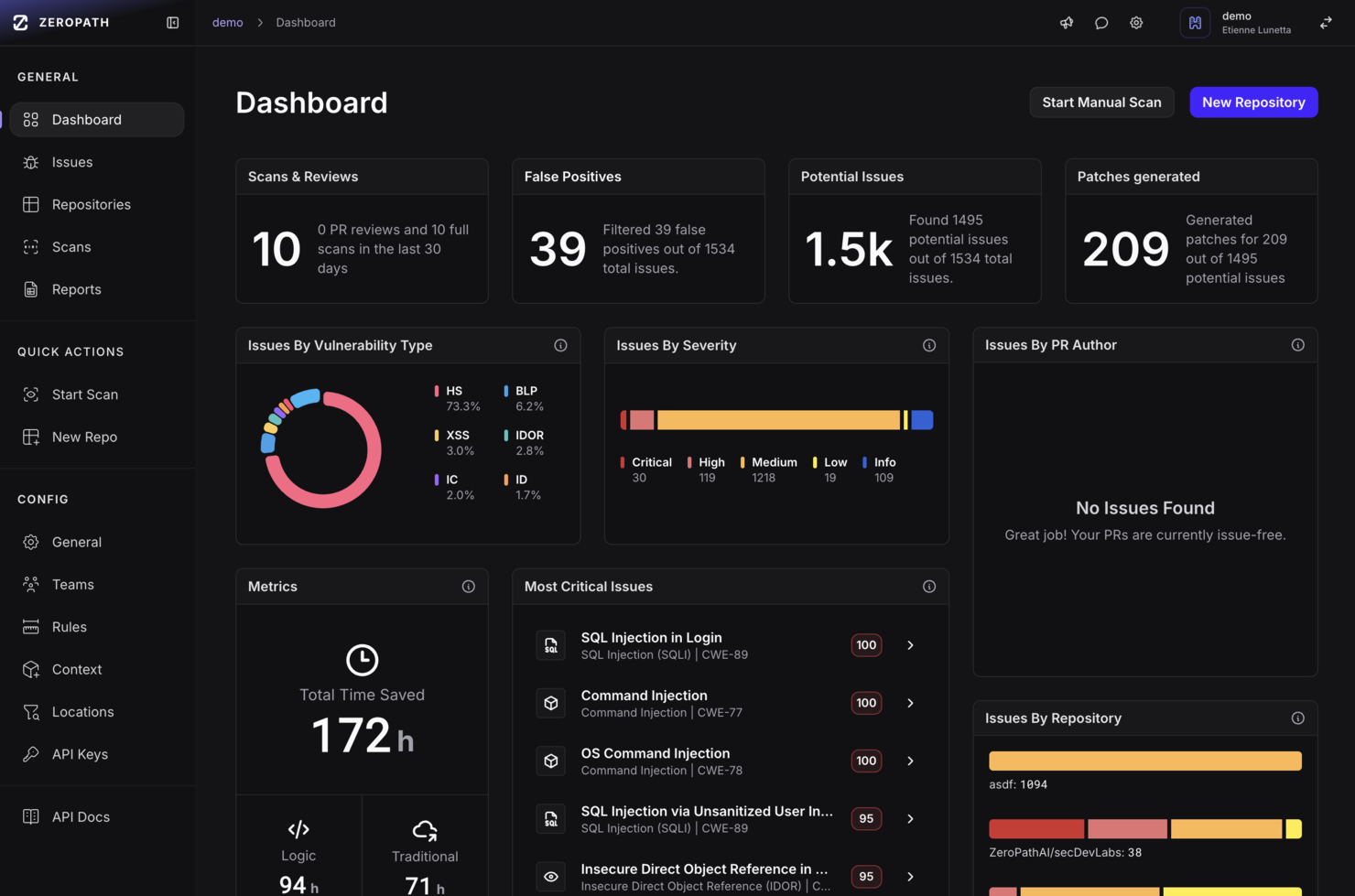
ZeroPath provides an AI-native application security platform designed to cater to security-conscious companies aiming to enhance their application security processes. By offering tools such as Static Application Security Testing (SAST) and Software Composition Analysis (SCA), ZeroPath intelligently identifies and auto-fixes vulnerabilities, making it particularly appealing to businesses that prioritize minimizing false positives and gaining actionable insights.
Why I Picked Zeropath
I picked ZeroPath because it brings a distinctive focus on detecting exploitable vulnerabilities (not just surface-level issues) through features like context-aware SAST with exploitability scoring, and one-click AI-generated patching that helps developers act on security findings without leaving the code flow. These align directly with what your team may struggle with—slow builds, noisy alerts, and friction between security and development—and help make security feedback feel like part of the workflow rather than an obstacle.
Zeropath Key Features
In addition to its core vulnerability remediation capabilities, Zeropath offers several other valuable features:
- Real-Time Feedback: The platform provides immediate insights to developers, helping them address security issues before code merges.
- Incremental Scanning: Analyzes only changed code paths, so PR checks complete in under 60 seconds.
- Natural-Language Policy Engine: Lets you write code-security rules in plain language and enforce them across repositories.
- Developer-Friendly Integrations and Toolchain Support: Includes VS Code plugin, CLI tools, REST API and visual application analysis for embedding security into dev workflows.
Zeropath Integrations
Integrations include GitHub, GitLab, Bitbucket, Azure DevOps, Jira, Linear, Slack and other security tools.
Pros and Cons
Pros:
- Unified dashboard and analytics gives visibility into security posture and velocity metrics
- One-click or near-automatic remediation support for many vulnerabilities
- Catches logic flaws and hidden authorization issues that many scanners miss
Cons:
- May be over-featured for small teams that only need basic vulnerability scanning
- As with any AI-powered tool, trusting the automation (patch generation, triage) requires verification

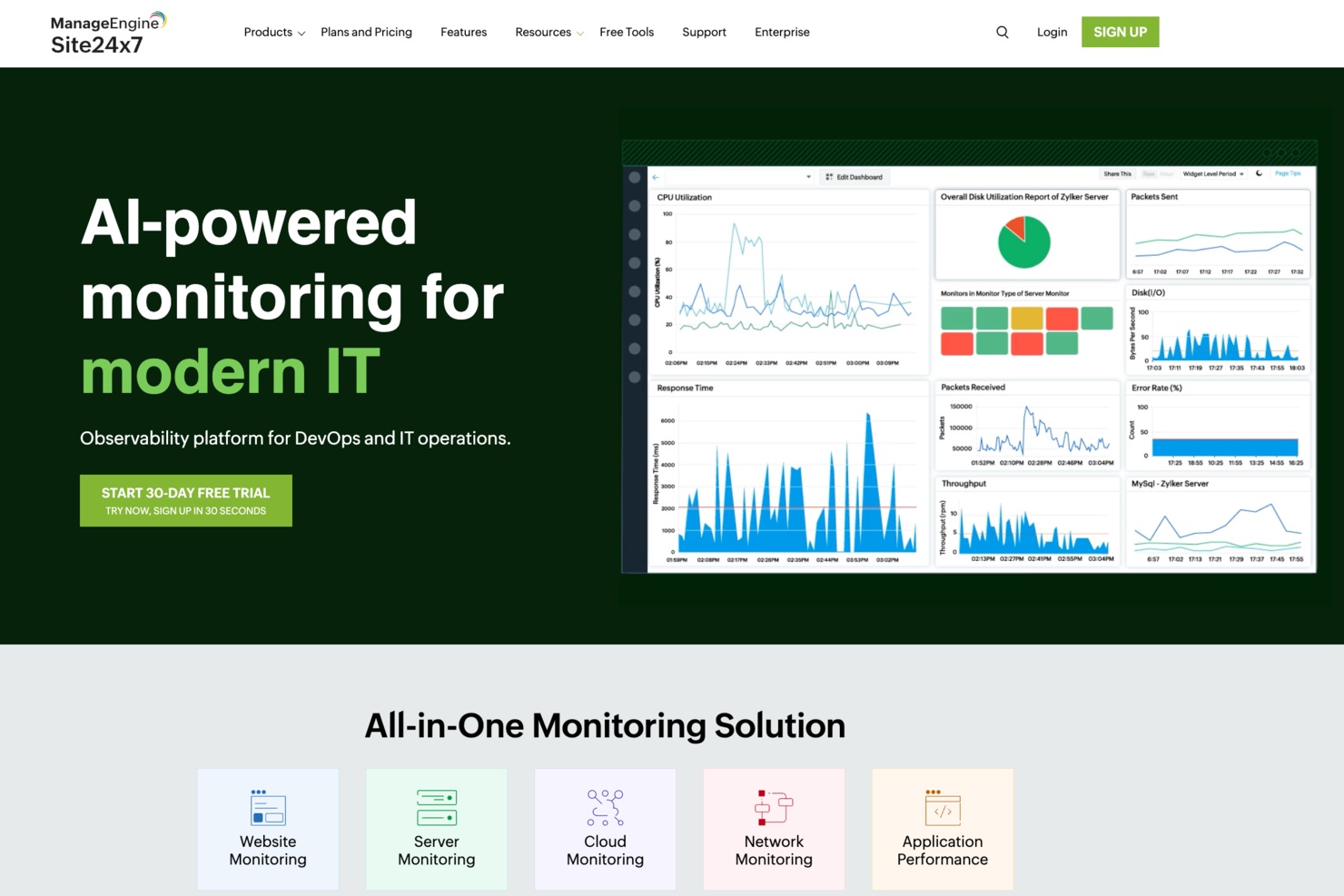
Site24x7 offers a comprehensive suite of monitoring tools tailored for DevSecOps, including website monitoring, application performance monitoring, log management, and cloud cost management. It caters to IT professionals and businesses seeking to enhance operational efficiency and security. By emphasizing proactive diagnostics and risk assessment, Site24x7 stands out as a valuable resource for organizations focused on maintaining robust and secure digital environments.
Why I Picked Site24x7
I picked Site24x7 because it excels in providing comprehensive cloud monitoring and AI-driven insights, which are crucial for DevSecOps tools. Its ability to seamlessly integrate with major cloud platforms like AWS, Azure, and GCP allows your team to monitor cloud resources effectively. The platform's AI-driven IT monitoring offers proactive diagnostics, ensuring that potential issues are identified before they impact operations. In my experience, the extensive plugin integrations further enhance its capability to manage diverse IT environments, making it a strong contender for organizations aiming to maintain security and efficiency.
Site24x7 Key Features
Aside from its cloud monitoring capabilities, I also found the following features to be particularly useful:
- Real User Monitoring: This feature helps you understand the actual user experience by tracking how real users interact with your applications.
- Synthetic Web Transaction Monitoring: It allows you to simulate user transactions to ensure that your application performs well under various conditions.
- Network Monitoring: This provides insights into your network's health, helping identify and resolve connectivity issues.
- Log Management: It enables you to collect, analyze, and manage logs from various sources, aiding in troubleshooting and security monitoring.
Site24x7 Integrations
Site24x7 offers a variety of native integrations to enhance its monitoring capabilities. Integrations include Slack, Microsoft Teams, Zoho Cliq, Discord, Telegram, Jira, ServiceDesk Plus MSP Cloud, Amazon EventBridge, and Zapier.
Pros and Cons
Pros:
- AI-driven anomaly detection
- Real and synthetic user monitoring
- Broad DevSecOps monitoring coverage
Cons:
- Alert customization can feel restrictive
- Limited deep security testing
New Product Updates from Site24x7

Site24x7 Enhances Network Monitoring With Device and Visibility Updates
Site24x7 introduces proactive hardware health monitoring, expanded device support, centralized network controls, and enhanced SD-WAN visualization to improve network monitoring and management. For more information, visit Site24x7’s official site.
 .
.

Datadog is a powerful tool designed to provide extensive full-stack application monitoring. With its in-depth insights across your entire stack, it firmly earns the title of the best comprehensive application surveillance tool.
Why I Picked Datadog: I chose Datadog for its unmatched ability to delve deep into every layer of your applications. Its breadth of monitoring capabilities stands out, uniquely suited for teams seeking a thorough understanding of their entire stack. That's why it's the best for full-stack application monitoring.
Standout features & integrations:
Datadog offers real-time performance dashboards, extensive automation, and advanced alerting capabilities. These features empower you to stay proactive about potential issues.
On the integration front, Datadog supports many platforms, including AWS, Google Cloud, Azure, and many more, ensuring compatibility with your existing infrastructure.
Pros and Cons
Pros:
- Wide range of integrations
- Extensive automation features
- Comprehensive full-stack monitoring
Cons:
- Can be overwhelming due to the sheer volume of data
- Higher cost compared to some alternatives
- Can be complex for beginners


New Relic is a tool that offers observability and real-time analytics to help developers and operations teams understand, debug, and improve the performance of their applications. Its strong focus on performance analysis and engineering excels at helping teams refine and maintain high-quality, high-performance applications.
Why I Picked New Relic: I picked New Relic due to its robust suite of features aimed at performance analysis, including detailed analytics and flexible data visualizations. This tool offers real-time insights for developers to quickly address performance issues, making it the top choice for performance engineering and analysis.
Standout features & integrations:
New Relic features extensive real-time analytics, distributed tracing, and error tracking, which are critical for a detailed understanding of application performance.
It also integrates with various other tools like AWS, Azure, and GCP, thus extending its functionality across multiple platforms.
Pros and Cons
Pros:
- Broad range of integrations
- Real-time insights for faster troubleshooting
- Powerful performance analytics
Cons:
- Customization can be complex
- Steep learning curve for some users
- Higher price point

mabl is an intelligent end-to-end test automation platform that offers AI-driven testing capabilities. As the solution is equipped with machine learning algorithms, it proves highly effective at managing and executing complex testing scenarios, justifying its standing as the best for AI-driven end-to-end testing.
Why I Picked mabl: In my evaluation, mabl stood out for its innovative application of AI to the testing landscape. I chose mabl because it allows teams to create, execute, and maintain reliable tests quickly. What makes it unique is its use of machine learning to adapt tests as your application evolves - this feature truly justifies its place as the best for AI-driven end-to-end testing.
Standout features & integrations:
mabl's AI learning capabilities truly set it apart - it auto-heals tests, meaning they evolve with your application, saving significant time during the testing phase. Furthermore, its easy-to-read test output helps users identify issues quickly.
On the integration front, mabl plays well with others, providing integration with popular CI/CD and IDE tools such as Jenkins, Bamboo, CircleCI, and more.
Pros and Cons
Pros:
- Clear and useful test output
- Extensive integration capabilities
- Intelligent auto-healing tests
Cons:
- Limited capabilities for performance testing
- Requires learning to fully utilize AI capabilities
- Could be pricey for small teams


Headlessforms is a specialized tool that helps developers quickly set up form endpoints. This ability to facilitate speedy form creation makes it an optimal choice for tasks requiring swift form integration, cementing its place as the best for creating form endpoints in minutes.
Why I Picked Headlessforms: When it comes to setting up forms, speed and reliability matter, that’s why I picked Headlessforms. Its emphasis on rapid-form endpoint creation makes it a standout. This tool does a specific job well, which is why it's best for anyone needing to create form endpoints in record time.
Standout features & integrations:
Headlessforms offers a streamlined form creation process that bypasses server setup, a huge timesaver. It also delivers robust spam filtering features, an essential open-source component of any form tool.
For integrations, Headlessforms shines by providing webhooks that can easily connect with any of your existing systems.
Pros and Cons
Pros:
- Versatile webhooks for integrations
- Strong spam filtering
- Swift form endpoint creation
Cons:
- Lack of advanced customization options
- Might be overkill for occasional form creators
- Limited to form-related tasks

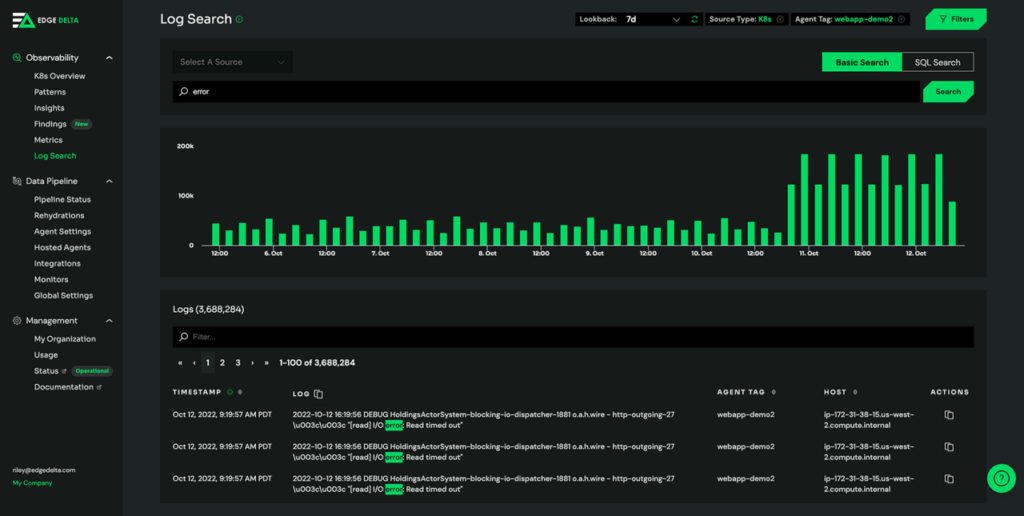
Edge Delta is a cutting-edge DevSecOps tool with real-time observability and analytics powered by machine learning. Get immediate insights into your system's performance and security.
Why I Picked Edge Delta: Edge Delta delivers a powerful solution for observability and analytics that sets it apart. It harnesses real-time data to give you insight into your DevOps processes. I chose it for the list due to its exceptional capacity to handle massive volumes of data with minimal latency, enabling instant response to potential issues. It shines as the best for real-time observability and analytics, as its performance-focused design ensures timely and accurate insight.
Standout features & integrations:
Edge Delta boasts the ability to process and analyze data at the source, a unique feature that can drastically reduce costs and time for data transport and storage. Its autonomous monitoring capability also canenables you to pinpoint issues swiftly and reliably.
For integrations, it stands strong with major data platforms such as AWS, Azure, GCP, and more, providing a highly compatible solution that fits into diverse technological ecosystems.
Pros and Cons
Pros:
- Broad compatibility with major data platforms
- Autonomous monitoring capability
- Efficient real-time analytics
Cons:
- Customization options can be overwhelming
- The cost may be higher for smaller DevSecOps teams
- Requires a steep learning curve for new users
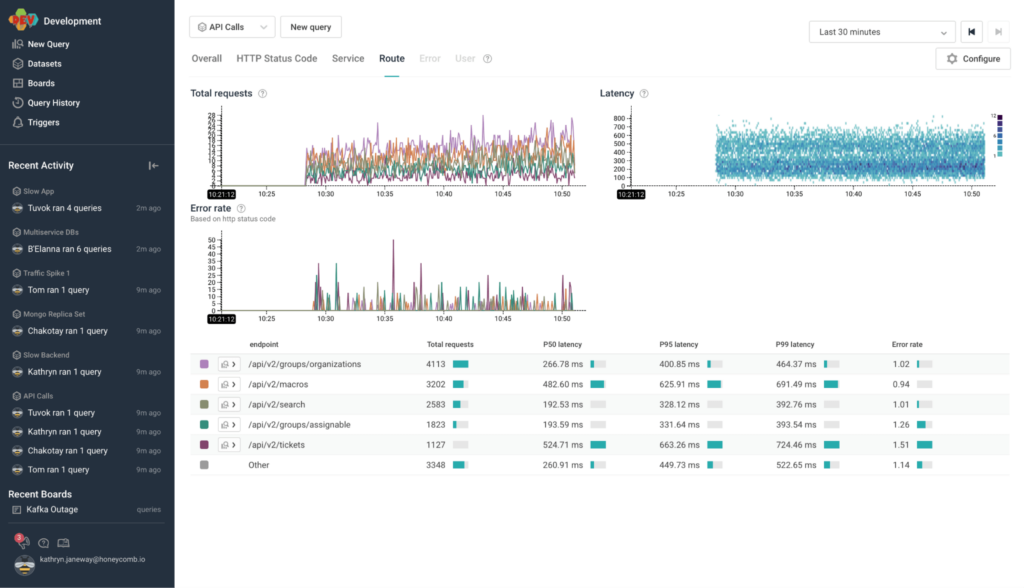
Honeycomb is a tool designed to provide insight into production systems, allowing for effective debugging and improved system health. As a platform for high cardinality data and collaborative problem solving, it's uniquely positioned to enhance observability in production environments.
Why I Picked Honeycomb: In my quest to select the ideal tool for observability and debugging, Honeycomb stood out due to its robust feature set and ability to handle complex, high-cardinality data. Honeycomb is the best tool for debugging and ensuring reliable observability in production systems because developers can ask any necessary questions to fully understand their software's behavior.
Standout features & integrations:
Honeycomb’s standout features include its dynamic sampling, which reduces noise, and its trace view, allowing for clear visibility into requests' path.
Additionally, Honeycomb's Query Builder enables complex queries, aiding in-depth debugging. Honeycomb provides vital integrations with numerous platforms like Kubernetes, AWS, and GCP and tools like Terraform, making it flexible and versatile.
Pros and Cons
Pros:
- Supports a wide range of integrations
- Robust trace view for improved observability
- Great for high cardinality data
Cons:
- UI may be overwhelming for beginners
- Has a steeper learning curve
- Starting price is higher compared to some competitors


GitLab offers a unified platform for managing the entire DevOps lifecycle in one application, with special attention given to robust CI/CD capabilities. It consolidates source code base management, CI/CD, and security into a single, efficient workflow, thereby earning the distinction of being the best for comprehensive CI/CD within a single application.
Why I Picked GitLab: I selected GitLab for its impressive ability to integrate numerous aspects of the DevOps lifecycle into one platform. This distinctive quality of streamlining varied tasks sets it apart from other tools. Moreover, its excellent CI/CD capabilities make it the prime choice for teams seeking to enhance their deployment process within a single application.
Standout features & integrations:
GitLab provides features like automated testing, multi-cloud deployments, and security scanning, all contributing to more efficient CI/CD practices.
It also integrates with popular tools like Kubernetes, Docker, and Prometheus, supporting effective and diverse tech stack implementation.
Pros and Cons
Pros:
- Extensive integration support
- Wide range of security features
- Consolidated CI/CD process
Cons:
- Complex UI can be intimidating
- Higher cost for premium features
- Steeper learning curve for beginners


VMware is a well-established provider of cloud computing and virtualization software and services. VMware supports private, public, and hybrid clouds, making it an excellent option for businesses to manage their IT environments efficiently.
Why I Picked VMware: While considering various tools for multi-cloud environment management, I selected VMware because of its comprehensive cloud solutions and extensive track record. VMware offers diverse solutions for data center, cloud infrastructure, networking, security, and digital workspace technologies. It simplifies multi-cloud management with ease.
Standout features & integrations:
VMware offers robust features like centralized management, network and security virtualization, and intelligent operations. It allows organizations to manage multi-cloud environments efficiently and securely.
Moreover, VMware integrates with other leading solutions such as Amazon Web Services (AWS), Microsoft Azure, Google Cloud Platform (GCP), and IBM Cloud.
Pros and Cons
Pros:
- Integrations with major cloud providers
- Robust security and networking features
- Comprehensive multi-cloud management capabilities
Cons:
- Dependency on vendor-specific technologies could limit flexibility
- Some users may find the platform complex due to its wide range of offerings
- Pricing information is not readily available
Weitere DevSecOps-Tools
Hier sind einige zusätzliche DevSecOps-Tools, die es zwar nicht auf meine Shortlist geschafft haben, aber dennoch einen Blick wert sind:
- Wiz IaC Scanning
For identifying risks in Infrastructure as Code
- Sysdig
For container and Kubernetes security
- Flosum
For Salesforce-specific DevOps
- Octopus Deploy
For automated deployments for .NET applications
- GitHub
Good for version control and collaborative software development
- Bitbucket
Good for integrated Git code management and collaboration
- Wrike
Good for project management and collaboration in large teams
- Splunk Enterprise
Good for big data analysis and operational intelligence
- Opsgenie
Good for incident management with powerful alerting functionality
- Rollbar
Good for real-time error tracking and debugging
- Buildkite
Good for scalable and flexible CI/CD pipelines
- Travis CI
Good for continuous integration in software development
- SpiraTeam
Good for integrated project management with requirements and quality assurance
- PyCharm
Good for Python development with smart coding assistance
- Tempo Timesheets
Good for time tracking and reporting in Jira
- Anypoint Platform
Good for designing, building, and managing APIs and integrations
- Open DevOps
Good for end-to-end DevOps workflow management


Auswahlkriterien für DevSecOps-Tools
Bei der Auswahl der besten DevSecOps-Tools für diese Liste habe ich auf die typischen Bedürfnisse und Herausforderungen von Käufern geachtet, wie die Einhaltung von Sicherheitsvorgaben und die Integration von Sicherheit in den Entwicklungsprozess. Zudem habe ich das folgende Bewertungsraster verwendet, um die Bewertung strukturiert und fair zu gestalten:
Kernfunktionen (25% der Gesamtbewertung)
Um für die Liste in Betracht gezogen zu werden, musste jede Lösung folgende Anwendungsfälle abdecken:
- Automatisierung von Sicherheitstests
- Integration von Sicherheit in CI/CD-Pipelines
- Überwachung von Systemschwachstellen
- Bereitstellung von Compliance-Reports
- Ermöglichung sicherer Code-Reviews
Zusätzliche herausragende Funktionen (25% der Gesamtbewertung)
Um die Auswahl weiter einzugrenzen, habe ich außerdem auf Alleinstellungsmerkmale geachtet, wie zum Beispiel:
- Echtzeit-Bedrohungsinformationen
- Fortschrittliche Anomalie-Erkennung
- Anpassbare Sicherheitsrichtlinien
- Plattformübergreifende Kompatibilität
- Prädiktive Analytik für Sicherheitsbedrohungen
Benutzerfreundlichkeit (10% der Gesamtbewertung)
Um einen Eindruck von der Benutzerfreundlichkeit jedes Systems zu bekommen, habe ich folgendes überprüft:
- Intuitives Oberflächendesign
- Einfache Navigation und Zugänglichkeit
- Minimale Einarbeitungszeit
- Anpassungsmöglichkeiten für Nutzerpräferenzen
- Reaktionsschnelle Systemleistung
Onboarding (10 % der Gesamtpunktzahl)
Um das Onboarding-Erlebnis jeder Plattform zu bewerten, habe ich Folgendes berücksichtigt:
- Verfügbarkeit von Schulungsvideos und Tutorials
- Interaktive Produkttouren
- Umfassende Dokumentation und Leitfäden
- Zugang zu Chatbots und Support-Foren
- Geplante Webinare und Workshops
Kundensupport (10 % der Gesamtpunktzahl)
Um die Kundensupport-Dienste jedes Softwareanbieters zu bewerten, habe ich Folgendes berücksichtigt:
- 24/7 Verfügbarkeit von Support-Dienstleistungen
- Multikanal-Support-Optionen
- Schnelle Reaktionszeiten
- Zugang zu einem dedizierten Account Manager
- Umfassende Support-Ressourcen und FAQs
Preis-Leistungs-Verhältnis (10 % der Gesamtpunktzahl)
Um das Preis-Leistungs-Verhältnis jeder Plattform zu bewerten, habe ich Folgendes berücksichtigt:
- Konkurrenzfähige Preise im Verhältnis zu den Funktionen
- Verfügbarkeit flexibler Preismodelle
- Kosteneffizienz von gebündelten Diensten
- Transparenz in den Preisstrukturen
- Rabatte bei langfristigen Verpflichtungen
Kundenbewertungen (10 % der Gesamtpunktzahl)
Um einen Eindruck von der allgemeinen Kundenzufriedenheit zu erhalten, habe ich bei der Lektüre von Kundenbewertungen Folgendes berücksichtigt:
- Konsistenz des positiven Feedbacks
- Häufig gemeldete Probleme und deren Lösungen
- Zufriedenheit der Nutzer mit den Funktionen
- Qualität der Kundensupport-Erfahrungen
- Allgemeine Weiterempfehlungsrate des Tools
Wie wähle ich DevSecOps-Tools aus?
Es ist leicht, sich in langen Funktionslisten und komplexen Preisstrukturen zu verlieren. Damit Sie sich bei Ihrer individuellen Software-Auswahl besser fokussieren können, finden Sie hier eine Checkliste mit Faktoren, die Sie im Auge behalten sollten:
| Faktor | Worauf achten? |
|---|---|
| Skalierbarkeit | Kann das Tool mit Ihrem Team wachsen? Prüfen Sie, wie gut es steigende Datenmengen und Benutzerzahlen ohne Leistungseinbußen bewältigt. |
| Integrationen | Lässt sich das Tool in Ihre aktuellen Systeme wie CI/CD-Pipelines integrieren? Achten Sie auf native Integrationen zu Software wie Docker oder Docker-Alternativen, um maßgeschneiderte Entwicklungsarbeit zu vermeiden. |
| Anpassbarkeit | Können Sie das Tool an Ihre spezifischen Arbeitsabläufe anpassen? Suchen Sie nach Möglichkeiten, Funktionen und Einstellungen individuell zu gestalten. |
| Benutzerfreundlichkeit | Wie intuitiv ist das Tool für neue Nutzer? Vermeiden Sie steile Lernkurven und bevorzugen Sie benutzerfreundliche Oberflächen und verständliche Dokumentation. |
| Implementierung und Onboarding | Wie lange dauert es, bis Sie startklar sind? Berücksichtigen Sie den Zeit- und Ressourcenaufwand für die Einrichtung und wie schnell Ihr Team Nutzen daraus ziehen kann. |
| Kosten | Gibt es versteckte Kosten neben der Abonnementgebühr? Beurteilen Sie die Gesamtkosten, einschließlich Support, Schulungen und möglichen Zusatzgebühren. |
| Sicherheitsvorkehrungen | Gibt es integrierte Sicherheitsmaßnahmen zum Schutz Ihrer Daten? Vergewissern Sie sich, dass das Tool Branchenstandards einhält und Funktionen wie Verschlüsselung und Audits bietet. |
| Compliance-Anforderungen | Unterstützt das Tool die Einhaltung von Vorschriften wie DSGVO oder HIPAA? Prüfen Sie, ob es die erforderlichen Standards erfüllt – insbesondere beim Umgang mit sensiblen Daten. |
Was sind DevSecOps-Tools?
DevSecOps-Tools sind Softwarelösungen, die Sicherheitspraktiken in den DevOps-Prozess integrieren. Diese Tools werden in der Regel von Entwicklern, Sicherheitsteams und IT-Betriebsexperten eingesetzt, um die Zusammenarbeit zu verbessern und Sicherheit während des gesamten Softwareentwicklungszyklus zu gewährleisten. Automatisierte Sicherheitstests, kontinuierliches Monitoring und Berichte zur Compliance helfen Teams, Schwachstellen frühzeitig zu erkennen und sichere Umgebungen zu erhalten. Insgesamt bieten diese Tools eine effiziente Möglichkeit, Sicherheitsrisiken zu managen und gleichzeitig die Entwicklung zu beschleunigen.
Funktionen
Achten Sie bei der Auswahl von DevSecOps-Tools besonders auf die folgenden Schlüsseleigenschaften:
- Automatisierte Sicherheitstests: DevOps-Testtools integrieren Sicherheitsprüfungen in den Entwicklungsprozess, um Schwachstellen frühzeitig zu erkennen und so Zeit und Aufwand zu sparen.
- Kontinuierliches Monitoring: Bietet Echtzeiteinblicke in den Systemzustand und hilft Teams, potenzielle Probleme schnell zu erkennen und zu beheben.
- Compliance-Berichte: Bietet Tools zur Erstellung von Berichten, die die Einhaltung von Branchenvorschriften und Standards gewährleisten.
- Multi-Cloud-Management: Ermöglicht die nahtlose Verwaltung von Ressourcen über verschiedene Cloud-Plattformen hinweg und erhöht so die Flexibilität.
- Versionskontrolle: Ermöglicht das Nachverfolgen und Verwalten von Änderungen am Quellcode und sorgt so für Konsistenz und Zusammenarbeit im Team.
- Anomalieerkennung: Identifiziert ungewöhnliche Muster in Daten, die auf Sicherheitsbedrohungen hinweisen können, und hilft, Angriffe zu verhindern.
- Anpassbare Dashboards: Bietet eine benutzerfreundliche Oberfläche zur Visualisierung von Daten und zur Überwachung wichtiger Leistungskennzahlen.
- Integrationsfähigkeit: Verbindet sich mühelos mit anderen Tools und Plattformen und verringert so den Aufwand für manuelle Datenübertragungen.
- Bedrohungsinformationen: Liefert Einblicke in aufkommende Bedrohungen, damit Teams potenziellen Schwachstellen immer einen Schritt voraus sind.
- Automatisierte Behebung: Schlägt Lösungen für erkannte Probleme vor oder setzt diese um und entlastet so das Sicherheitsteam.
Vorteile
Der Einsatz von DevSecOps-Tools bringt zahlreiche Vorteile für Ihr Team und Ihr Unternehmen. In Kombination mit fortschrittlichen KI-Tools für DevOps können diese Vorteile erheblich verstärkt werden. Auf diese können Sie sich freuen:
- Erhöhte Sicherheit: Automatisierte Sicherheitstests und Anomalieerkennung helfen dabei, Schwachstellen frühzeitig zu erkennen und das Risiko von Angriffen zu verringern.
- Verbesserte Compliance: Die Funktionen zur Compliance-Berichterstattung sorgen dafür, dass Ihre Prozesse den Branchenstandards entsprechen, und erleichtern Prüfungen und regulatorische Kontrollen.
- Schnellere Entwicklungszyklen: Durch die Integration von Sicherheit in CI/CD-Pipelines können Teams Software schneller bereitstellen, ohne die Sicherheit zu vernachlässigen.
- Mehr Zusammenarbeit: Versionskontrolle und Integrationsfähigkeit fördern die Teamarbeit, indem sie sicherstellen, dass alle beim Code-Änderungsstand auf dem gleichen Stand sind.
- Bessere Ressourcenverwaltung: Multi-Cloud-Management und anpassbare Dashboards bieten einen klaren Überblick über die Ressourcennutzung und helfen, Prozesse zu optimieren.
- Proaktives Bedrohungsmanagement: Bedrohungsinformationen halten Ihr Team über neue Risiken auf dem Laufenden, sodass Sie handeln können, bevor Probleme entstehen.
Kosten & Preise
Die Auswahl von DevSecOps-Tools erfordert ein Verständnis für die verschiedenen verfügbaren Preismodelle und -pläne. Die Kosten variieren je nach Funktionsumfang, Teamgröße, Zusatzoptionen und mehr. Die folgende Tabelle fasst gängige Pläne, ihre durchschnittlichen Preise und typische Funktionen von DevSecOps-Tools zusammen:
Vergleichstabelle für DevSecOps-Tools-Pläne
| Plantyp | Durchschnittlicher Preis | Häufige Funktionen |
|---|---|---|
| Gratisplan | $0 | Grundlegende Sicherheitstests, eingeschränkte Integrationen und Community-Support. |
| Persönlicher Plan | $5-$25/user/month | Erweiterte Sicherheitstests, Versionskontrolle und grundlegende Analysen. |
| Business-Plan | $30-$75/user/month | Erweitertes Monitoring, Compliance-Berichte und Multi-Cloud-Management. |
| Enterprise-Plan | $100-$200/user/month | Anpassbare Dashboards, dedizierter Support und volle Integrationsmöglichkeiten. |
DevSecOps-Tools FAQ
Hier finden Sie Antworten auf häufig gestellte Fragen zu DevSecOps-Tools:
Was ist der Hauptzweck von DevSecOps-Tools?
Der Hauptzweck von DevSecOps-Tools besteht darin, Sicherheitspraktiken in den DevOps-Prozess zu integrieren. Diese Tools helfen Ihrem Team, Schwachstellen frühzeitig im Entwicklungszyklus zu erkennen und stellen so sicher, dass Sicherheit ein fortlaufendes Anliegen und kein nachträglicher Gedanke ist. Durch den Einsatz dieser Tools können Sie Sicherheitsüberprüfungen automatisieren, die Zusammenarbeit zwischen Teams fördern und die Einhaltung von Branchenstandards gewährleisten.
Sind DevSecOps-Tools für kleine Teams geeignet?
Ja, DevSecOps-Tools können auch für kleine Teams geeignet sein. Viele Tools bieten skalierbare Lösungen, die verschiedene Teamgrößen abdecken und essenzielle Sicherheitsfunktionen bereitstellen, ohne kleinere Teams zu überfordern. Achten Sie auf Tools mit flexiblen Preisplänen und benutzerfreundlichen Oberflächen, damit Ihr Team Sicherheitspraktiken integrieren kann, ohne umfangreiche Ressourcen oder Fachkenntnisse zu benötigen.
Wie verbessern DevSecOps-Tools die Teamzusammenarbeit?
DevSecOps-Tools verbessern die Teamzusammenarbeit, indem sie Sicherheit in den Entwicklungsworkflow einbinden. Sie stellen eine gemeinsame Plattform bereit, auf der Entwickler-, Operations- und Sicherheitsteams zusammenarbeiten und Sicherheitsprobleme direkt angehen können. Funktionen wie Echtzeit-Benachrichtigungen und gemeinsame Dashboards halten alle auf dem Laufenden und fördern eine Kultur der Transparenz und Kooperation.
Können DevSecOps-Tools in bestehende Systeme integriert werden?
Ja, die meisten DevSecOps-Tools können in bestehende Systeme integriert werden. In der Regel bieten sie Kompatibilität mit gängigen Plattformen wie AWS, Azure, Docker und Kubernetes an. Prüfen Sie bei der Wahl eines Tools dessen Integrationsmöglichkeiten, um sicherzustellen, dass es sich nahtlos in Ihr bestehendes Tech-Stack einfügt und so einen reibungsloseren Übergang sowie eine effizientere Arbeitsweise ermöglicht.
Wie geht es weiter:
Wenn Sie sich gerade mit der Recherche zu DevSecOps-Tools beschäftigen, verbinden Sie sich mit einem SoftwareSelect-Berater und erhalten Sie kostenlose Empfehlungen.
Sie füllen ein Formular aus und führen ein kurzes Gespräch, in dem Ihre Anforderungen besprochen werden. Danach erhalten Sie eine Shortlist von Softwarelösungen zur Prüfung. Die Berater unterstützen Sie außerdem während des gesamten Kaufprozesses, einschließlich Preisverhandlung.