

10 beste DAST-Werkzeuge im Test 2026

Auswahlliste der besten DAST-Tools


Die besten DAST-Tools helfen Sicherheits- und Entwicklungsteams dabei, ausnutzbare Schwachstellen in Live-Anwendungen zu identifizieren, Korrekturen anhand realer Angriffsmuster zu validieren und kontinuierliche Transparenz über Risiken zur Laufzeit zu gewährleisten. Durch das Testen von Software von außen nach innen decken sie Schwachstellen auf, die statische Scans nicht erkennen können, etwa Authentifizierungsumgehungen, falsch konfigurierte Header und Einschleusungspunkte, die nur unter bestimmten Bedingungen zur Laufzeit auftreten.
Viele Teams führen DAST ein, nachdem sie auf operative Hindernisse gestoßen sind, etwa die Verfolgung von Fehlalarmen aus statischen Scans, Schwierigkeiten bei der Reproduktion von Problemen in der Staging-Umgebung oder stundenlange Prüfungen nicht priorisierter Ergebnisse. Ohne laufzeitbezogene Tests können diese blinden Flecken unbemerkt in die Produktionsumgebung gelangen.
Ich habe DAST-Plattformen direkt in aktiven CI/CD-Pipelines evaluiert, ihre Integration in gängige Bereitstellungs-Frameworks bewertet und mit Teams gearbeitet, die veraltete Scanner ersetzt haben, welche Veröffentlichungen verzögerten. Diese praxisnahen Tests haben gezeigt, welche Tools sich nahtlos in reale Build-Zyklen integrieren lassen und umsetzbare, priorisierte Ergebnisse liefern.
In diesem Leitfaden erfahren Sie, welche DAST-Tools den klarsten Kontext zu Schwachstellen bieten, sich reibungslos in moderne Arbeitsabläufe integrieren lassen und tatsächlich dazu beitragen, unnötiges Rauschen zu reduzieren, damit sich Ihr Team auf die Behebung der wichtigen Probleme konzentrieren kann.
Warum Sie unseren Software-Empfehlungen vertrauen können
Unser Team testet und bewertet Software seit 2012. Als Tech-Führungskräfte wissen wir selbst, wie schwierig – und wichtig – es ist, die richtige Software auszuwählen.
Für diesen Leitfaden haben wir Tools mithilfe von praktischen Tests und unabhängiger Recherche bewertet und dabei unsere Bewertungskriterien angewendet.
Unsere Bewertungen spiegeln unser menschliches redaktionelles Urteilsvermögen wider, keine Verkaufsstrategie.
Zusammenfassung der besten DAST-Tools
Diese Vergleichstabelle fasst die Preisinformationen meiner Auswahl der besten DAST-Tools zusammen und hilft Ihnen dabei, das beste Tool für Ihr Budget und Ihre geschäftlichen Anforderungen zu finden.
| Tool | Best For | Trial Info | Price | ||
|---|---|---|---|---|---|
| 1 | Am besten für authentifizierte DAST-Tests | Kostenloser Plan verfügbar + kostenlose Demo | Ab $350/Monat | Website | |
| 2 | Am besten für KI-basierte Schwachstellenerkennung | Kostenlose Demo verfügbar | Preis auf Anfrage | Website | |
| 3 | Am besten für kleine Unternehmen | 14-tägige kostenlose Testphase + kostenlose Demo verfügbar | Ab $149/Monat | Website | |
| 4 | Beste Lösung für automatisierte Scans | Kostenlose Demo verfügbar | $58/user/month | Website | |
| 5 | Am besten für Compliance-Anforderungen geeignet | Kostenlose Demo verfügbar | Ab $69/Monat | Website | |
| 6 | Am besten für detaillierte Berichte | Kostenlose Demo verfügbar | $5,995 per year | Website | |
| 7 | Am besten für Unternehmenslösungen geeignet | Kostenlose Demo verfügbar | $59/user/month | Website | |
| 8 | Am besten für Cloud-Integration | Kostenlose Testversion verfügbar | $99/user/month | Website | |
| 9 | Am besten für Echtzeitanalyse geeignet | Kostenlose Demo verfügbar | Auf Anfrage | Website | |
| 10 | Am besten geeignet für kontinuierliche Aktualisierungen | 14-tägige kostenlose Testphase + kostenlose Demo verfügbar | $50/user/month | Website |

Tests der besten DAST-Tools
Nachfolgend finden Sie meine ausführlichen Zusammenfassungen der besten DAST-Tools, die es in meine Auswahlliste geschafft haben. Meine Tests bieten einen detaillierten Überblick über die wichtigsten Funktionen, Vor- und Nachteile, Integrationen und idealen Anwendungsfälle jedes Tools, damit Sie das beste für Ihre Anforderungen finden.

Am besten für authentifizierte DAST-Tests
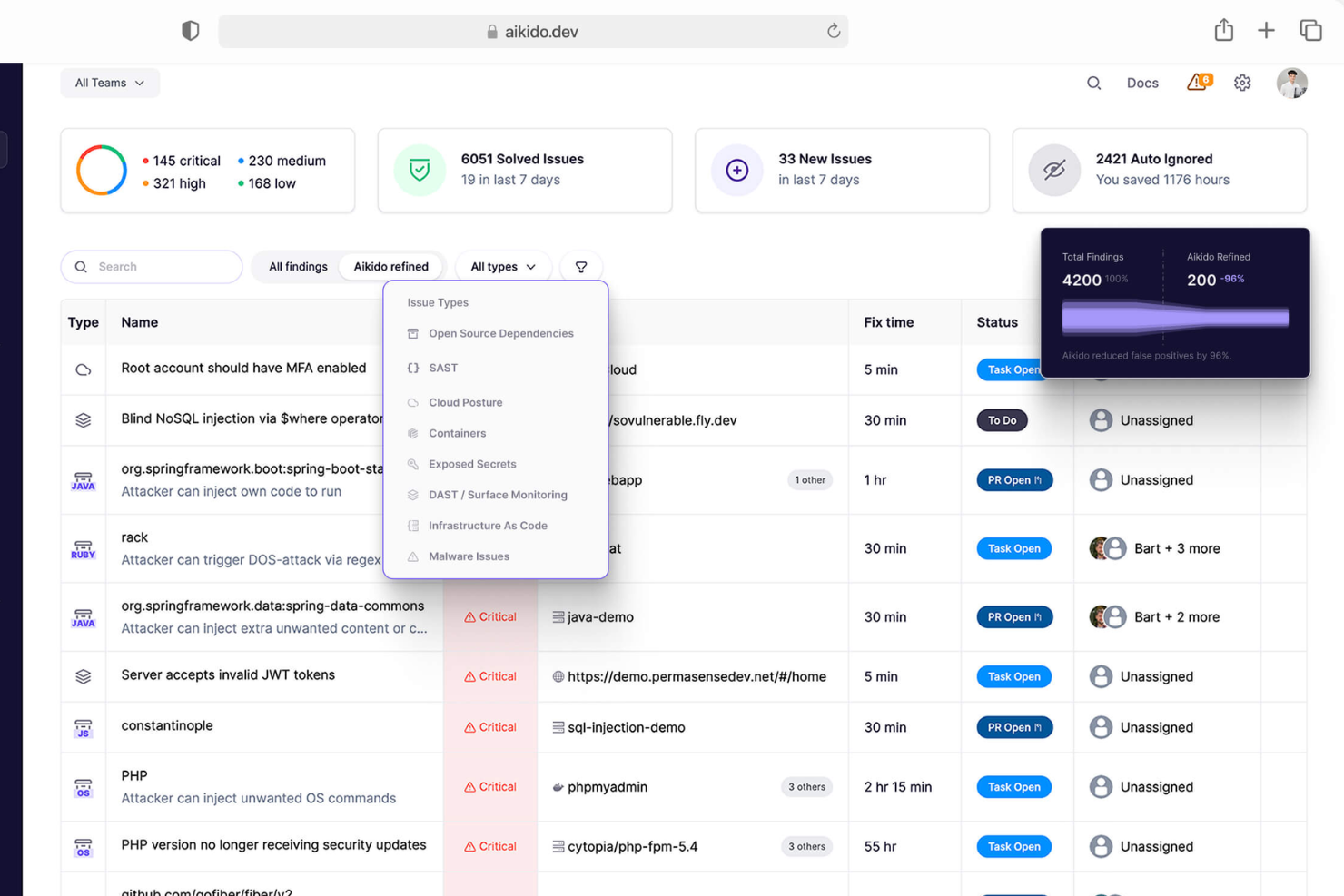
Aikido Security ist ein DAST-Tool, das sich auf die Überwachung von Angriffsflächen konzentriert und Sicherheitsteams sowie IT-Abteilungen unterstützt. Es hilft dabei, Schwachstellen in Webanwendungen und APIs zu identifizieren und zu verwalten.
Warum ich Aikido Security gewählt habe: Es ist speziell für die Überwachung von Angriffsflächen konzipiert und bietet Funktionen wie kontinuierliches Scannen und Echtzeit-Benachrichtigungen. Die Fähigkeit des Tools, Ihre digitalen Assets zu erfassen und zu bewerten, verschafft einen klaren Überblick über Ihre Sicherheitslage. Die benutzerfreundliche Oberfläche erleichtert Überwachungsaufgaben und macht das Tool auch für Teams mit unterschiedlichem Fachwissen zugänglich. Die detaillierte Analytik von Aikido verbessert zusätzlich die Monitoring-Fähigkeiten.
Hervorstechende Funktionen & Integrationen:
Funktionen umfassen kontinuierliches Scannen zur Absicherung Ihrer Systeme, Echtzeit-Benachrichtigungen, die Ihr Team über Bedrohungen informieren, sowie eine benutzerfreundliche Oberfläche, die das Monitoring vereinfacht. Detaillierte Analysen liefern Einblicke in Ihre Sicherheitslage.
Integrationen umfassen Slack, Jira, GitHub, GitLab, Bitbucket, AWS, Azure und Microsoft Teams.
Pros and Cons
Pros:
- Benutzerfreundliche Oberfläche
- Echtzeit-Bedrohungsbenachrichtigungen
- Effektive Überwachung der Angriffsfläche
Cons:
- Eingeschränkte Offline-Funktionalität
- Kann technisches Fachwissen erfordern
New Product Updates from Aikido Security
Aikido Security Adds Pentest for AI Capabilities
Aikido Security adds Pentest for AI to test agents and LLM features against OWASP Agentic Top 10 risks. This helps teams identify AI-specific security weaknesses before they reach production. For more information, visit Aikido Security’s official site.

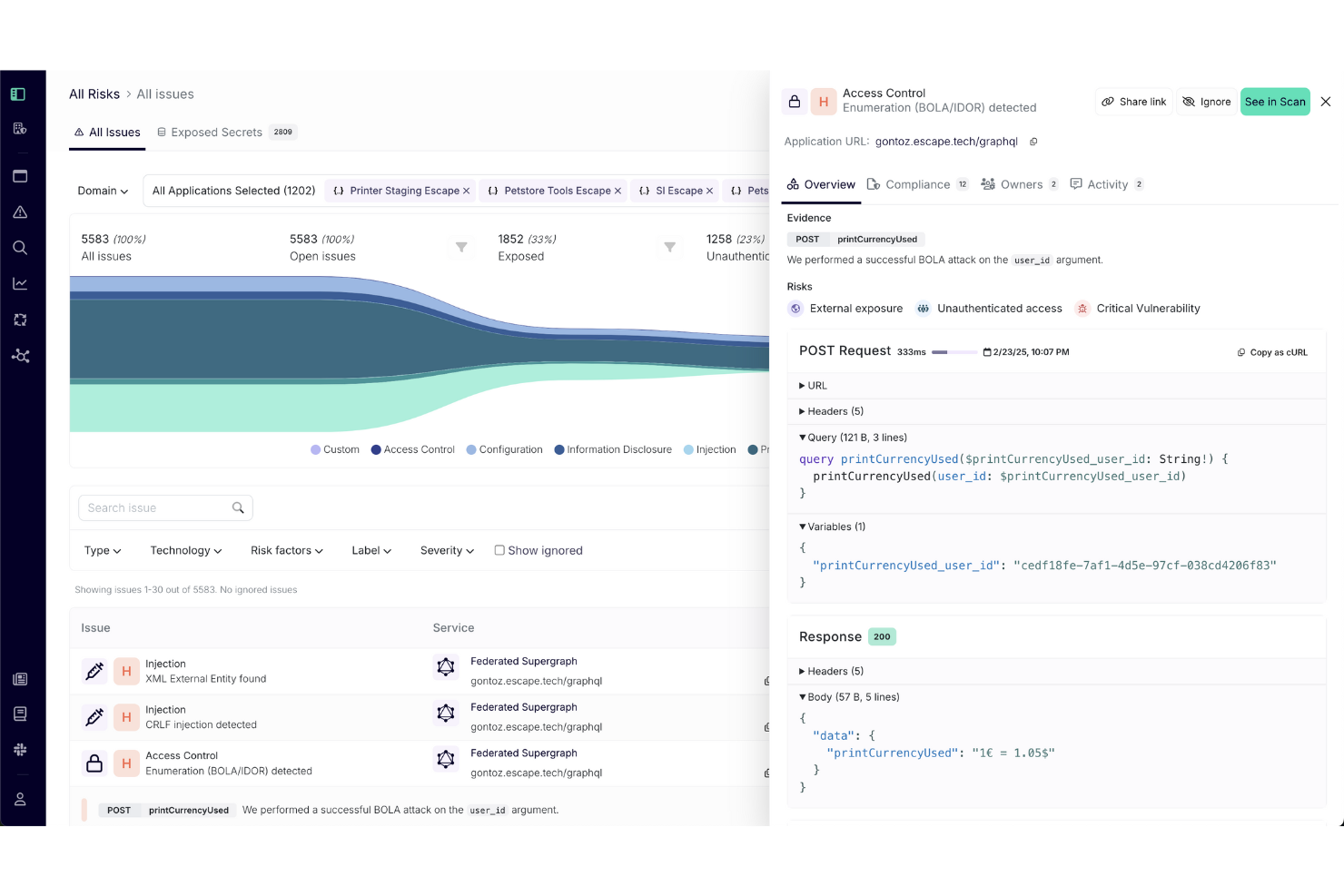
Für Teams, die sich mit Herausforderungen der Anwendungssicherheit auseinandersetzen, bietet Escape eine DAST-Lösung mit Fokus auf KI-basierte Schwachstellenerkennung. Sie hilft dabei, Sicherheitsprobleme zu identifizieren und berücksichtigt dabei die Anwendungslogik, was besonders nützlich beim Testen von APIs und Webanwendungen ist. Escape sorgt für eine umfassendere Sicherheitsprüfung und hilft Teams, ihre Software besser vor neuen Risiken zu schützen.
Warum ich Escape gewählt habe
Ich habe mich für Escape entschieden, weil es dank KI-basierter Schwachstellenerkennung Sicherheitsprobleme aufspürt, die einfache Scanner übersehen – insbesondere in Anwendungen mit komplexer Logik. Außerdem lässt sich Escape in CI/CD-Pipelines integrieren, sodass Teams Sicherheitstests im Rahmen der normalen Entwicklungsarbeit durchführen können. So lassen sich regelmäßige Sicherheitsprüfungen leichter aufrechterhalten, ohne Release-Termine zu verzögern.
Hauptfunktionen von Escape
Neben dem herausragenden KI-gestützten Testen bietet Escape folgende Funktionen:
- API-Discovery & -Sicherheit: Escape bietet eine Plattform zur Entdeckung, Dokumentation und Absicherung Ihrer APIs, damit sie über ihren gesamten Lebenszyklus geschützt sind.
- GraphQL-Sicherheitstests: Mit nativer GraphQL-Unterstützung trägt das Tool zur Absicherung dieses immer beliebteren API-Formats bei.
- Individuelle Sicherheitsprüfungen: Sie können maßgeschneiderte Tests erstellen, um spezifische Sicherheitsanforderungen abzubilden, was Flexibilität und Präzision in Ihrer Sicherheitsstrategie ermöglicht.
- Compliance-Management: Vereinfacht die Erstellung von Berichten und die Einhaltung von Branchenstandards.
Escape-Integrationen
Integrationen sind u. a. möglich mit GitHub, GitLab, Jenkins, AWS, Azure DevOps, Jira, Bitbucket, Slack, Trello und Confluence.
Pros and Cons
Pros:
- Starke API-Schwachstellenerkennung, einschließlich Abdeckung für REST- und GraphQL-Endpunkte
- Nahtlose Integrationen, die sich in bestehende Entwicklungs- und Sicherheitsabläufe einfügen
- Kontinuierliches Scannen und Überprüfen unterstützt die laufende Sicherheitsüberwachung
Cons:
- Der Einrichtungsprozess kann komplex sein und erfordert möglicherweise Konfigurationsanpassungen
- Plattform-Upgrades können Zeit in Anspruch nehmen und erfordern manchmal Anpassungen

Intruder
Am besten für kleine Unternehmen
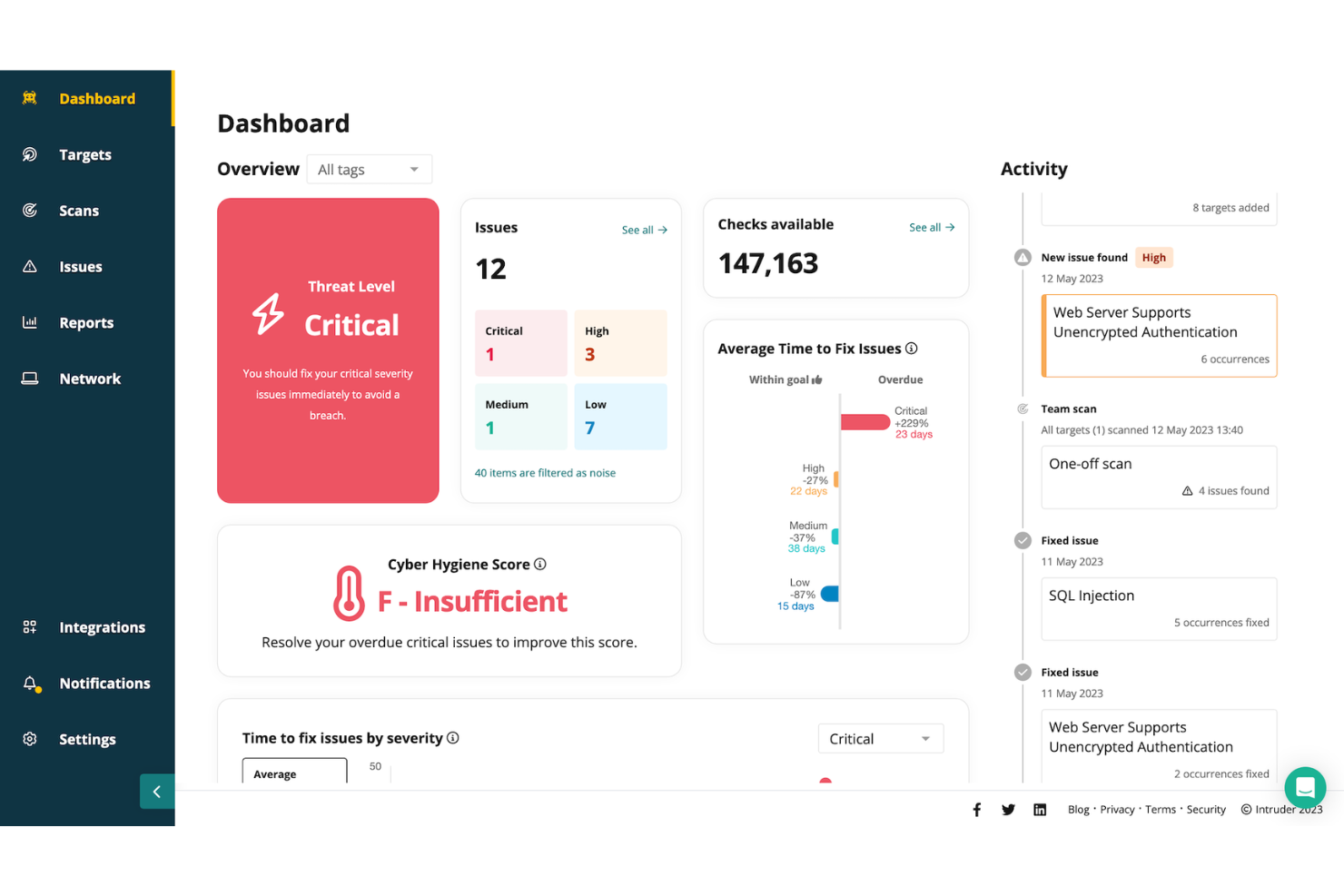
Intruder ist eine Cloud-Sicherheitsplattform für kleine Unternehmen, die ein kontinuierliches Schwachstellenmanagement anstreben. Sie bietet externe, interne, Cloud-, Webanwendungs- und API-Schwachstellenscans, um Organisationen bei der Identifizierung von Sicherheitslücken zu unterstützen. Nutzer profitieren von detaillierten Berichten und Compliance-Funktionen.
Warum ich Intruder gewählt habe: Es ist perfekt für kleine Unternehmen, da der Fokus auf umfassenden Schwachstellenscans liegt, einschließlich externer und interner Prüfungen. Die detaillierten Berichte von Intruder helfen Ihnen, Sicherheitsprobleme effektiv zu verstehen und zu beheben. Die Compliance-Funktionen der Plattform sind ideal, um regulatorische Anforderungen zu erfüllen. Der private Bug-Bounty-Service bietet eine zusätzliche Sicherheitsebene, da er Schwachstellen aufdeckt, die herkömmliche Scanner möglicherweise übersehen.
Herausragende Funktionen & Integrationen:
Funktionen umfassen private Bug-Bounty-Services zur Entdeckung versteckter Schwachstellen, detaillierte Compliance-Berichte zur Erfüllung regulatorischer Anforderungen sowie eine proaktive Änderungserkennung, um die Sicherheit während des Wachstums Ihrer Organisation zu gewährleisten.
Integrationen umfassen Slack, Jira, AWS, Azure, Google Cloud, Zapier, Microsoft Teams, Splunk, ServiceNow und PagerDuty.
Pros and Cons
Pros:
- Effektive Schwachstellenprüfung
- Einfache Einrichtung
- Reaktionsschneller Kundensupport
Cons:
- Kann technisches Wissen erfordern
- Begrenzte Anpassungsmöglichkeiten
New Product Updates from Intruder
Intruder Launches On-Demand AI Pentesting for Web Apps
Intruder adds on-demand AI pentesting for web applications, allowing teams to launch assessments in minutes and receive audit-ready reports on the same day. For more information, visit Intruder’s official site.
 .
.
Invicti
Beste Lösung für automatisierte Scans
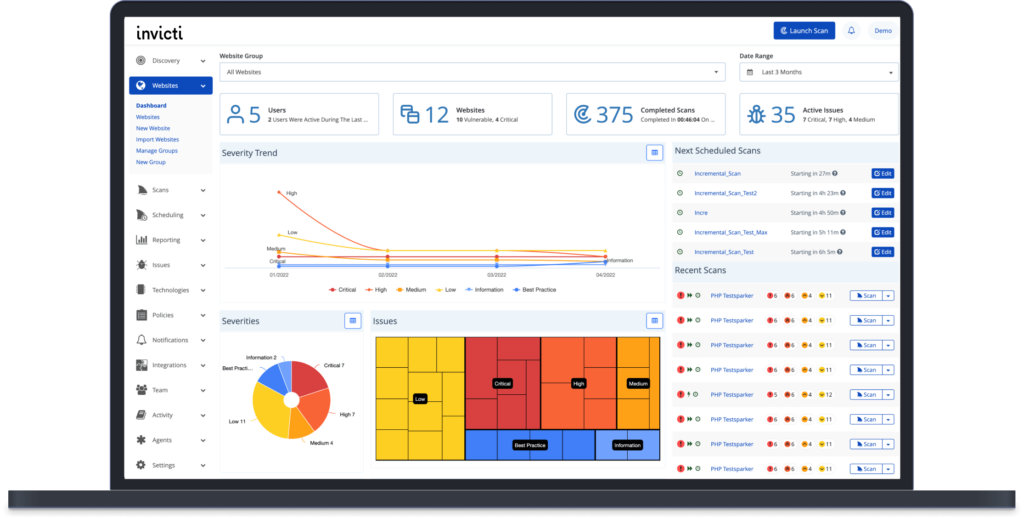
Invicti ist ein DAST-Tool, das für Entwicklungs- und Sicherheitsteams entwickelt wurde und sich auf automatisierte Scans und Schwachstellenmanagement konzentriert. Es hilft dabei, Schwachstellen in Webanwendungen und -diensten effizient zu identifizieren und zu beheben.
Warum ich Invicti ausgewählt habe: Das Tool überzeugt durch automatisierte Scans und bietet Funktionen wie nachweisbasiertes Scannen zur Verifizierung von Schwachstellen. Es erstellt detaillierte Berichte, die Ihrem Team helfen, die Behebung von Schwachstellen zu priorisieren. Die Skalierbarkeit von Invicti sorgt dafür, dass es sich an die Anforderungen Ihres Unternehmens anpasst und sowohl für kleine als auch große Teams geeignet ist. Die einfache Integration in Entwicklungs-Workflows macht es besonders attraktiv für kontinuierliche Sicherheitstests.
Besondere Funktionen & Integrationen:
Funktionen umfassen nachweisbasiertes Scannen zur Bestätigung von Schwachstellen, detaillierte Berichte als Leitfaden für die Behebung und Skalierbarkeit, damit Ihr Unternehmen wachsen kann. Das Tool lässt sich zudem leicht in Entwicklungs-Workflows integrieren, um kontinuierliche Tests zu ermöglichen.
Integrationen umfassen Jira, Jenkins, GitHub, GitLab, Bitbucket, Azure DevOps, ServiceNow, Slack, Trello und Microsoft Teams.
Pros and Cons
Pros:
- Einfache Integration in Workflows
- Skalierbar für wachsende Unternehmen
- Nachweisbasierte Bestätigung von Schwachstellen
Cons:
- Hohe Einstiegskosten
- Komplexität bei der Ersteinrichtung

Am besten für Compliance-Anforderungen geeignet
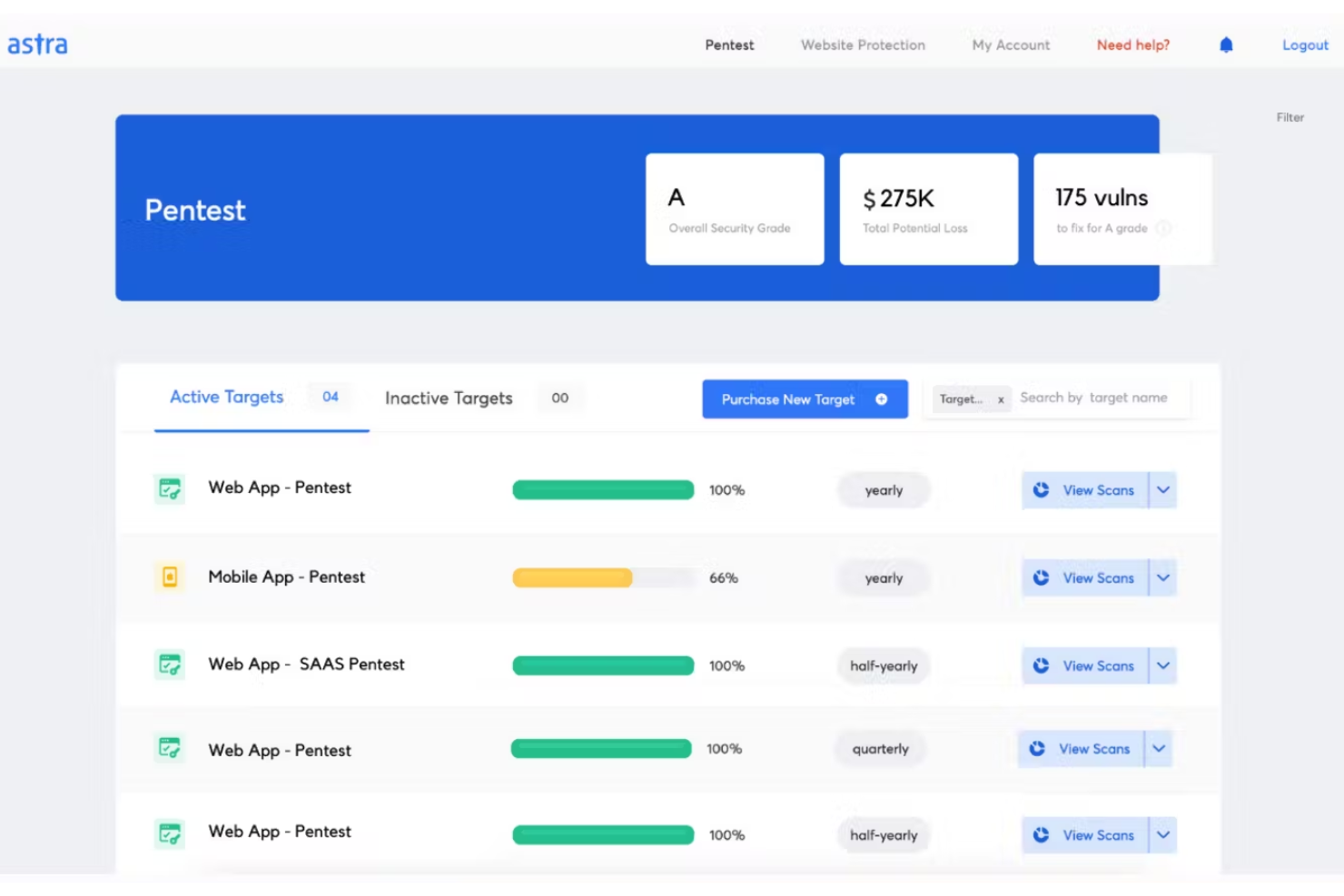
Astra Pentest ist ein Tool zum dynamischen Testen der Anwendungssicherheit (DAST) für Entwicklungsteams. Es zeichnet sich durch die Integration in CI/CD-Pipelines und die Durchführung umfangreicher Sicherheitstests aus, einschließlich der OWASP Top 10 und bekannter Schwachstellen.
Warum ich Astra Pentest ausgewählt habe: Der Fokus auf Compliance-Anforderungen macht das Tool ideal für Unternehmen, die Standards wie ISO 27001 und die DSGVO einhalten. Die KI-gestützte Technologie des Tools ermöglicht maßgeschneiderte Tests, während authentifizierte Prüfungen eine umfassende Abdeckung bieten. Die kontinuierliche Sicherheitsüberwachung unterstützt die Aufrechterhaltung der Compliance, und die Möglichkeit, hinter Anmeldeseiten zu prüfen, erweitert die Testmöglichkeiten.
Herausragende Funktionen & Integrationen:
Zu den Funktionen gehören KI-gestützte Technologie für spezifische Testanforderungen, authentifizierte Prüfungen für gründliche Bewertungen und kontinuierliche Überwachung, um Ihre Anwendungen sicher zu halten. Außerdem bietet das Tool eine vereinfachte Einhaltung wichtiger Standards.
Zu den Integrationen gehören Slack, Jira, GitHub, GitLab, Bitbucket, AWS, Azure und Trello.
Pros and Cons
Pros:
- KI-gestützte Erkennung von Schwachstellen
- Kontinuierliches Lernen aus realen Penetrationstests
- Funktionen zur Compliance-Berichterstattung
Cons:
- Eingeschränkte Offline-Unterstützung
- Nicht für sehr große Unternehmen geeignet

Acunetix
Am besten für detaillierte Berichte
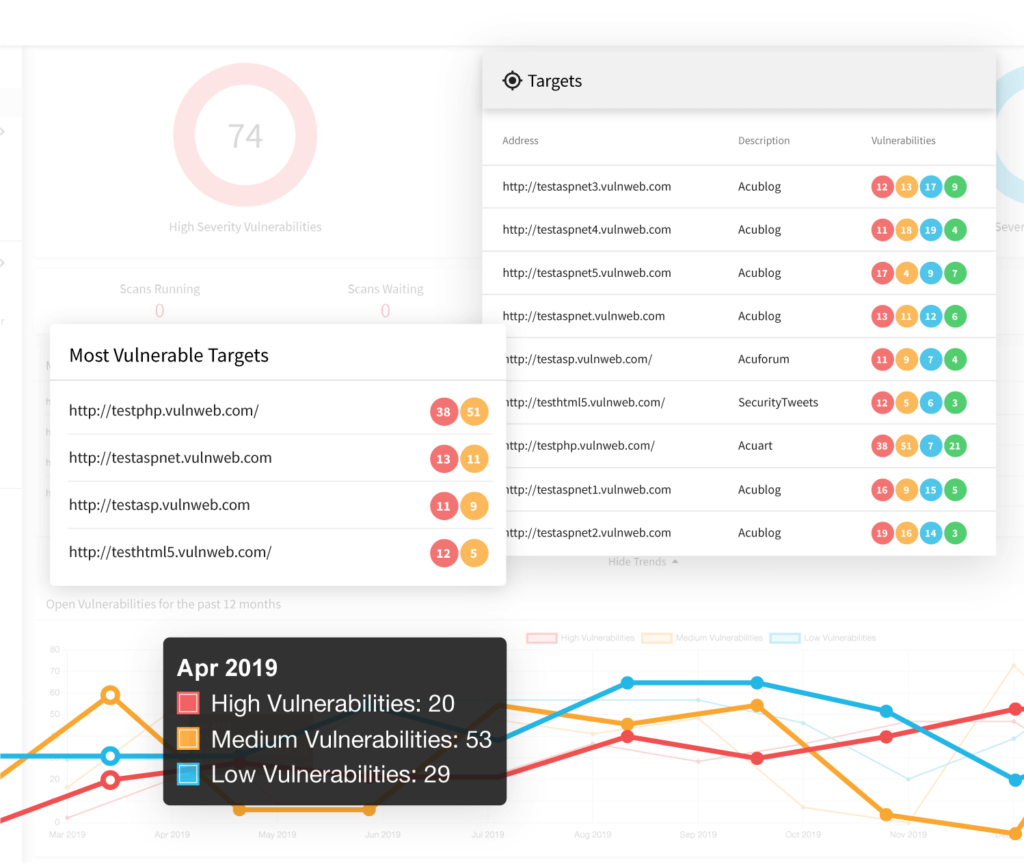
Acunetix ist ein DAST-Tool, das speziell für Sicherheitsteams und Entwickler entwickelt wurde, die sich auf Webanwendungssicherheit konzentrieren. Es scannt effizient und identifiziert Schwachstellen und bietet detaillierte Einblicke für die Behebung.
Warum ich Acunetix gewählt habe: Das Tool überzeugt durch die Erstellung detaillierter Berichte, die Ihrem Team helfen, Sicherheitsprobleme umfassend anzugehen. Seine fortschrittliche Scan-Engine erkennt eine Vielzahl von Schwachstellen, einschließlich SQL-Injection und XSS. Der Mehrwert von Acunetix liegt auch in der Fähigkeit, sowohl Webanwendungen als auch APIs zu scannen. Die benutzerfreundliche Oberfläche sorgt dafür, dass auch Nutzer mit begrenztem Sicherheitswissen von den Funktionen profitieren können.
Herausragende Funktionen & Integrationen:
Funktionen umfassen fortschrittliche Scanmöglichkeiten zur Erkennung von Schwachstellen, eine benutzerfreundliche Oberfläche für einfache Bedienung sowie Unterstützung für das Scannen von Webanwendungen und APIs. Das Tool bietet zudem detaillierte Schwachstellenberichte, die Sie bei der Behebung unterstützen.
Integrationen umfassen Jira, Jenkins, GitHub, GitLab, Bitbucket, Microsoft Teams, ServiceNow, Slack, Azure DevOps und Bamboo.
Pros and Cons
Pros:
- Fortschrittliche Scanfunktionen
- Detaillierte Schwachstellenberichte
- Unterstützt Web- und API-Scans
Cons:
- Gelegentliche Fehlalarme
- Nicht ideal für sehr große Unternehmen
Veracode
Am besten für Unternehmenslösungen geeignet
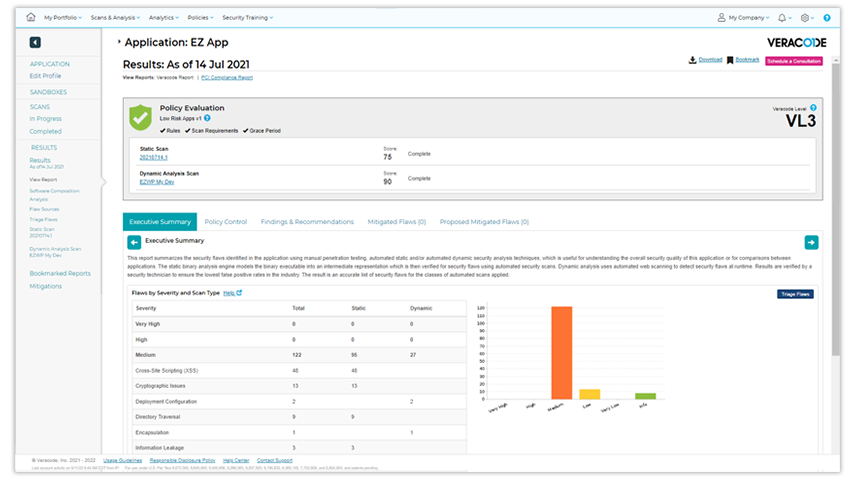
Veracode ist eine Anwendungssicherheitsplattform für Sicherheitsteams auf Unternehmensebene und konzentriert sich auf umfassende Code-Analysen. Sie hilft Organisationen dabei, ihre Anwendungen zu sichern, indem sie Schwachstellen sowohl im statischen als auch im dynamischen Code identifiziert.
Warum ich Veracode gewählt habe: Es ist speziell auf Unternehmenslösungen zugeschnitten und bietet umfassende Sicherheit für komplexe Umgebungen. Veracode stellt sowohl statische als auch dynamische Analysen zur Verfügung und gewährleistet dadurch eine vollständige Abdeckung Ihres Codebestandes. Die detaillierte Berichterstattung hilft Ihrem Team, Schwachstellen effektiv zu priorisieren. Die Skalierbarkeit der Plattform macht sie geeignet für große Organisationen mit umfangreichen Sicherheitsanforderungen.
Hervorstechende Funktionen & Integrationen:
Funktionen umfassen umfassende statische und dynamische Code-Analysen, detaillierte Berichte zu Schwachstellen zur Priorisierung von Problemen und die Skalierbarkeit zur Unterstützung großer Unternehmen. Die Plattform bietet außerdem umfassende Sicherheit für komplexe Umgebungen.
Integrationen umfassen Jira, Jenkins, GitHub, GitLab, Azure DevOps, Bitbucket, ServiceNow, Bamboo, Slack und Visual Studio.
Pros and Cons
Pros:
- Skalierbar für Unternehmensanforderungen
- Geeignet für große Unternehmen
- Umfassende Code-Analyse
Cons:
- Nicht ideal für kleine Teams
- Komplexität bei der erstmaligen Einrichtung

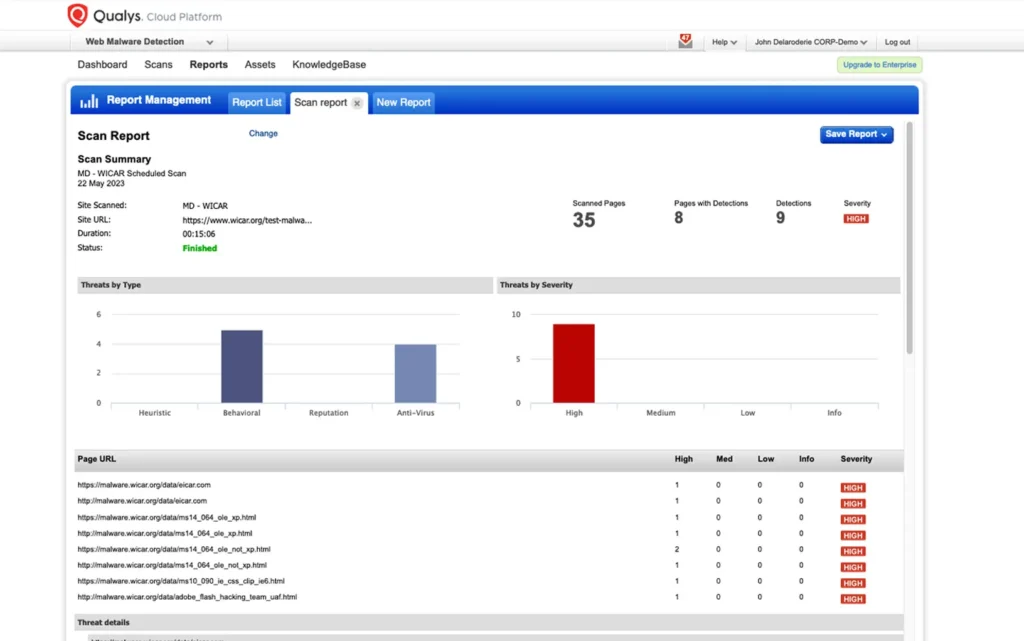
Qualys Web Application Scanning ist ein DAST-Tool, das für Sicherheits- und IT-Teams entwickelt wurde und sich auf die Identifizierung von Schwachstellen in Webanwendungen konzentriert. Es bietet umfassende Scan-Funktionen, um Ihre Webanwendungen sicher zu halten.
Warum ich Qualys Web Application Scanning gewählt habe: Es ist ideal für die Cloud-Integration und bietet eine nahtlose Anbindung an Ihre Cloud-Dienste. Die umfassenden Scan-Funktionen des Tools sorgen dafür, dass Ihre Anwendungen auch in dynamischen Umgebungen sicher bleiben. Mit der Fähigkeit, sowohl bekannte als auch unbekannte Schwachstellen zu erkennen, bietet es einen robusten Schutz. Die cloudbasierte Architektur ermöglicht eine einfache Skalierung mit dem Wachstum Ihres Unternehmens.
Hervorstechende Funktionen & Integrationen:
Funktionen umfassen umfassende Scan-Möglichkeiten zur Erkennung von bekannten und unbekannten Schwachstellen, eine cloudbasierte Architektur für einfache Skalierbarkeit und robusten Schutz für dynamische Umgebungen. Zudem werden detaillierte Berichte zur Unterstützung von Behebungsmaßnahmen angeboten.
Integrationen umfassen ServiceNow, Splunk, AWS, Azure, Google Cloud, Jira, IBM QRadar, McAfee ePolicy Orchestrator, Tenable und Microsoft Teams.
Pros and Cons
Pros:
- Skalierbar für wachsende Unternehmen
- Einfache Cloud-Integration
- Umfassende Schwachstellenüberprüfung
Cons:
- Komplexität bei der Ersteinrichtung
- Begrenzte Offline-Funktionalität

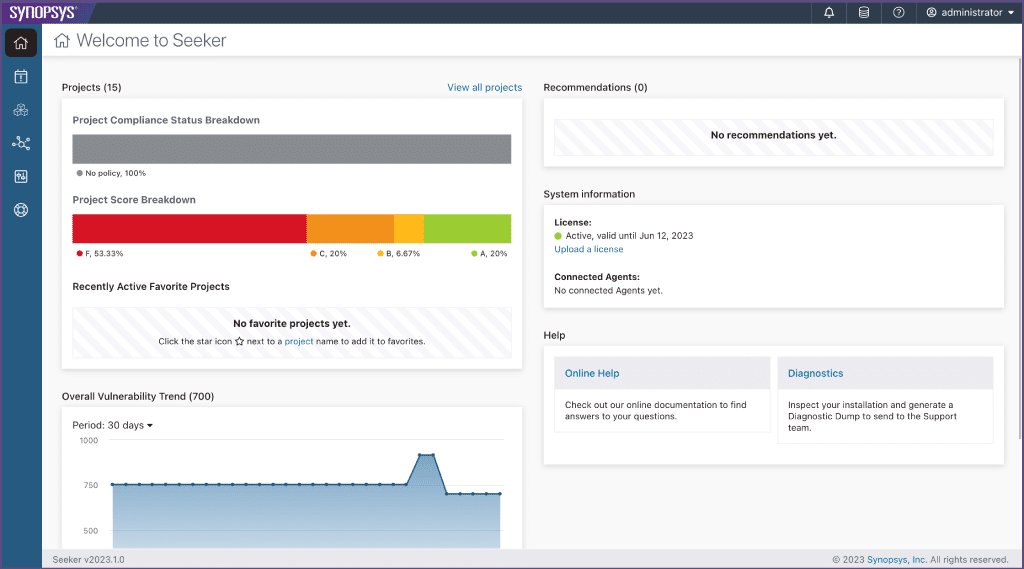
Synopsys Seeker ist ein Interactive Application Security Testing (IAST) Tool, das für Entwickler und Sicherheitsexperten entwickelt wurde. Es bietet eine Echtzeitanalyse und Rückmeldung zu Sicherheitslücken in Webanwendungen während der Laufzeit.
Warum ich Synopsys Seeker ausgewählt habe: Das Tool überzeugt durch seine Echtzeitanalyse und bietet Einblicke während des gesamten Entwicklungszyklus. So kann Ihr Team Schwachstellen direkt beheben und die Zeit bis zur Behebung reduzieren. Die Möglichkeit von Seeker, detaillierte Einblicke in Datenflüsse und Sicherheitsprobleme zu liefern, erhöht den Nutzen. Die Integration in CI/CD-Pipelines macht es zu einer praktischen Wahl für kontinuierliche Testumgebungen.
Herausragende Funktionen & Integrationen:
Funktionen umfassen die Erkennung von Schwachstellen zur Laufzeit, um Probleme frühzeitig zu entdecken, detaillierte Einsichten in Datenflüsse für ein besseres Verständnis sowie die Integration mit CI/CD-Pipelines für kontinuierliche Tests. Außerdem erhalten Entwickler umsetzbares Feedback zur schnellen Behebung von Schwachstellen.
Integrationen umfassen Jenkins, Jira, GitHub, GitLab, Azure DevOps, Bamboo, Bitbucket, TeamCity, Rally und Slack.
Pros and Cons
Pros:
- Unterstützt kontinuierliche Testumgebungen
- Detaillierte Datenfluss-Einblicke
- Echtzeit-Schwachstellenanalyse
Cons:
- Nicht ideal für kleine Teams
- Hohe Lernkurve


Detectify ist ein Tool, das speziell für Sicherheitsteams und Entwickler entwickelt wurde und den Schwerpunkt auf die Sicherheit von Webanwendungen legt. Es bietet kontinuierliche Überwachung und Scans, um Schwachstellen zu erkennen und die Sicherheit von Webanwendungen zu gewährleisten.
Warum ich mich für Detectify entschieden habe: Seine fortlaufenden Aktualisierungen machen es zur besten Wahl, um neuen Bedrohungen stets einen Schritt voraus zu sein. Das Tool nutzt ein auf der Schwarmintelligenz basierendes Sicherheitsforschungsmodell, um seine Datenbank aktuell zu halten. Detectify bietet automatisierte Scans mit detaillierten Berichten, die Ihrem Team helfen, Schwachstellen zu priorisieren und zu beheben. Die benutzerfreundliche Oberfläche sorgt für Zugänglichkeit für Teams mit unterschiedlichsten Erfahrungsstufen.
Hervorstechende Funktionen & Integrationen:
Funktionen umfassen automatisierte Scans zur Gewährleistung einer umfassenden Abdeckung, detaillierte Berichte zur Priorisierung von Schwachstellen und eine benutzerfreundliche Oberfläche, die die Navigation erleichtert. Das forschungsbasierte Crowdsourcing-Modell des Tools hält seine Schwachstellendatenbank stets auf dem neuesten Stand.
Integrationen umfassen Slack, Jira, AWS, Azure, Google Cloud, GitHub, GitLab, Bitbucket, Microsoft Teams und Trello.
Pros and Cons
Pros:
- Benutzerfreundliche Oberfläche
- Detaillierte Schwachstellenberichte
- Kontinuierliche Schwachstellen-Updates
Cons:
- Erfordert technisches Fachwissen
- Eingeschränkte Offline-Funktionalität
Weitere DAST-Tools
Hier finden Sie einige zusätzliche DAST-Tool-Optionen, die es nicht in meine Auswahlliste geschafft haben, aber dennoch einen Blick wert sind:
- AppCheck
Am besten geeignet für Support mit Sitz im Vereinigten Königreich
- Mend.io
Am besten geeignet für SLDC-Anwendungssicherheit
- NowSecure
Am besten geeignet für mobile App-Sicherheit
- DerScanner
Am besten geeignet für kontinuierliches DAST in Entwicklungszyklen


Wie ich DAST-Tools bewerte
Ich teile meine Bewertung in Basiskriterien wie authentifizierte Scans und CI/CD-Integration sowie in Unterscheidungsmerkmale, die ein bestimmtes Tool für Ihre spezifische Pipeline und Ihr Bedrohungsmodell hervorheben, auf.
Kernfunktionen (Grundvoraussetzungen für diese Liste)
Wenn ich Tools für meine Liste auswähle, bewerte ich jedes einzelne auf einer Skala von 0 (bietet diese Funktion nicht) bis 5 (übertrifft in diesem Bereich) hinsichtlich jeder unten aufgeführten Kernfunktion. Dann berechne ich die Gesamtpunktzahl des Tools als Prozentsatz. Jedes Tool muss mindestens eine Gesamtpunktzahl von 65 % erreichen, um für die Aufnahme in Betracht gezogen zu werden.
- Black-Box-Laufzeitscans: Ich bewerte, wie gut jedes Tool eine laufende Anwendung ohne Zugriff auf den Quellcode durchsucht und angreift – insbesondere bei JavaScript-lastigen Single-Page-Applications und mehrstufigen Workflows.
- Web-App- & API-Abdeckung: Ein Tool sollte REST-, SOAP- und GraphQL-Endpunkte ebenso wie klassische Webanwendungen scannen – ich prüfe, ob OpenAPI-Spezifikationen und Schemaimporte unterstützt werden.
- OWASP-Schwachstellenerkennung: Ich achte auf eine zuverlässige Erkennung aller OWASP Top 10, wobei ich besonderes Augenmerk auf die False-Positive-Rate bei Funden wie SQLi und reflektiertem XSS lege.
- Authentifizierte Scans: Unterstützung für formularbasierte, tokenbasierte, OAuth- und SSO-Anmeldeverfahren ist hier wichtig – ich prüfe, ob der Scanner den Sitzungsstatus über komplexe Authentifizierungsketten hinweg aufrechterhalten kann.
- CI/CD- & DevOps-Integration: Ich bewerte native Plugin-Unterstützung für Tools wie Jenkins, GitLab CI und GitHub Actions – einschließlich der Möglichkeit, Policy-Gates zu setzen, die einen Build bei bestimmten Schweregraden stoppen.
- Berichterstattung & Compliance-Zuordnung: Jedes Tool sollte Berichte erzeugen, die auf Standards wie PCI-DSS oder OWASP ASVS abgebildet sind und konkrete Abhilfemaßnahmen enthalten, die Entwickler direkt umsetzen können.
Wenn ich eine Liste von Tools habe, die diese Kriterien erfüllen, schaue ich, was jede Plattform besonders macht.
Unterscheidungsmerkmale (Was Anbieter voneinander abhebt)
So vergleiche und kontrastiere ich verschiedene Anbieter:
Herausragende Funktionen
Proof-of-Exploit-Validierung ist ein großes Unterscheidungsmerkmal – ich achte auf Tools, die sichere Exploit-Belege wie aufgezeichnete Payloads und Anfrage-/Antwort-Paare liefern, was den manuellen Analyseaufwand deutlich reduziert. KI-gestützte Reduktion von False Positives ist ebenso essenziell, wenn Sie große Anwendungsportfolios scannen, denn zu viele Fehlalarme untergraben schnell das Vertrauen der Entwickler. Ich bewerte außerdem die Fähigkeiten zur Erkennung der Angriffsfläche, um vergessene Subdomains oder nicht dokumentierte APIs aufzudecken, deren Gefährdung Ihrem Team oft nicht bewusst ist.
Über die Funktionen hinaus
Die Flexibilität beim Einsatz ist ein wichtiges Kriterium – ich prüfe, ob ein Tool SaaS-, On-Premise- und Hybridoptionen bietet, da Teams mit sensiblen Daten häufig Scanning-Engines hinter der eigenen Firewall benötigen. Die Scan-Performance spielt ebenfalls eine Rolle, insbesondere bei Unternehmen, die Hunderte von Anwendungen durch nächtliche CI/CD-Pipelines laufen lassen, wo inkrementelles Scannen die Build-Zeiten reduziert. Außerdem bewerte ich die Compliance-Ausrichtung und achte darauf, dass integrierte Berichtsvorlagen für PCI-DSS, SOC 2 oder ISO 27001 bereitstehen, sodass Auditoren diese ohne manuelle Nachbearbeitung nutzen können.
So wählen Sie DAST-Tools aus
Bei langen Funktionslisten und komplexen Preisstrukturen verliert man leicht den Überblick. Damit Sie sich bei der individuellen Auswahl Ihrer Software auf das Wesentliche konzentrieren können, finden Sie hier eine Checkliste mit Faktoren, die Sie berücksichtigen sollten:
| Faktor | Was zu beachten ist |
| Skalierbarkeit | Stellen Sie sicher, dass das Werkzeug mit Ihrer Organisation wachsen kann. Achten Sie auf Lösungen, die bei wachsendem Team steigende Arbeitslasten und mehr Benutzer bewältigen können. |
| Integrationen | Prüfen Sie die Kompatibilität mit Ihren bestehenden Systemen wie CI/CD-Pipelines, Aufgabenverfolgungssystemen und Cloud-Plattformen, um Ihren Arbeitsablauf zu optimieren. |
| Anpassbarkeit | Achten Sie auf Werkzeuge, die Anpassungen an Ihre spezifischen Sicherheitsrichtlinien und Berichtsanforderungen ermöglichen und so sicherstellen, dass sie zu den Arbeitsabläufen Ihres Teams passen. |
| Benutzerfreundlichkeit | Berücksichtigen Sie die Lernkurve und wie schnell sich Ihr Team einarbeiten kann. Intuitive Benutzeroberflächen und umfassende Dokumentation sind entscheidend. |
| Budget | Bewerten Sie die Gesamtbetriebskosten einschließlich zusätzlicher Gebühren für Integrationen oder Unterstützung. Stellen Sie sicher, dass das Werkzeug in die finanziellen Möglichkeiten Ihres Teams passt. |
| Sicherheitsvorkehrungen | Überprüfen Sie, ob das Werkzeug sensible Daten verarbeiten kann und Branchenstandards wie die DSGVO erfüllt, damit Ihre Sicherheitsmaßnahmen auf dem neuesten Stand sind. |
| Unterstützung | Bewerten Sie die verfügbare Kundenunterstützung, beispielsweise Unterstützung rund um die Uhr oder feste Kundenbetreuer, um Probleme schnell zu lösen. |
| Leistung | Testen Sie die Geschwindigkeit und Genauigkeit des Werkzeugs bei der Erkennung von Schwachstellen und stellen Sie sicher, dass es die Anforderungen Ihres Teams an zeitnahe und zuverlässige Sicherheitsbewertungen erfüllt. |
Was sind DAST-Werkzeuge?
DAST-Werkzeuge sind Softwarelösungen, die Webanwendungen auf Sicherheitslücken untersuchen. Sicherheitsexperten und Entwickler verwenden diese Werkzeuge in der Regel, um die Sicherheitslage ihrer Anwendungen zu verbessern.
Automatisierte Scans, Echtzeitwarnungen und detaillierte Berichtsfunktionen helfen dabei, Schwachstellen effizient zu identifizieren und zu beheben. Diese Lösungen bieten zusammen mit Werkzeugen für Penetrationstests in Unternehmen einen enormen Mehrwert, da sie sicherstellen, dass Anwendungen vor potenziellen Bedrohungen geschützt sind.
Funktionen von DAST-Werkzeugen
Achten Sie bei der Auswahl von DAST-Werkzeugen auf die folgenden wichtigen Funktionen:
- Automatisierte Scans: Diese Funktion untersucht Webanwendungen automatisch auf Schwachstellen, spart Zeit und gewährleistet eine umfassende Abdeckung.
- Echtzeitwarnungen: Liefert sofortige Benachrichtigungen über erkannte Schwachstellen, sodass Ihr Team schnell auf potenzielle Bedrohungen reagieren kann.
- Detaillierte Berichte: Bietet umfassende Berichte, die dabei helfen, Maßnahmen zur Behebung zu priorisieren und Sicherheitsverbesserungen im Zeitverlauf nachzuverfolgen.
- Integrationsmöglichkeiten: Verbindet sich mit bestehenden Systemen wie CI/CD-Pipelines und Aufgabenverfolgungssystemen, um Arbeitsabläufe zu optimieren und die Produktivität zu steigern.
- Anpassbarkeit: Ermöglicht es Benutzern, das Werkzeug an ihre spezifischen Sicherheitsrichtlinien und Berichtsanforderungen anzupassen und so sicherzustellen, dass es zu den Arbeitsabläufen der Organisation passt.
- Skalierbarkeit: Unterstützt wachsende Teams und Arbeitslasten und eignet sich damit für Organisationen jeder Größe.
- Unterstützung bei der Regelkonformität: Stellt sicher, dass Sicherheitsmaßnahmen Branchenstandards wie der DSGVO entsprechen und Ihre Organisation regelkonform bleibt.
- Benutzerfreundliche Oberfläche: Bietet ein intuitives Design, das die Lernkurve verkürzt und Teams hilft, sich schnell einzuarbeiten.
- Genauigkeit der Schwachstellenerkennung: Gewährleistet die präzise Identifizierung von Sicherheitsproblemen, minimiert Fehlalarme und konzentriert sich auf tatsächliche Bedrohungen.
- Cloud-Kompatibilität: Funktioniert effektiv in Cloud-Umgebungen und bietet Flexibilität für Unternehmen, die in der Cloud arbeiten.
Vorteile von DAST-Werkzeugen
Die Implementierung von DAST-Werkzeugen bietet Ihrem Team und Ihrem Unternehmen mehrere Vorteile. Hier sind einige davon:
- Verbesserte Sicherheit: Durch die frühzeitige Erkennung von Schwachstellen helfen diese Werkzeuge, Sicherheitsverletzungen zu verhindern und sensible Daten zu schützen.
- Zeiteffizienz: Automatisierte Scans sparen Ihrem Team Zeit, indem sie Anwendungen kontinuierlich ohne manuelles Eingreifen überwachen.
- Bereitschaft für die Regelkonformität: Stellt sicher, dass Ihre Sicherheitspraktiken Branchenstandards erfüllen, wodurch Prüfungen der Regelkonformität reibungsloser und weniger stressig verlaufen.
- Kosteneinsparungen: Die frühzeitige Identifizierung und Behebung von Schwachstellen reduziert potenzielle Kosten im Zusammenhang mit Sicherheitsverletzungen und Datenverlust.
- Höhere Produktivität: Die Integration in bestehende Systeme optimiert Arbeitsabläufe und ermöglicht Ihrem Team, sich auf andere wichtige Aufgaben zu konzentrieren.
- Skalierbarkeit: Unterstützt wachsende Unternehmen, indem es sich an höhere Arbeitslasten und größere Teams anpasst, ohne die Leistung zu beeinträchtigen.
- Umsetzbare Erkenntnisse: Detaillierte Berichte liefern klare Anleitungen zur Behebung von Schwachstellen und helfen Ihrem Team, Maßnahmen zur Behebung effektiv zu priorisieren.
Kosten und Preise von DAST-Tools
Bei der Auswahl von DAST-Tools ist es wichtig, die verschiedenen verfügbaren Preismodelle und Tarife zu verstehen. Die Kosten variieren je nach Funktionen, Teamgröße, Erweiterungen und weiteren Faktoren. Die folgende Tabelle fasst gängige Tarife, ihre durchschnittlichen Preise und typische in DAST-Tool-Lösungen enthaltene Funktionen zusammen:
Vergleichstabelle der Tarife für DAST-Tools
| Tariftyp | Durchschnittlicher Preis | Übliche Funktionen |
| Kostenloser Tarif | $0 | Grundlegendes Schwachstellen-Scanning, eingeschränkte Berichterstattung und Community-Support. |
| Persönlicher Tarif | $10-$30 /Benutzer /Monat | Automatisiertes Scanning, grundlegende Integrationen und E-Mail-Support. |
| Geschäftstarif | $50-$100 /Benutzer /Monat | Erweiterte Scan-Funktionen, umfassende Berichterstattung, API-Zugriff und vorrangiger Support. |
| Unternehmenstarif | $150-$300/Benutzer /Monat | Anpassbare Sicherheitsrichtlinien, persönlicher Account-Manager, umfangreiche Integrationen und Support rund um die Uhr. |
Häufig gestellte Fragen zu DAST-Tools
Hier finden Sie Antworten auf häufige Fragen zu DAST-Tools:
Stimmt es, dass DAST-Tools den Quellcode überprüfen?
Nein, DAST-Tools überprüfen nicht den Quellcode Ihrer Anwendung. Stattdessen analysieren sie laufende Anwendungen von außen und identifizieren Sicherheitslücken, indem sie reale Angriffe simulieren. Zur Überprüfung Ihres Quellcodes würden Sie SAST-Tools verwenden, die den Code selbst untersuchen.
Wie unterscheiden sich DAST-Tools von SAST-Tools?
DAST-Tools testen Ihre Anwendung während des Betriebs und finden Sicherheitsprobleme, die von außen sichtbar sind. SAST-Tools analysieren Ihren Quellcode vor der Bereitstellung, um Fehler frühzeitig zu erkennen. Wenn Sie beide Arten gemeinsam verwenden, erhalten Sie ein umfassenderes Bild von der Sicherheit Ihrer Anwendung.
Können DAST-Tools in CI/CD-Pipelines integriert werden?
Ja, die meisten modernen DAST-Tools lassen sich problemlos in CI/CD-Pipelines integrieren. Dadurch können Sie bei jedem Push oder jeder Bereitstellung automatisch nach Schwachstellen suchen und Probleme erkennen, bevor sie die Produktionsumgebung erreichen.
Welche Herausforderungen können bei der Implementierung von DAST-Tools auftreten?
Mögliche Herausforderungen sind falsch-positive Ergebnisse, zusätzlicher Konfigurationsaufwand und eine eingeschränkte Sichtbarkeit von Schwachstellen in der Geschäftslogik. Es ist wichtig, die Scan-Parameter genau abzustimmen und Ihr Team zu schulen, um den Nutzen Ihrer DAST-Investition zu maximieren.
Wie kann ich falsch-positive Ergebnisse mit DAST-Tools reduzieren?
Sie können falsch-positive Ergebnisse reduzieren, indem Sie die Scan-Einstellungen verfeinern, Angriffssignaturen aktualisieren und Ergebnisse manuell oder mit SAST überprüfen. Durch die regelmäßige Überprüfung und Anpassung von Ausschlüssen konzentrieren sich Ihre Ergebnisse auf tatsächliche, umsetzbare Risiken.
Sind DAST-Tools für das Testen von APIs und Microservices geeignet?
Ja, viele DAST-Tools unterstützen inzwischen APIs und Microservices. Die besten Ergebnisse erzielen Sie jedoch mit einem Tool, das für moderne Anwendungsarchitekturen entwickelt wurde. Achten Sie auf die Integration von OpenAPI/Swagger und die Abdeckung mehrerer Endpunkte.
Welche Arten von Schwachstellen erkennen DAST-Tools am besten?
DAST-Tools erkennen besonders gut Laufzeitprobleme wie SQL-Injection, Cross-Site-Scripting, unsichere Authentifizierung und Fehlkonfigurationen. Schwachstellen wie Fehler in der Geschäftslogik oder solche, die in nicht zugänglichen Codepfaden verborgen sind, werden möglicherweise nicht erkannt.
Wie geht es weiter?
Wenn Sie gerade DAST-Tools recherchieren, wenden Sie sich an einen SoftwareSelect-Berater und erhalten Sie kostenlose Empfehlungen.
Sie füllen ein Formular aus und führen ein kurzes Gespräch, in dem die Einzelheiten Ihrer Anforderungen besprochen werden. Anschließend erhalten Sie eine Vorauswahl an Software, die Sie prüfen können. Die Berater unterstützen Sie sogar während des gesamten Kaufprozesses, einschließlich der Preisverhandlungen.