

Leitfaden zu den 10 besten Cloud-Management-Plattformen 2026

10 Beste Cloud-Management-Plattformen Auswahlliste
Here's my pick of the 10 best software from the 20 tools reviewed.


Die Verwaltung von Cloud-Systemen kann kompliziert werden, wenn Unternehmen wachsen und mehrere Online-Dienste gleichzeitig nutzen. Cloud-Management-Plattformen erleichtern dies, indem sie alles an einem Ort zusammenführen. Sie helfen Teams, ihre Cloud-Aktivitäten reibungsloser zu organisieren, zu überwachen und zu steuern – so bleiben Daten sicher, Systeme laufen stabil und die Ausgaben bleiben unter Kontrolle.
Diese Tools vereinfachen alltägliche Aufgaben, liefern nützliche Einblicke in die Leistung und helfen Unternehmen dabei, Verschwendung zu vermeiden. Mit der richtigen Plattform kann sich Ihr Team auf das Wesentliche konzentrieren und Arbeitsabläufe effizient und sicher gestalten.
Why Trust Our Software Reviews
We’ve been testing and reviewing software since 2023. As tech leaders ourselves, we know how critical and difficult it is to make the right decision when selecting software.
We invest in deep research to help our audience make better software purchasing decisions. We’ve tested more than 2,000 tools for different tech use cases and written over 1,000 comprehensive software reviews. Learn how we stay transparent & our software review methodology.
Zusammenfassung der besten Cloud-Management-Plattformen
| Tool | Best For | Trial Info | Price | ||
|---|---|---|---|---|---|
| 1 | Best cloud management provider for user access control | Free demo available | From $9.99/user/month | Website | |
| 2 | Best open-source cloud management provider | Free plan available | Open source project and Available for free | Website | |
| 3 | Best for working with multiple resource types | Free plan available | Open source project and Available for free | Website | |
| 4 | Best for multi-cloud monitoring and reporting | 14-day free trial | Pricing upon request | Website | |
| 5 | Best for container-based application development | 60-day free trial | From $83.33/month (billed annually, exclude AWS infrastructure fees) | Website | |
| 6 | Best for automating cloud management | Free plan available | From $49/month | Website | |
| 7 | Best for hybrid cloud management | Free demo available | Pricing upon request | Website | |
| 8 | Best self-service features for cloud management | Free plan available | From $708.33/month (billed annually) | Website | |
| 9 | Best for virtual machines (VMs) | 7-day free trial | Pricing upon request | Website | |
| 10 | Best for multi-cloud FinOps | Free demo available | From $49/user/month | Website |
-

Site24x7
Visit WebsiteThis is an aggregated rating for this tool including ratings from Crozdesk users and ratings from other sites.4.7 -
GitHub Actions
Visit WebsiteThis is an aggregated rating for this tool including ratings from Crozdesk users and ratings from other sites.4.8 -
Docker
Visit WebsiteThis is an aggregated rating for this tool including ratings from Crozdesk users and ratings from other sites.4.6





Bewertungen der besten Cloud-Management-Plattformen
In den folgenden Abschnitten gehe ich auf meine bevorzugten Cloud-Management-Plattformen ein, einschließlich Vor- und Nachteilen, Preisinformationen und den Kriterien, die ich für meine Auswahl verwendet habe.
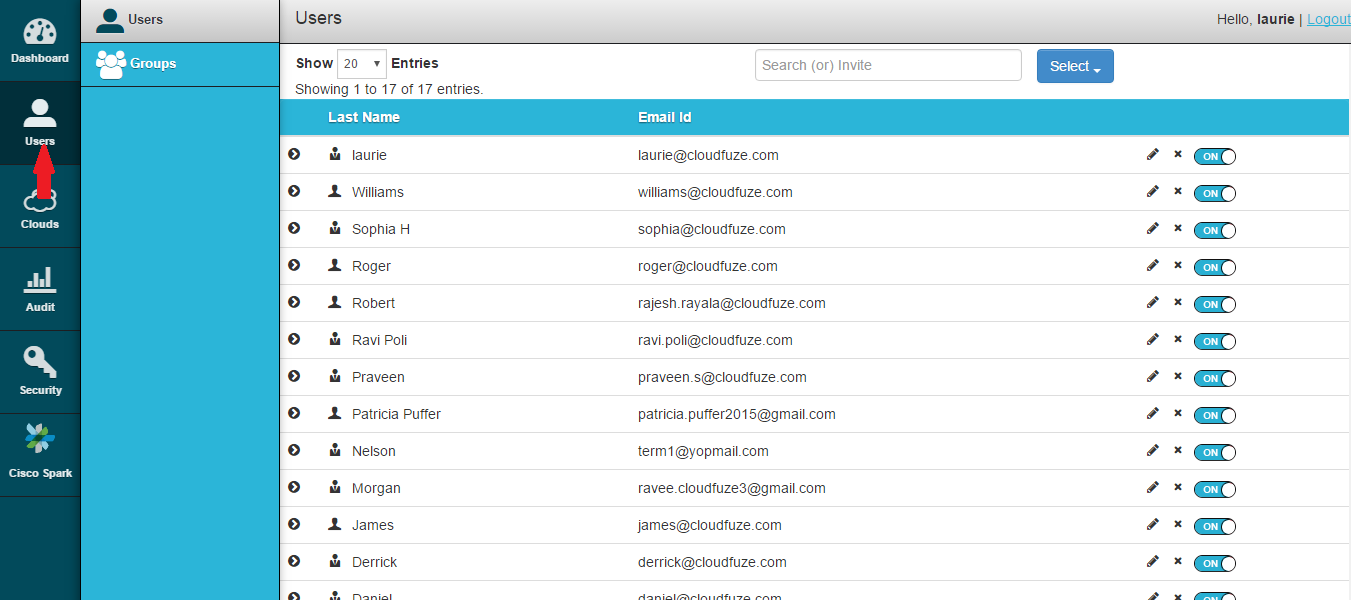
CloudFuze’s main focus with its core product seems to be on cloud migrations, but during the course of my time with it, I found it handles user access very well.
Why I Picked CloudFuze:
I found CloudFuze’s cloud file security features to be quite comprehensive for user access management, with an entire page dedicated to it. You can add and delete user accounts, as well as edit their status to or from administrators. If you have several users you need to keep track of, you can group them into teams that you manage with bulk actions.
CloudFuze Standout Features and Integrations
Features that made me recommend CloudFuze for user access management include API keys and secure cloud access that let you control who can access your cloud from external platforms. There’s also an audit function that shows you how the files you’ve shared are being used, with information on general access and downloads.
Integrations are pre-built for major cloud platforms as well as Slack, Microsoft Teams, Defender, and Sharepoint.
Pros and Cons
Pros:
- Strong file security features
- Comprehensive user access control
- Easy migrations
Cons:
- Free trial is often unavailable in favor of a demo
- Web-only, no apps
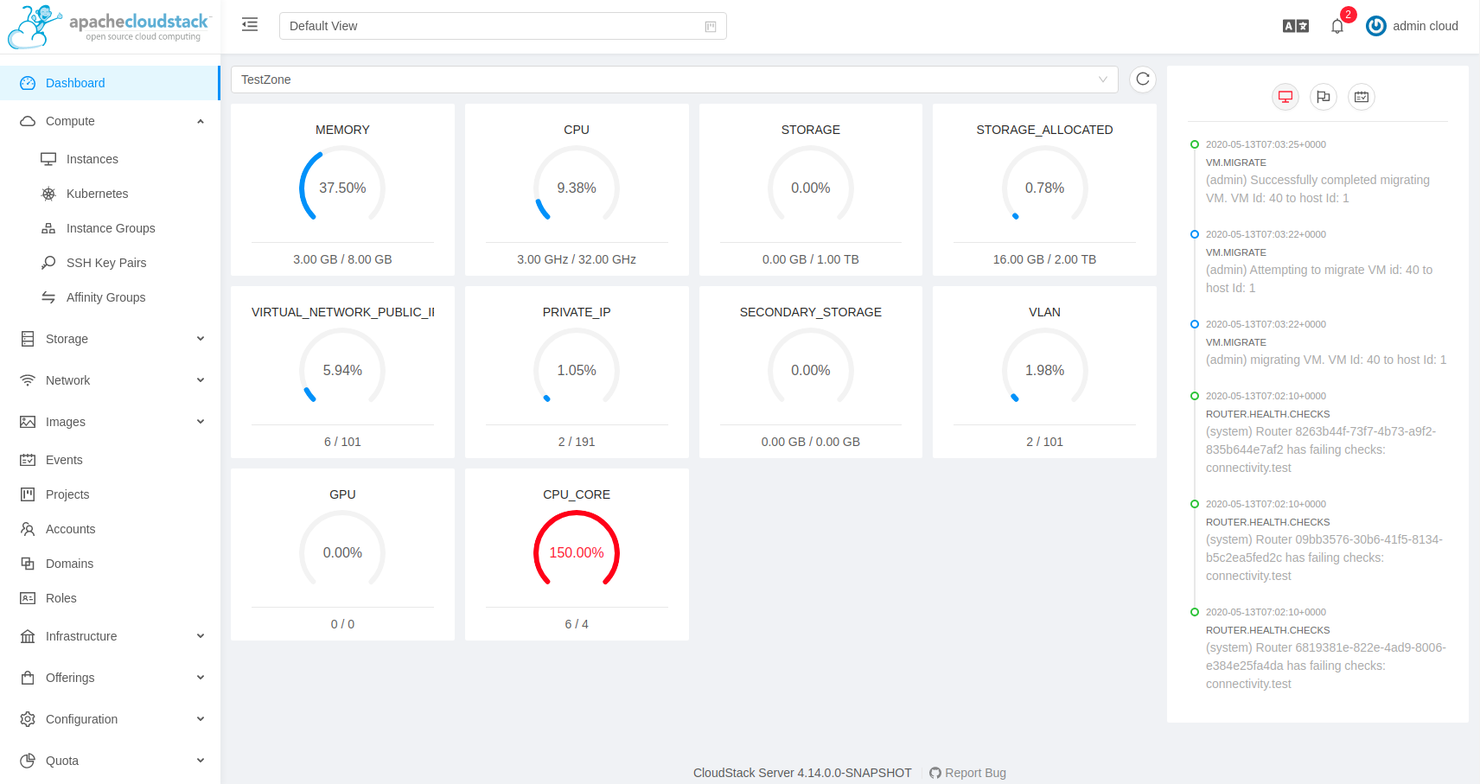
CloudStack is a free open-source Infrastructure-as-a-Service (IaaS) CMP from Apache meant for use on both on-premise and hybrid environments.
Why I Picked Apache CloudStack:
As I’ve mentioned above, CloudStack is an Apache product, meaning it’s completely open-source and has a thriving developer community behind it. This makes it an ideal option for deployments where you need to implement functionality that you can’t find anywhere else but without needing to build everything from scratch.
Apache CloudStack Standout Features and Integrations
Features in CloudStack that I really like for working on open-source software include a powerful and extensively documented API that you can use to extend the functionality of the product with things like custom integrations. CloudStack also allows you to work with the APIs for AWS S3 and EC2.
It’s also hypervisor-agnostic, so you can run it on KVM, VMware, Citrix XenProject and XenServer, BareMetal through IPMI, vSphere through vCenter, and LXC.
Integrations are available via an API that you can use to build custom solutions to connect third-party services.
Pros and Cons
Pros:
- Completely free
- Robust documentation
- Open source
Cons:
- More prone to bugs than other solutions
- No dedicated customer support; you’ll have to rely on the community

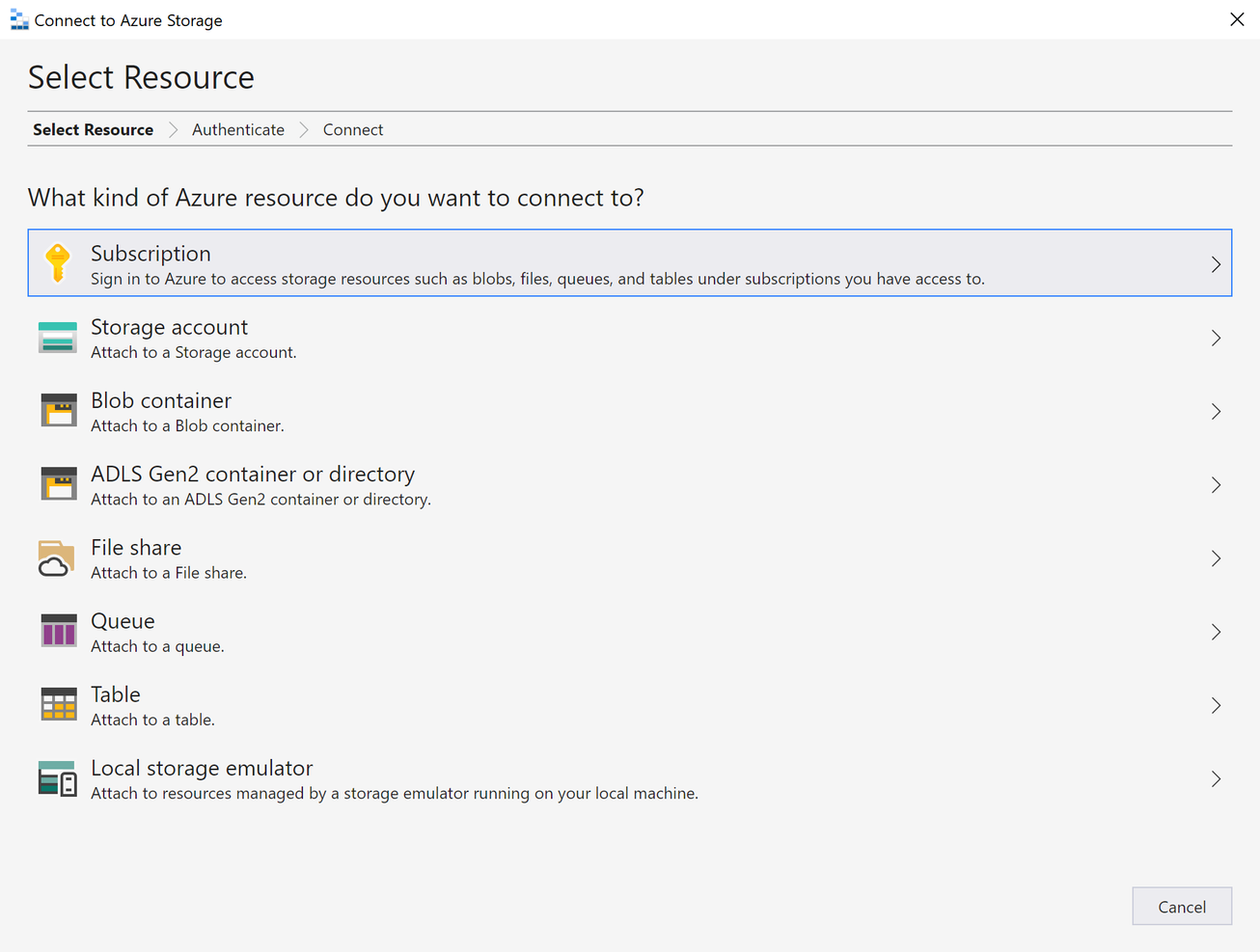
Azure Storage Explorer is one of several products Microsoft offers in its suite of cloud computing tools. It’s used to manage multiple cloud environments both on and off the Azure platform.
Why I Picked Azure Storage Explorer:
I chose Storage Explorer because it supports a comprehensive list of resource types. If you want to use your Azure account, you can connect to queues, blob containers, and Azure Data Lake Storage Gen2 directories and containers. If you’re using a shared access signature (SAS) URL, you can connect to all four previously mentioned resources, as well as tables and file shares.
Azure Storage Explorer Standout Features and Integrations
Features I liked in Storage Explorer include the presence of local emulators like Azurite, which allow you to create an environment where you can test out table, queue, and blob storage applications whether you’re on-premise or offline. It’s also extensible, with extensions for services such as Azure Data Factory to connect to third-party services like Google Cloud and AWS S3 for migrations.
Integrations are pre-built for major cloud providers and native for other Azure services such as Azurite, Data Factory, App Configuration, and Active Directory (AD).
Pros and Cons
Pros:
- Easy to use after deployment
- Strong security features
- Supports several different resource and object types
Cons:
- Slow performance
- Limited analytics

Best for multi-cloud monitoring and reporting
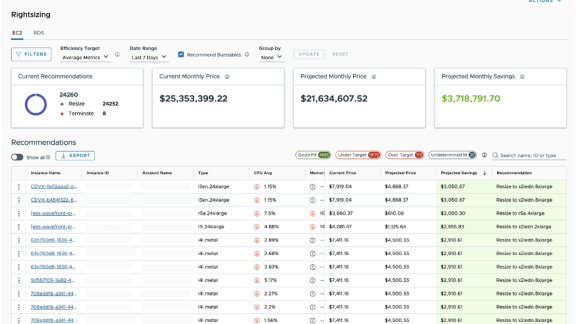
The first time I heard about CloudHealth was in 2018 when VMware announced it had acquired the multi-cloud management company for an estimated $500 million, so they must have been doing something right. In 2022, VMware rebranded it into VMware Aria Cost powered by CloudHealth, and that’s the version I’ve tested for this article.
Why I Picked VMware Aria Cost:
I chose VMware Aria Cost because of its wide support for most major cloud providers, including Google Cloud, Azure, Alibaba Cloud, AWS, Oracle Cloud, and VMware itself. On all these platforms, you can use it to generate in-depth insights into your cloud providers in areas ranging from FinOps to security.
VMware Aria Cost Standout Features and Integrations
Features I liked in VMware Aria Cost for multi-cloud monitoring and reporting include the multi-cloud history report, which gives you information on historical trends and activity within your cloud environments. The FlexReports feature allows you to generate insights from different areas of your cloud environments for in-depth analysis regarding aspects such as assets and costs.
Integrations are available natively with VMware and other Aria offerings, including Operation, Hub, and Automation. You also get built-in integrations for Azure, Google Cloud, AWS, Alert Logic, Logicworks, Ansible, Bulletproof, Shi, New Relic, and Docker.
Pros and Cons
Pros:
- Strong monitoring and analytics features
- Easy to deploy
- Supports major cloud service providers
Cons:
- Weak performance on mobile and tablets
- Limited documentation

Best for container-based application development
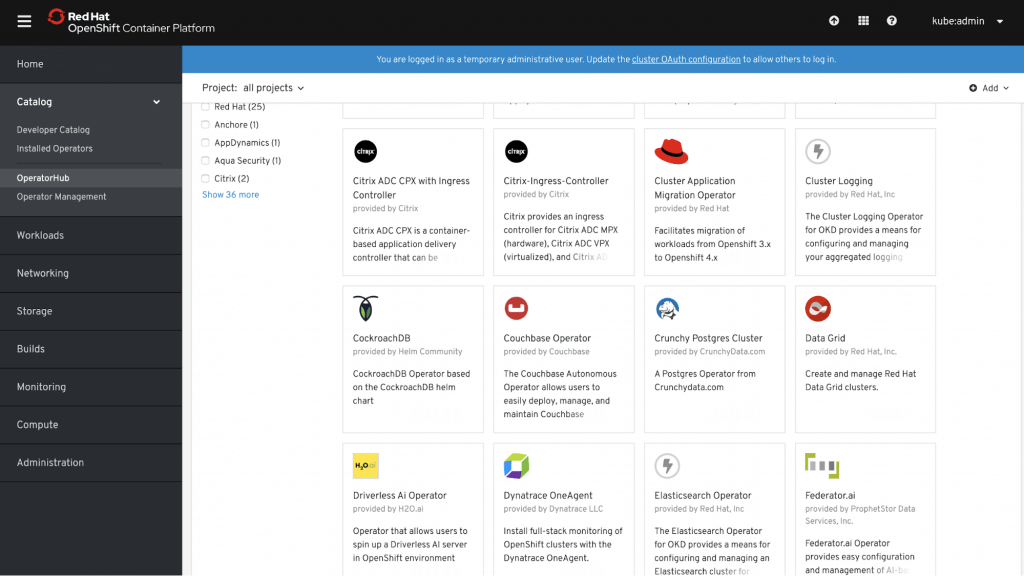
OpenShift Container Platform is offered by Red Hat, one of the biggest contributors to various projects that support container-based development, including Kubernetes, Docker, and Linux.
Why I Picked OpenShift Container Platform:
When I was working with OpenShift Container Platform, I found out that it provides access to the source-to-image (S2I) framework that lets you create container images using your application’s source code. It supports some of the most popular languages and frameworks used in app development, including Python, Node.js, Java, PHP, .NET, Go, Ruby, and Perl.
OpenShift Container Platform Standout Features and Integrations
Features that made me recommend OpenShift Container Platform for developers include the inbuilt CI/CD pipeline that allows for rapid development over sustained periods. It also uses Prometheus, a tool that gives you monitoring capabilities and metrics for applications and clusters so you can ensure whatever you’re working on remains healthy throughout the process.
Integrations are available natively with other Red Hat products like the OpenShift Platform, Ansible, and Enterprise Linux. There’s also a REST API that allows you to build your own integrations if you need them.
Pros and Cons
Pros:
- Extensive documentation
- Flexible customization options
- Built-in source-to-image framework for containerization
Cons:
- Steep learning curve
- Limited deployment options

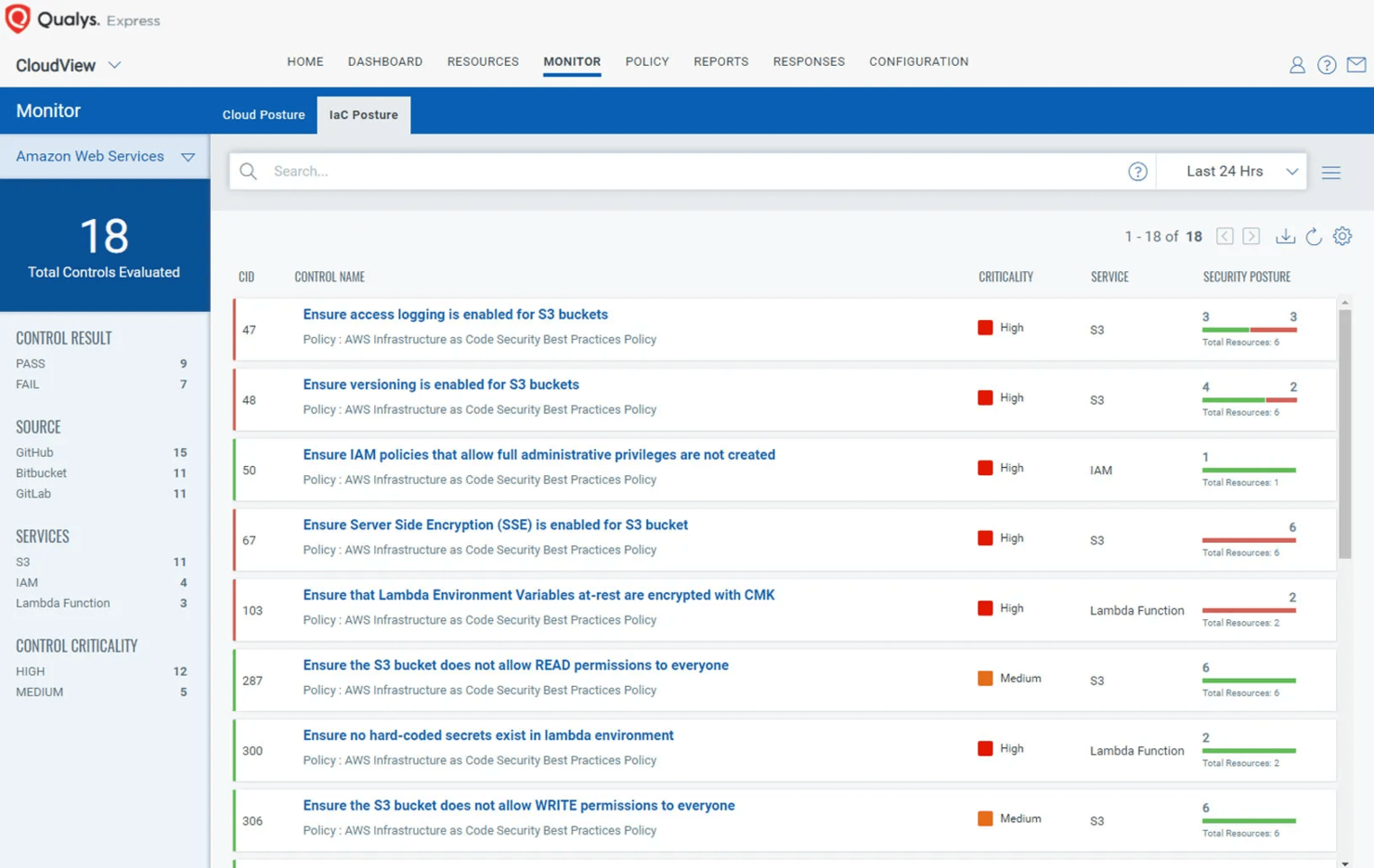
TotalCloud is a CMP from Qualys, a company that also specializes in other cloud-related solutions covering security and compliance.
Why I Picked TotalCloud:
TotalCloud came with Qualys Flow, which I used during my tests to automate several functions, and it worked very well, in my opinion. For instance, I used it to orchestrate security-related tasks, and it handled them from end to end, from scanning my deployment for vulnerabilities all the way to remediation.
TotalCloud Standout Features and Integrations
Features that stood out to me when I was examining TotalCloud include the built-in security provisions that echo the rest of the offerings from Qualys, most of which you can leave to run automatically.
For example, FlexScan gives you agentless security scans but also allows you to run network and agent-based scanning if you want more detailed reports. TruRisk uses a risk-based approach to security for your cloud environments to protect you from threats like malware and ransomware.
Integrations are pre-built for major cloud providers and available natively with other Qualys products such as InstaProtect, FlexScan, Flow, and TruRisk.
Pros and Cons
Pros:
- Useful native integrations for security
- Strong automation features
- Free plan available
Cons:
- Costly to bring in other Qualys integrations
- Limited customizability


The team that built Morpheus Data was looking for a solution that fit their DevOps pipeline at an application factory and decided to make their own when they couldn’t find one.
Why I Picked Morpheus Data:
I chose Morpheus Data because of its support for open-container orchestration. When you pair this with its standard cloud management features, it becomes a useful unified tool for anyone looking to run hybrid setups.
Morpheus Data Standout Features and Integrations
Features in Morpheus Data that caught my attention include the no-code setup for Kubernetes and private clouds, making it easy for non-technical people to get started with their own deployments. It can also integrate tools like load balancers, DNS, and networks to convert hypervisors like KVM, Nutanix, and VMware into private clouds with full multi-tenancy.
Integrations are pre-built for Microsoft DNS, Github, Docker, Chef, Ansible, Puppet, Remedy, Jenkins, PowerDNS, and ServiceNow, as well as major cloud platforms.
Pros and Cons
Pros:
- Strong one-click functionality
- Allows you to build a true private cloud
- Several pre-built integrations for third parties
Cons:
- Weak customer support
- No free plan
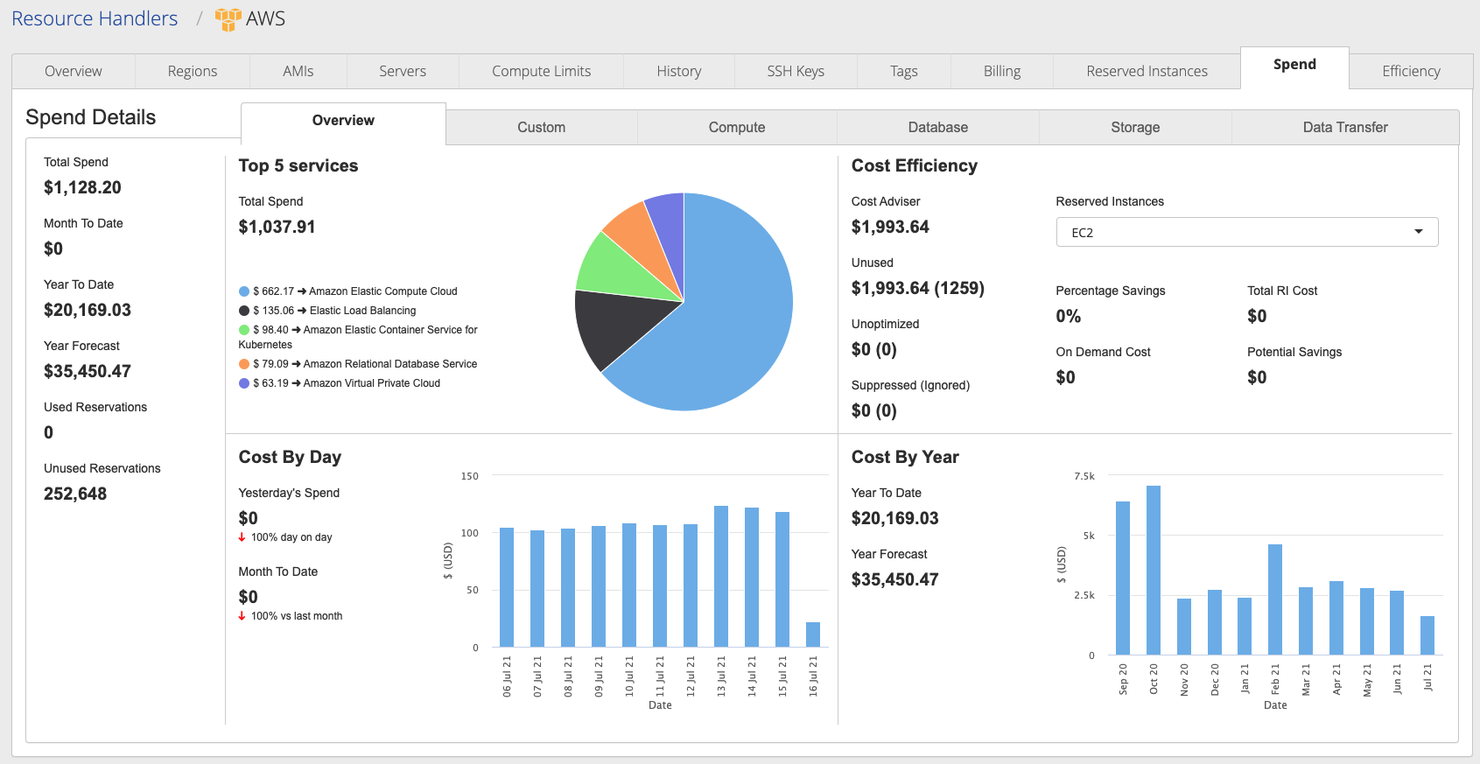
CloudBolt is a multi and hybrid cloud management platform that supports various deployment options, including containers.
Why I Picked CloudBolt:
CloudBolt won me over with its self-service features that let me order resources like storage, compute, and application stacks and have them available almost immediately. For most of the time I spent with it, I wasn’t worried about shadow IT, when employees use hardware or software that hasn’t been approved by the IT department, because I never had to wait too long for things to get moving.
CloudBolt Standout Features and Integrations
Features I liked under CloudBolt’s self-service include what they call blueprints, which allow DevOps teams to set up and provision resources within only minutes on any deployment. You also get catalogs of your environments that make it easier to manage resources, from provisions to user roles.
Integrations are pre-built for major cloud providers, as well as Veeam, ServiceNow, Puppet, Ansible, Chef, SolarWinds, Datadog, SAML, Spunk, and New Relic.
Pros and Cons
Pros:
- Several pre-built integrations
- Robust self-service features
- Flexible deployment options
Cons:
- Weaker support on lower tiers
- Bare-bones logging


Snow Commander is a cloud management platform from Snow Software that focuses mainly on hybrid clouds and puts automation at its forefront.
Why I Picked Snow Commander:
I chose Snow Commander because of its automated service management feature, which allows you to set timed windows after which resources are decommissioned. This makes it easy to manage virtual machines like the ones I’d built with VMware where I was running my tests. You get notifications and have the option to delay this, so you can keep resources available for as long as you need them without worrying about sprawl.
Snow Commander Standout Features and Integrations
Features that made managing my environments with Snow Commander easy include a self-service portal where you can request new VMs from a service catalog or changes to existing instances, so it’s easier to operate these environments. It also provides reporting and analytics, and I found the information on VM sprawl and growth important for keeping my environments under control.
Integrations are pre-built for major cloud providers as well as ServiceNow, Ansible, Jenkins, BMC Helix, Topdesk, Puppet, Chef, Saltstack, Cherwell, and Slack.
Pros and Cons
Pros:
- Customizable service catalog
- Automated lifecycle management
- Several integrations
Cons:
- Slow customer service response
- Costs can add up


CoreStack is a multi-cloud governance platform that supports major providers like Azure, Google Cloud, Oracle Cloud, and AWS.
Why I Picked CoreStack:
I chose CoreStack because of its FinOps Maturity Assessment Reports, which I found to be very detailed when it came to my spending. It made forecasts to tell me whether my current spending habits were sustainable with my budget and even provided suggestions for cost savings and optimizations.
CoreStack Standout Features and Integrations
Features that make CoreStack great for FinOps, in my opinion, include real-time monitoring for drifts in your spending with alerts that get you back in line. You also get alerts as soon as services deploy, so you know exactly what’s using up resources in your environments, making it easier to manage costs.
Integrations are pre-built for major cloud providers, as well as Nagios, Zabbix, Nessus, Chef, and ServiceNow. There are also several APIs that allow you to connect to other tools.
Pros and Cons
Pros:
- Complies with several regulations and standards
- Strong multi-cloud governance features
- Supports large-scale FinOps
Cons:
- Somewhat dated UI
- Slightly vague language in reports
Weitere Cloud-Management-Plattformen
Nachfolgend finden Sie eine Liste weiterer Cloud-Management-Plattformen, die es nicht in meine Top 10 geschafft haben, aber dennoch großartige Produkte sind.
- Concierto Cloud
For cloud migration
- AWS Storage Gateway
For multiple storage solutions
- NinjaOne
For automated endpoint management
- Turbo360
For monitoring Azure cloud environments
- IBM Turbonomic
For automating critical actions in real time
- Rubrik
For cloud administrative control
- Flexera One
For hybrid cloud visibility
- CloudKeeper
For cloud financial management services
- ServiceNow Cloud Management
For reducing cloud spending
- Zesty
For dynamic cloud management


Weitere Cloud-Software-Bewertungen
- Cloud-Service-Provider
- Cloud-Sicherheits-Tools
- Cloud-Plattformen als Service
- Cloud-Speicher-Tools
- Cloud-Entwicklungsplattformen
Auswahlkriterien für Cloud-Management-Plattformen
Bei der Auswahl der besten Cloud-Management-Plattformen für diese Liste habe ich die typischen Anforderungen von Käufern und ihre Schmerzpunkte wie Kostenmanagement und Integrationsfähigkeit berücksichtigt. Zudem habe ich das folgende Rahmenwerk genutzt, um meine Bewertung strukturiert und objektiv durchzuführen:
Kernfunktionen (25% der Gesamtbewertung)
Um in diese Liste aufgenommen zu werden, musste jede Lösung die folgenden typischen Anwendungsfälle erfüllen:
- Verwaltung von virtuellen Maschinen
- Automatisierung von Workflows
- Überwachung von Cloud-Ressourcen
- Kostenoptimierung
- Sicherstellung der Einhaltung von Richtlinien
Weitere herausragende Funktionen (25% der Gesamtbewertung)
Um die Auswahl weiter einzugrenzen, habe ich auch nach besonderen Merkmalen gesucht, wie zum Beispiel:
- Prädiktive Analytik
- KI-basierte Einblicke
- Multi-Cloud-Unterstützung
- Benutzerdefinierte Automatisierungsskripte
- Dynamische Ressourcenzuweisung
Benutzerfreundlichkeit (10% der Gesamtbewertung)
Um die Benutzerfreundlichkeit jedes Systems einschätzen zu können, habe ich insbesondere auf Folgendes geachtet:
- Intuitive Oberflächengestaltung
- Einfache Navigation
- Anpassbare Dashboards
- Geringe Einarbeitungszeit
- Responsives Design
Onboarding (10% der Gesamtbewertung)
Um das Onboarding-Erlebnis jeder Plattform zu beurteilen, habe ich insbesondere auf Folgendes geachtet:
- Verfügbarkeit von Schulungsvideos
- Interaktive Produkttouren
- Zugang zu Vorlagen
- Chatbot-Unterstützung
- Webinare und Live-Demos
Kundensupport (10 % der Gesamtbewertung)
Um die Kundendienstleistungen jedes Softwareanbieters zu bewerten, habe ich Folgendes berücksichtigt:
- 24/7 Support-Verfügbarkeit
- Live-Chat-Optionen
- Umfassende Wissensdatenbank
- Persönliche Kundenbetreuer
- Schnelle Reaktionszeiten
Preis-Leistungs-Verhältnis (10 % der Gesamtbewertung)
Um das Preis-Leistungs-Verhältnis jeder Plattform zu beurteilen, habe ich Folgendes geprüft:
- Wettbewerbsfähige Preise
- Funktionsumfang im Verhältnis zum Preis
- Flexible Zahlungspläne
- Rabatte bei jährlicher Abrechnung
- Keine versteckten Gebühren
Kundenbewertungen (10 % der Gesamtbewertung)
Um einen Eindruck von der allgemeinen Kundenzufriedenheit zu erhalten, habe ich beim Lesen von Kundenbewertungen Folgendes beachtet:
- Positives Nutzerfeedback
- Häufig gemeldete Probleme
- Regelmäßigkeit von Updates
- Allgemeine Zufriedenheitswerte
- Erfahrungsberichte und Fallstudien
So wählen Sie eine Cloud Management Platform aus
Man kann sich leicht in langen Funktionslisten und komplexen Preisstrukturen verlieren. Um Ihnen zu helfen, bei Ihrer individuellen Softwaresuche den Überblick zu behalten, finden Sie hier eine Checkliste mit wichtigen Faktoren:
| Faktor | Worauf zu achten ist |
|---|---|
| Skalierbarkeit | Unterstützt die Plattform Ihr Wachstum? Berücksichtigen Sie künftige Arbeitslaststeigerungen und wie das Tool diese ohne zusätzliche Kosten oder Leistungseinbußen handhabt. |
| Integrationen | Prüfen Sie, ob sich die Plattform mit Ihren vorhandenen Tools verbinden lässt. Fehlende Integrationen könnten zu manueller Arbeit oder erhöhter Komplexität führen. |
| Anpassbarkeit | Können Sie die Plattform an Ihre Arbeitsabläufe anpassen? Achten Sie auf einstellbare Optionen und benutzerdefinierte Vorlagen. |
| Benutzerfreundlichkeit | Ist die Oberfläche intuitiv? Eine steile Lernkurve kann Ihr Team ausbremsen. Suchen Sie nach Nutzerfeedback zur Bedienbarkeit. |
| Implementierung und Onboarding | Wie schnell können Sie starten? Bewerten Sie die Verfügbarkeit von Schulungsressourcen und Support während der Übergangsphase. |
| Kosten | Vergleichen Sie die Preisstrukturen. Achten Sie auf versteckte Gebühren und darauf, ob die Kosten zu Ihrem Budget und dem erwarteten ROI passen. |
| Sicherheitsmechanismen | Sind die Sicherheitsfunktionen für Ihre Anforderungen ausreichend? Beachten Sie Verschlüsselung, Zugriffssteuerung und die Einhaltung von Branchenstandards. |
| Support-Verfügbarkeit | Welche Supportkanäle stehen zur Verfügung? Prüfen Sie auf 24/7 Support, Live-Chat und persönliche Kundenbetreuer, die Ihnen bei Problemen helfen. |
Was sind Cloud Management Platforms?
Cloud Management Platforms sind Tools, die Unternehmen dabei helfen, ihre Cloud-Ressourcen und -Dienste zu verwalten und zu optimieren. IT-Fachkräfte und Cloud-Administratoren verwenden diese Tools in der Regel, um die betriebliche Effizienz zu steigern und Kosten zu senken. Automatisierungs-, Überwachungs- und Integrationsfunktionen unterstützen das Arbeitslastmanagement, die Gewährleistung von Sicherheit und die Einhaltung von Vorschriften. Insgesamt bieten diese Tools Unternehmen eine bessere Kontrolle über ihre Cloud-Umgebungen.
Funktionen
Achten Sie bei der Auswahl von Cloud Management Platforms auf die folgenden zentralen Funktionen:
- Automatisierung: Automatisiert Routinetätigkeiten, um Zeit zu sparen und menschliche Fehler zu reduzieren, sodass Ihr Team sich auf strategischere Initiativen konzentrieren kann.
- Kostenmanagement: Bietet Einblicke in die Cloud-Ausgaben und hilft dabei, Bereiche zu identifizieren, in denen Kosten gesenkt und die Ressourcennutzung optimiert werden können.
- Integrationsfähigkeit: Verbindet sich nahtlos mit bestehenden Tools wie Cloud Workload Protection Platforms und steigert so die Effizienz der Arbeitsabläufe und reduziert manuelle Arbeit.
- Sicherheitsvorkehrungen: Gewährleistet Datenschutz durch Verschlüsselung und Zugriffskontrollen und hält die Einhaltung von Branchenstandards aufrecht.
- Überwachung: Bietet Echtzeit-Überwachung Ihrer Cloud-Ressourcen, um Anomalien zu erkennen und die Leistung zu sichern.
- Anpassbarkeit: Ermöglicht, die Plattform auf Ihre spezifischen Anforderungen und Workflows zuzuschneiden und bietet somit Flexibilität und Anpassungsfähigkeit.
- Skalierbarkeit: Unterstützt das Unternehmenswachstum, indem steigende Arbeitslasten bewältigt werden, ohne die Performance zu beeinträchtigen.
- Compliance-Überwachung: Sichert die Ausrichtung Ihrer Prozesse an Branchenvorschriften und reduziert das Risiko von Nichteinhaltungen.
- Benutzerfreundliche Oberfläche: Bietet ein intuitives Design, das die Navigation vereinfacht und die Einarbeitungszeit für Ihr Team reduziert.
- Prädiktive Analytik: Liefert Einblicke in zukünftige Trends und potenzielle Probleme, sodass Sie fundierte Entscheidungen treffen können.
Vorteile von Cloud-Management-Plattformen
Die Implementierung von Cloud-Management-Plattformen bietet zahlreiche Vorteile für Ihr Team und Ihr Unternehmen. Hier einige, auf die Sie sich freuen können:
- Kosteneinsparungen: Durch die Optimierung der Ressourcennutzung und die Reduzierung von Verschwendung helfen diese Plattformen, Ihre Cloud-Ausgaben zu senken.
- Gesteigerte Effizienz: Die Automatisierung routinemäßiger Aufgaben entlastet Ihr Team, damit es sich auf strategische Projekte konzentrieren kann und die Produktivität steigt.
- Erhöhte Sicherheit: Integrierte Sicherheitsfunktionen schützen Ihre Daten und gewährleisten die Einhaltung von Branchenstandards.
- Verbesserte Entscheidungsfindung: Echtzeit-Überwachung und prädiktive Analytik bieten Einblicke, die Ihnen helfen, fundierte Entscheidungen zu treffen.
- Skalierbarkeit: Diese Plattformen können wachsende Arbeitslasten bewältigen und unterstützen Ihr Unternehmen beim Wachstum.
- Flexibilität: Durch die Anpassungsfähigkeit können Sie die Plattform exakt auf Ihre Anforderungen und Workflows abstimmen.
- Bessere Compliance: Die Compliance-Überwachung stellt sicher, dass Ihre Prozesse Branchenvorgaben erfüllen und reduziert rechtliche Risiken.
Kosten & Preise
Die Auswahl von Cloud-Management-Plattformen erfordert ein Verständnis der verschiedenen Preismodelle und angebotenen Pakete. Die Kosten variieren je nach Funktionsumfang, Teamgröße, Erweiterungen und mehr. Es empfiehlt sich, NinjaOne vs. ManageEngine-Vergleiche für detaillierte Preisinformationen zu prüfen. Die folgende Tabelle fasst gängige Modelle, deren durchschnittliche Preise und typische enthaltene Funktionen bei Cloud-Management-Plattformen zusammen:
Vergleichstabelle der Pakete für Cloud-Management-Plattformen
| Pakettyp | Durchschnittlicher Preis | Häufige Funktionen |
|---|---|---|
| Gratis-Tarif | $0 | Basis-Überwachung, eingeschränkte Automatisierung und Community-Support. |
| Persönlicher Tarif | $5-$25/user/month | Erweiterte Überwachung, grundlegende Automatisierung und eingeschränkte Integrationen. |
| Geschäftstarif | $30-$75/user/month | Vollständige Automatisierung, umfassendes Reporting und priorisierter Support. |
| Unternehmens-Tarif | $100-$200/user/month | Individuelle Integrationen, engagierter Account Manager und erweiterte Sicherheitsfunktionen. |
Häufig gestellte Fragen zu Cloud-Management-Plattformen
Hier finden Sie Antworten auf häufig gestellte Fragen zu Cloud-Management-Plattformen:
Kann eine Plattform mehrere Cloud-Dienste verwalten?
Ja. Viele Cloud-Management-Plattformen ermöglichen es Ihnen, verschiedene Cloud-Anbieter wie AWS, Azure oder Google Cloud über ein einziges Dashboard zu steuern. Das hilft Teams, effizienter zu arbeiten und eine bessere Kontrolle über ihre Systeme zu behalten.
Wie helfen diese Plattformen dabei, die Sicherheit zu verbessern?
Sie bieten eine zentrale Steuerung und einheitliche Sicherheitseinstellungen in allen verbundenen Umgebungen. Funktionen wie Benutzerzugriffsverwaltung, Aktivitätsüberwachung und Warnmeldungen tragen dazu bei, Daten zu schützen und Risiken zu minimieren.
Sind diese Plattformen für kleine oder mittelgroße Teams geeignet?
Ja. Die meisten Plattformen sind flexibel und benutzerfreundlich konzipiert, sodass sie für Teams jeder Größe geeignet sind. Sie vereinfachen den Arbeitsalltag und reduzieren manuelle Aufgaben durch Automatisierung und Organisation.
Wie geht es weiter?
Wenn Sie gerade dabei sind, Cloud-Management-Plattformen zu recherchieren, verbinden Sie sich mit einem SoftwareSelect-Berater für kostenlose Empfehlungen.
Sie füllen ein Formular aus und führen ein kurzes Gespräch, in dem Ihre spezifischen Anforderungen besprochen werden. Anschließend erhalten Sie eine Vorauswahl an Softwarelösungen zur Prüfung. Zudem begleitet man Sie durch den gesamten Kaufprozess – einschließlich Preisverhandlungen.