Vertex AI Review 2026: Pros, Cons, Features, and Pricing


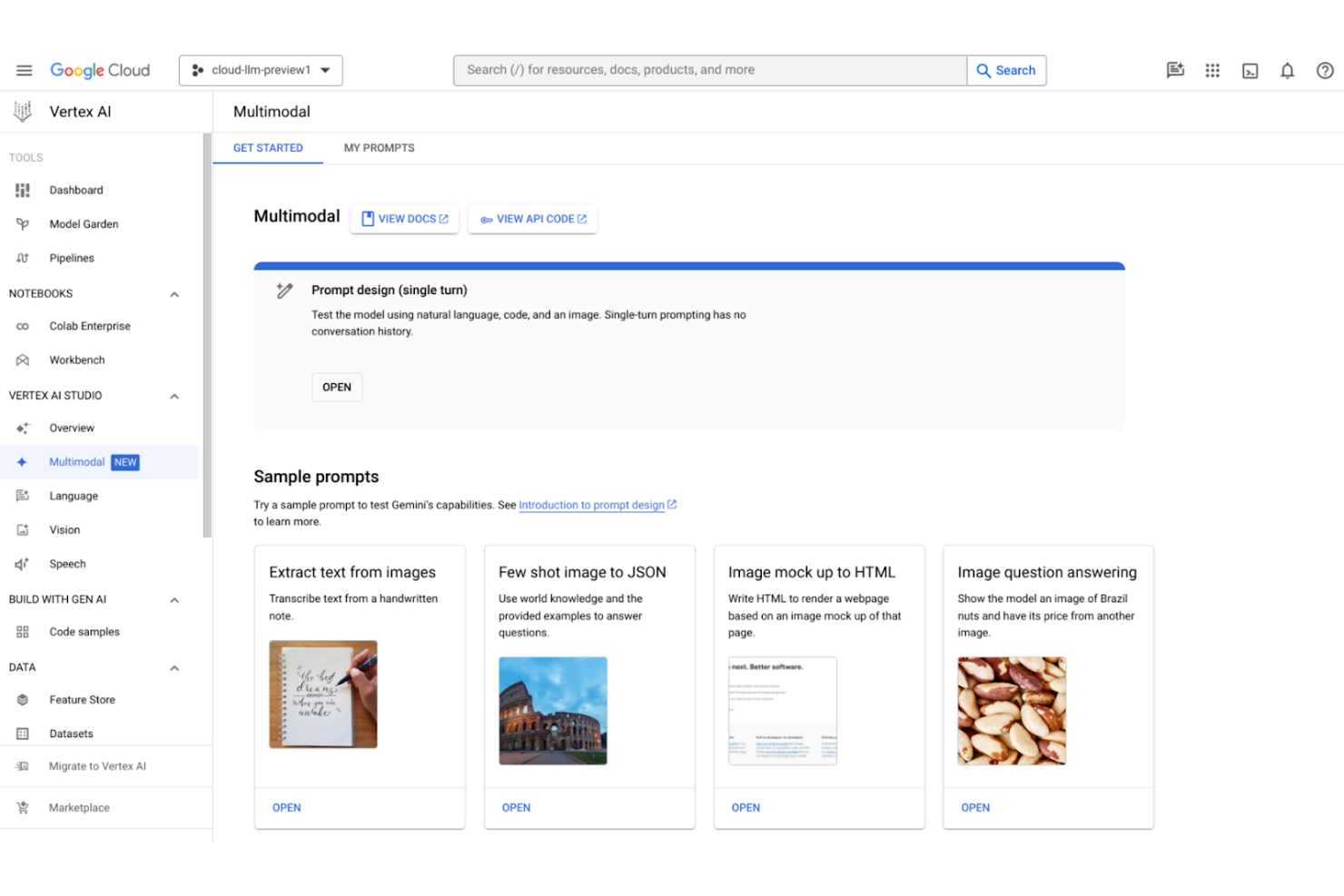
Managing AI projects across multiple tools and cloud services can quickly become complex, especially as models scale and teams grow. Vertex AI is a machine learning software platform on Google Cloud that brings data preparation, training, deployment, and monitoring into one managed environment. It supports both predictive and generative AI workloads, helping teams reduce workflow fragmentation and operate at scale.
In this review, you’ll get an overview of Vertex AI’s features, use cases, pros and cons, and pricing to decide if it fits your needs.
Vertex AI Evaluation Summary
- From $0.19/user/hour for training models with standard machines
Why Trust Our Software Reviews
Vertex AI Overview
Vertex AI is a computer vision and machine learning software platform on Google Cloud that brings together model training, deployment, generative AI, and MLOps in one managed environment. It offers access to Gemini and other models, along with scalable infrastructure for production AI workloads.
Its strengths include deep cloud integration and enterprise governance, though its usage-based pricing and cloud setup may require careful cost monitoring and technical familiarity.
pros
-
Model monitoring tools help track drift and performance.
-
AutoML supports custom model creation without deep coding.
-
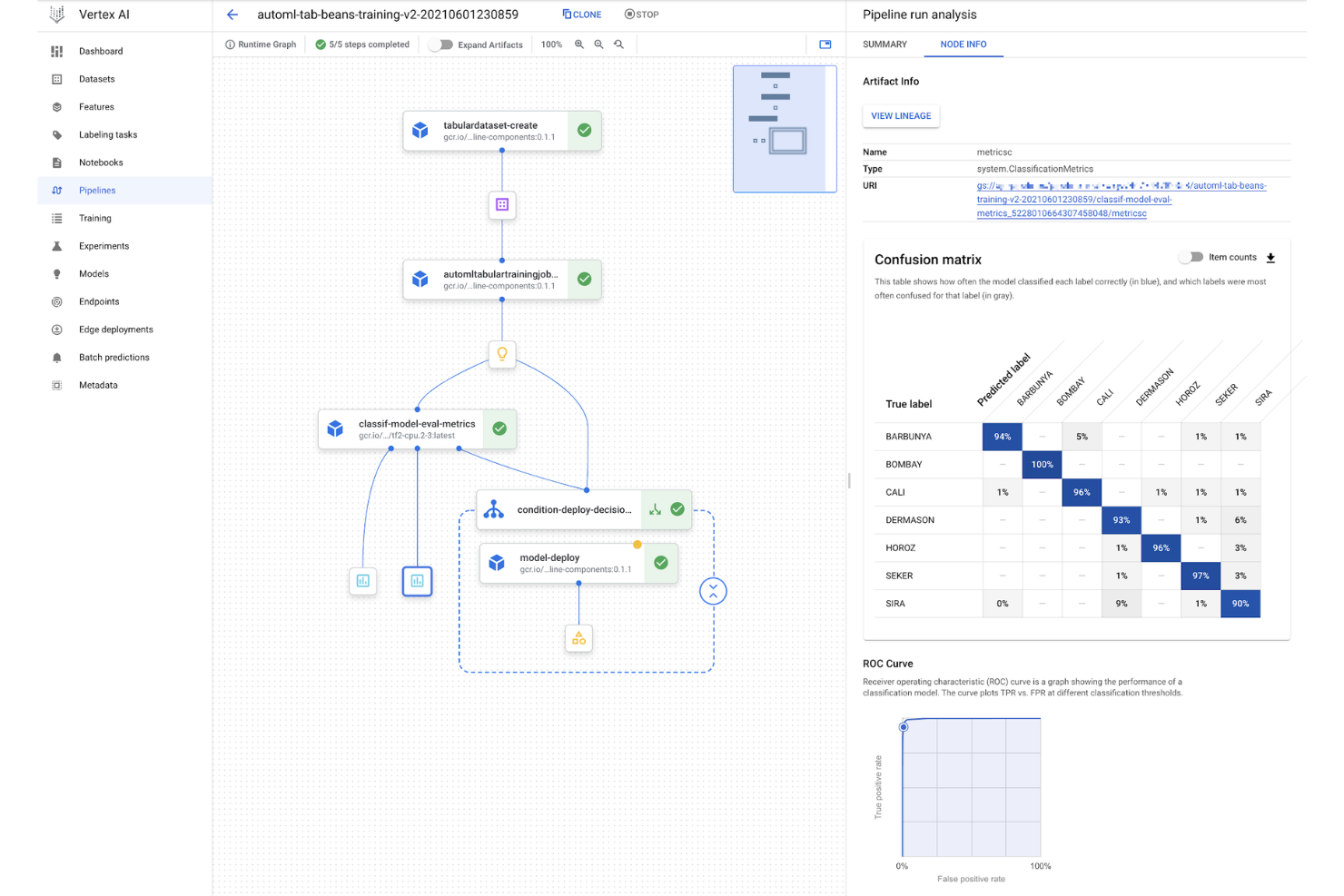
Managed pipelines automate model training and deployment.
cons
-
Limited transparency in resource usage and billing details.
-
Onboarding is challenging for teams new to Google Cloud.
-
Pricing structure is complex and hard to predict.
-

Site24x7
Visit WebsiteThis is an aggregated rating for this tool including ratings from Crozdesk users and ratings from other sites.4.6 -
Docker
Visit WebsiteThis is an aggregated rating for this tool including ratings from Crozdesk users and ratings from other sites.4.6 -
Pulumi
Visit WebsiteThis is an aggregated rating for this tool including ratings from Crozdesk users and ratings from other sites.4.8





Our Review Methodology
How We Test & Score Tools
We’ve spent years building, refining, and improving our software testing and scoring system. The rubric is designed to capture the nuances of software selection and what makes a tool effective, focusing on critical aspects of the decision-making process.
Below, you can see exactly how our testing and scoring works across seven criteria. It allows us to provide an unbiased evaluation of the software based on core functionality, standout features, ease of use, onboarding, customer support, integrations, customer reviews, and value for money.
Core Functionality (25% of final scoring)
The starting point of our evaluation is always the core functionality of the tool. Does it have the basic features and functions that a user would expect to see? Are any of those core features locked to higher-tiered pricing plans? At its core, we expect a tool to stand up against the baseline capabilities of its competitors.
Standout Features (25% of final scoring)
Next, we evaluate uncommon standout features that go above and beyond the core functionality typically found in tools of its kind. A high score reflects specialized or unique features that make the product faster, more efficient, or offer additional value to the user.
We also evaluate how easy it is to integrate with other tools typically found in the tech stack to expand the functionality and utility of the software. Tools offering plentiful native integrations, 3rd party connections, and API access to build custom integrations score best.
Ease of Use (10% of final scoring)
We consider how quick and easy it is to execute the tasks defined in the core functionality using the tool. High scoring software is well designed, intuitive to use, offers mobile apps, provides templates, and makes relatively complex tasks seem simple.
Onboarding (10% of final scoring)
We know how important rapid team adoption is for a new platform, so we evaluate how easy it is to learn and use a tool with minimal training. We evaluate how quickly a team member can get set up and start using the tool with no experience. High scoring solutions indicate little or no support is required.
Customer Support (10% of final scoring)
We review how quick and easy it is to get unstuck and find help by phone, live chat, or knowledge base. Tools and companies that provide real-time support score best, while chatbots score worst.
Customer Reviews (10% of final scoring)
Beyond our own testing and evaluation, we consider the net promoter score from current and past customers. We review their likelihood, given the option, to choose the tool again for the core functionality. A high scoring software reflects a high net promoter score from current or past customers.
Value for Money (10% of final scoring)
Lastly, in consideration of all the other criteria, we review the average price of entry level plans against the core features and consider the value of the other evaluation criteria. Software that delivers more, for less, will score higher.
Core Features
Gemini Multimodal Models
Access Google’s Gemini models for text, image, video, code, and multimodal generation. Developers can prompt, test, and build applications using Gemini through Vertex AI Studio and APIs.
Model Garden
Choose from 200+ first-party, third-party, and open models, including Gemini, Imagen, Claude, and Llama. Models can be tuned and customized for specific enterprise use cases.
Managed Training & Prediction
Train custom machine learning models using managed infrastructure and deploy them to production with scalable prediction services.
Integrated Notebooks & BigQuery
Work within Vertex AI Workbench or Colab Enterprise, with native BigQuery integration to unify data, experimentation, and deployment workflows.
MLOps & Model Lifecycle Management
Use built-in tools like Pipelines, Model Registry, Feature Store, and Evaluation to manage, automate, and monitor models across their lifecycle.
AI Agent Development
Build, deploy, and govern enterprise AI agents powered by Gemini models, designed for scalable, production-ready applications.
Ease of Use
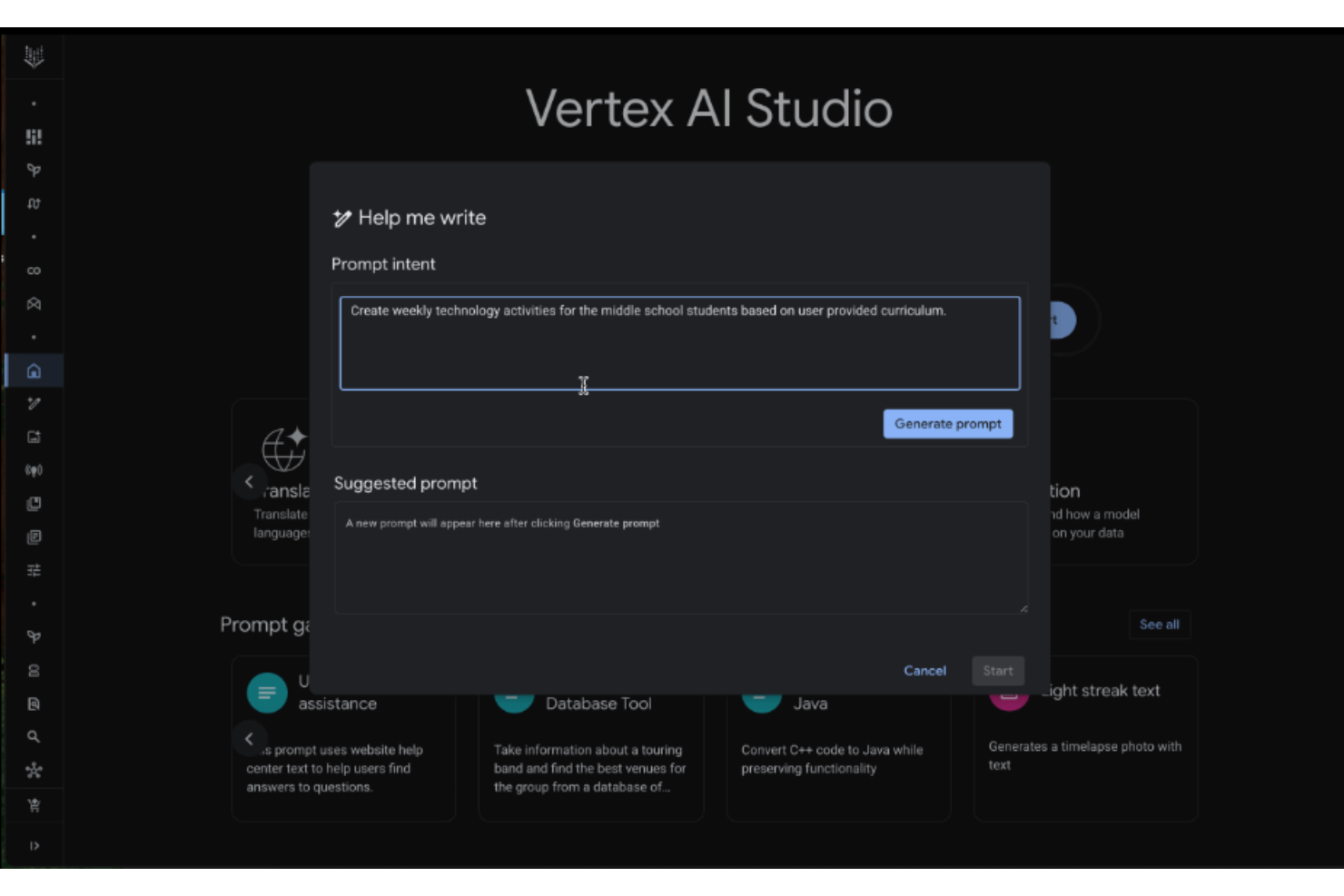
Vertex AI offers a polished interface and guided workflows, but its usability depends heavily on your familiarity with Google Cloud. Many users appreciate the streamlined AutoML and Workbench environments for rapid prototyping, yet the platform’s depth and configuration options can feel overwhelming for newcomers. Documentation is thorough, but onboarding often requires cloud expertise and time to navigate the full range of features, making it best suited for technically proficient teams.
Integrations
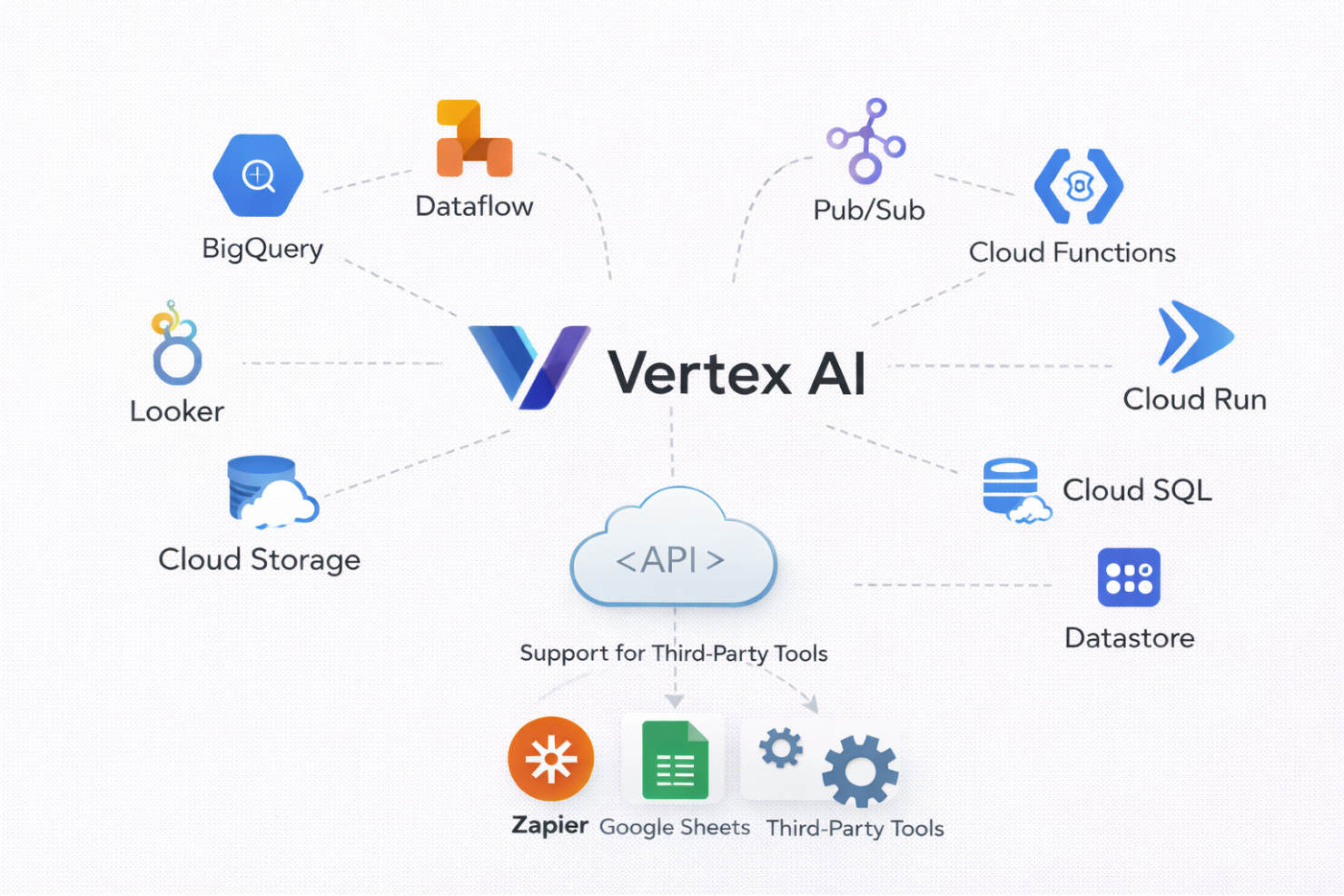
Vertex AI integrates with BigQuery, Dataflow, Dataproc, Looker, Cloud Storage, Pub/Sub, Cloud Functions, Cloud Run, Cloud SQL, and Datastore, among others.
Vertex AI also offers a robust API and supports connections with third-party integration tools.
Vertex AI Specs
- A/B Testing
- Analytics
- API
- Big Data
- Cloud Deployment
- Dashboard
- Data Export
- Data Import
- Data Mining
- Data Visualization
- External Integrations
- Local Deployment
- Multi-User
- Optimized Search Processing
- SAP Integration
- Sentiment Analysis