


ThreatLocker vs. SentinelOne: Comparison & Expert Reviews For 2026


If you’re comparing ThreatLocker and SentinelOne right now, chances are you’re feeling the pressure of ransomware headlines and board-level questions about cyber risk. Confirmed ransomware incidents keep climbing, with recovery often costing more than the ransom itself—so getting endpoint protection with the right cybersecurity software is no longer a “nice to have,” it’s a business continuity decision.
In this article, I’ll walk you through how ThreatLocker’s default-deny Zero Trust approach stacks up against SentinelOne’s AI-driven, autonomous EDR, and what that really means for your day-to-day security operations, budget, and team capacity. You’ll see where each platform shines, where it falls short, and which scenarios favor one over the other, so you can make a confident, defensible choice for your organization.
ThreatLocker vs. SentinelOne: An Overview
ThreatLocker

SentinelOne
Why Trust Our Software Reviews
We’ve been testing and reviewing software since 2023. As tech leaders ourselves, we know how critical and difficult it is to make the right decision when selecting software.
We invest in deep research to help our audience make better software purchasing decisions. We’ve tested more than 2,000 tools for different tech use cases and written over 1,000 comprehensive software reviews. Learn how we stay transparent & our software review methodology.
ThreatLocker vs. SentinelOne Pricing Comparison
| ThreatLocker | SentinelOne | |
|---|---|---|
| Free Trial | 30-day free trial + free demo available | Free demo available |
| Pricing | Pricing upon request | From $179.99/endpoint (billed annually) |
ThreatLocker vs. SentinelOne Pricing & Hidden Costs
ThreatLocker uses a custom, environment-based subscription model rather than public per-endpoint pricing. Quotes are built around factors like endpoint count, application landscape, and required Zero Trust controls such as application allowlisting and ringfencing. Additional capabilities, including network control or patch management, are typically scoped into the overall plan rather than added later as surprise fees.
SentinelOne offers public, annual per-endpoint pricing tiers, including Core, Control, Complete, Commercial, and Enterprise. Costs increase as organizations move into higher tiers to access features like extended data retention, managed threat hunting, MDR services, and cloud workload protection.
ThreatLocker vs. SentinelOne Feature Comparison
ThreatLocker’s core strength is Zero Trust enforcement, operating on a default-deny model that only allows explicitly approved software and actions. Its key controls include Allowlisting, Ringfencing, Elevation Control, Storage Control, and Network Control to restrict what can run, how it behaves, and what it can access, helping limit living-off-the-land abuse and unauthorized lateral movement while enabling enforceable technical compliance controls.
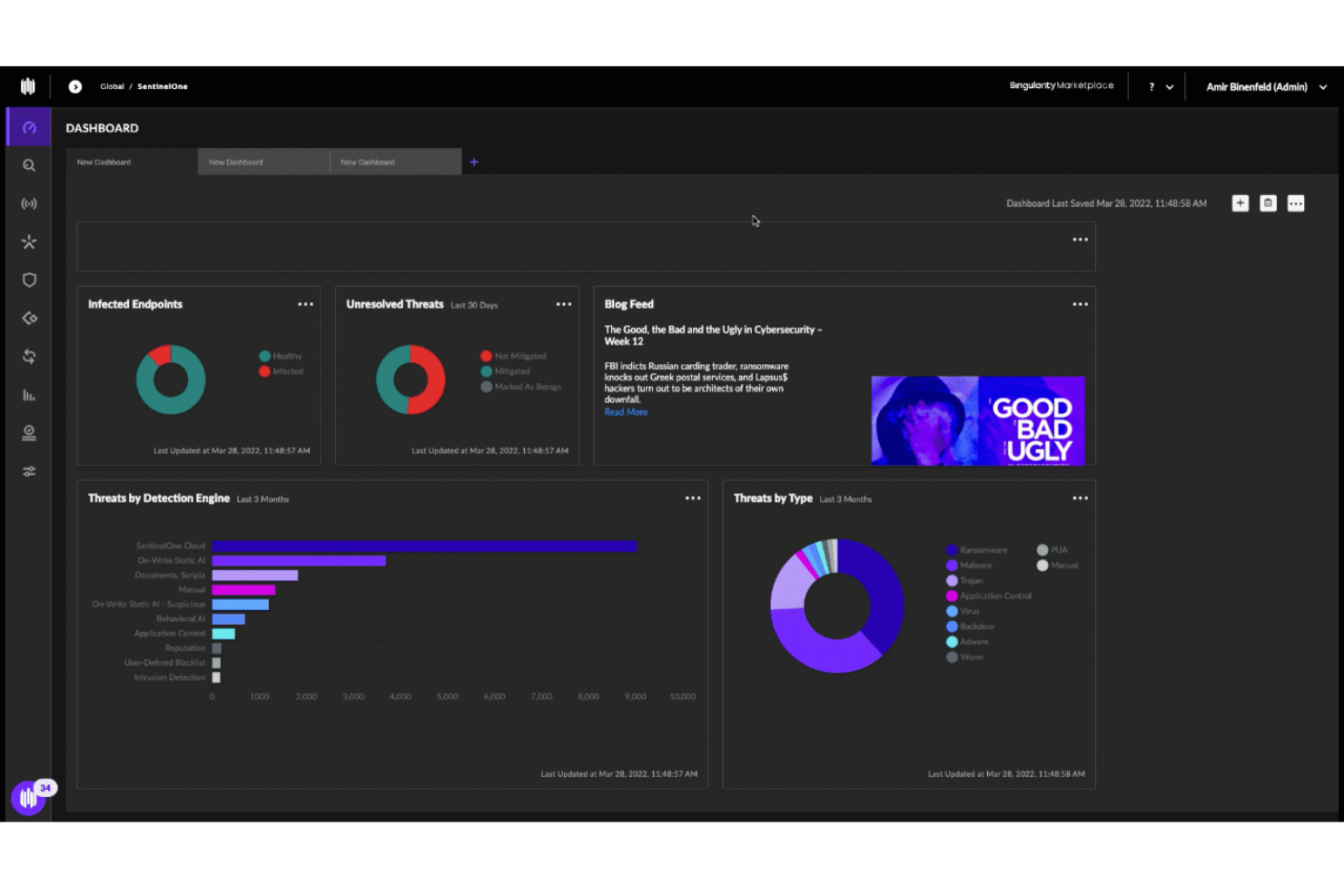
SentinelOne’s Singularity platform centers on AI-driven EPP/EDR/XDR, using static and behavioral AI engines to detect and autonomously respond to known and unknown threats. Its capabilities span real-time prevention, detection, and automated remediation across endpoints (and extended tiers support cloud, identity, and managed services), with tech like Storyline linking related suspicious activity for richer context. Singularity also offers rollback and forensic features to recover from ransomware or destructive attacks without manual intervention.
| ThreatLocker | SentinelOne | |
|---|---|---|
| 2-Factor Authentication | ||
| API | ||
| Access Management | ||
| Anti-Virus | ||
| Audit Management | ||
| Audit Trail | ||
| Batch Permissions & Access | ||
| Compliance Tracking | ||
| DDoS Protection | ||
| Dashboard | ||
| Data Export | ||
| Data Import | ||
| External Integrations | ||
| File Sharing | ||
| File Transfer | ||
| Firewall | ||
| Incident Management | ||
| Malware Protection | ||
| Multi-User | ||
| Notifications | ||
| Password & Access Management | ||
| Policy Management | ||
| Real-time Alerts | ||
| Report & Compliance | ||
| Risk Assessment | ||
| Security Migration | ||
| Threat Detection | ||
| Workflow Management |
ThreatLocker vs. SentinelOne Integrations
| Tool | ThreatLocker | SentinelOne |
| ConnectWise | ✅ | ✅ |
| Datto RMM | ✅ | ✅ |
| Kaseya | ✅ | ✅ |
| N-able | ✅ | ✅ |
| Autotask | ✅ | ✅ |
| ServiceNow | ✅ | ✅ |
| Splunk | ✅ | ✅ |
| Microsoft Sentinel | ✅ | ✅ |
| Cribl Stream | ❌ | ✅ |
| Okta | ✅ | ✅ |
| Azure AD | ✅ | ✅ |
| Jira | ✅ | ✅ |
| Elastic | ✅ | ✅ |
Both platforms integrate well with a modern SecOps stack, but in different ways: ThreatLocker focuses on tight alignment with MSP tooling like RMM and PSA so you can operationalize Zero Trust policies inside existing service workflows, while SentinelOne leans into broader XDR and AI SIEM ecosystems, giving you richer data flows into SIEM, SOAR, and cloud-native pipelines if you’re building a more centralized, analytics-driven security architecture.
ThreatLocker vs. SentinelOne Security, Compliance & Reliability
| Factor | ThreatLocker | SentinelOne |
| Data Protection and Encryption | Encrypts data in transit and at rest; enforces least-privilege application and storage access via Zero Trust controls. | Encrypts data in transit and at rest with strong access controls across endpoints and cloud workloads. |
| Compliance Support | Helps map controls to NIST, CIS, HIPAA, PCI, ISO 27001, and SOC 2 via policies and configuration checks. | Supports HIPAA, SOC 2, PCI DSS, GDPR, and other standards; offers guidance and tooling for audits and cloud compliance. |
| Access Control and Zero Trust | Deny-by-default Zero Trust model with granular application, storage, and network policy enforcement. | Zero Trust-aligned endpoint and identity protection with behavioral AI and fine-grained policy controls. |
| Audit Logging and Visibility | Detailed logs of application execution, policy decisions, and data access to support investigations and audits. | Deep visibility and telemetry for SOC 2 and HIPAA evidence, threat hunting, and forensics across endpoints and cloud. |
| Reliability and Uptime | Public status page shows consistent 99.9%+ portal uptime in recent months. | Enterprise-grade availability backed by global cloud infrastructure and controls aligned to availability TSCs. |
ThreatLocker enforces a strict default-deny Zero Trust model with granular controls that can support compliance efforts by generating clear audit logs and enforcing technical safeguards aligned with frameworks like NIST, HIPAA, and ISO 27001. SentinelOne’s AI-driven Singularity platform provides broader visibility and protection across endpoints, cloud workloads, and identities, with centralized telemetry and reporting that can help organizations assemble audit evidence for frameworks such as SOC 2, HIPAA, and PCI-DSS in complex environments.
ThreatLocker vs. SentinelOne Ease of Use
| Factor | ThreatLocker | SentinelOne |
| Admin Interface | ThreatLocker’s interface is intuitive and straightforward once policies are in place. | Has a modern unified console; powerful but can feel complex for less-technical users. |
| Setup and Deployment | Lightweight agent and learning mode make rollout and policy baselineing relatively painless. | Single agent for endpoint, cloud, and identity simplifies deployment across large estates. |
| Oneboarding Experience | Strong guided onboarding with “learning mode” and frequent success check-ins from the ThreatLocker team. | Offers structured onboarding and training but may require more tuning for advanced features. |
| Day-To-Day Management | Policy-driven workflow that’s easy to adjust but can add admin overhead in very dynamic environments. | Centralized alerts and automation reduce manual triage, though deep hunting features add complexity. |
| Support Quality | Frequently praised for extremely fast, hands-on support. It can often take minutes to reach an engineer. | Highly rated support and documentation, though responsiveness is slightly behind ThreatLocker. |
In practice, many teams find ThreatLocker approachable once initial policy tuning is complete, especially if they value guided onboarding, fast access to human support, and a policy-centric interface. SentinelOne offers a polished, unified console that scales well for larger or more mature security teams, but its broad feature set and threat-hunting capabilities typically come with a steeper learning curve before organizations unlock full value.
ThreatLocker vs SentinelOne: Pros & Cons
ThreatLocker
- Detailed logging supports compliance, audits, and forensic investigations.
- Granular control over applications, storage, and network access.
- Delivers strong prevention against ransomware and zero-days.
- End-user friction arises from strict controls that block routine software installs.
- Not a set-and-forget security solution for most environments.
- Steep initial learning curve and tuning period, requires upfront policy work to avoid blocking legitimate apps.
SentinelOne
- Stops attacks and restores systems without intervention.
- Identifies known and unknown threats automatically.
- Broad platform coverage, protecting endpoints, cloud workloads, and identities.
- Heavy emphasis on autonomous response may not be ideal for teams that need more manual control.
- Steep learning curve. Full value requires security expertise.
- Advanced features increase licensing expenses.
Best Use Cases for ThreatLocker and SentinelOne
ThreatLocker
- MSPs Managing Multiple Clients Centralized cloud portal and RMM integrations let you deploy and tune policies across diverse environments without constant per-client tweaks.
- Healthcare Organizations Granular storage and elevation controls protect patient data on USBs, shares, and apps while meeting HIPAA compliance through audit trails.
- Educational Institutions Locks down student devices and servers against unauthorized software, reducing risks from unvetted apps in shared environments.
- Midmarket Enterprises Balances strong prevention with learning modes to build allowlists quickly, minimizing disruption during rollout.
- High-Compliance Industries Ringfencing and network controls limit lateral movement and data exfiltration, simplifying audits with detailed enforcement logs.
- Remote/Hybrid Workforces Dynamic network ACLs secure traveling endpoints by whitelisting specific IPs or keywords without VPN overhead.
SentinelOne
- Large Enterprises Protect thousands of endpoints and servers while maintaining centralized visibility and consistent security policies across global environments.
- Cloud-First SaaS Companies Secure cloud workloads, containers, and remote endpoints in fast-changing, highly dynamic infrastructure environments.
- Healthcare and Financial Services Firms Detect and respond to advanced threats while maintaining visibility and audit evidence for strict regulatory requirements.
- Organizations with Internal SOC Teams Enable proactive threat hunting, automated incident response, and deep forensic investigations using centralized telemetry and AI analytics.
- Hybrid IT Environments Unify security operations across on-premises infrastructure, public cloud, and remote workforce endpoints through a single platform.
- Ransomware-Targeted Industries Automatically detect ransomware, stop encryption activity, and restore impacted systems to minimize downtime and operational impact.
Who Should Use ThreatLocker, and Who Should Use SentinelOne?
ThreatLocker fits teams that want strict default-deny controls and strong application governance, such as MSPs, regulated organizations, and IT groups managing legacy systems or many small tenants. Its allowlisting-first approach and policy focus help reduce attack surface and support compliance evidence gathering without needing a large SOC.
SentinelOne suits larger or cloud-first organizations that need broad AI-driven EPP/EDR/XDR across endpoints, identities, and cloud workloads. Its unified Singularity platform is ideal for teams that want automated detection, response, and hunting at scale, with deep telemetry and centralized visibility rather than per-app allowlist management.
Differences Between ThreatLocker and SentinelOne
| ThreatLocker | SentinelOne | |
|---|---|---|
| Control | ThreatLocker gives you surgical control over applications and storage, helping dictate which processes run, what network connections they make, and how the access data—particularly when you’re looking to lock down critical servers or specialized applications with strict compliance requirements. | SentinelOne covers more territory, from laptops to servers to cloud workloads, while pulling in security telemetry from across your tech stack with a unified view that gives you the comprehensive oversight you need. |
| MSP Compatibility | ThreatLocker’s multi-tenant console lets MSPs handle dozens of clients in one place, with plug-and-play integrations, saving teams hours of management time every week. | SentinelOne caters to enterprises with full security teams with SOC analysts loving its API-first design that plugs right into multiple tools, beefing up investigations and putting response playbooks on autopilot. |
| Policy Configuration | ThreatLocker requires users to invest time building policies, approving legitimate apps, and managing exceptions—particularly if users are constantly installing new software or your dev team pushes frequent updates. | With SentinelOne, automation reduces manual blocking decisions, yet you’ll invest more effort in triaging alerts, tuning detection rules, and using hunting features to get full value from the platform. |
| Zero Trust | ThreatLocker uses a Zero Trust, default-deny model that prevents threats by only allowing approved applications and behaviors to run, blocking malicious code before execution. | SentinelOne relies on AI-driven behavioral analysis to prevent and detect threats, focusing on identifying and automatically stopping malicious activity in real time rather than enforcing strict default-deny policies. |
| Visit ThreatLockerOpens new window | Read SentinelOne ReviewOpens new window |
Similarities Between ThreatLocker and SentinelOne
| Agent Architectures | Both offer lightweight agents that protect devices, even when they’re offline, then sync with the cloud when reconnected, protecting remote teams from anywhere they work with no system slowdowns. |
|---|---|
| Behavior Visibility | Each platform provides detailed visibility into application and process behavior, helping teams understand what is running and why actions are allowed or blocked. |
| Compliance | Both automatically track and document security events across major compliance frameworks, with detailed records that satisfy the most thorough auditors. |
| Endpoint Protection | Both go beyond detection to proactively block ransomware, malware, and zero-day attacks across your devices. |
| Real-Time Protection | Both respond to emerging threats, automatically isolating compromised systems and blocking lateral movement. |
| Visit ThreatLockerOpens new window Read SentinelOne ReviewOpens new window | |