

Roboflow vs. Encord: Comparison & Expert Reviews for 2026


As an AI or machine learning developer, you know how challenging it can be to manage datasets, maintain annotation quality, and move models into production—especially as projects scale. Tools that help you organize data, automate labeling, and integrate smoothly into your workflow are essential.
In this guide, I’ll walk you through Roboflow and Encord, two leading machine learning platforms. I’ll break down their features, strengths, pricing, and use cases so you can decide which one best fits your development workflow.
Roboflow vs. Encord: An Overview
Roboflow
Why Trust Our Software Reviews
Roboflow vs. Encord Pricing Comparison
| Roboflow | Encord | |
|---|---|---|
| Free Trial | Free plan available | Free demo available |
| Pricing | From $79/month (for 3 users, billed annually) | Pricing upon request |
Roboflow vs. Encord Pricing & Hidden Costs
Roboflow uses a tier-based pricing model with a free option and paid tiers that expand dataset limits, collaboration features, and deployment capabilities. Costs can rise with increased usage, particularly around training, storage, and API inference. Encord also follows a tiered structure that scales based on team size, data volume, and access to advanced features such as automation, model evaluation, and enterprise infrastructure. For both platforms, larger production workloads and enterprise support can increase overall spend.
When deciding, consider how your dataset size, annotation volume, and team collaboration needs are likely to grow. Review usage limits, infrastructure options, and support inclusions to avoid unexpected scaling costs.
Roboflow vs. Encord Feature Comparison
| Roboflow | Encord | |
|---|---|---|
| A/B Testing | ||
| API | ||
| Analytics | ||
| Dashboard | ||
| Data Export | ||
| Data Import | ||
| Data Mining | ||
| Data Visualization | ||
| External Integrations | ||
| Multi-User | ||
| Sentiment Analysis |
Roboflow vs. Encord Integrations
| Integration | Roboflow | Encord |
|---|---|---|
| AWS S3 | ✅ | ✅ |
| Google Cloud Storage | ✅ | ✅ |
| Azure Blob Storage | ✅ | ✅ |
| Labelbox | ✅ | ❌ |
| CVAT | ✅ | ✅ |
| YOLOv8* | ✅ | ❌ |
| TensorFlow* | ✅ | ✅ |
| PyTorch* | ✅ | ✅ |
| API | ✅ | ✅ |
| Zapier | ✅ | ❌ |
*Framework = Support refers to model or dataset compatibility.
Both Roboflow and Encord support major cloud storage providers and machine learning frameworks, helping you move data and models across your pipeline. Roboflow emphasizes developer-friendly integrations and automation tools, while Encord focuses on enterprise data ecosystem compatibility.
Roboflow vs. Encord Security, Compliance & Reliability
| Factor | Roboflow | Encord |
|---|---|---|
| Data Privacy | Provides workspace and project-level access controls to manage dataset visibility and collaboration. | Offers role-based permissions and detailed audit logging for user actions. |
| Regulatory Compliance | Maintains SOC 2 Type II compliance and offers HIPAA-aligned infrastructure with BAA under agreement. | Provides SOC 2, GDPR, and HIPAA-compliant infrastructure, with security and privacy controls verified through Vanta. |
| Encryption | Encrypts data in transit and at rest, with SSL transport rated A+ by Qualys. | Uses AES-256 encryption for data at rest and secure encryption protocols for data in transit. |
| Uptime & Reliability | Publishes service status updates and may provide SLAs for enterprise customers. | Offers high-availability infrastructure with enterprise SLAs available. |
| Auditability | Tracks dataset versioning and user activity for traceability. | Maintains comprehensive audit logs for project and annotation activity. |
| Infrastructure Options | Supports cloud and private deployment options on enterprise plans. | Offers VPC and on-prem deployment options for enterprise customers. |
Both Roboflow and Encord provide core security features, including encryption, access controls, and activity tracking. Roboflow focuses on practical, secure model development and deployment, while Encord emphasizes enterprise governance and compliance. As a result, Encord may suit regulated environments, whereas Roboflow fits secure, production-ready vision workflows.
Roboflow vs. Encord Ease of Use
| Factor | Roboflow | Encord |
|---|---|---|
| User Interface | Clean, intuitive interface with drag-and-drop dataset tools and simple navigation. | More advanced interface with configurable annotation panels and workflow controls. |
| Onboarding | Guided tutorials, documentation, and sample projects support quick setup for new users. | Provides learning resources and guided setup, with dedicated onboarding support for Teams and Enterprise users. |
| Setup Process | Allows fast project setup with prebuilt workflows and integrations. | Requires more configuration but supports complex, custom workflows. |
| Support Resources | Maintains an active community forum and extensive documentation. | Features email support, an AI documentation assistant, and detailed technical docs, with enterprise assistance available. |
| Collaboration | Enables easy team invites and shared project spaces. | Supports granular role assignments and real-time annotation review. |
Roboflow is generally easier for new users to adopt, with fast setup and a straightforward interface. Encord is built for teams that need deeper customization and structured collaboration. While it may require more setup, it supports structured review processes and granular role assignments suited for larger annotation teams.
Roboflow vs Encord: Pros & Cons
Roboflow
- Offers open source tools and public datasets for experimentation.
- Supports deployment to edge devices, cloud, or on-premises.
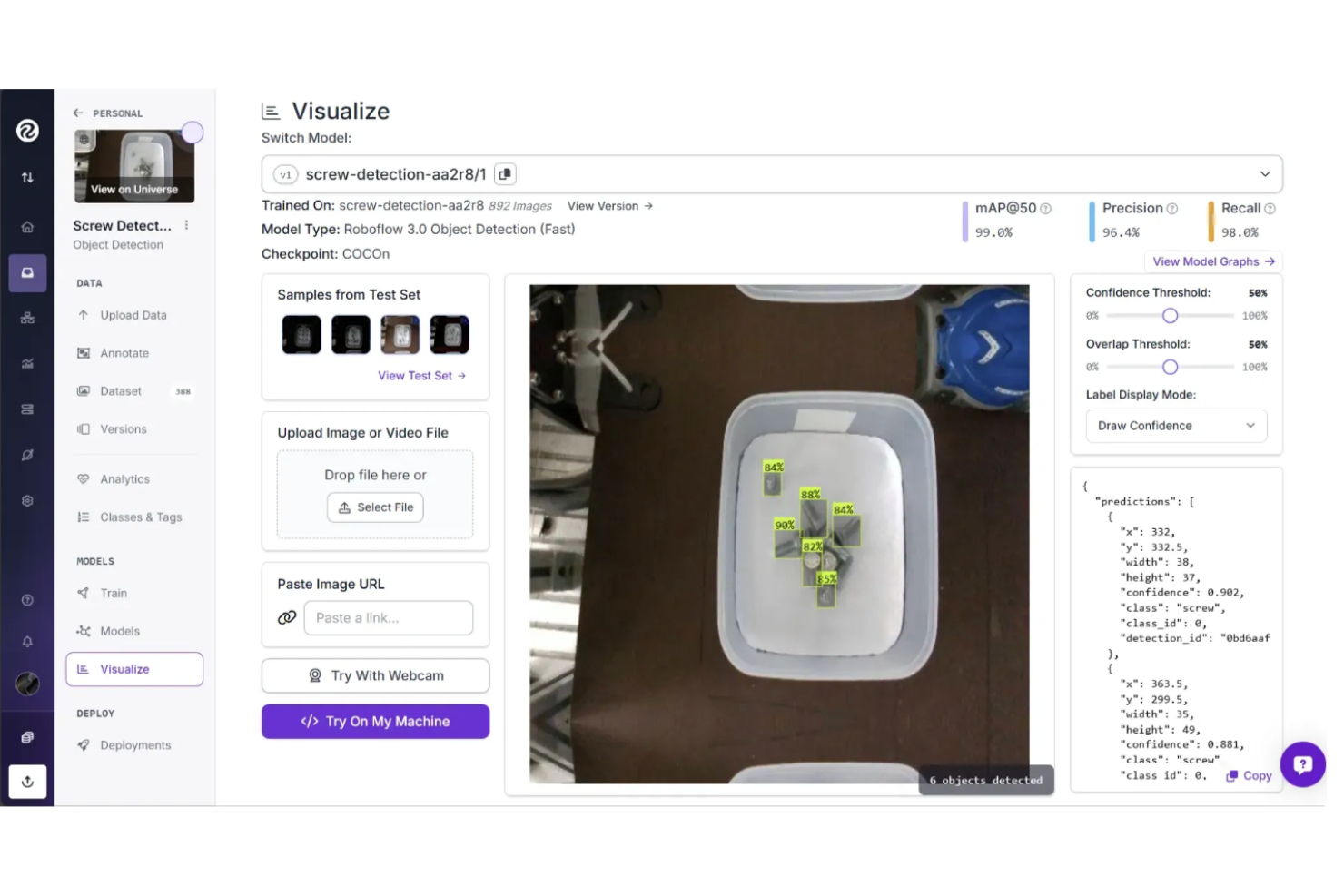
- AI-assisted annotation speeds up labeling large datasets.
- Performance and latency vary by deployment method.
- Limited low-level customization compared to fully custom ML pipelines.
- Costs can scale quickly with high-volume training and inference.
Encord
- Detailed ontology and taxonomy management features.
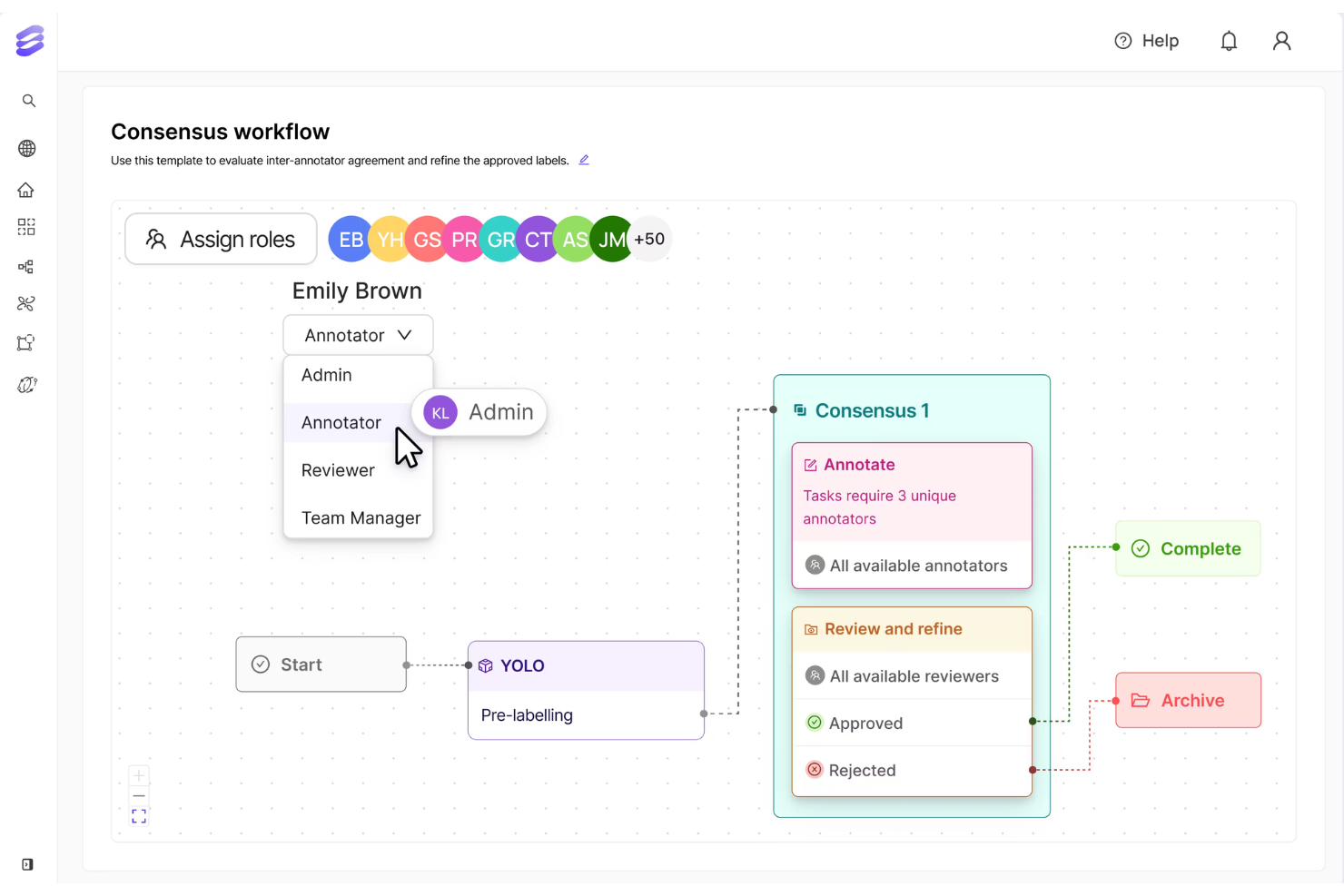
- Strong workflow automation for large-scale projects.
- Advanced video and multimodal annotation tools.
- Pricing may be high for small teams or startups.
- Occasional performance lags with very large datasets.
- Limited model training capabilities compared to some platforms.
Best Use Cases for Roboflow and Encord
Roboflow
- Manufacturing Deploy vision AI to automate quality inspections, detect defects, track inventory, and improve efficiency across modern manufacturing operations.
- Industrial Manufacturing Use vision AI to monitor equipment performance, prevent downtime, automate inspections, and optimize complex industrial production environments at scale.
- Healthcare & Medicine Apply vision AI to analyze medical imagery, monitor patients, automate workflows, and improve diagnostic accuracy and healthcare outcomes.
- Automotive Enhance automotive manufacturing with vision AI that detects defects, monitors assembly lines, optimizes processes, and prevents costly production downtime.
- Aerospace & Defense Use vision AI to inspect components, verify assembly accuracy, monitor safety compliance, and ensure quality across aerospace manufacturing operations.
- Consumer Goods Protect product quality and brand trust using vision AI to inspect packaging, verify labels, detect defects, and optimize production.
Encord
- Enterprise AI Strategy & Innovation Offices Organizations scaling AI across business units benefit from centralized governance and collaboration infrastructure.
- Data Operations & MLOps Functions Teams responsible for dataset orchestration, versioning, and workflow automation gain better coordination and oversight.
- Robotics & Physical AI Programs Engineering units working with multimodal or sequential sensor data can manage complex real-world datasets.
- Healthcare AI & Clinical Data Divisions Regulated environments benefit from audit trails, governance controls, and traceable annotation pipelines.
- Computer Vision & Data Engineering Teams Departments managing large-scale image and video datasets can leverage collaborative annotation and version control.
- AI Research & Model Development Departments Groups building generative or frontier models benefit from structured evaluation and post-training alignment workflows.
Who Should Use Roboflow, and Who Should Use Encord?
If you want to move quickly from data to deployed computer vision models, Roboflow is likely the better fit. It works best when you need simple workflows, fast setup, and an all-in-one platform for dataset management, annotation, training, and deployment. This makes it a practical choice for developers building real-world vision applications without managing complex ML infrastructure.
If your priority is building high-quality training data for complex or multimodal AI, Encord may suit you better. It is better suited for teams needing structured annotation workflows, strong collaboration, and deeper data governance for large-scale AI systems.
Differences Between Roboflow and Encord
| Roboflow | Encord | |
|---|---|---|
| Collaboration | Shared workspaces and simple team collaboration for dataset and model workflows. | Granular roles, structured review pipelines, and collaboration built for large annotation teams. |
| Core Focus | End-to-end computer vision pipeline from dataset to model deployment. | Focuses on enterprise-grade annotation, data curation, and QA workflows. |
| Dataset Management | Provides dataset versioning and simple data organization for iterative model training and experimentation. | Offers advanced data management, including dataset governance, audit trails, and quality monitoring, across large-scale pipelines. |
| Modalities Supported | Primarily images and video (with plugins/export). | Multimodal, including LiDAR, DICOM/medical, audio, and documents. |
| Pricing Model | Tiered subscription with free and paid plans based on usage and features. | Tiered and usage-based pricing, often customized for enterprise data and workflow needs. |
| Visit RoboflowOpens new window | Read Encord ReviewOpens new window |
Similarities Between Roboflow and Encord
| API Availability | Both offer robust APIs that allow teams to automate dataset management, integrate with ML pipelines, and build custom workflows. |
|---|---|
| Annotation Capabilities | Both provide image and video annotation tools with support for multiple labeling formats, automation assistance, and quality control features for building high-quality datasets. |
| Cloud Storage | Both integrate with major cloud storage providers such as AWS S3, Google Cloud Storage, and Azure Blob Storage for importing, syncing, and exporting datasets. |
| Computer Vision | Both provide tools to prepare visual data for computer vision workflows. |
| Data Security | Both implement enterprise-grade security practices, including encryption at rest and in transit, to ensure safe handling of datasets. |
| Visit RoboflowOpens new window Read Encord ReviewOpens new window | |