

IBM Turbonomic Review: Key Features, Pros, Cons, and Pricing Explained
IBM Turbonomic stands out for its AI-driven automation and real-time resource optimization, making it ideal for complex cloud migrations, but may be best suited for larger enterprises.

We review tools independently, and commissions help fund our testing. See our transparency policy, our methodology, or suggest a tool.
IBM Turbonomic is an AI-driven cloud migration solution that automates workload placement and right-sizing across hybrid and multi-cloud environments. I'd consider it if your infrastructure team needs to migrate workloads while keeping performance and costs in check, without relying on manual analysis at every step. Compared to CloudHealth by VMware, Turbonomic goes further by automating resource decisions in real time, rather than just surfacing recommendations for your team to act on manually.
IBM Turbonomic Evaluation Summary
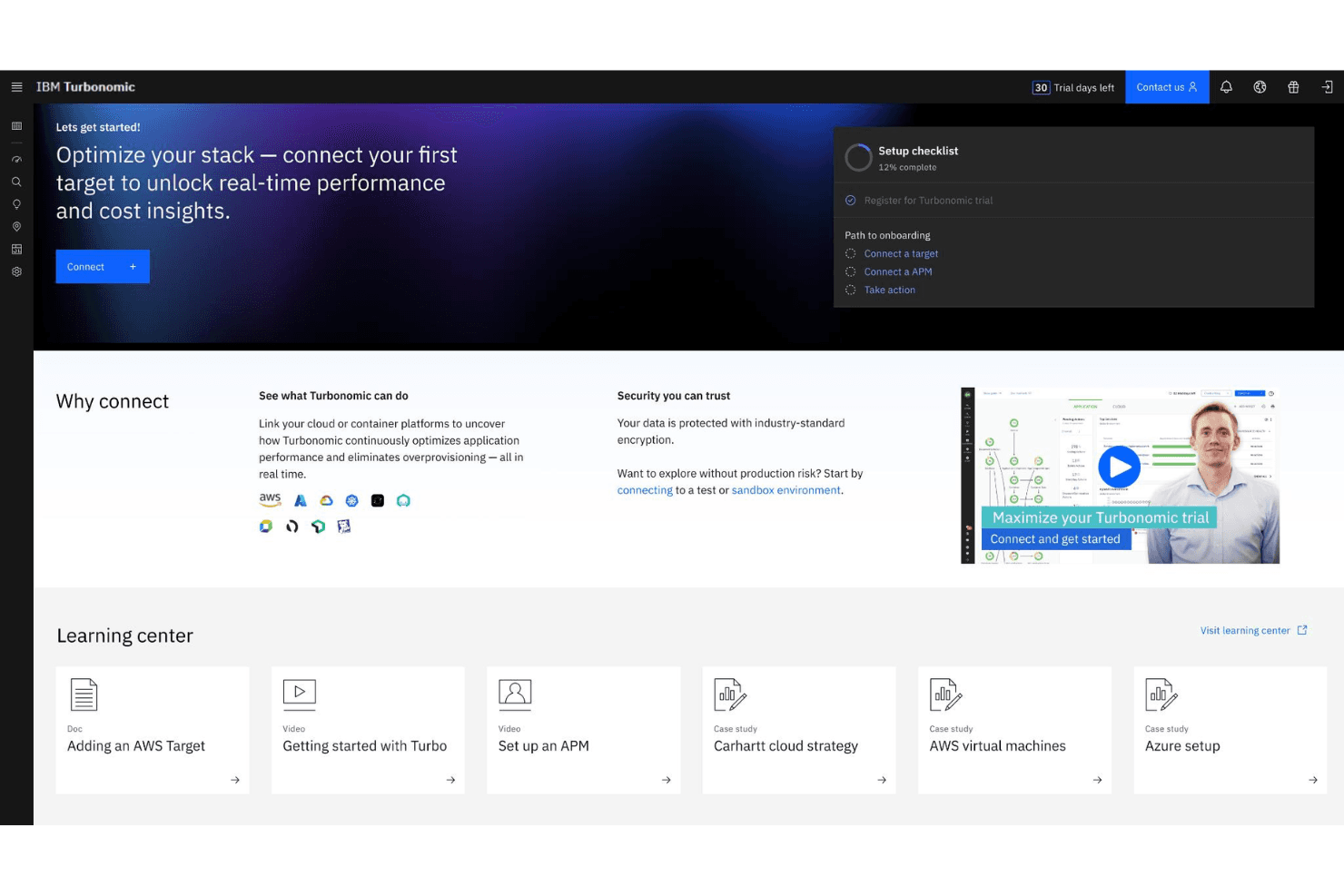
4.4/5
- From $15/user/month (billed annually)
Why Trust Our Software Recommendations
6,700+
Reviews
20
Industry experts
16+
Evaluation factors
14
Years
Our team has been testing and reviewing software since 2012. As tech leaders ourselves, we know how difficult—and important—it is to choose the right software.
For this guide, we evaluated tools using hands-on testing and independent research, scoring tools using our selection criteria.
Our reviews reflect our human editorial judgment, not a sales pitch.
Expert reviewers:
- Paulo Gardini MiguelTech Director
 Tim FisherVP of AI
 Gabriel RosasTech Lead & Software Architect
 Christhian GruhnTech Lead & Platform Architect

IBM Turbonomic Overview
IBM Turbonomic offers advanced automation and resource optimization that set it apart for large-scale or highly dynamic environments. Its AI-driven recommendations and real-time analytics help IT teams make informed purchase decisions during migration, but the user interface and onboarding can feel complex for smaller teams. Pricing is on the higher end, reflecting its enterprise focus and deep integration capabilities. Compared to other options, Turbonomic excels in multi-cloud management and automated scaling, but may be more than what smaller organizations need. If you're evaluating solutions for complex, mission-critical migrations, Turbonomic is a strong contender.
Pros
- Automates resource allocation during cloud migration processes
- Provides real-time analytics for workload performance optimization
- Supports multi-cloud and hybrid cloud environments natively
Cons
- Pricing may be prohibitive for smaller organizations
- Initial setup and configuration can be complex
- Limited documentation for advanced cloud migration scenarios
Is IBM Turbonomic Right For Your Needs?
Who Would be a Good Fit for IBM Turbonomic?
IBM Turbonomic is best suited for organizations with complex, large-scale IT environments that require automated resource management and real-time optimization during cloud migration. Enterprises in regulated industries, global operations, or those running hybrid and multi-cloud architectures will benefit from its AI-driven analytics and automation. Teams responsible for mission-critical workloads or those needing granular visibility into resource usage—whether across a data center, public clouds, or hybrid setups—will find Turbonomic's capabilities especially valuable.
- Large EnterprisesTurbonomic handles high-volume, multi-cloud migrations with advanced automation.
- Financial ServicesIts compliance features and real-time optimization support strict regulatory needs.
- Healthcare ITAutomated resource management helps maintain uptime for critical applications.
- Cloud Operations TeamsReal-time analytics and automation reduce manual intervention during migrations.
- Global RetailersSupports distributed, hybrid environments with dynamic scaling requirements.
- Managed Service ProvidersMulti-tenant support and workload optimization fit service delivery models.
Who Would be a Bad Fit for IBM Turbonomic?
IBM Turbonomic may not be the right choice for smaller businesses, teams with limited IT resources, or organizations with simple cloud migration needs. Its advanced features, pricing, and complexity can be excessive for those who don't require deep automation or multi-cloud support. Companies with limited budgets or those seeking lightweight, easy-to-deploy solutions may find Turbonomic's functionality more than they need.
- Small StartupsThe platform's cost and complexity outweigh basic migration needs.
- Non-Technical TeamsRequires technical expertise for setup and ongoing management.
- Single-Cloud EnvironmentsMulti-cloud features are unnecessary for single-provider migrations.
- SMB IT DepartmentsResource requirements and pricing are not aligned with smaller budgets.
- Temporary ProjectsLong-term automation and optimization are excessive for short-term use.
- Educational InstitutionsBudget constraints and simple infrastructure needs limit Turbonomic's value.
Our Review Methodology
How We Test & Score Tools
We’ve spent years building, refining, and improving our software testing and scoring system. The rubric is designed to capture the nuances of software selection and what makes a tool effective, focusing on critical aspects of the decision-making process.
Below, you can see exactly how our testing and scoring works across seven criteria. It allows us to provide an unbiased evaluation of the software based on core functionality, standout features, ease of use, onboarding, customer support, integrations, customer reviews, and value for money.
Core Functionality (25% of final scoring)
The starting point of our evaluation is always the core functionality of the tool. Does it have the basic features and functions that a user would expect to see? Are any of those core features locked to higher-tiered pricing plans? At its core, we expect a tool to stand up against the baseline capabilities of its competitors.
Standout Features (25% of final scoring)
Next, we evaluate uncommon standout features that go above and beyond the core functionality typically found in tools of its kind. A high score reflects specialized or unique features that make the product faster, more efficient, or offer additional value to the user.
We also evaluate how easy it is to integrate with other tools typically found in the tech stack to expand the functionality and utility of the software. Tools offering plentiful native integrations, 3rd party connections, and API access to build custom integrations score best.
Ease of Use (10% of final scoring)
We consider how quick and easy it is to execute the tasks defined in the core functionality using the tool. High scoring software is well designed, intuitive to use, offers mobile apps, provides templates, and makes relatively complex tasks seem simple.
Onboarding (10% of final scoring)
We know how important rapid team adoption is for a new platform, so we evaluate how easy it is to learn and use a tool with minimal training. We evaluate how quickly a team member can get set up and start using the tool with no experience. High scoring solutions indicate little or no support is required.
Customer Support (10% of final scoring)
We review how quick and easy it is to get unstuck and find help by phone, live chat, or knowledge base. Tools and companies that provide real-time support score best, while chatbots score worst.
Customer Reviews (10% of final scoring)
Beyond our own testing and evaluation, we consider the net promoter score from current and past customers. We review their likelihood, given the option, to choose the tool again for the core functionality. A high scoring software reflects a high net promoter score from current or past customers.
Value for Money (10% of final scoring)
Lastly, in consideration of all the other criteria, we review the average price of entry level plans against the core features and consider the value of the other evaluation criteria. Software that delivers more, for less, will score higher.
Core Features
AI-Powered Resource Optimization
Analyzes workloads in real time and automatically adjusts resources to match demand. Helps prevent overprovisioning and underutilization during migrations.
Automated Scaling
Dynamically scales compute, storage, and network resources based on live app needs. Maintains performance without manual intervention.
Policy-Driven Automation
Set custom policies for compliance, cost management, and performance targets. The platform enforces these rules automatically throughout the migration process.
End-to-End Visibility
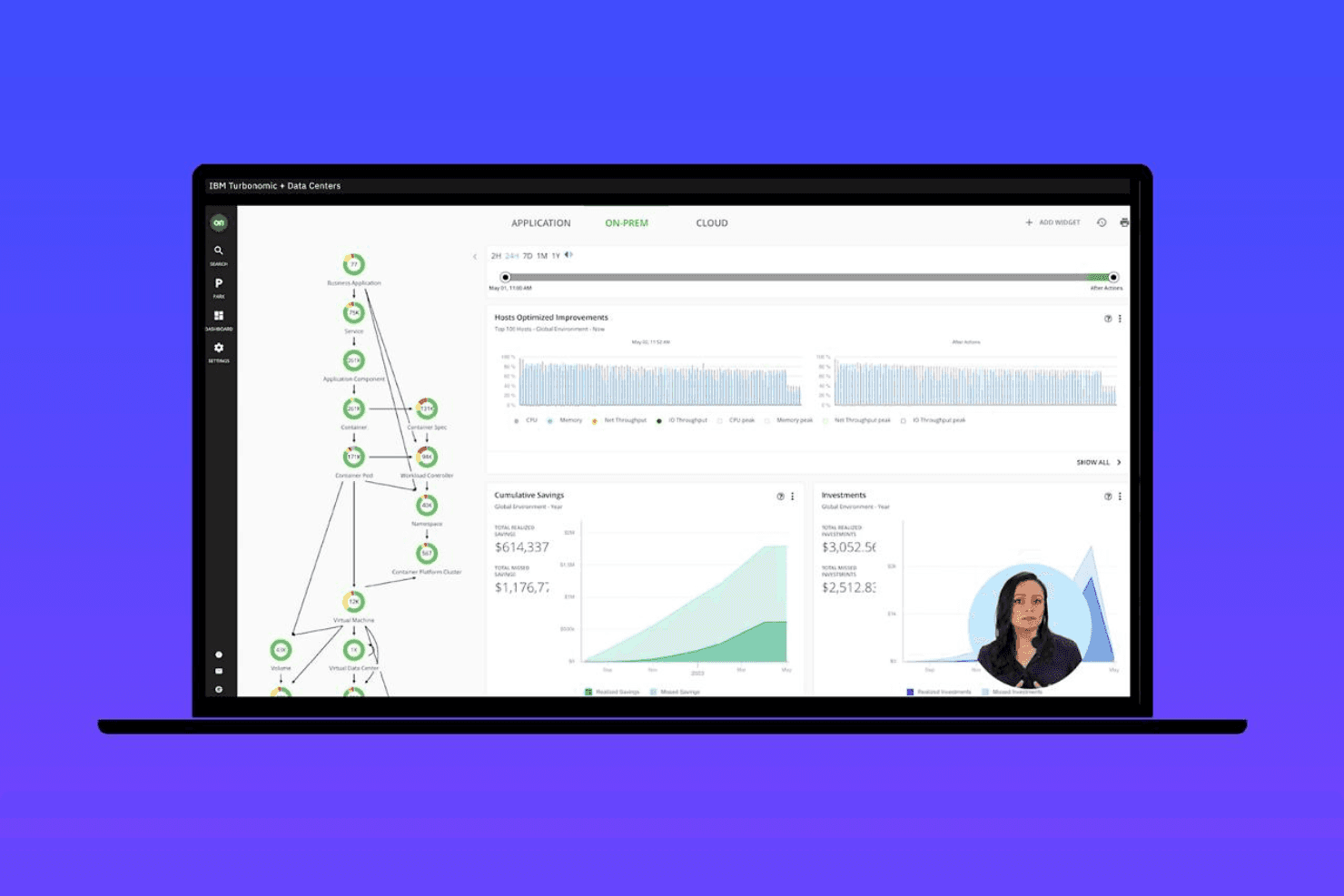
A unified dashboard for monitoring workloads across on-premises, hybrid, and multi-cloud environments. Track resource usage and performance metrics at every migration stage.
Workload Placement Recommendations
Uses analytics to suggest optimal cloud or on-premises locations for each workload. Reduces risk and improves efficiency during migration.
Cost Analysis and Forecasting
Estimates migration costs and ongoing cloud spend using real-time data. Teams can plan budgets and avoid unexpected charges.
Ease of Use
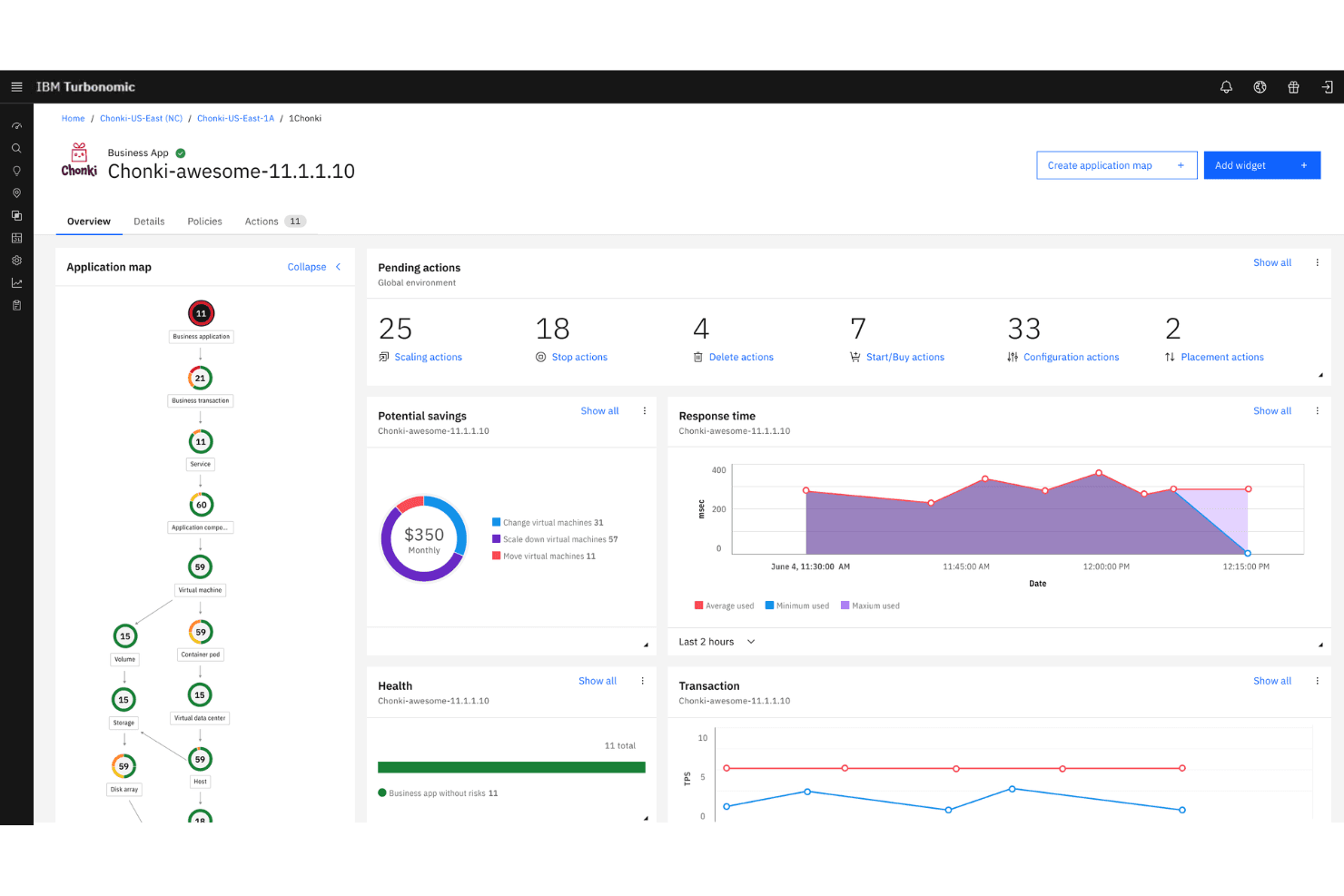
IBM Turbonomic offers deep automation and analytics, but its user interface and setup process can be overwhelming for new users or smaller teams. Many users report that configuring policies and understanding the full range of functionality requires significant technical expertise. Visualization of complex multi-cloud environments is powerful, but the learning curve is steeper than most—making it best suited for organizations with dedicated IT staff and complex migration needs. Real-time monitoring capabilities are robust once the platform is configured, though getting there takes meaningful investment.
Integrations
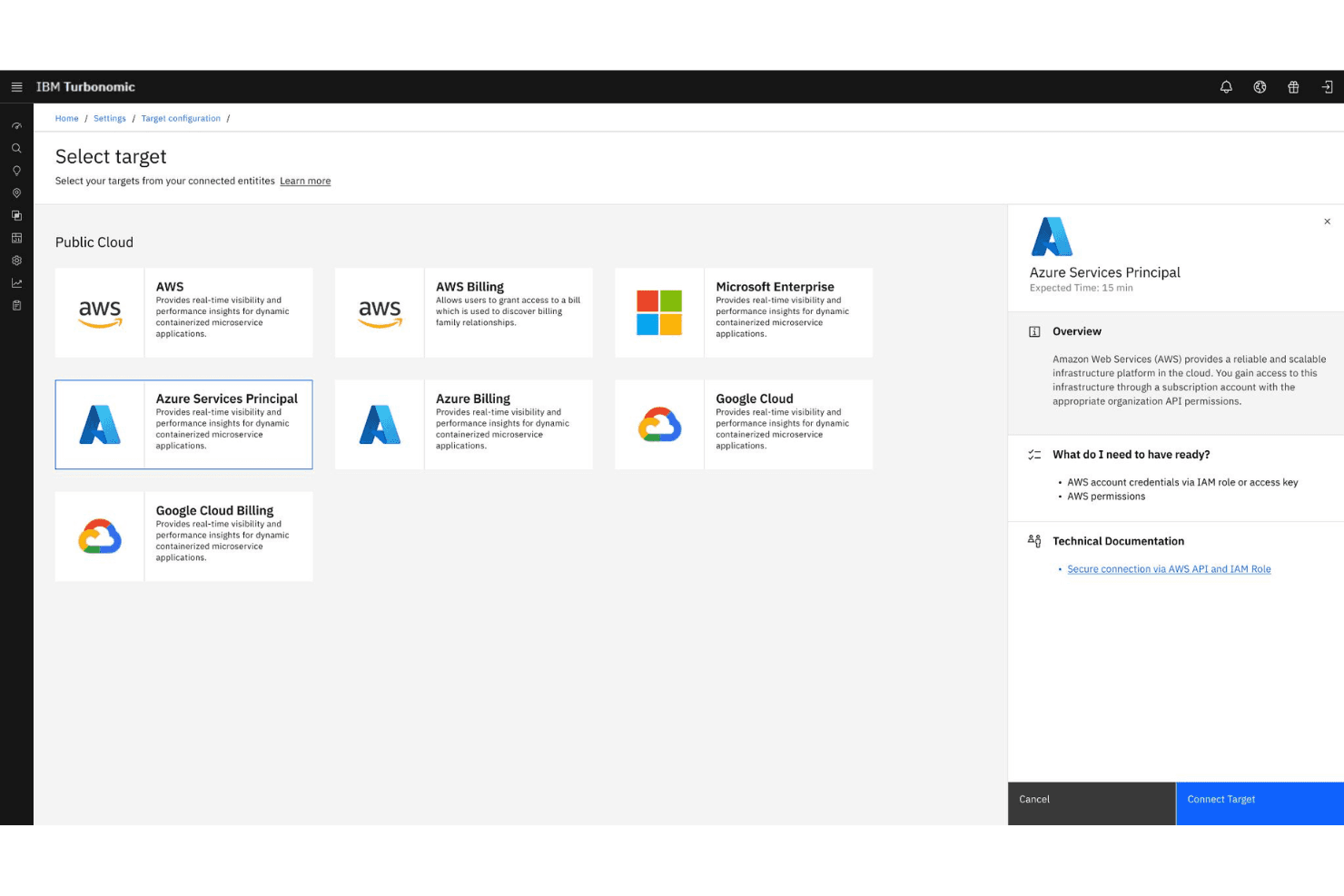
IBM Turbonomic integrates with Azure Kubernetes, AWS, Google Kubernetes Engine, Datadog, Dynatrace, MySQL, GitHub, and IBM Cloud, among others.
The platform also offers a REST API for custom integrations and supports connections with third-party integration tools.
IBM Turbonomic Specs
- API: Yes
- Bug Tracking: Yes
- CI/CD Integration: Yes
- Cloud Deployment: Yes
- Code Review: Yes
- Code Transformation: Yes
- Collaboration Support: Yes
- Data Export: Yes
- Data Import: Yes
- Developer Tools: Yes
- External Integrations: Yes
- Git Integration: Yes
- History/Version Control: Yes
- IDE Plugins: Yes
- Local Deployment: Yes
- Multi-User: Yes
- Notifications: Yes
- Project Management: Yes
- Release Management: Yes
- Static Analysis: Yes
- Task Scheduling/Tracking: Yes
- Testing: Yes


