

Gorgias Review: Pros, Cons, Features, and Pricing



Gorgias is an IT helpdesk software built for ecommerce teams that need to manage customer conversations alongside order data, returns, and purchase history. I'd consider it if you're running a Shopify or WooCommerce store and want support ticketing that connects directly to your ecommerce stack. Compared to Zendesk, Gorgias gives you native ecommerce integrations out of the box—agents can view and edit orders without switching tabs, something Zendesk requires significant configuration to replicate.
Gorgias Evaluation Summary

- From $40/month
- Free demo + 30-day free trial available
Why Trust Our Software Recommendations
Our team has been testing and reviewing software since 2012. As tech leaders ourselves, we know how difficult—and important—it is to choose the right software.
For this guide, we evaluated tools using hands-on testing and independent research, scoring tools using our selection criteria.
Our reviews reflect our human editorial judgment, not a sales pitch.
Expert reviewers:
Gorgias Overview
In my opinion, Gorgias is a solid choice for e-commerce businesses needing an all-in-one IT helpdesk software. It excels in integrating with platforms like Shopify, WooCommerce, and Magento. It also offers powerful AI features and automation for handling customer inquiries. While its pricing may seem high, the features provided justify the cost for businesses with substantial customer interaction needs. However, it might not be the best fit for small businesses with minimal support requirements or those outside the e-commerce sector. If you want a tool that efficiently manages customer support with excellent integration options, use Gorgias.
pros
-
Automate repetitive customer service tasks easily.
-
Excellent channel management.
-
Intuitive user interface.
cons
-
It might not suit businesses outside e-commerce.
-
Your team may find limited customization options.
-
The reporting features could feel basic compared to other tools.
Is Gorgias Right For Your Needs?
Who Would be a Good Fit for Gorgias?
Gorgias is a great fit for e-commerce businesses needing efficient customer support. If your team manages high volumes of inquiries on platforms like Shopify or Magento, you'll benefit from Gorgias's automation and integration features. It centralizes communication, making your customer service more manageable and responsive. Your team will find it user-friendly, which speeds up onboarding and daily operations.
-
ECommerce Teams
Gorgias excels in automating customer service tasks, freeing your team to focus on complex queries.
-
Online Retailers
If you handle multiple customer inquiries, Gorgias centralizes channels, simplifying your team's workflow.
-
Customer Support Managers
You'll appreciate Gorgias's ability to integrate with existing e-commerce platforms, enhancing your support capabilities.
-
Small to Medium Enterprises
Gorgias offers scalability, allowing your business to grow without changing your support system.
-
Marketing Departments
Gorgias helps you track customer interactions, providing valuable insights for targeted campaigns.
-
Shopify Users
Your team will find seamless integration, ensuring efficient order management and customer communication.
Who Would be a Bad Fit for Gorgias?
Gorgias might not suit non-e-commerce businesses or those needing extensive customization. If your team relies on highly tailored support features, Gorgias's limited customization options could be a constraint. It's also not ideal for industries without a focus on customer service through online platforms. If your business doesn't handle a high volume of customer inquiries or uses different platforms, you might not get the full benefit from Gorgias's capabilities.
-
Manufacturing Companies
Gorgias lacks features tailored for industries focused on production rather than customer service.
-
Large Corporations
If you need extensive custom features, Gorgias's limitations could hinder your operations.
-
Financial Services
Your work often requires specific compliance features that Gorgias doesn't offer.
-
Healthcare Providers
Gorgias isn't designed to handle sensitive patient data or complex healthcare workflows.
-
Logistics Firms
The platform's focus on e-commerce doesn't align with logistics and supply chain management needs.
-
Small Local Businesses
If your customer interaction is minimal, Gorgias's features might be more than you need.
Our Review Methodology
How We Test & Score Tools
We’ve spent years building, refining, and improving our software testing and scoring system. The rubric is designed to capture the nuances of software selection and what makes a tool effective, focusing on critical aspects of the decision-making process.
Below, you can see exactly how our testing and scoring works across seven criteria. It allows us to provide an unbiased evaluation of the software based on core functionality, standout features, ease of use, onboarding, customer support, integrations, customer reviews, and value for money.
Core Functionality (25% of final scoring)
The starting point of our evaluation is always the core functionality of the tool. Does it have the basic features and functions that a user would expect to see? Are any of those core features locked to higher-tiered pricing plans? At its core, we expect a tool to stand up against the baseline capabilities of its competitors.
Standout Features (25% of final scoring)
Next, we evaluate uncommon standout features that go above and beyond the core functionality typically found in tools of its kind. A high score reflects specialized or unique features that make the product faster, more efficient, or offer additional value to the user.
We also evaluate how easy it is to integrate with other tools typically found in the tech stack to expand the functionality and utility of the software. Tools offering plentiful native integrations, 3rd party connections, and API access to build custom integrations score best.
Ease of Use (10% of final scoring)
We consider how quick and easy it is to execute the tasks defined in the core functionality using the tool. High scoring software is well designed, intuitive to use, offers mobile apps, provides templates, and makes relatively complex tasks seem simple.
Onboarding (10% of final scoring)
We know how important rapid team adoption is for a new platform, so we evaluate how easy it is to learn and use a tool with minimal training. We evaluate how quickly a team member can get set up and start using the tool with no experience. High scoring solutions indicate little or no support is required.
Customer Support (10% of final scoring)
We review how quick and easy it is to get unstuck and find help by phone, live chat, or knowledge base. Tools and companies that provide real-time support score best, while chatbots score worst.
Customer Reviews (10% of final scoring)
Beyond our own testing and evaluation, we consider the net promoter score from current and past customers. We review their likelihood, given the option, to choose the tool again for the core functionality. A high scoring software reflects a high net promoter score from current or past customers.
Value for Money (10% of final scoring)
Lastly, in consideration of all the other criteria, we review the average price of entry level plans against the core features and consider the value of the other evaluation criteria. Software that delivers more, for less, will score higher.
Core Features
Ticket Management: Gorgias centralizes customer inquiries from different channels into a single ticketing system. This helps your team track and resolve issues efficiently.
Automation Rules: You can set up rules to automate repetitive tasks or deploy the AI agent, saving time and reducing manual errors. This feature helps your team focus on more complex customer issues.
Multi-Channel Support: Gorgias allows you to manage customer interactions from email, chat, and social media in one place. Your team will appreciate the streamlined workflow.
Macros: Use predefined responses (templates) to handle common questions quickly. This feature helps your team optimize response times and maintain consistency in your team's communication.
Customer Profiles: Gorgias builds detailed customer profiles with interaction history. This helps your team provide personalized support based on past interactions, significantly improving the overall customer experience.
Analytics Dashboard: You can access real-time data on your team's performance and customer interactions. This feature aids in making informed decisions and improving service.

Standout Features
Shopify Integration: Gorgias's deep integration with Shopify allows you to manage orders and customer queries directly from the helpdesk. This feature is invaluable for e-commerce teams using Shopify.
Social Media Management: Handle customer inquiries from platforms like Facebook and Instagram within Gorgias. This unique capability ensures e-commerce brands never miss any customer interactions.
Ease of Use
Gorgias is remarkably user-friendly, making it easy for your team to get up and running quickly. Its intuitive interface allows you to manage tickets and customer interactions without hassle. The drag-and-drop automation rules simplify setting up workflows, enhancing your team's productivity. Compared to other IT Helpdesk Software like Zendesk, Gorgias stands out for its straightforward design and efficient navigation, ensuring that even new users can adapt swiftly to its functionalities.

Onboarding
Gorgias offers a smooth onboarding experience with clear tutorials and responsive support to guide your team. The setup process is straightforward, allowing you to quickly integrate it into your workflows, especially for platforms like BigCommerce and Shopify. While the initial learning curve is manageable, the available resources, such as help articles and live chat support, ensure that your team gets the most out of the software. Compared to other IT Helpdesk Software, Gorgias delivers a fast time to value, making it a practical choice for your organization.

Customer Support
Gorgias provides solid customer support, offering multiple channels such as live chat and email to assist your team. Users appreciate the prompt responses and knowledgeable support staff, which help resolve issues efficiently. The support resources, including a comprehensive knowledge base and community forums, further enhance your team's ability to troubleshoot independently. Compared to other IT Helpdesk Software, Gorgias ensures your team has access to the assistance needed to maintain smooth operations.

Integrations
Gorgias integrates with Gmail, Gorgias Chat, Facebook, Instagram, SMS apps, Klaviyo, Recharge, Yotpo, Smile, and ChannelReply. You can find these and many other connections directly within the Gorgias App Store.
Gorgias supports an API and connects with third-party integration tools, enhancing its adaptability for various e-commerce needs.

Value for Money
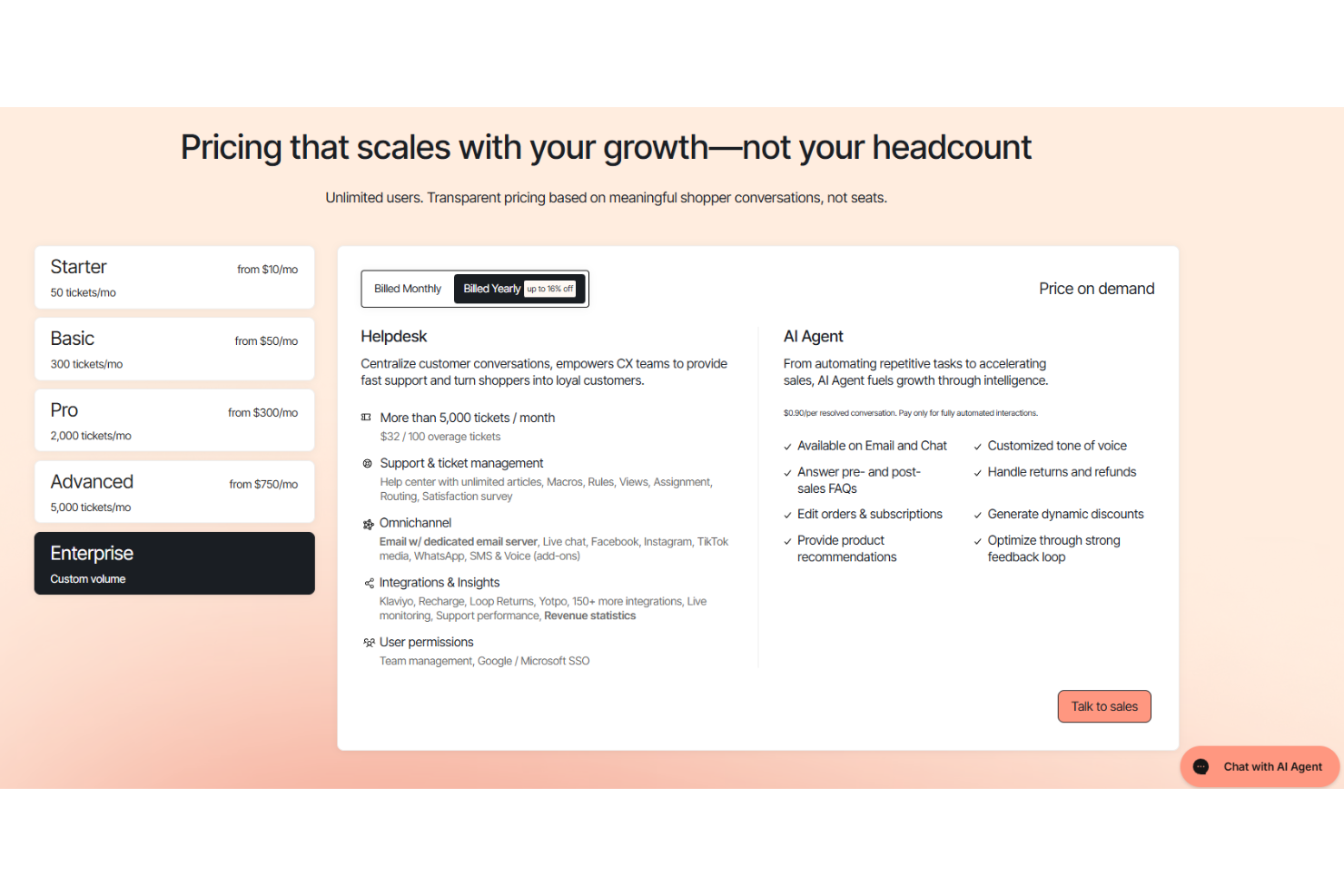
Gorgias has a ticket-based pricing model with tiered plans designed to accommodate different business sizes and levels of customer interaction. Each plan is determined by the maximum number of tickets included in the tier. Additional costs may apply if your team exceeds ticket limits or opts for premium features, such as AI-powered tools. Gorgias provides a free trial, allowing your team to evaluate the software before committing to a purchase.
- Starter Plan: Entry-level option for very small businesses.
- Basic Plan: Offers essential features for small teams.
- Pro Plan: Includes advanced automation and additional support options.
- Advanced Plan: Provides enhanced analytics and reporting capabilities.
- Enterprise Plan: Customized solutions for large organizations with premium support.
Gorgias Specs
- Analytics
- API
- Calendar Management
- Chat
- Click-to-Dial
- CRM Integration
- Customer Management
- Customer Service
- Dashboard
- Dashboards
- Data Export
- Data Import
- Data Visualization
- External Integrations
- Feedback Management
- Knowledge Base
- Lead Management
- Lead Scoring
- Multi-Source Feedback
- Multi-User
- Net Promoter Score
- Notifications
- Omnichannel Referrals
- Online Surveys
- Review Moderation
- Scheduling
- Sentiment Analysis
- Social Media Monitoring
Gorgias FAQs
How does Gorgias handle data security and compliance?
Can Gorgias support multi-language customer interactions?
What kind of customer support can we expect from Gorgias?
How scalable is Gorgias for growing businesses?
Does Gorgias offer a mobile app for on-the-go management?
How does Gorgias improve team collaboration?
What reporting capabilities does Gorgias offer?
Can Gorgias integrate with our existing CRM?
Gorgias Company Overview & History
Gorgias, founded in 2015, is headquartered in San Francisco, California, with over 400 employees. The company specializes in providing a customer support platform tailored for e-commerce businesses, particularly those using the Shopify store. Known for its strong work culture, Gorgias has attracted notable clients like Steve Madden and Timbuk2. With a valuation rising to $710 million, Gorgias continues to grow its presence in the customer service space.
Gorgias Major Milestones
- 2015: Founded by Romain Lapeyre and Alex Plugaru in Paris.
- 2018: Relocated headquarters to San Francisco to expand its market presence.
- 2024: Achieved $69 million in annual recurring revenue, showing significant growth.
- 2022: Valuation rose to $710 million with a $30 million Series C funding round.