
CyberArk DevSecOps Review: Key Features, Pros, Cons, and Pricing Explained

We review tools independently, and commissions help fund our testing. See our transparency policy, our methodology, or suggest a tool.
CyberArk DevSecOps is a DevOps security tool built around secrets management and privileged access control for CI/CD pipelines and developer environments. It's worth considering if your team needs to secure API keys, credentials, and certificates across automated workflows without slowing delivery cycles. I'd look at it over HashiCorp Vault if your organization already runs CyberArk's identity security platform—the native PAM integration gives you centralized secrets governance without managing a separate identity layer on top.
CyberArk DEVSECOPS Evaluation Summary
0/5
- Pricing upon request
- Free demo available
Why Trust Our Software Recommendations
6,700+
Reviews
20
Industry experts
16+
Evaluation factors
14
Years
Our team has been testing and reviewing software since 2012. As tech leaders ourselves, we know how difficult—and important—it is to choose the right software.
For this guide, we evaluated tools using hands-on testing and independent research, scoring tools using our selection criteria.
Our reviews reflect our human editorial judgment, not a sales pitch.
Expert reviewers:
- Paulo Gardini MiguelTech Director
 Tim FisherVP of AI
 Gabriel RosasTech Lead & Software Architect
 Christhian GruhnTech Lead & Platform Architect

CyberArk DEVSECOPS Overview
CyberArk DevSecOps offers advanced secrets management and automation that set it apart for teams handling sensitive workloads at scale. Its user interface and integrations are more mature than most, and support is responsive, but onboarding can be complex for smaller teams. Pricing reflects its enterprise focus, so it's best suited for organizations prioritizing security and compliance over simplicity.
Pros
- Centralized secrets management across multi-cloud and hybrid environments
- Automated credential rotation reduces manual intervention and risk
- Granular policy controls support strict compliance requirements
Cons
- Onboarding and configuration can be complex for new teams
- Pricing may be high for smaller organizations or projects
- Limited native support for some niche DevOps toolchains
Is CyberArk DEVSECOPS Right For Your Needs?
Who Would be a Good Fit for CyberArk DEVSECOPS?
CyberArk DevSecOps is best suited for organizations with strict compliance needs, complex infrastructure, or high-value sensitive data at risk. Teams in regulated industries, large enterprises, and those with dedicated security operations will benefit from its advanced secrets management, automated credential rotation, and granular policy controls.
If your business must audit access, enforce least privilege, or manage secrets across hybrid and multi-cloud environments — including service accounts, machine identities, and SaaS apps — CyberArk DevSecOps offers the depth and control you need. Its IAM and PAM capabilities make it especially compelling for teams looking to strengthen their overall security posture.
- Financial ServicesMeets strict regulatory requirements with detailed audit trails and policy controls.
- Healthcare ITProtects sensitive patient data with automated secrets management and access controls.
- Large EnterprisesHandles complex, multi-cloud environments with centralized secrets management.
- Security OperationsEnables granular access policies and automated credential rotation for security teams.
- Government AgenciesSupports compliance mandates and secure access for distributed teams.
- DevOps Platform TeamsIntegrates with CI/CD pipelines to automate secrets handling at scale.
Who Would be a Bad Fit for CyberArk DEVSECOPS?
CyberArk DevSecOps is less suitable for small businesses, teams with limited security resources, or organizations with simple infrastructure. If your environment doesn't require advanced policy enforcement or you're looking for a lightweight solution, the complexity and cost may outweigh the benefits. Teams with niche toolchains or minimal compliance needs may find better value elsewhere.
- Small StartupsSetup complexity and pricing are excessive for basic security needs.
- Freelance DevOpsOverkill for individuals or very small teams managing simple projects.
- Non-Regulated IndustriesLacks cost justification for teams without compliance requirements.
- Minimal IT DepartmentsRequires dedicated resources for onboarding and ongoing management.
- Education SectorMay not align with budget constraints or simple infrastructure needs.
- Legacy-Only EnvironmentsLimited value if not integrating with modern DevOps pipelines or cloud.
Our Review Methodology
How We Test & Score Tools
We’ve spent years building, refining, and improving our software testing and scoring system. The rubric is designed to capture the nuances of software selection and what makes a tool effective, focusing on critical aspects of the decision-making process.
Below, you can see exactly how our testing and scoring works across seven criteria. It allows us to provide an unbiased evaluation of the software based on core functionality, standout features, ease of use, onboarding, customer support, integrations, customer reviews, and value for money.
Core Functionality (25% of final scoring)
The starting point of our evaluation is always the core functionality of the tool. Does it have the basic features and functions that a user would expect to see? Are any of those core features locked to higher-tiered pricing plans? At its core, we expect a tool to stand up against the baseline capabilities of its competitors.
Standout Features (25% of final scoring)
Next, we evaluate uncommon standout features that go above and beyond the core functionality typically found in tools of its kind. A high score reflects specialized or unique features that make the product faster, more efficient, or offer additional value to the user.
We also evaluate how easy it is to integrate with other tools typically found in the tech stack to expand the functionality and utility of the software. Tools offering plentiful native integrations, 3rd party connections, and API access to build custom integrations score best.
Ease of Use (10% of final scoring)
We consider how quick and easy it is to execute the tasks defined in the core functionality using the tool. High scoring software is well designed, intuitive to use, offers mobile apps, provides templates, and makes relatively complex tasks seem simple.
Onboarding (10% of final scoring)
We know how important rapid team adoption is for a new platform, so we evaluate how easy it is to learn and use a tool with minimal training. We evaluate how quickly a team member can get set up and start using the tool with no experience. High scoring solutions indicate little or no support is required.
Customer Support (10% of final scoring)
We review how quick and easy it is to get unstuck and find help by phone, live chat, or knowledge base. Tools and companies that provide real-time support score best, while chatbots score worst.
Customer Reviews (10% of final scoring)
Beyond our own testing and evaluation, we consider the net promoter score from current and past customers. We review their likelihood, given the option, to choose the tool again for the core functionality. A high scoring software reflects a high net promoter score from current or past customers.
Value for Money (10% of final scoring)
Lastly, in consideration of all the other criteria, we review the average price of entry level plans against the core features and consider the value of the other evaluation criteria. Software that delivers more, for less, will score higher.
Core Features
Centralized Secrets Management
Store and manage credentials, API keys, and secrets in a single secure vault. This reduces the risk of hardcoded secrets, vulnerabilities, and unauthorized access.
Automated Credential Rotation
Automatically rotate passwords and keys on a schedule or after use. Which limits exposure if credentials are compromised.
Granular Policy Controls
Define and enforce access policies at the user, application, or environment level, supporting compliance requirements.
Audit and Reporting
Track all access and changes to secrets with detailed logs. This feature helps meet regulatory requirements and supports incident investigations.
Dynamic Secrets Injection
Inject secrets into apps and pipelines at runtime without storing them in code or config files, which minimizes accidental exposure risk.
Role-Based Access Control
Assign permissions based on roles to control who can access or manage secrets. This streamlines user management and reduces privilege escalation risk.
.jpg&w=3840&q=75)
Ease of Use
CyberArk DevSecOps offers a polished user interface and clear documentation, but its setup and configuration can be demanding, especially for teams new to enterprise security tools. Users often mention the initial learning curve and the need for dedicated onboarding resources.
However, once deployed, its centralized management and automation features make ongoing operations straightforward. The platform's depth and policy granularity are genuine strengths, but they add complexity compared to more lightweight security solutions. Teams coming from open source secrets management tools may find the transition particularly steep.
Integrations
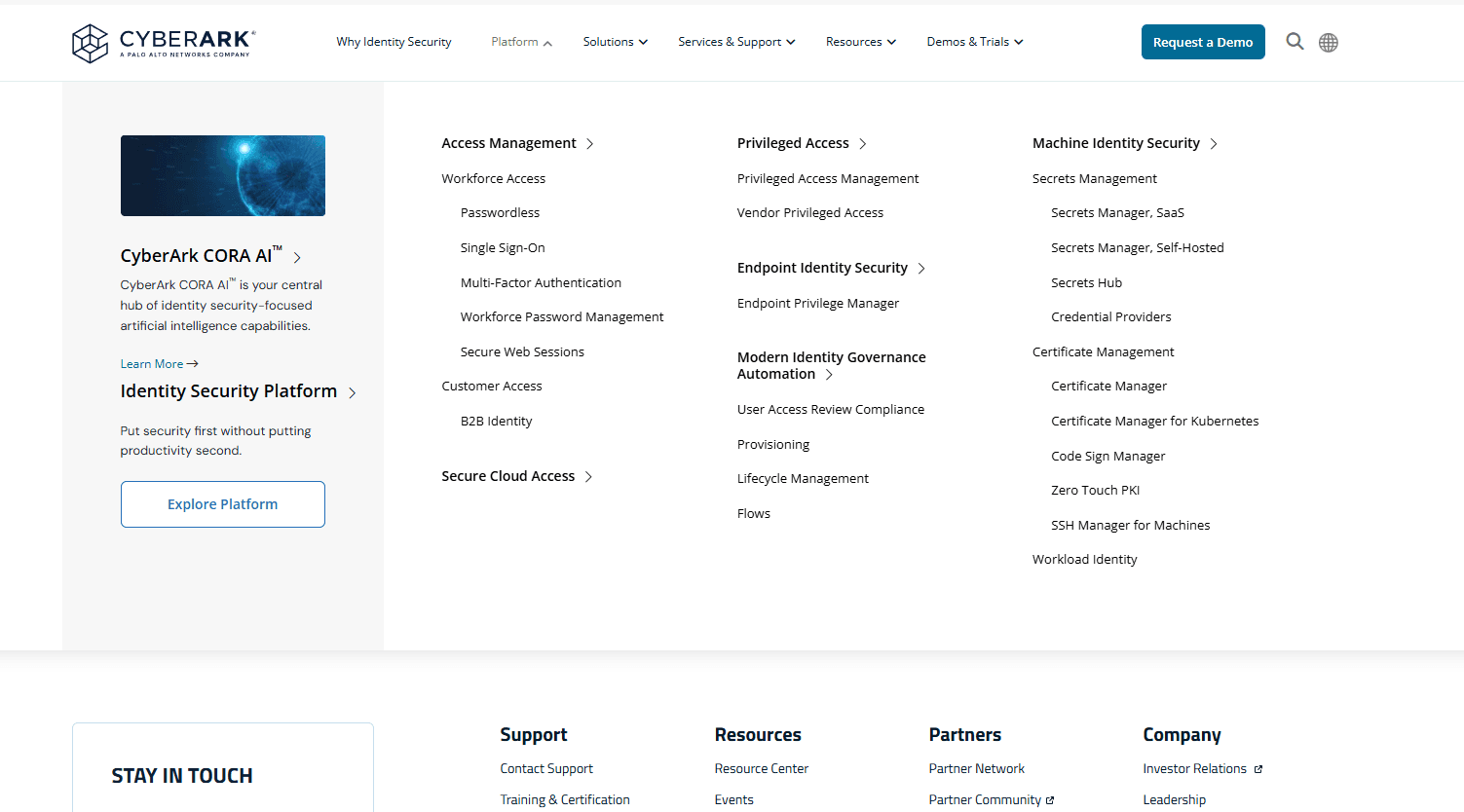
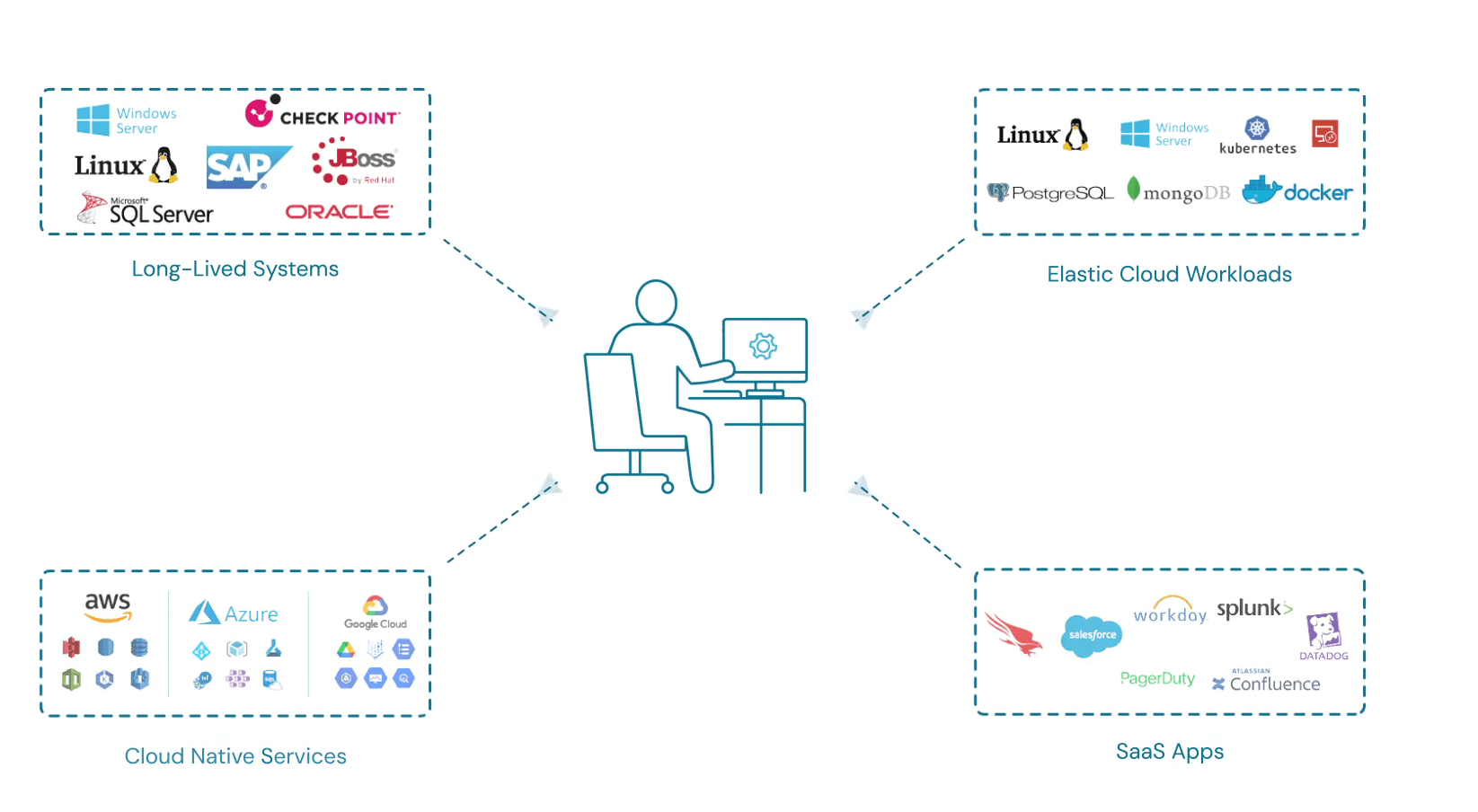
CyberArk DevSecOps is designed to integrate broadly with a variety of cloud platforms and DevOp tools like AWS, Azure, Google Cloud Platform, Kubernetes, Jenkins, GitHub, GitLab, and ServiceNow, among others.
The platform also offers a robust API and supports connections with third-party integration tools for custom workflows.
CyberArk DEVSECOPS Specs
- 2-Factor Authentication: Yes
- Access Management: Yes
- Anti-Virus: Yes
- API: Yes
- Audit Trail: Yes
- Bug Tracking: No
- Calendar Management: No
- Customer Management: No
- Dashboard: Yes
- Data Export: Yes
- Data Import: Yes
- Data Visualization: No
- Email Integration: No
- External Integrations: Yes
- File Sharing: No
- File Transfer: No
- Firewall: No
- Google Apps Integration: No
- Inventory Tracking: No
- Malware Protection: Yes
- Multi-User: Yes
- Network Device Performance Monitoring: Yes
- Network Traffic Monitoring: Yes
- Network Visualization: Yes
- Notifications: Yes
- Project Management: No
- Remote Access: Yes
- Risk Assessment: Yes
- SAP Integration: Yes
- Scheduling: Yes
- Software Integration: Yes
- Third-Party Plugins/Add-Ons: Yes
- Ticket Management: No


