

Enterprise patch management software lets you identify, deploy, and monitor updates across hundreds or thousands of devices from a single platform. If you’re looking for the best tools, you probably need hands-off patching, clear reporting, and bulletproof compliance without risking downtime in complex enterprise environments.
This list gives you practical insight into top patch management tools, so you can match features to your needs and keep your systems secure and up to date in 2026.
Why Trust Our Software Recommendations
6,700+
Reviews
20
Industry experts
16+
Evaluation factors
14
Years
Our team has been testing and reviewing software since 2012. As tech leaders ourselves, we know how difficult—and important—it is to choose the right software.
For this guide, we evaluated tools using hands-on testing and independent research, scoring tools using our selection criteria.
Our reviews reflect our human editorial judgment, not a sales pitch.
Expert reviewers:
- Paulo Gardini MiguelTech Director
 Tim FisherVP of AI
 Gabriel RosasTech Lead & Software Architect
 Christhian GruhnTech Lead & Platform Architect

Enterprise Patch Management Software Comparison Table
This comparison table summarizes pricing details for my top enterprise patch management software selections:
| Tool | Best For | Trial Info | Price | ||
|---|---|---|---|---|---|
| 1 | Best for unified risk and compliance remediation | 30-day free trial + free demo available | Pricing upon request | Website | |
| 2 | Best for patch automation for remote devices | Free plan + free demo available | Pricing upon request | Website | |
| 3 | Best for custom patch workflows with automation | Free trial available | Pricing upon request | Website | |
| 4 | Best for large-scale environment control | Free demo available | Pricing upon request | Website | |
| 5 | Best for Microsoft 365 ecosystem integration | 90-day free trial | From $60/user/month (billed annually) | Website | |
| 6 | Best for cloud-native OS and third-party patching | 15-day free trial + free demo available | From $1/endpoint/month (billed annually) | Website | |
| 7 | Best for real-time patch visibility dashboards | 30-day free trial + free demo | Pricing upon request | Website | |
| 8 | Best for multi-platform coverage | Not available | Pricing upon request | Website | |
| 9 | Best for automated patching across endpoints | Free trial + free demo available | Pricing upon request | Website | |
| 10 | Best for risk-based prioritization for remediation | Free demo available | Pricing upon request | Website |


Best Enterprise Patch Management Software Reviews
Below are my detailed summaries of the best enterprise patch management software that made it onto my shortlist. My reviews offer a detailed look at the features, capabilities, and integrations of each platform to help you find the best one for you.
 Best for unified risk and compliance remediation
- 30-day free trial + free demo available
- Pricing upon request
Visit WebsiteCustomer Rating:4.5/5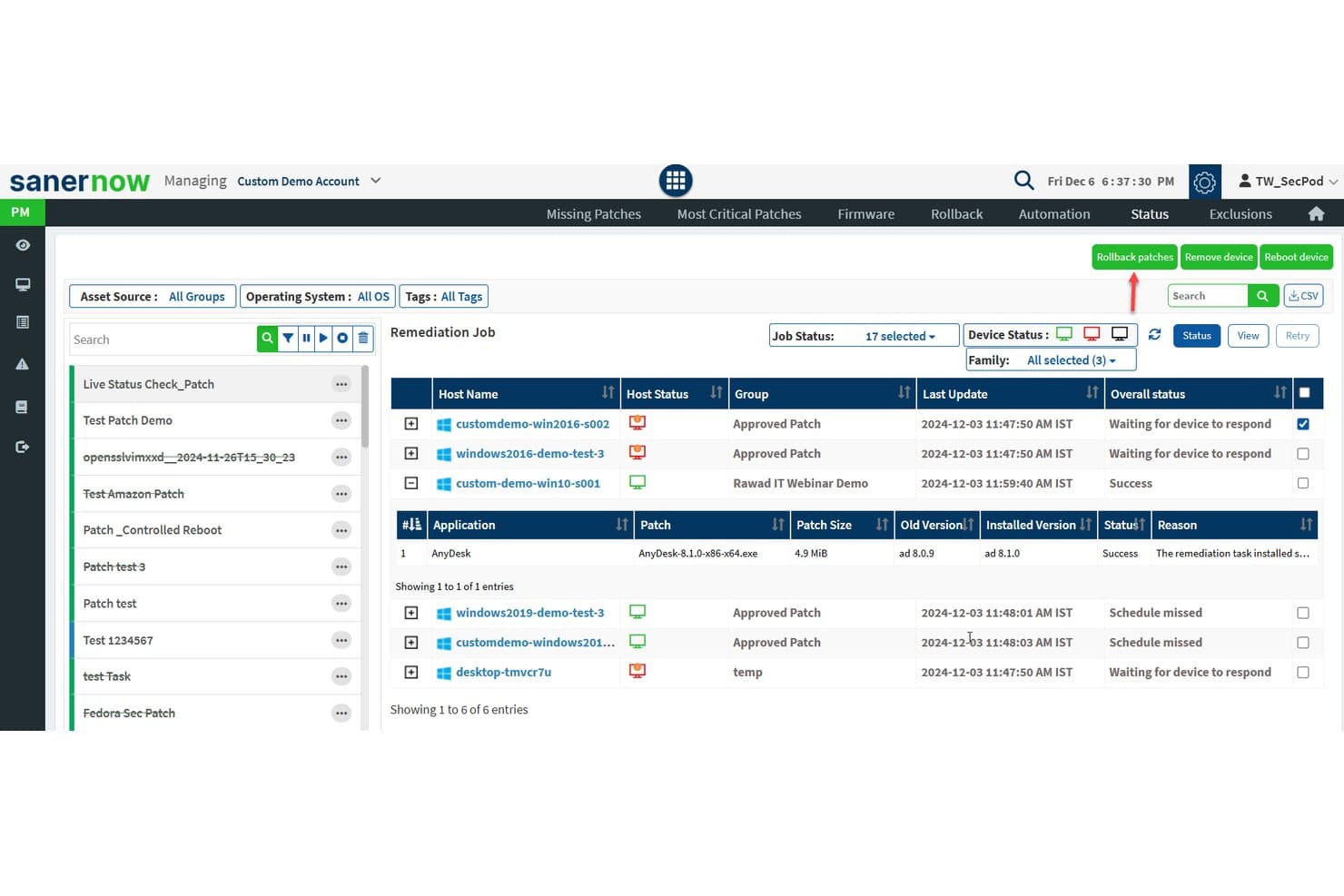
SecPod (Saner Platform) offers a detailed patch remediation job status view showing host names, device status, patch details, and overall remediation outcomes across multiple devices. SecPod's Saner Platform is a continuous vulnerability and exposure management solution that combines automated patch deployment, vulnerability scanning, and compliance remediation across Windows, macOS, Linux, and 550+ third-party applications.
Who Is SecPod (Saner Platform) Best For?
SecPod suits enterprise IT security teams managing distributed endpoint fleets across hybrid environments where compliance with frameworks like HIPAA, PCI-DSS, or NIST is a core operational requirement.
Why I Picked SecPod (Saner Platform)
I picked SecPod (Saner Platform) as one of the best because it's one of the few patch management platforms that fully integrates vulnerability assessment and remediation into a single automated workflow, eliminating the manual correlation between detected risks and available patches. I also like that it scans beyond standard CVEs, identifying misconfigurations and security anomalies via its 190,000+ SCAP vulnerability checks. That detection breadth maps directly to compliance frameworks including HIPAA, NIST CSF, and PCI DSS, making patch audit trails genuinely traceable to specific risk findings.
SecPod (Saner Platform) Key Features
- Third-party patch catalog: Supports patching for over 550 non-OS applications across browsers, productivity tools, and security software.
- Firmware and configuration remediation: Addresses hardware-level vulnerabilities and configuration deviations in addition to software updates.
- Custom compliance dashboards: Provides pre-built and customizable reporting mapped to frameworks like HIPAA, PCI, and NIST.
- API-first integration: Connects with ITSM, SIEM, and DevOps platforms using REST APIs for automated workflows and real-time data sync.
SecPod (Saner Platform) Integrations
SecPod (Saner Platform) offers native integrations with ServiceNow, Splunk, Jira, AWS, Azure DevOps, and Qualys, and provides an API for custom integrations.
Pros and Cons
Pros:
- Covers 550+ third-party applications natively
- Deep SCAP-based compliance checks built in
- Unified vulnerability scanning and patch remediation
Cons:
- Initial agent deployment is time-consuming
- Reporting interface can feel dated
Learn more about SecPod (Saner Platform): Best for patch automation for remote devices
- Free plan + free demo available
- Pricing upon request
Visit WebsiteCustomer Rating:4.9/5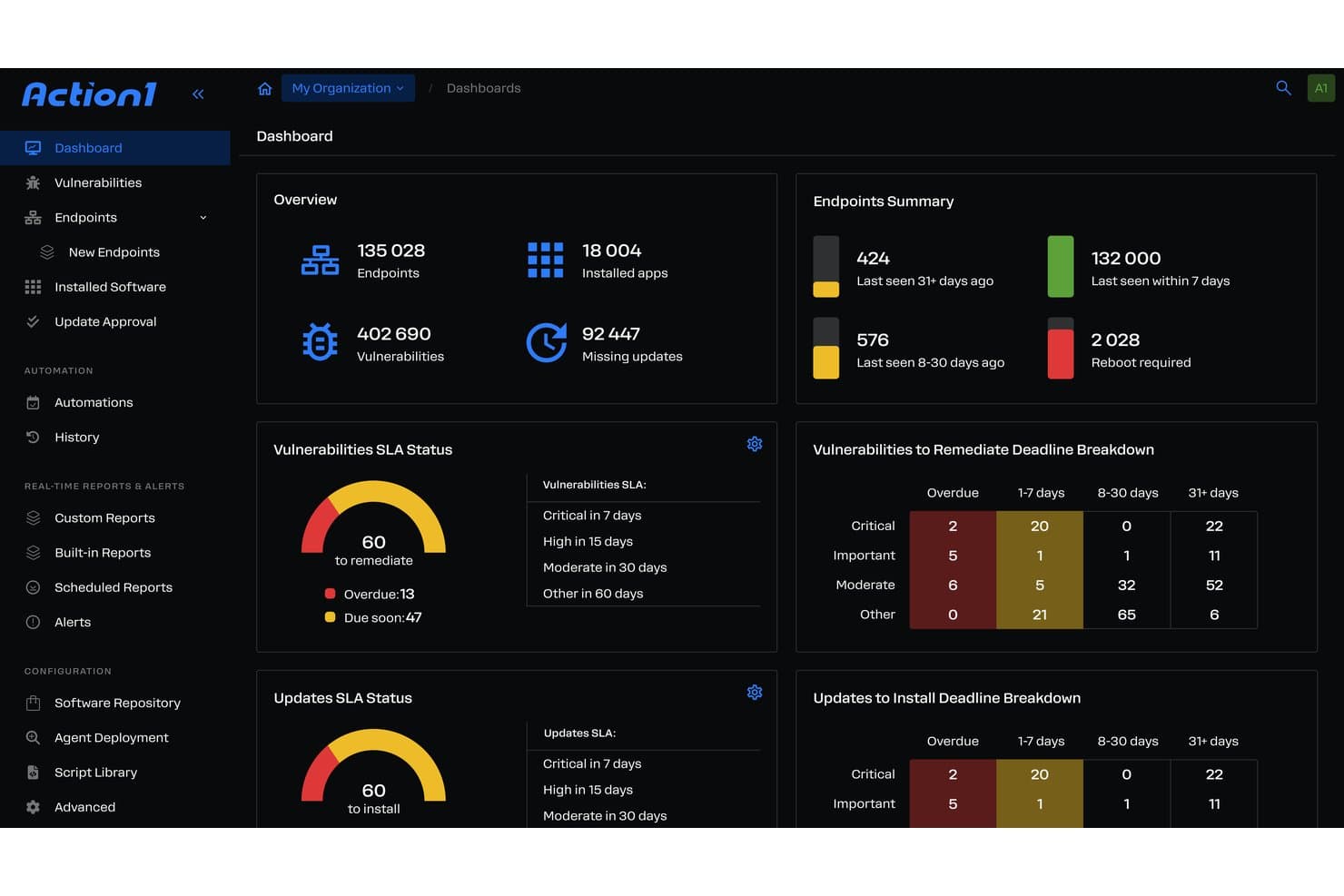
Action1 offers a comprehensive patch management dashboard displaying endpoint summaries, vulnerability SLA status, and remediation deadline breakdowns for enterprise environments. Action1 is a cloud-native autonomous endpoint management platform that combines OS and third-party application patching, vulnerability assessment, risk-based prioritization, and compliance reporting across distributed enterprise environments.
Who Is Action1 Best For?
Action1 is a strong fit for IT teams managing distributed endpoint fleets across remote, hybrid, or multi-site environments where VPN-free patching coverage is a priority.
Why I Picked Action1
Action1 earns its spot as one of the best on my shortlist because of how it handles remote endpoint patching without a VPN dependency. The cloud-native agent reaches devices wherever they are, and the update rings feature lets me configure phased, autonomous rollouts with automatic rollback built in. I also like that offline endpoints get patched the moment they reconnect, so remote workers who miss a maintenance window don't stay vulnerable.
Action1 Key Features
- Third-party application patching: Patch over 600 supported non-OS applications from a single dashboard.
- Risk-based vulnerability prioritization: Prioritize patch deployment based on CVSS scores and real-time threat data.
- Compliance dashboards and audit reporting: Generate exportable reports mapped to frameworks like SOC 2, HIPAA, and PCI DSS.
- PowerShell and RESTful API automation: Automate custom workflows and integrate with other IT systems using built-in scripting and API capabilities.
Action1 Integrations
Action1 offers native integrations with Microsoft Azure, Zendesk, Bitdefender, Slack, Microsoft Teams, PayPal, Amazon Web Services, and Zapier. An API is available for custom integrations.
Pros and Cons
Pros:
- SOC 2 and HIPAA compliance reporting included
- Automated CVE detection and risk-based prioritization
- Patching works for offline and remote endpoints
Cons:
- Lacks native mobile app patch catalog
- No support for mobile device patching
Learn more about Action1: Best for custom patch workflows with automation
- Free trial available
- Pricing upon request
Visit WebsiteCustomer Rating:4.6/5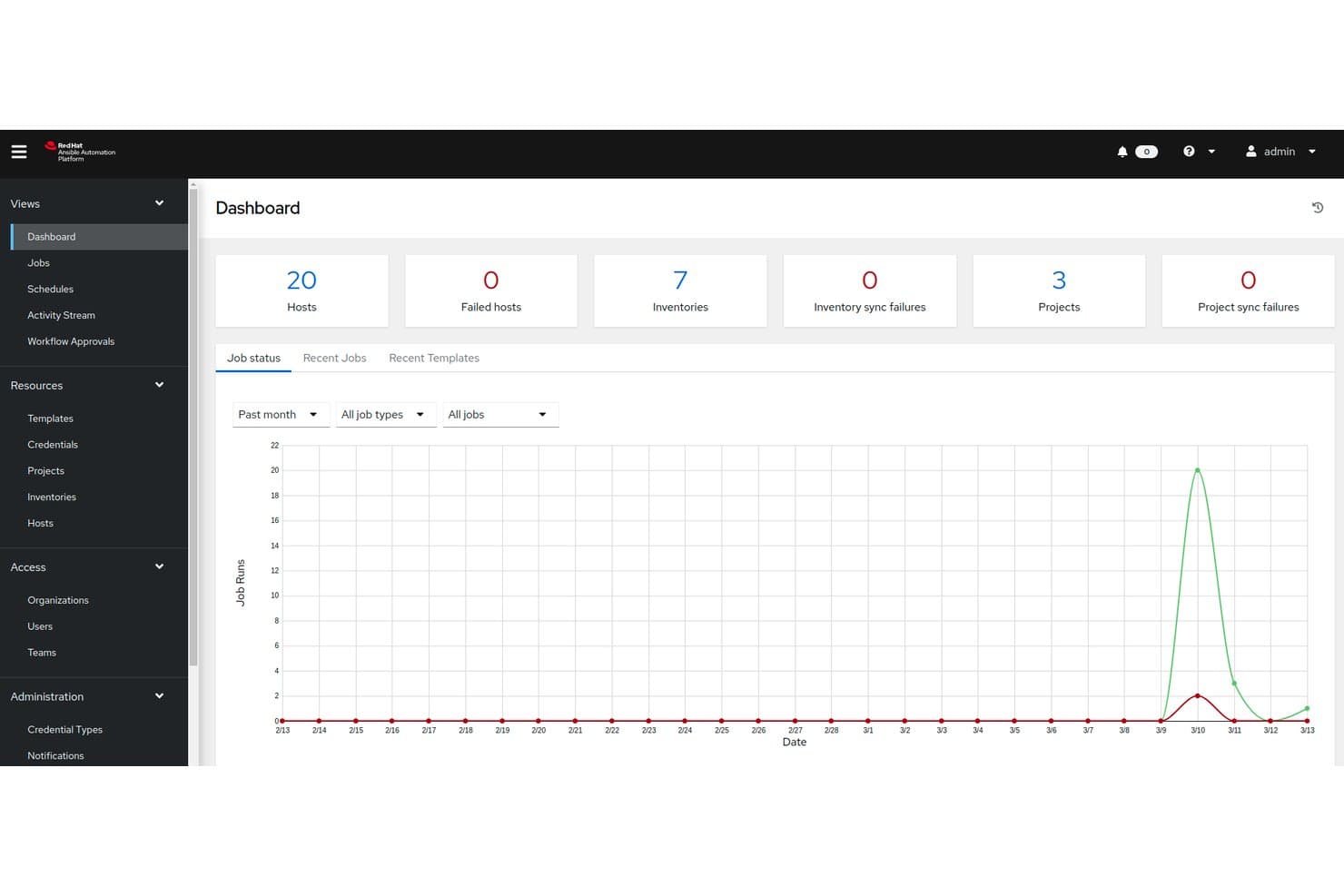
Red Hat Ansible Automation Platform offers a centralized dashboard displaying job status, host counts, inventories, and project sync metrics essential for enterprise patch management oversight. Red Hat Ansible Automation Platform is an agentless IT automation platform that lets enterprises build, run, and scale custom patch workflows across on-prem, cloud, and hybrid infrastructure using YAML-based playbooks and event-driven automation.
Who Is Red Hat Ansible Automation Platform Best For?
It's a strong fit for enterprise infrastructure and systems engineering teams that need to build fully custom patching pipelines across large, complex, multi-OS environments.
Why I Picked Red Hat Ansible Automation Platform
I picked Red Hat Ansible Automation Platform as one of the best because no other tool gives you this level of control over patch workflow logic. With YAML playbooks, you define exactly which hosts get patched, in what order, and what happens on failure. Event-Driven Ansible closes the loop by triggering those playbooks automatically when a connected security tool flags a new CVE, so patch jobs fire without anyone touching a keyboard.
Red Hat Ansible Automation Platform Key Features
- Automation controller: Central management UI for organizing, running, and monitoring patch jobs across all inventory.
- Automation mesh: Supports orchestrating patch tasks across distributed networks and network zones.
- Self-service automation portal: Allows non-technical users to launch pre-approved patching jobs securely.
- Ansible content collections: Provides certified, pre-built automation content for common IT platforms and software.
Red Hat Ansible Automation Platform Integrations
Red Hat Ansible Automation Platform offers a range of native integrations including ServiceNow, Splunk, VMware, AWS, Microsoft Azure, Google Cloud, Palo Alto Networks, CyberArk, and Cisco. An API is available for custom integrations.
Pros and Cons
Pros:
- Agentless approach covers most major OSes
- Supports event-driven and scheduled patching
- Full control of patch workflow logic
Cons:
- Requires custom playbooks for every app
- No built-in patch content catalog
Learn more about Red Hat Ansible Automation Platform: Best for large-scale environment control
- Free demo available
- Pricing upon request
Visit WebsiteCustomer Rating:4.5/5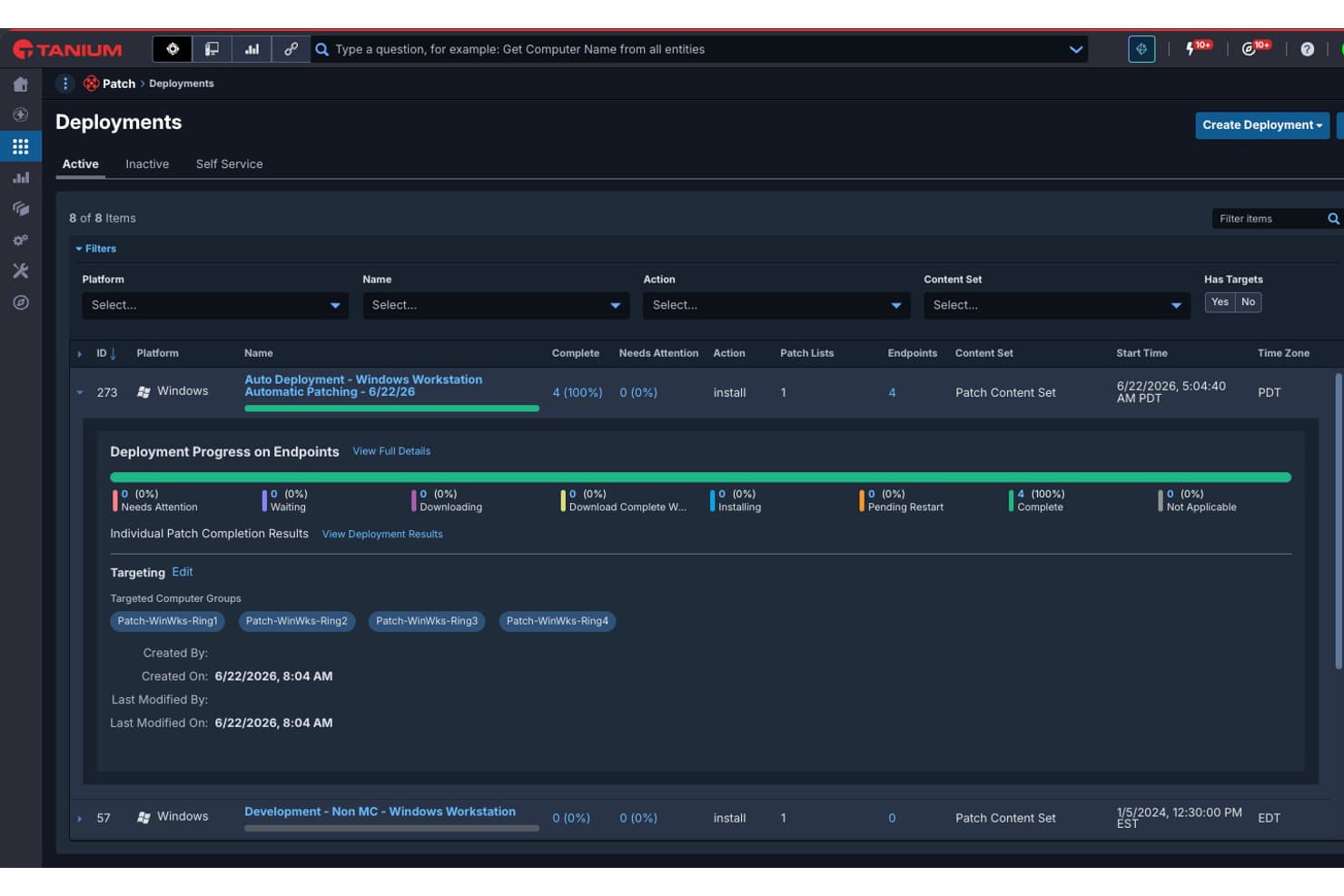
Tanium offers a Patch Deployments dashboard that displays active deployment progress, endpoint targeting, and patch completion status across Windows workstation ring groups. Tanium Patch is an enterprise patch management platform that combines real-time endpoint visibility with automated patch deployment across Windows, Linux, macOS, and third-party applications in on-prem, cloud, and hybrid environments.
Who Is Tanium Best For?
Tanium Patch is a strong fit for large enterprises with distributed endpoint fleets that need IT operations and security teams working from a single, unified platform.
Why I Picked Tanium
I picked Tanium as one of the best because no other tool I've tested matches its ability to query thousands of endpoints in real-time and act on what it finds instantly. I run concurrent patching campaigns across Windows, Linux, and macOS fleets from a single console, with safe deployment rings that let me test patches on a subset of devices before rolling out broadly. The automatic rollback capability means I'm not flying blind if something breaks mid-deployment.
Tanium Key Features
- Third-party application patching: Patch hundreds of supported software titles beyond operating systems.
- Real-time endpoint inventory: Instantly discover, track, and categorize assets across your environment.
- Custom compliance reporting: Generate dashboards and audit logs aligned with major regulatory frameworks.
- ServiceNow integration: Automate patch orchestration directly from ServiceNow IT operations workflows.
Tanium Integrations
Tanium Patch offers native integrations with Microsoft, ServiceNow, ScreenMeet, and more. An API is available for custom integrations.
Pros and Cons
Pros:
- Policy-based deployments with rollback support
- Linear chain architecture saves internal bandwidth
- Real-time endpoint visibility at enterprise scale
Cons:
- Module-based licensing can be complex
- Requires significant initial setup and tuning
Learn more about Tanium: Best for Microsoft 365 ecosystem integration
- 90-day free trial
- From $60/user/month (billed annually)
Visit WebsiteCustomer Rating:4.7/5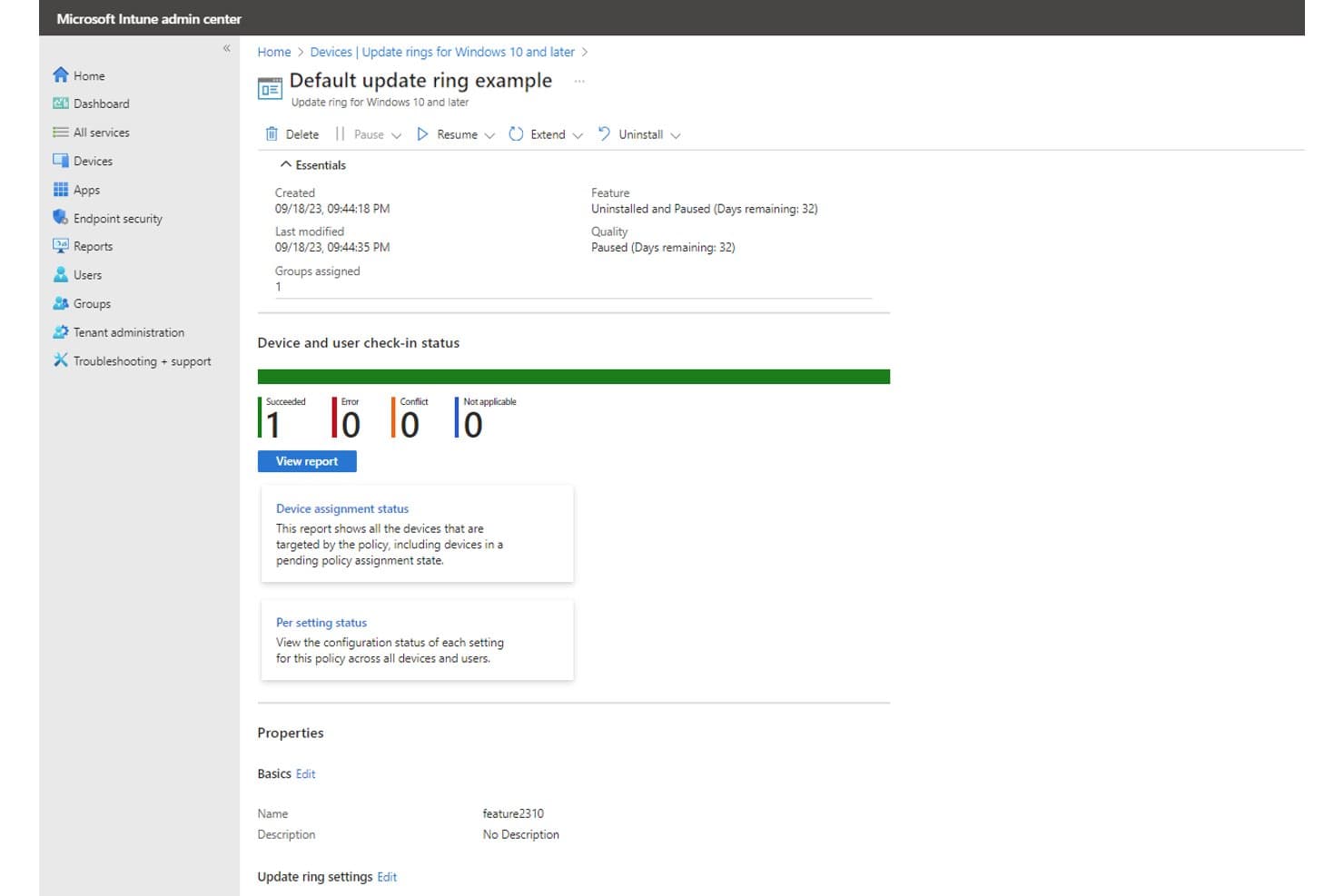
Microsoft Intune offers update ring management with real-time device check-in status, pause/resume controls, and feature and quality update tracking for enterprise patch management. Microsoft Intune is a cloud-native unified endpoint management platform that handles OS patch deployment, update ring configuration, driver and firmware updates, and device compliance policy enforcement across Windows, macOS, iOS, and Android endpoints.
Who Is Microsoft Intune Best For?
Microsoft Intune is a strong fit for enterprise IT teams already running Microsoft 365 or Azure who need cloud-native endpoint management without adding a separate patching tool.
Why I Picked Microsoft Intune
I picked Microsoft Intune as one of the best because it's built directly into the Microsoft 365 E3 and E5 licensing stack, meaning there's no separate agent or infrastructure to stand up. Windows Autopatch manages OS update rings natively, and Hotpatch pushes monthly security fixes without requiring a device reboot. I also like how Intune compliance policies connect to Microsoft Entra ID, feeding patch status directly into conditional access rules automatically.
Microsoft Intune Key Features
- Update rings configuration: Group endpoints for phased rollout of Windows feature and quality updates.
- Expedite update policies: Push critical security patches immediately, bypassing standard update deferral rules.
- Driver and firmware update management: Deploy approved driver and firmware updates to specific device groups.
- Remote management for cross-platform endpoints: Manage patch deployment on Windows, macOS, iOS, and Android devices from a cloud console.
Microsoft Intune Integrations
Microsoft Intune has native integrations across the Microsoft ecosystem, including Microsoft 365, Microsoft Entra ID, and Microsoft Defender for Endpoint. It supports third-party patching through integrations with Patch My PC, Ivanti Neurons, and Action1. An API is available for custom integrations.
Pros and Cons
Pros:
- Centralized cloud-based management for remote devices
- Native support for Windows Autopatch and Hotpatch
- Deep integration with Microsoft 365 environment
Cons:
- macOS and Linux patch management lacks parity
- Limited native third-party patching support
Learn more about Microsoft Intune: Best for cloud-native OS and third-party patching
- 15-day free trial + free demo available
- From $1/endpoint/month (billed annually)
Visit WebsiteCustomer Rating:4.7/5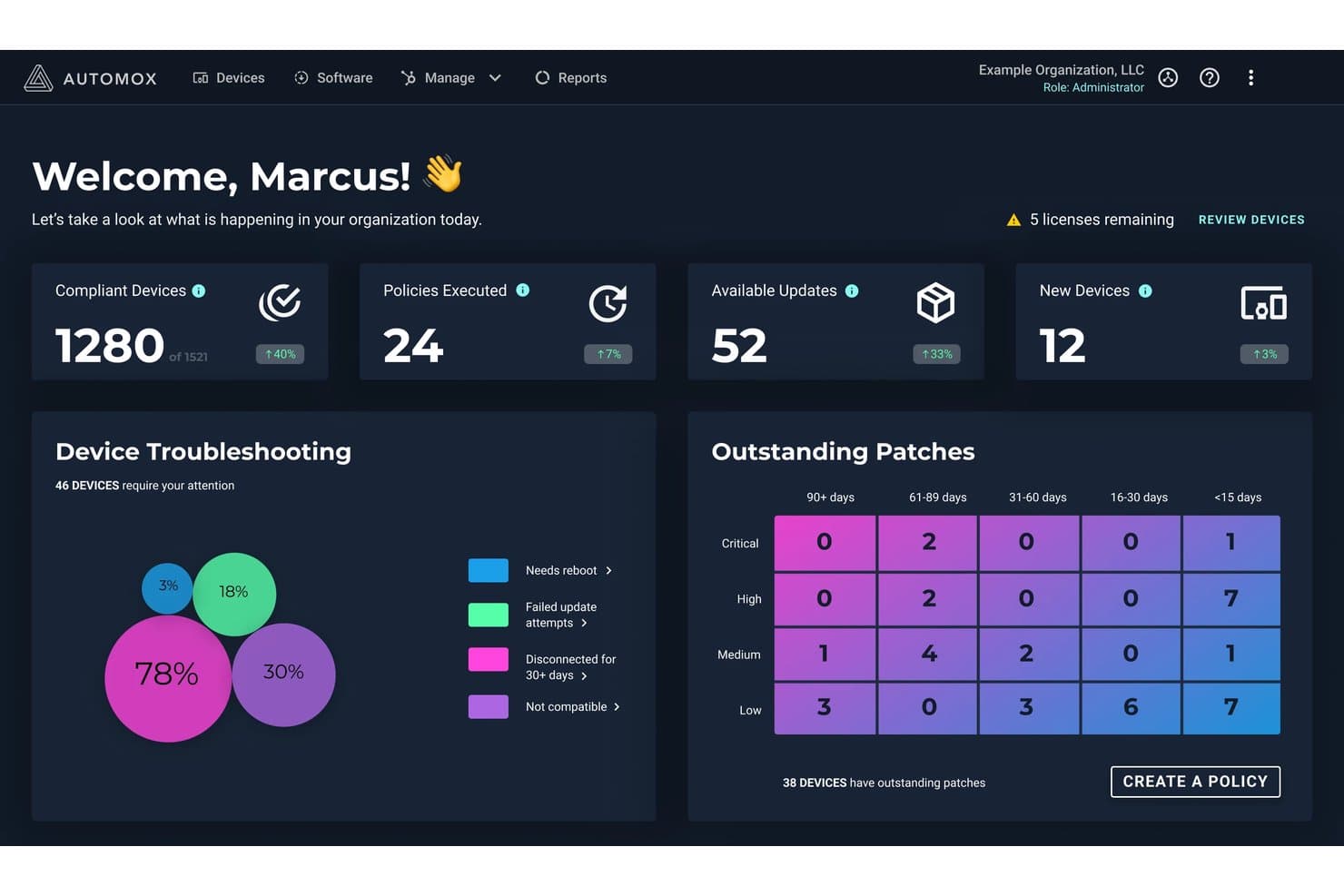
Automox offers an enterprise patch management dashboard displaying compliant devices, outstanding patches by severity and age, and device troubleshooting insights. Automox is a cloud-native autonomous endpoint management platform that handles OS patching across Windows, macOS, and Linux, third-party application patching for 630+ titles, software deployment, and device configuration—all without on-prem infrastructure.
Who Is Automox Best For?
Automox is a strong fit for IT and security teams managing distributed or remote endpoint fleets who need cross-platform patching without on-prem infrastructure.
Why I Picked Automox
Automox earns its spot on my shortlist because of how it handles third-party patching at scale. With 630+ supported titles, I can patch Chrome, Adobe, Java, and dozens of other apps using the same policy engine I use for OS updates. The Worklets library (432+ pre-built automation scripts) lets my team push custom remediation without spinning up additional infrastructure, and FixNow means I can execute patches immediately when a zero-day drops.
Automox Key Features
- Policy-driven automation: Set up rules for patching, software deployment, and configuration management across device groups.
- Multi-OS support: Manage patching for Windows, macOS, and Linux devices from a single cloud console.
- Role-based access control (RBAC): Assign permissions based on user roles to control who manages and approves patch jobs.
- Compliance reporting dashboard: Access built-in dashboards and exportable reports for audit trails and regulatory tracking.
Automox Integrations
Automox offers native integrations with ServiceNow, CrowdStrike, Splunk, SentinelOne, Zendesk, Freshworks, Microsoft Intune, among others, and provides an API for custom integrations.
Pros and Cons
Pros:
- Extensive macOS and Linux support
- No on-prem infrastructure required
- Fast patch deployment for zero-day threats
Cons:
- Executive summary views lack granular filters
- No support for air-gapped environments
 Best for real-time patch visibility dashboards
- 30-day free trial + free demo
- Pricing upon request
Visit WebsiteCustomer Rating:4.4/5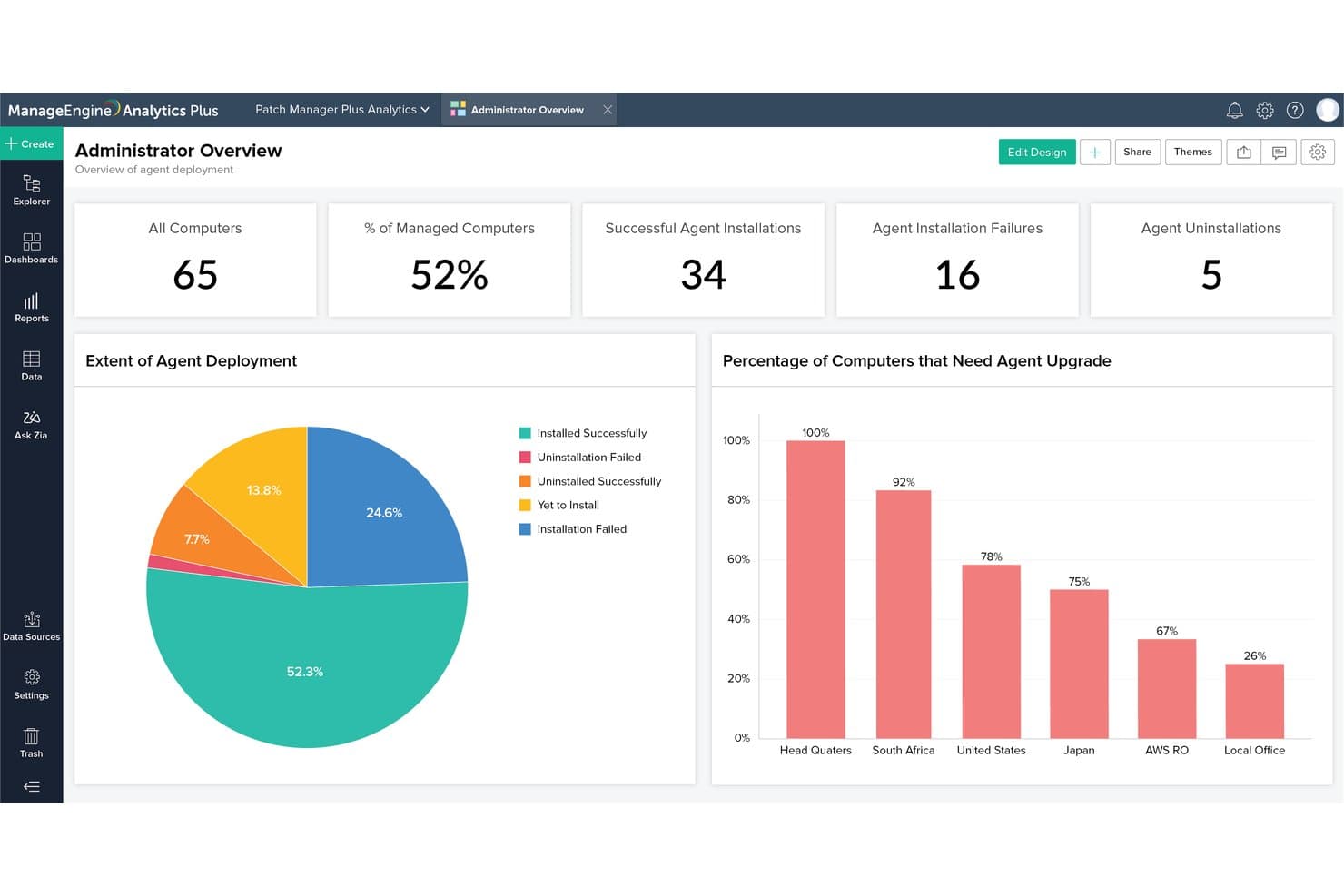
ManageEngine Patch Manager Plus offers an Administrator Overview analytics dashboard displaying agent deployment metrics, installation success rates, and upgrade needs by location. ManageEngine Patch Manager Plus is an enterprise patch management platform that automates OS and third-party application patching across Windows, macOS, and Linux endpoints, including remote, cloud-hosted, and DMZ-connected devices.
Who Is ManageEngine Patch Manager Plus Best For?
It's a strong fit for systems administrators and IT operations teams managing large, distributed endpoint fleets to ensure strict patch compliance across hybrid enterprise environments.
Why I Picked ManageEngine Patch Manager Plus
Patch Manager Plus earns its spot on my shortlist because the real-time patch visibility it provides is genuinely useful when managing large, distributed fleets. The centralized dashboard surfaces missing patches, deployment status, and compliance posture across all endpoints at once. I particularly like the granular audit reports, which give me a timestamped record of every patch action across Windows, macOS, and Linux devices.
ManageEngine Patch Manager Plus Key Features
- Automated third-party application patching: Supports patching for 850+ non-OS apps including browsers, Java, Adobe, and Zoom.
- Cross-platform OS support: Manages patch deployment for Windows, macOS, and Linux devices in one platform.
- Patch testing and approval workflows: Lets you create test groups and automate approvals before patches reach production machines.
- Bandwidth optimization for remote sites: Limits network usage by distributing patches efficiently to remote or distributed offices.
ManageEngine Patch Manager Plus Integrations
Patch Manager Plus offers native integrations with ServiceNow, ServiceDesk Plus, Rapid7, CrowdStrike, Tenable.io, and Tenable.sc. An API is available for building custom integrations.
Pros and Cons
Pros:
- Automated third-party application patching
- Bandwidth optimization throttles remote WAN downloads
- Real-time patch status visibility dashboard
Cons:
- Custom report builder requires steep learning
- Functional UI, but visually behind modern SaaS
Learn more about ManageEngine Patch Manager Plus:
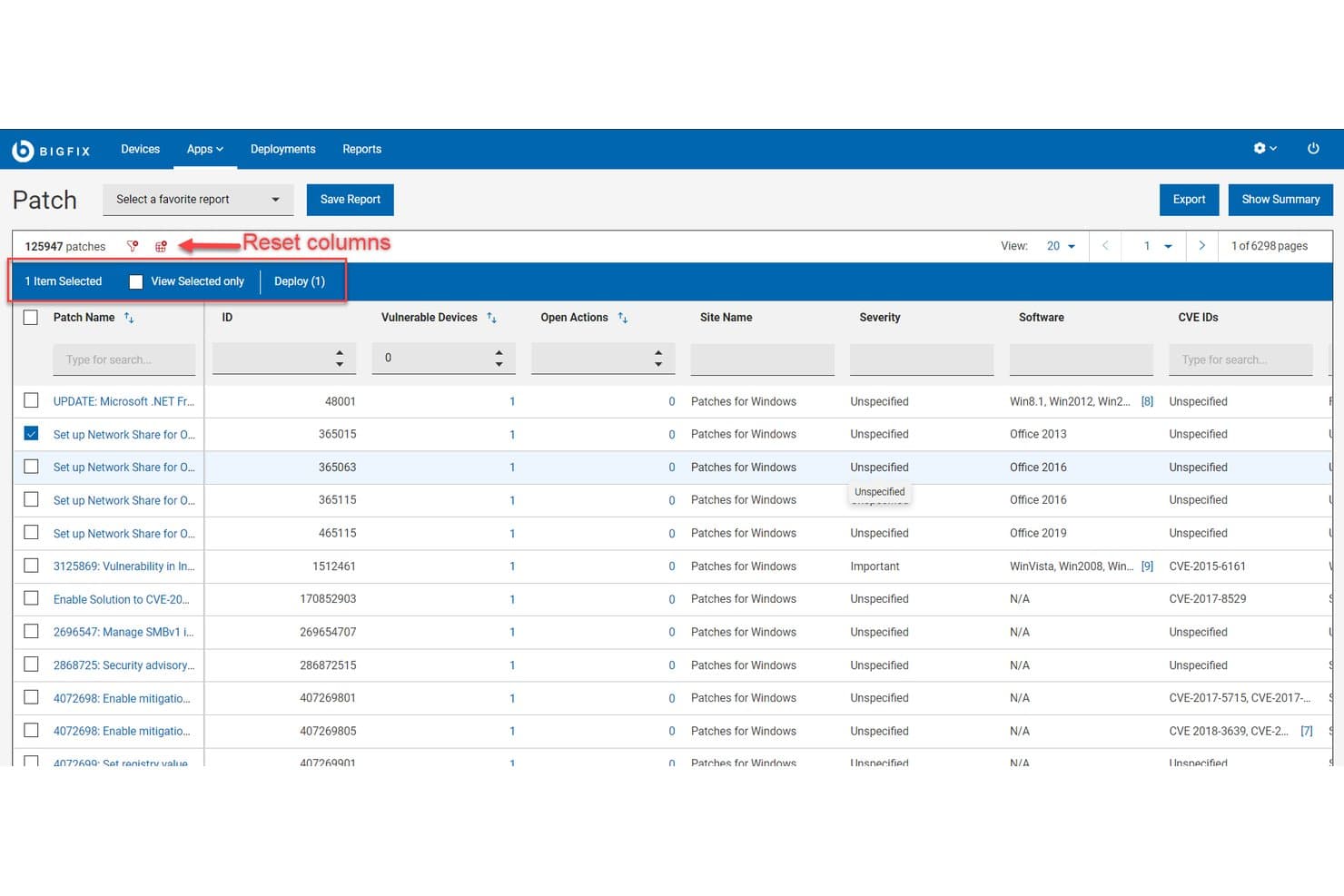
HCL BigFix offers a patch management list view displaying 125,947 patches with CVE IDs, severity levels, vulnerable devices, and one-click deployment capabilities. HCL BigFix is an enterprise endpoint management and patch automation platform that centralizes vulnerability remediation, compliance monitoring, and software distribution across on-premises, cloud, and hybrid environments.
Who Is HCL BigFix Best For?
HCL BigFix is a strong fit for large enterprises with IT and security operations teams managing heterogeneous endpoint fleets across distributed, mixed-OS environments.
Why I Picked HCL BigFix
HCL BigFix earns its spot on my shortlist because no other patch management tool I've used handles OS diversity at this scale. My team can patch Windows Servers, Ubuntu desktops, and legacy AIX boxes from a single console without separate agents or platform-specific workflows. The 120+ OS variant coverage, paired with a >98% first-pass patch success rate, means I'm not chasing failed deployments across disconnected tools when a zero-day hits a mixed-OS fleet.
HCL BigFix Key Features
- Patch Workbench: Centralizes and automates patch management actions with integrated ServiceNow synchronization for change control.
- Vulnerability remediation integrations: Natively connects with Tenable, Rapid7, and Qualys to close vulnerabilities identified in external scans.
- Custom fixlet authoring: Lets you create and deploy custom remediation jobs using BigFix's scripting and automation engine.
- Relays infrastructure: Distributes patch content efficiently across WAN links to thousands of endpoints without saturating the network.
HCL BigFix Integrations
HCL BigFix offers native integrations with Tenable, Rapid7, Qualys, Google Cloud, Nutanix Beam, ServiceNow, Forescout, AWS, Azure, and more. An API is also available for custom integrations.
Pros and Cons
Pros:
- Supports patch automation at thousands-of-endpoints scale
- Remediates vulnerabilities across disconnected endpoints
- Patches over 100 OS and device types
Cons:
- Setup complexity is high for smaller teams
- Executive reporting requires customization and expertise
Learn more about HCL BigFix: Best for automated patching across endpoints
- Free trial + free demo available
- Pricing upon request
Visit WebsiteCustomer Rating:5/5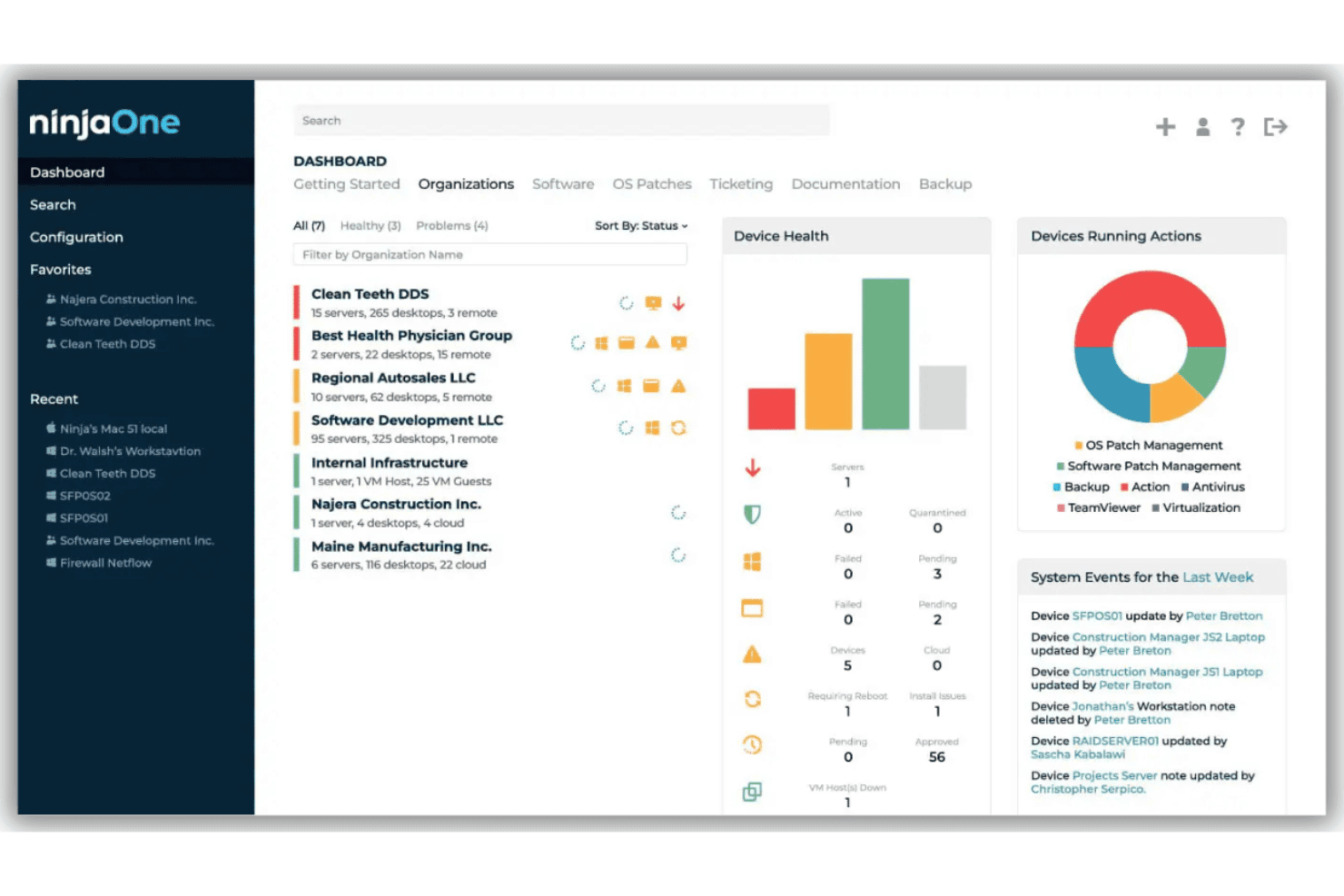
NinjaOne offers a centralized dashboard for monitoring device health, managing organizations, and tracking system events across multiple clients. NinjaOne is a unified IT operations platform with autonomous patch management at its core, supporting OS and third-party application patching across Windows, macOS, Linux, and mobile endpoints from a single cloud-based console.
Who Is NinjaOne Best For?
NinjaOne fits IT teams and managed service providers managing distributed endpoint fleets across mid-market and enterprise environments.
Why I Picked NinjaOne
NinjaOne earns its spot on my shortlist because of its Patch Intelligence AI, which analyzes deployment signals and community telemetry to automatically pause risky patches before they reach production. I also rely on patch caching, which lets my team push updates to bandwidth-limited remote sites without a VPN. Add in support for 6,000+ third-party applications, and I'm not managing a separate tool just to cover browsers and productivity apps.
NinjaOne Key Features
- Multi-OS patch management: Centrally patch Windows, macOS, Linux, and mobile devices from a single console.
- Preemptive patch approval policies: Approve or block specific KBs or update categories before release.
- Automated vulnerability data imports: Bring in vulnerability data to inform patch prioritization workflows.
- Compliance and audit-ready reporting: Generate detailed reports mapped to frameworks like SOC 2, HIPAA, and ISO 27001.
NinjaOne Integrations
NinjaOne offers native integrations with Splashtop, Zendesk, Okta, ConnectWise, Microsoft Azure/Intune, Slack, ServiceNow, DeskDay, and more, and provides an API for custom integrations.
Pros and Cons
Pros:
- Built-in compliance reporting for multiple frameworks
- Supports remote endpoints without VPN dependency
- Automated patch rollback on failed deployments
Cons:
- No native Unix (AIX, Solaris) support
- Custom metric export options remain basic
Learn more about NinjaOne: Best for risk-based prioritization for remediation
- Free demo available
- Pricing upon request
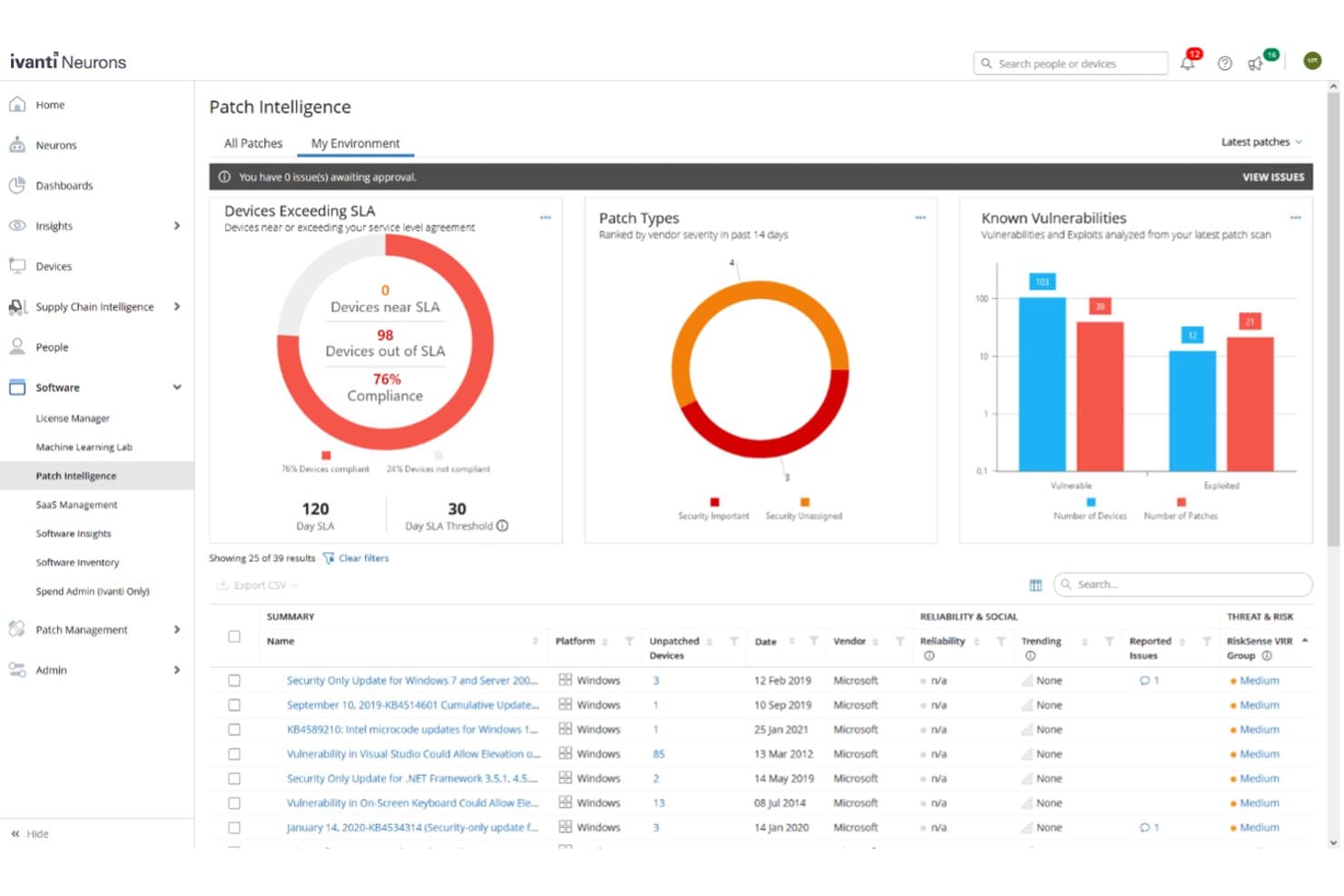
Ivanti Neurons for Patch Management offers a Patch Intelligence dashboard displaying device compliance, patch types, known vulnerabilities, and a detailed list of unpatched security updates. Ivanti Neurons for Patch Management is a cloud-native patch management platform that automates vulnerability discovery, risk-based prioritization, and patch deployment across Windows, macOS, Linux, and 800+ third-party applications in hybrid enterprise environments.
Who Is Ivanti Neurons for Patch Management Best For?
It's a strong fit for security-focused enterprise IT teams that need to prioritize remediation by actual exploit risk rather than raw CVE scores.
Why I Picked Ivanti Neurons for Patch Management
I picked Ivanti Neurons for Patch Management because its Vulnerability Risk Rating (VRR) goes beyond CVSS scores, pulling in threat intelligence from 100+ sources, dark web feeds, and human-validated exploit data to rank what actually needs patching first. My team uses deploy-by-risk automation to push the highest-priority patches before exploits hit. The ring deployment feature, which includes user sentiment surveys, catches stability issues before a patch rolls out fleet-wide.
Ivanti Neurons for Patch Management Key Features
- Patch reliability insights: Aggregates anonymized deployment data and user sentiment to flag patches that may trigger issues.
- Compliance reporting dashboard: Provides status, history, and SLA tracking for audits across your full environment.
- Third-party patch catalog: Maintains over 800 supported applications with regular updates from a central feed.
- Ring deployment configuration: Lets you define phased rollouts with configurable groups and pre-built policies.
Ivanti Neurons for Patch Management Integrations
Ivanti Neurons for Patch Management offers native integrations with Jira, CrowdStrike, AWS, Rapid7, ServiceNow, Tenable, Wiz, Synopsis, Splunk, and more. An API is available for custom integrations.
Pros and Cons
Pros:
- Covers Windows, macOS, Linux, and 800+ apps
- Automated ring deployment with user sentiment analysis
- Risk prioritization uses threat and exploit intelligence
Cons:
- Custom patch uploads limited to sideload solution
- Compliance reporting lacks detailed export templates
Learn more about Ivanti Neurons for Patch Management:
Other Enterprise Patch Management Software
Here are some additional enterprise patch management software options that didn’t make it onto my shortlist, but are still worth checking out:
- 11SolarWinds Patch ManagerBest for third-party patch catalog support
- 12Kaseya VSABest for unified IT management and automation
- 13Qualys Patch ManagementBest for built-in vulnerability assessment
- 14AteraBest for patching with remote monitoring
- 15PDQ ConnectBest for zero-touch patching for distributed teams
- 16GFI LanguardBest for vulnerability and patch scanning
- 17HeimdalBest for automated patching with compliance
- 18N-able N-central RMMBest for role-based patch controls for IT teams
- 19SyxsenseBest for real-time patch deployment visibility
- 20Patch My PCBest for rapid third-party patch catalog updates
How I Evaluate Enterprise Patch Management Software
I evaluate enterprise patch management tools on two levels: baseline requirements like cross-platform deployment and audit reporting, and differentiators like risk-based prioritization and rollback.
Core Functionality (Table Stakes for This List)
When I'm selecting tools for my list, I rank each one on a scale from 0 (does not offer the functionality) to 5 (excels in this area) for each core functionality listed below. Then, I calculate the tool's total score into a percentage. Each tool needs to achieve a minimum total score of 65% to be considered for inclusion.
- Automated Patch Deployment: I check whether a tool can handle policy-based scheduling, phased rollouts, and automatic rollback so a failed update doesn't take down a production server at 2 a.m.
- Cross-Platform OS Support: Enterprise environments rarely run one OS. I look for full patching parity across Windows, macOS, and major Linux distributions like RHEL, Ubuntu, and SUSE.
- Third-Party App Patching: Most exploited vulnerabilities live in apps like browsers, Java, and Zoom. I evaluate how many third-party titles each platform covers and how fast new patches hit the catalog.
- Vulnerability Assessment & Prioritization: I look for CVE-based scanning paired with risk scoring, so your team patches the actively exploited flaw before the low-severity cosmetic fix.
- Compliance Reporting & Audit Trails: Auditors want proof, not promises. I evaluate whether each tool offers pre-built reports mapped to frameworks like PCI-DSS, HIPAA, and ISO 27001 with exportable audit logs.
- Distributed Endpoint Management: I look at how each platform reaches remote laptops, cloud instances, and on-prem servers without forcing traffic through a VPN or requiring constant network connectivity.
Once I have a list of tools that meet the criteria, I consider what sets each platform apart.
Differentiating Factors (What Sets Vendors Apart)
Here's how I compare and contrast different vendors:
Standout Features
Risk-based prioritization is a major differentiator. I look for tools that pull in threat intelligence like CISA KEV to rank patches by active exploitation, not just CVSS severity. Automated testing and rollback matter just as much—pilot-ring deployment lets you validate a patch on a small group before it hits production. Bandwidth optimization also separates vendors, especially for distributed teams where peer-to-peer distribution and delta patching keep deployments from choking the network.
Beyond Features
Deployment architecture matters. I evaluate whether a vendor offers SaaS, on-premise, and hybrid options, since regulated industries often need air-gapped environments. Integration depth is equally important; I check for bi-directional connectors to ITSM tools like ServiceNow and Jira so patch deployments auto-generate change tickets. I also consider how quickly a vendor publishes new patch content after a CVE drops, because a delay of even a day or two can leave thousands of endpoints exposed.
How to Choose Enterprise Patch Management Software
It’s easy to get bogged down in long feature lists and complex pricing structures. To help you stay focused as you work through your unique software selection process, here’s a checklist of factors to keep in mind:
| Factor | What to Consider |
|---|---|
| FactorScalability | What to ConsiderWill the software handle all your current and projected endpoints, across multiple sites or business units, without lag or agent overload? |
| FactorIntegrations | What to ConsiderDoes the tool connect easily with your vulnerability scanners, ITSM workflows, and alerting tools? Check for native integration or reliable APIs. |
| FactorCustomizability | What to ConsiderCan you tailor patch policies, maintenance windows, access, and reporting to match your compliance needs or business processes? |
| FactorEase of use | What to ConsiderIs the console intuitive for day-to-day admins, or will you rely on specialist skills and constant training to operate and troubleshoot? |
| FactorImplementation and onboarding | What to ConsiderHow long will it take to deploy agents, configure settings, and train staff? Look for unexpected infrastructure, policy, or change management requirements. |
| FactorCost | What to ConsiderAre pricing structures based on endpoint, user, or features? Check for hidden costs like extra modules, integration add-ons, or compliance/reporting tiers. |
| FactorSecurity safeguards | What to ConsiderDoes the platform offer RBAC, audit logging, and data encryption? Ask yourself how these controls align with your organization's risk posture. |
| FactorSupport availability | What to ConsiderHow quickly and reliably can you get help during incidents or upgrades? Consider SLAs, support hours, and access channels before committing. |
What is Enterprise Patch Management Software?
Enterprise patch management software is an essential endpoint security platform that automates the discovery, deployment, and monitoring of software updates across large, diverse IT environments. It handles updates for operating systems and third-party applications, helps maintain regulatory compliance, and reduces security vulnerabilities. These tools are designed to support thousands of endpoints, streamline patching across distributed sites, and provide robust reporting required for enterprise-scale operations.
Features
When selecting enterprise patch management software, keep an eye out for the following key features:
- Automated patch deployment: Uses automated workflows to orchestrate scheduled or triggered rollouts across endpoints, reducing manual effort and minimizing patching delays.
- Cross-platform OS support: Manages updates for Windows, macOS, and major Linux distributions from a single console, ensuring coverage across varied device fleets.
- Third-party application patching: Delivers updates for non-OS apps like browsers, productivity suites, and collaboration tools, reducing risk from unpatched third-party software.
- Vulnerability assessment: Integrates vulnerability management by scanning for missing updates and identifying prioritized vulnerabilities using CVE severity and real-time threat intelligence feeds.
- Rollback capabilities: Allows IT teams to reverse or remove problematic patches, minimizing downtime if an update causes issues in production.
- Compliance reporting: Generates reports for audit trails and regulatory frameworks, making it easier to demonstrate patch status during security reviews.
- Remote endpoint management: Supports patch delivery to devices outside the corporate network, useful for remote or hybrid work environments.
- Bandwidth optimization: Uses peer-to-peer distribution, throttling, or differential patching to minimize network impact and speed up large deployments.
- Maintenance window scheduling: Lets you define specific times for patching and reboots, aligning updates with your business’s SLAs and operational needs.
- Role-based access control: Connects with identity providers like Active Directory to give granular permissions, ensuring only authorized users can manage critical patching workflows.
Benefits
Implementing enterprise patch management software provides several benefits for your team and your business. Here are a few you can look forward to:
- Reduced security risk: Regular, automated patching closes known software vulnerabilities quickly, helping protect your organization from malware, ransomware, and evolving cyber threats.
- Improved compliance: Built-in compliance reporting and audit trails make it easier to demonstrate adherence to standards like PCI-DSS, HIPAA, or ISO 27001.
- Time savings for IT: Automation and centralized patch orchestration free up IT teams from manual updates, letting them focus on higher-priority initiatives.
- Consistent update deployment: Cross-platform support ensures that all endpoints—local, remote, and cloud-based—receive timely and consistent patches.
- Less business disruption: Features like rollback, maintenance windows, and bandwidth optimization preserve system stability and reduce downtime during updates.
- Greater visibility and control: Real-time dashboards, customizable alerts, and granular permissions let you monitor, analyze, and manage patch progress across your fleet.
- Streamlined remote management: The ability to patch distributed or off-network endpoints means your security posture stays strong even as teams work from different locations.
Costs and Pricing
Selecting enterprise patch management software requires an understanding of the various pricing models and plans available. Costs vary based on features, team size, add-ons, and more. The table below summarizes common plans, their average prices, and typical features included in enterprise patch management software solutions:
Plan Comparison Table for Enterprise Patch Management Software
| Plan Type | Average Price | Common Features |
|---|---|---|
| Plan TypeFree Plan | Average Price$0 | Common FeaturesBasic patch deployment for limited devices, manual scheduling, and community support. |
| Plan TypePersonal Plan | Average Price$5-$15/user/month | Common FeaturesSingle-user patching, automated updates for one OS, basic reporting, and standard technical support. |
| Plan TypeBusiness Plan | Average Price$20-$40/user/month | Common FeaturesMulti-user support, cross-platform patching, third-party app updates, compliance reporting, and role-based permissions. |
| Plan TypeEnterprise Plan | Average Price$40-$80/user/month | Common FeaturesFull automation, hybrid deployment options, custom integrations, SLA-backed support, and advanced audit capabilities. |
Enterprise Patch Management Software FAQs
Here are some answers to common questions about enterprise patch management software:
How does enterprise patch management software help with compliance audits?
Enterprise patch management software automates compliance reporting and maintains detailed audit trails. This way, you can quickly demonstrate patch status, proof of remediation, and adherence to regulations like PCI-DSS or HIPAA during internal or external audits.
Can enterprise patch management software patch devices that are off-network?
Yes, most modern solutions support remote patching for devices outside the corporate network. This keeps endpoints secure and up-to-date, even when users are traveling or working from home.
What third-party applications are usually supported for patching?
Enterprise solutions typically cover a wide range of third-party apps such as web browsers, email clients, Java, Zoom, and productivity suites. You should check the vendor’s catalog for updates relevant to your environment.
How does automation reduce risk compared to manual patching?
Automation reduces human error, enforces consistent policy, and enables rapid rollout of security updates across your fleet. This helps minimize the patching window and lowers the chances of threats exploiting unpatched vulnerabilities.
What should I consider when comparing total cost of ownership?
You should factor in licensing, infrastructure changes, professional services, support tiers, and time needed for deployment and ongoing management. Beware of hidden add-on costs for key features like compliance, integrations, or advanced reporting.