

As melhores soluções de gestão de acessos privilegiados ajudam as equipas a controlar as permissões administrativas, reduzir os riscos de acesso não autorizado e proteger sistemas sensíveis contra ameaças internas e externas. Estas ferramentas facilitam a aplicação de políticas de privilégio mínimo, a monitorização de atividades de alto risco e a proteção de credenciais em ambientes distribuídos.
Quando configurações incorretas expõem sistemas críticos, os processos de aprovação manual atrasam tarefas urgentes ou as contas privilegiadas não são monitorizadas, as organizações enfrentam falhas de segurança mais significativas e um maior risco operacional. Estes problemas dificultam a manutenção da visibilidade por parte das equipas de segurança e de TI, o apoio a auditorias e a resposta rápida a comportamentos suspeitos.
Com mais de 20 anos de experiência no setor enquanto Diretor de Tecnologia, testei e analisei dezenas de soluções de gestão de acessos privilegiados em ambientes reais, avaliando os seus controlos de segurança, funcionalidades de auditoria e qualidade das integrações. Este guia destaca as principais soluções de gestão de acessos privilegiados. Cada análise aborda as funcionalidades, as vantagens e desvantagens e os casos de utilização mais adequados, para ajudar a escolher a ferramenta certa.
Why Trust Our Software Recommendations
6,700+
Reviews
20
Industry experts
16+
Evaluation factors
14
Years
Our team has been testing and reviewing software since 2012. As tech leaders ourselves, we know how difficult—and important—it is to choose the right software.
For this guide, we evaluated tools using hands-on testing and independent research, scoring tools using our selection criteria.
Our reviews reflect our human editorial judgment, not a sales pitch.
Expert reviewers:
- Paulo Gardini MiguelTech Director
 Tim FisherVP of AI
 Gabriel RosasTech Lead & Software Architect
 Christhian GruhnTech Lead & Platform Architect

Tabela comparativa: soluções de gestão de acessos privilegiados
Esta tabela comparativa resume os detalhes de preços das minhas principais escolhas de soluções de gestão de acessos privilegiados.
| Tool | Best For | Trial Info | Price | ||
|---|---|---|---|---|---|
| 1 | Best for automated app provisioning | 14-day free trial | From $8/user/month (billed annually) | Website | |
| 2 | Best with built-in dark web breach monitoring | 14-day free trial | Pricing upon request | Website | |
| 3 | Best for smart privilege elevation | Free trial + free demo available | Pricing upon request | Website | |
| 4 | Best for secure password vault | Free trial + demo available | From $3.33/month (billed annually) | Website | |
| 5 | Best for compliance with data regulations | Free trial + free demo available | Pricing upon request | Website | |
| 6 | Best for enterprise-level integration | Free demo available | Pricing upon request | Website | |
| 7 | Best for agentless PAM approach | 30-day free trial | From $2/user/month | Website | |
| 8 | Best for privileged access without blind spots | 30-day free trial | From $3/user/month (billed annually) | Website | |
| 9 | Best for small to medium businesses | Free demo available | Pricing upon request | Website | |
| 10 | Best for scalability across industries | Pricing upon request | Website |


Análises das melhores soluções de gestão de acessos privilegiados
Apresentamos abaixo os meus resumos detalhados das melhores soluções de gestão de acessos privilegiados que entraram na minha lista restrita. As minhas análises oferecem uma visão detalhada das principais funcionalidades, vantagens & desvantagens, integrações e casos de utilização ideais de cada ferramenta, para ajudar a encontrar a melhor opção para si.
 Best for automated app provisioning
- 14-day free trial
- From $8/user/month (billed annually)
Visit WebsiteCustomer Rating:4.7/5
Rippling's role-based permissions include an approvals feature that allows businesses to control who has the authority to approve specific requests. Rippling IT is an IT management platform that brings together identity and access management, MDM, device lifecycle management, and automated compliance in one system.
Who Is Rippling IT Best For?
Rippling IT is ideal for mid-sized to enterprise IT teams managing large employee populations across multiple systems and devices.
Why I Picked Rippling IT
I picked Rippling IT for its automated app provisioning that runs on role-based templates tied directly to job titles and departments. My team defines the correct app set once per role, and Rippling applies it to every new hire or internal transfer that matches. I also use the app catalog to see exactly which employees hold access to which tools, so auditing privileged app assignments takes minutes rather than hours.
Rippling IT Key Features
- SSO enforcement: Apply single sign-on across your app catalog to centralize employee authentication.
- MFA policies: Set multi-factor authentication requirements for specific apps or groups in the admin console.
- RPass password manager: Manage company-owned passwords for apps outside your SSO configuration.
- SSH key management: Manage SSH keys for engineers accessing servers, linking keys to employment status.
Rippling IT Integrations
Rippling IT integrates with 650+ apps, including GitHub, Jira, Slack, Google Workspace, Zoom, Salesforce, and Microsoft 365. It also supports API access and developer tools for custom integrations.
Pros and Cons
Pros:
- Automated provisioning reduces manual access tasks
- Identity, devices, and apps are managed together
- HR-driven access changes are triggered by personnel updates
Cons:
- Limited advanced PAM features like session monitoring
- Requires employee data setup for accurate automation
Learn more about Rippling IT: Best with built-in dark web breach monitoring
- 14-day free trial
- Pricing upon request
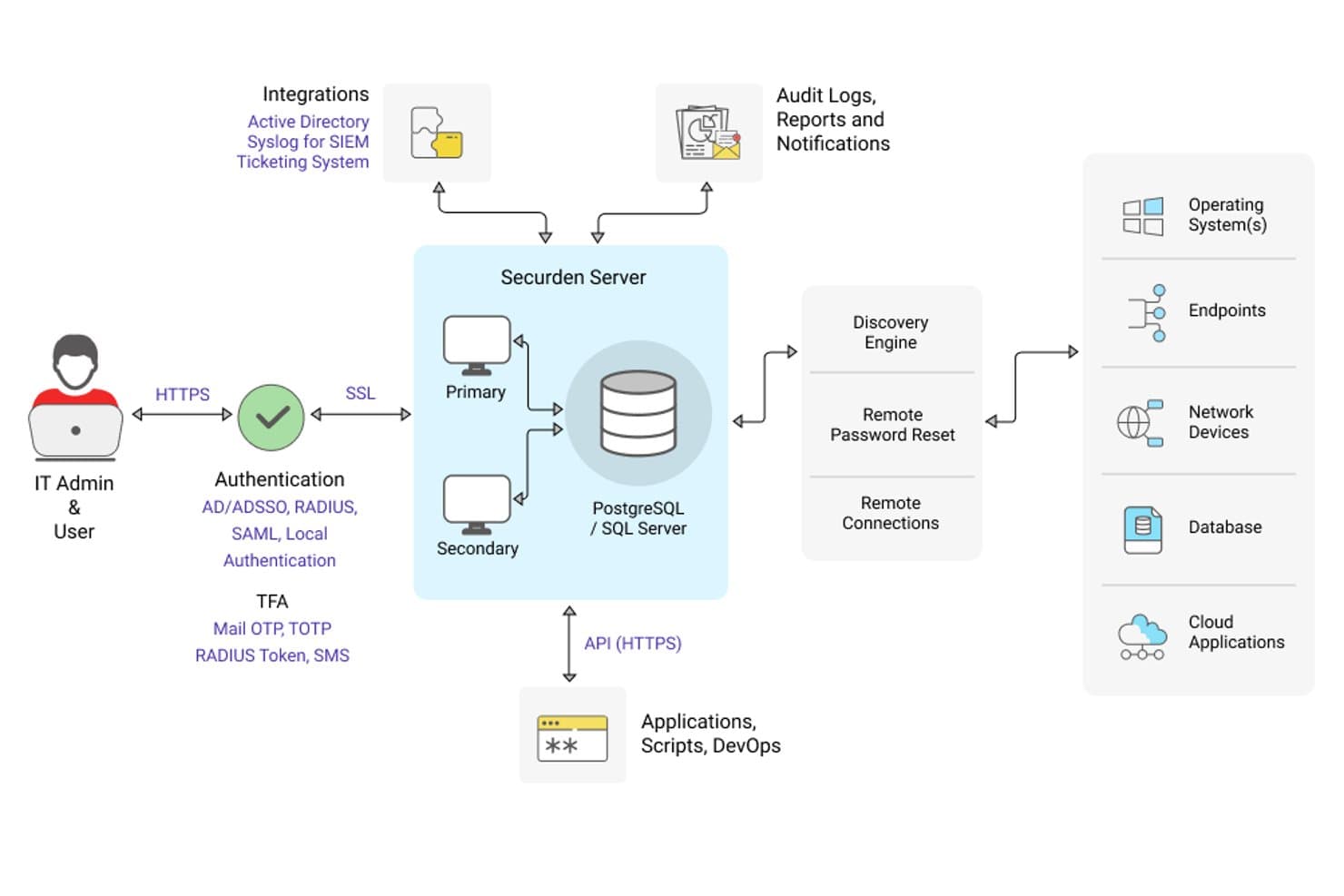
Securden Unified PAM offers a comprehensive architecture diagram showing server components, authentication methods, integrations, and target system connections. Securden Unified PAM is a privileged access management platform that combines credential vaulting, session monitoring, endpoint privilege control, and just-in-time access management across on-prem, cloud, and hybrid environments.
Who Is Securden Unified PAM Best For?
IT security and compliance teams that need a full PAM stack without the complexity or cost of legacy enterprise vendors.
Why I Picked Securden Unified PAM
I picked Securden Unified PAM as one of the best because of its built-in dark web breach monitoring, which flags compromised credentials stored in the vault before attackers can exploit them. Unlike tools that need third-party add-ons for breach intelligence, Securden checks partial password hashes against breached databases and fires instant alerts. I also like how this pairs with automated password rotation, so a flagged credential gets cycled out immediately rather than just flagged and forgotten.
Securden Unified PAM Key Features
- Automated privileged account discovery: Scans endpoints, servers, databases, and cloud platforms to identify and onboard privileged accounts.
- Endpoint privilege management: Removes local admin rights with policy-based elevation for approved applications and tasks.
- Built-in compliance reporting: Generates audit-ready reports mapped to major regulations like HIPAA, PCI DSS, and NIST frameworks.
- SIEM and ITSM integration: Connects with solutions like IBM QRadar and ServiceNow for centralized monitoring and workflow automation.
Securden Unified PAM Integrations
Securden Unified PAM offers native integrations with ServiceNow, IBM QRadar, AWS, Google Cloud Platform, Microsoft Entra ID, Okta, OneLogin, Duo, YubiKey, RADIUS, and Freshservice, and provides an API for custom integrations.
Pros and Cons
Pros:
- Endpoint privilege management included natively
- Covers on-prem, cloud, and hybrid deployments
- Built-in dark web breach monitoring included
Cons:
- Advanced reporting requires significant manual customization
- UI feels dated compared to competitors
Learn more about Securden Unified PAM: Best for smart privilege elevation
- Free trial + free demo available
- Pricing upon request

Heimdal dashboard showing centralized monitoring of privileged activity, access controls, and threat insights. In the realm of privileged access management solutions, Heimdal stands out by addressing the unique security challenges faced by various industries, including healthcare, government, and education. Designed for organizations that prioritize compliance and data governance, it offers a robust framework for managing access to sensitive accounts and systems. By eliminating shared admin passwords and blocking unauthorized software installs, Heimdal provides your team with the tools needed to maintain a secure and compliant IT environment.
Why I Picked Heimdal
I picked Heimdal for its innovative approach to privileged access management, specifically its Smart Privilege Elevation and Delegation Management feature. This tool automates admin requests, allowing you to grant temporary admin rights that automatically expire, reducing the risk of privilege creep. Additionally, Heimdal's Application Control with AppFencing blocks unauthorized software installations, ensuring only approved applications run on your network. These features collectively help your organization maintain security without compromising on efficiency.
Heimdal Key Features
In addition to its standout privilege management tools, I also found several other features that enhance its value:
- Privileged Account & Session Management: This feature records and audits all privileged sessions, providing a clear trail for compliance and security audits.
- Just-in-Time Access: Offers temporary access to critical systems only when necessary, reducing the risk of privilege abuse.
- Mobile Approvals: Allows administrators to approve requests on the go, ensuring that your team maintains control over access even when they're away from their desks.
- Instant Compliance Reporting: Generates detailed reports to help your organization meet various regulatory standards, such as ISO 27001 and HIPAA.
Heimdal Integrations
Integrations include ConnectWise RMM, Autotask PSA, and other third-party cybersecurity tools. Additionally, Heimdal offers an API for custom integrations, allowing you to tailor the solution to fit your specific needs.
Pros and Cons
Pros:
- Comprehensive session monitoring logs
- Smart privilege elevation automation
- Granular role-based access controls
Cons:
- Pricing not publicly disclosed
- Interface may feel complex
Learn more about Heimdal: Best for secure password vault
- Free trial + demo available
- From $3.33/month (billed annually)
Visit WebsiteCustomer Rating:4.7/5
With Keeper Security you can secure file and password sharing. Keeper Security is a password management and privileged access management solution designed for businesses and individuals. It focuses on securing passwords and sensitive data, providing features that enhance security and compliance.
Why I picked Keeper Security: Its secure password vault differentiates Keeper Security from other solutions. The platform uses zero-trust and zero-knowledge architecture, ensuring end-to-end encryption for user data. Features like password sharing and secrets management enhance security for your team. Keeper Security is FedRAMP authorized, meeting stringent government standards, making it ideal for high-security environments.
Standout features & integrations:
Features include password sharing, secrets management, and secure file sharing. Your team can benefit from passwordless authentication, reducing the risk of breaches. Keeper Security also offers compliance with certifications like HIPAA, GDPR, and PCI DSS.
Integrations include Microsoft Azure, Active Directory, LDAP, SSO, SAML, Google Workspace, Okta, Duo Security, Slack, and Splunk.
Pros and Cons
Pros:
- Passwordless authentication
- FedRAMP authorized
- Zero-knowledge architecture
Cons:
- Limited customization options
- May be complex for small teams
Learn more about Keeper Security: Best for compliance with data regulations
- Free trial + free demo available
- Pricing upon request
Visit WebsiteCustomer Rating:4.6/5
This is CyberArk's view of its identity security intelligence. Cyberark is a leading provider of identity security and privileged access management solutions, serving industries like banking, healthcare, and government. It focuses on securing privileged access and enhancing security through features like single sign-on and multi-factor authentication.
Why I picked Cyberark: It excels in compliance with data regulations, making it a top choice for regulated industries. Cyberark's Identity Security Platform offers intelligent privilege controls and secrets management to meet stringent compliance requirements. It provides robust security measures without compromising productivity. The platform's emphasis on compliance ensures your team can meet regulatory standards effectively.
Standout features & integrations:
Features include single sign-on, multi-factor authentication, and secrets management. Your team can benefit from endpoint identity security to protect devices. Cyberark also offers machine identity security to safeguard automated processes.
Integrations include Splunk, ServiceNow, SailPoint, Okta, Microsoft Azure, AWS, Google Cloud, SAP, Oracle, and IBM.
Pros and Cons
Pros:
- Extensive industry coverage
- Machine identity security
- Strong compliance support
Cons:
- Requires technical expertise
- High resource requirements
Learn more about Cyberark: Best for enterprise-level integration
- Free demo available
- Pricing upon request
Visit WebsiteCustomer Rating:4.5/5
Here is a view of BeyondTrust's PRA real-time dashboard. BeyondTrust is a privileged access management solution tailored for large enterprises. It focuses on securing and managing access across complex IT environments, providing tools that enhance control and compliance.
Why I picked BeyondTrust: It excels in enterprise-level integration, making it ideal for large organizations with diverse systems. Features like session monitoring and real-time threat analytics help you maintain oversight and security. BeyondTrust's ability to integrate with various enterprise systems ensures smooth operations. The tool offers granular access controls, enhancing security for your team.
Standout features & integrations:
Features include session monitoring, real-time threat analytics, and granular access controls. Your team can use vulnerability management to identify and address potential risks. BeyondTrust also provides detailed audit trails for compliance purposes.
Integrations include Microsoft Active Directory, LDAP, ServiceNow, Splunk, SailPoint, CyberArk, Okta, Duo Security, RSA, and Google Workspace.
Pros and Cons
Pros:
- Strong enterprise-level integration
- Real-time threat analytics
- Detailed audit trails
Cons:
- Complex for small businesses
- Initial setup can be time-consuming
Learn more about BeyondTrust: Best for agentless PAM approach
- 30-day free trial
- From $2/user/month
Visit WebsiteCustomer Rating:4.5/5
miniOrange PAM dashboard showing real-time session overview, user counts, and privileged resource activity from a centralized admin console. miniOrange PAM is a modern, identity-first privileged access management solution built for organizations that require strong privileged security controls. It is well-suited for regulated industries such as finance, healthcare, manufacturing, and government, where protecting sensitive data and meeting compliance requirements are essential. With capabilities like password vaulting, session monitoring, and just-in-time access, miniOrange PAM helps reduce risk and protect privileged accounts from evolving cyber threats.
Why I Picked miniOrange PAM
I picked miniOrange PAM because it offers modern, mature PAM capabilities with a strong identity-first foundation. It is a cloud-first solution that also supports on-premises and hybrid environments, giving you flexibility across infrastructure models. I value its advanced features such as just-in-time access management, privileged session monitoring and recording, granular access controls, password vaulting, and automated credential rotation. These capabilities support real-time auditing of privileged activity and allow temporary elevation of privileges based on verified needs, aligning with the principle of least privilege. Its agentless PAM architecture also makes deployment simpler and more scalable, which can be especially helpful if you want to strengthen privileged security without managing endpoint agents.
miniOrange PAM Key Features
In addition to its robust privileged access management capabilities, I also found several key features that enhance its value:
- Session Monitoring and Control: Provides real-time tracking and recording of privileged sessions, allowing intervention if unauthorized or risky activity is detected.
- Strong Identity-Based Authentication: Enforces access using native SSO and identity-level MFA, incorporating device trust, location, and risk signals to strengthen verification.
- Just-In-Time Privileged Access and EPM: Grants time-bound privileged access through approval workflows and automatically revokes rights after expiration, while Endpoint Privilege Management removes unnecessary admin rights and enforces least privilege on endpoints.
- AI-Driven Threat Detection: Uses anomaly detection, automated responses, and continuous learning to identify suspicious behaviour and improve privileged account protection.
miniOrange PAM Integrations
Integrations include Salesforce, Google Workspace, Microsoft 365, AWS, Azure, Slack, Jira, ServiceNow, Zoom, Dropbox, SSH, RDP, and VPN and VDI solutions. An API is also available to support custom integrations.
Pros and Cons
Pros:
- Solid endpoint privilege management
- Agentless PAM simplifies deployment
- Cloud-first and hybrid flexibility
Cons:
- Legacy migrations may need planning
- Complex setups may need specialists
Learn more about miniOrange: Best for privileged access without blind spots
- 30-day free trial
- From $3/user/month (billed annually)
Visit WebsiteCustomer Rating:4.9/5
Zygon’s app inventory dashboard showing approved apps, access sources, contract types, and renewal timelines. Zygon is a modern identity governance platform that helps IT and security teams control user identities, manage access, and detect shadow IT. It combines identity lifecycle management, access reviews, and governance workflows to strengthen security across SaaS environments.
Why I picked Zygon: I picked Zygon because it gives you fast, automated visibility into all apps and user identities, which is crucial for reducing access sprawl. You can build a consolidated inventory of cloud accounts quickly, even across shadow IT, helping you secure privileged access without blind spots. Zygon also automates deprovisioning, access reviews, and compliance workflows, making it a solid option for teams aiming to save time while staying audit-ready.
Standout features & integrations:
Features include a real-time cloud identity inventory, agentless and SCIM-less deprovisioning, and bulk access reviews. Zygon also offers a browser extension for managing apps without API connections and an Auto-Provisioning Atlas to track authentication methods.
Integrations include Google Workspace, Microsoft 365, Entra ID, Okta, n8n, Make, Slack, and Microsoft Teams.
Pros and Cons
Pros:
- Bulk access reviews
- Browser extension for non-API apps
- Agentless and SCIM-less deprovisioning
Cons:
- Smaller integration library
- Limited advanced reporting
Learn more about Zygon: Best for small to medium businesses
- Free demo available
- Pricing upon request
Visit WebsiteCustomer Rating:4.2/5
Here is a screenshot of ManageEngine PAM360's password dashboard. ManageEngine PAM360 is a privileged access management solution designed for small to medium-sized businesses. It provides centralized control over IT infrastructure, helping manage and secure privileged accounts effectively.
Why I picked ManageEngine PAM360: Its suitability for small to medium businesses sets it apart. The tool offers comprehensive password management and session monitoring, making it accessible for teams with limited IT resources. It also provides automated compliance reporting to keep your business aligned with regulations. The intuitive dashboard simplifies management, allowing your team to focus on core tasks without getting bogged down in complex processes.
Standout features & integrations:
Features include automated compliance reporting, session monitoring, and an intuitive dashboard. Your team can benefit from real-time alerts to identify potential security threats. ManageEngine PAM360 also offers audit trails to track user activities and ensure accountability.
Integrations include Microsoft Active Directory, LDAP, ServiceNow, Jira, Azure, AWS, Google Cloud, Oracle, VMware, and SAP.
Pros and Cons
Pros:
- Intuitive user interface
- Automated compliance reporting
- Suitable for small businesses
Cons:
- Limited advanced features
- Basic reporting capabilities
Learn more about ManageEngine PAM360:

This is a view of Broadcom's software for Symantec privileged access management (pam) overview. Broadcom is a privileged access management solution catering to enterprises across various industries. It focuses on providing scalable security solutions to manage and protect privileged accounts effectively.
Why I picked Broadcom: Its scalability across industries makes it versatile for different enterprise environments. Broadcom offers centralized policy management and access controls, ensuring consistent security measures. It provides automated threat detection to identify and respond to potential risks. The platform's flexibility allows it to adapt to your organization's specific needs, making it suitable for diverse operational requirements.
Standout features & integrations:
Features include centralized policy management, automated threat detection, and flexible access controls. Your team can use detailed audit logs to track user activities. Broadcom also offers real-time analytics to monitor security events.
Integrations include Microsoft Active Directory, LDAP, ServiceNow, SAP, Oracle, IBM, AWS, Azure, Google Cloud, and Splunk.
Pros and Cons
Pros:
- Centralized policy management
- Automated threat detection
- Flexible access controls
Cons:
- Complex initial setup
- Ongoing maintenance needed
Learn more about Broadcom:
Outras soluções de gestão de acessos privilegiados
- 11Auth0Best for seamless third-party integrations
- 12SailPointBest for identity governance
- 13One IdentityBest for cloud-based solutions
- 14WallixBest for managing remote access
- 15CakewalkBest for user-friendly interface
- 16JumpCloudBest for comprehensive device management across different operating systems
- 17OktaBest for identity management in large organizations
- 18WorkatoBest for workflow automation
- 19DelineaBest for efficient privilege management
- 20Microsoft Entra Verified IDBest for verifying digital identities
- 21StrongDMBest for privileged session management
- 22SilverfortBest for adaptive multi-factor authentication
- 23DuoBest for user-friendly two-factor authentication
- 24SafeNet Trusted AccessBest for managing remote access
- 25NokiaBest for large-scale network environments
- 26IBM Security Verify PrivilegeBest for hybrid cloud integration
- 27Azure AD (Microsoft Entra ID)Best for seamless integration with Microsoft services
- 28EkranBest for insider threat detection
- 29IdencyBest for on-premise deployments
- 30PrivXBest for cloud-native environments
How I Evaluate Privileged Access Management Solutions
I split my evaluation into two layers: the baseline requirements—credential vaulting, session recording, and JIT access—a tool must meet, and the differentiators that set the best tools apart.
Core Functionality (Table Stakes For This List)
When I'm selecting tools for my list, I rank each one on a scale from 0 (does not offer the functionality) to 5 (excels in this area) for each core functionality listed below. Then, I calculate the tool's total score into a percentage. Each tool needs to achieve a minimum total score of 65% to be considered for inclusion.
- Privileged Credential Vaulting: I check whether the vault handles automated rotation for passwords, SSH keys, and API tokens—not just stores them—across platforms like Active Directory, Linux servers, and databases.
- Session Management & Monitoring: Real-time session recording and live monitoring matter here, especially the ability to terminate a suspicious RDP or SSH session mid-stream before damage is done.
- Least-Privilege & JIT Access: I evaluate how each tool handles time-bound privilege elevation, like granting a DBA temporary access to a production database through an approval workflow rather than standing permissions.
- Multi-Factor Authentication: Each tool should integrate with major identity providers for MFA at the point of privileged access, not just at initial login, including step-up authentication for sensitive actions.
- Audit Logging & Compliance Reporting: I look for tamper-proof audit trails paired with prebuilt report templates mapped to frameworks like SOX, PCI-DSS, and HIPAA that compliance teams can pull without custom queries.
- Privileged Account Discovery: Automated scanning across endpoints, cloud environments, and directories is what I evaluate here—tools should find orphaned and unmanaged accounts, not rely on manual entry alone.
Once I have a list of tools that meet this criteria, I consider what sets each platform apart.
Differentiating Factors (What Sets Vendors Apart)
Here's how I compare and contrast different vendors:
Standout Features
Secrets management for DevOps is a key differentiator—I look for tools that inject credentials into CI/CD pipelines and Kubernetes without hardcoding them in scripts. Endpoint privilege management matters too, especially for teams that need to strip local admin rights while still letting users elevate permissions for approved tasks. Remote vendor access is another factor I evaluate, since granting a contractor temporary, audited access without a VPN or shared credentials is a common need across IT teams.
Beyond Features
Integration ecosystem is a big one—I check whether a tool connects natively with your SIEM (Splunk, Sentinel) and ITSM platforms like ServiceNow so alerts flow into existing incident workflows. Compliance certifications also carry weight; SOC 2 Type II and FedRAMP authorization signal that a vendor meets strict audit standards your compliance team will ask about. Deployment model matters too, since some organizations require self-hosted or air-gapped options while others prefer SaaS for faster rollouts.
Como escolher uma solução de gestão de acessos privilegiados
É fácil ficar preso a listas extensas de funcionalidades e estruturas de preços complexas. Para se manter focado enquanto percorre o seu processo único de seleção de software, apresentamos uma lista de fatores a ter em conta:
| Fator | O que considerar |
| Escalabilidade | Certifique-se de que a solução consegue acompanhar o crescimento da sua organização. Considere se consegue lidar com um aumento do número de utilizadores e de dados sem perda de desempenho. |
| Integrações | Verifique se integra os sistemas existentes, como o Active Directory, os serviços na nuvem e outro software de aprovisionamento de utilizadores utilizado pela sua equipa. |
| Personalização | Procure opções que permitam adaptar a solução aos seus fluxos de trabalho e políticas de segurança específicos. |
| Facilidade de utilização | Avalie se a interface é intuitiva para a sua equipa, minimizando o tempo de formação e os erros dos utilizadores. |
| Orçamento | Avalie se o preço está de acordo com as suas restrições financeiras, incluindo potenciais custos ocultos de suplementos ou atualizações. |
| Salvaguardas de segurança | Verifique se a solução oferece uma gestão robusta da encriptação (software PKI), autenticação multifator e conformidade com normas como o RGPD. |
| Serviços de suporte | Considere a disponibilidade do apoio ao cliente, incluindo chat em direto, telefone e e-mail, para prestar assistência quando surgirem problemas. |
| Monitorização do desempenho | Certifique-se de que a ferramenta fornece informações em tempo real sobre o desempenho do sistema e as atividades dos utilizadores, para resolver rapidamente potenciais problemas. |
Tendências nas soluções de gestão de acesso privilegiado
Na minha pesquisa, recolhi inúmeras atualizações de produtos, comunicados de imprensa e registos de lançamento de diferentes fornecedores de soluções de gestão de acesso privilegiado. Eis algumas das tendências emergentes que estou a acompanhar:
- Arquitetura de confiança zero: Cada vez mais fornecedores estão a adotar modelos de confiança zero, que partem do princípio de que as ameaças podem ser externas e internas. Esta abordagem exige a verificação contínua dos utilizadores e dispositivos, reforçando a segurança. Soluções como a CyberArk incorporaram esta abordagem nas suas ofertas.
- Análise comportamental: Os fornecedores estão a integrar a análise comportamental para monitorizar as ações dos utilizadores e detetar anomalias. Isto ajuda a identificar atempadamente atividades suspeitas. Por exemplo, a Ekran utiliza a análise comportamental para reforçar a monitorização da segurança.
- Soluções nativas da nuvem: Está a verificar-se uma mudança para arquiteturas nativas da nuvem, que oferecem flexibilidade e escalabilidade. Estas soluções foram concebidas para funcionar de forma integrada em ambientes de nuvem, como se verifica com fornecedores como a PrivX.
- Autenticação sem palavra-passe: A adoção de métodos de autenticação sem palavra-passe está a ganhar força. Esta tendência reduz o risco de roubo de credenciais e melhora a experiência do utilizador. Fornecedores como a BeyondTrust estão a explorar opções sem palavra-passe nas suas soluções.
- Gestão unificada de dispositivos terminais: Os fornecedores estão a concentrar-se na gestão de todos os dispositivos terminais através de uma única plataforma, o que simplifica a gestão da segurança. Esta tendência é evidente no melhor software de portais que oferece controlo e monitorização centralizados, como o fornecido pela One Identity.
O que são soluções de gestão de acesso privilegiado?
As soluções de gestão de acesso privilegiado protegem e gerem as contas privilegiadas de uma organização. Os administradores de TI, os profissionais de segurança e os responsáveis pela conformidade utilizam normalmente estas ferramentas para proteger informações sensíveis e manter a conformidade regulamentar.
Funcionalidades como a arquitetura de confiança zero, a análise comportamental e a autenticação sem palavra-passe ajudam a proteger o acesso, detetar anomalias e melhorar a experiência do utilizador. De um modo geral, estas ferramentas garantem que apenas os utilizadores autorizados têm acesso a sistemas críticos, reduzindo o risco de violações de dados.
Funcionalidades das soluções de gestão de acesso privilegiado
Ao selecionar soluções de gestão de acesso privilegiado, esteja atento às seguintes funcionalidades essenciais:
- Arquitetura de confiança zero: Requer a verificação contínua de utilizadores e dispositivos, reforçando a segurança ao assumir que as ameaças podem ser tanto externas como internas.
- Análise comportamental: Monitoriza as ações dos utilizadores para detetar anomalias, ajudando a identificar atividades suspeitas numa fase inicial.
- Autenticação sem palavra-passe: Reduz o risco de roubo de credenciais e melhora a experiência do utilizador ao eliminar a necessidade de palavras-passe.
- Controlos de acesso baseados em funções: Garantem que os utilizadores têm os níveis de acesso adequados, reforçando a segurança e a conformidade.
- Relatórios de conformidade automatizados: Simplificam o processo de criação de relatórios para garantir que a sua organização cumpre as normas regulamentares.
- Monitorização de sessões: Acompanha as sessões dos utilizadores em tempo real para manter a supervisão e detetar atividades não autorizadas.
- Arquitetura nativa da nuvem: Oferece flexibilidade e escalabilidade, sendo ideal para ambientes que dependem de serviços na nuvem.
- Gestão unificada de dispositivos terminais: Proporciona controlo e monitorização centralizados de todos os dispositivos terminais, simplificando a gestão da segurança.
- Certificação de acesso: Analisa e certifica regularmente os direitos de acesso para manter a segurança e a conformidade.
- Deteção de ameaças em tempo real: Identifica potenciais ameaças à segurança à medida que ocorrem, permitindo uma resposta e mitigação rápidas.
Vantagens das soluções de gestão de acessos privilegiados
A implementação de soluções de gestão de acessos privilegiados proporciona várias vantagens à sua equipa e à sua empresa. Eis algumas das que pode esperar:
- Segurança reforçada: Ao utilizarem uma arquitetura de confiança zero e análise comportamental, estas ferramentas reduzem o risco de acesso não autorizado e de violações de dados.
- Conformidade regulamentar: Os relatórios de conformidade automatizados e a certificação de acesso ajudam a garantir que a sua organização cumpre as normas e os regulamentos do setor.
- Experiência do utilizador melhorada: A autenticação sem palavra-passe e os controlos de acesso baseados em funções facilitam o acesso dos utilizadores aos sistemas de que necessitam sem comprometer a segurança.
- Eficiência operacional: O aprovisionamento automatizado e a monitorização de sessões simplificam os processos, reduzindo a carga de trabalho das equipas de TI e mantendo a supervisão.
- Escalabilidade: As arquiteturas nativas da nuvem e a gestão unificada de dispositivos terminais permitem que a sua organização cresça sem sacrificar a segurança ou o desempenho.
- Resposta em tempo real: A deteção de ameaças em tempo real permite identificar e mitigar rapidamente potenciais ameaças à segurança, minimizando o impacto na sua empresa.
- Controlo centralizado: A gestão unificada de identidades e acessos em vários ambientes simplifica a gestão da segurança e reforça a governação geral.
Custos e preços das soluções de gestão de acessos privilegiados
A seleção de soluções de gestão de acessos privilegiados exige uma compreensão dos vários modelos de preços e planos disponíveis. Os custos variam consoante as funcionalidades, a dimensão da equipa, os complementos e outros fatores. A tabela abaixo resume os planos comuns, os respetivos preços médios e as funcionalidades normalmente incluídas nas soluções de gestão de acessos privilegiados:
Tabela de comparação de planos para soluções de gestão de acessos privilegiados
| Tipo de plano | Preço médio | Funcionalidades comuns |
| Plano gratuito | $0 | Controlo de acesso básico, gestão limitada de utilizadores e relatórios básicos. |
| Plano pessoal | $5-$25 /utilizador /mês | Acesso de um único utilizador, gestão de palavras-passe e funcionalidades de segurança básicas. |
| Plano empresarial | $25-$50 /utilizador /mês | Suporte para vários utilizadores, monitorização de sessões, acesso baseado em funções e relatórios de conformidade. |
| Plano empresarial avançado | $50-$100 /utilizador /mês | Análise de segurança avançada, integração com outros sistemas, utilizadores ilimitados e suporte dedicado. |
Perguntas frequentes sobre soluções de gestão de acessos privilegiados
Eis algumas respostas a perguntas comuns sobre soluções de gestão de acessos privilegiados:
Como funciona uma solução PAM?
As soluções PAM protegem as credenciais de contas privilegiadas, armazenando-as num cofre seguro. Os administradores têm de passar pelo sistema PAM para aceder a estas credenciais, garantindo a autenticação e o registo de cada acesso. Este processo ajuda a proteger contas sensíveis contra utilizações não autorizadas.
Qual é a diferença entre ZTNA e PAM?
A PAM centra-se na proteção e gestão do acesso a sistemas críticos, enquanto a ZTNA impõe controlos de acesso rigorosos em redes inteiras. Ambas são essenciais para a cibersegurança, mas respondem a necessidades de segurança diferentes. A PAM gere o acesso privilegiado, enquanto a ZTNA verifica continuamente o acesso dos utilizadores nas redes.
Quais são os requisitos para a gestão de acessos privilegiados?
Uma PAM eficaz requer autenticação multifator, medidas de segurança automatizadas e a remoção do acesso dos utilizadores aos dispositivos terminais. O estabelecimento de linhas de base e a monitorização de desvios também são cruciais para manter a segurança. Estas práticas ajudam a impedir acessos não autorizados e a garantir a conformidade.
Qual é o risco da gestão de acessos privilegiados?
Negligenciar a PAM pode provocar violações de dados, escalada de privilégios e ameaças internas. Os atacantes podem explorar direitos de acesso elevados, causando danos operacionais e financeiros. A implementação da PAM reduz estes riscos ao proteger contas sensíveis e monitorizar os acessos.
Como reduz a PAM as ameaças internas?
A PAM reduz as ameaças internas ao limitar o acesso a contas sensíveis e monitorizar as atividades dos utilizadores. Impõe controlos rigorosos sobre quem pode aceder a determinados recursos, ajudando a impedir a utilização indevida de privilégios. Ao registar todos os acessos, a PAM dissuade potenciais ações maliciosas.
As soluções PAM podem integrar-se com os sistemas de segurança existentes?
Sim, as soluções PAM integram-se frequentemente com sistemas de segurança existentes, como IAM, SIEM e outras ferramentas de TI. Esta integração reforça a segurança global ao proporcionar uma abordagem unificada à gestão de acessos e à monitorização de atividades em diferentes plataformas.