

De beste verktøyene for overvåking av infrastruktur hjelper team med å oppdage systemproblemer tidlig, opprettholde oppetid og sørge for at applikasjoner og tjenester kjører pålitelig på tvers av komplekse miljøer. Disse verktøyene gir organisasjoner innsyn i sanntid i servere, nettverk og skyressurser, slik at de kan oppdage ytelsesfall og løse problemer før brukerne blir berørt.
Når feilkonfigurasjoner fører til driftsavbrudd, når manuelle kontroller forsinker responstidene, eller når mangler i overvåkingen gjør at kritiske systemer ikke blir sett, kan ytelsen og effektiviteten raskt bli svekket. Disse problemene skaper forsinkelser i feilsøkingen, øker risikoen under perioder med høy belastning og gjør det vanskeligere for utviklings- og driftsteam å forstå hva som skjer i infrastrukturen.
Med over 20 års erfaring i bransjen som teknologidirektør har jeg testet og gjennomgått dusinvis av verktøy for overvåking av infrastruktur i virkelige miljøer for å vurdere nøyaktighet, integrasjoner og brukervennlighet. Denne veiledningen fremhever de beste verktøyene for overvåking av infrastruktur som forbedrer innsynet, styrker ytelsesstyringen og hjelper team med å opprettholde pålitelige systemer. Hver gjennomgang dekker funksjoner, fordeler og ulemper samt bruksområder verktøyet egner seg best til, slik at du kan velge riktig verktøy.
Why Trust Our Software Recommendations
6,700+
Reviews
20
Industry experts
16+
Evaluation factors
14
Years
Our team has been testing and reviewing software since 2012. As tech leaders ourselves, we know how difficult—and important—it is to choose the right software.
For this guide, we evaluated tools using hands-on testing and independent research, scoring tools using our selection criteria.
Our reviews reflect our human editorial judgment, not a sales pitch.
Expert reviewers:
- Paulo Gardini MiguelTech Director
 Tim FisherVP of AI
 Gabriel RosasTech Lead & Software Architect
 Christhian GruhnTech Lead & Platform Architect

Sammenligningstabell for verktøy for overvåking av infrastruktur
Tabellen nedenfor sammenligner prisdetaljene for mine beste utvalgte verktøy for overvåking av infrastruktur.
| Tool | Best For | Trial Info | Price | ||
|---|---|---|---|---|---|
| 1 | Best for customizable dashboard visualizations | 30-day free trial + free plan available | From $200/month (billed annually) | Website | |
| 2 | Best for open-source infrastructure monitoring | Free plan available | Pricing upon request | Website | |
| 3 | Best for comprehensive IT operations | Free demo available | Pricing upon request | Website | |
| 4 | Best for website performance checks | 30-day free trial | From $3/device/month | Website | |
| 5 | Best for AI-powered automation | 15-day free trial | From $7/month | Website | |
| 6 | Best for real-time data analytics | Free plan available | From $15/month (billed annually) | Website | |
| 7 | Best for cloud-native applications | Free plan available | From $10/user/month | Website | |
| 8 | Best for end-to-end visibility | 30-day free trial | From $125/month | Website | |
| 9 | Best for virtual machine management | 90-day free trial available | Pricing upon request | Website | |
| 10 | Best for hybrid cloud monitoring | 30-day free trial available | From $7/node/month | Website |


Anmeldelser av de beste verktøyene for overvåking av infrastruktur
Nedenfor finner du mine detaljerte sammendrag av de beste verktøyene for overvåking av infrastruktur som kom med på kortlisten min. Anmeldelsene mine gir en detaljert oversikt over de viktigste funksjonene, fordeler & ulemper, integrasjoner og ideelle bruksområder for hvert verktøy, slik at du kan finne det beste alternativet for deg.
 Best for customizable dashboard visualizations
- 30-day free trial + free plan available
- From $200/month (billed annually)
Visit WebsiteCustomer Rating:4.6/5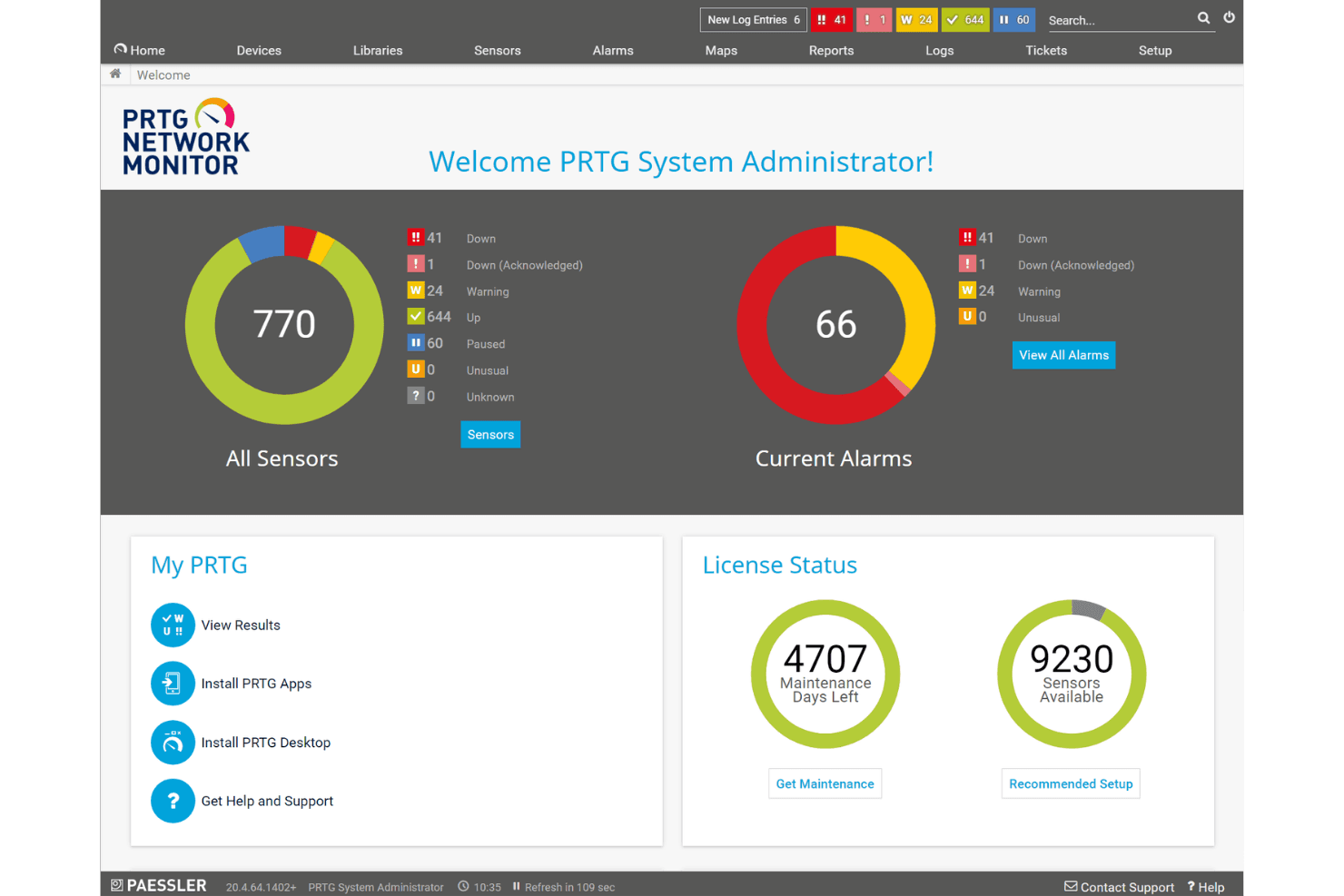
Paessler PRTG displays a centralized network monitoring dashboard with sensor status, current alarms, and license information at a glance. Paessler PRTG is an infrastructure monitoring platform that tracks network devices, servers, applications, and cloud services using a sensor-based architecture with support for SNMP, NetFlow, WMI, REST, and other protocols across on-premises and hybrid environments.
Who Is Paessler PRTG Best For?
PRTG is a strong fit for IT operations and NOC teams in mid-sized organizations managing complex, mixed-device environments across on-premises and hybrid infrastructure.
Why I Picked Paessler PRTG
I picked Paessler PRTG as one of the best because its Map Designer lets me build real-time network maps from scratch, pulling live status data from any monitored device into a single, fully custom view. I also like how PRTG MultiBoard consolidates dashboards across multiple PRTG servers into one display. In practice, that means my NOC team gets a true single-pane-of-glass view across every site without toggling between instances.
Paessler PRTG Key Features
- Sensor-based data collection: Choose from 250+ sensor types to monitor devices, bandwidth, applications, cloud services, and more.
- Auto-discovery wizard: Automatically finds and maps network devices for quick setup.
- APIs and custom sensor framework: Extend monitoring by building custom sensors or integrating with external systems.
- Distributed monitoring with remote probes: Monitor remote sites or branch offices using lightweight agents without extra PRTG servers.
Paessler PRTG Integrations
Paessler PRTG offers native integrations with AWS, Microsoft Azure, Google Cloud Platform, Cisco, VMware vSphere, ServiceNow, and Splunk. An API is available for custom integrations.
Pros and Cons
Pros:
- Strong SNMP, NetFlow, and WMI support
- Real-time network topology mapping built-in
- 250+ sensors cover diverse infrastructure environments
Cons:
- Limited Kubernetes and container monitoring depth
- Per-sensor pricing gets expensive at scale
Learn more about Paessler PRTG: Best for open-source infrastructure monitoring
- Free plan available
- Pricing upon request
Visit WebsiteCustomer Rating:4.7/5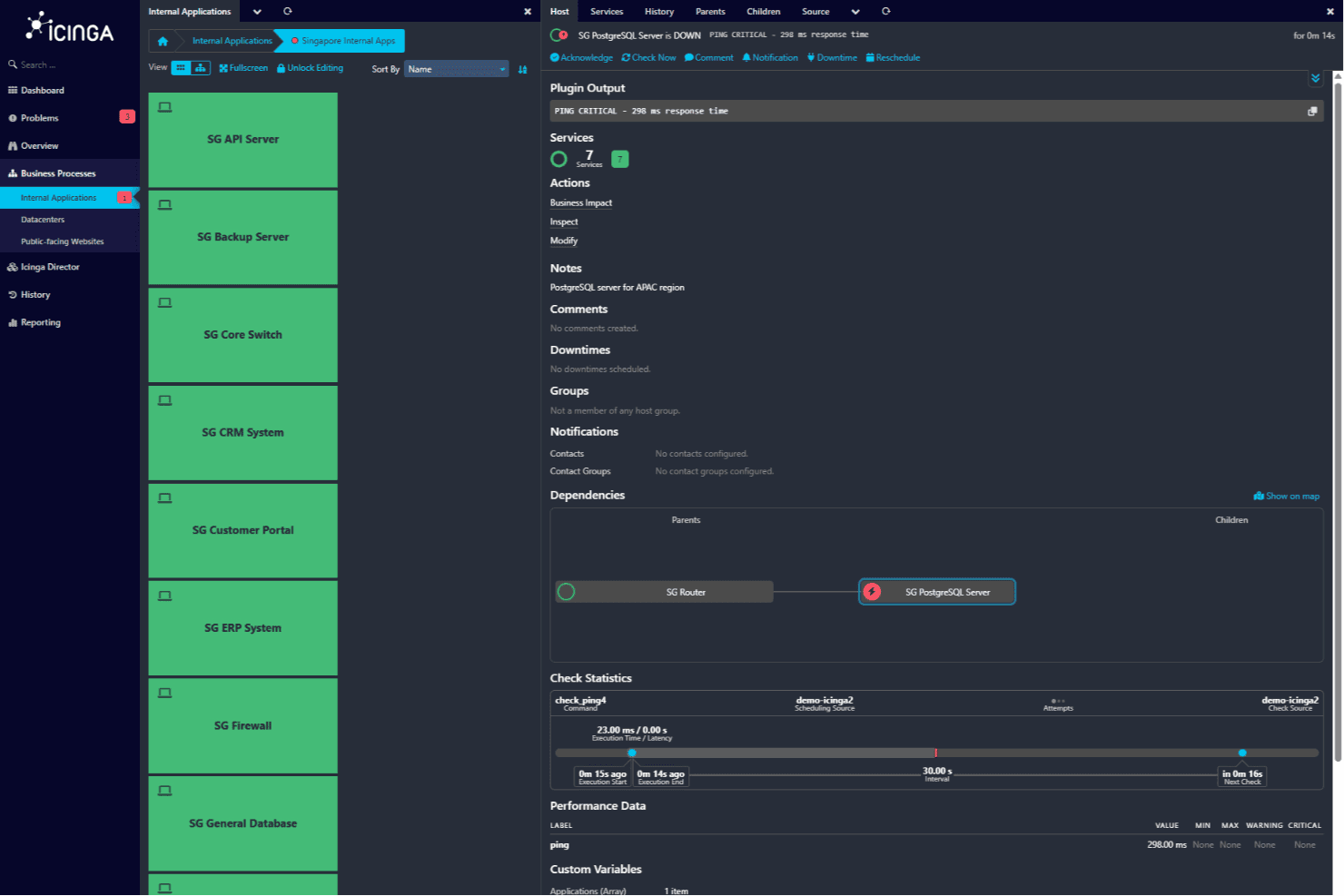
Icinga internal applications view showing SG PostgreSQL Server in a critical state with service details. For teams seeking a reliable infrastructure monitoring tool, Icinga offers a comprehensive solution tailored to complex IT environments. Its open-source architecture supports flexible monitoring across servers, networks, and applications, making it suitable for teams managing complex IT setups. Whether you're in telecom, finance, or technology sectors, Icinga helps you monitor systems while integrating with existing IT service workflows so you can identify and resolve issues quickly and minimize disruptions in your operations.
Why I Picked Icinga
I picked Icinga for its open-source infrastructure monitoring, which gives teams the flexibility to monitor servers, networks, and applications across complex IT environments. Its monitoring automation helps your team handle large volumes of data without constant manual work, while the alert notification system keeps you informed of issues as they arise so you can respond quickly. I also appreciate its analytics features, which provide insights into system performance and support more proactive IT management.
Why I Picked Icinga
Aside from open-source infrastructure monitoring, Icinga offers:
- Cloud Monitoring: This feature allows you to monitor various cloud environments, ensuring that your cloud-based operations run smoothly.
- Kubernetes Monitoring: Icinga supports monitoring of Kubernetes clusters, providing insights into the performance and health of containerized applications.
- Database Monitoring: Keep an eye on database performance and availability to ensure your data-driven applications are always up and running.
- Security Monitoring: This feature alerts you to unusual activities and supports vulnerability scanning, helping to protect your IT infrastructure.
Icinga Integrations
Integrations include Grafana, Puppet, Ansible, Chef, AWS, Azure, ServiceNow, SIGNL4, ilert, and AlertOps.
Pros and Cons
Pros:
- Highly customizable and scalable for enterprise needs
- Supports a wide range of integrations with IT services
- Provides real-time visibility into complex IT infrastructures
Cons:
- Heavy reliance on configuration files compared to SaaS tools
- Lack of a user-friendly interface for non-technical users
Learn more about Icinga: Best for comprehensive IT operations
- Free demo available
- Pricing upon request
Visit WebsiteCustomer Rating:4.2/5
ManageEngine OpManager Plus provides real-time visibility into server availability, packet loss, and uptime history. ManageEngine OPM Plus is an IT infrastructure monitoring tool designed for IT administrators and managers. It helps monitor and manage IT assets, focusing on Active Directory management and security information management.
Why I picked ManageEngine OPM Plus: This tool offers in-depth monitoring capabilities for both physical and virtual infrastructures. Its standout feature is its comprehensive IT operations management, which includes real-time change monitoring and bandwidth management. You can also benefit from its robust security features that help protect against cyber threats. Its user-friendly interface makes it accessible, though it might require some training for new users.
Standout features & integrations:
Features include real-time change monitoring, which keeps you updated on any alterations made to your infrastructure, and in-depth log and IP address monitoring, helping you track performance issues. Multi-channel notifications ensure you never miss a critical alert, providing peace of mind for your team.
Integrations include ServiceNow, Jira, Slack, Microsoft Teams, PagerDuty, Splunk, Zapier, Zoho Analytics, ManageEngine Analytics Plus, and ManageEngine ServiceDesk Plus.
Pros and Cons
Pros:
- Multi-channel notifications
- User-friendly interface
- Comprehensive monitoring capabilities
Cons:
- Requires adequate training
- Complexity for new users
Learn more about ManageEngine OPM Plus: Best for website performance checks
- 30-day free trial
- From $3/device/month
Visit WebsiteCustomer Rating:4.7/5
Site24x7 offers customizable dashboards where users can tailor their monitoring views according to their specific needs. Site24x7 is a cloud-based infrastructure monitoring tool designed for IT and DevOps teams. It focuses on monitoring website performance and user experience, providing insights that help improve system availability.
Why I picked Site24x7: It offers detailed website performance monitoring, which is key for maintaining high uptime and user satisfaction. Real user monitoring lets you see exactly how visitors interact with your site. Its application performance monitoring provides a deeper look into your app's health and performance. This tool is ideal for teams needing to ensure their web services are always optimized.
Standout features & integrations:
Features include server monitoring to keep tabs on your server health and status. Network monitoring helps you track network performance and troubleshoot issues quickly. Synthetic monitoring allows your team to simulate user interactions and test website performance from different locations.
Integrations include Slack, Microsoft Teams, PagerDuty, Zapier, Jira, ServiceNow, Trello, HipChat, Opsgenie, and Zoho Desk.
Pros and Cons
Pros:
- Application performance insights
- Real user monitoring available
- Detailed website performance metrics
Cons:
- May require additional training
- Can be complex to set up
Learn more about Site24x7:

Here's a sample analysis done inside Dynatrace. Dynatrace is an AI-driven infrastructure monitoring tool aimed at IT and DevOps teams. It provides application monitoring, cloud infrastructure monitoring, and business analytics to enhance operational efficiency.
Why I picked Dynatrace: Its AI-powered automation is a key feature, reducing manual intervention and enhancing system performance. Dynatrace's full-stack monitoring gives you real-time insights across your entire tech stack. Its automatic root cause analysis helps quickly identify and resolve issues. Additionally, the tool's scalability supports growing business needs, making it ideal for dynamic environments.
Standout features & integrations:
Features include automatic root cause analysis, which helps you pinpoint issues quickly. Real-time monitoring provides continuous insights into your infrastructure's health. The tool's scalability supports businesses as they grow and evolve.
Integrations include AWS, Azure, Google Cloud Platform, Kubernetes, Docker, VMware, ServiceNow, Slack, Jira, and PagerDuty.
Pros and Cons
Pros:
- Automatic root cause analysis
- Full-stack monitoring capabilities
- AI-driven automation
Cons:
- Initial setup can be time-intensive
- Requires some technical expertise
 Best for real-time data analytics
- Free plan available
- From $15/month (billed annually)
Visit WebsiteCustomer Rating:4.5/5
Here is the summary graph feature in Datadog. Datadog is a cloud-based infrastructure monitoring tool designed for IT and DevOps teams. It provides real-time data analytics and monitoring for applications, servers, databases, tools, and services.
Why I picked Datadog: Its real-time data analytics are essential for teams needing immediate insights into system performance. The tool's dashboard provides a comprehensive view of your entire infrastructure. It offers anomaly detection to alert you of potential issues before they escalate. This makes it especially valuable for teams that require constant monitoring and quick responses.
Standout features & integrations:
Features include customizable dashboards that let you visualize data in a way that fits your team's needs. Anomaly detection helps you catch issues early. The tool's scalability ensures it can grow with your business as your monitoring needs expand.
Integrations include AWS, Azure, Google Cloud Platform, Kubernetes, Docker, PagerDuty, Slack, Jira, GitHub, and Bitbucket.
Pros and Cons
Pros:
- Effective anomaly detection
- Real-time data analytics
- Customizable dashboards
Cons:
- Initial setup can be complex
- Steep learning curve for beginners
 Best for cloud-native applications
- Free plan available
- From $10/user/month
Visit WebsiteCustomer Rating:4.3/5
An overview of the summary dashboard in New Relic. New Relic is a cloud-based infrastructure monitoring tool tailored for developers and IT operations teams. It focuses on monitoring and analyzing application performance to enhance digital customer experiences.
Why I picked New Relic: Its focus on cloud-native applications makes it a top choice for teams working in modern environments. The tool's application performance monitoring offers detailed insights into your app's health. Real-time analytics help you make data-driven decisions quickly. Its scalability supports your team's growth without compromising on performance.
Standout features & integrations:
Features include real-time user monitoring, which provides insights into user interactions with your applications. Custom dashboards allow you to visualize data in a way that suits your team's needs. Error tracking helps you quickly identify and address issues.
Integrations include AWS, Microsoft Azure, Google Cloud Platform, Kubernetes, Docker, Slack, PagerDuty, Jira, ServiceNow, and Splunk.
Pros and Cons
Pros:
- Customizable dashboards
- Suitable for cloud-native environments
- Real-time user monitoring
Cons:
- May need additional training
- Some features can be overwhelming
Learn more about New Relic:

Here's how data can be viewed inside the system dashboard in eG Enterprise. eG Enterprise is an IT infrastructure monitoring tool designed for IT teams and system administrators. It focuses on providing end-to-end visibility across physical, virtual, and cloud environments, enhancing system performance and reliability.
Why I picked eG Enterprise: Its end-to-end visibility means you get a complete picture of your IT infrastructure. The tool's automatic root cause diagnosis helps you identify and fix issues quickly. With its detailed performance metrics, you can monitor everything from applications to network devices. This comprehensive approach ensures nothing is overlooked, making it ideal for complex IT environments.
Standout features & integrations:
Features include detailed performance metrics that cover a wide range of IT assets, helping you maintain optimal system performance. The tool offers automatic root cause diagnosis to quickly pinpoint and resolve issues. Its customizable dashboards allow you to visualize data in a way that suits your team's needs.
Integrations include ServiceNow, Microsoft SCOM, VMware vSphere, Citrix, Oracle, SAP, Microsoft Exchange, Microsoft Active Directory, Amazon Web Services, and Microsoft Azure.
Pros and Cons
Pros:
- Customizable dashboards
- Comprehensive end-to-end visibility
- Automatic root cause analysis
Cons:
- Limited customization in some areas
- Requires ongoing maintenance and updates
Learn more about eG Enterprise: Best for virtual machine management
- 90-day free trial available
- Pricing upon request

This screenshot is a configuration profile demo in vSphere. vSphere is a virtualization platform designed for IT administrators and system architects. It focuses on virtual machine management, providing the infrastructure needed to run applications efficiently in virtual environments.
Why I picked vSphere: Its virtual machine management capabilities are key for optimizing resources and enhancing system performance. The tool's live migration feature allows you to move VMs without downtime. With its automated load balancing, your team can ensure optimal resource allocation. Additionally, data protection features help safeguard your virtual environment against potential threats.
Standout features & integrations:
Features include live migration, which allows for seamless VM relocation without downtime. Automated load balancing helps distribute workloads efficiently across resources. Data protection features ensure the safety and integrity of your virtual environments.
Integrations include VMware vSAN, VMware NSX, VMware Cloud Foundation, VMware Site Recovery Manager, Dell EMC VxRail, HPE SimpliVity, IBM Cloud, AWS, Microsoft Azure, and Google Cloud Platform.
Pros and Cons
Pros:
- Automated load balancing
- Efficient virtual machine management
- Live migration without downtime
Cons:
- Limited customization options
- Frequent updates needed for optimal performance
Learn more about vSphere: Best for hybrid cloud monitoring
- 30-day free trial available
- From $7/node/month

SolarWinds monitors infrastructure performance across servers, networks, and cloud resources SolarWinds Observability SaaS is an infrastructure monitoring platform for IT teams managing complex environments. It provides unified visibility across cloud-native, on-premises, and hybrid systems to support monitoring and troubleshooting. By eliminating tool sprawl and reducing alert fatigue, it ensures optimal service levels and user satisfaction, making it an invaluable asset for businesses striving to maintain high-performance standards in their IT operations.
Why I Picked SolarWinds Observability SaaS
I chose SolarWinds Observability SaaS for its ability to deliver a unified view across multi-cloud, hybrid, and on-premises environments. The tool's hybrid network and cloud infrastructure monitoring capabilities are particularly beneficial, as they encompass both traditional network devices and modern cloud services. Its integration of AIOps with machine learning to prioritize and surface real problems helps your team focus on resolving critical issues faster. These features collectively provide a reliable framework for teams aiming to enhance their infrastructure monitoring strategies.
SolarWinds Observability SaaS Key Features
In addition to its core functionalities, I also found other features that enhance its utility:
- Hybrid Application Performance Monitoring: This feature provides unified code-level troubleshooting with transaction tracing and code-profiling, combined with user experience insights.
- Open-Source Database Performance Monitoring: Offers full visibility into open-source databases like MySQL, PostgreSQL, and MongoDB, aiding in system performance optimization.
- Data Center Location Flexibility: Allows the choice of data center regions, supporting local compliance and optimizing load distribution for better performance.
- Real User Monitoring (RUM): Provides insights into actual user experiences, enabling businesses to detect and resolve user-facing issues effectively.
SolarWinds Observability SaaS Integrations
Integrations include AWS, Azure, Google Cloud, Kubernetes, Docker, MySQL, PostgreSQL, MongoDB, Redis, and SNMP-enabled devices.
Pros and Cons
Pros:
- Effective for managing both legacy and cloud infrastructures
- Savings through reduced downtime
- Enhanced anomaly detection and smart alert features
Cons:
- Configuration can be complex
- Costs increase as more infrastructure are added
Learn more about SolarWinds Observability SaaS:
Andre verktøy for overvåking av infrastruktur
Her er noen flere alternativer for verktøy for overvåking av infrastruktur som ikke kom med på kortlisten min, men som likevel er verdt å ta en titt på:
- 11Malwarebytes for BusinessBest for malware protection
- 12Logic MonitorBest for cloud infrastructure monitoring
- 13NMISBest for open-source flexibility
- 14Dotcom MonitorBest for real-user journey simulations
- 15PulsewayBest for mobile IT management
- 16Splunk EnterpriseBest for data-driven insights
- 17PagerDutyBest for incident response coordination
- 18PingPlotterBest for network troubleshooting
- 19NinjaOneBest for IT management automation
- 20OpsgenieBest for alerting and on-call management
- 21WhatsUp GoldBest for network visibility and mapping
- 22Germain UXBest for user experience analytics
- 23DomotzBest for remote network monitoring
- 24ConnectWise AutomateBest for remote monitoring and management
- 25Kaseya VSABest for unified remote monitoring and management
- 26PRTG Network MonitorBest for detailed network monitoring
- 27AteraBest for all-in-one RMM solution
- 28Pandora FMSBest for flexible monitoring solutions
- 29SyncroBest for small MSPs and IT teams
- 30OpManager PlusBest for integrated IT operations
How I Evaluate Infrastructure Monitoring Tools
When an on-call site reliability engineer needs to diagnose a Kubernetes pod crash at 2 a.m., the tools I evaluate must first clear a baseline of core monitoring capabilities before I consider what sets them apart.
Core Functionality (Table Stakes For This List)
When I'm selecting tools for my list, I rank each one on a scale from 0 (does not offer the functionality) to 5 (excels in this area) for each core functionality listed below. Then, I calculate the tool's total score into a percentage. Each tool needs to achieve a minimum total score of 75% to be considered for inclusion.
- Metrics Collection & Visualization: I evaluate whether a tool can ingest CPU, memory, disk, and network metrics and surface them in dashboards you can actually customize to match your team's workflows.
- Multi-Environment Coverage: Whether your stack spans bare-metal servers, AWS, Azure, GCP, or Kubernetes clusters, I check that a tool provides native support across hybrid and multi-cloud setups.
- Alerting & Anomaly Detection: I look for configurable alert rules with routing to channels like Slack, PagerDuty, or Teams, so the right on-call engineer gets notified instead of an entire department.
- Log & Event Management: Correlating a spike in error rates with a specific deployment matters, so I evaluate how well each tool ties log data to infrastructure metrics for root cause analysis.
- Network & Uptime Monitoring: I check for availability and latency tracking via methods like ping, SNMP, or synthetic checks that confirm services are reachable from the end user's perspective.
- Historical Data & Reporting: Capacity planning requires months of trend data, so I look at retention windows and whether a tool can generate reports useful for SLA reviews or resource forecasting.
Once I have a list of tools that meet this criteria, I consider what sets each platform apart.
Differentiating Factors (What Sets Vendors Apart)
Here's how I compare and contrast different vendors:
Standout Features
Auto-discovery matters when your environment changes constantly. I look for tools that detect new containers or VMs as they come online and map dependencies without manual configuration. AIOps capabilities separate reactive tools from proactive ones, especially when ML-driven anomaly detection catches a memory leak before a threshold alert would fire. I also evaluate infrastructure-as-code support, since teams managing monitors through Terraform or YAML can version-control their alerting configs alongside deployment pipelines.
Beyond Features
Pricing predictability is a big deal here. I check whether a vendor charges per host, per metric, or by ingestion volume, since a surprise bill after a traffic spike can wreck a budget. Integration ecosystem depth also matters. Support for OpenTelemetry and Prometheus means your team avoids vendor lock-in and can pipe data into existing ITSM tools like ServiceNow or Jira. I also evaluate deployment flexibility, because teams in regulated industries often need self-hosted or regional SaaS options to meet data residency requirements.
Slik velger du et verktøy for overvåking av infrastruktur
Det er lett å gå seg vill i lange funksjonslister og kompliserte prismodeller. For å hjelpe deg med å holde fokus mens du går gjennom den unike prosessen din for valg av programvare, får du her en sjekkliste over faktorer du bør ha i bakhodet:
| Faktor | Hva du bør vurdere |
| Skalerbarhet | Forsikre deg om at verktøyet kan vokse med virksomheten din. Se etter løsninger som kan håndtere økte datamengder og flere brukere uten at det går ut over ytelsen. |
| Integrasjoner | Kontroller om verktøyet kan integreres med den eksisterende programvarestakken din. Kompatibilitet med plattformer som AWS, Azure og Google Cloud er avgjørende for problemfri drift. |
| Tilpasningsmuligheter | Se etter verktøy som tilbyr tilpassbare oversikter og rapporter. Denne fleksibiliteten gjør det mulig å tilpasse grensesnittet til teamets spesifikke behov for overvåking. |
| Brukervennlighet | Velg et verktøy med et intuitivt grensesnitt og enkel navigering. Dette reduserer opplæringstiden for teamet og øker produktiviteten. |
| Budsjett | Vurder prismodellen og sørg for at den passer inn i den økonomiske planen din. Ta hensyn til skjulte kostnader som ekstra funksjoner, kundestøtte eller gebyrer for datalagring. |
| Sikkerhetstiltak | Prioriter verktøy med sterke sikkerhetstiltak. Funksjoner som kryptering, tilgangskontroller og samsvar med personvernregler er avgjørende. |
| Varsler i sanntid | Velg verktøy som tilbyr varsler i sanntid. Dette sikrer at teamet raskt kan reagere på problemer, slik at nedetid og potensielle tap minimeres. |
| Støtte | Vurder kvaliteten på og tilgjengeligheten av kundestøtten. Et lydhørt supportteam kan være uvurderlig når problemer skal løses og veiledning skal tilbys. |
Trender innen verktøy for infrastrukturovervåking
I arbeidet med undersøkelsen min samlet jeg inn utallige produktoppdateringer, pressemeldinger og utgivelseslogger fra ulike leverandører av verktøy for infrastrukturovervåking. Her er noen av trendene som er i ferd med å vokse frem, og som jeg følger med på:
- AI-drevet innsikt: Flere verktøy bruker AI til å levere prediktiv analyse og innsikt. Dette hjelper team med å forutse problemer før de oppstår, noe som sparer tid og reduserer nedetid. Leverandører som Dynatrace har integrert AI for å forbedre overvåkingsmulighetene sine.
- Synlighet i hele stakken: Det er en økende etterspørsel etter verktøy som gir synlighet på tvers av hele teknologistakken. Virksomheter trenger å overvåke alt fra maskinvare til applikasjoner på ett sted. New Relic tilbyr overvåking av hele stakken for å dekke dette behovet.
- Overvåking av brukeropplevelsen: Verktøy for overvåking av apper og nettsteder fokuserer i økende grad på sluttbrukeropplevelsen. Ved å overvåke brukerinteraksjoner kan virksomheter forbedre ytelsen og tilfredsheten. Germain UX legger for eksempel vekt på analyse av brukeropplevelsen.
- Støtte for hybridsky: Etter hvert som flere virksomheter tar i bruk strategier for hybridsky, utvikles overvåkingsverktøyene for å støtte disse miljøene. Dette sikrer sømløs drift på tvers av lokal infrastruktur og skyinfrastruktur. Logic Monitor er kjent for funksjonene sine for hybridsky.
- Forbedret datasikkerhet: Med økende cybertrusler er det et sterkt fokus på å forbedre datasikkerheten i overvåkingsverktøy. Funksjoner som kryptering og samsvar med databeskyttelsesregler blir stadig mer standardiserte. Verktøy som Malwarebytes for Business prioriterer disse sikkerhetstiltakene.
Hva er verktøy for infrastrukturovervåking?
Verktøy for infrastrukturovervåking sporer ytelsen og tilstanden til komponenter i IT-infrastrukturen. IT-administratorer, DevOps-team og nettverksingeniører bruker vanligvis disse verktøyene for å sikre at systemene fungerer effektivt og for å forhindre nedetid.
Varsler i sanntid, ytelsesmålinger og overvåking av brukeropplevelsen bidrar til å identifisere problemer, optimalisere ressursbruken og opprettholde systemets pålitelighet. Disse verktøyene gir virksomheter innsikten de trenger for å opprettholde driftseffektiviteten og forbedre den generelle systemytelsen.
Funksjoner i verktøy for infrastrukturovervåking
Når du velger verktøy for infrastrukturovervåking, bør du se etter følgende viktige funksjoner:
- Varsler i sanntid: Varsle brukere om problemer etter hvert som de oppstår, slik at de kan reagere raskt og minimere potensiell nedetid.
- Ytelsesmålinger: Gi detaljert innsikt i systemets tilstand og effektivitet, slik at team kan optimalisere ressursene.
- Overvåking av brukeropplevelsen: Følg sluttbrukernes interaksjoner for å forbedre applikasjonens ytelse og tilfredshet.
- Prediktiv analyse: Bruk AI til å forutsi potensielle problemer, slik at proaktivt vedlikehold blir mulig og forstyrrelser reduseres.
- Innsikt i hele teknologistakken: Gi en helhetlig oversikt over hele teknologistakken, slik at alle komponenter overvåkes på ett sted.
- Støtte for hybrid sky: Sørg for kompatibilitet med både lokale og skybaserte miljøer, og støtt ulike IT-strategier.
- Automatisk problemløsning: Identifiser og løs vanlige problemer automatisk, slik at IT-team sparer tid og arbeid.
- Tilpassbare kontrollpaneler: La brukere tilpasse datavisualiseringen etter spesifikke behov og preferanser innen overvåking.
- Forbedringer av datasikkerheten: Tilby funksjoner som kryptering og samsvar med regelverk for å beskytte sensitiv informasjon.
- Skalerbarhet: Tilpass deg virksomhetens voksende behov, og håndter økte datamengder og brukerbelastning uten at ytelsen svekkes.
Fordeler med verktøy for infrastrukturovervåking
Implementering av verktøy for infrastrukturovervåking gir flere fordeler for teamet og virksomheten din. Her er noen av fordelene du kan se frem til:
- Forbedret oppetid: Varsler i sanntid og prediktiv analyse bidrar til å forhindre nedetid ved å håndtere problemer før de eskalerer.
- Forbedret ytelse: Ytelsesmålinger gjør det mulig for team å optimalisere systemressursene og sikre effektiv drift.
- Bedre brukeropplevelse: Overvåking av brukeropplevelsen bidrar til å identifisere og løse problemer som påvirker applikasjonens ytelse og brukertilfredshet.
- Kostnadsbesparelser: Automatisk problemløsning reduserer behovet for manuell inngripen, noe som sparer tid og arbeidskostnader.
- Samsvar med sikkerhetskrav: Forbedringer av datasikkerheten beskytter sensitiv informasjon og sikrer samsvar med bransjereguleringer.
- Skalerbarhet: Muligheten til å vokse sammen med virksomheten betyr at verktøyene kan håndtere økte krav uten at tjenestekvaliteten svekkes.
- Informerte beslutninger: Innsikt i hele teknologistakken gir omfattende informasjon, slik at team kan ta datadrevne beslutninger.
Kostnader og priser for verktøy for infrastrukturovervåking
Valg av verktøy for infrastrukturovervåking krever en forståelse av de ulike prismodellene og abonnementene som er tilgjengelige. Kostnadene varierer basert på funksjoner, teamstørrelse, tillegg og mer. Tabellen nedenfor oppsummerer vanlige abonnementer, gjennomsnittsprisene deres og typiske funksjoner som er inkludert i løsninger for infrastrukturovervåking:
Sammenligningstabell for verktøy for infrastrukturovervåking
| Abonnementstype | Gjennomsnittspris | Vanlige funksjoner |
| Gratisabonnement | $0 | Grunnleggende overvåking, begrensede varsler og brukerstøtte fra fellesskapet. |
| Personlig abonnement | $5-$25/bruker/måned | Varsler i sanntid, ytelsesmålinger og tilpassbare kontrollpaneler. |
| Bedriftsabonnement | $30-$75/bruker/måned | Innsikt i hele teknologistakken, overvåking av brukeropplevelsen og automatisk problemløsning. |
| Virksomhetsabonnement | $80-$150/bruker/måned | Prediktiv analyse, støtte for hybrid sky og avanserte sikkerhetstiltak. |
Vanlige spørsmål om verktøy for infrastrukturovervåking
Her er noen svar på vanlige spørsmål om verktøy for infrastrukturovervåking:
Hva er parametrene for infrastrukturovervåking?
Verktøy for infrastrukturovervåking dekker parametere som CPU- og minnebruk, nettverkstrafikk, diskplass, responstider og feilrater. Disse parameterne hjelper teamet ditt med å sikre at systemene kjører jevnt og effektivt. Ved å spore disse målingene kan du identifisere flaskehalser og optimalisere ytelsen.
Hva må installeres i infrastrukturen for å overvåke lokal infrastruktur?
For å overvåke lokal infrastruktur må du installere programvareagenter på hvert system. Disse agentene samler inn data og sender dem til overvåkingsserveren. Dette oppsettet hjelper deg med å opprettholde oversikten over hele nettverket, slik at du raskt kan håndtere eventuelle problemer som oppstår.
Hva er forskjellen mellom applikasjonsovervåking og infrastrukturovervåking?
Applikasjonsovervåking fokuserer på applikasjonstilgjengelighet og brukeropplevelse, mens infrastrukturovervåking gir innsyn i nettverksmiljøet ditt. Begge deler er viktig, men infrastrukturovervåking bidrar til å beskytte mot kostnadsineffektivitet og sikkerhetstrusler ved å holde øye med de underliggende systemene.
Hvordan håndterer verktøy for infrastrukturovervåking varsler?
Prisen for verktøy for infrastrukturovervåking kan starte på rundt $20 per måned for grunnleggende løsninger på nybegynnernivå og gå opp til flere tusen dollar per måned for omfattende løsninger på bedriftsnivå.
Kan verktøy for infrastrukturovervåking integreres med andre systemer?
Ja, de fleste verktøy for infrastrukturovervåking tilbyr integrasjoner med andre systemer, for eksempel skyplattformer, verktøy for IT-tjenesteadministrasjon og samarbeidsprogramvare. Disse integrasjonene bidrar til å effektivisere arbeidsflyter og gir en samlet oversikt over IT-miljøet ditt, noe som forbedrer den generelle effektiviteten.
Hvordan støtter verktøy for infrastrukturovervåking skalerbarhet?
Verktøy for infrastrukturovervåking støtter skalerbarhet ved å håndtere økte datamengder og brukerbelastninger uten at ytelsen forringes. De tilbyr funksjoner som automatisk skalering og belastningsfordeling, slik at systemene dine kan vokse sammen med virksomheten. Denne tilpasningsevnen er avgjørende for å opprettholde ytelsen under vekst.