

I dagens digitale verden er det viktig å holde dataene dine sikre. Datatap kan være et mareritt for deg og teamet ditt, og føre til tapt tid, penger og tillit. Det er her programvare for forebygging av datatap kommer inn – den hjelper deg med å beskytte sensitiv informasjon og sikre at regelverket overholdes.
Jeg tester og vurderer programvare uavhengig, med fokus på det som virkelig betyr noe for teknologieksperter som deg. Etter min erfaring kan det å finne de riktige verktøyene for forebygging av datatap utgjøre hele forskjellen når det gjelder å beskytte virksomheten din.
I denne artikkelen deler jeg mine beste anbefalinger for programvare for forebygging av datatap. Du får en objektiv gjennomgang av funksjoner, fordeler og ulemper, samt hvordan disse verktøyene kan løse utfordringene dine. La oss se nærmere på alternativene og finne det som passer best for dine behov.
Why Trust Our Software Recommendations
6,700+
Reviews
20
Industry experts
16+
Evaluation factors
14
Years
Our team has been testing and reviewing software since 2012. As tech leaders ourselves, we know how difficult—and important—it is to choose the right software.
For this guide, we evaluated tools using hands-on testing and independent research, scoring tools using our selection criteria.
Our reviews reflect our human editorial judgment, not a sales pitch.
Expert reviewers:
- Paulo Gardini MiguelTech Director
 Tim FisherVP of AI
 Gabriel RosasTech Lead & Software Architect
 Christhian GruhnTech Lead & Platform Architect

Sammenligningstabell for programvare for forebygging av datatap
Tabellen nedenfor sammenligner prisdetaljer for mine beste utvalgte programmer for forebygging av datatap.
| Tool | Best For | Trial Info | Price | ||
|---|---|---|---|---|---|
| 1 | Best for SaaS and GenAI data exfiltration control | Free demo available | Pricing upon request | Website | |
| 2 | Best for insider threat detection | Free demo available | Pricing upon request | Website | |
| 3 | Best for threat detection and response | From $15/user/month (billed annually) | Website | ||
| 4 | Best for large-scale enterprise data protection | Customized price upon request | Website | ||
| 5 | Best for holistic data protection across hybrid cloud environments | Pricing upon request | Website | ||
| 6 | Best for database security and compliance | 30-day free trial available | Pricing upon request | Website | |
| 7 | Best for advanced machine learning-based protection | Pricing upon request | Website | ||
| 8 | Best for context-aware data security | From $10/user/month (billed annually) | Website | ||
| 9 | Best for integrated endpoint and network security | From $15/user/month | Website | ||
| 10 | Best for cloud-native environments | From $10/user/month (billed annually) | Website |


Anmeldelser av den beste programvaren for forebygging av datatap
 Best for SaaS and GenAI data exfiltration control
- Free demo available
- Pricing upon request
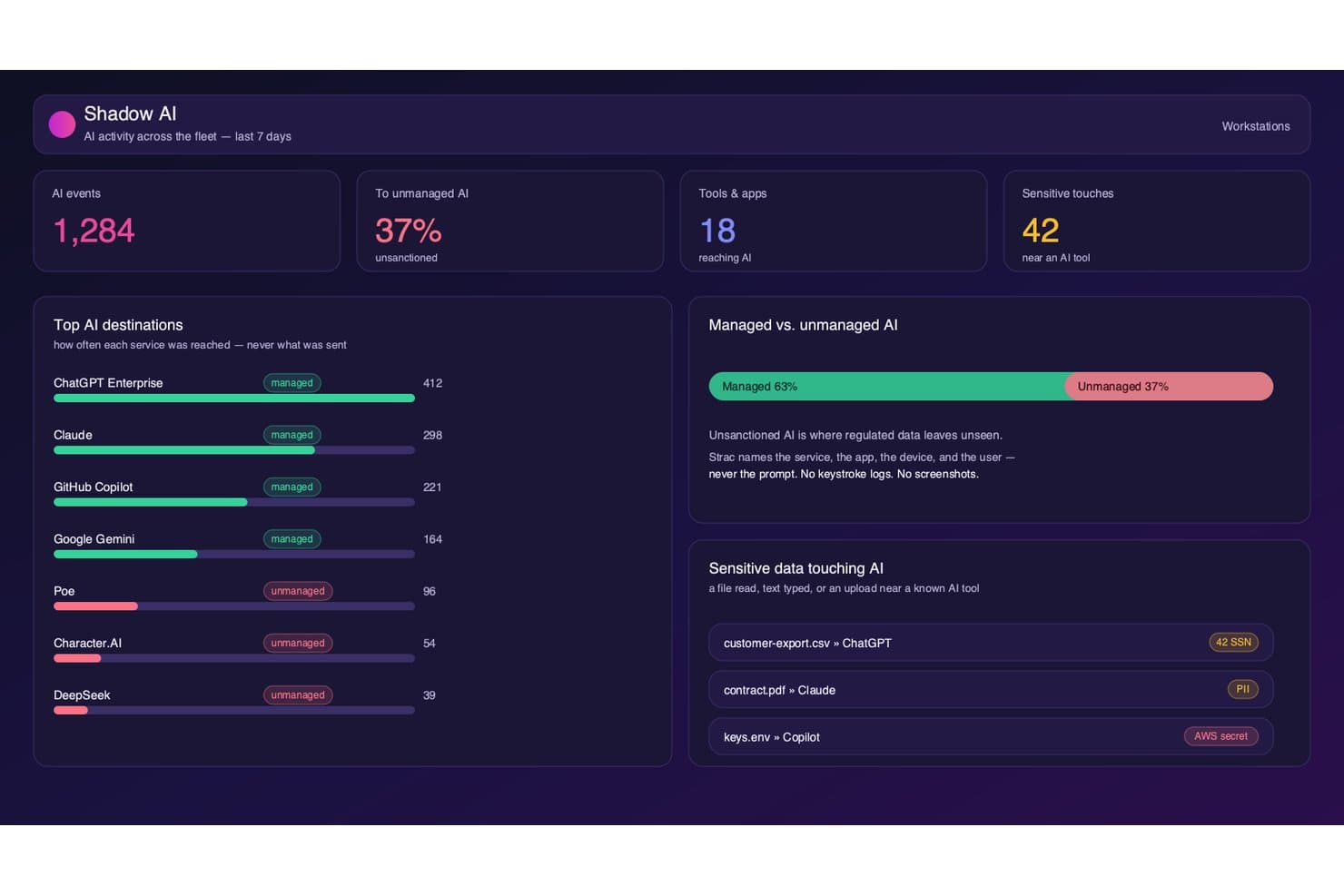
Strac tracks shadow AI usage and flags sensitive data near AI tools. Strac is a DLP platform that monitors and enforces data protection policies across SaaS apps, cloud storage, endpoints, browsers, and generative AI tools using ML-based classification and OCR.
Who Is Strac Best For?
Strac is a strong fit for security teams managing sensitive data across sprawling SaaS environments and organizations actively adopting generative AI tools that need to control what data employees submit to AI models.
Why I Picked Strac
I picked Strac as one of the best because it's one of the few DLP platforms that treats generative AI as a first-class exfiltration channel. It monitors and blocks sensitive data submitted to ChatGPT, Claude, Gemini, and Copilot at the prompt level, and extends that coverage to MCP agent workflows. I also like that its ML plus OCR engine catches sensitive data embedded in images and scanned PDFs before they leave the environment.
Strac Key Features
- Compliance policy templates: Prebuilt templates mapped to HIPAA, PCI DSS, SOC 2, GDPR, CCPA, CPRA, ISO 27001, and ISO 27701 for out-of-the-box regulatory coverage.
- Removable media and print control: Endpoint agents for Windows, macOS, and Linux enforce USB, clipboard, and print restrictions in real time.
- On-premises self-hosted deployment: Strac can run entirely within your own AWS VPC with zero data egress, supporting strict data residency and FedRAMP requirements.
- User coaching nudges: At the moment of a potential policy violation, Strac delivers inline nudges that educate employees rather than silently blocking them.
Strac Integrations
Strac offers 50+ native integrations, including Slack, Google Workspace, Microsoft 365, Salesforce, Jira, AWS, Snowflake, PostgreSQL, ChatGPT, Claude, and Gemini. It also provides API documentation for custom integrations and supports SIEM connections with Splunk, Sumo Logic, and Microsoft Sentinel.
Pros and Cons
Pros:
- Performs OCR-based detection for images and PDFs
- Provides real-time remediation at data source
- Enforces DLP on generative AI tools
Cons:
- No network-layer inline proxy DLP
- Lacks standalone UEBA for insider threat
Learn more about Strac: Best for insider threat detection
- Free demo available
- Pricing upon request
Visit WebsiteCustomer Rating:4.5/5
Teramind displays analytics showing top employees, departments, and app usage to help detect data activity patterns that could signal potential data loss risks. Teramind lands on my shortlist because of how well it covers insider threat detection in real time. I suggest it when you need to monitor risky user behaviors that slip past traditional DLP controls.
What I like is its strong user activity monitoring and automated risk scoring. In practice, teams can pinpoint unusual actions—like mass file movement or unauthorized access—before data actually leaves the environment.
Teramind’s Best For
- Security teams monitoring insider threats and risky users
- Organizations needing granular user activity tracking
Teramind’s Not Great For
- Companies wanting lightweight, hands-off DLP solutions
- Teams focused solely on automated data classification
What Sets Teramind Apart
Teramind focuses on close monitoring of user behavior, treating every action—like file transfers and application usage—as a potential risk indicator you need to track. Unlike most DLP tools that center on content scanning or data tagging, Teramind assumes your biggest threats move through people inside your network. In practice, this works well when you care more about activity patterns than just blocking known data types.
Tradeoffs with Teramind
Teramind optimizes for hands-on monitoring and behavioral data, but this brings more setup, ongoing analysis, and noise. If you want automated DLP with minimal tuning, this approach is a heavier lift.
Pros and Cons
Pros:
- Blocks data leaks proactively, not just detect after
- Granular risk scoring helps reduce false positives
- Catches insider threats missed by rule-only systems
Cons:
- Requires endpoint agent installation on every device
- No database fingerprinting of structured data
Learn more about Teramind: Best for threat detection and response
- From $15/user/month (billed annually)

Here's Proofpoint's analytics feature. Proofpoint Enterprise Data Loss Prevention earns a spot because it consistently catches threats other tools miss, especially across email, cloud, and endpoint channels. I've seen it pinpoint exfiltration attempts and insider risk by combining behavioral analytics and content inspection in one workflow.
What sets it apart for me is the threat correlation engine. You get actionable alerts and a response workflow that covers everything from real-time blocking to incident review in a single dashboard.
Proofpoint DLP’s Best For
- Large enterprises needing threat protection across email, cloud, and endpoints
- Security teams focused on insider and exfiltration risks
Proofpoint DLP’s Not Great For
- Small businesses with minimal IT security resources
- Organizations wanting lightweight or basic DLP solutions
What sets Proofpoint DLP apart
Proofpoint DLP puts threat detection at the center, focusing on behavioral signals before digging into content and policies. Unlike traditional DLP tools that flag based mostly on keywords or patterns, Proofpoint leans into context and real-time activity—flagging risky behavior across email and cloud first. I see this work best in organizations with a mix of insider and external threat concerns, where you want to connect early warning signs with data movement.
Tradeoffs with Proofpoint DLP
By optimizing for advanced detection, Proofpoint adds complexity and a steeper learning curve. For teams wanting something simpler or lighter-touch, that extra depth can translate into more work up front and slower onboarding.
Pros and Cons
Pros:
- Provides comprehensive visibility into data security.
- Integrates with other Proofpoint solutions.
- Exceptional threat detection and response capabilities.
Cons:
- May be complex for small businesses to deploy and manage.
- Extra costs may apply for advanced features.
- Higher starting price compared to other DLP solutions.
Learn more about Proofpoint Enterprise Data Loss Prevention: Best for large-scale enterprise data protection
- Customized price upon request

Here's the policy management feature in Symantec Data Loss Prevention. Symantec Data Loss Prevention is on my list because it handles some of the largest, most complex data protection needs I’ve come across. When I’m working with enterprises where confidential data moves across cloud, endpoint, and on-prem systems, Symantec’s unified policy management and automated data discovery really stand out.
What I like most is how you can customize policies to address regional compliance, insider threats, and third-party risk at scale.
Symantec DLP’s Best For
- Large enterprises with diverse and complex data environments
- Organizations needing granular control over sensitive data movement
Symantec DLP’s Not Great For
- Small businesses with simple data protection needs
- Teams looking for fast, lightweight deployments
What sets Symantec DLP apart
Symantec DLP is designed for organizations that need to govern sensitive data moving between endpoints, cloud, and on-prem systems, all under one roof. Unlike simpler tools like Microsoft Purview, which fit smaller or mostly Microsoft-based environments, Symantec expects you to centralize policies and reporting for highly diverse infrastructure.
In practice, this works well for security teams that need to coordinate risk controls across global operations, regulatory obligations, and mixed platforms.
Tradeoffs with Symantec DLP
Symantec DLP optimizes for control over scale and complexity, but onboarding and tuning it takes time and specialized skill. Smaller teams end up with more maintenance than they want.
Pros and Cons
Pros:
- Integrates deeply with other Symantec products.
- Offers unified policy management.
- Can handle large-scale enterprise requirements.
Cons:
- Setup and management could be time-consuming.
- It might be too complex for smaller organizations.
- Pricing information is not readily available.
Learn more about Symantec Data Loss Prevention: Best for holistic data protection across hybrid cloud environments
- Pricing upon request

Here's the IBM Data Security active threat analytics. IBM Data Security lands on my list because it brings data loss prevention and encryption together for hybrid and multi-cloud environments. I find the way it automates policy enforcement across Kubernetes, databases, and filesystems saves significant manual effort as environments scale.In testing, what stood out is how precise the policies and monitoring are, without introducing noticeable friction for end users. This is especially valuable in large organizations where the same data needs consistent protection and policy enforcement across on-prem systems, cloud platforms, and containerized workloads.IBM Data Security’s Best For
- Enterprises with complex hybrid or multi-cloud data environments
- Security teams needing centralized policy and compliance automation
IBM Data Security’s Not Great For
- Small organizations with simple, on-premise data storage
- Teams needing lightweight, plug-and-play DLP tools
What Sets IBM Data Security Apart
IBM Data Security stands out by prioritizing unified policy enforcement and monitoring across cloud and on-prem data sources. Instead of layering DLP tools for each environment, you set policies once and apply them everywhere.
This works best for organizations juggling sensitive data in both public cloud and local data centers. Compared to something like Symantec DLP, which often assumes more standardized infrastructure, IBM focuses on cross-environment consistency.
Tradeoffs with IBM Data Security
It optimizes for broad, centralized control, but that can mean slower rollouts and extra configuration when you only need basic, targeted DLP protection for a single system.
Pros and Cons
Pros:
- Wide range of compatible integrations.
- Offers a unified platform for all data security needs.
- Comprehensive solution for data protection in hybrid cloud environments.
Cons:
- Potential learning curve due to its wide array of features.
- It may be too complex for small businesses.
- Pricing information is not readily available.
Learn more about IBM Data Security: Best for database security and compliance
- 30-day free trial available
- Pricing upon request

Here's Imperva's cloud data security dashboard overview. Imperva is here because its approach to database security and compliance solves a problem I see often: patchy visibility into where sensitive data lives and how it’s being accessed. When I evaluate data loss prevention options, Imperva stands out for its agentless activity monitoring and ability to enforce granular policies directly at the data store.In testing, what stood out is how easily you can set real-time alerts for risky data access while still meeting compliance audit requirements. If you’ve ever had to trace who touched sensitive records or pull logs under pressure, this kind of visibility makes a real difference—without having to stitch together multiple tools.Imperva’s Best For
- Regulated industries with complex database compliance needs
- Security teams needing real-time monitoring of sensitive data
Imperva’s Not Great For
- Organizations focused on endpoint-based data loss prevention
- Teams with small-scale or file storage-only environments
What sets Imperva apart
Imperva is designed around the idea that database security needs to be granular, continuous, and independent of where your data lives. Unlike traditional DLP solutions that focus on endpoints or network traffic, Imperva assumes your most valuable data lives inside databases and cloud stores—and that’s where it monitors and enforces controls.
I could see how this works well when you need tight policies for regulated workloads or database environments. It takes the view that data-centric controls should drive your security approach, not just network perimeters or endpoints.
Tradeoffs with Imperva
Imperva optimizes for database and cloud data protection, but that focus means you lose full visibility into file and endpoint risks. Teams with data spread across many systems may need another DLP tool for broader coverage.
Pros and Cons
Pros:
- Integrates with other security tools for comprehensive protection.
- Helps in achieving compliance with regulatory standards.
- Strong focus on database security.
Cons:
- Depending on the size of the database, system performance may be affected.
- Customization options may be complex for beginners.
- Pricing might be high for small businesses.
Learn more about Imperva: Best for advanced machine learning-based protection
- Pricing upon request

Here's the analytics dashboard in Forcepoint Data Loss Prevention. Forcepoint Data Loss Prevention earns its place on my list for its advanced machine learning approach to data loss risks. I’ve seen how the tool identifies nuanced patterns in user behavior that many traditional rules-based systems miss. I like the precision of its automated policy enforcement, especially in complex and heavily regulated environments.
This is a go-to when your team deals with large volumes of sensitive data and you need deeper, contextual insight to stop leaks before they happen.
Forcepoint DLP's Best For
- Enterprises with complex data flows and strict compliance needs
- Security teams demanding contextual, ML-driven data protection
Forcepoint DLP's Not Great For
- Small organizations needing simple, out-of-the-box DLP
- Teams without resources for ongoing tuning and management
What sets Forcepoint DLP apart
Forcepoint DLP is built for organizations that need more than simple content rules. In practice, it expects you to set up policies that consider user context and behavior, not just file types or keywords. Unlike tools such as Symantec DLP, which rely heavily on static patterns, Forcepoint pushes you toward risk-adaptive workflows that change based on what users actually do over time.
You end up working with alerts and controls that adapt to your environment—not just block the same violations over and over.
Tradeoffs with Forcepoint DLP
By focusing on risk-adaptive protection, Forcepoint adds more setup and calibration work upfront, so you give up the easy onboarding you’d get with a basic DLP tool.
Pros and Cons
Pros:
- Provides integrations with other Forcepoint solutions.
- Offers a comprehensive suite of features.
- Utilizes advanced machine learning for protection.
Cons:
- Machine learning models may require time for optimal calibration.
- It might be overly complex for smaller businesses.
- Pricing is not transparent and requires direct contact.
Learn more about Forcepoint Data Loss Prevention: Best for context-aware data security
- From $10/user/month (billed annually)

Here's the automated and easy-to-deploy security feature in Egress Data Loss Prevention. Egress Data Loss Prevention makes my shortlist for the way it applies contextual awareness to email data security. What stands out is how it analyzes message content and recipient context in real time, flagging or blocking risky data events before they happen.
I like how teams can set policy so sensitive information gets handled differently based on content, recipient, or user action—especially in financial or legal settings where context matters most.
Egress’s Best For
- Organizations sending confidential data by email
- Teams needing policy-driven, context-aware data controls
Egress’s Not Great For
- Companies looking for non-email DLP coverage
- Small businesses with straightforward, low-volume email needs
What sets Egress apart
Egress stands out by building email security around context, not just basic content detection. Instead of tagging keywords or blocking attachments like some DLP tools, it analyzes both the message and its recipients before taking action. For organizations where sensitive details might change meaning depending on who sends it, or where mistakes with outbound data are common, this tool is a solid choice.
Tradeoffs with Egress
Egress optimizes for nuanced, policy-driven controls on email, but that comes at the cost of limited coverage for non-email channels. If you need to monitor data in cloud drives or chat, you’ll need a second tool.
Pros and Cons
Pros:
- Utilizes advanced machine learning for threat detection.
- Integrates well with Microsoft 365 and Google Workspace.
- Offers context-aware data security.
Cons:
- The setup might require a learning curve.
- It may be overwhelming for small businesses.
- Advanced features might result in extra costs.
Learn more about Egress Data Loss Prevention: Best for integrated endpoint and network security
- From $15/user/month

Here's the endpoint security feature in Trellix Data Loss Prevention. Trellix Data Loss Prevention lands on my list for how it unifies endpoint and network security into a coordinated system. I’ve worked with teams who want to catch both accidental data leaks and serious insider threats without jumping between separate tools, and this fits that use case well.
What I like is the way Trellix combines real-time content inspection with automated policy enforcement across devices and network layers. You can define and apply consistent controls in one place, making gaps between endpoint and network less likely.
Trellix’s Best For
- Organizations needing unified endpoint and network data protection
- Teams with strict regulatory or insider threat monitoring needs
Trellix’s Not Great For
- Small businesses without dedicated security staff
- Teams wanting lightweight or plug-and-play DLP solutions
What sets Trellix apart
Trellix takes a coordinated approach by managing data loss prevention at both endpoints and the network. This is different from tools like Symantec DLP, which often keep those layers siloed. In practice, I see Trellix expecting you to design policies that track sensitive data moving across your whole environment, including endpoints, network traffic, and cloud channels.
This works well if you want consistent controls and unified incident response, but you do need to plan for policy alignment across multiple surfaces.
Tradeoffs with Trellix
Trellix optimizes for deep policy control across endpoints and networks, but that complexity slows down deployment and requires ongoing admin effort. If you want something quick to set up with minimal tuning, this isn’t a good fit.
Pros and Cons
Pros:
- Easy integration with other security and IT platforms.
- Real-time visibility into data movement.
- Provides both endpoint and network security.
Cons:
- The interface may require help to navigate for beginners.
- Requires time for setup and policy configuration.
- It might be pricey for smaller businesses.
Learn more about Trellix Data Loss Prevention:

Here's the file and folder permissions feature in Nightfall DLP. Nightfall DLP makes the cut for how thoroughly it addresses cloud-native data protection. When I tested its automated detection, content inspection works right inside tools like Google Drive, Slack, and Jira, flagging sensitive data with minimal setup.
What I appreciate here is the prebuilt detection pack for common data types. It’s a smart way to handle data loss risk without manual tuning, especially as your team scales cloud adoption.
Nightfall DLP's Best For
- Security teams protecting sensitive data in cloud apps
- Organizations needing automated compliance and data classification
Nightfall DLP's Not Great For
- Companies with mostly on-prem or legacy infrastructure
- Small teams that need basic endpoint DLP only
What sets Nightfall DLP apart
Nightfall DLP stands out because it’s built with cloud platforms like Google Workspace, Slack, and Jira in mind, not as an afterthought. While legacy DLP tools lean on endpoint or network controls, Nightfall expects you to work across SaaS apps and APIs directly. In practice, this is a good fit when you need continuous scanning inside the tools your teams already use.
Tradeoffs with Nightfall DLP
Nightfall optimizes for cloud-first environments, but you lose direct support for controlling on-prem data channels, which makes it less helpful if your data still lives mainly on local endpoints or file servers.
Pros and Cons
Pros:
- Extensive cloud platform integrations.
- Machine learning-enhanced detection.
- Excellent cloud-native environment protection.
Cons:
- The user interface may take time to master.
- Some advanced features might come with extra costs.
- It might be over-specialized for non-cloud-native businesses.
Learn more about Nightfall DLP:
Annen programvare for forebygging av datatap
Nedenfor finner du en liste over ytterligere programmer for forebygging av datatap som jeg satte opp på kortlisten, men som ikke kom med blant de 10 beste. Det er absolutt verdt å ta en titt på dem.
- 11Endpoint Protector Data Loss Prevention (DLP) SoftwareBest for USB and peripheral device control
- 12Safetica ONEBest for data leak prevention via behavioral analysis
- 132B Advice PrIMEBest for privacy and compliance management
- 14GTT DLPBest for comprehensive data visibility
- 15LastPassGood for password management in businesses of all sizes
- 16NordLayerGood for advanced network security with threat prevention
- 17Varonis Data Security PlatformGood for extensive data security and threat detection
- 18SpirionGood for businesses needing precise personal data discovery and protection
- 19TessianGood for preventing data loss through emails and human interactions
- 20CoveGood for reliable data backup and recovery solutions
- 21GTB Data Loss PreventionGood for comprehensive data loss protection across various platforms
- 22Clearswift Data Loss PreventionGood for adaptable and dynamic data loss prevention
- 23Digital Guardian DLPGood for businesses requiring context-aware data loss prevention
- 24Teramind DLPGood for user-focused data loss prevention and user behavior analytics
- 25Fidelis NetworkGood for organizations looking for network traffic analysis and data leakage prevention
- 26LaminarGood for businesses seeking automated threat detection and response
Relaterte anmeldelser
How I Evaluate Data Loss Prevention Software
I split my evaluation into two layers: baseline capabilities every DLP tool must have—like data classification and multi-channel policy enforcement—and differentiators that set the strongest options apart.
Core Functionality (Table Stakes For This List)
When I'm selecting tools for my list, I rank each one on a scale from 0 (does not offer the functionality) to 5 (excels in this area) for each core functionality listed below. Then, I calculate the tool's total score into a percentage. Each tool needs to achieve a minimum total score of 75% to be considered for inclusion.
- Data Discovery & Classification: I check whether a tool can automatically scan and categorize sensitive data—like PII in cloud storage or financial records across databases—without relying on manual tagging.
- Multi-Channel Policy Enforcement: Each tool should enforce policies across endpoints, email, web, cloud apps, and removable media so a single rule set covers all the ways data leaves your environment.
- Content Inspection & Context Analysis: Beyond basic keyword matching, I evaluate whether the tool supports fingerprinting, exact data matching, and contextual analysis to reduce false positives on real documents.
- Incident Detection & Response: Real-time alerting matters, but I also look for automated response actions like blocking a file transfer or encrypting an attachment before it reaches an external recipient.
- Compliance Reporting & Audit Logs: Prebuilt report templates mapped to regulations like GDPR, HIPAA, and PCI-DSS save significant time when preparing for audits or demonstrating compliance to stakeholders.
- User Activity & Insider Threat Monitoring: Behavioral analytics and risk scoring help surface anomalous patterns—such as a user downloading unusual volumes of files—before a breach occurs.
Once I have a list of tools that meet this criteria, I consider what sets each platform apart.
Differentiating Factors (What Sets Vendors Apart)
Here's how I compare and contrast different vendors:
Standout Features
AI/ML-powered risk scoring is a big differentiator—it helps analysts focus on high-severity incidents instead of wading through hundreds of low-priority alerts. OCR capability matters too, since sensitive data often hides in scanned documents, screenshots, or image-based PDFs that basic content inspection misses entirely. I also evaluate whether a tool offers native CASB integration to extend DLP policies into SaaS apps like Microsoft 365 and Google Workspace, where most data movement happens today.
Beyond Features
Integration ecosystem is something I evaluate closely—DLP tools need to feed alerts into your existing SIEM or SOAR platform, and connect with your identity provider for context-aware policies. Deployment flexibility also matters. Some teams need a cloud-native option, while others in regulated industries require on-premise or hybrid models. I also look at pricing structure, specifically whether licensing is modular enough to let you start with endpoint DLP and add network or cloud modules as your program matures, rather than paying for capabilities you don't need yet.
Slik velger du programvare for forebygging av datatap
Det er lett å gå seg vill i lange funksjonslister og kompliserte prismodeller. For å hjelpe deg med å holde fokus mens du går gjennom den unike prosessen med å velge programvare, får du her en sjekkliste over faktorer du bør huske på:
| Faktor | Hva du bør vurdere |
|---|---|
| FaktorSkalerbarhet | Hva du bør vurdereVil programvaren vokse sammen med virksomheten din? Vurder brukerbegrensninger, datakapasitet og hvor enkelt det er å oppgradere eller utvide funksjonene etter hvert som behovene dine utvikler seg. |
| FaktorIntegrasjoner | Hva du bør vurdereFungerer den med de eksisterende verktøyene dine? Kontroller kompatibiliteten med dagens systemer og eventuell fremtidig teknologi du planlegger å ta i bruk. |
| FaktorTilpasningsmuligheter | Hva du bør vurdereKan du tilpasse den til prosessene dine? Se etter alternativer for å justere innstillinger, arbeidsflyter og rapporter slik at de passer teamets spesifikke behov. |
| FaktorBrukervennlighet | Hva du bør vurdereEr grensesnittet brukervennlig? Sørg for at teamet kan navigere i programvaren uten omfattende opplæring. Test om utformingen og funksjonaliteten er intuitiv. |
| FaktorImplementering og introduksjon | Hva du bør vurdereHvor raskt kan den settes opp? Vurder tiden og ressursene som trengs for å komme i gang, inkludert opplæringsmateriell og støtte i den innledende fasen. |
| FaktorKostnad | Hva du bør vurderePasser den inn i budsjettet ditt? Sammenlign prismodeller, for eksempel abonnement kontra engangsavgifter, og ta hensyn til eventuelle skjulte kostnader som tillegg eller oppdateringer. |
| FaktorSikkerhetstiltak | Hva du bør vurdereHvordan beskytter den dataene dine? Vurder krypteringsstandarder, alternativer for sikkerhetskopiering av data og tilgangskontroller for å sikre solide sikkerhetstiltak. |
| FaktorKrav til samsvar | Hva du bør vurdereOppfyller den bransjestandardene? Kontroller om programvaren overholder regelverk som gjelder for sektoren din, for eksempel GDPR eller HIPAA. |
Hva er programvare for forebygging av datatap?
Programvare for forebygging av datatap er et verktøy som er utviklet for å beskytte sensitive data mot å gå tapt, bli stjålet eller bli åpnet av uautoriserte brukere. IT-fagfolk, etterlevelsesansvarlige og datasikkerhetsteam bruker vanligvis disse verktøyene til å beskytte informasjon og sikre overholdelse av regelverk.
Funksjoner for overvåking, datakryptering og tilgangskontroll bidrar til å forhindre datainnbrudd og opprettholde dataintegriteten. Når hendelser oppstår, kan programvare for digital etterforskning bidra til å undersøke og analysere datainnbruddet. Alt i alt gir disse verktøyene trygghet ved å sikre verdifull informasjon og støtte arbeidet med å overholde regelverk.
Funksjoner
Når du velger programvare for forebygging av datatap, bør du se etter følgende viktige funksjoner:
- Dataovervåking: Sporer dataflyt og tilgang for å identifisere uvanlig aktivitet og forhindre uautorisert tilgang.
- Kryptering: Beskytter sensitiv informasjon ved å konvertere den til uleselig kode, slik at datasikkerheten opprettholdes selv om dataene blir åpnet.
- Tilgangskontroll: Begrenser hvem som kan se eller redigere data, og reduserer risikoen for interne og eksterne datainnbrudd.
- Etterlevelsesstyring: Bidrar til å sikre overholdelse av bransjereguleringer som GDPR eller HIPAA, slik at kostbare bøter og sanksjoner unngås.
- Varsler i sanntid: Varsler brukere umiddelbart om potensielle datainnbrudd eller brudd på retningslinjer, slik at de kan reagere raskt.
- Integrasjonsmuligheter: Fungerer sømløst med eksisterende systemer og programvare og styrker den overordnede sikkerhetsinfrastrukturen.
- Dataklassifisering: Kategoriserer data basert på sensitivitet, slik at beskyttelsestiltak kan prioriteres effektivt.
- Tilpassbare retningslinjer: Gjør det mulig å tilpasse sikkerhetstiltak til organisasjonens spesifikke behov og arbeidsflyter.
- Revisjonsspor: Gir detaljerte logger over datatilgang og endringer, noe som bidrar til rettsmedisinsk analyse og ansvarliggjøring.
- Støtte for brukeropplæring: Tilbyr ressurser og verktøy for å lære opp ansatte i praksis for databeskyttelse, noe som reduserer menneskelige feil.
Fordeler
Implementering av programvare for forebygging av datatap gir flere fordeler for teamet og virksomheten din. Her er noen av fordelene du kan se frem til:
- Forbedret sikkerhet: Beskytter sensitiv informasjon med kryptering og tilgangskontroller, og reduserer risikoen for datainnbrudd.
- Overholdelse av regelverk: Hjelper organisasjonen din med å oppfylle bransjestandarder som GDPR eller HIPAA, slik at kostbare bøter og sanksjoner unngås.
- Respons i sanntid: Sender umiddelbare varsler om mistenkelig aktivitet, slik at teamet ditt kan handle raskt og redusere potensielle trusler.
- Synlighet i data: Gir innsikt i dataflyt og tilgang, slik at du kan overvåke og administrere informasjon effektivt.
- Kostnadsbesparelser: Forhindrer datainnbrudd og tilknyttede kostnader ved å opprettholde dataintegriteten og beskytte mot uautorisert tilgang.
- Tilpasset beskyttelse: Tilbyr tilpassbare retningslinjer som dekker virksomhetens spesifikke behov og sikrer målrettede og effektive datasikkerhetstiltak.
- Brukeransvar: Sporer datatilgang og endringer ved hjelp av revisjonsspor og fremmer en kultur for ansvarlighet og åpenhet i teamet.
Kostnader & priser
Valg av programvare for forebygging av datatap krever en forståelse av de ulike prismodellene og tilgjengelige abonnementene. Kostnadene varierer basert på funksjoner, teamstørrelse, tillegg og mer. Tabellen nedenfor oppsummerer vanlige abonnementer, gjennomsnittsprisene deres og typiske funksjoner som er inkludert i programvareløsninger for forebygging av datatap:
Sammenligningstabell for abonnementer for programvare for forebygging av datatap
| Abonnementstype | Gjennomsnittspris | Vanlige funksjoner |
|---|---|---|
| AbonnementstypeGratisabonnement | Gjennomsnittspris$0 | Vanlige funksjonerGrunnleggende overvåking, begrenset databeskyttelse og grunnleggende rapportering. |
| AbonnementstypePersonlig abonnement | Gjennomsnittspris$5-$25/user/month | Vanlige funksjonerForbedret kryptering, tilgangskontroller og standardverktøy for etterlevelse. |
| AbonnementstypeBedriftsabonnement | Gjennomsnittspris$30-$75/user/month | Vanlige funksjonerAvansert analyse, tilpassbare retningslinjer og integrasjonsmuligheter. |
| AbonnementstypeEnterprise-abonnement | Gjennomsnittspris$100-$200/user/month | Vanlige funksjonerVarsler i sanntid, omfattende revisjonsspor og dedikert brukerstøtte. |
Vanligste spørsmål om programvare for forebygging av datatap (FAQ)
Hvordan fungerer DLP-policyer?
DLP-policyer definerer regler og handlinger for å beskytte data mot uautorisert tilgang eller lekkasjer. De overvåker dataaktivitet, oppdager brudd og iverksetter korrigerende tiltak, for eksempel blokkering eller varsling. Disse policyene er avgjørende for å opprettholde datasikkerheten og forhindre datainnbrudd.
Hva er de fire typene DLP?
De fire hovedtypene DLP er nettverk, endepunkt, sky og applikasjon. DLP for nettverk overvåker data under overføring, DLP for endepunkter sikrer data på enheter, DLP for sky beskytter data som er lagret i skyen, og DLP for applikasjoner fokuserer på å sikre data i bestemte applikasjoner.
Hvordan implementerer man DLP-programvare?
Implementering av DLP-programvare innebærer å vurdere behovene dine for databeskyttelse, velge en egnet løsning og konfigurere policyer for å håndtere sårbarheter. Lær opp teamet ditt i bruken, og overvåk systemet regelmessig for å sikre at det beskytter sensitiv informasjon effektivt.
Hva er DLP-retningslinjer?
DLP-retningslinjer hjelper deg med å identifisere, overvåke og beskytte sensitive data når de er lagret, under overføring og i bruk. De angir hvordan data skal håndteres på tvers av ulike plasseringer og overføringsmetoder. Implementering av disse retningslinjene sikrer at sensitiv informasjon forblir sikker og i samsvar med regelverket.