

Det kan være krevende å drifte et nettverk, særlig når budsjettene er stramme. Du kjenner kanskje presset med å holde systemene i gang uten å bruke for mye penger. Det er her gratis verktøy for nettverksovervåking kan hjelpe, ved å gi deg viktig innsikt uten kostnadene.
Etter min erfaring er disse verktøyene nyttige for å oppdage problemer tidlig og holde teamets arbeid på rett spor. Jeg har testet og vurdert flere alternativer, med særlig fokus på dem som tilbyr gratis abonnementer eller prøveperioder.
I denne artikkelen deler jeg mine beste anbefalinger, der hvert verktøy har unike funksjoner som dekker ulike behov. Enten du administrerer et lite nettverk eller et større oppsett, finner du løsninger som kan gjøre arbeidsbelastningen enklere og forbedre effektiviteten. La oss se nærmere på hva disse verktøyene kan gjøre for deg.
Why Trust Our Software Recommendations
6,700+
Reviews
20
Industry experts
16+
Evaluation factors
14
Years
Our team has been testing and reviewing software since 2012. As tech leaders ourselves, we know how difficult—and important—it is to choose the right software.
For this guide, we evaluated tools using hands-on testing and independent research, scoring tools using our selection criteria.
Our reviews reflect our human editorial judgment, not a sales pitch.
Expert reviewers:
- Paulo Gardini MiguelTech Director
 Tim FisherVP of AI
 Gabriel RosasTech Lead & Software Architect
 Christhian GruhnTech Lead & Platform Architect

Sammenligningstabell for gratis verktøy for nettverksovervåking
Her er grunnkostnadene for hvert av verktøyene som kom med på kortlisten min.
| Tool | Best For | Trial Info | Price | ||
|---|---|---|---|---|---|
| 1 | Best for multi-platform probe deployment | 30-day free trial + free plan available | From $200/month (billed annually) | Website | |
| 2 | Best with automated root cause analysis | 15-day free trial | From $7/month | Website | |
| 3 | Best for open-source flexibility | Free plan and free demo available | From $2,595 (perpetual license for 100 nodes) | Website | |
| 4 | Best for real-time monitoring | Free download available | From $325/month (billed annually) | Website | |
| 5 | Best for customizable dashboards | Free plan + free trial available | From $19/month + usage | Website | |
| 6 | Best intuitive dashboard | Free 30-day trial + Free edition available | Pricing upon request | Website | |
| 7 | Best for community support | Free plan available | From $5/seat/month (billed annually) | Website | |
| 8 | Best for graphing network data | Free to download | Free to use | Website | |
| 9 | Best for extensible architecture | Free consultation available | Pricing upon request | Website | |
| 10 | Best for Windows integration | Free plan available | Pricing upon request | Website |


Anmeldelser av de beste gratis verktøyene for nettverksovervåking
Nedenfor finner du mine detaljerte sammendrag av de beste gratis verktøyene for nettverksovervåking som kom med på kortlisten min. Anmeldelsene mine gir en grundig gjennomgang av de viktigste funksjonene, fordelene og ulempene, integrasjonene og de ideelle bruksområdene for hvert verktøy, slik at du kan finne det som passer best for deg. Noen av disse verktøyene tilbyr en helt gratis versjon, mens andre tilbyr en gratis prøveperiode. Jeg har lagt til en merknad om hva som er gratis i hver anmeldelse.
 Best for multi-platform probe deployment
- 30-day free trial + free plan available
- From $200/month (billed annually)
Visit WebsiteCustomer Rating:4.6/5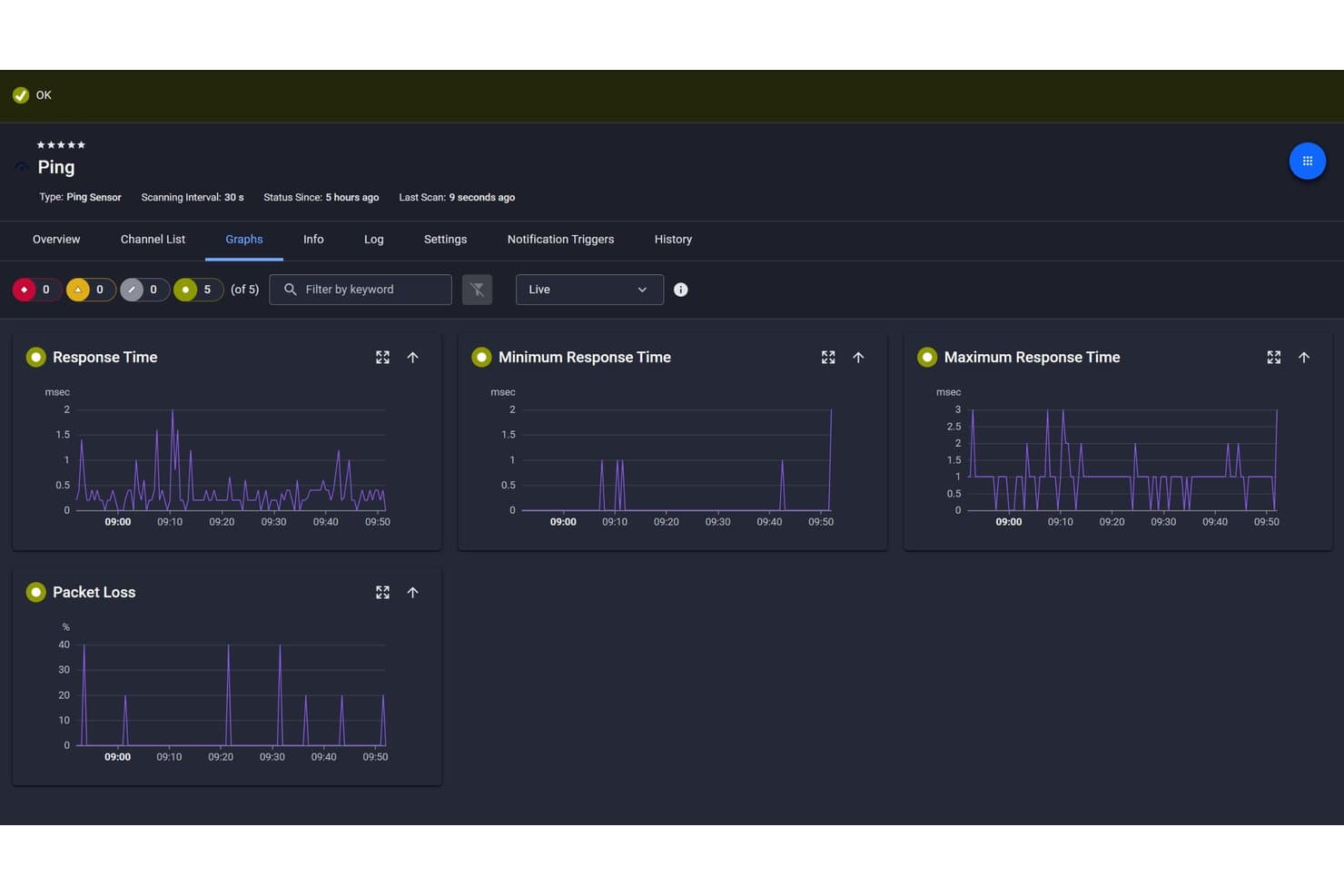
Paessler PRTG offers a Ping Sensor dashboard displaying live graphs for response time, minimum and maximum response time, and packet loss metrics. Paessler PRTG is a network monitoring tool that tracks device uptime, bandwidth usage, traffic flow, and application performance across IT infrastructure using SNMP, ICMP, NetFlow, and REST-based sensors.
Who Is Paessler PRTG Best For?
IT teams and network administrators managing mid-to-large enterprise infrastructure across mixed operating systems and hardware environments.
Why I Picked Paessler PRTG
I picked Paessler PRTG as one of the best because its multi-platform probe deployment genuinely sets it apart from tools that still require Windows across every layer of the monitoring stack. I can deploy probes on Debian, Ubuntu, Red Hat, and ARM platforms including Raspberry Pi, which means I'm not locked into Windows-only infrastructure. In PRTG Hosted Monitor deployments, the environment can be completely Windows-free, with TLS 1.3 securing all probe-to-core communication.
Paessler PRTG Key Features
- Auto-discovery mode: Scans defined network segments to automatically detect and inventory devices.
- Customizable dashboards: Lets you build live, drag-and-drop dashboards with widgets and real-time status.
- Alerting and notification channels: Supports alerts via email, push, SMS, HTTP requests, and Microsoft Teams.
- Historical performance reporting: Stores long-term metrics and generates reports for trend and capacity analysis.
Paessler PRTG Integrations
Paessler PRTG offers native integrations with AWS, Azure, VMware, Microsoft 365, and Slack. An API is available for custom integrations.
What's Free?
PRTG offers a 30-day free trial of the full product, after which it reverts to a free freeware mode capped at 100 sensors. That sensor limit covers basic monitoring needs but can be restrictive for larger networks with many devices and interfaces to track.
Pros and Cons
Pros:
- Multi-platform probe deployment across Linux and ARM
- Freeware mode includes full feature access
- Supports 250+ sensor types out of the box
Cons:
- Windows required for core server installation
- 100-sensor freeware cap limits larger environments
Learn more about Paessler PRTG: Best with automated root cause analysis
- 15-day free trial
- From $7/month
Visit WebsiteCustomer Rating:4.5/5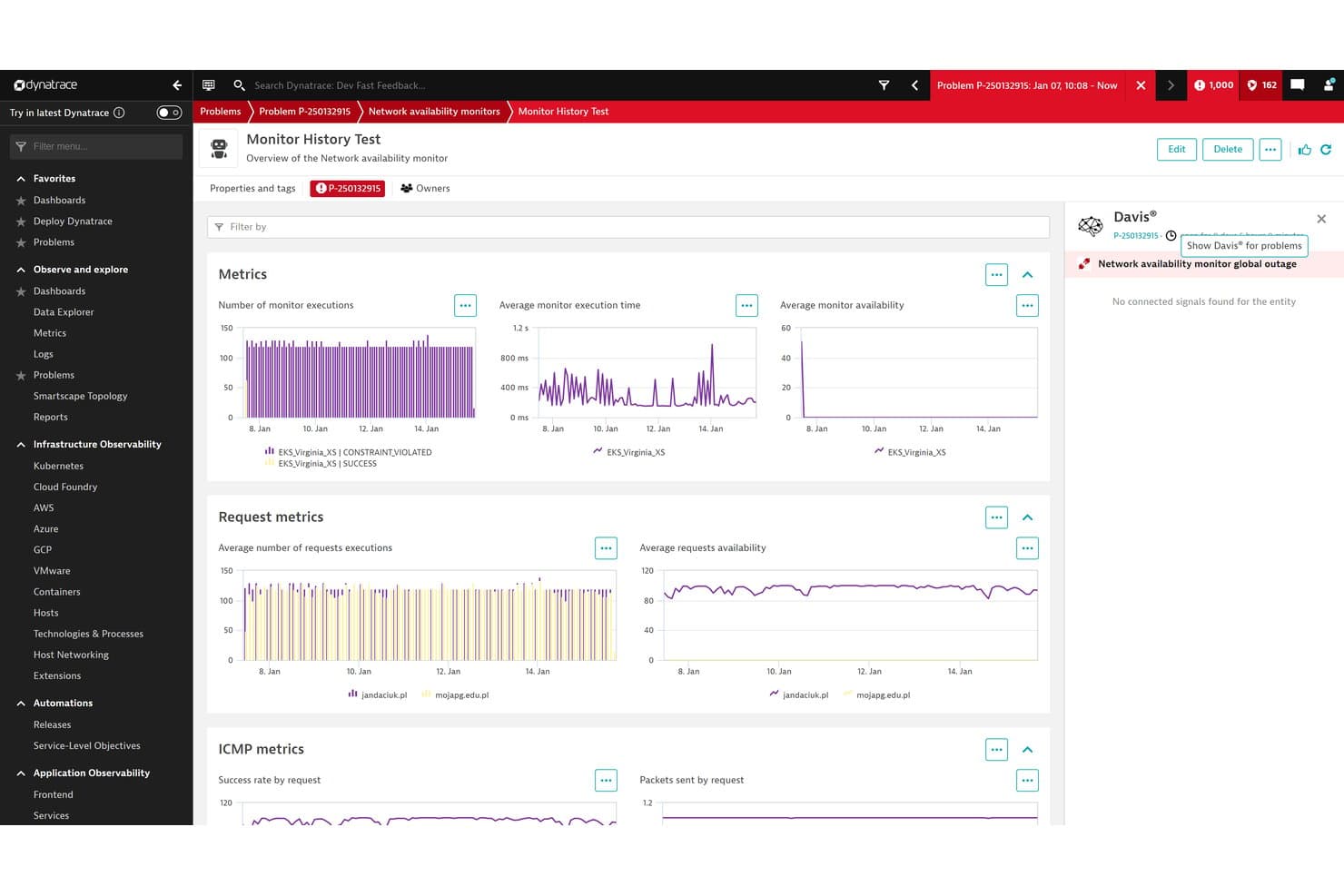
Dynatrace offers a Network Availability Monitor dashboard with metrics on monitor executions, execution time, availability, and ICMP metrics across multiple locations. Dynatrace is an AI-powered observability platform that combines infrastructure monitoring, application performance monitoring, log analytics, and automated anomaly detection across multi-cloud and hybrid environments.
Who Is Dynatrace Best For?
Dynatrace is a strong fit for enterprise DevOps and SRE teams managing large-scale, distributed, or multi-cloud environments where pinpointing the source of incidents quickly is a priority.
Why I Picked Dynatrace
I picked Dynatrace as one of the best because its Davis AI engine does something most monitoring tools can't: it automatically traces an incident back to a single root cause rather than flooding you with dozens of correlated alerts. When a network switch fails, for example, Davis bundles every downstream error into one actionable problem card. I also like how OneAgent auto-discovers every host, container, and process without manual configuration, so you're never chasing blind spots.
Dynatrace Key Features
- Smartscape topology mapping: Visualizes relationships between hosts, services, and applications in real time.
- OneAgent auto-discovery: Installs once to automatically recognize all monitored entities and technologies across your environment.
- Cloud-native monitoring: Monitors workloads across AWS, Azure, Google Cloud, Kubernetes, and hybrid infrastructure.
- Log analytics in context: Connects log data with events, entities, and user sessions for faster troubleshooting.
Dynatrace Integrations
Dynatrace offers native integrations with ServiceNow, Jira, Slack, Microsoft Teams, PagerDuty, and AWS, and provides an API for custom integrations.
What's Free?
Dynatrace offers a 15-day free trial that gives you full access to its monitoring and AI capabilities with no credit card required. There's no free-forever plan, so you'll need to move to a paid tier once the trial period ends.
Pros and Cons
Pros:
- Real-time topology maps across cloud environments
- Auto-discovers all hosts and services instantly
- Davis AI pinpoints root cause automatically
Cons:
- Complex initial setup for smaller teams
- No free-forever plan available
 Best for open-source flexibility
- Free plan and free demo available
- From $2,595 (perpetual license for 100 nodes)
Visit WebsiteCustomer Rating:4.6/5
Nagios provides monitoring, alerts, and reports for IT systems. Nagios is an open-source infrastructure monitoring tool designed for IT professionals and system administrators. It offers monitoring, alerting, and reporting for networks, servers, and applications, making it valuable for network health and performance.
Why I picked Nagios: Nagios is a free, open-source solution that provides core monitoring capabilities. Its flexibility comes from a strong plugin architecture, allowing you to tailor monitoring to your specific needs. With over 50 official plugins included, your team can monitor a wide range of network components. Extensive community support can help you to expand functionality with additional resources.
Standout features and integrations:
Features include strong configuration tools that let you customize Nagios to meet your specific monitoring needs. The community ecosystem is beneficial for helping you troubleshoot and expand Nagios' capabilities. The monitoring wizards provide step-by-step instructions that can make it easier for your team to set up and manage network monitoring tasks.
Integrations are not publicly listed.
What's free?
Nagios has a free-forever plan that offers essential monitoring features without any user or integration limitations.
Pros and Cons
Pros:
- Free open-source version
- Highly customizable with plugins
- Extensive community support
Cons:
- Basic UI design
- Minimal built-in reporting and analytics
Learn more about Nagios: Best for real-time monitoring
- Free download available
- From $325/month (billed annually)
Visit WebsiteCustomer Rating:4.4/5
Zabbix focuses on observability for real-time IT monitoring. Zabbix is an open-source observability solution designed for enterprises, focusing on network management, server monitoring, and application monitoring. It caters to IT professionals and system administrators who need a reliable tool for real-time monitoring and analysis.
Why I picked Zabbix: Zabbix offers a free trial of its Zabbix Cloud service, which allows you to explore its real-time monitoring capabilities without upfront costs, while its on-premise software is free and open-source. The platform offers strong flexibility in monitoring various environments, and you can leverage its extensive documentation to set up and customize your monitoring needs. The community forum is also valuable, as it provides resources for troubleshooting and improvements.
Standout features and integrations:
Features include real-time monitoring, which keeps you updated on your network's status. The alerting system is customizable, allowing your team to set specific triggers for notifications. Additionally, Zabbix provides detailed reporting tools for analyzing and visualizing performance data.
Integrations include Microsoft Azure, VMware, Docker, Kubernetes, MySQL, PostgreSQL, and more.
What's free?
Zabbix offers a free edition of the software for on-premise use and a free trial of its Zabbix Cloud service that allows full access to its features.
Pros and Cons
Pros:
- Scalable for large enterprises
- Detailed real-time insights
- Flexible monitoring environment options
Cons:
- Scaling to large environments requires technical expertise
- Some integrations require manual configuration
 Best for customizable dashboards
- Free plan + free trial available
- From $19/month + usage
Visit WebsiteCustomer Rating:4.6/5
Grafana Cloud offers interactive dashboards for monitoring and data analysis. Grafana Cloud is an open-source data visualization tool used primarily by IT professionals and data analysts. It allows users to create interactive and customizable dashboards to monitor and analyze various data sources.
Why I picked Grafana Cloud: Grafana Cloud offers a free-forever plan that allows access to 10,000 Prometheus metrics and 50 GB of logs, traces, and profiles. This plan includes customizable dashboards, allowing you to tailor data visualization to your needs. The tool also supports over 20 enterprise data source plugins, providing flexibility in monitoring. Grafana's focus on customization makes it a valuable choice for users who want detailed and personalized data insights.
Standout features and integrations:
Features include performance testing, which can help you assess the efficiency of your network. The alerting system is customizable, allowing your team to set specific thresholds for notifications. Grafana Cloud also offers incident and on-call management tools to optimize response workflows for network issues.
Integrations include Amazon Web Services, Azure, Cloudflare, CrowdStrike Falcon LogScale (formerly Humio), and more.
What's free?
Grafana Cloud offers a free-forever plan with access to 10,000 Prometheus metrics, 50 GB of logs, and over 20 enterprise data source plugins.
Pros and Cons
Pros:
- Fully managed servers
- Strong integration ecosystem
- Highly customizable dashboards
Cons:
- Core features locked behind paywalls
- Limited backend control
 Best intuitive dashboard
- Free 30-day trial + Free edition available
- Pricing upon request
Visit WebsiteCustomer Rating:4.4/5
WhatsUp Gold provides visual network performance and device monitoring. WhatsUp Gold is a network monitoring solution designed for IT teams and network administrators. It focuses on visualizing network performance, tracking network traffic, and managing network devices.
Why I picked WhatsUp Gold: WhatsUp Gold offers a free trial with access to its intuitive dashboard, which simplifies network visualization and allows you to view performance metrics and device statuses in one place. The tool provides customizable alerts to keep your team informed of any issues. Its user-friendly interface makes it accessible even if you have a limited technical background.
Standout features and integrations:
Features include a log management and archiving system that you can use to monitor, filter, and configure alerts on syslogs. The interactive mapping feature allows you to clearly visualize your network's layout. You can also generate detailed reports to analyze network performance over time with the Virtualization Monitoring module.
Integrations include Salesforce, Microsoft Office 365, and more.
What's free?
WhatsUp Gold offers a limited-time free trial, allowing full access to its features without restrictions, but it is not a free-forever plan.
Pros and Cons
Pros:
- Interactive network visualization
- Integrated log management
- Intuitive and user-friendly dashboard
Cons:
- Not suitable for very large networks
- Reporting and analytics can be less detailed
Learn more about WhatsUp Gold: Best for community support
- Free plan available
- From $5/seat/month (billed annually)
Visit WebsiteCustomer Rating:4.3/5
Spiceworks focuses on website monitoring and management for IT teams. Spiceworks is a free network monitoring and management tool designed for IT professionals, most suitable for small- to medium-sized businesses. It provides essential features for monitoring network performance, managing devices, and troubleshooting network issues.
Why I picked Spiceworks: Spiceworks offers a free-forever plan with a strong focus on community support through active forums, discussions, and Q&As. It includes features such as live monitoring and status alerts, helping you keep track of your network's health. The tool also provides an intuitive system for visualizing network data.
Standout features and integrations:
Features include real-time insights that can help you keep your network in check. The alert system can promptly notify you of issues targeting any of your web applications. The Connectivity Dashboard is integrated with a help desk that organizes and tracks user requests.
Integrations are not publicly listed.
What's free?
Spiceworks offers a free-forever plan with no limitations on users or integrations, focusing on community-driven support.
Pros and Cons
Pros:
- Suitable for small- to medium-sized businesses
- Intuitive dashboard design
- Strong IT community support
Cons:
- Not ideal for large-scale or complex IT environments
- Limited API and automation features
Learn more about Spiceworks:

Cacti network offers graphing tools for clear performance insights. Cacti is an open-source network monitoring and graphing tool suitable for network administrators and IT professionals. It specializes in providing detailed graphs of network performance metrics, helping users visualize and analyze data effectively.
Why I picked Cacti: Cacti offers a free-forever solution that focuses on graphing network data. With its templates and automation features, you can efficiently set up and manage network graphs. The tool supports data collection from various sources, offering flexibility in monitoring.
Standout features and integrations:
Features include a Devices system that can be used to create and manage graphs with specific attributes and meta information. Cacti offers multiple data acquisition methods, which adds to its flexibility. It also supports router configuration backup and has a scheduler that can be used to create custom network discovery rules.
Integrations are not publicly listed.
What's free?
Cacti offers a free-forever plan with no restrictions on users or integrations, focusing on graphing capabilities.
Pros and Cons
Pros:
- Strong template system
- Supports multiple data sources
- High-density graphing capabilities
Cons:
- Limited alerting and notification capabilities
- Advanced functionality may require technical expertise
Learn more about Cacti: Best for extensible architecture
- Free consultation available
- Pricing upon request

OpenNMS enables open-source monitoring for enterprise networks. OpenNMS is an open-source network monitoring platform aimed at IT professionals and network administrators. It offers full network performance monitoring and management capabilities.
Why I picked OpenNMS: OpenNMS is available as a free open-source solution that emphasizes extensibility through plugins. You can customize the tool to fit your specific monitoring needs. The platform supports a wide range of monitoring services, from performance metrics to event management. Its open-source nature allows your team to contribute and expand its capabilities.
Standout features and integrations:
Features include advanced event management, which helps your team track and respond to network incidents. The platform provides detailed performance monitoring, offering insights into network health. OpenNMS also offers a flexible architecture, allowing you to tailor the system to your specific requirements.
Integrations include Slack, Mattermost, Jira, Grafana, Remedy, and more.
What's free?
OpenNMS offers a free-forever plan called Horizon with no restrictions on the number of users or integrations, focusing on extensibility and customization.
Pros and Cons
Pros:
- Flexible event-driven architecture
- Ticketing system integration
- Highly extensible with plugins
Cons:
- Some integrations may require manual configuration
- High cost for enterprise support
Learn more about OpenNMS: Best for Windows integration
- Free plan available
- Pricing upon request

Wi-Fi Network Monitor enables real-time views of Windows network traffic. Wi-Fi Network Monitor is a Windows app designed to help you keep an eye on your network devices and traffic in real time. It provides your team with a simple way to see how data moves across your network so you can catch issues early.
Why I picked Wi-Fi Network Monitor: It can be installed directly from the Microsoft Store, so it can naturally integrate into your existing Windows setup. You and your team can use it inside the familiar Windows environment instead of learning a different tool layout.
Standout features and integrations:
Features include real-time views of download, upload, and bandwidth use so you can see how your connection changes over time. You can track which devices are on your network and how much traffic they’re sending or receiving, making it easier for you and your team to notice unusual activity or heavy use without having to navigate various Windows system menus.
Integrations are not publicly listed.
What’s free?
It’s a free-forever app with no paid tiers, and all features available on the Microsoft Store listing are included at no cost.
Pros and Cons
Pros:
- Good fit for small networks
- Low system impact
- Integrates with your existing Windows workflow
Cons:
- Limited analytics features
- Windows-only platform
Learn more about Wi-Fi Network Monitor:
Andre gratis verktøy for nettverksovervåking
Her er noen flere verktøy for nettverksovervåking som også tilbyr gratis abonnementer eller prøveperioder. Selv om disse verktøyene ikke kom med på kortlisten min, er de likevel verdt å undersøke:
- 11IcingaBest for modular architecture
- 12NetdataBest for AI-assisted troubleshooting
- 13MikroTik (The Dude)Best for testing tools
- 14NtopBest for traffic analysis
How I Evaluate Free Network Monitoring Tools
I look at every tool through two lenses: whether it covers the basics—SNMP polling, threshold alerts, and bandwidth visibility—and what sets it apart for teams managing real production networks.
Core Functionality (Table Stakes For This List)
When I'm selecting tools for my list, I rank each one on a scale from 0 (does not offer the functionality) to 5 (excels in this area) for each core functionality listed below. Then, I calculate the tool's total score into a percentage. Each tool needs to achieve a minimum total score of 65% to be considered for inclusion.
- Device & Uptime Monitoring: I check whether a tool can poll routers, switches, firewalls, and servers via SNMP, ICMP, or WMI—and whether it auto-discovers devices on a subnet.
- Bandwidth & Traffic Analysis: Tools should surface per-interface throughput and, ideally, flow-based breakdowns (NetFlow, sFlow) so you can spot which app is saturating a WAN link.
- Alerting & Notifications: I evaluate threshold configuration and delivery channels—email at minimum, but webhook or Slack integration matters for teams running on-call rotations.
- Network Topology Mapping: A good map view lets you see upstream dependencies at a glance, like tracing a failing access switch back to its distribution layer during an outage.
- Free Tier Availability: I look at whether the free version is genuinely usable—open-source tools like Zabbix and Nagios Core offer full access, while vendors like PRTG and Datadog cap sensors or hosts.
- Historical Data & Reporting: Retention depth matters when you need to compare this month's peak utilization against the same period last year for capacity planning or budget requests.
Once I have a list of tools that meet this criteria, I consider what sets each platform apart.
Differentiating Factors (What Sets Vendors Apart)
Here's how I compare and contrast different vendors:
Standout Features
Distributed monitoring matters when you're managing branch offices or remote sites—tools like Zabbix and Checkmk support remote probes that report back to a central server. I also evaluate cloud and virtualization coverage, since most networks now span AWS, Azure, or VMware alongside physical gear. A strong plugin ecosystem is another differentiator. Nagios and Zabbix both benefit from community-built templates and extensions that let you monitor niche hardware without writing checks from scratch.
Beyond Features
Deployment model is one of the first things I evaluate—whether a tool runs on-prem, in the cloud, or both shapes how it fits into your security policies and infrastructure. I also look at integration depth with ITSM and incident platforms like ServiceNow, Jira, or PagerDuty, since a monitoring tool that can't feed into your ticketing workflow creates manual overhead. Community support and documentation quality matter a lot with free tools, where vendor-provided support is often limited or nonexistent.
Slik velger du et gratis verktøy for nettverksovervåking
Komplekse funksjonslister og prismodeller kan gjøre det vanskelig å finne ut hva du egentlig får fra et gratis verktøy for nettverksovervåking. For å hjelpe deg med å holde fokus mens du går gjennom prosessen med å velge programvare, er dette noen faktorer du bør ha i bakhodet:
| Faktor | Hva du bør vurdere |
|---|---|
| FaktorOmfanget av gratistilbudet | Hva du bør vurdereKontroller hva som er inkludert i gratisabonnementet. Dekker det viktige funksjoner som overvåking og varsler, eller er disse låst bak en betalingsmur? |
| FaktorSkalerbarhet | Hva du bør vurdereVurder om verktøyet kan vokse sammen med teamet ditt. Kan det håndtere økt nettverksstørrelse og kompleksitet etter hvert som virksomheten utvides? |
| FaktorIntegrasjoner | Hva du bør vurdereKontroller at verktøyet kan integreres med de eksisterende systemene dine. Se etter kompatibilitet med plattformer som AWS, Microsoft Azure og VMware. |
| FaktorBrukervennlighet | Hva du bør vurdereVurder brukergrensesnittet. Er det intuitivt? Trenger teamet omfattende opplæring, eller kan de begynne å bruke det med en gang? |
| FaktorTilpasning | Hva du bør vurdereSe etter alternativer for å tilpasse verktøyet til behovene dine. Kan du tilpasse dashbord og rapporter slik at du kan fokusere på dataene som er viktigst for deg? |
| FaktorStøtte | Hva du bør vurdereKontroller om tilstrekkelig støtte er tilgjengelig. Finnes det et forum, en direktechat eller et hjelpesenter som kan hjelpe deg når du møter problemer? |
| FaktorYtelsesmålinger | Hva du bør vurdereVurder hvilke typer målinger verktøyet sporer. Overvåker det effektivt båndbredde, enhetsstatus og data i sanntid? |
| FaktorSikkerhetsfunksjoner | Hva du bør vurdereUndersøk hvilke sikkerhetstiltak som finnes. Tilbyr verktøyet datakryptering og samsvar med forskrifter som GDPR? |
Hva er gratis verktøy for nettverksovervåking?
Verktøy for nettverksovervåking er programvareløsninger som bidrar til å spore og analysere nettverksytelse og -tilstand. Gratis tilbud omfatter vanligvis grunnleggende overvåking, varsler og begrenset datavisualisering. IT-fagfolk og nettverksadministratorer bruker ofte disse verktøyene for å oppnå effektivitet og oppetid i nettverket. Funksjoner som sanntidsovervåking, tilpassbare varsler og integrasjonsalternativer bidrar til å opprettholde nettverksytelsen, støtte skalerbarhet og forbedre brukeropplevelsen.
Funksjoner
La oss gå gjennom funksjonene som vanligvis finnes i programvare for nettverksovervåking, og hvilke som vanligvis er inkludert i gratis kontra betalte abonnementer.
Funksjoner som vanligvis finnes i gratis verktøy for nettverksovervåking
- Sanntidsovervåking: Sporer kontinuerlig nettverksytelsen for å identifisere problemer når de oppstår.
- Tilpassbare varsler: Sender varsler om bestemte nettverkshendelser, slik at du kan reagere raskt.
- Grunnleggende rapportering: Gir enkle rapporter om nettverksstatus og ytelsesmålinger.
- Enhetsoppdagelse: Identifiserer automatisk enheter i nettverket for enkel administrasjon.
- Visualisering i kontrollpanel: Viser nettverksdata i et oversiktlig format for rask innsikt.
- Støtte fra fellesskapet: Gir tilgang til brukerfora og ressurser fra fellesskapet for feilsøking.
- Begrensede integrasjoner: Tillater grunnleggende tilkoblinger til annen programvare eller andre plattformer.
- Grunnleggende sikkerhetsfunksjoner: Omfatter grunnleggende sikkerhetstiltak for å beskytte nettverksdata.
Funksjoner som vanligvis finnes i betalte verktøy for nettverksovervåking
- Avansert analyse: Tilbyr grundig analyse av nettverksytelse og trender for bedre beslutningstaking.
- Skalerbarhet: Støtter større nettverk og mer komplekse miljøer etter hvert som organisasjonen vokser.
- Forbedrede sikkerhetsprotokoller: Tilbyr avanserte sikkerhetsfunksjoner utover grunnleggende beskyttelse av sensitive data.
- Fullstendig rapportering: Leverer detaljerte og tilpassbare rapporter som dekker spesifikke forretningsbehov.
- Komplett integrasjonspakke: Tillater integrasjon med et bredt utvalg av tredjepartsapplikasjoner.
- Automatisert utbedring: Løser automatisk enkelte nettverksproblemer uten manuell inngripen.
- Kundestøtte døgnet rundt: Gir tilgang til dedikerte kundestøtteteam for umiddelbar hjelp.
- Verktøy for ytelsesoptimalisering: Omfatter funksjoner som forbedrer nettverkets effektivitet og hastighet.
Fordeler
Implementering av gratis verktøy for nettverksovervåking gir flere fordeler for teamet og virksomheten din. Her er noen du kan se frem til:
- Kostnadsbesparelser: Ved å bruke gratis verktøy kan du overvåke nettverket uten ekstra kostnader.
- Rask oppdagelse av problemer: Sanntidsovervåking bidrar til å identifisere nettverksproblemer umiddelbart, noe som reduserer nedetiden.
- Raskere responstid: Tilpassbare varsler informerer teamet ditt om problemer umiddelbart, slik at de kan løses raskere.
- Bedre oversikt: Visualisering i kontrollpanelet gir et tydelig bilde av nettverksytelsen og bidrar til velinformerte beslutninger.
- Ressurser fra fellesskapet: Tilgang til støttefora og brukerfellesskap gir verdifull innsikt og hjelp med feilsøking.
- Enkelt oppsett: Grunnleggende funksjoner og intuitive grensesnitt gjør det enkelt å komme i gang med nettverksovervåking.
- Mulighet for skalerbarhet: Enkelte gratis verktøy tilbyr muligheter for oppskalering etter hvert som nettverket vokser, noe som gir langsiktig verdi.
Kostnader og priser
Jeg forstår at du kom til denne artikkelen på jakt etter de beste alternativene for nettverksovervåking som er tilgjengelige gratis. Ettersom gratisabonnementer bare tilbyr begrensede funksjoner, er det imidlertid stor sjanse for at du må oppgradere abonnementet ditt i fremtiden.
Tabellen nedenfor oppsummerer vanlige abonnementer, gjennomsnittsprisene deres og typiske funksjoner som er inkludert i løsninger for nettverksovervåking:
Sammenligningstabell for abonnementer på verktøy for nettverksovervåking
| Plantype | Gjennomsnittspris | Vanlige funksjoner |
|---|---|---|
| PlantypeGratisplan | Gjennomsnittspris$0 | Vanlige funksjonerGrunnleggende overvåking, tilpassbare varsler og brukerstøtte fra fellesskapet. |
| PlantypePersonlig plan | Gjennomsnittspris$5-$25/bruker/måned | Vanlige funksjonerAvansert overvåking, rapportering og begrensede integrasjoner. |
| PlantypeBedriftsplan | Gjennomsnittspris$25-$75/bruker/måned | Vanlige funksjonerFullstendig integrasjonspakke, forbedret sikkerhet og detaljert analyse. |
| PlantypeVirksomhetsplan | Gjennomsnittspris$75-$150/bruker/måned | Vanlige funksjonerSkalerbarhet for store nettverk, kundestøtte døgnet rundt og verktøy for ytelsesoptimalisering. |