

I dagens hektiske teknologiverden er det viktigere enn noen gang å sørge for at koden din er sikker. Verktøy for statisk applikasjonssikkerhetstesting kan være en stor fordel for deg og teamet ditt, fordi de identifiserer sårbarheter før de blir et problem. Du kjenner utfordringene med å holde tritt med sikkerhetstrusler, og disse verktøyene tilbyr en praktisk måte å håndtere dem på.
Jeg har testet og gjennomgått disse verktøyene uavhengig for å gi deg et objektivt innblikk i hva som er tilgjengelig. Du kan stole på at mine beste anbefalinger er grundig undersøkt og fokuserer på behovene innen SaaS-utvikling. I denne artikkelen veileder jeg deg gjennom de beste alternativene, fremhever deres unike funksjoner og viser hvordan de kan hjelpe teamet ditt med å holde seg sikkert.
Hvorfor du kan stole på våre programvareanbefalinger
6,700+
Reviews
20
Industry experts
16+
Evaluation factors
14
Years
Teamet vårt har testet og anmeldt programvare siden 2012. Vi er selv teknologiledere, så vi vet hvor vanskelig og hvor viktig det er å velge riktig programvare.
I denne guiden har vi vurdert verktøyene gjennom praktisk testing og uavhengig research og gitt dem poeng ut fra våre utvelgelseskriterier.
Anmeldelsene våre bygger på vår egen redaksjonelle vurdering. De er ikke et salgsargument.
Ekspertanmeldere:
- Paulo Gardini MiguelTech Director
 Tim FisherVP of AI
 Gabriel RosasTech Lead & Software Architect
 Christhian GruhnTech Lead & Platform Architect

Sammenligningstabell for verktøy for statisk applikasjonssikkerhetstesting
Denne sammenligningstabellen oppsummerer prisdetaljene for mine utvalgte verktøy for statisk applikasjonssikkerhetstesting.
| Tool | Best For | Trial Info | Price | ||
|---|---|---|---|---|---|
| 1 | Best for AI SAST scanning | Not available | From $250/dev/year | Website | |
| 2 | Best for scalable vulnerability detection | Free plan available | From $300/month | Website | |
| 3 | Best for fitting into CI/CD pipelines | Free plan available | From $34/developer/month | Website | |
| 4 | Best for supply chain threat detection | 7-day free trial + free demo available | From $399/month (billed annually) | Website | |
| 5 | Best for automatic patch generation | Free plan available | From $200/month | Website | |
| 6 | Best for open-source collaboration | Free plan available | From $4/user/month | Website | |
| 7 | Best for unlimited parallel test runs | Free demo available | From 1¢/AI credit | Website | |
| 8 | Best for real-time observability | 15-day free trial | From $7/month | Website | |
| 9 | Best for integrated DevOps workflows | Free plan available; 30-day free trial | From $29/user/month (billed annually) | Website | |
| 10 | Best for real-time observability | Free plan available | From $10/user/month | Website |


Anmeldelser av de beste verktøyene for statisk applikasjonssikkerhetstesting
Nedenfor finner du mine detaljerte sammendrag av de beste verktøyene for statisk applikasjonssikkerhetstesting som kom med på listen min. Anmeldelsene mine gir en detaljert oversikt over de viktigste funksjonene, fordelene & ulempene, integrasjonene og ideelle bruksområdene for hvert verktøy, slik at du kan finne det som passer best for deg.

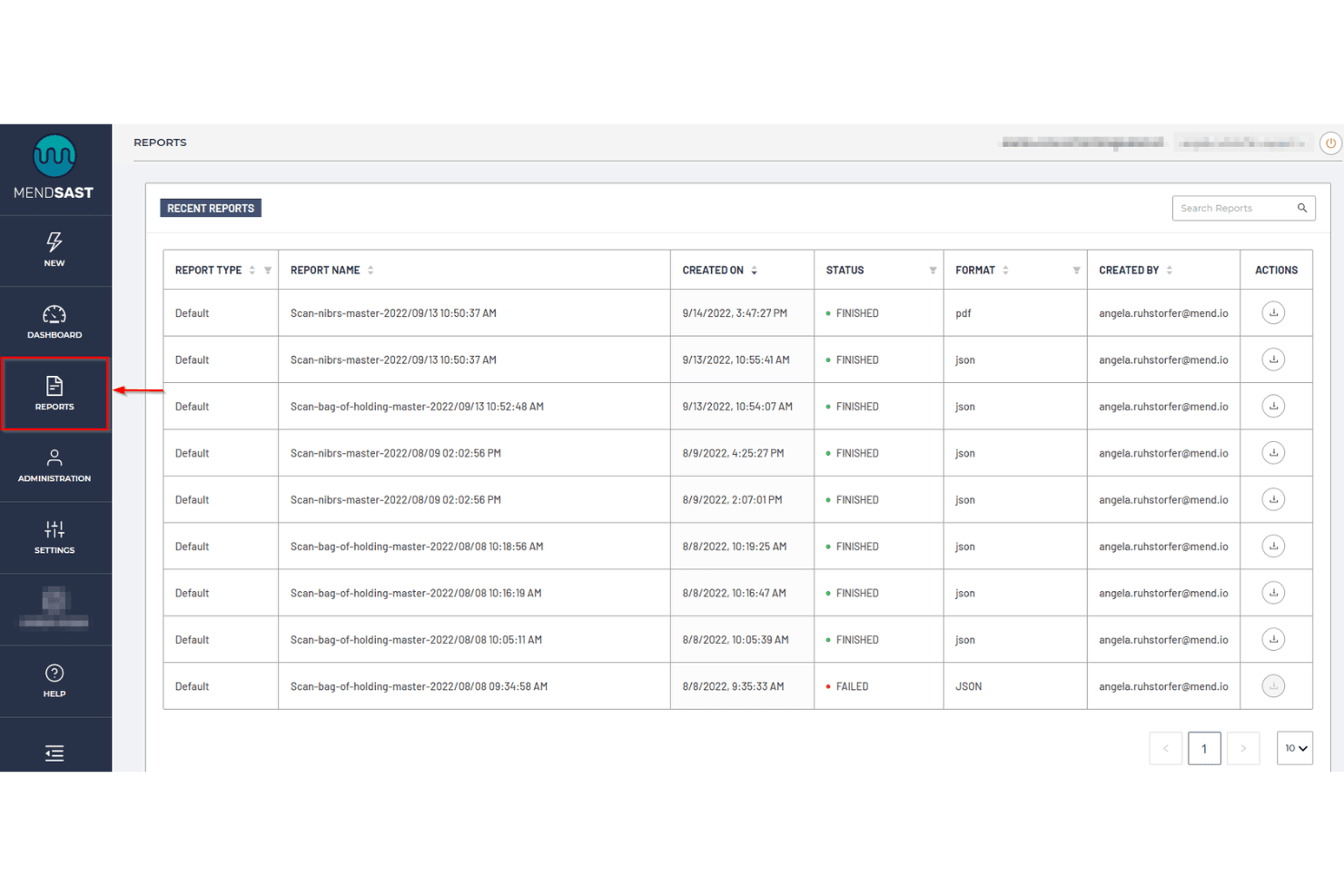
Mend.io’s reporting dashboard displays scan results, file formats, statuses, and report metadata. Mend AppSec is an application security platform that combines SAST, software composition analysis, and container scanning to identify vulnerabilities in proprietary source code across 30+ languages, with AI-powered fix suggestions and CI/CD pipeline integration.
Who Is Mend.io Best For?
Mend AppSec is a strong fit for AppSec and DevSecOps teams that need AI-powered SAST with benchmark-verified accuracy and fixes delivered directly in the repository.
Why I Picked Mend.io
I picked Mend.io as one of the best because its SAST engine posts +38% precision and +48% recall against benchmark competitors, which matters when you're trying to trust your scan results. It also scans up to 10x faster than those same competitors, so findings land while the code is still in context. On top of that, its AI-powered remediation generates fixes 46% more accurate than the competitor average and opens them directly as pull requests.
Mend.io Key Features
- Secrets detection: Scans proprietary source code for hardcoded credentials, API keys, tokens, and certificates, with the option to trigger policy violations or fail a build on detection.
- Code compliance reporting: Generates reports mapped to standards including OWASP, PCI DSS, NIST, HIPAA, and MISRA, exportable as HTML, PDF, XML, JSON, CSV, or SARIF.
- Incremental scanning: Analyzes only changed code against an uploaded baseline, reducing scan time for pull requests and feature branches without requiring a full repository rescan.
- Monorepo project mapping: Splits a single repository into separate Mend projects using a JSON path mapping, so commits trigger scans only for the affected project segments.
Mend.io Integrations
Mend.io lists integrations with GitHub, GitHub Enterprise, GitLab, Bitbucket, Azure DevOps, Jira, Jenkins, CircleCI, TeamCity, and Bamboo. It also supports CLI-based SAST scans in CI/CD pipelines; API availability isn't documented.
Pros and Cons
Pros:
- 46% more accurate fixes open as PRs
- Scans up to 10x faster than competitors
- Precision +38% and recall +48% versus competitors
Cons:
- Less mature than dedicated SAST tools
- Some findings require manual triage
Learn more about Mend.io: Best for scalable vulnerability detection
- Free plan available
- From $300/month
Visit WebsiteCustomer Rating:4.7/5
Aikido Security provides a unified dashboard to triage and filter issues by type, severity, and scan source. Aikido Security offers a Static Application Security Testing (SAST) solution aimed at securing code, cloud, and runtime environments. It's designed for developers across industries like FinTech, HealthTech, and startups, focusing on vulnerability detection and compliance support.
Why I picked Aikido Security: Aikido Security specializes in scalable vulnerability detection, ensuring genuine security issues are prioritized. It integrates seamlessly with CI/CD pipelines and IDEs for real-time detection. Users can customize rules to fit their specific needs, and AI-powered one-click fixes simplify the remediation process. Its support for compliance with standards like SOC 2 and ISO further enhances its appeal.
Standout features & integrations:
Features include vulnerability detection that minimizes false alerts, customizability for tailored rule creation, and automated compliance support for standards like SOC 2 and ISO.
Integrations include Azure Pipelines, Jira, GitHub, Bitbucket, GitLab, Slack, Trello, Jenkins, CircleCI, and Travis CI.
Pros and Cons
Pros:
- Real-time detection
- Great for compliance support
- Scalable for large teams
Cons:
- Limited offline support
- May require technical setup
Learn more about Aikido Security: Best for fitting into CI/CD pipelines
- Free plan available
- From $34/developer/month

Corgea flags SQL injection risks directly in GitHub pull requests, with context-aware fix suggestions developers can review before merging. Corgea is built for developers and security teams who want stronger application security through static analysis. It uses AI to surface vulnerabilities that traditional tools often miss, including business logic flaws and configuration issues. Because it integrates directly into common development environments, teams can improve security without slowing down their workflow.
Why I Picked Corgea
I picked Corgea because its AI-driven analysis reduces false positives while improving detection quality. Its use of Large Language Models (LLMs) helps it reason about code context and catch issues like business logic flaws that are typically hard to find with rule-based scanners. Corgea also fits cleanly into CI/CD pipelines, providing real-time feedback so teams can fix issues early and keep security part of the normal development process.
Corgea Key Features
In addition to its AI-driven analysis, I also found the following features noteworthy:
- Comprehensive Language Support: Analyzes code across 10+ languages and frameworks, ensuring broad coverage for diverse tech stacks.
- Secret Scanning: Identifies hardcoded secrets and sensitive data within your code to prevent data breaches.
- Intelligent File Filtering: Optimizes scan performance by excluding non-relevant files, ensuring accurate and efficient analysis.
- Automated Fixing: Offers context-aware fixes that can be applied either automatically or after review, streamlining the remediation process.
Corgea Integrations
Integrations include CI/CD pipelines, pull request reviews, IDE support, GitHub, GitLab, Bitbucket, Jenkins, and Azure DevOps.
Pros and Cons
Pros:
- Broad multi-language code coverage
- Reduced false positives with AI
- Detects complex business logic flaws
Cons:
- Newer tool with limited history
- Results may vary between scans
Learn more about Corgea: Best for supply chain threat detection
- 7-day free trial + free demo available
- From $399/month (billed annually)

Xygeni dashboard showing prioritized application security risks across code, dependencies, CI/CD, secrets, and IaC. Xygeni is an AI-powered application security platform that combines SAST, SCA, DAST, secrets detection, CI/CD security, and supply chain malware defense into a single system for end-to-end SDLC coverage.
Who Is Xygeni Best For?
Xygeni is a strong fit for security-focused engineering teams at mid-size to enterprise companies that need unified visibility across code, dependencies, pipelines, and third-party components.
Why I Picked Xygeni
I've included Xygeni in my top picks because its supply chain threat detection goes well beyond what most SAST tools offer. The SCA module analyzes thousands of new and updated open source packages daily to detect and block zero-day malware before it reaches your codebase. On top of that, the anomaly detection engine monitors behavioral signals across code, dependencies, pipelines, and config files to catch unauthorized modifications in real time—the kind of attack vector that pure static analysis simply won't surface.
Xygeni Key Features
- AI-powered SAST scanning: Scans source code for vulnerabilities including SQLi, XSS, insecure authentication, and backdoors, benchmarked against the OWASP test suite.
- AI auto-fix via pull request: Generates code-level fixes for detected vulnerabilities and submits them as pull requests for developer review.
- Secrets detection: Scans repositories, commits, and CI/CD configs to identify exposed credentials, API keys, and tokens before they reach production.
- IaC security scanning: Analyzes infrastructure-as-code files to detect misconfigurations in cloud and container environments before deployment.
Xygeni Integrations
Xygeni offers native integrations with GitHub, GitLab, Bitbucket, Azure DevOps, and Jenkins, as well as CircleCI for SCM and CI/CD pipeline scanning. For ticketing and alerts, it integrates with Jira, GitHub Issues, and Slack. IDE plugins are available for VS Code, IntelliJ, Eclipse, Visual Studio, Windsurf, and Cursor. Xygeni also provides a REST API for custom integrations and automation across CI/CD and governance workflows.
Pros and Cons
Pros:
- Unifies SAST, SCA, and secrets scanning
- Detects malware in open source dependencies
- Reachability analysis reduces false positives significantly
Cons:
- Smaller community compared to Snyk or SonarQube
- Alert volume can be high initially
Learn more about Xygeni: Best for automatic patch generation
- Free plan available
- From $200/month
Visit WebsiteCustomer Rating:4.5/5
ZeroPath provides a unified security dashboard that highlights scan activity, vulnerability types, issue severity, and top critical findings at a glance. ZeroPath is designed to help development and security teams get ahead of code vulnerabilities by using AI to surface issues such as broken authentication, logic bugs, exploitable dependencies, and misconfigured pipelines. If your team is building software rapidly and wants a SAST solution that catches real threats without overwhelming you with false alarms, then ZeroPath is worth a look.
Why I Picked Zeropath
I picked ZeroPath because its AI-native static application security testing (SAST) engine goes beyond pattern matching and understands code context and business logic—so you and your team can trust that findings are meaningful. The tool’s automatic patch generation lets you review or merge suggested fixes directly in pull requests, reducing time spent manually crafting remediation. Its deep discovery of authentication bypasses, IDORs, race conditions and logic flaws means you’re catching vulnerability types many legacy scanners miss.
Zeropath Key Features
In addition to its core SAST capabilities, ZeroPath offers:
- Custom Code Policies: Create natural-language or rule-based policies to flag specific patterns or anti-patterns in your codebase.
- Secrets Detection: Scan for leaked credentials, keys, tokens, or API secrets within repositories and enforce remediation workflows.
- Infrastructure as Code (IaC) Misconfiguration Detection: Analyze IaC templates (e.g., Terraform, CloudFormation) for insecure configurations before deployment.
- Security Intelligence Dashboard: View real-time metrics on vulnerability trends, exploitability scoring (CVSS 4.0), team performance, and compliance status.
Zeropath Integrations
Integrations include GitHub, GitLab, Bitbucket, Azure DevOps, Jira, Jenkins, Slack, Microsoft Teams, and CircleCI.
Pros and Cons
Pros:
- Gives you clear fixes that speed up your security reviews.
- Cuts down noisy findings so your team can focus on real issues.
- It catches logic flaws and hidden risks you might miss in normal scans.
Cons:
- You may need time to adjust your workflow around its automation.
- Integration options may not be extensive enough for complex enterprise environments.
Learn more about Zeropath: Best for open-source collaboration
- Free plan available
- From $4/user/month
Visit WebsiteCustomer Rating:4.8/5
GitHub dialog for adding images GitHub is a collaborative software development platform widely used by developers across various industries, including healthcare and finance. It offers tools for security, automation, and code management, making it suitable for tasks like DevSecOps and CI/CD.
Why I picked GitHub: GitHub excels in open-source collaboration, providing a platform where developers can work together on projects from anywhere. Its built-in application security tools use AI to quickly identify and address vulnerabilities, which supports its USP. GitHub Actions automate workflows, enhancing efficiency in managing code changes. With GitHub Advanced Security, you gain enterprise-grade security options to protect your codebase.
Standout features & integrations:
Features include GitHub Copilot for AI-assisted coding, GitHub Actions for workflow automation, and Codespaces for instant development environments. These features enhance collaboration and streamline development processes.
Integrations include Slack, Trello, Jira, Visual Studio, Azure DevOps, Google Cloud, AWS, Heroku, Docker, and Kubernetes.
Pros and Cons
Pros:
- GitHub Actions for automation
- AI-driven security tools
- Extensive open-source community
Cons:
- Dependency on Git knowledge
- Potential for complex configurations
 Best for unlimited parallel test runs
- Free demo available
- From 1¢/AI credit
Visit WebsiteCustomer Rating:4.9/5
QA Wolf's team can design, create, and manage automated tests and report bugs in a timely manner. QA Wolf is a hybrid platform and service aimed at software teams in industries like fintech, healthcare, and eCommerce. It provides automated end-to-end test coverage for web and mobile applications, enhancing quality assurance and reducing QA costs.
Why I picked QA Wolf: QA Wolf excels in offering unlimited parallel test runs, which is a game-changer for teams looking to speed up their testing processes. The platform's human-verified bug reports help ensure accuracy. Its zero-flake guarantee reduces the chances of flaky tests, making it reliable for consistent testing. The AI-driven test creation and maintenance improve productivity by minimizing the time spent on QA tasks.
Standout features & integrations:
Features include human-verified bug reports that ensure accuracy, a zero-flake guarantee to reduce flaky tests, and AI-driven test creation for improved productivity.
Integrations include GitHub, GitLab, Bitbucket, Slack, Jira, Trello, Asana, CircleCI, Jenkins, Travis CI, and Azure DevOps.
Pros and Cons
Pros:
- AI-driven test creation
- Human-verified bug reports
- Unlimited parallel test runs
Cons:
- May need technical expertise
- Not ideal for small teams
Learn more about QA Wolf:

Dynatrace overview dashboard Dynatrace is an all-in-one software intelligence platform used by IT and DevOps teams across various sectors. It provides monitoring and analytics for applications, infrastructure, and user experience, helping teams optimize performance and ensure reliability.
Why I picked Dynatrace: Dynatrace offers real-time observability, making it a top choice for teams needing instant insights into their systems. Its AI-powered root cause analysis helps quickly identify issues, saving you time. The platform's full-stack monitoring covers everything from applications to infrastructure. Additionally, automated deployment and scaling simplify managing complex environments.
Standout features & integrations:
Features include AI-driven root cause analysis that speeds up troubleshooting, full-stack monitoring to cover applications and infrastructure, and automated deployment for simplified management of complex environments.
Integrations include AWS, Azure, Google Cloud, Kubernetes, ServiceNow, Slack, Jira, Microsoft Teams, Ansible, and Puppet.
Pros and Cons
Pros:
- Full-stack monitoring
- AI-driven root cause analysis
- Real-time data analysis
Cons:
- Complex initial setup
- High resource consumption
 Best for integrated DevOps workflows
- Free plan available; 30-day free trial
- From $29/user/month (billed annually)
Visit WebsiteCustomer Rating:4.5/5
GitLab issue-tracking functionality displayed on a Kanban board GitLab empowers users to build modern applications and accelerate digital transformation by embracing automated processes to deliver code faster.
In addition to providing code repository and version control functions, GitLab comes with built-in DevOps workflows such as continuous integration and continuous delivery (CI/CD) pipelines. GitLab boosts developer productivity and collaboration among developers while reducing costs, cycle time, and time to market.
GitLab is free for individual users. Its Premium edition targets customers who want to enhance team productivity and coordination and is priced at $19/user/month. GitLab Ultimate tier is priced at $99/user/month and is designed for organization-wide security, planning, and compliance.
 Best for real-time observability
- Free plan available
- From $10/user/month
Visit WebsiteCustomer Rating:4.3/5
You can prioritize, track, and report vulnerabilities through the software at an organizational, team, or component level. New Relic is an observability platform tailored for developers, offering monitoring solutions for applications and infrastructure. It's designed for IT teams looking to enhance performance and gain insights through data analysis.
Why I picked New Relic: New Relic excels in real-time observability, providing instant insights into application performance. Its ability to monitor an entire stack in real-time with pre-built dashboards is a key differentiator. The platform supports over 780 integrations, ensuring comprehensive visibility across programming environments. This makes it a versatile tool for troubleshooting and enhancing user experience.
Standout features & integrations:
Features include end-to-end monitoring set up in under five minutes, comprehensive visibility across various programming environments, and actionable insights to proactively troubleshoot issues.
Integrations include AWS, Azure, Google Cloud, Kubernetes, Slack, Jira, PagerDuty, ServiceNow, Splunk, and Datadog.
Pros and Cons
Pros:
- Actionable performance insights
- Supports extensive integrations
- Real-time application monitoring
Cons:
- Dependency on internet connectivity
- High data volume costs
Learn more about New Relic:
Andre verktøy for statisk applikasjonssikkerhetstesting
Her er noen flere alternativer for verktøy for statisk applikasjonssikkerhetstesting som ikke kom med på listen min, men som likevel er verdt å se nærmere på:
- 11DeepSourceBest for code quality analysis
- 12IDA ProBest for advanced binary analysis
- 13Nexus Lifecycle Best for open-source management
- 14Mend SASTBest for fast vulnerability detection
- 15StackHawkBest for automated security testing
- 16CodigaBest for real-time code analysis
- 17GuardRailsBest for developer-first security
- 18FlawnterBest for in-depth code inspection
- 19SonarQubeBest for continuous code quality
- 20DerScannerBest for vulnerability detection
- 21CodacyDevOps intelligence platform with high-quality code on 40+ programming languages.
- 22CheckmarxFast and accurate scans easily integrated into the tools you use daily, with remediation guidance.
- 23KlocworkStatic code analysis and SAST tool for C, C++, C#, Java, JavaScript, Python, and Kotlin.
- 24VeracodeIntegrate automated AppSec testing into your CI/CD pipeline.
- 25BrinqaConsolidate, prioritize and manage findings from all your AST tools.
- 26SpectralOpsAdvanced AI backed technology with over 2000 detectors to discover and classify your data silos and uncover data breaches.
- 27LGTM.COMFree SAST tool for open source projects.
- 28ReshiftCode security tool that secures your code as you build
- 29INSIDER CLICovers the OWASP Top 10 to make source code analysis to find vulnerabilities right in the source code.
How I Evaluate Static Application Security Testing Tools
I evaluate every tool in two layers—baseline requirements like CI/CD pipeline integration and multi-language scanning, and the differentiators that determine which tools developers will actually use.
Core Functionality (Table Stakes For This List)
When I'm selecting tools for my list, I rank each one on a scale from 0 (does not offer the functionality) to 5 (excels in this area) for each core functionality listed below. Then, I calculate the tool's total score into a percentage. Each tool needs to achieve a minimum total score of 65% to be considered for inclusion.
- Source Code Analysis: I check how many languages each tool scans and whether it handles source code, bytecode, and binaries—especially for teams running mixed stacks like Java alongside Go or Kotlin.
- Vulnerability Detection Coverage: Each tool's rule set should map to OWASP Top 10 and CWE/SANS Top 25 at minimum, with regular updates as new vulnerability classes emerge.
- CI/CD & IDE Integration: I look for native plugins in tools like Jenkins, GitHub Actions, and GitLab CI, plus IDE support in VS Code or IntelliJ so developers get feedback before code even hits a pipeline.
- Remediation Guidance: The best tools surface line-level fix suggestions with contextual code examples, not just a CVE description that sends developers searching through docs on their own.
- False Positive Management: I evaluate whether a tool lets security teams tune rules, suppress known safe patterns, and carry those decisions across projects to keep scan results meaningful.
- Compliance & Reporting: Reports should map findings to frameworks like PCI-DSS, HIPAA, or ISO 27001 and offer both developer-facing detail and executive-level summaries ready for audits.
Once I have a list of tools that meet this criteria, I consider what sets each platform apart.
Differentiating Factors (What Sets Vendors Apart)
Here's how I compare and contrast different vendors:
Standout Features
AI-powered auto-remediation is a major differentiator—tools that suggest or generate code fixes directly in a pull request save developers from context-switching into security docs. Incremental scanning matters just as much, since a tool that re-scans an entire codebase on every commit will slow pipelines and frustrate teams. I also look for custom rule authoring, which lets security teams write detection rules for internal frameworks or coding patterns that generic rule sets won't catch.
Beyond Features
Language and framework coverage is one of the first things I check—a tool that supports Java and Python but misses Kotlin or Rust won't work for teams modernizing their stacks. The integration ecosystem matters too. I evaluate whether a tool connects natively with SCM platforms, ticketing systems like Jira, and broader AppSec suites so findings don't live in a silo. Pricing transparency plays a role as well, since per-developer vs. per-scan licensing can dramatically shift total cost depending on your team size and build frequency.
Slik velger du verktøy for statisk applikasjonssikkerhetstesting
Det er lett å gå seg vill i lange funksjonslister og komplekse prismodeller. For å hjelpe deg med å holde fokus mens du arbeider deg gjennom den unike programvarevalgsprosessen din, får du her en sjekkliste over faktorer du bør ha i bakhodet:
| Faktor | Hva du bør vurdere |
|---|---|
| FaktorSkalerbarhet | Hva du bør vurdereKan verktøyet vokse med virksomheten din? Vurder brukerbegrensninger, kapasitet for databehandling og hvor enkelt det integreres med fremtidige teknologier. |
| FaktorIntegrasjoner | Hva du bør vurdereFungerer det med de eksisterende verktøyene og arbeidsflytene dine? Kontroller kompatibilitet med CI/CD-pipelines og utviklingsmiljøer for problemfri drift. |
| FaktorTilpasningsmuligheter | Hva du bør vurdereKan du tilpasse verktøyet til dine spesifikke behov? Se etter alternativer for å justere deteksjonsregler og rapporter slik at de samsvarer med sikkerhetspolicyene dine. |
| FaktorBrukervennlighet | Hva du bør vurdereEr verktøyet brukervennlig for alle teammedlemmer? Vurder grensesnittet og navigasjonen for å sikre rask innføring uten omfattende opplæring. |
| FaktorImplementering og opplæring | Hva du bør vurdereHvor raskt kan du begynne å bruke verktøyet effektivt? Vurder tiden og ressursene som kreves for oppsett, innledende opplæring og integrasjon med eksisterende systemer. |
| FaktorKostnad | Hva du bør vurderePasser prisen inn i budsjettet ditt? Sammenlign prismodeller, inkludert eventuelle skjulte gebyrer, og se om det finnes en gratis prøveperiode du kan teste før du bestemmer deg. |
| FaktorSikkerhetstiltak | Hva du bør vurdereFølger verktøyet beste praksis for sikkerhet? Kontroller datakryptering, tilgangskontroller og samsvar med relevante forskrifter. |
| FaktorEtterlevelseskrav | Hva du bør vurdereOppfyller verktøyet bransjespesifikke standarder? Se etter sertifiseringer eller støtte for forskrifter som GDPR eller HIPAA hvis det er relevant for sektoren din. |
Hva er verktøy for statisk sikkerhetstesting av applikasjoner?
Verktøy for statisk sikkerhetstesting av applikasjoner er programvareløsninger som analyserer kildekode for å identifisere sikkerhetssårbarheter tidlig i utviklingsprosessen. Utviklere, sikkerhetsteam og fagpersoner innen kvalitetssikring bruker disse verktøyene til å forbedre kodesikkerheten og sikre samsvar med bransjestandarder. Kodeanalyse, sårbarhetsdeteksjon og integrasjonsfunksjoner bidrar til å identifisere potensielle trusler og forbedre kodekvaliteten. Samlet sett gir disse verktøyene verdifull innsikt som hjelper team med å opprettholde sikre og pålitelige programvareapplikasjoner.
Funksjoner
Når du velger verktøy for statisk sikkerhetstesting av applikasjoner, bør du se etter følgende viktige funksjoner:
- Kodeanalyse: Skanner kildekoden automatisk for å identifisere sikkerhetssårbarheter, slik at utviklere kan løse problemer tidlig i utviklingsprosessen.
- Sårbarhetsdeteksjon: Identifiserer potensielle trusler og svakheter i koden og gir detaljerte rapporter for utbedring.
- Integrasjonsfunksjoner: Kobles sømløst til eksisterende utviklingsmiljøer og CI/CD-pipelines for å sikre kontinuerlig sikkerhetstesting.
- Tilpassbare regler: Gjør det mulig for brukere å tilpasse sikkerhetskontroller slik at de samsvarer med bestemte organisasjonspolicyer og etterlevelseskrav.
- Tilbakemeldinger i sanntid: Gir utviklere umiddelbar innsikt og forslag, noe som reduserer tiden som trengs til manuelle kodegjennomganger.
- Etterlevelsesrapportering: Genererer dokumentasjon som viser at bransjestandarder og forskrifter som GDPR eller HIPAA etterleves.
- Støtte for flere språk: Analyserer kode skrevet i ulike programmeringsspråk og tilpasser seg forskjellige utviklingsteam.
- Brukervennlig grensesnitt: Sikrer enkel bruk med intuitiv navigasjon, noe som reduserer læringskurven for nye brukere.
- Skalerbarhet: Tilpasser seg virksomhetens voksende behov og håndterer økte datamengder og brukerkrav effektivt.
- Sikkerhetstiltak: Omfatter funksjoner som datakryptering og tilgangskontroller for å beskytte sensitiv informasjon under analysen.
Fordeler
Implementering av verktøy for statisk sikkerhetstesting av applikasjoner gir flere fordeler for teamet og virksomheten din. Her er noen av fordelene du kan se frem til:
- Tidlig oppdagelse av sårbarheter: Identifiserer sikkerhetsproblemer i koden før de når produksjon, noe som reduserer risikoen for utnyttelse.
- Forbedret kodekvalitet: Gir detaljert analyse og tilbakemeldinger som hjelper utviklere med å skrive renere og sikrere kode.
- Forbedret etterlevelse: Genererer rapporter som viser at bransjestandarder og forskrifter etterleves, og forenkler revisjoner.
- Tidsbesparelser: Automatiserer sikkerhetsgjennomgangen, slik at utviklere kan fokusere på å bygge funksjoner i stedet for å kontrollere kode manuelt.
- Kostnadseffektivitet: Oppdager sårbarheter tidlig i utviklingssyklusen og sparer kostnader forbundet med å rette problemer etter implementering.
- Økt samarbeid: Integreres med eksisterende verktøy og arbeidsflyter, noe som fremmer bedre kommunikasjon mellom utviklings- og sikkerhetsteam.
- Skalerbarhet: Tilpasser seg behovene til team i vekst og sikrer konsekvent sikkerhetspraksis etter hvert som virksomheten utvides.
Kostnader og priser
Når du velger verktøy for statisk applikasjonssikkerhetstesting, må du forstå de ulike prismodellene og abonnementene som er tilgjengelige. Kostnadene varierer basert på funksjoner, teamstørrelse, tillegg og mer. Tabellen nedenfor oppsummerer vanlige abonnementer, gjennomsnittsprisene deres og typiske funksjoner som er inkludert i løsninger for statisk applikasjonssikkerhetstesting:
Sammenligningstabell for verktøy for statisk applikasjonssikkerhetstesting
| Abonnementstype | Gjennomsnittspris | Vanlige funksjoner |
|---|---|---|
| AbonnementstypeGratisabonnement | Gjennomsnittspris$0 | Vanlige funksjonerGrunnleggende kodeanalyse, begrenset språkstøtte og brukerstøtte fra fellesskapet. |
| AbonnementstypePersonlig abonnement | Gjennomsnittspris$10-$30/bruker/måned | Vanlige funksjonerAvansert kodeanalyse, støtte for flere programmeringsspråk og grunnleggende integrasjonsmuligheter. |
| AbonnementstypeBedriftsabonnement | Gjennomsnittspris$45-$100/bruker/måned | Vanlige funksjonerOmfattende kodeanalyse, egendefinerte regler, integrasjon med CI/CD-pipelines og brukerstøtte via e-post. |
| AbonnementstypeVirksomhetsabonnement | Gjennomsnittspris$150-$300/bruker/måned | Vanlige funksjonerAnalyse med alle funksjoner, oppdagelse av sårbarheter i sanntid, samsvarsrapportering og dedikert brukerstøtte. |
Verktøy for statisk applikasjonssikkerhetstesting (vanlige spørsmål)
Her er noen svar på vanlige spørsmål om verktøy for statisk applikasjonssikkerhetstesting:
Når kan statisk applikasjonssikkerhetstesting brukes i et prosjekt?
Du kan bruke verktøy for statisk applikasjonssikkerhetstesting tidlig i programvareutviklingsprosessen. De krever ikke at en applikasjon kjører, og er derfor ideelle for å oppdage sårbarheter under utviklingsfasen. Dermed kan du håndtere sikkerhetsproblemer proaktivt.
Hvilke av følgende problemer vil ikke bli funnet av SAST-verktøy?
SAST-verktøy kan ikke oppdage problemer under kjøring siden de analyserer kode uten å kjøre den. Det betyr at de ikke finner problemer som autentiseringsfeil eller feilkonfigureringer av serveren, som krever at applikasjonen kjører for å kunne identifiseres.
Kan statisk applikasjonssikkerhetstesting bidra til å identifisere mulige sårbarheter?
Ja, statisk applikasjonssikkerhetstesting er effektivt for å identifisere mulige sårbarheter i kildekoden til en applikasjon. Disse verktøyene utfører testing i hvit boks, noe som bidrar til å finne de grunnleggende årsakene til sikkerhetsfeil og gir veiledning om hvordan de kan utbedres.
Passer verktøy for statisk applikasjonssikkerhetstesting for alle programmeringsspråk?
Nei, ikke alle verktøy for statisk applikasjonssikkerhetstesting støtter alle programmeringsspråk. De fleste verktøy spesialiserer seg på populære språk som Java, C++ og Python, men støtten kan variere. Før du kjøper et verktøy, bør du kontrollere at det støtter språkene teamet ditt bruker. Hvis du arbeider med mindre vanlige språk, kan det hende du må se etter spesialiserte verktøy eller bekrefte støtten med leverandøren.