


Recensione di Intercom 2026: Caratteristiche Chiave, Pro e Contro e Prezzi Aggiornati



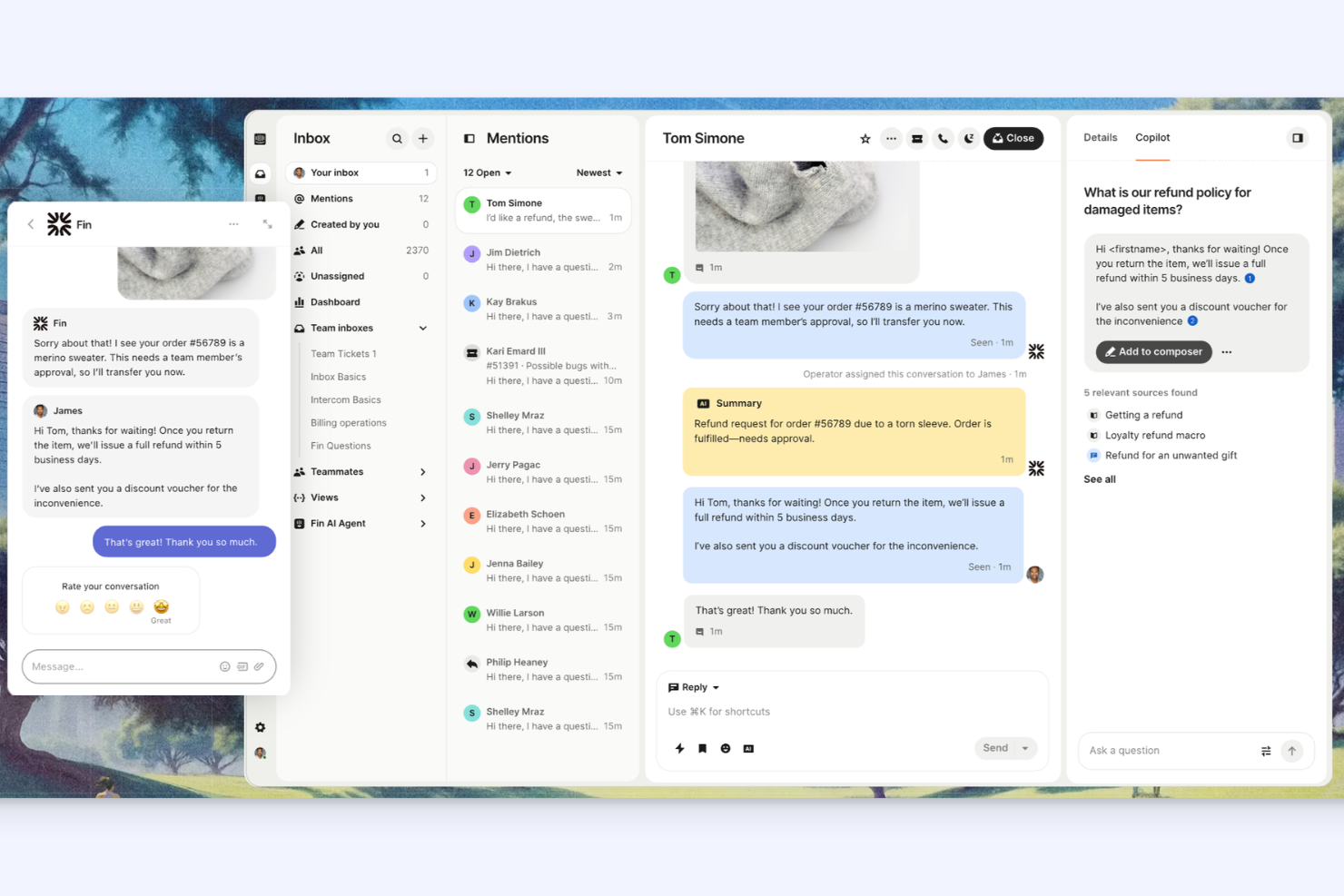
Intercom is a help desk software built around conversational, AI-driven support—covering live chat, in-app messaging, and automated ticketing in one platform. It's a strong fit for SaaS and tech teams that want to handle customer conversations proactively, not just reactively. If you're weighing it against Zendesk, Intercom's advantage is a more modern, messaging-first interface with AI automation built in from the ground up, rather than patched in through third-party add-ons.
Intercom Evaluation Summary
- From $29/user/month
- 14-day free trial
Perché fidarsi dei nostri consigli sui software
Il nostro team testa e recensisce software dal 2012. In quanto leader tecnologici noi stessi, sappiamo quanto sia difficile — e importante — scegliere il software giusto.
Per questa guida, abbiamo valutato gli strumenti attraverso test praticie ricerche indipendenti, assegnando un punteggio agli strumenti in base ai nostri criteri di selezione.
Le nostre recensioni riflettono il nostro giudizio editoriale umano, non un discorso di vendita.
Revisori esperti:
Intercom Overview
Intercom offers a modern interface, strong automation, and deep integrations, making it a top choice for teams prioritizing chat-based support and proactive engagement. Its onboarding is straightforward, and the workflow builder is intuitive, but pricing can climb quickly as you add features or users. Compared to others, Intercom excels at real-time messaging and self-serve support, but may be less appealing if you need granular ticket management or budget-friendly plans. It’s best for fast-moving IT teams or tech-driven environments that value automation, visibility into customer data, and a unified support
pros
-
Real-time chat and messaging across multiple channels.
-
Workflow automation reduces manual ticket handling.
-
Unified inbox for managing all customer conversations.
cons
-
Pricing increases quickly with advanced features.
-
Limited ticket categorization and escalation options.
-
Support response times can be inconsistent.




La Nostra Metodologia di Recensione
Come Testiamo e Valutiamo gli Strumenti
Abbiamo trascorso anni a costruire, perfezionare e migliorare il nostro sistema di testing e valutazione del software. Il nostro schema è progettato per cogliere le sfumature della selezione software e cosa rende efficace uno strumento, focalizzandosi sugli aspetti critici del processo decisionale.
Di seguito, puoi vedere esattamente come funziona il nostro testing e punteggio su sette criteri. Ci permette di offrire una valutazione imparziale del software basata su funzionalità principali, caratteristiche distintive, facilità d’uso, onboarding, assistenza clienti, integrazioni, recensioni dei clienti e rapporto qualità-prezzo.
Funzionalità Principali (25% del punteggio finale)
Il punto di partenza della nostra valutazione è sempre la funzionalità principale dello strumento. Ha le funzioni e caratteristiche base che ci si aspetta? Alcune di queste caratteristiche sono limitate ai piani tariffari superiori? Fondamentalmente, ci aspettiamo che uno strumento regga il confronto rispetto alle capacità di base dei concorrenti.
Caratteristiche Distintive (25% del punteggio finale)
Successivamente, valutiamo le caratteristiche distintive e non comuni che vanno oltre la funzionalità base tipicamente trovata negli strumenti di questa categoria. Un punteggio alto riflette funzionalità specializzate o uniche che rendono il prodotto più veloce, efficiente o offrono ulteriore valore all’utente.
Valutiamo inoltre quanto sia semplice integrare altri strumenti tipicamente utilizzati nell’infrastruttura tecnologica per espandere la funzionalità e l’utilità del software. Gli strumenti che offrono numerose integrazioni native, connessioni di terze parti e accesso API per creare integrazioni personalizzate ottengono i punteggi migliori.
Facilità d’Uso (10% del punteggio finale)
Consideriamo quanto sia rapido e semplice svolgere i compiti definiti nella funzionalità principale utilizzando lo strumento. Il software con punteggio alto è ben progettato, intuitivo da usare, offre app mobili, fornisce modelli e rende semplici attività relativamente complesse.
Onboarding (10% del punteggio finale)
Sappiamo quanto sia importante l’adozione rapida da parte del team per una nuova piattaforma, quindi valutiamo quanto sia facile imparare e utilizzare uno strumento con formazione minima. Valutiamo quanto velocemente un membro del team possa iniziare a usare lo strumento anche senza esperienza. Soluzioni con punteggio alto indicano che sono richiesti pochi o nessun supporto.
Assistenza Clienti (10% del punteggio finale)
Esaminiamo quanto sia veloce e facile ricevere assistenza e risolvere problemi tramite telefono, live chat o knowledge base. Gli strumenti e le aziende che garantiscono supporto in tempo reale ottengono il miglior punteggio, mentre i chatbot ottengono il peggiore.
Recensioni dei Clienti (10% del punteggio finale)
Oltre ai nostri test e valutazioni, prendiamo in considerazione il net promoter score dei clienti attuali e passati. Valutiamo la probabilità che, data la scelta, selezionerebbero nuovamente lo strumento per la funzionalità principale. Un software con punteggio alto riflette un alto net promoter score da parte dei clienti attuali o passati.
Rapporto Qualità-Prezzo (10% del punteggio finale)
Infine, considerando tutti gli altri criteri, analizziamo il prezzo medio dei piani base rispetto alle funzionalità principali e consideriamo il valore degli altri criteri di valutazione. Il software che offre di più a meno otterrà un punteggio più alto.
Core Features
Unified Inbox
Manage all customer conversations from chat, email, and social in one place. This centralizes support and reduces missed messages.
Automated Workflows
Set up bots and rules to route, assign, and resolve tickets automatically. This reduces manual work and speeds up response times.
Customizable Chatbots
Deploy bots to answer common questions and collect information 24/7. These bots can escalate complex issues to human agents as needed.
In-App Messaging
Send targeted messages to users directly inside your product or app. This helps guide users, announce updates, or offer support at key moments.
Knowledge Base
Build and maintain a self-serve help center with articles and FAQs. Customers can find answers without waiting for an agent.
Reporting and Analytics
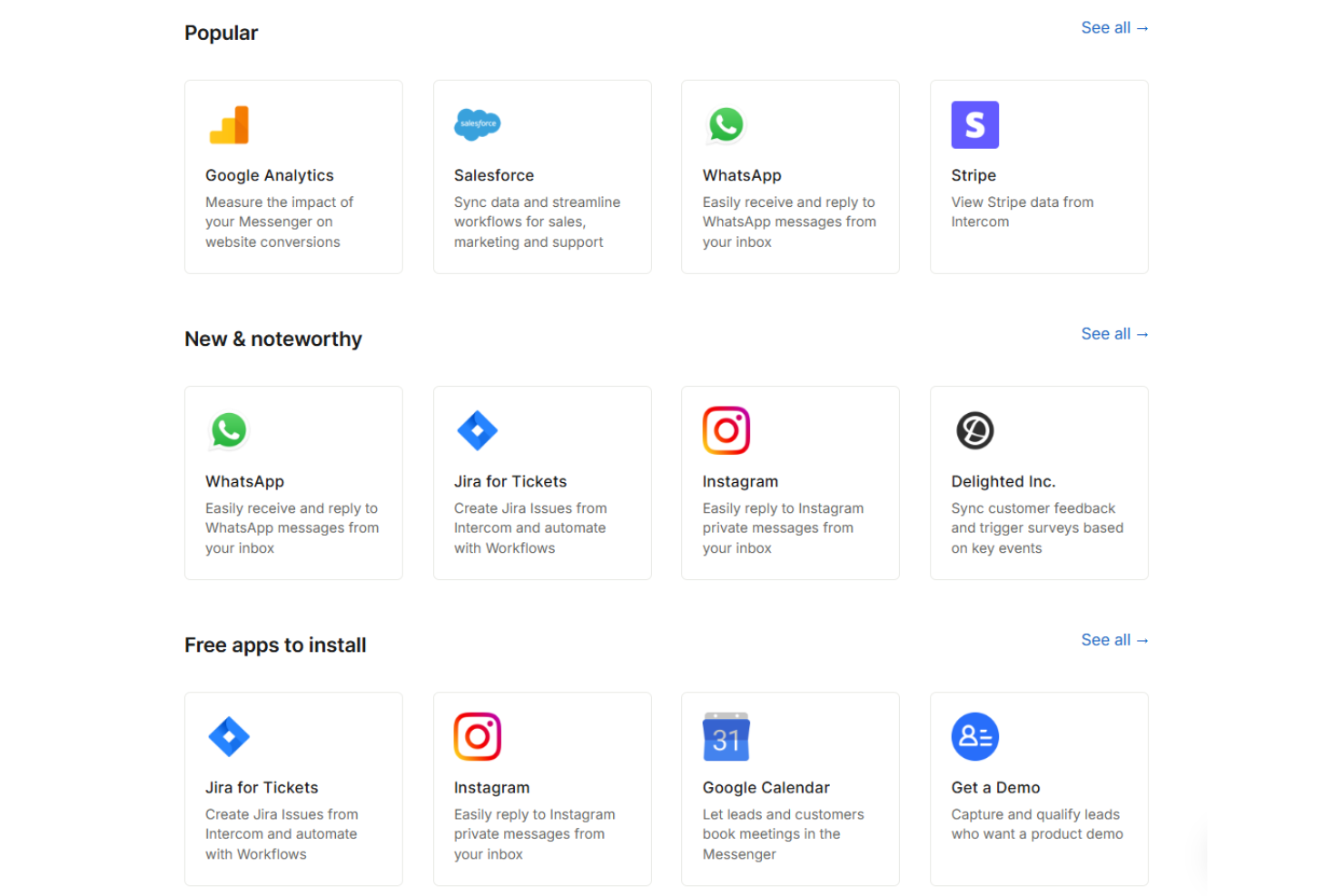
Track conversation volume, response times, and customer satisfaction with built-in dashboards. These insights help teams identify trends and improve support quality.
Ease of Use
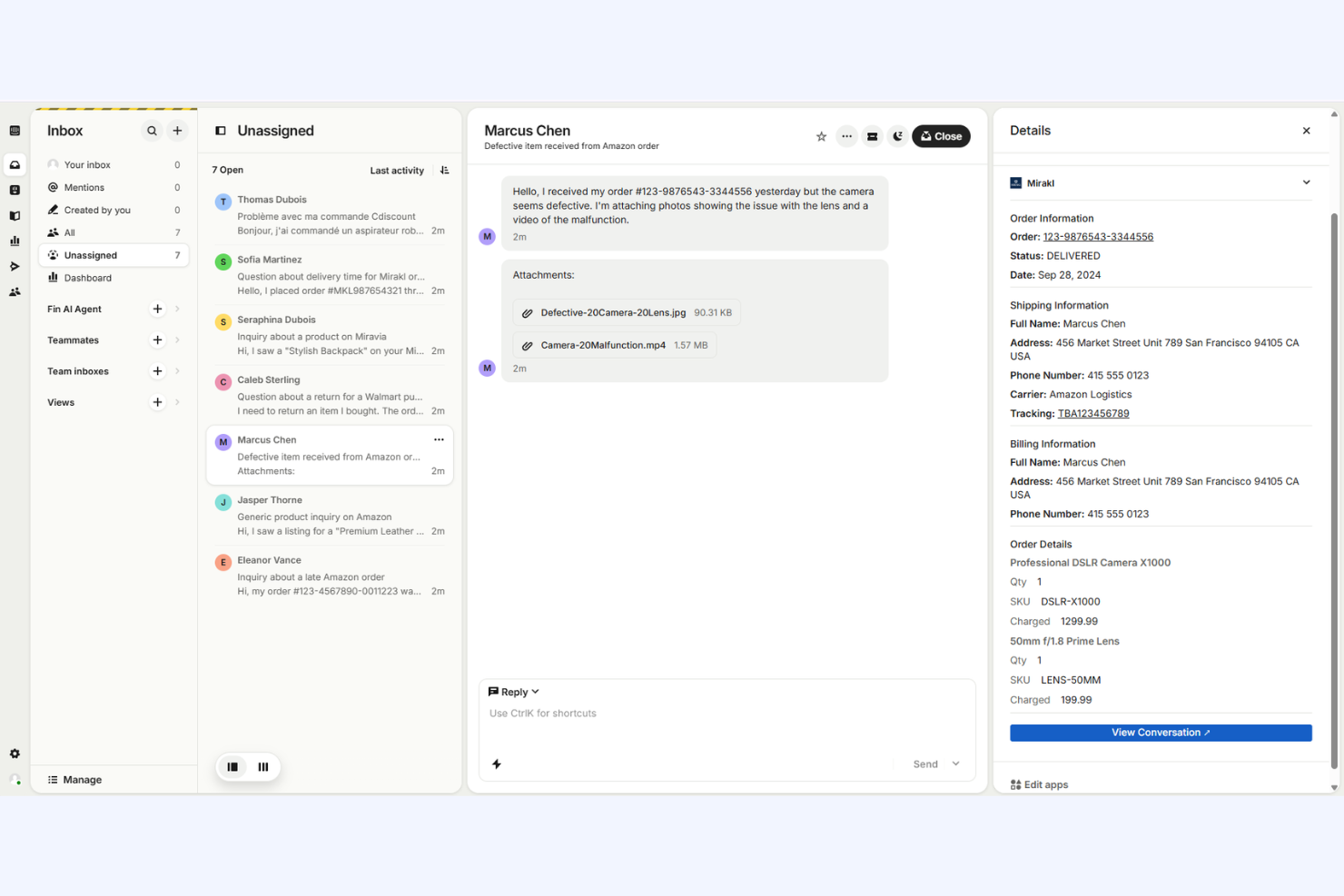
Intercom’s interface is clean, modern, and easy to navigate, making onboarding straightforward for most teams. Users often highlight the intuitive workflow builder and clear conversation management tools. Setting up chatbots and automated rules requires minimal technical skill, and the in-app guidance helps new users get started quickly. However, some advanced settings and reporting options can feel buried, which may slow down less technical users during setup or customization.
Integrations
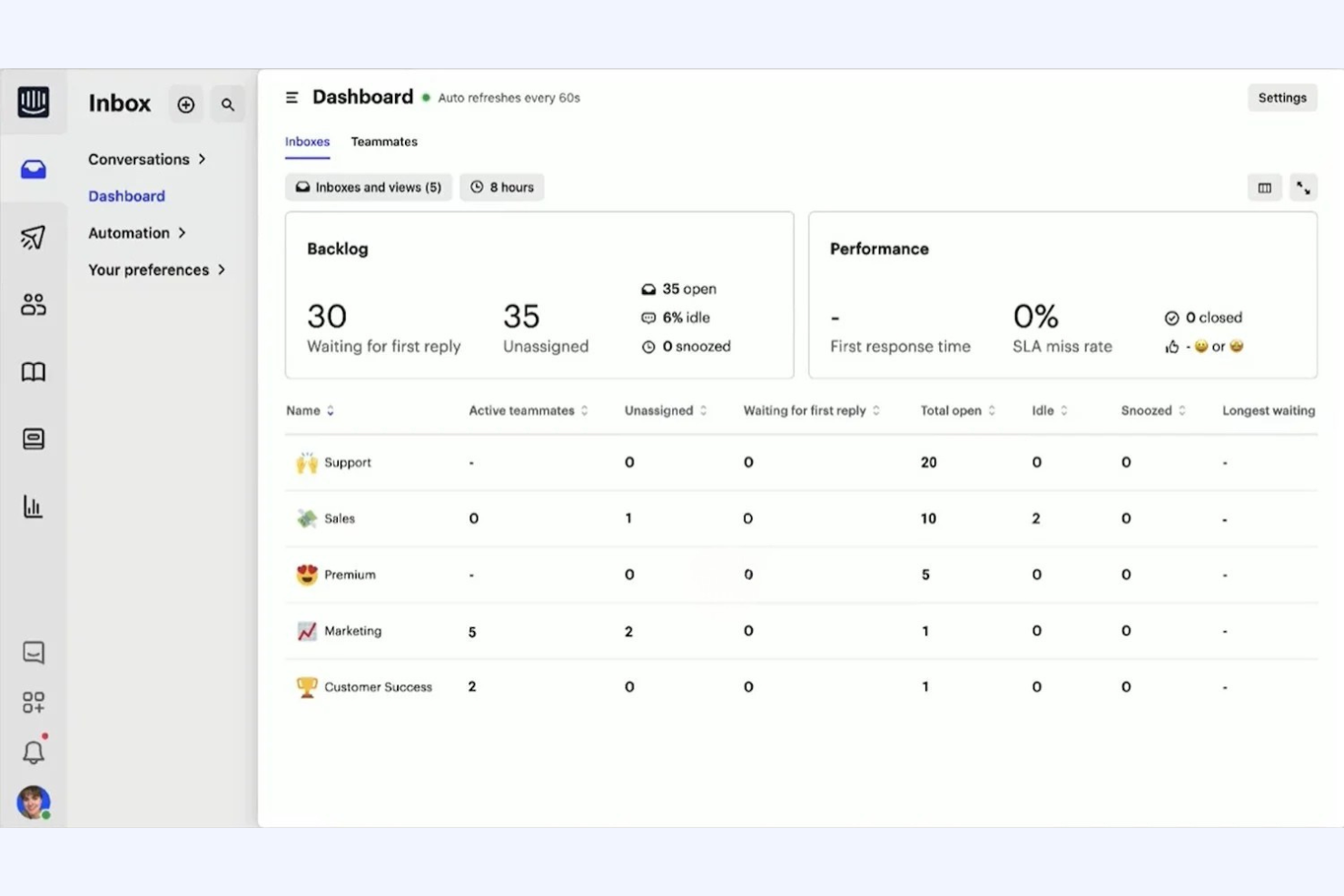
Intercom integrates with Slack, Salesforce, HubSpot, Shopify, Zendesk, Google Analytics, Stripe, Jira, Mailchimp, and Facebook Messenger, among others.
Intercom also offers a robust API and connects with third-party integration tools like Zapier for expanded automation and connectivity.
Intercom Specs
- API
- Batch Permissions & Access
- Call Logging
- Call Monitoring
- Chat
- Click-to-Dial
- Contact Management
- Customer Management
- Customer Service
- Dashboard
- Data Export
- Data Import
- Email Integration
- Escalation Management
- External Integrations
- Feedback Management
- Google Apps Integration
- Instant Chat Integration
- Knowledge Base
- Lead Management
- Lead Scoring
- Marketing Automation
- Multi-User
- Notifications
- Self-service Portal
- Workflow Management




Intercom FAQs
How does Intercom handle data security and compliance?
Can Intercom support multi-language customer conversations?
What customization options are available for chat widgets and bots?
Does Intercom offer SLA management or escalation features?
How does Intercom manage user and agent permissions?
What reporting and analytics capabilities does Intercom provide?
Can Intercom be used for both support and proactive customer engagement?
How scalable is Intercom for growing teams or enterprises?
Cosa succede dopo?
Fai crescere la tua SaaS e potenzia le tue capacità di leadership. Iscriviti alla nostra newsletter per ricevere le ultime novità dai CTO e dai leader tecnologici di domani. Ti aiuteremo a scalare in modo più intelligente e a guidare con maggior forza grazie a guide, risorse e strategie da esperti di primo livello!