

Nel frenetico mondo tecnologico di oggi, gestire numerosi accessi può essere un vero problema. Probabilmente devi gestire innumerevoli password, il che può rappresentare un rischio per la sicurezza e ridurre la tua produttività. È qui che entrano in gioco le soluzioni di accesso singolo (SSO), che offrono un modo per semplificare l'accesso senza compromettere la sicurezza.
Ho testato e recensito diversi software per presentarti le migliori opzioni disponibili. Nella mia esperienza, una buona soluzione SSO può farti risparmiare tempo e ridurre i problemi di sicurezza, offrendoti maggiore tranquillità.
In questo articolo condividerò le mie scelte migliori. Avrai una panoramica imparziale delle funzionalità, dei vantaggi e degli elementi che distinguono ciascuno strumento. Che tu lavori nell'IT, nello sviluppo o in qualsiasi altro settore tecnologico, qui troverai qualcosa che aiuterà il tuo team a lavorare in modo più efficiente.
Perché fidarsi dei nostri consigli sui software
6,700+
Reviews
20
Industry experts
16+
Evaluation factors
14
Years
Il nostro team testa e recensisce software dal 2012. In quanto leader tecnologici noi stessi, sappiamo quanto sia difficile — e importante — scegliere il software giusto.
Per questa guida, abbiamo valutato gli strumenti attraverso test praticie ricerche indipendenti, assegnando un punteggio agli strumenti in base ai nostri criteri di selezione.
Le nostre recensioni riflettono il nostro giudizio editoriale umano, non un discorso di vendita.
Revisori esperti:
- Paulo Gardini MiguelDirettore tecnico
 Tim FisherVP dell'IA
 Gabriel RosasTech Lead e architetto software
 Christhian GruhnTech Lead e architetto della piattaforma

Tabella comparativa delle soluzioni di accesso singolo
Questa tabella comparativa riassume i dettagli dei prezzi delle mie migliori soluzioni SSO selezionate:
| Tool | Best For | Trial Info | Price | ||
|---|---|---|---|---|---|
| 1 | Ideale per il ciclo di vita dell'accesso alle app gestito dalle risorse umane | Prova gratuita di 14 giorni | A partire da $8/utente/mese (fatturato annualmente) | Website | |
| 2 | Ideale per SSO condizionato su dispositivi e app | Prova gratuita di 14 giorni | Prezzo su richiesta | Website | |
| 3 | Ideale per il supporto di molteplici protocolli SSO | Versione gratuita disponibile (fino a 50 utenti di dominio) | A partire da $595 (500 utenti di dominio) | Website | |
| 4 | Ideale per directory-as-a-service | Prova gratuita di 30 giorni + demo gratuita disponibile | $10/utente/mese (fatturato annualmente) | Website | |
| 5 | Ideale per le integrazioni di piattaforme SaaS | 30 giorni di prova gratuita | $12/utente/mese (fatturazione annuale) | Website | |
| 6 | Ideale per integrazioni multi-fattore | Demo gratuita disponibile | $10/utente/mese (fatturato annualmente) | Website | |
| 7 | Ideale per regole di accesso basate su IP | Prova gratuita di 30 giorni disponibile | A partire da $2/utente/mese | Website | |
| 8 | Ideale per l'integrazione della gestione delle password | $6/user/month (fatturato annualmente) | Website | ||
| 9 | Ideale per l'integrazione con Azure | Prova gratuita di 30 giorni disponibile | $6/utente/mese (fatturazione annuale) | Website | |
| 10 | Ideale per casi d'uso specifici della forza lavoro | Prova gratuita di 30 giorni + demo gratuita disponibile | $5/utente/mese (fatturazione annuale) | Website |


Recensioni delle migliori soluzioni di accesso singolo
Di seguito trovi le mie analisi dettagliate delle migliori soluzioni di accesso singolo incluse nel mio elenco. Le mie recensioni offrono una panoramica dettagliata delle funzionalità principali, dei pro & contro, delle integrazioni e dei casi d’uso ideali di ogni strumento, per aiutarti a trovare quello più adatto a te.
 Ideale per il ciclo di vita dell'accesso alle app gestito dalle risorse umane
- Prova gratuita di 14 giorni
- A partire da $8/utente/mese (fatturato annualmente)
Visit WebsiteCustomer Rating:4.8/5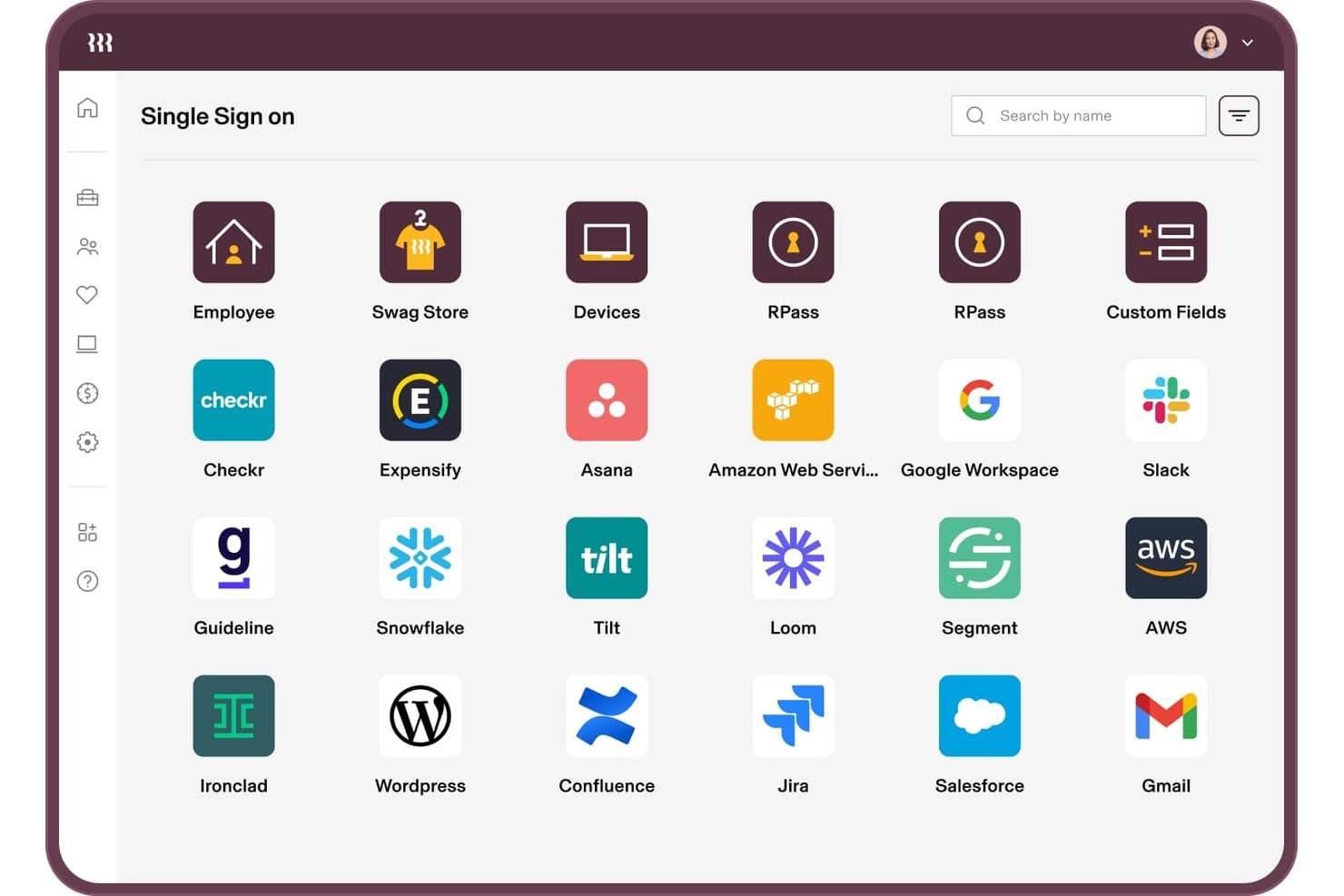
Rippling IT supporta connessioni SSO a oltre 20 app come Slack, AWS e Jira. Rippling IT è una soluzione di accesso singolo e gestione degli accessi alle identità integrata in una piattaforma unificata per risorse umane e IT, che combina autenticazione federata, provisioning automatizzato del ciclo di vita, applicazione delle policy MFA, fiducia nei dispositivi e gestione delle directory.
A chi è più adatto Rippling IT?
Rippling IT è particolarmente adatto ai team IT che desiderano collegare direttamente l'accesso alle app ai dati delle risorse umane, in modo che l'onboarding e l'offboarding avvengano automaticamente senza interventi manuali.
Perché ho scelto Rippling IT
Ho scelto Rippling IT come una delle soluzioni migliori perché collega direttamente il SSO ai dati delle risorse umane, quindi l'accesso alle app si aggiorna automaticamente quando cambia il ruolo di una persona o quando questa lascia l'azienda. I Supergroups e RQL consentono di creare gruppi di accesso ad aggiornamento automatico basati su attributi come reparto, sede o anzianità. La fiducia nei dispositivi aggiunge un ulteriore livello di protezione limitando gli accessi ai dispositivi che dispongono di un certificato emesso da Rippling e mantenendo un accesso resistente al phishing senza configurazioni aggiuntive.
Funzionalità principali di Rippling IT
- Directory LDAP virtuale: consente alle app meno recenti e alle apparecchiature di rete di autenticarsi con le credenziali Rippling senza richiedere il supporto dei protocolli moderni.
- Server RADIUS cloud: permette al personale di accedere al Wi-Fi e alla VPN usando la propria identità Rippling, centralizzando l'accesso alla rete insieme a quello alle app.
- Gestore di password RPass: copre le app che non supportano il SSO, offrendo agli utenti un unico archivio di credenziali per l'intero insieme di app.
- Rilevamento dell'IT ombra e dell'IA ombra: mette in evidenza l'utilizzo non autorizzato delle app e le autorizzazioni OAuth, consentendo di individuare e gestire i rischi di accesso nell'intero ambiente.
Integrazioni di Rippling IT
Rippling IT offre oltre 600 integrazioni SSO e di provisioning preconfigurate, tra cui Microsoft 365, Google Workspace, Slack, Salesforce, GitHub, Jira, AWS, Zoom, Asana e HubSpot. La sua API e le app SAML e SCIM personalizzate supportano ulteriori integrazioni.
Pros and Cons
Pros:
- Le modifiche alle risorse umane attivano aggiornamenti automatici degli accessi
- La fiducia nei dispositivi blocca gli accessi da dispositivi non attendibili
- Le passkey riducono le richieste di assistenza relative alle password
Cons:
- Le policy complesse richiedono una configurazione accurata
- Le risposte dell'assistenza possono essere frustranti per gli amministratori
Learn more about Rippling IT: Ideale per SSO condizionato su dispositivi e app
- Prova gratuita di 14 giorni
- Prezzo su richiesta
Visit WebsiteCustomer Rating:4.7/5
Schermata di configurazione dell'organizzazione Scalefusion OneIdP per l'inserimento dei dettagli aziendali e la configurazione delle impostazioni di accesso. Scalefusion OneIdP è una piattaforma di gestione dell'identità e dell'accesso condizionato che integra il single sign-on (SSO) con l'autenticazione del dispositivo per rafforzare la sicurezza aziendale. Garantisce che sia l'identità dell'utente sia lo stato di conformità del dispositivo vengano verificati prima che venga concesso l'accesso alle applicazioni aziendali.
Perché ho scelto Scalefusion OneIdP: Ho scelto Scalefusion OneIdP perché dà priorità all'autenticazione basata sul dispositivo e all'accesso condizionato in tempo reale, aggiungendo così un prezioso livello di sicurezza rispetto al SSO tradizionale. Questo approccio aiuta le organizzazioni ad assicurare che solo dispositivi affidabili e conformi alle policy possano accedere, riducendo significativamente i rischi per la sicurezza. Apprezzo inoltre il suo accesso amministrativo just-in-time, che fornisce privilegi temporanei elevati solo quando necessario, minimizzando così le possibilità di uso improprio.
Caratteristiche e integrazioni principali:
Le funzionalità includono la valutazione continua dell'accesso, che monitora dinamicamente la conformità del dispositivo e può revocare l'accesso se cambiano le condizioni di sicurezza. Questo aiuta le organizzazioni a far rispettare i principi di Zero Trust durante l'intera sessione utente. Scalefusion OneIdP integra anche l'autenticazione a più fattori (MFA) per rafforzare ulteriormente la sicurezza. La piattaforma si integra con Google Workspace, Microsoft Entra, Amazon Web Services (AWS), Cisco Duo, Okta, Salesforce, Bamboo HR, Slack, Notion, HubSpot, Figma, Zoom e Asana.
Pros and Cons
Pros:
- Ampio supporto per integrazioni di terze parti
- Supporta l'autenticazione a più fattori (MFA)
- Potente applicazione della sicurezza basata sul dispositivo
Cons:
- Opzioni limitate di personalizzazione avanzata
- Prezzi più elevati per alcuni utenti
Learn more about Scalefusion OneIdP: Ideale per il supporto di molteplici protocolli SSO
- Versione gratuita disponibile (fino a 50 utenti di dominio)
- A partire da $595 (500 utenti di dominio)
Visit WebsiteCustomer Rating:4.4/5
La funzione single sign-on (SSO) in ManageEngine ADSelfService Plus offre varie impostazioni per la gestione dell'SSO su diverse applicazioni. ManageEngine ADSelfService Plus è uno strumento di gestione delle password self-service progettato per migliorare l'esperienza dell'utente e la sicurezza. Consente agli utenti di reimpostare le proprie password e sbloccare gli account senza la necessità di assistenza IT.
Perché ho scelto ManageEngine ADSelfService Plus: Offre il supporto per molteplici protocolli SSO, inclusi SAML, OAuth e OpenID Connect. Questa flessibilità garantisce che le organizzazioni possano integrare un'ampia gamma di applicazioni, sia basate su cloud che on-premises, in un unico framework di autenticazione. Sfruttando le credenziali di Active Directory, ADSelfService Plus elimina la necessità di utilizzare più nomi utente e password. L'utilizzo di unità organizzative (OU) e politiche basate sui gruppi per controllare l'accesso assicura che solo gli utenti autorizzati possano accedere a specifiche applicazioni, aggiungendo un ulteriore livello di sicurezza.
Funzionalità principali e integrazioni:
Un'altra funzionalità rilevante è il Report di Audit sugli Accessi alle Applicazioni, che registra tutte le attività degli utenti durante l'accesso SSO. Questa funzione è fondamentale per garantire la conformità e per scopi di audit, poiché fornisce un registro dettagliato di chi ha avuto accesso a cosa e quando. Inoltre, l'integrazione dell'Autenticazione a Più Fattori (MFA) con SSO aggiunge un ulteriore livello di sicurezza. Lo strumento si integra con Spiceworks Cloud Help Desk, ManageEngine ServiceDesk Plus e ManageEngine ADManager Plus.
Pros and Cons
Pros:
- Offre una sincronizzazione delle password efficace
- Supporta MFA
- Interfaccia facile da navigare
Cons:
- Il processo di registrazione degli utenti può richiedere tempo
- Per i team più grandi, i costi delle licenze possono aumentare
Learn more about ManageEngine ADSelfService Plus: Ideale per directory-as-a-service
- Prova gratuita di 30 giorni + demo gratuita disponibile
- $10/utente/mese (fatturato annualmente)
Visit WebsiteCustomer Rating:4.6/5
Immagine 10: schermata del portale utente JumpCloud JumpCloud modernizza i servizi di directory per ambienti basati su cloud con una soluzione di directory-as-a-service. Questo semplifica la gestione di utenti e sistemi per le organizzazioni su diverse piattaforme e sedi.
Perché ho scelto JumpCloud: Nel processo di selezione degli strumenti più incisivi, JumpCloud si è distinto grazie alle sue capacità di directory robuste ma flessibili, progettate appositamente per ambienti IT diversificati e distribuiti. Dopo averlo valutato e confrontato con altre piattaforme, è stato evidente che il suo impegno per la modernizzazione dei servizi di directory non aveva eguali. Sulla base di ciò, ho scelto JumpCloud, convinto che sia la soluzione migliore per chi necessita di un servizio di directory-as-a-service.
Funzionalità e integrazioni principali:
Le funzionalità distintive di JumpCloud includono la possibilità di gestire gli utenti su varie piattaforme come Mac, Linux e Windows da un'unica console. Inoltre, offre un controllo dettagliato sulle politiche di sistema e sulle configurazioni di sicurezza. Per quanto riguarda le integrazioni, JumpCloud si connette facilmente con una varietà di risorse IT, inclusi provider cloud, applicazioni legacy e reti on-premises.
Pros and Cons
Pros:
- Gestione utenti e sistemi cross-platform da una posizione centralizzata
- Integrazioni complete con una miriade di risorse IT
- Approccio moderno ai tradizionali servizi di directory
Cons:
- Potrebbe esserci una curva di apprendimento per chi è abituato ai tradizionali sistemi di directory
- Alcune funzionalità avanzate potrebbero essere disponibili solo nei piani di livello superiore
- La migrazione dai sistemi legacy può richiedere una pianificazione e un'esecuzione attente
Learn more about JumpCloud: Ideale per le integrazioni di piattaforme SaaS
- 30 giorni di prova gratuita
- $12/utente/mese (fatturazione annuale)
Visit WebsiteCustomer Rating:4.8/5
Immagine 6: Box di login Frontegg e panoramica portale amministratore Frontegg offre una suite di funzionalità predefinite per accelerare lo sviluppo di piattaforme SaaS. Si distingue per le sue caratteristiche di integrazione, appositamente progettate per le piattaforme SaaS, il che lo rende una scelta ottimale per le aziende che danno priorità a integrazioni profonde e affidabili.
Perché ho scelto Frontegg: Nell'ambito degli strumenti dedicati alle piattaforme SaaS, Frontegg si è distinto nel mio processo di selezione grazie al suo focus sulle integrazioni. Confrontando e valutando diversi strumenti, mi sono progressivamente orientato verso Frontegg a causa delle sue capacità di integrazione complete. L'ho scelto come il migliore per le integrazioni di piattaforme SaaS in base alla sua abilità nel collegare efficacemente varie piattaforme.
Caratteristiche e integrazioni principali:
Frontegg è rinomato per le sue capacità di autenticazione e autorizzazione, che permettono alle piattaforme SaaS di avere un controllo dettagliato sui ruoli e sugli accessi degli utenti. Inoltre, introduce notifiche basate su eventi, che forniscono alle aziende informazioni in tempo reale. Fondamentale, Frontegg si integra in profondità con le più diffuse piattaforme SaaS come Salesforce, Slack e HubSpot, garantendo un ampio spettro di compatibilità per aziende di ogni tipo.
Pros and Cons
Pros:
- Integrazione completa con le principali piattaforme SaaS
- Potenti funzionalità di autenticazione e autorizzazione
- Notifiche in tempo reale basate su eventi
Cons:
- Può presentare una curva di apprendimento per i principianti
- Le funzionalità avanzate possono risultare complesse per alcuni utenti
- Il focus sulle piattaforme SaaS potrebbe non soddisfare tutte le esigenze aziendali
Learn more about Frontegg: Ideale per integrazioni multi-fattore
- Demo gratuita disponibile
- $10/utente/mese (fatturato annualmente)
Visit WebsiteCustomer Rating:4.5/5
Immagine 5: dashboard di riepilogo applicazioni di Ping Identity Ping Identity è una soluzione IAM di prim'ordine che offre potenti capacità di integrazione multi-fattore. È una scelta popolare per le aziende che danno priorità alla sicurezza stratificata tramite molteplici misure di autenticazione.
Perché ho scelto Ping Identity: Dopo aver confrontato diversi strumenti per integrazioni multi-fattore, ho scelto Ping Identity per la sua ampia gamma di opzioni di integrazione e l’impegno a essere il migliore. Si è chiaramente distinto nella mia valutazione ed è un aspetto critico dei moderni framework di sicurezza.
Caratteristiche e integrazioni principali:
Uno dei principali punti di forza di Ping Identity è la sua autenticazione multi-fattore adattiva, che consente alle aziende di impostare politiche che richiedono agli utenti ulteriori verifiche quando necessario. Lo strumento vanta anche un design orientato all’utente, garantendo che anche con più livelli di autenticazione, l’esperienza dell’utente rimanga fluida. Sul fronte delle integrazioni, Ping Identity è compatibile con diverse applicazioni e piattaforme, consentendo alle aziende di implementare l’autenticazione multi-fattore in tutto il loro ecosistema digitale.
Pros and Cons
Pros:
- Opzioni complete di autenticazione multi-fattore
- Autenticazione adattiva basata su policy
- Compatibilità estesa delle applicazioni per integrazioni
Cons:
- Potrebbe risultare complesso per le organizzazioni più piccole
- La fatturazione annuale può scoraggiare alcuni potenziali utenti
- La configurazione iniziale e la personalizzazione possono essere impegnative
Learn more about Ping Identity: Ideale per regole di accesso basate su IP
- Prova gratuita di 30 giorni disponibile
- A partire da $2/utente/mese
Visit WebsiteCustomer Rating:4.5/5
Schermata di accesso a miniOrange IDP che evidenzia l'autenticazione sicura tramite nome utente e opzioni di login social integrate per un controllo centralizzato dell'accesso. Per le aziende che desiderano migliorare la sicurezza e semplificare l'autenticazione, miniOrange IDP offre una soluzione pratica di Single Sign-On. È pensato per le organizzazioni che gestiscono più applicazioni e vogliono ridurre l'onere della gestione di credenziali separate. Con il supporto per fonti di identità esistenti e molteplici protocolli di autenticazione, miniOrange IDP aiuta le aziende a mantenere un accesso sicuro e una gestione utente coerente in ambienti IT eterogenei.
Perché ho scelto miniOrange IDP
Ho scelto miniOrange IDP per la sua forte attenzione a un Single Sign-On sicuro ed efficiente. Supporta protocolli ampiamente utilizzati come SAML, OAuth e OpenID Connect, rendendolo compatibile con una vasta gamma di applicazioni. Include inoltre solidi controlli di sicurezza come l'Autenticazione Multi-Fattore (MFA) e regole di accesso basate su IP per limitare gli accessi non autorizzati. Insieme, queste caratteristiche rendono miniOrange IDP un'opzione affidabile per le organizzazioni che desiderano maggiore sicurezza senza aggiungere complessità all'accesso utente.
Caratteristiche principali di miniOrange IDP
Oltre al supporto dei protocolli e alle misure di sicurezza, ho trovato anche le seguenti funzionalità a valore aggiunto:
- Supporto per fonti di identità e protocolli: Si collega con Active Directory, LDAP, Google Workspace e Microsoft Entra ID, e supporta SAML, OAuth, OpenID Connect, JWT e WS-Federation (WS-Fed) per compatibilità con applicazioni SaaS, cloud e legacy.
- Autenticazione adattiva e senza password: Adatta i requisiti di autenticazione in base al contesto utente, come dispositivo o posizione, e supporta MFA nonché opzioni di accesso senza password, inclusi biometria e notifiche push.
- Provisioning automatizzato e controlli di accesso: Consente il provisioning automatico degli utenti tra le applicazioni, regole di accesso basate su IP e gestione centralizzata dell'accesso utente.
- Supporto per applicazioni legacy e personalizzate: Include connettori, API e opzioni di reverse proxy per proteggere applicazioni legacy e sviluppate internamente.
Integrazioni di miniOrange IDP
Le integrazioni includono Salesforce, Google Workspace, Microsoft 365, AWS, Atlassian, ServiceNow, Zoom, Dropbox e WordPress. La piattaforma supporta oltre 6.000 integrazioni preconfigurate tra applicazioni SaaS, cloud, on-premise e legacy. Connettori e API sono disponibili per integrazioni personalizzate o applicazioni interne.
Pros and Cons
Pros:
- Ampio supporto di protocolli (SAML, OAuth, OpenID)
- Sicurezza elevata (MFA, SSO adattivo)
- Esperienza utente personalizzabile e provisioning automatizzato
Cons:
- Meno integrazioni native rispetto ad alcuni concorrenti
- La configurazione può essere complessa per utenti non tecnici
Learn more about miniOrange: Ideale per l'integrazione della gestione delle password
- $6/user/month (fatturato annualmente)

Immagine 9: Soluzioni LastPass Single Sign-On LastPass SSO combina il Single Sign-On con una gestione delle password affidabile, offrendo una soluzione completa per un accesso più facile e sicuro alle applicazioni aziendali. È una scelta leader per le organizzazioni che desiderano semplificare le procedure di gestione delle password e del controllo degli accessi.
Perché ho scelto LastPass Single Sign-On (SSO): Consiglio LastPass SSO come la migliore soluzione per la gestione delle password. La sua credibilità deriva dalle sue origini come sistema di gestione affidabile. L'integrazione della gestione delle password in una soluzione Single Sign-On distingue LastPass SSO, rendendolo lo strumento ideale per un'integrazione efficace.
Funzionalità e integrazioni principali:
LastPass SSO si distingue per l'autenticazione adattiva, che adegua i livelli di sicurezza in base al comportamento e alla posizione dell'utente, aggiungendo un ulteriore livello di protezione. Inoltre, la sua dashboard centralizzata offre una panoramica chiara delle attività degli utenti e dei potenziali rischi per la sicurezza. Per quanto riguarda le integrazioni, LastPass SSO supporta un'ampia gamma di applicazioni, dalle soluzioni cloud come Salesforce e Slack alle applicazioni on-premises, garantendo una copertura molto estesa.
Pros and Cons
Pros:
- Forte esperienza da un marchio riconosciuto nella gestione delle password
- L'autenticazione adattiva rafforza la sicurezza in base al contesto
- Integrazioni complete sia con applicazioni cloud che on-premises
Cons:
- Alcuni utenti potrebbero percepirlo solo come un gestore di password
- Le organizzazioni più grandi potrebbero trovare difficoltà di scalabilità
- La configurazione iniziale può richiedere tempo e competenze
Learn more about LastPass Single Sign-On (SSO): Ideale per l'integrazione con Azure
- Prova gratuita di 30 giorni disponibile
- $6/utente/mese (fatturazione annuale)

Immagine 12: soluzione di single sign-on di Microsoft Entra ID Microsoft Entra ID è una piattaforma di gestione delle identità sicura ed efficiente progettata per gli utenti Azure. Semplifica le attività per le organizzazioni che hanno investito nell'ecosistema Microsoft e si integra perfettamente con Azure.
Perché ho scelto Microsoft Entra ID: Nella mia ricerca di uno strumento per la gestione delle identità, l'integrazione nativa di Microsoft Entra ID con Azure lo ha distinto dagli altri concorrenti. Dopo aver valutato e confrontato varie piattaforme, è stato evidente che, per le aziende che già sfruttano la potenza di Azure, Microsoft Entra ID offre una soluzione armonizzata. L'ho scelto perché è fatto su misura per un'integrazione semplice con Azure, rendendolo particolarmente prezioso per le imprese che si concentrano su Azure.
Funzionalità e integrazioni principali:
Le principali funzionalità di Microsoft Entra ID includono single sign-on, autenticazione multifattore e reportistica di sicurezza avanzata. Come previsto, i suoi punti di forza nell'integrazione risiedono nel legame con gli strumenti Microsoft. Non solo si integra perfettamente con Azure, ma si collega anche ad altri servizi Microsoft, da Microsoft 365 a Dynamics 365.
Pros and Cons
Pros:
- Integrazione profonda con Azure e altri strumenti Microsoft
- Fornisce funzionalità di sicurezza complete che garantiscono una protezione robusta dell'identità utente
- Sviluppato da Microsoft, offre un'esperienza utente coerente per chi è già familiare con l'ecosistema Microsoft
Cons:
- Potrebbe non essere la scelta ideale per aziende che non utilizzano prodotti Microsoft
- L'interfaccia utente può sembrare complessa a chi non ha familiarità con le piattaforme Microsoft
- Potenzialmente una curva di apprendimento più ripida per chi transita da soluzioni non Microsoft
Learn more about Microsoft Entra ID: Ideale per casi d'uso specifici della forza lavoro
- Prova gratuita di 30 giorni + demo gratuita disponibile
- $5/utente/mese (fatturazione annuale)

Immagine 11: funzione di single sign-on di Okta Workforce Identity Okta Workforce Identity gestisce l'autenticazione degli utenti, il provisioning e la gestione del ciclo di vita per i dipendenti, offrendo un accesso sicuro ed efficiente agli strumenti e ai dati di cui hanno bisogno. È pensato per casi d'uso impiegatizi ed è ideale per scenari specifici alla forza lavoro.
Perché ho scelto Okta Workforce Identity: Durante il mio processo di selezione, Okta Workforce Identity ha attirato la mia attenzione grazie al suo approfondito focus sulle sfide uniche che le moderne forze lavoro devono affrontare. Dopo averlo confrontato con altre piattaforme, è stato chiaro che Okta ha sviluppato una soluzione che risponde specificamente alle esigenze sfumate degli impiegati di oggi. Ho scelto Okta Workforce Identity perché dimostra una chiara comprensione e risponde meglio della maggior parte delle altre piattaforme ai casi d'uso specifici della forza lavoro.
Caratteristiche e integrazioni principali:
Le caratteristiche chiave di Okta Workforce Identity includono autenticazione adattiva a più fattori, gestione centralizzata degli utenti e provisioning automatizzato. Le capacità di integrazione della piattaforma sono altrettanto apprezzabili, collegandosi senza sforzo a numerosi strumenti aziendali, dalle piattaforme di comunicazione come Slack alle suite di produttività come Microsoft 365.
Pros and Cons
Pros:
- Approfondito focus sulle sfide della forza lavoro garantisce soluzioni specializzate
- Offre un'ampia gamma di integrazioni con le principali applicazioni aziendali
- Funzionalità di sicurezza avanzata come MFA adattivo proteggono efficacemente le identità degli utenti
Cons:
- Alcune funzionalità potrebbero richiedere competenze tecniche per l'implementazione
- L'integrazione con strumenti meno popolari potrebbe richiedere configurazioni aggiuntive
- Per le aziende molto piccole, la piattaforma potrebbe offrire più funzionalità del necessario, complicando potenzialmente l'esperienza utente
Learn more about Okta Workforce Identity:
Altre soluzioni di accesso singolo
Ecco alcune ulteriori opzioni di soluzioni SSO che non sono state incluse nel mio elenco, ma che vale comunque la pena prendere in considerazione:
- 11miniOrangeIdeale per la compatibilità multipiattaforma
- 12ForgeRockIdeale per la scalabilità nelle grandi aziende
- 13SecureAuthMigliore per l'autenticazione adattiva
- 14GluuIdeale per le implementazioni open-source
- 15RipplingIdeale per la gestione centralizzata dei dipendenti
- 16ScalefusionIdeale per l’accesso zero-trust
Come Valuto le Soluzioni Single Sign-On
Valuto ogni piattaforma SSO su due livelli: le funzionalità di base—supporto ai protocolli, MFA e provisioning—che ne determinano l'idoneità per l'elenco, e i fattori differenzianti che distinguono le migliori soluzioni.
Funzionalità di Base (Requisiti Minimi per Questo Elenco)
Quando seleziono gli strumenti per la mia lista, valuto ciascuno su una scala da 0 (non offre la funzionalità) a 5 (eccelle in questo ambito) per ogni funzionalità di base elencata di seguito. Successivamente, calcolo il punteggio totale in percentuale. Ogni strumento deve raggiungere un punteggio totale minimo del 75% per essere considerato per l'inclusione.
- Protocolli di Autenticazione Federata: Verifico quali standard SSO supporta ciascun strumento—SAML 2.0, OAuth 2.0, OIDC—e se la loro configurazione per app come Salesforce o AWS è semplice.
- Integrazioni Predefinite per App: La dimensione e la profondità del catalogo di integrazione sono fondamentali. Valuto se le principali app SaaS, piattaforme cloud e sistemi on-prem hanno connettori pronti all'uso.
- Autenticazione a Più Fattori: Esamino la gamma di metodi MFA disponibili—notifiche push, TOTP, chiavi hardware, biometria—e se gli amministratori possono imporli per app o gruppi di utenti.
- Directory Utenti & Provisioning: Il provisioning e deprovisioning automatico tramite SCIM o sincronizzazione directory con AD e LDAP è un aspetto chiave. La gestione manuale degli utenti è un segnale d'allarme.
- Policy di Accesso & Accesso Condizionale: Qui valuto regole dettagliate e contestuali—gli amministratori possono limitare l'accesso in base all'affidabilità del dispositivo, alla posizione o al ruolo dell'utente tra le app connesse?
- Audit Log & Reportistica: Cerco log di autenticazione dettagliati, con filtri, opzioni di esportazione e inoltro SIEM a supporto delle risposte agli incidenti e delle verifiche di conformità.
Una volta individuati gli strumenti che soddisfano questi criteri, considero cosa distingue ciascuna piattaforma.
Fattori Differenzianti (Cosa Distingue i Fornitori)
Ecco come confronto e metto a confronto i diversi fornitori:
Caratteristiche Distintive
L'autenticazione senza password è un fattore di differenziazione importante. Le piattaforme che supportano FIDO2/WebAuthn e l'accesso biometrico eliminano il principale vettore di attacco offrendo agli utenti un'esperienza più rapida. Valuto anche il punteggio di rischio adattivo, in cui la piattaforma utilizza segnali comportamentali per attivare un'autenticazione rafforzata solo quando qualcosa appare insolito—come un accesso da un dispositivo sconosciuto. Per i team che sviluppano app personalizzate, SDK e API facili per sviluppatori sono fondamentali. Verifico se la piattaforma offre componenti di autenticazione integrabili nei workflow CI/CD già esistenti.
Oltre le Caratteristiche
Le certificazioni di conformità sono tra le prime cose che controllo. Se la tua organizzazione necessita di attestazioni SOC 2 Type II, HIPAA o FedRAMP, il fornitore SSO deve possedere direttamente tali certificazioni. La trasparenza dei prezzi è altrettanto importante—valuto se i costi per utente restano prevedibili mentre si scala da poche centinaia a decine di migliaia di identità. Guardo anche la profondità dell'ecosistema, in particolare se la piattaforma si collega a strumenti HRIS come Workday e piattaforme SIEM come Splunk per una piena automazione del ciclo di vita e una visibilità sulla sicurezza.
Come scegliere una soluzione di accesso singolo
È facile perdersi in lunghi elenchi di funzionalità e strutture tariffarie complesse. Per aiutarti a rimanere concentrato mentre affronti il tuo processo unico di selezione del software, ecco un elenco dei fattori da tenere a mente:
| Fattore | Elementi da considerare |
|---|---|
| FattoreScalabilità | Elementi da considerareLa soluzione crescerà insieme al tuo team? Considera i limiti di utenti, le prestazioni sotto carico e le future esigenze di espansione. |
| FattoreIntegrazioni | Elementi da considerareSi collega agli strumenti che già utilizzi? Verifica la disponibilità di integrazioni native e API per evitare soluzioni manuali. |
| FattorePossibilità di personalizzazione | Elementi da considerarePuoi adattarla ai tuoi flussi di lavoro? Cerca flessibilità nelle impostazioni, opzioni di personalizzazione del marchio e ruoli utente. |
| FattoreSemplicità d'uso | Elementi da considerareÈ intuitiva per il tuo team? Valuta l'interfaccia, la curva di apprendimento e i feedback di utenti simili. |
| FattoreImplementazione e configurazione iniziale | Elementi da considerareQuanto rapidamente puoi iniziare? Considera i tempi di configurazione, le risorse formative disponibili e il supporto durante la transizione. |
| FattoreCosto | Elementi da considerareRientra nel tuo budget? Confronta i livelli di prezzo, i costi nascosti e le spese con i vantaggi offerti. Fai attenzione agli addebiti aggiuntivi per utenti o funzionalità extra. |
| FattoreMisure di sicurezza | Elementi da considerareLe misure di protezione dei dati sono sufficienti? Cerca standard di crittografia, controlli degli accessi e conformità alle normative sulla sicurezza. |
| FattoreRequisiti di conformità | Elementi da considerareRispetta gli standard del settore? Assicurati che sia conforme ai requisiti legali o normativi che la tua organizzazione deve rispettare. |
Cosa sono le soluzioni di accesso singolo?
Le soluzioni di accesso unico sono strumenti che consentono agli utenti di accedere a più applicazioni con un unico set di credenziali di accesso. I professionisti IT, gli esperti di sicurezza e i responsabili dei team utilizzano generalmente questi strumenti per semplificare la gestione degli utenti e migliorare la sicurezza. Funzionalità come l'autenticazione a più fattori, la gestione degli utenti e la trasmissione sicura dei dati aiutano a integrare i sistemi in modo sicuro ed efficiente. Nel complesso, questi strumenti fanno risparmiare tempo e riducono i rischi per la sicurezza delle organizzazioni.
Funzionalità
Quando selezioni soluzioni di accesso unico, presta attenzione alle seguenti funzionalità principali:
- Accesso unico: consente agli utenti di effettuare l'accesso una sola volta e accedere a più applicazioni, riducendo la fatica derivante dalle password e migliorando la sicurezza.
- Autenticazione a più fattori: aggiunge un ulteriore livello di sicurezza richiedendo una verifica aggiuntiva oltre alla semplice password.
- Gestione degli utenti: semplifica il processo di aggiunta, rimozione e gestione degli accessi degli utenti tra diverse applicazioni.
- Trasmissione sicura dei dati: garantisce che tutti i dati scambiati tra utenti e applicazioni siano crittografati e protetti.
- Funzionalità di integrazione: si connette senza problemi agli strumenti e alle applicazioni esistenti per offrire un'esperienza utente unificata.
- Pagine di accesso personalizzabili: consentono alle organizzazioni di personalizzare l'identità visiva delle interfacce di accesso, offrendo un aspetto coerente.
- Reportistica avanzata: offre informazioni sui modelli di accesso degli utenti e sulle potenziali minacce alla sicurezza attraverso analisi dettagliate.
- Supporto alla conformità: garantisce il rispetto delle normative e degli standard specifici del settore, riducendo al minimo i rischi legali.
- Compatibilità multipiattaforma: funziona su diversi dispositivi e sistemi operativi, garantendo l'accessibilità a tutti gli utenti.
- Rilevamento delle minacce basato sull'intelligenza artificiale: utilizza l'intelligenza artificiale per identificare e rispondere alle potenziali minacce alla sicurezza in tempo reale.
Vantaggi
L'implementazione di soluzioni di accesso unico offre diversi vantaggi al tuo team e alla tua azienda. Eccone alcuni che puoi aspettarti:
- Maggiore sicurezza: utilizzando l'autenticazione a più fattori e la trasmissione sicura dei dati, puoi proteggere la tua organizzazione dagli accessi non autorizzati.
- Maggiore produttività: l'accesso unico riduce il tempo dedicato alla gestione di più accessi, consentendo al tuo team di concentrarsi sul proprio lavoro.
- Gestione semplificata degli utenti: le funzionalità di gestione degli utenti facilitano il controllo degli accessi tra le applicazioni, facendo risparmiare tempo ai team IT.
- Esperienza utente migliorata: le pagine di accesso personalizzabili e le funzionalità di integrazione creano un'esperienza coerente e intuitiva.
- Risparmio sui costi: consolidando i processi di autenticazione, puoi ridurre i costi associati alla gestione di più sistemi.
- Garanzia di conformità: il supporto alla conformità aiuta la tua organizzazione a rispettare le normative di settore, riducendo al minimo i rischi legali.
- Rilevamento delle minacce in tempo reale: il rilevamento delle minacce basato sull'intelligenza artificiale aiuta a identificare e mitigare rapidamente le minacce alla sicurezza, proteggendo i tuoi dati e sistemi.
Costi e prezzi
La selezione di soluzioni di accesso unico richiede la comprensione dei vari modelli e piani tariffari disponibili. I costi variano in base alle funzionalità, alle dimensioni del team, ai componenti aggiuntivi e ad altro ancora. La tabella seguente riassume i piani più comuni, i relativi prezzi medi e le funzionalità normalmente incluse nelle soluzioni di accesso unico:
Tabella comparativa dei piani per le soluzioni di accesso unico
| Tipo di piano | Prezzo medio | Funzionalità comuni |
|---|---|---|
| Tipo di pianoPiano gratuito | Prezzo medio$0 | Funzionalità comuniGestione di base degli utenti, accesso unico e integrazioni limitate. |
| Tipo di pianoPiano personale | Prezzo medio$5-$15/utente/mese | Funzionalità comuniAutenticazione a più fattori, pagine di accesso personalizzabili e trasmissione sicura dei dati. |
| Tipo di pianoPiano aziendale | Prezzo medio$15-$25/utente/mese | Funzionalità comuniReportistica avanzata, supporto alla conformità e funzionalità di integrazione avanzate. |
| Tipo di pianoPiano per grandi aziende | Prezzo medio$25-$50/utente/mese | Funzionalità comuniRilevamento delle minacce basato sull'intelligenza artificiale, supporto dedicato e opzioni di personalizzazione complete. |
Domande frequenti sulle soluzioni di accesso singolo
Ecco alcune risposte alle domande più comuni sulle soluzioni di accesso singolo:
Quali sono i requisiti di base di una tipica soluzione SSO?
Una tipica soluzione SSO richiede un’autenticazione forte, comunicazioni sicure e la protezione dei token. Saranno inoltre necessarie una gestione efficace delle sessioni e il controllo degli accessi. Anche la registrazione degli audit e la protezione dagli attacchi più comuni sono fondamentali. Questi elementi garantiscono un’esperienza di accesso singolo sicura ed efficiente
Come funziona l'SSO passo dopo passo?
L’SSO funziona reindirizzando gli utenti a uno strumento di accesso centralizzato. Dopo aver inserito le credenziali, il sistema li autentica e genera un token. Questo token consente di accedere a più applicazioni senza effettuare nuovamente l’accesso. È un processo semplificato che migliora la praticità per gli utenti mantenendo al contempo la sicurezza.
Qual è la principale preoccupazione legata all'accesso singolo?
La principale preoccupazione legata all’accesso singolo è la sicurezza. Se un aggressore riesce a ottenere l’accesso, potrebbe raggiungere più applicazioni. È necessario disporre di misure per rilevare gli accessi non autorizzati e disabilitare rapidamente gli account compromessi. Assicurati sempre che la tua soluzione SSO includa funzionalità di autenticazione forte e monitoraggio.
L'SSO è sicuro?
L’SSO può essere sicuro se implementato correttamente. Riduce la difficoltà legata alla gestione di numerose password e centralizza l’autenticazione, ma è necessario assicurarsi che siano attive solide misure di sicurezza. Utilizza l’autenticazione a più fattori e monitora attentamente gli accessi per ridurre i rischi associati a un singolo punto di vulnerabilità.