

Le 10 migliori soluzioni di sicurezza DNS recensite nel 2026

Elenco delle migliori soluzioni di sicurezza DNS


Le migliori soluzioni di sicurezza del sistema dei nomi di dominio (DNS) aiutano i team a rilevare e bloccare i domini dannosi, fermare i tentativi di esfiltrazione dei dati e applicare policy di navigazione sicura su tutti i dispositivi e le reti. Offrono alle organizzazioni un maggiore controllo sul traffico in uscita, riducendo al contempo il rischio di phishing, infezioni da malware e comunicazioni di callback di comando e controllo.
Molti team iniziano a cercare strumenti di sicurezza DNS quando si trovano ad affrontare punti ciechi nella visibilità della rete, un'applicazione incoerente delle policy negli ambienti ibridi o una stanchezza da alert causata dai falsi positivi. Queste difficoltà rendono spesso complicato identificare le minacce reali prima che causino danni.
Ho lavorato con team IT e di sicurezza nella valutazione di strumenti di protezione DNS su reti aziendali, verificandone l'accuratezza del rilevamento, la facilità di implementazione e l'integrazione con firewall e piattaforme SIEM esistenti.
In questa guida scoprirai quali strumenti di sicurezza DNS offrono informazioni utili, un controllo più efficace della rete e la visibilità necessaria per anticipare le minacce in continua evoluzione.
Perché fidarsi dei nostri consigli sui software
Il nostro team testa e recensisce software dal 2012. In quanto leader tecnologici noi stessi, sappiamo quanto sia difficile — e importante — scegliere il software giusto.
Per questa guida, abbiamo valutato gli strumenti attraverso test praticie ricerche indipendenti, assegnando un punteggio agli strumenti in base ai nostri criteri di selezione.
Le nostre recensioni riflettono il nostro giudizio editoriale umano, non un discorso di vendita.
Revisori esperti:
Riepilogo delle migliori soluzioni di sicurezza DNS
Questa tabella comparativa riassume i dettagli dei prezzi delle mie migliori selezioni di soluzioni di sicurezza DNS, per aiutarti a trovare quella più adatta al tuo budget e alle esigenze della tua azienda.
| Tool | Best For | Trial Info | Price | ||
|---|---|---|---|---|---|
| 1 | Ottimo per bloccare gli accessi non autorizzati | Prova gratuita + demo gratuita disponibile | Prezzo su richiesta | Website | |
| 2 | Ideale per il rilevamento delle minacce in tempo reale | Prova gratuita di 14 giorni + demo disponibile | $1/utente/mese (fatturato annualmente) | Website | |
| 3 | Ideale per la sicurezza basata su cloud | Versione di prova gratuita + demo disponibile | $2.20/utente/mese (fatturato annualmente) | Website | |
| 4 | Ideale per esigenze di sicurezza aziendale | Prova gratuita di 30 giorni + demo gratuita disponibile | $20/user/month (minimo 10 utenti) | Website | |
| 5 | Ideale per la protezione globale contro le minacce | Piano gratuito disponibile | $20/utente/mese (min 5 utenti) | Website | |
| 6 | Ideale per ambienti cloud ibridi | Not available | Prezzi su richiesta | Website | |
| 7 | Ideale per piccole e medie imprese | Demo gratuita disponibile | $20/user/month | Website | |
| 8 | Ideale per l'automazione della rete | Demo gratuita disponibile | $10/user/month (minimum 10 seats) | Website | |
| 9 | Ideale per filtraggio personalizzabile | Prova gratuita di 14 giorni + demo disponibile | $40/network/month | Website | |
| 10 | Ideale per servizi ad alta disponibilità | Not available | $500/mese (fatturato annualmente) | Website |
Recensioni delle migliori soluzioni di sicurezza DNS
Di seguito trovi i miei riepiloghi dettagliati delle migliori soluzioni di sicurezza DNS incluse nel mio elenco. Le mie recensioni offrono un’analisi approfondita delle funzionalità principali, dei pro & contro, delle integrazioni e dei casi d’uso ideali di ogni strumento, per aiutarti a trovare quello più adatto alle tue esigenze.

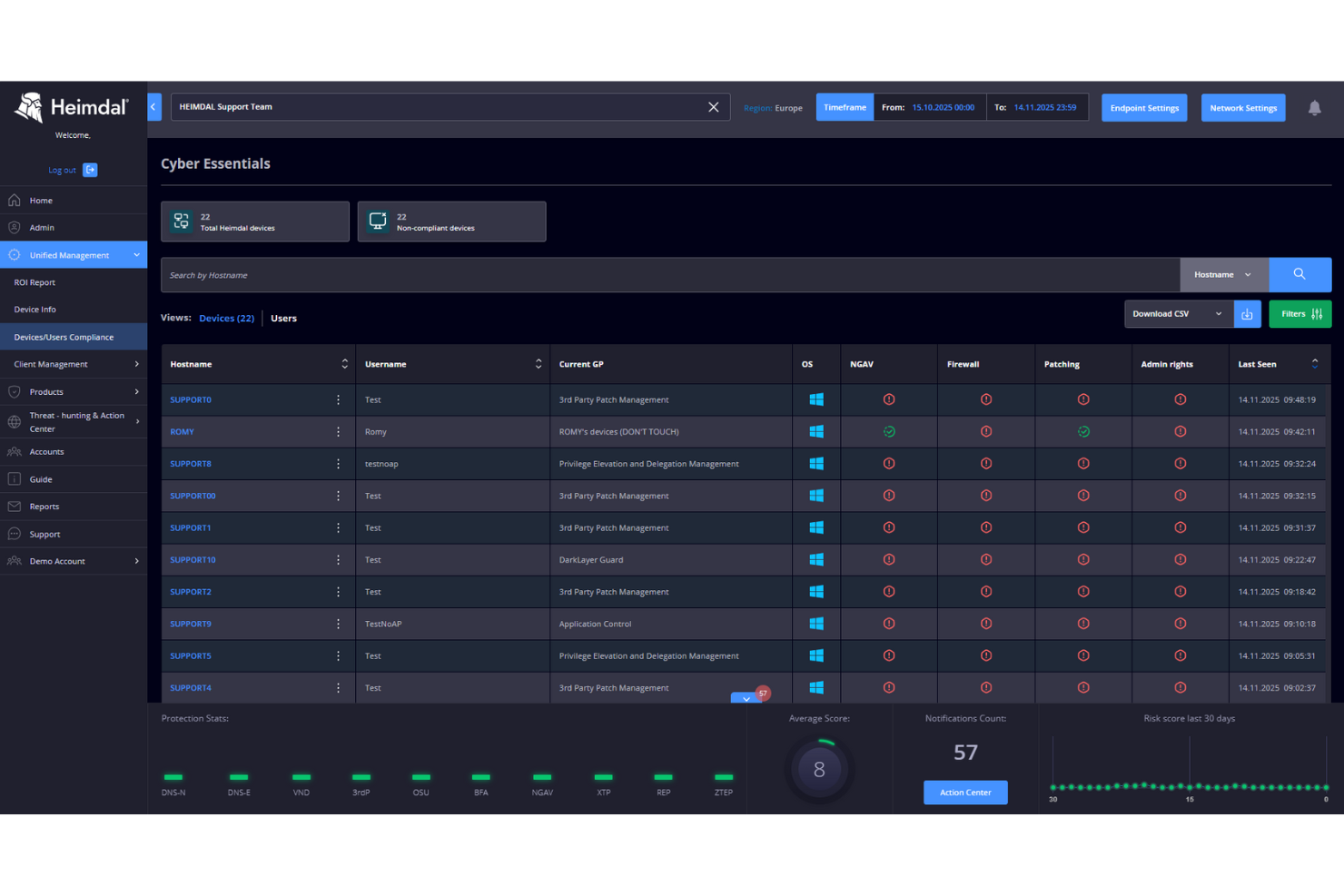
Heimdal si distingue per il blocco dell’accesso non autorizzato direttamente a livello DNS, ed è proprio quello che cerco quando vuoi blindare ogni punto d’ingresso. L’ho scelto per le organizzazioni che necessitano di filtraggio granulare del traffico, rilevamento delle minacce in tempo reale e risposta automatizzata per fermare malware, phishing e tentativi di esfiltrazione dati prima che raggiungano gli endpoint.
Quello che apprezzo è come si ottengano controlli di policy rigorosi, tracciabilità delle attività e automazione intelligente, rendendolo un’ottima soluzione di sicurezza DNS quando la priorità è fermare connessioni non autorizzate.
Heimdal è ideale per
- Organizzazioni che applicano controlli di accesso rigorosi basati su DNS
- Team IT che bloccano tentativi di malware, phishing ed esfiltrazione dati
Heimdal non è adatto per
- Piccole imprese senza un team IT dedicato
- Team che cercano funzionalità di sicurezza endpoint generali, a livello dispositivo
Cosa distingue Heimdal
Heimdal si distingue perché adotta un approccio DNS-first per fermare le minacce prima che raggiungano gli endpoint. A differenza di strumenti come Cisco Umbrella, che puntano a una copertura di servizio ampia, Heimdal ti chiede di guidare la policy di sicurezza controllando strettamente il primo livello di accesso alla rete. In pratica, vedo che questa soluzione funziona bene per chi vuole controllo diretto su ciò che esce o entra a livello DNS, senza complicazioni a livello dei dispositivi.
Compromessi con Heimdal
Heimdal è ottimizzato per il filtraggio DNS guidato dalle policy, ma di conseguenza perdi visibilità approfondita e opzioni di risposta specifiche per dispositivo offerte da suite di sicurezza endpoint più complete.
Pros and Cons
Pros:
- Automatizza l’applicazione delle patch sugli endpoint
- Rilevamento efficace di vulnerabilità e minacce
- Visibilità dettagliata di asset e licenze
Cons:
- Nessuna integrazione nativa disponibile
- L’interfaccia richiede tempo di apprendimento

Ideale per il rilevamento delle minacce in tempo reale

DNSFilter entra nella mia shortlist perché reagisce alle minacce emergenti più velocemente della maggior parte dei servizi di sicurezza DNS che ho valutato. Ciò che lo distingue davvero è l'analisi dei domini in tempo reale e il rilevamento delle minacce, che aggiorna costantemente le sue blocklist utilizzando dati in streaming live e non solo fonti statiche.
Apprezzo le politiche di filtraggio dei contenuti e il blocco dei siti dannosi di DNSFilter, altamente affidabili nel rispondere a campagne di phishing e malware in rapida evoluzione. Tendo a consigliarlo quando i team necessitano di una protezione automatica che si adatti di minuto in minuto ai nuovi vettori di attacco.
Ideale per
- Team IT e sicurezza che richiedono il blocco delle minacce in tempo reale
- Organizzazioni che cercano una protezione DNS automatica e adattiva
Non indicato per
- Aziende che necessitano dell'ispezione approfondita dei pacchetti
- Team con avanzate esigenze di personalizzazione della rete on-premises
Cosa distingue DNSFilter
DNSFilter è diverso perché si aspetta che tu adotti un approccio preventivo, a livello di rete, alle minacce, invece di inseguire i singoli incidenti uno dopo l'altro. Mentre strumenti come Cisco Umbrella puntano a suite più ampie di gestione IT, DNSFilter mantiene il focus sull'analisi in tempo reale a livello di DNS. Vedo che dà il meglio di sé quando si desidera una protezione automatizzata e silenziosa, senza interrompere la rete o dipendere dalle installazioni sugli endpoint.
Compromessi con DNSFilter
DNSFilter è ottimizzato per bloccare le minacce prima che raggiungano gli endpoint, ma si perde la possibilità di condurre analisi forensi approfondite e di disporre di un controllo granulare tipici delle soluzioni di sicurezza di rete più personalizzabili.
Pros and Cons
Pros:
- Configurazione e distribuzione semplici
- Blocco delle minacce efficace
- Interfaccia utente intuitiva
Cons:
- Alcune funzionalità avanzate possono risultare complesse
- Potrebbe richiedere configurazioni aggiuntive

Ideale per la sicurezza basata su cloud
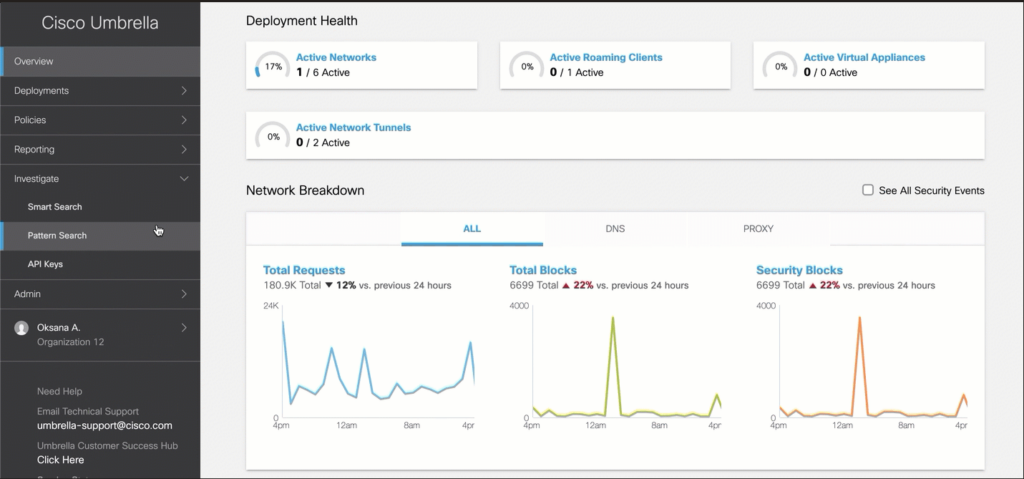
Cisco Umbrella è nella mia lista perché è uno dei leader più evidenti per la sicurezza DNS basata su cloud. Lo consiglio quando desideri applicare politiche di sicurezza e bloccare le minacce direttamente a livello DNS per tutti gli utenti, anche quelli fuori rete. Quello che mi piace è come ottieni intelligence sulle minacce in tempo reale, filtraggio dei contenuti e protezione rapida senza dover reindirizzare tutto il tuo traffico.
I team percepiscono il valore quando vogliono controlli scalabili, implementazione veloce e non vogliono dipendere da appliance hardware.
Ideale per
- Organizzazioni che vogliono proteggere utenti sia in sede che da remoto
- Team che necessitano di blocco delle minacce DNS rapido e gestito tramite cloud
Non ideale per
- Aziende che richiedono filtraggio DNS completamente offline, solo on-premise
- Team che desiderano una suite di sicurezza endpoint completa in un unico strumento
Cosa distingue Cisco Umbrella
Cisco Umbrella si distingue adottando un approccio a livello DNS, bloccando le minacce prima che venga stabilita una connessione. Invece di distribuire agenti endpoint ovunque o affidarti ai tradizionali firewall, indirizzi il traffico DNS verso Umbrella. Questo funziona bene quando desideri un'attivazione rapida sia per utenti remoti che in sede, senza il peso dei tunnel VPN.
Rispetto a strumenti come Palo Alto Networks GlobalProtect, Umbrella richiede la gestione della protezione tramite policy cloud invece che tramite distribuzioni sui dispositivi.
Compromessi con Cisco Umbrella
Cisco Umbrella ottimizza la sicurezza DNS semplificata e ampia, ma si perde la rilevazione granulare delle minacce sugli endpoint e il contesto dei dispositivi. Nella pratica, serve comunque una protezione endpoint a più livelli per minacce avanzate o controlli specifici del dispositivo.
Pros and Cons
Pros:
- Estende la protezione agli utenti remoti
- Facile da implementare e gestire
- Aggiornamenti sulle minacce in tempo reale
Cons:
- Opzioni di personalizzazione limitate
- Richiede monitoraggio continuo

Akamai
Ideale per esigenze di sicurezza aziendale
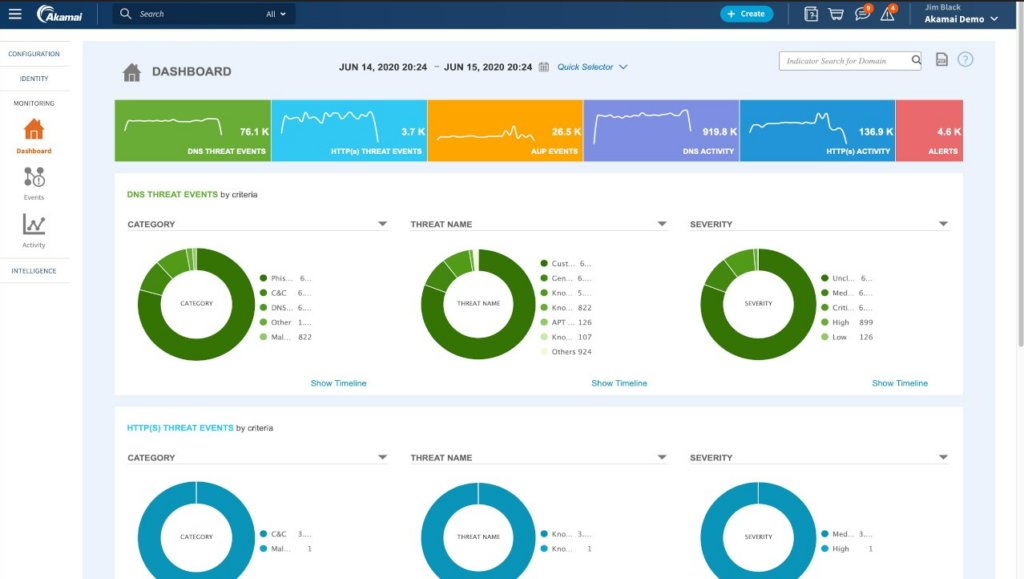
Akamai si distingue grazie alle sue funzionalità di sicurezza DNS a livello aziendale, che puntano sull'intelligence contro le minacce e la resilienza della rete. Quando collaboro con organizzazioni che gestiscono traffico sensibile o di elevato valore, il filtraggio DNS in tempo reale e la mitigazione automatica degli attacchi di Akamai offrono ai team IT il controllo di cui hanno bisogno.
Apprezzo come i servizi di sicurezza di Akamai siano progettati per scalare e integrarsi con infrastrutture globali complesse senza compromettere affidabilità o prestazioni.
A chi è maggiormente indicato Akamai
- Grandi aziende che necessitano di sicurezza DNS avanzata e su vasta scala
- Organizzazioni che richiedono intelligence globale sulle minacce e mitigazione rapida
Per chi non è ideale Akamai
- Piccole imprese con esigenze semplici di sicurezza DNS
- Team che desiderano soluzioni DNS leggere o altamente personalizzabili
Cosa distingue Akamai
Akamai è pensato per le organizzazioni che necessitano di una sicurezza DNS di livello enterprise integrata direttamente nella loro infrastruttura globale. A differenza di Cloudflare o Cisco Umbrella, si aspetta che operiate su larga scala e diate priorità al controllo dettagliato su ogni transazione DNS. In pratica, questo approccio risulta ideale se volete applicare policy e mitigare automaticamente le minacce su ogni punto edge, non solo a livello regionale o di ufficio.
Compromessi con Akamai
Akamai punta su ampiezza funzionale e difesa multilivello, ma la complessità e l’ampia gamma di opzioni possono rallentare i team con meno risorse o requisiti più semplici.
Pros and Cons
Pros:
- Distribuzione rapida senza hardware
- Impatto minimo sull’esperienza utente
- Efficace contro le minacce DNS ricorsive
Cons:
- Richiede conoscenza delle API per l'integrazione
- Alcune funzionalità possono risultare complesse

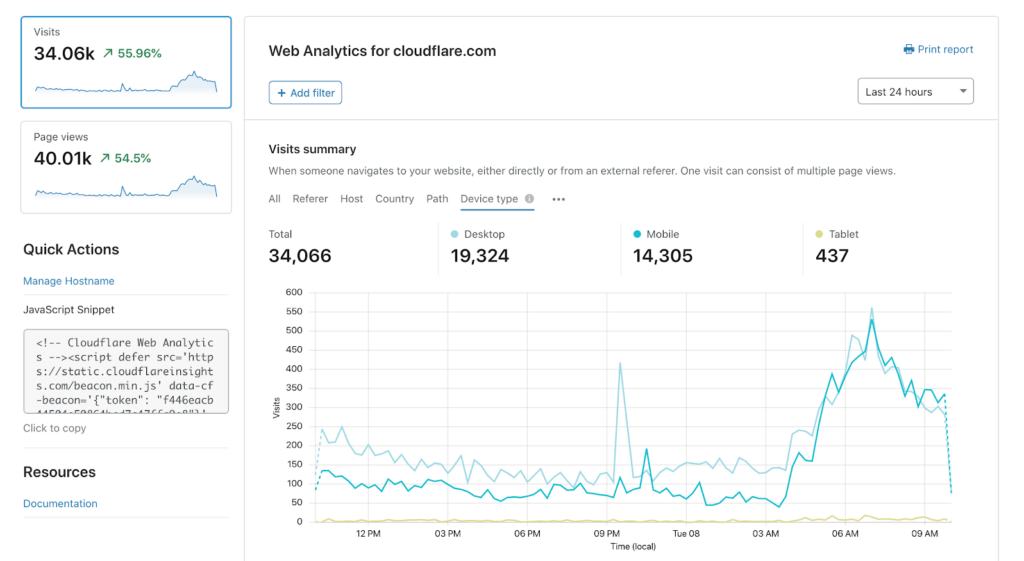
Cloudflare DNS Firewall è nella mia lista grazie alla sua attenzione nel bloccare gli attori delle minacce prima che raggiungano il perimetro della rete. Quando le organizzazioni necessitano di una sicurezza a livello DNS con presenza in tutte le principali regioni, vedo spesso emergere questo strumento.
Apprezzo la sua intelligence sulle minacce in tempo reale basata sul traffico globale e gli aggiornamenti automatici—queste funzioni significano che le minacce vengono fermate in scala, non solo registrate per una verifica successiva.
Cloudflare DNS Firewall è l’ideale per
- Organizzazioni che necessitano di blocco delle minacce a livello DNS a livello globale
- Grandi aziende che proteggono infrastrutture distribuite da malware e phishing
Cloudflare DNS Firewall non è ideale per
- Team concentrati su sicurezza dettagliata a livello di applicazione
- Piccole imprese senza personale IT o gestione DNS dedicati
Cosa distingue Cloudflare DNS Firewall
Cloudflare DNS Firewall è progettato per intercettare le minacce a livello DNS, ovunque si trovino utenti o workload a livello globale. A differenza di strumenti che si basano su feed di minacce locali o copertura regionale, Cloudflare presume che la superficie di attacco sia ovunque e aggiorna continuamente le sue protezioni in tempo reale. In pratica, vedo le organizzazioni utilizzarlo per gestire traffico e minacce su reti internazionali, non solo negli uffici locali.
Compromessi con Cloudflare DNS Firewall
Cloudflare ottimizza in modo aggressivo per la visibilità globale sulle minacce, ma questa impostazione significa che non si ha molto controllo diretto o personalizzazione per regole DNS specifiche. Se si desidera regolare ogni risposta o applicare filtri dettagliati, questa limitazione diventa evidente.
Pros and Cons
Pros:
- Aggiornamenti di intelligence globale sulle minacce
- Protezione DDoS efficace
- Risposta rapida alle minacce
Cons:
- Richiede configurazione continua
- Può richiedere competenze tecniche

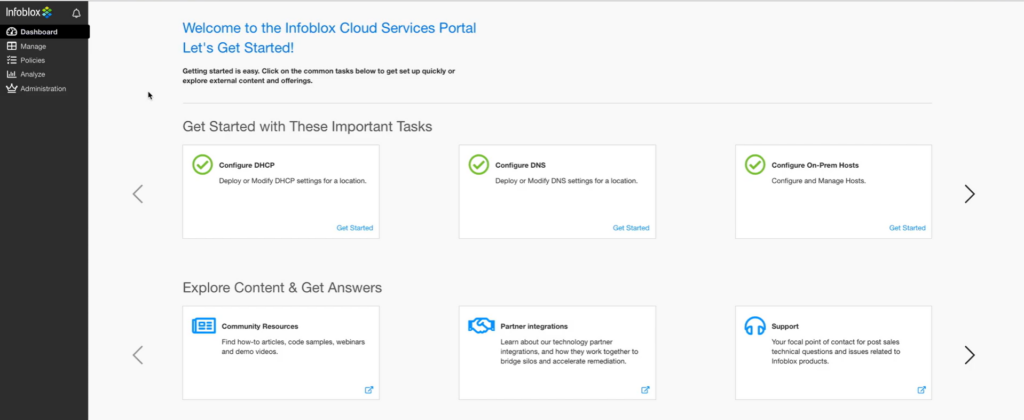
BloxOne DDI è una scelta fondamentale grazie al modo in cui unifica DNS, DHCP e IPAM sia nelle reti locali che in quelle cloud. Quando collaboro con organizzazioni che stanno passando a ambienti cloud ibridi, la visibilità centralizzata e l'applicazione delle policy si distinguono davvero. Apprezzo soprattutto la possibilità di estendere rapidamente i controlli di sicurezza DNS alle implementazioni cloud senza ulteriore complessità.
I team lo utilizzano per individuare minacce, automatizzare l'assegnazione degli IP e ridurre le lacune che spesso emergono in ambienti misti.
BloxOne DDI è ideale per
- Organizzazioni che gestiscono DNS, DHCP e IPAM in ambienti cloud ibridi
- Team IT che necessitano di sicurezza DNS centralizzata e applicazione delle policy
BloxOne DDI non è indicato per
- Piccole imprese con reti semplici e a ambiente unico
- Team che cercano un semplice firewall DNS senza funzionalità IPAM o DHCP
Cosa distingue BloxOne DDI
BloxOne DDI tratta DNS, DHCP e IPAM come un servizio unico e integrato che puoi gestire centralmente, anche tra ambienti cloud e locali. A differenza di Cisco Umbrella, che concentra la sicurezza DNS nel cloud, BloxOne DDI prevede che tu coordini policy e visibilità per tutto, ovunque risieda. Di solito vedo che questo funziona particolarmente bene quando hai bisogno della flessibilità del cloud senza perdere il controllo interno.
Compromessi con BloxOne DDI
BloxOne DDI è ottimizzato per una gestione unificata su infrastrutture ibride, il che comporta una maggiore complessità e gestione se hai solo bisogno di una protezione DNS di base.
Pros and Cons
Pros:
- Supporta ambienti cloud ibridi
- I flussi di lavoro automatizzati riducono le attività manuali
- Scalabilità per reti in crescita
Cons:
- Aggiornamenti regolari richiesti
- Problemi di prestazioni occasionali


TitanSecure entra nella mia lista per quanto bene risponde alle esigenze di sicurezza e conformità delle piccole e medie imprese. Apprezzo come combini un filtraggio DNS granulare con una protezione contro phishing e malware che si adatta mentre la rete evolve. Quando ho testato le funzionalità di reporting, sono riuscito a vedere le minacce bloccate in tempo reale (senza essere sommerso dalla complessità).
TitanSecure è l'ideale per
- Piccole e medie imprese che necessitano di filtraggio DNS
- Aziende che cercano una facile implementazione con un forte blocco delle minacce web
TitanSecure non è adatto per
- Grandi aziende con un'infrastruttura DNS globale complessa
- Organizzazioni che necessitano di controlli DNS altamente personalizzabili o basati su API
Cosa distingue TitanSecure
TitanSecure affronta la sicurezza DNS con un forte focus sulla semplificazione per le piccole e medie imprese, invece dei controlli multilivello presenti in strumenti enterprise come Cisco Umbrella. A differenza di soluzioni che aggiungono infinite personalizzazioni, TitanSecure presuppone che tu voglia una protezione dalle minacce robusta, aggiornamenti automatici e report chiari, con un minimo bisogno di configurazioni o supervisione quotidiana.
Funziona bene quando hai bisogno che la sicurezza DNS lavori in background e che la visibilità sia concisa, invece che dover gestire ogni dettaglio delle policy.
Compromessi con TitanSecure
TitanSecure è ottimizzato per semplicità e onboarding rapido, il che significa che la configurazione DNS avanzata e la personalizzazione granulare delle policy sono limitate. Questo può portare le grandi organizzazioni che necessitano di controlli più dettagliati a cercare altrove.
Pros and Cons
Pros:
- Robuste funzionalità di sicurezza email
- Integrazione semplice con Microsoft 365
- Protezione efficace dal phishing
Cons:
- Opzioni di configurazione avanzate limitate
- Alcune funzionalità possono richiedere tempo per la configurazione

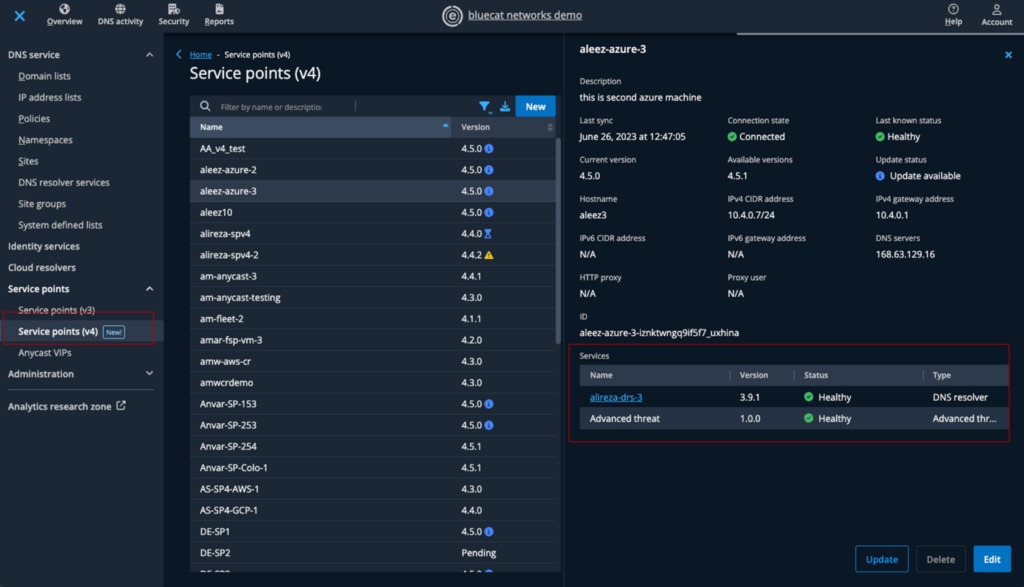
BlueCat Edge è nella mia lista perché porta l'automazione della rete nella sicurezza DNS, cosa rara in questa categoria. Lo consiglio se il tuo team deve automatizzare il rilevamento e la risposta alle minacce a livello DNS, soprattutto in ambienti ibridi o distribuiti.
Quello che apprezzo è come puoi applicare policy personalizzate in modo dinamico e attivare risposte automatiche basate sul comportamento della rete in tempo reale. I team tendono ad ottenere un'applicazione più coerente e meno interventi manuali quando si tratta dei rischi legati alla sicurezza DNS.
Ideale per BlueCat Edge
- Grandi organizzazioni che automatizzano il rilevamento e la risposta alle minacce DNS
- Reti ibride o distribuite che necessitano di un'applicazione dinamica delle policy DNS
BlueCat Edge non è ideale per
- Reti piccole con esigenze semplici di sicurezza DNS
- Team che desiderano solo una gestione DNS manuale e semplice
Cosa distingue BlueCat Edge
BlueCat Edge è progettato per le organizzazioni che considerano il DNS un controllo di sicurezza dinamico, non solo infrastruttura. A differenza di Cisco Umbrella, che mantiene la maggior parte delle impostazioni centralizzate, BlueCat punta sull'automazione delle policy e sull'applicazione decentralizzata. In questo modo i team locali possono agire rapidamente senza aspettare aggiornamenti globali.
Nella pratica, questo approccio funziona bene quando ci sono reti che coprono diverse aree geografiche o unità aziendali con esigenze differenti.
Compromessi con BlueCat Edge
BlueCat Edge è ottimizzato per l'automazione e la gestione flessibile delle policy DNS, ma si perde un po' di semplicità. I team che non vogliono mantenere un'automazione e una logica delle policy continue possono ritrovarsi con più lavoro amministrativo.
Pros and Cons
Pros:
- Capacità efficaci di automazione della rete
- Controllo e visibilità centralizzati
- Applicazione coerente delle policy
Cons:
- Necessità di aggiornamenti regolari
- Potenziali sfide nella configurazione

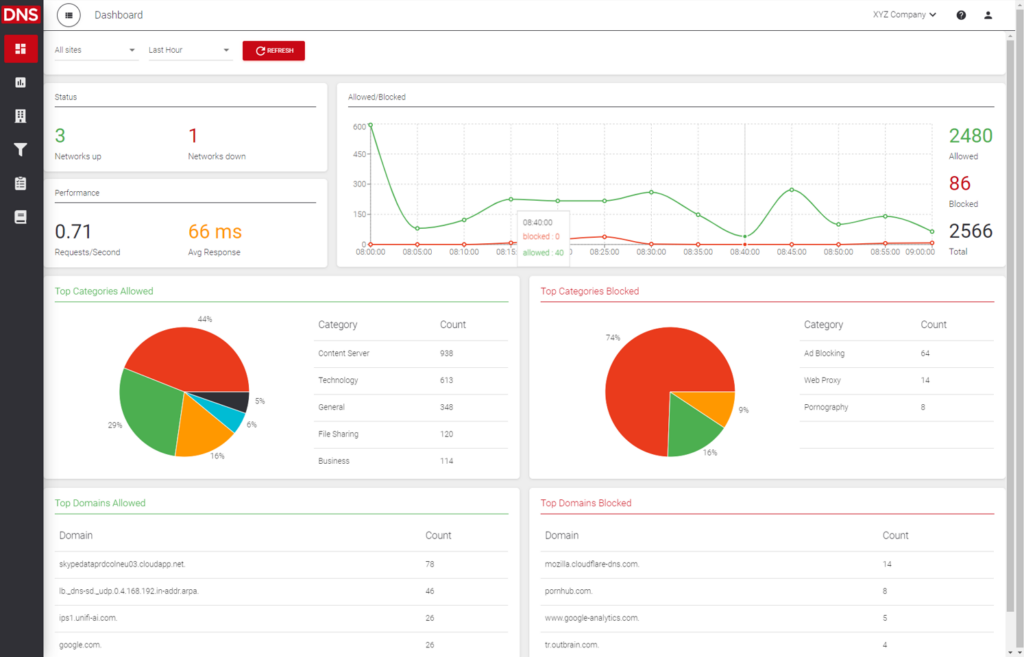
ScoutDNS entra nella mia lista perché permette di attuare un filtraggio DNS basato su policy in modo estremamente granulare. Ho lavorato con organizzazioni che necessitano di profili di filtraggio distinti per diversi gruppi, e ScoutDNS offre esattamente questa flessibilità.
Apprezzo la facilità con cui si possono sovrapporre liste di permessi e blocchi a più livelli e personalizzare gli accessi per categoria, offrendo controllo senza dover scrivere manualmente molte regole. Lo consiglio ai team che desiderano regole differenziate per dipartimenti, sedi o dispositivi senza perdere il controllo centralizzato.
Ideale per
- Organizzazioni che necessitano di un filtraggio DNS altamente personalizzabile
- Team IT che gestiscono ambienti complessi e con molte policy differenti
Non consigliato per
- Aziende che vogliono una sicurezza DNS semplice e pronta all'uso
- Team che non hanno bisogno di controlli dettagliati per categoria
Cosa rende ScoutDNS unico
ScoutDNS è pensato per organizzazioni che richiedono un controllo dettagliato del filtraggio DNS senza doversi sobbarcare la complessità tipica delle soluzioni enterprise. Invece di offrire solo semplici interruttori on/off come OpenDNS o WebTitan, ScoutDNS ti consente di definire policy molto granulari a livello di gruppo o dispositivo. In pratica, questo approccio è ideale se vuoi personalizzare gli accessi tra dipartimenti o profili utente, e non solo imporre una regola generale per tutti.
Compromessi con ScoutDNS
ScoutDNS privilegia la personalizzazione e la flessibilità delle policy, ma ciò significa che potresti dover investire più tempo nella pianificazione delle regole e nelle revisioni delle policy, il che può rallentare se ti serve una protezione DNS rapida e pronta all’uso.
Pros and Cons
Pros:
- Configurazione e gestione delle policy semplici
- Monitoraggio in tempo reale delle attività DNS
- Opzioni di filtraggio altamente personalizzabili
Cons:
- Potrebbe richiedere tempo per la configurazione iniziale
- Alcuni utenti trovano la dashboard basica

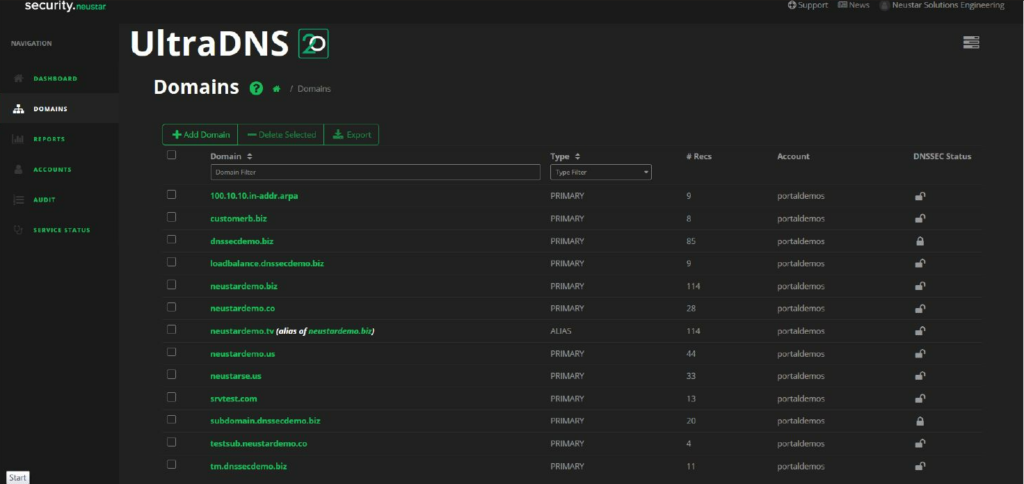
Neustar UltraDNS è un servizio DNS gestito progettato per le aziende che necessitano di alta disponibilità e affidabilità. Garantisce agli utenti un accesso continuo a siti web e applicazioni, anche durante picchi di traffico o potenziali interruzioni.
Perché ho scelto Neustar UltraDNS: Eccelle nel fornire servizi ad alta disponibilità grazie alla sua rete globale di server DNS. Il servizio offre funzionalità avanzate di gestione del traffico che aiutano a distribuire il carico in modo efficiente. La rete DNS Shield potenzia la sicurezza proteggendo dagli attacchi DDoS. Gli strumenti di monitoraggio integrati offrono al tuo team una panoramica sulle prestazioni DNS e su eventuali problemi.
Funzionalità e integrazioni principali:
Funzionalità comprendono una gestione avanzata del traffico che ottimizza la distribuzione del carico. La rete DNS Shield aggiunge un ulteriore livello di protezione contro gli attacchi DDoS. Gli strumenti di monitoraggio integrati forniscono informazioni sulle prestazioni DNS, aiutandoti a individuare e risolvere rapidamente eventuali problemi.
Integrazioni includono Amazon Route 53, Microsoft Azure, Google Cloud Platform, Cisco Umbrella, Akamai, Cloudflare, Splunk, New Relic, Datadog ed Elastic Stack.
Pros and Cons
Pros:
- Elevata disponibilità durante i picchi di traffico
- Protezione DDoS efficace
- Opzioni avanzate di gestione del traffico
Cons:
- Occasionali difficoltà di configurazione
- Personalizzazione limitata per le piccole imprese
Altre soluzioni di sicurezza DNS
Ecco alcune ulteriori soluzioni di sicurezza DNS che non sono state incluse nel mio elenco, ma che vale comunque la pena prendere in considerazione:


Come valuto le soluzioni di sicurezza DNS
SUDDIVIDO la valutazione in due livelli: la base che ogni strumento deve soddisfare per rilevare un tentativo di tunneling DNS o bloccare un dominio di phishing e i fattori di differenziazione che separano le migliori opzioni.
Funzionalità di base (Requisiti minimi per questa lista)
Quando seleziono gli strumenti per la mia lista, valuto ciascuno su una scala da 0 (non offre la funzionalità) a 5 (eccelle in questo ambito) per ogni funzionalità di base elencata di seguito. Successivamente, converto il punteggio totale dello strumento in percentuale. Ogni strumento deve ottenere un punteggio totale minimo del 65% per essere considerato per l'inclusione.
- Filtro tramite threat intelligence: Verifico se lo strumento attinge da più feed di minacce, aggiornati frequentemente, per bloccare automaticamente le interrogazioni verso domini noti come malevoli, di phishing e C2.
- Rilevamento del tunneling DNS: Uno strumento deve individuare più delle sole firme note di tunneling—cerco analisi comportamentali che individuino pattern DGA e tentativi di esfiltrazione.
- Filtro dei contenuti basato su policy: La granularità è fondamentale. Valuto se è possibile applicare blocchi per categoria e liste personalizzate consentite/negate a specifici gruppi di utenti, reti o dispositivi.
- Log delle query DNS e analitiche: Dashboard in tempo reale e log ricercabili fanno la differenza quando un analista deve tracciare una query sospetta fino a uno specifico endpoint durante un incidente.
- Supporto DNS criptato: Cerco la copertura per DoH, DoT e DNSSEC—specialmente la possibilità di imporre la risoluzione criptata sugli endpoint in roaming fuori dalla rete aziendale.
- Copertura distribuita della protezione: Lo strumento dovrebbe proteggere gli utenti sia su rete, che remoti o in filiale tramite resolver cloud, agenti leggeri o entrambi.
Una volta ottenuta una lista di strumenti che rispettano questi criteri, considero cosa distingue ciascuna piattaforma.
Fattori di differenziazione (Cosa distingue i fornitori)
Ecco come confronto e distinguo i diversi fornitori:
Caratteristiche distintive
La classificazione dei domini tramite AI/ML è un grande elemento distintivo—gli strumenti in grado di segnalare domini appena registrati o simili prima che vengano inseriti nei tradizionali feed di minacce danno un reale vantaggio al tuo SOC. Valuto anche se una piattaforma lega le policy DNS alle identità autenticate tramite provider come Okta o Azure AD, poiché le regole basate su IP cedono rapidamente con i lavoratori remoti. Anche l'ispezione proxy selettiva merita attenzione. Instradare solo i domini rischiosi o non categorizzati a un'ispezione più approfondita mantiene bassa la latenza garantendo comunque l'individuazione delle minacce che il solo filtro DNS potrebbe non rilevare.
Oltre le caratteristiche
L'integrazione nell'ecosistema è molto rilevante qui. Verifico se uno strumento invia log nativamente al tuo SIEM—Splunk, Sentinel, Chronicle—e se offre accesso API per automazione personalizzata e gestione delle policy. La conformità è un altro fattore che valuto, specialmente per i team in settori regolamentati dove le certificazioni SOC 2, ISO 27001 o FedRAMP possono fare la differenza in fase di acquisto. Esamino anche la capacità di ricerca sulle minacce del fornitore. Un team di ricerca interno che pubblica indicatori originali di compromissione e attribuzioni di campagne segnala un livello di intelligenza che i provider basati solo su feed non possono eguagliare.
Come scegliere una soluzione di sicurezza DNS
È facile perdersi in lunghi elenchi di funzionalità e strutture tariffarie complesse. Per aiutarti a rimanere concentrato mentre affronti il tuo processo di selezione del software, ecco un elenco dei fattori da tenere presenti:
| Fattore | Cosa considerare |
| Scalabilità | La soluzione è in grado di supportare la vostra crescita? Considerate le dimensioni attuali e future della rete. Cercate strumenti che si espandano insieme alle vostre esigenze senza richiedere una revisione completa. |
| Integrazioni | Funziona bene con i sistemi esistenti? Verificate la compatibilità con le piattaforme attuali, come i servizi cloud e gli strumenti di sicurezza. |
| Personalizzazione | Potete adattarla ai vostri flussi di lavoro? Valutate se lo strumento consente di modificare criteri e impostazioni in base ai requisiti specifici della vostra organizzazione. |
| Facilità d'uso | È intuitiva per il vostro team? Cercate interfacce intuitive che riducano la curva di apprendimento ed evitate strumenti che richiedano una formazione approfondita per le operazioni di base. |
| Implementazione e onboarding | Quanto velocemente potete iniziare? Valutate le risorse e il tempo necessari per la configurazione. Considerate strumenti che offrano un onboarding guidato e una documentazione chiara per semplificare la transizione. |
| Costo | Rientra nel vostro budget? Confrontate il prezzo con i vostri vincoli finanziari, tenendo presente il costo totale di proprietà, comprese eventuali tariffe nascoste o spese aggiuntive. |
| Misure di sicurezza | Offre protezioni adeguate? Assicuratevi che la soluzione fornisca solide misure di sicurezza contro le minacce. Cercate funzionalità come la crittografia e aggiornamenti di sicurezza regolari. |
| Requisiti di conformità | Rispetta gli standard del settore? Verificate che la soluzione sia conforme alle normative pertinenti, soprattutto se operate in un settore regolamentato. Questo è fondamentale per evitare problemi legali e garantire la privacy dei dati. |
Che cos'è una soluzione di sicurezza DNS?
Le soluzioni di sicurezza DNS sono strumenti che proteggono le reti monitorando e controllando il traffico del sistema dei nomi di dominio (DNS) per bloccare le richieste dannose e prevenire le fughe di dati. Vengono utilizzate dagli amministratori IT, dagli ingegneri di rete e dai team di cybersicurezza per migliorare il rilevamento delle minacce, ridurre i rischi e mantenere sicuro l'accesso alle risorse online.
Funzionalità come il filtraggio dei domini, l'intelligence sulle minacce e il monitoraggio in tempo reale aiutano a identificare attività sospette, applicare i criteri di sicurezza e impedire le comunicazioni dei malware. Nel complesso, questi strumenti aiutano le organizzazioni a proteggere il livello DNS e a mantenere operazioni di rete più sicure e affidabili.
Funzionalità delle soluzioni di sicurezza DNS
Quando selezionate soluzioni di sicurezza DNS, prestate attenzione alle seguenti funzionalità chiave:
- Rilevamento delle minacce: identifica e blocca le attività dannose per proteggere la rete da potenziali attacchi.
- Filtraggio dei domini: consente di controllare l'accesso ai siti web bloccando i domini dannosi o indesiderati.
- Monitoraggio in tempo reale: fornisce una supervisione continua dell'attività DNS per rilevare e contrastare rapidamente le minacce.
- Criteri personalizzabili: consente di adattare le impostazioni di sicurezza alle esigenze e ai requisiti specifici della vostra organizzazione.
- Scalabilità: supporta la crescita gestendo l'aumento delle esigenze della rete senza compromettere le prestazioni.
- Funzionalità di integrazione: garantisce la compatibilità con i sistemi e le piattaforme esistenti per un funzionamento fluido.
- Interfaccia intuitiva: semplifica la navigazione e riduce la curva di apprendimento per i team IT e gli amministratori.
- Protezione DDoS: protegge la rete dagli attacchi distribuiti di negazione del servizio, garantendone la disponibilità.
- Applicazione automatizzata dei criteri: mantiene una sicurezza coerente tra dispositivi e sedi con un intervento manuale minimo.
Vantaggi delle soluzioni di sicurezza DNS
L'implementazione di soluzioni di sicurezza DNS offre diversi vantaggi al vostro team e alla vostra azienda. Eccone alcuni:
- Sicurezza potenziata: protegge da malware e phishing bloccando i domini dannosi prima che possano causare danni.
- Migliori prestazioni della rete: garantisce una risoluzione DNS affidabile e veloce, riducendo i tempi di inattività e migliorando l'esperienza degli utenti.
- Controllo personalizzabile: offre impostazioni di sicurezza personalizzate per soddisfare i requisiti specifici della vostra organizzazione, garantendo una protezione ottimale.
- Scalabilità: supporta le esigenze della vostra azienda in crescita, espandendosi facilmente per gestire l'aumento delle richieste della rete.
- Gestione efficiente: semplifica la supervisione della rete con il monitoraggio in tempo reale e l'applicazione automatizzata dei criteri, riducendo il carico di lavoro del personale IT.
- Supporto alla conformità: aiuta a rispettare le normative del settore fornendo le misure di sicurezza e le funzionalità di reportistica necessarie.
- Protezione conveniente: riduce il rischio di costose violazioni della sicurezza e tempi di inattività, consentendo all'azienda di risparmiare nel lungo periodo.
Costi e prezzi delle soluzioni di sicurezza DNS
La selezione di soluzioni per la sicurezza DNS richiede la comprensione dei vari modelli di prezzo e dei piani disponibili. I costi variano in base alle funzionalità, alle dimensioni del team, ai componenti aggiuntivi e ad altro ancora. La tabella seguente riassume i piani più comuni, i relativi prezzi medi e le funzionalità tipicamente incluse nelle soluzioni per la sicurezza DNS:
Tabella comparativa dei piani per le soluzioni di sicurezza DNS
| Tipo di piano | Prezzo medio | Funzionalità comuni |
| Piano gratuito | $0 | Rilevamento di base delle minacce, filtraggio limitato dei domini e supporto della community. |
| Piano personale | $5-$25 /utente /mese | Funzionalità di sicurezza avanzate, criteri personalizzabili e reportistica di base. |
| Piano aziendale | $30-$75 /utente /mese | Intelligence avanzata sulle minacce, funzionalità di integrazione e monitoraggio in tempo reale. |
| Piano per grandi aziende | $100-$200/utente /mese | Scalabilità completa, applicazione automatizzata dei criteri, supporto dedicato e reportistica sulla conformità. |
Domande frequenti sulle soluzioni di sicurezza DNS
Ecco alcune risposte alle domande comuni sulle soluzioni di sicurezza DNS:
Cosa devo cercare quando valuto i fornitori di sicurezza DNS per la mia organizzazione?
Cerca fornitori di sicurezza DNS che offrano una solida intelligence sulle minacce, un’integrazione perfetta con i sistemi esistenti, il monitoraggio in tempo reale e un supporto completo. Informati sulle garanzie di disponibilità, sulle funzionalità di reportistica e sulla frequenza di aggiornamento dei database delle minacce. Valuta le referenze dei clienti, la trasparenza dei prezzi e la capacità di ridimensionare la soluzione con la crescita della rete.
In che modo le soluzioni di sicurezza DNS si integrano con le piattaforme SIEM o SOAR?
La maggior parte degli strumenti di sicurezza DNS supporta l’integrazione con le piattaforme SIEM o SOAR più diffuse tramite API, output syslog o connettori dedicati. Ciò significa che puoi inviare direttamente i log degli eventi DNS al tuo stack di sicurezza, automatizzare l’arricchimento delle minacce e unificare la risposta agli incidenti. Prima di prendere una decisione, chiedi ai fornitori guide all’integrazione e casi d’uso reali dei clienti.
Gli strumenti di sicurezza DNS possono aiutare a garantire la conformità normativa (ad esempio, GDPR, HIPAA)?
Sì, le soluzioni di sicurezza DNS possono supportare gli sforzi di conformità bloccando l’accesso ai siti vietati, registrando le query DNS e monitorando le violazioni dei criteri. Queste funzionalità aiutano a dimostrare il monitoraggio della rete, la protezione dei dati e la risposta agli incidenti, tutti elementi fondamentali per il GDPR, l’HIPAA e normative simili. Verifica che il fornitore offra documentazione e reportistica incentrate sulla conformità.
Come posso misurare l'efficacia della sicurezza DNS nella mia rete?
Inizia esaminando metriche come le minacce bloccate, il tempo di rilevamento, i tassi di applicazione dei criteri e il numero di falsi positivi. Configura audit periodici per assicurarti che le configurazioni corrispondano alla tua tolleranza al rischio. Una buona piattaforma di sicurezza DNS offre dashboard e report periodici, semplificando la dimostrazione del valore e l’individuazione delle lacune.
Esistono rischi o svantaggi nell'implementazione della sicurezza DNS a livello di rete?
Sì, potresti riscontrare falsi positivi, interruzioni del servizio durante aggiornamenti importanti o conflitti con sistemi legacy non supportati. Questi rischi possono essere gestiti eseguendo test su un gruppo pilota, mantenendo server DNS di backup e collaborando con fornitori che offrano un supporto efficace e opzioni di ripristino chiare.
Quali sono le principali considerazioni sulla sicurezza nella gestione del DNS per le aziende?
Dovresti applicare DNSSEC, utilizzare il filtraggio DNS e limitare l’accesso ai resolver autorizzati. Monitora i log alla ricerca di schemi insoliti e configura avvisi per le query sospette. Esegui regolarmente audit sulle modifiche DNS e aggiorna i criteri con la crescita della rete per ridurre il rischio di attacchi.
In che modo DNSSEC protegge l'infrastruttura DNS della mia organizzazione?
DNSSEC firma digitalmente le risposte DNS, consentendo agli endpoint di verificare che i record non siano stati alterati durante il transito. Ciò aiuta a impedire l’avvelenamento della cache e gli attacchi man-in-the-middle. Abilita DNSSEC sui resolver e verifica regolarmente le firme per garantire una protezione continua.
La modifica dei fornitori DNS influisce sul livello di sicurezza della mia organizzazione?
Sì, il cambio di fornitore può migliorare la sicurezza, ma anche introdurre nuovi rischi. I servizi DNS di terze parti possono offrire una protezione migliore dalle minacce, ma devi verificarne le pratiche di gestione dei dati, lo storico della disponibilità e gli impegni previsti dagli SLA. Esegui sempre un’adeguata valutazione e test approfonditi prima di entrare in produzione.
Qual è il prossimo passo?
Se stai cercando servizi di sicurezza DNS, contatta gratuitamente un consulente SoftwareSelect per ricevere consigli.
Compili un modulo e fai una breve conversazione durante la quale approfondiscono le specifiche delle tue esigenze. Poi riceverai una selezione ristretta di software da esaminare. Ti supporteranno anche durante l'intero processo di acquisto, comprese le negoziazioni sul prezzo.