
10 meilleurs logiciels d’automatisation des processus informatiques examinés en 2026

10 Meilleurs logiciels d'automatisation des processus informatiques
Voici ma sélection des meilleurs logiciels d’automatisation des processus informatiques :


Dans le monde dynamique de l’informatique, gérer efficacement les processus peut vite devenir un casse-tête. Vous pouvez facilement être submergé par des tâches répétitives qui nuisent à la productivité de votre équipe. C’est là qu’interviennent les logiciels d’automatisation des processus informatiques, qui peuvent vous aider à simplifier vos workflows et à accroître l’efficacité.
D’après mon expérience, choisir le bon logiciel fait toute la différence. J’ai testé et évalué plusieurs solutions de façon indépendante afin de vous proposer une sélection impartiale des meilleures options du marché.
Dans cet article, vous découvrirez mes meilleures recommandations adaptées à divers besoins et budgets. Que vous cherchiez à améliorer la coordination de votre équipe ou à automatiser des tâches fastidieuses, vous trouverez une solution adaptée.
Table of Contents
- Meilleure sélection de logiciels
- Pourquoi nous faire confiance
- Comparer les caractéristiques
- Avis
- Autres logiciels d'automatisation des processus informatiques
- Avis connexes
- Critères de sélection
- Comment choisir
- Qu'est-ce qu'un logiciel d'automatisation des processus informatiques ?
- Fonctionnalités
- Avantages
- Coûts et tarification
- FAQ
Why Trust Our Software Reviews
Résumé des meilleurs logiciels d'automatisation des processus informatiques
Ce tableau comparatif résume les tarifs de mes meilleures sélections de logiciels d’automatisation des processus informatiques pour vous aider à trouver celui qui correspond à votre budget et à vos besoins professionnels.
| Tool | Best For | Trial Info | Price | ||
|---|---|---|---|---|---|
| 1 | Best for automated global asset management | Free demo available | from $5/person/month | Website | |
| 2 | Best for automating patching & routine IT tasks | 30-day free trial + free demo available | From $149/technician/month (billed annually) | Website | |
| 3 | Best for connecting and automating SAP and non-SAP systems and workflows | Free demo available | Pricing upon request | Website | |
| 4 | Best for ease of use with pre-built integrations, job steps, and templates | Free demo available | Not available | Website | |
| 5 | Best for drag-and-drop application building | Free demo available | Pricing upon request | Website | |
| 6 | Best for document management automation | Free demo available | Pricing upon request | Website | |
| 7 | Best for CRM and process automation fusion | Free demo available | From $25/user/month | Website | |
| 8 | Best for infrastructure monitoring automation | Free 15-day trial | From $16/hybrid unit/month | Website | |
| 9 | Best for low-code automation and integration | Free plan available | Pricing upon request | Website | |
| 10 | Best for AI-driven decision automation | Free trial + free demo available | From $0.45/case | Website |

-

Site24x7
Visit WebsiteThis is an aggregated rating for this tool including ratings from Crozdesk users and ratings from other sites.4.6 -
GitHub Actions
Visit WebsiteThis is an aggregated rating for this tool including ratings from Crozdesk users and ratings from other sites.4.8 -
Docker
Visit WebsiteThis is an aggregated rating for this tool including ratings from Crozdesk users and ratings from other sites.4.6





Avis sur les meilleurs logiciels d'automatisation des processus informatiques
Vous trouverez ci-dessous mes résumés détaillés des meilleurs logiciels d’automatisation des processus informatiques qui figurent dans ma sélection. Mes avis vous proposent un aperçu complet des fonctionnalités clés, des avantages et inconvénients, des intégrations et des cas d’utilisation idéaux de chaque outil pour vous aider à choisir celui qui vous convient le mieux.


Deel is widely known for its comprehensive HR, payroll, and compliance solutions, but its IT suite, Deel IT, adds another layer of innovation by integrating global IT operations management into its platform. With the rise of remote and hybrid workforces, Deel offers businesses the ability to manage not just their people, but also their IT assets, across more than 130 countries.
Why I Picked Deel: For businesses operating in multiple regions, Deel’s automated workflows for onboarding and offboarding employees stand out. It can pre-configure devices with apps, and security protocols, and ship them globally, ensuring employees are set up from day one. Furthermore, Deel provides complete visibility over all assets worldwide, automating tracking and recovery, which is crucial for managing large inventories spread across different countries.
Standout features & integrations
One standout feature is Deel’s 24/7 global IT support, which ensures that teams are always online and productive. The platform also offers SLA-backed repairs and sends loaner devices when needed, minimizing downtime. Another convenient feature is its certified data erasure service, which secures company data when devices are returned or re-deployed.
Integrations include Slack, Google Workspace, Microsoft Teams, BambooHR, Greenhouse, SAP SuccessFactors, Okta, and Azure Active Directory.
Pros and Cons
Pros:
- Supports equipment deployment in over 130 countries
- Can combine HR and IT asset management in one
- Can pre-configure devices before they're shipped
Cons:
- May not be ideal for teams with very complex IT asset needs
- Doesn't offer features beyond device management, like network and server management


Atera is an all-in-one IT management platform designed for managed service providers (MSPs) and internal IT teams that need to automate key IT processes. In addition to its remote monitoring and management (RMM), Atera offers IT process automation capabilities through automated patching, scripting, and AI-powered ticket routing.
Why I Picked Atera: I picked Atera because of how directly it applies automation to common IT workflows. You can set up automation profiles that handle patch management, disk maintenance, Windows updates, and software installs without manual intervention. The scripting engine lets you create task sequences that would otherwise take hours of repetitive work. With real-time monitoring feeding into automated alerts, you can address issues early, or even fully automate their resolution depending on your setup. These tools allow you to shift your team's focus toward higher-priority projects instead of routine tasks.
Standout features & integrations:
Features include AI ticket tagging, predictive alerting, remote device access, recurring ticket scheduling, SLA policy management, flexible contracts and billing, customer portals, and advanced reporting.
Integrations include Microsoft Teams, Slack, ServiceNow, Okta, Azure Active Directory, Microsoft Outlook, WhatsApp Notifications, monday.com, Jira Software Cloud, Google Calendar, Acronis Cyber Protect Cloud, and Google Sheets.
Pros and Cons
Pros:
- Centralized inventory for network assets
- Real-time CVE vulnerability scanning
- Auto-discovery of devices
Cons:
- Some features require separate add-ons
- Customization options may feel limited
New Product Updates from Atera

Atera Enhances IT Autopilot With Automation and File Support
Atera’s IT Autopilot gets three major boosts: you can now attach common files for deeper analysis, automate IT tasks with clear workflows, and choose how the system follows up when users go silent. These updates help streamline IT operations and improve resolution efficiency. For more information, visit Atera’s official site.

Best for connecting and automating SAP and non-SAP systems and workflows

RunMyJobs is a SaaS-based workload automation platform that provides solutions for enterprise workload, file transfer, and finance automation. It is designed to integrate with SAP ERP applications and S/4HANA Cloud, as well as other business processes for real-time results.
Why I Picked RunMyJobs: As an IT process automation software, the platform enables full-stack automation for businesses, allowing users to connect to any app, system, or service with prebuilt integrations and automate processes across applications, servers, and services. RunMyJobs is designed to work on-premises, in the cloud, or in hybrid environments. It also provides end-to-end visibility and control, real-time monitoring, and predictive SLA notification to ensure that issues are quickly identified and resolved. Another standout aspect of RunMyJobs is that it's a premium-certified SAP Endorsed App and is included in the RISE with SAP reference architecture, making it ideal for those looking for less risk and long-term reliability.
Standout features & integrations
RunMyJobs offers event-based automation, which triggers a process based on real-time events. It also has record-to-report automation to eliminate manual tasks in accounting processes. Other notable features include data management, DevOps automation, and ETL automation.
The platform integrates with SAP ERP, SAP S/4HANA, Oracle, Datasphere, Databricks, Box, ServiceNow, Amazon S3, Azure, Boomi, Snowflake, SharePoint, and more.
Pros and Cons
Pros:
- Customizable batch scheduling
- Ability to schedule and monitor jobs
- Notification and alerting functionality
Cons:
- Dashboard could be improved
- Complexity for inexperienced users
New Product Updates from RunMyJobs by Redwood
RunMyJobs Enhances User Experience Across UIs
RunMyJobs introduces updates to its Classic and Modern UIs. These improvements enhance usability and streamline the overall user experience. For more information, visit RunMyJobs' official site.
 .
.
Best for ease of use with pre-built integrations, job steps, and templates

ActiveBatch is an IT automation tool designed to build, monitor, and manage end-to-end workflows across various technology platforms. It provides a centralized automation hub for scheduling and monitoring, enabling business-critical systems to work together with minimal human intervention. It's designed to integrate seamlessly with your current tech stack for less disruption to existing workflows.
Why I Picked ActiveBatch: The tool features a low-code drag-and-drop graphical user interface for easy setup and management of workflows, ideal for team members without advanced development skills. The software also has a comprehensive library of prebuilt integrations and extensions, job steps, templates, and advanced scheduling capabilities. ActiveBatch also leverages artificial intelligence (AI) and machine learning (ML) to optimize resources and workload placement.
Standout features & integrations
ActiveBatch has features for a wide range of IT and business processes, including job scheduling, event automation, cloud provisioning, and service-level agreement management. It also offers security, auditing, and governance features to ensure controlled access across environments.
Integrations include Active Directory, Crystal Reports, CyberArk Application Access Manager, Exchange Server, JSCAPE Managed File Transfer, Oracle Job Scheduler, PowerShell, SQL Server Scheduling, and more.
Pros and Cons
Pros:
- Scalability and intelligent automation features
- Event-based automation
- Real-time processes and accurate data capturing capabilities
Cons:
- Could be easier to setup
- Some features in the user interface may be confusing


Quixy is a modern cloud-based platform designed to simplify the process of building business applications without coding. With its drag-and-drop interface, users can quickly create applications tailored to their unique business needs. It is especially beneficial for those who want an uncomplicated method to build applications.
Why I Picked Quixy: When I was sifting through various automation tools and platforms, Quixy's drag-and-drop capability immediately stood out. It's a platform that truly empowers business users to take matters into their own hands without the need to rely on heavy IT intervention. I selected it for this list because of its unparalleled user-friendly interface, which perfectly aligns with the need for effortless application building.
Standout features & integrations
One of Quixy's most noteworthy features is its intuitive user interface that allows for easy drag-and-drop operations, reducing manual tasks and the potential for human error. Alongside, its cloud-based architecture ensures accessibility from anywhere. In terms of integrations, Quixy is versatile. It has connectors for various platforms like Salesforce, Microsoft products, and also provides an API for custom integrations, allowing businesses to link with tools they're already familiar with.
Pros and Cons
Pros:
- Cloud-based infrastructure ensures global accessibility and ease of updates.
- Strong integration capabilities, from pre-built connectors to custom APIs.
- Intuitive drag-and-drop interface making application building straightforward.
Cons:
- Potential learning curve for users completely new to application building.
- Lack of transparent pricing can be a barrier for some organizations.
- The simplicity might not cater to businesses looking for more intricate features.


Laserfiche is a powerful automation tool specifically designed to streamline and improve document management processes. By emphasizing automated workflows centered around document handling, it addresses the challenges businesses face with manual document procedures and ensures more efficient business process management.
Why I Picked Laserfiche: Laserfiche immediately captured my attention when selecting a tool for this list because of its dedicated focus on document automation. I judged it against several other contenders and it was evident that Laserfiche's capabilities in automating document-centric tasks were unparalleled. This made my decision clear as to why it stands out as the best for document management automation.
Standout features & integrations
Laserfiche is more than just a document repository. It offers features like automated workflows, permissions management, and real-time notifications to keep team members in sync.
When it comes to integrations, Laserfiche is compatible with a variety of tools and platforms. It supports connectors for mainstream platforms such as Microsoft, Salesforce, and ERP systems, ensuring that document processes can be embedded into broader business workflows.
Pros and Cons
Pros:
- Permissions management ensures that sensitive documents remain secure and accessible only to authorized personnel.
- Comprehensive set of integrations, ensuring compatibility with major platforms.
- Strong emphasis on document-centric automated workflows.
Cons:
- Absence of transparent pricing can create uncertainties for businesses planning their budgets.
- The initial setup can be complex for those unfamiliar with document management systems.
- The specificity of the tool might not appeal to businesses looking for a more generalized automation solution.


Creatio is a platform that combines CRM features with process automation. It helps businesses improve customer relations and optimize internal workflows in harmony with the CRM.
Why I Picked Creatio: In my journey of selecting tools, Creatio emerged as a compelling choice. The fusion of CRM capabilities with process automation tools is what genuinely differentiates it from the competition. I determined that for businesses looking to unify customer management and automated workflows, Creatio stands as the ideal solution. This is why I believe it truly fits the bill as the "Best for CRM and process automation fusion".
Standout features & integrations:
Creatio comes equipped with a user-friendly interface, easing the navigation between CRM functionalities and business process automation. Automated workflows can be tailored using templates to suit specific business needs, while its BPM features ensure real-time tracking of processes.
When it comes to integrations, Creatio boasts connectors with Microsoft, Salesforce, and also supports integration with Zapier, ensuring businesses have a wide range of tools at their disposal.
Pros and Cons
Pros:
- Real-time BPM tools for tracking and refining workflows
- Extensive integration options, including major players like Microsoft and Salesforce
- Dual functionality of CRM and process automation in a single platform
Cons:
- While it offers a broad feature set, mastering all of them requires dedicated onboarding.
- Certain niche integrations might require custom scripting
- The dual functionality might seem overwhelming to first-time users

LogicMonitor stands as a specialized tool for companies aiming to automate the monitoring of their infrastructure. Through its cloud-based interface, it offers businesses in-depth insights into the health and status of their infrastructure, aligning perfectly with the need for infrastructure monitoring automation.
Why I Picked LogicMonitor: After evaluating and comparing several automation tools, I chose LogicMonitor based on its specific focus on infrastructure. Its unique offering and user interface for infrastructure monitoring set it apart from other automation solutions. In my judgment and based on various use cases, I believe LogicMonitor is particularly tailored to be "Best for infrastructure monitoring automation" because of its comprehensive and automated insights into IT infrastructure.
Standout features & integrations
LogicMonitor boasts automated workflows to detect and alert on issues in real-time, ensuring minimal human error in tracking infrastructure problems. It also offers a user-friendly dashboard to read metrics, enabling quick decisions.
Integrations-wise, LogicMonitor connects effortlessly with platforms like Microsoft, Salesforce, and even Zapier, allowing for a flow of data and alerts across various tools.
Pros and Cons
Pros:
- Extensive integrations with popular platforms to improve functionality.
- Real-time alerts and notifications reduce response time to issues.
- Specific focus on infrastructure monitoring ensures specialized features.
Cons:
- The depth of features may pose a learning curve for some users.
- Might be over-specialized for businesses not entirely focused on infrastructure.
- Lack of transparent pricing can make budget planning challenging.


Appian offers a leading low-code automation platform that empowers businesses to create apps quickly and with minimal hands-on coding. By enabling businesses to integrate their systems and automate workflows, Appian plays a vital role in simplifying complex processes and promoting efficient business process management.
Why I Picked Appian: In my quest to identify impactful automation tools, I determined that Appian stood out prominently in the realm of low-code platforms. I chose it because of its unique blend of user-friendly interfaces coupled with powerful automation capabilities. This juxtaposition of simplicity and power underpins why it's the best for those who need low-code automation and deep integration capabilities.
Standout features & integrations
Appian's low-code platform is not just about building applications swiftly; it's about ensuring they can interact with other systems. The platform offers connectors for significant platforms such as Salesforce and Microsoft, enabling businesses to establish automated workflows across various software. Its robust API infrastructure also paves the way for in-depth custom integrations, addressing diverse business needs.
Pros and Cons
Pros:
- Focus on both automation and integration ensures a holistic approach to business process automation.
- Comprehensive integration capabilities, including both pre-built connectors and custom API options.
- Intuitive low-code platform that reduces time-consuming manual coding.
Cons:
- Lack of transparent pricing can make budgeting challenging for some businesses.
- The platform's wide range of features may be overwhelming for new users.
- Some complex integrations might require a steeper learning curve.

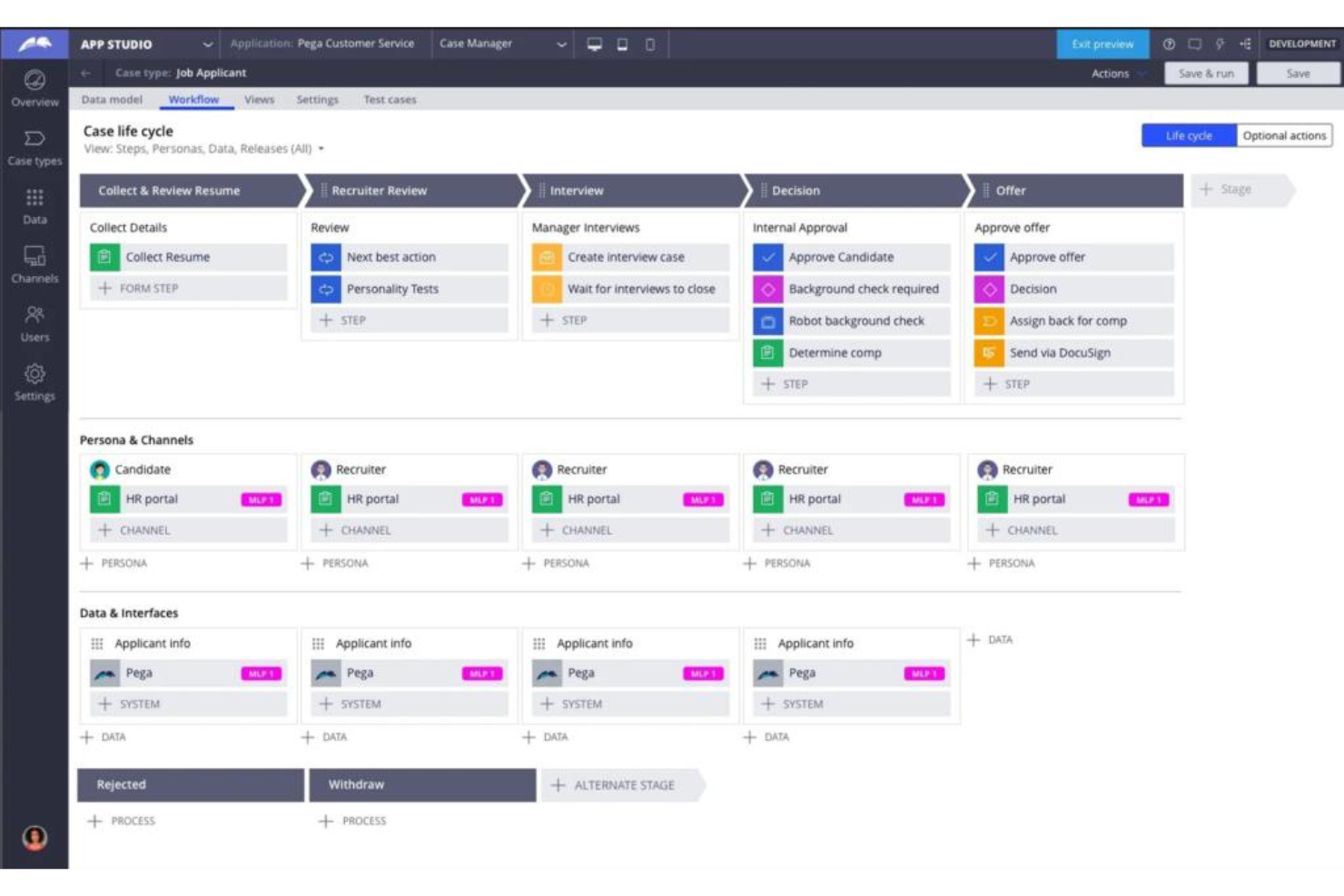
Pega Platform is a dynamic automation tool incorporating AI technology to refine organizational decision-making processes. Leveraging AI algorithms and data analytics facilitates smarter business decisions, aligning perfectly with its reputation as the best choice for AI-driven decision automation.
Why I Picked Pega Platform: In the process of selecting and judging various automation solutions, Pega Platform consistently emerged as a front-runner. Its AI capabilities are not just a peripheral addition but are deeply integrated, making the platform truly distinctive. When considering tools for AI-driven decision automation, Pega's in-depth AI capabilities and its reputation in the industry convinced me of its superiority.
Standout features & integrations
Pega Platform excels with its AI-driven automated workflows, allowing businesses to reduce human error and speed up decision-making processes. The platform is designed with a user-friendly interface, offering BPM and BPA features that streamline business process management.
Integration-wise, Pega offers connectors to major platforms such as Salesforce, Microsoft, and even has the ability to work with Zapier, allowing for a plethora of real-time data connections.
Pros and Cons
Pros:
- Rich integration ecosystem with key platforms and tools.
- Comprehensive BPM and BPA features to improve workflow management.
- Advanced AI algorithms integrated into the core of the platform.
Cons:
- Might be overkill for businesses looking for simpler automation solutions.
- A steeper learning curve might be expected given its vast feature set.
- Some businesses might find its extensive AI capabilities overwhelming initially.
Autres logiciels d'automatisation des processus informatiques
Voici d’autres logiciels d’automatisation des processus informatiques qui ne figurent pas dans ma sélection principale, mais qui méritent tout de même votre attention :
- Josys
For automating SaaS provisioning tasks
- NewgenONE Digital Transformation Platform
For end-to-end digital solutions
- Nintex Process Platform
For process mapping and visualization
- Advsyscon
For IT workload automation
- Zvolv
For rapid no-code application development
- Parallel
For real estate business automation
- NinjaOne
For endpoint management and patch compliance
- Rippling IT
For automating IT onboarding
- SuperOps
For MSP operational growth
- Kissflow
For simple workflow creation and management
- ProcessMaker
Good for BPMN 2.0 compliant workflows
- Checkbox
Good for automating legal processes
- TrackVia
Good for mobile workflow and data tracking
- AppMaster
Good for creating apps without technical expertise
- Superblocks
Good for blockchain and smart contract projects
- BRYTER
Good for no-code business application building
- Tonkean
Good for adaptive business operations
- Kofax TotalAgility
Good for multi-channel capture and process management
- SS&C Blue Prism Intelligent Automation Platform
Good for scalable robotic process automation
- FlowForma Process Automation
Good for digital process automation without coding
- Catalytic
Good for efficient process and data integration
- PMG Platform
Good for rapid digital transformation initiatives
- Nintex Automation On-Prem (formerly K2 Software)
Good for on-premises automation deployment
- AgilePoint NX
Good for model-driven application development
- BP Logix
Good for predictive process modeling and management.


Critères de sélection des logiciels d'automatisation des processus informatiques
Pour sélectionner les meilleurs logiciels d’automatisation des processus informatiques de cette liste, j’ai pris en compte les besoins et points de douleur courants des acheteurs, tels que les capacités d’intégration et la facilité d’utilisation. J’ai également appliqué le cadre suivant afin de garantir une évaluation structurée et équitable :
Fonctionnalité de base (25 % du score total)
Pour être retenue dans cette sélection, chaque solution devait répondre à ces usages fréquents :
- Automatisation des tâches répétitives
- Intégration aux systèmes existants
- Gestion des workflows
- Surveillance des processus
- Génération de rapports
Fonctionnalités distinctives supplémentaires (25 % du score total)
Pour affiner encore plus la sélection, j’ai également recherché des fonctionnalités originales, notamment :
- Automatisation basée sur l’IA
- Tableaux de bord personnalisables
- Analyses en temps réel
- Fonctionnalités de sécurité avancées
- Accessibilité via application mobile
Utilisabilité (10 % du score total)
Pour évaluer l’ergonomie de chaque système, j’ai pris en compte les éléments suivants :
- Conception d'une interface intuitive
- Navigation facile
- Courbe d'apprentissage minime
- Options de personnalisation
- Conception responsive
Intégration des nouveaux utilisateurs (10 % du score total)
Pour évaluer l'expérience d'intégration de chaque plateforme, j'ai pris en compte les éléments suivants :
- Disponibilité de vidéos de formation
- Visites interactives du produit
- Accès à des modèles
- Webinaires d’accompagnement
- Assistance par chatbot
Service client (10 % du score total)
Pour évaluer les services d'assistance de chaque fournisseur de logiciel, j'ai pris en compte les éléments suivants :
- Disponibilité de l’assistance 24/7
- Multiples canaux de support
- Délai de réponse
- Accès à une base de connaissances
- Assistance personnalisée
Rapport qualité-prix (10 % du score total)
Pour évaluer le rapport qualité-prix de chaque plateforme, j'ai pris en compte les éléments suivants :
- Tarification compétitive
- Fonctionnalités incluses dans le plan de base
- Flexibilité des tarifs
- Disponibilité d'une période d’essai gratuite
- Réductions pour formules annuelles
Avis clients (10 % du score total)
Pour obtenir une idée globale de la satisfaction des clients, j'ai pris en compte les éléments suivants lors de la lecture des avis :
- Notes de satisfaction des utilisateurs
- Problèmes fréquemment signalés
- Éloges pour certaines fonctionnalités
- Retour sur l'assistance client
- Recommandations des utilisateurs
Comment choisir un logiciel d’automatisation des processus IT
Il est facile de se laisser submerger par de longues listes de fonctionnalités et des grilles tarifaires complexes. Pour vous aider à rester concentré lors de votre démarche de sélection logicielle, voici une liste de critères à garder à l’esprit :
| Critère | À considérer |
|---|---|
| Évolutivité | Le logiciel peut-il évoluer avec votre entreprise ? Pensez à vos besoins futurs et si l’outil peut gérer l’augmentation des utilisateurs ou des processus sans coût supplémentaire. |
| Intégrations | Est-il compatible avec vos systèmes actuels ? Vérifiez la compatibilité avec les outils déjà en place et assurez-vous que les flux de données s’effectuent sans accroc entre les plateformes. |
| Personnalisation | Pouvez-vous l’adapter à vos workflows ? Recherchez la possibilité de personnaliser les paramètres, workflows ou tableaux de bord en fonction des processus de votre équipe. |
| Simplicité d’utilisation | Est-il convivial pour votre équipe ? Évaluez l’interface et la navigation. Une courbe d’apprentissage importante peut freiner l’adoption et impacter la productivité. |
| Mise en œuvre et intégration | Combien de temps pour être opérationnel ? Évaluez le temps et les ressources nécessaires à la mise en place. Recherchez des supports de formation et de l’accompagnement lors de l’intégration. |
| Coût | Correspond-il à votre budget ? Comparez les formules tarifaires, frais cachés et rapport qualité/prix. Pensez aux réductions pour les engagements longue durée. |
| Sécurité | Comment protège-t-il vos données ? Vérifiez les normes de chiffrement, les contrôles d’accès et la conformité aux réglementations en vigueur. |
| Support | Obtiendrez-vous de l’aide au besoin ? Vérifiez les horaires du support, les canaux disponibles et les délais de réponse. Un support fiable est essentiel pour résoudre rapidement les problèmes. |
Qu’est-ce qu’un logiciel d'automatisation des processus IT ?
Un logiciel d’automatisation des processus IT est un outil qui automatise les tâches et workflows IT répétitifs. Les professionnels de l’IT, tels que les administrateurs système et les responsables informatiques, utilisent généralement ces outils pour réduire le travail manuel et améliorer l’efficacité. Les fonctionnalités d’automatisation, d’intégration et de personnalisation facilitent la connexion des systèmes, l’adaptation des workflows et un gain de temps. Ces capacités fonctionnent en synergie avec les outils de reporting d’automatisation pour offrir une visibilité complète sur vos processus. Au final, ces outils simplifient les opérations et augmentent la productivité.
Fonctionnalités
Lorsque vous choisissez un logiciel d’automatisation des processus IT, portez une attention particulière aux caractéristiques clés suivantes :
- Capacités d'automatisation : Automatisez les tâches répétitives pour gagner du temps et réduire les erreurs.
- Compatibilité d'intégration : Connectez-vous aux systèmes existants pour permettre un flux de données fluide.
- Flux de travail personnalisables : Adaptez les processus aux besoins spécifiques et au fonctionnement de votre équipe.
- Interface conviviale : Garantissez une utilisation facile grâce à une conception intuitive pour une adoption rapide.
- Analyses en temps réel : Surveillez les performances et prenez des décisions éclairées grâce à des données actualisées.
- Mesures de sécurité : Protégez les informations sensibles avec un chiffrement robuste et des contrôles d'accès sécurisés.
- Options de montée en charge : Faites évoluer votre entreprise en gérant davantage d'utilisateurs et de processus.
- Ressources de formation : Accédez à des tutoriels et des guides pour faciliter l'intégration et l'apprentissage.
- Accessibilité mobile : Gérez les processus en déplacement grâce à la compatibilité avec les applications mobiles.
- Support client : Obtenez une assistance rapide via différents canaux en cas de besoin.
Avantages
La mise en œuvre d'un logiciel d'automatisation des processus IT procure de nombreux avantages pour votre équipe et votre entreprise. Voici quelques points à envisager :
- Efficacité accrue : Automatisez les tâches répétitives pour libérer du temps consacré à des missions plus stratégiques.
- Réduction des erreurs : Minimisez les erreurs manuelles grâce à des processus automatisés et cohérents.
- Collaboration améliorée : Intégrez les systèmes pour renforcer la communication et le partage de données entre les équipes.
- Scalabilité renforcée : Accompagnez la croissance de l'entreprise en gérant aisément de nouveaux utilisateurs et processus.
- Réduction des coûts : Diminuez les coûts opérationnels en limitant le besoin d'intervention manuelle.
- Prise de décision optimisée : Utilisez des analyses en temps réel pour accéder rapidement à des informations fondées sur les données.
- Plus grande flexibilité : Personnalisez les flux de travail pour répondre à votre activité et à ses évolutions spécifiques.
Coûts & Tarification
Le choix d'un logiciel d'automatisation des processus IT implique de bien comprendre les différents modèles et plans tarifaires disponibles. Les coûts varient selon les fonctionnalités, la taille de l'équipe, les options ajoutées et plus encore. Le tableau ci-dessous résume les formules courantes, leurs prix moyens et les fonctionnalités généralement incluses dans les solutions d'automatisation des processus IT :
Tableau comparatif des plans pour les logiciels d'automatisation des processus IT
| Type de plan | Prix moyen | Fonctionnalités courantes |
|---|---|---|
| Forfait gratuit | $0 | Automatisation basique, intégrations limitées et support communautaire. |
| Forfait personnel | $5-$25/user/month | Automatisation de tâches, intégrations standards et analyses de base. |
| Forfait business | $30-$75/user/month | Automatisation avancée, intégrations multiples, fonctions de reporting et support prioritaire. |
| Forfait entreprise | $100+/user/month | Automatisation sur mesure, intégrations illimitées, support dédié et sécurité avancée. |
FAQ sur les logiciels d'automatisation des processus informatiques
Voici des réponses à quelques questions courantes sur les logiciels d’automatisation des processus informatiques :
Comment évaluer les outils d'automatisation des processus informatiques ?
Commencez par examiner les flux de travail actuels de votre équipe et localisez les goulots d’étranglement. Ensuite, alignez ces besoins avec des fonctionnalités telles que les concepteurs de flux, les intégrations et la génération de rapports. Considérez la facilité d’utilisation, le prix et la compatibilité avec votre environnement technologique existant. Essayez toujours une version d’essai gratuite ou une démo si elle est disponible.
Quelle est la différence entre automatisation et orchestration informatique ?
L’automatisation traite des tâches ou scripts individuels, comme la réinitialisation d’un mot de passe. L’orchestration gère l’ensemble d’un flux de tâches à travers différents outils et systèmes. Si vos processus incluent plusieurs étapes ou outils, vous aurez probablement besoin des deux. Certaines plateformes proposent ces deux fonctions réunies.
Comment garantir la sécurité dans les workflows informatiques automatisés ?
Utilisez des outils intégrant une gestion des accès basée sur les rôles et une journalisation des audits. Veillez à sécuriser les étapes sensibles (comme l’installation de logiciels ou la gestion des identifiants). Votre équipe doit également relire régulièrement les scripts d’automatisation et suivre les politiques internes de sécurité. Choisir un outil certifié conforme peut aussi aider.
L’automatisation des processus IT fonctionne-t-elle entre différents départements ?
Oui, elle peut aussi soutenir des équipes hors IT—comme les RH, la finance ou le service client. De nombreux outils offrent la possibilité de créer des workflows pour l’onboarding, les validations ou le suivi des actifs. Il est important que votre solution soit adaptée à un usage transversal et s’intègre avec des systèmes non-IT.
Est-ce difficile de passer de processus manuels à des processus automatisés ?
Cela dépend de votre configuration, mais la plupart des équipes mettent quelques semaines pour effectuer la transition complète. Commencez petit, avec des tâches à fort impact, et utilisez des modèles ou des éditeurs glisser-déposer pour gagner du temps. Assurez-vous que chacun soit formé et sache comment adapter les workflows si besoin.
Et ensuite :
Si vous êtes en train de rechercher un logiciel d’automatisation des processus informatiques, contactez gratuitement un conseiller SoftwareSelect pour obtenir des recommandations personnalisées.
Vous remplissez un formulaire puis échangez rapidement sur vos besoins spécifiques. Vous recevrez ensuite une présélection de logiciels à examiner. Ils vous accompagneront également tout au long du processus d’achat, y compris lors de la négociation des tarifs.