
10 Meilleurs Logiciels Anti-Malware pour la Cybersécurité en 2026

10 Meilleur logiciel anti-malware - Liste courte
Here's my pick of the 10 best software from the 25 tools reviewed.


Dans le paysage numérique actuel, protéger vos systèmes contre les logiciels malveillants est essentiel. En tant qu'expert en technologie, vous connaissez les défis liés à la sécurisation des données face à des menaces en constante évolution. Un logiciel anti-malware peut vous aider à apaiser ces préoccupations en protégeant votre réseau et vos données.
J'ai testé et évalué de manière indépendante diverses solutions logicielles afin de vous offrir un point de vue impartial. Mon objectif est de vous aider à trouver les meilleurs outils pour votre équipe.
Dans cet article, je partage mes meilleurs choix de logiciels anti-malware. Vous découvrirez leurs fonctionnalités, avantages et ce qui distingue chaque solution. Assurons-nous que vos systèmes restent protégés et votre tranquillité d'esprit préservée.
Why Trust Our Software Reviews
Résumé des meilleurs logiciels anti-malware
| Tool | Best For | Trial Info | Price | ||
|---|---|---|---|---|---|
| 1 | Best for global device fleet defense | Free demo available | from $5/person/month | Website | |
| 2 | Best for detection in software dependencies | Free plan available + free demo | From $350/month | Website | |
| 3 | Best for next-gen antivirus capabilities | Free trial + free demo available | Pricing upon request | Website | |
| 4 | Best for known virus detection rates | Free demo available | From £14.99/year | Website | |
| 5 | Best for home user defense | Not available | From $4/user/month (billed annually) | Website | |
| 6 | Best for web filtering services | 14-day free trial + free demo | Pricing upon request | Website | |
| 7 | Best for widespread brand reliability | 30-day free trial | From $4.99/user/month (billed annually) | Website | |
| 8 | Best for enterprise-grade solutions | 30-day free trial + free demo available | From $39.95/device (billed annually) | Website | |
| 9 | Best for managed threat hunting | Not available | From $15/user/month (billed annually) | Website | |
| 10 | Best for multi-device coverage | 30-day free trial | From $49.99/1 user - 5 devices/yearly | Website |

-

Site24x7
Visit WebsiteThis is an aggregated rating for this tool including ratings from Crozdesk users and ratings from other sites.4.6 -
GitHub Actions
Visit WebsiteThis is an aggregated rating for this tool including ratings from Crozdesk users and ratings from other sites.4.8 -
Docker
Visit WebsiteThis is an aggregated rating for this tool including ratings from Crozdesk users and ratings from other sites.4.6





Avis sur les meilleurs logiciels anti-malware


Deel offers an IT management platform that gives your global team endpoint protection right from when their devices arrive. It protects laptops, tablets, and smartphones against malware, ransomware, spyware, and more.
Why I Picked Deel: I picked Deel because it includes lightweight AI‑led threat detection that runs silently, using less than 1% of CPU. This means you get protection without slowing your team down or interrupting their work. You don’t need to install complex controllers or mess with updates—just deploy a small sensor and everything works automatically.
I also like how Deel extends beyond just spotting malware by giving you automated, real‑time containment of threats. That lets your team skip manual response steps and focus only on the critical alerts. Plus, it works across a wide range of operating systems—from Windows and macOS to iOS, Android, Linux, and ChromeOS—so your global fleet stays protected wherever it’s used.
Standout Features & Integrations:
Other features include continuous cross‑platform defense that fills security gaps across mixed device fleets, global deployment with zero‑touch setup and automated enrollment, and built‑in integration with identity‑linked workflows so devices are protected and access‑controlled from day one. Some integrations include Microsoft Entra, Google Workspace, Okta, JumpCloud, Apple Business Manager, Microsoft Autopilot, Jamf, Kandji, and Intune.
Pros and Cons
Pros:
- Deploys protection automatically with device delivery
- No pop-ups, reboots, or local maintenance required
- Blocks malware, ransomware, and spyware in real-time
Cons:
- No mention of custom malware detection rules
- Limited visibility into advanced malware response configurations

Aikido Security is a comprehensive application security platform that offers full coverage from code to cloud, integrating features like vulnerability management, compliance monitoring, and secrets detection.
Why I Picked Aikido Security: It offers malware detection in software dependencies, which is vital as modern software increasingly relies on external components that may harbor malware. By utilizing a threat feed, Aikido can detect and counteract malware threats even before they are widely known, allowing for quick action against potential vulnerabilities.
Aikido Security also offers an array of scanning tools that enhance security measures. These include static code analysis, secrets detection, infrastructure as code scanning, and dynamic web application testing to identify vulnerabilities. The platform even supports scanning of open-source dependencies and checks for outdated software.
Standout Features & Integrations:
Aikido Security's in-app firewall stands out by offering automatic blocking of critical attacks and API rate limiting, providing robust protection against immediate threats. Additionally, its custom rules feature gives you the flexibility to tailor alerts, ensuring that critical issues are prioritized. The platform integrates with Amazon Web Services (AWS), Google Cloud, Microsoft Azure Cloud, Drata, Vanta, AWS Elastic Container Registry, Docker Hub, Jira, Asana, and GitHub.
Pros and Cons
Pros:
- Scalable for growing teams
- Offers actionable insights
- Code-to-cloud security
Cons:
- No endpoint security or intrusion detection capabilities
- Ignores vulnerabilities if no fix is available
New Product Updates from Aikido Security

Aikido Security Adds Continuous Pentesting, VM Reachability, and IDE Scanning
Aikido Security introduces Aikido Infinite continuous pentesting, cloud VM reachability diagrams, and full workspace scanning across IDEs. These updates help teams identify exploitable vulnerabilities faster and strengthen security checks during development. For more information, visit Aikido Security’s official site.

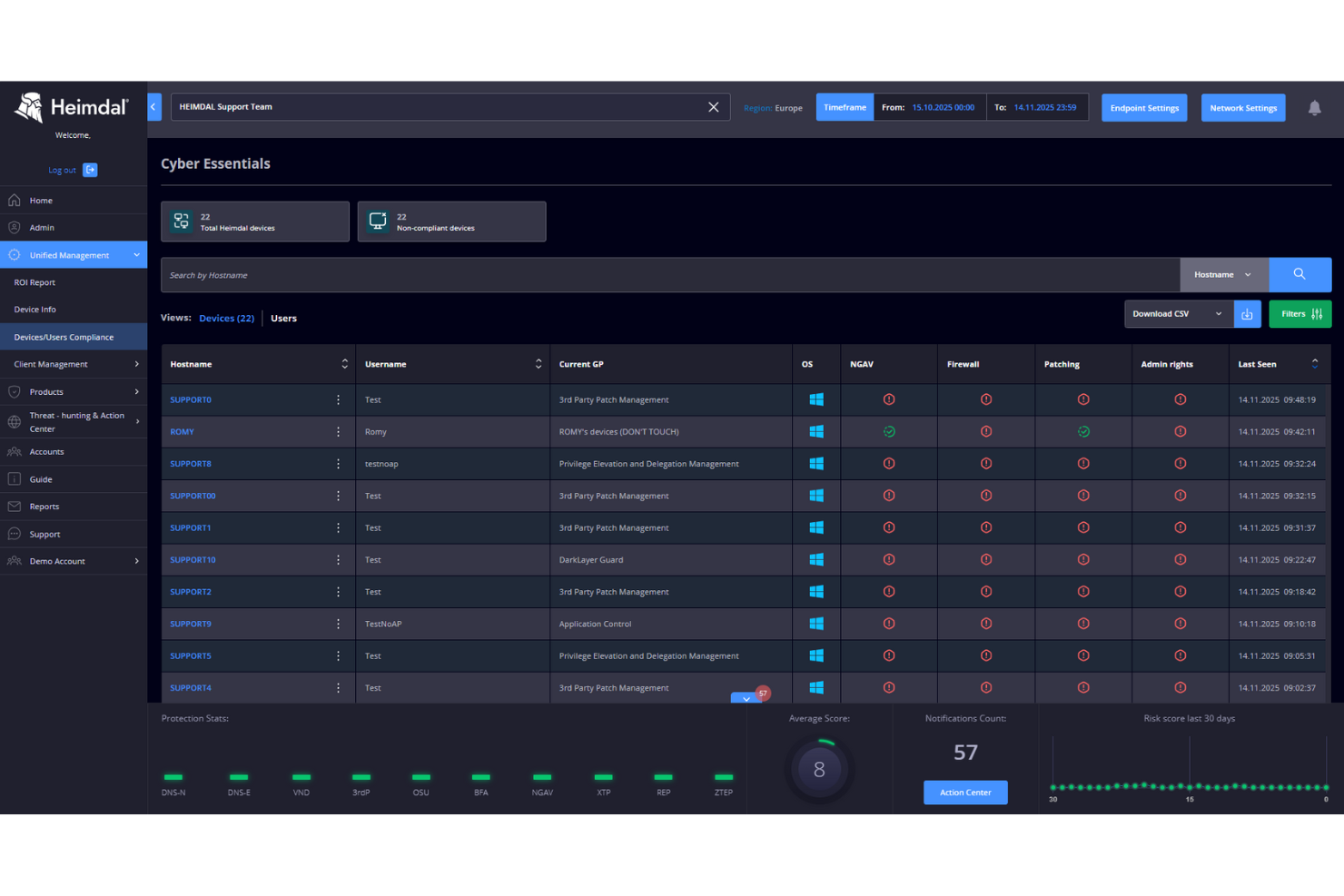
Heimdal serves as a versatile cybersecurity platform that offers robust solutions for businesses seeking to safeguard their digital environments. It appeals to industries like healthcare, education, and government by addressing common security challenges with its comprehensive suite of features. Whether you're looking to protect sensitive data or manage vulnerabilities, Heimdal provides tools that focus on threat detection and prevention, ensuring your operations remain secure and compliant with global standards.
Why I Picked Heimdal
I picked Heimdal because of its impressive focus on next-gen antivirus capabilities, which include real-time cloud scanning and sandbox inspection to detect and neutralize threats before they infiltrate your systems. These features are complemented by DNS security that adds an extra layer of protection against phishing attacks. For those dealing with ransomware, Heimdal's specialized ransomware encryption protection stands out as a vital tool to prevent unauthorized data encryption. These targeted features make Heimdal a compelling choice for anyone serious about comprehensive malware protection.
Heimdal Key Features
In addition to its antivirus and DNS security features, I also found the following noteworthy:
- Threat Hunting: This feature allows your team to proactively search for security threats across your network, ensuring timely intervention and mitigation.
- Vulnerability Management: With this tool, you can identify and address security weaknesses in your systems before they become exploitable.
- Unified Endpoint Management: Manage all your devices from a single platform, simplifying the process of deploying security updates and policies.
- 24/7 SOC Support: Heimdal provides continuous monitoring and rapid response services to help you stay ahead of potential threats.
Heimdal Integrations
Integrations include ConnectWise PSA, Autotask PSA, HaloPSA, and Datto.
Pros and Cons
Pros:
- Detailed asset and license visibility
- Strong vulnerability and threat detection
- Automates patching across endpoints
Cons:
- Interface requires onboarding time
- No native integrations available


Kaspersky, a stalwart in the cybersecurity industry, offers top-tier security software designed to thwart a plethora of digital threats. With a stellar reputation for its impressive virus detection rates, Kaspersky ensures that users are not just protected, but are benefiting from one of the best detection rates in the market.
Why I Picked Kaspersky: When I was determining the right fit for this list, Kaspersky consistently emerged as a front-runner. My decision to choose Kaspersky was primarily based on its unparalleled virus detection capabilities, which stand out even when compared to other leading brands.
This unmatched proficiency is why I genuinely believe Kaspersky is "best for known virus detection rates."
Standout Features & Integrations:
Kaspersky is not just about virus detection; its total protection suite ensures users are shielded from scams, trackers, and other malicious entities. The software’s real-time protection means threats are intercepted before they cause harm. Additionally, Kaspersky's integrations with popular operating systems and browsers amplify its defense mechanisms, ensuring a safer browsing experience.
Pros and Cons
Pros:
- Broad compatibility with operating systems and browsers
- Comprehensive total protection against scams and trackers
- Superior known virus detection rates
Cons:
- Installation process can be lengthy on older systems
- Occasional false positives might occur
- The user interface might seem complex to some users


Panda Security serves as a robust armor in the realm of cybersecurity, tailored especially for home users. Its dedication to providing a safe environment for every type of user at home underscores its position as "best for home user defense".
Why I Picked Panda Security: When judging and comparing various tools, Panda Security caught my eye, prompting me to delve deeper into its offerings. What I determined was a software that exhibits mastery in home defense, with unique optimization techniques and integrated parental controls.
This perspective solidified my opinion that Panda Security stands out as the best choice for protecting home users against threats like adware and other unwanted software.
Standout Features & Integrations:
Panda Security's strengths lie in its optimization tools that ensure smooth device performance alongside protection. Its parental controls are noteworthy, giving parents peace of mind by ensuring a safe online experience for their children. Integration-wise, Panda Security collaborates with popular browsers, providing consistent adware defense regardless of browsing preferences.
Pros and Cons
Pros:
- Strong defense against adware and other potentially harmful software
- Comprehensive parental controls for user-specific protection
- Effective optimization ensuring device performance isn't compromised
Cons:
- Limited customer support options outside of business hours
- Might require occasional manual updates for best performance
- Users might find the interface a bit complex initially


TitanHQ delivers robust web filtering services, designed primarily to protect users from malicious web content. By ensuring users access only secure web resources, it mitigates risks associated with identity theft, malicious files, and harmful software.
Why I Picked TitanHQ: In the landscape of security tools, choosing the right fit often involves detailed comparison and judgment. TitanHQ caught my attention due to its advanced web filtering mechanisms. I determined that its capabilities shield against identity theft and malicious software uniquely position it as the "best for web filtering services."
Standout Features & Integrations:
TitanHQ stands out with its real-time web filtering which prevents access to harmful domains and malicious files. This tool also offers detailed reporting features, providing insights into user behavior and potential threats. For integrations, TitanHQ connects with popular IT management tools and cybersecurity platforms, enhancing its utility in diverse IT environments.
Pros and Cons
Pros:
- Effective integrations with IT management platforms.
- Detailed threat reporting enhances security awareness.
- Comprehensive real-time web filtering.
Cons:
- Some users might find default filter settings too strict.
- Not all integrations might be relevant for smaller businesses.
- Learning curve for some advanced features.


McAfee has established itself as a renowned security software company, offering a suite of tools tailored to protect computers and mobile devices from potential threats. Given its long-standing reputation and presence in the market, it is often chosen by individuals and businesses looking for widespread brand reliability in the cybersecurity sector.
Why I Picked McAfee: In determining which tools to highlight, McAfee's widespread recognition and trustworthiness in the cybersecurity landscape became evident. My choice of McAfee was influenced by both its history of consistent performance and the fact that many users across the globe rely on it for their digital protection.
It's this broad-based trust and its commitment to evolving with technological trends that make it "best for widespread brand reliability."
Standout Features & Integrations:
McAfee provides a comprehensive array of features, including robust web protection, VPN services, and specialized safeguards for webcam privacy. Their software is optimized for various platforms, ensuring laptops, iPhones, and other iOS mobile devices are shielded from potential threats.
Furthermore, McAfee integrates with many popular platforms and applications, providing a holistic security approach for users.
Pros and Cons
Pros:
- Trusted by a large global user base, affirming its reliability.
- Compatibility with a wide range of devices, including laptops and iOS mobile devices.
- Comprehensive web protection and vpn services catered to diverse user needs.
Cons:
- Occasional false positives in threat detection.
- Performance can occasionally impact device speed.
- Some users may find the interface not as intuitive as competitors.


Trend Micro stands as a titan in the cybersecurity landscape, specializing in delivering enterprise-grade solutions. It is meticulously designed to safeguard extensive networks, making it the prime choice for organizations in search of enterprise-level security.
Why I Picked Trend Micro: In the process of selecting and comparing various security solutions, Trend Micro resonated strongly with my criteria for robust enterprise-grade protection. I determined that its prowess in handling intricate corporate networks and its expansive antivirus protection sets it apart from other providers.
This distinct capability made it evident to me that Trend Micro truly fits the bill as "best for enterprise-grade solutions."
Standout Features & Integrations:
One of Trend Micro's defining features is its robust antivirus protection that actively shields against threats while ensuring minimal pop-ups and disruptions. Moreover, its smart integration with various platforms, including Microsoft products, amplifies its efficacy in an enterprise setting.
Notably, its collaboration with other security providers strengthens its defense parameters, enabling a multi-layered protection approach.
Pros and Cons
Pros:
- Collaborations with other leading security providers
- Tight-knit integration with Microsoft software
- Extensive antivirus protection, minimizing vulnerabilities
Cons:
- The product range can be overwhelming, necessitating clear understanding for selection
- Deployment across very large networks could be time-consuming
- The interface might appear intricate for novice users


Falcon Complete provides an end-to-end solution that specializes in managed threat hunting, ensuring systems remain free from malicious attacks. By continuously monitoring and proactively countering threats, Falcon Complete positions itself as a top-tier option when managed threat hunting is of paramount concern.
Why I Picked Falcon Complete: When selecting the most effective tools in the realm of threat hunting, Falcon Complete caught my attention due to its comprehensive security features and its specialization in detecting various types of malware. The decision to label it as "best for managed threat hunting" was influenced by its track record of timely threat detection and mitigation. In my opinion, its effectiveness in providing robust virus protection combined with its user-friendly interface makes it stand out in its category.
Standout Features & Integrations:
Falcon Complete boasts an extensive range of security features that span from real-time monitoring to advanced threat detection algorithms. Its capabilities to detect an array of malware types sets it apart from the competition.
In terms of integrations, Falcon Complete collaborates with several major security platforms and IT management tools, creating an interconnected security ecosystem for its users.
Pros and Cons
Pros:
- User-friendly interface facilitates ease of use.
- Ability to detect a wide spectrum of malware types.
- Comprehensive range of security features.
Cons:
- Limited customization options in predefined settings.
- High demand for resources might impact system performance.
- Might require some initial training for optimal utilization.


Bitdefender Total Security is a comprehensive cybersecurity solution that caters to a spectrum of devices, including PCs, Macs, smartphones, and tablets. Recognized for its expansive multi-device coverage, Bitdefender ensures that all your digital endpoints, regardless of the platform, remain guarded against threats.
Why I Picked Bitdefender Total Security: In my journey of comparing and selecting the top security tools, Bitdefender Total Security constantly garnered my attention. I chose this software not just for its name but because of its commitment to providing protection across multiple devices. Its versatility and vast coverage make it the tool I firmly believe is "best for multi-device coverage."
Standout Features & Integrations:
Beyond its robust protection capabilities, Bitdefender Total Security comes with a virtual private network (VPN) that enhances users' privacy while they browse. The software is equipped to monitor Wi-Fi connections for vulnerabilities, ensuring a secure online experience. Furthermore, it integrates well with popular operating systems, offering users additional features tailored for each platform.
Pros and Cons
Pros:
- Effective Wi-Fi vulnerability scanning
- In-built virtual private network for added privacy
- Comprehensive protection for multiple devices
Cons:
- Occasional lag in real-time protection updates
- Some users might find the array of features overwhelming
- Can be resource-intensive on older devices
Autres logiciels anti-malware
Vous trouverez ci-dessous une liste supplémentaire de logiciels anti-malware que j’ai présélectionnés, mais qui n’ont pas atteint le top 10. Ils valent tout de même le détour.
- Vade
For ransomware and malware blocking
- Emsisoft
For MSP-integrated security
- F-Secure
For internet security suite
- TotalAV
For comprehensive device protection
- ManageEngine Endpoint Central
For centralized endpoint management
- Malwarebytes
Good for advanced malware detection
- Avira
Good for cloud-based scanning efficiency
- Norton
Good for comprehensive digital life protection
- ESET
Good for multilayered malware defense
- Sophos
Good for centralized threat management
- Pure Storage
Good for high-speed data protection
- Webroot
Good for lightweight system performance
- Vipre
Good for email threat blocking
- Comodo
Good for secure auto-containment features
- Windows Defender
Good for integrated Windows security


Avis connexes
Critères de sélection des logiciels anti-malware
Pour sélectionner les meilleurs logiciels anti-malware à inclure dans cette liste, j’ai pris en compte les besoins courants des acheteurs et les points douloureux tels que la protection contre les menaces évolutives et la facilité d’intégration. J’ai également utilisé le cadre suivant afin de structurer et d’objectiver mon évaluation :
Fonctionnalité de base (25 % du score total)
Pour être incluses dans cette liste, chaque solution devait couvrir ces cas d’utilisation :
- Détecter et supprimer les logiciels malveillants
- Fournir une protection en temps réel
- Mettre à jour automatiquement les définitions de virus
- Effectuer des analyses planifiées
- Offrir des options de mise en quarantaine
Fonctionnalités supplémentaires distinctives (25 % du score total)
Pour affiner la sélection, j’ai également recherché des fonctionnalités uniques telles que :
- Détection avancée des menaces
- Protection multi-niveaux
- Analyse basée sur le cloud
- Analyse comportementale
- Intégration avec d’autres outils de sécurité
Utilisabilité (10 % du score total)
Pour apprécier la facilité d’utilisation de chaque système, j’ai considéré :
- Interface utilisateur intuitive
- Navigation simple
- Paramètres personnalisables
- Fonctionnalités de rapports claires
- Impact minimal sur le système
Intégration et prise en main (10 % du score total)
Pour évaluer l’expérience d’intégration de chaque plateforme, j’ai pris en compte les éléments suivants :
- Disponibilité de vidéos de formation
- Visites produits interactives
- Accès à des webinaires
- Manuels d'utilisation complets
- Support chat réactif
Support client (10 % du score total)
Pour évaluer les services d’assistance client de chaque éditeur de logiciel, j’ai pris en compte les éléments suivants :
- Disponibilité de l’assistance 24/7
- Options d’assistance multicanal
- Délais de réponse rapides
- Personnel d’assistance compétent
- Accès aux forums communautaires
Rapport qualité-prix (10 % du score total)
Pour évaluer le rapport qualité-prix de chaque plateforme, j’ai pris en compte les éléments suivants :
- Tarification compétitive
- Offres d’abonnements flexibles
- Disponibilité d’une version d’essai gratuite
- Réductions pour achats en volume
- Structure tarifaire transparente
Avis des clients (10 % du score total)
Pour avoir une idée de la satisfaction globale des clients, j’ai pris en compte les critères suivants lors de la lecture des avis :
- Notes de satisfaction globale
- Problèmes fréquemment signalés
- Retours sur l’efficacité des fonctionnalités
- Retour d’expérience sur l’assistance
- Commentaires sur le rapport qualité-prix
Comment choisir un logiciel anti-malware
Il est facile de se perdre dans de longues listes de fonctionnalités et des structures tarifaires complexes. Pour vous aider à rester concentré lors de votre processus de sélection, voici une liste de points à garder à l’esprit :
| Facteur | À considérer |
|---|---|
| Scalabilité | Le logiciel accompagnera-t-il la croissance de votre équipe ? Anticipez vos besoins futurs et veillez à ce que le logiciel puisse prendre en charge davantage de données et d’utilisateurs sans perte de performance. |
| Intégrations | Est-il compatible avec vos outils actuels ? Vérifiez la compatibilité avec vos systèmes en place et toute application tierce sur laquelle vous comptez. |
| Personnalisation | Pouvez-vous l’adapter à vos besoins ? Privilégiez des outils offrant des réglages et options pour ajuster le logiciel à vos flux de travail et politiques de sécurité. |
| Facilité d’utilisation | Est-il simple à prendre en main ? L’interface doit être intuitive pour permettre à votre équipe de l’utiliser sans formation poussée. |
| Implémentation et intégration | Combien de temps vous faudra-t-il pour le déployer ? Évaluez le temps et les ressources nécessaires à la mise en place et à la formation de vos collaborateurs. |
| Coût | Est-il dans votre budget ? Comparez les plans tarifaires, considérez le coût total de possession, et repérez d’éventuels frais cachés. |
| Mesures de sécurité | Les protections sont-elles suffisantes ? Vérifiez que le logiciel offre une défense efficace contre les menaces et respecte les standards de sécurité. |
| Disponibilité de l’assistance | Pouvez-vous obtenir de l’aide en cas de besoin ? Vérifiez si le fournisseur propose une assistance 24/7 et plusieurs canaux (téléphone, email, chat). |
Qu’est-ce qu’un logiciel anti-malware ?
Un logiciel anti-malware est un outil conçu pour détecter, prévenir et supprimer les logiciels malveillants des ordinateurs et réseaux. Les professionnels IT, les experts en cybersécurité et les équipes techniques utilisent généralement ces outils pour protéger les données et assurer l’intégrité des systèmes. L’analyse en temps réel, la détection des menaces et les mises à jour automatiques contribuent à la protection contre les menaces émergentes et garantissent la sécurité des données. Globalement, ces outils apportent une protection essentielle pour maintenir la sûreté et la sécurité des systèmes.
Fonctionnalités
Lorsque vous choisissez un logiciel anti-malware, portez une attention particulière aux fonctionnalités clés suivantes :
- Protection en temps réel : Analyse en continu de votre système à la recherche de menaces, assurant une réaction immédiate contre les logiciels malveillants.
- Mises à jour automatiques : Maintient le logiciel à jour avec les dernières définitions de virus, assurant une protection contre les nouvelles menaces.
- Détection des menaces : Identifie et vous alerte des activités potentielles de logiciels malveillants au sein de votre réseau.
- Analyses planifiées : Vous permet de programmer des analyses régulières pour garantir la sécurité continue du système sans intervention manuelle.
- Options de quarantaine : Isole les menaces détectées pour les empêcher de nuire jusqu’à leur suppression sécurisée.
- Analyse comportementale : Surveille le comportement des logiciels afin de détecter et bloquer les activités suspectes pouvant indiquer la présence d’un logiciel malveillant.
- Analyse dans le cloud : Utilise les ressources du cloud pour effectuer les analyses, réduisant la charge sur votre système local.
- Capacités d’intégration : Fonctionne de façon fluide avec les outils et plateformes existants pour une protection complète.
- Interface conviviale : Assure une utilisation facile grâce à une navigation intuitive et à des rapports clairs.
- Protection multicouche : Propose différents niveaux de défense pour se prémunir contre divers types de logiciels malveillants.
Avantages
L’implémentation d’un logiciel anti-malware offre plusieurs avantages pour votre équipe et votre entreprise. Voici ceux auxquels vous pouvez vous attendre :
- Sécurité renforcée : Protège vos systèmes contre les menaces de logiciels malveillants, assurant l’intégrité des données et la sécurité des informations sensibles.
- Réduction des interruptions : Minimise les perturbations en détectant et supprimant rapidement les menaces, permettant à votre équipe de maintenir sa productivité.
- Sérénité : Offre une tranquillité d’esprit grâce à la protection en temps réel et aux mises à jour automatiques, maintenant votre défense contre les menaces évolutives.
- Réduction des coûts : Prévient les violations de données coûteuses et les réparations système en bloquant les logiciels malveillants avant qu’ils ne causent des dégâts.
- Conformité améliorée : Aide à respecter les normes de sécurité du secteur grâce à la mise en place de mesures de protection robustes et des mises à jour régulières.
- Efficacité des utilisateurs : Simplifie la gestion de la sécurité à l’aide d’interfaces conviviales et d’outils faciles à naviguer.
- Scalabilité : Accompagne l’évolution de votre entreprise, en s’adaptant à l’augmentation des données et des utilisateurs sans compromettre la protection.
Coûts & Tarification
Choisir un logiciel anti-malware nécessite de comprendre les différents modèles de tarification et les formules disponibles. Les coûts varient selon les fonctionnalités, la taille de l’équipe, les modules complémentaires, et plus encore. Le tableau ci-dessous résume les formules courantes, leurs prix moyens et les fonctionnalités typiques incluses dans les solutions anti-malware :
Tableau comparatif des formules pour les logiciels anti-malware
| Type de formule | Prix moyen | Fonctionnalités communes |
|---|---|---|
| Formule gratuite | $0 | Détection basique des logiciels malveillants, mises à jour limitées et analyses manuelles. |
| Formule personnelle | $5-$25/utilisateur/mois | Protection en temps réel, mises à jour automatiques et analyses planifiées. |
| Formule entreprise | $30-$60/utilisateur/mois | Détection avancée des menaces, analyse dans le cloud et capacités d’intégration. |
| Formule corporate | $70-$100/utilisateur/mois | Protection multicouche, analyse comportementale et support dédié. |
Questions les plus fréquentes concernant les logiciels anti-malveillants
Ai-je besoin à la fois d’un antivirus et d’un logiciel anti-malveillant ?
Bien que les antivirus et les logiciels anti-malveillants aient des fonctions qui se chevauchent, utiliser les deux peut offrir une protection renforcée. Les antivirus se concentrent sur la prévention des menaces connues, tandis que les logiciels anti-malveillants ciblent un éventail plus large de programmes malveillants. Ensemble, ils offrent une sécurité plus complète.
Un logiciel anti-malveillant peut-il tout détecter ?
Aucun outil anti-malveillant ne peut garantir la détection de 100 % des menaces. Il est important d’adopter une approche de sécurité multi-couches, de maintenir vos logiciels à jour et d’éviter les comportements à risque comme le téléchargement à partir de sources non fiables. De cette manière, vous augmentez votre protection contre les logiciels malveillants non détectés.
Quel type de logiciel malveillant est le plus difficile à détecter ?
Les logiciels malveillants sans fichier (fileless) et les rootkits sont parmi les plus difficiles à détecter. Ils fonctionnent en mémoire ou se dissimulent dans des activités au niveau du système, contournant souvent les logiciels anti-malveillants traditionnels. Utiliser des outils avancés dotés d’une analyse comportementale peut aider à identifier ces menaces.
À quelle fréquence dois-je mettre à jour mon logiciel anti-malveillant ?
Vous devriez mettre à jour votre logiciel anti-malveillant aussi souvent que possible. Les mises à jour automatiques sont idéales pour garantir que vous disposez des dernières définitions de virus. Des mises à jour régulières contribuent à maintenir une protection contre les menaces nouvelles et évolutives qui pourraient compromettre votre système.
Et ensuitea0:
Si vous êtes en train de comparer des logiciels anti-malveillants, contactez gratuitement un conseiller SoftwareSelect pour des recommandations personnalisées.
Vous remplissez un formulaire et discutez brièvement pour préciser vos besoins. Ensuite, vous recevez une liste restreinte de logiciels à examiner. Ils vous accompagnent même tout au long du processus d’achat, y compris lors des négociations tarifaires.