

Las 10 mejores soluciones de seguridad DNS analizadas en 2026

Selección de las mejores soluciones de seguridad DNS


Las mejores soluciones de seguridad del sistema de nombres de dominio (DNS) ayudan a los equipos a detectar y bloquear dominios maliciosos, detener los intentos de extracción de datos y aplicar políticas de navegación segura en todos los dispositivos y redes. Proporcionan a las organizaciones un mayor control sobre el tráfico saliente, al tiempo que reducen el riesgo de phishing, infecciones de malware y llamadas de retorno de comando y control.
Muchos equipos empiezan a buscar herramientas de seguridad DNS cuando tienen dificultades con puntos ciegos en la visibilidad de la red, una aplicación incoherente de las políticas en entornos híbridos o fatiga por alertas causada por falsos positivos. Estos desafíos suelen dificultar la identificación de amenazas reales antes de que causen daños.
He trabajado con equipos de TI y seguridad que evaluaban herramientas de protección DNS en redes empresariales, realizando pruebas de precisión de detección, facilidad de implementación e integración con firewalls y plataformas SIEM existentes.
En esta guía, descubrirás qué herramientas de seguridad DNS ofrecen información útil, un control más sólido de la red y la visibilidad necesaria para adelantarte a las amenazas en evolución.
Por qué confiar en nuestras recomendaciones de software
Nuestro equipo lleva probando y evaluando software desde 2012. Como líderes tecnológicos, sabemos lo difícil —y lo importante— que es elegir el software adecuado.
Para esta guía, evaluamos las herramientas mediante pruebas prácticas e investigación independiente, puntuando las herramientas según nuestros criterios de selección.
Nuestras reseñas reflejan nuestro criterio editorial humano, no un discurso de ventas.
Revisores expertos:
Resumen de las mejores soluciones de seguridad DNS
Esta tabla comparativa resume los detalles de precios de mi selección de las mejores soluciones de seguridad DNS para ayudarte a encontrar la más adecuada para tu presupuesto y las necesidades de tu empresa.
| Tool | Best For | Trial Info | Price | ||
|---|---|---|---|---|---|
| 1 | Ideal para bloquear accesos no autorizados | Prueba gratuita + demostración gratuita disponible | Precio bajo consulta | Website | |
| 2 | Ideal para detección de amenazas en tiempo real | Prueba gratuita de 14 días + demo disponible | $1/usuario/mes (facturado anualmente) | Website | |
| 3 | Ideal para seguridad basada en la nube | Prueba gratuita + demo disponible | $2.20/user/month (facturado anualmente) | Website | |
| 4 | La mejor opción para necesidades de seguridad empresarial | Prueba gratuita de 30 días + demo gratuita disponible | $20/usuario/mes (mínimo 10 usuarios) | Website | |
| 5 | Ideal para protección global contra amenazas | Plan gratuito disponible | $20/user/month (min 5 seats) | Website | |
| 6 | Ideal para entornos híbridos en la nube | Not available | Precios disponibles bajo solicitud | Website | |
| 7 | Mejor para pequeñas y medianas empresas | Demo gratuita disponible | $20/user/month | Website | |
| 8 | Ideal para la automatización de redes | Demostración gratuita disponible | $10/user/month (mínimo 10 usuarios) | Website | |
| 9 | Ideal para filtrado personalizable | Prueba gratuita de 14 días + demo disponible | $40/network/month | Website | |
| 10 | La mejor para servicios de alta disponibilidad | Not available | $500/mes (facturado anualmente) | Website |
Opiniones sobre las mejores soluciones de seguridad DNS
A continuación, encontrarás mis resúmenes detallados de las mejores soluciones de seguridad DNS que llegaron a mi selección. Mis análisis ofrecen una visión detallada de las funciones principales, ventajas & desventajas, integraciones y casos de uso ideales de cada herramienta para ayudarte a encontrar la más adecuada para ti.

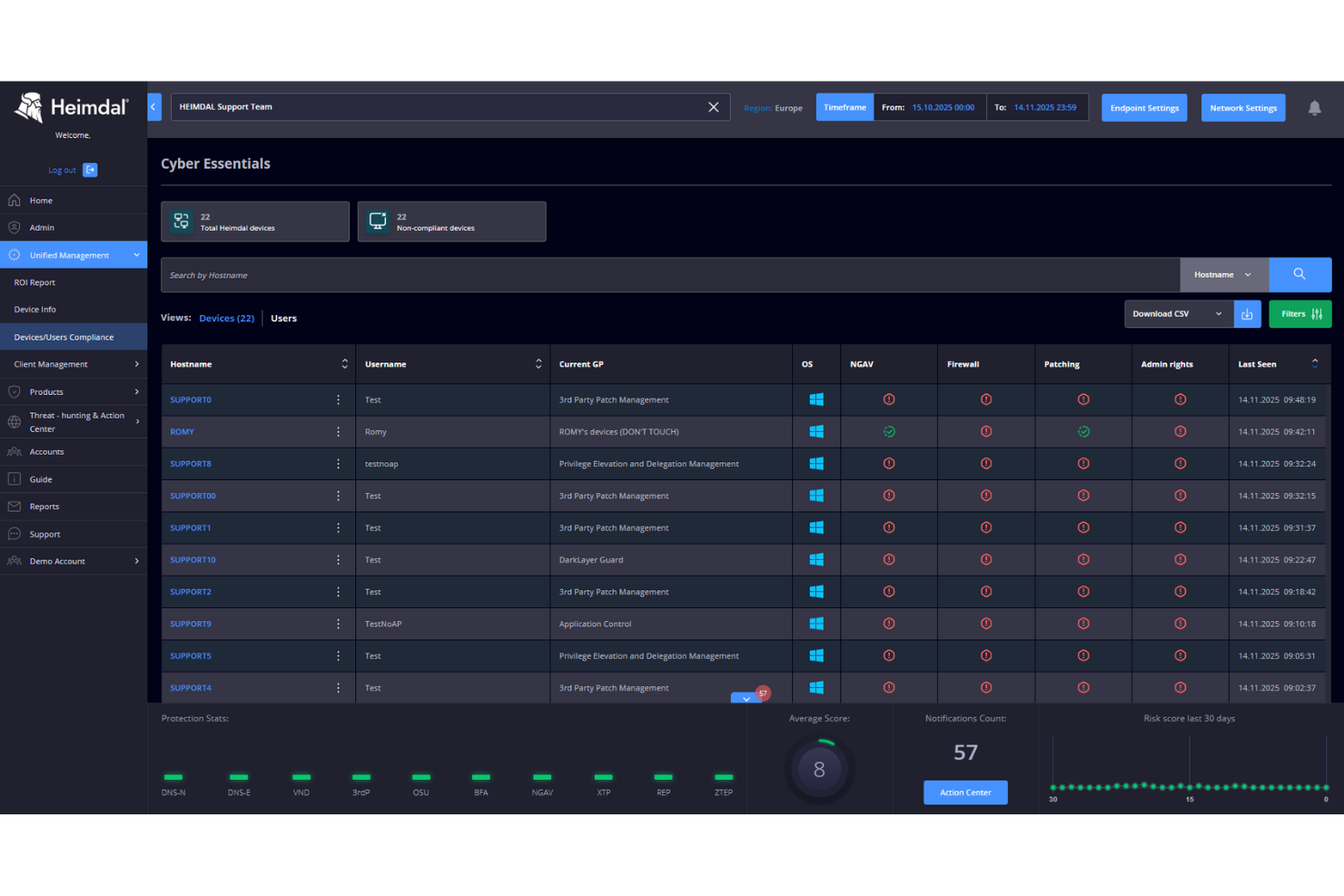
Heimdal destaca por bloquear el acceso no autorizado directamente en la capa DNS, que es exactamente lo que busco cuando se trata de cerrar todos los puntos de entrada. Lo elijo para organizaciones que necesitan filtrado granular de tráfico, detección de amenazas en tiempo real y respuesta automatizada para detener intentos de malware, phishing y exfiltración de datos antes de que lleguen a los endpoints.
Me gusta cómo ofrece controles de políticas estrictos, registros de auditoría claros y automatización inteligente, lo que lo convierte en una excelente opción de seguridad DNS cuando detener conexiones no autorizadas es la máxima prioridad.
Lo mejor de Heimdal para
- Organizaciones que imponen controles estrictos de acceso basados en DNS
- Equipos de TI que bloquean intentos de malware, phishing y exfiltración de datos
Heimdal no es ideal para
- Pequeñas empresas sin un equipo de TI dedicado
- Equipos que buscan funciones amplias de seguridad a nivel de endpoint en dispositivos
Lo que distingue a Heimdal
Heimdal destaca porque adopta un enfoque centrado en el DNS para detener amenazas antes de que lleguen a tus endpoints. A diferencia de herramientas como Cisco Umbrella, que se enfocan en una cobertura de servicio más amplia, Heimdal espera que impulsen la política de seguridad controlando estrictamente el acceso a la red en la primera capa. En la práctica, veo que esto funciona bien para organizaciones que quieren control directo sobre lo que entra o sale a nivel DNS, sin lidiar con complejidad a nivel de dispositivo.
Compromisos con Heimdal
Heimdal está optimizado para filtrado DNS basado en políticas, pero como resultado, se pierde visibilidad más profunda y opciones de respuesta específicas de cada dispositivo que ofrecen las suites de seguridad de endpoint más completas.
Pros and Cons
Pros:
- Automatiza el parcheo en todos los endpoints
- Fuerte detección de vulnerabilidades y amenazas
- Visibilidad detallada de activos y licencias
Cons:
- No dispone de integraciones nativas
- La interfaz requiere tiempo de incorporación

Ideal para detección de amenazas en tiempo real

DNSFilter está en mi lista de favoritos porque reacciona a amenazas emergentes más rápido que la mayoría de los servicios de seguridad DNS que he evaluado. Lo que realmente lo distingue es su análisis de dominios y detección de amenazas en tiempo real, que actualiza constantemente sus listas de bloqueo usando datos transmitidos en vivo, no solo fuentes estáticas.
Me gustan las políticas de filtrado de contenido y el bloqueo de sitios maliciosos de DNSFilter, que son altamente confiables para responder a campañas de phishing y malware que evolucionan rápidamente. Suelo recomendarlo cuando los equipos necesitan protección automatizada que se adapta minuto a minuto a nuevos vectores de ataque.
Mejor para
- Equipos de TI y seguridad que necesitan bloqueo de amenazas en tiempo real
- Organizaciones que buscan protección DNS automatizada y adaptable
No es ideal para
- Empresas que requieren inspección profunda de paquetes
- Equipos con necesidades avanzadas de personalización de red local
¿Qué diferencia a DNSFilter?
DNSFilter es distinto porque espera que adoptes un enfoque preventivo a nivel de red frente a las amenazas, en lugar de buscar incidentes uno por uno. Mientras herramientas como Cisco Umbrella se enfocan en suites de gestión de TI más amplias, DNSFilter mantiene el foco en el análisis en tiempo real en la capa DNS. Veo que esto funciona mejor cuando buscas protección automatizada y en segundo plano, sin interrumpir tu red ni depender de instalaciones en los endpoints.
Concesiones al usar DNSFilter
DNSFilter está optimizado para bloquear amenazas antes de que lleguen a los endpoints, pero pierdes acceso a análisis forense profundo y control granular que encontrarías en soluciones de seguridad de red más personalizables.
Pros and Cons
Pros:
- Fácil configuración y despliegue
- Bloqueo de amenazas eficaz
- Interfaz de usuario intuitiva
Cons:
- Algunas funciones avanzadas pueden ser complejas
- Puede requerir configuración adicional

Ideal para seguridad basada en la nube
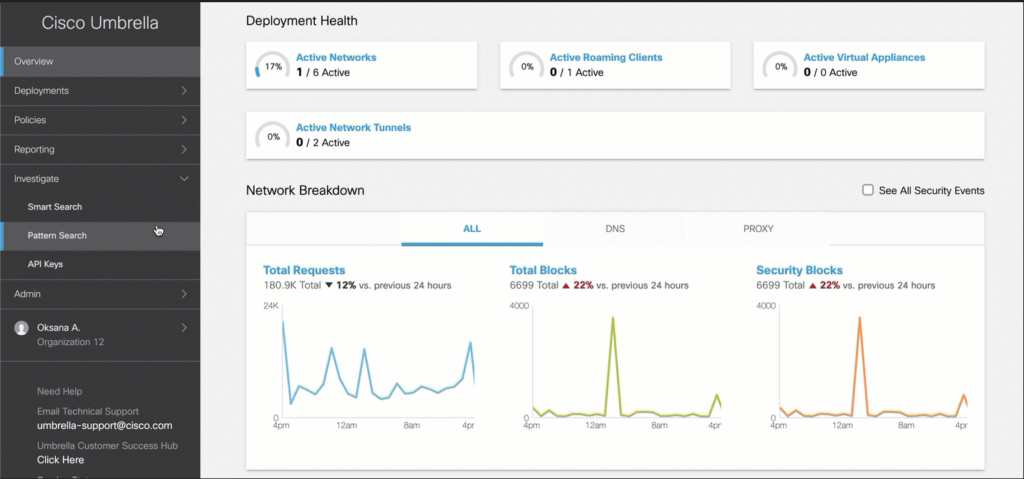
Cisco Umbrella está en mi lista porque es uno de los líderes más claros en seguridad DNS basada en la nube. Lo recomiendo cuando necesitas aplicar políticas de seguridad y bloquear amenazas directamente en la capa DNS para todos los usuarios, incluso los que están fuera de la red. Lo que me gusta es que obtienes inteligencia de amenazas en tiempo real, filtrado de contenido y protección rápida sin redirigir todo el tráfico.
Los equipos suelen percibir el valor cuando buscan controles escalables, implementación rápida y no quieren depender de dispositivos de hardware.
Lo mejor de Cisco Umbrella
- Organizaciones que buscan proteger usuarios tanto en entornos locales como remotos
- Equipos que necesitan un bloqueo rápido de amenazas DNS gestionado en la nube
No es ideal para
- Empresas que necesitan filtrado DNS completamente fuera de línea y sólo en local
- Equipos que desean una suite de seguridad de endpoints completa en una sola herramienta
Qué diferencia a Cisco Umbrella
Cisco Umbrella se destaca por su enfoque a nivel de DNS, bloqueando amenazas antes de que se establezca una conexión. En lugar de desplegar agentes en cada endpoint o depender de cortafuegos tradicionales, simplemente apuntas el tráfico DNS hacia Umbrella. Esto funciona muy bien cuando quieres implementación rápida para usuarios remotos y locales por igual, sin la complejidad de los túneles VPN.
En comparación con herramientas como Palo Alto Networks GlobalProtect, Umbrella espera que gestiones la protección a través de políticas basadas en la nube en lugar de despliegues en los dispositivos.
Compromisos al usar Cisco Umbrella
Cisco Umbrella optimiza la seguridad simplificada y amplia a nivel DNS, pero pierdes detección de amenazas detallada por endpoint y contexto de dispositivo. En la práctica, todavía necesitas protección en capas para endpoints ante amenazas avanzadas o controles específicos por dispositivo.
Pros and Cons
Pros:
- Extiende la protección a usuarios remotos
- Fácil de implementar y administrar
- Actualizaciones de amenazas en tiempo real
Cons:
- Opciones de personalización limitadas
- Requiere monitoreo continuo

Akamai
La mejor opción para necesidades de seguridad empresarial

Akamai destaca por sus funciones de seguridad DNS de nivel empresarial, centradas en inteligencia de amenazas y resiliencia de red. Cuando trabajo con organizaciones que manejan tráfico sensible o crítico, el filtrado DNS en tiempo real de Akamai y la mitigación automática de ataques brindan a los equipos de TI el nivel de control que necesitan.
Lo que valoro es cómo los servicios de seguridad de Akamai están diseñados para escalar e integrarse con infraestructuras globales y complejas sin comprometer la fiabilidad ni el rendimiento.
Mejor para
- Empresas que necesitan seguridad DNS avanzada y a gran escala
- Organizaciones que requieren inteligencia de amenazas global y mitigación rápida
No es ideal para
- Pequeñas empresas con necesidades sencillas de seguridad DNS
- Equipos que desean configuraciones DNS ligeras o muy personalizables
Lo que diferencia a Akamai
Akamai está diseñado para organizaciones que requieren seguridad DNS de nivel empresarial integrada directamente en su infraestructura global. A diferencia de Cloudflare o Cisco Umbrella, espera que trabajes a gran escala y priorices el control detallado sobre cada transacción DNS. En la práctica, esto funciona mejor si buscas aplicar políticas y mitigar amenazas automáticamente en cada punto perimetral, no solo a nivel regional u oficina.
Concesiones con Akamai
Akamai optimiza para amplitud y defensa en profundidad, pero la complejidad y variedad de opciones pueden ralentizar a los equipos con menos recursos o requerimientos más sencillos.
Pros and Cons
Pros:
- Implementación rápida sin hardware
- Bajo impacto en la experiencia del usuario
- Eficaz contra amenazas DNS recursivas
Cons:
- Requiere conocimientos de API para la integración
- Algunas funciones pueden ser complejas


Cloudflare DNS Firewall aparece en mi lista por su enfoque en bloquear actores maliciosos antes de que lleguen a la periferia de tu red. Cuando las organizaciones necesitan seguridad a nivel de DNS con presencia en todas las regiones principales, veo que esta herramienta aparece con frecuencia.
Aprecio su inteligencia de amenazas en tiempo real a partir del tráfico global y las actualizaciones automáticas; esas funciones significan que las amenazas se detienen a gran escala, no solo se registran para después.
Lo mejor de Cloudflare DNS Firewall
- Organizaciones que requieren bloqueo global de amenazas a nivel DNS
- Empresas que protegen infraestructura distribuida contra malware y phishing
No es ideal para
- Equipos enfocados en seguridad granular a nivel de aplicación
- Pequeñas empresas sin gestión de IT ni DNS dedicada
Qué diferencia a Cloudflare DNS Firewall
Cloudflare DNS Firewall está diseñado para interceptar amenazas en la capa DNS, sin importar dónde se encuentren tus usuarios o cargas de trabajo. A diferencia de las herramientas que dependen de fuentes locales de amenazas o cobertura regional, Cloudflare asume que tu superficie de amenaza está en todas partes y actualiza sus protecciones en tiempo real. En la práctica, veo que las organizaciones lo usan para gestionar tráfico y amenazas en redes internacionales, no solo en sucursales.
Compensaciones de Cloudflare DNS Firewall
Cloudflare optimiza de manera agresiva la visibilidad global de amenazas, pero ese enfoque significa que no obtienes mucho control manual ni personalización para reglas DNS específicas. Si deseas ajustar cada respuesta o aplicar filtros muy detallados, esa limitación se vuelve evidente.
Pros and Cons
Pros:
- Actualizaciones de inteligencia global de amenazas
- Protección efectiva contra DDoS
- Respuesta rápida ante amenazas
Cons:
- Requiere configuración continua
- Puede requerir conocimientos técnicos


BloxOne DDI es una opción esencial aquí gracias a cómo unifica DNS, DHCP e IPAM tanto en redes locales como en la nube. Cuando trabajo con organizaciones que migran a entornos híbridos en la nube, la visibilidad centralizada y la aplicación de políticas destacan. Me gusta especialmente la capacidad de ampliar rápidamente los controles de seguridad de DNS a implementaciones en la nube sin complejidad adicional.
Los equipos lo utilizan para detectar amenazas, automatizar la asignación de IP y reducir los vacíos que suelen surgir en entornos mixtos.
BloxOne DDI es mejor para
- Organizaciones que gestionan DNS, DHCP e IPAM en entornos híbridos en la nube
- Equipos de TI que requieren seguridad DNS centralizada y aplicación de políticas
BloxOne DDI no es ideal para
- Pequeñas empresas con redes simples y de un solo entorno
- Equipos que buscan un cortafuegos DNS básico sin funciones de IPAM o DHCP
Qué distingue a BloxOne DDI
BloxOne DDI trata DNS, DHCP e IPAM como un único servicio integrado que puedes gestionar centralizadamente, incluso en entornos locales y de nube. A diferencia de Cisco Umbrella, que centra la seguridad DNS en la nube, BloxOne DDI espera que coordines políticas y visibilidad para todo, donde sea que esté. He visto que esto funciona especialmente bien cuando necesitas elasticidad en la nube sin perder control interno.
Compromisos de BloxOne DDI
BloxOne DDI está optimizado para la gestión unificada a través de infraestructuras híbridas, lo que significa que tendrás más complejidad y sobrecarga si solo necesitas protección básica a nivel DNS.
Pros and Cons
Pros:
- Compatible con entornos híbridos en la nube
- Los flujos de trabajo automatizados reducen tareas manuales
- Escalable para redes en crecimiento
Cons:
- Se requieren actualizaciones periódicas
- Problemas ocasionales de rendimiento

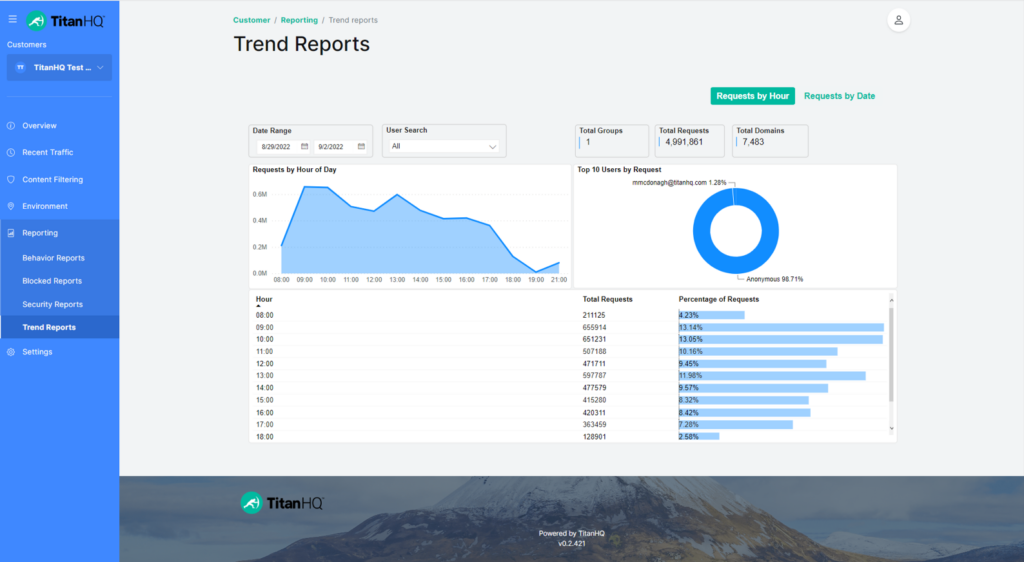
TitanSecure está en mi lista por lo bien que se adapta a las necesidades de seguridad y cumplimiento de pequeñas y medianas empresas. Me gusta cómo combina un filtrado DNS granular con protección contra phishing y malware, adaptándose a medida que cambia tu red. Cuando probé las funciones de informes, pude ver las amenazas bloqueadas en tiempo real (sin verme abrumado por la complejidad).
Mejor uso de TitanSecure
- Pequeñas y medianas empresas que necesitan filtrado DNS
- Empresas que buscan una implementación sencilla con potente bloqueo de amenazas web
TitanSecure no es ideal para
- Grandes empresas con una infraestructura DNS global y compleja
- Organizaciones que requieren controles DNS altamente personalizables o gestionados por API
Qué distingue a TitanSecure
TitanSecure aborda la seguridad DNS con un enfoque fuerte en la simplificación para pequeñas y medianas empresas, en lugar de los controles multinivel que se encuentran en herramientas empresariales como Cisco Umbrella. A diferencia de soluciones que añaden interminables opciones de personalización, TitanSecure parte de la idea de que buscas protección sólida contra amenazas, actualizaciones automáticas e informes claros, con una mínima necesidad de ajustes o supervisión diaria.
Esto funciona bien cuando necesitas que la seguridad DNS funcione en segundo plano y tener visibilidad concisa, en lugar de gestionar cada detalle de las políticas.
Compromisos con TitanSecure
TitanSecure prioriza la simplicidad y una incorporación rápida, lo que significa que la configuración avanzada de DNS y la personalización detallada de políticas son limitadas. Esto puede hacer que las organizaciones más grandes que necesitan controles más ajustados busquen otras opciones.
Pros and Cons
Pros:
- Potentes funciones de seguridad de correo electrónico
- Integración sencilla con Microsoft 365
- Efectiva protección contra phishing
Cons:
- Opciones de configuración avanzada limitadas
- Algunas funciones pueden requerir tiempo de configuración


BlueCat Edge está en mi lista porque introduce la automatización de redes en la seguridad DNS, lo cual es poco común en esta categoría. Lo recomiendo si tu equipo necesita automatizar la detección y respuesta a amenazas en la capa DNS, especialmente en entornos híbridos o distribuidos.
Lo que valoro es cómo puedes aplicar políticas personalizadas de manera dinámica y activar respuestas automatizadas según el comportamiento de la red en tiempo real. Los equipos suelen conseguir una aplicación más coherente y menos intervención manual al enfrentar riesgos de seguridad relacionados con DNS.
Mejor uso de BlueCat Edge
- Grandes organizaciones que automatizan la detección y respuesta a amenazas DNS
- Redes híbridas o distribuidas que necesitan una aplicación dinámica de políticas DNS
Cuándo no es ideal BlueCat Edge
- Redes pequeñas con necesidades sencillas de seguridad DNS
- Equipos que solo buscan una gestión DNS directa y manual
Qué distingue a BlueCat Edge
BlueCat Edge está diseñado para organizaciones que consideran el DNS como un control de seguridad dinámico, y no solo como infraestructura. A diferencia de Cisco Umbrella, que mantiene la mayoría de los ajustes centralizados, BlueCat apuesta por la automatización de políticas y la aplicación descentralizada, permitiendo que los equipos locales puedan actuar rápidamente sin esperar actualizaciones globales.
En la práctica, este enfoque funciona bien cuando tienes redes que abarcan diferentes geografías o unidades de negocio con necesidades particulares.
Compromisos con BlueCat Edge
BlueCat Edge está optimizado para la automatización y la gestión flexible de políticas DNS, pero se pierde algo de sencillez. Los equipos que no deseen mantener la automatización continua y la lógica de políticas pueden terminar con más carga de trabajo.
Pros and Cons
Pros:
- Capacidades efectivas de automatización de redes
- Control y visibilidad centralizados
- Aplicación coherente de políticas
Cons:
- Se requieren actualizaciones regulares
- Potencial para desafíos de configuración

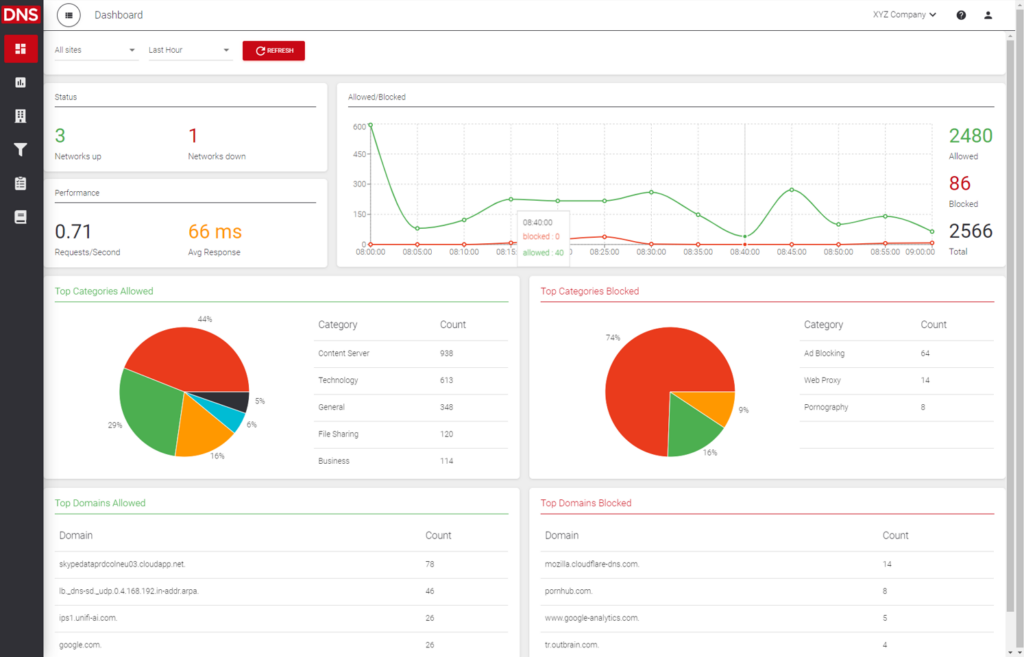
ScoutDNS está en mi lista porque permite aplicar una filtración DNS basada en políticas muy detallada. He trabajado con organizaciones que necesitan perfiles de filtrado distintos para diferentes grupos, y ScoutDNS domina esa flexibilidad.
Lo que me gusta es lo sencillo que resulta apilar listas de permitidos/bloqueados en capas y personalizar el acceso por categorías, lo que te da control sin tener que escribir muchas reglas manuales. Lo recomiendo para equipos que quieren establecer reglas diferenciadas para departamentos, ubicaciones o dispositivos sin perder supervisión.
Lo mejor de ScoutDNS para
- Organizaciones que necesitan filtrado DNS altamente personalizable
- Equipos de TI que gestionan entornos complejos con múltiples políticas
ScoutDNS no es ideal para
- Empresas que buscan una seguridad DNS simple y lista para usar
- Equipos que no requieren controles detallados por categoría
Lo que diferencia a ScoutDNS
ScoutDNS está diseñado para organizaciones que necesitan un control matizado del filtrado DNS sin la complejidad de nivel empresarial. En lugar de ofrecerte solo simples opciones de activación/desactivación como OpenDNS o WebTitan, ScoutDNS espera que definas políticas por grupo o dispositivo de forma detallada. En la práctica, esto es útil cuando quieres adaptar el acceso entre departamentos o perfiles de usuario, y no solo establecer una única regla para todos.
Inconvenientes de ScoutDNS
ScoutDNS prioriza el filtrado personalizado y la flexibilidad de políticas, pero eso significa que dedicarás más tiempo a planificar políticas y revisar reglas, lo que puede ralentizarte si solo necesitas protección DNS rápida y lista para usar.
Pros and Cons
Pros:
- Fácil configuración y administración de políticas
- Información en tiempo real sobre actividad DNS
- Opciones de filtrado altamente personalizables
Cons:
- Puede requerir tiempo de configuración inicial
- Algunos usuarios consideran el panel básico

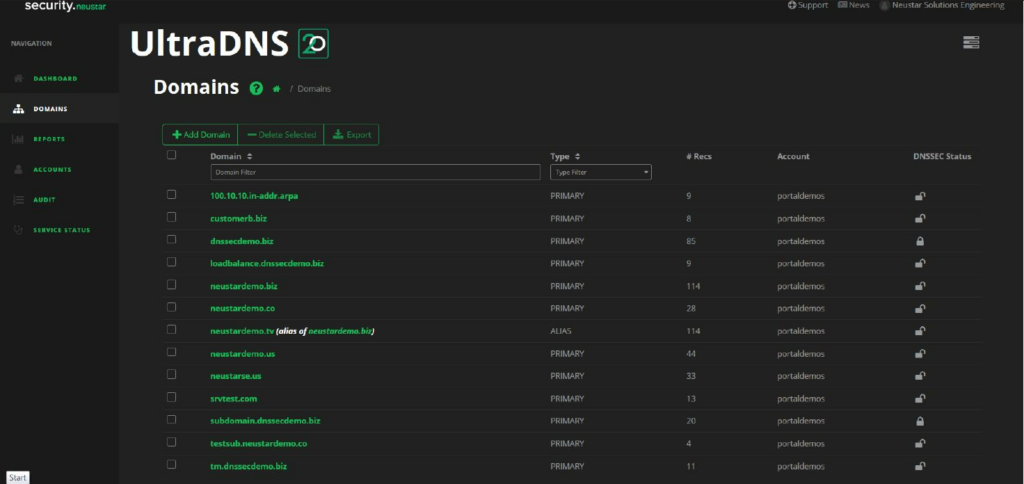
Neustar UltraDNS es un servicio de DNS gestionado diseñado para empresas que requieren alta disponibilidad y confiabilidad. Garantiza que los usuarios tengan acceso continuo a sitios web y aplicaciones, incluso durante picos de tráfico o posibles interrupciones.
Por qué elegí Neustar UltraDNS: Destaca por ofrecer servicios de alta disponibilidad a través de su red global de servidores DNS. El servicio proporciona funciones avanzadas de gestión de tráfico que ayudan a distribuir las cargas de manera eficiente. Su red DNS Shield mejora la seguridad al proteger contra ataques DDoS. Las herramientas de monitoreo integradas brindan a tu equipo información sobre el rendimiento del DNS y posibles problemas.
Funciones destacadas e integraciones:
Funciones incluyen gestión avanzada del tráfico que optimiza la distribución de la carga. La red DNS Shield añade una capa de protección contra ataques DDoS. Las herramientas de monitoreo integradas ofrecen información sobre el rendimiento DNS, ayudando a detectar y resolver problemas rápidamente.
Integraciones incluyen Amazon Route 53, Microsoft Azure, Google Cloud Platform, Cisco Umbrella, Akamai, Cloudflare, Splunk, New Relic, Datadog y Elastic Stack.
Pros and Cons
Pros:
- Alta disponibilidad durante picos de tráfico
- Protección DDoS eficaz
- Opciones avanzadas de gestión de tráfico
Cons:
- Desafíos ocasionales en la configuración
- Personalización limitada para pequeñas empresas
Otras soluciones de seguridad DNS
Estas son algunas opciones adicionales de soluciones de seguridad DNS que no llegaron a mi selección, pero que aun así merece la pena consultar:


Cómo Evalúo las Soluciones de Seguridad DNS
Divido mi evaluación en dos capas: la línea base que toda herramienta debe cumplir para detectar un intento de tunelización DNS o bloquear un dominio de phishing, y los diferenciadores que separan las mejores opciones.
Funcionalidad Básica (Requisitos Fundamentales Para Esta Lista)
Al seleccionar herramientas para mi lista, califico cada una en una escala del 0 (no ofrece la funcionalidad) al 5 (destaca en esta área) para cada funcionalidad básica indicada a continuación. Luego, calculo la puntuación total de la herramienta en porcentaje. Cada herramienta necesita alcanzar una puntuación mínima total del 65% para ser considerada para inclusión.
- Filtrado por Inteligencia de Amenazas: Reviso si la herramienta se basa en múltiples fuentes de amenazas, actualizadas con frecuencia, para bloquear automáticamente las consultas a dominios maliciosos, de phishing y C2 conocidos.
- Detección de Tunelización DNS: Una herramienta debe detectar más que firmas conocidas de tunelización—busco análisis de comportamiento que identifiquen patrones DGA y posibles intentos de exfiltración.
- Filtrado de Contenidos Basado en Políticas: Aquí la granularidad es importante. Evalúo si se pueden definir bloqueos por categoría y listas personalizadas de permitidos/denegados para grupos de usuarios, redes o dispositivos específicos.
- Registro y Analítica de Consultas DNS: Los paneles en tiempo real y los registros consultables marcan la diferencia cuando un analista necesita rastrear una consulta sospechosa hasta un endpoint específico durante un incidente.
- Soporte de DNS Cifrado: Busco cobertura de DoH, DoT y DNSSEC—en especial, la capacidad de forzar la resolución cifrada en endpoints itinerantes fuera de la red corporativa.
- Cobertura de Despliegue Distribuido: La herramienta debe proteger a los usuarios estén en la red, remotos o en una sucursal, mediante resolutores en la nube, agentes ligeros o ambos.
Una vez dispongo de una lista de herramientas que cumplen estos criterios, considero los aspectos que hacen que cada plataforma destaque.
Factores Diferenciadores (Qué Distingue a los Proveedores)
Así comparo y contrasto los diferentes proveedores:
Características Sobresalientes
La clasificación de dominios impulsada por IA/ML es un gran diferenciador—las herramientas que pueden marcar dominios recién registrados o similares antes de que lleguen a los feeds tradicionales de amenazas ofrecen a tu SOC una auténtica ventaja inicial. También evalúo si una plataforma vincula las políticas DNS a identidades autenticadas mediante proveedores como Okta o Azure AD, ya que las reglas basadas en IP pierden eficacia rápidamente con personal remoto. La inspección selectiva de proxy también es destacable. Encaminando solo los dominios riesgosos o no categorizados a una inspección más profunda, se mantiene la baja latencia y se detectan amenazas que el filtrado DNS puro podría pasar por alto.
Más Allá de las Características
El encaje en el ecosistema es crucial. Reviso si la herramienta envía registros de forma nativa a tu SIEM—Splunk, Sentinel, Chronicle—y si ofrece acceso por API para automatización personalizada y gestión de políticas. La postura de cumplimiento es otro punto que considero, sobre todo para equipos en sectores regulados donde una certificación SOC 2, ISO 27001 o FedRAMP puede ser determinante en una decisión de compra. También observo el prestigio de la investigación en amenazas del proveedor. Un equipo de investigación interno que publique IoCs originales y atribución de campañas demuestra una profundidad de inteligencia que los proveedores solo basados en feeds no pueden igualar.
Cómo elegir una solución de seguridad DNS
Es fácil perderse entre largas listas de funciones y estructuras de precios complejas. Para ayudarte a mantener la concentración mientras recorres tu proceso único de selección de software, aquí tienes una lista de factores que debes tener en cuenta:
| Factor | Qué considerar |
| Escalabilidad | ¿Puede la solución adaptarse a su crecimiento? Considere el tamaño actual y futuro de la red. Busque herramientas que se amplíen según sus necesidades sin requerir una renovación completa. |
| Integraciones | ¿Funciona bien con sus sistemas actuales? Compruebe la compatibilidad con sus plataformas actuales, como los servicios en la nube y las herramientas de seguridad. |
| Personalización | ¿Puede adaptarla para ajustarla a sus flujos de trabajo? Evalúe si la herramienta permite ajustar las políticas y la configuración para adaptarse a los requisitos específicos de su organización. |
| Facilidad de uso | ¿Es sencilla para su equipo? Busque interfaces intuitivas que reduzcan la curva de aprendizaje y evite las herramientas que requieran una formación extensa para las operaciones básicas. |
| Implementación e incorporación | ¿Con qué rapidez puede empezar? Evalúe los recursos y el tiempo necesarios para la configuración. Considere herramientas que ofrezcan una incorporación guiada y documentación clara para simplificar la transición. |
| Coste | ¿Se ajusta a su presupuesto? Compare el precio con sus limitaciones financieras, teniendo en cuenta el coste total de propiedad, incluidas las posibles tarifas ocultas o los cargos adicionales. |
| Medidas de seguridad | ¿Existen protecciones adecuadas? Asegúrese de que la solución ofrezca medidas de seguridad sólidas contra las amenazas. Busque funciones como el cifrado y las actualizaciones de seguridad periódicas. |
| Requisitos de cumplimiento | ¿Cumple las normas del sector? Verifique si la solución cumple las normativas pertinentes, especialmente si opera en un sector regulado. Esto es crucial para evitar problemas legales y garantizar la privacidad de los datos. |
¿Qué es una solución de seguridad DNS?
Las soluciones de seguridad DNS son herramientas que protegen las redes mediante la supervisión y el control del tráfico del sistema de nombres de dominio (DNS) para bloquear solicitudes maliciosas y evitar filtraciones de datos. Las utilizan administradores de TI, ingenieros de redes y equipos de ciberseguridad para mejorar la detección de amenazas, reducir los riesgos y mantener un acceso seguro a los recursos en línea.
Funciones como el filtrado de dominios, la inteligencia contra amenazas y la supervisión en tiempo real ayudan a identificar actividades sospechosas, aplicar políticas de seguridad y evitar la comunicación con programas maliciosos. En general, estas herramientas ayudan a las organizaciones a proteger su capa DNS y mantener operaciones de red más seguras y fiables.
Funciones de las soluciones de seguridad DNS
Al seleccionar soluciones de seguridad DNS, preste atención a las siguientes funciones clave:
- Detección de amenazas: Identifica y bloquea actividades maliciosas para proteger su red de posibles ataques.
- Filtrado de dominios: Permite controlar el acceso a sitios web mediante el bloqueo de dominios dañinos o no deseados.
- Supervisión en tiempo real: Proporciona una supervisión continua de la actividad DNS para detectar y responder rápidamente a las amenazas.
- Políticas personalizables: Permite adaptar la configuración de seguridad a las necesidades y requisitos específicos de su organización.
- Escalabilidad: Favorece el crecimiento al adaptarse al aumento de las demandas de la red sin comprometer el rendimiento.
- Capacidades de integración: Garantiza la compatibilidad con los sistemas y plataformas existentes para un funcionamiento fluido.
- Interfaz fácil de usar: Simplifica la navegación y reduce la curva de aprendizaje para los equipos y administradores de TI.
- Protección contra DDoS: Protege su red frente a ataques distribuidos de denegación de servicio, garantizando la disponibilidad.
- Aplicación automatizada de políticas: Mantiene una seguridad coherente en dispositivos y ubicaciones con una intervención manual mínima.
Beneficios de las soluciones de seguridad DNS
La implementación de soluciones de seguridad DNS proporciona varias ventajas para su equipo y su empresa. Estas son algunas de las que puede esperar:
- Mayor seguridad: Protege frente a programas maliciosos y el phishing al bloquear los dominios maliciosos antes de que puedan causar daños.
- Mejor rendimiento de la red: Garantiza una resolución DNS rápida y fiable, reduciendo el tiempo de inactividad y mejorando la experiencia del usuario.
- Control personalizable: Ofrece una configuración de seguridad adaptada para satisfacer los requisitos únicos de su organización y garantizar una protección óptima.
- Escalabilidad: Responde a las necesidades crecientes de su empresa al ampliarse fácilmente para adaptarse al aumento de las demandas de la red.
- Gestión eficiente: Simplifica la supervisión de la red mediante la supervisión en tiempo real y la aplicación automatizada de políticas, reduciendo la carga de trabajo del personal de TI.
- Ayuda para el cumplimiento: Ayuda a cumplir las normativas del sector al proporcionar las medidas de seguridad y las funciones de generación de informes necesarias.
- Protección rentable: Reduce el riesgo de costosas brechas de seguridad y periodos de inactividad, lo que permite ahorrar dinero a su empresa a largo plazo.
Costes y precios de las soluciones de seguridad DNS
Seleccionar soluciones de seguridad DNS requiere comprender los diversos modelos de precios y planes disponibles. Los costes varían en función de las características, el tamaño del equipo, los complementos y otros factores. La tabla siguiente resume los planes habituales, sus precios medios y las características típicas incluidas en las soluciones de seguridad DNS:
Tabla comparativa de planes para soluciones de seguridad DNS
| Tipo de plan | Precio medio | Características habituales |
| Plan gratuito | $0 | Detección básica de amenazas, filtrado de dominios limitado y asistencia de la comunidad. |
| Plan personal | $5-$25 /usuario /mes | Funciones de seguridad mejoradas, políticas personalizables e informes básicos. |
| Plan empresarial | $30-$75 /usuario /mes | Inteligencia avanzada sobre amenazas, capacidades de integración y supervisión en tiempo real. |
| Plan corporativo | $100-$200/usuario /mes | Escalabilidad completa, aplicación automatizada de políticas, asistencia especializada e informes de cumplimiento. |
Preguntas frecuentes sobre soluciones de seguridad DNS
Estas son algunas respuestas a preguntas habituales sobre las soluciones de seguridad DNS:
¿Qué debo buscar al evaluar proveedores de seguridad DNS para mi organización?
Busca proveedores de seguridad DNS que ofrezcan una sólida inteligencia sobre amenazas, una integración fluida con tus sistemas actuales, supervisión en tiempo real y asistencia sólida. Pregunta por sus garantías de disponibilidad, sus funciones de generación de informes y la frecuencia con la que actualizan las bases de datos de amenazas. Evalúa las referencias de clientes, la transparencia de los precios y la capacidad de escalar la solución a medida que crece tu red.
¿Cómo se integran las soluciones de seguridad DNS con las plataformas SIEM o SOAR?
La mayoría de las herramientas de seguridad DNS admiten integraciones con plataformas SIEM o SOAR populares mediante API, salida syslog o conectores específicos. Esto significa que puedes enviar los registros de eventos DNS directamente a tu conjunto de herramientas de seguridad, automatizar el enriquecimiento de amenazas y unificar la respuesta ante incidentes. Pregunta a los proveedores por las guías de integración y casos de uso reales de clientes antes de comprometerte.
¿Pueden las herramientas de seguridad DNS ayudar con el cumplimiento normativo (por ejemplo, GDPR, HIPAA)?
Sí, las soluciones de seguridad DNS pueden respaldar los esfuerzos de cumplimiento al bloquear el acceso a sitios prohibidos, registrar las consultas DNS y realizar un seguimiento de las infracciones de las políticas. Estas funciones ayudan a demostrar la supervisión de la red, la protección de datos y la respuesta ante incidentes, aspectos fundamentales para GDPR, HIPAA y normativas similares. Confirma que tu proveedor proporcione documentación e informes centrados en el cumplimiento.
¿Cómo mido la eficacia de la seguridad DNS en mi red?
Empieza revisando métricas como las amenazas bloqueadas, el tiempo hasta la detección, las tasas de aplicación de políticas y el número de falsos positivos. Programa auditorías periódicas para asegurarte de que las configuraciones coinciden con tu tolerancia al riesgo. Una buena plataforma de seguridad DNS ofrecerá paneles e informes periódicos, lo que facilita demostrar su valor y detectar carencias.
¿Existen riesgos o inconvenientes al implementar la seguridad DNS en toda la red?
Sí, puedes experimentar falsos positivos, interrupciones del servicio durante actualizaciones importantes o conflictos con sistemas heredados no compatibles. Estos riesgos pueden gestionarse realizando pruebas con un grupo piloto, manteniendo servidores DNS de respaldo y trabajando con proveedores que ofrezcan una asistencia sólida y opciones claras para revertir los cambios.
¿Cuáles son las consideraciones de seguridad clave en la gestión de DNS para empresas?
Debes aplicar DNSSEC, utilizar el filtrado DNS y restringir el acceso a resolutores autorizados. Supervisa los registros para detectar patrones inusuales y configura alertas para consultas sospechosas. Audita periódicamente los cambios de DNS y actualiza las políticas a medida que crece tu red para reducir el riesgo de ataques.
¿Cómo protege DNSSEC la infraestructura DNS de mi organización?
DNSSEC firma digitalmente las respuestas DNS, de modo que tus dispositivos puedan verificar que los registros no se han alterado durante el tránsito. Esto ayuda a detener el envenenamiento de caché y los ataques de intermediario. Activa DNSSEC en tus resolutores y verifica periódicamente las firmas para garantizar una protección continua.
¿Cambiar de proveedor DNS afecta a la postura de seguridad de mi organización?
Sí, cambiar de proveedor puede mejorar la seguridad, pero también introducir nuevos riesgos. Los servicios DNS de terceros pueden ofrecer una mejor protección contra amenazas, pero debes verificar sus prácticas de gestión de datos, su historial de disponibilidad y sus compromisos de SLA. Realiza siempre la diligencia debida y prueba todo minuciosamente antes de entrar en producción.
¿Qué viene después?
Si estás investigando servicios de seguridad DNS, ponte en contacto con un asesor de SoftwareSelect para obtener recomendaciones gratuitas.
Rellenas un formulario y mantienes una breve conversación en la que profundizarán en los detalles específicos de tus necesidades. Después recibirás una lista reducida de programas que podrás revisar. Incluso te ayudarán durante todo el proceso de compra, incluidas las negociaciones de precios.