

10 Best Free Requirements Management Tools Reviewed in 2026

Best Free Requirements Management Tools Shortlist


Navigating requirements management tools can be challenging on a limited budget. If you have a tight budget, you need a free solution that helps your team stay organized, document requirements clearly, and keep projects on track without adding new costs.
Free requirements management tools offer structured ways to capture requirements, maintain traceability, and collaborate with your team. The right tool reduces confusion, helps you avoid missed requirements, and keeps everyone aligned throughout the project lifecycle.
In this guide, I’ve reviewed a selection of free and free-to-try tools to help you understand what each option offers and how they differ. Whether you're looking for something lightweight for a small team or a more specialized tool for technical work, the list below will help you narrow down the best choices for your needs.
Why Trust Our Software Recommendations
Our team has been testing and reviewing software since 2012. As tech leaders ourselves, we know how difficult—and important—it is to choose the right software.
For this guide, we evaluated tools using hands-on testing and independent research, scoring tools using our selection criteria.
Our reviews reflect our human editorial judgment, not a sales pitch.
Expert reviewers:
Free Requirements Management Tools Comparison Table
Here are the base costs for each of the tools that made it onto my shortlist:
| Tool | Best For | Trial Info | Price | ||
|---|---|---|---|---|---|
| 1 | Best for project timeline visualization | 14-day free trial + free plan available | From $7.25/user/month (billed annually) | Website | |
| 2 | Best for issue tracking integration | Free plan available | Free forever plan | Website | |
| 3 | Best for open-source projects | Free demo available | Free forever plan | Website | |
| 4 | Best for .NET integration | Not available | Free forever plan | Website | |
| 5 | Best for Eclipse users | Not available | Free forever plan | Website | |
| 6 | Best for enterprise architecture | Not available | Free forever plan | Website | |
| 7 | Best for Agile acceptance testing | Not available | Free forever plan | Website | |
| 8 | Best for small team collaboration | 14-day free trial | From $510/user/year (billed annually) | Website | |
| 9 | Best for data dependency mapping | Free trial and demo available | Pricing upon request | Website | |
| 10 | Best for security requirements | Not available | Free forever plan | Website |
Best Free Requirements Management Tools Reviews
Below are my detailed summaries of the best free requirements management tools on my shortlist. My reviews offer a thorough look at the key features, pros & cons, integrations, and ideal use cases of each tool, helping you find the best one for you. While some of these tools offer a completely free version, others offer a free trial period. I’ve added a note about what’s free in each of my reviews.

Best for project timeline visualization

OpenProject is project management software designed for teams and project managers. It provides features for planning, tracking, and collaborating on projects, with a focus on timeline visualization.
Why I picked OpenProject: OpenProject isn’t a full-featured requirements management system in its free Community Edition, but it does a great job at supporting teams that track lightweight requirements. Its visual timeline, Gantt charts, and roadmapping tools help teams plan and monitor requirements-related work, even when dedicated RM features are locked behind paid tiers.
It’s a practical choice for teams already using OpenProject for project management who want a single environment for coordinating requirement-related tasks.
Standout features & integrations:
Features include Agile boards that let your team manage tasks. The tool also offers time tracking, helping you keep tabs on how long tasks take. Additionally, OpenProject provides budgeting features to assist with financial planning for your projects.
Integrations include GitHub, GitLab, Jenkins, JIRA, Redmine, Slack, Microsoft Teams, Asana, Trello, and Excel.
What's free?
OpenProject offers a free-forever plan with access to core features, but limits some advanced functionalities and support options.
Pros and Cons
Pros:
- Supports budgeting features
- Provides time tracking
- Strong timeline visualization
Cons:
- Basic support in the free plan
- Requires a learning curve

Redmine
Best for issue tracking integration

Redmine is an open-source project management tool designed for teams and developers. It supports project tracking, issue management, and collaboration, helping teams stay organized and efficient.
Why I picked Redmine: Redmine is another option that isn’t a traditional requirements management tool, but teams use its issue types, custom fields, and workflows to store and track requirement-related items. Its strength lies in helping teams connect requirement-like tasks to issues, milestones, and source-control activities.
For teams that already use Redmine for development or issue tracking, adapting it for lightweight requirements can be a cost-free way to centralize project information.
Standout features & integrations:
Features include time tracking, which helps your team monitor the time spent on tasks and projects. Redmine also offers role-based access control, allowing you to manage permissions and access within your team. Additionally, it supports custom fields, enabling you to tailor the software to your specific project requirements.
Integrations include Git, SVN, CVS, Bazaar, Mercurial, Darcs, Bitbucket, GitHub, and Jenkins.
What's free?
Redmine offers a free-forever plan with no user or feature restrictions, making it accessible to teams of any size.
Pros and Cons
Pros:
- Provides custom fields
- Offers role-based access control
- Supports multiple projects
Cons:
- Advanced configuration needed
- Outdated interface design


OSRMT is an open-source requirements management tool designed for software developers. It helps define and manage software requirements throughout the product development lifecycle.
Why I picked OSRMT: OSRMT is one of the few open-source tools built for end-to-end requirements tracking. It supports lifecycle traceability, making it appealing for teams that prefer self-hosted or customizable environments. Since it’s fully open-source, teams can extend or adapt it to their development workflow without licensing constraints.
Standout features & integrations:
Features include full SDLC traceability, allowing you to track requirements from the initial design phase through testing. The tool's configurability lets you tailor it to fit your specific project needs. Additionally, OSRMT's open-source nature means you can modify the tool to suit your development process.
Integrations include GitHub, Jenkins, Eclipse, Subversion, and Bugzilla.
What's free?
OSRMT provides a free-forever plan with no user limits, but it requires self-hosting and setup.
Pros and Cons
Pros:
- Free self-hosting
- Tracks the full development lifecycle
- No user limits
Cons:
- No cloud hosting
- Requires self-hosting setup


Concordion.Net is a testing framework tailored for .NET developers and testers. It facilitates the creation of executable specifications, bridging the gap between documentation and testing within .NET environments.
Why I picked Concordion.Net: Concordion.Net extends the Concordion approach to the .NET ecosystem, letting teams express acceptance criteria as human-readable executable specifications. While it does not manage requirements directly, some teams use these living documents to capture and validate requirement intent.
This makes Concordion.Net appealing for .NET teams that want tight linkage between requirement intent and automated test execution.
Standout features & integrations:
Features include the ability to write specifications in plain language, making your testing documentation easier to read and maintain. Concordion.Net supports live documentation, keeping your tests aligned with the latest project requirements. Additionally, it offers extensibility, allowing you to enhance its capabilities to suit your needs.
Integrations include NUnit, SpecFlow, Visual Studio, Jenkins, TeamCity, Azure DevOps, GitHub Actions, Bitbucket Pipelines, and Travis CI.
What's free?
Concordion.Net provides a free-forever plan with access to all core functionalities, with no user or time restrictions.
Pros and Cons
Pros:
- Provides live documentation
- Encourages clear communication
- Supports executable specifications
Cons:
- Does not manage requirements directly
- Requires .NET expertise

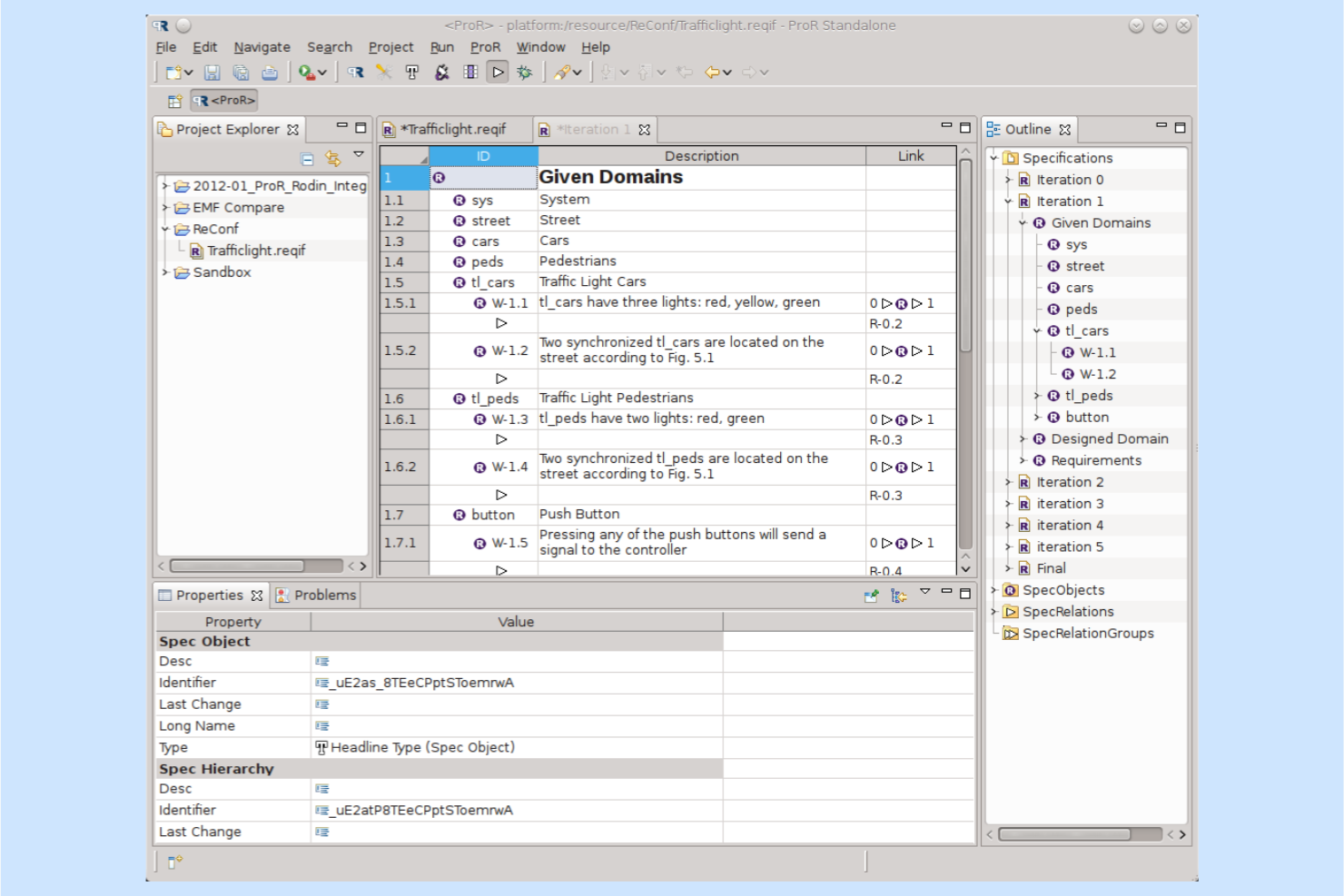
ProR (Eclipse RMF) is an open-source requirements management tool used primarily by software developers and engineers. It facilitates the management and tracking of requirements within the Eclipse development environment.
Why I picked ProR (Eclipse RMF): ProR is a good fit for development teams already using Eclipse because it lets them work with requirements in the same environment as their code and modeling tools. Its structured requirements editor supports ReqIF, making it useful for exchanging requirements between organizations or tools.
This tight alignment with Eclipse workflows makes it practical for engineering teams who want a free, extensible RM solution without adopting a separate platform.
Standout features & integrations:
Features include drag-and-drop functionality that simplifies managing requirements. ProR supports customizable views, allowing you to tailor the display of information to your project's needs. Additionally, it provides version control, helping you track changes to your requirements over time.
Integrations include Eclipse IDE, Git, SVN, Jenkins, Jira, Bugzilla, Redmine, Trac, and GitHub.
What's free?
ProR (Eclipse RMF) offers a free-forever plan with full access to its core functionalities, but it requires an Eclipse environment to operate.
Pros and Cons
Pros:
- Includes version control
- Offers drag-and-drop functionality
- Supports requirements modeling
Cons:
- Requires technical expertise
- Limited support options


Archi is an open-source modeling tool for enterprise architects and planners. It helps users create ArchiMate models to visualize and manage architectural designs.
Why I picked Archi: Archi isn’t a traditional requirements management tool, but it’s useful for teams who treat architectural elements as structured “requirements” within broader system design work. Its ArchiMate modeling support enables teams to express constraints, relationships, and business rules graphically, complementing or informing requirement definitions.
For teams doing architecture-heavy planning, Archi offers a free way to maintain visual models that support requirement discussions without needing a complete RM platform.
Standout features & integrations:
Features include a built-in scripting language that allows your team to automate repetitive tasks. Archi also provides a canvas feature for freeform diagramming, letting you customize layouts to fit your project's requirements. Additionally, it offers model validation to ensure your architectural designs meet industry standards.
Integrations include GitHub, GitLab, Google Drive, Dropbox, OneDrive, and SharePoint.
What's free?
Archi offers a free-forever plan with access to its core modeling features, with no user or time limitations.
Pros and Cons
Pros:
- Freeform diagramming available
- Includes model validation
- Offers automation scripting
Cons:
- Advanced features require customization
- Initial setup may take time


Concordion is an open-source testing framework designed for developers and testers. It supports Agile acceptance testing by allowing users to write executable specifications in plain English.
Why I picked Concordion: Concordion isn’t a requirements management tool, but its executable specification format supports teams who document acceptance criteria as a lightweight form of requirements. Teams practicing behavior-driven or specification-based development may use Concordion to validate requirements through automated acceptance tests.
It’s a helpful option where requirements, documentation, and tests are tightly intertwined, even though it doesn’t manage requirements in a traditional sense.
Standout features & integrations:
Features include a plain English syntax that makes it easy for your team to write and understand specifications. Concordion supports live documentation, ensuring your test results are always up to date with your project documentation. The tool also offers extensibility, allowing you to customize and extend its capabilities to suit your testing requirements.
Integrations include JUnit, Maven, Gradle, Ant, IntelliJ IDEA, Eclipse, and NetBeans.
What's free?
Concordion offers a free-forever plan with access to all core testing features, with no user or time limitations.
Pros and Cons
Pros:
- Extensible framework
- Provides live documentation
- Supports Agile testing
Cons:
- Self-setup necessary
- Limited support options


ReqView is a requirements management tool designed for hardware and software engineers. It helps manage requirements, risks, and tests while ensuring compliance with safety-critical standards.
Why I picked ReqView: ReqView offers a usable free tier for small teams that need structured requirements documentation and basic traceability without adopting a large enterprise tool. The free version supports requirement hierarchies, document management, and version control connections, making it suitable for projects where traceability matters but the team doesn’t need advanced automation.
Standout features & integrations:
Features include customizable templates that let you tailor documents to your project's needs. You can easily manage requirements, risks, and tests to ensure compliance with industry standards. The tool also provides end-to-end traceability, helping your team track changes and maintain project integrity.
Integrations include Jira, Sparx Systems Enterprise Architect, Git, Subversion, and Microsoft Word.
What's free?
ReqView offers a free-forever plan with limitations on features like document editing and the number of custom attributes.
Pros and Cons
Pros:
- End-to-end traceability
- Customizable templates
- Enables structured requirement linking
Cons:
- Requires manual license renewal
- Limited to one document


Arovy is a data governance tool primarily aimed at businesses using Salesforce. It enhances AI effectiveness through features like impact analysis and data classification.
Why I picked Arovy: Arovy is primarily a data governance platform, and not a traditional requirements management tool. But it is useful for teams that need to visualize dependencies across systems. Its impact analysis and data lineage views support teams who treat system-level data relationships as “requirements” for downstream applications.
For Salesforce-centric organizations, this makes Arovy a way to map, review, and validate upstream dependencies that influence requirement decisions, even if it’s not a direct RM solution.
Standout features & integrations:
Features include change tracking, which helps your team monitor updates across projects. The tool's threat detection provides proactive identification and risk mitigation. Additionally, Arovy supports application security monitoring to keep your data secure.
Integrations include Salesforce, Slack, Microsoft Teams, Google Workspace, and GitHub.
What's free?
Arovy offers a limited-time free trial with access to its core features, but some advanced functionalities may be restricted.
Pros and Cons
Pros:
- Proactive threat detection
- Advanced impact analysis
- Visual requirement mapping
Cons:
- Requires Salesforce integration
- Advanced features restricted


CAIRIS is a tool designed for security requirements engineering, used by security analysts and developers. It supports the modeling of security concepts and risk assessments to enhance project security.
Why I picked CAIRIS: CAIRIS is great for modeling and managing security requirements, making it valuable when projects must incorporate threat modeling early. It allows teams to capture personas, tasks, vulnerabilities, and risks in one place, which translates security research into structured requirements.
This focus on security engineering makes it a worthy option even though its interface and workflows require some technical familiarity.
Standout features & integrations:
Features include persona modeling, which helps your team understand user interactions and potential security threats. The tool supports task analysis to evaluate and improve security processes. Additionally, CAIRIS offers threat modeling, allowing you to identify and mitigate risks effectively.
Integrations include GitHub, GitLab, JIRA, and Slack.
What's free?
CAIRIS offers a free-forever plan with access to its core security features, but some advanced functionalities may be limited.
Pros and Cons
Pros:
- Supports task analysis
- Offers persona modeling
- Includes API risk modeling
Cons:
- Self-hosting required
- Requires technical expertise
Other Requirements Management Tools
Here are some additional requirements management tools options that also offer free plans or trials. While these tools didn’t make it onto my shortlist, they’re still worth checking out:


How I Evaluate Free Requirements Management Tools
I split my evaluation into baseline criteria—like traceability and version control—and differentiators that separate tools built for real dev workflows from basic spreadsheet substitutes.
Core Functionality (Table Stakes For This List)
When I'm selecting tools for my list, I rank each one on a scale from 0 (does not offer the functionality) to 5 (excels in this area) for each core functionality listed below. Then, I calculate the tool's total score into a percentage. Each tool needs to achieve a minimum total score of 65% to be considered for inclusion.
- Requirements Repository: I look for structured storage with custom attributes, hierarchical grouping, and filtering—so teams can organize hundreds of specs by module, priority, or release without losing track.
- Traceability Links: Each tool should let you tie requirements to downstream artifacts like test cases or user stories, making it easy to spot gaps in coverage before a sprint closes.
- Version Control & Audit Trail: I check whether change history includes user attribution and rollback, which matters when multiple analysts are revising acceptance criteria across overlapping projects.
- Collaboration & Review Workflows: Tools earn higher marks when stakeholders can comment inline, flag approvals, and receive notifications—rather than relying on external emails to coordinate sign-off.
- Genuinely Free Plan: I evaluate whether the free tier supports real usage with core features intact, not just a 14-day trial that locks you out before your first review cycle finishes.
- Import/Export & Integrations: Compatibility with formats like CSV and Excel, plus connections to tools like Jira or Azure DevOps, determines how well a platform fits into an existing dev workflow.
Once I have a list of tools that meet this criteria, I consider what sets each platform apart.
Differentiating Factors (What Sets Vendors Apart)
Here's how I compare and contrast different vendors:
Standout Features
Baseline and branching capabilities matter when your team manages requirements across parallel releases or product variants. I look for tools that let you snapshot a requirement set at a milestone, then branch it for the next sprint without losing the original. Reusable requirement libraries also save real time—especially for teams that repeat similar specs across projects, like API security standards or accessibility criteria. For regulated environments, I evaluate whether a tool ships with compliance-ready templates mapped to standards like IEC 62304 or ISO 26262.
Beyond Features
Free plan transparency is something I always evaluate closely—some tools quietly cap the number of requirements or projects, which you only discover mid-rollout. Security and access controls also carry weight, especially role-based permissions and audit logs for teams building software under regulatory oversight. I consider the upgrade path too. A tool that forces a full data migration when you outgrow the free tier creates unnecessary risk, so I check whether vendors let you scale into paid plans with your existing workspace and history intact.
How to Choose a Free Requirements Management Tool
Complex feature lists and pricing structures can make it hard to figure out what you’re really getting from free requirements management tools. To help you stay focused as you work through your software selection process, here are some factors to keep in mind:
| Factor | What to Consider |
|---|---|
| Free Offer Scope | Check what's included in the free plan. Make sure it covers essential features your team needs without hidden costs or severe limitations. |
| Scalability | Consider whether the tool can grow with your team. Look for options that allow easy upgrades as your project or team expands. |
| Integrations | Ensure the tool integrates with other software you use. This could include project management tools, communication platforms, or development software. |
| Ease of Use | Evaluate if the tool is intuitive for your team. An easy-to-navigate interface with a minimal learning curve is crucial. |
| Collaboration | Look for features that facilitate teamwork, like shared documents or real-time updates. This helps keep everyone on the same page. |
| Customization | Determine if you can tailor the tool to your needs. Custom fields or templates can be beneficial for specific project requirements. |
| Support | Consider the level of support available. Access to tutorials, FAQs, or community forums can be invaluable when issues arise. |
| Security | Evaluate the security measures in place. For sensitive projects, ensure the tool complies with necessary data protection standards. |
What Are Free Requirements Management Tools?
Requirements management tools are products that help teams define, manage, and track project requirements. They typically offer free plans or trial periods, with core features available at no cost. These tools are commonly used by project managers, developers, and business analysts to ensure project goals are met efficiently. They provide value by organizing and maintaining clarity on project needs, facilitating communication, and reducing errors. Features like requirement tracking, traceability management, and collaboration tools help ensure project alignment and team coordination.
Features
Let’s go over the features commonly found in requirements management tools, and which ones are usually included in free vs. paid plans.
Typically Free Requirements Management Tools Features
- Requirement tracking: Allows you to monitor and update project requirements, ensuring all team members are on the same page.
- Traceability management: Helps link requirements to their origins and track changes, maintaining consistency throughout the project lifecycle.
- Collaboration tools: Facilitate communication and information sharing among team members, promoting teamwork and efficiency.
- Document management: Organizes project documents and ensures easy access and retrieval when needed.
- Basic reporting: Provides simple reports to give insights into project progress and requirements status.
Typically Paid Requirements Management Tools Features
- Advanced analytics: Offers in-depth analysis of project data, helping teams make informed decisions and optimize processes.
- Customizable templates: Create tailored templates to meet specific project needs and improve efficiency.
- Automated notifications: Send alerts for updates or changes in requirements, keeping team members informed in real-time.
- Integration with external tools: Connects with other software, such as project management or development tools, enhancing workflows and data sharing.
- Role-based access control: Manages user permissions and ensures that sensitive information is accessible only to authorized personnel.
Benefits
Implementing free requirements management tools provides several benefits for your team and your business. Here are a few you can look forward to:
- Cost savings: Free plans allow your team to manage requirements without the financial burden, making them ideal for startups or small businesses.
- Stronger team alignment: Shared requirement views help teams stay coordinated across stages of the project, reducing misunderstandings and rework.
- Easier information retrieval: Organized requirement documents and links help teams quickly find the details they need as projects become more complex.
- Increased visibility: Requirement tracking and basic reporting provide insights into project progress, helping your team stay on track.
- Scalability: Many free tools offer the ability to upgrade as your team grows, ensuring the tool continues to meet your needs.
- Accessibility: Web-based free tools can be accessed from anywhere, allowing team members to work remotely or on the go.
- Flexibility: Customizable features in free plans let you tailor the tool to fit your specific project requirements, offering personalized solutions.
Costs & Pricing
I realize you came to this article looking for the best requirements management tools options that are available for free. However, since free plans only offer limited features, there's a good chance you'll need to scale your plan up in the future.
The table below summarizes common plans, their average prices, and typical features included in requirements management tools solutions:
Plan Comparison Table for Requirements Management Tools
| Plan Type | Average Price | Common Features |
|---|---|---|
| Free Plan | $0 | Basic requirement tracking, document management, and collaboration tools. |
| Personal Plan | $5-$20/user/month | Advanced reporting, customization options, and integration with other tools. |
| Business Plan | $25-$50/user/month | Multiple project management, enhanced security features, and priority support. |
| Enterprise Plan | $60-$150/user/month | Enterprise security, admin controls, custom workflows, dedicated support. |
Free Requirements Management Tools FAQs
Here are some answers to common questions about free requirements management tools:
What are the limitations of free requirements management tools?
Free requirements management tools often have limitations such as restricted features, limited storage, or a cap on the number of users or projects. Some also lack advanced options like requirements traceability dashboards or deeper metrics reporting unless you upgrade. While they provide basic functions, you might find advanced options locked behind paid plans. Assess if the free version meets your team’s needs, especially if you manage complex test cases or work with multiple stakeholders.
Can free requirements management tools integrate with other software?
Yes, many free requirements management tools offer basic integrations with popular software, such as project management and communication tools. Some even connect with platforms like ClickUp, Scrum tools, or source code repositories. However, the range of integrations might be more limited compared to paid versions. Check if the free tool integrates with the software your team already uses, particularly if you’re working in Linux environments or coordinating requirements gathering across teams.
How secure are free requirements management tools?
Security can vary among free tools. While some may offer basic encryption and secure access controls, they might not provide the same level of protection as paid platforms. This is important if your team manages sensitive on-premises data or uses tools tied to your ALM processes. Evaluate the security measures of any tool you consider, especially if handling sensitive data.
How do free requirements management tools support collaboration?
Free tools often include basic collaboration features such as shared docs, comments, and task assignments. These features help your team communicate and work together, even if they’re not as advanced as those in paid plans. Some tools also support versioning features, such as maintaining a baseline, which can be helpful when multiple contributors update requirements across different projects. Consider what level of collaboration your team needs when choosing a tool.
Are there free requirements management tools suitable for large teams?
Some free tools can accommodate large teams, but they might come with limitations on features or support. For example, tools designed for enterprise requirements management software may require paid tiers for scalability or additional administrative controls. If your team is large, ensure the tool can handle the number of users and projects you anticipate. This comes into play when you need to manage high-volume data, such as dashboards or structured requirements documentation.
How can I ensure a smooth transition to a free requirements management tool?
To ensure a smooth transition, look for tools that offer onboarding resources like tutorials, guides, or community support. Options that provide structured test management workflows or allow precise tracking of changes to your baseline can reduce friction during migration. These resources can help your team quickly adapt to the new system, minimizing disruption and maximizing productivity, even if tools like Visure or others are part of your evaluation process. Solutions that help you streamline setup and data import are helpful during onboarding.