

El Top 10 de Software de Gestión de Activos de Software de 2026

Mejor Software de Gestión de Activos de Software Shortlist


El software de gestión de activos de software te ayuda a rastrear, gestionar y optimizar las licencias de software de tu organización, para que te mantengas en cumplimiento y evites costes sorpresa o dolores de cabeza manuales. Utilízalo para convertir hojas de cálculo enmarañadas y preocupaciones de cumplimiento en un control claro y organizado de tus inversiones en software.
Reducirás riesgos, ahorrarás dinero y tomarás decisiones más inteligentes sobre tu stack tecnológico. En este artículo, te guiaré a través de las mejores opciones de software SAM para que tu organización funcione sin problemas.
Por qué confiar en nuestras recomendaciones de software
Nuestro equipo lleva probando y evaluando software desde 2012. Como líderes tecnológicos, sabemos lo difícil —y lo importante— que es elegir el software adecuado.
Para esta guía, evaluamos las herramientas mediante pruebas prácticas e investigación independiente, puntuando las herramientas según nuestros criterios de selección.
Nuestras reseñas reflejan nuestro criterio editorial humano, no un discurso de ventas.
Revisores expertos:
Resumen de los Mejores Software de Gestión de Activos de Software
Esta tabla comparativa resume los detalles de precios de mis selecciones principales de software de gestión de activos de software para ayudarte a encontrar el mejor para tu presupuesto y necesidades empresariales.
| Tool | Best For | Trial Info | Price | ||
|---|---|---|---|---|---|
| 1 | Ideal para preconfigurar hardware con activos de software | Demostración gratuita disponible | desde $5/persona/mes | Website | |
| 2 | Mejor para la gestión fácil del ciclo de vida de los activos | Prueba gratuita de 14 días + demo gratuita disponible | Desde $19/usuario/mes (facturado anualmente) | Website | |
| 3 | Ideal para la monitorización de activos en tiempo real | Prueba gratuita de 30 días + demostración gratuita disponible | Desde $129/técnico/mes (facturado anualmente) | Website | |
| 4 | Mejor para organizaciones orientadas al cumplimiento | Precios a consultar | Website | ||
| 5 | Mejor para el seguimiento de licencias de software nativas en la nube | Not available | Precio bajo solicitud | Website | |
| 6 | Ideal para la gobernanza de TI multifuncional | Demostración gratuita disponible | Precios bajo petición | Website | |
| 7 | Mejor para integración con flujos de trabajo de servicios de TI | Precio a consultar | Website | ||
| 8 | Mejor para MSP y gestión remota de activos | Not available | Precios bajo solicitud | Website | |
| 9 | Ideal para la visualización intuitiva de activos | Prueba gratuita de 30 días | Precios bajo solicitud | Website | |
| 10 | Mejor para la transparencia de costos en los activos de software | Precio bajo solicitud | Website |


Reseñas del Mejor Software de Gestión de Activos de Software
A continuación encontrarás mis resúmenes detallados de los mejores software de gestión de activos de software que entraron en mi lista. Mis reseñas ofrecen un vistazo a fondo a las características clave, pros y contras, integraciones y casos de uso ideales de cada herramienta para ayudarte a encontrar la mejor para ti.

Deel IT
Ideal para preconfigurar hardware con activos de software
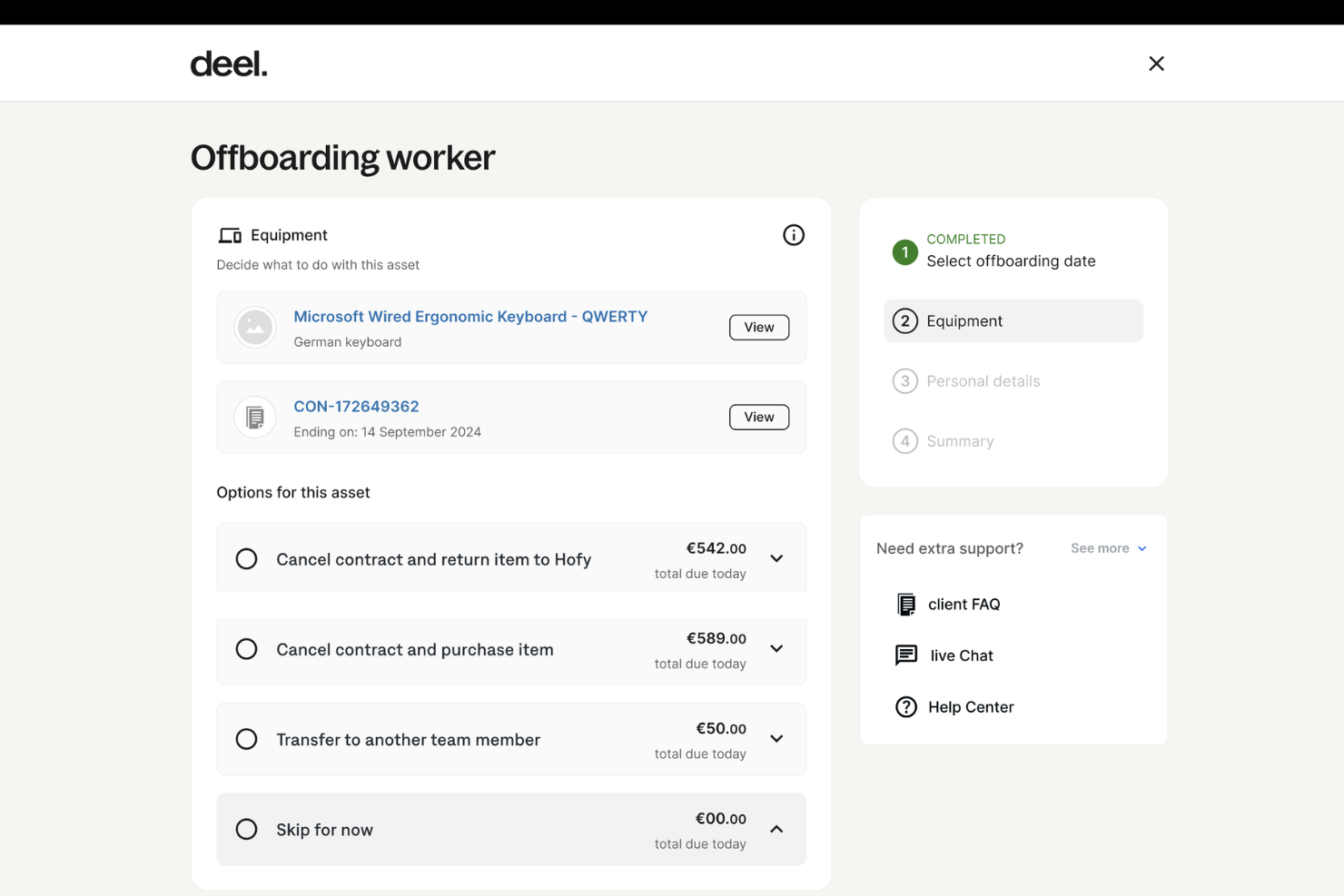
Deel IT es una solución integral para gestionar las operaciones y los activos de TI en todo el mundo, en más de 130 países. Como parte de la plataforma de Deel, conocida por sus soluciones de recursos humanos, nómina y cumplimiento normativo, Deel IT amplía sus servicios para incluir la gestión integral de equipos para empresas con trabajadores distribuidos.
Por qué elegí Deel:
Las empresas pueden enviar dispositivos precargados con aplicaciones, protocolos de seguridad y configuraciones específicas directamente desde la plataforma, lo que garantiza que cada nuevo empleado esté listo desde el primer día. Esto reduce la complejidad de incorporar nuevos empleados, especialmente en entornos remotos o híbridos, y garantiza que el hardware esté equipado con el software y las herramientas adecuados en cuanto llega.
La plataforma también automatiza tareas como el aprovisionamiento, la gestión de licencias de software y la revocación del acceso a aplicaciones cuando los empleados dejan la empresa. Gracias a estas funcionalidades, Deel IT garantiza que las empresas mantengan un control estricto sobre la distribución y las licencias de software.
Características e integraciones destacadas:
Otras características destacadas incluyen el soporte global 24/7 de Deel IT y la gestión de dispositivos en tiempo real. La plataforma ofrece asistencia para la resolución de problemas y reparaciones durante todo el día, lo que garantiza un tiempo de inactividad mínimo para los empleados, independientemente de su ubicación. Además, la interfaz centralizada de gestión de dispositivos proporciona visibilidad sobre todos los activos de TI.
Las integraciones incluyen Deel HR, Apple Business Manager, Windows Autopilot, Slack, Microsoft Teams, Okta, BambooHR, Workday, Zenefits y Greenhouse.
Pros and Cons
Pros:
- Puede combinar la gestión de activos de recursos humanos y de TI en una sola plataforma
- Ayuda a automatizar los flujos de trabajo de activos
- Admite la implementación de equipos en más de 130 países
Cons:
- Puede no ser ideal para equipos con necesidades de activos de TI muy complejas
- No ofrece funciones más allá de la gestión de dispositivos, como la gestión de redes y servidores

Mejor para la gestión fácil del ciclo de vida de los activos

Freshservice de Freshworks es una herramienta dinámica de gestión de servicios de TI (ITSM) basada en la nube diseñada para ofrecer tanto funcionalidades de soporte de TI como de gestión de activos. Se destaca especialmente por su interfaz fácil de usar, que ayuda a las organizaciones a gestionar el ciclo de vida completo de sus activos, alineándose con el enfoque de 'gestión del ciclo de vida de activos fácil de usar'.
Por qué elegí Freshservice:
Al analizar varias herramientas ITAM, Freshservice me llamó la atención por su diseño intuitivo y por su objetivo de simplificar la gestión del ciclo de vida de los activos. Tras comparar y evaluar, determiné que el énfasis de Freshservice en la facilidad de uso lo diferencia claramente de otras soluciones de software en la gestión de activos de TI.
Por eso, en mi opinión, realmente se posiciona como la 'mejor para una gestión del ciclo de vida de activos fácil de usar' para organizaciones que priorizan la experiencia del usuario en la gestión de activos.
Características destacadas e integraciones:
Freshservice cuenta con funciones esenciales como el descubrimiento de activos, auditorías y una CMDB que en conjunto ofrecen una visibilidad total tanto de los activos de hardware como de los digitales. La plataforma también integra un portal de autoservicio, asegurando que los usuarios finales puedan acceder a los servicios requeridos sin dificultades.
En cuanto a integraciones, Freshservice se fusiona sin esfuerzo con soluciones de software populares, incluyendo productos de Microsoft, diversos dispositivos móviles e incluso proveedores como IBM, asegurando compatibilidad y una funcionalidad ampliada para los equipos de TI.
Pros and Cons
Pros:
- El diseño centrado en el usuario simplifica los procesos de gestión del ciclo de vida de los activos
- Robustas capacidades de descubrimiento y generación de informes de activos.
- Amplia variedad de integraciones, incluyendo Microsoft, IBM y dispositivos móviles
Cons:
- El modelo SaaS puede no atraer a quienes buscan una solución local
- Aunque es fácil de usar, la profundidad de sus funciones puede requerir capacitación para algunos usuarios finales
- El precio puede ser elevado para pymes al escalar
New Product Updates from Freshservice
 Experience)
Freshservice Introduces a Reimagined IT Asset Management (ITAM) Experience
Freshservice introduces a reimagined IT Asset Management (ITAM) experience with continuous infrastructure discovery, dependency mapping, IPAM, and Software License Management. This update helps teams improve asset visibility and manage connected IT environments more effectively. For more information, visit Freshservice’s official site.

Atera
Ideal para la monitorización de activos en tiempo real
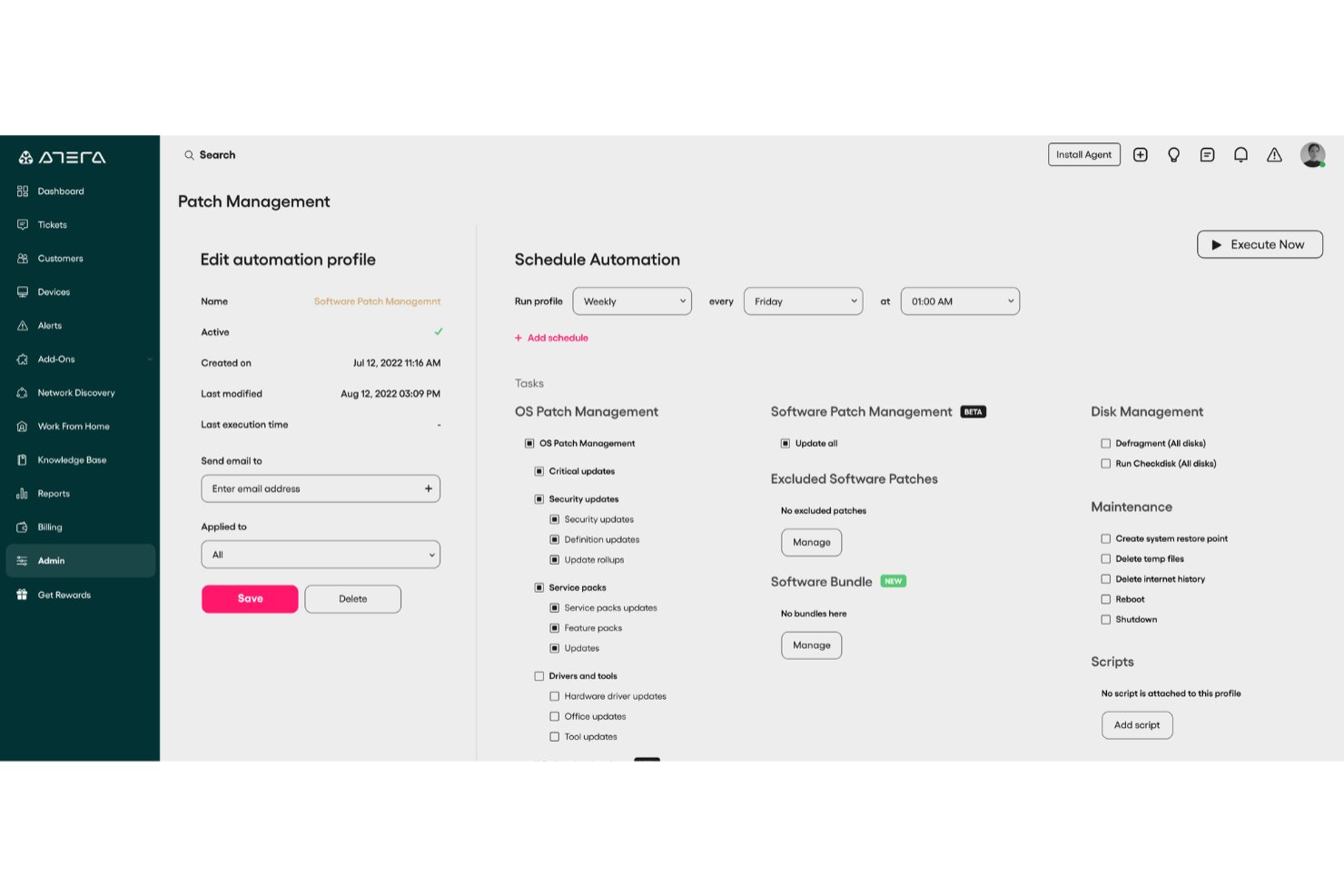
Atera es una plataforma de gestión de TI diseñada para ayudar a los profesionales de TI y a los proveedores de servicios administrados (MSP) a supervisar sus activos de hardware y software. Su oferta principal combina la monitorización remota, la automatización de TI y la funcionalidad de mesa de ayuda para mantener los entornos de TI funcionando sin problemas.
Por qué elegí Atera:
Elegí Atera por la eficacia con la que ayuda a los equipos de TI a supervisar los activos en tiempo real. Sus herramientas de monitorización y gestión remotas ofrecen visibilidad de los entornos de TI, lo que ayuda a identificar posibles problemas antes de que se agraven. También me pareció especialmente valiosa su gestión automatizada de parches, ya que mantiene los sistemas actualizados y seguros sin necesidad de supervisión manual. Estas capacidades hacen de Atera una opción excelente para los equipos que buscan anticiparse a los problemas de TI y mantener la continuidad operativa.
Funciones e integraciones destacadas:
Atera ofrece funciones como paneles de monitorización en tiempo real, un sistema integrado de tickets para incidentes de TI y automatización de tareas recurrentes. También incluye herramientas avanzadas de generación de informes para ayudar a los profesionales de TI a realizar un seguimiento de las tendencias y el rendimiento. En cuanto a las integraciones, Atera funciona con Microsoft Teams, Slack, ServiceNow, Azure Active Directory, Okta, Google Chat, monday.com, Acronis, Xero y Zapier, entre otras.
Pros and Cons
Pros:
- Informes detallados y paneles orientados a los clientes
- Detección proactiva de problemas y opciones de automatización
- Centraliza la gestión de tickets, RMM, PSA y activos
Cons:
- Algunas limitaciones en las funciones de PSA y facturación
- Curva de aprendizaje para los nuevos usuarios debido a la amplitud de sus funciones
New Product Updates from Atera

Atera Adds Webhook Triggers for Technician Assignment Changes
Atera ticket automation rules now support a webhook trigger when a ticket’s technician assignment changes, expanding automation beyond creation, status updates, and closure/resolution events. For more information, visit Atera's official site.

Mejor para organizaciones orientadas al cumplimiento

Lansweeper es una solución de gestión de activos que ayuda a las organizaciones a gestionar y auditar sus activos de software y hardware. Su enfoque en garantizar el cumplimiento, especialmente en la gestión de licencias de software, lo posiciona como un líder para las empresas que priorizan el cumplimiento de estándares regulatorios.
Por qué elegí Lansweeper:
En mi búsqueda para seleccionar las herramientas adecuadas, Lansweeper me llamó la atención por su énfasis en el cumplimiento, particularmente en el ámbito de las licencias de software. Observé que va más allá del simple seguimiento de activos, asegurando que las organizaciones se mantengan dentro de los límites de los acuerdos de licencias de software.
Elegí Lansweeper porque su dedicación al cumplimiento y su capacidad para auditar licencias de software lo distinguen, haciéndolo el mejor para organizaciones impulsadas por necesidades de cumplimiento.
Características destacadas e integraciones:
Lansweeper ofrece potentes capacidades de descubrimiento de activos, asegurando que los equipos de TI tengan visibilidad completa sobre sus activos de hardware y software en tiempo real. Además, su solución de gestión de activos de TI viene equipada con capacidades detalladas de informes, ayudando a las organizaciones a mantenerse al día con sus requisitos de cumplimiento.
En cuanto a integraciones, Lansweeper se conecta con Microsoft Windows y otros dispositivos de red, asegurando que los datos de activos se mantengan consistentes a través de varias plataformas.
Pros and Cons
Pros:
- Fuerte énfasis en el cumplimiento de licencias de software
- Capacidades completas de descubrimiento de activos e informes
- Integración efectiva con plataformas principales como Microsoft Windows
Cons:
- La transparencia de los precios podría mejorar para usuarios potenciales
- Puede requerir capacitación inicial para usuarios finales no familiarizados con herramientas ITAM
- Algunos usuarios pueden encontrar la interfaz menos moderna en comparación con otras soluciones SaaS

Mejor para el seguimiento de licencias de software nativas en la nube
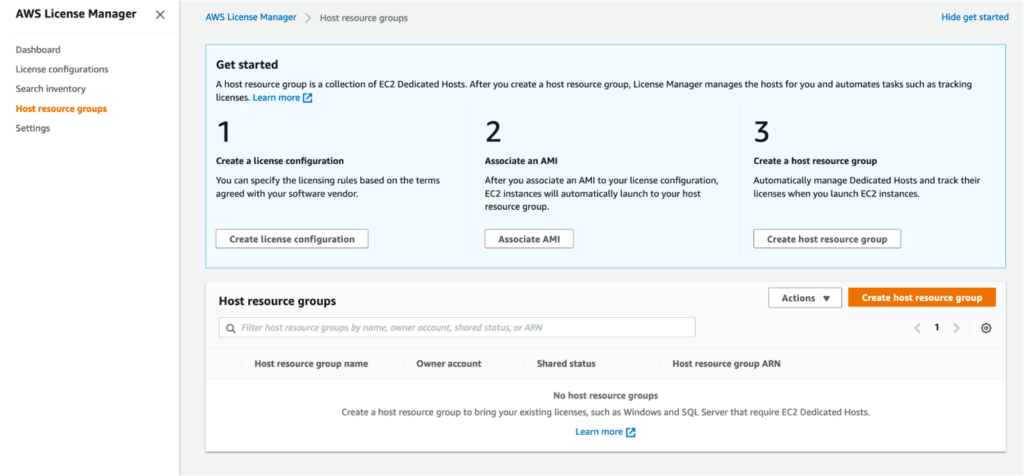
AWS License Manager, un servicio ofrecido por Amazon Web Services, se especializa en ayudar a las organizaciones a rastrear, gestionar y controlar sus licencias de software en un entorno basado en la nube. Con el auge de las aplicaciones y servicios nativos en la nube, esta herramienta es esencial para las organizaciones que priorizan mantener bajo control el cumplimiento de sus licencias de software, especialmente dentro del amplio ecosistema en la nube de AWS.
Por qué elegí AWS License Manager:
Después de evaluar y comparar varias herramientas de gestión de activos informáticos, elegí AWS License Manager por su enfoque único y eficiente en el seguimiento de licencias de software nativas en la nube. Con el aumento en la migración de servicios a la nube, contar con una herramienta integrada en la propia estructura de uno de los mayores proveedores de nube del mundo es un rasgo destacado.
En mi opinión, AWS License Manager es insuperable para entidades que dependen en gran medida de los servicios de AWS y desean una solución integrada para la gestión de licencias de software, lo que la convierte en la 'mejor para el seguimiento de licencias de software nativas en la nube'.
Funciones e integraciones destacadas:
AWS License Manager ofrece capacidades de seguimiento de licencias en tiempo real, lo que garantiza que las organizaciones puedan mantener el cumplimiento de sus licencias con facilidad. Además, la herramienta agiliza el proceso de gestión de inventario e integra otros servicios de AWS.
En cuanto a integraciones, AWS License Manager funciona de manera armoniosa con una variedad de servicios de AWS como EC2, RDS y más, asegurando que todos los activos de software dentro del ecosistema de AWS sean rastreados y gestionados minuciosamente.
Pros and Cons
Pros:
- Integrado en el ecosistema de AWS, proporcionando una experiencia cohesionada
- Capacidades de seguimiento de licencias en tiempo real
- Gestión de inventario optimizada dentro de los servicios de AWS
Cons:
- Quizás menos adecuado para organizaciones que no utilizan principalmente AWS
- Curva de aprendizaje para quienes no están familiarizados con los servicios de AWS
- Puede resultar más complejo para pequeñas empresas que no están profundamente integradas en plataformas en la nube

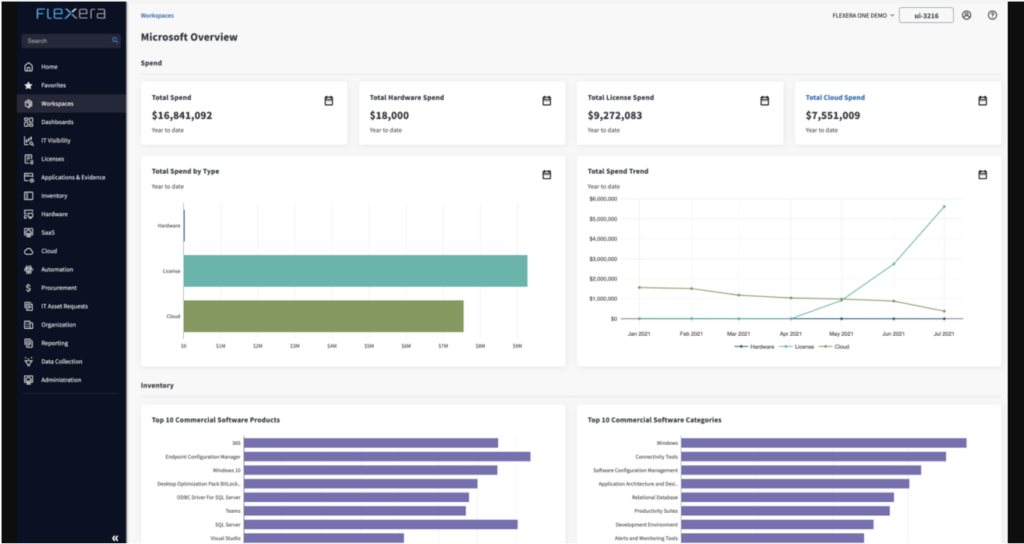
Flexera One es una solución integral de gestión de activos de TI, experta en optimizar y simplificar los procesos de descubrimiento de activos, gestión de inventario y gobernanza de TI. Cuando las organizaciones buscan una gobernanza multifuncional de sus activos de TI, Flexera One destaca como líder, asegurando que los activos no solo sean rastreados, sino gestionados con un claro enfoque en estrategias globales de TI.
Por qué elegí Flexera One:
Seleccionar el mejor software de gestión de activos de TI requiere un juicio cuidadoso, y determiné que Flexera One sobresalía por su enfoque multifacético de la gobernanza de TI. Esta herramienta no solo gestiona lo básico de la administración de activos, sino que va más allá integrando principios estratégicos de gobernanza de TI en su núcleo.
Elegí Flexera One debido a sus capacidades multifuncionales, lo que la convierte en una herramienta ideal para organizaciones que buscan más que solo rastreo de activos — desean una gobernanza integral de TI.
Características destacadas e integraciones:
Flexera One ofrece un impresionante conjunto de características que permite una visibilidad completa tanto de los activos de hardware como digitales, facilitando así una gestión eficiente de los activos y auditorías en tiempo real. Sus mecanismos de descubrimiento de activos son sólidos, asegurando que ningún activo pase desapercibido, mientras que sus capacidades de generación de informes brindan a los equipos de TI los datos necesarios para tomar decisiones informadas.
En cuanto a integraciones, Flexera One resalta por integrarse sin problemas con proveedores como Microsoft, IBM y una multitud de sistemas en la nube y locales.
Pros and Cons
Pros:
- Enfoque integral de la gobernanza de TI
- Descubrimiento de activos y capacidades de generación de informes eficientes
- Integraciones con los principales proveedores y plataformas
Cons:
- La transparencia en los precios podría mejorar
- La amplitud de funciones puede ser abrumadora para pequeñas empresas
- Curva de aprendizaje potencial para quienes no están familiarizados con herramientas de gobernanza de TI multifuncional

Mejor para integración con flujos de trabajo de servicios de TI
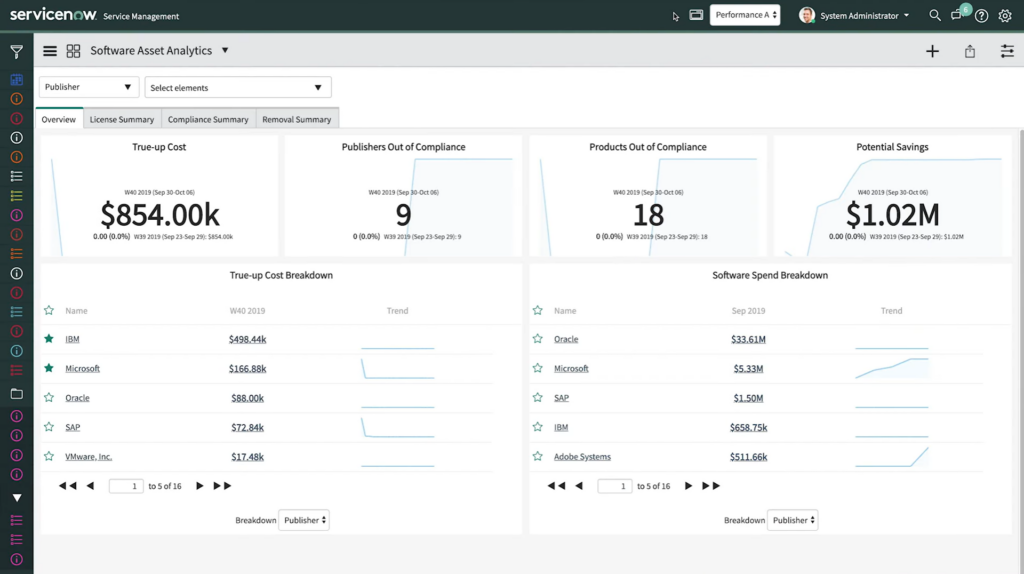
ServiceNow Software Asset Management (SAM) es una solución integral basada en la nube orientada a la gestión eficaz de los activos de software en toda una organización. Una parte crucial de su oferta es su estrecha integración con los flujos de trabajo de servicios de TI, lo que garantiza que las empresas puedan entrelazar la gestión de activos con sus procesos de TI fundamentales.
Por qué elegí ServiceNow Software Asset Management (SAM):
En el proceso de determinar y comparar soluciones de gestión de activos, seleccioné ServiceNow SAM debido a su profundidad en la integración con los flujos de trabajo de servicios de TI. Esta herramienta destaca por su capacidad para fusionar los mundos de la gestión de activos de software y la gestión de servicios de TI (ITSM) de manera tan eficiente.
Según mi criterio y comparación, ServiceNow SAM sobresale como el 'Mejor para integración con flujos de trabajo de servicios de TI' principalmente por su enfoque holístico y alineación con el ecosistema más amplio de ServiceNow.
Características destacadas e integraciones:
ServiceNow SAM es reconocido por sus capacidades de seguimiento en tiempo real e informes sólidos. No solo proporciona visibilidad de extremo a extremo sobre los activos de software, sino que también automatiza el ciclo de vida del software, reduciendo el esfuerzo de los equipos de TI.
Una de sus integraciones más destacadas es con el paquete ServiceNow ITSM, asegurando que los activos de software se gestionen junto con los servicios de TI. Además, las integraciones con proveedores como Microsoft e IBM enriquecen aún más sus capacidades.
Pros and Cons
Pros:
- Integración profunda con flujos de trabajo de servicios de TI mediante ServiceNow ITSM
- Capacidades completas de seguimiento e informes en tiempo real
- Amplia gama de integraciones con los principales proveedores de software
Cons:
- Puede ser complejo para pequeñas empresas sin un equipo de TI dedicado
- Puede considerarse excesivo para organizaciones que solo buscan una gestión básica de activos de software
- Curva de aprendizaje para quienes no están familiarizados con el ecosistema ServiceNow


NinjaOne es una solución versátil de gestión de activos de TI diseñada para satisfacer las necesidades específicas de los Proveedores de Servicios Gestionados (MSP) y las organizaciones que priorizan la gestión remota de activos. El software está desarrollado para ofrecer a los MSP una plataforma centralizada para supervisar los activos de sus clientes, siendo especialmente beneficioso en los modelos operativos actuales orientados a lo remoto.
Por qué elegí NinjaOne IT Asset Management Software:
En mi extenso análisis y proceso de selección, NinjaOne destacó por su enfoque personalizado hacia los MSP y las herramientas que brinda para el seguimiento remoto de activos. A medida que el entorno laboral sigue orientándose hacia estructuras más descentralizadas y remotas, una herramienta que simplifique la gestión de activos remotos se vuelve indispensable.
Por lo tanto, mi determinación fue clara: NinjaOne está idealmente posicionado como el “mejor para MSP y gestión remota de activos” debido a sus capacidades únicas y alineación directa con las necesidades actuales del sector.
Características destacadas e integraciones:
NinjaOne sobresale por su monitoreo de datos de activos en tiempo real y auditorías detalladas, asegurando que los equipos de TI tengan visibilidad completa tanto sobre activos de hardware como digitales. Su naturaleza basada en la nube permite el acceso fácil desde cualquier ubicación, lo que supone una gran ventaja para las operaciones remotas. Además, las integraciones con soluciones clave como Microsoft y la disponibilidad de una API ofrecen amplias posibilidades de conectividad y automatización de flujos de trabajo.
Pros and Cons
Pros:
- Enfocado en MSP, garantizando herramientas y características directamente relevantes
- Seguimiento de activos en tiempo real para visibilidad total
- Sólidas integraciones, incluyendo Microsoft y una API versátil
Cons:
- Puede no ser tan adecuado para empresas que no operan bajo el modelo MSP
- Puede ser abrumador para organizaciones pequeñas sin equipos dedicados de ITSM o TI
- El modelo basado en la nube puede no ser preferido por organizaciones que buscan soluciones on-premise


InvGate Assets ofrece una solución que centraliza y visualiza tanto los activos de hardware como de software dentro de una organización. Su capacidad para presentar los activos en un formato visual y fácil de entender justifica su reputación por ofrecer una visualización intuitiva de activos.
Por qué elegí InvGate Assets:
Al seleccionar herramientas para esta lista, InvGate Assets me llamó la atención por su enfoque único en la representación visual de los activos. Determiné que su manera de presentar los datos de los activos de forma comprensible lo distingue de otras soluciones.
Este énfasis visual es precisamente la razón por la que considero que InvGate Assets es 'el mejor para la visualización intuitiva de activos', ya que agiliza el proceso de gestión de activos al hacer que los datos complejos sean entendibles de un vistazo.
Características y Integraciones destacadas:
InvGate Assets cuenta con una sólida función de descubrimiento de activos, permitiendo a los equipos de TI detectar y registrar automáticamente nuevos activos en tiempo real. Además, su plataforma de gestión de activos se integra con un sistema de códigos de barras para el seguimiento físico de activos.
En cuanto a integraciones, InvGate permite la sincronización con populares soluciones ITSM y se puede conectar fácilmente con plataformas como Microsoft Windows, asegurando una experiencia de gestión de activos coherente.
Pros and Cons
Pros:
- La presentación visual de los activos simplifica datos complejos
- El descubrimiento automatizado de activos garantiza datos actualizados
- Integración con soluciones y plataformas ITSM populares
Cons:
- La ausencia de precios transparentes puede desalentar el interés inicial
- Podría tener una curva de aprendizaje más pronunciada para quienes son nuevos en sistemas de gestión de activos
- Algunas soluciones de software de nicho pueden no tener integraciones nativas disponibles

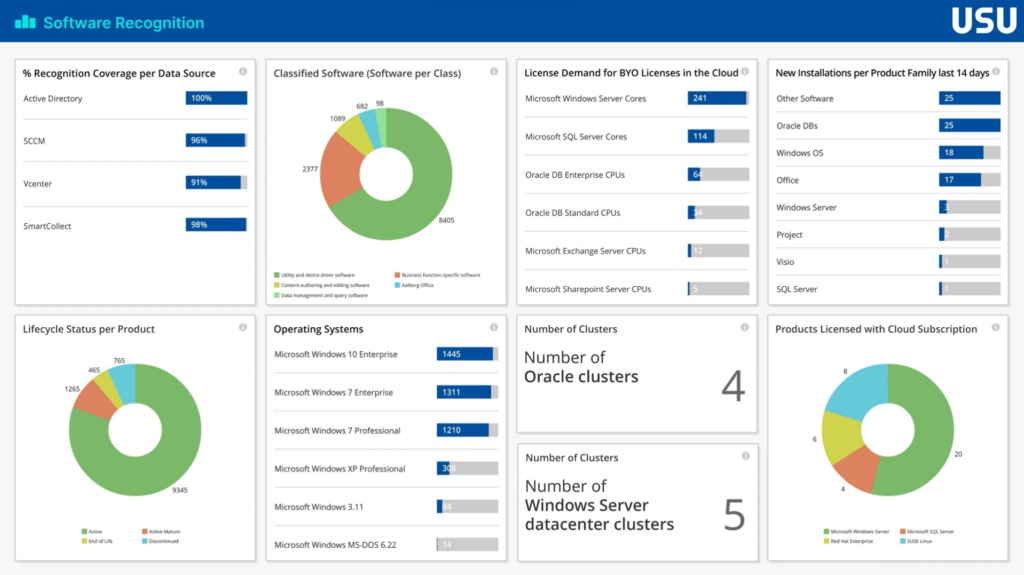
USU es una destacada plataforma de gestión de activos de TI que se centra específicamente en proporcionar un desglose detallado de los costos de activos de software. Al enfatizar la transparencia de costos, USU brinda a las organizaciones una comprensión clara de sus gastos en activos de software, lo que la hace ideal para quienes buscan obtener información profunda sobre sus inversiones en software.
Por qué elegí USU:
En el vasto mundo de las soluciones de gestión de activos de TI, seleccioné USU tras una cuidadosa comparación y análisis. Su enfoque distintivo en la transparencia de costos para activos de software realmente la diferencia de otras herramientas del mercado. En mi opinión, USU destaca para las organizaciones que priorizan entender a dónde va cada dólar en sus inversiones de software, consolidando su posición como la 'mejor para la transparencia de costos en los activos de software.'
Funciones destacadas e integraciones:
USU cuenta con poderosas funciones que automatizan el proceso de recopilación de datos de activos y auditorías en tiempo real, garantizando que se contabilicen todos los costos de software. Sus capacidades de generación de informes ofrecen a los equipos de TI información detallada, simplificando así el proceso, por lo demás complejo, de la gestión de activos de software.
En cuanto a integraciones, USU colabora de manera eficiente con los principales proveedores de software, incluyendo Microsoft e IBM, así como con numerosos sistemas en la nube y locales.
Pros and Cons
Pros:
- Desglose detallado de los costos de activos de software
- Fuertes integraciones con los principales proveedores de software
- Automatización eficiente de la recopilación de datos de activos
Cons:
- Los detalles de precios pueden ser más opacos para los posibles compradores
- Puede ser abrumador para pequeñas empresas que no se centran en grandes inversiones en software
- Puede requerir una curva de aprendizaje para quienes son nuevos en las herramientas de análisis de costos de software
Otros Software de Gestión de Activos de Software
Aquí tienes algunas opciones adicionales de software de gestión de activos de software que no entraron en mi lista, pero que aún valen la pena revisar:
- Cherwell Asset Management
Mejor para estrategias empresariales escalables de gestión de activos
- Belarc
Ideal para la elaboración exhaustiva de perfiles de sistemas
- ManageEngine Endpoint Central
Mejor para el seguimiento de activos centrado en endpoints
- ManageEngine ServiceDesk Plus
Ideal para la gestión combinada de servicios y activos de TI


Cómo evalúo el software de gestión de activos de software
Divido mi evaluación en dos niveles: la base que toda herramienta SAM debe cumplir—como conciliación de licencias y descubrimiento—y los diferenciadores que separan a las mejores del resto.
Funcionalidad básica (requisitos indispensables para esta lista)
Cuando selecciono herramientas para mi lista, califico cada una en una escala del 0 (no ofrece la funcionalidad) al 5 (sobresale en esta área) para cada funcionalidad básica listada a continuación. Luego, convierto la puntuación total de la herramienta en un porcentaje. Cada herramienta debe alcanzar una puntuación total mínima del 75% para ser considerada para su inclusión.
- Descubrimiento e inventario de software: Verifico si una herramienta puede detectar automáticamente instalaciones en endpoints, servidores y entornos en la nube en lugar de depender de importaciones manuales de hojas de cálculo.
- Gestión de licencias y cumplimiento: Cada herramienta debe conciliar los derechos adquiridos con las instalaciones reales, especialmente para modelos complejos como licenciamiento por núcleo o por usuario nombrado.
- Mediación de uso y optimización: Busco un seguimiento granular del uso que identifique licencias inactivas y respalde flujos de trabajo de recuperación, no solo recuentos básicos de instalaciones.
- Gestión del ciclo de vida del software: La herramienta debe cubrir todo el proceso, desde la solicitud y aprobación hasta la implementación y eventual retiro o desmantelamiento.
- Gestión de proveedores y contratos: Evalúo qué tan bien una herramienta vincula los contratos y fechas de renovación con los registros de derechos, facilitando la identificación de próximos ajustes de licencias.
- Gestión de aplicaciones SaaS y en la nube: Aquí es importante el descubrimiento de TI en la sombra mediante integraciones con SSO, navegadores o finanzas, junto con la visibilidad a nivel de usuario en las suscripciones SaaS.
Una vez que tengo una lista de herramientas que cumplen estos criterios, considero qué distingue a cada plataforma.
Factores diferenciales (qué distingue a los proveedores)
Así es como comparo y contrasto a los diferentes proveedores:
Funciones destacadas
La inteligencia específica de editores es un gran diferenciador. Las herramientas con bibliotecas de derechos preconstruidas para Oracle, Microsoft o SAP ahorran horas de mapeo manual durante las revisiones de cumplimiento. También busco análisis de gasto que vayan más allá de la generación de reportes—la modelización de escenarios de ajuste o la previsión de costos de renovación ayudan a los líderes de TI a fundamentar su presupuesto. La integración nativa con ITSM también es relevante, ya que vincular los datos de activos con plataformas como ServiceNow o Jira conecta la información de licencias directamente con flujos de trabajo de cambios e incidentes.
Más allá de las funciones
El ecosistema de integraciones es un aspecto muy importante. Una herramienta SAM que se conecte con tu gestión de endpoints, proveedores de identidad y sistemas ERP obtiene datos más completos para la conciliación de licencias. El soporte para defensa en auditorías es otro factor que valoro—algunos proveedores ofrecen servicios gestionados o asesoría en licenciamiento durante auditorías de proveedores, lo que puede ahorrar mucho ante ajustes costosos. También considero el costo total de propiedad, incluido el tiempo hasta obtener valor para el descubrimiento y normalización inicial, ya que una herramienta que tarde meses en entregar una posición precisa de licencias retrasa el ROI esperado.
Cómo Elegir un Software de Gestión de Activos de Software
Es fácil perderse entre largas listas de características y estructuras de precios complejas. Para ayudarte a mantenerte enfocado mientras atraviesas tu proceso único de selección de software, aquí tienes una lista de factores a tener en cuenta:
| Factor | Qué considerar |
|---|---|
| Escalabilidad | ¿Puede la herramienta crecer junto con tu empresa? Verifica si admite un aumento de usuarios y conjuntos de datos más grandes sin problemas de rendimiento. |
| Integraciones | ¿Funciona con tus sistemas actuales? Asegúrate de que se conecte con tu infraestructura de TI existente para evitar datos aislados. |
| Personalización | ¿Puedes adaptarlo a tus necesidades? Busca herramientas que permitan ajustar flujos de trabajo y configuraciones para que coincidan con los procesos de tu empresa. |
| Facilidad de uso | ¿Es fácil de usar? Asegúrate de que la interfaz sea intuitiva para que tu equipo no pierda tiempo aprendiendo sistemas complejos. |
| Implementación y adopción | ¿Qué tan rápido puedes comenzar? Considera el tiempo y los recursos necesarios para desplegar la herramienta y capacitar a tu equipo de manera efectiva. |
| Costo | ¿Se ajusta a tu presupuesto? Compara modelos de precios y busca costes o tarifas ocultas que puedan afectar tu gasto total. |
| Salvaguardas de seguridad | ¿Qué tan segura está tu información? Verifica que la herramienta cumpla con los estándares de la industria y tenga medidas de protección de datos para resguardar información sensible. |
| Requisitos de cumplimiento | ¿Cumple con las regulaciones necesarias? Asegúrate de que el software soporte el cumplimiento de leyes y normas relevantes para tu industria o región. |
¿Qué es un Software de Gestión de Activos de Software?
El software de gestión de activos de software es una herramienta que ayuda a las empresas a rastrear y gestionar sus activos de software de manera eficiente. Los profesionales de TI, equipos de compras y responsables de cumplimiento suelen utilizar estas herramientas para garantizar el licenciamiento adecuado, optimizar el uso de software y reducir costos.
Las funciones de seguimiento de licencias, gestión del cumplimiento normativo e informes de uso ayudan a mantener la responsabilidad y a mejorar la eficiencia operativa. Estas herramientas, junto con el software de gestión de inventario de TI, ahorran tiempo y dinero al simplificar las tareas de administración de software.
Funciones
Al investigar diferentes tipos de software de gestión de activos fijos, presta atención a las siguientes funciones clave:
- Gestión de licencias: Realiza un seguimiento de las licencias de software para garantizar el cumplimiento y evitar compras innecesarias.
- Seguimiento de uso: Monitorea el uso del software para identificar recursos infrautilizados y optimizar los costos.
- Informes de cumplimiento: Genera informes para demostrar el cumplimiento de regulaciones y normas del sector.
- Paneles personalizables: Ofrece vistas e informes adaptados a las necesidades y preferencias específicas de la empresa.
- Alertas automáticas: Proporciona notificaciones sobre vencimiento de licencias, problemas de cumplimiento y anomalías en el uso.
- Interfaz fácil de usar: Garantiza la facilidad de uso con una navegación y diseño intuitivos.
- Analítica en tiempo real: Ofrece información actualizada para la toma de decisiones informadas y la planificación estratégica.
- Medidas de seguridad: Protege los datos sensibles mediante sólidas medidas de seguridad y cumplimiento.
- Capacidades de integración: Se conecta con software de gestión de contratos de TI y otros sistemas existentes para un flujo de datos eficiente y sin interrupciones.
- Escalabilidad: Soporta el crecimiento empresarial, acomodando el aumento de usuarios y datos sin afectar el rendimiento.
Beneficios
Implementar software de gestión de activos de software brinda varios beneficios a tu equipo y a tu empresa. Aquí algunos de los que puedes esperar:
- Ahorro de costos: Optimiza el uso de software y elimina licencias innecesarias, ahorrando dinero.
- Mejor cumplimiento: Garantiza el seguimiento de regulaciones del sector con informes automatizados de cumplimiento.
- Mejora en la toma de decisiones: Ofrece análisis en tiempo real para una planificación estratégica y asignación de recursos informada.
- Mayor eficiencia: Automatiza el seguimiento y las tareas de gestión, liberando tiempo para actividades más importantes.
- Mejor seguridad: Protege datos sensibles con sólidas medidas y estándares de seguridad.
- Escalabilidad: Apoya el crecimiento del negocio adaptándose al incremento de usuarios y necesidades de datos.
- Procesos simplificados: Se integra con los sistemas existentes, asegurando operaciones fluidas y consistencia de datos.
Costos y Precios
Seleccionar un software de gestión de activos de software requiere comprender los diferentes modelos y planes de precios disponibles. Los costes varían según las funciones, el tamaño del equipo, complementos y más. La tabla siguiente resume los planes más comunes, sus precios promedio y las funciones habituales incluidas en las soluciones de software de gestión de activos de software:
Tabla comparativa de planes para software de gestión de activos de software
| Tipo de Plan | Precio Promedio | Funciones Comunes |
|---|---|---|
| Plan Gratuito | $0 | Seguimiento básico de licencias, informes de uso limitados y soporte comunitario. |
| Plan Personal | $10-$30/user/month | Seguimiento de licencias, informes básicos de cumplimiento y soporte por correo electrónico. |
| Plan Empresarial | $30-$60/user/month | Gestión avanzada de cumplimiento, integraciones y soporte telefónico. |
| Plan Corporativo | $60-$100/user/month | Paneles personalizables, analítica en tiempo real, responsable de cuenta dedicado y soporte 24/7. |
Preguntas frecuentes sobre software de gestión de activos de software
Aquí hay algunas respuestas a preguntas comunes sobre el software de gestión de activos de software:
¿Puede SAM soportar modelos BYOL y suscripciones propias?
Sí, SAM admite los modelos de Bring-Your-Own-Licenses (BYOL) y Bring-Your-Own-Subscription (BYOS). Esta flexibilidad permite a su equipo gestionar licencias en entornos híbridos, adaptándose a diversas necesidades de software sin costes adicionales.
¿Cómo gestiona SAM la carga masiva de derechos de software?
SAM proporciona una guía paso a paso para cargar masivamente los derechos de software utilizando una plantilla de Excel. Este proceso agiliza la entrada de datos e incluye gestión de errores, facilitando a su equipo la administración eficiente de los derechos.
¿El software SAM puede operar en diferentes departamentos?
Sí, a menudo se implementa en toda la organización para ofrecer una visión unificada del uso de software. Los departamentos acceden al mismo sistema para garantizar la coherencia. Esta estructura compartida mantiene la información sincronizada entre equipos.
¿Qué tipos de activos pueden rastrear las herramientas SAM?
Las plataformas SAM suelen rastrear licencias de software, instalaciones, datos de uso e historial de versiones. Algunas también incluyen el seguimiento de suscripciones SaaS y activos virtuales. La profundidad del seguimiento de activos depende de la configuración del sistema y de las integraciones que soporte.
¿Las herramientas SAM se actualizan en tiempo real?
Algunas herramientas ofrecen actualizaciones casi en tiempo real, especialmente cuando están conectadas a directorios activos o agentes de monitoreo. Otras operan con sincronizaciones programadas o actualizaciones manuales. La frecuencia de actualización depende de la arquitectura y el modelo de implementación.
¿Qué tipos de entornos son compatibles?
Las herramientas SAM pueden ser compatibles con entornos on-premise, en la nube, híbridos o virtualizados. La compatibilidad depende de cómo el sistema se conecta a los puntos finales y recupera los datos. Algunas herramientas se especializan en un tipo de entorno, mientras que otras cubren múltiples infraestructuras.
¿Qué sigue?
Si estás investigando software de gestión de activos de software, conéctate con un asesor de SoftwareSelect para recibir recomendaciones gratuitas.
Solo tienes que completar un formulario y mantener una breve conversación en la que indagarán en las especificaciones de tus necesidades. Después recibirás una lista corta de software para revisar. Incluso te apoyarán durante todo el proceso de compra, incluidas las negociaciones de precios.