

Las mejores plataformas de desarrollo sin código ayudan a los equipos a entregar aplicaciones más rápido, ya que permiten a los usuarios no técnicos crear, personalizar e implementar aplicaciones sin escribir código. Permiten a las organizaciones acelerar los proyectos digitales, integrarse con los sistemas existentes y reducir la dependencia de recursos de desarrollo limitados.
Muchos equipos empiezan a buscar soluciones sin código después de tener dificultades para crear herramientas internas sin el apoyo de desarrolladores, perder horas actualizando manualmente hojas de cálculo que no pueden escalar o gestionar varias aplicaciones desconectadas que no pueden compartir datos. Estos problemas ralentizan las operaciones y dificultan que las unidades de negocio avancen al ritmo que necesitan.
He trabajado con equipos de producto que adoptaban plataformas sin código para sustituir flujos de trabajo heredados, he probado el rendimiento de estas herramientas en entornos de producción reales y he evaluado su flexibilidad para admitir integraciones en ecosistemas de SaaS y empresariales. Estas experiencias me han permitido comprender claramente qué plataformas empoderan a los usuarios no técnicos sin sacrificar la escalabilidad ni el control.
En esta guía, descubrirás qué plataformas de desarrollo sin código ofrecen las opciones de personalización más prácticas, se integran eficazmente con los sistemas empresariales modernos y ayudan a tu organización a avanzar más rápido sin depender exclusivamente de los recursos de ingeniería.
Por qué confiar en nuestras recomendaciones de software
6,700+
Reviews
20
Industry experts
16+
Evaluation factors
14
Years
Nuestro equipo lleva probando y evaluando software desde 2012. Como líderes tecnológicos, sabemos lo difícil —y lo importante— que es elegir el software adecuado.
Para esta guía, evaluamos las herramientas mediante pruebas prácticas e investigación independiente, puntuando las herramientas según nuestros criterios de selección.
Nuestras reseñas reflejan nuestro criterio editorial humano, no un discurso de ventas.
Revisores expertos:
- Paulo Gardini MiguelDirector técnico
 Tim FisherVP de IA
 Gabriel RosasTech Lead y arquitecto de software
 Christhian GruhnTech Lead y arquitecto de plataforma

Tabla comparativa de plataformas de desarrollo sin código
Esta tabla comparativa resume los detalles de precios de mi selección de las mejores plataformas de desarrollo sin código:
| Tool | Best For | Trial Info | Price | ||
|---|---|---|---|---|---|
| 1 | Ideal para digitalizar flujos de trabajo de captura de datos de campo | Prueba gratuita de 15 días | Desde $20/usuario/mes (facturado anualmente) | Website | |
| 2 | Ideal para desarrollo de aplicaciones empresariales asistidas por IA | Demostración gratuita disponible | $40/usuario/mes | Website | |
| 3 | Mejor para crear apps móviles con arrastrar y soltar | Plan gratuito disponible | Desde $19/mes (facturado anualmente) | Website | |
| 4 | Ideal para backends escalables | Plan gratuito disponible | Desde $85/mes (facturado anualmente) | Website | |
| 5 | Ideal para el diseño de aplicaciones basadas en bases de datos | Prueba gratuita de 15 días + demo gratuita disponible | Desde $8/usuario/mes (facturado anualmente) | Website | |
| 6 | Ideal para crear aplicaciones web visualmente | Plan gratuito disponible | Desde $32/mes | Website | |
| 7 | Ideal para crear aplicaciones móviles y web interactivas | Plan gratuito disponible | Desde $36/mes (facturación anual) | Website | |
| 8 | Ideal para aplicaciones dinámicas basadas en formularios | Plan gratuito disponible | Desde $34/usuario/mes (facturado anualmente) | Website | |
| 9 | Ideal para soluciones empresariales dentro del ecosistema Microsoft | Prueba gratuita de 30 días + plan gratuito disponible | Desde $20/usuario/mes | Website | |
| 10 | Lo mejor para automatizar procesos empresariales | Website |


Análisis de las 10 mejores plataformas de desarrollo sin código
A continuación encontrarás mis resúmenes detallados de las mejores plataformas de desarrollo sin código que llegaron a mi selección. Mis análisis ofrecen una visión detallada de las características principales, ventajas y desventajas, integraciones y casos de uso ideales de cada herramienta para ayudarte a encontrar la más adecuada para ti.
 Ideal para digitalizar flujos de trabajo de captura de datos de campo
- Prueba gratuita de 15 días
- Desde $20/usuario/mes (facturado anualmente)
Visit WebsiteCustomer Rating:4.7/5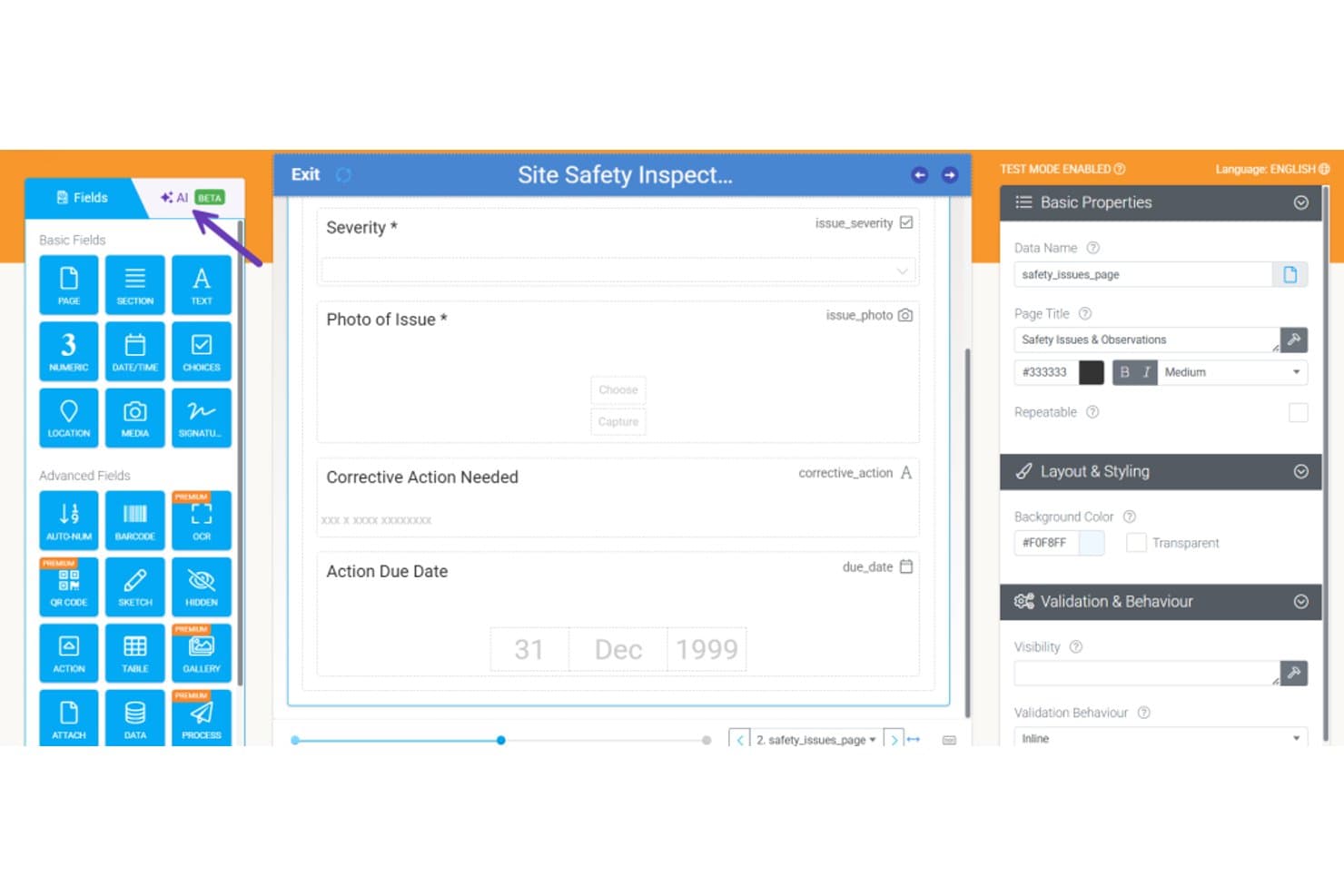
Appenate permite a los usuarios crear formularios de inspección de seguridad con campos que se pueden arrastrar y soltar. Appenate es un creador de aplicaciones móviles sin código diseñado específicamente para equipos de campo, que ofrece creación de formularios mediante arrastrar y soltar, captura de datos sin conexión, generación de formularios asistida por IA y flujos de trabajo automatizados para inspecciones, auditorías y asignación de trabajos.
¿Para quién es más adecuado Appenate?
Appenate es una excelente opción para equipos de servicios de campo e industriales—como los de construcción, minería y fabricación—que necesitan sustituir las inspecciones, auditorías y listas de verificación en papel por aplicaciones móviles capaces de funcionar sin conexión.
Por qué elegí Appenate
Elegí Appenate como una de las mejores opciones porque hace algo que la mayoría de las plataformas sin código no hace: está creado específicamente para digitalizar los flujos de trabajo de captura de datos de campo, no adaptado posteriormente para ello. Me encanta la función Relleno fotográfico con IA, que permite a los trabajadores de campo fotografiar un formulario en papel y hacer que sus campos digitales se completen automáticamente. Junto con la captura nativa sin conexión en iOS, Android y Windows, Appenate gestiona condiciones reales de campo en las que la conectividad se interrumpe durante una inspección.
Funciones principales de Appenate
- Creador de formularios mediante arrastrar y soltar: Un editor visual que permite a usuarios sin conocimientos técnicos crear aplicaciones de captura de datos utilizando tipos de campos como GPS, escaneo de códigos de barras, NFC, firmas y tablas repetibles.
- Motor de automatización de sincronización: Una herramienta de flujo de trabajo sin código que activa acciones encadenadas—como la generación de documentos, el envío de datos y el envío de correos electrónicos—en función de los envíos de formularios, las programaciones o los webhooks entrantes.
- Paneles de BI de Distill: Una capa de análisis integrada que convierte los datos de campo capturados en paneles interactivos y permite consultar los resultados en relación con los procedimientos operativos estándar internos.
- Compatibilidad con múltiples entornos: Entornos separados por departamento, con el kit de herramientas empresarial, que permite usar varios entornos empresariales y sincronizar aplicaciones, documentos y datos entre ellos.
Integraciones de Appenate
Appenate ofrece integraciones nativas con Salesforce, NetSuite, Xero, QuickBooks, Google Sheets, Snowflake, Google BigQuery y herramientas del ecosistema de Microsoft, como SharePoint y Azure. También se conecta con SQL Server, MySQL y PostgreSQL, y ofrece una API REST, webhooks y compatibilidad con Zapier.
Pros and Cons
Pros:
- La captura móvil sin conexión funciona sin conectividad
- La captura fotográfica de formularios en papel reduce el tiempo de configuración
- La asistencia de incorporación específica facilita las implementaciones en campo
Cons:
- Su alcance limitado restringe la creación de aplicaciones generales
- No ofrece control de versiones ni código personalizado
Learn more about Appenate: Ideal para desarrollo de aplicaciones empresariales asistidas por IA
- Demostración gratuita disponible
- $40/usuario/mes
Visit WebsiteCustomer Rating:4.7/5
El centro de aplicaciones de Studio Creatio ofrece una vista consolidada de todas las plantillas, conectores y aplicaciones. Creatio Studio está en esta lista porque combina diseño sin código con soporte de IA, lo que lo convierte en una excelente opción para crear aplicaciones empresariales rápidamente. Cuando trabajo con equipos de operaciones o TI que necesitan automatizar flujos de trabajo complejos o crear prototipos de sistemas específicos para departamentos, esta es una de las pocas plataformas donde las sugerencias generadas por IA y el mapeo de procesos realmente agilizan el trabajo.
Lo que más valoro es lo fácil que resulta para los equipos arrastrar y soltar lógica, integrarse con sistemas existentes y adaptar procesos en tiempo real. Destaca por el modelado guiado de procesos y por permitir diseñar visualmente tanto aplicaciones empresariales simples como complejas, con una carga técnica mínima.
Para quién es mejor Creatio Studio
- Equipos de TI u operaciones en empresas que desarrollan aplicaciones de flujo de trabajo personalizadas
- Organizaciones que utilizan IA para automatizar y optimizar procesos de negocio
Para quién no es ideal Creatio Studio
- Equipos pequeños con necesidades simples de tareas o proyectos
- Cualquiera que desee plantillas de aplicaciones preconstruidas con un mínimo de personalización
Lo que distingue a Creatio Studio
Creatio Studio está enfocado en permitir que los usuarios de negocio construyan aplicaciones impulsadas por flujos de trabajo de manera visual, sin necesidad de recurrir a código o scripts. Espera que las organizaciones definan primero los procesos empresariales y luego los traduzcan en automatizaciones e interfaces de aplicaciones. A diferencia de ClickUp o Airtable, que tienden hacia la gestión flexible de tareas, Creatio Studio enmarca todo alrededor del diseño de procesos y la automatización desde el principio.
Compromisos con Creatio Studio
Creatio Studio está optimizado para el diseño estructurado de procesos, pero se renuncia a la simplicidad y a las plantillas de inicio rápido que ofrecen otras herramientas sin código más ligeras. Esto implica que los equipos pequeños o usuarios menos técnicos pueden encontrar la configuración y la puesta en marcha más lenta.
Pros and Cons
Pros:
- Requiere mínima personalización
- Automatización de procesos y flujos de trabajo
- Interfaz de arrastrar y soltar
Cons:
- Curva de aprendizaje para quienes no estén familiarizados con el desarrollo sin código
- Algunos usuarios pueden encontrar complicado crear flujos de trabajo automatizados
Learn more about Creatio AI Studio: Mejor para crear apps móviles con arrastrar y soltar
- Plan gratuito disponible
- Desde $19/mes (facturado anualmente)
Visit WebsiteCustomer Rating:4.7/5
Aquí tienes una captura de pantalla de la función de voz en Thunkable, la cual te permite traducir texto, reconocer voz y hablar el idioma que eliges. Thunkable me llama la atención por cómo te permite crear aplicaciones móviles multiplataforma con un enfoque verdaderamente visual de arrastrar y soltar. Puedes personalizar componentes de la interfaz de usuario, manejar bloques de lógica y previsualizar los cambios en vivo, todo sin escribir código. Me gusta especialmente usar sus integraciones con funciones del dispositivo—como notificaciones push o GPS—ya que permite que equipos prototipen apps con sensación de producción rápidamente, incluso sin experiencia en programación.
Mejores usos de Thunkable
- Equipos no técnicos que necesitan crear aplicaciones móviles personalizadas rápidamente
- Educadores o gestores de producto que prototipan ideas de apps móviles
Cuándo Thunkable no es ideal
- Desarrolladores que necesitan codificación avanzada o control de backend
- Empresas que desarrollan aplicaciones empresariales de alto rendimiento
Qué diferencia a Thunkable
Thunkable aborda la creación de apps como un proceso completamente visual, por lo que ensamblas interfaces y lógica conectando bloques. Funciona bien cuando tu prioridad es prototipar rápido o iterar ideas móviles sin necesidad de tocar código. Comparado con alternativas como Bubble, que prioriza la web y ofrece algunas funciones móviles, Thunkable espera que te centres por completo en experiencias móviles nativas.
Compensaciones de Thunkable
Thunkable está optimizado para construir sin código de forma visual, por lo que pierdes la flexibilidad y el control que obtienes al escribir código personalizado. Esto suele limitar a equipos que buscan características más matizadas o integraciones fuera de su ecosistema.
Pros and Cons
Pros:
- Interfaz de arrastrar y soltar, enfatizando la facilidad de uso.
- Permite el desarrollo de aplicaciones tanto para iOS como para Android.
- Extensa biblioteca de componentes para diversas necesidades de desarrollo de aplicaciones.
Cons:
- Puede requerir curva de aprendizaje para funcionalidades de aplicaciones más complejas.
- Dependencia de integraciones de terceros para algunas funciones avanzadas.
- Las funcionalidades premium tienen un coste elevado.
Learn more about Glide: 4Ideal para backends escalables
Xano
- Plan gratuito disponible
- Desde $85/mes (facturado anualmente)
Visit WebsiteCustomer Rating:4.8/5
Xano proporciona un constructor de APIs sin código que permite a los usuarios crear lógica de negocio sin programar. Xano se gana su lugar porque elimina la complejidad de lanzar backends escalables sin utilizar código. He visto a equipos toparse con cuellos de botella al crecer en otras plataformas: Xano desbloquea la personalización de APIs y el escalado de cargas de trabajo cuando lo necesitas. Valoro su base de datos real y lógica sin servidor, así que no te limita a herramientas CRUD solamente web.
Lo que destaca es la rapidez con la que puedes construir e iterar flujos de trabajo complejos, incluso cuando cambian las demandas.
Xano es ideal para
- Equipos de producto que crean APIs y flujos de trabajo sin código escalables
- Aplicaciones que superan las bases de datos solamente web
No es ideal para
- Usuarios no técnicos que solo necesitan creadores de formularios simples
- Equipos que nunca planean personalizar la lógica del backend
Qué hace diferente a Xano
Xano realiza el trabajo de backend que harías con Firebase o APIs personalizadas, pero te permite trabajar de forma visual y sin utilizar código. Espera que definas la lógica de negocio, el esquema de la base de datos y los puntos finales de la API todo en un mismo lugar, lo que veo funcionar mejor para equipos que crean apps web o móviles y quieren verdadero control sobre las decisiones de backend. A diferencia de Airtable o Bubble, que priorizan el frontend, Xano está orientado a quienes construyen sistemas estructurados y escalables detrás del telón.
Compromisos con Xano
Xano prioriza el poder y la flexibilidad del backend, pero la interfaz y los conceptos requieren cierto entendimiento sobre diseño de APIs y datos relacionales, por lo que fundadores tempranos o constructores no técnicos pueden quedarse atascados.
Pros and Cons
Pros:
- Xano es altamente escalable
- Buenas funciones de gestión de API
- Hay plantillas predefinidas disponibles
Cons:
- Capacidades frontend limitadas
- Capacidad limitada para personalizar la infraestructura base
Learn more about Xano: Ideal para el diseño de aplicaciones basadas en bases de datos
- Prueba gratuita de 15 días + demo gratuita disponible
- Desde $8/usuario/mes (facturado anualmente)
Visit WebsiteCustomer Rating:4.3/5
Esta es la intuitiva función de creador con arrastrar y soltar de Zoho Creator. Zoho Creator está en mi lista porque es una de las pocas plataformas que hace que diseñar aplicaciones basadas en bases de datos sea realmente accesible sin código. Cuando los equipos necesitan crear aplicaciones personalizadas que dependan de una sólida estructuración de datos, acceso basado en roles y automatización, he visto que Zoho Creator destaca.
Lo que más aprecio es cómo puedes modelar visualmente tablas, relaciones y lógica empresarial—es práctico para sistemas de inventario, portales de clientes o herramientas de flujo de trabajo que parten de datos complejos.
Para qué es mejor Zoho Creator
- Crear aplicaciones personalizadas basadas en bases de datos sin código
- Organizaciones que necesitan modelado de datos y automatización de flujos de trabajo
Para qué no es ideal Zoho Creator
- Equipos que esperan un desarrollo de aplicaciones empresariales con todas las funciones
- Seguimiento de proyectos simples o necesidades básicas de listas de tareas
Lo que distingue a Zoho Creator
Zoho Creator se enfoca en permitirte crear aplicaciones impulsadas por bases de datos sin necesidad de tocar código. A diferencia de monday.com, que pone el foco en tableros visuales, considero que Zoho Creator espera que comiences modelando primero tus datos y relaciones para luego añadir los flujos de trabajo. Esto se adapta a organizaciones que desean digitalizar formularios, aprobaciones o sistemas internos y tienen necesidades de datos únicas, en lugar de adoptar un modelo genérico preestablecido.
Compensaciones con Zoho Creator
Zoho Creator está optimizado para el modelado de datos y la lógica de flujos de trabajo, pero se renuncia a la flexibilidad visual y las plantillas que ofrecen herramientas como Glide o Airtable. Esto hace que el inicio sea más lento para los equipos que quieren crear aplicaciones visuales rápidamente en lugar de partir de datos estructurados.
Pros and Cons
Pros:
- Sólido enfoque en la creación de aplicaciones basadas en bases de datos.
- Interfaz fácil de usar que se adapta tanto a expertos como a nuevos usuarios.
- Integraciones versátiles, especialmente dentro del ecosistema Zoho.
Cons:
- Aunque la plataforma es intuitiva, algunas funcionalidades avanzadas pueden tener una curva de aprendizaje más pronunciada.
- Las integraciones externas podrían ser más limitadas en comparación con otras plataformas sin código.
- Como ocurre con otras herramientas SaaS, los costos pueden aumentar al escalar para equipos grandes.
Learn more about Zoho Creator: Ideal para crear aplicaciones web visualmente
- Plan gratuito disponible
- Desde $32/mes
Visit WebsiteCustomer Rating:4.4/5
Esta es la función de interfaz de arrastrar y soltar en Bubble. Incluyo Bubble en mi lista porque es la plataforma más capaz que conozco para crear aplicaciones web totalmente personalizadas de manera visual, sin necesidad de código. Cuando los equipos superan las capacidades de los creadores de sitios web básicos y necesitan diseñar verdaderos flujos de trabajo, bases de datos dinámicas o una experiencia de usuario de aplicación web, Bubble destaca por su control de diseño a nivel de píxel y lógica basada en bases de datos.
Lo que valoro es cómo puedes arrastrar y soltar casi cualquier patrón de interfaz, configurar flujos de trabajo detallados y publicar herramientas SaaS listas para producción o portales de clientes sin tocar el código fuente.
Bubble es ideal para:
- Crear SaaS personalizados, portales o marketplaces de forma visual
- Equipos que necesitan control avanzado de la interfaz de usuario y lógica de flujos de trabajo
No es óptimo para usar Bubble en:
- Páginas de aterrizaje simples o sitios de tipo folleto
- Quienes necesiten apps móviles tradicionales empaquetadas para las tiendas de aplicaciones
Qué diferencia a Bubble
Bubble aborda el desarrollo de aplicaciones web poniendo en tus manos el diseño de maquetación a nivel de píxel, la lógica y la base de datos sin escribir código. A diferencia de otras como Webflow, que se enfoca principalmente en el diseño de sitios web, Bubble espera que estructures lógica de aplicación real y flujos de trabajo dinámicos. En la práctica, esto funciona perfectamente si deseas crear herramientas internas complejas o aplicaciones orientadas a clientes sin aprender un framework.
Aspectos a considerar en Bubble
Bubble prioriza la flexibilidad y la lógica personalizada, pero esa complejidad significa que la curva de aprendizaje es más alta que la de la mayoría de los constructores visuales. Si quieres lanzar un sitio simple rápidamente, este te parecerá un recurso excesivo para ese objetivo.
Pros and Cons
Pros:
- La interfaz de arrastrar y soltar simplifica el proceso de desarrollo de la aplicación.
- Los cambios en tiempo real permiten retroalimentación y ajustes inmediatos.
- Amplia biblioteca de plugins para extender las capacidades de la aplicación.
Cons:
- Puede haber una curva de aprendizaje para los principiantes absolutos.
- Aunque es versátil, puede haber algunas limitaciones en comparación con la programación tradicional.
- La plataforma puede ser abrumadora para algunos debido a sus amplias funciones.
 Ideal para crear aplicaciones móviles y web interactivas
- Plan gratuito disponible
- Desde $36/mes (facturación anual)
Visit WebsiteCustomer Rating:3.5/5
Aquí están los componentes preconstruidos en Adalo. Adalo está en mi lista porque te ofrece una forma visual de crear aplicaciones móviles y web interactivas sin código. Lo recomiendo cuando necesitas lógica personalizada y pantallas basadas en datos que aún se sientan nativas en ambas plataformas.
Me gusta cómo su mercado de componentes te permite añadir cosas como pagos y autenticación de usuarios justo donde lo necesitas. Me resultó fácil incorporar datos en tiempo real o activar flujos de trabajo personalizados durante las pruebas, lo cual sucede mucho en herramientas internas o prototipos de startups.
Lo mejor de Adalo
- Crear aplicaciones móviles o web completamente personalizadas de manera visual
- Equipos que construyen MVP, prototipos o herramientas internas rápidamente
Lo no tan bueno de Adalo
- Aplicaciones complejas con lógica avanzada en el backend o APIs
- Desarrolladores que necesitan exportación completa de código o arquitecturas abiertas
Qué hace único a Adalo
Adalo está diseñado para crear aplicaciones interactivas de manera visual, con un fuerte enfoque en la creación y personalización rápidas. A diferencia de herramientas como Glide, que se orientan más hacia la creación de apps a partir de hojas de cálculo, Adalo te brinda control total sobre el diseño, la experiencia del usuario y la base de datos. Esto es ideal cuando necesitas precisión en las interacciones y el diseño de la interfaz en vez de ajustarte a plantillas rígidas.
Compromisos de Adalo
Adalo prioriza el diseño práctico y la flexibilidad, pero sacrifica parte de la extensibilidad avanzada y el control a nivel de código que ofrecen plataformas no-code más técnicas. Eso puede limitar hasta dónde puedes escalar la lógica de tu app o conectarte a sistemas backend personalizados.
Pros and Cons
Pros:
- Interfaz intuitiva de arrastrar y soltar para un desarrollo sencillo de aplicaciones.
- Plataforma versátil que admite tanto la creación de aplicaciones web como móviles.
- Amplia biblioteca de plantillas preconstruidas que facilitan la rápida finalización de proyectos.
Cons:
- Las funciones premium tienen un costo más elevado.
- Algunas funciones avanzadas pueden requerir una ligera curva de aprendizaje.
- Según el proyecto, las integraciones externas pueden ser esenciales para la funcionalidad completa.
Learn more about Adalo: Ideal para aplicaciones dinámicas basadas en formularios
- Plan gratuito disponible
- Desde $34/usuario/mes (facturado anualmente)

Aquí tienes una captura de pantalla de la página del creador de apps en Jotform. Jotform Apps es mi elección para proyectos donde los formularios no solo son entrada de datos, sino que constituyen la aplicación en sí. Cuando los equipos utilizan lógica condicional, firmas e integraciones con cálculos, esto se convierte en una auténtica alternativa a los creadores de aplicaciones tradicionales. Me gusta cómo puedes iniciar flujos de trabajo, recopilar aprobaciones y distribuir aplicaciones sin una sola línea de código, todo basado en formularios personalizados.
Jotform Apps es ideal para
- Usuarios sin conocimientos técnicos que necesiten aplicaciones personalizadas basadas en formularios
- Equipos de RR. HH., educación y servicios que recopilan y procesan datos
Jotform Apps no es ideal para
- Desarrollar aplicaciones comerciales complejas y multiusuario con lógica avanzada
- Equipos que necesiten automatizaciones internas avanzadas o llamadas a APIs externas
Lo que distingue a Jotform Apps
Jotform Apps aborda la creación de aplicaciones como trabajar con formularios: combinas lógica, flujos de trabajo y recopilación de datos utilizando el mismo enfoque centrado en formularios que han perfeccionado durante años. En lugar de intentar imitar algo como Glide o Bubble, este conjunto de herramientas parte de la premisa de que tu necesidad principal es crear formularios interactivos, orientados a procesos y que además funcionen como aplicaciones independientes.
En la práctica, veo que esto funciona muy bien cuando tu flujo de trabajo se basa en aprobaciones, firmas y campos enriquecidos, pero no requiere una lógica compleja de backend.
Compromisos al usar Jotform Apps
Jotform Apps está optimizado para desarrollar rápidamente soluciones basadas en formularios, pero como resultado, la profundidad de la lógica y automatización es limitada en comparación con los creadores de aplicaciones completos. Si llegas a esos límites, no podrás ampliar mucho la funcionalidad más allá de lo que ya está integrado.
Pros and Cons
Pros:
- Interfaz intuitiva de arrastrar y soltar
- Comentarios en tiempo real durante el diseño de formularios
- Fuertes integraciones, especialmente con Salesforce y Slack
Cons:
- Las funciones avanzadas pueden requerir conocimientos de CSS
- Funciones de personalización limitadas en el plan básico
- Curva de aprendizaje para ciertas funcionalidades
Learn more about Jotform Apps: Ideal para soluciones empresariales dentro del ecosistema Microsoft
- Prueba gratuita de 30 días + plan gratuito disponible
- Desde $20/usuario/mes

Aquí tienes una captura de pantalla del estudio de Microsoft Power Apps. Microsoft PowerApps entra en mi lista porque es la opción preferida para organizaciones que ya han invertido en Microsoft 365 y Azure. Me gusta cómo puedes crear rápidamente aplicaciones que obtienen datos de SharePoint, Dataverse o Dynamics 365 sin necesidad de programar. Cuando los equipos desean automatizar formularios, aprobaciones o la recolección de datos en campo dentro de los flujos de trabajo existentes de Microsoft, PowerApps suele ser la opción ideal.
Lo que me llama la atención es cómo puedes personalizar el acceso de los usuarios y las conexiones de datos con controles de seguridad granulares, todo gestionado dentro del mismo ecosistema.
Para quién es mejor PowerApps
- Organizaciones que usan Microsoft 365 y Azure
- Creación de aplicaciones empresariales que utilizan datos internos de Microsoft
Para quién no es recomendable PowerApps
- Equipos que necesitan aplicaciones complejas fuera del entorno de Microsoft
- Usuarios que desean muchas plantillas prediseñadas específicas de la industria
Qué diferencia a PowerApps
PowerApps plantea la creación de aplicaciones empresariales como algo que se agrega directamente a los sistemas existentes de Microsoft, y no como un proceso independiente. He notado que la mayoría lo utiliza para acoplar flujos de trabajo en SharePoint, Teams o Dataverse sin salir del entorno familiar de Microsoft. A diferencia de herramientas como AppSheet o Bubble, presupone que tus datos y usuarios ya están en Microsoft 365. Esto es ideal cuando quieres que las aplicaciones estén dentro de esas herramientas de productividad.
Desventajas de PowerApps
Al estar optimizado para flujos de trabajo alineados con Microsoft, limita tu alcance y flexibilidad fuera de ese ecosistema, por lo que crear soluciones para otras plataformas o integrar APIs externas generalmente requiere más trabajo.
Pros and Cons
Pros:
- Integración robusta con servicios de Microsoft como Excel y Dynamics 365.
- Plataforma de desarrollo de aplicaciones sin código, accesible para usuarios con poca experiencia en programación.
- Ofrece una variedad de plantillas prediseñadas que aceleran el proceso de desarrollo.
Cons:
- La curva de aprendizaje puede ser algo pronunciada para quienes son nuevos en el entorno de Microsoft.
- Aunque cuenta con una funcionalidad amplia, puede ser excesivo para necesidades de negocios muy pequeños.
- Las personalizaciones fuera del paquete de Microsoft pueden requerir conectores adicionales o conocimientos específicos.
Learn more about Microsoft PowerApps:

Aquí tienes la captura de pantalla de la página principal de Google App AppSheet. Elegí Google AppSheet para equipos que desean automatizar procesos empresariales sin necesidad de código ni configuraciones complejas. Lo que realmente distingue a AppSheet es cómo permite crear aplicaciones que desencadenan acciones (como aprobaciones, alertas o generación de documentos) en función de actualizaciones de datos tanto en Google Workspace como fuera de él.
He visto organizaciones crear flujos de trabajo que monitorizan hojas compartidas o formularios de inventario, inician pasos automáticamente y mantienen los procesos en movimiento sin intervención del departamento de TI. Aprecio especialmente cómo su automatización basada en eventos te da control real sobre procesos entre sistemas, sin necesidad de scripts.
Lo mejor de AppSheet
- Automatizar procesos empresariales vinculados a datos de Google Workspace
- Equipos no técnicos que crean aplicaciones de flujo de trabajo sin código
Lo que no es ideal de AppSheet
- Desarrolladores que necesitan personalización avanzada o lógica compleja
- Organizaciones que requieren control de acceso estricto y granular entre aplicaciones
Lo que diferencia a AppSheet
AppSheet está pensado para personas que desean automatizar procesos conectando los datos que ya utilizan, como Google Sheets o Drive, sin escribir código. En lugar de guiarte a través de la construcción abstracta de una app, comienza con la información empresarial existente y te permite agregar acciones y flujos de trabajo según sea necesario.
En comparación con opciones como Zapier, AppSheet espera que crees aplicaciones reales que combinen datos, formularios y disparadores en un solo espacio de trabajo, no simplemente conectar automatizaciones individuales.
Compensaciones de AppSheet
AppSheet prioriza la simplicidad sin código, lo que significa que renuncias al tipo de personalización profunda y control de sistema amplio que ofrecen los frameworks abiertos o plataformas tradicionales de bajo código.
Pros and Cons
Pros:
- Integración estrecha con los servicios de Google, lo que facilita el acceso a los datos.
- La sincronización de datos en tiempo real garantiza información actualizada para todos los usuarios.
- Interfaz fácil de usar, adecuada tanto para desarrolladores experimentados como para principiantes.
Cons:
- Aunque es potente, puede haber una curva de aprendizaje para principiantes absolutos.
- Las funcionalidades avanzadas pueden necesitar conocimientos más profundos.
- Algunas integraciones o funciones avanzadas pueden requerir costes adicionales.
Learn more about Google App AppSheet:
Otras plataformas de desarrollo sin código que puedes considerar
A continuación encontrarás una lista de plataformas de desarrollo sin código adicionales que incluí en mi selección, pero que no llegaron a estar entre las 10 mejores. Sin duda, merece la pena echarles un vistazo.
- 11WebflowLo mejor para diseño web sin escribir código
- 12ServiceNow App EngineIdeal para aplicaciones escalables
- 13Base44Ideal para crear apps con lenguaje natural
- 14ThunkableIdeal para crear apps móviles con arrastrar y soltar
- 15ZeroqodeIdeal para construir con plantillas prediseñadas
- 16Codeless ONEIdeal para el desarrollo de aplicaciones empresariales
- 17QuickbaseMejor para el desarrollo de aplicaciones empresariales
Análisis relacionados de software de TI
Si todavía no has encontrado aquí lo que buscas, consulta estas herramientas alternativas que hemos probado y evaluado.
- Software de monitorización de redes
- Software de monitorización de servidores
- Soluciones SD-WAN
- Herramientas de monitorización de infraestructuras
- Analizador de paquetes
- Herramientas de monitorización de aplicaciones
Cómo evalúo las plataformas de desarrollo sin código
Desde equipos de TI que crean paneles internos hasta responsables de DevOps que automatizan flujos de aprobación, busco dos cosas: las capacidades básicas que toda herramienta debe tener y lo que realmente diferencia a las mejores.
Funcionalidad central (lo mínimo indispensable para esta lista)
Cuando selecciono herramientas para mi lista, califico cada una en una escala de 0 (no ofrece la funcionalidad) a 5 (destaca en esta área) para cada funcionalidad básica mencionada a continuación. Luego, calculo la puntuación total de la herramienta en porcentaje. Cada herramienta debe lograr una puntuación mínima total del 75% para ser considerada para su inclusión.
- Interfaz de desarrollo visual: Evalúo si el constructor de arrastrar y soltar permite diseñar la interfaz, vinculación de datos y lógica interna, no solo el diseño visual que sigue requiriendo código backend.
- Plantillas y componentes preconstruidos: Una buena biblioteca de elementos reutilizables como campos de formulario, gráficos y vistas de tabla ahorra tiempo real en aplicaciones comunes como rastreadores de inventario o portales de solicitudes.
- Automatización de flujos de trabajo y lógica: Busco creadores de flujos visuales que soporten procesos de varios pasos—como cadenas de aprobación, enrutamiento condicional y activadores programados.
- Gestión e integración de datos: La conexión con bases de datos externas, APIs REST y herramientas como Salesforce o Google Sheets debe ser sencilla y bien documentada.
- Despliegue multiplataforma: Verifico que un solo proyecto pueda publicarse como app web adaptable y como app móvil nativa sin tener que reconstruir las pantallas desde cero.
- Gestión de acceso y roles de usuario: La autenticación integrada y los permisos granulares por roles importan, especialmente para aplicaciones internas donde diferentes equipos necesitan distintas vistas de los datos.
Una vez tengo la lista de herramientas que cumplen con estos criterios, considero qué distingue a cada plataforma.
Factores diferenciadores (qué distingue a los proveedores)
Así es como comparo y contrasto diferentes proveedores:
Características destacadas
El desarrollo asistido por IA es actualmente un gran diferenciador. Busco plataformas donde indicaciones en lenguaje natural pueden generar diseños de aplicaciones o flujos de lógica funcionales, lo que reduce drásticamente el tiempo de creación para herramientas internas comunes. El control de versiones y los entornos de pruebas también son importantes, especialmente cuando varios equipos realizan actualizaciones en aplicaciones en producción. La extensibilidad mediante código personalizado complementa el conjunto. Plataformas como Retool y Appsmith permiten insertar JavaScript cuando las capacidades visuales no son suficientes, lo que da a los equipos de TI una solución para casos especiales.
Más allá de las características
La gobernanza y la supervisión de TI son cruciales cuando los desarrolladores ciudadanos comienzan a crear a través de varios departamentos. Evalúo si una plataforma ofrece controles de administración centralizados y registros de auditoría para que los equipos de TI mantengan la visibilidad sin frenar a los creadores. Las certificaciones de cumplimiento como SOC 2 Tipo II y la preparación para el RGPD también tienen un peso importante, especialmente para apps que gestionan datos de clientes o empleados. La transparencia en los precios también importa: reviso si la concesión de licencias escala de forma previsible a medida que más usuarios o unidades de negocio adoptan la plataforma, ya que los aumentos inesperados de costos pueden frenar rápidamente la adopción.
Cómo elegir plataformas de desarrollo sin código
Es fácil perderse entre largas listas de características y estructuras de precios complejas. Para ayudarte a mantener la concentración mientras avanzas en tu proceso único de selección de software, aquí tienes una lista de factores que debes tener en cuenta:
| Factor | Qué tener en cuenta |
|---|---|
| FactorEscalabilidad | Qué tener en cuentaAsegúrate de que la plataforma pueda gestionar un mayor volumen de usuarios y unas necesidades de datos crecientes sin problemas de rendimiento. |
| FactorIntegraciones | Qué tener en cuentaBusca compatibilidad con tu CRM, ERP y otros sistemas empresariales principales existentes. |
| FactorPersonalización | Qué tener en cuentaEvalúa con qué facilidad puedes modificar plantillas y flujos de trabajo para adaptarlos a tus procesos empresariales específicos. |
| FactorFacilidad de uso | Qué tener en cuentaLa plataforma debe contar con una interfaz intuitiva de arrastrar y soltar y una curva de aprendizaje mínima. |
| FactorPresupuesto | Qué tener en cuentaCompara los planes de precios para asegurarte de obtener la combinación adecuada de funciones y licencias de usuario dentro de tu presupuesto. |
| FactorMedidas de seguridad | Qué tener en cuentaVerifica que la plataforma ofrezca cifrado de datos, acceso basado en roles y cumplimiento de los estándares del sector. |
| FactorCompatibilidad móvil | Qué tener en cuentaAsegúrate de que la plataforma admita un diseño adaptable y compatibilidad multiplataforma. |
| FactorPermisos de usuario | Qué tener en cuentaBusca roles de usuario y configuraciones de acceso detalladas para controlar la visibilidad de los datos y los permisos de edición. |
Tendencias en las plataformas de desarrollo sin código
En mi investigación, recopilé innumerables actualizaciones de productos, comunicados de prensa y registros de versiones de distintos proveedores de plataformas de desarrollo de bajo código y sin código. Estas son algunas de las tendencias emergentes que estoy siguiendo:
- Desarrollo impulsado por IA: Las plataformas están integrando la IA para automatizar la lógica, sugerir mejoras y mejorar la experiencia del usuario mediante diseño predictivo y automatización inteligente.
- Flexibilidad de arrastrar y soltar: Cada vez más plataformas están mejorando las funciones de arrastrar y soltar, lo que permite una mayor personalización sin necesidad de conocimientos de programación.
- Roles de usuario avanzados: Las herramientas ofrecen configuraciones de permisos más detalladas y acceso basado en roles para adaptarse a estructuras empresariales complejas.
- Implementación multiplataforma: La creciente demanda de compatibilidad web, móvil y de escritorio está impulsando a las plataformas a ampliar sus opciones de implementación.
- Análisis integrados: Los proveedores están incorporando herramientas de visualización de datos y generación de informes directamente en las plataformas para ayudar a los usuarios a supervisar el rendimiento y optimizar los flujos de trabajo.
¿Qué son las plataformas de desarrollo sin código?
Las plataformas de desarrollo sin código son herramientas de software que permiten a los usuarios crear aplicaciones sin escribir código. Los profesionales empresariales, los responsables de producto y los desarrolladores ciudadanos suelen utilizarlas para desarrollar aplicaciones rápidamente y reducir la dependencia de los equipos técnicos.
Las interfaces de arrastrar y soltar, las plantillas prediseñadas y las funciones de automatización de flujos de trabajo ayudan a simplificar el proceso de desarrollo. Estas plataformas ofrecen una implementación rápida, ahorro de costes y una mayor innovación, lo que las hace valiosas para las empresas que buscan crecer y adaptarse rápidamente. Las modernas plataformas de IA sin código van un paso más allá al automatizar tareas complejas que antes requerían conocimientos técnicos.
Funciones de las plataformas de desarrollo sin código
Al seleccionar plataformas de desarrollo sin código, presta atención a las siguientes funciones clave:
- Interfaz de arrastrar y soltar: Permite a los usuarios crear aplicaciones visualmente sin conocimientos de programación, acelerando el desarrollo.
- Plantillas prediseñadas: Proporciona estructuras de aplicaciones listas para usar con las que se acelera la implementación.
- Integración de datos: Permite conectarse con bases de datos, API y aplicaciones de terceros existentes.
- Flujos de trabajo personalizados: Admite la automatización de procesos empresariales mediante reglas basadas en lógica.
- Diseño adaptable: Garantiza que las aplicaciones funcionen en dispositivos de escritorio y móviles.
- Permisos de usuario: Controla los niveles de acceso y los roles para mantener la seguridad de los datos.
- Control de versiones: Registra y gestiona los cambios para evitar conflictos y mantener la coherencia.
- Análisis e informes: Proporciona información sobre el rendimiento de las aplicaciones y el comportamiento de los usuarios.
- Escalabilidad: Garantiza que la plataforma pueda gestionar volúmenes crecientes de usuarios y datos.
- Funcionalidad sin conexión: Permite que las aplicaciones funcionen sin conexión a Internet y se sincronicen posteriormente.
Ventajas de las plataformas de desarrollo sin código
La implementación de plataformas de desarrollo sin código ofrece varias ventajas para tu equipo y tu empresa. Estas son algunas de las que puedes esperar:
- Desarrollo más rápido: Acelera la creación de aplicaciones con herramientas de arrastrar y soltar y plantillas prediseñadas.
- Costes más bajos: Reduce la necesidad de recursos de desarrollo costosos y ciclos de desarrollo largos.
- Empodera a quienes no son desarrolladores: Permite a los usuarios empresariales crear aplicaciones sin conocimientos de programación.
- Colaboración mejorada: Permite que los equipos técnicos y no técnicos trabajen juntos de forma más eficaz.
- Escalabilidad: Se adapta a las necesidades empresariales crecientes sin tener que reconstruir desde cero.
- Mayor flexibilidad: Los flujos de trabajo personalizados y las opciones de automatización permiten crear soluciones adaptadas.
- Seguridad mejorada: Los permisos integrados y el cifrado de datos protegen la información confidencial.
Costes y precios de las plataformas de desarrollo sin código
Seleccionar plataformas de desarrollo sin código requiere comprender los distintos modelos de precios y planes disponibles. Los costes varían en función de las características, el tamaño del equipo, los complementos y otros factores. La siguiente tabla resume los planes habituales, sus precios medios y las características típicas incluidas en las plataformas de desarrollo sin código:
Tabla comparativa de planes para plataformas de desarrollo sin código
| Tipo de plan | Precio medio | Características habituales |
|---|---|---|
| Tipo de planPlan gratuito | Precio medio$0 | Características habitualesPlantillas básicas, número limitado de usuarios y un número restringido de integraciones. |
| Tipo de planPlan personal | Precio medio$10–$30/usuario/mes | Características habitualesPlantillas personalizables, automatización básica e integraciones estándar. |
| Tipo de planPlan empresarial | Precio medio$30–$100/usuario/mes | Características habitualesAutomatización avanzada, compatibilidad con varios usuarios, seguridad mejorada y herramientas de generación de informes. |
| Tipo de planPlan corporativo | Precio medio$100+/usuario/mes | Características habitualesNúmero ilimitado de usuarios, seguridad avanzada, asistencia técnica dedicada y funciones de cumplimiento normativo. |
Preguntas frecuentes sobre plataformas de desarrollo sin código
Estas son algunas respuestas a preguntas frecuentes sobre las plataformas de desarrollo sin código:
¿Pueden las plataformas sin código gestionar aplicaciones empresariales complejas?
Sí, muchas plataformas sin código han evolucionado para admitir aplicaciones empresariales complejas. Ofrecen funciones avanzadas como integraciones con diversas fuentes de datos, autenticación de usuarios y automatización de flujos de trabajo. Sin embargo, la complejidad que pueden gestionar varía según la plataforma, por lo que es esencial evaluar sus requisitos específicos y elegir una plataforma que se ajuste a las necesidades de su empresa.
¿Cómo garantizan las plataformas sin código la seguridad y el cumplimiento de los datos?
Las plataformas sin código de confianza implementan sólidas medidas de seguridad, como el cifrado de datos, la autenticación de usuarios y auditorías de seguridad periódicas. Algunas plataformas también cumplen normas y reglamentos del sector, como el RGPD o HIPAA. Es fundamental revisar las funciones de seguridad y las certificaciones de cumplimiento de la plataforma para asegurarse de que cumplen las normas de su organización.
¿Pueden las plataformas sin código integrarse con sistemas y bases de datos existentes?
Sí, la mayoría de las plataformas sin código ofrecen funciones de integración con sistemas y bases de datos existentes mediante API o conectores integrados. Esto permite conectar sus aplicaciones con otras herramientas y servicios, facilitando un flujo de datos fluido y mejorando la funcionalidad. Compruebe siempre las opciones de integración de una plataforma para garantizar la compatibilidad con sus sistemas actuales.
¿Cuáles son las limitaciones de las plataformas de desarrollo sin código?
Aunque las plataformas sin código ofrecen un desarrollo rápido y facilidad de uso, pueden presentar limitaciones de personalización y escalabilidad en comparación con la programación tradicional. Las funcionalidades complejas pueden ser difíciles de implementar y el rendimiento podría ser un problema para aplicaciones a gran escala. Es importante evaluar estos factores en función de los requisitos de su proyecto.
¿Cómo gestionan las plataformas sin código la escalabilidad a medida que crece mi empresa?
La escalabilidad varía según la plataforma sin código. Algunas están diseñadas para admitir el crecimiento y ofrecen funciones que se adaptan al aumento del volumen de datos y de la carga de usuarios. Sin embargo, otras pueden ser más adecuadas para aplicaciones pequeñas o medianas. Evalúe las opciones de escalabilidad de una plataforma, como la optimización del rendimiento y la asistencia de infraestructura, para asegurarse de que pueda crecer junto con su empresa. Otra opción, según sus necesidades, es trabajar con una empresa de desarrollo, como un proveedor de servicios de desarrollo de aplicaciones multiplataforma.
¿Hay opciones gratuitas de plataformas sin código disponibles?
Sí, muchas plataformas sin código ofrecen planes gratuitos para atraer usuarios. Estos planes gratuitos suelen incluir limitaciones, como marcas de agua de la empresa, menos funciones o límites en el número de usuarios o visitantes de la aplicación. Plataformas como Bubble y Glide tienen niveles gratuitos populares para empezar.
¿Necesito conocimientos técnicos para utilizar eficazmente una plataforma de desarrollo sin código?
Las plataformas sin código están diseñadas para usuarios con pocos o ningún conocimiento técnico, e incluyen interfaces intuitivas y funcionalidades de arrastrar y soltar. Sin embargo, tener conocimientos básicos de lógica de aplicaciones y estructuras de datos puede ser beneficioso para crear aplicaciones más sofisticadas. Algunas plataformas también ofrecen recursos y tutoriales para ayudar a los usuarios a empezar.