

Los entornos tecnológicos actuales, rápidos y exigentes, requieren mantener la red segura y eficiente, lo que a menudo puede ser un desafío. Los instrumentos de supervisión de redes con IA pueden ayudar a tu equipo a detectar anomalías y predecir problemas antes de que se conviertan en dificultades.
Como persona que prueba y analiza software de forma independiente, mi objetivo es ofrecerte información imparcial sobre los mejores instrumentos de supervisión de redes con IA disponibles. Estos instrumentos aprovechan la IA para mejorar el rendimiento y la seguridad de tu red, facilitándote el trabajo.
En este artículo encontrarás mis principales recomendaciones, cada una evaluada por sus capacidades únicas de IA. Tanto si buscas análisis predictivo como supervisión en tiempo real, te ofrezco toda la información que necesitas. Exploremos cómo estos instrumentos pueden satisfacer tus necesidades.
Por qué confiar en nuestras recomendaciones de software
6,700+
Reviews
20
Industry experts
16+
Evaluation factors
14
Years
Nuestro equipo lleva probando y evaluando software desde 2012. Como líderes tecnológicos, sabemos lo difícil —y lo importante— que es elegir el software adecuado.
Para esta guía, evaluamos las herramientas mediante pruebas prácticas e investigación independiente, puntuando las herramientas según nuestros criterios de selección.
Nuestras reseñas reflejan nuestro criterio editorial humano, no un discurso de ventas.
Revisores expertos:
- Paulo Gardini MiguelDirector técnico
 Tim FisherVP de IA
 Gabriel RosasTech Lead y arquitecto de software
 Christhian GruhnTech Lead y arquitecto de plataforma

Tabla comparativa de instrumentos de supervisión de redes con IA
Esta tabla comparativa resume los detalles de precios de mis principales selecciones de instrumentos de supervisión de redes con IA:
| Tool | Best For | Trial Info | Price | ||
|---|---|---|---|---|---|
| 1 | Ideal para mapeo de red | Prueba gratuita de 14 días + demo gratis disponible | Precios bajo solicitud | Website | |
| 2 | Mejor para recomendaciones de sensores impulsadas por IA | Prueba gratis de 30 días | Desde $200/mes (facturado anualmente) | Website | |
| 3 | La mejor opción para la monitorización integral de infraestructuras híbridas | Plan gratuito + prueba gratuita de 30 días disponible | Desde $275/mes (facturado anualmente) | Website | |
| 4 | Ideal para obtener información basada en IA | Demostración gratuita disponible | Desde $4.50/1000 sesiones | Website | |
| 5 | Ideal para monitoreo en tiempo real | Prueba gratuita de 14 días | Desde $15/host/mes (pagado anualmente) | Website | |
| 6 | Ideal para monitoreo en la nube | Prueba gratuita de 15 días | Desde $16/unidad híbrida/mes | Website | |
| 7 | Mejor para cumplimiento de seguridad | Demostración gratuita disponible | Precios bajo consulta | Website | |
| 8 | Mejor para integración de IA | Prueba gratuita de 30 días + demo gratis disponible | Precios bajo consulta | Website | |
| 9 | Mejor para operaciones de TI | Prueba gratuita de 30 días + demo gratis disponible | Desde $104/mes | Website | |
| 10 | Mejor para la detección de amenazas | Demostración gratuita disponible | Precios bajo consulta | Website |


Análisis de los mejores instrumentos de supervisión de redes con IA
A continuación se presentan mis resúmenes detallados de los mejores instrumentos de supervisión de redes con IA que llegaron a mi lista de selección. Mis análisis ofrecen una visión detallada de las funciones principales, ventajas y desventajas, integraciones y casos de uso ideales de cada instrumento para ayudarte a encontrar el más adecuado para ti.
 Ideal para mapeo de red
- Prueba gratuita de 14 días + demo gratis disponible
- Precios bajo solicitud
Visit WebsiteCustomer Rating:4.7/5
Auvik ofrece mapeo de red impulsado por IA e información sobre el rendimiento en tiempo real. Auvik es un software de gestión de redes basado en la nube dirigido a profesionales de TI que buscan simplificar la supervisión y administración de redes. Ofrece mapeo de red y capacidad de observación impulsadas por IA para proporcionar información en tiempo real sobre el rendimiento de la red.
Por qué elegí Auvik: El mapeo de red de Auvik descubre y visualiza automáticamente la infraestructura de tu red. Sus capacidades de IA identifican rápidamente anomalías en la red, asegurando que tu equipo pueda abordar los problemas con prontitud. La plataforma ofrece supervisión continua del rendimiento, dándote una visión clara de la salud de tu ecosistema. El sistema de alertas de Auvik es personalizable, lo que te permite establecer umbrales y recibir notificaciones según tus necesidades.
Funciones e integraciones destacadas:
Funciones incluyen la supervisión del rendimiento para proporcionar información sobre la salud de la red. El sistema de alertas personalizable te permite decidir qué notificaciones recibir y sobre las cuales actuar.
Integraciones incluyen ConnectWise, Autotask, Microsoft Teams, Slack, Cisco, Google Workspace, ServiceNow y más.
Pros and Cons
Pros:
- Automatiza el descubrimiento y mapeo de la red
- Ofrece monitoreo de rendimiento en tiempo real
- Proporciona umbrales de alerta personalizables
Cons:
- Puede tener una curva de aprendizaje considerable
- Funciones limitadas de informes avanzados
Learn more about Auvik: Mejor para recomendaciones de sensores impulsadas por IA
- Prueba gratis de 30 días
- Desde $200/mes (facturado anualmente)
Visit WebsiteCustomer Rating:4.6/5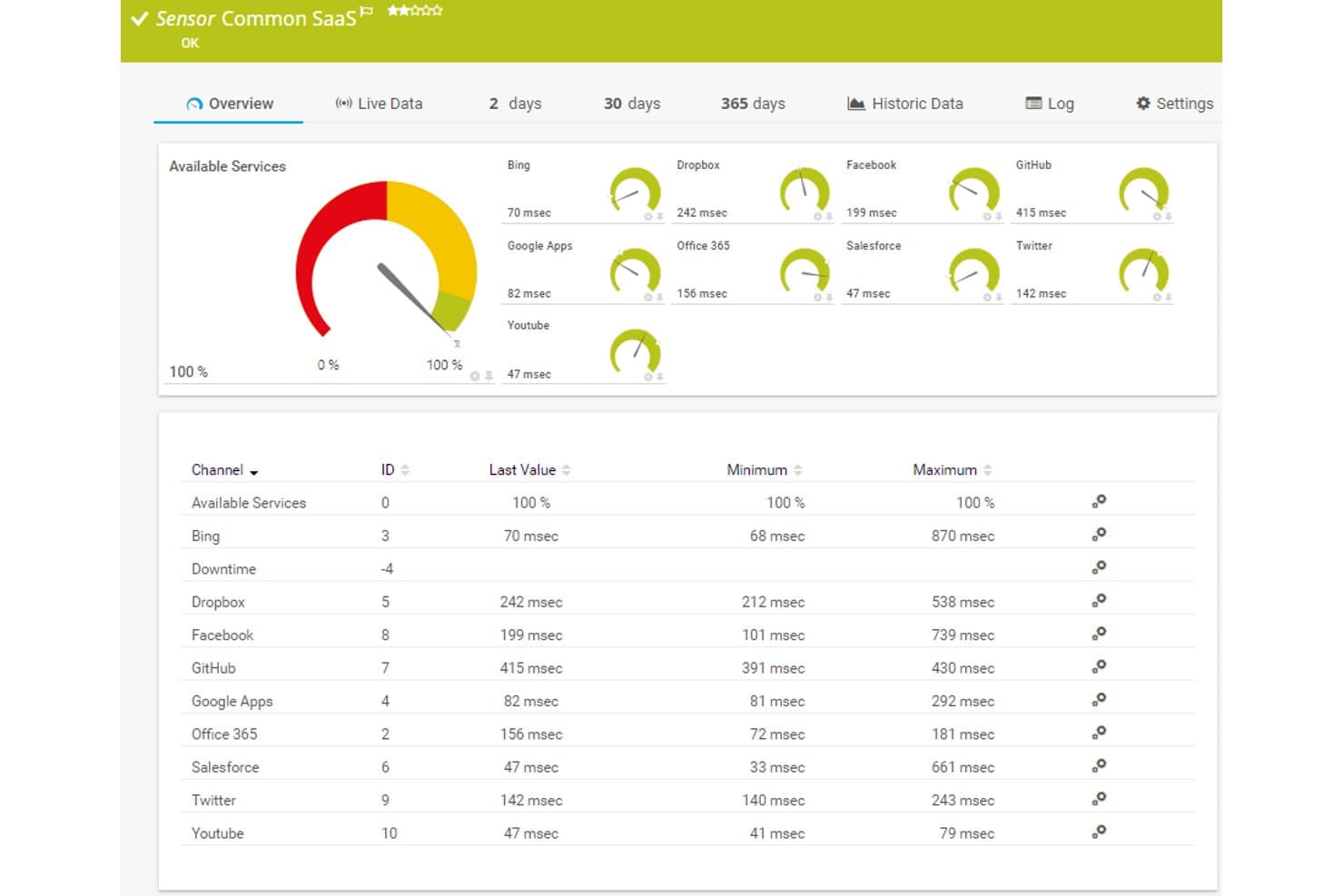
Paessler PRTG ofrece un panel de sensores SaaS común que muestra en tiempo real los tiempos de respuesta y la disponibilidad de servicios en la nube como Dropbox, Office 365, Salesforce y GitHub. Paessler PRTG es una plataforma de monitoreo de red asistida por IA que combina monitoreo de infraestructura basado en sensores, detección adaptativa de anomalías, recopilación de telemetría en tiempo real y soporte multiprotocolo en entornos locales y en la nube.
¿Para quién es mejor Paessler PRTG?
PRTG es ideal para gerentes de infraestructura de TI e ingenieros de NOC en empresas medianas y grandes que gestionan entornos de red complejos y multiprotocolo.
Por qué elegí Paessler PRTG
Elegí Paessler PRTG porque su motor de recomendaciones de sensores impulsado por IA sugiere activamente qué sensores desplegar según los dispositivos detectados, lo que reduce significativamente el tiempo de configuración del monitoreo. También me gusta la función de establecimiento de línea base automatizada, que analiza continuamente la telemetría histórica para crear umbrales adaptativos sin ninguna configuración manual. Eso significa que no estoy persiguiendo falsos positivos por límites de alertas estáticos, porque el sistema se ajusta automáticamente a medida que mi entorno cambia.
Características clave de Paessler PRTG
- Diseñador de mapas: Crea mapas de topología de red personalizados con indicadores de estado en tiempo real para dispositivos y enlaces.
- Monitoreo distribuido: Utiliza sondas remotas para monitorear múltiples sitios, redes o subsidiarias desde una sola interfaz.
- Sensores personalizados REST: Extiende el monitoreo a cualquier sistema accesible por API construyendo tus propios sensores basados en REST.
- Soporte de protocolos industriales: Monitorea entornos OT con soporte integrado para protocolos OPC UA, Modbus TCP y MQTT.
Integraciones de Paessler PRTG
Paessler PRTG ofrece integraciones nativas en todo el ecosistema de Microsoft, incluyendo Microsoft 365 y Azure, y es compatible con AWS, VMware y Cisco Meraki. Hay una API disponible para integraciones personalizadas.
Pros and Cons
Pros:
- Las recomendaciones de sensores basadas en IA reducen el tiempo de configuración de monitoreo
- Cubre más de 1,000 sensores en diversos tipos de dispositivos
- El despliegue en local es ideal para entornos con sensibilidad de datos
Cons:
- Las funciones de IA están por detrás respecto a competidores nativos de la nube
- La interfaz se siente anticuada frente a plataformas SaaS modernas
Learn more about Paessler PRTG: La mejor opción para la monitorización integral de infraestructuras híbridas
- Plan gratuito + prueba gratuita de 30 días disponible
- Desde $275/mes (facturado anualmente)
Visit WebsiteCustomer Rating:4.7/5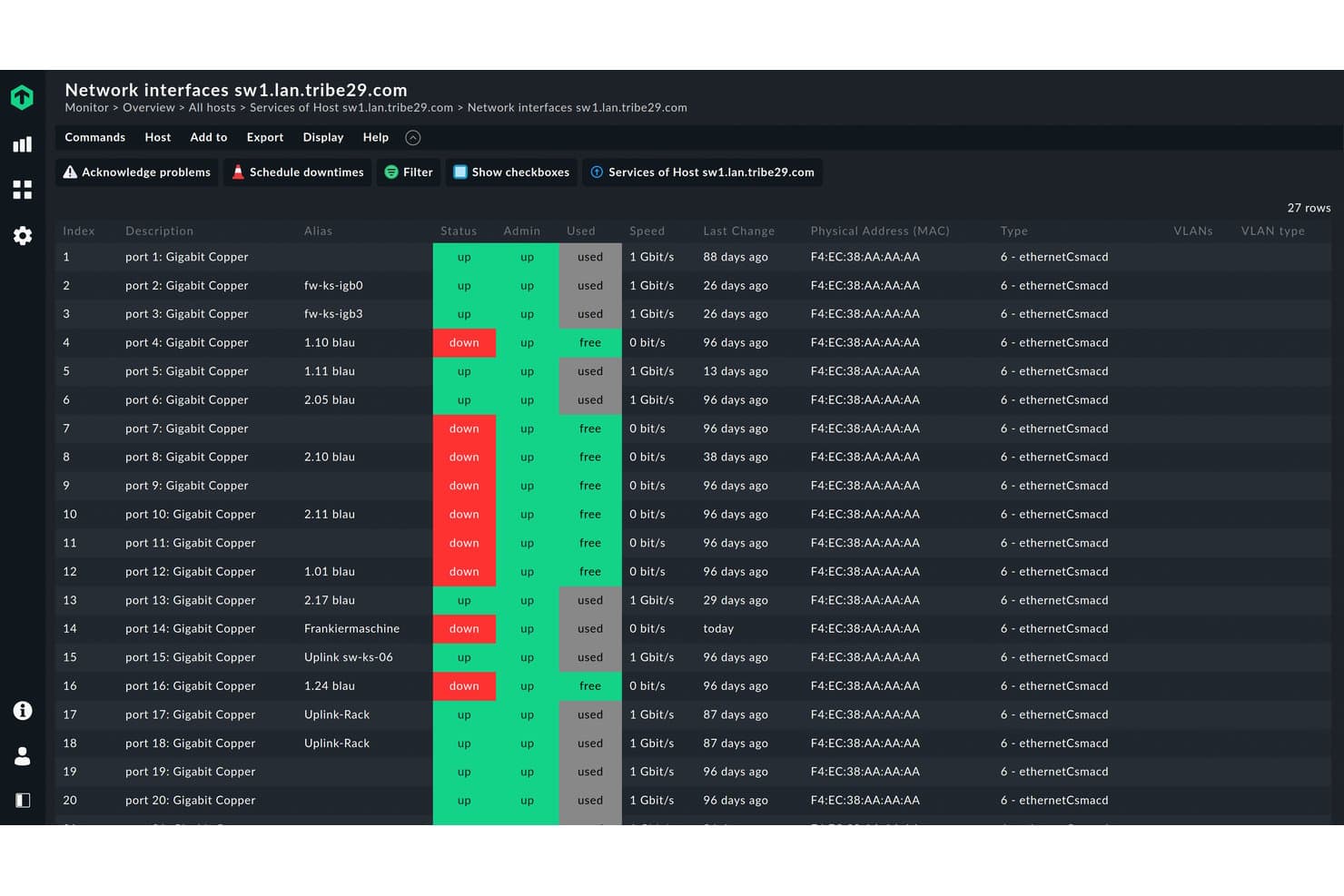
Checkmk muestra el estado, la velocidad y el uso de los puertos de los switches en todas las interfaces. Checkmk es una plataforma de monitorización integral de infraestructuras que cubre dispositivos de red, entornos en la nube, Kubernetes y sistemas locales, con alertas, informes de SLA y un servidor MCP experimental para realizar consultas en lenguaje natural sobre datos de monitorización en directo.
¿Para quién es más adecuado Checkmk?
Checkmk es una opción muy adecuada para equipos de operaciones de TI e infraestructuras de red que gestionan entornos híbridos complejos que abarcan hardware local, plataformas en la nube y clústeres de Kubernetes.
Por qué elegí Checkmk
Elegí Checkmk como una de las mejores opciones porque es una de las pocas plataformas que realmente unifica el hardware local, los entornos en la nube (AWS, Azure, GCP) y Kubernetes en una sola vista de monitorización. Me gusta especialmente su servidor MCP, que permite a un cliente de IA consultar datos en directo mediante lenguaje natural: en una prueba real con 603 equipos y 12,383 servicios, agrupó 89 problemas abiertos en 46 clústeres y los relacionó con un único disco defectuoso.
Funciones principales de Checkmk
- Consola de eventos: Acepta syslog, traps SNMP, registros de eventos de Windows y archivos de registro; después aplica reglas definidas por el usuario para clasificar, correlacionar y actuar sobre los mensajes entrantes.
- Monitorización sintética: Simula recorridos de usuario mediante aplicaciones web o de escritorio para realizar un seguimiento de los KPI del flujo de usuario y detectar problemas de interfaz.
- Relé de Checkmk: Recopila datos SNMP de segmentos de red inaccesibles para el sitio de monitorización principal y los reenvía hacia el exterior sin almacenarlos ni procesarlos.
- Acceso basado en roles y registros de auditoría: Controla lo que cada usuario puede ver y hacer dentro de la plataforma, con un registro de auditoría completo de los cambios y las acciones.
Integraciones de Checkmk
Checkmk incluye más de 2,000 integraciones, entre ellas Cisco, Juniper, FortiGate, Palo Alto Networks, Aruba Networks y Check Point. También admite la ingesta de OpenTelemetry y Prometheus, además de una API REST para integraciones personalizadas.
Pros and Cons
Pros:
- Amplia visibilidad de redes híbridas
- MCP agrupa los incidentes relacionados para su investigación
- Los usuarios destacan la escalabilidad y la automatización
Cons:
- La detección de anomalías mediante IA sigue basándose en umbrales
- La configuración avanzada requiere un esfuerzo constante
Learn more about Checkmk: Ideal para obtener información basada en IA
- Demostración gratuita disponible
- Desde $4.50/1000 sesiones
Visit WebsiteCustomer Rating:4.5/5
Dynatrace utiliza IA para supervisar aplicaciones, detectar anomalías y optimizar el rendimiento. Dynatrace es una herramienta de gestión del rendimiento de aplicaciones diseñada para empresas que buscan obtener información detallada sobre sus entornos de TI. Utiliza IA para automatizar la supervisión, detectar anomalías y optimizar el rendimiento de las aplicaciones.
Por qué elegí Dynatrace: Dynatrace proporciona información basada en IA que te ayuda a comprender entornos de TI complejos. Su motor de IA Davis automatiza el análisis de la causa raíz y predice posibles problemas. Esto permite que tu equipo aborde las interrupciones y otros problemas antes de que afecten a los usuarios. El descubrimiento y la asignación automáticos de las dependencias de las aplicaciones de la plataforma garantizan que tengas una visión clara de todo tu sistema.
Funciones e integraciones destacadas:
Las funciones incluyen un descubrimiento basado en IA que asigna continuamente las dependencias y la conectividad de tus aplicaciones. La supervisión de usuarios en tiempo real te ayuda a comprender las interacciones y el comportamiento de los usuarios. La plataforma también ofrece supervisión de la nube, lo que garantiza que tu infraestructura en la nube funcione de manera óptima.
Las integraciones incluyen AWS, Azure, Google Cloud, Kubernetes, Docker, VMware, SAP, ServiceNow, Slack, Jira y más.
Pros and Cons
Pros:
- Ofrece información detallada sobre el rendimiento de las aplicaciones
- Automatiza el análisis de la causa raíz
- Proporciona supervisión de usuarios en tiempo real
Cons:
- Alto consumo de recursos
- Configuración inicial compleja
 Ideal para monitoreo en tiempo real
- Prueba gratuita de 14 días
- Desde $15/host/mes (pagado anualmente)
Visit WebsiteCustomer Rating:4.5/5
Datadog ofrece monitoreo en tiempo real e información con IA para aplicaciones a escala en la nube. Datadog es una plataforma de monitoreo y análisis diseñada para equipos de TI y desarrollo que gestionan aplicaciones a escala en la nube. Ofrece monitoreo en tiempo real e información basada en inteligencia artificial sobre el rendimiento de aplicaciones y la salud de la infraestructura.
Por qué elegí Datadog: Datadog proporciona monitoreo continuo para obtener información instantánea sobre el rendimiento de aplicaciones y su ecosistema. Su detección de anomalías potenciada por inteligencia artificial ayuda a identificar problemas a medida que surgen. Los paneles personalizables de la plataforma permiten visualizar los datos de acuerdo a tus necesidades específicas. El sistema de alertas de Datadog notifica a tu equipo de problemas críticos de inmediato, reduciendo los tiempos de respuesta.
Características destacadas e integraciones:
Características incluyen paneles personalizables que puedes adaptar a tus necesidades específicas. La detección de anomalías utiliza inteligencia artificial para identificar problemas de inmediato. Las notificaciones aseguran que tu equipo esté al tanto de problemas críticos de manera inmediata.
Integraciones incluyen AWS, Azure, Google Cloud, Kubernetes, Docker, Slack, Jira, GitHub, PagerDuty, Microsoft Teams y más.
Pros and Cons
Pros:
- Proporciona monitoreo continuo y notificaciones
- Ofrece paneles personalizables
- Detecta anomalías con IA
Cons:
- Modelos personalizados de ML limitados
- Trazado básico de causas raíz
 Ideal para monitoreo en la nube
- Prueba gratuita de 15 días
- Desde $16/unidad híbrida/mes
Visit WebsiteCustomer Rating:4.5/5
LogicMonitor ofrece monitoreo de red basado en la nube con información sobre el rendimiento. LogicMonitor es una plataforma de monitoreo de redes basada en la nube, diseñada para equipos de TI y proveedores de servicios gestionados. Su monitoreo integral y análisis ofrecen observabilidad y valiosos conocimientos sobre el rendimiento y la salud de la red.
Por qué elegí LogicMonitor: El monitoreo en la nube de esta herramienta ofrece una amplia cobertura en las infraestructuras híbridas de las redes modernas. Su detección de anomalías impulsada por IA ayuda a tu equipo a identificar problemas antes de que afecten el rendimiento. El mapeo dinámico de topología de LogicMonitor proporciona una visión clara de toda la configuración de tu red. Sus paneles y reportes personalizables aseguran que obtengas los conocimientos necesarios para una toma de decisiones efectiva, planificación de capacidad y acciones correctivas según sea necesario.
Funciones destacadas e integraciones:
Funciones incluyen mapeo dinámico de topología que visualiza toda tu red. Los paneles personalizables permiten adaptar la vista a tus necesidades. Las alertas automatizadas aseguran que tu equipo sea notificado oportunamente ante posibles problemas.
Integraciones incluyen AWS, Azure, Google Cloud, VMware, Cisco, Microsoft 365, ServiceNow, Slack, PagerDuty y más.
Pros and Cons
Pros:
- Proporciona información detallada sobre infraestructura en la nube
- Ofrece alertas y paneles personalizables
- Soporta entornos híbridos
Cons:
- Herramientas limitadas de análisis de registros
- Puede requerir capacitación para un uso completo
Learn more about LogicMonitor:

IBM proporciona seguridad gestionada por IA con detección proactiva de amenazas. IBM ofrece un servicio de seguridad gestionada diseñado para empresas que requieren una gestión avanzada de amenazas y cumplimiento de regulaciones del sector. Sus capacidades de IA proporcionan una detección y respuesta proactiva de amenazas, asegurando la integridad de su red.
Por qué elegí IBM: IBM puede reforzar el cumplimiento en materia de seguridad, aprovechando la IA para garantizar que sus sistemas cumplan con los estándares de la industria. Su inteligencia de amenazas impulsada por IA ayuda a su equipo a identificar vulnerabilidades antes de que se conviertan en emergencias. La analítica de seguridad de la plataforma ofrece información sobre riesgos potenciales y problemas de cumplimiento. Las capacidades de respuesta automatizada de IBM ayudan a mitigar amenazas de manera eficiente y están alineadas con su enfoque en el cumplimiento.
Características destacadas e integraciones:
Características incluyen inteligencia de amenazas con IA que mantiene su red segura. La analítica de seguridad proporciona información sobre riesgos y brechas de cumplimiento. Las capacidades de respuesta basada en IA de la plataforma ayudan a su equipo a mitigar amenazas eficientemente.
Integraciones incluyen AWS, Azure, Google Cloud y más.
Pros and Cons
Pros:
- Brinda gestión avanzada de amenazas
- Garantiza el cumplimiento con los estándares del sector
- Ofrece inteligencia de amenazas automatizada
Cons:
- Alta complejidad de despliegue
- Puede requerir experiencia dedicada en seguridad
Learn more about IBM: Mejor para integración de IA
- Prueba gratuita de 30 días + demo gratis disponible
- Precios bajo consulta

Cisco ofrece herramientas impulsadas por IA para automatizar y mejorar las operaciones AIOps empresariales. Cisco ofrece una gama de soluciones de monitoreo de red impulsadas por IA, diseñadas para empresas que buscan una gestión y seguridad de red mejoradas. Sus capacidades de IA ayudan a automatizar las operaciones de red y a mejorar la eficiencia, convirtiéndolo en una herramienta valiosa para los departamentos de TI que gestionan grandes ecosistemas.
Por qué elegí Cisco: Cisco integra IA en todas sus soluciones de red, proporcionando automatización inteligente y características de seguridad mejoradas. Los algoritmos de ML de la plataforma se adaptan continuamente a su red, mejorando el rendimiento con el tiempo. La integración de IA de Cisco asegura una comunicación fluida entre todos los componentes de la red, optimizando su infraestructura de TI.
Características y compatibilidades destacadas:
Características incluyen automatización inteligente que simplifica las operaciones de red. Los análisis impulsados por IA ayudan a su equipo a tomar decisiones basadas en datos y a resolver problemas de red de forma proactiva. Existen soluciones para mejorar la sostenibilidad en el centro de datos.
Integraciones incluyen ServiceNow, IBM, Splunk, Oracle, Palo Alto Networks y más.
Pros and Cons
Pros:
- Integra IA en todas las soluciones de red
- Proporciona análisis predictivo
- Ofrece automatización inteligente para AIOps
Cons:
- Puede requerir una configuración inicial extensa
- Información limitada sobre múltiples proveedores
Learn more about Cisco: Mejor para operaciones de TI
- Prueba gratuita de 30 días + demo gratis disponible
- Desde $104/mes

ManageEngine ofrece herramientas impulsadas por IA para operaciones de TI, desde la monitorización hasta la seguridad. ManageEngine es una suite de software de gestión de TI diseñada para equipos de TI y administradores que buscan soluciones integrales para administrar sus operaciones de TI. Ofrece herramientas impulsadas por IA para la monitorización de redes, el rendimiento de aplicaciones y la gestión de seguridad.
Por qué elegí ManageEngine: ManageEngine se centra en operaciones de TI, proporcionando una amplia gama de herramientas potenciadas por IA para agilizar las tareas de tu equipo. Sus funciones de monitorización de redes utilizan IA para detectar anomalías y garantizar un rendimiento óptimo. Las herramientas de gestión del rendimiento de aplicaciones ofrecen información sobre la utilización de recursos y posibles cuellos de botella. Las capacidades de gestión de seguridad de ManageEngine ayudan a proteger tu infraestructura de TI frente a amenazas, en línea con su enfoque en las operaciones de TI.
Funciones destacadas e integraciones:
Funciones incluyen gestión del rendimiento de aplicaciones para optimizar el uso de recursos y la planificación de capacidad. Las herramientas de monitorización de redes detectan anomalías y aseguran que tu red funcione sin problemas. Las funciones de gestión de seguridad protegen tu infraestructura de TI de posibles amenazas.
Integraciones incluyen Microsoft 365, Google Workspace, Azure, Salesforce, ServiceNow, Slack, PagerDuty, Jira y más.
Pros and Cons
Pros:
- Ofrece una suite completa de soluciones de gestión de TI
- Proporciona monitorización de red impulsada por IA
- Incluye funciones de gestión de seguridad
Cons:
- Débil trazabilidad de causas raíz en tiempo real
- Lógica básica de detección de anomalías
Learn more about ManageEngine: Mejor para la detección de amenazas
- Demostración gratuita disponible
- Precios bajo consulta

Darktrace utiliza IA para detectar amenazas y anomalías en tiempo real. Darktrace es una solución de ciberseguridad basada en IA diseñada para empresas que buscan capacidades avanzadas de detección y respuesta ante amenazas. Utiliza aprendizaje automático para identificar posibles amenazas y anomalías, proporcionando una postura de seguridad continua y proactiva.
Por qué elegí Darktrace: Darktrace aprovecha sus algoritmos de IA para identificar amenazas y responder rápidamente a incidentes de seguridad. Su tecnología Antigena responde de forma autónoma a las amenazas, minimizando la necesidad de intervención manual. La IA autoaprendizaje de la plataforma se adapta a los patrones únicos de tu red, mejorando el rendimiento del cortafuegos y la precisión en la detección. La visualización de amenazas en tiempo real de Darktrace ofrece una visión global de los eventos de seguridad, mejorando la capacidad de tu equipo para actuar con decisión.
Funciones destacadas e integraciones:
Funciones incluyen capacidades de respuesta autónoma que reducen la carga de trabajo manual. La visualización inmediata de amenazas ayuda a tu equipo a comprender y responder rápidamente a incidentes de seguridad. La IA autoaprendizaje se adapta continuamente a tu red, mejorando la detección de amenazas con el tiempo.
Integraciones incluyen AWS, Azure, Google Cloud, Cisco, Palo Alto Networks, Splunk, ServiceNow, Microsoft 365, Okta, CrowdStrike y más.
Pros and Cons
Pros:
- Proporciona respuesta autónoma ante amenazas
- Ofrece visualización en tiempo real de amenazas
- Se adapta automáticamente a los cambios en la red
Cons:
- Es posible que requiera tiempo para el aprendizaje de la IA
- Puede ser complejo para equipos pequeños
Learn more about Darktrace:
Otros instrumentos de supervisión de redes con IA
Estos son algunos instrumentos adicionales de supervisión de redes con IA que no llegaron a mi lista de selección, pero que aún merece la pena conocer:
- 11SelectorMejor para análisis predictivo
- 12NetOp.cloudMejor para monitoreo automatizado
- 13LiveActionIdeal para la visualización de redes
- 14NinjaOneMejor para la gestión de endpoints
- 15NetFlow LogicMejor para análisis basados en flujos
Cómo evalúo las herramientas de monitoreo de red con IA
Cada herramienta en esta lista debe ofrecer IA que realmente cambie tu manera de trabajar: detectando anomalías antes de que se conviertan en problemas y filtrando el ruido de alertas, no solo colocando una etiqueta sobre umbrales estáticos. Divido mi evaluación en funcionalidad principal que toda herramienta debe tener para calificar, y factores diferenciadores que separan las buenas opciones de las excelentes.
Funcionalidad principal (requisitos mínimos para esta lista)
Cuando selecciono herramientas para mi lista, califico cada una en una escala de 0 (no ofrece la funcionalidad) a 5 (destaca en esta área) para cada funcionalidad principal detallada a continuación. Después, calculo la puntuación total como porcentaje. Cada herramienta debe alcanzar un puntaje mínimo total del 65% para ser considerada para la inclusión.
- Detección de anomalías impulsada por IA: Verifico si la herramienta utiliza aprendizaje automático para construir líneas base dinámicas en vez de depender de umbrales configurados manualmente que pueden pasar por alto cambios sutiles de ancho de banda o latencia.
- Analítica predictiva: Prever el agotamiento de capacidad o la degradación del enlace con días de antelación es clave, así que busco modelos entrenados con telemetría histórica y no solo líneas de tendencia.
- Análisis automatizado de causa raíz: Cuando una sucursal se cae, evalúo qué tan bien la herramienta correlaciona eventos entre switches, firewalls y enlaces WAN para identificar el origen del problema.
- Monitoreo de red en tiempo real: Busco recolección continua de telemetría vía SNMP, NetFlow y datos en streaming, con tasas de actualización lo suficientemente rápidas para detectar micro ráfagas e interfaces inestables.
- Correlación inteligente de alertas: Las tormentas de alertas durante una interrupción pueden ocultar el problema real. Evalúo cómo la herramienta agrupa alertas relacionadas y prioriza las que requieren atención inmediata.
- Visibilidad en múltiples entornos: Las redes híbridas son la norma, así que reviso si la herramienta monitoriza tanto equipos locales, VPCs en la nube, superposiciones SD-WAN e infraestructura inalámbrica en una sola vista.
Una vez tengo una lista de herramientas que cumplen con este criterio, considero qué diferencia a cada plataforma.
Factores diferenciadores (qué distingue a los proveedores)
Así es cómo comparo y contrasto diferentes proveedores:
Características destacadas
La remediación automatizada es un gran diferenciador: busco herramientas que puedan iniciar reversión de configuraciones o redireccionar tráfico en el momento en que la IA detecta un problema, no solo que abran un ticket. Un asistente de IA generativa también aporta un gran valor cuando los ingenieros pueden preguntar “¿por qué está aumentando la latencia entre sitios?” y obtener una respuesta contextualizada al instante. También evalúo la integración con AIOps, donde la telemetría de red se fusiona con logs y rastreos para ofrecer una línea de tiempo de incidentes única en toda la infraestructura.
Más allá de las características
El ecosistema de integraciones es muy relevante aquí. Reviso si la herramienta se conecta nativamente a plataformas ITSM como ServiceNow y Jira, además de herramientas de chat como Slack, para que las alertas se integren en los flujos de trabajo existentes. La transparencia de precios es otro aspecto que analizo de cerca: algunos proveedores cobran por la cantidad de dispositivos y otros por el volumen de datos, lo que puede cambiar drásticamente los costos a medida que crece tu red. También considero la flexibilidad de despliegue, especialmente para equipos que necesitan opciones locales para mantener la telemetría sensible dentro de su propia infraestructura.
Cómo elegir un instrumento de supervisión de redes con IA
Es fácil perderse entre largas listas de funciones y estructuras de precios complejas. Para ayudarte a mantener la concentración mientras avanzas en tu proceso de selección único, aquí tienes una lista de factores que debes tener en cuenta:
| Factor | Qué debes tener en cuenta |
|---|---|
| FactorEscalabilidad | Qué debes tener en cuenta¿El instrumento crecerá junto con las necesidades de tu red? Considera la expansión futura. Busca funciones que admitan un aumento de la carga de datos y del acceso de los usuarios sin reducir el rendimiento. |
| FactorIntegraciones | Qué debes tener en cuenta¿Funciona con tus sistemas actuales? Comprueba la compatibilidad con el software que utilizas y con las plataformas que tu equipo usa habitualmente para garantizar un intercambio de datos y un flujo de trabajo fluidos. |
| FactorPersonalización | Qué debes tener en cuenta¿Puedes adaptar el instrumento a tus procesos? Busca opciones para personalizar paneles, informes y alertas según las necesidades y preferencias específicas de tu equipo. |
| FactorFacilidad de uso | Qué debes tener en cuenta¿La interfaz es intuitiva para tu equipo? Evalúa la curva de aprendizaje y si el instrumento ofrece una experiencia de usuario sencilla para minimizar el tiempo de formación. |
| FactorImplementación e incorporación | Qué debes tener en cuenta¿Con qué rapidez puedes ponerlo en funcionamiento? Evalúa el proceso de configuración, los recursos de asistencia disponibles y cualquier formación necesaria para garantizar una transición fluida. |
| FactorCoste | Qué debes tener en cuenta¿El precio se ajusta a tu presupuesto? Considera los costes totales, incluidas las tarifas de configuración, los modelos de suscripción y cualquier cargo oculto. Compáralo con instrumentos similares para valorar su relación calidad-precio. |
| FactorMedidas de seguridad | Qué debes tener en cuenta¿Están protegidos tus datos y tu red? Verifica las medidas de seguridad del instrumento, como el cifrado y los controles de acceso, para asegurarte de que cumplen los estándares de tu organización. |
| FactorDisponibilidad de asistencia | Qué debes tener en cuenta¿Cuándo puedes contactar con el servicio de asistencia si lo necesitas? Comprueba la disponibilidad del servicio de atención al cliente, incluidos el horario de funcionamiento y los tiempos de respuesta, para garantizar ayuda cuando surjan problemas. |
¿Qué son los instrumentos de supervisión de redes con IA?
Las herramientas de monitoreo de redes con IA son soluciones de software que utilizan la IA para supervisar y gestionar el rendimiento y la seguridad de la red. Los profesionales de TI, administradores de redes y equipos de seguridad suelen utilizar estas herramientas para identificar problemas, optimizar el rendimiento y garantizar la seguridad de los datos. La detección de anomalías, el análisis predictivo y las alertas automatizadas ayudan a mantener el estado de la red, mejorar los tiempos de respuesta y reducir la carga de trabajo manual. En general, estas herramientas proporcionan información valiosa y automatización para mantener las redes funcionando de forma fluida y segura.
Características
Al seleccionar herramientas de monitoreo de redes con IA, presta atención a las siguientes características clave:
- Detección de anomalías: Identifica patrones inusuales en el tráfico de red para alertar a tu equipo sobre posibles problemas antes de que se agraven.
- Análisis predictivo: Utiliza datos históricos para pronosticar el rendimiento de la red y abordar de forma preventiva posibles cuellos de botella o fallos.
- Alertas automatizadas: Envía notificaciones a tu equipo cuando se superan determinados umbrales, garantizando una respuesta oportuna a los problemas críticos.
- Mapeo de redes: Visualiza la topología de tu red en tiempo real, ayudándote a comprender su estructura y sus relaciones.
- Análisis del comportamiento de los usuarios: Supervisa las actividades de los usuarios para detectar comportamientos sospechosos y mejorar las medidas de seguridad.
- Paneles personalizables: Te permiten adaptar la interfaz para mostrar métricas e información relevantes y específicas para tus necesidades.
- Monitoreo en tiempo real: Proporciona una supervisión continua del rendimiento de la red, garantizando que los problemas se detecten y aborden rápidamente.
- Medidas de seguridad impulsadas por IA: Refuerzan la protección de la red mediante el uso de IA para identificar y responder a las amenazas automáticamente.
- Capacidades de integración: Garantizan que la herramienta pueda funcionar con tu software y sistemas existentes para facilitar el intercambio de datos y los flujos de trabajo.
- Respuesta automatizada a incidentes: Utiliza la IA para responder de forma autónoma a los incidentes de red, reduciendo la necesidad de intervención manual.
Beneficios
La implementación de herramientas de monitoreo de redes con IA proporciona varios beneficios para tu equipo y tu empresa. Estos son algunos de los que puedes esperar:
- Mayor eficiencia: La IA automatiza las tareas y alertas rutinarias, permitiendo que tu equipo se concentre en iniciativas más estratégicas.
- Seguridad reforzada: La detección de amenazas impulsada por IA identifica y responde rápidamente a los riesgos de seguridad, manteniendo tu red protegida.
- Mantenimiento proactivo: El análisis predictivo te permite abordar posibles problemas antes de que afecten al rendimiento de la red.
- Mejor toma de decisiones: Los datos y la información en tiempo real ayudan a tu equipo a tomar decisiones fundamentadas sobre la gestión y optimización de la red.
- Menor tiempo de inactividad: La respuesta automatizada a incidentes minimiza las interrupciones de la red al resolver rápidamente los problemas sin intervención manual.
- Mayor visibilidad: El mapeo y el monitoreo de redes proporcionan una visión clara del estado y el rendimiento de la red, lo que ayuda a solucionar problemas y planificar la capacidad.
- Ahorro de costes: Al optimizar el rendimiento de la red y reducir la carga de trabajo manual, estas herramientas pueden disminuir los costes operativos con el tiempo.
Costes y precios
Seleccionar una herramienta de monitoreo de redes con IA requiere comprender los distintos modelos de precios y planes disponibles. Los costes varían según las características, el tamaño del equipo, los complementos y otros factores. La siguiente tabla resume los planes habituales, sus precios promedio y las características típicas incluidas en las soluciones de herramientas de monitoreo de redes con IA:
Tabla comparativa de planes para herramientas de monitoreo de redes con IA
| Tipo de plan | Precio promedio | Características habituales |
|---|---|---|
| Tipo de planPlan gratuito | Precio promedio$0 | Características habitualesMonitoreo básico, alertas limitadas e informes esenciales. |
| Tipo de planPlan personal | Precio promedio$5-$25/usuario/mes | Características habitualesMonitoreo en tiempo real, paneles personalizables y alertas por correo electrónico. |
| Tipo de planPlan empresarial | Precio promedio$30-$75/usuario/mes | Características habitualesAnálisis avanzado, capacidades de integración y respuesta automatizada a incidentes. |
| Tipo de planPlan corporativo | Precio promedio$100-$200/usuario/ mes | Características habitualesVisibilidad completa de la red, análisis predictivo y asistencia especializada. |
Preguntas frecuentes sobre las herramientas de monitorización de redes con IA
Estas son algunas respuestas a preguntas frecuentes sobre las herramientas de monitorización de redes con IA:
¿Cómo gestionan los falsos positivos las herramientas de monitorización de redes con IA?
Las herramientas de monitorización de redes con IA pueden gestionar los falsos positivos aprendiendo continuamente de los patrones de la red y de los comentarios de los usuarios. Perfeccionan sus algoritmos para reducir las alertas falsas con el tiempo. Para minimizar los falsos positivos, asegúrate de que tu equipo actualice periódicamente los modelos de aprendizaje de la herramienta y establezca umbrales de alerta precisos. Esto ayuda a la IA a distinguir entre las amenazas legítimas y el comportamiento normal de la red.
Además, aprovecha las opciones de personalización disponibles para adaptar las alertas a tu entorno de red específico.
¿Pueden las herramientas de monitorización de redes con IA integrarse con los sistemas de seguridad existentes?
Sí, la mayoría de las herramientas de monitorización de redes con IA pueden integrarse con los sistemas de seguridad existentes. Normalmente ofrecen API y compatibilidad con protocolos habituales para garantizar un intercambio de datos fluido.
Antes de elegir una herramienta, verifica su compatibilidad con tus sistemas actuales y con cualquier requisito de integración específico. Esto garantiza que los esfuerzos de monitorización y seguridad de tu red funcionen conjuntamente y proporcionen una visión global del estado y la postura de seguridad de tu red. Asegúrate de probar las integraciones durante el periodo de prueba para resolver cuanto antes cualquier posible problema.
¿Qué debo tener en cuenta al establecer los umbrales de alerta?
Al establecer los umbrales de alerta, ten en cuenta los patrones de tráfico normales de tu red e identifica los puntos críticos que requieren atención inmediata. Define umbrales que equilibren la sensibilidad y la especificidad para evitar saturar a tu equipo con alertas. Utiliza datos históricos como guía para tomar decisiones y revisa y ajusta periódicamente los umbrales a medida que evoluciona tu red. Involucrar a tu equipo en este proceso garantiza que las alertas sigan siendo relevantes y permitan tomar medidas.
Además, considera utilizar las recomendaciones basadas en IA de tu herramienta de monitorización para optimizar la configuración de los umbrales.
Qué sigue:
Si estás investigando herramientas de monitorización de redes con IA, ponte en contacto con un asesor de SoftwareSelect para recibir recomendaciones gratuitas.
Rellenas un formulario y mantienes una breve conversación en la que se analizan los detalles específicos de tus necesidades. Después recibirás una lista de programas preseleccionados para revisar. Además, te ayudarán durante todo el proceso de compra, incluidas las negociaciones de precios.