

Gestionar entornos en la nube puede ser una tarea abrumadora. Estás combinando el monitoreo del rendimiento, la seguridad y la eficiencia de costos en numerosas cargas de trabajo. Las herramientas de monitoreo en la nube pueden ser un salvavidas, funcionando como una plataforma de seguridad central que ayuda a tu equipo a mantener una postura de seguridad sólida, garantizar el funcionamiento óptimo de los sistemas e identificar problemas antes de que se conviertan en inconvenientes mayores.
He invertido incontables horas probando y revisando estas herramientas para ofrecerte una lista imparcial y bien investigada con las mejores opciones. Según mi experiencia, elegir la solución adecuada de monitoreo en la nube puede marcar una diferencia significativa en tus operaciones en la nube.
En este artículo te guiaré a través de las mejores herramientas de monitoreo en la nube disponibles, resaltando sus características y beneficios únicos. Tanto si eres un equipo pequeño como una gran empresa, encontrarás algo que se adapte a tus necesidades.
Por qué confiar en nuestras recomendaciones de software
6,700+
Reviews
20
Industry experts
16+
Evaluation factors
14
Years
Nuestro equipo lleva probando y evaluando software desde 2012. Como líderes tecnológicos, sabemos lo difícil —y lo importante— que es elegir el software adecuado.
Para esta guía, evaluamos las herramientas mediante pruebas prácticas e investigación independiente, puntuando las herramientas según nuestros criterios de selección.
Nuestras reseñas reflejan nuestro criterio editorial humano, no un discurso de ventas.
Revisores expertos:
- Paulo Gardini MiguelDirector técnico
 Tim FisherVP de IA
 Gabriel RosasTech Lead y arquitecto de software
 Christhian GruhnTech Lead y arquitecto de plataforma

Resumen de las mejores herramientas de monitoreo en la nube
Esta tabla comparativa resume los detalles de precios de mis principales opciones de herramientas de monitoreo en la nube para ayudarte a encontrar la mejor adaptada a tu presupuesto y necesidades empresariales.
| Tool | Best For | Trial Info | Price | ||
|---|---|---|---|---|---|
| 1 | Ideal con monitoreo personalizable basado en sensores | Prueba gratuita de 30 días | Desde $200/mes (facturado anualmente) | Website | |
| 2 | Mejor para entornos híbridos | Prueba gratuita de 15 días | Desde $16/unidad híbrida/mes | Website | |
| 3 | Mejor por su flexibilidad de código abierto | Descarga gratuita disponible | Desde $325/mes (facturado anualmente) | Website | |
| 4 | Ideal para el monitoreo de redes | Prueba gratuita de 30 días + edición gratuita disponible | Precio a consultar | Website | |
| 5 | Mejor para monitoreo y alertas de infraestructura | Demo gratuita + prueba gratuita de 30 días + plan gratuito disponible | Desde $2,595/licencia de 100 nodos | Website | |
| 6 | Mejor para datos de series temporales | Gratis para usar | Sin coste de licencia | Website | |
| 7 | Mejor para usuarios de Google Cloud | Plan gratuito disponible | Desde $0.1510/MiB por métricas ingeridas | Website | |
| 8 | Ideal para la integración con AWS | Plan gratuito disponible | Precios bajo solicitud | Website | |
| 9 | Mejor para automatización DevOps | Precio a consultar | Website | ||
| 10 | Mejor opción para servicios de Azure | Demo gratuita disponible | Precios bajo solicitud | Website |


Reseñas de las mejores herramientas de monitoreo en la nube
A continuación encontrarás mis resúmenes detallados de las mejores herramientas de monitoreo en la nube que forman parte de mi selección. Mis reseñas ofrecen un análisis profundo de las características clave, pros y contras, integraciones y casos de uso ideales de cada herramienta para ayudarte a encontrar la opción perfecta para ti.
 Ideal con monitoreo personalizable basado en sensores
- Prueba gratuita de 30 días
- Desde $200/mes (facturado anualmente)
Visit WebsiteCustomer Rating:4.6/5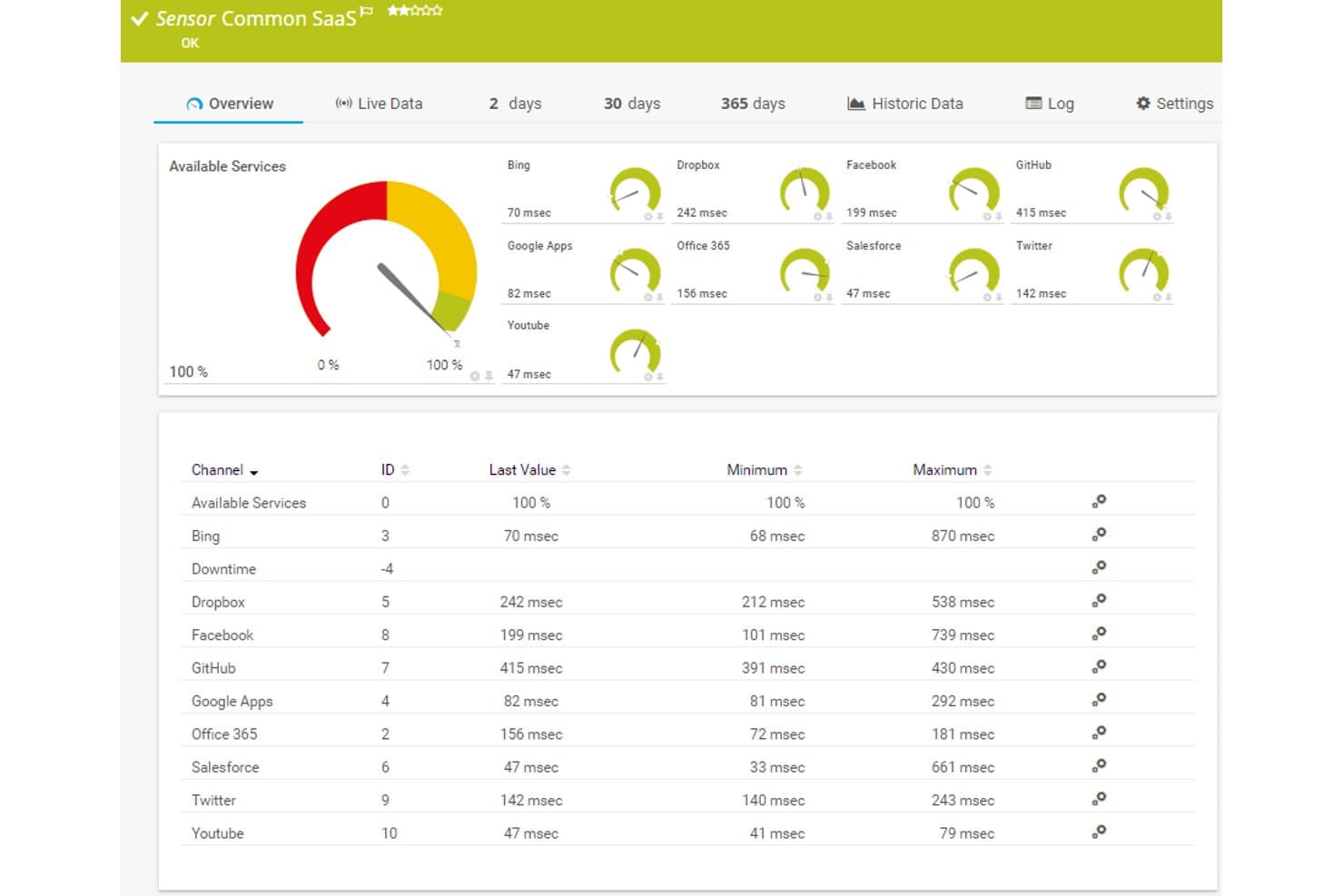
Paessler PRTG ofrece un panel de sensores SaaS común que muestra en tiempo real los tiempos de respuesta y la disponibilidad para servicios en la nube como Dropbox, Office 365, Salesforce y GitHub. Paessler PRTG es una plataforma de monitoreo basada en sensores que supervisa infraestructura, servicios en la nube y el rendimiento de redes en entornos AWS, Azure e híbridos usando más de 250 sensores preconfigurados.
¿Para quién es ideal Paessler PRTG?
Equipos de operaciones de TI que gestionan entornos mixtos—combinando infraestructura local con servicios en la nube—y que necesitan una única plataforma de monitoreo sin sorpresas de precios por host.
Por qué elegí Paessler PRTG
Elegí Paessler PRTG como uno de los mejores porque su arquitectura basada en sensores me da control preciso sobre exactamente qué se monitoriza. Puedo implementar sensores AWS preconfigurados como AWS EC2 v2 y AWS Cost junto a sensores Cloud HTTP v2 que verifican tiempos de respuesta desde Asia, Europa y Estados Unidos simultáneamente. Cuando los sensores estándar no son suficientes, creo personalizados mediante REST API o solicitudes HTTP para cubrir vacíos que ninguna otra herramienta resuelve de serie.
Características clave de Paessler PRTG
- Integraciones multi-nube: Sensores nativos se conectan directamente con servicios de AWS, Azure, Microsoft 365 y Google Cloud.
- Paneles personalizables: Mapas y paneles drag-and-drop visualizan métricas, alarmas y el estado de los dispositivos en todo tu entorno.
- Exportador para Grafana: Exporta métricas de múltiples servidores PRTG a Grafana para una visualización unificada de varias instancias.
- Monitoreo Syslog y SNMP: Soporte integrado para la recopilación de Syslog, SNMP y registros de eventos de Windows de dispositivos de red y servidores.
Integraciones de Paessler PRTG
Paessler PRTG ofrece integraciones nativas con AWS, Azure, Google Cloud, Microsoft 365, vSphere y dispositivos de red SNMP. Hay disponible una API para integraciones personalizadas y exportación de datos.
Pros and Cons
Pros:
- Más de 250 sensores preconfigurados para el despliegue
- El precio basado en sensores escala de manera predecible con la cobertura
- Supervisa infraestructura local y en la nube desde una sola interfaz
Cons:
- La profundidad del monitoreo nativo en la nube es menor que la de herramientas dedicadas de la nube
- Las capacidades de análisis de registros son limitadas
Learn more about Paessler PRTG: Mejor para entornos híbridos
- Prueba gratuita de 15 días
- Desde $16/unidad híbrida/mes
Visit WebsiteCustomer Rating:4.5/5
LogicMonitor rastrea recursos multi-nube desde una única vista centralizada. LogicMonitor es una plataforma de monitoreo de infraestructura basada en la nube, diseñada para equipos de operaciones de TI y proveedores de servicios gestionados. Ayuda a supervisar entornos tanto locales como en la nube, proporcionando una vista unificada de toda tu infraestructura de TI. La herramienta es valiosa para las empresas que necesitan rastrear el rendimiento en entornos diversos.
Por qué elegí LogicMonitor: Destaca en el monitoreo de entornos híbridos, permitiéndote vigilar recursos tanto en la nube como en las instalaciones locales. Puedes configurar alertas automáticas para notificar a tu equipo sobre cualquier problema. Los tableros personalizables de la herramienta ofrecen información sobre métricas clave en toda tu infraestructura. Su escalabilidad la hace adecuada para empresas en crecimiento con necesidades complejas.
Características y integraciones destacadas:
Características incluyen el descubrimiento automático de dispositivos y recursos, lo que te ahorra tiempo durante la configuración. Puedes utilizar sus funciones de previsión para anticipar necesidades futuras de recursos. La herramienta también proporciona informes detallados para ayudarte a analizar tendencias de rendimiento a lo largo del tiempo.
Integraciones incluyen AWS, Microsoft Azure, Google Cloud Platform, Slack y más.
Pros and Cons
Pros:
- Soporta infraestructura híbrida
- Escalable para grandes organizaciones
- Descubrimiento automático de dispositivos
Cons:
- Informes nativos limitados
- Puede generar un alto volumen de alertas
Learn more about LogicMonitor: Mejor por su flexibilidad de código abierto
- Descarga gratuita disponible
- Desde $325/mes (facturado anualmente)
Visit WebsiteCustomer Rating:4.4/5
Zabbix monitorea recursos del servidor como CPU, memoria, disco y uso de red. Zabbix es una solución de monitoreo de código abierto diseñada para la infraestructura de TI, aplicaciones y operaciones en la nube. Es ampliamente utilizada por administradores de TI y desarrolladores para supervisar el rendimiento y la disponibilidad de servidores de red, dispositivos, máquinas virtuales y aplicaciones. La herramienta proporciona una variedad de capacidades de monitoreo, incluyendo monitoreo de red, servidores y nube.
Por qué elegí Zabbix: Ofrece flexibilidad de código abierto que permite personalizar y ampliar las capacidades de monitoreo según las necesidades de la infraestructura. Con su confiable sistema de alertas, puedes crear disparadores basados en umbrales y recibir notificaciones. La herramienta soporta monitoreo distribuido, lo cual es ideal para entornos a gran escala. Las opciones de visualización detallada te ayudan a rastrear métricas.
Características destacadas e integraciones:
Características incluyen una interfaz web incorporada que proporciona acceso sencillo a los datos de monitoreo. Puedes crear plantillas personalizadas para optimizar la configuración del monitoreo. La herramienta también soporta el auto-descubrimiento de dispositivos de red, lo que ahorra tiempo en la configuración.
Integraciones incluyen VMware, AWS, Microsoft Azure, IBM Tivoli, Oracle, SAP y más.
Pros and Cons
Pros:
- Escalable para grandes entornos
- Opciones detalladas de visualización
- Capacidades de monitoreo extensas
Cons:
- Consume muchos recursos en grandes implementaciones
- La gestión de alertas puede ser compleja
 Ideal para el monitoreo de redes
- Prueba gratuita de 30 días + edición gratuita disponible
- Precio a consultar
Visit WebsiteCustomer Rating:4.4/5
WhatsUp Gold monitorea dispositivos de red y estado en la nube con tableros en tiempo real. WhatsUp Gold es un software de monitoreo de red diseñado para profesionales de TI y administradores de red. Ayuda a supervisar el rendimiento y la disponibilidad de la red, proporcionando análisis para mantener operaciones fluidas. La herramienta es valiosa para las empresas que necesitan rastrear y gestionar recursos de red de manera eficiente.
Por qué elegí WhatsUp Gold: Ofrece capacidades especializadas de monitoreo de red, lo que lo hace ideal para equipos de TI. La herramienta permite visualizar la topología de la red, brindándote una vista clara de las conexiones de los dispositivos. Puedes configurar alertas para problemas de red a fin de apoyar respuestas oportunas. Una interfaz fácil de usar simplifica la gestión de red, incluso para quienes tienen conocimientos técnicos limitados.
Funciones destacadas e integraciones:
Funciones incluyen tableros personalizables que te permiten rastrear métricas clave de la red de un vistazo. Puedes automatizar el descubrimiento de la red para mantener actualizado tu inventario. La herramienta también proporciona informes detallados para ayudarte a analizar tendencias del rendimiento de la red.
Integraciones incluyen Microsoft Active Directory, VMware, AWS, Microsoft Azure, Google Cloud Platform, Slack y más.
Pros and Cons
Pros:
- Monitoreo especializado de red
- Descubrimiento automatizado de red
- Tableros personalizables
Cons:
- Escalabilidad limitada
- Puede consumir muchos recursos
Learn more about WhatsUp Gold: Mejor para monitoreo y alertas de infraestructura
- Demo gratuita + prueba gratuita de 30 días + plan gratuito disponible
- Desde $2,595/licencia de 100 nodos
Visit WebsiteCustomer Rating:4.6/5
Nagios XI rastrea la salud del sistema con paneles para alertas, hosts y servicios. Nagios XI es una solución de monitoreo de nivel empresarial para infraestructura de TI. Sirve a administradores y gerentes de TI al proporcionar información sobre el estado y el rendimiento del sistema. La herramienta sobresale en el monitoreo de servidores, redes y aplicaciones.
Por qué elegí Nagios XI: Su completo sistema de alertas te ayuda a detectar todos los problemas críticos. Puedes configurar alertas basadas en umbrales y condiciones específicas. La herramienta ofrece una interfaz web fácil de usar para gestionar alertas y notificaciones. Sus opciones de alertas personalizables la convierten en una opción confiable para equipos de TI.
Características destacadas e integraciones:
Características incluyen informes avanzados que te ayudan a analizar tendencias y el rendimiento a lo largo del tiempo. También puedes usar sus visualizaciones para crear paneles personalizados para tu equipo. Las características de planificación de capacidad de la herramienta ayudan a predecir futuras necesidades de recursos.
Integraciones incluyen AWS, Microsoft Azure, VMware, Oracle, Cisco, Slack y más.
Pros and Cons
Pros:
- Personalización de alertas extensa
- Arquitectura escalable
- Sistema de notificaciones confiable
Cons:
- Costo elevado comparado con la competencia
- Problemas de rendimiento a gran escala
Learn more about Nagios XI: Mejor para datos de series temporales
- Gratis para usar
- Sin coste de licencia
Visit WebsiteCustomer Rating:4.4/5
Prometheus supervisa métricas del servidor en tiempo real como CPU, memoria y tráfico. Prometheus es un sistema de monitoreo de código abierto diseñado para capturar datos de series temporales. Se integra con las canalizaciones CI/CD para supervisar aplicaciones, sistemas y servicios. La herramienta recopila y consulta métricas para establecer alertas y crear paneles de control.
Por qué elegí Prometheus: Su lenguaje funcional, PromQL, te permite consultar y transformar datos eficientemente. Opera de manera independiente, usando almacenamiento local, y es fácil de desplegar en diferentes entornos. Una gran variedad de bibliotecas de instrumentación es compatible con la mayoría de los lenguajes de programación.
Funciones destacadas e integraciones:
Funciones incluyen un modelo de datos multidimensional que identifica las series temporales con un nombre de métrica y pares clave-valor. Permite reglas de alerta precisas basadas en PromQL. La herramienta también ofrece una operación simple mediante binarios enlazados de forma estática para facilitar el despliegue.
Integraciones incluyen Kubernetes, Consul, etcd, HAProxy y más.
Pros and Cons
Pros:
- Sólido soporte para series temporales
- Lenguaje de consultas flexible
- Integración nativa con la nube
Cons:
- Paneles de control limitados
- Sin almacenamiento a largo plazo incorporado
Learn more about Prometheus: Mejor para usuarios de Google Cloud
- Plan gratuito disponible
- Desde $0.1510/MiB por métricas ingeridas

Google Cloud Monitoring rastrea métricas en la nube con paneles personalizables. Google Cloud Monitoring está diseñado para supervisar aplicaciones que se ejecutan en Google Cloud Platform y otros entornos en la nube. Está dirigido principalmente a desarrolladores y equipos de operaciones de TI que desean obtener información sobre el rendimiento y la disponibilidad del sistema. La herramienta ayuda a identificar y resolver problemas rápidamente, manteniendo operaciones sin inconvenientes.
Por qué elegí Google Cloud Monitoring: Está pensado para usuarios de Google Cloud y ofrece una integración profunda con los servicios de Google. La herramienta proporciona paneles preconfigurados para dar una visión rápida del estado del sistema. Su integración con otros servicios de Google mejora la experiencia de monitorización para quienes ya utilizan Google Cloud.
Características destacadas e integraciones:
Características incluyen la capacidad de crear paneles personalizados para visualizar los datos de la forma que más convenga a tu equipo. Puedes configurar políticas de alertas para avisarte de incidencias según condiciones específicas. La herramienta también ofrece verificaciones de disponibilidad para ayudar a mantener tus servicios accesibles para los usuarios.
Las integraciones no se encuentran listadas públicamente.
Pros and Cons
Pros:
- Integración profunda con los servicios de Google
- Configuración rápida para usuarios de Google Cloud
- Admite entornos multinube
Cons:
- Limitado al ecosistema de Google
- La configuración de alertas es compleja para principiantes
Learn more about Google Cloud Monitoring: Ideal para la integración con AWS
- Plan gratuito disponible
- Precios bajo solicitud

Amazon CloudWatch monitoriza los recursos de AWS con paneles, alarmas y métricas. Amazon CloudWatch es un servicio de monitorización para recursos y aplicaciones en la nube de AWS. Se utiliza principalmente para que los desarrolladores y los equipos de operaciones de TI supervisen el rendimiento del sistema y optimicen el uso de los recursos. La herramienta proporciona métricas y registros que ayudan a monitorizar los entornos de AWS.
Por qué elegí Amazon CloudWatch: ofrece una integración óptima con los servicios de AWS, lo que la convierte en una opción natural para los usuarios de AWS. Puedes monitorizar y recopilar métricas de varios servicios de AWS con facilidad. La capacidad de la herramienta para crear paneles personalizados te ayuda a visualizar las métricas clave. El sistema de alertas te ayuda a estar informado sobre eventos importantes.
Características e integraciones destacadas:
Las funcionalidades incluyen la capacidad de recopilar y monitorizar archivos de registro, lo que facilita la resolución de problemas. Puedes configurar alarmas para responder automáticamente a los cambios en tus recursos de AWS. La herramienta también admite la monitorización en tiempo real, lo que te ayuda a reaccionar rápidamente ante los problemas.
Las integraciones incluyen casi todos los servicios de AWS, Zapier, Grafana y más.
Pros and Cons
Pros:
- Integración profunda con AWS
- Capacidades de monitorización en tiempo real
- Admite varios servicios de AWS
Cons:
- Configuración compleja para usuarios que no utilizan AWS
- Opciones de visualización limitadas
Learn more about Amazon CloudWatch:

DuploCloud supervisa la infraestructura en la nube con observabilidad integrada. DuploCloud es una plataforma de automatización en la nube diseñada para equipos de DevOps y desarrolladores. Ayuda a automatizar el aprovisionamiento de infraestructura y el cumplimiento normativo, haciendo que la gestión de la nube sea más eficiente. La herramienta es ideal para equipos que buscan acelerar el despliegue y mantener la seguridad en la nube.
Por qué elegí DuploCloud: Destaca en la automatización de procesos DevOps, ahorrando tiempo y esfuerzo a tu equipo. La plataforma ofrece plantillas prediseñadas para cumplimiento y seguridad, ayudándote a mantenerte alineado con las regulaciones. Puedes gestionar la infraestructura como código sin necesidad de amplias habilidades de programación. La interfaz fácil de usar la hace accesible para equipos de todos los tamaños.
Funciones y integraciones destacadas:
Funciones incluyen comprobaciones de cumplimiento automatizadas para ayudar a que tu sistema cumpla con los estándares de la industria. Puedes utilizar el control de acceso basado en roles para gestionar permisos. La herramienta también proporciona monitoreo en tiempo real y alertas para mantenerte informado sobre el rendimiento del sistema.
Integraciones incluyen AWS, Microsoft Azure, Google Cloud Platform, GitHub, Slack y más.
Pros and Cons
Pros:
- Automatiza las comprobaciones de cumplimiento
- Simplifica la gestión de la infraestructura
- Reduce la codificación manual
Cons:
- Flexibilidad limitada para casos de uso muy específicos
- Riesgo de dependencia con el proveedor
Learn more about DuploCloud: Mejor opción para servicios de Azure
- Demo gratuita disponible
- Precios bajo solicitud

Azure Monitor rastrea métricas de uso, rendimiento y confiabilidad en tiempo real. Azure Monitor es una solución completa de monitoreo que ofrece visibilidad nativa en cargas de trabajo sin servidor dentro del ecosistema del proveedor de nube Microsoft Azure. Está diseñado para administradores de TI y desarrolladores que necesitan información sobre el rendimiento y el estado de sus recursos de Azure. La herramienta respalda la disponibilidad y el desempeño de las aplicaciones mediante la recopilación y el análisis detallados de datos.
Por qué elegí Azure Monitor: Ofrece una integración profunda con los servicios de Azure, brindando una experiencia de monitoreo continua para los usuarios de Azure. Puedes recopilar y analizar datos de telemetría de tus recursos de Azure con facilidad. La capacidad de la herramienta para crear paneles personalizados te ayuda a visualizar métricas importantes, y sus funciones de alerta te mantienen informado sobre problemas críticos.
Funciones destacadas e integraciones:
Funciones incluyen la capacidad de realizar un monitoreo de extremo a extremo de tus aplicaciones, lo que ayuda a identificar rápidamente problemas de rendimiento. Puedes configurar alertas proactivas basadas en condiciones específicas para mitigar riesgos. La herramienta también ofrece análisis avanzados para profundizar en los datos y obtener mejores perspectivas.
Integraciones incluyen Microsoft Entra ID, Datadog, Dynatrace y más.
Pros and Cons
Pros:
- Integración profunda con Azure
- Análisis de datos avanzado
- Escalable para entornos grandes
Cons:
- Complejo para entornos que no sean de Azure
- Altos costos por la ingesta de datos
Learn more about Azure Monitor:
Otras herramientas de monitoreo en la nube
Aquí tienes algunas herramientas de monitoreo en la nube adicionales que no llegaron a mi selección principal, pero que aún vale la pena revisar:
- 11DatadogIdeal para paneles en tiempo real
- 12ManageEngine OpManagerMejor para la gestión de redes
- 13Nagios CoreMejor para supervisión de código abierto
Cómo Evalúo las Herramientas de Monitorización en la Nube
Observo las herramientas desde dos perspectivas: si cubren los fundamentos—métricas en tiempo real, alertas multicloud, agregación de logs—y qué las distingue, como la detección de anomalías mediante IA o la visibilidad de costos.
Funcionalidad Central (Requisitos Fundamentales para Esta Lista)
Cuando selecciono las herramientas para mi lista, califico cada una en una escala de 0 (no ofrece la funcionalidad) a 5 (destaca en esta área) para cada funcionalidad central que detallo a continuación. Luego, cálculo la puntuación total de la herramienta como un porcentaje. Cada herramienta debe lograr una puntuación total mínima del 75% para ser considerada.
- Monitorización de Infraestructura en Tiempo Real: Reviso si una herramienta puede obtener métricas en vivo como CPU, memoria y E/S de disco desde máquinas virtuales, contenedores y funciones sin servidor con intervalos de actualización de menos de un minuto.
- Soporte Multicloud e Híbrido: Las herramientas que se integran con AWS, Azure y GCP mediante conectores nativos obtienen mejor puntuación, especialmente si también cubren entornos locales u opciones híbridas.
- Alertas y Notificaciones de Incidentes: Evalúo la flexibilidad de las reglas de alerta y si la herramienta envía notificaciones a canales que los equipos ya utilizan, como Slack, PagerDuty o correo electrónico.
- Agregación y Análisis de Logs: Centralizar los logs de docenas de servicios en la nube es importante, por lo que busco una búsqueda potente, filtrado y la posibilidad de correlacionar entradas de logs con métricas.
- Paneles y Visualización: Reviso si los equipos pueden crear paneles personalizados con widgets relevantes, compartirlos entre roles y usar vistas predefinidas para reutilizar en diferentes entornos.
- Monitorización del Rendimiento de Aplicaciones: Aquí me enfoco en el rastreo distribuido entre microservicios, junto con el soporte para lenguajes y frameworks habituales en aplicaciones nativas en la nube.
Una vez que tengo una lista de herramientas que cumplen estos criterios, considero qué distingue a cada plataforma.
Factores Diferenciadores (Qué Distingue a los Proveedores)
Así es como comparo y contrasto a los distintos proveedores:
Características Destacadas
La detección de anomalías impulsada por IA es un gran diferenciador—busco herramientas que identifiquen patrones inusuales en métricas y logs sin que los equipos deban configurar manualmente cada umbral. La observabilidad de Kubernetes también es importante, especialmente el descubrimiento automático de pods, nodos y service mesh entre clústeres. El monitoreo de costos cierra el círculo; las herramientas que conectan los datos de uso de recursos directamente con el gasto en la nube ayudan a los equipos a detectar desperdicios sin cambiar a una plataforma FinOps distinta.
Más Allá de las Características
El ecosistema de integraciones es uno de los primeros aspectos que evalúo. Una herramienta que se conecta con tu pipeline de CI/CD, plataforma ITSM y soporta OpenTelemetry, reduce los silos de datos en tu stack. El modelo de precios también determina si el encaje será sostenible a largo plazo—verifico si los costos escalan según la cantidad de hosts, el volumen de datos o los eventos, ya que la facturación impredecible basada en la ingesta puede dispararse rápidamente en entornos grandes. Para equipos en industrias reguladas, reviso certificaciones de cumplimiento como SOC 2 Tipo II y HIPAA, junto con opciones de residencia de datos y controles RBAC.
Cómo elegir herramientas de monitoreo en la nube
Es fácil perderse entre extensas listas de funciones y estructuras de precios complejas. Para ayudarte a mantener el enfoque durante tu propio proceso de selección de software, aquí tienes una lista de factores a tener en cuenta:
| Factor | Qué considerar |
| Escalabilidad | ¿Puede la herramienta crecer con tu negocio? Verifica si soporta el aumento de volúmenes de datos y usuarios sin disminuir el rendimiento. Considera el crecimiento futuro y si la herramienta lo puede manejar. |
| Integraciones | ¿Se conecta con tus sistemas existentes? Busca compatibilidad con tu infraestructura tecnológica actual para evitar trabajo extra. Verifica que se integre fácilmente con tus aplicaciones y plataformas críticas. |
| Personalización | ¿Puedes adaptar la herramienta a tus necesidades? Determina si permite ajustes en los paneles y alertas para adaptarse a tus flujos de trabajo específicos. Busca flexibilidad en la forma en que se muestra y accede a los datos. |
| Facilidad de uso | ¿Es fácil de usar para tu equipo? Evalúa la curva de aprendizaje y qué tan rápido puede tu equipo empezar a usarla de manera efectiva. Las herramientas con interfaces intuitivas pueden ahorrar tiempo y reducir la frustración. |
| Implementación e incorporación | ¿Cuánto tiempo tomará la configuración? Considera los recursos necesarios para un despliegue exitoso. Evalúa la disponibilidad de soporte y capacitación durante la fase de incorporación para minimizar interrupciones. |
| Costo | ¿Se ajusta a tu presupuesto? Analiza los costos totales, incluyendo tarifas ocultas o compromisos a largo plazo. Compara los precios con el valor que proporciona, considerando tanto los gastos iniciales como continuos. |
| Salvaguardas de seguridad | ¿Tus datos y operaciones están seguros? Verifica las medidas de seguridad de la herramienta, como cifrado de datos y controles de acceso. Confirma que se alinea con las políticas y estándares de seguridad de tu organización. |
| Requisitos de cumplimiento | ¿Cumple con las regulaciones del sector? Evalúa si la herramienta cumple con los estándares legales e industriales relevantes, especialmente si operas en sectores altamente regulados. Confirma que admite los informes y auditorías de cumplimiento necesarios. |
¿Qué son las herramientas de monitorización en la nube?
Las herramientas de monitorización en la nube son soluciones de software utilizadas para supervisar y gestionar el rendimiento, la seguridad y la disponibilidad de los recursos basados en la nube. Normalmente, los profesionales de TI, desarrolladores y equipos de operaciones emplean estas herramientas para mantener los sistemas funcionando de manera fluida y eficiente. Los paneles visuales, alertas y capacidades de integración ayudan en la monitorización en tiempo real y la rápida resolución de problemas. Estas herramientas proporcionan información clave, permitiendo a los equipos optimizar el rendimiento y mantener servicios en la nube confiables.
Características de las herramientas de monitorización en la nube
Al seleccionar herramientas de monitorización en la nube, ten en cuenta las siguientes características clave:
- Monitoreo en tiempo real: Supervisa continuamente el rendimiento y la salud de los recursos en la nube, proporcionando información inmediata sobre el estado del sistema.
- Paneles visuales: Ofrecen visualizaciones personalizables de métricas clave, ayudando a los equipos a evaluar rápidamente el rendimiento e identificar problemas.
- Alertas: Envían notificaciones basadas en condiciones predefinidas para apoyar respuestas oportunas a posibles problemas.
- Capacidades de integración: Se conectan con sistemas y aplicaciones existentes para ofrecer una visión unificada de la infraestructura de TI.
- Escalabilidad: Soportan el crecimiento al admitir volúmenes crecientes de datos y usuarios sin pérdida de rendimiento.
- Salvaguardas de seguridad: Incluyen medidas como cifrado y controles de acceso para proteger los datos y cumplir con los requisitos de cumplimiento.
- Análisis de datos: Analizan los datos recopilados para identificar tendencias y proporcionar información accionable para la optimización.
- Personalización: Permiten adaptar los paneles y las alertas a flujos de trabajo y necesidades organizativas específicas.
- Detección de anomalías: Identifican patrones inusuales en los datos para abordar proactivamente posibles problemas antes de que escalen.
- Gestión de usuarios: Ofrecen controles de acceso basados en roles para gestionar permisos y mantener la seguridad de los datos entre equipos.
Beneficios de las herramientas de monitorización en la nube
Implementar una solución de monitorización en la nube aporta varios beneficios para tu equipo y tu empresa. Aquí tienes algunos que puedes esperar:
- Rendimiento mejorado: Al monitorear datos en tiempo real, estas herramientas te ayudan a identificar y solucionar problemas de rendimiento.
- Mayor seguridad: Salvaguardas como cifrado y controles de acceso protegen tus datos y ayudan a cumplir con las regulaciones.
- Eficiencia de costos: Las funciones de escalabilidad permiten gestionar recursos eficientemente, reduciendo gastos innecesarios.
- Mayor tiempo de actividad: Las alertas te avisan de posibles problemas, ayudando a evitar interrupciones y manteniendo la disponibilidad del servicio.
- Información basada en datos: El análisis de datos proporciona información accionable, permitiendo una mejor toma de decisiones y optimización.
- Opciones de personalización: Los paneles y alertas personalizables te permiten adaptar las herramientas a las necesidades y flujos de trabajo específicos de tu equipo.
- Resolución proactiva de problemas: La detección de anomalías ayuda a identificar posibles inconvenientes a tiempo, reduciendo el riesgo de grandes interrupciones.
Costos y precios de las herramientas de monitoreo en la nube
Seleccionar herramientas de monitoreo en la nube requiere comprender los distintos modelos y planes de precios disponibles. Los costos varían según las funciones, el tamaño del equipo, los complementos y más. La siguiente tabla resume los planes comunes, sus precios promedio y las funciones típicas incluidas en las soluciones de monitoreo en la nube:
Tabla comparativa de planes para herramientas de monitoreo en la nube
| Tipo de Plan | Precio Promedio | Funciones Comunes |
| Plan Gratuito | $0 | Monitoreo básico, alertas limitadas y soporte comunitario. |
| Plan Personal | $15-$300/usuario/mes | Monitoreo en tiempo real, paneles personalizables y alertas por correo electrónico. |
| Plan Empresarial | $1000-$4000/mes | Análisis avanzados, control de acceso basado en roles y capacidades de integración. |
| Plan Enterprise | $10000-$50000/mes | Visibilidad de pila completa, información basada en IA, soporte al cliente dedicado y amplias funciones de seguridad. |
Preguntas frecuentes sobre herramientas de monitoreo en la nube
Aquí tienes respuestas a preguntas comunes sobre herramientas de monitoreo en la nube:
¿Cuál es el propósito principal de las herramientas de monitoreo en la nube?
Las herramientas de monitoreo en la nube se utilizan principalmente para rastrear y gestionar el rendimiento, la seguridad y la disponibilidad de los recursos basados en la nube. Ayudan a tu equipo a mantener los sistemas funcionando correctamente, ya que proporcionan datos y alertas en tiempo real. Esto permite identificar y resolver problemas rápidamente, manteniendo tus operaciones eficientes y confiables.
¿Cómo apoyan las herramientas de monitoreo en la nube los entornos multi-nube?
Las herramientas de monitoreo en la nube soportan múltiples nubes agregando datos de rendimiento de proveedores como AWS, Azure y Google Cloud. Obtienes un solo panel para métricas, registros y alertas, lo que te ayuda a realizar un seguimiento centralizado del uso y detectar problemas entre distintas nubes.
¿Pueden las herramientas de monitoreo en la nube funcionar con entornos híbridos?
Sí, muchas herramientas de monitoreo en la nube pueden funcionar con entornos híbridos, admitiendo tanto recursos en la nube como locales. Esta flexibilidad es importante si tu organización utiliza una infraestructura mixta. Busca herramientas que ofrezcan capacidades de integración con tus sistemas existentes para mantener un monitoreo continuo en todos los entornos.
¿Pueden las plataformas de monitoreo en la nube ayudar con la supervisión de cumplimiento y seguridad?
Sí, la mayoría de las plataformas de monitoreo en la nube cuentan con funciones para la supervisión de cumplimiento y seguridad. Registran el acceso de usuarios, logs de auditoría y cambios en el sistema. Estas herramientas suelen incluir alertas basadas en reglas para actividades no autorizadas, lo que facilita el cumplimiento de marcos como SOC 2, HIPAA o GDPR.
¿Son adecuadas las herramientas de monitoreo en la nube para pequeñas empresas?
Sí, las herramientas de monitoreo en la nube son adecuadas para pequeñas empresas, especialmente aquellas que ofrecen planes escalables. Comienza con un plan básico que cubra las necesidades esenciales de supervisión y ve mejorando a medida que tu empresa crece. Estas herramientas aportan información valiosa incluso a pequeña escala, ayudando a optimizar el rendimiento y gestionar recursos.
¿Cómo miden los CTO el ROI de una inversión en monitoreo en la nube?
Los CTO miden el ROI haciendo seguimiento a la reducción del tiempo de inactividad, la resolución más rápida de incidentes y la disminución de los costos operativos. Observa el tiempo medio de recuperación y comprueba si el monitoreo proactivo permite reducir las comprobaciones manuales. La alineación con los objetivos de disponibilidad del negocio también indica un ROI positivo.
¿Qué sigue?
Si estás investigando herramientas de monitoreo en la nube, conecta con un asesor de SoftwareSelect para recibir recomendaciones gratuitas.
Solo tienes que completar un formulario y tendrás una charla rápida donde profundizarán en tus necesidades específicas. Luego recibirás una lista corta de software para revisar. Incluso te acompañarán durante todo el proceso de compra, incluidas las negociaciones de precios.