

Las 10 mejores herramientas de colaboración de código para desarrolladores en 2026

10 Mejores herramientas de colaboración de código: selección


Adentrarse en el mundo del código puede ser complicado. Ahí es donde entran en juego las herramientas de colaboración de código, que funcionan como un editor de código dinámico adaptado a los proyectos en equipo. ¿Recuerdas esos momentos de confusión durante la programación en pareja o los obstáculos que surgían durante la depuración? Estas herramientas son el antídoto, especialmente cuando te sumerges en el vasto mar del código abierto. Agilizan el proceso de programación y permiten adoptar un enfoque más unificado y eficiente. Créeme, una vez que explores estas opciones, te preguntarás cómo te las arreglabas sin ellas.
Por qué confiar en nuestras recomendaciones de software
Nuestro equipo lleva probando y evaluando software desde 2012. Como líderes tecnológicos, sabemos lo difícil —y lo importante— que es elegir el software adecuado.
Para esta guía, evaluamos las herramientas mediante pruebas prácticas e investigación independiente, puntuando las herramientas según nuestros criterios de selección.
Nuestras reseñas reflejan nuestro criterio editorial humano, no un discurso de ventas.
Revisores expertos:
Resumen de las mejores herramientas de colaboración de código
Esta tabla comparativa resume los detalles de precios de mi selección de las mejores herramientas de colaboración de código para ayudarte a encontrar la más adecuada para tu presupuesto y las necesidades de tu empresa.
| Tool | Best For | Trial Info | Price | ||
|---|---|---|---|---|---|
| 1 | Ideal para control de versiones con Git | Plan gratuito disponible | Desde $20/desarrollador/mes | Website | |
| 2 | Ideal para colaboración en calidad de código centrada en PRs | Plan gratuito + prueba gratis de 14 días + demo gratis disponible | Desde $34/mes | Website | |
| 3 | Mejor para el diseño frontend y entorno de pruebas para el desarrollo | Plan gratuito + demo gratuita disponible | Desde $8/usuario/mes (facturado anualmente) | Website | |
| 4 | La mejor opción para CI/CD integrado con repositorios Git | Plan gratuito disponible | Desde $3/usuario/mes (facturado anualmente) | Website | |
| 5 | La mejor para el seguimiento visual de la gestión de proyectos | Plan gratuito disponible | Desde $10/usuario/mes (facturado anualmente) | Website | |
| 6 | Ideal para la ejecución instantánea y colaborativa de código | Plan gratuito disponible | Desde $7/usuario/mes (facturado anualmente) | Website | |
| 7 | Mejor para programar en la nube desde cualquier dispositivo | Prueba gratuita disponible | Desde $8/usuario/mes (facturado anualmente) | Website | |
| 8 | Mejor para la colaboración en documentación técnica | Prueba gratuita de 7 días + plan gratuito disponible | Desde $5/usuario/mes (facturado anualmente) | Website | |
| 9 | Mejor para soporte integral de cadenas de herramientas DevOps | 30 días de prueba gratuita + Demostración gratis | Desde $4/usuario/mes (facturado anualmente) | Website | |
| 10 | Mejor para IDE completo con colaboración | Plan gratuito + prueba gratuita disponible | Desde $45/usuario/mes (facturado anualmente) | Website |
Reseñas de las mejores herramientas de colaboración de código
A continuación se incluyen mis resúmenes detallados de las mejores herramientas de colaboración de código que llegaron a mi selección. Mis reseñas ofrecen una visión detallada de las funciones principales, ventajas y desventajas, integraciones y casos de uso ideales de cada herramienta para ayudarte a encontrar la más adecuada para ti.

Ideal para control de versiones con Git

UI Bakery ofrece una versátil plataforma low-code diseñada para acelerar el desarrollo de herramientas internas y aplicaciones web. Facilita una mejor coordinación de equipos mediante funciones como el control de versiones con Git, ayudando a los equipos a gestionar los cambios de manera más fluida. Con su constructor de interfaz de usuario por arrastrar y soltar y amplias opciones de integración, UI Bakery responde a los desafíos relacionados con el desarrollo rápido de aplicaciones y la conectividad sencilla de datos.
Por qué elegí UI Bakery
Elegí UI Bakery por su soporte de control de versiones con Git, que brinda a los equipos una forma confiable de rastrear cambios y colaborar de manera fluida en proyectos compartidos. Su constructor de UI por arrastrar y soltar facilita el trabajo en equipo al permitir que personas sin experiencia en programación participen en la creación de aplicaciones. Además, su flexibilidad de despliegue, ofreciendo tanto opciones en la nube como en las instalaciones locales, se adapta a las diversas necesidades organizativas, asegurando que tu equipo trabaje eficientemente sin importar las preferencias de infraestructura.
Características clave de UI Bakery
Además del control de versiones con Git, UI Bakery ofrece:
- Automatización de flujos de trabajo: Optimiza los procesos automatizando tareas repetitivas, permitiendo que tu equipo se enfoque en desafíos más complejos.
- Plantillas preconstruidas: Da inicio a tus proyectos con plantillas listas para usar para paneles, paneles de administración y más, ahorrando un tiempo valioso a tu equipo.
- Control de acceso basado en roles (RBAC): Asegura un acceso seguro y controlado para los miembros del equipo, mejorando la colaboración sin comprometer la seguridad.
- Desarrollo impulsado por IA: Reduce el tiempo de salida al mercado utilizando IA para generar componentes de aplicaciones rápidamente, empoderando a tu equipo para innovar con agilidad.
Integraciones de UI Bakery
Las integraciones incluyen AWS, Airtable, Azure Blob Storage, Close, Databricks, DynamoDB, Elasticsearch, Exasol, Firebase y Google BigQuery.
Pros and Cons
Pros:
- Ofrece opciones de despliegue en la nube y en instalaciones locales
- Permite personalización de marca
- Ofrece controles de permisos detallados
Cons:
- Requiere ciertos conocimientos de programación para personalizaciones avanzadas
- Algunos usuarios reportan retrasos ocasionales en el rendimiento
New Product Updates from UI Bakery
UI Bakery Adds SSO Role Assignment and Stability Fixes
UI Bakery adds SSO role assignment based on validated ID token claims, along with fixes across the builder and AI sandbox. These updates improve access control and overall platform stability. For more information, visit UI Bakery’s official site.
 .
.
Ideal para colaboración en calidad de código centrada en PRs
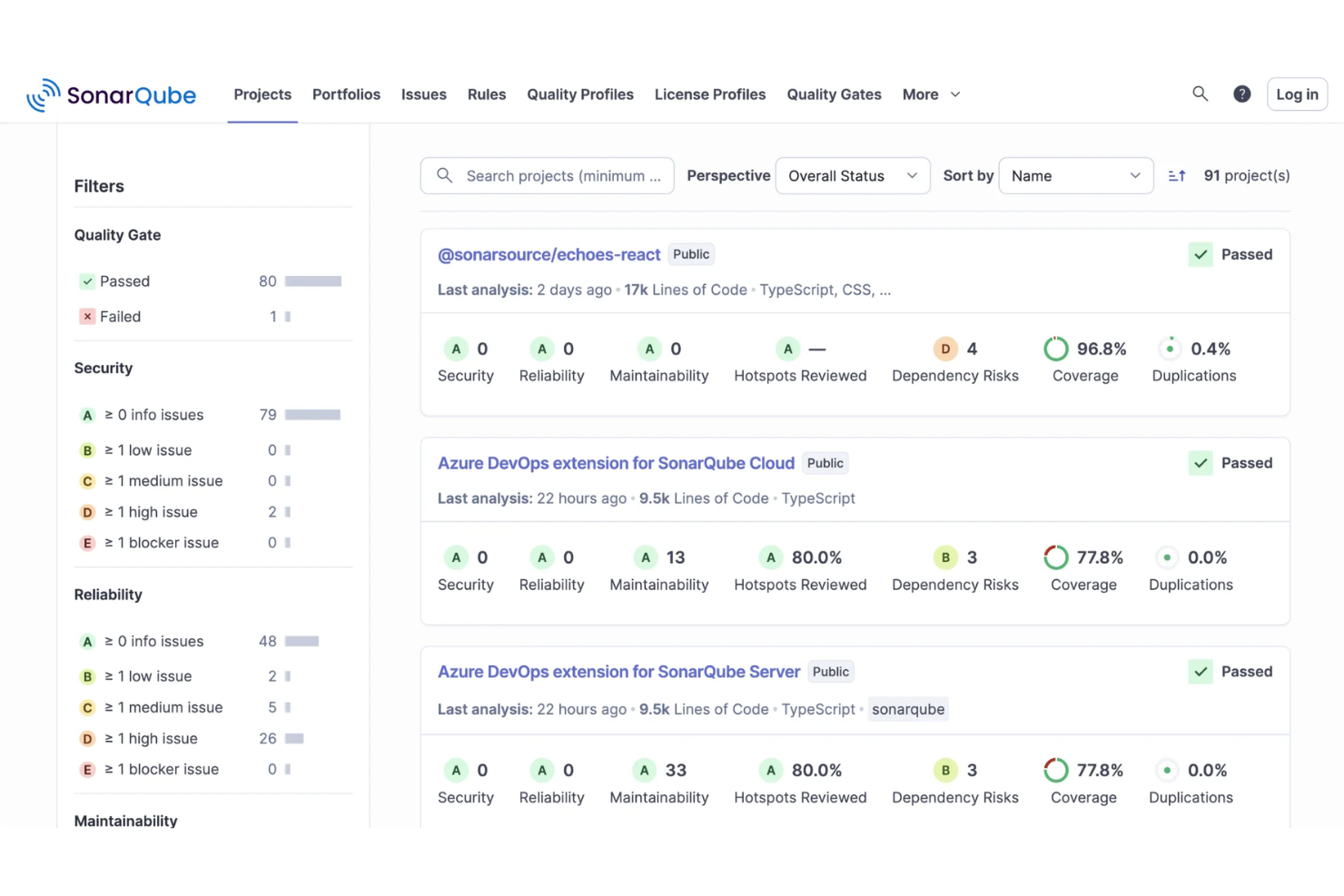
Cuando tu equipo se preocupa por un código limpio y seguro pero la colaboración ocurre en GitHub, GitLab, Bitbucket o Azure DevOps, SonarQube ofrece un sitio compartido para detectar y solucionar problemas dentro del mismo flujo de trabajo donde ya revisan el código. Analiza cada cambio en decenas de lenguajes, señala errores y vulnerabilidades y los convierte en tareas asignables que tus desarrolladores pueden discutir y resolver en conjunto.
Por qué elegí SonarQube
Elegí SonarQube porque convierte la calidad del código en un trabajo de equipo al incorporar la revisión y retroalimentación automática directamente en tus pull requests. Decora los PR en GitHub, GitLab, Bitbucket y Azure DevOps con resúmenes de incidencias y estado de aprobado/rechazado, para que los revisores vean barreras de calidad y problemas del nuevo código sin dejar su espacio habitual de colaboración. En el propio SonarQube, puedes asignar incidencias a desarrolladores específicos, comentarlas y seguir su ciclo de vida, lo que ayuda a tu equipo a coordinar la propiedad de cada tarea en vez de cargarle todo al líder. Y como se integra en los sistemas CI/CD populares, cada commit y PR se analiza automáticamente, brindando a todo el equipo una señal compartida y consistente sobre si un cambio está listo para avanzar.
Características clave de SonarQube
Además de sus capacidades colaborativas, SonarQube brinda varias funciones clave:
- Motor de análisis estático multilenguaje: SonarQube analiza más de 35 lenguajes y frameworks, así que todo tu código backend, frontend e infraestructura puede revisarse en un solo lugar.
- Conjunto de herramientas de pruebas de seguridad (SAST y análisis de trazabilidad): La plataforma incluye SAST y análisis de trazabilidad para detectar fallos de inyección y otras vulnerabilidades.
- AI CodeFix: Ofrece correcciones automáticas con un solo clic para los problemas identificados, agilizando la remediación para equipos colaborativos.
- Análisis de infraestructura como código: Analiza archivos de Terraform, manifiestos de Kubernetes, CloudFormation y otros archivos IaC, así que los equipos de operaciones y plataformas pueden colaborar con desarrollo en cambios de configuración seguros.
Integraciones de SonarQube
Las integraciones incluyen GitHub, GitLab, Azure DevOps, Bitbucket, Jenkins, Bamboo, CircleCI, Travis CI, TeamCity y Sonatype Nexus.
Pros and Cons
Pros:
- Soporta más de 35 lenguajes así que equipos multidisciplinarios comparten una sola plataforma
- Asignación automática de incidencias vincula hallazgos con el último responsable del commit
- Paneles centrales muestran tendencias de mantenibilidad, confiabilidad y deuda técnica
Cons:
- Instancias grandes se sienten lentas al navegar incidencias y proyectos
- El ruido de incidencias y falsos positivos requieren triage manual continuo
New Product Updates from SonarQube
SonarQube Cloud Expands Rust Analysis and Quality Controls
SonarQube Cloud now delivers enterprise-grade Rust verification by complementing Clippy and treating it as a dependency, preserving local workflows while enabling organization-wide quality and security governance. For more information, visit SonarQube's official site.
 .
.
CodePen
Mejor para el diseño frontend y entorno de pruebas para el desarrollo

CodePen es un entorno de codificación interactivo diseñado específicamente para desarrolladores frontend. Como un punto clave para mostrar y probar fragmentos de HTML, CSS y JavaScript, encaja perfectamente en la descripción de ser el 'Mejor para el diseño frontend y como entorno de pruebas para el desarrollo'.
Por qué elegí CodePen: Entre todas las herramientas seleccionadas, CodePen captó mi atención por su enfoque exclusivo en el frontend. Al juzgar y comparar varias plataformas, era evidente que CodePen ofrece una combinación única de características que lo convierten en un recurso indispensable para los desarrolladores frontend.
Su título como 'mejor para el diseño frontend y entorno de pruebas para el desarrollo' proviene de su capacidad para permitir que los miembros del equipo colaboren en fragmentos de diseño, refinen su código y vean resultados visuales de inmediato.
Características destacadas e integraciones:
CodePen destaca por su función de vista previa en vivo, que permite a los desarrolladores ver los cambios en tiempo real mientras codifican. Su sistema de 'Pens' permite a los usuarios guardar, compartir e insertar sus proyectos en cualquier lugar. En cuanto a integraciones, se conecta fácilmente con las principales bibliotecas y plugins de frontend, asegurando un flujo de trabajo fluido para los desarrolladores.
Pros and Cons
Pros:
- Experiencia de codificación y previsualización en tiempo real
- Capacidad para que los miembros del equipo colaboren en 'Pens'
- Integraciones sólidas con plugins y bibliotecas
Cons:
- Limitado a lenguajes y frameworks frontend
- Puede que no sea adecuado para el desarrollo completo de aplicaciones web
- Las funciones premium están detrás de una barrera de pago

La mejor opción para CI/CD integrado con repositorios Git

Bitbucket es una solución avanzada de gestión de repositorios Git que viene equipada con funcionalidades integradas de Integración Continua/Despliegue Continuo (CI/CD). Su capacidad para vincular operaciones de Git con procesos de CI/CD justifica su posición como 'la mejor opción para CI/CD integrado con repositorios Git'.
Por qué elegí Bitbucket: Al evaluar numerosas soluciones de gestión de repositorios, determiné que Bitbucket tenía una ventaja competitiva en cuanto a CI/CD integrado. Tras un exhaustivo proceso de selección y comparación, resulta evidente que la estrecha integración de los repositorios Git de Bitbucket con las operaciones de CI/CD lo convierte en una opción destacada.
Este mismo aspecto de Bitbucket refuerza por qué lo elegí como la 'mejor opción para CI/CD integrado con repositorios Git'.
Características destacadas e integraciones:
Bitbucket no es solo un repositorio; sus capacidades integradas de CI/CD garantizan que los cambios de código se prueben automáticamente y estén listos para su lanzamiento. La función de solicitudes de extracción agiliza las revisiones de código, y su modelo de ramificación organiza las versiones de manera eficiente.
En cuanto a integraciones, Bitbucket colabora con otros productos de Atlassian como Jira. Además, admite funcionalidades de videollamadas y uso compartido de pantalla, lo cual resulta de gran ayuda en sesiones de codificación colaborativas a distancia. Estas integraciones, junto con su capacidad para realizar videollamadas directamente, refuerzan el entorno colaborativo de Bitbucket.
Pros and Cons
Pros:
- El CI/CD integrado con repositorios Git optimiza el flujo de desarrollo.
- Sólidas integraciones con otras herramientas de Atlassian.
- Las funcionalidades de videollamada y uso compartido de pantalla integradas potencian la colaboración del equipo.
Cons:
- La interfaz de usuario puede parecer compleja para principiantes.
- Los equipos grandes pueden encontrar limitaciones en el plan gratuito.
- La integración con herramientas que no son de Atlassian puede ser menos intuitiva a veces.
Trello
La mejor para el seguimiento visual de la gestión de proyectos
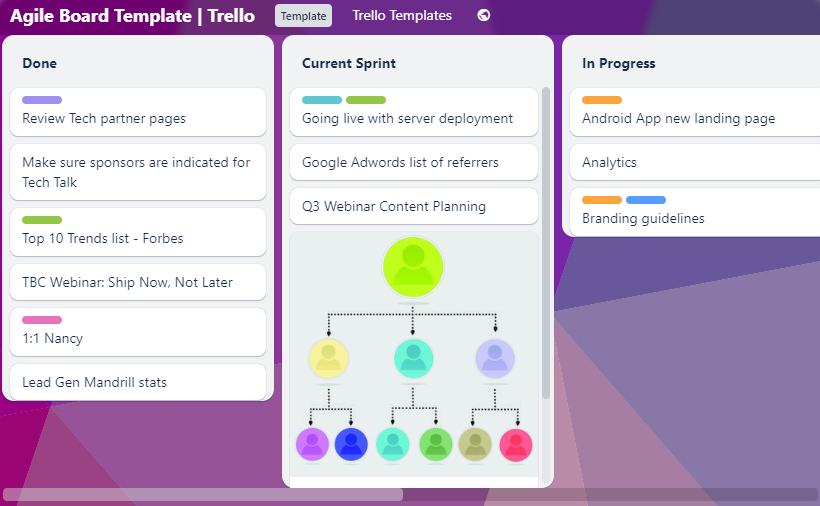
Trello funciona como una herramienta dinámica que emplea sistemas de tarjetas y tableros para organizar y gestionar tareas o proyectos. Su interfaz visual se alinea perfectamente con la idea de que es 'la mejor para el seguimiento visual de la gestión de proyectos', permitiendo a los equipos obtener claridad sobre el avance de su proyecto de un solo vistazo.
Por qué elegí Trello: En el proceso de seleccionar y determinar las mejores herramientas para la gestión de proyectos, Trello captó mi atención gracias a su enfoque visual único. Al evaluarla y compararla con otras herramientas, su distintivo sistema de tarjetas y tableros destacó claramente.
Esta singularidad y mi opinión personal, basada en extensas comparaciones, subrayan por qué creo que Trello es 'la mejor para el seguimiento visual de la gestión de proyectos'.
Características destacadas e integraciones:
La principal fortaleza de Trello radica en sus tableros, listas y tarjetas que permiten a los usuarios organizar proyectos de una manera flexible y gratificante. Funcionalidades como etiquetas, listas de verificación y fechas de vencimiento aseguran la gestión eficiente de las tareas. Además, la automatización incorporada de Trello, conocida como 'Butler', optimiza las tareas repetitivas y asegura una calidad de código constante y el cumplimiento de los procesos.
En cuanto a integraciones, Trello ofrece una amplia variedad de Power-Ups que amplían su funcionalidad. Esto incluye integraciones con herramientas como Slack, Google Drive e incluso aplicaciones de Android, asegurando que los usuarios puedan acceder a sus tableros y tarjetas en cualquier momento y desde cualquier lugar.
Pros and Cons
Pros:
- El sistema de tableros visuales facilita el seguimiento sencillo de los proyectos.
- La automatización integrada asegura consistencia en las tareas y calidad de código.
- La integración robusta con aplicaciones de Android permite la gestión de proyectos desde dispositivos móviles.
Cons:
- Puede requerir curva de aprendizaje para quienes son nuevos en las herramientas de gestión visual.
- Las funciones avanzadas están bloqueadas en planes de pago.
- Algunos usuarios pueden encontrar la interfaz demasiado simple para la gestión de proyectos complejos.

Replit
Ideal para la ejecución instantánea y colaborativa de código
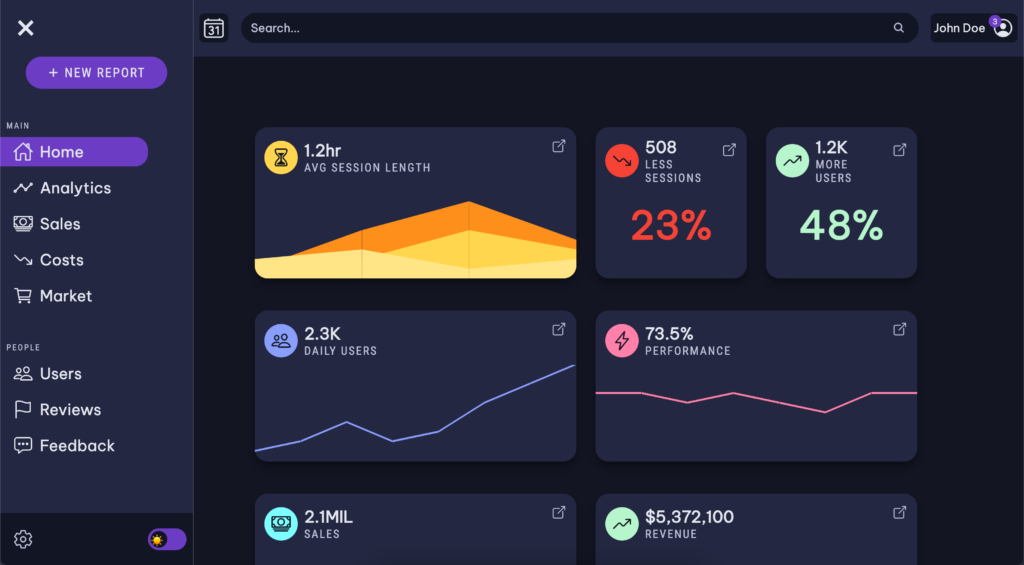
Replit es un editor de código en línea dinámico y una plataforma diseñada para la colaboración rápida entre desarrolladores. Su énfasis en la ejecución instantánea de código en un entorno compartido realmente destaca, convirtiéndose en la herramienta preferida para equipos que buscan interactuar en tiempo real en sus proyectos.
Por qué elegí Replit: Después de analizar meticulosamente numerosas plataformas, seleccioné Replit por su destacada capacidad para reunir a programadores en un entorno de ejecución inmediata. Lo que realmente inclinó mi juicio fue lo sencillo que es para los equipos escribir, ejecutar y depurar código juntos.
Su provisión única de 'ejecución instantánea y colaborativa de código' lo distingue del resto, atendiendo a proyectos que requieren una experiencia de codificación rápida y conjunta.
Funciones y conexiones destacadas:
Replit admite una amplia variedad de lenguajes de programación en su editor de código. Su destacada habilidad para ejecutar y depurar código directamente en el navegador elimina las barreras de la configuración local. Además, con integraciones como GitHub, los desarrolladores pueden importar y compartir código fluidamente, haciendo el espacio de trabajo aún más colaborativo.
Pros and Cons
Pros:
- Ejecución inmediata de código en el navegador
- Amplio soporte de lenguajes
- Integración simplificada con GitHub para compartir código
Cons:
- Carece de funciones sólidas para trabajar sin conexión
- Puede ser un poco abrumador para principiantes debido a la gran cantidad de funciones
- El rendimiento del espacio de trabajo depende de una conectividad a internet estable

Mejor para programar en la nube desde cualquier dispositivo
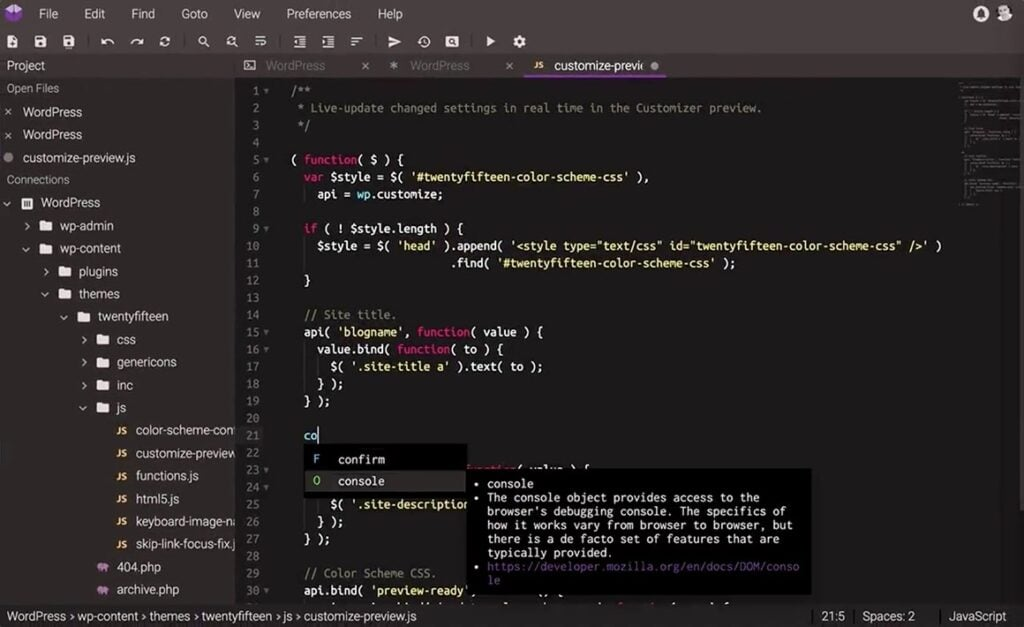
Codeanywhere es una herramienta versátil de codificación colaborativa que proporciona un entorno de programación intuitivo basado en la nube. Su distintiva oferta de permitir que los desarrolladores programen desde prácticamente cualquier dispositivo la posiciona firmemente como la 'mejor opción para programar en la nube desde cualquier dispositivo'.
Por qué elegí Codeanywhere: En mi búsqueda por seleccionar las herramientas más adaptables, Codeanywhere surgió como favorito gracias a su compromiso con la programación flexible, independiente de la ubicación. El simple hecho de comparar y evaluar varias plataformas resaltó su ventaja innegable: la capacidad de acceder y contribuir a una base de código desde cualquier lugar.
Elegí Codeanywhere porque su enfoque independiente del dispositivo garantiza que la programación nunca esté restringida por ubicación o dispositivo, encapsulando perfectamente su designación de 'La mejor para...'.
Características destacadas e integraciones:
En esencia, Codeanywhere se centra en hacer que la codificación colaborativa sea fluida. Tiene una función de cursor compartido que permite a los miembros del equipo ver en tiempo real dónde están trabajando los demás en el código. Además, ofrece entornos preconfigurados, asegurando que los desarrolladores puedan incorporarse a sus proyectos sin la molestia de la configuración. En el aspecto de integraciones, se conecta con repositorios populares como GitHub y Bitbucket, facilitando la gestión y colaboración en el código.
Pros and Cons
Pros:
- Compartición de cursor en tiempo real para colaboración efectiva
- Capacidad para configurar entornos fácilmente
- Fuertes integraciones con los principales repositorios de código
Cons:
- Puede requerir curva de aprendizaje para quienes son nuevos en plataformas basadas en la nube
- La experiencia en la aplicación móvil puede ser limitada
- Capacidades limitadas sin conexión

Mejor para la colaboración en documentación técnica
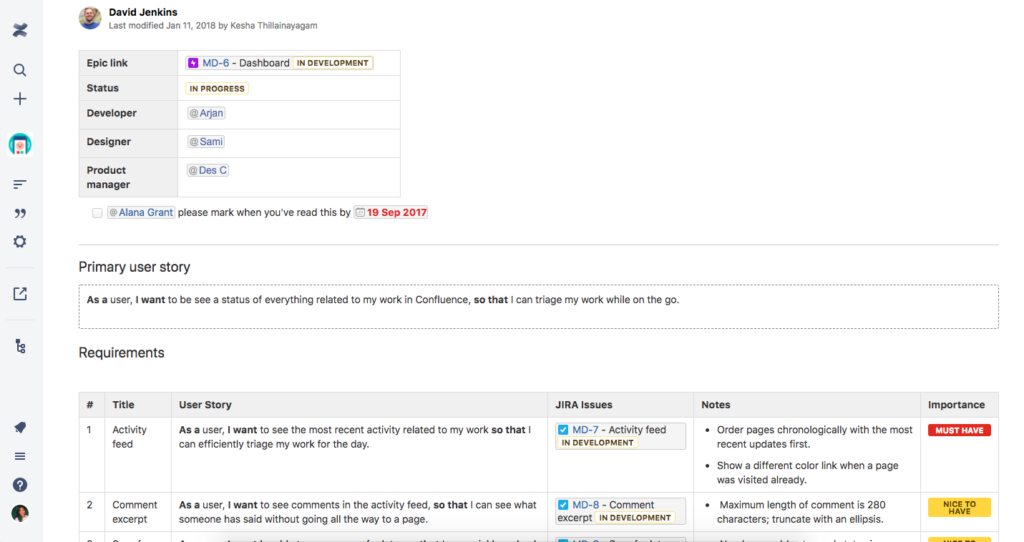
Confluence, desarrollado por Atlassian, funciona como una plataforma colaborativa orientada a que los equipos creen, compartan y actualicen documentos técnicos. Su diseño está específicamente enfocado en ayudar a los equipos de desarrollo de software a documentar sus proyectos, lo que la convierte en una opción óptima para la colaboración en documentación técnica.
Por qué elegí Confluence: En mi búsqueda de la herramienta adecuada, Confluence destacó consistentemente como la opción preferida por muchos profesionales. Mi decisión se basó en la evaluación de varias plataformas y en analizar sus capacidades. El enfoque de Confluence en facilitar la colaboración en la documentación de desarrollo de software la diferencia del resto. Por esta fortaleza única, creo firmemente que merece el título de «Mejor para la colaboración en documentación técnica».
Características destacadas e integraciones:
Confluence cuenta con un editor intuitivo que facilita la redacción y edición de documentos técnicos. Su integración con codetogether permite la programación colaborativa en tiempo real, una característica clave para los equipos de desarrollo de software. Además, las plantillas que ofrece Confluence están diseñadas específicamente para necesidades técnicas, haciendo la creación de documentación mucho más eficiente.
En cuanto a integraciones, Confluence se conecta con otros productos de Atlassian como JIRA. Además, su compatibilidad con Windows garantiza una experiencia de usuario más fluida para quienes trabajan en esta plataforma. También dispone de numerosas aplicaciones de terceros que amplían su funcionalidad, adaptándose a las necesidades específicas de cada equipo.
Pros and Cons
Pros:
- La colaboración en tiempo real ayuda a mantener la documentación actualizada.
- La integración con codetogether facilita la programación colaborativa.
- Diversas plantillas diseñadas específicamente para documentación técnica.
Cons:
- Algunos usuarios pueden encontrar la interfaz algo menos intuitiva al principio.
- Los documentos de mayor tamaño pueden ralentizar el editor en ocasiones.
- La integración con productos que no son de Atlassian puede requerir plugins adicionales o soluciones alternativas.


GitLab es una plataforma basada en la web que ofrece una completa gama de herramientas diseñadas para cubrir todo el ciclo de vida DevOps. Con sus amplias funcionalidades, GitLab se ajusta especialmente a quienes buscan un sólido soporte de cadenas de herramientas a lo largo de sus operaciones de desarrollo.
Por qué elegí GitLab: En mi recorrido analizando varias plataformas DevOps, GitLab destacó notablemente. Determiné que GitLab ofrece un enfoque holístico y único para el desarrollo y despliegue de software. Al compararlo con otras plataformas y basándome en mis propias valoraciones, formé la opinión de que realmente sobresale como el 'mejor para soporte integral de cadenas de herramientas DevOps'.
Características destacadas e integraciones:
GitLab proporciona una solución de extremo a extremo, incluyendo gestión de código fuente, integración y entrega continua (CI/CD), monitoreo y más. Además, su registro de contenedores integrado y la integración con Kubernetes ofrecen a los equipos la flexibilidad de desarrollar y desplegar en entornos diversos.
En cuanto a integraciones, GitLab se lleva muy bien con una infinidad de herramientas de terceros, lo que mejora su versatilidad. Entre las integraciones más populares se encuentran Slack, JIRA y Jenkins, permitiendo a los equipos integrar sus flujos de trabajo existentes sin complicaciones.
Pros and Cons
Pros:
- Suite completa que cubre todo el ciclo de vida DevOps.
- Registro de contenedores integrado e integración con Kubernetes.
- Gran variedad de integraciones con herramientas de terceros.
Cons:
- La amplia gama de funciones puede resultar abrumadora para los nuevos usuarios.
- Algunas funciones avanzadas están restringidas a los planes de mayor precio.
- El rendimiento de la plataforma puede variar según la elección de implementación (autoalojado vs. nube).

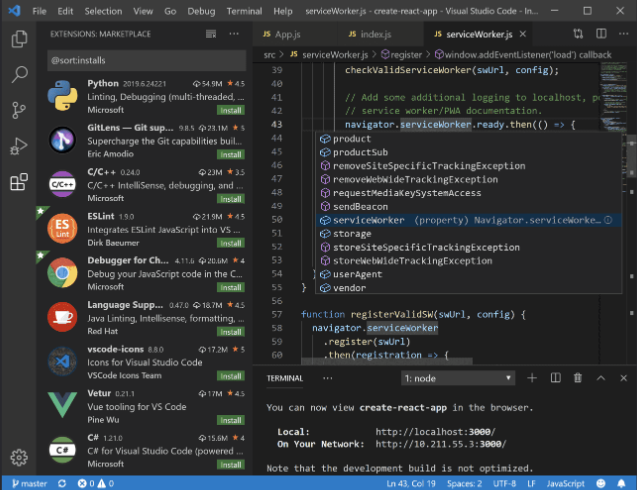
Visual Studio es un entorno de desarrollo integrado (IDE) robusto que proporciona a los desarrolladores herramientas para diseñar, depurar y desplegar aplicaciones en varias plataformas. Al considerar sus características colaborativas, la herramienta justifica la etiqueta de 'mejor para IDE completo con colaboración', ofreciendo un entorno propicio para que los equipos trabajen juntos de forma eficiente.
Por qué elegí Visual Studio: En mi proceso de selección de herramientas, Visual Studio surgió constantemente como una opción preferida debido a sus amplias capacidades de desarrollo. Tras investigar, comparar y evaluar varios IDE, quedó claro que la combinación de características de Visual Studio, incluidas sus herramientas de colaboración, lo hacía destacar.
Estos elementos distintivos refuerzan mi convicción de que es el 'Mejor para IDE completo con colaboración'.
Funciones destacadas e integraciones:
Una de las características más notables de Visual Studio es su intuitivo editor de código fuente, que ofrece resaltado de sintaxis y autocompletado adaptado a numerosos lenguajes. Además, cuenta con potentes herramientas de depuración y es compatible con una infinidad de extensiones para funcionalidades adicionales. La función Live Share de la plataforma, similar a Google Docs pero para código, permite a los desarrolladores editar y depurar en colaboración y en tiempo real.
En cuanto a integraciones, Visual Studio es compatible con una gran cantidad de complementos, entre ellos GitLive, que permite la colaboración en tiempo real en el código, similar a Google Docs pero para desarrolladores. El IDE también presume de integración con git, mejorando los flujos de trabajo de control de versiones .
Pros and Cons
Pros:
- Las ricas herramientas de edición de código fuente y depuración mejoran la productividad del desarrollador.
- Las funciones de colaboración como Live Share fomentan el trabajo en equipo en tiempo real.
- El soporte extensivo de plugins garantiza flexibilidad y personalización.
Cons:
- Puede resultar abrumador para principiantes debido a la multitud de funciones.
- Ocupa una cantidad significativa de recursos del sistema, lo que puede ralentizar algunos equipos.
- Algunas funciones avanzadas están limitadas a la versión premium.
Otras herramientas de colaboración de código
A continuación se incluye una lista de herramientas adicionales de colaboración de código que seleccioné, pero que no llegaron a estar entre las 10 mejores. Sin duda, vale la pena echarles un vistazo.
- GitHub Codespaces
Ideal para entornos de desarrollo bajo demanda
- Stack Overflow
Mejor para equipos de desarrolladores que buscan preguntas y respuestas
- GitKraken
Mejor para una visualización intuitiva de Git
- Slack
Ideal para la comunicación e integración en equipo


Cómo evalúo las herramientas de colaboración de código
Divido mi evaluación en requisitos básicos—como flujos de trabajo de PR nativos de Git y alojamiento de repositorios—y los diferenciadores que separan las herramientas recomendables de aquellas que simplemente cumplen con su función.
Funcionalidad principal (Requisitos imprescindibles para esta lista)
Cuando selecciono herramientas para mi lista, califico cada una en una escala del 0 (no ofrece la funcionalidad) al 5 (destaca en este área) para cada funcionalidad principal que detallo a continuación. Luego, calculo la puntuación total de la herramienta como un porcentaje. Cada herramienta debe lograr una puntuación total mínima del 65% para ser considerada para su inclusión.
- Integración con control de versiones: Reviso si la herramienta ofrece soporte nativo para Git con ramificación y fusión completas, o si depende de conexiones superficiales con un sistema de control de versiones externo.
- Flujos de trabajo de Pull/Merge Request: Los buenos flujos de revisión incluyen comentarios en línea, diffs lado a lado, aprobaciones requeridas y controles de estado vinculados a CI—no solo un visor básico de diferencias.
- Repositorios de código compartidos: Evalúo cómo la plataforma gestiona el alojamiento de repositorios del equipo, considerando estructuras organizativas, agrupación de repos y si los equipos grandes pueden duplicar o bifurcar repositorios.
- Colaboración en tiempo real o asincrónica: Ya sea edición colaborativa en vivo como terminales compartidos o discusiones en PRs con @menciones, busco rutas claras para que los desarrolladores puedan dialogar sobre el código en contexto.
- Integraciones con herramientas de desarrollo: Los plugins IDE para VS Code o JetBrains, conexiones con Jira o Linear para vinculación de incidencias, y soporte de webhooks para herramientas de chat influyen en qué tan bien una herramienta se adapta al stack existente.
- Controles de acceso y permisos: Evalúo el acceso basado en roles, reglas de protección de ramas y soporte de SSO—especialmente la granularidad con la que los equipos pueden controlar quién puede fusionar en ramas de producción.
Una vez tengo una lista de herramientas que cumplen con estos criterios, considero qué diferencia a cada plataforma.
Factores diferenciadores (Lo que distingue a los proveedores)
Así es como comparo y contrasto los diferentes proveedores:
Funciones destacadas
La revisión de código asistida por IA es un gran diferenciador: analizo si la herramienta puede resumir automáticamente los PR, señalar posibles errores o sugerir correcciones en línea. Los entornos de desarrollo en la nube también son importantes, especialmente para la incorporación de nuevos contribuidores que pueden lanzar un espacio de trabajo listo para programar desde cualquier rama sin configuración local. Las canalizaciones de CI/CD nativas cierran el ciclo vinculando los resultados de pruebas y compilaciones directamente al flujo de revisión, de modo que los equipos ven el estado aprobado/fallido antes de aceptar una fusión.
Más allá de las funciones
El modelo de despliegue importa: algunos equipos necesitan opciones autohospedadas o aisladas para la residencia de datos, mientras que otros prefieren SaaS completamente gestionado. También evalúo la postura de seguridad y cumplimiento, comprobando certificaciones SOC 2, escaneos de secretos y SAML SSO, ya que suelen ser impedimentos de compra para clientes empresariales. La transparencia en los precios es otro factor que tengo en cuenta, en particular cómo el proveedor gestiona el licenciamiento para colaboradores externos y contratistas que requieren acceso temporal a repositorios.
Cómo elegir una herramienta de colaboración de código
Es fácil perderse entre largas listas de funciones y estructuras de precios complejas. Para ayudarte a mantener la concentración mientras avanzas en tu proceso único de selección de software, aquí tienes una lista de factores que debes tener en cuenta:
| Factor | Qué debes considerar |
|---|---|
| Escalabilidad | ¿Puede la herramienta crecer junto con tu equipo? Ten en cuenta los límites de usuarios y lo bien que se adapta a proyectos más grandes a medida que aumentan tus necesidades. |
| Integraciones | ¿Se conecta con tus herramientas actuales? Comprueba la compatibilidad con tu pila tecnológica actual para evitar interrupciones en el flujo de trabajo. |
| Personalización | ¿Puedes adaptarla para que se ajuste a tus procesos? Busca opciones para personalizar los flujos de trabajo y las interfaces de usuario de acuerdo con la forma de trabajar de tu equipo. |
| Facilidad de uso | ¿La encontrará intuitiva tu equipo? Una herramienta compleja podría ralentizar la adopción, así que busca una interfaz sencilla y documentación clara. |
| Implementación e incorporación | ¿Con qué rapidez puedes empezar? Evalúa la disponibilidad de recursos de formación y considera cuánto tiempo tendrás que invertir en la configuración y el aprendizaje. |
| Coste | ¿Se ajusta a tu presupuesto? Compara los planes de suscripción y ten en cuenta cualquier coste oculto, como complementos o funciones de niveles superiores. |
| Medidas de seguridad | ¿Están seguros tus proyectos? Asegúrate de que la herramienta ofrezca cifrado, controles de acceso y cumplimiento de las normas pertinentes de protección de datos. |
| Disponibilidad de asistencia | ¿Qué tan accesible es la ayuda si la necesitas? Busca varios canales de asistencia y asegúrate de que ofrezcan ayuda oportuna cuando surjan problemas. |
¿Qué es una herramienta de colaboración de código?
Una herramienta de colaboración de código es una plataforma de software diseñada para facilitar el trabajo en equipo entre desarrolladores, lo que les permite escribir, revisar y perfeccionar código colectivamente con mayor facilidad. Utilizada por desarrolladores, ingenieros de software e incluso gestores de proyectos, admite actividades como la programación en pareja, la revisión de código y la edición en tiempo real. Al centralizar y sincronizar los cambios en el código, estas herramientas garantizan que los equipos puedan producir software de alta calidad de forma más eficiente, independientemente de su ubicación física.
Características
Al seleccionar herramientas de colaboración de código, presta atención a las siguientes características clave:
- Control de versiones: Realiza un seguimiento de los cambios en el código a lo largo del tiempo, lo que permite a los equipos gestionar diferentes versiones y colaborar sin conflictos.
- Edición en tiempo real: Permite que varios usuarios editen el código simultáneamente, mejorando la colaboración y reduciendo el tiempo de desarrollo.
- Revisión de código: Facilita comentarios y debates estructurados sobre la calidad del código, lo que ayuda a mejorar los estándares generales del proyecto.
- Capacidades de integración: Se conecta con otras herramientas como GitHub, Jira y Slack, garantizando un flujo de trabajo fluido dentro de tu conjunto de tecnologías existente.
- Flujos de trabajo personalizables: Permite a los equipos adaptar los procesos para satisfacer sus necesidades de desarrollo específicas y mejorar la eficiencia.
- Medidas de seguridad: Proporciona cifrado y controles de acceso para proteger el código y los datos sensibles frente a accesos no autorizados.
- Canalizaciones de CI/CD integradas: Automatiza las pruebas y la implementación, acelerando el ciclo de desarrollo y reduciendo el esfuerzo manual.
- Resaltado de sintaxis: Mejora la legibilidad del código diferenciando visualmente sus elementos, lo que facilita detectar errores y comprender su estructura.
- Gestión colaborativa de proyectos: Ofrece funciones como la asignación de tareas y el seguimiento del progreso, lo que ayuda a organizar los proyectos y mejorar la comunicación de manera eficiente.
Ventajas
La implementación de herramientas de colaboración de código proporciona varias ventajas para tu equipo y tu empresa. Estas son algunas de las que puedes esperar:
- Mejor trabajo en equipo: La edición en tiempo real y las funciones colaborativas fomentan una mejor comunicación y cooperación entre los miembros del equipo.
- Mayor calidad del código: Los procesos de revisión de código ayudan a identificar y corregir errores con antelación, lo que da lugar a un código más limpio y fiable.
- Ciclos de desarrollo más rápidos: Las canalizaciones de CI/CD integradas y las herramientas de automatización aceleran las pruebas y la implementación, reduciendo el tiempo de comercialización.
- Gestión de proyectos mejorada: La integración con herramientas de gestión de tareas permite realizar un mejor seguimiento del progreso del proyecto y de la asignación de recursos.
- Mayor seguridad: Las medidas de seguridad, como el cifrado y los controles de acceso, protegen tu código y tus datos frente a accesos no autorizados.
- Flexibilidad en los flujos de trabajo: Los flujos de trabajo personalizables permiten a los equipos adaptar la herramienta a sus procesos de desarrollo específicos, mejorando la eficiencia.
Costes y precios
Para seleccionar herramientas de colaboración de código es necesario comprender los distintos modelos de precios y planes disponibles. Los costes varían según las funciones, el tamaño del equipo, los complementos y otros factores. La siguiente tabla resume los planes habituales, sus precios medios y las funciones que suelen incluir las soluciones de herramientas de colaboración de código:
Tabla comparativa de planes para herramientas de colaboración de código
| Tipo de plan | Precio medio | Funciones habituales |
|---|---|---|
| Plan gratuito | $0 | Control de versiones básico, integraciones limitadas y asistencia de la comunidad. |
| Plan personal | $5-$25/usuario/mes | Editor de código avanzado, colaboración en tiempo real y gestión básica de proyectos. |
| Plan empresarial | $30-$60/usuario/mes | Funciones de seguridad mejoradas, asistencia prioritaria e integraciones ampliadas. |
| Plan corporativo | $70-$150/usuario/mes | Flujos de trabajo personalizables, gestor de cuenta exclusivo y capacidades de cumplimiento normativo. |
Preguntas frecuentes sobre herramientas de colaboración de código
Aquí tienes respuestas a preguntas frecuentes sobre las herramientas de colaboración de código:
¿Cuáles son los requisitos del sistema para las herramientas de colaboración de código?
Los requisitos del sistema varían según la herramienta, pero la mayoría de las herramientas modernas de colaboración de código funcionan en Windows, macOS y Linux. Necesitarás una conexión a Internet estable para las funciones de colaboración en tiempo real. Consulta los requisitos específicos de cada herramienta antes de comprarla para garantizar la compatibilidad con los dispositivos y sistemas operativos de tu equipo.
¿Se pueden utilizar las herramientas de colaboración de código sin conexión?
Algunas herramientas de colaboración de código ofrecen capacidades limitadas sin conexión, pero la mayoría de las funciones requieren conexión a Internet. El acceso sin conexión puede incluir la edición básica de código, y los cambios se sincronizan cuando vuelves a estar conectado. Si trabajar sin conexión es esencial para tu equipo, busca herramientas que admitan específicamente esta función.
¿Cómo gestionan la seguridad las herramientas de colaboración de código?
Las herramientas de colaboración de código suelen utilizar cifrado para proteger tus datos y controles de acceso para gestionar los permisos de los usuarios. Es fundamental elegir una herramienta que cumpla con las normas de seguridad pertinentes y ofrezca funciones como la autenticación de dos factores. Revisa siempre las políticas de seguridad de una herramienta para asegurarte de que satisfacen las necesidades de tu equipo.
¿Son adecuadas las herramientas de colaboración de código para equipos remotos?
Sí, las herramientas de colaboración de código son ideales para equipos remotos, ya que permiten editar, comunicarse y gestionar proyectos en tiempo real desde cualquier lugar. Estas herramientas ayudan a reducir la distancia entre los miembros del equipo que se encuentran en distintas ubicaciones, lo que facilita la colaboración y la gestión eficaz de los proyectos. Considera herramientas con sólidas opciones de integración para el trabajo remoto.
Lo siguiente:
Si estás investigando herramientas de colaboración de código, ponte en contacto con un asesor de SoftwareSelect para recibir recomendaciones gratuitas.
Rellenas un formulario y mantienes una breve conversación en la que profundizan en los detalles de tus necesidades. Después recibirás una lista reducida de programas para revisar. También te ayudarán durante todo el proceso de compra, incluidas las negociaciones de precios.