

10 Mejores Software de Mesa de Ayuda Empresarial Analizados en 2026

Mejores Soluciones de Software de Helpdesk Empresarial


Dirigir una empresa implica varios desafíos, especialmente cuando se trata de gestionar el soporte al cliente. Necesitas una solución que ayude a tu equipo a manejar las consultas sin sumar más caos. Ahí es donde entra en juego el software de helpdesk empresarial.
En mi experiencia, el software adecuado puede marcar toda la diferencia a la hora de mejorar los tiempos de respuesta y mantener a tus clientes satisfechos. He probado y revisado muchas opciones para ayudarte a encontrar la que mejor se adapte a tus necesidades.
En este artículo, compartiré mis principales recomendaciones de software de helpdesk empresarial. Obtendrás una reseña imparcial y bien investigada de cada opción, centrándome en cómo pueden solucionar los desafíos específicos de tu equipo. Vamos a sumergirnos y encontrar la herramienta perfecta para tu empresa.
Por qué confiar en nuestras recomendaciones de software
Nuestro equipo lleva probando y evaluando software desde 2012. Como líderes tecnológicos, sabemos lo difícil —y lo importante— que es elegir el software adecuado.
Para esta guía, evaluamos las herramientas mediante pruebas prácticas e investigación independiente, puntuando las herramientas según nuestros criterios de selección.
Nuestras reseñas reflejan nuestro criterio editorial humano, no un discurso de ventas.
Revisores expertos:
Resumen de los Mejores Software de Helpdesk Empresarial
Esta tabla comparativa resume los detalles de precios de mis mejores elecciones de software de helpdesk empresarial para ayudarte a encontrar el más adecuado para tu presupuesto y necesidades de negocio.
| Tool | Best For | Trial Info | Price | ||
|---|---|---|---|---|---|
| 1 | El mejor con gestión de portafolio de proyectos incorporada | Prueba gratuita de 14 días + demo gratis disponible | Desde $19/agente/mes (facturado anualmente) | Website | |
| 2 | Ideal para la priorización inteligente de tickets | Prueba gratuita de 21 días + demo gratis disponible | Desde $149/técnico/mes (facturado anualmente) | Website | |
| 3 | Ideal para soporte omnicanal | Prueba gratuita de 14 días + demo gratuita disponible | Desde $19/agente/mes (facturado anualmente) | Website | |
| 4 | Ideal para implementar chatbots de IA sobre datos personalizados | Plan gratuito disponible | Desde $32/mes (facturado anualmente) | Website | |
| 5 | La mejor mesa de ayuda de configuración rápida para equipos pequeños | Plan gratuito + demo gratis disponible | Desde $29/usuario/mes | Website | |
| 6 | Mejor mesa de ayuda intuitiva para equipos no técnicos | Plan gratuito + demo gratuita disponible | Desde $39.99/mes (facturado anualmente) | Website | |
| 7 | Ideal para recopilar comentarios de la comunidad y usarlos en las hojas de ruta de productos | Prueba gratuita de 14 días + demostración gratuita disponible | Desde $49/agente/mes (facturado anualmente) | Website | |
| 8 | Ideal para soporte al cliente nativo basado en CRM | Prueba gratuita de 14 días + plan gratuito + demo gratuita disponible | Desde $20/mes/usuario | Website | |
| 9 | Mejor para la gestión automatizada de servicios de TI | Prueba gratuita de 14 días + demo gratis disponible | Precios bajo solicitud | Website | |
| 10 | Ideal para servicios empresariales con cumplimiento global | Prueba gratuita de 30 días + demo gratis disponible | Precio bajo consulta | Website |


Reseñas de los Mejores Software de Helpdesk Empresarial
A continuación, tienes un resumen detallado de los mejores software de helpdesk empresarial que incluí en mi selección. Mis reseñas ofrecen una mirada en profundidad a las características clave, pros y contras, integraciones y casos de uso ideales de cada herramienta para ayudarte a elegir la mejor para ti.

El mejor con gestión de portafolio de proyectos incorporada
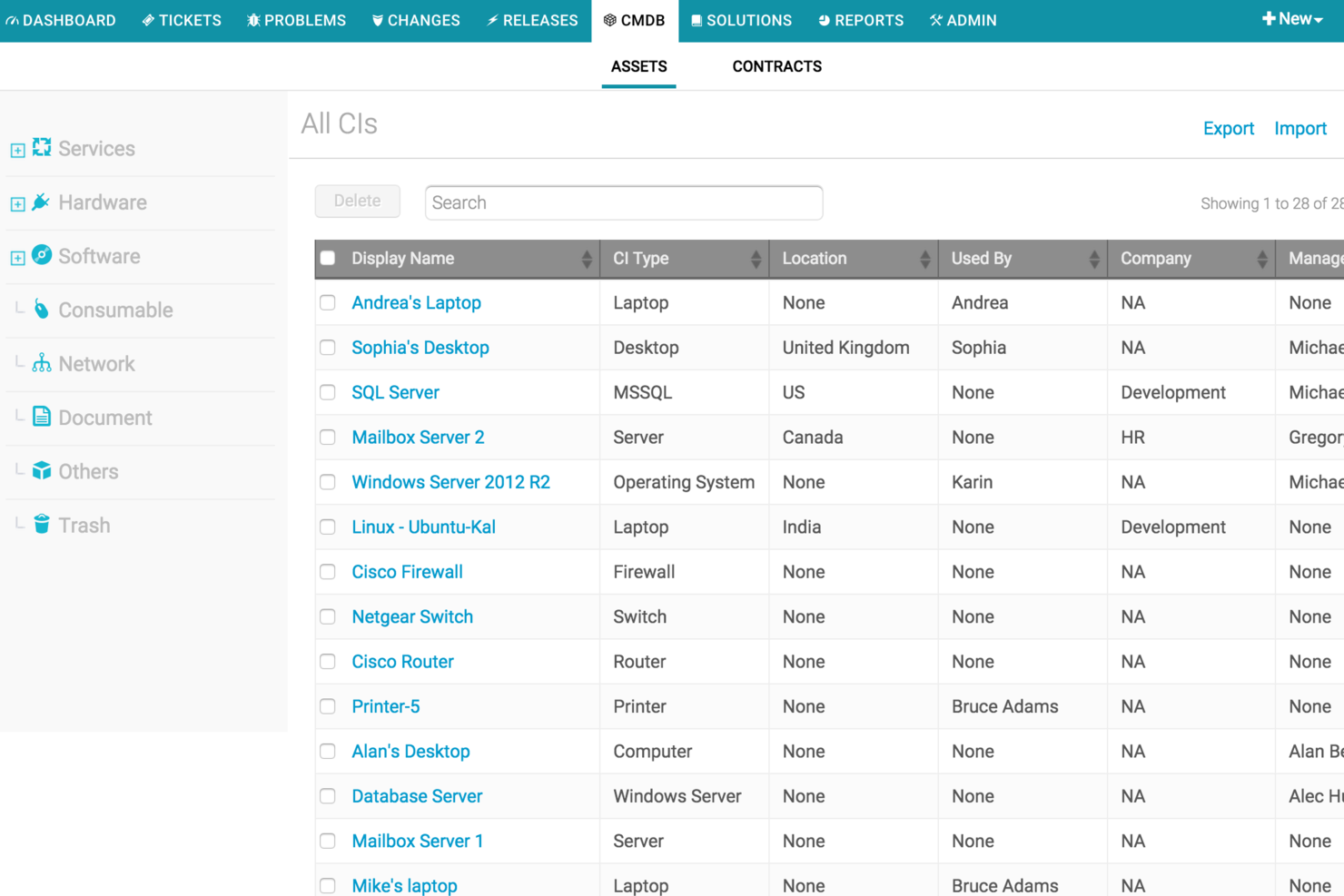
Freshservice es una plataforma de software de mesa de ayuda empresarial que reúne la gestión de servicios de TI, la automatización de flujos de trabajo, el seguimiento de activos y un amplio mercado de integraciones para grandes organizaciones.
¿Para quién es mejor Freshservice?
Freshservice es ideal para equipos de TI en empresas medianas y grandes que necesitan una gestión centralizada de servicios y automatización.
Por qué elegí Freshservice
Elegí Freshservice como uno de los mejores porque puedo gestionar tanto las solicitudes de servicios de TI como los portafolios de proyectos en un solo lugar. La gestión de portafolios de proyectos integrada permite a mi equipo hacer seguimiento del progreso de los proyectos, asignar recursos y alinear los proyectos de TI con las operaciones de servicio. Me gusta que puedo ver los cronogramas de proyectos junto con la gestión de incidentes y de cambios, lo que nos ayuda a mantener todo coordinado.
Características clave de Freshservice
- Catálogo de servicios: Permite a los usuarios enviar y rastrear solicitudes de servicio a través de un portal personalizable.
- Asignación automática de tiques: Envía los tiques entrantes a los agentes adecuados según reglas preestablecidas.
- Gestión de activos: Hace seguimiento de activos de hardware y software a lo largo de su ciclo de vida.
- Gestión de cambios: Proporciona flujos de trabajo para planificar, aprobar e implementar cambios en TI.
Integraciones de Freshservice
Freshservice ofrece más de 200 integraciones nativas, incluyendo Jira, Slack, Microsoft Teams, Azure Active Directory, Google Workspace, Salesforce, Okta, GitHub, Trello y Dropbox. Hay una API disponible para integraciones personalizadas y se conecta con Zapier.
Pros and Cons
Pros:
- Enrutamiento inteligente de tiques que equilibra la carga de los agentes
- CMDB nativa para seguimiento de activos y relaciones
- Flujos de trabajo de aprobación automatizada para solicitudes de servicio
Cons:
- Las integraciones del mercado a veces requieren configuración adicional
- Las funciones de la aplicación móvil son menos completas
New Product Updates from Freshservice
 Experience)
Freshservice Introduces a Reimagined IT Asset Management (ITAM) Experience
Freshservice introduces a reimagined IT Asset Management (ITAM) experience with continuous infrastructure discovery, dependency mapping, IPAM, and Software License Management. This update helps teams improve asset visibility and manage connected IT environments more effectively. For more information, visit Freshservice’s official site.

SuperOps
Ideal para la priorización inteligente de tickets
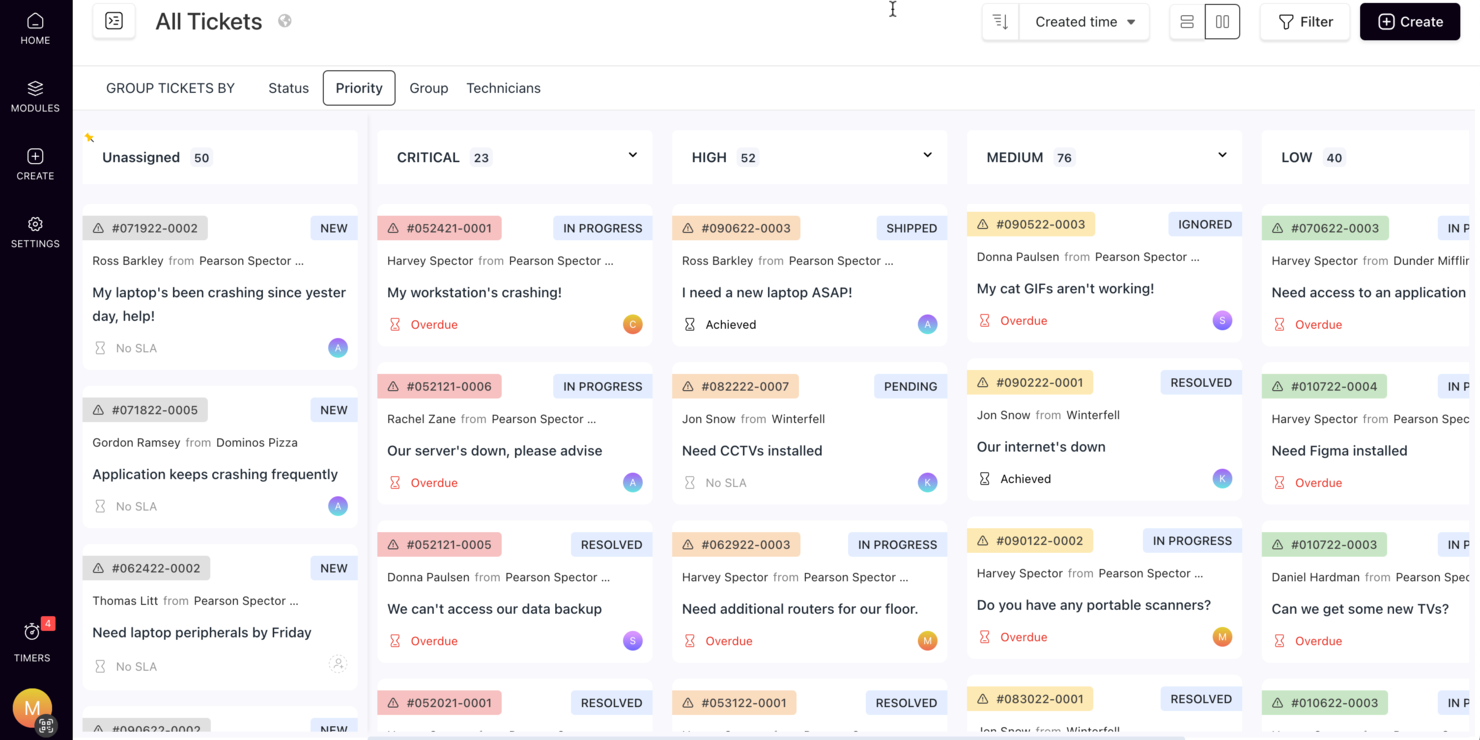
SuperOps atiende a proveedores de servicios gestionados (MSP) y equipos de TI que necesitan una solución confiable de software de mesa de ayuda empresarial. Simplifica las operaciones de TI con una gestión integrada de la mesa de servicios, automatización y funcionalidades impulsadas por IA. Las organizaciones pueden mejorar la eficiencia y la entrega de servicios, gestionando fácilmente los tickets, automatizando flujos de trabajo y manteniendo una comunicación efectiva.
Por qué elegí SuperOps
Elegí SuperOps por su priorización inteligente de tickets y un sistema automatizado de gestión de tickets, que aprovecha la IA para optimizar el proceso de mesa de ayuda. El chatbot Monica AI gestiona tareas rutinarias rápidamente, liberando a tu equipo para enfocarse en problemas más complejos. Además, su función de registro de tiempo ofrece información precisa sobre la asignación de recursos, lo que lo hace valioso para operaciones de soporte a nivel empresarial.
Características clave de SuperOps
Además de su destacado sistema de tickets, encontré varias otras funciones que aumentan su valor:
- Runbooks unificados: Estos te permiten estandarizar y automatizar procesos repetitivos, reduciendo el tiempo que tu equipo dedica a tareas rutinarias.
- Comunicación centralizada: Esta función asegura que todos los miembros del equipo tengan acceso a la misma información, favoreciendo una mejor colaboración y toma de decisiones.
- Gestión de SLA: SuperOps te ayuda a rastrear y gestionar los acuerdos de nivel de servicio, asegurando que cumplas con las expectativas de los clientes y los estándares de cumplimiento.
- Temporizadores móviles: Esta herramienta permite a los técnicos registrar con precisión su tiempo de trabajo en movimiento, mejorando la exactitud de la facturación y la gestión de recursos.
Integraciones de SuperOps
Las integraciones incluyen BambooHR, Google Sheets, Microsoft Office 365, Slack, PandaDoc, Dialpad, Google Workspace Admin, Microsoft Outlook y Airtable.
Pros and Cons
Pros:
- Gestión de dispositivos móviles incorporada
- Potentes herramientas de automatización e IA
- Incluye gestión de parches y terminales
Cons:
- Puede requerir tiempo de incorporación
- En la nube, requiere acceso a internet
New Product Updates from SuperOps

SuperOps Improves Ticket Visibility, Dynamic Forms, and Dashboard Views
SuperOps introduces improvements to ticket visibility, dynamic forms, and dashboard visualizations. These updates help technicians manage customer conversations, simplify ticket creation, and keep dashboard views consistent across teams. For more information, visit SuperOps' official site.
 .
.
Ideal para soporte omnicanal
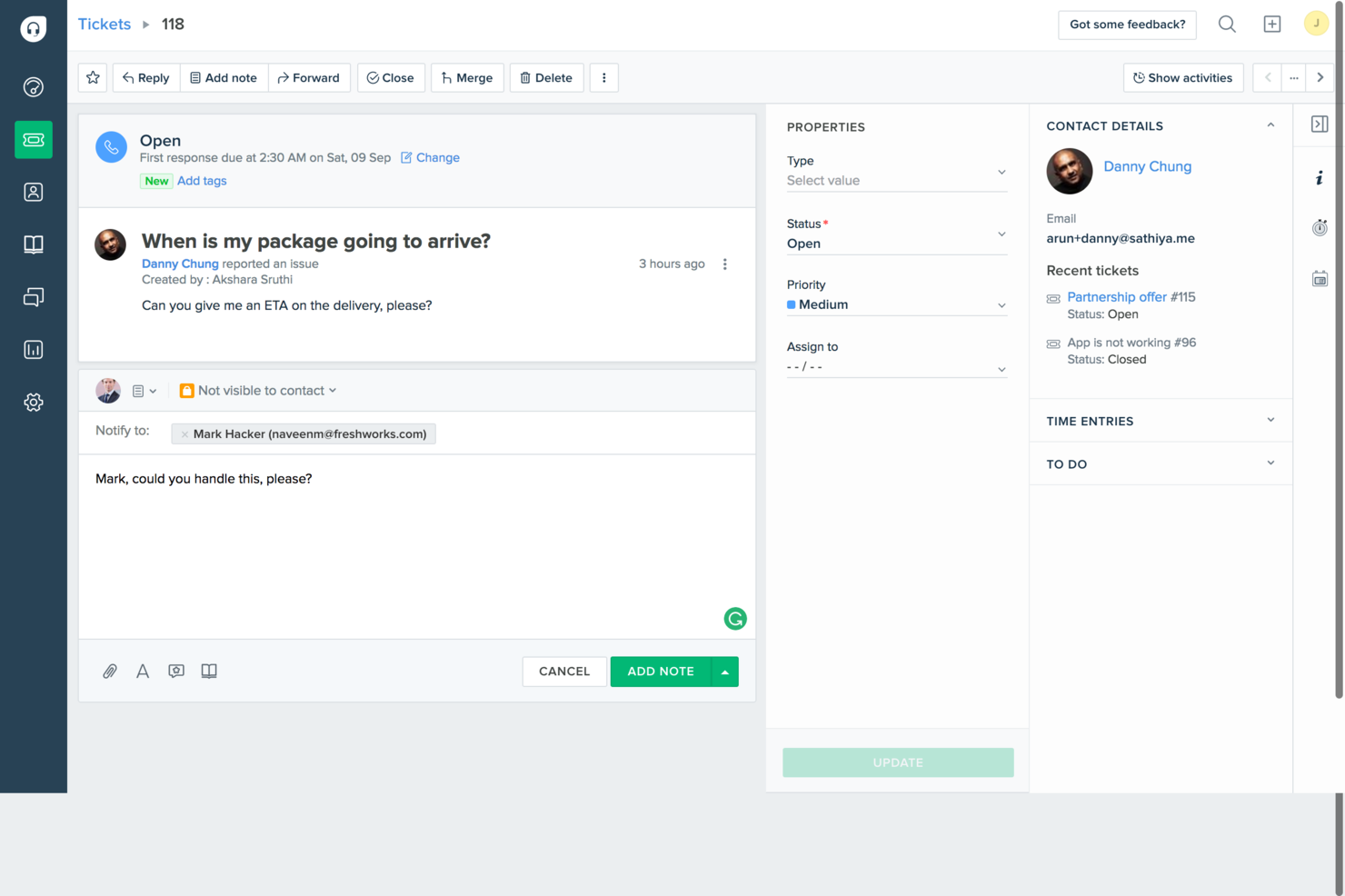
Freshdesk es un software de atención al cliente impulsado por IA, diseñado para equipos empresariales que necesitan gestionar eficazmente operaciones de soporte de alto volumen y múltiples canales. Ofrece un espacio de trabajo centralizado para el servicio de asistencia, donde se gestionan tickets provenientes de correo electrónico, chat, teléfono y redes sociales, utilizando IA para automatizar la asignación, sugerir respuestas y priorizar temas urgentes. Con funciones como automatización de flujos de trabajo, seguimiento de SLA, analíticas, base de conocimientos de autoservicio y firmas electrónicas de documentos, Freshdesk ayuda a las grandes organizaciones a mejorar los tiempos de respuesta, mantener la consistencia del servicio y escalar el soporte al cliente sin aumentar la complejidad operativa.
Por qué elegí Freshdesk
Elegí Freshdesk por sus capacidades impulsadas por IA que mejoran significativamente las operaciones del servicio de asistencia en empresas. El asistente Freddy AI Copilot de la plataforma automatiza tareas rutinarias, permitiendo que tu equipo se enfoque en problemas más complejos, lo que incrementa la productividad. Además, el avanzado sistema de tickets de Freshdesk, con asignación basada en habilidades y soporte multimarcas, garantiza que las consultas se gestionen y resuelvan de forma eficiente. Estas características se alinean con las necesidades de las empresas que buscan soluciones de soporte escalables e inteligentes.
Características clave de Freshdesk
Además de sus capacidades basadas en IA, Freshdesk ofrece varias funciones pensadas para satisfacer las necesidades empresariales:
- Soporte omnicanal: Esta función centraliza las interacciones con los clientes a través de diversos canales como correo electrónico, chat y redes sociales, asegurando una comunicación fluida.
- Paneles personalizables: Puedes adaptar los paneles para monitorear métricas clave y obtener información sobre el rendimiento del equipo y la satisfacción del cliente.
- Herramientas de colaboración: Las notas internas y los encuentros de equipo facilitan la colaboración efectiva entre los agentes de soporte, lo que lleva a una resolución más rápida de los problemas.
- Funciones de seguridad: Freshdesk ofrece registros de auditoría y listas blancas de IP para mejorar la seguridad de los datos y el cumplimiento para clientes empresariales.
Integraciones de Freshdesk
Las integraciones incluyen Slack, MS Teams, Shopify, Confluence, Google Docs, Playvox, Dropbox Sign 2 y más, con una API disponible para integraciones personalizadas.
Pros and Cons
Pros:
- Herramientas de automatización de tickets impulsadas por IA
- Flujos de trabajo de asignación de tickets basada en habilidades
- Sólidos controles de seguridad y cumplimiento
Cons:
- Las funciones avanzadas requieren niveles superiores
- La personalización de informes puede ser limitada
New Product Updates from Freshdesk

Freshdesk Adds Voice AI Agents in Freshcaller
Freshdesk introduces Voice AI Agents available through Freshcaller Marketplace apps to handle routine calls and reduce queues. This feature enables automated call handling with real-time, conversational support. For more information, visit Freshdesk's official site.

Chatbase
Ideal para implementar chatbots de IA sobre datos personalizados

Chatbase es una plataforma de asistencia empresarial impulsada por IA que permite a los equipos crear, implementar y gestionar chatbots conversacionales entrenados con fuentes de datos internas y externas a la empresa.
¿Para quién es mejor Chatbase?
Chatbase es ideal para equipos de TI y soporte en empresas medianas a grandes que necesitan implementar chatbots de IA entrenados con sus propios datos y documentación interna.
Por qué elegí Chatbase
Elegí Chatbase como uno de los mejores por la forma en que maneja el entrenamiento personalizado de datos para agentes de soporte de IA. Puedes proporcionar al agente tu documentación interna, artículos de la base de conocimientos y fuentes de datos conectadas, y responderá preguntas basándose específicamente en ese contenido, no en respuestas genéricas de IA. También me gusta que se sincronice con sistemas en tiempo real como CRMs y herramientas de gestión de pedidos, por lo que el agente puede obtener datos de clientes en vivo durante una conversación en lugar de depender de información estática. Para equipos de soporte empresarial que gestionan grandes bases de conocimiento actualizadas frecuentemente, esa combinación de entrenamiento personalizado y acceso a datos en tiempo real es realmente difícil de replicar.
Características clave de Chatbase
- Formularios de captura de clientes potenciales: Inserta formularios directamente en las conversaciones con el chatbot para recopilar información del usuario sin salir de la interfaz de chat.
- Derivación a humano: Redirige las conversaciones a un agente en vivo cuando el chatbot alcanza el límite de su conocimiento o el usuario solicita soporte humano.
- Personalización de la marca: Ajusta la apariencia, nombre y tono del chatbot para que coincidan con la marca y el estilo de comunicación de tu organización.
- Historial de conversaciones: Accede a transcripciones completas de interacciones anteriores para revisar conversaciones de soporte e identificar brechas de conocimiento.
Integraciones de Chatbase
Chatbase ofrece integraciones nativas con Make, Zendesk, Notion, Slack, Stripe, Salesforce y más. También hay una API disponible para integraciones personalizadas.
Pros and Cons
Pros:
- Permite entrenar chatbots con documentos propietarios
- El panel analítico rastrea métricas a nivel de conversación
- Acceso flexible a la API para flujos de trabajo personalizados
Cons:
- La escalada a agentes humanos no es automatizada
- No incluye sistema de gestión de tickets o casos integrado

HelpDesk
La mejor mesa de ayuda de configuración rápida para equipos pequeños

HelpDesk es un software de gestión de tickets diseñado para pequeñas empresas y equipos de soporte en diversos sectores, incluyendo TI y ventas. Facilita la gestión de tickets y la colaboración en equipo para fortalecer las operaciones de soporte.
Por qué elegí HelpDesk: Es ideal para equipos pequeños, ya que ofrece simplicidad y eficiencia en la gestión de consultas de clientes. El software proporciona soporte multicanal, permitiendo que tu equipo gestione solicitudes a través de correo electrónico y formularios web. Sus funciones de automatización reducen el trabajo manual para lograr asignaciones de tickets más eficientes. Las herramientas analíticas de HelpDesk ofrecen información sobre el desempeño del equipo y la satisfacción del cliente.
Funciones destacadas e integraciones:
Funciones incluyen detección de idioma para usuarios globales, seguimiento de tickets similares para una resolución eficiente y sugerencias de etiquetas impulsadas por IA que ayudan a organizar las consultas.
Integraciones incluyen LiveChat, HubSpot, Salesforce, Slack y más.
Pros and Cons
Pros:
- Fácil de configurar y usar para equipos pequeños
- Opciones centralizadas de soporte multicanal
- Automatización y organización sólida de tickets
Cons:
- Carece de automatización avanzada basada en IA
- Sin creación de tickets desde redes sociales

Mejor mesa de ayuda intuitiva para equipos no técnicos
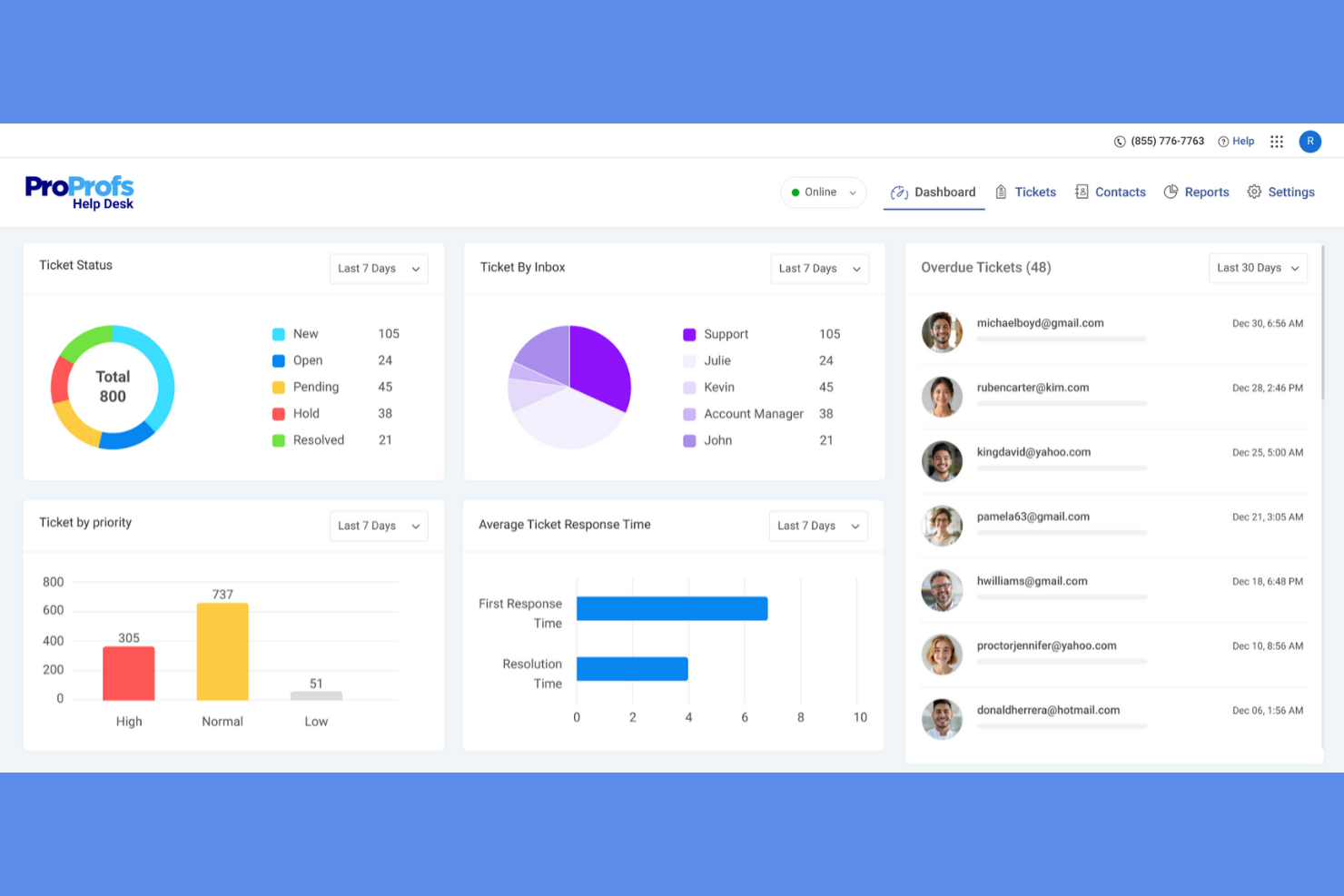
ProProfs Help Desk es una solución de soporte al cliente basada en la nube dirigida a pequeñas y medianas empresas. Ayuda a gestionar las consultas de los clientes mediante la emisión de tickets, bandejas de entrada compartidas y herramientas de colaboración.
Por qué elegí ProProfs Help Desk: Se reconoce por su facilidad de uso, lo que la hace accesible para equipos sin amplios conocimientos técnicos. La función de bandeja de entrada compartida permite que tu equipo colabore eficazmente en las consultas de los clientes. Las reglas de automatización mejoran la gestión de tickets, reduciendo las tareas manuales. Las herramientas de informes proporcionan información sobre el rendimiento del soporte para asegurar que tu equipo pueda mejorar continuamente la calidad del servicio.
Características destacadas e integraciones:
Características incluyen una base de conocimientos que ayuda a los usuarios a encontrar soluciones de forma autónoma, un sistema de chat que facilita la comunicación en tiempo real y una aplicación móvil que permite a tu equipo gestionar los tickets desde cualquier lugar.
Integraciones incluyen Salesforce, Slack, Shopify, Microsoft Dynamics CRM y más.
Pros and Cons
Pros:
- Configuración y panel simples e intuitivos
- La bandeja de entrada compartida permite la colaboración
- Base de conocimientos de autoservicio
Cons:
- Falta de herramientas avanzadas de informes
- Sin asignación de tickets basada en habilidades

Ideal para recopilar comentarios de la comunidad y usarlos en las hojas de ruta de productos
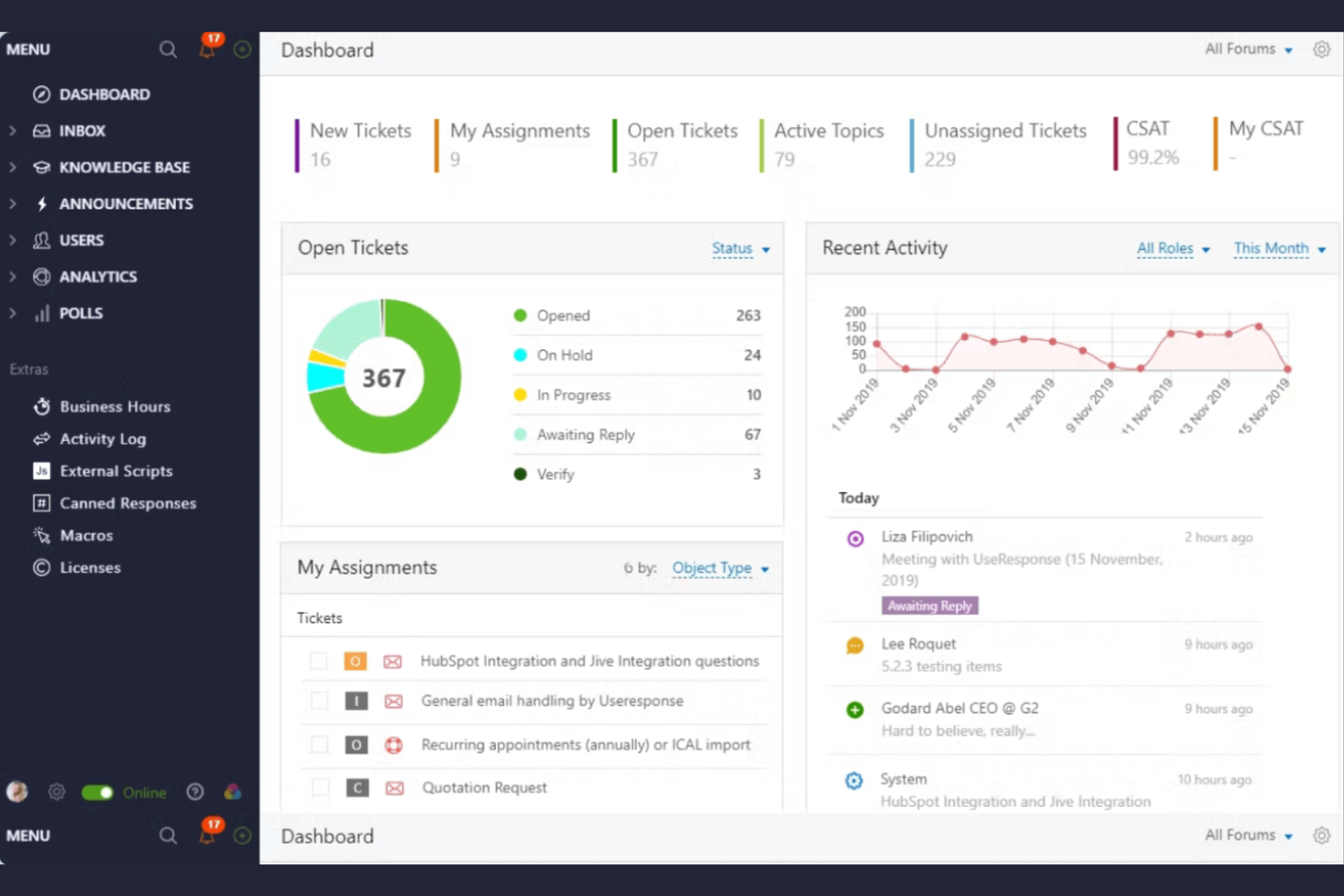
UseResponse es una plataforma de soporte al cliente y gestión de retroalimentación diseñada para empresas que buscan interactuar con su comunidad. Facilita la recopilación de comentarios de clientes, la gestión de tickets de mesa de ayuda y la administración de la base de conocimientos.
Por qué elegí UseResponse: Destaca en la recopilación de comentarios de la comunidad, permitiendo que tu equipo interactúe directamente con los usuarios. La plataforma ofrece foros comunitarios personalizables para captar comentarios, ideas y sugerencias. El sistema de tickets de UseResponse se integra con la gestión de retroalimentación, asegurando una resolución eficiente de problemas. La herramienta también ofrece análisis para rastrear la participación de la comunidad y mejorar los servicios ofrecidos.
Funciones y Integraciones Destacadas:
Funciones incluyen un portal de autoservicio que reduce las solicitudes de soporte, una base de conocimientos que ayuda a los usuarios a encontrar respuestas rápidamente y flujos de trabajo personalizables que se adaptan a los procesos de tu equipo.
Integraciones incluyen Slack, Atlassian Jira, Salesforce y más.
Pros and Cons
Pros:
- Fuertes funciones de soporte comunitario
- Análisis de participación comunitaria perspicaces
- Flujos de trabajo altamente adaptables
Cons:
- La automatización no es adecuada para flujos de trabajo complejos
- Dependencia en la participación del usuario

Ideal para soporte al cliente nativo basado en CRM
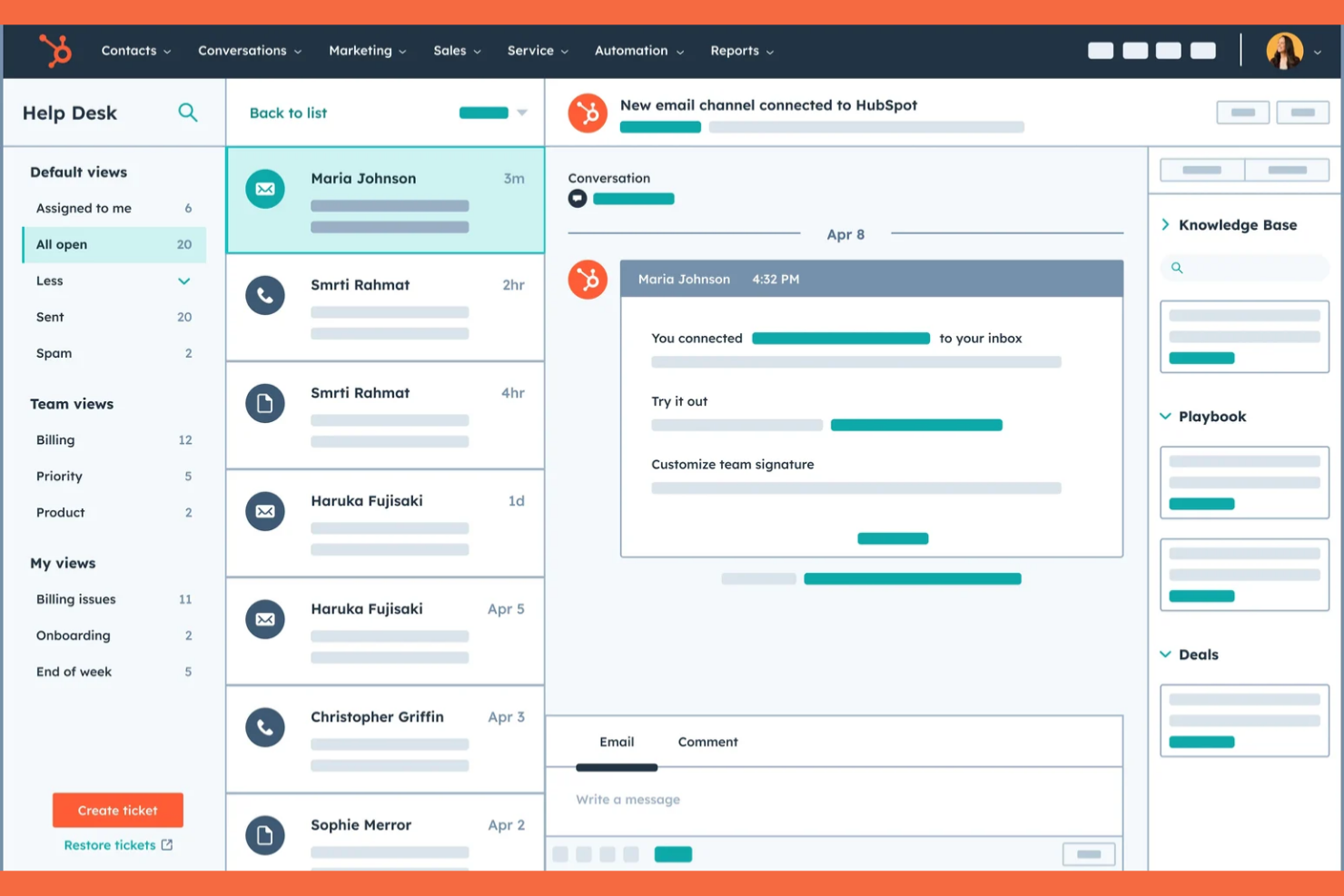
HubSpot Service Hub es un software de servicio al cliente diseñado para empresas que buscan fortalecer las relaciones y el soporte a sus clientes. Ofrece herramientas para la gestión de tickets, retroalimentación de clientes y administración de la base de conocimientos.
Por qué elegí HubSpot Service Hub: Es conocido por su sólida integración con HubSpot CRM, lo cual proporciona una plataforma unificada para gestionar las interacciones con los clientes. El software incluye un sistema de tickets que organiza las solicitudes de soporte de manera eficiente. Las herramientas de retroalimentación permiten recopilar información directamente de tus clientes. La función de base de conocimientos de HubSpot permite a los usuarios encontrar respuestas por sí mismos, reduciendo la carga de trabajo para tu equipo de soporte.
Características destacadas e integraciones:
Características incluyen un portal del cliente que permite a los usuarios hacer seguimiento de sus tickets, herramientas de automatización que ayudan a gestionar tareas repetitivas y paneles de informes que proporcionan información sobre el desempeño del soporte al cliente.
Integraciones incluyen Salesforce, Slack, Zapier, Shopify, Mailchimp, Microsoft Dynamics y más.
Pros and Cons
Pros:
- Integraciones con el ecosistema de HubSpot
- Portal del cliente y base de conocimientos integrada
- Paneles de informes personalizables
Cons:
- El precio aumenta rápidamente
- La falta de funciones puede limitar los flujos de trabajo y las integraciones

SysAid
Mejor para la gestión automatizada de servicios de TI

SysAid es una herramienta de gestión de servicios de TI diseñada para departamentos de TI en diversas industrias. Apoya las operaciones de TI proporcionando soluciones de mesa de ayuda y gestión de activos.
Por qué elegí SysAid: Destaca en la gestión de servicios de TI, proporcionando herramientas para automatizar y mejorar los flujos de trabajo de TI. El software incluye un sistema de gestión de activos integrado que ayuda a rastrear activos de hardware y software. Las funciones de mesa de ayuda de SysAid cuentan con una gestión de tickets automatizada, reduciendo tareas manuales para tu equipo. Sus capacidades de reporte ofrecen información sobre el desempeño de TI y el uso de recursos.
Características destacadas e integraciones:
Características incluyen un portal de autoservicio que permite a los usuarios resolver problemas de forma independiente, una base de conocimientos que almacena soluciones para problemas comunes y un módulo de gestión de cambios que rastrea los cambios de TI de forma eficiente.
Integraciones incluyen Microsoft Active Directory, Microsoft SCCM, Google Workspace y más.
Pros and Cons
Pros:
- Potentes capacidades de gestión de servicios de TI y activos
- Fuerte automatización de flujos de trabajo de TI
- Base de conocimientos integrada para resolución autónoma de problemas
Cons:
- Interfaz de usuario compleja y desactualizada
- Precios altamente opacos y basados en cotización

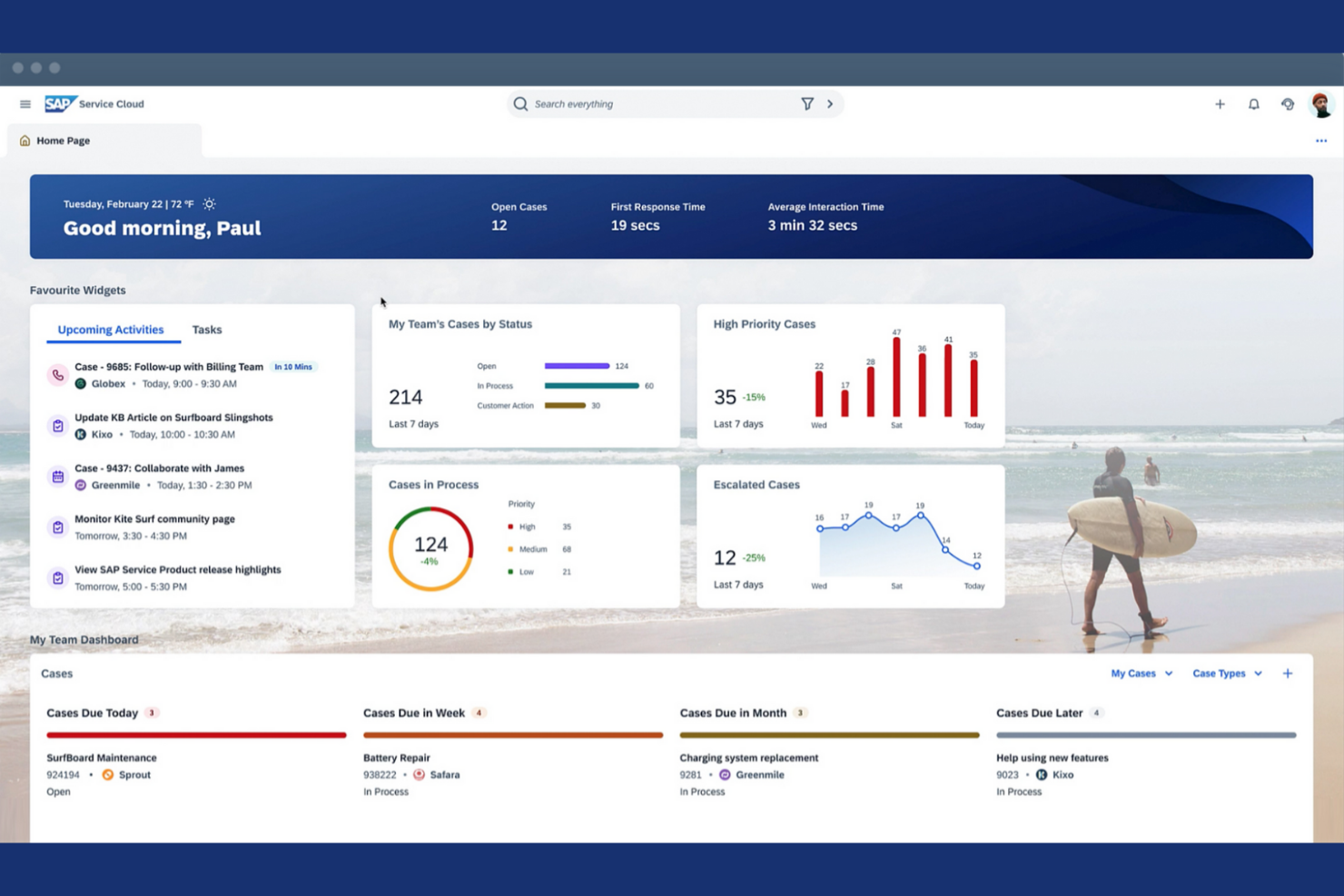
SAP Service Cloud es una solución de atención al cliente diseñada para grandes empresas que buscan fortalecer sus operaciones de soporte. Proporciona herramientas para la gestión de tickets, el compromiso con el cliente y analíticas de servicio.
Por qué elegí SAP Service Cloud: Es conocida por sus funciones de cumplimiento global, lo que la hace adecuada para empresas internacionales. La plataforma ofrece capacidades avanzadas de gestión de tickets que ayudan a gestionar las consultas de los clientes de manera eficiente. Las analíticas en tiempo real proporcionan información sobre el rendimiento del servicio y la satisfacción del cliente. SAP Service Cloud también incluye herramientas de interacción con el cliente que facilitan las interacciones personalizadas con tus clientes.
Funciones y integraciones destacadas:
Las funciones incluyen una herramienta de gestión de acuerdos de nivel de servicio (SLA) que asegura que tu equipo cumpla las expectativas del cliente, un sistema de gestión del conocimiento que almacena información valiosa y un diseño adaptable a dispositivos móviles que permite el acceso desde cualquier lugar.
Las integraciones incluyen SAP S/4HANA, SAP ERP, SAP CRM, soluciones en la nube de SAP y más.
Pros and Cons
Pros:
- Amplias funciones de cumplimiento global
- Herramientas impulsadas por IA para mejorar los procesos de escalamiento
- Herramientas personalizadas de interacción con el cliente
Cons:
- Implementación compleja y costosa
- Dependencia del ecosistema SAP en general
Otros Software de Helpdesk Empresarial
Aquí tienes algunas opciones adicionales de software de helpdesk empresarial que no están en mi selección principal, pero que aún así valen la pena considerar:
- Zendesk
La mejor opción para soporte empresarial con automatización por IA
- SolarWinds Web Help Desk
Mejor para tickets vinculados a la gestión de activos de TI
- HappyFox Help Desk
Ideal para agentes ilimitados y soporte escalable
- ScienceSoft
Mejor para plataformas personalizadas para necesidades complejas
- Freshdesk
Ideal para conversaciones omnicanal con clientes
- InvGate
La mejor opción para flujos de trabajo personalizables sin código


Cómo evalúo el software de mesa de ayuda empresarial
Evalúo las herramientas de mesa de ayuda en dos niveles: los requisitos fundamentales como los flujos de trabajo ITIL y la automatización de SLA que califican a un proveedor, y luego los diferenciadores que importan cuando estás escalando las operaciones de TI a nivel global.
Funcionalidad principal (Requisitos imprescindibles para esta lista)
Cuando selecciono herramientas para mi lista, califico cada una en una escala del 0 (no ofrece la funcionalidad) al 5 (sobresale en esta área) para cada funcionalidad principal que se detalla a continuación. Después, convierto la puntuación total de la herramienta en un porcentaje. Cada herramienta necesita alcanzar una puntuación total mínima del 65% para ser considerada para la inclusión.
- Gestión y asignación de tickets: Reviso si permite la recepción multicanal y reglas de enrutamiento automatizado que gestionen altos volúmenes, como el triaje de miles de restablecimientos de contraseñas en colas regionales.
- ITSM y flujos ITIL: Cada herramienta debe contar con módulos de gestión de incidentes, problemas y cambios. Analizo qué tan maduro es el CMDB y si los activos se vinculan a los tickets.
- Gestión de SLA y automatización: Evalúo si las políticas de SLA soportan rutas de escalamiento en varios niveles, como plazos separados para ejecutivos VIP frente a solicitudes del personal general.
- Portal de autoservicio y base de conocimientos: Un portal buscable con un catálogo de servicios es importante aquí. Busco herramientas donde los empleados puedan solicitar hardware o software sin necesidad de enviar correos a TI.
- Integraciones empresariales y APIs: La herramienta debe conectarse con los sistemas que las empresas ya usan, como Azure AD, Okta, Jira y Slack. Verifico la existencia de APIs abiertas y la profundidad del marketplace.
- Seguridad empresarial y reportes: Busco certificaciones de cumplimiento como SOC 2 e ISO 27001, junto con RBAC, registros de auditoría y tableros que muestren tendencias de SLA.
Una vez tengo una lista de herramientas que cumplen con estos criterios, considero qué distingue a cada plataforma.
Factores diferenciadores (lo que distingue a los proveedores)
Así es como comparo y pongo en contraste a los distintos proveedores:
Características destacadas
La asistencia basada en IA es un diferenciador importante. Valoro si una plataforma puede resumir tickets automáticamente o redactar respuestas para los agentes, lo que ahorra tiempo real durante picos de incidentes importantes. También evalúo si la herramienta va más allá de TI hacia la gestión de servicios empresariales, permitiendo que equipos de RRHH o instalaciones administren sus propios catálogos de servicios desde una misma plataforma. Los creadores de flujos de trabajo de bajo código también son relevantes. Cuando un administrador puede construir un flujo de aprobación personalizado para solicitudes de cambio de firewall sin escribir código, eso marca una diferencia significativa entre proveedores.
Más allá de las características
El costo total de propiedad es un aspecto que reviso detalladamente. Las plataformas empresariales de mesa de ayuda suelen cobrar por agente, pero los costos reales provienen de módulos adicionales para la gestión de activos, ITOM o funciones de IA. La flexibilidad de despliegue también es importante. Algunas organizaciones necesitan alojamiento local o híbrido para cumplir con requisitos de residencia de datos. Verifico si el proveedor ofrece programas estructurados de implementación, porque poner en marcha una mesa de ayuda para 5,000 empleados en varias oficinas es un reto muy diferente al de un equipo de 50 personas. El acceso a consultores certificados y ecosistemas de partners puede determinar el éxito de ese despliegue.
Cómo Elegir un Software de Helpdesk Empresarial
Es fácil perderse entre largas listas de características y estructuras de precios complejas. Para ayudarte a mantener la concentración mientras avanzas en tu proceso de selección de software, aquí tienes una lista de factores clave a tener en cuenta:
| Factor | Qué considerar |
|---|---|
| Escalabilidad | ¿Puede el software crecer con tu negocio? Considera si puede manejar un aumento en el volumen de tickets y soportar usuarios adicionales sin inconvenientes. |
| Integraciones | ¿Se conecta con tus herramientas existentes? Verifica la compatibilidad con tu CRM, plataformas de comunicación y otros programas esenciales para la empresa. |
| Personalización | ¿Puedes adaptarlo a tus procesos? Busca opciones para ajustar flujos de trabajo, paneles de control y permisos de usuario según las necesidades de tu equipo. |
| Facilidad de uso | ¿Es fácil de usar para tu equipo? Evalúa la interfaz y los requisitos de formación para garantizar una rápida adopción por todos los usuarios. |
| Implementación e incorporación | ¿Cuánto tiempo tomará comenzar? Considera el tiempo y los recursos necesarios para la configuración, incluida la migración de datos y la capacitación de los usuarios. |
| Costo | ¿Está dentro del presupuesto? Compara planes de precios, incluidos complementos y costos ocultos, para asegurarte de que se ajustan a tus restricciones financieras. |
| Salvaguardas de seguridad | ¿Se satisfacen tus necesidades de protección de datos? Verifica las características de seguridad del software, como cifrado y controles de acceso, para proteger información sensible. |
| Disponibilidad de soporte | ¿Qué opciones de soporte se ofrecen? Asegúrate de tener acceso a asistencia oportuna mediante canales como chat, teléfono o correo electrónico cuando surjan problemas. |
¿Qué es un software de mesa de ayuda empresarial?
El software de mesa de ayuda empresarial es una herramienta diseñada para gestionar consultas de clientes y solicitudes de soporte dentro de grandes organizaciones. Profesionales de TI, equipos de soporte al cliente y gestores de servicios suelen usar estas herramientas para aumentar la eficacia del servicio y la satisfacción del cliente. La gestión de tickets, el soporte multicanal y las capacidades de automatización ayudan a organizar las solicitudes, mejorar los tiempos de respuesta y reducir tareas manuales. En general, estas herramientas ofrecen una solución centralizada para gestionar interacciones con clientes y mantener la calidad del servicio.
Características del software de mesa de ayuda empresarial
Al seleccionar un software de mesa de ayuda empresarial, presta atención a las siguientes características clave:
- Gestión de tickets: Organiza y rastrea las consultas de los clientes para garantizar respuestas y soluciones a tiempo.
- Soporte multicanal: Permite gestionar interacciones de clientes a través de correo electrónico, chat, teléfono y redes sociales para una comunicación coherente.
- Capacidades de automatización: Automatiza tareas repetitivas, como la asignación de tickets, para mejorar la eficiencia y liberar recursos del equipo.
- Portal de autoservicio: Permite a los clientes encontrar respuestas de manera independiente, reduciendo el volumen de tickets de soporte.
- Flujos de trabajo personalizables: Permiten a los equipos adaptar los procesos a las necesidades específicas del negocio, mejorando la eficiencia operativa.
- Opciones de integración: Se conecta con las herramientas existentes, como CRM y plataformas de comunicación, para garantizar un flujo de datos fluido.
- Analítica e informes: Ofrece información sobre el desempeño del equipo y la satisfacción del cliente para impulsar mejoras en el servicio.
- Salvaguardas de seguridad: Protege información sensible mediante cifrado y controles de acceso, asegurando el cumplimiento de regulaciones de datos.
- Base de conocimientos: Almacena información valiosa y soluciones para ayudar a clientes y agentes de soporte a encontrar respuestas rápidamente.
- Herramientas de colaboración: Facilita el trabajo en equipo mediante bandejas de entrada compartidas y notas internas para mejorar la calidad y velocidad de las respuestas.
Beneficios del software de mesa de ayuda empresarial
Implementar un software de mesa de ayuda empresarial aporta varios beneficios a tu equipo y tu empresa. Aquí tienes algunos que puedes esperar:
- Mejora de la eficiencia: Las capacidades de automatización reducen las tareas manuales, permitiendo que tu equipo se concentre en resolver los problemas de los clientes de manera más efectiva.
- Mayor satisfacción del cliente: El soporte multicanal garantiza que los clientes puedan contactarte por su método preferido, lo que conduce a una resolución más rápida.
- Mejor gestión de datos: Las opciones de integración mediante API garantizan que todos los datos del cliente estén centralizados, facilitando su acceso y gestión.
- Más autoservicio: Un portal de autoservicio permite a los clientes encontrar soluciones por sí mismos, disminuyendo la cantidad de solicitudes de soporte entrantes.
- Toma de decisiones informada: La analítica y los informes proporcionan información sobre el desempeño del equipo y las interacciones con los clientes, ayudando a realizar mejoras basadas en datos.
- Mayor seguridad: Las salvaguardas de seguridad protegen la información sensible, garantizando el cumplimiento con las normativas de protección de datos.
- Colaboración fortalecida: Las herramientas de colaboración permiten que tu equipo trabaje de forma eficiente, mejorando la calidad y velocidad de las respuestas.
Costos y precios del software de mesa de ayuda empresarial
Seleccionar un software de mesa de ayuda empresarial requiere comprender los distintos modelos de precios y planes disponibles. Los costos varían según las funciones, el tamaño del equipo, complementos y más. La siguiente tabla resume los planes más comunes, sus precios promedio y las características típicas incluidas en las soluciones de software de mesa de ayuda empresarial:
Tabla comparativa de planes para software de mesa de ayuda empresarial
| Tipo de plan | Precio promedio | Características comunes |
|---|---|---|
| Plan gratuito | $0 | Gestión básica de tickets, soporte por correo electrónico e integraciones limitadas. |
| Plan personal | $9-$21/usuario/mes | Gestión de tickets, soporte multicanal e informes básicos. |
| Plan empresarial | $40-$155/usuario/mes | Automatización avanzada, flujos de trabajo personalizables, y análisis e informes. |
| Plan corporativo | $150+/usuario/mes | Personalización total, soporte dedicado y funciones avanzadas de seguridad. |
Preguntas frecuentes sobre software de mesa de ayuda empresarial
Aquí tienes respuestas a preguntas comunes sobre el software de mesa de ayuda empresarial:
¿Qué debo buscar en un proveedor?
Busca un proveedor que ofrezca soporte al cliente confiable y una sólida reputación. Considera su historial de actualizaciones y mejoras del software. Verifica si disponen de recursos como tutoriales y seminarios web para que tú y tu equipo puedan aprovechar al máximo el software. También es importante evaluar la transparencia del proveedor respecto a los precios y las condiciones del contrato. Habla con otros usuarios o lee reseñas para conocer su nivel de satisfacción y posibles inconvenientes que hayan tenido.
¿Cómo sé si una solución es escalable?
La escalabilidad es importante para empresas en crecimiento. Verifica si el software permite agregar más usuarios y manejar mayores volúmenes de tickets sin perder rendimiento. Pregunta a los proveedores por sus clientes más grandes y cómo gestionan el escalado. Busca funciones como balanceo de carga y licencias de usuario flexibles. Si es posible, prueba el rendimiento del software en horas pico con una demo o versión de prueba. Evalúa la capacidad del proveedor para acompañar tu crecimiento con actualizaciones regulares y mejoras de infraestructura.
¿Cómo mido el ROI de un software de mesa de ayuda empresarial?
Supervisa métricas como el tiempo promedio de resolución de tickets, productividad de los agentes, satisfacción del cliente y tasas de respuesta ante incidentes antes y después de la implementación. Compara estas mejoras con los gastos de software y operaciones para evaluar el ROI. Algunas plataformas ofrecen análisis integrados que facilitan este proceso.
¿Puedo migrar mis datos existentes a un nuevo sistema de mesa de ayuda?
Sí, la mayoría de las soluciones empresariales de mesa de ayuda ofrecen herramientas de migración de datos. Verifica si el proveedor ofrece guías detalladas o soporte para migrar datos desde tu sistema actual. Antes de empezar, haz una copia de seguridad de todos tus datos para evitar pérdidas. Busca un software que permita importar datos desde archivos CSV o que ofrezca integración con tu sistema actual. Pregunta por el tiempo necesario para la migración y posibles periodos de inactividad. Una buena planificación y pruebas durante la migración garantizan una transición sin inconvenientes.
¿Qué debo tener en cuenta al migrar desde un sistema de mesa de ayuda antiguo?
Comienza auditando tus datos y flujos de trabajo actuales. Elige una nueva plataforma con sólidas herramientas de importación y soporte para mapeo de datos. Programa las migraciones en periodos de baja actividad y mantén ambos sistemas en paralelo durante la transición para evitar interrupciones. Capacita a tu equipo y documenta los nuevos procesos para asegurar la adopción.
¿Con qué frecuencia debe mi equipo actualizar el software?
Las actualizaciones periódicas son necesarias para mantener el software seguro y eficiente. La mayoría de proveedores lanzan actualizaciones varias veces al año, corrigiendo errores y añadiendo nuevas funciones. Establece un calendario para que tu equipo revise e instale actualizaciones. Las actualizaciones automáticas pueden facilitar este proceso, pero revisa siempre las notas para comprender los cambios. Asegúrate de que tu equipo reciba formación sobre las nuevas funciones. Mantenerse actualizado te permite aprovechar los últimos avances y mantener la seguridad.
¿Qué sigue?
Si estás investigando software de mesa de ayuda empresarial, conéctate con un asesor de SoftwareSelect para recibir recomendaciones gratuitas.
Rellenas un formulario y tienes una breve charla en la que analizan los detalles de tus necesidades. Luego recibirás una lista corta de softwares para revisar. Incluso te acompañarán durante todo el proceso de compra, incluyendo negociaciones de precios.