
Die 23 besten statischen Code-Analyse-Tools für Java 2026

10 Beste Tools für statische Code-Analyse für Java Übersicht
Here's my pick of the 10 best software from the 23 tools reviewed.


Sauberen, zuverlässigen Java-Code zu schreiben, ist eine Herausforderung, vor der jede Entwicklerin und jeder Entwickler steht. Es geht nicht nur darum, Aufgaben zu erledigen – sondern diese effizient zu meistern und die Probleme zu vermeiden, die durch späteres Debugging und Kompatibilitätsprobleme entstehen können. Wenn Sie schon einmal stundenlang nach einer versteckten Schwachstelle gesucht oder Schwierigkeiten gehabt haben, eine gleichbleibende Code-Qualität im Team sicherzustellen, wissen Sie, wie frustrierend das sein kann. Solche Herausforderungen hemmen den Fortschritt und bergen Risiken, deren Behebung später teuer werden kann.
Genau hier kommen Tools für die statische Code-Analyse ins Spiel. Sie helfen dabei, Fehler frühzeitig zu erkennen, die Einhaltung von Programmierstandards sicherzustellen und die Gesamtqualität Ihrer Java-Anwendungen zu erhöhen. Im Laufe der Jahre habe ich eine Vielzahl dieser Tools in verschiedenen Projekten eingesetzt – vom Android-Development bis hin zu Enterprise-Systemen – und ich habe gesehen, wie diese Tools Workflows grundlegend verändern können. In diesem Leitfaden stelle ich meine Favoriten unter den Tools für die statische Code-Analyse für Java vor und teile praxisnahe Einblicke, die Ihnen helfen, das passende Tool für Ihre Anforderungen zu finden.
Why Trust Our Software Reviews
Beste Tools für statische Code-Analyse für Java Zusammenfassung
Diese Vergleichstabelle fasst die Preisinformationen meiner besten statischen Code-Analyse-Tools für Java zusammen – damit Sie schnell das passende Tool für Ihr Budget und Ihr Unternehmen finden.
| Tool | Best For | Trial Info | Price | ||
|---|---|---|---|---|---|
| 1 | Best for continuous codebase monitoring | Free plan available (up to 5 users) | From $65/month | Website | |
| 2 | Best for dependency scanning | Free plan available | From $34/developer/month | Website | |
| 3 | Best for identifying malware | 7-day free trial available | From $399/month | Website | |
| 4 | Best for context-aware AI analysis | Free plan available | From $200/month | Website | |
| 5 | Best for custom security rules | Free plan available + free demo | From $350/month | Website | |
| 6 | Best for open-source vulnerability management | Free plan available | From $25/product/month | Website | |
| 7 | Best for automated code quality reviews | 14-day free trial | From $15/user/month (billed annually) | Website | |
| 8 | Best for in-depth source code scanning | Free demo available | Pricing upon request | Website | |
| 9 | Best for quick identification of common coding flaws | Free | Open source project and available for free. | Website | |
| 10 | Best for cloud-based security assessments | Not available | Pricing upon request | Website |


-

Site24x7
Visit WebsiteThis is an aggregated rating for this tool including ratings from Crozdesk users and ratings from other sites.4.6 -
Docker
Visit WebsiteThis is an aggregated rating for this tool including ratings from Crozdesk users and ratings from other sites.4.6 -
Pulumi
Visit WebsiteThis is an aggregated rating for this tool including ratings from Crozdesk users and ratings from other sites.4.8





Beste Tools für statische Code-Analyse für Java im Test
Nachfolgend finden Sie meine ausführlichen Zusammenfassungen der besten Tools für statische Code-Analyse für Java, die es auf meine Shortlist geschafft haben. Meine Bewertungen bieten einen detaillierten Blick auf Schlüsselfunktionen, Vor- und Nachteile, Integrationen und ideale Anwendungsfälle – damit Sie das perfekte Tool für Ihre Bedürfnisse finden.

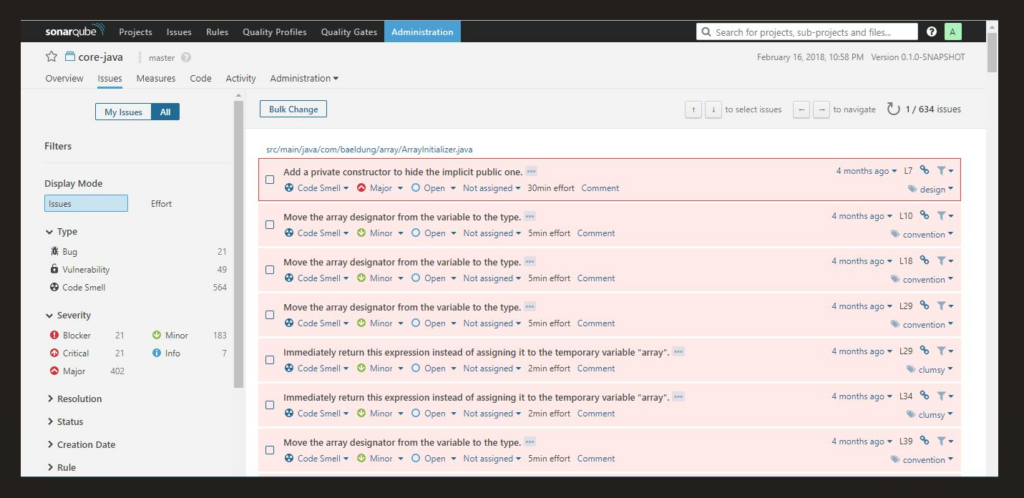
SonarQube is a static code analysis tool available for both self-managed and cloud deployments. It examines first-party, AI-generated, and open source code to detect bugs, security vulnerabilities, and maintainability issues early in the development process. The platform flags reliability and security risks and can generate AI-assisted fix suggestions to help reduce manual review.
Why I Picked SonarQube:
I included SonarQube because it offers broad language coverage and flexibility in how teams apply static analysis. It provides structured reporting that highlights areas of technical debt and security exposure, supporting teams that want consistent visibility into project health.
Its compatibility with CI/CD environments also makes it suitable for continuous inspection workflows.
Standout Features and Integrations:
Features include support for over 35 languages, 6,500+ coding rules, taint analysis for common programming languages, and unified configuration options.
Integrations include Jenkins, GitHub, GitLab, Bitbucket, Azure DevOps, Jira, Slack, and Port. A SonarQube IDE extension is available for VS Code, JetBrains IDEs, Cursor, Windsurf, and others.
Pros and Cons
Pros:
- Open-source nature with a large community, fostering frequent updates and shared best practices.
- Comprehensive integrations with popular development tools and repositories.
- Robust source code analysis that detects a broad range of coding issues.
Cons:
- Complexity can be a challenge for smaller teams without dedicated DevOps personnel.
- Some false positives might arise, necessitating thorough review.
- The initial setup might require some technical expertise.
New Product Updates from SonarQube
SonarQube Cloud Introduces Architecture Management
SonarQube Cloud now offers architecture management to automatically map your project's structure, ensuring design integrity and resolving deviations seamlessly. For more information, visit SonarQube's official site.
 .
.
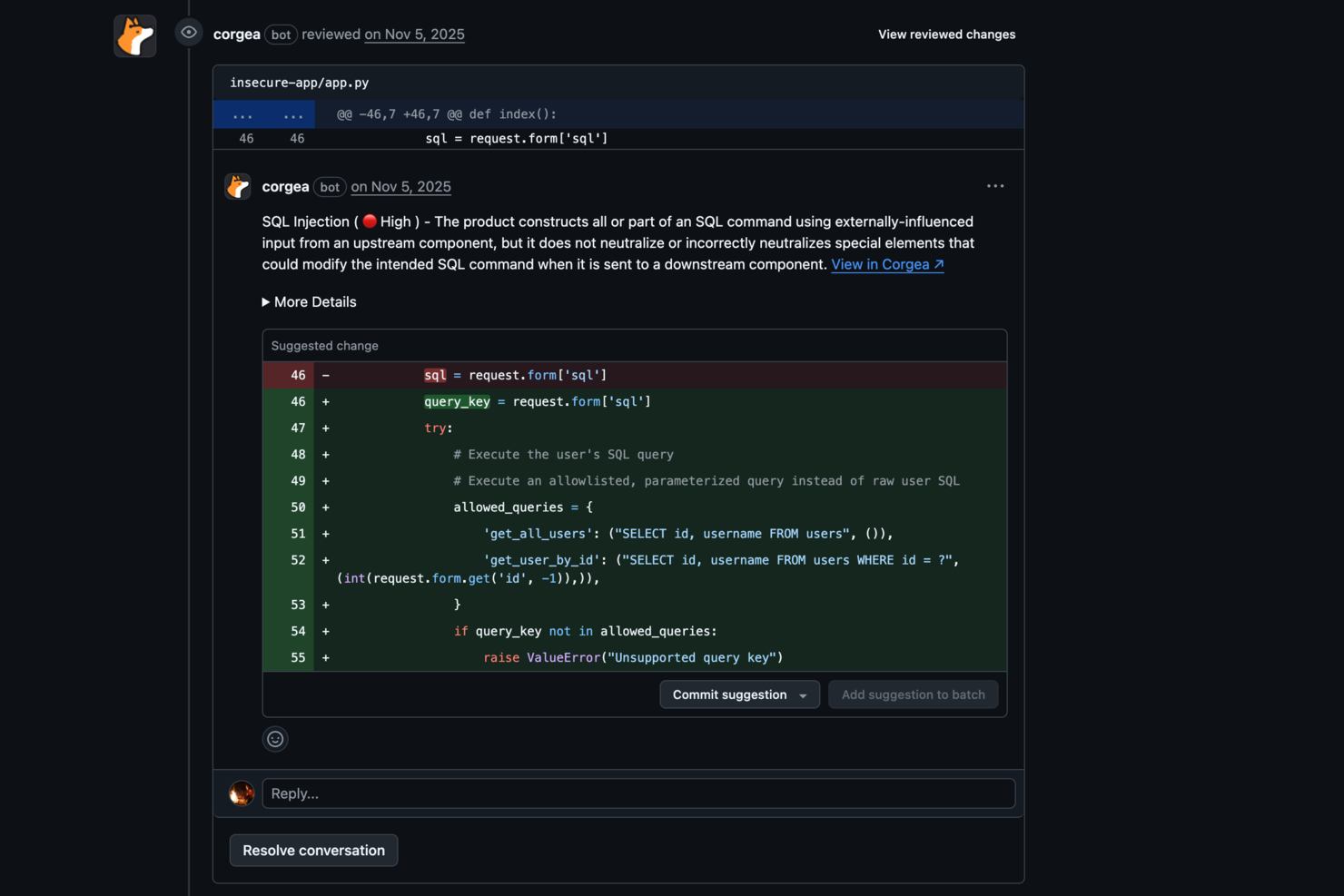
Corgea is a static code analysis tool built for developers and organizations that want to improve application security. It uses AI to identify issues such as business logic flaws and authentication vulnerabilities, helping keep code secure. The tool is especially useful for teams that want to automate how they find and fix insecure code, cutting down on manual review and speeding up security workflows.
Why I Picked Corgea
I picked Corgea for its AI-native approach to static application security testing, which sets it apart from other static code analysis tools for Java. By using large language models, Corgea can detect complex vulnerabilities like business logic flaws and broken authentication that traditional tools often miss. It adapts to the codebase with each scan and significantly reduces false positives, making it a strong option for developers who need accurate and dependable security findings.
Corgea Key Features
In addition to its AI-driven vulnerability detection, Corgea offers several key features that enhance its utility for static code analysis in Java:
- Dependency Scanning: Automatically scans and identifies vulnerabilities within your code dependencies, ensuring comprehensive security coverage.
- Customizable Policies: Allows you to set security policies in natural language, tailoring the tool to fit your specific security needs and workflows.
- SAST Auto-Fix: Provides automated security patches, simplifying the process of addressing vulnerabilities and maintaining secure codebases.
- Multi-Language Support: Supports Java along with other languages like JavaScript, Python, and C#, broadening its applicability across different projects.
Corgea Integrations
Native integrations are not currently listed by Corgea.
Pros and Cons
Pros:
- Business logic flaw detection
- Automatic secure code fixes
- AI-driven vulnerability detection
Cons:
- AppSec-focused, not full stack
- No runtime protection features

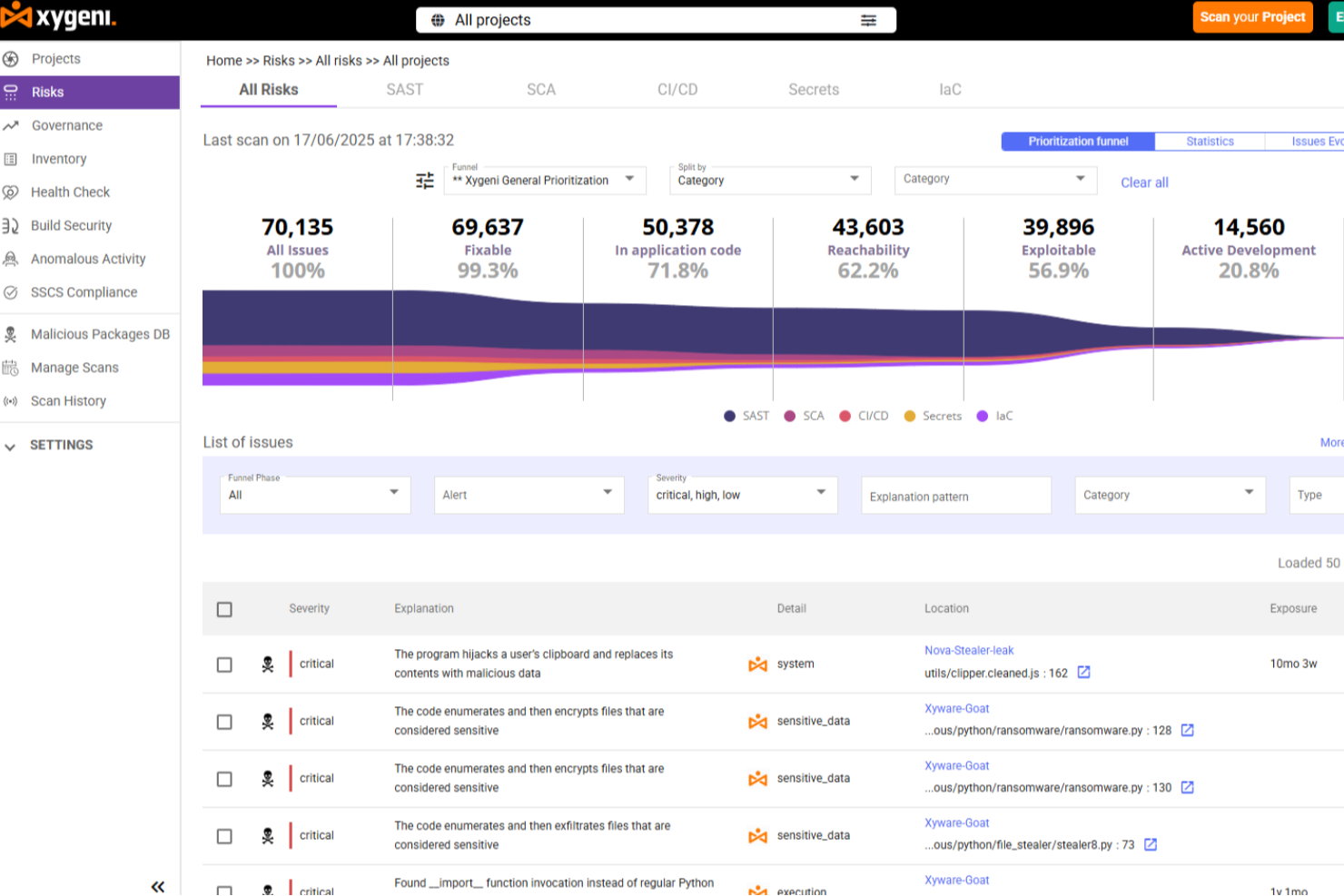
Xygeni offers a unique approach to static code analysis for Java by providing deep contextual insights and a unified application security strategy. This tool is particularly appealing to DevSecOps teams and developers focused on maintaining code integrity and security throughout the software development lifecycle. By aggregating and deduplicating findings from various scanners, Xygeni ensures that you receive a clean, correlated risk view, addressing the common challenge of alert fatigue and allowing you to focus on genuine threats.
Why I Picked Xygeni
I picked Xygeni because it excels in providing precise vulnerability detection, which is crucial for Java developers aiming to secure their code. The tool's standout feature is its ability to identify malware and supply chain threats, offering a level of security that many other static code analysis tools lack. Additionally, Xygeni's integration with CI/CD pipelines ensures that vulnerability detection is seamlessly incorporated into your existing workflows, making it an efficient choice for development teams.
Xygeni Key Features
In addition to its malware detection capabilities, Xygeni offers several other features that enhance its utility:
- Policy-Driven Rules and Guardrails: These allow you to automate actions based on scan results, ensuring that security policies are consistently enforced.
- AI-Powered AutoFix: This feature provides context-aware code suggestions and automatic fixes, helping your team write secure code faster.
- Supply Chain Security: Xygeni detects malware in open-source components, adding an extra layer of protection to your projects.
- True Positive Rate: With a 100% true positive rate and a low false positive rate of 16.7%, you can trust the alerts you receive are actionable.
Xygeni Integrations
Xygeni integrates seamlessly with popular development tools, including GitHub Actions, Jenkins, GitLab, and Bitbucket. These integrations allow for smooth incorporation into your existing development environment, enhancing workflow efficiency and security.
Pros and Cons
Pros:
- Real-time detection minimizes security risk
- Function-level analysis prioritizes vulnerabilities
- Privacy-first scanning ensures data safety
Cons:
- Limited integrations compared to competitors
- Pricing may be steep for some teams


ZeroPath is built for development teams looking to bring advanced code-security into their Java (and other language) codebases without drowning in alert noise. If you’re operating in a Java-centric environment—whether fintech, healthcare or SaaS—and you want a static code analysis tool that understands business logic, handles complex flows, and offers actionable fixes, ZeroPath is worth a look.
Why I Picked Zeropath
I picked ZeroPath because it leverages AI-native static application security testing (SAST) that goes beyond pattern-matching and works deep into logic and authorization flows—so your Java services won’t silently ship broken auth or business logic holes. It uses context-aware analysis to trace data flows and dependency reachability (for example SCA and dependency-graphing) which helps your team spot real vulnerabilities, not just generic findings. I appreciate how it can generate one-click patches directly in pull requests and integrate into your workflow so that your Java team can keep moving fast while still embedding security checks early.
Zeropath Key Features
In addition to its standout AI-driven analysis, I also found several features that enhance its utility:
- Infrastructure as Code (IaC) Detection: This feature allows you to identify and address security vulnerabilities within your infrastructure code, ensuring comprehensive security coverage.
- Automated Compliance Reporting: Zeropath automatically generates compliance reports, simplifying the process of meeting industry standards and regulations.
- Pull Request (PR) Reviews: Performs automated security reviews on every pull request and places AI-powered feedback and suggested fixes in your code review workflow.
- Custom Code Policies: Lets you define arbitrary rules (in natural language) to catch patterns your organization cares about (for instance: all public endpoints must validate input).
Zeropath Integrations
Integrations include GitHub, GitLab, Jenkins, Bitbucket, Jira, Azure DevOps, Slack, AWS, Google Cloud Platform, and Microsoft Teams.
Pros and Cons
Pros:
- Supports auto-patch generation directly in code review workflow.
- Discovers business-logic and authorization vulnerabilities in Java and other languages.
- Reduces noisy false positives compared to traditional SAST tools
Cons:
- Dependence on AI means that edge-case detection still may vary.
- You may need time to adjust your workflow around its automation.


Aikido Security is an application security platform offering comprehensive solutions to protect applications from code to cloud. It encompasses features like cloud posture management, open source dependency scanning, secrets detection, and both static and dynamic application security testing.
Why I Picked Aikido Security:
Aikido lets you create custom security rules that fit your specific needs, giving your team more control over how you protect your Java code. It’s flexible enough to allow tailored configurations, so you don’t have to rely on generic rule sets that might not fit your project. Aikido scans code in real-time, catching vulnerabilities before they escalate. With its ability to enforce these custom rules automatically, your team can easily adapt it to match your code standards and security policies, ensuring more precise security monitoring.
Standout Features and Integrations:
Other features include secrets detection, which is vital for checking code for leaked and exposed API keys, passwords, and encryption keys, and auto-triaging known safe secrets. It also offers DAST for web applications to identify vulnerabilities through simulated attacks.
Integrations include Amazon Web Services (AWS), Google Cloud, Microsoft Azure Cloud, Drata, Vanta, AWS Elastic Container Registry, Docker Hub, Jira, Asana, and GitHub.
Pros and Cons
Pros:
- Scalable for growing teams
- Has a comprehensive dashboard and customizable reports
- Code-to-cloud security
Cons:
- Ignores vulnerabilities if no fix is available
- Supports English only
New Product Updates from Aikido Security

Aikido Security Adds Continuous Pentesting, VM Reachability, and IDE Scanning
Aikido Security introduces Aikido Infinite continuous pentesting, cloud VM reachability diagrams, and full workspace scanning across IDEs. These updates help teams identify exploitable vulnerabilities faster and strengthen security checks during development. For more information, visit Aikido Security’s official site.
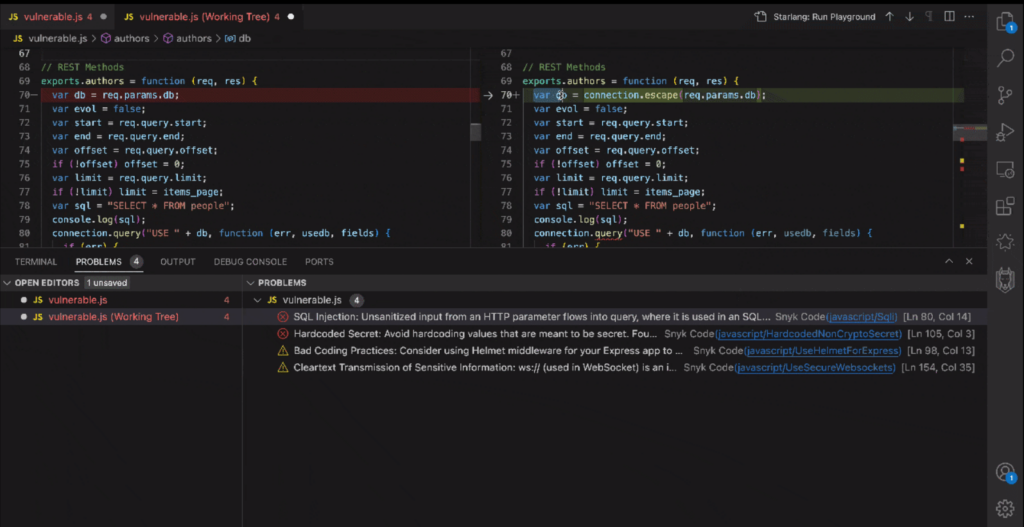
Snyk stands at the forefront of identifying and rectifying vulnerabilities in open-source projects and dependencies. With its sharp focus on securing open-source software, it offers a much-needed shield against potential security breaches.
Why I Picked Snyk:
In my continuous search for tools that ensure software robustness, Snyk caught my attention due to its dedicated focus on open-source vulnerabilities. When determining and comparing static code analysis tools, Snyk's specialization in tracking and managing open-source project vulnerabilities made it stand out.
I determined that, in the realm of open-source software, Snyk is undoubtedly best for vulnerability management, providing an invaluable service to the development community.
Standout Features and Integrations:
One of Snyk's prime features is its extensive database of open-source vulnerabilities, making it a vital tool for developers leveraging open-source projects. Furthermore, its dashboards offer comprehensive insights, enabling development teams to quickly identify and address potential threats.
When it comes to integrations, Snyk effortlessly ties in with popular repositories like GitHub and Bitbucket. It also smoothly integrates with CI/CD pipelines, including Jenkins, improving the DevOps workflow.
Pros and Cons
Pros:
- Offers insights and actionable solutions through its dashboards.
- Integration with popular repositories and CI/CD tools.
- Comprehensive database catering specifically to open-source vulnerabilities.
Cons:
- Pricing and tiers can be complex for teams with varied needs.
- The granularity of its features might require a learning curve for some users.
- While it specializes in open-source, it might not cover all proprietary software vulnerabilities.

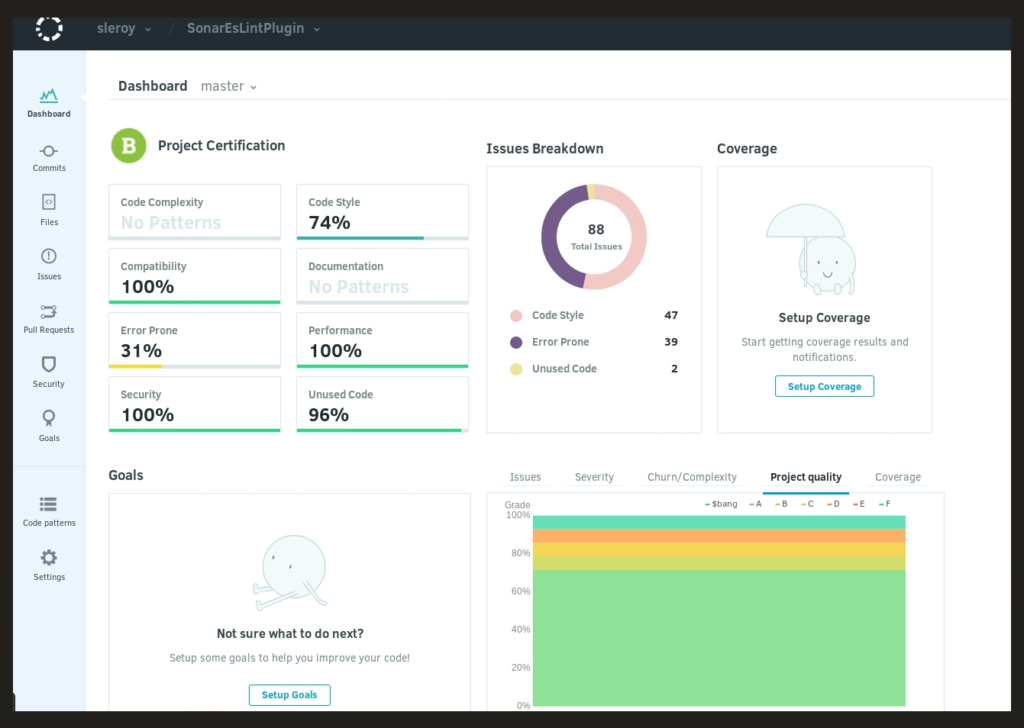
Codacy is a prominent static code analysis tool that focuses on automating code quality reviews. By streamlining the code review process, it ensures that development teams deliver high-quality code consistently.
Why I Picked Codacy:
In the vast domain of static code analysis tools, choosing Codacy was a deliberate decision. When determining which tools to highlight, Codacy stood out due to its potent automated review capabilities. I chose Codacy because I believe its emphasis on automating quality reviews is paramount, positioning it as an essential asset for teams desiring to ensure consistent quality without manual oversight.
Standout Features and Integrations:
Codacy shines with its ability to identify a broad range of issues, from coding errors and code smells to security issues. It offers detailed dashboards that provide a snapshot of the overall code quality, aiding in the rapid identification of problem areas.
As for integrations, Codacy blends perfectly with platforms like GitHub, GitLab, and Bitbucket. This ensures code reviews and quality checks throughout the development process.
Pros and Cons
Pros:
- Automated reviews reduce manual oversight and human errors.
- Strong integrations with popular repositories, improving the development workflow.
- Efficient source code analyzer detecting a wide array of issues.
Cons:
- Annual billing may not cater to all teams or projects.
- Potential for occasional false positives in code reviews.
- Some users might find certain features slightly complex.
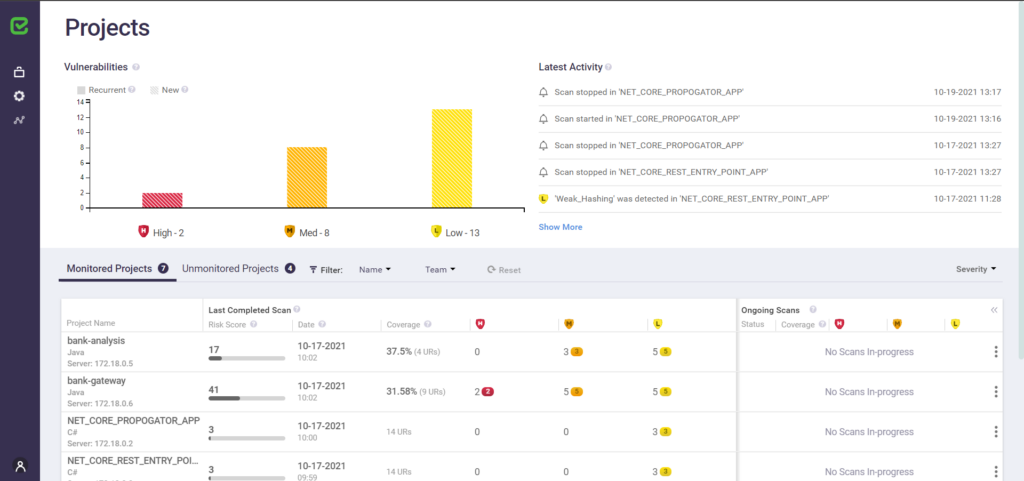
Checkmarx is a renowned static application security testing tool, dives deep into the source code to identify vulnerabilities. Its focus on thorough source code scanning ensures that even intricate security issues don't go unnoticed.
Why I Picked Checkmarx:
Selecting the right tools from a plethora of options can be daunting. I picked Checkmarx for this list after judging its unparalleled depth in source code analysis. Compared to other tools, Checkmarx provides an extensive examination, diving deep into programming languages and repositories.
In my opinion, its prowess in in-depth source code scanning solidifies its position as a top choice for teams aiming to fortify their code against potential threats.
Standout Features and Integrations:
Checkmarx excels in identifying a spectrum of security issues, from common vulnerabilities to nuanced threats in the source code. Its dashboards are highly informative, offering development teams a panoramic view of potential risks in the codebase.
For integrations, Checkmarx collaborates with platforms like GitHub, GitLab, and Bitbucket, ensuring a fortified development process that integrates security considerations from the get-go.
Pros and Cons
Pros:
- Mastery in various programming languages, including Java, Python, PHP, and Ruby.
- Strong integration with popular repositories, ensuring security is an integral part of the development workflow.
- Comprehensive source code analyzer adept at spotting an extensive range of vulnerabilities.
Cons:
- Pricing transparency can be improved for easier decision-making.
- Potential for false positives, demanding thorough review.
- May require a learning curve for those new to static application security testing.

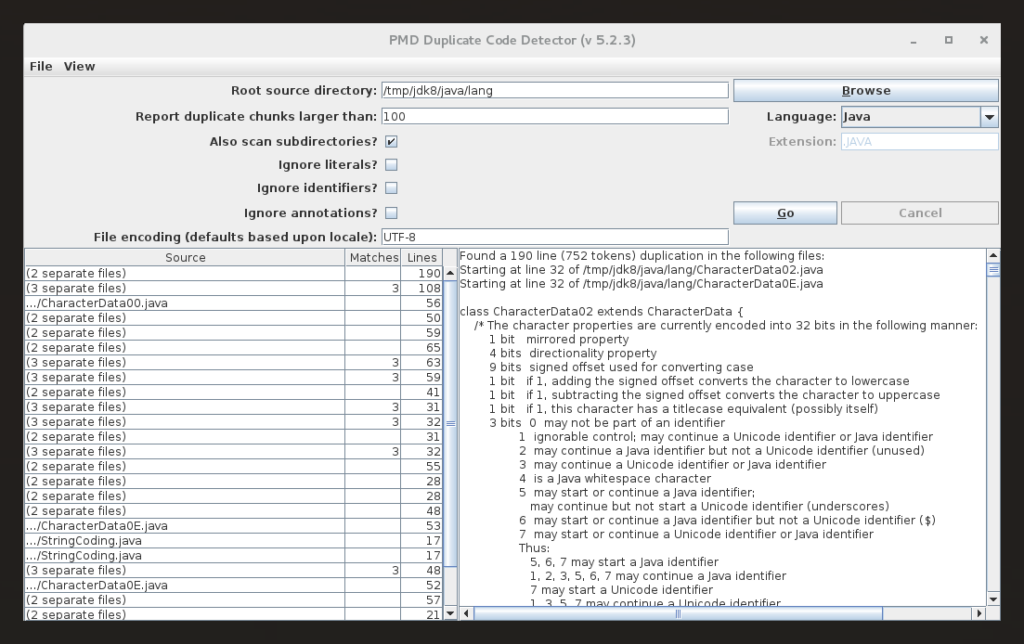
PMD is a well-regarded static code analysis tool that offers developers the capability to rapidly identify frequent coding flaws across various programming languages. Its forte lies in its proficiency to swiftly pinpoint such issues, making it indispensable for those who prioritize swift code reviews.
Why I Picked PMD:
Navigating through the diverse field of static code analysis tools, choosing PMD became an evident choice after determining its strengths and comparing them with its peers. The tool's inherent capability to swiftly uncover common coding flaws made it stand out, distinguishing it from the vast array of options available.
I picked it because, in my judgment, PMD excels at rapidly identifying coding flaws, ensuring that development teams can make quick rectifications.
Standout Features and Integrations:
PMD is celebrated for its broad support for multiple programming languages, including Java, JavaScript, and Apex, which grants it a versatility not all tools possess. Its source code analysis is robust, and the ability to detect code smells and coding errors promptly is commendable.
As for integrations, PMD incorporates popular platforms like GitHub, GitLab, and Jenkins, aligning itself perfectly with the development process of many teams.
Pros and Cons
Pros:
- Robust integrations with platforms like GitHub and Jenkins.
- Quick and effective detection of common coding flaws.
- Broad support for multiple programming languages.
Cons:
- Being open-source, it might lack some commercial-level support or features.
- The UI might not be as intuitive for beginners.
- Might require some configuration for specific projects.

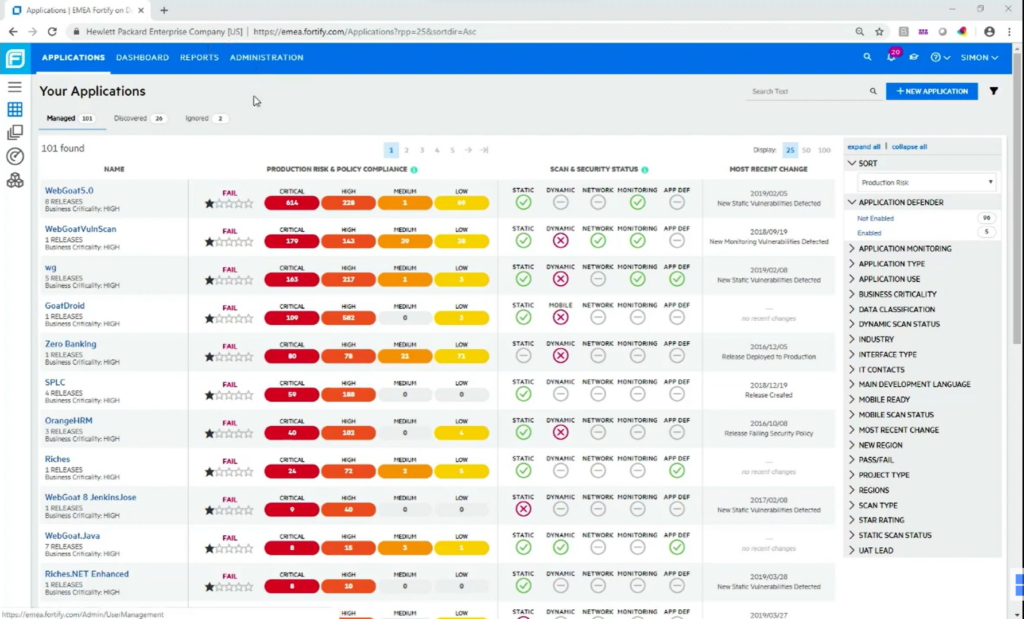
Fortify on Demand is a SaaS solution that facilitates rigorous security analysis of source code, pinpointing vulnerabilities with precision. When considering cloud-based platforms for security evaluations, its dedicated focus ensures it remains unparalleled.
Why I Picked Fortify on Demand:
While curating this list, I delved deep into numerous tools, and my judgment led me to select Fortify on Demand. The tool's cloud-centric architecture and its prowess in static application security testing distinguished it from the rest. Having compared a multitude of platforms, I confidently determine Fortify on Demand to be the prime choice for cloud-based security assessments.
Standout Features and Integrations:
Fortify on Demand excels in its static code analysis for Java, Python, and many other programming languages, ensuring a thorough detection of potential security issues. Its dashboards provide a comprehensive insight into vulnerabilities, coding errors, and technical debt, assisting development teams in remediation.
The tool integrates with popular repositories like GitHub, GitLab, and Bitbucket and also ties well with CI/CD tools like Jenkins for continuous integration.
Pros and Cons
Pros:
- Robust integrations with popular repositories and CI/CD tools.
- Comprehensive dashboards that aid in quick vulnerability assessments and remediations.
- Proficient in static code analysis across various programming languages.
Cons:
- Might be on the pricier side for startups or businesses with tight budgets.
- Potential false positives could require manual validation.
- Might be overwhelming for small development teams due to its breadth of features.
Weitere Tools zur statischen Code-Analyse für Java
Nachfolgend finden Sie eine Liste weiterer Tools zur statischen Code-Analyse für Java, die ich zwar auf meine Shortlist gesetzt, aber nicht in die Top 10 aufgenommen habe. Diese Tools sind definitiv einen Blick wert.
- Coverity
For detection of software defects in development
- Klocwork
For real-time security vulnerability detection
- Azul Platform Core
For Java runtime customization
- Parasoft JTest
For comprehensive Java testing
- Codiga
For code consistency and maintenance
- JArchitect
For detailed code architecture visualization
- Fortify Static Code Analyzer
Good for end-to-end vulnerability management
- Infer
Good for mobile app static analysis
- CodeSonar
Good for detecting complex programming errors
- Source Insight
Good for large codebase navigation
- Checkstyle
Good for Java coding standard adherence
- Veracode Static Analysis (SAST)
Good for scalable threat detection in binaries
- SpotBugs
Good for bite-sized code bug spotting


Auswahlkriterien für Tools zur statischen Code-Analyse für Java
Bei der Auswahl der besten Tools für die statische Code-Analyse in Java für diese Liste habe ich typische Käuferbedürfnisse und -probleme berücksichtigt, wie das Aufspüren von Sicherheitslücken und die Einhaltung von Programmierstandards. Zudem habe ich das folgende Bewertungsraster verwendet, um meine Einschätzung strukturiert und fair zu gestalten:
Kernfunktionen (25 % der Gesamtbewertung)
Um in diese Liste aufgenommen zu werden, musste jede Lösung die folgenden Anwendungsfälle abdecken:
- Aufspüren von Sicherheitslücken im Code
- Durchsetzung von Programmierstandards
- Erkennung von Code-Smells
- Bereitstellung detaillierter Berichte
- Unterstützung mehrerer Programmiersprachen
Zusätzliche herausragende Funktionen (25 % der Gesamtbewertung)
Um die Auswahl weiter einzuschränken, habe ich zudem nach besonderen Features gesucht, etwa:
- Echtzeit-Code-Analyse
- Anpassbare Regel-Sets
- Integration in CI/CD-Pipelines
- Automatisierte Code-Reviews
- Ausführliche Sicherheitseinblicke
Benutzerfreundlichkeit (10 % der Gesamtbewertung)
Um die Benutzerfreundlichkeit der einzelnen Systeme zu beurteilen, habe ich folgende Aspekte betrachtet:
- Intuitive Benutzeroberfläche
- Einfache Navigation
- Klare Dokumentation
- Anpassbarkeit der Einstellungen
- Reaktionsfähigkeit des Systems
Onboarding (10% der Gesamtbewertung)
Um die Onboarding-Erfahrung jeder Plattform zu bewerten, habe ich Folgendes berücksichtigt:
- Verfügbarkeit von Schulungsvideos
- Interaktive Produkttouren
- Zugang zu Webinaren
- Umfassende Benutzerhandbücher
- Unterstützung während der Migration
Kundensupport (10% der Gesamtbewertung)
Um die Kundensupport-Dienste jedes Softwareanbieters zu bewerten, habe ich Folgendes berücksichtigt:
- Verfügbarkeit von Live-Chat-Support
- Reaktionsfähigkeit des E-Mail-Supports
- Zugang zu einer Wissensdatenbank
- Verfügbarkeit von Telefonsupport
- Qualität der Leitfäden zur Fehlerbehebung
Preis-Leistungs-Verhältnis (10% der Gesamtbewertung)
Um das Preis-Leistungs-Verhältnis jeder Plattform zu bewerten, habe ich Folgendes berücksichtigt:
- Wettbewerbsfähige Preisgestaltung
- Funktionsumfang
- Skalierbarkeit der Lösung
- Flexibilität der Preismodelle
- Kosten-Nutzen-Analyse
Kundenbewertungen (10% der Gesamtbewertung)
Um das allgemeine Kundenzufriedenheitsniveau einzuschätzen, habe ich bei der Auswertung von Kundenbewertungen Folgendes beachtet:
- Gesamte Zufriedenheitsbewertungen
- Häufigkeit von Updates und Verbesserungen
- Qualität des Kundenfeedbacks
- Häufig gemeldete Probleme
- Empfehlungen und Bewertungen durch Nutzer
Wie Sie ein statisches Code-Analyse-Tool für Java auswählen
Es ist leicht, sich in langen Funktionslisten und komplexen Preisstrukturen zu verlieren. Um Ihnen zu helfen, während Ihres individuellen Software-Auswahlprozesses den Überblick zu behalten, finden Sie hier eine Checkliste mit Faktoren, die Sie im Auge behalten sollten:
| Faktor | Worauf zu achten ist |
|---|---|
| Skalierbarkeit | Kann das Tool mit Ihren Projekten wachsen? Prüfen Sie, ob es mit wachsenden Codebasen und zusätzlichen Nutzern zurechtkommt, ohne an Leistung einzubüßen. Vermeiden Sie Tools, die beim Wachstum Grenzen setzen. |
| Integrationen | Passt es in Ihren aktuellen Workflow? Achten Sie auf Kompatibilität mit Ihren vorhandenen CI/CD-Tools und -Plattformen. Sorgen Sie für einen reibungslosen Datenaustausch zwischen den Systemen. |
| Anpassbarkeit | Können Sie es an Ihren Workflow anpassen? Bewerten Sie, ob das Tool das Anpassen von Regeln und Berichten ermöglicht, damit sie den Programmierstandards und Praktiken Ihres Teams entsprechen. |
| Benutzerfreundlichkeit | Kann Ihr Team es einfach übernehmen? Berücksichtigen Sie die Lernkurve und wie intuitiv die Oberfläche ist. Ein komplexes Tool kann anfangs die Produktivität bremsen. |
| Implementierung und Onboarding | Wie schnell können Sie loslegen? Prüfen Sie die Verfügbarkeit von Ressourcen wie Tutorials, Support und Dokumentation, um einen reibungslosen Übergang zu ermöglichen. |
| Kosten | Passt es in Ihr Budget? Vergleichen Sie die Preisstruktur mit Ihren finanziellen Möglichkeiten. Achten Sie auf versteckte Gebühren oder notwendige Zusatzmodule, die die Kosten erhöhen. |
| Sicherheitsmaßnahmen | Wie wird Ihr Code geschützt? Stellen Sie sicher, dass das Tool robuste Sicherheitsfunktionen bietet, um Schwachstellen zu erkennen und Datenpannen zu verhindern. |
| Compliance-Anforderungen | Erfüllt es Branchenstandards? Vergewissern Sie sich, dass das Tool die für Ihre Branche relevanten Vorschriften einhält, um rechtliche Probleme zu vermeiden. |
Was sind statische Code-Analyse-Tools für Java?
Statische Code-Analyse-Tools für Java sind Softwarelösungen, die Java-Code auf Fehler, Schwachstellen und die Einhaltung von Programmierstandards analysieren, ohne den Code auszuführen. Diese Tools werden in der Regel von Entwicklern und Qualitätssicherungsteams eingesetzt, um Codequalität und Sicherheit zu gewährleisten. Automatisierte Code-Reviews, Erkennung von Schwachstellen und Compliance-Prüfungen helfen dabei, hohe Qualitätsstandards einzuhalten und Probleme frühzeitig zu identifizieren. Insgesamt sparen diese Tools Zeit und Ressourcen, da Fehler erkannt werden, bevor sie in die Produktion gelangen.
Funktionen
Achten Sie bei der Auswahl von statischen Code-Analyse-Tools für Java auf die folgenden Schlüsselfunktionen:
- Erkennung von Code-Sicherheitslücken: Identifiziert potenzielle Sicherheitsbedrohungen in Ihrem Code und hilft, Verstöße frühzeitig zu verhindern.
- Automatisierte Code-Reviews: Bietet sofortiges Feedback zur Codequalität, um Konsistenz über Projekte hinweg sicherzustellen.
- Anpassbare Regelsätze: Ermöglicht es, die Codeanalyse auf die spezifischen Kodierungsstandards und Praktiken Ihres Teams zuzuschneiden.
- Echtzeitanalyse: Bietet sofortige Einblicke während des Codierens und ermöglicht schnelle Anpassungen und Verbesserungen.
- Integrationsmöglichkeiten: Sorgt für einen reibungslosen Betrieb mit Ihren bestehenden Tools und Plattformen, was die Workflow-Effizienz steigert.
- Detaillierte Berichte: Liefert umfassende Erkenntnisse zu Code-Problemen, was die Priorisierung von Fehlerbehebungen und Verbesserungen erleichtert.
- Compliance-Prüfungen: Überprüft die Einhaltung von Industriestandards und reduziert das Risiko rechtlicher Probleme.
- Unterstützung mehrerer Programmiersprachen: Ermöglicht Teams die Arbeit an verschiedenen Projekten ohne den Einsatz unterschiedlicher Tools.
- Niedrige Latenz bei der Verarbeitung: Minimiert Verzögerungen während der Codeanalyse und sorgt für einen reibungslosen Entwicklungsprozess.
- Kontinuierliche Überwachung: Überwacht die Codequalität im Zeitverlauf und hilft, hohe Standards zu halten und Rückschritte zu vermeiden.
Vorteile
Der Einsatz von statischen Codeanalyse-Tools für Java bringt zahlreiche Vorteile für Ihr Team und Ihr Unternehmen. Hier einige, auf die Sie sich freuen können:
- Verbesserte Codequalität: Automatisierte Code-Reviews und die Erkennung von Schwachstellen helfen, hohe Standards zu erhalten und Fehler im Code zu reduzieren.
- Erhöhte Sicherheit: Durch die frühzeitige Identifikation von Schwachstellen werden potenzielle Sicherheitsverletzungen verhindert, was Ihre Anwendungen und Daten schützt.
- Zeitersparnis: Echtzeitanalyse und detaillierte Berichte ermöglichen die schnelle Erkennung und Behebung von Problemen und beschleunigen so den Entwicklungsprozess.
- Compliance-Sicherheit: Compliance-Prüfungen stellen sicher, dass Ihr Code den Industriestandards entspricht und reduzieren das Risiko rechtlicher Komplikationen.
- Ressourceneffizienz: Durch das Aufdecken von Fehlern vor der Produktion sparen diese Tools Zeit und Ressourcen, die sonst in Debugging und Fehlerbehebung investiert würden.
- Erleichterte Zusammenarbeit: Integrationsmöglichkeiten sorgen für einen reibungslosen Einsatz mit vorhandenen Tools und verbessern Teamarbeit und Kommunikation.
- Konsistente Performance: Kontinuierliche Überwachung hilft, die Codequalität langfristig zu wahren, Rückschritte zu vermeiden und eine zuverlässige Anwendungsleistung sicherzustellen.
Kosten & Preise
Die Auswahl statischer Codeanalyse-Tools für Java erfordert ein Verständnis der verschiedenen Preismodelle und verfügbaren Tarife. Die Kosten variieren je nach Funktionsumfang, Teamgröße, Zusatzoptionen und mehr. Die folgende Tabelle fasst gängige Tarife, deren durchschnittliche Preise und typische Merkmale von Lösungen für statische Codeanalyse-Tools für Java zusammen:
Vergleichstabelle für Tarife statischer Codeanalyse-Tools für Java
| Tarifart | Durchschnittlicher Preis | Übliche Merkmale |
|---|---|---|
| Kostenloser Tarif | $0 | Basis-Codeanalyse, eingeschränkte Sprachunterstützung und Community-Support. |
| Persönlicher Tarif | $5-$25/user/month | Standard-Codeanalyse, anpassbare Regelsätze und Echtzeit-Feedback. |
| Business-Tarif | $25-$50/user/month | Erweiterte Codeanalyse, Integrationsmöglichkeiten, detaillierte Berichte und Compliance-Prüfungen. |
| Enterprise-Tarif | $50-$100/user/month | Umfassende Codeanalyse, dedizierter Support, kontinuierliche Überwachung und umfangreiche Sprachunterstützung. |
FAQs zu statischen Codeanalyse-Tools für Java
Hier finden Sie einige Antworten auf häufig gestellte Fragen zu statischen Codeanalyse-Tools für Java:
Welche drei Techniken werden in statischen Codeanalyse-Tools verwendet?
Statische Codeanalyse-Tools verwenden in der Regel Syntaxanalyse, Daten- und Kontrollflussanalyse sowie Sicherheitsanalyse. Die Syntaxanalyse überprüft die korrekte Struktur des Codes, während Daten- und Kontrollflussanalysen verfolgen, wie sich Daten durch den Code bewegen. Die Sicherheitsanalyse identifiziert Schwachstellen, die ausgenutzt werden könnten.
Welche Einschränkungen hat die statische Codeanalyse?
Statische Codeanalyse-Tools können nur Probleme erkennen, ohne den Code auszuführen. Sie können Performance- oder Usability-Probleme übersehen, die erst zur Laufzeit auftreten. Darüber hinaus können diese Tools zu Fehlalarmen führen, sodass Entwickler die gemeldeten Probleme manuell prüfen müssen.
Wie helfen statische Codeanalyse-Tools bei der Aufrechterhaltung der Codequalität?
Diese Tools tragen zur Aufrechterhaltung der Codequalität bei, indem sie automatisch nach Fehlern, Schwachstellen und der Einhaltung von Programmierstandards suchen. Sie bieten Entwicklern sofortiges Feedback, ermöglichen schnelle Korrekturen und sorgen für gleichbleibende Codequalität im gesamten Projekt.
Was ist der Hauptzweck von statischen Codeanalyse-Tools?
Der Hauptzweck besteht darin, Probleme frühzeitig zu erkennen, stilistische Konsistenz zu wahren und die Codequalität zu verbessern. Zum Beispiel können sie Probleme wie nicht geschlossene Dateien oder falsch benannte Variablen markieren, bevor sie in der Anwendung zu Fehlern führen.
Können statische Codeanalyse-Tools in CI/CD-Pipelines integriert werden?
Ja, viele statische Codeanalyse-Tools lassen sich in CI/CD-Pipelines integrieren, um den Codeüberprüfungsprozess zu automatisieren. Durch diese Integration wird der Code kontinuierlich auf Qualitäts- und Sicherheitsprobleme geprüft, bevor er bereitgestellt wird. Das erhöht die Effizienz der Entwicklung insgesamt.
Worin unterscheiden sich statische Codeanalyse-Tools von dynamischen Analysetools?
Statische Codeanalyse-Tools analysieren den Code, ohne ihn auszuführen, und konzentrieren sich auf die Code-Struktur und potenzielle Probleme. Im Gegensatz dazu bewerten dynamische Analysetools den Code zur Laufzeit und erkennen Probleme, die erst bei der Ausführung des Programms auftreten, wie etwa Speicherlecks oder Performance-Engpässe.
Was kommt als Nächstes:
Wenn Sie gerade statische Codeanalyse-Tools für Java recherchieren, sprechen Sie mit einem SoftwareSelect-Berater für kostenlose Empfehlungen.
Sie füllen ein Formular aus und führen ein kurzes Gespräch, bei dem Ihre individuellen Anforderungen im Detail besprochen werden. Anschließend erhalten Sie eine Vorauswahl passender Software. Die Berater begleiten Sie auch durch den gesamten Kaufprozess, einschließlich Preisverhandlungen.