
27 Beste Penetrationstest-Tools im Test 2026

Die besten Penetration Testing Tools (Kurzliste)
Hier ist meine Kurzliste der besten Penetration Testing Tools:


Das richtige Penetration Testing Tool zu finden, bedeutet mehr als nur auf Features zu achten – es geht um Sicherheit. Die Sicherheit, keine kritischen Schwachstellen zu übersehen. Dass Ihre Sicherheitsmaßnahmen mit der wachsenden Infrastruktur skalieren. Und dass das von Ihrem Team genutzte Tool weder den Entwicklungsprozess verlangsamt noch Sie mit irrelevanten Informationen überflutet.
Das Problem? Viele Tools versprechen umfassende Abdeckung, machen es aber durch Komplexität schwierig oder liefern in realen Testumgebungen zu wenig. Die Auswahl erfordert oft das Durchforsten von Marketingversprechen, ohne einen klaren Eindruck von der tatsächlichen Performance in Ihrem spezifischen Stack zu bekommen.
Ich habe in den letzten Jahren eng mit Engineering- und Security-Teams in SaaS-Umgebungen zusammengearbeitet – Penetration Testing Tools geprüft, eingeführt und Fehlerbehebungen sowohl in Cloud-nativen als auch in hybriden Systemen vorgenommen. Dieser Leitfaden fasst diese praktischen Erfahrungen in konkrete Empfehlungen zusammen und richtet sich an Teams, die Ergebnisse brauchen, nicht nur Berichte.
Table of Contents
Why Trust Our Software Reviews
Zusammenfassung: Beste Penetration Testing Tools
Diese Vergleichstabelle gibt eine Übersicht über die Preisgestaltung meiner Top-Auswahl von Penetration Testing Tools, damit Sie das passende Tool für Ihr Budget und Ihre geschäftlichen Anforderungen finden können.
| Tool | Best For | Trial Info | Price | ||
|---|---|---|---|---|---|
| 1 | Best for hybrid AI + human pentesting | Free plan available | From $200/month | Website | |
| 2 | Best for automated scanning | 14-day free trial + free demo available | From $149/month | Website | |
| 3 | Best for continuous testing | Free demo available | From $69/month | Website | |
| 4 | Best for business logic vulnerability detection | Free demo available | Pricing upon request | Website | |
| 5 | Best for agentic AI penetration tests | Free plan available + free demo | From $350/month | Website | |
| 6 | Best for developers | Free plan + free demo available | Pricing upon request | Website | |
| 7 | Best for web vulnerabilities | Free demo available | Pricing upon request | Website | |
| 8 | Best for web application protection | 14-day free trial + free demo | From $99/month | Website | |
| 9 | Best for manual testing | Free plan available | From $475/user/year | Website | |
| 10 | Best for Wi-Fi security | Not available | Free to use | Website | |
| 11 | Best for vulnerability assessment | 7-day free trial + free demo | From $4,390/license/year | Website | |
| 12 | Best for large-scale penetration testing | Free demo available | Pricing upon request | Website | |
| 13 | Best for open-source tools | Free demo available | Free to use | Website | |
| 14 | Best for penetration testing frameworks | Free plan available | Pricing available upon request | Website | |
| 15 | Best for enterprise use | Free demo available | Pricing upon request | Website |


-

Site24x7
Visit WebsiteThis is an aggregated rating for this tool including ratings from Crozdesk users and ratings from other sites.4.6 -
Docker
Visit WebsiteThis is an aggregated rating for this tool including ratings from Crozdesk users and ratings from other sites.4.6 -
Pulumi
Visit WebsiteThis is an aggregated rating for this tool including ratings from Crozdesk users and ratings from other sites.4.8





Penetration Testing Tools im Test
Im Folgenden finden Sie meine ausführlichen Zusammenfassungen der besten Penetration Testing Tools, die es auf meine Shortlist geschafft haben. In meinen Bewertungen stelle ich die wichtigsten Funktionen, Vor- und Nachteile, Integrationen und idealen Einsatzbereiche jedes Tools vor, um Ihnen die Auswahl zu erleichtern.


Zeropath provides an AI-driven penetration testing solution tailored for innovative companies looking to proactively address security vulnerabilities in their code. With its advanced detection capabilities and seamless integration with development platforms, Zeropath appeals to organizations seeking to enhance their security posture by identifying and resolving issues before they become critical.
Why I Picked Zeropath
I picked ZeroPath because it approaches penetration testing with both automation and human expertise, giving you stronger, more reliable findings. Its AI engine continuously monitors your applications and flags vulnerabilities as soon as new code or features introduce risk. Then, seasoned pentesters validate the results and look for deeper attack chains that automated scanners typically miss. This gives your team clarity on what actually needs attention and why it matters.
Zeropath Key Features
In addition to its AI-driven detection and integration capabilities, I also found Zeropath offers several other notable features:
- Software Composition Analysis (SCA): This feature helps your team identify and manage open-source components within your code, ensuring compliance and security.
- Detailed Proof-of-Concept Exploitation: Each confirmed issue comes with clear, reproducible exploitation steps for your team to study.
- Automated Compliance Reporting: This tool provides real-time security metrics and compliance reports, helping your organization stay informed and compliant with industry standards.
- Custom Code Policies: You can define arbitrary security rules using natural-language policy syntax and enforce them across your repositories.
Zeropath Integrations
Integrations include GitHub, GitLab, Azure DevOps, and an API is available for custom integrations.
Pros and Cons
Pros:
- Continuous scanning and retesting ensure issues don’t creep back in.
- Automated vulnerability remediation streamlines security processes.
- AI-driven detection significantly reduces false positives.
Cons:
- You may need time to adjust your workflow around its automation.
- Dependence on AI means that edge-case detection still may vary.

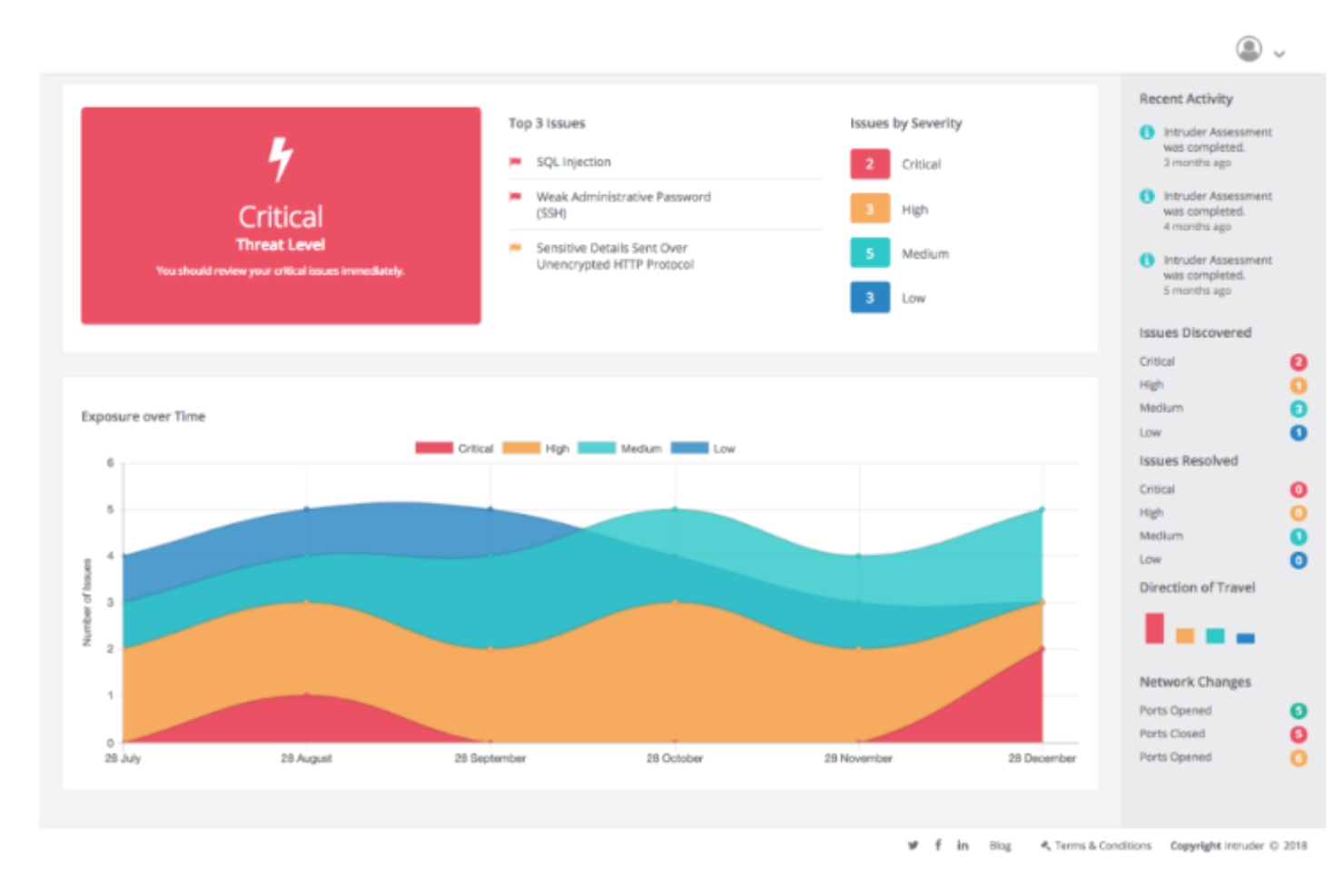
Intruder is an automated vulnerability scanner designed for IT and security teams to identify cybersecurity weaknesses. It offers year-round protection and performs continuous vulnerability management, making it ideal for preventing data breaches.
Why I picked Intruder: Intruder excels at automated scanning, providing proactive change detection and detailed vulnerability reports. It uses advanced scanning technology similar to that used by major banks. The platform's noise reduction algorithm helps prioritize actionable insights. Intruder's user-friendly reports make it accessible for both technical and non-technical users.
Standout features & integrations:
Features include advanced scanning technology that identifies both known and emerging threats, a noise reduction algorithm that helps prioritize critical issues, and user-friendly reports that simplify understanding of security risks. The platform also offers expert analysis to catch vulnerabilities that automated scans might miss.
Integrations include Slack, Jira, AWS, Azure, Google Cloud, Microsoft Teams, Trello, GitHub, GitLab, and Bitbucket.
Pros and Cons
Pros:
- Proactive change detection
- Detailed vulnerability reports
- Easy to set up
Cons:
- May require technical knowledge
- Limited customization options
New Product Updates from Intruder
Intruder Partners With DomainTools for Enhanced Security
Intruder has partnered with DomainTools to integrate DNS data, enhancing security. This update helps security teams identify hidden subdomains and uncover Shadow IT risks more effectively. For more information, visit Intruder's official site.
 .
.

Astra Pentest is a penetration testing tool designed for businesses seeking continuous security assessments. Its main users include IT security teams and developers focused on identifying and managing vulnerabilities.
Why I picked Astra Pentest: It provides continuous testing capabilities that set it apart from other tools. The platform offers automated vulnerability scanning and manual penetration testing, covering over 8,000 security tests. The centralized dashboard simplifies the process of tracking and remediating vulnerabilities. This makes it particularly suitable for teams needing constant security evaluation.
Standout features & integrations:
Features include automated vulnerability scanning that covers a wide range of threats, manual pentesting options for more detailed analysis, and a user-friendly dashboard that centralizes all findings for easy access. The tool's ability to conduct over 8,000 security tests ensures comprehensive coverage.
Integrations include Jira, Slack, GitHub, GitLab, Bitbucket, Asana, Trello, Azure DevOps, Zapier, and Microsoft Teams.
Pros and Cons
Pros:
- Continuous scanning capability
- Comprehensive test coverage
- Easy setup and use
Cons:
- Dashboard can be overwhelming at first
- Limited customization options


Escape offers a modern approach to penetration testing that addresses the unique challenges businesses across industries, such as finance and healthcare, face. Its focus on business logic, security, and seamless integration with CI/CD workflows makes it a valuable tool for security teams aiming to enhance their security posture without disrupting existing processes. With features like API discovery, AI-driven DAST, and tailored remediation strategies, Escape helps organizations quickly identify and mitigate vulnerabilities, ultimately improving their overall security landscape.
Why I Picked Escape
I picked Escape for its distinctive focus on business logic vulnerabilities, which are often overlooked by traditional penetration testing tools. Escape's AI-powered Dynamic Application Security Testing (DAST) not only detects these complex vulnerabilities but also integrates with CI/CD pipelines to ensure continuous security monitoring. This integration allows your team to stay ahead of potential threats by adapting to code changes and reducing the time required for testing from weeks to hours, making it a practical choice for organizations with frequent deployment cycles.
Escape Key Features
In addition to its focus on business logic vulnerabilities, Escape offers:
- API Discovery: Automatically identifies and documents APIs, ensuring comprehensive security coverage across your application.
- GraphQL Security Testing: Provides specialized testing capabilities for GraphQL APIs, addressing unique security challenges in modern applications.
- Custom Security Checks: Allows your team to create tailored tests that align with specific organizational needs and compliance requirements.
- Compliance Reporting: Generates detailed reports that help maintain adherence to standards like PCI-DSS, GDPR, and HIPAA.
Escape Integrations
Integrations include Jira, Jenkins, GitLab, GitHub, Slack, AWS, Azure, Google Cloud, Kubernetes, and Docker.
Pros and Cons
Pros:
- Seamless integrations that fit into existing development and security workflows
- Strong API vulnerability detection, including coverage for REST and GraphQL endpoints
- Continuous scanning and verification that support ongoing security monitoring
Cons:
- Setup process can be complex and may require configuration adjustments
- Platform upgrades can take time to apply and adapt to


Aikido Security is a security platform tailored for small businesses needing to secure code, cloud, and runtime environments. It serves IT security teams by providing a centralized system that integrates static and dynamic security testing.
Why I picked Aikido Security: I picked Aikido because it replaces slow, one-off pentests with ongoing, AI-driven testing that helps you see how vulnerabilities actually connect across your stack. Instead of isolated findings, it maps real attack paths, showing how an exploit could move through code or cloud environments. Results feed directly into developer tools, so fixes and retests happen within your normal workflow.
Standout features & integrations:
Features include AI-driven pentesting to replicate real attack behavior and attack path mapping to reveal how vulnerabilities connect across code and cloud.
Integrations include GitHub, GitLab, Bitbucket, Azure DevOps, AWS, Google Cloud, Azure, Jenkins, Jira, and Slack.
Pros and Cons
Pros:
- SOC 2 and ISO compliant
- Reduces false positives
- All-in-one security solution
Cons:
- May require technical knowledge
- Limited customization
New Product Updates from Aikido Security

Aikido Security Adds Continuous Pentesting, VM Reachability, and IDE Scanning
Aikido Security introduces Aikido Infinite continuous pentesting, cloud VM reachability diagrams, and full workspace scanning across IDEs. These updates help teams identify exploitable vulnerabilities faster and strengthen security checks during development. For more information, visit Aikido Security’s official site.


New Relic is a software analytics and monitoring tool primarily used by developers to track application performance and infrastructure health. It provides insights into application behavior, helping teams optimize performance and troubleshoot issues.
Why I picked New Relic: Its detailed monitoring capabilities make it particularly useful for developers. New Relic offers real-time analytics that help you understand application performance. The tool's customizable dashboards allow you to focus on metrics that matter most to your team. Its alerting system ensures you’re notified of critical issues, enabling prompt responses.
Standout features & integrations:
Features include real-time performance monitoring that provides instant insights into application behavior. Customizable dashboards let you focus on specific metrics that are crucial for your operations. The alerting system automatically notifies you of any critical performance issues.
Integrations include AWS, Azure, Google Cloud, Kubernetes, Docker, Slack, PagerDuty, Jira, Trello, and GitHub.
Pros and Cons
Pros:
- Detailed performance insights
- Customizable dashboards
- Real-time data analysis
Cons:
- Can be resource-intensive
- Requires technical expertise
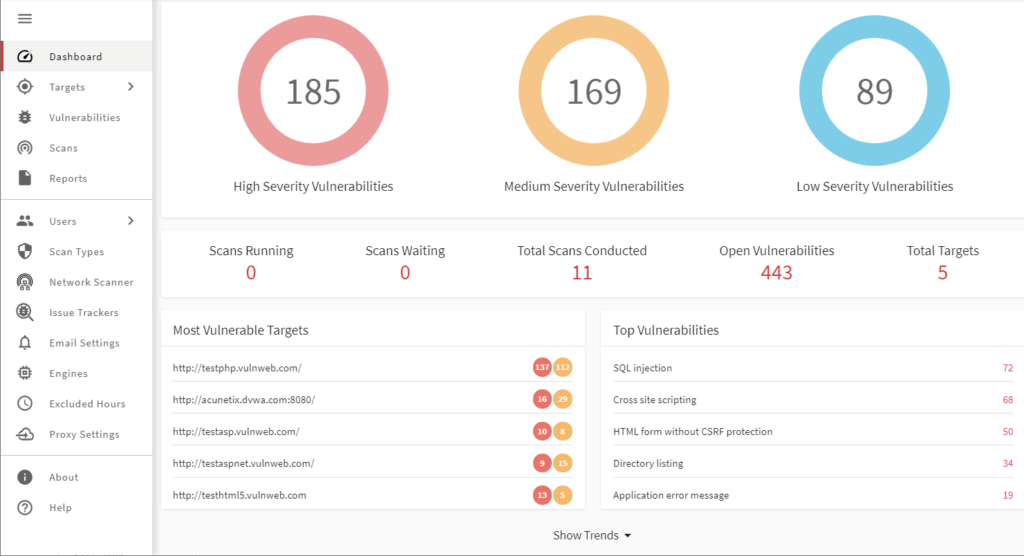
Acunetix is a web application security scanner primarily used by security professionals to identify vulnerabilities in web applications. It automates the process of finding security flaws, which helps teams improve their web security posture.
Why I picked Acunetix: It specializes in detecting web vulnerabilities, making it a top choice for web security. Acunetix features sophisticated scanning technology that identifies SQL injection, XSS, and other threats. Its ability to scan complex web applications ensures comprehensive security. The platform's detailed reports guide your team on how to remediate vulnerabilities effectively.
Standout features & integrations:
Features include advanced scanning capabilities that identify a wide range of web vulnerabilities. The platform supports both authenticated and unauthenticated scans, providing flexibility for different security needs. Acunetix also offers detailed reporting that helps your team understand and address security issues.
Integrations include Jira, Jenkins, GitHub, GitLab, Bitbucket, Microsoft TFS, Azure DevOps, Slack, Bamboo, and ServiceNow.
Pros and Cons
Pros:
- Supports complex web applications
- Detailed and actionable reports
- Detects a wide range of vulnerabilities
Cons:
- Can be resource-intensive
- Limited support for non-web applications

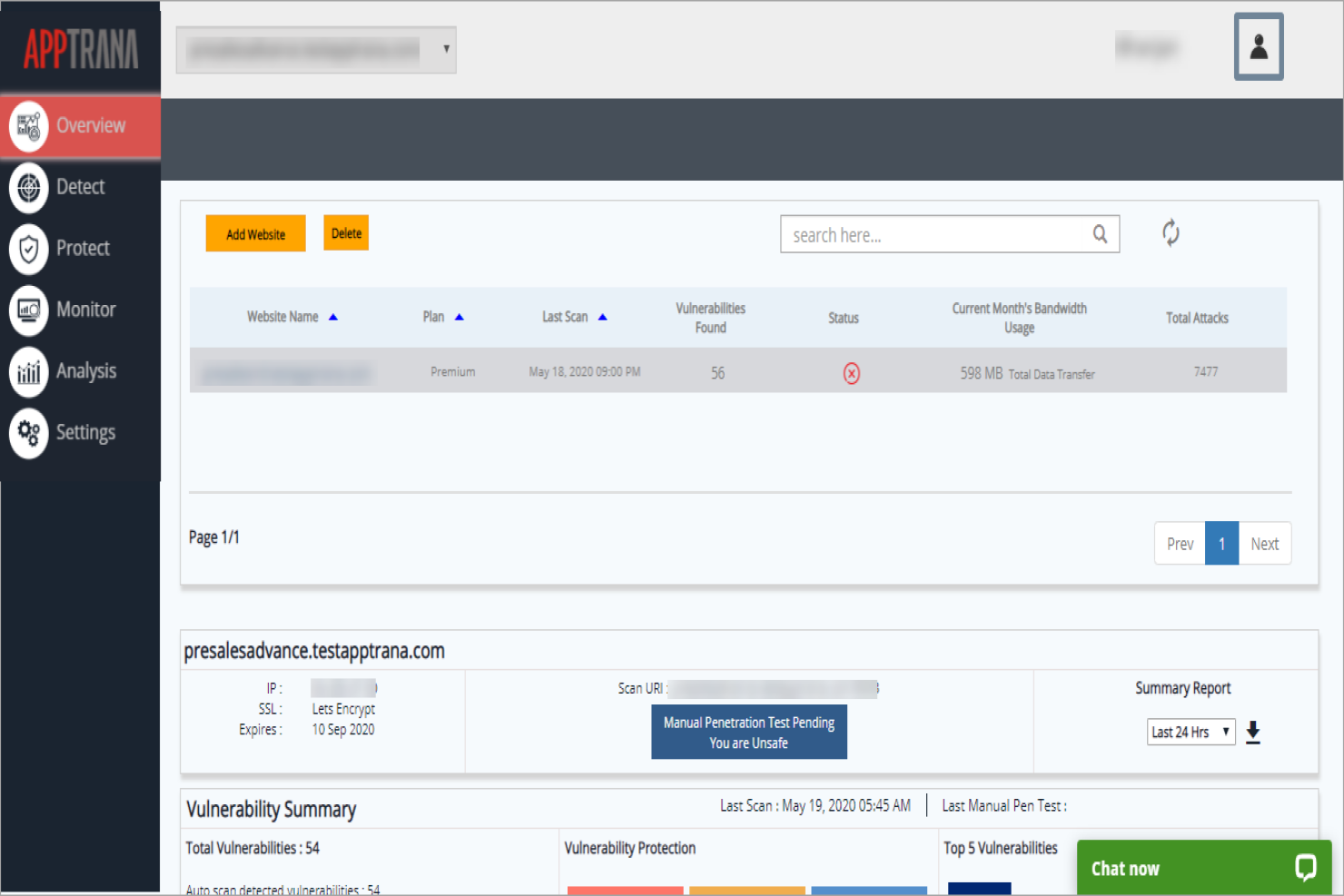
AppTrana is a web application firewall and security solution primarily used by businesses to protect their web applications from threats. It offers continuous monitoring and protection, making it vital for maintaining web security.
Why I picked AppTrana: It excels in providing web application protection with features like continuous threat monitoring. AppTrana includes automated vulnerability scanning and managed security services. Its round-the-clock monitoring helps ensure your web applications remain secure. The tool's ability to adapt to new threats keeps your security measures current.
Standout features & integrations:
Features include automated vulnerability scanning that identifies and mitigates potential threats. The platform provides managed security services for continuous protection and threat monitoring. AppTrana also adapts to new security threats, ensuring your web applications stay secure.
Integrations include AWS, Azure, Google Cloud, Cloudflare, Slack, Jira, GitHub, GitLab, Bitbucket, and Microsoft Teams.
Pros and Cons
Pros:
- Adapts to new threats
- Managed security services
- Continuous threat monitoring
Cons:
- Limited customization options
- May require technical expertise

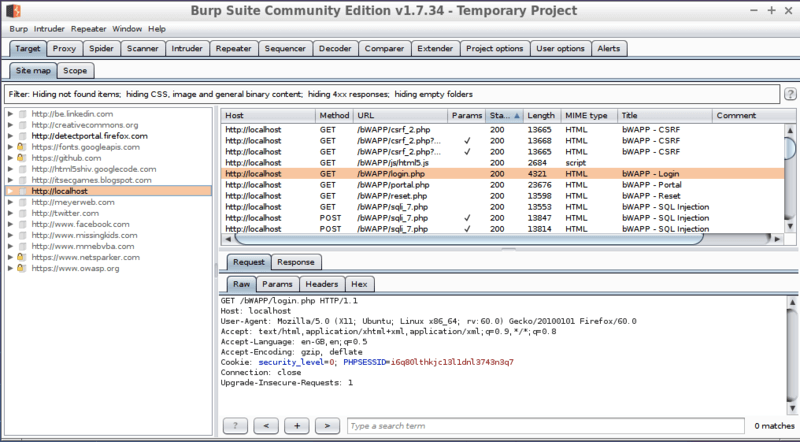
Burp Suite is a penetration testing tool commonly used by security professionals to conduct manual testing of web applications. It helps users identify security vulnerabilities and assess the security posture of their applications.
Why I picked Burp Suite: It offers extensive manual testing capabilities that are ideal for security experts. Burp Suite provides tools like the web vulnerability scanner and intruder for advanced testing. Its suite of tools allows for deep inspection and manipulation of web traffic. The customizable interface and detailed reports cater to professionals who need precise control over their testing environment.
Standout features & integrations:
Features include a web vulnerability scanner that identifies a wide array of security issues. The intruder tool allows for automated attacks and security testing. Burp Suite also offers an extensible framework, enabling users to add custom functionality.
Integrations include Jenkins, Jira, GitHub, GitLab, Azure DevOps, Slack, Trello, Bitbucket, Microsoft Teams, and Bamboo.
Pros and Cons
Pros:
- Detailed security reports
- Customizable interface
- Extensive manual testing tools
Cons:
- Limited automation options
- Requires technical expertise


Aircrack-ng is a suite of tools used for Wi-Fi network security testing, primarily by network administrators and security professionals. It helps in monitoring, testing, and cracking Wi-Fi networks to identify vulnerabilities.
Why I picked Aircrack-ng: It specializes in Wi-Fi security, offering tools for packet capturing, network testing, and password cracking. Aircrack-ng includes features like replay attacks and deauthentication to evaluate network defenses. Its ability to support multiple wireless adapters enhances testing capabilities. The tool's open-source nature allows you to customize it to fit your specific security needs.
Standout features & integrations:
Features include packet capturing for network analysis and testing. Aircrack-ng supports replay attacks and deauthentication to test network resilience. The tool is compatible with multiple wireless adapters, enhancing its flexibility for various testing scenarios.
Integrations include Metasploit, Wireshark, Nmap, Kismet, Snort, Ettercap, John the Ripper, Hydra, Netcat, and Tcpdump.
Pros and Cons
Pros:
- Open-source and customizable
- Supports multiple wireless adapters
- Specialized in Wi-Fi security
Cons:
- May not support all hardware
- Limited documentation

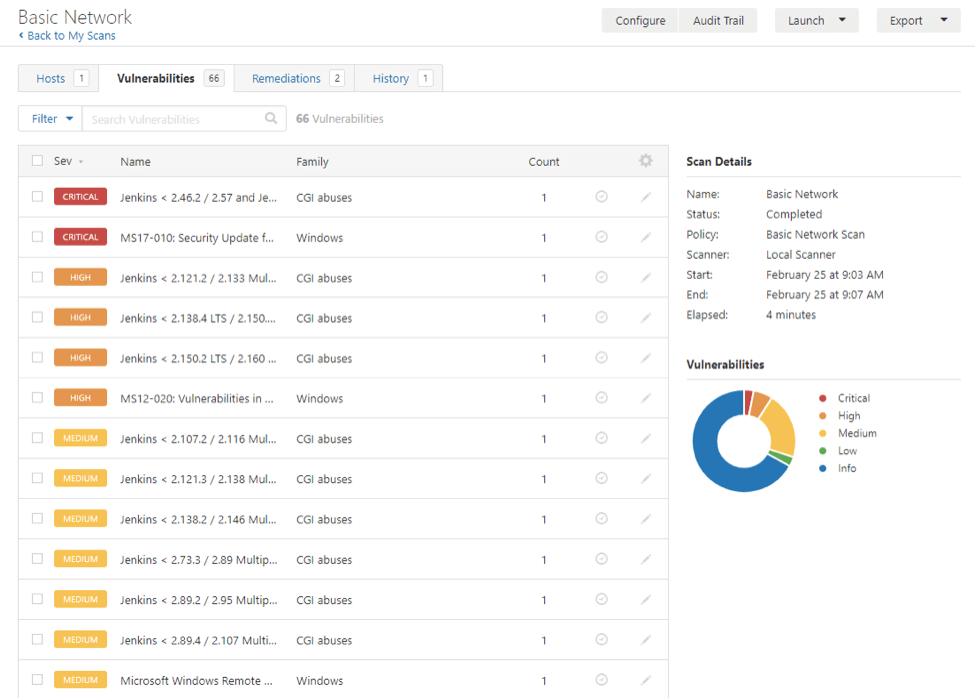
Nessus is a vulnerability assessment solution designed to help organizations identify and address security weaknesses across various systems and applications. It serves security practitioners by automating the process of detecting vulnerabilities, misconfigurations, and compliance issues within networks and devices.
Why I picked Nessus: It offers extensive coverage of Common Vulnerabilities and Exposures (CVEs), enabling you to identify a wide range of security issues. Its support for multiple vulnerability scoring systems, such as CVSS v4 and EPSS, assists in prioritizing remediation efforts effectively. The tool's policy creation is straightforward, allowing your team to initiate comprehensive scans with just a few clicks. Additionally, Nessus provides detailed reports that facilitate a clear understanding of your security posture.
Standout features & integrations:
Features include high-speed asset discovery, configuration auditing, and malware detection, which help you identify and mitigate potential threats promptly. The sensitive data discovery feature aids in locating and securing confidential information across your systems.
Integrations include compatibility with security information and event management (SIEM) systems, patch management solutions, and credential management tools, enhancing your organization's overall security framework.
Pros and Cons
Pros:
- Detailed reporting capabilities
- Straightforward policy creation
- Supports multiple vulnerability scoring systems
Cons:
- Initial setup can be complex for some users
- May require significant system resources during scans


CyCognito is an external attack surface management platform built for large-scale penetration testing and security monitoring. It helps security teams think like attackers by automatically mapping internet-exposed assets—no input or agent required—and continuously testing them for vulnerabilities.
Why I Picked CyCognito: I picked CyCognito for its unique ability to discover unmanaged assets and security gaps using attacker-style reconnaissance. Unlike tools that rely on static inventories, CyCognito autonomously uncovers forgotten or unknown assets across cloud and hybrid environments. I also like its contextual risk engine, which scores vulnerabilities based on exploitability and business impact.
Standout Features & Integrations:
Features include attacker-based asset discovery, continuous automated testing, and real-world exploit simulations. Its contextualization engine helps prioritize vulnerabilities based on actual risk rather than CVSS alone. The platform also includes automated remediation guidance.
Integrations include Axonius, Cortex XSOAR, ServiceNow, Splunk, and JupiterOne.
Pros and Cons
Pros:
- Intuitive interface with great visibility
- Strong exploit intelligence and prioritization
- Detailed reports and continuous testing
Cons:
- Reporting lacks customization for some roles
- Limited control over testing configurations


Kali Linux is an open-source penetration testing platform widely used by cybersecurity professionals and ethical hackers. It provides a suite of tools to conduct comprehensive security assessments and identify vulnerabilities.
Why I picked Kali Linux: Its open-source nature offers flexibility and customization for security experts. Kali Linux includes a wide array of pre-installed security tools for various testing needs. The platform is adaptable, allowing users to tailor it to specific security requirements. Its community-driven development ensures regular updates and improvements.
Standout features & integrations:
Features include a vast library of pre-installed security tools that cater to different testing scenarios. Kali Linux is highly customizable, enabling users to configure the platform to their specific needs. Its regular updates ensure the latest security tools are available to users.
Integrations include Metasploit, Wireshark, Aircrack-ng, Hydra, Nmap, Burp Suite, John the Ripper, Netcat, SQLmap, and Maltego.
Pros and Cons
Pros:
- Regular updates from the community
- Highly customizable environment
- Extensive tool library
Cons:
- Limited support for beginners
- Initial setup complexity

Metasploit is a penetration testing tool that helps you find weaknesses and test exploits in your systems. It works across Windows, Linux, and Mac OS X, and can be used on different devices. The tool gives you ways to isolate and show risks so you can plan remediations.
Why I picked Metasploit:
You can use its free version to test security gaps without extra cost. The tool lets you automate tests and exploits, saving your team from building them manually. It includes a large exploit database that gets new updates often. These features give you a strong starting point for testing across many systems.
Standout features & integrations:
Features include automation that reduces the need for manual work, an exploit database that grows with regular updates, and support across different operating systems. You can test and show weaknesses clearly to guide fixes. The tool also provides community resources that help you and your team learn faster.
Integrations include Kali Linux and Dradis.
Pros and Cons
Pros:
- Automation reduces manual work
- Large exploit database with updates
- Wide support across operating systems
Cons:
- Requires technical knowledge to use
- Setup may feel complex for beginners

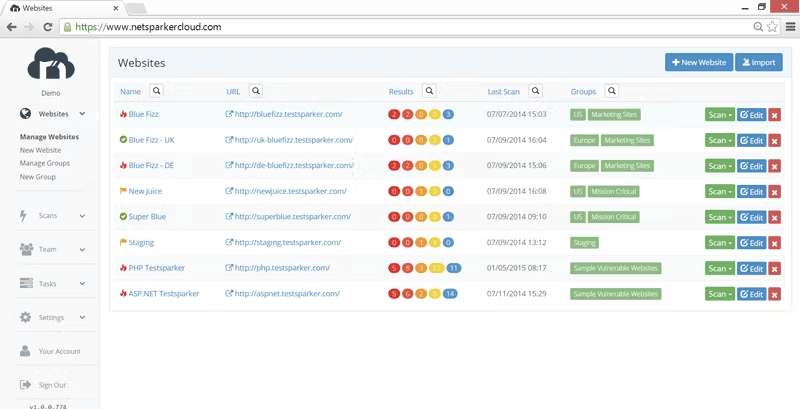
Invicti is a web application security scanner tailored for enterprises to identify and manage vulnerabilities. It provides automated scanning and comprehensive reporting, helping security teams protect their web applications.
Why I picked Invicti: Its enterprise-level capabilities make it ideal for large organizations. Invicti offers automated vulnerability scanning with proof-based scanning to eliminate false positives. The tool's scalability supports extensive web application portfolios. With detailed reporting, your team can easily prioritize and address security issues.
Standout features & integrations:
Features include proof-based scanning that validates vulnerabilities to reduce false positives. The tool provides detailed reporting that helps prioritize security measures effectively. Invicti's scalability is designed to handle large numbers of web applications, making it suitable for enterprise use.
Integrations include Jira, Jenkins, GitHub, GitLab, Azure DevOps, Slack, ServiceNow, Bamboo, Bitbucket, and Microsoft Teams.
Pros and Cons
Pros:
- Detailed and actionable reports
- Scalable for large enterprises
- Proof-based scanning reduces false positives
Cons:
- Learning curve for new users
- Resource-intensive for smaller teams
Weitere Penetration Testing Tools
Hier sind weitere empfehlenswerte Penetration Testing Tools, die es nicht auf meine Shortlist geschafft haben, die jedoch trotzdem einen Blick wert sind:
- Core Impact
For multi-vector testing
- BreachLock
For cloud-based pentesting
- W3af
For web application auditing
- UnderDefense
For managed security services
- John the Ripper
Free password cracking tool
- Wireshark
Open-source network protocol analyzer
- NMap
Open source utility
- SQLMap
Open source penetration testing tool
- Zed Attack Proxy (ZAP)
For beginners
- Canvas
For exploit development
- BeEF (Browser Exploitation Framework)
Penetration testing tool
- Indusface WAS Free Website Security Check
For vulnerability protection
- Cain & Abel
For password recovery


Auswahlkriterien für Penetration Testing Tools
Bei der Auswahl der besten Penetration Testing Tools für diese Liste habe ich übliche Anforderungen und Herausforderungen wie das Erkennen von Sicherheitslücken und die Einhaltung von Sicherheitsstandards berücksichtigt. Außerdem habe ich das folgende Bewertungsraster verwendet, um eine strukturierte und faire Analyse zu gewährleisten:
Kernfunktionen (25% der Gesamtwertung)
Um in diese Liste aufgenommen zu werden, musste jede Lösung diese gängigen Anwendungsbereiche abdecken:
- Sicherheitslücken identifizieren
- Automatisierte Scans durchführen
- Detaillierte Berichte zur Verfügung stellen
- Manuelle Tests unterstützen
- Integration in bestehende Sicherheitstools
Zusätzliche Alleinstellungsmerkmale (25% der Gesamtwertung)
Um die Auswahl weiter einzugrenzen, habe ich auch nach einzigartigen Funktionen Ausschau gehalten, wie:
- Echtzeit-Bedrohungserkennung
- Anpassbare Scan-Profile
- KI-gestützte Schwachstellenanalyse
- Multi-Vektor-Angriffssimulation
- Werkzeuge für das Compliance-Management
Benutzerfreundlichkeit (10% der Gesamtwertung)
Um ein Gefühl für die Benutzerfreundlichkeit der einzelnen Systeme zu bekommen, habe ich Folgendes betrachtet:
- Intuitive Benutzeroberfläche
- Einfache Navigation
- Schneller Zugriff auf Schlüsselfunktionen
- Geringe technische Fachkenntnisse erforderlich
- Klare und prägnante Dokumentation
Onboarding (10% der Gesamtbewertung)
Um die Onboarding-Erfahrung jeder Plattform zu bewerten, habe ich Folgendes berücksichtigt:
- Verfügbarkeit von Trainingsvideos
- Interaktive Produkttouren
- Umfassende Benutzerhandbücher
- Zugang zu Webinaren
- Reaktionsschneller Onboarding-Support
Kundensupport (10% der Gesamtbewertung)
Um die Kundensupportleistungen der einzelnen Softwareanbieter zu beurteilen, habe ich Folgendes berücksichtigt:
- Rund um die Uhr verfügbar
- Mehrere Support-Kanäle
- Schnelle Reaktionszeiten
- Kompetentes Support-Team
- Zugang zu einem Community-Forum
Preis-Leistungs-Verhältnis (10% der Gesamtbewertung)
Um das Preis-Leistungs-Verhältnis jeder Plattform einzuschätzen, habe ich Folgendes berücksichtigt:
- Wettbewerbsfähige Preisgestaltung
- Auswahl an Tarifmodellen
- Angebotene Funktionen zu jedem Preisniveau
- Kosteneffizienz für kleine Teams
- Rabatte für Jahresabonnements
Kundenbewertungen (10% der Gesamtbewertung)
Um ein Bild der allgemeinen Kundenzufriedenheit zu erhalten, habe ich bei der Auswertung von Kundenbewertungen Folgendes beachtet:
- Gesamtzufriedenheitsbewertung
- Häufig berichtete Probleme
- Feedback zur Effektivität der Funktionen
- Nutzerempfehlungen
- Stimmung gegenüber dem Kundensupport
So wählen Sie ein Penetration Testing Tool aus
Es ist leicht, sich in langen Funktionslisten und komplexen Preisstrukturen zu verlieren. Damit Sie während Ihres individuellen Auswahlprozesses den Überblick behalten, finden Sie hier eine Checkliste wichtiger Faktoren:
| Faktor | Worauf achten |
| Skalierbarkeit | Stellen Sie sicher, dass das Tool mit Ihren Anforderungen mitwachsen kann. Prüfen Sie, ob es mit einer steigenden Anzahl von Tests und größeren Datenvolumen umgehen kann, wenn Ihr Unternehmen wächst. |
| Integrationen | Überprüfen Sie, ob das Tool sich in Ihre vorhandene Sicherheitssoftware und Arbeitsabläufe integrieren lässt. Achten Sie auf die Kompatibilität mit Observability-Lösungen wie New Relic oder Alternativen zu New Relic. |
| Anpassungsfähigkeit | Suchen Sie nach Funktionen, mit denen Sie das Tool auf Ihre individuellen Sicherheitsanforderungen zuschneiden können. Anpassbare Scanprofile und Berichtsmöglichkeiten sind dabei essenziell. |
| Benutzerfreundlichkeit | Bewerten Sie, ob das Tool benutzerfreundlich und intuitiv ist. Ihr Team sollte sich darin zurechtfinden und es ohne umfangreiche Schulungen oder technischen Support nutzen können. |
| Budget | Beachten Sie die Gesamtkosten, einschließlich Einrichtung und möglicher Zusatzgebühren. Achten Sie darauf, dass das Tool Ihrem Budget entspricht und zugleich Ihre Kernanforderungen erfüllt. |
| Schutzmaßnahmen | Überprüfen Sie die Sicherheitsmechanismen des Tools zum Schutz sensibler Daten. Achten Sie auf Verschlüsselung, sichere Datenspeicherung und die Einhaltung von Branchenstandards. |
| Support | Bewerten Sie die Verfügbarkeit und Qualität des Kundensupports. 24/7-Support und mehrere Kontaktmöglichkeiten können in kritischen Sicherheitsvorfällen entscheidend sein. |
| Reputation | Lesen Sie Rezensionen und Erfahrungsberichte anderer Anwender. Ein Tool mit einer starken Reputation in der Cybersecurity-Community bietet zusätzliche Zuverlässigkeit. |
Trends bei Penetration Testing Tools
Für meine Recherchen habe ich zahlreiche Produkt-Updates, Pressemitteilungen und Release-Logs verschiedener Anbieter von Penetration Testing Tools ausgewertet. Hier sind einige der aufkommenden Trends, die ich besonders im Blick behalte:
- KI-gestütztes Testen: Viele Tools integrieren mittlerweile künstliche Intelligenz, um die Bedrohungserkennung und Schwachstellenanalyse zu verbessern. KI kann Muster schnell erkennen und potenzielle Sicherheitsverletzungen vorhersagen, was sie zu einer wertvollen Ergänzung für Nutzer macht, die Bedrohungen stets einen Schritt voraus sein möchten.
- Cloud-native Sicherheit: Da Unternehmen in die Cloud wechseln, passen sich Penetrationstest-Tools an und konzentrieren sich zunehmend auf Cloud-Umgebungen. Dieser Wandel stellt sicher, dass Cloud-Infrastrukturen genauso sicher sind wie traditionelle Netzwerke, wobei Anbieter wie BreachLock hierbei führend sind.
- Kontinuierliches Testen: Es gibt eine steigende Nachfrage nach Tools, die fortlaufende Sicherheitsbewertungen ermöglichen und nicht nur einmalige Tests. Kontinuierliches Testen hilft Unternehmen, ihre Sicherheit langfristig zu gewährleisten, indem Schwachstellen zeitnah erkannt und behoben werden.
- IoT-Sicherheitstests: Durch den Anstieg von IoT-Geräten besteht die Notwendigkeit, dass Penetrationstest-Tools auch die Sicherheit dieser vernetzten Geräte prüfen können. Tools mit IoT-Testunterstützung helfen Unternehmen, ihr wachsendes Netzwerk abzusichern.
- Nutzerzentrierte Dashboards: Anbieter verbessern die Benutzeroberflächen, um intuitivere und informativere Dashboards zu bieten. Diese Dashboards liefern Echtzeit-Einblicke und umsetzbare Daten, wodurch Teams Sicherheitsbedrohungen effektiv einschätzen und darauf reagieren können.
Was sind Penetrationstest-Tools?
Penetrationstest-Tools sind Softwarelösungen, die dazu entwickelt wurden, Sicherheitslücken in Netzwerken und Anwendungen zu identifizieren und zu bewerten. Diese Tools werden in der Regel von Cybersecurity-Experten, ethischen Hackern und IT-Sicherheitsteams eingesetzt, um sicherzustellen, dass Systeme vor potenziellen Bedrohungen geschützt sind.
Automatisierte Scans, Schwachstellenanalysen und detaillierte Berichte helfen dabei, Schwachstellen zu erkennen, fortlaufende Sicherheitsüberprüfungen durchzuführen und umsetzbare Einblicke zu liefern. Insgesamt ermöglichen diese Tools Unternehmen, ihre digitalen Werte proaktiv zu schützen und eine starke Sicherheitsposition zu bewahren.
Funktionen von Penetrationstest-Tools
Bei der Auswahl von Enterprise Penetrationstest-Tools sollten Sie auf folgende Hauptmerkmale achten:
- Automatisierte Scans: Findet Schwachstellen in Netzwerken und Anwendungen schnell und spart so Zeit und Ressourcen für die Sicherheitsteams.
- Schwachstellenanalyse: Liefert detaillierte Einblicke in potenzielle Sicherheitsbedrohungen und hilft Teams, Prioritäten zu setzen und Probleme effektiv zu beheben.
- Anpassbare Testprofile: Ermöglicht es den Nutzern, Scans auf spezifische Anforderungen zuzuschneiden und dadurch gründliche und relevante Sicherheitsüberprüfungen sicherzustellen.
- Echtzeit-Bedrohungserkennung: Alarmiert die Teams bei unmittelbaren Bedrohungen, damit sie rechtzeitig auf potenzielle Sicherheitsverletzungen reagieren können.
- Cloud-native Sicherheit: Bietet Schutz- und Testfunktionen, die speziell für Cloud-Umgebungen entwickelt wurden und so moderne Infrastrukturtrends unterstützen.
- IoT-Geräte-Test: Prüft die Sicherheit vernetzter Geräte, sodass das gesamte Netzwerk, inklusive IoT, abgesichert ist.
- Detaillierte Berichte: Erstellt umfassende Berichte mit umsetzbaren Einblicken, die bei der Behebung von Schwachstellen helfen.
- Benutzerfreundliche Dashboards: Bietet intuitive Oberflächen für eine einfache Navigation und einen schnellen Zugriff auf wichtige Sicherheitsdaten.
- Compliance-Management: Unterstützt Unternehmen dabei, Branchenstandards und Richtlinien durch integrierte Compliance-Prüfungen zu erfüllen.
Vorteile von Penetrationstest-Tools
Der Einsatz von Penetrationstest-Tools bietet zahlreiche Vorteile für Ihr Team und Ihr Unternehmen. Hier sind einige, auf die Sie sich freuen können:
- Verbesserte Sicherheitslage: Durch das Aufdecken und Beheben von Schwachstellen stärken diese Tools die Abwehr Ihres Unternehmens gegen Cyberbedrohungen.
- Proaktives Bedrohungsmanagement: Echtzeit-Bedrohungserkennung und kontinuierliche Tests ermöglichen es Ihrem Team, Probleme zu erkennen und zu beheben, bevor sie zu größeren Sicherheitsverletzungen werden.
- Effizienter Ressourceneinsatz: Automatisierte Scans sparen Zeit und Aufwand, sodass sich Ihr Team auf strategischere Sicherheitsinitiativen konzentrieren kann.
- Compliance-Sicherheit: Integriertes Compliance-Management hilft Ihnen, Branchenstandards und gesetzliche Anforderungen zu erfüllen.
- Fundierte Entscheidungsfindung: Detaillierte Berichte liefern umsetzbare Einblicke, die Ihr Team bei fundierten Sicherheitsentscheidungen unterstützen.
- Anpassung an moderne Infrastrukturen: Funktionen wie Cloud-native Sicherheit und IoT-Geräte-Tests sorgen dafür, dass Ihre Sicherheitsmaßnahmen mit aktuellen Technologietrends Schritt halten.
- Benutzerfreundliches Erlebnis: Intuitive Dashboards und anpassbare Testprofile machen diese Tools für Ihr Team zugänglich und einfach in der Anwendung.
Kosten und Preise für Penetrationstest-Tools
Die Auswahl von Penetration-Testing-Tools erfordert ein Verständnis der verschiedenen Preismodelle und verfügbaren Tarife. Die Kosten variieren je nach Funktionsumfang, Teamgröße, Zusatzoptionen und weiteren Faktoren. Die folgende Tabelle fasst gängige Tarife, deren durchschnittliche Preise und typische Merkmale zusammen, die in Penetration-Testing-Tools-Lösungen enthalten sind:
Tabellarischer Tarifvergleich für Penetration-Testing-Tools
| Tarifart | Durchschnittlicher Preis | Übliche Funktionen |
| Gratis-Tarif | $0 | Grundlegendes Schwachstellen-Scanning, eingeschränkte Berichtsoptionen und Community-Support. |
| Persönlicher Tarif | $10-$30/Nutzer/Monat | Automatisches Scannen, einfache Berichte und E-Mail-Support. |
| Business-Tarif | $50-$100/Nutzer/Monat | Erweiterte Scan-Fähigkeiten, detaillierte Berichte, Integrationssupport und bevorzugter E-Mail-Support. |
| Enterprise-Tarif | $150-$300/Nutzer/Monat | Umfassende Sicherheitsbewertungen, anpassbare Testprofile, dediziertes Account-Management und 24/7-Support. |
Penetration-Testing-Tool-FAQs
Hier finden Sie Antworten auf häufig gestellte Fragen zu Penetration-Testing-Tools:
Welches Tool wird häufig für Penetration Testing genutzt?
Penetrationstests verwenden oftmals eine Vielzahl von Tools, die jeweils für unterschiedliche Aufgaben geeignet sind. Beliebte Optionen sind Metasploit zur Ausnutzung von Schwachstellen, Nmap für Netzwerk-Scanning und Wireshark für die Paket-Analyse. Die Auswahl der Tools hängt von Ihren individuellen Anforderungen und dem Umfang der Tests ab.
Fallen Penetration-Testing-Tools unter die Kategorie Schwachstellenanalyse?
Ja, Penetration-Testing-Tools sind Bestandteil der Schwachstellenanalyse. Während Schwachstellenscanner potenzielle Schwachstellen identifizieren, gehen Penetration-Testing-Tools einen Schritt weiter, indem sie versuchen, diese Schwachstellen tatsächlich auszunutzen. Dadurch lässt sich das potenzielle Risiko und die Auswirkung jeder einzelnen Schwachstelle besser bewerten.
Was sind die Top 5 Penetration-Testing-Techniken?
Gängige Techniken beim Penetration Testing sind beispielsweise Blind Testing, bei dem die Tester keine Vorkenntnisse über das System haben, sowie Targeted Testing, das in Zusammenarbeit mit dem IT-Team durchgeführt wird. Weitere Methoden sind das External Testing zur Überprüfung nach außen sichtbarer Systeme, Internal Testing für interne Netzwerkschwachstellen und Double-Blind Testing zur Simulation realer Angriffsszenarien.
Wie oft sollte ein Penetrationstest durchgeführt werden?
Es wird empfohlen, mindestens einmal pro Jahr einen Penetrationstest durchzuführen. Regelmäßige Tests stellen sicher, dass Ihre Sicherheitsmaßnahmen aktuell bleiben und neue Bedrohungen effektiv abwehren können. Je nach Branche und Risikoprofil kann es notwendig sein, häufiger zu testen, um die Sicherheit aufrechtzuerhalten.
Was ist der Unterschied zwischen automatisiertem und manuellem Penetration Testing?
Beim automatisierten Testen werden Tools eingesetzt, die schnell bekannte Schwachstellen identifizieren und eine breite Abdeckung mit wenig menschlichem Aufwand bieten. Das manuelle Testen hingegen erfolgt durch Experten, die ihr Wissen einbringen, um komplexe Schwachstellen zu erkennen, die automatisierte Tools eventuell übersehen. Eine Kombination beider Ansätze ermöglicht besonders umfassende Sicherheitsüberprüfungen.
Wie integrieren sich Penetration-Testing-Tools in bestehende Sicherheitssysteme?
Penetration-Testing-Tools bieten häufig Integrationsmöglichkeiten mit anderen Sicherheitssystemen wie SIEMs, Schwachstellenmanagement-Tools und Ticket-Systemen. So lassen sich Arbeitsabläufe effizient gestalten, indem erkannte Schwachstellen direkt im bestehenden Sicherheitssystem nachverfolgt und verwaltet werden können.
Wie geht es weiter?
Wenn Sie sich gerade mit der Recherche zu Penetration-Testing-Tools beschäftigen, verbinden Sie sich kostenlos mit einem SoftwareSelect-Berater für Empfehlungen.
Sie füllen ein Formular aus und führen ein kurzes Gespräch, in dem Ihre Anforderungen im Detail besprochen werden. Anschließend erhalten Sie eine Auswahlliste mit geeigneten Softwarelösungen zur Überprüfung. Die Berater begleiten Sie auch während des gesamten Kaufprozesses, inklusive Preisverhandlungen.