

10 Beste Paket-Sniffer 2026

10 Die besten Packet Sniffer Tools im Überblick
Here's my pick of the 10 best software from the 21 tools reviewed.


Das passende Packet Sniffer-Tool kann die Fehlersuche im Netzwerk erheblich vereinfachen und die Sicherheitsüberwachung stärken – egal ob Sie den Datenverkehr analysieren, Anomalien erkennen oder die Netzwerkleistung optimieren möchten.
Die schiere Menge an verfügbaren Netzwerk-Analyse-Tools – kombiniert mit der Herausforderung, komplexe Daten auszuwerten und die richtigen Funktionen zu wählen – kann die Auswahl jedoch schnell überwältigend machen.
In diesem Artikel ziehe ich meine Erfahrungen in der Netzwerksicherheit und praktische Tests dutzender Packet Sniffer heran, um zu erklären, was diese Tools bieten, für wen sie am besten geeignet sind und wie sie helfen können, Netzwerktransparenz zu schaffen, Bedrohungen zu identifizieren und die Leistung insgesamt zu verbessern.
Why Trust Our Software Reviews
We’ve been testing and reviewing software since 2023. As tech leaders ourselves, we know how critical and difficult it is to make the right decision when selecting software.
We invest in deep research to help our audience make better software purchasing decisions. We’ve tested more than 2,000 tools for different tech use cases and written over 1,000 comprehensive software reviews. Learn how we stay transparent & our software review methodology.
Packet Sniffer – Zusammenfassung
| Tool | Best For | Trial Info | Price | ||
|---|---|---|---|---|---|
| 1 | Best for sFlow packet sampling | 30-day free trial + free demo available | From $10/month (billed annually) | Website | |
| 2 | Best for deep packet analysis | Free download available | Free to use (open source) | Website | |
| 3 | Best or bandwidth and traffic monitoring | Free demo available | From $17.20/user/month for 10 interfaces (billed annually) | Website | |
| 4 | Best for debugging web traffic | Free demo available | Pricing upon request | Website | |
| 5 | Best for network discovery and auditing | Not available | Free to use | Website | |
| 6 | Best for command-line packet capture | Not available | Free forever | Website | |
| 7 | Best for intrusion detection and prevention | Free demo available | From $29.99/year (billed annually) | Website | |
| 8 | Best for passive network forensics | Not available | Pricing upon request | Website | |
| 9 | Best for wireless network detection | Not available | Free forever | Website | |
| 10 | Best for network troubleshooting and diagnostics | Not available | Pricing upon request | Website |
-

Site24x7
Visit WebsiteThis is an aggregated rating for this tool including ratings from Crozdesk users and ratings from other sites.4.7 -
GitHub Actions
Visit WebsiteThis is an aggregated rating for this tool including ratings from Crozdesk users and ratings from other sites.4.8 -
Docker
Visit WebsiteThis is an aggregated rating for this tool including ratings from Crozdesk users and ratings from other sites.4.6




Packet Sniffer Tests & Bewertungen

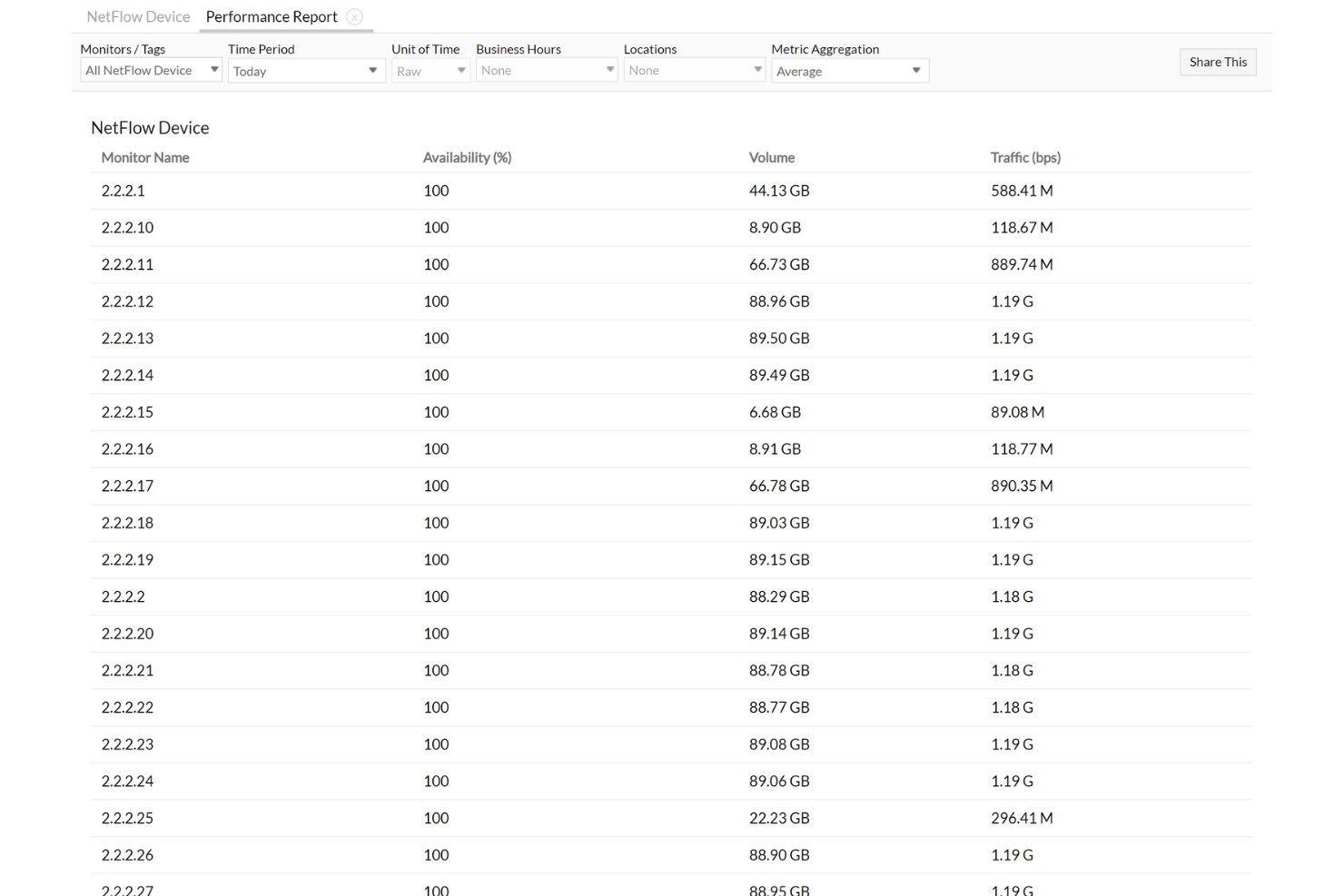
Site24x7 is a cloud-based monitoring solution that helps you oversee your websites, servers, applications, and network infrastructure. It offers comprehensive tools to ensure your IT resources are performing optimally and remain available to your users.
Why I Picked Site24x7: I like that it supports sFlow monitoring. This is a packet sampling technology that captures every Nth packet or a random sample per interface, providing detailed insights into network traffic. By analyzing these samples, you can identify bandwidth hogs, monitor application performance, and detect potential network issues before they escalate. Another feature that makes Site24x7 suitable for packet sniffing is its NetFlow Analyzer. This tool collects flow export data from network devices, organizes it, and presents actionable insights.
Standout features & integrations:
Other features include monitoring network traffic at the interface, application, protocol, and conversation levels, providing detailed reports on application and interface traffic, and identifying traffic hotspots in your network.
Integrations include ServiceNow, PagerDuty, Opsgenie, Jira, ManageEngine AlarmsOne, ManageEngine ServiceDesk Plus, Slack, Microsoft Teams, Zoho Cliq, Amazon EventBridge, Zapier, and Webhooks.
Pros and Cons
Pros:
- Flexible customization options for dashboards and reports
- Reliable real-time alerts that enable prompt issue resolution
- Comprehensive monitoring capabilities across various IT infrastructure components
Cons:
- Limited integration options with certain third-party tools
- Configuration complexity can be challenging for new users
New Product Updates from Site24x7

Site24x7 Enhances Network Monitoring With Device and Visibility Updates
Site24x7 introduces proactive hardware health monitoring, expanded device support, centralized network controls, and enhanced SD-WAN visualization to improve network monitoring and management. For more information, visit Site24x7’s official site.
 .
.

Wireshark is a preeminent network protocol analyzer that delves deep into the intricacies of network traffic, offering detailed insights that other tools might overlook. Its forte in delivering profound packet analysis validates its reputation as the best choice for professionals seeking an in-depth understanding of network interactions.
Why I Picked Wireshark: Wireshark is a widely acknowledged network protocol analyzer used for troubleshooting, analysis, software and communication protocol development, and education. As someone who’s consistently engaged with different network tools, I chose Wireshark for its unparalleled depth in packet capturing and analysis. Among all the options available, Wireshark distinctly stands out because of its comprehensive packet details, making it ideal for those who need a deep understanding of network traffic.
Standout features & integrations:
Wireshark offers a live capture feature that allows users to read data from Ethernet, IEEE 802.11, PPP/HDLC, ATM, Bluetooth, USB, among others. Its display filter system is exceptional, enabling users to sift through complex packet data easily.
Additionally, Wireshark integrates with GeoIP, OS fingerprinting, and various decryption functions, offering an expanded utility for its users.
Pros and Cons
Pros:
- Robust filtering capabilities
- Supports a wide range of data network protocols
- Comprehensive packet data analysis
Cons:
- Potential security risks if used carelessly on public networks.
- Requires significant system resources for large captures
- Steeper learning curve for beginners

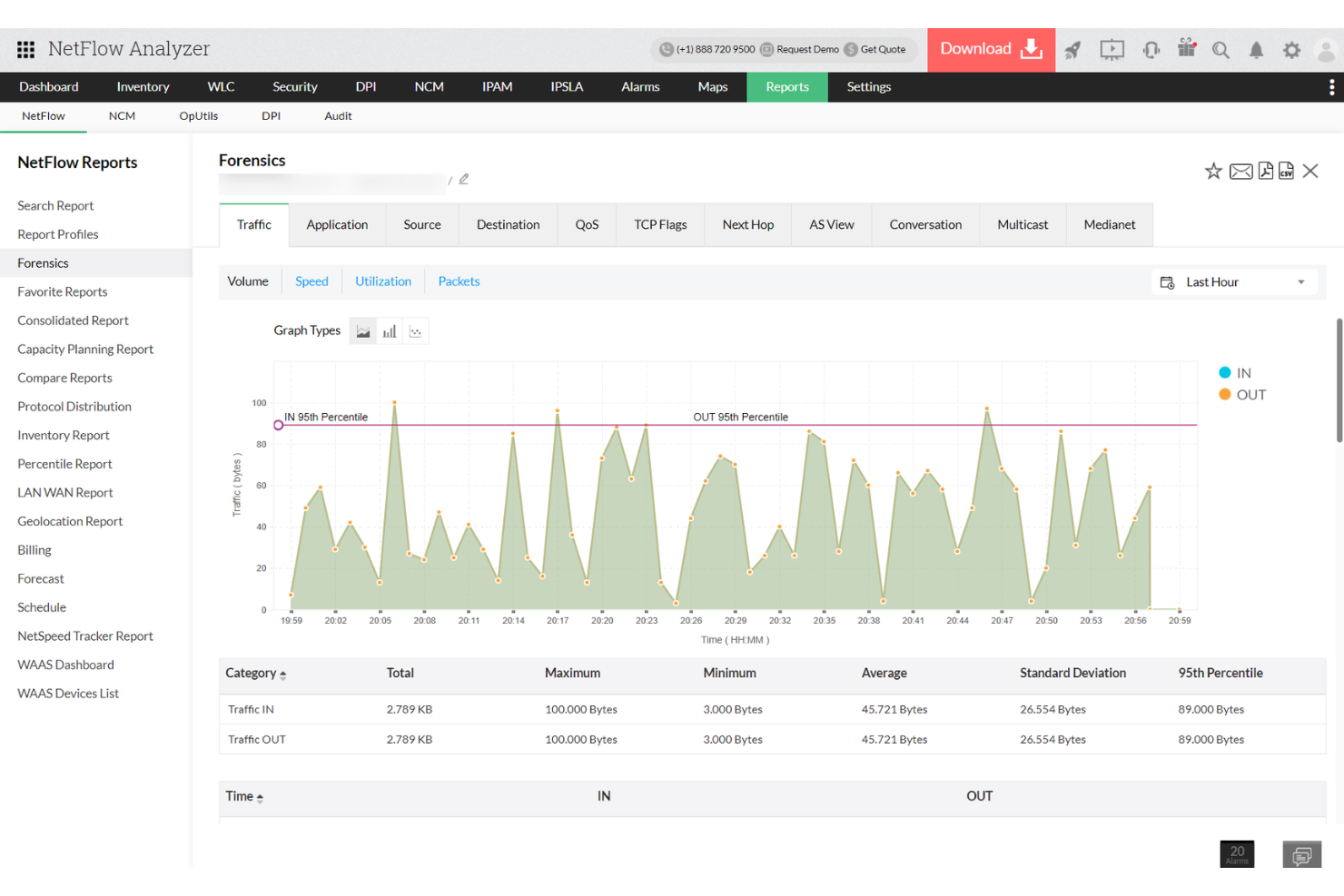
ManageEngine NetFlow Analyzer is a flow-based network traffic monitoring solution that gives you insight into how your bandwidth is being used. It helps you monitor traffic patterns, application performance, and device activity across your network using data from NetFlow, sFlow, and other flow protocols. Instead of capturing packets, it collects and analyzes aggregated flow data to build a complete picture of what’s happening in your network.
Why I Picked ManageEngine NetFlow Analyzer: I included NetFlow Analyzer because it stands out in how it handles bandwidth analysis and traffic reporting. Unlike traditional packet sniffers, it doesn’t collect individual data packets. Instead, it analyzes flow records from devices, giving you a higher-level view of traffic behavior without needing full packet capture. That distinction makes it a good fit when you're looking to track usage patterns, detect anomalies, or troubleshoot application slowdowns—especially in large or distributed networks where deep packet inspection would be overkill.
Standout features & integrations:
Features include real-time traffic visualization, application-level monitoring, and customizable alerts that help you drill into network slowdowns and suspicious activity. The tool supports distributed network monitoring and includes reporting features for capacity planning and billing. While not a packet sniffer in the strictest sense, it fills a similar role for many network performance use cases.
Integrations include ADManager Plus, ADAudit Plus, ServiceDesk Plus, AssetExplorer, Endpoint Central, Mobile Device Manager Plus, Site24x7, Analytics Plus, CloudSpend, CloudDNS, Zoho Projects, and Zoho Assist.
Pros and Cons
Pros:
- Utilizes Cisco NBAR for deep insights into application traffic
- Displays traffic patterns and trends through intuitive graphs and charts
- Monitors network traffic in real-time
Cons:
- Manual setup for device compatibility
- Slow reporting during peak times


Fiddler is a web debugging proxy that logs all HTTP and HTTPS traffic between your computer and the Internet. Capturing web traffic in real time allows developers and network professionals to inspect, monitor, and modify requests and responses. This aligns with its forte in debugging web traffic, ensuring that web-related anomalies are detected and rectified efficiently.
Why I Picked Fiddler: In the process of selecting the top tools for web traffic debugging, Fiddler stood out primarily because of its robust capabilities and widespread industry acclaim. What differentiates Fiddler is its versatility; not only does it debug, but it also offers modification capabilities which are invaluable in testing scenarios. This tool clearly aligns with its designation as best for web traffic debugging, given its tailored features and reliable performance.
Standout features & integrations:
Fiddler is renowned for its detailed traffic recording, which breaks down each request and response for easy inspection. Another salient feature is the "Composer" tool, allowing users to craft custom HTTP/HTTPS requests to test against their web apps.
Fiddler also integrates with popular development and testing tools, enhancing its debugging capabilities.
Pros and Cons
Pros:
- Compatible with multiple development and testing tools
- Composer' tool aids in creating custom requests for testing
- Detailed traffic logging enables thorough inspection
Cons:
- The tool's performance may vary across different operating systems.
- Requires configuration for capturing traffic from certain devices
- Some features might be overwhelming for beginners


Nmap, short for Network Mapper, is a free and open-source utility that conducts network discovery and security auditing. By leveraging its capabilities, professionals can discover devices running on a network and find open ports along with various attributes of the network. Such comprehensive insights serve as the foundation for its recognition as an optimal tool for network discovery and auditing.
Why I Picked Nmap: During my quest to determine the most proficient tools for network discovery, Nmap consistently emerged as an industry favorite. Its flexibility in scanning both large and small networks, coupled with its long-standing presence in the industry, gave me a strong inclination toward this tool. In light of its exhaustive scanning capabilities and trusted reputation, it's clear why Nmap holds the title of being best for network discovery and auditing.
Standout features & integrations:
Nmap's prowess lies in its ability to detect operating systems, identify open ports, and gauge the security of a network. Its script engine, NSE (Nmap Scripting Engine), allows users to write scripts to customize their scans further.
In terms of integrations, Nmap pairs effectively with several visualization and reporting tools, elevating the way professionals perceive and interpret scan results.
Pros and Cons
Pros:
- Established reputation with years of proven reliability
- NSE allows for custom script creation, offering a tailored scanning experience.
- Comprehensive scanning capabilities cover a wide range of network attributes.
Cons:
- Command-line interface may not be user-friendly for all, requiring familiarity or additional training.
- Scans, if not configured properly, can be intrusive and disruptive to some network devices
- Steep learning curve for newcomers


Tcpdump is a well-established network diagnostic tool that facilitates packet capturing and analysis directly from the command line. For those who prefer working within terminal environments and require immediate insights into network traffic, Tcpdump stands as a fitting solution.
Why I Picked Tcpdump: n my journey of comparing various network diagnostic tools, I chose Tcpdump because of its straightforward command-line interface and the raw power it offers without a graphical overhead. This tool is distinct in its simplicity and the flexibility it provides to network professionals. Its command-line essence is why I determined Tcpdump is best for those who want direct and efficient packet capture without the need for a graphical interface.
Standout features & integrations:
Tcpdump's primary strength lies in its simplicity, making it quick and efficient for real-time packet analysis. With the ability to filter packets using the Berkeley Packet Filter (BPF) syntax, it gives users fine-grained control over the traffic they observe. Although Tcpdump is primarily a standalone tool, its output can be integrated with other tools like Wireshark for more detailed analysis.
Pros and Cons
Pros:
- Portable across multiple platforms
- Fine-grained packet filtering with BPF
- Lightweight with minimal system resource usage
Cons:
- Initial learning curve for beginners due to command-line nature.
- Might require supplemental tools for in-depth analysis
- Lacks a graphical user interface


Snort is an open-source intrusion prevention system capable of real-time traffic analysis and packet logging. Designed to detect attacks and probes on computer networks, Snort's capabilities align directly with its reputation for effective intrusion detection and prevention, ensuring that network vulnerabilities are promptly identified and addressed.
Why I Picked Snort: When I began my selection journey for the most efficient intrusion detection tools, Snort consistently surfaced as a top contender. Its open-source nature, combined with a vast community supporting its development, makes it a distinct tool in this domain. Given its robust features and extensive support system, it's evident to me why Snort is considered best for intrusion detection and prevention.
Standout features & integrations:
Snort boasts real-time traffic analysis, ensuring that potential threats are identified as they occur. With its signature-based detection mechanisms, it can effectively detect a myriad of attacks and malicious activities.
Snort also integrates well with other popular networking tools, ensuring that users have a broad suite of resources for comprehensive network monitoring.
Pros and Cons
Pros:
- Supported by a vast and active community providing continuous updates
- Signature-based detection system offers extensive coverage against different types of attacks
- Real-time traffic analysis facilitates instant threat detection
Cons:
- May generate false positives, requiring careful configuration and tuning.
- As an open-source tool, it might lack some of the advanced features available in commercial solutions
- The initial setup can be complex for beginners


Network Miner specializes in capturing and analyzing network traffic for forensic purposes. Recognized for its ability to meticulously dissect network packets and present data in an accessible manner, it caters to professionals who need a passive yet comprehensive approach to network forensics.
Why I Picked Network Miner: When it came to selecting a reliable tool for passive network forensics, Network Miner became an evident choice. My determination was based on its distinct capability to work without directly engaging with the network, ensuring minimal disruption. The tool's emphasis on passive methodologies makes it an unparalleled candidate for cases that demand discreet and thorough network analysis.
Standout features & integrations:
One of Network Miner's most commendable features is its ability to extract files from network traffic, thereby offering tangible data for forensic analysis. Furthermore, its user-friendly interface presents a comprehensive summary of hosts and their corresponding communications.
In terms of integrations, Network Miner efficiently works alongside other forensic analysis tools, and its outputs can be leveraged for deeper insights with platforms like Wireshark.
Pros and Cons
Pros:
- Passive approach ensures minimal interference with network operations
- Comprehensive host-centric view of network interactions
- Efficient file extraction from network traffic
Cons:
- Limited customization options compared to some competitors.
- Not optimized for real-time intrusion detection
- Might require a learning curve for those unfamiliar with forensics

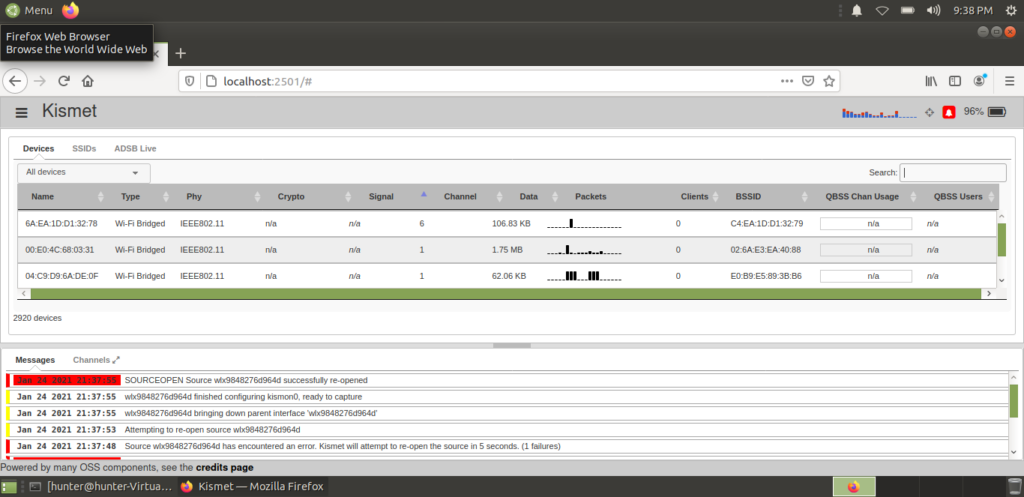
Kismet is a powerful tool geared toward detecting, sniffing, and analyzing wireless network traffic. With its prowess in identifying networks across a wide array of protocols, it stands as an indispensable asset for professionals striving for exhaustive wireless network detection and surveillance.
Why I Picked Kismet: In the course of judging various wireless network tools, I chose Kismet because of its expansive capabilities in network detection. It's not just about the sheer number of protocols it supports but also the depth of analysis it provides for each. For individuals and businesses emphasizing the need for comprehensive wireless detection, I firmly hold the opinion that Kismet is unmatched in its domain.
Standout features & integrations:
Kismet is renowned for its capability to detect hidden networks, making it a go-to tool for in-depth wireless analysis. With features like rogue device detection and flexible alerting mechanisms, it adds layers of security for network administrators.
As for integrations, Kismet's data can be consumed by tools like Wireshark and other network analysis platforms for a more intricate examination.
Pros and Cons
Pros:
- Equipped with real-time intrusion detection
- Offers support for a multitude of wireless protocols
- Exceptional at detecting hidden wireless networks
Cons:
- Interface may not be intuitive for all users.
- Resource-intensive when handling large network scans
- Might be overwhelming for beginners


Omnipeek is a robust network analysis solution known for its proficiency in diagnosing network issues and providing actionable insights. As organizations increasingly rely on flawless network performance, Omnipeek steps in, acting as the eyes and ears of network administrators, offering in-depth troubleshooting tools that make it indispensable.
Why I Picked Omnipeek: In the vast array of network analysis tools, Omnipeek was a standout due to its comprehensive and intuitive interface that facilitates network diagnostics. While many tools focus on a variety of metrics, Omnipeek’s forte lies in its targeted approach to troubleshooting. After an exhaustive review and comparing it to contemporaries, I can assertively state that Omnipeek is best for network troubleshooting and diagnostics.
Standout features & integrations:
Omnipeek is renowned for its packet capture capability, allowing detailed traffic analysis. Its real-time analytics and visual network insights make it easier for admins to identify and resolve issues swiftly.
Regarding integrations, Omnipeek boasts compatibility with a myriad of third-party platforms, ensuring its adaptability in diverse IT environments.
Pros and Cons
Pros:
- Adaptable with numerous third-party integrations
- Real-time insights facilitate swift issue identification and resolution
- Mastery in detailed packet capture and network analysis
Cons:
- Some features might be excessive for small-scale network environments.
- Pricier than some basic diagnostic tools
- Steeper learning curve for newcomers to network analysis
Weitere empfehlenswerte Packet Sniffer
Im Folgenden finden Sie zusätzliche Packet Sniffer, die ich zwar in die engere Wahl gezogen habe, die es aber nicht in die Top 12 geschafft haben. Auf jeden Fall einen Blick wert!
- Ettercap
For man-in-the-middle attacks
- CommView
For real-time packet capture and analysis
- Colasoft Capsa
For real-time network diagnostics
- PRTG
For customizable packet monitoring
- SolarWinds Network Performance Monitor
For scalable network performance monitoring
- ManageEngine NetFlow Analyzer
For bandwidth monitoring and traffic analysis
- NirSoft's SmartSniff
Good for straightforward packet capture without complex configurations
- netsniff-ng
Good for efficient packet capturing on Linux systems
- TCPView
Good for real-time monitoring of TCP/UDP endpoints on Windows
- Iperf
Good for bandwidth performance measurement and tuning
- KisMAC2
Good for advanced Wi-Fi network discovery on macOS platforms


Auswahlkriterien für Packet Sniffer
Bei der Auswahl des besten Packet Sniffers für diese Liste habe ich die typischen Anforderungen und Probleme der Anwender berücksichtigt, wie etwa Netzwerkleistungsüberwachung und Analyse von Datenpaketen. Zur objektiven Bewertung habe ich mich zudem an folgendem Rahmen orientiert:
Kernfunktionen (25 % der Gesamtbewertung)
Jede Lösung auf dieser Liste musste diese Anwendungsfälle abdecken:
- Netzwerkverkehr überwachen
- Datenpakete erfassen
- Protokollschichten analysieren
- Netzwerkprobleme diagnostizieren
- Spezifische Datenströme filtern
Besondere Zusatzfunktionen (25 % der Gesamtbewertung)
Zum weiteren Vergleich habe ich nach einzigartigen Merkmalen Ausschau gehalten, wie beispielsweise:
- Echtzeit-Datenvisualisierung
- Anpassbare Warnmeldungen
- Integration mit Sicherheitstools
- Cloud-Kompatibilität
- Erweiterte Filteroptionen
Benutzerfreundlichkeit (10 % der Gesamtbewertung)
Um die Bedienbarkeit der Systeme einzuschätzen, habe ich folgende Aspekte bewertet:
- Intuitive Benutzeroberfläche
- Einfache Navigation
- Anpassbares Dashboard
- Geringe Einarbeitungszeit
- Zugriff über verschiedene Endgeräte
Onboarding (10 % der Gesamtbewertung)
Zur Beurteilung des Onboardings auf jeder Plattform habe ich folgende Kriterien herangezogen:
- Verfügbarkeit von Schulungsvideos
- Interaktive Produkttouren
- Zugang zu Webinaren
- Einsatz von Chatbots für Anleitungen
- Verfügbarkeit von Einrichtungsvorlagen
Kundensupport (10 % der Gesamtbewertung)
Um die Kundendienstleistungen jedes Softwareanbieters zu bewerten, habe ich Folgendes berücksichtigt:
- 24/7 Support-Verfügbarkeit
- Mehrere Support-Kanäle
- Umfassender FAQ-Bereich
- Effizienz der Reaktionszeit
- Zugang zu Community-Foren
Preis-Leistungs-Verhältnis (10 % der Gesamtbewertung)
Um das Preis-Leistungs-Verhältnis jeder Plattform zu beurteilen, habe ich folgende Kriterien herangezogen:
- Konkurrenzfähige Preisgestaltung
- Funktionsumfang im Verhältnis zu den Kosten
- Verfügbarkeit von kostenlosen Testversionen
- Flexible Preismodelle
- Kostentransparenz
Kundenbewertungen (10 % der Gesamtbewertung)
Um den Grad der allgemeinen Kundenzufriedenheit zu erfassen, habe ich bei der Auswertung von Kundenbewertungen Folgendes berücksichtigt:
- Konsistenz positiver Rückmeldungen
- Erwähnung der Benutzerfreundlichkeit
- Zuverlässigkeit des Tools
- Qualität des Kundensupports
- Wahrgenommenes Preis-Leistungs-Verhältnis
Wie wählt man einen Packet Sniffer aus?
Es ist leicht, sich in langen Funktionslisten und komplexen Preismodellen zu verlieren. Damit Sie sich bei der Auswahl der passenden Software nicht verzetteln, finden Sie hier eine Checkliste wichtiger Faktoren, die Sie berücksichtigen sollten:
| Faktor | Darauf kommt es an |
|---|---|
| Skalierbarkeit | Kann das Tool mit Ihrem Netzwerk mitwachsen? Prüfen Sie, ob es steigende Datenlasten und Benutzerzahlen ohne Leistungseinbußen unterstützt. |
| Integrationen | Funktioniert es mit Ihren derzeitigen Tools? Prüfen Sie die Kompatibilität mit bestehenden Systemen wie Sicherheitssoftware und Netzwerkmanagementtools. |
| Anpassbarkeit | Lässt es sich auf Ihre Bedürfnisse zuschneiden? Achten Sie auf anpassbare Einstellungen und Dashboards, die Ihren spezifischen Überwachungsanforderungen entsprechen. |
| Benutzerfreundlichkeit | Ist die Benutzeroberfläche intuitiv? Stellen Sie sicher, dass Ihr Team sie ohne umfangreiche Schulungen bedienen kann. |
| Implementierung und Onboarding | Wie schnell können Sie starten? Bewerten Sie den Zeit- und Ressourcenaufwand für Einrichtung und Schulung. |
| Kosten | Passt es in Ihr Budget? Vergleichen Sie die Preismodelle und achten Sie auf versteckte Kosten oder langfristige Verträge. |
| Sicherheitsmaßnahmen | Schützt es Ihre Daten wirkungsvoll? Bewerten Sie Verschlüsselungsstandards und die Einhaltung von Datenschutzvorschriften. |
| Support-Verfügbarkeit | Erhalten Sie Unterstützung, wenn Sie sie benötigen? Prüfen Sie die Verfügbarkeit von technischem Support und Ressourcen wie Foren oder Wissensdatenbanken. |
Was ist ein Packet Sniffer?
Ein Packet Sniffer, auch als Netzwerksniffer oder Paketanalysator bekannt, ist ein Diagnosetool, das Datenpakete beim Durchlaufen der verschiedenen Netzwerkschnittstellen aufzeichnet, analysiert und entschlüsselt. Er kann im Promiscuous Mode arbeiten und so Daten unabhängig vom vorgesehenen Ziel einsehen.
Diese Tools sind insbesondere bei der Analyse von Routern und deren Datenverkehr unverzichtbar. Netzwerkadministratoren und IT-Fachkräfte nutzen sie als Netzwerkleistungs-Monitor, um Einblicke in Verkehrsströme und potenzielle Ursachen von Problemen zu erhalten.
Diese Paketerfassungstools bieten detaillierte Einblicke und ermöglichen es den Anwendern, das Netzwerkverhalten nachzuvollziehen. Über die reine Anzeige von Daten hinaus fungieren sie als erste Verteidigungslinie gegen Bedrohungen und sorgen für einen optimalen Zustand des Netzwerks.
Funktionen
Achten Sie bei der Auswahl eines Packet Sniffers auf folgende Schlüsselfunktionen:
- Echtzeit-Datenvisualisierung: Zeigt den Netzwerkverkehr in Echtzeit an und ermöglicht es Ihnen, Probleme schnell zu erkennen, sobald sie auftreten.
- Anpassbare Warnmeldungen: Ermöglicht das Festlegen spezifischer Auslöser für Warnungen, sodass Sie stets über kritische Netzwerkereignisse informiert bleiben.
- Protokollanalyse: Analysiert verschiedene Protokollschichten, um Netzwerkprobleme effizient zu diagnostizieren und zu beheben.
- Erweiterte Filteroptionen: Ermöglichen das Filtern von Datenpaketen nach Kriterien und erleichtern so die Analyse.
- Integrationsmöglichkeiten: Arbeitet nahtlos mit bestehenden Netzwerkmanagement- und Sicherheitstools zusammen, um die Funktionalität zu erweitern.
- Erfassung von Datenpaketen: Sammelt Datenpakete, die durch das Netzwerk übertragen werden, und bietet Einblicke in Verkehrsaufkommen und -muster.
- Benutzerfreundliche Oberfläche: Sorgt für eine einfache Navigation und Bedienung und senkt die Einstiegshürde für neue Nutzer.
- Verschlüsselungsstandards: Schützt sensible Daten mit starker Verschlüsselung und gewährleistet die Einhaltung von Datenschutzvorschriften.
- Skalierbarkeit: Unterstützt wachsende Netzwerkansprüche und bewältigt steigende Datenmengen sowie Nutzerzahlen.
Vorteile
Der Einsatz eines Packet Sniffer bietet zahlreiche Vorteile für Ihr Team und Ihr Unternehmen. Im Folgenden finden Sie einige, auf die Sie sich freuen können:
- Verbesserte Netzwerkleistung: Durch die Analyse des Datenverkehrs in Echtzeit können Engpässe und Ineffizienzen schnell erkannt und behoben werden.
- Erhöhte Sicherheit: Anpassbare Warnmeldungen und Protokollanalysen ermöglichen die frühzeitige Erkennung verdächtiger Aktivitäten und potenzieller Bedrohungen.
- Effiziente Fehlerbehebung: Erweiterte Filteroptionen und das Erfassen von Datenpaketen ermöglichen eine präzise Identifikation und Lösung von Problemen.
- Kosteneinsparungen: Die frühzeitige Erkennung von Netzwerkproblemen verhindert kostspielige Ausfälle und reduziert den Bedarf an umfangreichen IT-Eingriffen.
- Skalierbarkeitsunterstützung: Die Fähigkeit, wachsende Netzwerkansprüche zu bewältigen, sorgt dafür, dass Ihre Tools mit den Anforderungen Ihres Unternehmens mitwachsen.
- Gewährleistung der Compliance: Verschlüsselungsstandards und Datenschutzfunktionen helfen bei der Einhaltung gesetzlicher Vorschriften und schützen sensible Informationen.
Kosten & Preise
Die Auswahl eines Packet Sniffer erfordert ein Verständnis der verschiedenen verfügbaren Preismodelle und -pläne. Die Kosten variieren je nach Funktionen, Teamgröße, Add-ons und mehr. Die folgende Tabelle fasst gängige Pläne, deren durchschnittliche Preise und typische Funktionen von Packet Sniffer-Lösungen zusammen:
Vergleichstabelle für Packet Sniffer Pläne
| Pakettyp | Durchschnittlicher Preis | Übliche Funktionen |
|---|---|---|
| Kostenloser Plan | $0 | Grundlegende Paketaufzeichnung, eingeschränkte Datenanalyse und Community-Unterstützung. |
| Persönlicher Plan | $5-$25/user/month | Erweiterte Filterfunktionen, Echtzeitüberwachung und E-Mail-Benachrichtigungen. |
| Business-Plan | $30-$75/user/month | Protokollanalyse, Integration mit anderen Tools und anpassbare Dashboards. |
| Enterprise-Plan | $100+/user/month | Vollständige Datenverschlüsselung, priorisierter Kundensupport und Skalierbarkeit für große Netzwerke. |
Häufigste Fragen zu Paket-Sniffern (FAQ)
Welche sind die günstigsten und teuersten Paket-Sniffer?
Die günstigsten Optionen umfassen in der Regel Freemium-Tools oder Basisversionen von kommerziellen Tools. Beispiele sind Wireshark, das kostenlos ist, sowie einige Einstiegsvarianten kommerzieller Produkte. Am anderen Ende bieten Tools wie SolarWinds oder CommView erweiterte Funktionen und richten sich an große Unternehmen, was sie zu einigen der teuersten Optionen auf dem Markt macht.
Gibt es kostenlose Paket-Sniffer?
Ja, es gibt kostenlose Paket-Sniffer. Wireshark ist eine der bekanntesten kostenlosen Optionen und für seine umfassende Funktionalität weithin anerkannt. Allerdings bieten kostenlose Tools zwar grundlegende Funktionen, doch für fortgeschrittene Anforderungen oder den Einsatz im Unternehmensumfeld sind oft kommerzielle Tools besser geeignet.
Worauf sollte man bei der Auswahl eines Paket-Sniffers achten?
Bei der Auswahl eines Paket-Sniffers sollte man Faktoren wie Skalierbarkeit, Integrationsmöglichkeiten, Benutzerfreundlichkeit und Sicherheitsmaßnahmen berücksichtigen. Prüfen Sie, wie gut das Tool zu den Anforderungen Ihres Netzwerks passt und stellen Sie sicher, dass es die Arbeitsabläufe Ihres Teams optimal unterstützt, um die Effektivität zu maximieren.
Können Paket-Sniffer verschlüsselte Daten erfassen?
Paket-Sniffer können verschlüsselte Datenpakete erfassen, sie können diese jedoch ohne die entsprechenden Verschlüsselungsschlüssel nicht entschlüsseln. Sie sehen zwar den Datenfluss, haben aber keinen Zugriff auf den Inhalt, wodurch ein gewisses Maß an Sicherheit für verschlüsselte Kommunikation erhalten bleibt.
Weitere Testberichte zu Netzwerksicherheits-Software
- Netzwerk-Einbruchserkennungssysteme
- Netzwerksicherheits-Software
- Systeme zur Erkennung und Verhinderung von Angriffen
Wie geht es weiter?
Steigern Sie Ihr SaaS-Wachstum und Ihre Führungsfähigkeiten.
Abonnieren Sie unseren Newsletter für die neuesten Einblicke von CTOs und aufstrebenden Tech-Führungskräften.
Wir unterstützen Sie dabei, intelligenter zu skalieren und stärker zu führen – mit Leitfäden, Ressourcen und Strategien von Top-Expert:innen!