

Software zur Netzwerkzugriffssteuerung (NAC) unterstützt IT-Teams dabei, anhand von Identität, Rolle und Sicherheitsstatus zu kontrollieren, welche Geräte und Benutzer auf ihre Netzwerke zugreifen dürfen.
Viele Unternehmen beginnen mit der Suche nach einer NAC-Lösung, wenn sie Schwierigkeiten haben, BYOD-Geräte zu verwalten, Zugriffsrichtlinien konsistent durchzusetzen oder zu erkennen, wenn nicht genehmigte Systeme eine Verbindung zum Netzwerk herstellen. Diese Lücken können Sicherheitsrisiken verursachen und die Aufrechterhaltung der Compliance erschweren, insbesondere in größeren oder dynamischeren Umgebungen.
Ich habe mit Netzwerk- und Sicherheitsteams aus verschiedenen Branchen zusammengearbeitet, um NAC-Systeme in der Praxis zu bewerten, bereitzustellen und Fehler zu beheben. Dieser Leitfaden basiert auf diesen Erfahrungen und soll Ihnen helfen, ein Tool auszuwählen, das zu Ihrer Umgebung passt und Ihrem Team mehr Kontrolle ohne zusätzliche Komplexität gibt.
Was ist Software zur Netzwerkzugriffssteuerung?
Software zur Netzwerkzugriffssteuerung ist ein Tool, das verwaltet, welche Benutzer und Geräte eine Verbindung zu einem Netzwerk herstellen dürfen. Sie wird von IT-Administratoren und Sicherheitsteams eingesetzt, um unbefugten Zugriff zu blockieren und Sicherheitsregeln durchzusetzen. Funktionen zur Identitätsprüfung, Richtliniendurchsetzung und Bedrohungserkennung helfen dabei, den Zugriff zu kontrollieren, auf Risiken zu reagieren und das Netzwerk zu schützen. Diese Tools geben Teams mehr Kontrolle darüber, wer Zugriff erhält und was Benutzer und Geräte nach der Verbindung tun können.
Warum Sie unseren Software-Empfehlungen vertrauen können
6,700+
Reviews
20
Industry experts
16+
Evaluation factors
14
Years
Unser Team testet und bewertet Software seit 2012. Als Tech-Führungskräfte wissen wir selbst, wie schwierig – und wichtig – es ist, die richtige Software auszuwählen.
Für diesen Leitfaden haben wir Tools mithilfe von praktischen Tests und unabhängiger Recherche bewertet und dabei unsere Bewertungskriterien angewendet.
Unsere Bewertungen spiegeln unser menschliches redaktionelles Urteilsvermögen wider, keine Verkaufsstrategie.
Expertenprüfer:
- Paulo Gardini MiguelTech-Direktor
 Tim FisherVP für KI
 Gabriel RosasTech Lead & Software-Architekt
 Christhian GruhnTech Lead & Plattform-Architekt

Vergleichstabelle für Software zur Netzwerkzugriffssteuerung
Diese Vergleichstabelle fasst die Preisdetails meiner Auswahl der besten Softwarelösungen zur Netzwerkzugriffssteuerung zusammen:
| Tool | Best For | Trial Info | Price | ||
|---|---|---|---|---|---|
| 1 | Am besten für Netzwerkerkennung und -überwachung | 30-tägige kostenlose Testversion + kostenlose Demo verfügbar | Ab $129/Techniker/Monat (jährlich abgerechnet) | Website | |
| 2 | Am besten für Zero Trust Network Access | 14-tägige kostenlose Testphase + kostenlose Demo verfügbar | Ab $7/Nutzer/Monat (jährlich abgerechnet) | Website | |
| 3 | Am besten mit 24/7 Experten-Cybersicherheitsunterstützung | 30-tägige kostenlose Testversion + kostenlose Demo verfügbar | Preise auf Anfrage | Website | |
| 4 | Am besten geeignet für einheitliches Zugriffsmanagement | 30-tägige kostenlose Testversion | Preise auf Anfrage | Website | |
| 5 | Am besten geeignet für mandantenfähige, verwaltete NAC-Implementierungen | Kostenloser Download, keine Testversion erforderlich | Kostenlos, Open Source (optionaler kostenpflichtiger Support) | Website | |
| 6 | Am besten für die Sicherung industrieller IoT-Netzwerke geeignet | 30-tägige kostenlose Testversion + kostenlose Demo verfügbar | Preise auf Anfrage | Website | |
| 7 | Am besten für automatisierte Risikominderung bei IoT-Geräten | Demo auf Anfrage | Individuelles Angebot | Website | |
| 8 | Am besten geeignet für die automatisierte Bereitstellung von Gästennetzwerken | Demo auf Anfrage | Individuelles Angebot (Abonnement oder unbefristet) | Website | |
| 9 | Am besten mit automatisierten Reaktionsworkflows für Sicherheitsereignisse | Demo auf Anfrage | Individuelles Angebot | Website | |
| 10 | Am besten mit mehrschichtiger Abwehr von Dateibedrohungen | Kostenlose Testversion / Demo auf Anfrage | Lizenzbasiert, jährlich oder mehrjährig | Website |


Bewertungen der besten Software zur Netzwerkzugriffssteuerung
 Am besten für Netzwerkerkennung und -überwachung
- 30-tägige kostenlose Testversion + kostenlose Demo verfügbar
- Ab $129/Techniker/Monat (jährlich abgerechnet)
Visit WebsiteCustomer Rating:4.6/5
Atera bietet Werkzeuge zur Fernüberwachung für die Netzwerkverwaltung in Echtzeit. Atera bietet eine umfassende Plattform zur IT-Verwaltung, die über herkömmliche Lösungen zur Netzwerkzugriffskontrolle hinausgeht. Sie ist besonders attraktiv für IT-Fachleute und Anbieter verwalteter Dienste, die eine sichere und effiziente Netzwerkumgebung aufrechterhalten müssen. Mit Funktionen wie der automatisierten Geräteerkennung und Sicherheitswarnungen unterstützt Atera Sie bei der Verwaltung von Netzwerkressourcen und verhindert unbefugten Zugriff, wodurch reibungslose und sichere Abläufe für Ihr Unternehmen gewährleistet werden.
Warum ich Atera ausgewählt habe
Ich habe Atera aufgrund seines leistungsstarken Werkzeugs zur Netzwerkerkennung ausgewählt, das für die Netzwerkzugriffskontrolle von entscheidender Bedeutung ist. Diese Funktion nutzt die NMAP-Technologie, um Geräte in Ihrem Netzwerk automatisch zu erkennen und zu katalogisieren. So können Sie ein aktuelles Inventar führen und nicht autorisierte Geräte blockieren. Darüber hinaus bietet die zentrale Übersicht detaillierte Geräteinformationen und Konfigurationen für Warnmeldungen, sodass Sie Änderungen im Netzwerk proaktiv überwachen und verwalten können. Diese Funktionen erfüllen die Anforderungen an die Aufrechterhaltung der Netzwerksicherheit und -effizienz und machen Atera zu einem starken Kandidaten für alle, die nach Lösungen zur Netzwerkzugriffskontrolle suchen.
Die wichtigsten Funktionen von Atera
Zusätzlich zu seinem Werkzeug zur Netzwerkerkennung bietet Atera mehrere weitere Funktionen, die den Wert der Lösung als Netzwerkverwaltungslösung steigern.
- Automatisierte Patchverwaltung: Diese Funktion stellt sicher, dass alle Ihre Systeme auf dem neuesten Stand sind, indem sie automatisch Patches anwendet und dadurch Schwachstellen reduziert.
- Fernüberwachung und -verwaltung (RMM): Bietet umfassende Kontrolle über alle Netzwerkgeräte und hilft dabei, Probleme aus der Ferne zu erkennen und zu beheben.
- Intelligente IT-Automatisierungen: Automatisiert Routineaufgaben und Warnmeldungen, sodass Ihr Team sich auf strategisch wichtigere Tätigkeiten konzentrieren kann.
- Zentrale Übersicht: Bietet eine zentrale Oberfläche zur Verwaltung aller Netzwerkressourcen und vereinfacht die Überwachung und Entscheidungsfindung.
Integrationen von Atera
Zu den Integrationen gehören Splashtop, AnyDesk, TeamViewer, FreshBooks, QuickBooks, Xero, Zapier, Webroot, Acronis und Bitdefender.
Pros and Cons
Pros:
- Integriert RMM, IT-Support und Automatisierung in einer Plattform.
- Die zentrale Übersicht vereinfacht die Netzwerküberwachung und Berichterstattung.
- Agentendaten zu Betriebssystem, IP und Benutzeraktivitäten unterstützen die Prüfung von Zugriffsebenen.
Cons:
- Die Skalierbarkeit für sehr große NAC-Bereitstellungen in Unternehmen kann zusätzliche Module oder Lizenzstufen erfordern.
- Umfassende NAC-Richtlinien-Engines sind möglicherweise nicht so ausgereift wie bei spezialisierten Tools.
 Am besten für Zero Trust Network Access
- 14-tägige kostenlose Testphase + kostenlose Demo verfügbar
- Ab $7/Nutzer/Monat (jährlich abgerechnet)
Visit WebsiteCustomer Rating:4.3/5
Die Funktionen von NordLayer, wie ThreatBlock und private Gateways, sind darauf ausgelegt, Firmennetzwerke zu schützen. NordLayer ist eine Netzwerksicherheitslösung, die Unternehmen dabei unterstützt, ihre digitalen Vermögenswerte zu schützen und den sicheren Zugriff auf Unternehmensressourcen zu verwalten. Sie bietet Funktionen wie Zero Trust Network Access (ZTNA) und ein Business-VPN, um sicherzustellen, dass nur autorisierte Benutzer auf sensible Informationen zugreifen können.
Warum ich NordLayer ausgewählt habe: Mir gefällt die Nutzung des Zero Trust Network Access (ZTNA). Dieser Ansatz sorgt dafür, dass jede Zugriffsanfrage gründlich überprüft wird und Berechtigungen nur authentifizierten Nutzern und Geräten gewährt werden. Dadurch wird das Risiko unbefugten Zugriffs und potenzieller Datenlecks minimiert, was Ihrem Team eine sichere Arbeitsumgebung bietet. Ein weiteres Merkmal, das ich schätze, ist die Cloud-Firewall von NordLayer. Im Gegensatz zu traditionellen Hardware-Firewalls bietet diese cloudnative Lösung skalierbaren und flexiblen Schutz, ohne dass zusätzliche Hardware benötigt wird.
Herausragende Funktionen & Integrationen:
Weitere Funktionen beinhalten die Netzwerksegmentierung, mit der Sie Ihr Netzwerk in kleinere Segmente aufteilen können, um Zugriffe zu steuern und die Sicherheit zu erhöhen. Dies bedeutet, dass Sie den Zugriff auf sensible Daten einschränken können, sodass nur bestimmte Teammitglieder auf bestimmte Teile Ihres Netzwerks zugreifen dürfen. Zusätzlich bietet NordLayer DNS-Filterung, mit der Sie den Zugriff auf schadhafte oder unerwünschte Websites blockieren können. Zu den Integrationen gehören Entra ID, Okta, OneLogin, JumpCloud, Google Workspace, Google Cloud, IBM Cloud und AWS.
Pros and Cons
Pros:
- Nutzt ein Zero-Trust-Framework
- Sicherheitsmaßnahmen wie AES-256-Verschlüsselung und Multi-Faktor-Authentifizierung
- Bietet einen robusten VPN-Support
Cons:
- Anzahl der verfügbaren Serverstandorte könnte erweitert werden
- Server-Einrichtung kann komplex sein
Learn more about NordLayer: Am besten mit 24/7 Experten-Cybersicherheitsunterstützung
- 30-tägige kostenlose Testversion + kostenlose Demo verfügbar
- Preise auf Anfrage
Visit WebsiteCustomer Rating:4.8/5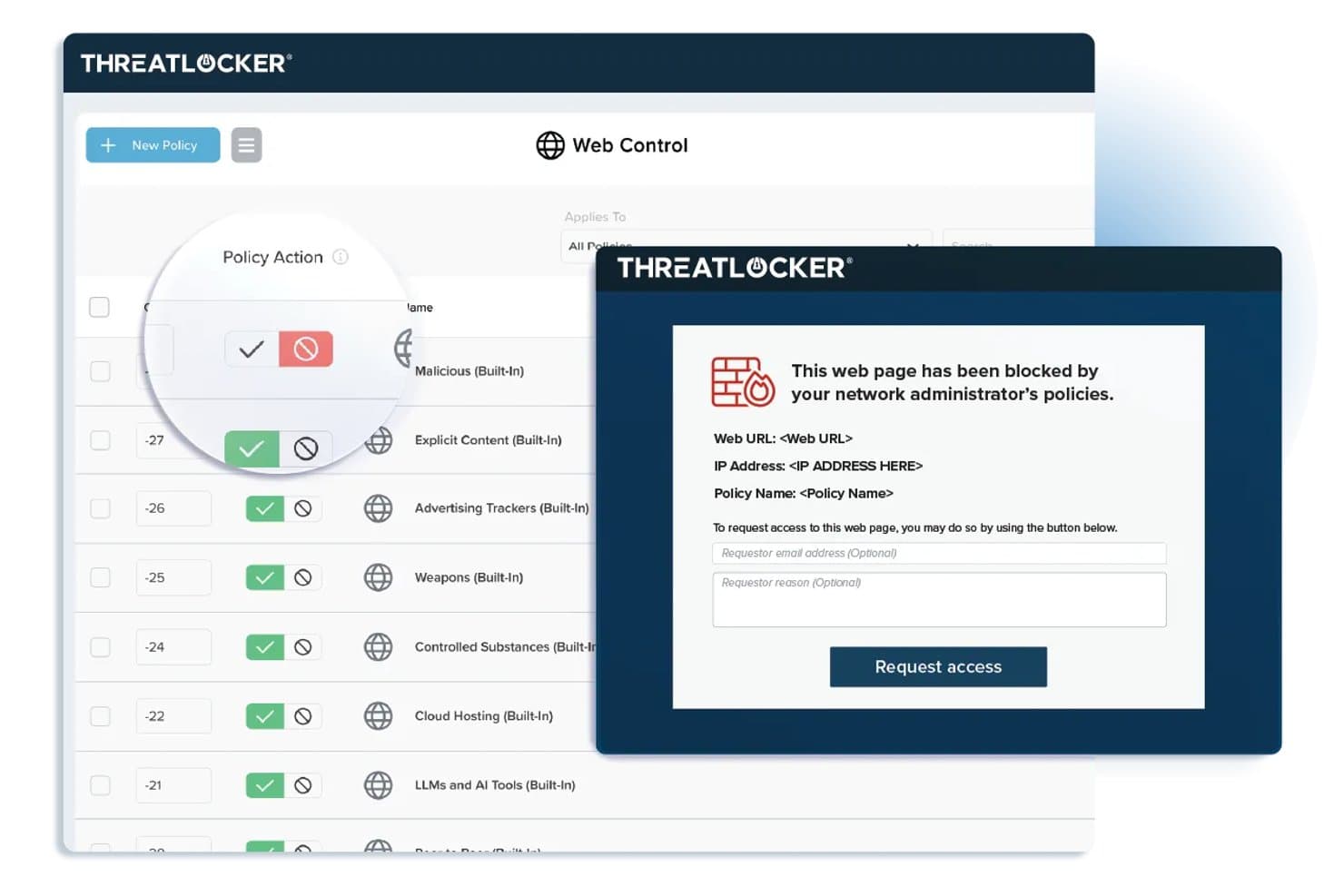
ThreatLocker bietet Web-Control-Richtlinien, die eingeschränkte Webseiten blockieren und eine individualisierbare Blockseite mit einem Zugriffsantragsformular für Endnutzer anzeigen. ThreatLocker ist eine Zero-Trust-Sicherheitsplattform für die Netzwerkzugriffskontrolle, die Anwendungs-Allowlisting, Gerätemanagement, Netzwerksegmentierung und Echtzeit-Bedrohungsreaktion in einer einzigen, einheitlichen Konsole vereint.
Für wen ist ThreatLocker am besten geeignet?
Organisationen mit strikten Zero-Trust-Richtlinien, die eine detaillierte Kontrolle über Anwendungen und Gerätezugriffe in Windows-basierten IT-Umgebungen wünschen.
Warum habe ich ThreatLocker ausgewählt
Ich habe ThreatLocker als eines der besten ausgewählt, weil ich schnell granulare Zugriffssteuerungen auf Anwendungsebene einrichten und unautorisierte ausführbare Dateien am Endpunkt blockieren kann. Es gibt mir Sicherheit zu wissen, dass ich rund um die Uhr Expertenunterstützung im Bereich Cybersicherheit habe, wenn ich strikte Zero-Trust-Richtlinien durchsetze.
Wichtige Funktionen von ThreatLocker
- Ringfencing: Isoliert Anwendungen, um eine laterale Bewegung im Netzwerk zu verhindern.
- Netzwerkkontrolle: Beschränkt ein- und ausgehenden Datenverkehr basierend auf präzisen Gruppen- und Richtlinienkonfigurationen.
- Speicherkontrolle: Verwalten Sie den Zugriff auf USB- und externe Speichergeräte mit anpassbaren Regeln.
- Genehmigungs-Workflow für Administratoren: Ermöglicht es Administratoren, eine explizite Genehmigung zu verlangen, bevor neue oder unbekannte Anwendungen ausgeführt werden.
ThreatLocker-Integrationen
ThreatLocker bietet native Integrationen mit Microsoft Active Directory und Azure, SSO-Anbietern mit SAML-Unterstützung und stellt eine API für kundenspezifische Integrationen zur Verfügung.
Pros and Cons
Pros:
- 24/7 Expertenunterstützung für Bedrohungsreaktionen
- Granulare Allowlisting- und Ringfencing-Werkzeuge für Anwendungen
- Echtzeit-Geräte- und Speicherkontrollrichtlinien
Cons:
- Keine agentenlose Gerätediscovery verfügbar
- Nicht für IoT- oder BYOD-Onboarding ausgelegt
Learn more about ThreatLocker: Am besten geeignet für einheitliches Zugriffsmanagement
- 30-tägige kostenlose Testversion
- Preise auf Anfrage
Visit WebsiteCustomer Rating:4.4/5
Bild 7: Portnox Netzwerkzugangskontroll-Software Portnox ist eine Zugangskontroll-Softwarelösung, die sich auf umfassende Netzwerksichtbarkeit und -kontrolle konzentriert. Dieses Tool zeichnet sich durch ein einheitliches Zugriffsmanagement über verschiedene Geräte und Netzwerke hinweg aus, was es ideal für Organisationen macht, die Kontrolle und Sicherheit auf einer Plattform suchen.
Warum ich Portnox ausgewählt habe: Ich habe Portnox in diese Liste aufgenommen, weil der Fokus auf einheitlichem Zugriffsmanagement liegt. Das herausragende Merkmal ist die Fähigkeit, vollständige Sichtbarkeit über alle verbundenen Geräte zu bieten – eine Kompetenz, die bei anderen von mir betrachteten Tools nicht so stark ausgeprägt ist. Für den Anwendungsfall des einheitlichen Zugriffsmanagements sehe ich die Stärke von Portnox in der Möglichkeit, zentrale Kontrolle über ein diverses Netzwerk zu ermöglichen.
Herausragende Funktionen & Integrationen:
Das Kernmerkmal von Portnox ist die Bereitstellung vollständiger Netzwerksichtbarkeit, wodurch Organisationen den Zugriff an allen Verbindungspunkten steuern können. Das Tool bietet außerdem Funktionen wie Remote-Zugriffssteuerung, risikobasierte Authentifizierung und die Erkennung von Netzwerk-Anomalien. Was die Integrationen betrifft, so lässt sich Portnox mit einer Vielzahl von Unternehmenssystemen integrieren, darunter VPNs, Switches, Wireless-Controller und Mobile-Device-Management-Lösungen, was einen reibungsloseren Sicherheits-Workflow ermöglicht.
Pros and Cons
Pros:
- Stellt vollständige Netzwerksichtbarkeit bereit
- Bietet zentrale Kontrolle über verschiedene Netzwerke und Geräte
- Integriert sich mit einer Vielzahl von Unternehmenssystemen
Cons:
- Preisinformationen sind nicht ohne Weiteres verfügbar
- Kann für kleine Unternehmen komplex sein
- Fehlende Preistransparenz könnte für einige potenzielle Nutzer ein Hindernis sein
Learn more about Portnox: Am besten geeignet für mandantenfähige, verwaltete NAC-Implementierungen
- Kostenloser Download, keine Testversion erforderlich
- Kostenlos, Open Source (optionaler kostenpflichtiger Support)
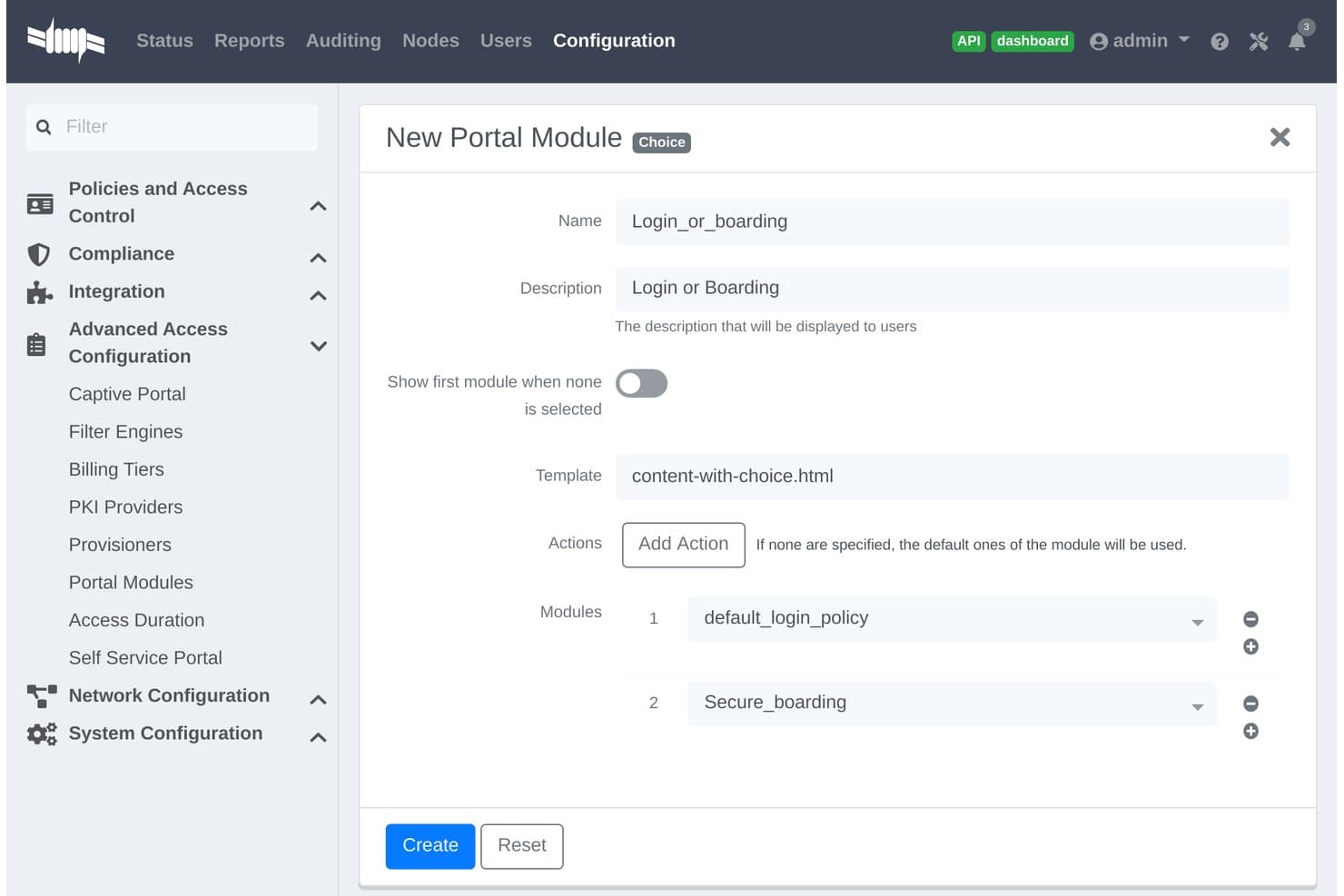
PacketFence bietet eine Konfiguration des Choice-Type Portal-Moduls, mit der Administratoren Login- und Boarding-Module zu einem einzigen Captive Portal-Prozess kombinieren können. PacketFence ist eine Open-Source-Lösung für Netzwerkzugangskontrolle, die für Organisationen mit vielfältigen Umgebungen entwickelt wurde. Sie bietet agentenlose Gerätedetektion, Authentifizierung, Autorisierung und richtlinienbasierte Netzwerksegmentierung.
Für wen ist PacketFence am besten geeignet?
Große Organisationen, Dienstanbieter und Campus-Umgebungen, die eine zentrale Steuerung über komplexe, mandantenfähige Netzwerke benötigen.
Warum ich PacketFence ausgewählt habe
Ich habe PacketFence als eine der besten Lösungen ausgewählt, weil es speziell für mandantenfähige, verwaltete NAC-Implementierungen entwickelt wurde. Mir gefällt die Unterstützung für agentenlose Gerätedetektion in kabelgebundenen, drahtlosen und VPN-Netzwerken sowie die flexible Durchsetzung von Richtlinien für Unternehmens- und Campus-Einsatz.
PacketFence Hauptfunktionen
- Anpassbares Captive Portal: Ermöglicht den Aufbau gebrandeter Web-Authentifizierungs- und Geräte-Registrierungsprozesse.
- Erweiterte Integration von Netzwerkgeräten: Unterstützt Switch-, Wireless- und Firewall-Anbieter wie Cisco, Aruba und Juniper.
- Automatisierte Compliance-Berichte: Exportiert Zugriffsprotokolle und Ereignisse, um Prüf- und Untersuchungstätigkeiten zu erleichtern.
- API-basierte Erweiterbarkeit: Verbindet sich mit Drittsystemen für automatisierte Workflows und individuelle Integrationen.
PacketFence Integrationen
PacketFence bietet native Integrationen mit Cisco, Aruba, Juniper, HP, Ruckus, Extreme Networks, Microsoft Active Directory, LDAP, RADIUS, SAML und verfügt über eine API für individuelle Integrationen.
Pros and Cons
Pros:
- Unterstützt agentenlose Detektion von Netzwerkgeräten
- Mandantenfähige Kontrolle für Managed Service Provider
- Skalierbar für große, verteilte Netzwerkumgebungen
Cons:
- Erfordert umfassende Linux- und Netzwerkkenntnisse
- Oberfläche ist weniger intuitiv als kommerzielle NAC-Lösungen
Learn more about PacketFence: Am besten für die Sicherung industrieller IoT-Netzwerke geeignet
- 30-tägige kostenlose Testversion + kostenlose Demo verfügbar
- Preise auf Anfrage
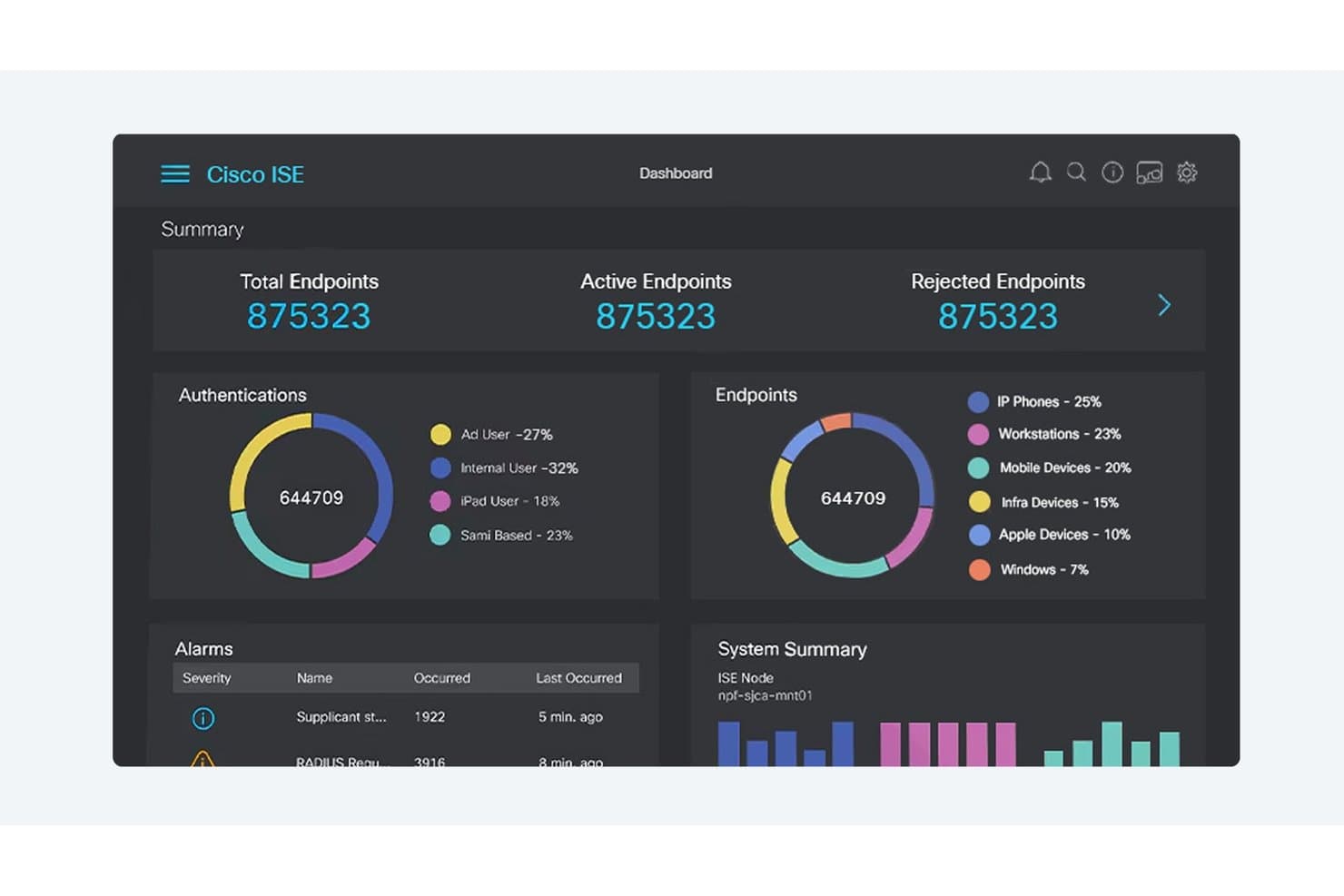
Cisco ISE bietet ein zentrales Netzwerkzugriffskontroll-Dashboard, das Echtzeit-Einblick in Endpunkt-Authentifizierung, Geräteklassifizierung, Alarme und Systemzustand gibt. Cisco ist eine Netzwerkzugriffskontrollplattform, die speziell für die Absicherung komplexer Industrieumgebungen entwickelt wurde. Sie kombiniert Geräteerkennung, dynamische Zugriffsrichtlinien, Segmentierung und Compliance-Funktionen, die für IoT- und Betriebsnetzwerke konzipiert sind.
Für wen ist Cisco am besten geeignet?
Sicherheitsteams für industrielle Netzwerke in Fertigung, Energie, Versorgung und kritischer Infrastruktur, die eine einheitliche Transparenz und Richtlinienkontrolle über IT- und OT-Umgebungen hinweg benötigen.
Warum ich Cisco ausgewählt habe
Ich habe Cisco als eine der besten Lösungen ausgewählt, weil mein Team jedes IoT-Gerät in großen Industrie-Netzwerken entdecken, profilieren und steuern kann. Die automatisierte Segmentierung und Bedrohungsreaktion helfen uns, die spezifischen Herausforderungen der industriellen IoT-Sicherheit zu bewältigen.
Cisco Schlüsselfunktionen
- Integration mit SCADA-Systemen: Verbindet sich direkt mit industriellen Kontrollsystemen, um vernetzte Betriebsgeräte zu überwachen.
- Dynamische Richtlinien-Engine: Ermöglicht die Echtzeit-Durchsetzung von Zugriffsregeln basierend auf Geräteidentität und Status.
- Individuelle Compliance-Berichte: Erstellt automatisierte Berichte, die an gängige regulatorische Rahmenwerke und Industriestandards angepasst sind.
- Unterstützung von Multi-Vendor-Netzwerken: Wendet Zugriffsrichtlinien und Erkennung über Cisco- und Drittanbieter-Netzwerktechnik hinweg an.
Cisco Integrationen
Cisco bietet native Integrationen im gesamten Cisco-Ökosystem, darunter Cisco ISE, Cisco Cyber Vision, Cisco SecureX und Cisco DNA Center. Es verfügt über native Integrationen mit Microsoft Azure und lässt sich mit Firewalls von Palo Alto Networks und Fortinet integrieren. Eine API für individuelle Integrationen steht zur Verfügung.
Pros and Cons
Pros:
- Tiefe Transparenz industrieller Netzwerkinfrastrukturen
- Echtzeit-Automatisierte Segmentierung für OT-Umgebungen
- Sehr granulare, rollenbasierte Richtlinienkontrollen
Cons:
- Umfangreiche Einrichtung für die Erstimplementierung erforderlich
- Komplexe Verwaltung für kleinere Sicherheitsteams
Learn more about Cisco: Am besten für automatisierte Risikominderung bei IoT-Geräten
- Demo auf Anfrage
- Individuelles Angebot
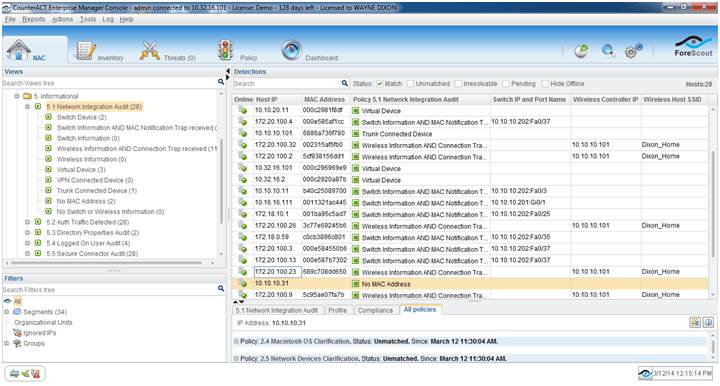
Bild 1: Forescout Netzwerkzugangskontrollsoftware Forescout ist eine Netzwerkzugangskontrollplattform, die sich auf automatisierte Geräteerkennung, -profilierung, Richtliniendurchsetzung und Echtzeit-Netzwerksegmentierung für verwaltete, nicht verwaltete, BYOD- und IoT-Endpunkte konzentriert.
Für wen ist Forescout am besten geeignet?
Große Unternehmen in regulierten Branchen, die eine detaillierte Kontrolle und Transparenz über unterschiedliche, mit dem Netzwerk verbundene Geräte, einschließlich IoT- und OT-Endpunkte, benötigen.
Warum ich Forescout ausgewählt habe
Ich habe Forescout als eines der besten ausgewählt, weil ich mich auf seine automatisierte Risikominderung für IoT-Geräte, die Echtzeit-Geräteerkennung und die agentenlose Profilierung verlasse. Meiner Erfahrung nach erkennt es schnell nicht verwaltete Geräte und ermöglicht mir, bei auftretenden Bedrohungen granulare Richtlinien durchzusetzen.
Forescout Hauptfunktionen
- Unterstützung von 802.1X-Authentifizierung: Verwendet mehrere Authentifizierungsstandards, um Geräte in kabelgebundenen und drahtlosen Netzwerken zu validieren.
- Orchestrierung der Netzwerksegmentierung: Integriert sich mit führenden Switches und Firewalls, um VLAN- und ACL-Zuweisungen zu automatisieren.
- Kontinuierliche Bewertung des Gerätestatus: Überwacht den Compliance-Status von Geräten während der gesamten Netzwerksitzung, nicht nur beim Verbindungsaufbau.
- Umfassende Compliance-Berichte: Liefert exportierbare Protokolle, Zugriffshistorien und Audit-Trails für behördliche Prüfungen.
Forescout Integrationen
Forescout bietet native Integrationen mit Cisco, Aruba, Palo Alto Networks, Fortinet, Splunk, ServiceNow, Okta, Microsoft Defender, CrowdStrike, IBM QRadar und AWS. Eine API steht für individuelle Integrationen zur Verfügung.
Pros and Cons
Pros:
- Unerreichte agentenlose IoT-Geräteerkennung
- Zuverlässige Automatisierung der Netzwerksegmentierung
- Echtzeit-Überwachung und -Reaktion auf Risiken
Cons:
- Einrichtung von Appliances erfordert Netzwerkstillstand
- Erweiterte Richtlinien-Workflows benötigen umfangreiche Anpassung
Learn more about Forescout: Am besten geeignet für die automatisierte Bereitstellung von Gästennetzwerken
- Demo auf Anfrage
- Individuelles Angebot (Abonnement oder unbefristet)
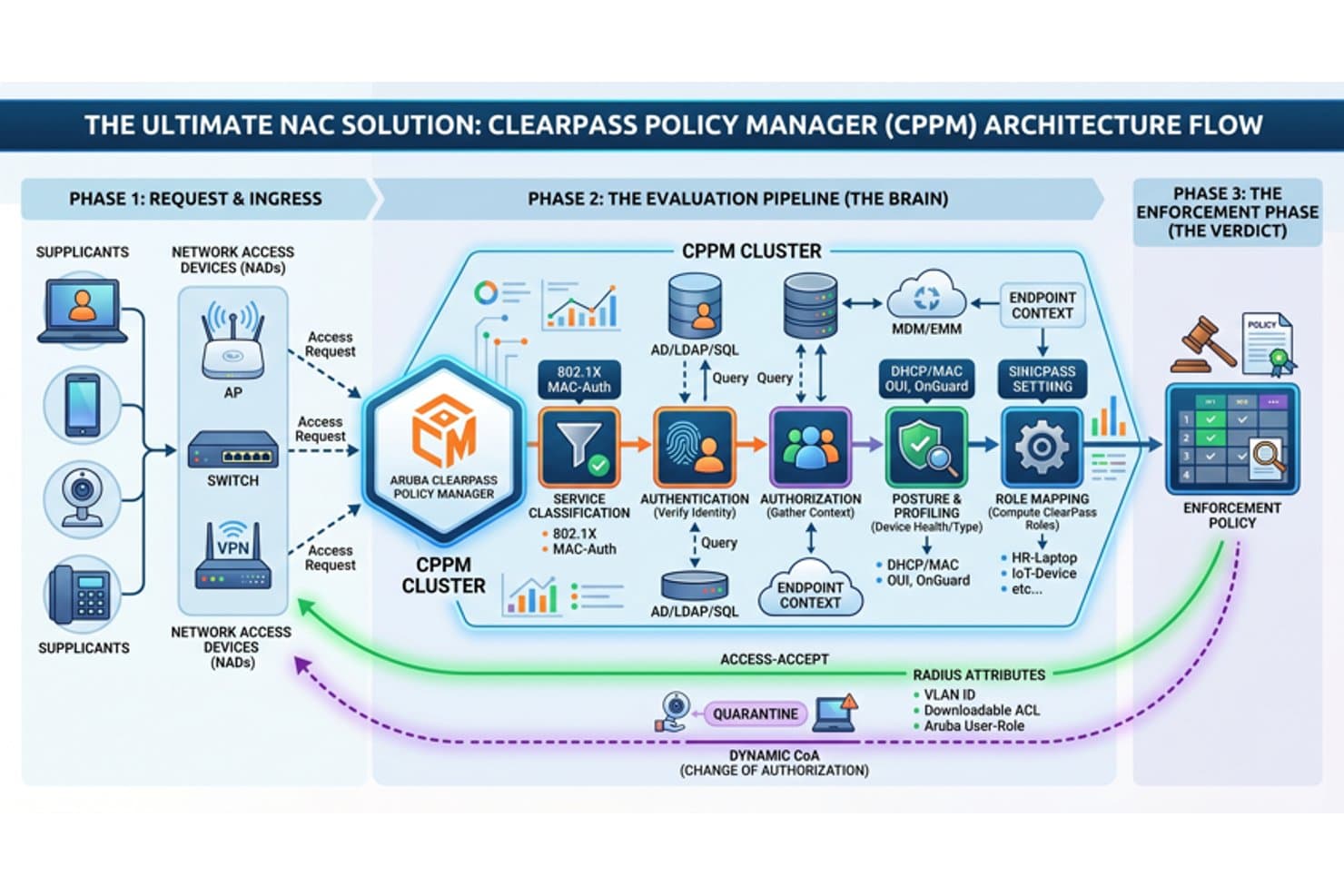
Aruba ClearPass bietet einen umfassenden NAC-Architekturablauf, der die Phasen Zugangsanfrage, Evaluierungspipeline und Richtliniendurchsetzung für die Netzwerkzugangskontrolle abdeckt. Aruba Clearpass ist eine Netzwerkzugangskontrollplattform, die automatisierte Geräteerkennung, rollenbasierte Authentifizierung, Echtzeit-Policy-Durchsetzung und Integration mit Identitäts-, Sicherheits- und Compliance-Systemen bietet.
Für wen ist Aruba Clearpass am besten geeignet?
Entwickelt für IT- und Sicherheitsteams in mittelständischen bis großen Unternehmen, die verschiedene Geräte und Gästezugänge in komplexen Netzwerkumgebungen verwalten.
Warum ich Aruba Clearpass gewählt habe
Ich habe Aruba Clearpass als eine der besten Lösungen ausgewählt, weil ich damit die sichere Gästeanmeldung automatisieren, granulare Geräte-Richtlinien anwenden und individuelle Workflows für Besucher und Auftragnehmer in großen, sich verändernden Umgebungen verwalten kann. Am besten geeignet für die automatisierte Bereitstellung von Gästennetzwerken.
Aruba Clearpass Hauptfunktionen
- Echtzeit-Geräteprofilierung: Erkennt und klassifiziert alle Endpunkte einschließlich IoT- und BYOD-Geräten ohne Agenten.
- Unterstützung für 802.1X-Authentifizierung: Ermöglicht sichere, standardbasierte Authentifizierung für kabelgebundene und drahtlose Verbindungen.
- Rollenbasierte Policy-Engine: Weist Richtlinien dynamisch basierend auf Benutzerrolle, Gerätetyp oder Sicherheitsstatus zu.
- Integration mit Sicherheitsplattformen: Verbindet sich mit SIEM-, EDR- und MDM-Tools für koordinierte Bedrohungsreaktionen und Compliance.
Aruba Clearpass Integrationen
Aruba Clearpass bietet native Integrationen mit Active Directory, Azure AD, Okta, Jamf, MobileIron, ServiceNow, Palo Alto Networks, Cisco ISE, Splunk und Fortinet. Eine API steht für individuelle Integrationen zur Verfügung.
Pros and Cons
Pros:
- Automatisierte und hochgradig konfigurierbare Bereitstellung von Gästennetzwerken
- Echtzeit-Geräte-Fingerprinting für alle Endpunkte
- Granulare, rollenbasierte Zugriffs- und Richtliniensteuerung
Cons:
- Die Erstkonfiguration ist für kleine Teams komplex
- Reporting Dashboards erfordern manuelle Einrichtung
Learn more about Aruba Clearpass: Am besten mit automatisierten Reaktionsworkflows für Sicherheitsereignisse
- Demo auf Anfrage
- Individuelles Angebot
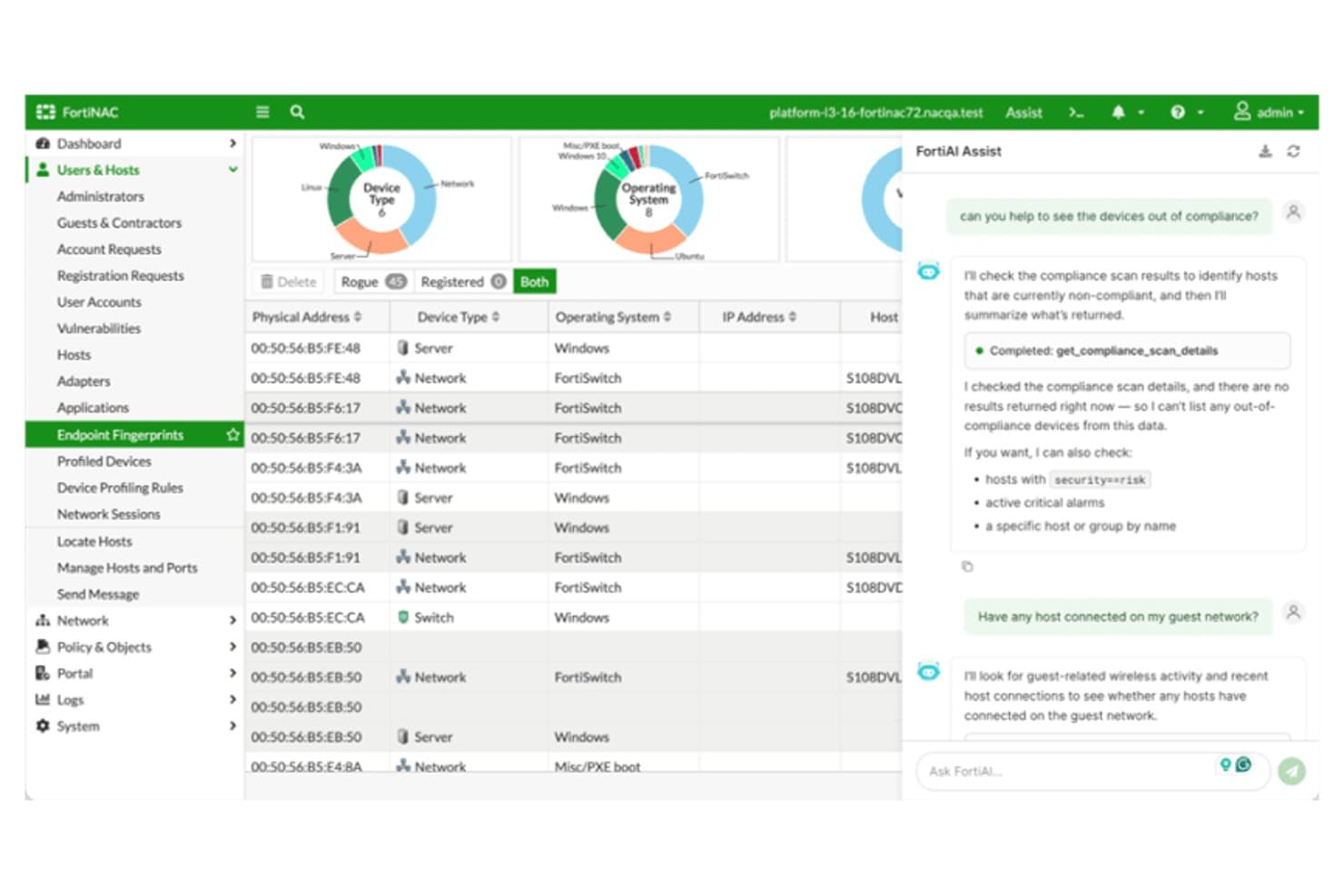
Fortinet FortiNAC bietet eine KI-gestützte Oberfläche mit Geräte-Compliance-Scan, Host-Management und Echtzeit-Netzwerktransparenz über Endpunkt-Fingerprints hinweg. Fortinet FortiNAC ist eine Netzwerkkontrollplattform, die für Organisationen entwickelt wurde, die eine fortschrittliche Geräteerkennung, dynamische Richtliniendurchsetzung, kontinuierliche Endpunktbewertung und Integration in Multi-Anbieter-Umgebungen benötigen.
Für wen ist Fortinet FortiNAC am besten geeignet?
Sicherheits- und IT-Teams in großen Unternehmen oder regulierten Organisationen, die komplexe Netzwerke mit mehreren Anbietern und unterschiedlichen Gerätetypen verwalten.
Warum habe ich Fortinet FortiNAC ausgewählt?
Ich habe Fortinet FortiNAC gewählt, weil ich mich auf die automatisierten Reaktionsworkflows verlasse, die riskante Geräte sofort isolieren und Netzwerk-Richtlinienänderungen auslösen. Ich nutze die Echtzeiterkennung, um Sicherheitsvorfälle automatisch zu bearbeiten, ohne manuelles Eingreifen.
Fortinet FortiNAC Schlüsselfunktionen
- Geräte-Profilierungs-Engine: Erkennt und klassifiziert alle Geräte, einschließlich IoT und OT, sobald sie sich mit dem Netzwerk verbinden.
- Mehrfach-Authentifizierungsmethoden: Unterstützt 802.1X, MAC-Authentifizierung, Captive Portal und zertifikatsbasierte Zugriffskontrollen.
- Dynamische Segmentierung: Weist Geräten auf Basis des Echtzeitstatus und der Identität die passenden VLANs oder Netzwerkzonen zu.
- Dashboard für Compliance-Berichte: Erstellt detaillierte Protokolle und anpassbare Berichte zur Unterstützung von Auditierungen und Untersuchungen.
Fortinet FortiNAC Integrationen
Fortinet FortiNAC bietet native Integrationen mit Fortinet Security Fabric Produkten wie FortiGate, FortiAnalyzer und FortiSIEM, sowie Cisco, Aruba, HPE, Extreme Networks, Meraki, Arista und Ruckus Netzwerktechnik. Eine API steht für individuelle Integrationen zur Verfügung.
Pros and Cons
Pros:
- Erweiterte Geräteprofilierung für IoT und OT
- Dynamische Netzwerksegmentierungsrichtlinien
- Automatisierte Reaktionen auf Sicherheitsereignisse
Cons:
- Oberfläche und Workflows erfordern umfangreiche Schulungen
- Einige Nutzer berichten über langsamen technischen Support
Learn more about Fortinet FortiNAC: Am besten mit mehrschichtiger Abwehr von Dateibedrohungen
- Kostenlose Testversion / Demo auf Anfrage
- Lizenzbasiert, jährlich oder mehrjährig
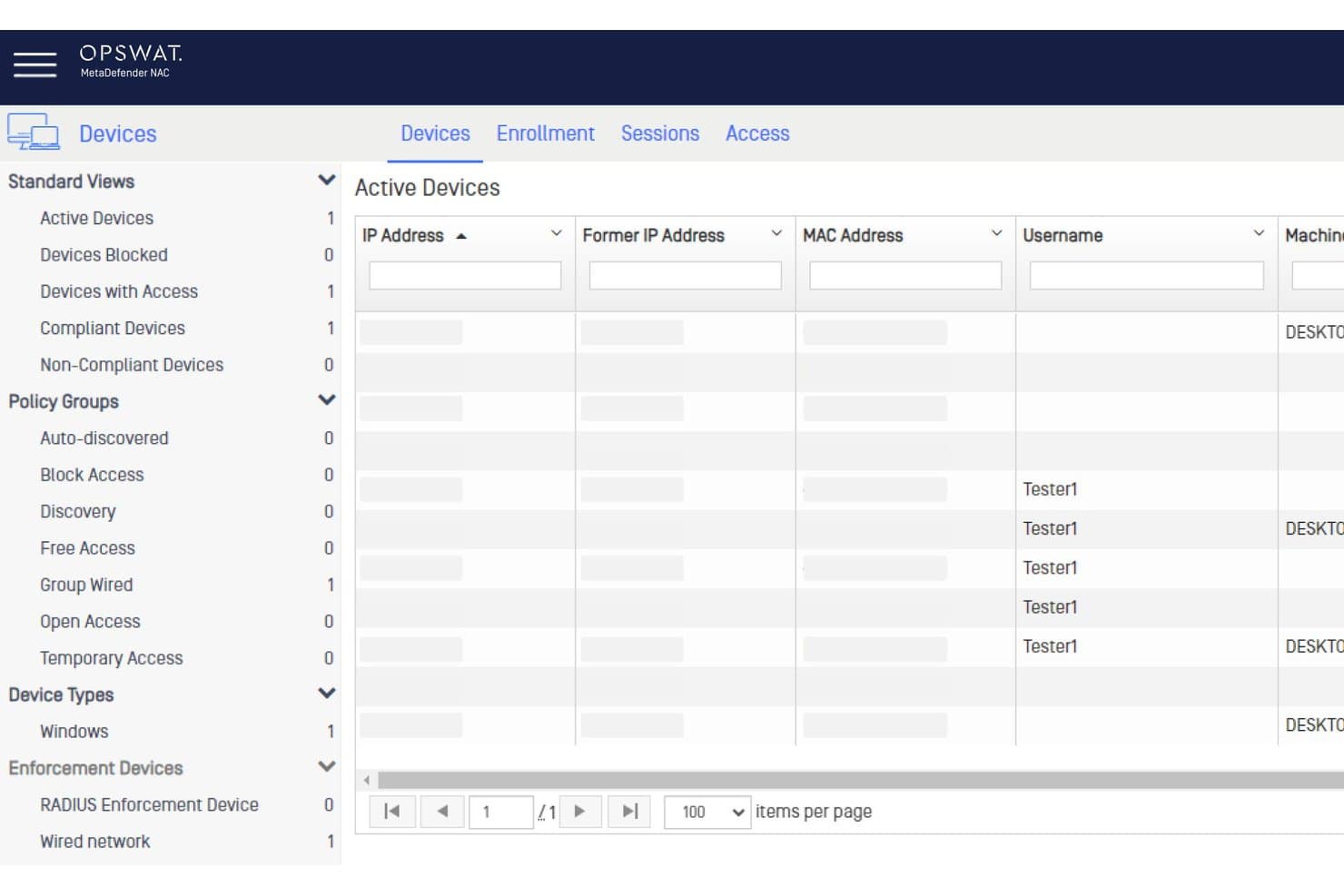
OPSWAT MetaDefender NAC bietet ein Dashboard für aktive Geräte, das Gerätestatus, Richtliniengruppen und Benutzersitzungen zur Netzwerkkontrolle anzeigt. OPSWAT MetaDefender ist eine Sicherheitsplattform, die fortschrittliche Inhaltsüberprüfung, Dateiscans und eine detaillierte Bewertung des Gerätezustands für Organisationen bietet, die ihre Zugangskontrolle im Netzwerk aufrüsten möchten.
Für wen ist OPSWAT MetaDefender am besten geeignet?
Sicherheitsteams in regulierten Unternehmen und Betreiber von Infrastrukturen, die komplexe Dateiübertragungen und den Zugriff von Drittanbieter-Geräten verwalten.
Warum ich OPSWAT MetaDefender gewählt habe
Ich habe mich für OPSWAT MetaDefender entschieden, weil ich mich auf dessen mehrschichtige Abwehr von Dateibedrohungen verlasse, um dateibasierte Risiken an Netzwerkgrenzen zu kontrollieren. Ich nutze die umfassende Dateibereinigung, Mehrfach-Scanning und Schwachstellenanalyse, um Bedrohungen zu stoppen, bevor Dateien Endpunkte erreichen.
Hauptfunktionen von OPSWAT MetaDefender
- Überprüfung des Gerätezustands: Bewertet Geräte bezüglich Betriebssystemversion, Sicherheitspatches und konformer Antivirus-Lösung.
- SIEM-Integration: Sendet Bedrohungsinformationen und Vorfalldaten direkt an Security Information and Event Management Systeme.
- Richtlinienbasierte Zugriffskontrolle: Erzwingt gerätezentrierte Netzwerkzugriffsregeln basierend auf Risikobewertung und Compliance-Status.
- Agentenloses Gerätescanning: Überprüft nicht verwaltete und BYOD-Geräte ohne Softwareinstallation.
OPSWAT MetaDefender Integrationen
OPSWAT MetaDefender bietet native Integrationen mit Cisco ISE, Forescout, Palo Alto Networks, ServiceNow und Splunk sowie eine API für individuelle Integrationen.
Pros and Cons
Pros:
- Mehrschichtige Scans mit über 30 Antiviren-Engines
- Fortschrittliche Dateibereinigung bei Uploads
- Echtzeit-Prüfung von Endpunkt-Risiken und Compliance
Cons:
- Kein dediziertes NAC zur Geräteerkennung
- Komplexe Implementierung für kleinere IT-Teams
Learn more about OPSWAT MetaDefender:
Weitere Software zur Netzwerkzugriffssteuerung
Nachfolgend finden Sie eine Liste weiterer Softwarelösungen zur Netzwerkzugriffssteuerung, die ich in die engere Auswahl genommen habe, die es aber nicht unter die Top 10 geschafft haben. Es lohnt sich auf jeden Fall, sie sich anzusehen.
- 11Cloudflare OneAm besten mit quantensicherer Verschlüsselung auf allen Ebenen
- 12NACVIEWAm besten für die Echtzeit-Netzwerküberwachung
- 13TwingateAm besten für die Sicherheit von Remote-Mitarbeitenden
- 14SilverfortAm besten mit Laufzeitschutz für alle Identitäten
- 15Auconet BICSAm besten mit unbegrenzter Skalierbarkeit für große Unternehmen
Weitere Bewertungen von Software zur Netzwerkzugriffssteuerung
So bewerte ich Network Access Control Software
Ich bewerte diese Tools in zwei Ebenen: die grundlegenden Anforderungen, die eine NAC-Plattform abdecken muss – wie 802.1X-Durchsetzung und Endpoint-Status – sowie die Unterscheidungsmerkmale, die bestimmte Anbieter herausheben.
Kernfunktionen (Grundvoraussetzungen für diese Liste)
Bei der Auswahl der Tools für meine Liste bewerte ich jedes einzelne auf einer Skala von 0 (bietet die Funktion nicht) bis 5 (übertrifft in diesem Bereich) für jede der unten aufgeführten Kernfunktionen. Anschließend rechne ich die Gesamtpunktzahl des Tools in einen Prozentsatz um. Jedes Tool muss einen Mindest-Gesamtwert von 65 % erreichen, um berücksichtigt zu werden.
- Geräteerkennung & Profilierung: Ich prüfe, ob die Plattform verwaltete Endpunkte, BYOD-Laptops, IoT-Sensoren und nicht verwaltete Geräte automatisch in kabelgebundenen und drahtlosen Segmenten erkennen und klassifizieren kann.
- Authentifizierung & Autorisierung: Jedes Tool sollte mehrere Methoden wie 802.1X, MAC-Authentifizierungsumgehung und Captive Portals unterstützen sowie rollenbasierte Zugriffssteuerungen, die mit Verzeichnisdiensten verknüpft sind.
- Richtliniendurchsetzung & Segmentierung: Ich schaue, wie das Tool VLANs zuweist, ACLs anwendet oder Mikrosegmentierung je nach Identität und Gerätekontext orchestriert, um den Datenverkehr dynamisch zu isolieren.
- Endpunkt-Statusbewertung: Die Plattform sollte den Gerätezustand – Patch-Stand, Antivirenstatus, Festplattenverschlüsselung – vor und während einer Sitzung überprüfen, nicht nur bei der ersten Verbindung.
- Automatisierte Bedrohungsreaktion: Ich bewerte, ob das Tool ein kompromittiertes Gerät in Echtzeit isolieren oder einschränken kann, etwa indem ein markierter Endpunkt ohne manuelles Zutun in ein Bereinigungs-VLAN verschoben wird.
- Compliance-Berichte & Audits: Detaillierte Zugriffsprotokolle und prüfbereite Berichte sind wichtig, insbesondere für Teams, die sich auf PCI-DSS-, HIPAA- oder NIST-Prüfungen vorbereiten, bei denen ein Nachweis über Zugangskontrollen erforderlich ist.
Sobald ich eine Liste von Tools habe, die diese Kriterien erfüllen, achte ich darauf, was jedes Tool besonders macht.
Unterscheidungsmerkmale (Was Anbieter unterscheidet)
So vergleiche und kontrastiere ich verschiedene Anbieter:
Hervorstechende Funktionen
Multi-Vendor-Netzwerkunterstützung ist ein großer Unterschied – ich prüfe, ob die Plattform mit Geräten von Cisco, Aruba, Juniper und Fortinet funktioniert, ohne auf einen Einzelanbieter festgelegt zu sein. Die Intelligenz bei IoT- und OT-Geräten trennt Tools ebenfalls schnell voneinander. Umgebungen mit Medizingeräten oder automatisierten Gebäudekontrollern benötigen eine spezielle Erkennung, die weit über Standard-Profilierung hinausgeht. Risikobasierte, adaptive Richtlinien runden dies ab, wobei der Zugang dynamisch je nach Bedrohungsscore in Echtzeit angepasst wird und nicht auf statischen Regeln basiert.
Mehr als nur Funktionen
Ökosystem-Integrationen sind hier besonders wichtig. Ich überprüfe, ob sich die NAC-Plattform mit vorhandenen SIEM-, EDR- und Identitätsanbietern verbinden lässt, damit sie sich in den Security-Stack einfügt und nicht nur danebensteht. Auch die Lizenzstruktur ist ein wichtiger Aspekt – manche Anbieter berechnen pro Gerät, andere pro gleichzeitigem Benutzer, und versteckte Modulgebühren für Gastzugang oder Statusbewertungen können die Kosten schnell in die Höhe treiben. Darüber hinaus bewerte ich Flexibilität bei der Bereitstellung, da Teams mit hybriden Umgebungen andere Optionen als nur eine On-Premises-Appliance benötigen.
Häufig gestellte Fragen
Welche Vorteile bietet der Einsatz von Software zur Netzwerkzugriffskontrolle?
Die Verwendung von Software zur Netzwerkzugriffskontrolle bietet zahlreiche Vorteile, darunter:
- Verbesserte Sicherheit: NAC-Software erhöht die Sicherheit, indem sie sicherstellt, dass nur autorisierte Geräte auf das Netzwerk zugreifen. Sie überprüft Benutzer und Geräte, bevor sie den Netzwerkzugriff gewährt, und verringert so das Risiko von Cyberbedrohungen.
- Durchsetzung von Richtlinien: Mit diesen Tools können Unternehmen Richtlinien auf verschiedenen Geräten und in unterschiedlichen Anwendungen durchsetzen und so die Sicherheit ihres Netzwerks weiter stärken.
- Transparenz und Kontrolle: NAC-Software bietet einen umfassenden Überblick über alle verbundenen Geräte und deren Aktivitäten und ermöglicht Überwachung und Kontrolle in Echtzeit.
- Automatisierte Reaktionen: Die Software kann Reaktionen auf potenzielle Bedrohungen automatisieren, etwa betroffene Systeme isolieren oder bestimmte Geräte blockieren, und dadurch bei Sicherheitsvorfällen ein schnelles Handeln unterstützen.
- Einhaltung gesetzlicher Vorgaben: NAC-Tools unterstützen Unternehmen dabei, bestimmte gesetzliche Anforderungen an Daten- und Netzwerksicherheit zu erfüllen.
Wie viel kosten Tools zur Netzwerkzugriffskontrolle normalerweise?
Die Kosten für Tools zur Netzwerkzugriffskontrolle können je nach konkreten Funktionen, Unternehmensgröße und Anzahl der zu verwaltenden Benutzer oder Geräte stark variieren. Die Preismodelle basieren in der Regel auf Lizenzen pro Benutzer oder pro Gerät, wobei einige Anbieter gestaffelte Tarife mit einem zunehmenden Funktionsumfang anbieten.
Welche Preisspanne ist für Software zur Netzwerkzugriffskontrolle üblich?
Software zur Netzwerkzugriffskontrolle kann von etwa $5 pro Benutzer und Monat bis zu mehreren hundert Dollar pro Benutzer und Monat für komplexere Unternehmenslösungen kosten.
Welche Software zur Netzwerkzugriffskontrolle ist am günstigsten und welche am teuersten?
Die günstigste NAC-Software in unserer Auswahl ist LiteManager mit Tarifen ab $10 pro Monat. Am oberen Ende der Preisspanne können die Lösungen von Cisco aufgrund ihrer umfangreichen Funktionen und umfassenden Funktionen auf Unternehmensniveau mehrere hundert Dollar pro Benutzer und Monat kosten.
Gibt es kostenlose Optionen für Software zur Netzwerkzugriffskontrolle?
Ja, einige Tools wie PacketFence bieten eine kostenlose Open-Source-Version ihrer Software zur Netzwerkzugriffskontrolle an. Diese kostenlosen Versionen verfügen jedoch häufig nicht über die erweiterten Funktionen und den Support kostenpflichtiger Lösungen und sind möglicherweise nicht für große oder komplexe Netzwerke geeignet.