

Wenn Sie IT-Abläufe verwalten, kennen Sie die Herausforderungen, Systeme reibungslos am Laufen zu halten und sich gleichzeitig an neue technologische Anforderungen anzupassen. Vielleicht haben Sie ManageEngine verwendet, aber festgestellt, dass es in bestimmten Bereichen nicht ausreicht.
Die richtige Software für das IT-Management kann für Ihr Team einen großen Unterschied machen. Sie unterstützt Sie bei allem – von der Systemüberwachung über die Geräteverwaltung bis hin zur Sicherstellung der Compliance.
Meiner Erfahrung nach kann die Prüfung von Alternativen zu einer besseren Abstimmung auf Ihre spezifischen Anforderungen führen. Ich stelle Ihnen einige der besten ManageEngine-Alternativen auf dem Markt vor und konzentriere mich darauf, was jede Lösung auszeichnet und wie sie zu den Herausforderungen Ihres Unternehmens passen könnte.
Sehen wir uns diese Optionen an, damit Sie eine Lösung finden, die Ihre Ziele wirklich unterstützt.
Was ist ManageEngine?
ManageEngine ist eine Software für das IT-Management, die Unternehmen dabei unterstützt, ihre IT-Abläufe effizient zu überwachen. Sie wird häufig von IT-Fachleuten, Netzwerkadministratoren und Systemverantwortlichen eingesetzt, die komplexe IT-Infrastrukturen verwalten müssen.
Die Funktionen für Asset-Management, Netzwerküberwachung und Helpdesk unterstützen Ihr Team dabei, den Systemzustand aufrechtzuerhalten und Probleme zeitnah zu beheben. Insgesamt bietet ManageEngine eine zentrale Lösung für die Verwaltung verschiedener IT-Anforderungen und erleichtert es Ihnen, Ihre Systeme im Blick zu behalten.
Vergleichstabelle der ManageEngine-Alternativen
Diese Vergleichstabelle fasst die Preisinformationen für meine wichtigsten ManageEngine-Alternativen zusammen:
| Tool | Best For | Trial Info | Price | ||
|---|---|---|---|---|---|
| 1 | Am besten geeignet für umfassende Infrastruktur-Transparenz | 30-tägige kostenlose Testversion | Ab $200/Monat (jährliche Abrechnung) | Website | |
| 2 | Am besten geeignet für Netzwerkdiagnosetools | 14-tägige kostenlose Testversion | Ab $1.50/Monat/verwaltetes Gerät | Website | |
| 3 | Am besten geeignet für die Nachverfolgung von Unternehmens-Workflows | Kostenlose Demo verfügbar | Preise auf Anfrage | Website | |
| 4 | Am besten für individuell anpassbares Asset-Tracking | 7-tägige kostenlose Testphase + kostenlose Demo verfügbar | Preise auf Anfrage | Website | |
| 5 | Am besten für automatisierte Selbstheilung | Kostenlose Demo verfügbar | Preise auf Anfrage | Website | |
| 6 | Am besten geeignet für Integration ins Microsoft-Ökosystem | 30-tägige kostenlose Testversion verfügbar | Ab $4/Nutzer/Monat (jährliche Abrechnung) | Website | |
| 7 | Am besten für KI-gestütztes IT-Service-Management | Kostenlose Testversion + kostenlose Demo verfügbar | Preise auf Anfrage | Website | |
| 8 | Am besten geeignet für ITSM und Teamzusammenarbeit | 14-tägige kostenlose Testversion + Gratisplan + kostenlose Demo verfügbar | Ab $20/Agent/Monat | Website | |
| 9 | Am besten geeignet für das Management von SaaS-Anwendungen | Kostenlose Demo verfügbar | Preise auf Anfrage | Website | |
| 10 | Am besten geeignet für einfaches Einrichten von Fernzugriff | 30-tägige kostenlose Testphase + kostenlose Demo verfügbar | Ab $129/Techniker/Monat (jährliche Abrechnung) | Website |


Warum Sie unseren Software-Empfehlungen vertrauen können
6,700+
Reviews
20
Industry experts
16+
Evaluation factors
14
Years
Unser Team testet und bewertet Software seit 2012. Als Tech-Führungskräfte wissen wir selbst, wie schwierig – und wichtig – es ist, die richtige Software auszuwählen.
Für diesen Leitfaden haben wir Tools mithilfe von praktischen Tests und unabhängiger Recherche bewertet und dabei unsere Bewertungskriterien angewendet.
Unsere Bewertungen spiegeln unser menschliches redaktionelles Urteilsvermögen wider, keine Verkaufsstrategie.
Expertenprüfer:
- Paulo Gardini MiguelTech-Direktor
 Tim FisherVP für KI
 Gabriel RosasTech Lead & Software-Architekt
 Christhian GruhnTech Lead & Plattform-Architekt

Bewertungen der besten ManageEngine-Alternativen
Nachfolgend finden Sie meine ausführlichen Zusammenfassungen der besten ManageEngine-Alternativen, die es in meine Auswahlliste geschafft haben. Meine Bewertungen bieten einen detaillierten Einblick in die wichtigsten Funktionen, Vor- & Nachteile, Integrationen und idealen Anwendungsfälle jedes Tools, damit Sie die beste Lösung für Ihre Anforderungen finden.
 Am besten geeignet für umfassende Infrastruktur-Transparenz
- 30-tägige kostenlose Testversion
- Ab $200/Monat (jährliche Abrechnung)
Visit WebsiteCustomer Rating:4.6/5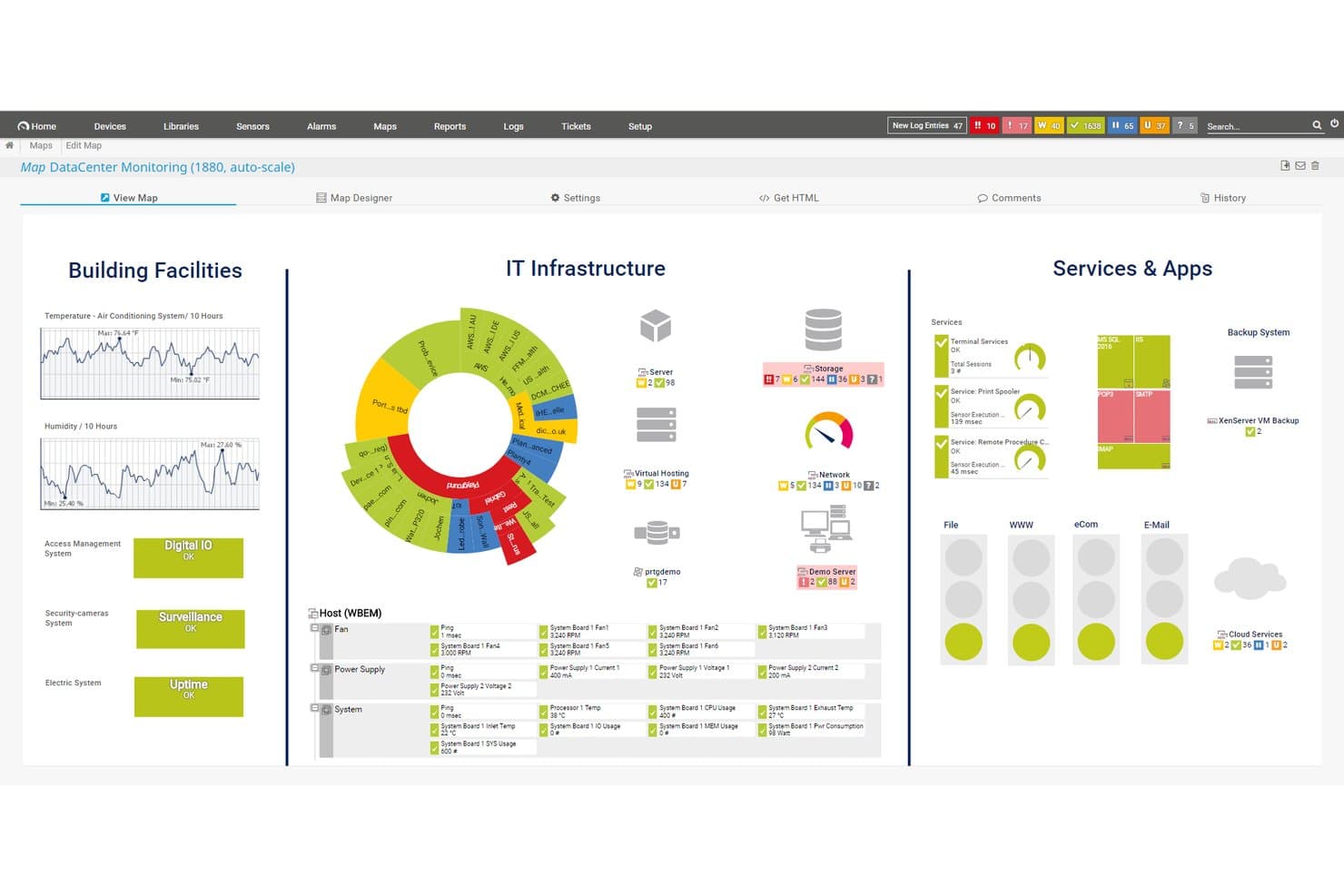
Paessler PRTG bietet eine anpassbare Monitoring-Karte für das Rechenzentrum, die Gebäudeeinrichtungen, IT-Infrastruktur sowie Dienste und Anwendungen in einer einheitlichen Dashboard-Ansicht darstellt. Paessler PRTG ist eine agentenlose Infrastrukturüberwachungsplattform, entwickelt für Netzwerk- und Systemadministratoren, die eine einheitliche Sicht auf Geräte, Server, Anwendungen und Cloud-Umgebungen benötigen – ohne den Aufwand, mehrere Tools parallel zu nutzen.
Für wen ist Paessler PRTG am besten geeignet?
Es eignet sich besonders für mittelgroße bis große Unternehmen mit komplexer On-Premises- oder hybrider Infrastruktur in Branchen wie Fertigung, Gesundheitswesen und Telekommunikation.
Warum Paessler PRTG eine gute ManageEngine-Alternative ist
Ich habe Paessler PRTG in meine Top-Auswahl aufgenommen, da seine sensorbasierte Architektur Netzwerkgeräte, Server, VMs, Anwendungen und OT-Systeme wie Modbus und OPC UA aus einer einzigen Konsole abdeckt. Besonders gefällt mir das Abhängigkeitsmapping, das zeigt, wie Geräte miteinander verbunden sind – so kann mein Team die tatsächlichen Ursachen schnell erkennen, statt falschen Alarmen nachzugehen. Durch das verteilte Remote-Probe-Modell lassen sich zudem mehrere Standorte überwachen, ohne an jedem Standort eigene Monitoring-Stacks bereitstellen zu müssen.
Wichtige Funktionen von Paessler PRTG
- Multi-Plattform-Probe-Unterstützung: Verteilte Probes auf Linux, Windows, NAS oder Containern ausführen für flexible Bereitstellung in verschiedenen Umgebungen.
- Anpassbarer Map-Designer: In Echtzeit Infrastrukturkarten und Dashboards per Drag-and-drop erstellen, um Status und Zusammenhänge zu visualisieren.
- Audit-Logging: Benutzeraktionen und Systemereignisse direkt in der Plattform protokollieren – für mehr Nachweisbarkeit und Sicherheit bei der Überwachung.
- API und individuelle Sensoren: Monitoring per HTTP API erweitern und eigene Sensoren für spezielle Geräte, Anwendungen oder Protokolle erstellen.
Paessler PRTG-Integrationen
Paessler PRTG bietet native Integrationen mit AWS, Microsoft Azure, VMware, Siemens Industrial Edge, Cisco Meraki, HPE, Dell EMC, OPC UA und MQTT. Eine API steht für eigene Integrationen bereit.
Pros and Cons
Pros:
- Reduziert den Bereitstellungsaufwand pro Endpunkt
- Unterstützt OT- und IoT-Protokolle nativ
- Sensorbasierte Architektur skaliert über verschiedene Umgebungen
Cons:
- Kein integriertes Ticketing- oder ITSM-Modul
- Sensorbasierte Preismodelle werden in großem Maßstab teuer
Learn more about Paessler PRTG: Am besten geeignet für Netzwerkdiagnosetools
- 14-tägige kostenlose Testversion
- Ab $1.50/Monat/verwaltetes Gerät
Visit WebsiteCustomer Rating:4.9/5
Domotz unterstützt Ferndiagnose und -überwachung, um zuverlässige Netzwerke aufrechtzuerhalten Domotz ist eine Netzwerküberwachungs- und Verwaltungssoftware, die sich an Managed Service Provider und IT-Fachleute richtet. Sie bietet Werkzeuge für Netzwerkdiagnose, Fernüberwachung und Fehlerbehebung, um die Zuverlässigkeit und Leistung von Netzwerken sicherzustellen.
Warum es eine gute ManageEngine-Alternative ist: Domotz stellt spezialisierte Netzwerkdiagnosetools zur Verfügung, die Ihre Möglichkeiten zur Überwachung und Fehlerbehebung von Netzwerkproblemen erweitern. Mit Echtzeit-Benachrichtigungen können Sie schnell auf Netzwerkprobleme reagieren. Die Fernüberwachungsfunktionen der Plattform ermöglichen es Ihnen, Netzwerke von überall zu verwalten. Der Schwerpunkt von Domotz auf Netzwerkdiagnosen macht es zu einer effektiven Alternative für alle, die detaillierte Netzwerkeinblicke suchen.
Herausragende Funktionen & Integrationen:
Funktionen umfassen die automatische Geräteerkennung, mit der Sie alle Geräte in Ihrem Netzwerk einfach identifizieren können. Die Plattform bietet fortschrittliche Reporting-Tools, die Einblicke in die Netzwerkleistung und mögliche Probleme liefern. Zusätzlich unterstützt Domotz die Verwaltung mehrerer Standorte, sodass Sie mehrere Netzwerke über eine einzige Oberfläche überwachen können.
Integrationen umfassen Slack, Amazon Alexa, Google Assistant, Control4, Crestron, Sonos, Luxul, Ruckus, Ubiquiti und Cisco Meraki.
Pros and Cons
Pros:
- Detaillierte, integrierte Netzwerkdiagnosetools für tiefgehende Analysen
- Echtzeit-Benachrichtigungen via E-Mail, SMS, Slack oder der mobilen App
- Unterstützt Multi-Site-Management für Skalierbarkeit und Effizienz
Cons:
- Erfordert Kenntnisse im Netzwerkmanagement
- Einrichtung des virtuellen Agents kann inkonsistent sein
Learn more about Domotz: Am besten geeignet für die Nachverfolgung von Unternehmens-Workflows
- Kostenlose Demo verfügbar
- Preise auf Anfrage
Visit WebsiteCustomer Rating:4.4/5
ServiceNow vereinfacht Unternehmens-Workflows über IT, Personalwesen und andere Abteilungen hinweg ServiceNow ist eine cloudbasierte Plattform zur Automatisierung und Verwaltung von Unternehmens-Workflows über verschiedene Abteilungen hinweg. Sie unterstützt Organisationen bei der Abwicklung von IT-Service-Management, Betriebsmanagement, Personalwesen, Kundenservice und weiteren Geschäftsprozessen von einer zentralen Plattform aus.
Warum es eine gute ManageEngine-Alternative ist: ServiceNow ist ideal für Teams, die einen einheitlichen Überblick über viele Prozesse benötigen und alles an einem Ort verwalten möchten. Die KI-gestützte Workflow-Automatisierung hilft, Abläufe zu optimieren, während anpassbare und vorgefertigte Workflows die Abbildung von Prozessen über verschiedene Abteilungen hinweg ermöglichen. Mit einem gemeinsamen Arbeitsbereich für Daten, Aufgaben und Freigaben erhalten Teams eine klare Übersicht über Arbeiten, Anfragen und Fortschritte im gesamten Unternehmen.
Herausragende Funktionen & Integrationen:
Funktionen umfassen eine einheitliche Workflow-Engine, die sich an IT, Personalwesen, Kundenservice, Sicherheit und Betriebsabläufe anpasst. Die Low-/No-Code-Tools ermöglichen es, ganz einfach benutzerdefinierte Formulare, Workflows und Automatisierungen zu erstellen. ServiceNow bietet zudem Dashboards und eine zentrale Datenbank, in der Ihr Team Aufgaben, Anfragen und Status an einem Ort einsehen kann.
Integrationen umfassen Slack, Jira, Azure DevOps, GitHub, Microsoft Teams, Splunk, GitLab, Salesforce, Microsoft Dynamics, SAP, Zendesk, Okta und Datadog.
Pros and Cons
Pros:
- Einheitliche bereichsübergreifende Workflows
- Individuelle Workflows ohne umfangreiche Programmierung
- KI-gestützte Prozessautomatisierung
Cons:
- Komplexe Setups erfordern technisches Fachwissen
- Berichtsmodul bietet wenig Flexibilität
 Am besten für individuell anpassbares Asset-Tracking
- 7-tägige kostenlose Testphase + kostenlose Demo verfügbar
- Preise auf Anfrage
Visit WebsiteCustomer Rating:4.2/5
Asset Panda bietet ein Dashboard mit Geräteverfolgung, Inventaraufzeichnungen und Lebenszyklus-Management. Asset Panda sticht hervor für IT-Teams, die eine flexible Nachverfolgung über eine breite Palette von Hardware, Software und Infrastruktur wünschen. Wenn Sie detaillierte Anlagenhistorien, Audit-Trails oder individuelle Workflows für das Asset-Management benötigen, bietet diese Plattform Ihnen starke Kontrolle und Transparenz.
Für wen ist Asset Panda am besten geeignet?
IT-Asset-Manager und Facility-Teams in mittelgroßen bis großen Unternehmen, die konfigurierbare Inventarverfolgung und Prüfungsfunktionen suchen.
Warum Asset Panda eine gute ManageEngine-Alternative ist
Ich habe Asset Panda ausgewählt, weil die Tiefe der Anpassungsmöglichkeiten sie von starreren IT-Management-Plattformen unterscheidet. Sie können für jeden Asset-Typ eigene Felder, Aktionen und Workflows definieren – so erhalten beispielsweise ein Laptop, eine Softwarelizenz und ein Außeneinsatz-Gerät jeweils ihre eigene, maßgeschneiderte Datenstruktur. Die vollständige Aktionshistorie pro Asset finde ich besonders nützlich: Jede Ausgabe, Rückgabe, Reparatur und Statusänderung wird protokolliert, was Compliance-Prüfungen deutlich erleichtert. Die mobile App mit Barcode-Scanfunktion bedeutet außerdem, dass mein Team Datensätze direkt vor Ort aktualisieren kann, ohne zurück zum Schreibtisch zu müssen.
Asset Panda Hauptfunktionen
- Wartungsverfolgung: Planen und verfolgen Sie präventive Wartungsaufgaben mit automatischen Benachrichtigungen, bevor Geräte außerhalb der Garantie oder über Serviceintervalle hinausgehen.
- Asset-Kitting: Bündeln Sie mehrere Assets, damit Ihr Team mit einem Schritt Aktionen für eine Gerätegruppe ausführen kann.
- Unterschriftenerfassung: Erfassen Sie digitale Unterschriften an beliebigen Punkten im Workflow, um Verantwortlichkeit bei Asset-Übergaben und Transfers sicherzustellen.
- Rollen und Berechtigungen: Beschränken Sie den Benutzerzugriff auf bestimmte Tools, Gruppen, Felder und Berichte abhängig von den Aufgaben jeder Person.
Asset Panda Integrationen
Asset Panda bietet über 20 native Integrationen mit gängigen Business-, IT- und Produktivitätsplattformen. Dazu gehören Dell, ArcGIS Online, Oracle NetSuite, Hexnode, Dell Warranty, Google Kalender, Microsoft Entra ID, Microsoft Intune, Google Workspace, Zendesk, Freshservice, ServiceNow, Slack, Jira, QuickBooks, Microsoft Teams und weitere.
Pros and Cons
Pros:
- Unterstützt Asset-Tracking an unbegrenzt vielen Standorten
- Individuelle Felder und Workflows für Assets verfügbar
- Mobile App mit Barcode-Scanner inklusive
Cons:
- Berichtsanpassungen sind eingeschränkt
- Keine integrierte Überwachung von Netzwerkgeräten
Learn more about Asset Panda: Am besten für automatisierte Selbstheilung
- Kostenlose Demo verfügbar
- Preise auf Anfrage
Visit WebsiteCustomer Rating:4/5
Ivanti Neurons automatisiert IT-Abläufe mit Werkzeugen für Vorfall-, Asset- und Service-Management Ivanti Neurons ist eine IT-Service-Management-Plattform, die für Unternehmen entwickelt wurde, die ihre IT-Abläufe durch Automatisierung und intelligente Einblicke verbessern möchten. Sie unterstützt IT-Abteilungen, indem sie Werkzeuge für Vorfallmanagement, Asset-Management und Serviceautomatisierung bereitstellt.
Warum es eine gute ManageEngine-Alternative ist: Ivanti Neurons bietet proaktive 'Selbstheilungs'-Funktionen, mit denen Ihr Team Probleme automatisch beheben kann, bevor sie Benutzer beeinträchtigen. Die Automatisierungsfunktionen reduzieren wiederkehrende manuelle Aufgaben, sodass sich Ihr Team auf strategische Initiativen konzentrieren kann. Die intelligenten Einblicke der Plattform liefern wertvolle Daten, um fundierte Entscheidungen zu treffen und die IT-Performance zu optimieren. Mit den Asset-Management-Tools können Sie IT-Assets effizient über deren gesamten Lebenszyklus verfolgen und verwalten.
Herausragende Funktionen & Integrationen:
Funktionen umfassen ein umfassendes Vorfallmanagementsystem, das Ihnen hilft, IT-Probleme schnell zu lösen. Die Plattform bietet zudem erweiterte Reporting-Tools, die Einblicke in die IT-Service-Performance und Verbesserungsmöglichkeiten liefern. Zusätzlich ermöglichen die Change-Management-Funktionen von Ivanti Neurons die Planung und Umsetzung von Änderungen mit minimaler Beeinträchtigung.
Integrationen umfassen Microsoft 365, ServiceNow, Salesforce, Google Workspace, Slack, VMware, Cisco und Amazon Web Services.
Pros and Cons
Pros:
- Proaktive Selbstheilungs-Fähigkeiten
- IT-Asset-Management und Software-Asset-Management-Tools
- Hyperautomatisierung reduziert manuelle IT-Interventionen bei Routineaufgaben
Cons:
- Komplexe Automatisierungseinrichtung
- Große Datenmengen können zu verzögerten Ladezeiten führen
Learn more about Ivanti Neurons: Am besten geeignet für Integration ins Microsoft-Ökosystem
- 30-tägige kostenlose Testversion verfügbar
- Ab $4/Nutzer/Monat (jährliche Abrechnung)

Microsoft Intune bietet ein Dashboard mit Geräte-Compliance, Registrierung und Einblicken. Microsoft Intune bietet Ihnen zentrale Kontrolle über Gerätekonfiguration, App-Verwaltung und Endpunktsicherheit aus der Cloud. IT-Teams, die Windows, mobile Geräte oder BYOD-Umgebungen verwalten, nutzen es häufig, um Compliance durchzusetzen, Updates bereitzustellen und Remote-Mitarbeiter abzusichern.
Für wen ist Microsoft Intune am besten geeignet?
IT-Abteilungen, die Windows-Geräte und mobile Endpunkte in wachsenden oder verteilten Organisationen verwalten.
Warum Microsoft Intune eine gute ManageEngine-Alternative ist
Ich habe Microsoft Intune ausgewählt, weil es sich nahtlos in bereits bestehende Microsoft-Infrastrukturen einfügt. Besonders praktisch finde ich die Integration des bedingten Zugriffs mit Microsoft Entra ID – der Compliance-Status eines Gerätes fließt direkt in Zugriffsentscheidungen ein, sodass ein nicht konformes Endgerät automatisch vom Zugriff auf Unternehmensressourcen ausgeschlossen wird. Außerdem nutze ich Windows Autopilot für die automatische Bereitstellung von Geräten ohne manuellen Konfigurationsaufwand vor der Auslieferung. Für Teams, die BYOD zusammen mit Firmengeräten verwalten, ermöglicht die Trennung von MDM- und MAM-Richtlinien, dass Sie beispielsweise Arbeitsdaten in Outlook oder Microsoft Teams schützen können, ohne auf persönliche Inhalte der Mitarbeitenden zuzugreifen.
Microsoft Intune: Wichtige Funktionen
- Endpunkt-Analysen: Überwachen Sie den Gerätezustand, die Startleistung und die Zuverlässigkeit von Apps in Ihrem gesamten Gerätebestand in Echtzeit.
- Bereitstellung und Verwaltung von Apps: Installieren, aktualisieren und entfernen Sie Anwendungen auf verwalteten Geräten, ohne physischen Zugriff zu benötigen.
- Verwaltung von Endpunktberechtigungen: Steuern Sie, welche Nutzer bestimmte erhöhte Aufgaben auf Windows-Geräten ausführen dürfen, ohne vollständige lokale Administratorrechte zu vergeben.
- Durchsetzung von Sicherheitsgrundlagen: Wenden Sie voreingestellte Sicherheitsrichtlinien gemäß Microsofts empfohlenen Einstellungen für Windows und andere verwaltete Plattformen an.
Microsoft Intune-Integrationen
Microsoft Intune verfügt über native Integrationen im gesamten Microsoft-Ökosystem, einschließlich Microsoft 365 und Azure. Eine API steht für benutzerdefinierte Integrationen zur Verfügung. Sie können außerdem Datenquellen wie Microsoft Access, SharePoint, SQL Server, Exchange Server und Microsoft Entra ID anbinden.
Pros and Cons
Pros:
- Integrierte Compliance-Richtlinien für Microsoft 365
- Automatisierte Patch-Verteilung für Windows-Endpunkte
- Tiefgreifende Integration mit Azure Active Directory
Cons:
- Begrenzte Unterstützung für Nicht-Microsoft-Betriebssysteme
- Berichtsanpassungen sind nur eingeschränkt möglich
Learn more about Microsoft Intune: Am besten für KI-gestütztes IT-Service-Management
- Kostenlose Testversion + kostenlose Demo verfügbar
- Preise auf Anfrage

BMC Helix hilft Unternehmen, ihre IT-Service-Operationen zu automatisieren und zu optimieren BMC Helix ist eine cloudbasierte IT-Service-Management-Plattform, die sich an Unternehmen richtet, die ihre IT-Operationen automatisieren und erweitern möchten. Sie unterstützt IT-Abteilungen mit Tools für Servicemanagement, Betriebsmanagement und Automatisierung.
Warum es eine gute ManageEngine-Alternative ist: BMC Helix nutzt KI, um prädiktives Servicemanagement zu bieten, sodass Ihr Team Probleme proaktiv angehen kann, bevor sie den Betrieb beeinträchtigen. Die Automatisierungsfunktionen reduzieren den manuellen Aufwand und ermöglichen es Ihrem Team, sich auf strategische Aufgaben zu konzentrieren. Die Incident-Management-Tools der Plattform sorgen für eine schnelle Lösung von IT-Problemen und minimieren Ausfallzeiten. Intuitive Dashboards bieten einen ganzheitlichen Überblick über IT-Umgebungen und unterstützen fundierte Entscheidungen.
Herausragende Funktionen & Integrationen:
Funktionen beinhalten ein Änderungsmanagement-Modul, mit dem Sie Änderungen effizient planen und verfolgen können. Die Plattform bietet zudem erweiterte Analysen und liefert Einblicke in die Serviceleistung und Verbesserungsbereiche. Darüber hinaus ermöglicht das Self-Service-Portal von BMC Helix Nutzern, häufige Probleme eigenständig zu lösen und entlastet somit Ihr IT-Team.
Integrationen umfassen Microsoft Azure, Amazon Web Services, Salesforce, ServiceNow, Google Cloud, Cisco, Splunk, IBM, Oracle und VMware.
Pros and Cons
Pros:
- KI-gesteuertes IT-Service-Management automatisiert Incident-Erkennung, -Lösung und intelligente Empfehlungen
- Automatisierte Ticketerstellung zur Überwachung von Echtzeit-Benachrichtigungen
- Integrierte KI und maschinelles Lernen bieten tiefe Einblicke in den Betrieb
Cons:
- Leistungseinbußen bei großen Datenmengen
- Updates des Asset-Moduls können langsam sein
Learn more about BMC Helix: Am besten geeignet für ITSM und Teamzusammenarbeit
- 14-tägige kostenlose Testversion + Gratisplan + kostenlose Demo verfügbar
- Ab $20/Agent/Monat

Jira Service Management bietet ein Dashboard mit Analysefunktionen zu Vorgängen und Einblicken für Teams. Jira Service Management unterstützt IT-Teams bei der Verwaltung von Serviceanfragen, Vorfällen und Änderungsprozessen auf einer zentralen, kollaborativen Plattform. Es ist eine praktische Wahl für Organisationen, die anpassbare Workflows und eine starke Integration mit Entwicklungstools benötigen.
Für wen eignet sich Jira Service Management am besten?
IT-Betriebsteams und Support-Desks, die Vorfälle, Änderungen und Anfragen in dynamischen, kollaborativen Geschäftsumgebungen managen.
Warum Jira Service Management eine gute ManageEngine-Alternative ist
Ich habe Jira Service Management ausgewählt, weil die Brücke, die zwischen IT-Betrieb und Entwicklungsteams gebaut wird, kaum anderswo nachgebildet werden kann. Wenn ein Vorfall auftritt, kann mein Team Entwickler direkt aus verknüpften Jira Software-Projekten einbinden, sodass der Kontext an einem Ort bleibt und nicht zwischen Systemen gewechselt werden muss. Zudem verlasse ich mich auf die Change-Management-Workflows, die Bereitstellungsdaten aus angebundenen CI/CD-Pipelines einbinden, damit wir Risiken vor einer Freigabe bewerten können. Dieser unmittelbare Rückkopplungskanal zwischen Entwicklung und Betrieb macht Jira Service Management zu einer herausragenden ManageEngine-Alternative für Teams, die bereits agil arbeiten.
- Asset-Management: Verfolgen Sie Hard- und Software-Assets, einschließlich Besitz, Lebenszyklusstatus und Inventar direkt in der Plattform.
- Problem-Management: Bündeln Sie zusammenhängende Vorfälle zu Problemfällen, führen Sie Ursachenanalysen durch und dokumentieren Sie Workarounds, um wiederkehrende Störungen zu minimieren.
- Wissensmanagement: Erstellen und präsentieren Sie Wissensartikel, um Self-Service zu fördern und die Menge eingehender Anfragen zu reduzieren.
- Konfigurationsmanagement: Bilden Sie Serviceabhängigkeiten und Infrastrukturbeziehungen ab, um die Auswirkungen von Änderungen vor ihrer Umsetzung besser einschätzen zu können.
Jira Service Management Integrationen
Jira Service Management bietet native Integrationen mit Jira Software, Confluence, Slack, Microsoft 365, Opsgenie, Trello, GitHub, Bitbucket, AWS, Azure und Google Cloud Platform. Eine API steht ebenfalls für individuelle Integrationen zur Verfügung.
Pros and Cons
Pros:
- Einfache Eskalation zu Softwareentwicklungsteams
- Robuste Workflows für Incident- und Changemanagement
- Anpassbare Serviceanfrage-Portale
Cons:
- Die anfängliche Workflow-Konfiguration kann komplex sein
- Asset-Tracking-Funktionen weniger fortgeschritten als bei Mitbewerbern
Learn more about Jira Service Management: Am besten geeignet für das Management von SaaS-Anwendungen
- Kostenlose Demo verfügbar
- Preise auf Anfrage

Zluri unterstützt IT-Teams dabei, SaaS-Anwendungen effizient zu verfolgen, zu verwalten und zu optimieren Zluri ist eine SaaS-Management-Plattform, die für IT-Teams und Organisationen entwickelt wurde, die ihre Softwareanwendungen verwalten und optimieren müssen. Sie bietet Werkzeuge zur Anwendungsentdeckung, Nutzungsverfolgung und Kostenoptimierung, um die Effizienz der Software zu steigern.
Warum es eine gute ManageEngine-Alternative ist: Zluri überzeugt im Management von SaaS-Anwendungen und bietet Funktionen, mit denen Sie Software-Nutzung im gesamten Unternehmen entdecken und nachverfolgen können. Die Kostenoptimierungs-Tools helfen dabei, unnötige Ausgaben zu identifizieren und Ihr Softwarebudget zu optimieren. Das Compliance-Management der Plattform stellt sicher, dass all Ihre Anwendungen Branchenstandards erfüllen. Mit detaillierten Nutzungsanalysen können Sie fundierte Entscheidungen über Ihre Softwareinvestitionen treffen.
Hervorstechende Funktionen & Integrationen:
Funktionen umfassen die automatisierte Anwendungsentdeckung, mit der Sie alle in Ihrem Unternehmen genutzten SaaS-Tools identifizieren können. Die Plattform bietet außerdem Ausgaben-Analysen, die Einblicke in Ihre Softwarekosten und mögliche Einsparungen verschaffen. Zusätzlich sorgt Zluris Compliance-Überwachung dafür, dass Ihre Softwareanwendungen regulatorischen Anforderungen entsprechen.
Integrationen umfassen Microsoft 365, Google Workspace, Salesforce, Slack, Zoom, Atlassian, Dropbox, GitHub, Okta und Zendesk.
Pros and Cons
Pros:
- Umfassendes Management von SaaS-Anwendungen über den gesamten Lebenszyklus
- Detaillierte Nutzungsanalysen über die Aktivitäten der Nutzer in Echtzeit
- Kostenoptimierungs-Tools helfen, Softwareausgaben deutlich zu senken
Cons:
- Exportierte Berichte sind weniger ausgereift
- Dashboard-Anpassung ist nicht so umfangreich wie bei anderen Tools
Learn more about Zluri: 10Am besten geeignet für einfaches Einrichten von Fernzugriff
Atera
- 30-tägige kostenlose Testphase + kostenlose Demo verfügbar
- Ab $129/Techniker/Monat (jährliche Abrechnung)
Visit WebsiteCustomer Rating:4.6/5
Mit Atera können IT-Teams Geräte verwalten, Netzwerke überwachen und Supportaufgaben automatisieren Atera ist eine All-in-One-IT-Management- und Supportplattform, die für IT-Teams und Managed Service Provider (MSPs) entwickelt wurde. Sie unterstützt Sie bei der Verwaltung von Geräten, der Überwachung von Netzwerken, der Bearbeitung von Support-Tickets und der Automatisierung von IT-Aufgaben über ein zentrales Dashboard.
Warum es eine gute ManageEngine-Alternative ist: Atera ist eine starke Alternative, wenn Sie einheitliche IT-Operationen mit vereinfachtem Fernzugriff wünschen. Es vereint Überwachung, Support und Wartung auf einer Plattform, sodass Ihr Team aus der Ferne auf Geräte zugreifen, Software und Patches von überall aus bereitstellen und wiederkehrende Aufgaben automatisieren kann. Sie können den Gerätestatus verfolgen, Systemgesundheitswarnungen erhalten und Support-Tickets verwalten, ohne zwischen verschiedenen Tools wechseln zu müssen. Der All-in-One-Ansatz von Atera macht es zu einer soliden Option für Teams, die zentralisiertes IT-Management und einfache Fernsteuerung priorisieren.
Herausragende Funktionen & Integrationen:
Funktionen umfassen Echtzeitüberwachung von Geräten und Servern mit automatisierten Warnmeldungen, Fernzugriff, unbeaufsichtigte Steuerung für schnelle Fehlerbehebung und automatisierte Softwarebereitstellung mit plattformübergreifendem Patch-Management. Außerdem bietet es ein integriertes Ticketing- und Helpdesk-System, um Probleme zu unterstützen, Anfragen zu verfolgen und IT-Workflows zu verwalten.
Integrationen umfassen Splashtop, IT-Glue, Domotz, Bitdefender, Acronis, Keeper und Zapier.
Pros and Cons
Pros:
- Benutzer aller Tarife können eine unbegrenzte Anzahl von Geräten verwalten
- Integrierte Fernzugriffsfunktion für effiziente Fehlerbehebung und Wartung
- Automatisiertes Patchen & Installationen für Windows, macOS und Linux
Cons:
- Begrenzte Anpassungsmöglichkeiten bei Berichten
- Keine umfassende Netzwerküberwachung
Weitere ManageEngine-Alternativen
Hier sind einige zusätzliche ManageEngine-Alternativen, die es nicht in meine Auswahlliste geschafft haben, aber dennoch einen Blick wert sind:
- 11ConnectWiseAm besten geeignet für IT-Automatisierungswerkzeuge
- 12SyncroAm besten für MSP-Abrechnungsintegration
- 13TaniumFührende Echtzeit-Endpunkttransparenz im Unternehmensmaßstab
- 14LogMeIn ResolveAm besten für Fernsupport-Funktionen geeignet
Wie ich ManageEngine-Alternativen bewerte
Ich teile meine Bewertung in zwei Ebenen auf: grundlegende Fähigkeiten, die ein Tool unbedingt haben muss — ITSM, Monitoring, Endpoint-Management — und die Differenzierungsmerkmale, durch die sich die besten Optionen abheben.
Kernfunktionen (Grundanforderungen für diese Liste)
Wenn ich Tools für meine Liste auswähle, bewerte ich jedes einzelne auf einer Skala von 0 (bietet die Funktion nicht) bis 5 (übertrifft in diesem Bereich) für jede der unten aufgeführten Kernfunktionen. Anschließend berechne ich die Gesamtpunktzahl des Tools als Prozentwert. Jedes Tool muss eine Mindestgesamtpunktzahl von 75 % erreichen, um für die Aufnahme in Betracht gezogen zu werden.
- IT-Service-Management: Ich achte auf ITIL-konformes Ticketing sowie Incident-, Problem- und Change-Management — die Art von Workflows, auf die ein Service-Desk-Team täglich angewiesen ist, um Störungen und Eskalationen zu verfolgen.
- Endpoint- & Asset-Management: Automatische Erkennung, Inventarisierung und Patchen sind hier entscheidend. Ich prüfe, ob ein Tool neue Geräte im Netzwerk erkennen und Patches ohne manuellen Aufwand ausrollen kann.
- Netzwerk- & Infrastrukturüberwachung: Echtzeit-Benachrichtigungen und Performance-Dashboards für Server, Switches und Anwendungen bewerte ich besonders — vor allem wie schnell eine Plattform degradierte Dienste erkennt und meldet.
- Remote-Support & Steuerung: Egal, ob Ihre Techniker den Laptop eines Benutzers oder einen unbeaufsichtigten Server warten müssen: Ich bewerte Verbindungsqualität, Dateitransfer und Plattformvielfalt.
- Automatisierung & Workflow-Orchestrierung: Ich prüfe, ob die Plattform regelbasierte Automatisierungen unterstützt – etwa das automatische Zuweisen von Tickets nach Kategorie oder das Planen wiederkehrender Wartungsaufgaben für Endgeräte.
- Berichte & Integrationen: Vorgefertigte Konnektoren zu Tools wie Active Directory, Jira, Slack und Cloud-Plattformen sind hier entscheidend. Außerdem achte ich auf individuelle Dashboards und API-Zugänge, um Daten in externe Systeme einbinden zu können.
Sobald ich eine Liste der Tools habe, die diese Kriterien erfüllen, schaue ich mir an, wodurch sich jede Plattform auszeichnet.
Differenzierende Merkmale (Was Anbieter unterscheidet)
So vergleiche und kontrastiere ich verschiedene Anbieter:
Herausragende Funktionen
Eine Multi-Mandanten-Architektur ist ein großes Unterscheidungsmerkmal – vor allem für MSPs, die Dutzende Kundenumgebungen von einer Konsole aus steuern. Ich prüfe auch, ob eine Plattform KI-gestützte Betriebsfunktionen wie prädiktive Benachrichtigungen oder automatische Ticket-Klassifizierung bietet, da diese die Bearbeitungszeiten deutlich verkürzen können. Ein gut umgesetztes Self-Service-Portal ist ebenfalls wichtig: Wenn Endnutzer in einer Wissensdatenbank recherchieren oder Anfragen über einen Servicekatalog einreichen können, sinkt die Zahl der wiederkehrenden Tickets am Helpdesk.
Mehr als nur Funktionen
Bereitstellungsflexibilität ist einer der ersten Punkte, die ich prüfe. Manche Teams benötigen On-Premises-Hosting aus Datenschutzgründen, andere bevorzugen reines SaaS – Tools wie NinjaOne und Freshservice verfolgen hier unterschiedliche Ansätze. Auch Preis- und Lizenzmodelle unterscheiden sich teils erheblich. Ich schaue, ob ein Anbieter pro Techniker, pro Endpoint oder pro Modul abrechnet, denn eine Lösung, die nur Komplettpakete verkauft, kann die Kosten schnell in die Höhe treiben. Compliance-Zertifizierungen wie SOC 2 und ISO 27001 vervollständigen meine Bewertung, da sie zeigen, wie ernst ein Anbieter das Thema Sicherheit nimmt.
Warum nach einer ManageEngine-Alternative suchen?
ManageEngine ist zwar eine bekannte Plattform für das IT-Management, doch einige Teams suchen nach Alternativen, wenn ihre Anforderungen über den aktuellen Funktionsumfang oder das bestehende Bereitstellungsmodell hinausgehen. Sie erwägen möglicherweise eine ManageEngine-Alternative, wenn:
- Sie eine bessere Skalierbarkeit benötigen, um eine wachsende IT-Umgebung zu unterstützen
- Benutzerfreundlichkeit sowohl für IT-Administratoren als auch für Endbenutzer Priorität hat
- Ihre Organisation leistungsfähigere MDM- oder Funktionen für die Fernverwaltung von Geräten benötigt
- Sie spezifische Anforderungen an Cybersicherheit, Compliance oder SLAs erfüllen müssen
- Sie branchenspezifische Tools anstelle eines allgemein ausgerichteten ITSM-Ansatzes wünschen
- Ihr Team ein flexibleres Preismodell oder weniger Zusatzmodule benötigt
Wenn Ihnen diese Herausforderungen bekannt vorkommen, bieten alternative ITSM-, RMM- oder Lösungen für die Endgeräteverwaltung möglicherweise eine bessere Unterstützung für Ihre Anforderungen an die Servicebereitstellung.
Funktionen
Hier sind einige der wichtigsten Funktionen von ManageEngine, die Ihnen helfen, die Angebote alternativer Lösungen gegenüberzustellen und zu vergleichen:
- Endpunktverwaltung: Verwaltet und schützt Endpunkte über mehrere Betriebssysteme hinweg und unterstützt sowohl lokale als auch hybride Umgebungen.
- Patch-Management: Automatisiert die Bereitstellung und Behebung von Patches, um Schwachstellen auf Servern, Desktopcomputern und Remote-Geräten zu reduzieren.
- Identitäts- und Zugriffsverwaltung: Kontrolliert Benutzerzugriffe und Berechtigungen und unterstützt Unternehmen dabei, Sicherheits- und Compliance-Anforderungen zu erfüllen.
- Verwaltung von IT-Ressourcen: Verfolgt Hardware- und Software-Ressourcen während ihres gesamten Lebenszyklus und unterstützt das Konfigurationsmanagement sowie die Kostenkontrolle.
- Sicherheitsinformations- und Ereignismanagement (SIEM): Überwacht Sicherheitsereignisse und Compliance-Signale, damit Teams schneller auf potenzielle Bedrohungen reagieren können.
- Leistungsüberwachung: Bietet Einblick in den Systemzustand und die Serviceleistung und unterstützt IT-Teams dabei, die SLA-Erwartungen zu erfüllen.
- Datenschutz: Trägt mit Tools zur Bedrohungserkennung, Malware-Prävention und Durchsetzung von Richtlinien zum Schutz sensibler Daten bei.
- Cloud-Kostenverwaltung: Nutzt KI-gestützte Einblicke, um Cloud-Ausgaben über mehrere Umgebungen hinweg zu überwachen und zu optimieren.
- Anwendungssteuerung: Verwaltet den Zugriff auf Anwendungen und Berechtigungen, um Risiken zu reduzieren und die Endpunktsicherheit zu verbessern.
- Fernzugriff: Ermöglicht IT-Teams die Remote-Fehlerbehebung und -verwaltung von Systemen und unterstützt verteilte Teams sowie remote arbeitende Belegschaften.