
10 Beste IT-Prozessautomatisierungssoftwares im Test 2026

10 Beste IT-Prozessautomatisierungssoftware Shortlist
Hier ist meine Shortlist der besten IT-Prozessautomatisierungssoftware:


In der schnelllebigen IT-Welt kann effizientes Prozessmanagement eine echte Herausforderung sein. Möglicherweise werden Sie durch wiederkehrende Aufgaben ausgebremst, die die Produktivität Ihres Teams beeinträchtigen. Genau hier setzt IT-Prozessautomatisierungssoftware an — sie hilft, Abläufe zu vereinfachen und die Effizienz zu steigern.
Meiner Erfahrung nach kann die Wahl der richtigen Software einen enormen Unterschied machen. Ich habe verschiedene Lösungen unabhängig getestet und bewertet, um Ihnen eine unvoreingenommene Auswahl der besten Optionen zu präsentieren.
In diesem Artikel finden Sie Top-Empfehlungen für unterschiedliche Anforderungen und Budgets. Egal, ob Sie die Teamkoordination verbessern oder alltägliche Aufgaben automatisieren möchten, hier ist für jeden etwas dabei.
Table of Contents
Why Trust Our Software Reviews
Zusammenfassung der besten IT-Prozessautomatisierungssoftware
Diese Vergleichstabelle fasst die Preisinformationen meiner Top-Auswahl an IT-Prozessautomatisierungssoftware zusammen, damit Sie die passende Lösung für Ihr Budget und Ihre geschäftlichen Anforderungen finden.
| Tool | Best For | Trial Info | Price | ||
|---|---|---|---|---|---|
| 1 | Best for automated global asset management | Free demo available | from $5/person/month | Website | |
| 2 | Best for automating patching & routine IT tasks | 30-day free trial + free demo available | From $149/technician/month (billed annually) | Website | |
| 3 | Best for connecting and automating SAP and non-SAP systems and workflows | Free demo available | Pricing upon request | Website | |
| 4 | Best for ease of use with pre-built integrations, job steps, and templates | Free demo available | Not available | Website | |
| 5 | Best for drag-and-drop application building | Free demo available | Pricing upon request | Website | |
| 6 | Best for document management automation | Free demo available | Pricing upon request | Website | |
| 7 | Best for CRM and process automation fusion | Free demo available | From $25/user/month | Website | |
| 8 | Best for infrastructure monitoring automation | Free 15-day trial | From $16/hybrid unit/month | Website | |
| 9 | Best for low-code automation and integration | Free plan available | Pricing upon request | Website | |
| 10 | Best for AI-driven decision automation | Free trial + free demo available | From $0.45/case | Website |

-

Site24x7
Visit WebsiteThis is an aggregated rating for this tool including ratings from Crozdesk users and ratings from other sites.4.6 -
GitHub Actions
Visit WebsiteThis is an aggregated rating for this tool including ratings from Crozdesk users and ratings from other sites.4.8 -
Docker
Visit WebsiteThis is an aggregated rating for this tool including ratings from Crozdesk users and ratings from other sites.4.6





Bewertungen der besten IT-Prozessautomatisierungssoftware
Nachfolgend finden Sie meine ausführlichen Zusammenfassungen der besten IT-Prozessautomatisierungssoftware, die es auf meine Shortlist geschafft haben. Meine Bewertungen geben Ihnen einen detaillierten Einblick in die wichtigsten Funktionen, Vor- und Nachteile, Integrationen und idealen Anwendungsfälle jedes Tools, damit Sie das beste für sich auswählen können.


Deel is widely known for its comprehensive HR, payroll, and compliance solutions, but its IT suite, Deel IT, adds another layer of innovation by integrating global IT operations management into its platform. With the rise of remote and hybrid workforces, Deel offers businesses the ability to manage not just their people, but also their IT assets, across more than 130 countries.
Why I Picked Deel: For businesses operating in multiple regions, Deel’s automated workflows for onboarding and offboarding employees stand out. It can pre-configure devices with apps, and security protocols, and ship them globally, ensuring employees are set up from day one. Furthermore, Deel provides complete visibility over all assets worldwide, automating tracking and recovery, which is crucial for managing large inventories spread across different countries.
Standout features & integrations
One standout feature is Deel’s 24/7 global IT support, which ensures that teams are always online and productive. The platform also offers SLA-backed repairs and sends loaner devices when needed, minimizing downtime. Another convenient feature is its certified data erasure service, which secures company data when devices are returned or re-deployed.
Integrations include Slack, Google Workspace, Microsoft Teams, BambooHR, Greenhouse, SAP SuccessFactors, Okta, and Azure Active Directory.
Pros and Cons
Pros:
- Supports equipment deployment in over 130 countries
- Can combine HR and IT asset management in one
- Can pre-configure devices before they're shipped
Cons:
- May not be ideal for teams with very complex IT asset needs
- Doesn't offer features beyond device management, like network and server management


Atera is an all-in-one IT management platform designed for managed service providers (MSPs) and internal IT teams that need to automate key IT processes. In addition to its remote monitoring and management (RMM), Atera offers IT process automation capabilities through automated patching, scripting, and AI-powered ticket routing.
Why I Picked Atera: I picked Atera because of how directly it applies automation to common IT workflows. You can set up automation profiles that handle patch management, disk maintenance, Windows updates, and software installs without manual intervention. The scripting engine lets you create task sequences that would otherwise take hours of repetitive work. With real-time monitoring feeding into automated alerts, you can address issues early, or even fully automate their resolution depending on your setup. These tools allow you to shift your team's focus toward higher-priority projects instead of routine tasks.
Standout features & integrations:
Features include AI ticket tagging, predictive alerting, remote device access, recurring ticket scheduling, SLA policy management, flexible contracts and billing, customer portals, and advanced reporting.
Integrations include Microsoft Teams, Slack, ServiceNow, Okta, Azure Active Directory, Microsoft Outlook, WhatsApp Notifications, monday.com, Jira Software Cloud, Google Calendar, Acronis Cyber Protect Cloud, and Google Sheets.
Pros and Cons
Pros:
- Centralized inventory for network assets
- Real-time CVE vulnerability scanning
- Auto-discovery of devices
Cons:
- Some features require separate add-ons
- Customization options may feel limited
New Product Updates from Atera

Atera Enhances IT Autopilot With Automation and File Support
Atera’s IT Autopilot gets three major boosts: you can now attach common files for deeper analysis, automate IT tasks with clear workflows, and choose how the system follows up when users go silent. These updates help streamline IT operations and improve resolution efficiency. For more information, visit Atera’s official site.

Best for connecting and automating SAP and non-SAP systems and workflows

RunMyJobs is a SaaS-based workload automation platform that provides solutions for enterprise workload, file transfer, and finance automation. It is designed to integrate with SAP ERP applications and S/4HANA Cloud, as well as other business processes for real-time results.
Why I Picked RunMyJobs: As an IT process automation software, the platform enables full-stack automation for businesses, allowing users to connect to any app, system, or service with prebuilt integrations and automate processes across applications, servers, and services. RunMyJobs is designed to work on-premises, in the cloud, or in hybrid environments. It also provides end-to-end visibility and control, real-time monitoring, and predictive SLA notification to ensure that issues are quickly identified and resolved. Another standout aspect of RunMyJobs is that it's a premium-certified SAP Endorsed App and is included in the RISE with SAP reference architecture, making it ideal for those looking for less risk and long-term reliability.
Standout features & integrations
RunMyJobs offers event-based automation, which triggers a process based on real-time events. It also has record-to-report automation to eliminate manual tasks in accounting processes. Other notable features include data management, DevOps automation, and ETL automation.
The platform integrates with SAP ERP, SAP S/4HANA, Oracle, Datasphere, Databricks, Box, ServiceNow, Amazon S3, Azure, Boomi, Snowflake, SharePoint, and more.
Pros and Cons
Pros:
- Customizable batch scheduling
- Ability to schedule and monitor jobs
- Notification and alerting functionality
Cons:
- Dashboard could be improved
- Complexity for inexperienced users
New Product Updates from RunMyJobs by Redwood
RunMyJobs Enhances User Experience Across UIs
RunMyJobs introduces updates to its Classic and Modern UIs. These improvements enhance usability and streamline the overall user experience. For more information, visit RunMyJobs' official site.
 .
.
Best for ease of use with pre-built integrations, job steps, and templates

ActiveBatch is an IT automation tool designed to build, monitor, and manage end-to-end workflows across various technology platforms. It provides a centralized automation hub for scheduling and monitoring, enabling business-critical systems to work together with minimal human intervention. It's designed to integrate seamlessly with your current tech stack for less disruption to existing workflows.
Why I Picked ActiveBatch: The tool features a low-code drag-and-drop graphical user interface for easy setup and management of workflows, ideal for team members without advanced development skills. The software also has a comprehensive library of prebuilt integrations and extensions, job steps, templates, and advanced scheduling capabilities. ActiveBatch also leverages artificial intelligence (AI) and machine learning (ML) to optimize resources and workload placement.
Standout features & integrations
ActiveBatch has features for a wide range of IT and business processes, including job scheduling, event automation, cloud provisioning, and service-level agreement management. It also offers security, auditing, and governance features to ensure controlled access across environments.
Integrations include Active Directory, Crystal Reports, CyberArk Application Access Manager, Exchange Server, JSCAPE Managed File Transfer, Oracle Job Scheduler, PowerShell, SQL Server Scheduling, and more.
Pros and Cons
Pros:
- Scalability and intelligent automation features
- Event-based automation
- Real-time processes and accurate data capturing capabilities
Cons:
- Could be easier to setup
- Some features in the user interface may be confusing


Quixy is a modern cloud-based platform designed to simplify the process of building business applications without coding. With its drag-and-drop interface, users can quickly create applications tailored to their unique business needs. It is especially beneficial for those who want an uncomplicated method to build applications.
Why I Picked Quixy: When I was sifting through various automation tools and platforms, Quixy's drag-and-drop capability immediately stood out. It's a platform that truly empowers business users to take matters into their own hands without the need to rely on heavy IT intervention. I selected it for this list because of its unparalleled user-friendly interface, which perfectly aligns with the need for effortless application building.
Standout features & integrations
One of Quixy's most noteworthy features is its intuitive user interface that allows for easy drag-and-drop operations, reducing manual tasks and the potential for human error. Alongside, its cloud-based architecture ensures accessibility from anywhere. In terms of integrations, Quixy is versatile. It has connectors for various platforms like Salesforce, Microsoft products, and also provides an API for custom integrations, allowing businesses to link with tools they're already familiar with.
Pros and Cons
Pros:
- Cloud-based infrastructure ensures global accessibility and ease of updates.
- Strong integration capabilities, from pre-built connectors to custom APIs.
- Intuitive drag-and-drop interface making application building straightforward.
Cons:
- Potential learning curve for users completely new to application building.
- Lack of transparent pricing can be a barrier for some organizations.
- The simplicity might not cater to businesses looking for more intricate features.


Laserfiche is a powerful automation tool specifically designed to streamline and improve document management processes. By emphasizing automated workflows centered around document handling, it addresses the challenges businesses face with manual document procedures and ensures more efficient business process management.
Why I Picked Laserfiche: Laserfiche immediately captured my attention when selecting a tool for this list because of its dedicated focus on document automation. I judged it against several other contenders and it was evident that Laserfiche's capabilities in automating document-centric tasks were unparalleled. This made my decision clear as to why it stands out as the best for document management automation.
Standout features & integrations
Laserfiche is more than just a document repository. It offers features like automated workflows, permissions management, and real-time notifications to keep team members in sync.
When it comes to integrations, Laserfiche is compatible with a variety of tools and platforms. It supports connectors for mainstream platforms such as Microsoft, Salesforce, and ERP systems, ensuring that document processes can be embedded into broader business workflows.
Pros and Cons
Pros:
- Permissions management ensures that sensitive documents remain secure and accessible only to authorized personnel.
- Comprehensive set of integrations, ensuring compatibility with major platforms.
- Strong emphasis on document-centric automated workflows.
Cons:
- Absence of transparent pricing can create uncertainties for businesses planning their budgets.
- The initial setup can be complex for those unfamiliar with document management systems.
- The specificity of the tool might not appeal to businesses looking for a more generalized automation solution.


Creatio is a platform that combines CRM features with process automation. It helps businesses improve customer relations and optimize internal workflows in harmony with the CRM.
Why I Picked Creatio: In my journey of selecting tools, Creatio emerged as a compelling choice. The fusion of CRM capabilities with process automation tools is what genuinely differentiates it from the competition. I determined that for businesses looking to unify customer management and automated workflows, Creatio stands as the ideal solution. This is why I believe it truly fits the bill as the "Best for CRM and process automation fusion".
Standout features & integrations:
Creatio comes equipped with a user-friendly interface, easing the navigation between CRM functionalities and business process automation. Automated workflows can be tailored using templates to suit specific business needs, while its BPM features ensure real-time tracking of processes.
When it comes to integrations, Creatio boasts connectors with Microsoft, Salesforce, and also supports integration with Zapier, ensuring businesses have a wide range of tools at their disposal.
Pros and Cons
Pros:
- Real-time BPM tools for tracking and refining workflows
- Extensive integration options, including major players like Microsoft and Salesforce
- Dual functionality of CRM and process automation in a single platform
Cons:
- While it offers a broad feature set, mastering all of them requires dedicated onboarding.
- Certain niche integrations might require custom scripting
- The dual functionality might seem overwhelming to first-time users

LogicMonitor stands as a specialized tool for companies aiming to automate the monitoring of their infrastructure. Through its cloud-based interface, it offers businesses in-depth insights into the health and status of their infrastructure, aligning perfectly with the need for infrastructure monitoring automation.
Why I Picked LogicMonitor: After evaluating and comparing several automation tools, I chose LogicMonitor based on its specific focus on infrastructure. Its unique offering and user interface for infrastructure monitoring set it apart from other automation solutions. In my judgment and based on various use cases, I believe LogicMonitor is particularly tailored to be "Best for infrastructure monitoring automation" because of its comprehensive and automated insights into IT infrastructure.
Standout features & integrations
LogicMonitor boasts automated workflows to detect and alert on issues in real-time, ensuring minimal human error in tracking infrastructure problems. It also offers a user-friendly dashboard to read metrics, enabling quick decisions.
Integrations-wise, LogicMonitor connects effortlessly with platforms like Microsoft, Salesforce, and even Zapier, allowing for a flow of data and alerts across various tools.
Pros and Cons
Pros:
- Extensive integrations with popular platforms to improve functionality.
- Real-time alerts and notifications reduce response time to issues.
- Specific focus on infrastructure monitoring ensures specialized features.
Cons:
- The depth of features may pose a learning curve for some users.
- Might be over-specialized for businesses not entirely focused on infrastructure.
- Lack of transparent pricing can make budget planning challenging.


Appian offers a leading low-code automation platform that empowers businesses to create apps quickly and with minimal hands-on coding. By enabling businesses to integrate their systems and automate workflows, Appian plays a vital role in simplifying complex processes and promoting efficient business process management.
Why I Picked Appian: In my quest to identify impactful automation tools, I determined that Appian stood out prominently in the realm of low-code platforms. I chose it because of its unique blend of user-friendly interfaces coupled with powerful automation capabilities. This juxtaposition of simplicity and power underpins why it's the best for those who need low-code automation and deep integration capabilities.
Standout features & integrations
Appian's low-code platform is not just about building applications swiftly; it's about ensuring they can interact with other systems. The platform offers connectors for significant platforms such as Salesforce and Microsoft, enabling businesses to establish automated workflows across various software. Its robust API infrastructure also paves the way for in-depth custom integrations, addressing diverse business needs.
Pros and Cons
Pros:
- Focus on both automation and integration ensures a holistic approach to business process automation.
- Comprehensive integration capabilities, including both pre-built connectors and custom API options.
- Intuitive low-code platform that reduces time-consuming manual coding.
Cons:
- Lack of transparent pricing can make budgeting challenging for some businesses.
- The platform's wide range of features may be overwhelming for new users.
- Some complex integrations might require a steeper learning curve.

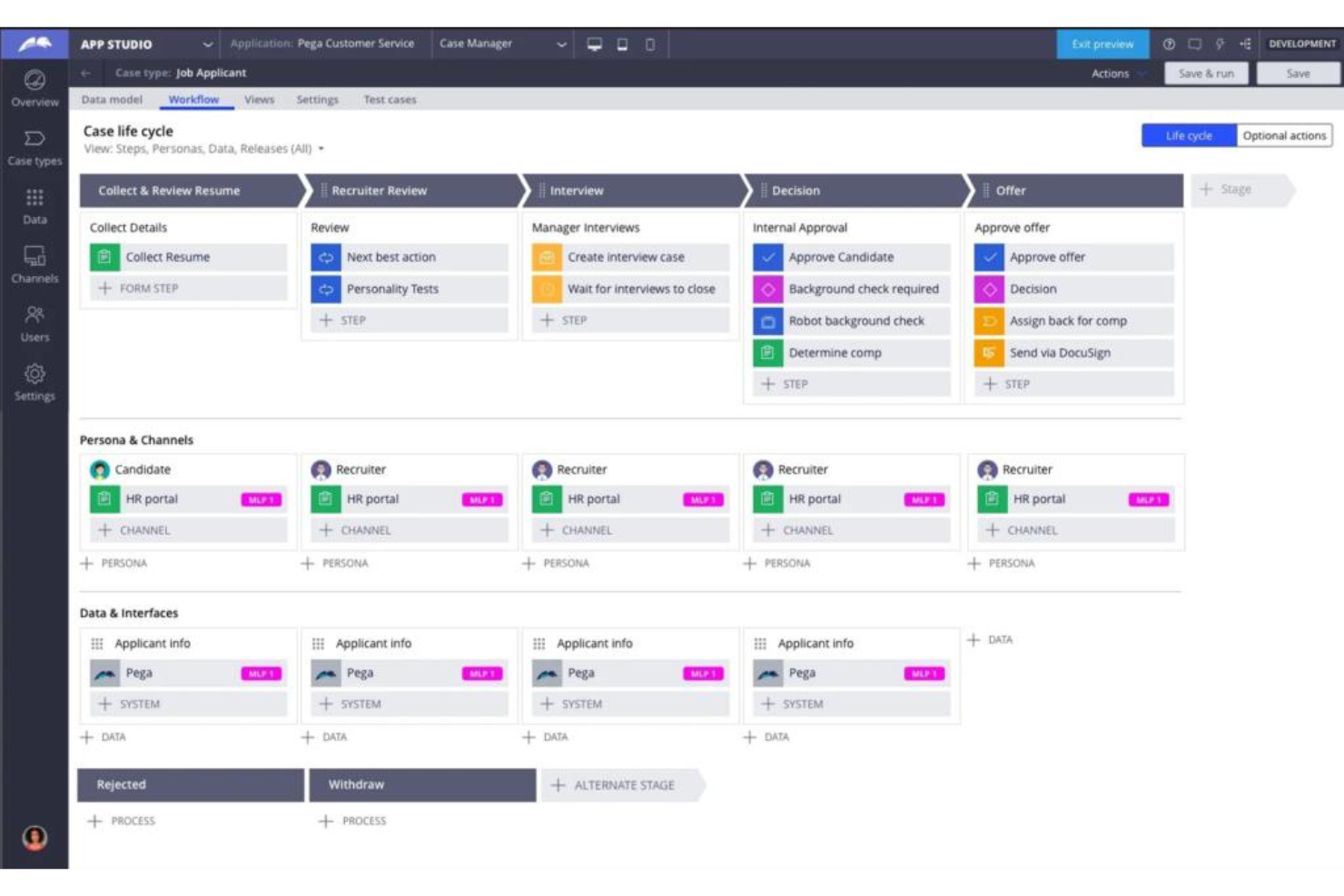
Pega Platform is a dynamic automation tool incorporating AI technology to refine organizational decision-making processes. Leveraging AI algorithms and data analytics facilitates smarter business decisions, aligning perfectly with its reputation as the best choice for AI-driven decision automation.
Why I Picked Pega Platform: In the process of selecting and judging various automation solutions, Pega Platform consistently emerged as a front-runner. Its AI capabilities are not just a peripheral addition but are deeply integrated, making the platform truly distinctive. When considering tools for AI-driven decision automation, Pega's in-depth AI capabilities and its reputation in the industry convinced me of its superiority.
Standout features & integrations
Pega Platform excels with its AI-driven automated workflows, allowing businesses to reduce human error and speed up decision-making processes. The platform is designed with a user-friendly interface, offering BPM and BPA features that streamline business process management.
Integration-wise, Pega offers connectors to major platforms such as Salesforce, Microsoft, and even has the ability to work with Zapier, allowing for a plethora of real-time data connections.
Pros and Cons
Pros:
- Rich integration ecosystem with key platforms and tools.
- Comprehensive BPM and BPA features to improve workflow management.
- Advanced AI algorithms integrated into the core of the platform.
Cons:
- Might be overkill for businesses looking for simpler automation solutions.
- A steeper learning curve might be expected given its vast feature set.
- Some businesses might find its extensive AI capabilities overwhelming initially.
Weitere IT-Prozessautomatisierungssoftware
Hier sind einige zusätzliche Optionen für IT-Prozessautomatisierungssoftware, die es nicht auf meine Shortlist geschafft haben, die aber dennoch einen Blick wert sind:
- Josys
For automating SaaS provisioning tasks
- NewgenONE Digital Transformation Platform
For end-to-end digital solutions
- Nintex Process Platform
For process mapping and visualization
- Advsyscon
For IT workload automation
- Zvolv
For rapid no-code application development
- Parallel
For real estate business automation
- NinjaOne
For endpoint management and patch compliance
- Rippling IT
For automating IT onboarding
- SuperOps
For MSP operational growth
- Kissflow
For simple workflow creation and management
- ProcessMaker
Good for BPMN 2.0 compliant workflows
- Checkbox
Good for automating legal processes
- TrackVia
Good for mobile workflow and data tracking
- AppMaster
Good for creating apps without technical expertise
- Superblocks
Good for blockchain and smart contract projects
- BRYTER
Good for no-code business application building
- Tonkean
Good for adaptive business operations
- Kofax TotalAgility
Good for multi-channel capture and process management
- SS&C Blue Prism Intelligent Automation Platform
Good for scalable robotic process automation
- FlowForma Process Automation
Good for digital process automation without coding
- Catalytic
Good for efficient process and data integration
- PMG Platform
Good for rapid digital transformation initiatives
- Nintex Automation On-Prem (formerly K2 Software)
Good for on-premises automation deployment
- AgilePoint NX
Good for model-driven application development
- BP Logix
Good for predictive process modeling and management.


Auswahlkriterien für IT-Prozessautomatisierungssoftware
Bei der Auswahl der besten IT-Prozessautomatisierungssoftware für diese Liste habe ich gängige Bedürfnisse und Schmerzpunkte der Käufer berücksichtigt – wie Integrationsmöglichkeiten und Benutzerfreundlichkeit. Um meine Bewertung strukturiert und fair zu gestalten, habe ich außerdem diesen Bewertungsrahmen verwendet:
Kernfunktionalität (25% der Gesamtbewertung)
Jede Lösung musste zur Aufnahme in diese Liste die folgenden Anwendungsfälle erfüllen:
- Automatisierung wiederkehrender Aufgaben
- Integration mit bestehenden Systemen
- Workflow-Management
- Überwachung von Prozessen
- Berichterstellung
Weitere herausragende Funktionen (25% der Gesamtbewertung)
Um das Feld weiter einzugrenzen, habe ich auch auf einzigartige Funktionen geachtet, wie zum Beispiel:
- KI-basierte Automatisierung
- Anpassbare Dashboards
- Echtzeit-Analysen
- Erweiterte Sicherheitsfunktionen
- Zugriff über mobile Apps
Benutzerfreundlichkeit (10% der Gesamtbewertung)
Um mir einen Eindruck von der Benutzerfreundlichkeit jeder Lösung zu verschaffen, habe ich Folgendes berücksichtigt:
- Intuitive Benutzeroberfläche
- Einfache Navigation
- Minimale Einarbeitungszeit
- Anpassungsoptionen
- Responsives Design
Onboarding (10% der Gesamtbewertung)
Um das Onboarding-Erlebnis jeder Plattform zu bewerten, habe ich Folgendes berücksichtigt:
- Verfügbarkeit von Schulungsvideos
- Interaktive Produkttouren
- Zugang zu Vorlagen
- Unterstützende Webinare
- Chatbot-Unterstützung
Kundensupport (10% der Gesamtbewertung)
Um die Kundendienstleistungen jedes Software-Anbieters zu beurteilen, habe ich Folgendes bewertet:
- 24/7 Support-Verfügbarkeit
- Mehrere Support-Kanäle
- Reaktionszeit
- Zugang zu einer Wissensdatenbank
- Personalisierte Unterstützung
Preis-Leistungs-Verhältnis (10% der Gesamtbewertung)
Um das Preis-Leistungs-Verhältnis der einzelnen Plattformen zu bewerten, habe ich Folgendes berücksichtigt:
- Konkurrenzfähige Preisgestaltung
- Im Basispaket enthaltene Funktionen
- Preisflexibilität
- Verfügbarkeit von kostenlosen Testversionen
- Rabatte bei Jahresverträgen
Kundenbewertungen (10% der Gesamtbewertung)
Um einen Eindruck von der allgemeinen Kundenzufriedenheit zu erhalten, habe ich beim Lesen von Kundenbewertungen Folgendes beachtet:
- Zufriedenheitsbewertungen der Nutzer
- Häufig gemeldete Probleme
- Lob für bestimmte Funktionen
- Rückmeldungen zum Kundensupport
- Empfehlungen von Anwendern
Wie wählt man eine IT-Prozessautomatisierungssoftware aus?
Es ist leicht, sich von langen Funktionslisten und komplexen Preisstrukturen überwältigen zu lassen. Damit Sie während Ihres individuellen Auswahlprozesses den Fokus behalten, finden Sie hier eine Checkliste wichtiger Faktoren, die Sie im Auge behalten sollten:
| Faktor | Worauf achten? |
|---|---|
| Skalierbarkeit | Kann die Software mit Ihrem Unternehmen wachsen? Berücksichtigen Sie zukünftige Anforderungen und prüfen Sie, ob das Tool mehr Nutzer oder Prozesse ohne zusätzliche Kosten abdecken kann. |
| Integrationen | Lässt sich die Software mit Ihren bisherigen Systemen verknüpfen? Prüfen Sie Kompatibilität und einen reibungslosen Datenfluss zwischen verschiedenen Plattformen. |
| Anpassbarkeit | Können Sie sie an Ihre Arbeitsabläufe anpassen? Achten Sie auf Möglichkeiten, Einstellungen, Workflows oder Dashboards individuell zu gestalten, damit diese Ihren Teamprozessen entsprechen. |
| Benutzerfreundlichkeit | Ist sie für Ihr Team leicht zu bedienen? Bewerten Sie Oberfläche und Navigation – eine steile Lernkurve kann die Akzeptanz und Produktivität beeinträchtigen. |
| Implementierung und Onboarding | Wie schnell können Sie starten? Schätzen Sie den Zeit- und Ressourcenaufwand für die Einrichtung ein. Suchen Sie nach Schulungsmaterialien und Unterstützung während des Onboardings. |
| Kosten | Passt die Lösung in Ihr Budget? Vergleichen Sie Preismodelle, versteckte Kosten und das Preis-Leistungs-Verhältnis. Berücksichtigen Sie Rabatte bei längerfristigen Verträgen. |
| Sicherheitsmaßnahmen | Wie schützt die Lösung Ihre Daten? Prüfen Sie Verschlüsselungsstandards, Zugriffsrechte und die Einhaltung relevanter Vorschriften. |
| Support-Verfügbarkeit | Erhalten Sie Unterstützung, wenn Sie sie benötigen? Achten Sie auf Supportzeiten, Kanäle und die Reaktionsgeschwindigkeit. Zuverlässiger Support ist entscheidend für eine schnelle Problemlösung. |
Was ist IT-Prozessautomatisierungssoftware?
IT-Prozessautomatisierungssoftware ist ein Tool, das wiederkehrende IT-Aufgaben und Arbeitsabläufe automatisiert. IT-Fachleute wie Systemadministratoren und IT-Manager setzen diese Tools meist ein, um manuelle Arbeit zu reduzieren und die Effizienz zu steigern. Funktionen für Automatisierung, Integration und Anpassung helfen, Systeme zu verbinden, Abläufe zu individualisieren und Zeit zu sparen. Diese Möglichkeiten arbeiten eng mit Tools für Automatisierungsberichte zusammen, um vollständige Transparenz in Ihren Prozessen zu schaffen. Insgesamt vereinfachen diese Tools Abläufe und erhöhen die Produktivität.
Funktionen
Achten Sie bei der Auswahl einer IT-Prozessautomatisierungssoftware auf die folgenden wichtigen Funktionen:
- Automatisierungsfunktionen: Automatisieren Sie sich wiederholende Aufgaben, um Zeit zu sparen und Fehler zu reduzieren.
- Integrationsunterstützung: Verbinden Sie sich mit bestehenden Systemen, um einen nahtlosen Datenfluss zu ermöglichen.
- Anpassbare Workflows: Passen Sie Prozesse an die spezifischen Anforderungen und Abläufe Ihres Teams an.
- Benutzerfreundliche Oberfläche: Sorgen Sie für eine einfache Bedienung durch intuitives Design und eine schnelle Einführung.
- Echtzeit-Analysen: Überwachen Sie die Leistung und treffen Sie fundierte Entscheidungen mit aktuellen Daten.
- Sicherheitsmaßnahmen: Schützen Sie sensible Informationen mit starker Verschlüsselung und Zugriffskontrollen.
- Skalierbarkeitsoptionen: Wachsen Sie mit Ihrem Unternehmen, indem Sie mehr Benutzer und Prozesse verwalten können.
- Schulungsressourcen: Greifen Sie auf Tutorials und Leitfäden zu, um die Einarbeitung und das Lernen zu unterstützen.
- Mobile Zugänglichkeit: Verwalten Sie Prozesse unterwegs mit Unterstützung für mobile Apps.
- Kundensupport: Erhalten Sie bei Bedarf schnelle Hilfe über verschiedene Kanäle.
Vorteile
Die Einführung von Software für die IT-Prozessautomatisierung bietet zahlreiche Vorteile für Ihr Team und Ihr Unternehmen. Hier sind einige Vorteile, auf die Sie sich freuen können:
- Steigerung der Effizienz: Automatisieren Sie wiederkehrende Aufgaben, um Zeit für strategischere Arbeit zu gewinnen.
- Weniger Fehler: Minimieren Sie manuelle Fehler durch konsistente und automatisierte Prozesse.
- Verbesserte Zusammenarbeit: Integrieren Sie Systeme, um die Kommunikation und den Datenaustausch zwischen Teams zu fördern.
- Erhöhte Skalierbarkeit: Unterstützen Sie das Unternehmenswachstum, indem Sie problemlos mehr Benutzer und Prozesse verwalten.
- Kosteneinsparungen: Senken Sie Betriebskosten, indem Sie den manuellen Aufwand reduzieren.
- Bessere Entscheidungsfindung: Nutzen Sie Echtzeit-Analysen, um schnell datengestützte Einblicke zu erhalten.
- Größere Flexibilität: Passen Sie Workflows individuell an Ihre spezifischen Geschäftsanforderungen und Veränderungen an.
Kosten & Preise
Die Auswahl von IT-Prozessautomatisierungssoftware erfordert ein Verständnis der verschiedenen verfügbaren Preismodelle und -pakete. Die Kosten variieren je nach Funktionen, Teamgröße, Add-ons und mehr. Die nachstehende Tabelle fasst gängige Pakete, ihre durchschnittlichen Preise und typische Funktionen von IT-Prozessautomatisierungssoftwarelösungen zusammen:
Paketvergleichstabelle für IT-Prozessautomatisierungssoftware
| Pakettyp | Durchschnittlicher Preis | Häufige Funktionen |
|---|---|---|
| Kostenloses Paket | $0 | Grundlegende Automatisierung, eingeschränkte Integrationen und Community-Support. |
| Persönliches Paket | $5-$25/user/month | Aufgabenautomatisierung, Standardintegrationen und grundlegende Analysen. |
| Business-Paket | $30-$75/user/month | Erweiterte Automatisierung, mehrere Integrationen, Berichtsfunktionen und priorisierter Support. |
| Enterprise-Paket | $100+/user/month | Individuelle Automatisierung, unbegrenzte Integrationen, dedizierter Support und erweiterte Sicherheit. |
FAQs zur IT-Prozessautomatisierungssoftware
Hier finden Sie Antworten auf häufig gestellte Fragen zur IT-Prozessautomatisierungssoftware:
Wie bewertet man IT-Prozessautomatisierungs-Tools?
Analysieren Sie zunächst die aktuellen Arbeitsabläufe Ihres Teams und identifizieren Sie die Engpässe. Vergleichen Sie diese Anforderungen dann mit Funktionen wie Workflow-Buildern, Integrationen und Berichtswesen. Berücksichtigen Sie Benutzerfreundlichkeit, Preisgestaltung und wie gut das Tool in Ihre bestehende IT-Landschaft passt. Testen Sie nach Möglichkeit immer eine kostenlose Testversion oder Demo.
Was ist der Unterschied zwischen IT-Automatisierung und Orchestrierung?
Automatisierung übernimmt einzelne Aufgaben oder Skripte, wie etwa das Zurücksetzen eines Passworts. Orchestrierung steuert einen kompletten Workflow mit Aufgaben über verschiedene Tools und Systeme hinweg. Wenn Ihre Abläufe mehrere Schritte oder Werkzeuge umfassen, benötigen Sie wahrscheinlich beides. Manche Plattformen bieten beides in einer Lösung.
Wie stellt man Sicherheit bei automatisierten IT-Workflows sicher?
Nutzen Sie Tools mit integrierter rollenbasierter Zugriffskontrolle und Prüfprotokollierung. Sorgen Sie dafür, dass sensible Schritte (wie Softwareinstallationen oder Umgang mit Zugangsdaten) besonders geschützt sind. Ihr Team sollte Automatisierungsskripte regelmäßig überprüfen und interne Sicherheitsrichtlinien befolgen. Ein Tool mit passenden Compliance-Zertifizierungen ist ebenfalls hilfreich.
Kann IT-Prozessautomatisierung auch in anderen Abteilungen eingesetzt werden?
Ja, sie kann auch Teams außerhalb der IT unterstützen – zum Beispiel Personalwesen, Finanzen oder Kundenservice. Viele Tools bieten die Möglichkeit, Workflows für Aufgaben wie Onboarding, Genehmigungen oder Asset-Tracking zu erstellen. Achten Sie darauf, dass das gewählte Tool bereichsübergreifenden Einsatz und Integrationen mit Nicht-IT-Systemen unterstützt.
Wie schwierig ist der Wechsel von manuellen zu automatisierten Prozessen?
Das hängt von Ihrer Infrastruktur ab, aber die meisten Teams benötigen einige Wochen für die vollständige Umstellung. Starten Sie mit Aufgaben, die einen großen Effekt haben, und nutzen Sie Vorlagen oder Drag-and-Drop-Builder, um Zeit zu sparen. Schulen Sie alle Mitarbeitenden und stellen Sie sicher, dass Anpassungen an Workflows bei Bedarf möglich sind.
Wie geht es weiter:
Wenn Sie gerade IT-Prozessautomatisierungssoftware recherchieren, sprechen Sie kostenlos mit einem SoftwareSelect-Berater für individuelle Empfehlungen.
Sie füllen ein Formular aus und führen ein kurzes Gespräch, in dem Ihre Anforderungen im Detail besprochen werden. Anschließend erhalten Sie eine Vorauswahl geeigneter Software zur Prüfung. Die Berater begleiten Sie sogar durch den gesamten Kaufprozess, einschließlich Preisverhandlungen.