

15 Beste Cross-Browser-Test-Tools im Jahr 2026 bewertet

Beste Cross-Browser-Testtools: Shortlist
Hier ist meine Shortlist der besten Cross-Browser-Testtools:


Die besten Cross-Browser-Testtools helfen Entwicklungsteams, Layoutprobleme, fehlerhafte Skripte und inkonsistente Nutzererfahrungen in verschiedenen Browsern und auf unterschiedlichen Geräten zu erkennen, bevor sie in die Produktion gelangen. Diese Tools simulieren reale Bedingungen, sodass Teams Leistung, Barrierefreiheit und Responsivität in diversen Umgebungen überprüfen können, ohne auf manuelle Tests angewiesen zu sein.
Viele Teams beginnen nach besseren Lösungen zu suchen, wenn Tests unzuverlässig werden, die Browser-Abdeckung unvollständig ist oder das Debuggen visueller Inkonsistenzen in Chrome, Safari und Edge die Release-Zyklen verlangsamt. Zersplitterte Workflows und unklare Testergebnisse führen oft zu übersehenen Defekten und frustrierten QA-Teams.
Ich habe direkt mit Webentwicklern und QA-Ingenieuren zusammengearbeitet, um Cross-Browser-Testtools in aktiven CI/CD-Pipelines zu bewerten und zu messen, wie gut sie Skalierbarkeit, Reporting-Genauigkeit und Zusammenarbeit unterstützen.
In diesem Leitfaden erfahren Sie, welche Cross-Browser-Testing-Plattformen tatsächlich konsistente Ergebnisse liefern, manuelle Nacharbeit reduzieren und Ihrem Team bei jedem Release Sicherheit geben.
Table of Contents
- Beste Software-Kurzliste
- Warum Sie uns vertrauen können
- Spezifikationen vergleichen
- Bewertungen
- Weitere Cross-Browser-Test-Tools
- Verwandte Testberichte
- Auswahlkriterien
- So wählen Sie aus
- Trends bei Cross-Browser-Test-Tools
- Was sind Cross-Browser-Test-Tools?
- Funktionen
- Vorteile
- Kosten und Preise
- FAQs
Why Trust Our Software Reviews
We’ve been testing and reviewing software since 2023. As tech leaders ourselves, we know how critical and difficult it is to make the right decision when selecting software.
We invest in deep research to help our audience make better software purchasing decisions. We’ve tested more than 2,000 tools for different tech use cases and written over 1,000 comprehensive software reviews. Learn how we stay transparent & our software review methodology.
Zusammenfassung der besten Cross-Browser-Testtools
Diese Vergleichstabelle fasst die Preisinformationen meiner Top-Auswahl an Cross-Browser-Testtools zusammen, um Ihnen zu helfen, das beste Tool für Ihr Budget und Ihre geschäftlichen Anforderungen zu finden.
| Tool | Best For | Trial Info | Price | ||
|---|---|---|---|---|---|
| 1 | Am besten für Teamzusammenarbeit geeignet | Kostenlose Demo verfügbar | Preise auf Anfrage | Website | |
| 2 | Am besten für KI-gesteuertes Testen | Kostenlose Testversion verfügbar + kostenlose Demo | Preise auf Anfrage | Website | |
| 3 | Am besten für Live-Browser-Tests geeignet | Kostenloser Plan verfügbar + kostenlose Demo | Ab $15/Benutzer/Monat (jährliche Abrechnung) | Website | |
| 4 | Am besten geeignet für Cloud-Infrastruktur | Kostenlose Testversion verfügbar | Ab $29/Monat (jährliche Abrechnung) | Website | |
| 5 | Am besten für die Aufzeichnung von Tests über mehrere Browser hinweg | 14-tägige kostenlose Testphase | Ab $212/Monat | Website | |
| 6 | Am besten geeignet für Tests mit echten Geräten | Kostenlose Demo verfügbar | Ab $39/Monat (jährlich abgerechnet) | Website | |
| 7 | Am besten geeignet für selbstheilende Tests | 14-tägige kostenlose Testphase + kostenlose Demo | Ab $175/Monat | Website | |
| 8 | Am besten geeignet für Leistungsüberwachung | Kostenlose Testphase + kostenlose Demo verfügbar | Preisinformationen auf Anfrage | Website | |
| 9 | Am besten für Unternehmensskalierung geeignet | 28-tägige kostenlose Testphase + kostenlose Demo verfügbar | Ab $39/Monat (jährliche Abrechnung) | Website | |
| 10 | Besonders geeignet für KI-basierte Testentwicklung | Kostenlose Testversion + Demo verfügbar | Preis auf Anfrage | Website | |
| 11 | Am besten geeignet für Salesforce-Tests | Kostenlose Version verfügbar | Ab $99/Monat (jährlich abgerechnet) | Website | |
| 12 | Am besten für DevOps-Integration geeignet | Kostenlose Testversion verfügbar + kostenlose Demo | Preis auf Anfrage | Website | |
| 13 | Am besten geeignet für das Testen von mobilen Apps | Kostenlose Demo verfügbar | Preis auf Anfrage | Website | |
| 14 | Am besten für Live- und automatisierte Tests geeignet | 14-tägige kostenlose Testphase + kostenlose Demo verfügbar | Ab $20/Monat (jährliche Abrechnung) | Website | |
| 15 | Am besten für sofortigen Browserzugriff geeignet | Nicht verfügbar | Ab $9/Monat (jährliche Abrechnung) | Website |



-

Site24x7
Visit WebsiteThis is an aggregated rating for this tool including ratings from Crozdesk users and ratings from other sites.4.7 -
GitHub Actions
Visit WebsiteThis is an aggregated rating for this tool including ratings from Crozdesk users and ratings from other sites.4.8 -
Docker
Visit WebsiteThis is an aggregated rating for this tool including ratings from Crozdesk users and ratings from other sites.4.6





Bewertungen der besten Cross-Browser-Testtools
Nachfolgend finden Sie meine ausführlichen Zusammenfassungen der besten Cross-Browser-Testtools, die es auf meine Shortlist geschafft haben. Meine Reviews bieten einen detaillierten Einblick in die wichtigsten Funktionen, Vor- u0026 Nachteile, Integrationen und ideale Anwendungsfälle jedes Tools, um Ihnen die bestmögliche Entscheidung zu ermöglichen.

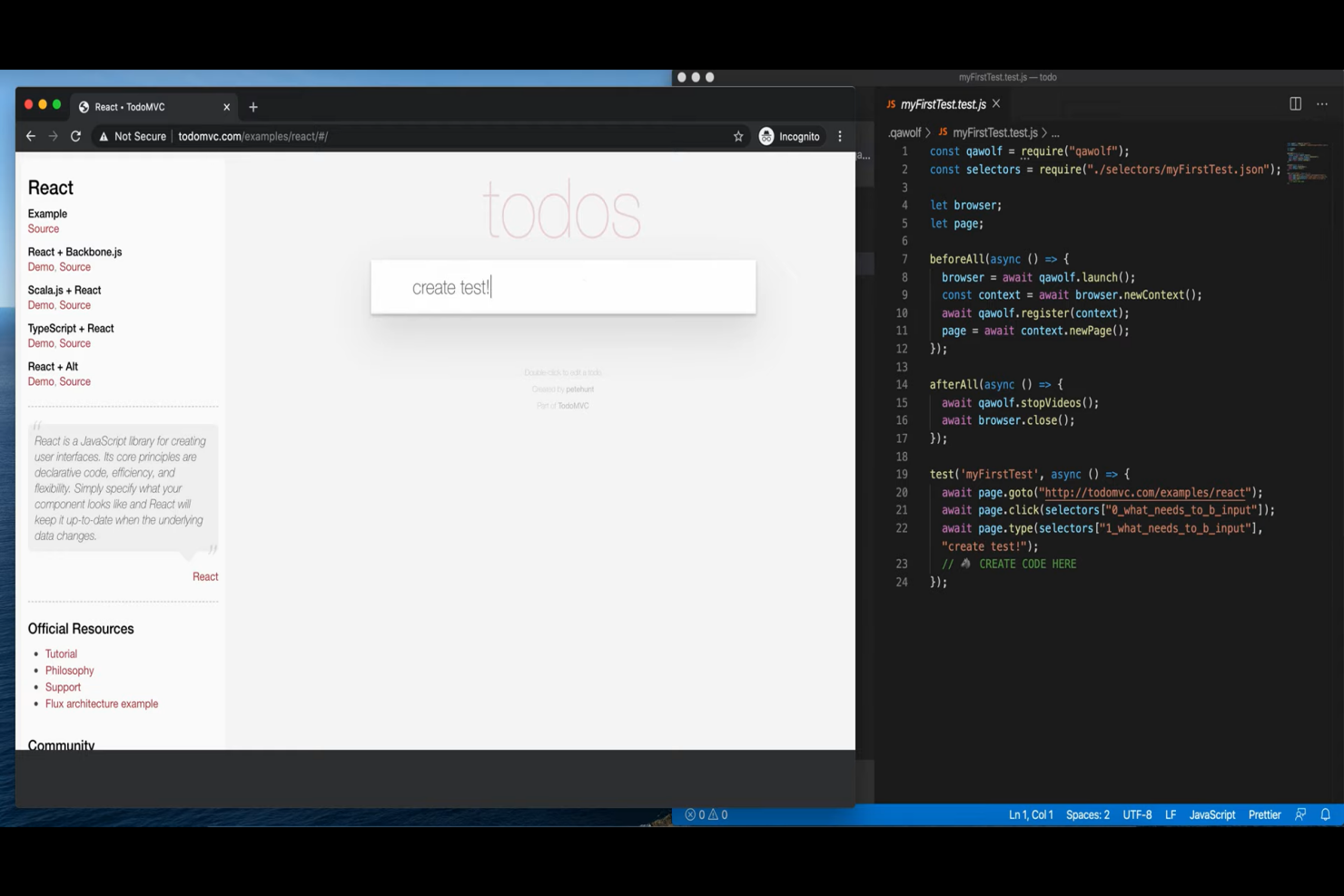
QA Wolf ist eine hybride Plattform, die für Softwareentwicklungsteams entwickelt wurde und QA-Lösungen für Branchen wie Fintech, Gesundheitswesen und E-Commerce bietet. Sie konzentriert sich auf die Automatisierung der End-to-End-Testabdeckung für Web- und Mobile-Anwendungen.
Warum ich mich für QA Wolf entschieden habe: Die Plattform überzeugt durch hervorragende Teamzusammenarbeit, indem sie menschlich geprüfte Bug-Reports und CI/CD-Integration bereitstellt. Sie ermöglicht unbegrenzte parallele Testdurchläufe, sodass Ihr Team effizient testen kann. Der einzigartige Service von QA Wolf übernimmt den gesamten QA-Prozess, sodass sich Ihr Team auf die Entwicklung konzentrieren kann. Dieser Ansatz verkürzt die QA-Zyklen und reduziert Kosten, was zu schnelleren Releases und weniger Fehlern führt.
Herausragende Funktionen & Integrationen:
Funktionen umfassen unbegrenzte parallele Testdurchläufe, mit denen Ihr Team mehrere Szenarien gleichzeitig testen kann. Menschlich geprüfte Bug-Reports sorgen für Genauigkeit und sparen Zeit bei der Identifizierung tatsächlicher Probleme. Die CI/CD-Integration der Plattform vereinfacht den Testprozess, was es Ihrem Team erleichtert, QA in den Workflow zu integrieren.
Integrationen umfassen GitHub, Bitbucket, GitLab, CircleCI, Travis CI, Slack, Jira, Asana, Trello und Monday.com.
Pros and Cons
Pros:
- Schnelle Testerstellung
- Menschlich geprüfte Bug-Reports
- Unbegrenzte parallele Testdurchläufe
Cons:
- Benötigt anfängliche Einrichtungszeit
- Begrenzte Anpassungsmöglichkeiten
New Product Updates from QA Wolf

QA Wolf Adds Android Emulator Infrastructure for Device Testing
QA Wolf introduces Android emulator infrastructure with expanded device and OS testing support. These updates enable teams to test across real-world device conditions and improve test coverage. For more information, visit QA Wolf’s official site.
 .
.
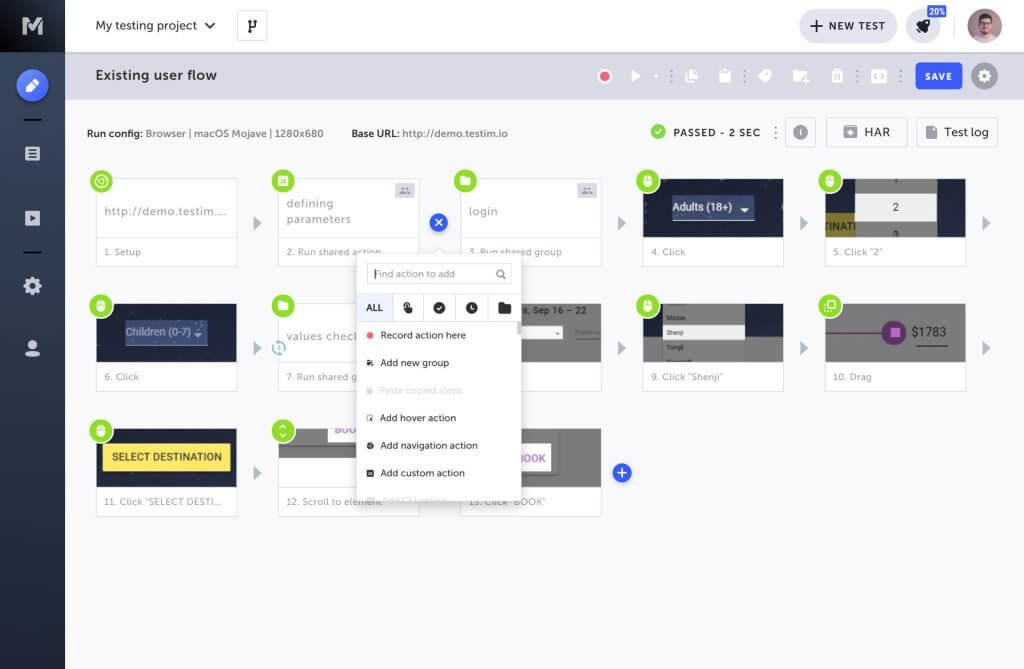
Tricentis Testim ist eine KI-gestützte automatisierte Testlösung für Web-, Mobile- und Salesforce-Anwendungen. Sie richtet sich an Entwicklungsteams aus verschiedenen Branchen und konzentriert sich darauf, Testprozesse zu beschleunigen und die Anwendungsqualität zu verbessern.
Warum ich Tricentis Testim ausgewählt habe: Dieses Tool ist auf KI-gestütztes Testen spezialisiert und bietet intelligente Lokatoren, die die Teststabilität verbessern, während sich Ihre Anwendungen weiterentwickeln. Schnelles Authoring ermöglicht es Ihrem Team, Tests zügig mit einem Low-Code-Ansatz zu erstellen, während TestOps das Testmanagement vereinfacht. Die KI-Funktionen bieten eine schnelle Ursachenanalyse, sodass Ihr Team Fehler effizient beheben kann.
Herausragende Funktionen & Integrationen:
Funktionen beinhalten schnelles Authoring, sodass Ihr Team Tests über einen Low-Code-Ansatz mit der Möglichkeit für individuellen Code erstellen kann. Die Teststabilität wird durch KI-gesteuerte intelligente Lokatoren verbessert, wodurch die Tests funktionstüchtig bleiben. Troubleshooting-Tools bieten eine schnelle Ursachenanalyse, sodass Ihr Team Fehler zügig beheben kann.
Integrationen umfassen Jira, GitHub und Jenkins.
Pros and Cons
Pros:
- KI-gesteuerte intelligente Lokatoren
- Schnelles Test-Authoring
- Low-Code-Ansatz
Cons:
- Hohe Lernkurve
- Begrenzte Offline-Unterstützung

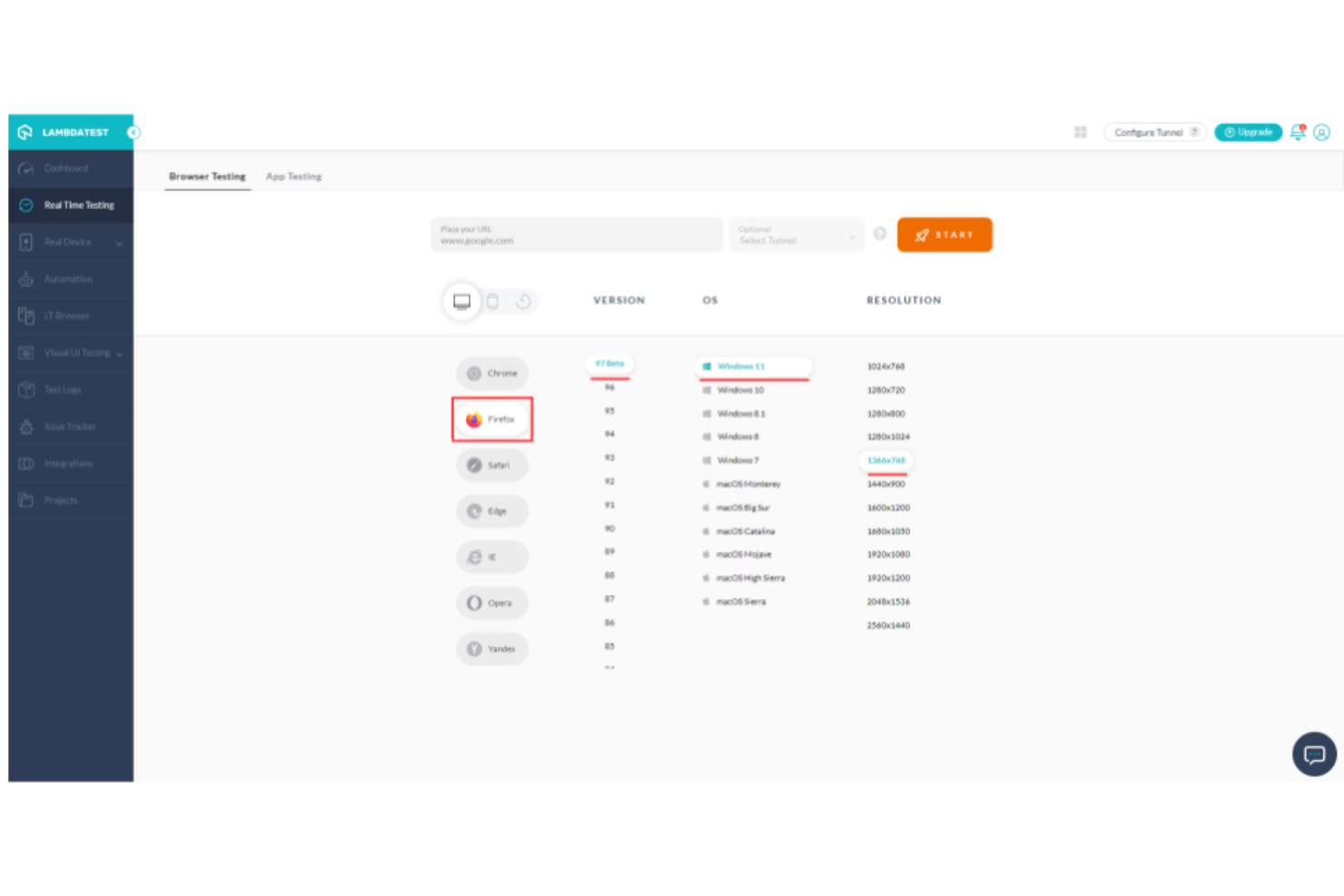
LambdaTest ist eine cloudbasierte Plattform für Cross-Browser-Tests, die für Entwickler und Tester konzipiert wurde, die sicherstellen müssen, dass ihre Webanwendungen in verschiedenen Browsern und Betriebssystemen funktionieren. Sie bietet Live-Browser-Tests, die es den Nutzern ermöglichen, ihre Websites in Echtzeit auf verschiedenen Browsern und Geräten zu testen und zu nutzen.
Warum ich LambdaTest gewählt habe: Die Live-Browser-Testfunktion ist ideal für Teams, die sofortiges Feedback zu ihren Webanwendungen benötigen. Die Plattform ermöglicht es, auf einer Vielzahl von Browsern und Betriebssystemen zu testen und bietet so eine umfassende Abdeckung. Mit LambdaTest kann Ihr Team Probleme schnell erkennen und beheben und so die Gesamtqualität der Webanwendung verbessern. Die Echtzeit-Testumgebung sorgt für präzise Ergebnisse, ohne lokale Setups zu benötigen.
Hervorstechende Funktionen & Integrationen:
Funktionen umfassen Echtzeit-Tests auf über 2000 Browsern und bieten damit eine breite Abdeckung für Ihre Webanwendungen. Die automatisierte Screenshot-Prüfung ermöglicht es, visuelle Layouts in verschiedenen Browsern zu erfassen und zu vergleichen. Geolokalisierungstests ermöglichen es Ihrem Team, zu überprüfen, wie Anwendungen aus unterschiedlichen Regionen weltweit funktionieren.
Integrationen umfassen Jira, Slack, Trello, GitHub, Bitbucket, Asana, CircleCI, Travis CI, GitLab und Microsoft Teams.
Pros and Cons
Pros:
- Umfangreiche Browser-Abdeckung
- Echtzeit-Testumgebung
- Automatisierte Screenshot-Prüfung
Cons:
- Erfordert stabile Internetverbindung
- Für kleine Teams möglicherweise ungeeignet
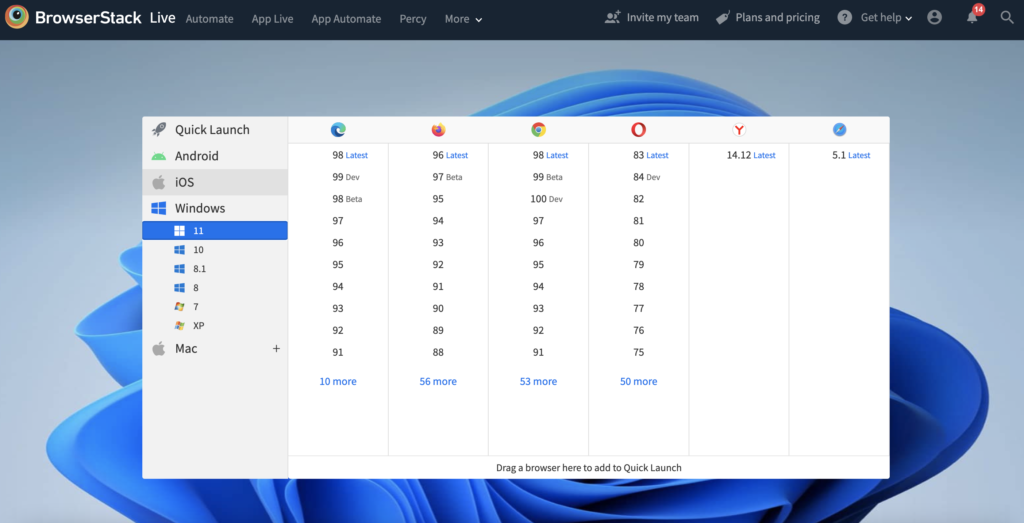
BrowserStack ist eine cloudbasierte Testplattform, die speziell für Entwickler und QA-Teams entwickelt wurde, die Webanwendungen auf verschiedenen Browsern und Geräten testen müssen. Sie bietet Echtzeit-Cross-Browser-Tests und hilft Teams, Kompatibilität und Funktionalität in vielfältigen Umgebungen sicherzustellen.
Warum ich BrowserStack ausgewählt habe: Die Plattform überzeugt durch eine Cloud-Infrastruktur, die bedarfsorientiertes Testen ohne lokale Installationen ermöglicht. Mit Zugriff auf eine große Auswahl an Browserversionen und Geräten kann Ihr Team effizient und präzise testen. Die Infrastruktur von BrowserStack reduziert den Bedarf an physischen Geräten, was Zeit und Ressourcen spart. Die Möglichkeit, reale Nutzerbedingungen zu simulieren, steigert zusätzlich den Wert der Plattform, da sie zuverlässige Ergebnisse für Ihre Webanwendungen liefert.
Hervorstechende Funktionen & Integrationen:
Zu den Funktionen gehören Live-Tests auf einer Vielzahl von Kombinationen aus Browsern und Geräten, sodass Ihr Team die Kompatibilität sicherstellen kann. Automatisierte Testfunktionen helfen, wiederkehrende Aufgaben zu automatisieren, sodass Sie sich auf komplexere Testszenarien konzentrieren können. Die sichere Umgebung der Plattform stellt sicher, dass Ihre Daten während der Testsitzungen geschützt bleiben.
Integrierte Tools sind Jira, Slack, Jenkins, GitHub, Trello, Bitbucket, TeamCity, Azure DevOps, Travis CI und GitLab.
Pros and Cons
Pros:
- Umfangreiche Geräteabdeckung
- Kein lokales Setup erforderlich
- Simulation realer Nutzerbedingungen
Cons:
- Begrenzte Offline-Funktionalität
- Einarbeitungszeit für manche Funktionen

Reflect
Am besten für die Aufzeichnung von Tests über mehrere Browser hinweg
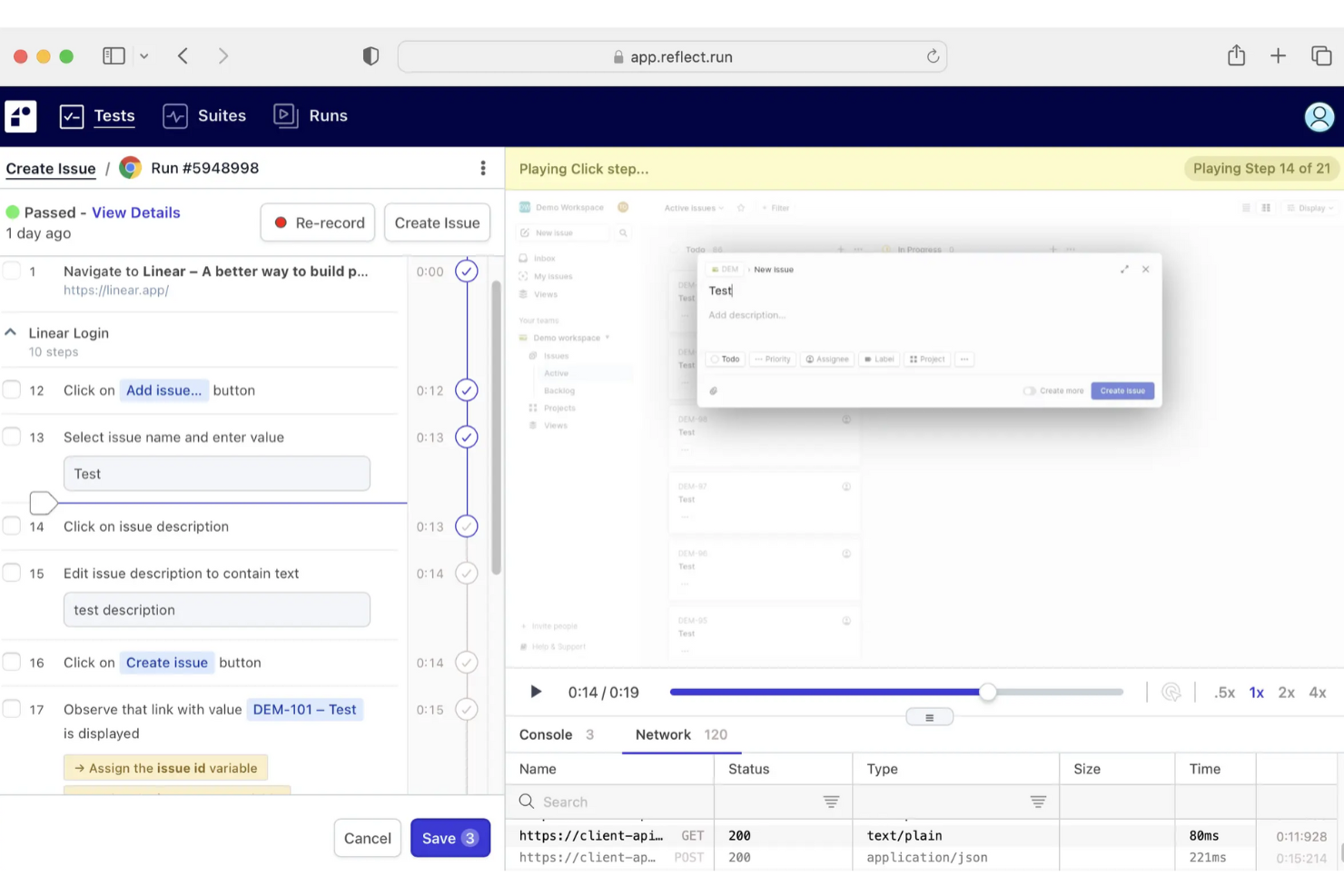
Reflect ist ein No-Code-Tool für Cross-Browser-Tests, das automatisierte Tests über die wichtigsten Browser wie Chrome, Firefox, Edge und Safari hinweg ermöglicht. Sie können Tests erstellen, ohne Code zu schreiben, indem Sie Aktionen in einem Cloud-Browser aufzeichnen; Reflect unterstützt die kontinuierliche Überwachung, um Probleme sofort zu erkennen.
Warum ich Reflect ausgewählt habe: Ich habe Reflect ausgewählt, weil Sie Tests erstellen und pflegen können, ohne sich auf traditionelle Selektoren verlassen zu müssen, wodurch der manuelle Pflegeaufwand reduziert wird. Sie können Tests aus Klartext-Eingaben generieren und diese in mehreren Browsern ausführen. Außerdem werden Testplanung, visuelle Regressionserkennung und die Protokollierung von Testergebnissen mit Screenshots, Videos und Netzwerkaktivitäten zur Unterstützung der Fehlerbehebung angeboten.
Hervorstechende Funktionen & Integrationen:
Funktionen umfassen Cross-Browser-Unterstützung, visuelles Testen, API-Tests und Unterstützung von E-Mail/SMS-Szenarien. Es werden Test-Exporte, Videoaufzeichnungen und die Bearbeitung in Echtzeit geboten. Reflect aktualisiert sich außerdem automatisch entsprechend den neuesten Browserversionen.
Integrationen umfassen GitHub, GitLab, Jira, CircleCI, Jenkins, Bitbucket, Azure DevOps, Codefresh, Slack, Linear, Cloudflare, AWS, Shopify, Microsoft ASP.NET, Google Analytics, Google Ads, Marketo, Zendesk, Drift, Facebook Pixel, LinkedIn Insight und Microsoft Ads.
Pros and Cons
Pros:
- Umfassende CI/CD-Integration
- KI-gestützte Testwartung
- No-Code-Test-Erstellung
Cons:
- Könnte mehr Anpassungsmöglichkeiten für Testkonfigurationen bieten
- Einschränkungen bei mobilen App-Tests

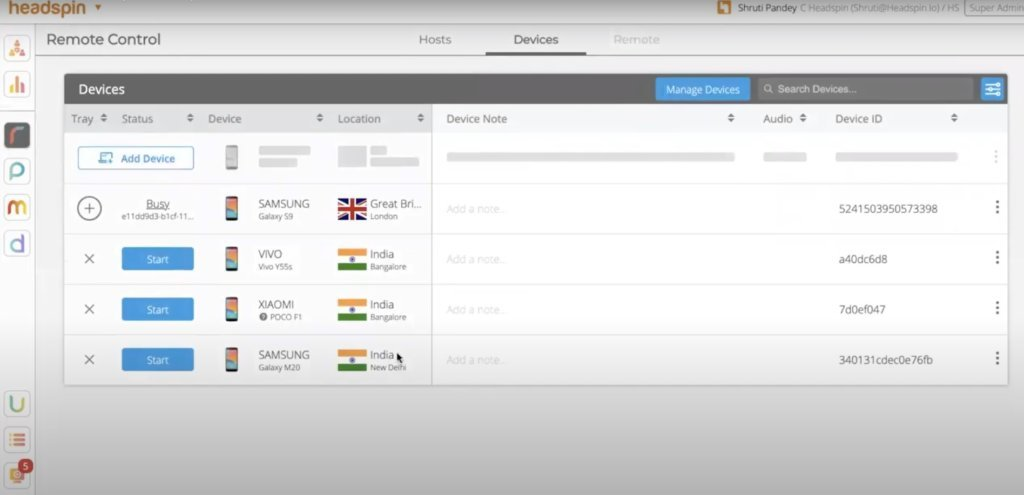
Headspin ist eine Testplattform, die sich auf das Testen mit echten Geräten konzentriert und Entwicklern sowie QS-Teams eine präzise Testumgebung für mobile und Webanwendungen bietet. Sie liefert Einblicke und Analysen, die Teams dabei unterstützen, die Anwendungsleistung und das Benutzererlebnis zu optimieren.
Warum ich Headspin gewählt habe: Die Plattform bietet Tests auf echten Geräten und ermöglicht Ihrem Team das Testen von Anwendungen unter realitätsnahen Bedingungen. Mit Zugriff auf eine breite Auswahl physischer Geräte stellt Headspin Kompatibilität und Leistungsgenauigkeit sicher. Die Analysewerkzeuge helfen, Leistungsengpässe zu identifizieren und bieten umsetzbare Erkenntnisse. Diese Kombination macht die Plattform für Teams wertvoll, die realitätsnahe Testbedingungen priorisieren.
Herausragende Funktionen & Integrationen:
Funktionen umfassen die Möglichkeit, auf tatsächlichen Geräten zu testen, was durch Nachbildung realer Bedingungen präzise Ergebnisse liefert. Leistungsüberwachungstools bieten detaillierte Analysen zur Optimierung der Anwendungsleistung im Team. Die Plattform unterstützt außerdem das Testen unter verschiedenen Netzwerkbedingungen, sodass Sie unterschiedliche Netzwerkszenarien simulieren können.
Integrationen umfassen Jenkins, Jira, Slack, GitHub, Bitbucket, Azure DevOps, CircleCI, TestRail, Appium und Selenium.
Pros and Cons
Pros:
- Tests auf echten Geräten
- Detaillierte Leistungsanalysen
- Unterstützt Tests von Netzwerkbedingungen
Cons:
- Eventuell nicht für jedes Budget geeignet
- Begrenzte Offline-Fähigkeiten

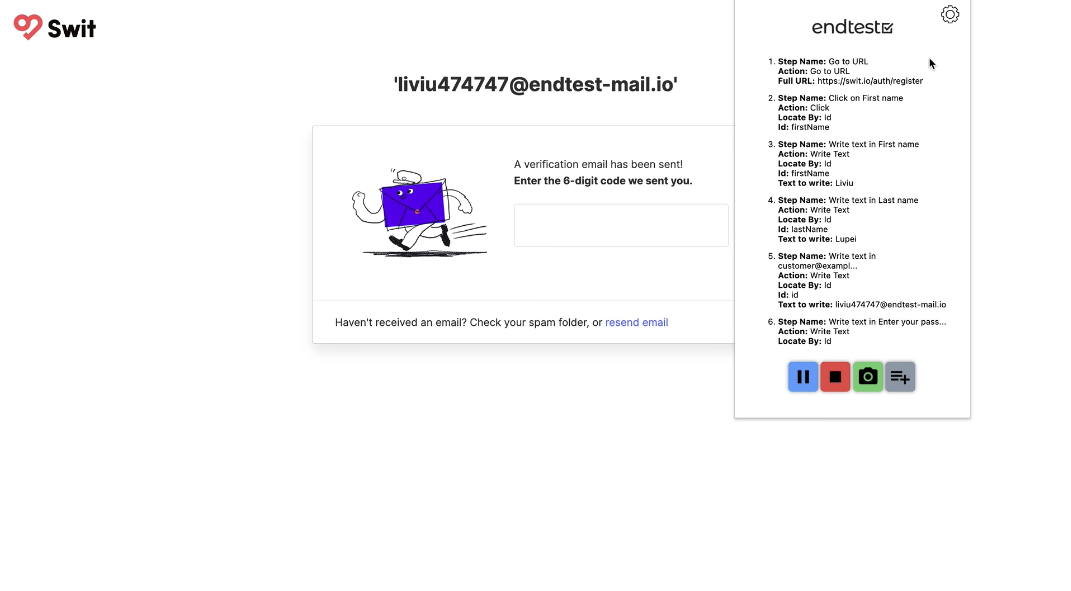
Endtest ist eine Testplattform, die für QA-Teams und Entwickler konzipiert wurde und sich auf automatisierte Tests ohne Skripte konzentriert. Sie ermöglicht es Benutzern, Tests mit minimalem technischen Wissen zu erstellen und auszuführen, wodurch der Testprozess vereinfacht wird.
Warum ich Endtest ausgewählt habe: Die skriptlose Automatisierungsfunktion des Tools macht es auch Teammitgliedern zugänglich, die keine Programmierkenntnisse haben. Da die Testerstellung über eine benutzerfreundliche Oberfläche erfolgt, vereinfacht Endtest den Testablauf. Die Plattform unterstützt verschiedene Testarten und gewährleistet so eine umfassende Abdeckung Ihrer Anwendungen. Dieser Ansatz ermöglicht es Ihrem Team, sich auf die Verbesserung der Anwendungsqualität zu konzentrieren, ohne durch komplexe Skripterstellung aufgehalten zu werden.
Herausragende Funktionen & Integrationen:
Funktionen umfassen eine benutzerfreundliche Oberfläche, mit der Ihr Team Tests ohne Programmierung erstellen kann. Die Plattform unterstützt datengetriebene Tests, sodass Sie mühelos mehrere Szenarien testen können. Darüber hinaus bietet Endtest visuelle Testfunktionen, mit denen Ihr Team UI-Probleme schnell erkennen kann.
Integrationen umfassen Jira, Slack, Jenkins, GitHub, Bitbucket, Trello, Azure DevOps, TestRail, Asana und monday.com.
Pros and Cons
Pros:
- Skriptfreie Testerstellung
- Benutzerfreundliche Oberfläche
- Unterstützt datengetriebene Tests
Cons:
- Begrenzte Anpassungsmöglichkeiten
- Möglicherweise nicht für komplexe Testszenarien geeignet

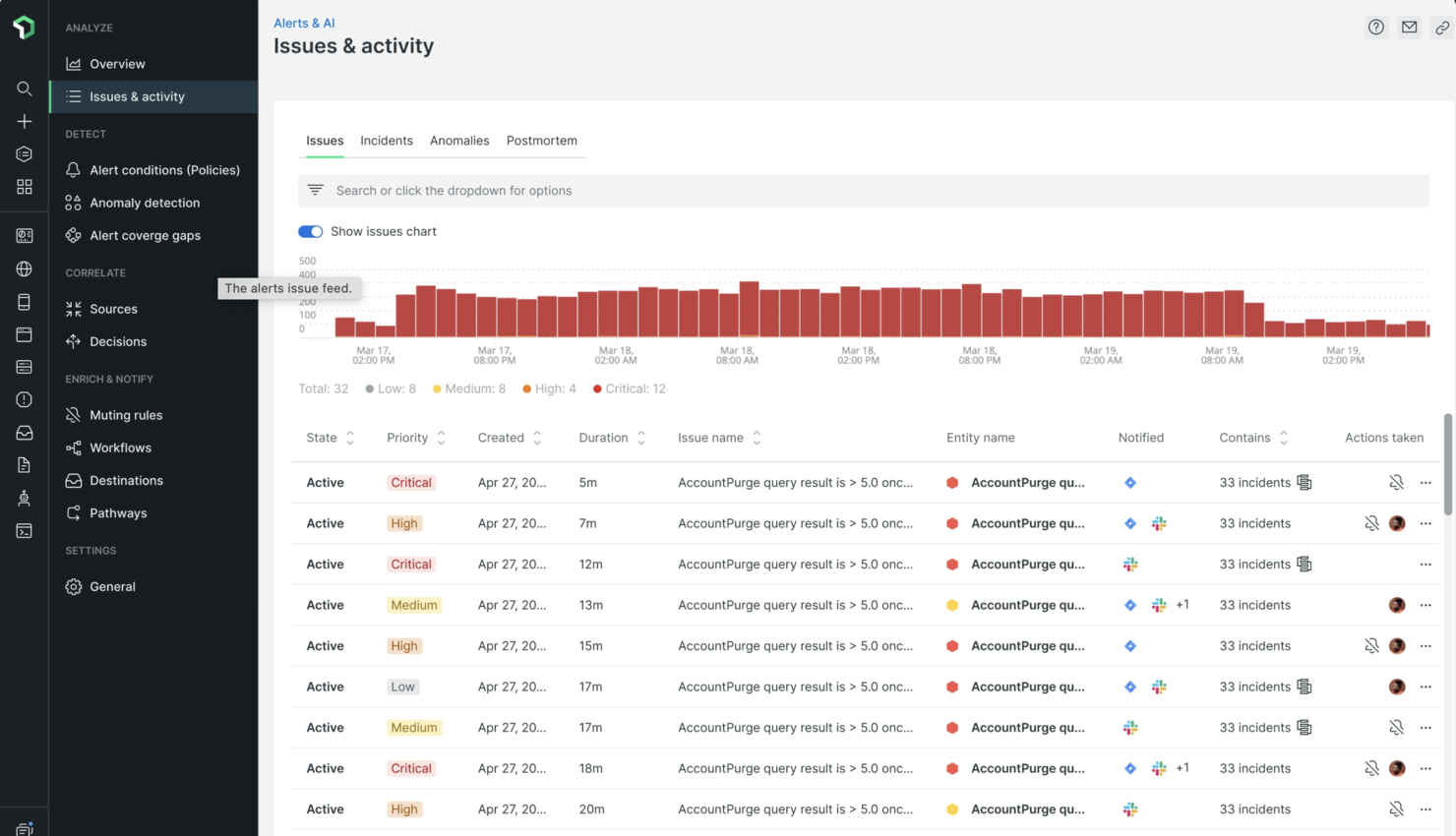
New Relic ist eine Observability-Plattform, die für Entwickler- und IT-Betriebsteams entwickelt wurde und umfassende Überwachung sowie Analysen für Anwendungen und Infrastrukturen bietet. Sie hilft Teams, die optimale Leistung und Zuverlässigkeit ihrer digitalen Services sicherzustellen.
Warum ich New Relic gewählt habe: Die Plattform brilliert in der Leistungsüberwachung und bietet Echtzeitanalysen, mit denen Ihr Team Probleme schnell identifizieren und beheben kann. Ihre detaillierten Einblicke in die Anwendungsleistung ermöglichen vorausschauende Problemlösungen. Mit New Relic kann Ihr Team die Systemgesundheit überwachen und sicherstellen, dass alle Systeme reibungslos laufen. Die Fähigkeit der Plattform, große Datenmengen effizient zu verarbeiten, macht sie besonders wertvoll für Teams mit komplexer Infrastruktur.
Hervorstechende Funktionen & Integrationen:
Funktionen umfassen Echtzeit-Überwachung, die Ihrem Team hilft, die Anwendungsleistung im Blick zu behalten. Individuell anpassbare Dashboards ermöglichen die Visualisierung von Daten nach eigenen Bedürfnissen. Zudem bietet die Plattform Alarmierungsfunktionen, die Ihr Team vor potenziellen Problemen warnen, bevor diese eskalieren.
Integrationen umfassen AWS, Azure, Google Cloud, Kubernetes, Docker, Slack, PagerDuty, Jira, GitHub und ServiceNow.
Pros and Cons
Pros:
- Echtzeit-Leistungsüberwachung
- Proaktive Alarmierungsfunktionen
- Anpassbare Dashboards
Cons:
- Erfordert technisches Fachwissen
- Eingeschränkte Offline-Funktionen
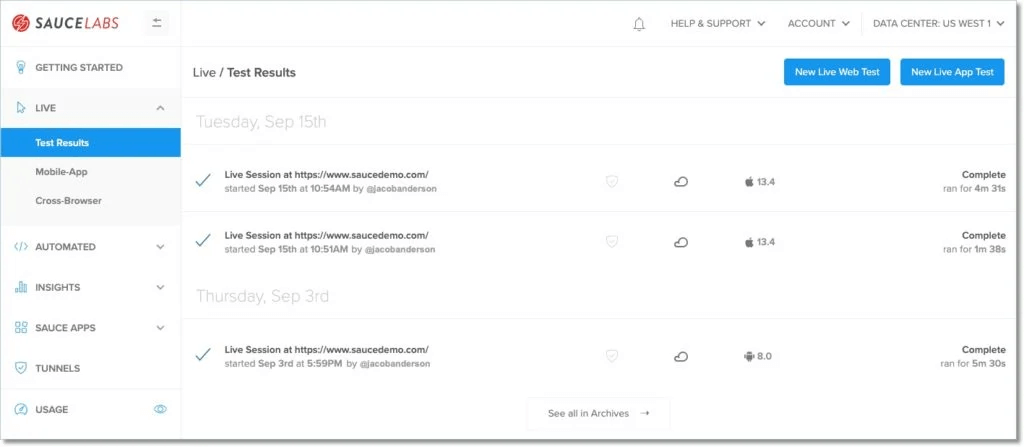
Sauce Labs ist eine cloudbasierte Testplattform, die für Entwicklungs- und QA-Teams auf Unternehmensebene konzipiert wurde und umfassende Cross-Browser-Testlösungen bietet. Sie ermöglicht Teams, ihre Anwendungen auf zahlreichen Geräten und Browsern zu testen, um Qualität und Performance im großen Maßstab sicherzustellen.
Warum ich Sauce Labs gewählt habe: Die Plattform ist auf Unternehmensskalierbarkeit ausgerichtet und unterstützt groß angelegte Tests in unterschiedlichsten Umgebungen. Dank ihrer Cloud-Infrastruktur kann Ihr Team parallele Tests durchführen und so Zeit und Ressourcen sparen. Sauce Labs bietet Zugriff auf eine breite Palette realer Geräte und Browser und sorgt damit für eine umfassende Testabdeckung. Diese Eigenschaften machen sie ideal für Organisationen, die hohe Qualitätsstandards über verschiedene Plattformen hinweg beibehalten müssen.
Hervorstechende Funktionen & Integrationen:
Funktionen umfassen paralleles Testen, mit dem Ihr Team mehrere Tests gleichzeitig ausführen kann und damit die Effizienz steigert. Die Real-Device-Cloud der Plattform bietet Zugriff auf eine große Auswahl physischer Geräte und gewährleistet so präzise Testergebnisse. Darüber hinaus bietet Sauce Labs Performance-Testwerkzeuge, die Ihrem Team helfen, die Geschwindigkeit und Zuverlässigkeit Ihrer Anwendungen zu optimieren.
Integrationen umfassen Jenkins, Jira, Slack, GitHub, Bamboo, CircleCI, Travis CI, TeamCity, Azure DevOps und Bitbucket.
Pros and Cons
Pros:
- Unterstützt groß angelegte Tests
- Umfassende Geräte- und Browserabdeckung
- Parallele Testmöglichkeiten
Cons:
- Komplexität bei der Ersteinrichtung
- Eingeschränkte Offline-Funktionen


Functionize ist ein plattformübergreifendes Kompatibilitätstest-Tool, das KI und maschinelle Lerntechnologien nutzt, um die Testautomatisierung für Web- und mobile Anwendungen auf allen Betriebssystemen wie Windows, MacOS und Linux zu ermöglichen. Das Tool erlaubt es, automatisierte Tests in allen Web- und mobilen Browsern durchzuführen.
Functionize automatisiert Testabläufe mithilfe von KI und maschinellem Lernen und bietet dadurch eine äußerst benutzerfreundliche Plattform, die Zeit- und Kostenaufwand beim Testen eliminiert. Mit dem Tool können Sie Tests mit ML-gestützten, sich selbst reparierenden Validierungen erstellen sowie eine Aufzeichnungs- und Wiedergabefunktion nutzen, die Klicks, Mausbewegungen und Dateneingaben erfasst. Functionize bietet außerdem visuelle Testfunktionen wie visuelle Vergleiche und visuelles Abschließen.
Functionize integriert sich mit Plattformen wie Jira, TestRail, Jenkins und Slack.
Für Preisinformationen wenden Sie sich an Functionize, um ein Angebot zu erhalten. Das Tool bietet außerdem eine kostenlose Testversion.


Autify ist ein Online-Tool für plattformübergreifende Browser-Tests, das es Benutzern ermöglicht, ihre Websites und Anwendungen in mehreren Browsern zu testen. Es bietet Entwicklern, Testern und Designern eine Plattform, um automatisierte Tests für ihre Websites oder Anwendungen schnell zu erstellen. Diese Tests werden in Echtzeit auf mehreren Browsern gleichzeitig ausgeführt, um Kompatibilitätsprobleme zu identifizieren, bevor sie problematisch werden.
Autify erstellt Schnappschüsse einer Website in verschiedenen Browsern und vergleicht diese anschließend auf Unterschiede. Das Tool überprüft automatisch Layoutprobleme, Fehler und Abweichungen zwischen Website-Versionen. Es ermöglicht Benutzern zudem, benutzerdefinierte Skripte hinzuzufügen, um speziellere Tests zu automatisieren, wie etwa die Überprüfung von Formularübermittlungen oder Ladezeiten von Seiten. Die parallele Ausführung von Autify erlaubt es Benutzern, mehrere automatisierte Tests gleichzeitig durchzuführen. Dadurch erhöht sich die Geschwindigkeit und Effizienz der Softwaretests, da zahlreiche Tests parallel ausgeführt werden können, ohne Einbußen bei Qualität oder Genauigkeit. Unternehmen können fehlgeschlagene Code-Implementierungen drastisch reduzieren und so die Gesamtproduktivität positiv steigern.
Autify unterstützt visuelle und kognitive Tests, wodurch Benutzer UI-Probleme sowie funktionale Fehler wie falsche Informationen oder Weiterleitungen schnell identifizieren können. Es verfügt über eine integrierte Debugging-Funktion, die Probleme im Code schnell erkennen kann, sowie eine visuelle Schnappschussfunktion, die es Benutzern ermöglicht, direkt zu sehen, wie ihre Website in verschiedenen Browsern aussieht, ohne jeden manuell öffnen zu müssen.
Autify bietet ein umfassendes Berichtssystem, das die Leistung einer Webanwendung in verschiedenen Browsern überwacht, einschließlich Antwortzeiten, Ladezeiten und Fehlern. Zudem können diese Berichte Einblicke in das Nutzerverhalten und Trends liefern, sodass Entwickler ihr Produkt für eine maximale Leistung auf allen unterstützten Browsern optimieren können.
Integrationen umfassen Slack, Bitrise, GitHub, CircleCI und Jenkins. Außerdem wird API-Zugang geboten, um die Funktionalität für Autify für Mobile zu erweitern.
Autify kostet ab $300/Monat und bietet eine 14-tägige kostenlose Testversion.

Mabl ist eine automatisierte Testplattform, die für Entwicklungs- und QA-Teams entwickelt wurde und sich nahtlos in DevOps-Workflows integriert. Sie hilft Teams, funktionale Tests zu automatisieren und stellt sicher, dass Anwendungen in verschiedenen Browsern wie erwartet funktionieren.
Warum ich Mabl gewählt habe: Die Plattform bietet eine starke DevOps-Integration und macht es Ihrem Team leicht, das Testen in kontinuierliche Entwicklungszyklen einzubinden. Die Low-Code-Testerstellung von Mabl senkt die technische Einstiegshürde, sodass mehr Teammitglieder beitragen können. Die intelligente Testautomatisierung passt sich Veränderungen in der Anwendung an und minimiert den Wartungsaufwand. Mit Mabl kann Ihr Team kontinuierliches Testen erreichen und so die Qualität und Zuverlässigkeit der Anwendung verbessern.
Herausragende Funktionen & Integrationen:
Funktionen sind unter anderem die Low-Code-Testerstellung, mit der Ihr Team Tests ohne umfangreiche Programmierkenntnisse erstellen kann. Die intelligente Testautomatisierung reagiert auf Änderungen an der Anwendung und reduziert so den Bedarf an ständigen Anpassungen. Die Plattform bietet außerdem leistungsstarke Reporting-Tools, die Einblicke in Testergebnisse und Anwendungsleistung liefern.
Integrationen umfassen Jira, Jenkins, GitHub, Bitbucket, Slack, Microsoft Teams, CircleCI, Azure DevOps, Google Cloud und AWS.
Pros and Cons
Pros:
- Low-Code-Testerstellung
- Passt sich Anwendungsänderungen an
- Starke DevOps-Integration
Cons:
- Lernkurve für nicht-technische Nutzer
- Hoher Ressourcenverbrauch während der Tests


Experitest ist ein Cross-Browser- und Mobile-Testtool, mit dem Sie verschiedene Server simulieren und die Transaktionsdauer messen können. Das Tool bietet Tests auf echten Geräten sowie die Möglichkeit, Selenium- und Appium-Tests auszuführen. Experitest stellt zudem qualitativ hochwertige Dokumentation und Kundensupport für Tester bereit.
Experitest ermöglicht visuelle Tests über eine Vielzahl von Browsern hinweg und erlaubt es Ihnen, die Responsivität der Benutzeroberfläche Ihrer Anwendung bei verschiedenen Auflösungen zu prüfen. Das Tool bietet außerdem die Möglichkeit, Testberichte mit Videos, Screenshots und Protokolldateien zu erhalten sowie die Analyse der Performance über Zeit, Versionen und Tests hinweg.
Experitest ist kostenlos nutzbar.


TestingBot bietet automatisierte und manuelle Tests für Websites und mobile Anwendungen. Qualitätsprüfer können Headless-, Performance- und visuelle Tests durchführen. TestingBot unterstützt außerdem das Remote-Testen von Anwendungen auf jedem Gerät. Qualitätsprüfer können Anwendungen auf Tausenden von Desktop-Browsern und Mobilgeräten in der Cloud testen. TestingBot ist zudem mit allen gängigen Betriebssystemen kompatibel. Nutzer können ihre Testabdeckung durch parallele Tests weiter ausbauen, die es ermöglichen, Hunderte von Tests gleichzeitig durchzuführen. TestingBot unterstützt verschiedene Automatisierungs-Frameworks, darunter Selenium, Appium und Espresso. Es integriert sich außerdem mit Jenkins, Bamboo, Jira und Azure DevOps. Die Preise beginnen bei $20/Monat.

Browserling ist eine webbasierte Anwendung, die keine Installation einer App, Software oder zusätzlicher Komponenten erfordert. Sie ist einfach zu bedienen, verfügt über eine übersichtliche, benutzerfreundliche Oberfläche und wird hauptsächlich für Frontend-Webtests verwendet. Das Tool gehört zu den besten plattformübergreifenden Testwerkzeugen für Startups und freiberufliche Entwickler.
Browserling bietet Live-Testing als Funktion, wodurch Sie Ihre Websites und Anwendungen in verschiedenen Browsern live testen können, als wären sie auf Ihrem Computer installiert. Es gibt Erweiterungen für Google Chrome und Firefox, sodass Sie direkt aus Ihrem eigenen Browser mit dem Testen beginnen können. Das Tool ermöglicht zudem, die Responsivität Ihrer Websites zu testen und Screenshots zu erstellen, damit Sie Ihre Testergebnisse visuell mit Ihrem Team teilen können.
Die Kosten für Browserling beginnen bei $19/Monat für einen Nutzer. Browserling bietet zudem einen kostenlosen Tarif an.
Weitere Cross-Browser-Testtools
Hier sind einige zusätzliche Optionen für Cross-Browser-Testtools, die es nicht auf meine Shortlist geschafft haben, aber trotzdem einen Blick wert sind:
- TestGrid
Am besten geeignet für App-Tests auf mobilen Geräten
- Telerik Test Studio
Am besten geeignet für skriptlose Testautomatisierung
- Owlity
Am besten für autonome Testausführung


Auswahlkriterien für Cross-Browser-Testtools
Bei der Auswahl der besten Cross-Browser-Testtools für diese Liste habe ich gängige Anforderungen und Schmerzpunkte von Käufern berücksichtigt, etwa die Kompatibilität über mehrere Browser hinweg zu gewährleisten und die Testdauer zu reduzieren. Außerdem habe ich den folgenden Rahmen genutzt, um meine Bewertung strukturiert und fair zu halten:
Kernfunktionalität (25% der Gesamtbewertung)
Um in diese Liste aufgenommen zu werden, musste jede Lösung diese Anwendungsfälle erfüllen:
- Tests in mehreren Browsern durchführen
- Automatisierte Tests ausführen
- Echtzeit-Testumgebungen bereitstellen
- Unterstützung von Tests auf Mobilgeräten und Desktop
- Gewährleistung einer korrekten Darstellung und Funktionalität
Zusätzliche herausragende Funktionen (25% der Gesamtbewertung)
Zur weiteren Eingrenzung der Auswahl habe ich zudem nach besonderen Eigenschaften gesucht wie:
- KI-gestützte Testgenerierung
- Werkzeuge für visuelles Regressionstesten
- Zugriff auf echte Geräte in der Cloud
- Geolokalisierungs-Tests
- Leistungsüberwachungstools
Benutzerfreundlichkeit (10% der Gesamtbewertung)
Um die Usability jedes Systems einzuschätzen, habe ich Folgendes berücksichtigt:
- Intuitives Oberflächendesign
- Einfache Navigation
- Minimale Lernkurve
- Anpassbare Dashboards
- Effiziente Workflow-Integration
Onboarding (10% der Gesamtbewertung)
Um die Onboarding-Erfahrung jeder Plattform zu bewerten, habe ich Folgendes berücksichtigt:
- Verfügbarkeit von Trainingsvideos
- Interaktive Produkttouren
- Zugang zu Vorlagen und Leitfäden
- Unterstützende Webinare
- Vorhandensein von Chatbots zur Unterstützung
Kundenservice (10% der Gesamtbewertung)
Um die Kundensupport-Dienste jedes Software-Anbieters zu beurteilen, habe ich Folgendes berücksichtigt:
- 24/7 Supportverfügbarkeit
- Zugang zu einem dedizierten Account-Manager
- Umfassende Wissensdatenbank
- Schneller Live-Chat- und E-Mail-Support
- Community-Foren oder Nutzergruppen
Preis-Leistungs-Verhältnis (10% der Gesamtbewertung)
Um das Preis-Leistungs-Verhältnis jeder Plattform zu bewerten, habe ich Folgendes berücksichtigt:
- Wettbewerbsfähige Preisstruktur
- Verfügbarkeit flexibler Tarife
- Enthalten alle essenziellen Funktionen
- Transparenz bei Preisbedingungen
- Rabatte für langfristige Bindungen
Kundenbewertungen (10% der Gesamtbewertung)
Um einen Eindruck von der allgemeinen Kundenzufriedenheit zu gewinnen, habe ich bei der Analyse der Kundenbewertungen Folgendes berücksichtigt:
- Konsistenz positiver Rückmeldungen
- Erwähnung zuverlässiger Leistung
- Feedback zur Reaktionsgeschwindigkeit des Supports
- Berichte über Benutzerfreundlichkeit
- Gesamtzufriedenheitsbewertungen
Wie man das richtige Cross-Browser-Testing-Tool auswählt
Es ist leicht, sich in langen Funktionslisten und komplexen Preisstrukturen zu verlieren. Damit Sie sich bei Ihrem individuellen Auswahlprozess auf das Wesentliche konzentrieren können, finden Sie hier eine Checkliste mit Faktoren, die Sie beachten sollten:
| Faktor | Worauf achten |
| Skalierbarkeit | Stellen Sie sicher, dass das Tool mit Ihrem Team wächst. Prüfen Sie, ob es wachsende Testvolumina und eine erweiterte Geräteabdeckung unterstützt, wenn Ihre Projekte skalieren. |
| Integrationen | Achten Sie auf die Kompatibilität mit Ihren bestehenden Tools wie CI/CD-Pipelines, Projektmanagement-Software und Web-Accessibility-Testing-Tools, um Ihren Workflow zu optimieren. |
| Anpassbarkeit | Überlegen Sie, ob das Tool es Ihnen ermöglicht, Testprozesse und Berichte an die spezifischen Bedürfnisse und Präferenzen Ihres Teams anzupassen. |
| Benutzerfreundlichkeit | Bewerten Sie die Benutzeroberfläche und die Lernkurve des Tools. Stellen Sie sicher, dass Ihr Team es schnell annehmen kann, ohne umfangreiche Schulungen oder technisches Know-how zu benötigen. |
| Budget | Passen Sie die Preisgestaltung des Tools an Ihr Budget an. Berücksichtigen Sie die Gesamtkosten, einschließlich versteckter Gebühren oder Kosten für Zusatzfunktionen. |
| Sicherheitsmaßnahmen | Überprüfen Sie die Sicherheitsvorkehrungen des Tools zum Schutz Ihrer Daten. Suchen Sie nach Funktionen wie Verschlüsselung, Zugriffskontrollen und der Einhaltung von Branchenstandards. |
| Testabdeckung | Stellen Sie sicher, dass das Tool eine umfassende Browser- und Geräteabdeckung bietet, die Ihren Testanforderungen entspricht. Prüfen Sie die Unterstützung für gängige sowie Nischenplattformen. |
| Supportdienste | Achten Sie auf die Verfügbarkeit und Qualität des Kundensupports, einschließlich Reaktionszeiten und Zugang zu Ressourcen wie Dokumentationen oder Community-Foren. |
Trends bei Cross-Browser-Testing-Tools
In meinen Recherchen habe ich zahlreiche Produktupdates, Pressemitteilungen und Release-Logs von verschiedenen Anbietern von Cross-Browser- und E-Mail-Testing-Tools ausgewertet. Hier sind einige der aktuellen Trends, die ich besonders im Blick habe:
- KI-gestütztes Testen: Künstliche Intelligenz wird eingesetzt, um die Genauigkeit und Effizienz von Tests zu erhöhen. Tools wie Functionize nutzen KI, um Tests zu erstellen und zu pflegen, wodurch manueller Aufwand reduziert und Fehlerquellen im Testprozess minimiert werden.
- Visuelles Testen: Dieser Trend konzentriert sich auf den Vergleich visueller Aspekte von Webanwendungen in verschiedenen Browsern. Applitools setzt visuelle KI ein, um visuelle Fehler zu erkennen und so konsistente Benutzeroberflächen und Nutzererfahrungen sicherzustellen.
- Leistungstests: Es wird zunehmend Wert darauf gelegt, nicht nur auf Kompatibilität, sondern auch auf die Performance unter verschiedenen Bedingungen zu testen. Tools wie Sauce Labs bieten Leistungs-Testfunktionen, mit denen Teams Geschwindigkeit und Zuverlässigkeit optimieren können.
- Geräteübergreifendes Testen: Das Testen auf einer Vielzahl von Geräten – und nicht nur in verschiedenen Browsern – wird immer wichtiger. Anbieter wie BrowserStack bieten eine große Geräteauswahl, um die Funktionsfähigkeit von Anwendungen auf allen Plattformen sicherzustellen.
- Cloud-basierte Lösungen: Viele Anbieter setzen auf cloudbasierte Plattformen, die skalierbare und flexible Testumgebungen ermöglichen. Dieser Trend erlaubt einen einfachen Zugriff sowie Zusammenarbeit, wobei Tools wie LambdaTest führend beim Umstieg auf Cloud-Infrastrukturen sind.
Was sind Cross-Browser-Testing-Tools?
Cross-Browser-Testing-Tools sind Anwendungen, mit denen Entwickler- und QA-Teams prüfen können, wie Websites und Webanwendungen in unterschiedlichen Browsern, auf verschiedenen Geräten und Betriebssystemen funktionieren. Diese Tools werden von Webentwicklern, Testern und Designern eingesetzt, um sicherzustellen, dass Seiten für alle Benutzer korrekt angezeigt werden und fehlerfrei funktionieren.
Funktionen wie Live-Tests, automatisierte Browser-Prüfungen und visuelle Vergleiche helfen dabei, Layoutprobleme zu erkennen, Kompatibilitätsfehler zu beheben und eine konsistente Darstellung zu gewährleisten. Insgesamt erleichtern sie es, eine Website bereitzustellen, die auf allen Plattformen zuverlässig funktioniert.
Funktionen von Cross-Browser-Testing-Tools
Bei der Auswahl von Cross-Browser-Testing-Tools sollten Sie auf folgende Schlüsselfunktionen achten:
- Automatisiertes Testen: Automatisiert wiederkehrende Tests, spart Zeit und reduziert menschliche Fehler.
- Echtzeit-Tests: Ermöglicht Benutzern das sofortige Testen von Anwendungen in mehreren Browsern und auf verschiedenen Geräten.
- Visuelles Testen: Vergleicht visuelle Elemente, um eine konsistente Benutzeroberfläche auf allen Plattformen sicherzustellen.
- Paralleles Testen: Ermöglicht die gleichzeitige Ausführung von Tests, um den Testprozess zu beschleunigen.
- KI-gestützte Funktionen: Setzt KI ein, um die Testgenauigkeit zu verbessern und Anpassungen an Tests im Zuge der Weiterentwicklung von Anwendungen zu ermöglichen.
- Leistungstests: Bewertet die Geschwindigkeit und Zuverlässigkeit der Anwendung unter verschiedenen Bedingungen.
- Geräteabdeckung: Bietet Zugang zu einer Vielzahl von Geräten, um Kompatibilität sicherzustellen.
- Cloud-basierte Plattform: Bietet skalierbare und flexible Testumgebungen, die von überall zugänglich sind.
- Anpassbare Dashboards: Ermöglicht es Nutzern, die Darstellung und Interaktion mit Testdaten individuell anzupassen.
- Geolocation-Testing: Simuliert unterschiedliche geografische Standorte, um die globale Performance der Anwendung sicherzustellen.
Vorteile von Cross-Browser-Testing-Tools
Die Implementierung von Cross-Browser-Testing-Tools bringt für Ihr Team und Ihr Unternehmen verschiedene Vorteile. Auf diese können Sie sich freuen:
- Verbesserte Kompatibilität: Stellt sicher, dass Ihre Webanwendungen in allen Browsern und auf allen Geräten funktionieren und reduziert Frustrationen bei den Nutzern.
- Zeitersparnis: Automatisiert wiederkehrende Aufgaben und parallele Tests, beschleunigt den Testprozess und schafft Freiräume für Ihr Team.
- Verbessertes Nutzererlebnis: Visuelle und Leistungstests helfen dabei, eine konsistente und zuverlässige Benutzeroberfläche zu gewährleisten.
- Früherkennung von Fehlern: Erkennt Probleme frühzeitig in der Entwicklung, ermöglicht schnelle Korrekturen und reduziert teure Fehler nach dem Release.
- Skalierbarkeit: Cloud-basierte Plattformen bieten flexible Testumgebungen, die mit Ihren Projektanforderungen wachsen.
- Datenbasierte Erkenntnisse: Liefert detaillierte Analysen und Berichte, die Ihrem Team bei der Optimierung Ihrer Anwendung helfen.
- Globale Reichweite: Geolocation-Testing stellt sicher, dass Ihre Anwendungen weltweit gut performen und erweitert Ihren potenziellen Markt.
Kosten und Preise von Cross-Browser-Testing-Tools
Um geeignete Cross-Browser-Testing-Tools auszuwählen, sollten Sie die unterschiedlichen Preismodelle und -pläne kennen. Die Kosten variieren je nach Funktionsumfang, Teamgröße, Zusatzoptionen und mehr. Die folgende Tabelle fasst gängige Pläne, Durchschnittspreise und typische in Cross-Browser-Testing-Tools enthaltene Funktionen zusammen:
Vergleichstabelle für Pläne von Cross-Browser-Testing-Tools
| Tariftyp | Durchschnittlicher Preis | Häufige Funktionen |
| Kostenloser Tarif | $0 | Begrenzte Browser-Abdeckung, grundlegende Testfunktionen und Community-Support. |
| Persönlicher Tarif | $10-$25/Benutzer/Monat | Zugang zu mehr Browsern und Geräten, automatisierte Testwerkzeuge und begrenztes paralleles Testen. |
| Business-Tarif | $50-$100/Benutzer/Monat | Vollständige Abdeckung von Browsern und Geräten, erweiterte Berichte, paralleles Testen und vorrangiger Support. |
| Enterprise-Tarif | $150-$300/Benutzer/Monat | Anpassbare Lösungen, dediziertes Account-Management, umfangreiche Integrationen und erhöhte Sicherheit. |
FAQs zu Cross-Browser-Testwerkzeugen
Hier sind einige Antworten auf häufig gestellte Fragen zu Cross-Browser-Testwerkzeugen:
Wie automatisiert man Cross-Browser-Tests?
Um Cross-Browser-Tests zu automatisieren, können Sie Skripte verwenden, um Ihre Website automatisch in mehreren Browsern zu laden. Mit dieser Methode können Sie Benutzerinteraktionen simulieren und verschiedene Benutzerpfade in unterschiedlichen Browsern überprüfen. Dadurch kann Ihr Team Kompatibilitätsprobleme schnell erkennen und beheben.
Was ist das beste Cross-Browser-Testwerkzeug?
Welches Tool am besten geeignet ist, hängt von den Anforderungen Ihres Teams ab, aber Selenium ist aufgrund seiner breiten Browserunterstützung eine beliebte Wahl. Andere Tools wie BrowserStack und LambdaTest bieten Cloud-basierte Lösungen mit umfangreicher Geräteabdeckung, was sie zu großartigen Optionen für umfassende Tests macht.
Sind Cross-Browser-Tests funktional oder nicht-funktional?
Cross-Browser-Tests werden als nicht-funktionale Tests betrachtet. Es wird überprüft, ob Ihre Website wie vorgesehen in verschiedenen Browsern und Betriebssystemen funktioniert. Mit diesen Tests wird sichergestellt, dass Benutzer unabhängig vom verwendeten Browser ein konsistentes Erlebnis haben.
Warum ist es wichtig, Webseiten in verschiedenen Browsern zu testen?
Verschiedene Browser interpretieren den Website-Code auf unterschiedliche Weise, was zu Kompatibilitätsproblemen führen kann. Indem Sie in mehreren Browsern testen, können Sie diese Probleme erkennen und beheben und sorgen dafür, dass Ihre Website für alle Nutzer korrekt funktioniert. Dieser Prozess hilft, ein reibungsloses Nutzererlebnis aufrechtzuerhalten.
Wie wählt man Browser für das Testen aus?
Wählen Sie Browser anhand der Präferenzen und Nutzungsstatistiken Ihrer Zielgruppe aus. Konzentrieren Sie sich auf beliebte Browser wie Chrome, Firefox und Safari und überlegen Sie, ob ältere Versionen einbezogen werden sollen. So erreichen Sie das größtmögliche Publikum.
Welche Herausforderungen können bei Cross-Browser-Tests auftreten?
Zu den Herausforderungen zählen das Management der Vielzahl an Browsern und Geräten, das Nachhalten häufiger Updates und die Sicherstellung einer umfassenden Testabdeckung. Automatisierte Tools können helfen, diese Herausforderungen zu bewältigen, indem sie umfangreiche Browserunterstützung und effiziente Testprozesse bereitstellen.
Wie geht es weiter?
Wenn Sie gerade Cross-Browser-Testwerkzeuge recherchieren, nehmen Sie Kontakt zu einem SoftwareSelect-Berater auf und erhalten Sie kostenlose Empfehlungen.
Sie füllen ein Formular aus und führen ein kurzes Gespräch, in dem auf Ihre spezifischen Anforderungen eingegangen wird. Danach erhalten Sie eine Liste von Softwarelösungen zur Überprüfung. Sie werden sogar während des gesamten Kaufprozesses unterstützt, einschließlich Preisverhandlungen.