

erwin Review: Pros, Cons, Features and Pricing Guide
See why I think erwin stands out for data modeling—powerful features, a steep learning curve, and scalability that makes it a serious contender for enterprise data design in 2026.

We review tools independently, and commissions help fund our testing. See our transparency policy, our methodology, or suggest a tool.
erwin is a database design tool built for teams that need to model, document, and manage complex data architectures across multiple database platforms. If you're deciding between erwin and a general diagramming tool like Lucidchart, erwin is the stronger choice when your team needs more than visuals—it gives you forward and reverse engineering, schema generation, and physical model management that diagram-first tools aren't built to handle.
erwin Evaluation Summary

4.2/5
- From $3,405.92/unit
- Free trial + free demo available
Why Trust Our Software Recommendations
6,700+
Reviews
20
Industry experts
16+
Evaluation factors
14
Years
Our team has been testing and reviewing software since 2012. As tech leaders ourselves, we know how difficult—and important—it is to choose the right software.
For this guide, we evaluated tools using hands-on testing and independent research, scoring tools using our selection criteria.
Our reviews reflect our human editorial judgment, not a sales pitch.
Expert reviewers:
- Paulo Gardini MiguelTech Director
 Tim FisherVP of AI
 Gabriel RosasTech Lead & Software Architect
 Christhian GruhnTech Lead & Platform Architect

erwin Overview
In my opinion, erwin stands out with deep modeling features, strong database integration options, and advanced automation that can save you time. Its interface and onboarding process feel dated compared to others, but if you’re judging tools for large-scale, regulated environments, erwin sets the bar high for functionality. Pricing is premium, but I’d choose it for teams managing enterprise data complexity or governance demands. For example, erwin’s reverse engineering and detailed reporting lead the pack, but casual users might find the learning curve steep.
Pros
- Supports complex data modeling, governance, and standardization workflows.
- Powerful model comparison and synchronization capabilities built-in.
- Repository-based collaboration with version control and governance.
Cons
- User interface feels outdated compared to modern tools.
- Workgroup setup requires significant infrastructure and administration.
- Steep learning curve for new or casual users.
Is erwin Right For Your Needs?
Who Would be a Good Fit for erwin?
erwin is ideal for large enterprises, regulated industries, and teams managing intricate, multi-platform data environments. It excels where organizations require rigorous data governance, standardized definitions, and managed change processes. Data architects, DBAs, and governance teams benefit from erwin, especially when bridging legacy and cloud systems or collaborating via shared model repositories.
- Data Governance TeamsDefine standards, enforce rules, and manage controlled, auditable data modeling workflows.
- Data Architecture TeamsDesign and maintain complex models across multiple platforms with version control and standardization.
- Database Administrators (DBAs)Reverse engineer existing databases, compare schemas, and manage synchronization across environments.
- Data Migration and Modernization TeamsPlan and execute migrations from legacy systems to cloud platforms with model comparison and transformation.
- Enterprise IT and Platform TeamsManage large, heterogeneous data environments spanning relational, NoSQL, and cloud systems.
- Cross-Functional Data TeamsShare models with business stakeholders through read-only access and web-based collaboration tools, aiding reporting layers and dashboards.
Who Would be a Bad Fit for erwin?
erwin is less suitable for small businesses, teams needing fast and simple diagrams, or groups with modest budgets and less complex requirements. Startups, freelancers, and agile teams often find the cost, complexity, and learning curve excessive, and organizations with minimal governance needs rarely require erwin’s advanced capabilities.
- Small BusinessesCost and complexity of erwin outweigh needs for basic data modeling.
- Startup TeamsSteep learning curve and dense feature set are unnecessary for lean, fast-moving teams.
- Agile Project Teamserwin’s workflow is slow and heavy for teams needing rapid iterations and lightweight models.
- Marketing Departmentserwin offers little value for teams that don’t need granular modeling or governance.
- Freelance ConsultantsHigh licensing fees and enterprise focus make erwin excessive for solo practitioners.
- Light Data AnalysisGroups with limited modeling requirements won’t benefit from erwin’s advanced feature set.
Our Review Methodology
How We Test & Score Tools
We’ve spent years building, refining, and improving our software testing and scoring system. The rubric is designed to capture the nuances of software selection and what makes a tool effective, focusing on critical aspects of the decision-making process.
Below, you can see exactly how our testing and scoring works across seven criteria. It allows us to provide an unbiased evaluation of the software based on core functionality, standout features, ease of use, onboarding, customer support, integrations, customer reviews, and value for money.
Core Functionality (25% of final scoring)
The starting point of our evaluation is always the core functionality of the tool. Does it have the basic features and functions that a user would expect to see? Are any of those core features locked to higher-tiered pricing plans? At its core, we expect a tool to stand up against the baseline capabilities of its competitors.
Standout Features (25% of final scoring)
Next, we evaluate uncommon standout features that go above and beyond the core functionality typically found in tools of its kind. A high score reflects specialized or unique features that make the product faster, more efficient, or offer additional value to the user.
We also evaluate how easy it is to integrate with other tools typically found in the tech stack to expand the functionality and utility of the software. Tools offering plentiful native integrations, 3rd party connections, and API access to build custom integrations score best.
Ease of Use (10% of final scoring)
We consider how quick and easy it is to execute the tasks defined in the core functionality using the tool. High scoring software is well designed, intuitive to use, offers mobile apps, provides templates, and makes relatively complex tasks seem simple.
Onboarding (10% of final scoring)
We know how important rapid team adoption is for a new platform, so we evaluate how easy it is to learn and use a tool with minimal training. We evaluate how quickly a team member can get set up and start using the tool with no experience. High scoring solutions indicate little or no support is required.
Customer Support (10% of final scoring)
We review how quick and easy it is to get unstuck and find help by phone, live chat, or knowledge base. Tools and companies that provide real-time support score best, while chatbots score worst.
Customer Reviews (10% of final scoring)
Beyond our own testing and evaluation, we consider the net promoter score from current and past customers. We review their likelihood, given the option, to choose the tool again for the core functionality. A high scoring software reflects a high net promoter score from current or past customers.
Value for Money (10% of final scoring)
Lastly, in consideration of all the other criteria, we review the average price of entry level plans against the core features and consider the value of the other evaluation criteria. Software that delivers more, for less, will score higher.
Core Features
Visual Data Modeling
Build and edit logical and physical data models with drag-and-drop diagrams. Visualize relationships and dependencies across complex databases, which can later support business intelligence workflows.
Reverse Engineering
Automatically generate models from existing databases or data sources. Spot inconsistencies and validate schema accuracy in large environments.
Model Comparison and Synchronization
Compare two models or a model and a database to identify differences. Sync changes easily to keep systems up-to-date.
Collaboration and Version Control
Share models, comment, and track changes in team environments. Support for model check-in/check-out helps manage concurrent edits.
Automated Documentation
Generate detailed, customizable documentation of data models and metadata. Keep audit trails and data dictionaries up to date for compliance needs.
Standardization and Governance
Implement global naming standards, data types, and governance rules across all models. Improve consistency and control with built-in data governance features.
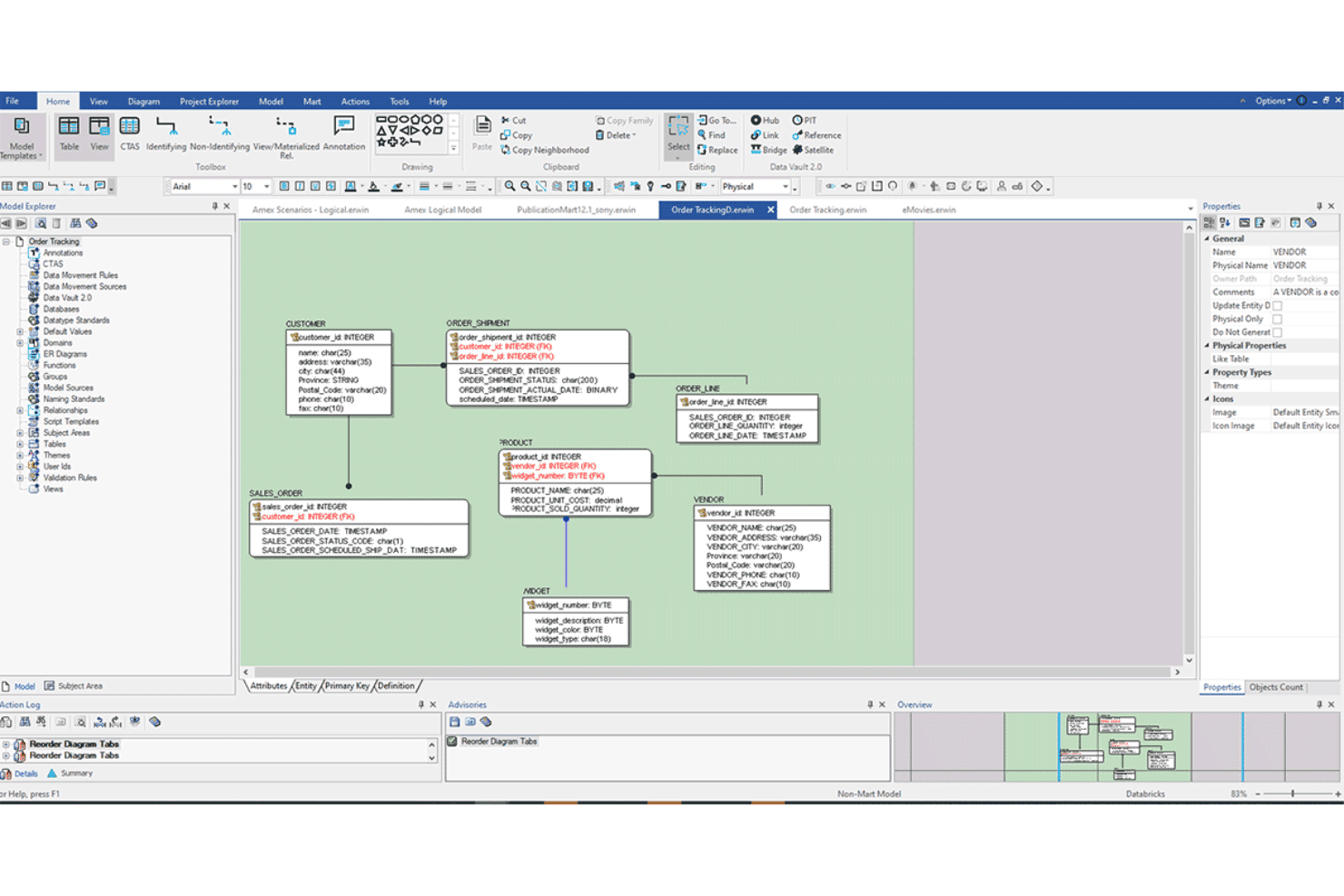
Ease of Use
erwin’s interface feels dated and can overwhelm new users with dense menus and options, making onboarding challenging for those unfamiliar with enterprise modeling. However, I think advanced users appreciate the depth of available tools, such as granular model validation and batch editing, which speed up complex modeling tasks once you’re acclimated.

Integrations
erwin integrates with Oracle, MySQL, Microsoft SQL Server, PostgreSQL, MongoDB, Snowflake, IBM DB2, Apache Cassandra, MariaDB, and Apache Hive, among others.
erwin also provides an API and supports integration with third-party tools for extended connectivity.

erwin Specs
- 2-Factor Authentication: No
- Access Management: No
- Anti-Virus: No
- API: Yes
- Audit Trail: No
- Bug Tracking: No
- Calendar Management: No
- Customer Management: No
- Dashboard: Yes
- Data Export: Yes
- Data Import: Yes
- Data Visualization: Yes
- Email Integration: No
- External Integrations: Yes
- File Sharing: No
- File Transfer: No
- Firewall: No
- Google Apps Integration: No
- Inventory Tracking: No
- Malware Protection: No
- Multi-User: Yes
- Network Device Performance Monitoring: No
- Network Traffic Monitoring: No
- Network Visualization: No
- Notifications: No
- Project Management: No
- Remote Access: No
- Risk Assessment: No
- SAP Integration: No
- Scheduling: No
- Software Integration: Yes
- Third-Party Plugins/Add-Ons: Yes
- Ticket Management: No


