

CyberArk Review: Pros, Cons, Features, and Pricing



CyberArk Workforce Identity and Access Management (IAM) is an identity and access management solution that covers SSO, MFA, adaptive authentication, and lifecycle management for enterprise workforces. I'd consider it if your organization needs workforce identity and privileged access management under one vendor rather than stitching together separate tools. That's where it has a clear edge over Okta—CyberArk brings its deep privileged access management heritage into the workforce identity layer, making it a stronger fit for security-first teams managing both standard users and high-risk accounts.
CyberArk Workforce Identity and Access Management (IAM) Evaluation Summary

- Pricing upon request
- Free demo available
Why Trust Our Software Recommendations
Our team has been testing and reviewing software since 2012. As tech leaders ourselves, we know how difficult—and important—it is to choose the right software.
For this guide, we evaluated tools using hands-on testing and independent research, scoring tools using our selection criteria.
Our reviews reflect our human editorial judgment, not a sales pitch.
Expert reviewers:
CyberArk Workforce Identity and Access Management (IAM) Overview
In my opinion, CyberArk stands out as a top-tier privileged access management software for organizations needing strong privilege control. Its key features, like privileged account management, make it ideal for industries such as finance and healthcare. While it offers great support and a solid onboarding process, it could be more intuitive, especially for smaller teams. Compared to other IAM software, CyberArk's pricing might be higher, but the security it provides justifies the cost for those who prioritize safeguarding sensitive data. If your team values strong customer support and needs to manage complex access scenarios, CyberArk is a worthy contender.
pros
-
CyberArk offers strong security for managing privileged accounts.
-
Your team can rely on its excellent customer support.
-
It provides advanced features for industries with high-security needs.
cons
-
Your team may find the interface a bit complex.
-
It's not the easiest for smaller teams to use.
-
Onboarding may take longer than expected for new users.
Is CyberArk Workforce Identity and Access Management (IAM) Right For Your Needs?
Who Would be a Good Fit for CyberArk Workforce Identity and Access Management (IAM)?
CyberArk is ideal for large enterprises and industries like finance, healthcare, and government, where security is paramount. If your team manages numerous privileged accounts, CyberArk's robust security features will help protect sensitive data. Its advanced functionalities make it a solid choice for IT departments that need to ensure compliance and prevent unauthorized access. For companies with a dedicated IT security team, CyberArk's strong support can be a valuable asset.
-
Financial Institutions
CyberArk secures sensitive financial data through its strong privileged account management.
-
Healthcare Providers
It protects patient information, making it a solid choice for healthcare IT teams.
-
Government Agencies
CyberArk ensures compliance and security for government IT infrastructures.
-
Large Enterprises
Your company can manage complex access to both privileged and service accounts with CyberArk's advanced security features.
-
IT Security Teams
CyberArk's excellent support and features help development and operations (DevOps) teams prevent unauthorized access.
-
Compliance-Focused Organizations
CyberArk's security measures help your team meet strict compliance requirements.
-
Basic Security Needs
For simple security scenarios, CyberArk's advanced features could be excessive.
Who Would be a Bad Fit for CyberArk Workforce Identity and Access Management (IAM)?
CyberArk might not be the best choice for small businesses or startups with limited IT resources. If your team doesn't manage many privileged accounts, CyberArk's advanced features could be excessive and unnecessarily complex. Its onboarding process and interface complexity may overwhelm teams without dedicated IT staff. For companies with tight budgets, the cost of CyberArk might outweigh its benefits, especially if your security needs are relatively simple.
-
Small Businesses
Your team might find CyberArk too complex and costly for simple security needs.
-
Startups
CyberArk's advanced features may overwhelm startups with limited IT resources.
-
Non-IT Departments
If your focus isn't on IT security, CyberArk may not align with your needs.
-
Freelancers
Individual users likely won't need CyberArk's extensive cybersecurity features.
-
Budget-Conscious Teams
If budget is a concern, CyberArk's cost might not fit your financial plans.
Our Review Methodology
How We Test & Score Tools
We’ve spent years building, refining, and improving our software testing and scoring system. The rubric is designed to capture the nuances of software selection and what makes a tool effective, focusing on critical aspects of the decision-making process.
Below, you can see exactly how our testing and scoring works across seven criteria. It allows us to provide an unbiased evaluation of the software based on core functionality, standout features, ease of use, onboarding, customer support, integrations, customer reviews, and value for money.
Core Functionality (25% of final scoring)
The starting point of our evaluation is always the core functionality of the tool. Does it have the basic features and functions that a user would expect to see? Are any of those core features locked to higher-tiered pricing plans? At its core, we expect a tool to stand up against the baseline capabilities of its competitors.
Standout Features (25% of final scoring)
Next, we evaluate uncommon standout features that go above and beyond the core functionality typically found in tools of its kind. A high score reflects specialized or unique features that make the product faster, more efficient, or offer additional value to the user.
We also evaluate how easy it is to integrate with other tools typically found in the tech stack to expand the functionality and utility of the software. Tools offering plentiful native integrations, 3rd party connections, and API access to build custom integrations score best.
Ease of Use (10% of final scoring)
We consider how quick and easy it is to execute the tasks defined in the core functionality using the tool. High scoring software is well designed, intuitive to use, offers mobile apps, provides templates, and makes relatively complex tasks seem simple.
Onboarding (10% of final scoring)
We know how important rapid team adoption is for a new platform, so we evaluate how easy it is to learn and use a tool with minimal training. We evaluate how quickly a team member can get set up and start using the tool with no experience. High scoring solutions indicate little or no support is required.
Customer Support (10% of final scoring)
We review how quick and easy it is to get unstuck and find help by phone, live chat, or knowledge base. Tools and companies that provide real-time support score best, while chatbots score worst.
Customer Reviews (10% of final scoring)
Beyond our own testing and evaluation, we consider the net promoter score from current and past customers. We review their likelihood, given the option, to choose the tool again for the core functionality. A high scoring software reflects a high net promoter score from current or past customers.
Value for Money (10% of final scoring)
Lastly, in consideration of all the other criteria, we review the average price of entry level plans against the core features and consider the value of the other evaluation criteria. Software that delivers more, for less, will score higher.
Core Features
Privileged Account Security: CyberArk Privileged Access Manager (PAM) protects your sensitive accounts by managing access to critical workloads. Authorized users are granted access in accordance with role-based and least-privilege principles.
Session Monitoring: You can track user sessions in real-time to detect any suspicious activity. This feature helps your team quickly respond to potential cyber threats.
Password Management: CyberArk automates password changes, reducing the risk of password-related breaches. It ensures strong, unique passwords are consistently used.
Access Control: It lets you define and enforce access policies, so your team can control who accesses what resources. With greater visibility, you can minimize the risk of unauthorized access.
Audit and Reporting: CyberArk provides detailed logs and reports, giving you insights into user activities. This helps your team maintain compliance with industry regulations.
Threat Analytics: Using advanced analytics, CyberArk identifies potential security risks before they become threats. Instead of reacting to incidents, your team can be more proactive in protecting data.

Standout Features
AI Powered Threat Detection: CyberArk's threat detection goes beyond standard measures, using artificial intelligence (AI) to spot anomalies. Organizations can pre-empt data risks with a unified security approach.
Privileged Threat Analytics: It analyzes user behavior to identify unusual activities in privileged accounts. This helps your team prevent insider threats and unauthorized access.
Ease of Use
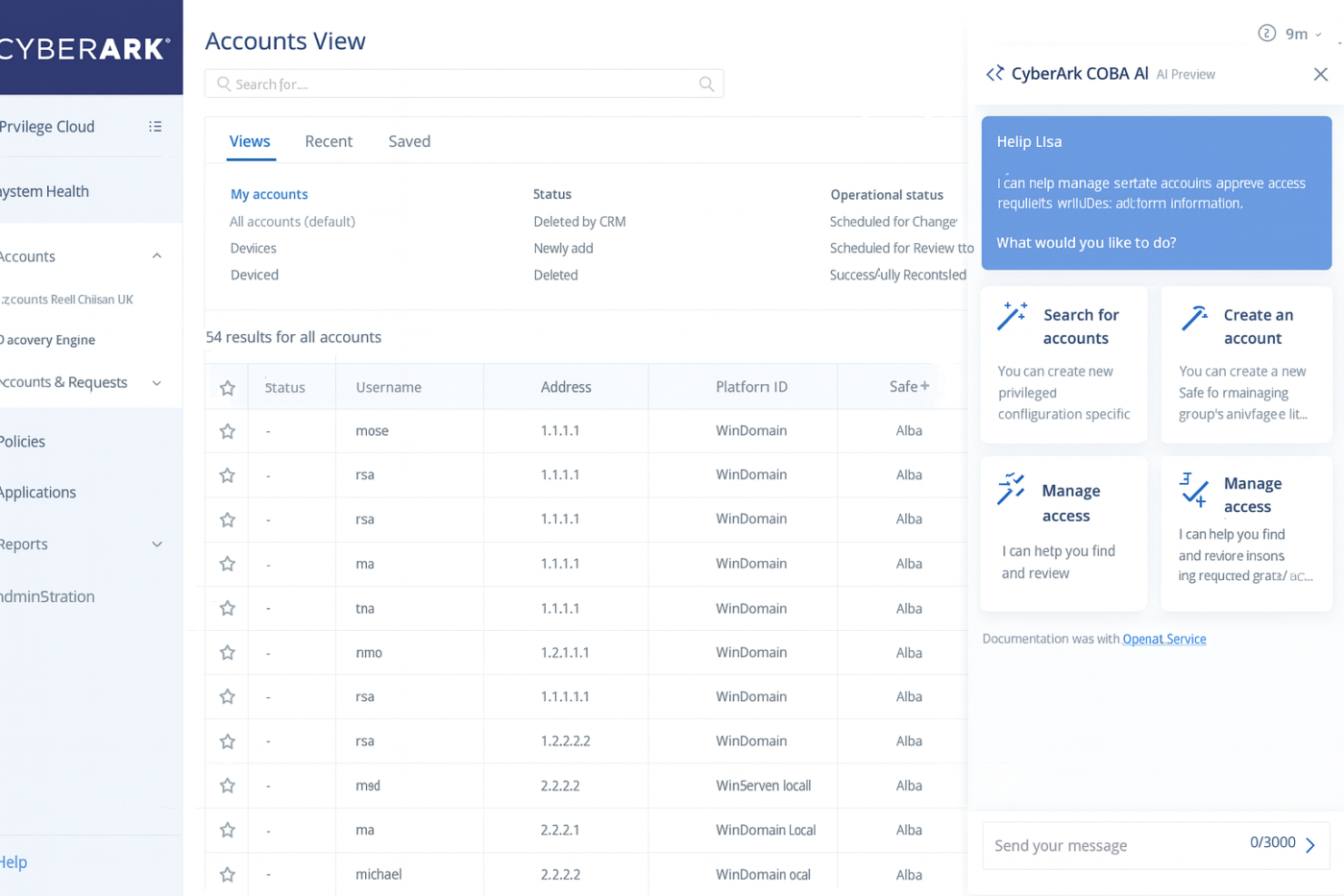
CyberArk isn't the easiest PAM solution to use, especially if your team lacks dedicated IT staff. Its interface can seem complex, which might slow down everyday tasks. While its advanced features provide strong security, they come with a learning curve. If your team manages many privileged accounts, the effort to learn CyberArk is worth it. However, smaller teams or those with simple needs might find it challenging to navigate and use effectively.

Onboarding
CyberArk's onboarding process can be lengthy, especially for teams new to its features. The setup demands time and effort, but the available support, FAQs, and resources help ease the transition. You’ll find detailed documentation and responsive support, which can shorten the learning curve. While the initial setup may take longer, the comprehensive guidance ensures your team can effectively use its robust security features. For teams with complex workflows, the onboarding investment pays off in enhanced security.
Customer Support
CyberArk provides excellent customer support, which is a major plus for users navigating its complex features. Your team can rely on responsive support channels, including hotlineand email, to resolve issues quickly. Users appreciate the knowledgeable support staff who provide clear solutions and guidance. The extensive documentation and training resources further assist your team in mastering the software, ensuring that you can maximize its security capabilities with confidence.
Integrations
CyberArk integrates with Ansible, Jenkins, Puppet, Terraform, OpenShift, Kubernetes, Rancher, Cloud Foundry, Amazon Web Services (AWS), Microsoft Azure, and more.
CyberArk also offers an application programming interface (API) for custom integrations and connects with third-party integration tools.

Value for Money
CyberArk’s pricing is tailored for mid-to-large enterprises and varies based on the number of privileged accounts, deployment model, and the specific modules your team needs. The platform generally requires a higher investment compared to lightweight PAM tools, which is why it may not fit smaller budgets. It offers a demo for teams wanting to explore the platform before committing.
CyberArk Workforce Identity and Access Management (IAM) Specs
- 2-Factor Authentication
- Access Management
- Anti-Virus
- API
- Audit Trail
- Bug Tracking
- Calendar Management
- Customer Management
- Dashboard
- Data Export
- Data Import
- Data Visualization
- Email Integration
- External Integrations
- File Sharing
- File Transfer
- Firewall
- Google Apps Integration
- Inventory Tracking
- Malware Protection
- Multi-User
- Network Device Performance Monitoring
- Network Traffic Monitoring
- Network Visualization
- Notifications
- Project Management
- Remote Access
- Risk Assessment
- SAP Integration
- Scheduling
- Software Integration
- Third-Party Plugins/Add-Ons
- Ticket Management
CyberArk Workforce Identity and Access Management (IAM) FAQs
How does CyberArk enhance data security?
Is CyberArk compliant with industry regulations?
How does CyberArk handle privileged account management?
What support resources does CyberArk provide?
Can CyberArk be customized to fit specific business needs?
How does CyberArk assist in threat detection and response?
What kind of training does CyberArk offer to new users?
Is CyberArk scalable for growing organizations?
CyberArk Workforce Identity and Access Management (IAM) Company Overview & History
CyberArk, founded in 1999 by Udi Mokady and Alon N. Cohen, is headquartered in Newton, Massachusetts, with a significant presence in Israel. Known for its leadership in identity security, CyberArk serves major clients across various industries. The company went public in 2014, trading on NASDAQ under the symbol CYBR. CyberArk is renowned for its strong work culture and commitment to protecting critical business data.
CyberArk Major Milestones
1999: Founded by Udi Mokady and Alon N. Cohen.
2014: Filed for an initial public offering and began trading on NASDAQ.
2020: Introduced pioneering privilege-based deception capabilities in CyberArk Endpoint Privilege Manager.
2023: Achieved System and Organization Controls (SOC) 2 Type 2 and SOC 3 certifications for its identity security platform.
2024: The company’s total revenue reached $240.1 million