

Today's fast-paced tech environments require that you keep your network secure and efficient, which can often be a challenge. AI network monitoring tools can help your team by detecting anomalies and predicting issues before they become problems.
As someone who independently tests and reviews software, I aim to provide you with unbiased insights into the best AI network monitoring tools available. These tools leverage AI to enhance your network's performance and security, making your job easier.
In this article, you’ll find my top picks, each evaluated for its unique AI capabilities. Whether you're looking for predictive analytics or real-time monitoring, I've got you covered. Let's explore how these tools can meet your needs.
Why Trust Our Software Recommendations
6,700+
Reviews
20
Industry experts
16+
Evaluation factors
14
Years
Our team has been testing and reviewing software since 2012. As tech leaders ourselves, we know how difficult—and important—it is to choose the right software.
For this guide, we evaluated tools using hands-on testing and independent research, scoring tools using our selection criteria.
Our reviews reflect our human editorial judgment, not a sales pitch.
Expert reviewers:
- Paulo Gardini MiguelTech Director
 Tim FisherVP of AI
 Gabriel RosasTech Lead & Software Architect
 Christhian GruhnTech Lead & Platform Architect

AI Network Monitoring Tools Comparison Table
This comparison table summarizes pricing details for my top AI network monitoring tool selections:
| Tool | Best For | Trial Info | Price | ||
|---|---|---|---|---|---|
| 1 | Best for real-time monitoring | Free plan + 14-day free trial available | From $15/host/month (billed annually) | Website | |
| 2 | Best for AI-driven insights | Free demo available | From $4.50/1000 sessions | Website | |
| 3 | Best for network mapping | 14-day free trial | Pricing upon request | Website | |
| 4 | Best for AI-powered sensor recommendations | 30-day free trial + free plan available | From $200/month (billed annually) | Website | |
| 5 | Best for cloud monitoring | 14-day free trial | Pricing upon request | Website | |
| 6 | Best for security compliance | Free demo available | Pricing upon request | Website | |
| 7 | Best for AI integration | 30-day free trial + free demo available | Pricing upon request | Website | |
| 8 | Best for IT operations | 30-day free trial + free demo available | From $104/month | Website | |
| 9 | Best for threat detection | Free demo available | Pricing upon request | Website | |
| 10 | Best for predictive analytics | Free demo available | Pricing upon request | Website |


Best AI Network Monitoring Tool Reviews
Below are my detailed summaries of the best AI network monitoring tools that made it onto my shortlist. My reviews offer a detailed look at the key features, pros and cons, integrations, and ideal use cases of each tool to help you find the best one for you.
 Best for real-time monitoring
- Free plan + 14-day free trial available
- From $15/host/month (billed annually)
Visit WebsiteCustomer Rating:4.5/5This rating combines scores from multiple user review sites to reflect overall customer sentiment about the product.
Datadog offers real-time monitoring and AI insights for cloud-scale apps. Datadog is a monitoring and analytics platform designed for IT and development teams to manage cloud-scale applications. It offers real-time monitoring and AI-driven insights into application performance and infrastructure health.
Why I picked Datadog: Datadog provides continuous monitoring for instant insights into application and ecosystem performance. Its AI-powered anomaly detection helps identify issues as they arise. The platform's customizable dashboards allow you to visualize data in ways that meet your specific needs. Datadog's alerting system notifies your team of critical issues immediately, reducing response times.
Standout features and integrations:
Features include customizable dashboards that you can tailor to your specific needs. Anomaly detection uses AI to identify issues immediately. Notifications ensure your team is immediately aware of critical issues.
Integrations include AWS, Azure, Google Cloud, Kubernetes, Docker, Slack, Jira, GitHub, PagerDuty, Microsoft Teams, and more.
Pros and Cons
Pros:
- Detects anomalies with AI
- Offers customizable dashboards
- Provides ongoing monitoring and notifications
Cons:
- Basic root-cause tracing
- Limited custom ML models
 Best for AI-driven insights
- Free demo available
- From $4.50/1000 sessions
Visit WebsiteCustomer Rating:4.5/5This rating combines scores from multiple user review sites to reflect overall customer sentiment about the product.
Dynatrace uses AI to monitor apps, detect anomalies, and optimize performance. Dynatrace is an application performance management tool tailored for enterprises seeking deep insights into their IT environments. It uses AI to automate monitoring, detect anomalies, and optimize application performance.
Why I picked Dynatrace: Dynatrace provides AI-driven insights that help you understand complex IT environments. Its Davis AI engine automates root-cause analysis and predicts potential issues. This enables your team to address outages and other problems before they affect users. The platform's automatic discovery and mapping of application dependencies ensure you have a clear view of your entire system.
Standout features and integrations:
Features include AI-powered discovery that continuously maps your application dependencies and connectivity. Real-time user monitoring helps you understand user interactions and behavior. The platform also offers cloud monitoring, ensuring your cloud infrastructure is performing optimally.
Integrations include AWS, Azure, Google Cloud, Kubernetes, Docker, VMware, SAP, ServiceNow, Slack, Jira, and more.
Pros and Cons
Pros:
- Provides real-time user monitoring
- Automates root-cause analysis
- Offers detailed application performance insights
Cons:
- Complex initial configuration
- Heavy resource consumption
 Best for network mapping
- 14-day free trial
- Pricing upon request
Visit WebsiteCustomer Rating:4.7/5This rating combines scores from multiple user review sites to reflect overall customer sentiment about the product.
Auvik delivers AI-powered network mapping and real-time performance insights. Auvik is a cloud-based network management software aimed at IT professionals seeking to simplify network monitoring and management. It offers AI-powered network mapping and observability to provide real-time insights into network performance.
Why I picked Auvik: Auvik's network mapping automatically discovers and visualizes your network infrastructure. Its AI capabilities identify network anomalies quickly, ensuring your team can address issues promptly. The platform offers continuous performance monitoring, giving you a clear view of your ecosystem health. Auvik's alert system is customizable, allowing you to set thresholds and receive notifications tailored to your needs.
Standout features and integrations:
Features include performance monitoring to provide insights into the health of your network. The customizable alert system lets you decide which notifications to receive and take action on.
Integrations include ConnectWise, Autotask, Microsoft Teams, Slack, Cisco, Google Workspace, ServiceNow, and more.
Pros and Cons
Pros:
- Provides customizable alert thresholds
- Offers real-time performance monitoring
- Automates network discovery and mapping
Cons:
- Limited advanced reporting features
- May have a significant learning curve
Learn more about Auvik: Best for AI-powered sensor recommendations
- 30-day free trial + free plan available
- From $200/month (billed annually)
Visit WebsiteCustomer Rating:4.6/5This rating combines scores from multiple user review sites to reflect overall customer sentiment about the product.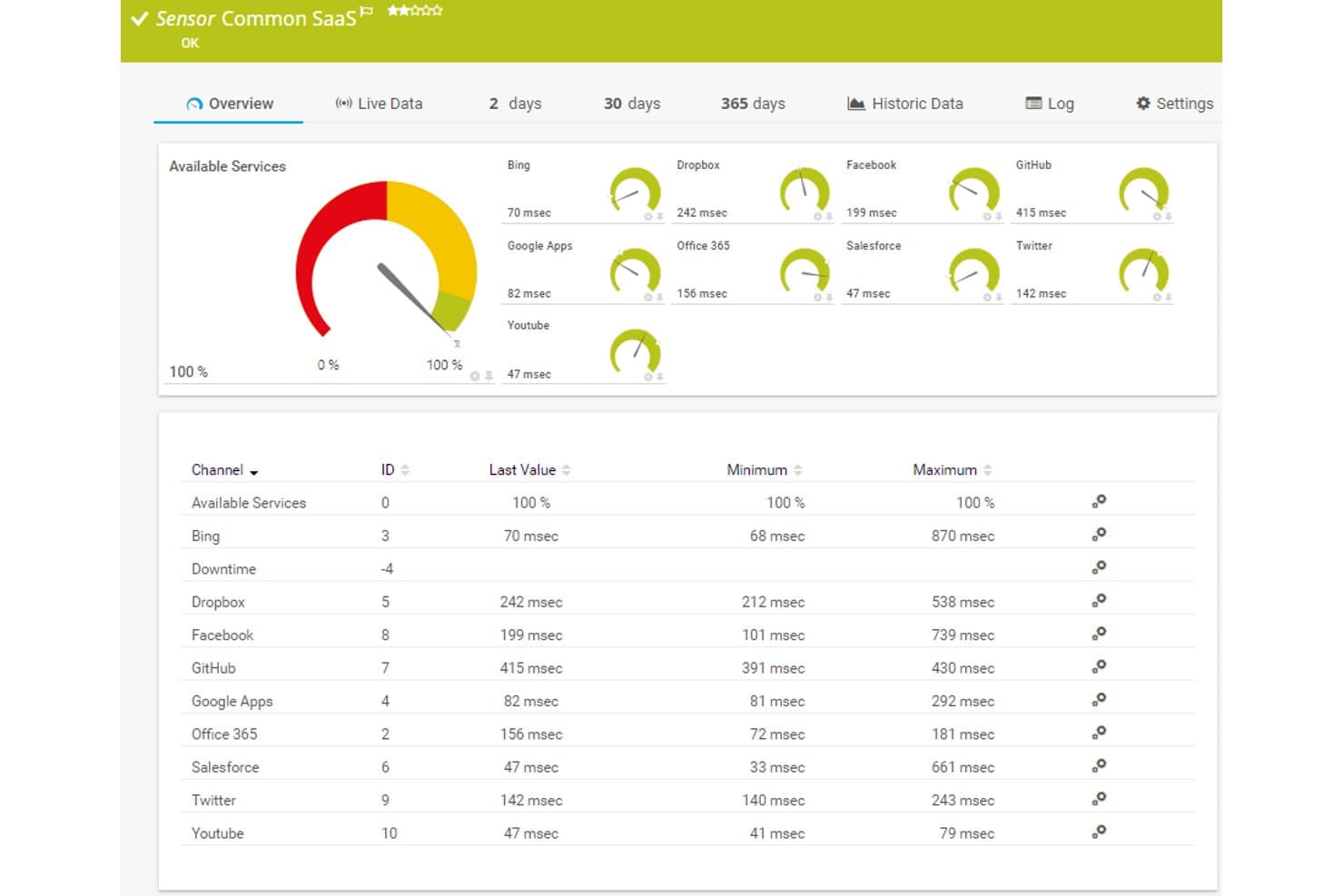
Paessler PRTG offers a Common SaaS sensor dashboard displaying real-time response times and availability for cloud services like Dropbox, Office 365, Salesforce, and GitHub. Paessler PRTG is an AI-assisted network monitoring platform that combines sensor-based infrastructure monitoring, adaptive anomaly detection, real-time telemetry collection, and multi-protocol support across on-premises and cloud environments.
Who Is Paessler PRTG Best For?
PRTG is a strong fit for IT infrastructure managers and NOC engineers in mid-to-large enterprises running complex, multi-protocol network environments.
Why I Picked Paessler PRTG
I picked Paessler PRTG because its AI-powered sensor recommendation engine actively suggests which sensors to deploy based on your discovered devices, which cuts monitoring setup time significantly. I also like the automated baselining feature, which continuously analyzes historical telemetry to build adaptive thresholds without any manual configuration. That means I'm not chasing false positives from static alert limits, because the system self-adjusts as my environment changes.
Paessler PRTG Key Features
- Map designer: Create custom network topology maps with real-time status indicators for devices and links.
- Distributed monitoring: Use remote probes to monitor multiple sites, networks, or subsidiaries from a single interface.
- REST custom sensors: Extend monitoring to any API-accessible system by building your own REST-based sensors.
- Industrial protocol support: Monitor OT environments with integrated support for OPC UA, Modbus TCP, and MQTT protocols.
Paessler PRTG Integrations
Paessler PRTG offers native integrations across the Microsoft ecosystem, including Microsoft 365 and Azure, and supports AWS, VMware, and Cisco Meraki. An API is available for custom integrations.
Pros and Cons
Pros:
- On-premises deployment suits data-sensitive environments
- Covers 1,000+ sensors across diverse device types
- AI sensor recommendations cut monitoring setup time
Cons:
- Interface feels dated vs. modern SaaS platforms
- AI features lag behind cloud-native competitors
Learn more about Paessler PRTG: Best for cloud monitoring
- 14-day free trial
- Pricing upon request
Visit WebsiteCustomer Rating:4.5/5This rating combines scores from multiple user review sites to reflect overall customer sentiment about the product.
LogicMonitor offers cloud-based network monitoring with performance insights. LogicMonitor is a cloud-based network monitoring platform designed for IT teams and managed service providers. Its end-to-end monitoring and analytics provide observability and valuable insights into network performance and health.
Why I picked LogicMonitor: The tool's cloud monitoring offers extensive coverage across modern networks' hybrid infrastructures. Its AI-driven anomaly detection helps your team identify issues before they impact performance. LogicMonitor's dynamic topology mapping provides a clear view of your entire network configuration. Its customizable dashboards and reports ensure you get the insights you need for effective decision-making, capacity planning, and as-needed remediation.
Standout features and integrations:
Features include dynamic topology mapping that visualizes your entire network. Customizable dashboards let you tailor the view to your needs. Automated alerts ensure your team is notified of potential issues promptly.
Integrations include AWS, Azure, Google Cloud, VMware, Cisco, Microsoft 365, ServiceNow, Slack, PagerDuty, and more.
Pros and Cons
Pros:
- Supports hybrid environments
- Offers customizable alerts and dashboards
- Provides detailed cloud infrastructure insights
Cons:
- May require training for full utilization
- Limited log-analysis tools
Learn more about LogicMonitor:

IBM provides AI-driven managed security with proactive threat detection. IBM offers a managed security service designed for enterprises that require advanced threat management and compliance with industry regulations. Its AI capabilities provide proactive threat detection and response, ensuring your network integrity.
Why I picked IBM: IBM can strengthen security compliance, leveraging AI to ensure your systems meet industry standards. Its AI-driven threat intelligence helps your team identify vulnerabilities before they become emergencies. The platform's security analytics provide insights into potential risks and compliance issues. IBM's automated response capabilities help mitigate threats efficiently, aligning with its focus on compliance.
Standout features and integrations:
Features include AI threat intelligence that keeps your network secure. Security analytics offer insights into risks and compliance gaps. The platform's AI-driven response capabilities help your team mitigate threats efficiently.
Integrations include AWS, Azure, Google Cloud, and more.
Pros and Cons
Pros:
- Offers automated threat intelligence
- Ensures compliance with industry standards
- Provides advanced threat management
Cons:
- May require dedicated security expertise
- Heavy deployment complexity
Learn more about IBM: Best for AI integration
- 30-day free trial + free demo available
- Pricing upon request

Cisco delivers AI-driven tools to automate and enhance enterprise AIOps. Cisco offers a range of AI-driven network monitoring solutions designed for enterprises seeking enhanced network management and security. Its AI capabilities help automate network operations and improve efficiency, making it a valuable tool for IT departments managing large ecosystems.
Why I picked Cisco: Cisco integrates AI across its network solutions, providing intelligent automation and enhanced security features. The platform's ML algorithms continuously adapt to your network, improving performance over time. Cisco's AI integration ensures smooth communication across all network components, optimizing your IT infrastructure.
Standout features and integrations:
Features include intelligent automation that simplifies network operations. AI-driven analytics help your team make data-informed decisions and resolve network issues proactively. Solutions to improve data center sustainability are available.
Integrations include ServiceNow, IBM, Splunk, Oracle, Palo Alto Networks, and more.
Pros and Cons
Pros:
- Offers intelligent automation for AIOps
- Provides predictive analytics
- Integrates AI across network solutions
Cons:
- Limited multi-vendor insights
- May require extensive initial setup
Learn more about Cisco: Best for IT operations
- 30-day free trial + free demo available
- From $104/month

ManageEngine provides AI-driven tools for IT ops, from monitoring to security. ManageEngine is an IT management software suite designed for IT teams and administrators seeking extensive solutions to manage their IT operations. It offers AI-driven tools for network monitoring, application performance, and security management.
Why I picked ManageEngine: ManageEngine focuses on IT operations, providing a wide range of AI-powered tools to streamline your team's tasks. Its network monitoring features use AI to detect anomalies and ensure optimal performance. The application performance management tools offer insights into resource utilization and potential bottlenecks. ManageEngine's security management capabilities help protect your IT infrastructure from threats, aligning with its focus on IT operations.
Standout features and integrations:
Features include application performance management that helps you optimize resource use and capacity planning. Network monitoring tools detect anomalies and ensure your network runs smoothly. Security management features protect your IT infrastructure from potential threats.
Integrations include Microsoft 365, Google Workspace, Azure, Salesforce, ServiceNow, Slack, PagerDuty, Jira, and more.
Pros and Cons
Pros:
- Includes security management features
- Provides AI-driven network monitoring
- Offers a full suite of IT management solutions
Cons:
- Basic anomaly detection logic
- Weak real-time root-cause tracing
Learn more about ManageEngine:

Darktrace uses AI to detect threats and anomalies in real time. Darktrace is an AI-based cybersecurity solution designed for businesses seeking advanced threat detection and response capabilities. It uses ML to identify potential threats and anomalies, providing a continuous, proactive security posture.
Why I picked Darktrace: Darktrace leverages its AI algorithms to identify threats and respond to security incidents quickly. Its Antigena technology autonomously responds to threats, minimizing the need for manual intervention. The platform's self-learning AI adapts to your network's unique patterns, improving firewall performance and detection accuracy. Darktrace's real-time threat visualization offers a global view of security events, enhancing your team's ability to act decisively.
Standout features and integrations:
Features include autonomous response capabilities that reduce manual workload. Immediate threat visualization helps your team understand and respond to security incidents quickly. The self-learning AI continually adapts to your network, improving threat detection over time.
Integrations include AWS, Azure, Google Cloud, Cisco, Palo Alto Networks, Splunk, ServiceNow, Microsoft 365, Okta, CrowdStrike, and more.
Pros and Cons
Pros:
- Adapts to network changes automatically
- Offers real-time threat visualization
- Provides autonomous threat response
Cons:
- Can be complex for smaller teams
- May require time for AI learning
Learn more about Darktrace:

Selector delivers real-time network insights and automated issue resolution. Selector is an AI-driven network monitoring tool designed for IT teams, network operators, and network engineers. It provides real-time insights and automates issue detection and resolution, enhancing network resilience and operational efficiency.
Why I picked Selector: Selector focuses on predictive analytics, using its advanced AI capabilities to forecast potential network issues and security threats. It features a patented correlation engine for effective root-cause analysis. The built-in digital twin offers a real-time model of the network ecosystem, aiding in disaster recovery planning. Selector's Network LLM and Copilot provide a unified view across all network layers, automating anomaly detection and improving incident response times.
Standout features and integrations:
Features include real-time insights that help your team detect issues faster. The digital twin allows for continuous modeling of your network configuration. Automated alerts reduce fatigue and latency, accelerating problem resolution.
Integrations include AWS, Google Sheets, Cisco, Juniper, Palo Alto Networks, Splunk, ServiceNow, Prometheus, and more.
Pros and Cons
Pros:
- Provides real-time correlation and visualization
- Enhances network resilience
- Significantly reduces ticket volume
Cons:
- Limited customization options for alerts
- May require initial setup time
Learn more about Selector:
Other AI Network Monitoring Tools
Here are some additional AI network monitoring tools that didn’t make it onto my shortlist but are still worth checking out:
- 11NetOp.cloudBest for automated monitoring
- 12LiveActionBest for network visualization
- 13NinjaOneBest for endpoint management
- 14MotadataBest for IT infrastructure management
- 15ZabbixBest for open-source flexibility
- 16Pandora FMSBest for customizable alerts
- 17Forward NetworksBest for network verification
- 18NetFlow LogicBest for flow-based insights
- 19ExabeamBest for user behavior analytics
Related Reviews
How I Evaluate AI Network Monitoring Tools
Every tool on this list needs to deliver AI that actually changes how you work—catching anomalies before they cascade and cutting through alert noise, not just slapping a label on static thresholds. I split my evaluation into core functionality every tool must have to qualify, and differentiating factors that separate good options from great fits.
Core Functionality (Table Stakes For This List)
When I'm selecting tools for my list, I rank each one on a scale from 0 (does not offer the functionality) to 5 (excels in this area) for each core functionality listed below. Then, I calculate the tool's total score into a percentage. Each tool needs to achieve a minimum total score of 65% to be considered for inclusion.
- AI-Driven Anomaly Detection: I check whether the tool uses ML to build dynamic baselines rather than relying on manually set thresholds that miss subtle bandwidth or latency shifts.
- Predictive Analytics: Forecasting capacity exhaustion or link degradation days ahead matters, so I look for models trained on historical telemetry, not just trend lines.
- Automated Root Cause Analysis: When a branch office goes down, I evaluate how well the tool correlates events across switches, firewalls, and WAN links to pinpoint the source.
- Real-Time Network Monitoring: I look for continuous telemetry collection via SNMP, NetFlow, and streaming data with refresh rates fast enough to catch microbursts and flapping interfaces.
- Intelligent Alert Correlation: Alert storms during an outage can bury the real issue. I evaluate how the tool clusters related alerts and prioritizes the ones that need attention first.
- Multi-Environment Visibility: Hybrid networks are the norm, so I check whether the tool monitors on-prem gear, cloud VPCs, SD-WAN overlays, and wireless infrastructure in one view.
Once I have a list of tools that meet this criteria, I consider what sets each platform apart.
Differentiating Factors (What Sets Vendors Apart)
Here's how I compare and contrast different vendors:
Standout Features
Automated remediation is a big differentiator—I look for tools that can trigger config rollbacks or reroute traffic the moment AI flags an issue, not just open a ticket. A generative AI assistant also adds real value when engineers can ask "why is site-to-site latency spiking?" and get a contextualized answer instantly. I also evaluate AIOps integration, where network telemetry merges with logs and traces to give a single incident timeline across the full stack.
Beyond Features
Integration ecosystem matters a lot here. I check whether the tool connects natively to ITSM platforms like ServiceNow and Jira, plus chat tools like Slack, so alerts flow into existing workflows. Pricing transparency is another factor I evaluate closely—some vendors charge by device count while others bill on data volume, which can drastically shift costs as your network grows. I also consider deployment flexibility, especially for teams that need on-prem options to keep sensitive telemetry within their own infrastructure.
How To Choose an AI Network Monitoring Tool
It’s easy to get bogged down in long feature lists and complex pricing structures. To help you stay focused as you work through your unique selection process, here’s a checklist of factors to keep in mind:
| Factor | What To Consider |
|---|---|
| FactorScalability | What To ConsiderWill the tool grow with your network needs? Consider future expansion. Look for features that support increased data loads and user access without degrading performance. |
| FactorIntegrations | What To ConsiderDoes it work with your existing systems? Check compatibility with your current software and platforms your team uses regularly to ensure smooth data exchange and workflow. |
| FactorCustomizability | What To ConsiderCan you tailor the tool to your processes? Look for options to customize dashboards, reports, and alerts to fit your team's specific needs and preferences. |
| FactorEase of use | What To ConsiderIs the interface intuitive for your team? Evaluate the learning curve and whether the tool provides a straightforward user experience to minimize training time. |
| FactorImplementation and onboarding | What To ConsiderHow quickly can you get up and running? Assess the setup process, available support resources, and any required training to ensure a smooth transition. |
| FactorCost | What To ConsiderDoes the pricing fit your budget? Consider total costs, including setup fees, subscription models, and any hidden charges. Compare with similar tools to gauge value. |
| FactorSecurity safeguards | What To ConsiderAre your data and network protected? Verify the tool's security measures, such as encryption and access controls, to ensure they meet your organization's standards. |
| FactorSupport availability | What To ConsiderWhen can you reach support if needed? Check the availability of customer support, including hours of operation and response times, to ensure assistance when issues arise. |
What Are AI Network Monitoring Tools?
AI network monitoring tools are software solutions that use AI to oversee and manage network performance and security. IT professionals, network administrators, and security teams generally use these tools to identify issues, optimize performance, and ensure data security. Anomaly detection, predictive analytics, and automated alerts help to maintain network health, improve response times, and reduce manual workload. Overall, these tools provide valuable insights and automation to keep networks running smoothly and securely.
Features
When selecting AI network monitoring tools, keep an eye out for the following key features:
- Anomaly detection: Identifies unusual patterns in network traffic to alert your team to potential issues before they escalate.
- Predictive analytics: Use historical data to forecast network performance and preemptively address potential bottlenecks or failures.
- Automated alerts: Send notifications to your team when specific thresholds are breached, ensuring a timely response to critical issues.
- Network mapping: Visualizes your network's topology in real time, helping you understand its structure and relationships.
- User behavior analytics: Monitor user activities to detect suspicious behavior and improve security measures.
- Customizable dashboards: Allow you to tailor the interface to display relevant metrics and insights specific to your needs.
- Real-time monitoring: Provides continuous oversight of network performance, ensuring issues are detected and addressed swiftly.
- AI-driven security measures: Enhance network protection by using AI to identify and respond to threats automatically.
- Integration capabilities: Ensure the tool can work with your existing software and systems for convenient data sharing and workflow.
- Automated incident response: Uses AI to autonomously respond to network incidents, reducing the need for manual intervention.
Benefits
Implementing AI network monitoring tools provides several benefits for your team and your business. Here are a few you can look forward to:
- Improved efficiency: AI automates routine tasks and alerts, freeing up your team to focus on more strategic initiatives.
- Enhanced security: AI-driven threat detection quickly identifies and responds to security risks, keeping your network safe.
- Proactive maintenance: Predictive analytics allow you to address potential issues before they impact network performance.
- Better decision-making: Real-time data and insights help your team make informed decisions about network management and optimization.
- Reduced downtime: Automated incident response minimizes network disruptions by swiftly resolving issues without manual intervention.
- Increased visibility: Network mapping and monitoring provide a clear view of network health and performance, aiding in troubleshooting and capacity planning.
- Cost savings: By optimizing network performance and reducing manual workload, these tools can lower operational costs over time.
Costs & Pricing
Selecting an AI network monitoring tool requires an understanding of the various pricing models and plans available. Costs vary based on features, team size, add-ons, and more. The table below summarizes common plans, their average prices, and typical features included in AI network monitoring tool solutions:
Plan Comparison Table for AI Network Monitoring Tools
| Plan Type | Average Price | Common Features |
|---|---|---|
| Plan TypeFree Plan | Average Price$0 | Common FeaturesBasic monitoring, limited alerts, and essential reporting. |
| Plan TypePersonal Plan | Average Price$5-$25/user/month | Common FeaturesReal-time monitoring, customizable dashboards, and email alerts. |
| Plan TypeBusiness Plan | Average Price$30-$75/user/month | Common FeaturesAdvanced analytics, integration capabilities, and automated incident response. |
| Plan TypeEnterprise Plan | Average Price$100-$200/user/ month | Common FeaturesFull network visibility, predictive analytics, and dedicated support. |
AI Network Monitoring Tools FAQs
Here are some answers to common questions about AI network monitoring tools:
How do AI network monitoring tools handle false positives?
AI network monitoring tools can handle false positives by continuously learning from network patterns and user feedback. They refine their algorithms to reduce false alerts over time. To minimize false positives, ensure your team regularly updates the tool’s learning models and sets precise alert thresholds. This helps the AI distinguish between legitimate threats and normal network behavior.
Additionally, leverage any available customization options to tailor alerts to your specific network environment.
Can AI network monitoring tools integrate with existing security systems?
Yes, most AI network monitoring tools can integrate with existing security systems. They typically offer APIs and support for common protocols to ensure smooth data exchange.
Before choosing a tool, verify its compatibility with your current systems and any specific integration requirements. This ensures your network monitoring and security efforts work in harmony, providing a global view of your network’s health and security posture. Make sure to test integrations during your trial period to address any potential issues early.
What should I consider when setting alert thresholds?
When setting alert thresholds, consider your network’s normal traffic patterns and identify critical points that require immediate attention. Set thresholds that balance sensitivity and specificity to avoid overwhelming your team with alerts. Use historical data to guide your decisions, and regularly review and adjust thresholds as your network evolves. Engaging your team in this process ensures the alerts remain relevant and actionable.
Additionally, consider utilizing any AI-driven recommendations from your monitoring tool to optimize threshold settings.
What’s Next:
If you're in the process of researching AI network monitoring tools, connect with a SoftwareSelect advisor for free recommendations.
You fill out a form and have a quick chat where they get into the specifics of your needs. Then you'll get a shortlist of software to review. They'll even support you through the entire buying process, including price negotiations.