

În acest articol, voi prezenta principalele mele recomandări de software pentru gestionarea cerințelor. Le-am testat și evaluat independent pe fiecare, astfel încât vă puteți baza pe opiniile mele. Scopul meu este să vă ajut să găsiți un instrument care vă simplifică procesele și sporește productivitatea echipei dumneavoastră.
Veți găsi o analiză imparțială a fiecărui software, cu evidențierea funcțiilor, avantajelor și dezavantajelor. Indiferent dacă faceți parte dintr-o echipă mică sau dintr-o întreprindere mare, există ceva potrivit pentru dumneavoastră. Să începem și să găsim soluția potrivită pentru nevoile dumneavoastră.
Why Trust Our Software Recommendations
6,700+
Reviews
20
Industry experts
16+
Evaluation factors
14
Years
Our team has been testing and reviewing software since 2012. As tech leaders ourselves, we know how difficult—and important—it is to choose the right software.
For this guide, we evaluated tools using hands-on testing and independent research, scoring tools using our selection criteria.
Our reviews reflect our human editorial judgment, not a sales pitch.
Expert reviewers:
- Paulo Gardini MiguelTech Director
 Tim FisherVP of AI
 Gabriel RosasTech Lead & Software Architect
 Christhian GruhnTech Lead & Platform Architect

Tabel comparativ pentru software-ul de gestionare a cerințelor
Acest tabel comparativ rezumă detaliile privind prețurile pentru principalele mele selecții de software pentru gestionarea cerințelor:
Sorted by: Default
| Tool | Starting Price | Website | |
|---|---|---|---|
Best for medical device regulatory compliance | Not rated | Pricing upon request Free demo available | Website |
Best for requirements management customizability | 4.7 out of 5 | Pricing upon request Free demo available | Website |
Best for large-scale project management | Not rated | Pricing upon request 30-day free trial + free demo available | Website |
Best for end-to-end traceability | 4.6 out of 5 | $520/user/year Free trial available | Website |
Best for enterprise-level customizability | 4.7 out of 5 | Pricing available upon request 30 days free trial | Website |
Best for out-of-box API integrations | 4.3 out of 5 | Pricing upon request 30-day free trial + free demo available | Website |
Best with an ITSM help desk | 4.0 out of 5 | $21.50/user/month Free plan + 14-day trial available | Website |
Best for scalable deployments | Not rated | Pricing upon request Free demo available | Website |
Best for traceability features | Not rated | Pricing upon request | Website |
Best for test integration | Not rated | Pricing upon request | Website |


Recenzii ale celor mai bune software-uri pentru gestionarea cerințelor
 Best for medical device regulatory compliance
- Free demo available
- Pricing upon request
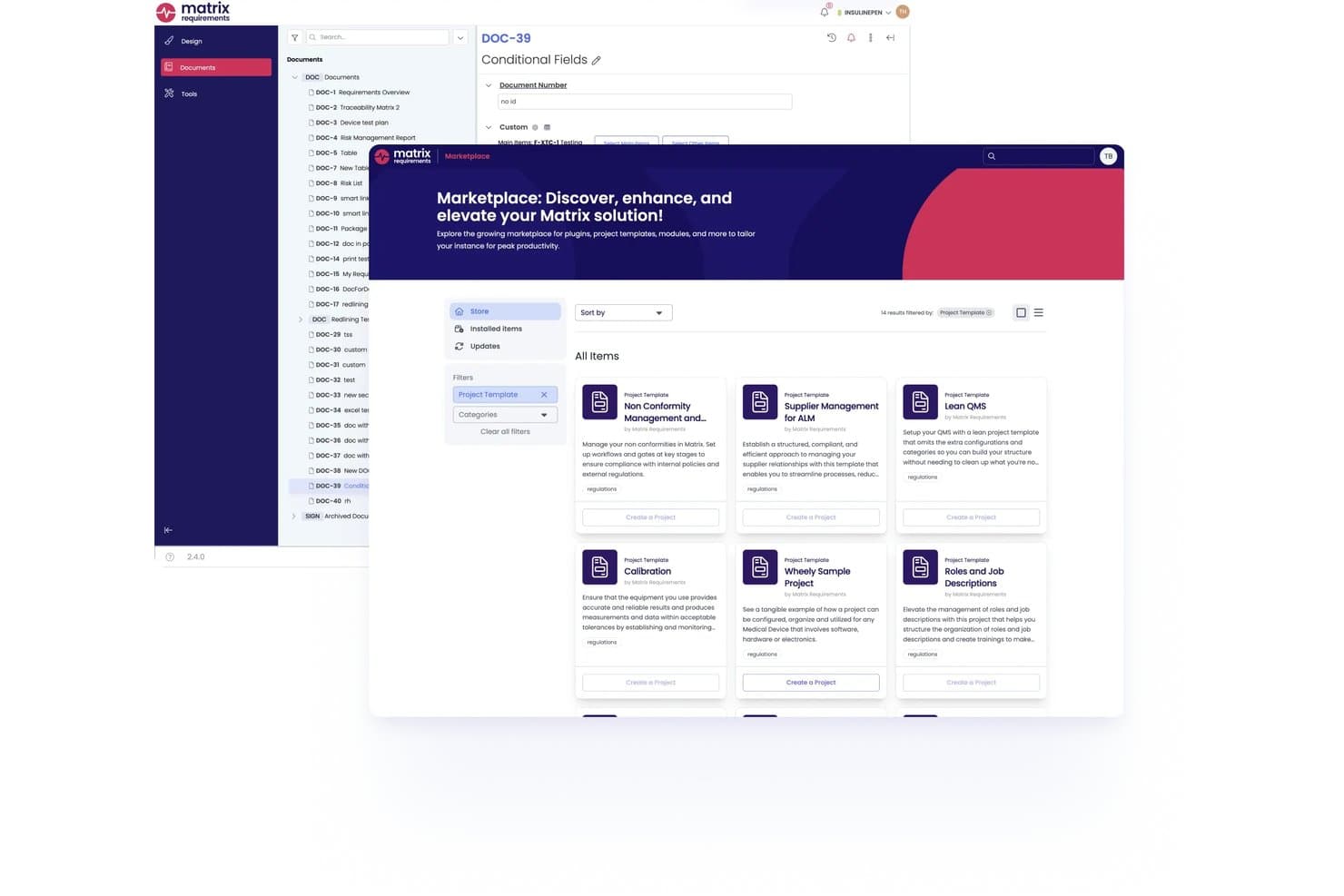
Matrix Req offers a built-in Marketplace where users can discover and install project templates, plugins, and modules directly within the platform. Matrix Req is a requirements management platform built specifically for medical device development, combining design control, risk management, end-to-end traceability, and test management within a single regulatory-ready environment.
Who Is Matrix Req Best For?
Matrix Req is a strong fit for QA and regulatory affairs teams in medical device, SaMD, and IVD companies navigating FDA or EU MDR compliance requirements.
Why I Picked Matrix Req
Matrix Req earns its spot on my shortlist because it treats regulatory compliance as architecture, not an afterthought. I particularly like the built-in Compliance Checker, which maps your documentation against standards like ISO 14971 and IEC 62304 and flags gaps before a submission. Its branch management also lets you maintain distinct requirement variants for different markets (EU MDR vs. FDA, for example) without duplicating the entire project structure.
Matrix Req Key Features
- Reusable requirements base library: Store and manage reusable requirement modules for rapid creation of new product variants.
- Bidirectional traceability matrix: Connect requirements to design, test, and risk artifacts with live, visual traceability.
- Automated audit trail and versioning: Track every change, approval, and comment with a full history and compliance-ready logs.
- Native ALM integrations: Sync requirements and links with Jira, Azure DevOps, GitHub, and GitLab for unified team workflows.
Matrix Req Integrations
Matrix Req offers native integrations with Jira, Azure DevOps, GitHub, GitLab, Confluence, TFS, Broadcom Rally, Phabricator, YouTrack, and Slack. An API is available for custom integrations.
Pros and Cons
Pros:
- Variant management for multi-region product requirements
- Built-in compliance checks for FDA and ISO
- End-to-end traceability for regulated industries
Cons:
- Pricing details not transparently available
- User interface can be unintuitive
Learn more about Matrix Req: Best for requirements management customizability
- Free demo available
- Pricing upon request
Visit WebsiteCustomer Rating:4.7/5
reqSuite® rm provides a single source of truth for all requirements and related data, ensuring consistency and accuracy throughout the project. reqSuite® rm stands out to me because of how flexible it gets as requirements grow more complex than typical templates can handle. I'd use reqSuite if you're a wall with standard requirements tools and need more custom workflows, document structures, or metadata fields.
One thing I appreciate is the level of control I get setting up requirement types and traceability rules. If you work in regulated environments or need a requirements process that fits your organization, not the other way around, this is where reqSuite® rm starts to shine.
reqSuite® rm's Best For
- Regulated industries needing custom requirements models and traceability
- Teams that outgrow fixed templates and need adaptable requirements processes
reqSuite® rm's Not Great For
- Small projects with simple requirements or minimal documentation needs
- Teams wanting a lightweight tool with minimal configuration
What sets reqSuite® rm apart
reqSuite® rm is built for organizations that need requirements management tailored to their own language and processes. It lets you define custom requirement types, workflows, and rules so you’re not bound by a preset framework. Unlike tools like Jira, which require workarounds for nonstandard needs, reqSuite® rm expects users to adapt the tool to fit their methodology. This works best in regulated, process-heavy environments where one-size-fits-all approaches fall short.
Tradeoffs with reqSuite® rm
By focusing on configurability and structure, reqSuite® rm makes setup and ongoing administration heavier. If you need a quick-start tool or want something lightweight, that level of depth can slow initial projects down.
Pros and Cons
Pros:
- Automatic checks for links and dependencies
- Version control features
- Highly configurable platform
Cons:
- Reporting graphical configuration could be modernized
- Data export feature could be improved
Learn more about reqSuite® rm: Best for large-scale project management
- 30-day free trial + free demo available
- Pricing upon request

A look at the projects tab from Jama Software showcasing the testing status overview. Jama Software lands on my list because it’s the tool I see large organizations turn to when requirements get complicated fast. Teams with dozens of contributors and evolving priorities use Jama Software to track requirements, manage versioning, and keep traceability clear during giant projects.
What I appreciate is how Jama Software handles end-to-end traceability and impact analysis. When you need to document complex relationships, align multiple teams, and keep ahead of compliance, this platform holds up.
Jama Software’s Best For
- Large enterprises managing complex, high-stakes engineering projects
- Teams requiring strict requirements traceability and regulatory compliance
Jama Software’s Not Great For
- Small teams needing lightweight or informal requirements tracking
- Projects without heavy documentation or traceability needs
What Sets Jama Software Apart
Jama Software treats requirements management as a structured, audit-ready process instead of a casual to-do list. Unlike Jira, which often gets stretched to handle requirements through plugins or workarounds, Jama builds traceability and impact analysis into its core workflow. In practice, this works best when you’re dealing with regulated environments or complex product development that can’t risk missed details.
Tradeoffs With Jama Software
It optimizes for thorough documentation and traceability, but the complexity adds significant onboarding time and overhead. For projects without strong compliance or traceability pressure, this extra friction can slow teams down.
Pros and Cons
Pros:
- Interface is designed for overseeing large-scale projects
- Real-time collaboration ensures timely decision-making
- Comprehensive traceability aids in keeping track of project details
Cons:
- Some users might find the pricing on the higher side
- Initial setup can be somewhat intricate
- Might be too extensive for smaller projects
Learn more about Jama Software: Best for end-to-end traceability
- Free trial available
- From $520/user/year
Visit WebsiteCustomer Rating:4.6/5
ReqView's interface organizes project requirements, documents, risks, and tests in one place. ReqView earns its spot on my list because it delivers on end-to-end traceability in a way most tools just can’t match. I tend to recommend it whenever a project needs rock-solid tracking of requirements changes, test coverage, and up-to-date trace matrices.
In my experience, ReqView’s bidirectional traceability and detailed versioning make a real difference on regulated projects or safety-critical systems. I appreciate how quickly you can link requirements, risks, and verification steps, then generate clear traceability reports without extra effort.
ReqView’s Best For
- Teams in regulated industries needing up-to-date requirement traceability
- Engineering groups tracking requirements, risks, and verification in detail
ReqView’s Not Great For
- Teams wanting visual boards or simplified task tracking
- Organizations needing heavy project planning or resource management features
What Sets ReqView Apart
ReqView centers everything around structured, document-driven requirements management. It expects you to approach requirements with traceability in mind and gives you fine-grained linking between each requirement, risk, and test case. Unlike something like Jira, which is optimized for user stories and iterative task management, ReqView sticks closer to document-based workflows common in regulated product development.
This tends to work well for teams that need to generate full trace matrices and demonstrate compliance, rather than just tracking day-to-day project tasks.
Tradeoffs with ReqView
ReqView optimizes for thorough traceability and documentation, but that focus means you lose visual project planning and simplified task management. In practice, this makes it cumbersome for teams looking for fluid, high-level project coordination.
Pros and Cons
Pros:
- Easy to setup and use
- Flexible project structure, customizable attributes and views
- Good customer support
Cons:
- Real-time collaboration is not yet implemented
- Coding skills needed for customization of export templates
Learn more about ReqView: Best for enterprise-level customizability
- 30 days free trial
- Pricing available upon request
Visit WebsiteCustomer Rating:4.7/5
Along with recording product requirements, users can keep track of traceability, defects, and verification. Visure Requirements makes my shortlist because it’s the tool I reach for when teams need heavy customizability to fit unique enterprise processes. I’ve seen organizations use it to create highly specific workflows, enforce distinct project templates, and manage complex compliance requirements all in one platform.
What stands out for me is the way Visure lets you design traceability matrices and enforce standards like DO-178C or ISO 26262 from the ground up. When requirements complexity rises and out-of-the-box tools just don’t cut it, this is what I recommend.
Visure Requirements’ Best For
- Large organizations with strict compliance or industry-specific standards
- Teams that need custom workflows and deep traceability for complex projects
Visure Requirements’ Not Great For
- Small teams with basic requirements management needs
- Groups seeking minimal setup or lightweight, ready-made workflows
What Sets Visure Requirements Apart
Visure Requirements stands out for the way it lets you define your own workflows and data structures from scratch. Unlike tools like Jira, which expect you to adapt your process to the product, here you build the system around how you already work. This makes the most sense when you have strict compliance rules or traceability needs that off-the-shelf tools miss. In practice, you’re shaping every stage—from requirements capture to reporting—to align with industry standards or internal processes.
Tradeoffs with Visure Requirements
You get maximum control, but that depth means setup and changes demand much more effort. If you want something you can just configure and launch, this won’t be a fit.
Pros and Cons
Pros:
- Strong Word and Excel integration
- AI-driven quality checks for requirements
- Flexible for agile and waterfall projects
Cons:
- Customization requires training for admins
- Interface may feel overwhelming at first
Learn more about Visure Requirements: Best for out-of-box API integrations
- 30-day free trial + free demo available
- Pricing upon request
Visit WebsiteCustomer Rating:4.3/5
Identify, manage, and track requirements across the lifecycle with codebeamer. Reduce costs, risks, and delivery times in product development. codebeamer makes my list because it's one of the few platforms that solves real API integration barriers right out of the box. I bring this up most when teams depend on syncing requirements with legacy or third-party tools and have no time for custom connector work.
My experience with codebeamer tells me it excels when you need to keep requirements, test cases, and traceability perfectly aligned across multiple software ecosystems. It's especially solid for regulated industries where integration points aren't negotiable, and I've always appreciated how it reduces the friction of combining data from across the product lifecycle.
codebeamer’s Best For
- Teams in regulated industries needing API-based requirements traceability
- Organizations with complex toolchains relying on real-time data sync
codebeamer’s Not Great For
- Teams that want a lightweight, out-of-the-box requirements solution
- Groups without integration needs or who avoid customization entirely
What Sets codebeamer Apart
What I find unique about codebeamer is how much it prioritizes API connectivity and integration with existing development environments. Instead of forcing you into a locked requirements-tracking silo the way Jira sometimes does, it expects you’ll need live connections with other tools and systems.
This works best when you want requirements, tests, and release data automatically synced across multiple platforms—especially in highly regulated industries where traceability is a core need.
Tradeoffs with codebeamer
By focusing on deep integrations and flexibility, codebeamer introduces setup complexity and a technical learning curve. That means teams looking for a plug-and-play solution without ongoing configuration tend to have a tougher time getting started.
Pros and Cons
Pros:
- Highly configurable workflows and templates
- Gapless traceability across development lifecycle
- Strong support for regulated industries
Cons:
- Interface may seem dated to new users
- Setup can feel complex at first
Learn more about codebeamer: Best with an ITSM help desk
- Free plan + 14-day trial available
- From $21.50/user/month
Visit WebsiteCustomer Rating:4/5
Jira Service Management lets you address project and team requirements in a unified dashboard for full operational transparency. Jira Service Management stands out for teams that need built-in ITSM features alongside requirements management. I picked it because service teams can tie change requests, incidents, and tasks right back to requirements, making it fit shops juggling both delivery and support. What I like is how we can link requirements to service tickets, so when someone files a request or disruption, you see the impact immediately. This works best when requirements, incidents, and changes need to stay connected for large, process-heavy organizations.
Jira Service Management’s Best For
- ITSM teams who need requirements linked with service tickets and incidents
- Enterprises managing requirements alongside change management and support processes
Jira Service Management’s Not Great For
- Software teams focused solely on product development requirements
- Small teams that don’t need ITSM workflows tightly integrated with requirements
What Sets Jira Service Management Apart
Jira Service Management is built on the idea that ITSM and requirements management should happen together, not in separate silos. Unlike stand-alone requirements tools like Jama Connect, it expects you to map requirements, incidents, changes, and requests in a single workflow. This works best when stakeholders need to see upstream and downstream impact—the way work shifts as requirements trigger changes or support tickets. I see it work well in large companies with strict approvals and audit trails.
Tradeoffs with Jira Service Management
It’s optimized for process-heavy environments, which means you get lots of structure and controls. As a result, pure product teams find the extra ITSM layers add overhead that slows down requirements gathering and iteration.
Pros and Cons
Pros:
- Links requirements with bugs or requests
- SLA tracking keeps requests on schedule
- Flexible workflows for IT and dev teams
Cons:
- Customization requires admin knowledge
- Setup can be complex for new users
Learn more about Jira Service Management: Best for scalable deployments
- Free demo available
- Pricing upon request

Here's a screenshot of the IBM Engineering Requirements Management DOORS Next dashboard. IBM Engineering Requirements Management "DOORS Next" stands out to me whenever I see organizations with extensive compliance needs and huge volumes of requirements that evolve over time. When teams start running into traceability and audit challenges, this is the tool I tend to recommend—they can map every requirement to tests, risks, and designs at scale.
I appreciate how it handles baselining and change management for complex multi-stakeholder projects, where lots of people contribute and requirements shift often. It's got strong support for enterprise-scale regulatory initiatives—teams can trace every requirement from idea to release, and verify coverage as regulations update.
DOORS Next is Best For
- Large enterprises managing extensive requirements across multiple products or regulatory initiatives
- Teams that need end-to-end traceability and audit trails for compliance-driven projects
DOORS Next is Not Great For
- Small teams looking for lightweight or informal requirements tracking
- Organizations that want modern, highly visual interfaces over process rigor
What Sets DOORS Next Apart
What stands out to me is how DOORS Next is built for situations where traceability matters more than speed. It expects large groups to define requirements early and maintain rigorous control as changes happen, unlike tools like Jira that focus more on tracking issues and sprints. In practice, this approach makes it work best for industries with strict compliance or auditing needs—think aerospace or regulated manufacturing.
Tradeoffs with DOORS Next
It optimizes for process rigor and traceable documentation, but that formal structure means onboarding takes longer and quick pivots feel slow. For teams that need to adapt requirements frequently or want a more visual, dynamic environment, it often feels too rigid.
Pros and Cons
Pros:
- Supports real-time collaboration which facilitates teamwork
- Comprehensive dashboards provide a detailed overview of projects
- Robust scalability ensures the tool is fit for all project sizes
Cons:
- Licensing and setup can be more complex than simpler alternatives
- Might be overkill for very small-scale projects
- A steeper learning curve compared to some other tools
Learn more about IBM Engineering Requirements Management DOORS Next:

The Micro Focus Dimensions RM offers a role-based dashboard that provides users with status updates and progress reports. Micro Focus Dimensions RM stands out on my shortlist because of how well it handles requirements traceability. When I’ve worked on projects with hundreds of moving parts, I’ve seen tracking dependencies and changes go from manageable to chaotic fast.
I really appreciate this tool's fine-grained auditing and live visualization of trace relationships. Teams are able to surface upstream and downstream impacts instantly, which is exactly what we need when regulatory or safety standards are on the line.
Micro Focus Dimensions RM's Best For
- Highly regulated industries needing requirements traceability and compliance
- Large organizations managing complex, multi-team software or systems projects
Micro Focus Dimensions RM's Not Great For
- Small teams with simple or informal requirements management needs
- Teams that want lightweight, highly visual, or Kanban-style workflows
What Sets Micro Focus Dimensions RM Apart
Micro Focus Dimensions RM builds traceability into every step, making it ideal when you need precise, auditable requirements control. Unlike tools like Jira, which add traceability with plugins or customizations, Dimensions RM is designed to map dependencies and changes from the start. This works best when you’re dealing with regulated environments or complex system development and can't leave gaps in your requirements lineage.
Tradeoffs With Micro Focus Dimensions RM
Dimensions RM is built for environments where traceability takes priority, but that often means slower onboarding and heavier process. If you need quick changes or informal collaboration, the formality here tends to slow the work down.
Pros and Cons
Pros:
- Robust version control ensures clear documentation of every change
- Integrates with a variety of popular development and testing tools
- Deep dive traceability features for comprehensive tracking
Cons:
- Potential for integration challenges with non-standard tools or platforms
- Some features may be too complex for smaller teams or projects
- May require a learning period for teams unfamiliar with its interface
Learn more about Micro Focus Dimensions RM:

The summary screenshot provides detailed information about the test execution results in Tricentris. I include Tricentris on my shortlist because it stays focused on tracking requirements through the whole testing lifecycle. When projects involve a lot of test automation or complex QA, I find this level of integration makes a tangible difference in oversight and speed.
What stands out is how Tricentris lets you link requirements directly to tests, with traceability and coverage reports updating automatically. When you're balancing traceability and compliance, those features tend to save hours and prevent missed edge cases.
Tricentris’s Best For
- QA and test teams needing tight requirements-to-test traceability
- Projects with heavy regulatory or audit demands around validation
Tricentris’s Not Great For
- Teams looking for high-level, visual requirements planning
- Small groups without dedicated QA or automation needs
What Sets Tricentris Apart
Tricentris takes requirements management and pushes it straight into the testing workflow. Unlike tools like Jira or Asana, it’s designed for environments where requirements and test cases need to stay tightly connected throughout a project. I tend to see the most value when organizations need oversight over traceability, compliance, and regulated testing.
Tradeoffs with Tricentris
Tricentris optimizes for traceability and formal QA, but that adds layers most smaller, collaborative teams won’t use. You lose out on fast, informal planning and lightweight workflows.
Pros and Cons
Pros:
- Efficient integrations with popular development tools streamline the workflow
- Advanced features like AI-driven analysis enhance testing precision
- Comprehensive test integration solution in a unified platform
Cons:
- Integration capabilities may require customization based on specific project needs
- Certain advanced features might be excessive for smaller projects
- Might come with a steeper learning curve for beginners
Learn more about Tricentris:
Alte software-uri pentru gestionarea cerințelor
Mai jos este o listă cu software-uri suplimentare pentru gestionarea cerințelor, pe care le-am inclus pe lista scurtă, dar care nu au ajuns în primele 12 poziții. Merită cu siguranță să le analizați.
- 11Visure SolutionsBest for robust integrations
- 12Doc SheetsBest for scalability
- 13ValispaceBest for engineering teams
- 14OliveBest for real-time collaboration
- 15OrcanosBest for compliance-focused projects
- 16PolarionBest for product lifecycle management
- 17InnoslateBest for lifecycle management
- 18AccompaBest for user-friendly dashboards
- 19Requirements PortalBest with unlimited collaborators included
- 20Modern RequirementsBest for collaboration in Azure DevOps
- 21PractiTestBest fortest and requirements alignment
- 22SpiraTeamBest forintegrated project management
- 23Sparx Systems Enterprise ArchitectBest forvisual modeling and design
- 24Micro Focus ALM Quality CenterBest forend-to-end quality management
- 25Modern Requirements4DevOpsBest forDevOps and Azure DevOps integration
- 26codebeamer RMBest forAgile and DevOps teams
Recenzii asociate despre software și instrumente
Dacă încă nu ați găsit aici ceea ce căutați, consultați și aceste alte tipuri de instrumente pe care le-am testat și evaluat.
- Software pentru monitorizarea rețelei
- Software pentru monitorizarea serverelor
- Soluții SD-WAN
- Instrumente pentru monitorizarea infrastructurii
- Analizor de pachete
- Instrumente pentru monitorizarea aplicațiilor
How I Evaluate Requirements Management Software
I split every evaluation into two layers: baseline criteria—think bidirectional traceability and formal baselining—and differentiators like compliance templates or OSLC integration.
Core Functionality (Table Stakes For This List)
When I'm selecting tools for my list, I rank each one on a scale from 0 (does not offer the functionality) to 5 (excels in this area) for each core functionality listed below. Then, I calculate the tool's total score into a percentage. Each tool needs to achieve a minimum total score of 65% to be considered for inclusion.
- Requirements Capture & Hierarchy: I evaluate how each tool structures requirements—whether you can build parent-child trees, assign custom attributes, and import from Word or CSV sources.
- End-to-End Traceability: Linking a requirement down to test cases, design specs, and defect matters, so I can check for bidirectional trace matrices and suspect-link detection.
- Version Control & Baselining: I look for full revision history per requirement, the ability to snapshot baselines before a release, and side-by-side comparison between baselines.
- Change & Impact Analysis: When a single requirement shifts mid-sprint, the tool should flag every affected artifact. I evaluate how each platform surfaces downstream impact.
- Collaboration & Review Workflows: Stakeholder sign-off cycles are a core part of the process, so I check for structured review assignments, threaded comments, and electronic approvals.
- Integrations With Dev & Test Tools: I look at native connections with platforms like Jira, Azure DevOps, and common test management tools, plus API and ReqIF support for broader toolchains.
Once I have a list of tools that meet this criteria, I consider what sets each platform apart.
Differentiating Factors (What Sets Vendors Apart)
Here's how I compare and contrast different vendors:
Standout Features
AI-assisted authoring is a big differentiator—I check whether a tool can flag ambiguous or duplicate requirements during drafting, which saves hours of manual review. Reusable requirement libraries also matter a lot when teams manage product variants or multi-program portfolios. I evaluate how well each platform supports live test coverage dashboards, since seeing verification gaps in real time beats running static reports after the fact. For regulated teams, configurable compliance templates tailored to standards like ISO 26262 or DO-178C can cut weeks off audit prep.
Beyond Features
Deployment flexibility is something I always evaluate—teams handling ITAR-controlled data or sensitive IP often need on-premise or single-tenant hosting, and not every vendor supports that. I also look at implementation and migration support, especially for organizations moving off legacy platforms like DOORS Classic or out of sprawling Excel spreadsheets. Industry and regulatory fit matter too. A tool pre-configured for medical device or aerospace standards saves your team from building validation workflows from scratch. These factors shape long-term success just as much as the feature set itself.
Cum să alegeți software-ul pentru gestionarea cerințelor
Este ușor să vă pierdeți în liste lungi de funcții și structuri complexe de prețuri. Pentru a vă ajuta să rămâneți concentrat în timp ce parcurgeți procesul unic de selectare a software-ului, iată o listă de factori de care trebuie să țineți cont:
| Factor | Aspecte de luat în considerare |
|---|---|
| FactorScalabilitate | Aspecte de luat în considerareVa crește instrumentul odată cu echipa dumneavoastră? Luați în considerare dacă poate gestiona mai multe proiecte sau utilizatori pe măsură ce nevoile dumneavoastră se extind. Căutați opțiuni clare de upgrade în structura de prețuri. |
| FactorIntegrări | Aspecte de luat în considerareSe conectează la instrumentele existente? Asigurați-vă că acceptă software-ul pe care echipa dumneavoastră îl folosește deja, precum Jira sau Slack, pentru a evita întreruperile fluxului de lucru. |
| FactorPosibilități de personalizare | Aspecte de luat în considerareÎl puteți adapta pentru a se potrivi proceselor dumneavoastră? Verificați dacă puteți ajusta fluxurile de lucru, șabloanele și câmpurile pentru a răspunde nevoilor echipei dumneavoastră fără asistență tehnică extinsă. |
| FactorUșurința utilizării | Aspecte de luat în considerareEste interfața intuitivă pentru toți utilizatorii? Un design simplu poate reduce timpul de instruire și îmbunătăți adoptarea. Căutați demonstrații sau perioade de testare pentru a verifica direct ușurința utilizării. |
| FactorImplementare și integrare inițială | Aspecte de luat în considerareCât de repede poate începe echipa dumneavoastră? Luați în considerare resursele necesare pentru configurare și instruire. Accesul la tutoriale și asistență poate facilita tranziția. |
| FactorCost | Aspecte de luat în considerareSe încadrează în bugetul dumneavoastră fără taxe ascunse? Comparați costurile totale, inclusiv licențierea, instruirea și asistența, cu limitele bugetului și rentabilitatea investiției preconizată. |
| FactorMăsuri de securitate | Aspecte de luat în considerareVă protejează datele? Evaluați măsurile de securitate implementate, precum criptarea și permisiunile utilizatorilor, pentru a asigura protecția datelor proiectului. |
Ce este software-ul pentru gestionarea cerințelor?
Software-ul pentru gestionarea cerințelor este utilizat pentru a colecta, documenta și urmări cerințele proiectului pe parcursul întregului lor ciclu de viață. Inginerii, managerii de proiect și analiștii de afaceri folosesc de obicei aceste instrumente pentru a se asigura că proiectele își ating obiectivele propuse și rămân pe drumul cel bun. Funcțiile de trasabilitate, gestionare a modificărilor și colaborare sprijină comunicarea eficientă și adaptabilitatea între echipe. Aceste instrumente contribuie la menținerea clarității și organizării, îmbunătățind în cele din urmă succesul proiectului și alinierea la obiectivele de afaceri.
Funcții
Atunci când selectați software pentru gestionarea cerințelor, urmăriți următoarele funcții esențiale:
- Măsuri de securitate: Protejează datele sensibile ale proiectului prin funcții precum criptarea și permisiunile utilizatorilor, asigurând conformitatea și integritatea datelor. Caracteristicile care se aliniază cel mai bine cazului dumneavoastră de utilizare vă permit să gestionați mai eficient complexitatea cerințelor proiectului și să obțineți rezultate de succes.
- Trasabilitate: Asigură urmărirea tuturor cerințelor pe parcursul ciclului de viață al proiectului, oferind responsabilitate și aliniere la obiectivele proiectului.
- Gestionarea modificărilor: Ajută la gestionarea și documentarea modificărilor aduse cerințelor, reducând riscul de comunicare deficitară și întârzieri ale proiectului.
- Instrumente de colaborare: Facilitează comunicarea între părțile interesate, permițând echipelor să lucreze eficient împreună și să ia decizii informate.
- Opțiuni de personalizare: Vă permit să adaptați fluxurile de lucru, șabloanele și câmpurile pentru a corespunde proceselor și nevoilor specifice ale echipei dumneavoastră.
- Analiza impactului: Evaluează efectele modificărilor cerințelor asupra proiectului, ajutându-vă să reduceți riscurile și să luați decizii bazate pe date.
- Actualizări în timp real: Oferă informații actualizate despre starea proiectului, asigurându-se că toți membrii echipei au cele mai recente date pentru luarea deciziilor.
- Controlul versiunilor: Gestionează diferitele versiuni ale cerințelor pentru a menține consecvența și a urmări modificările de-a lungul timpului.
- Raportare și analiză: Oferă informații despre performanța proiectului și starea cerințelor, sprijinind planificarea și execuția strategică.
Beneficii
Implementarea unui software de gestionare a cerințelor oferă mai multe beneficii pentru echipa și compania dumneavoastră. Iată câteva dintre acestea:
- Asigurarea securității: Protejează datele proiectului prin măsuri de securitate precum criptarea și permisiunile utilizatorilor, asigurând conformitatea și integritatea datelor. Gestionarea eficientă a cerințelor eficientizează execuția proiectului, dar oferă și un cadru solid pentru gestionarea schimbărilor, asigurarea calității și furnizarea de valoare.
- Aliniere îmbunătățită a proiectului: Menține toate părțile interesate informate și aliniate la obiectivele proiectului prin instrumente de trasabilitate și colaborare.
- Reducerea riscurilor: Minimizează riscurile proiectului prin funcții de gestionare a modificărilor și analiză a impactului, care gestionează eficient actualizările cerințelor.
- Comunicare îmbunătățită: Facilitează o comunicare mai bună între membrii echipei și părțile interesate, datorită actualizărilor în timp real și funcțiilor de colaborare.
- Eficiență sporită: Crește productivitatea prin automatizarea proceselor de rutină și furnizarea unor fluxuri de lucru personalizabile, adaptate nevoilor dumneavoastră.
- Decizii bazate pe date: Permite echipei dumneavoastră să ia decizii informate, oferind acces la instrumente de raportare și analiză care furnizează informații despre performanța proiectului.
Costuri & prețuri
Selectarea unui software de gestionare a cerințelor necesită înțelegerea diferitelor modele și planuri de tarifare disponibile. Opțiunile variază de la instrumente gratuite de gestionare a cerințelor până la planuri pentru începători, profesionale și pentru întreprinderi. Costurile variază în funcție de funcții, dimensiunea echipei, suplimente și alți factori.
Tabelul de mai jos rezumă planurile comune, prețurile medii ale acestora și funcțiile incluse de obicei în soluțiile software de gestionare a cerințelor:
Tabel comparativ al planurilor pentru software de gestionare a cerințelor
| Tipul planului | Preț mediu | Funcții comune |
|---|---|---|
| Tipul planuluiGratuit | Preț mediu$0 | Funcții comuneGestionarea de bază a cerințelor, număr limitat de utilizatori, instrumente de bază pentru colaborare, acces la asistență din partea comunității |
| Tipul planuluiÎncepător | Preț mediu$10 - $25/utilizator/lună | Funcții comuneInstrumente îmbunătățite pentru colaborare, mai mulți utilizatori, raportare și analiză de bază, asistență prin e-mail |
| Tipul planuluiProfesional | Preț mediu$25 - $50/utilizator/lună | Funcții comuneUrmărire avansată a cerințelor, funcții de integrare, raportare și analiză cuprinzătoare, asistență prioritară prin e-mail |
| Tipul planuluiPentru întreprinderi | Preț mediuPreț personalizat | Funcții comuneFluxuri de lucru personalizabile, utilizatori nelimitați, funcții avansate de securitate, asistență dedicată, opțiuni locale, funcții complete de integrare, informații bazate pe IA |
Întrebări frecvente despre software-ul de gestionare a cerințelor
Iată câteva răspunsuri la întrebările frecvente despre software-ul de gestionare a cerințelor:
Cum gestionează software-ul de gestionare a cerințelor modificările?
Software-ul de gestionare a cerințelor include, de obicei, funcții de gestionare a modificărilor pentru a urmări și documenta modificările. Acesta vă ajută să evaluați impactul modificărilor asupra proiectului și asigură comunicarea tuturor actualizărilor către părțile interesate, menținând alinierea proiectului și reducând riscurile.
Cum asigurați trasabilitatea în software-ul de gestionare a cerințelor?
Trasabilitatea este asigurată prin asocierea cerințelor cu originile lor și urmărirea acestora pe parcursul ciclului de viață al proiectului. Acest lucru ajută echipa să verifice dacă toate cerințele sunt îndeplinite și oferă o pistă de audit clară, esențială pentru conformitate și responsabilitate.
Ce ar trebui să luați în considerare atunci când integrați software-ul de gestionare a cerințelor?
Atunci când integrați software-ul de gestionare a cerințelor, luați în considerare compatibilitatea cu instrumentele existente, precum Jira sau Slack. Asigurați-vă că acesta acceptă migrarea datelor și oferă API-uri pentru conectivitate fără întreruperi. Această integrare ajută la menținerea continuității fluxului de lucru și îmbunătățește colaborarea între echipe.
Cum poate software-ul de gestionare a cerințelor să sprijine conformitatea?
Software-ul de gestionare a cerințelor sprijină conformitatea prin furnizarea unor funcții precum piste de audit, controlul versiunilor și trasabilitate. Aceste instrumente ajută echipa să documenteze procesele, să urmărească modificările și să se asigure că toate cerințele de reglementare sunt îndeplinite, reducând riscul de neconformitate.