

Cele mai bune platforme de dezvoltare fără cod ajută echipele să livreze aplicații mai rapid, permițând utilizatorilor fără cunoștințe tehnice să creeze, să personalizeze și să implementeze aplicații fără a scrie cod. Acestea permit organizațiilor să accelereze proiectele digitale, să se integreze cu sistemele existente și să reducă dependența de resurse limitate de dezvoltare.
Multe echipe încep să caute soluții fără cod după ce întâmpină dificultăți în construirea instrumentelor interne fără sprijinul dezvoltatorilor, pierd ore întregi actualizând manual foi de calcul care nu se pot extinde sau jonglează cu mai multe aplicații deconectate care nu pot partaja date. Aceste probleme încetinesc operațiunile și îngreunează desfășurarea activității de către departamentele companiei în ritmul de care au nevoie.
Am lucrat cu echipe de produs care au adoptat platforme fără cod pentru a înlocui fluxurile de lucru moștenite, am testat modul în care funcționează aceste instrumente în medii de producție reale și le-am evaluat flexibilitatea în ceea ce privește sprijinirea integrărilor între ecosistemele SaaS și cele pentru întreprinderi. Aceste experiențe mi-au oferit o perspectivă clară asupra platformelor care permit utilizatorilor fără cunoștințe tehnice să lucreze eficient fără a sacrifica scalabilitatea sau controlul.
În acest ghid, veți vedea care platforme de dezvoltare fără cod oferă cele mai practice opțiuni de personalizare, se integrează eficient cu sistemele moderne de afaceri și vă ajută organizația să se miște mai rapid fără a se baza exclusiv pe resursele echipei de dezvoltare.
Why Trust Our Software Recommendations
6,700+
Reviews
20
Industry experts
16+
Evaluation factors
14
Years
Our team has been testing and reviewing software since 2012. As tech leaders ourselves, we know how difficult—and important—it is to choose the right software.
For this guide, we evaluated tools using hands-on testing and independent research, scoring tools using our selection criteria.
Our reviews reflect our human editorial judgment, not a sales pitch.
Expert reviewers:
- Paulo Gardini MiguelTech Director
 Tim FisherVP of AI
 Gabriel RosasTech Lead & Software Architect
 Christhian GruhnTech Lead & Platform Architect

Tabel comparativ al platformelor de dezvoltare fără cod
Acest tabel comparativ rezumă detaliile privind prețurile pentru selecția mea de top de platforme de dezvoltare fără cod:
Sorted by: Default
| Tool | Starting Price | Website | |
|---|---|---|---|
Best for digitizing field data capture workflows | 4.5 out of 5 | $20/user/month Free trial + free demo available | Website |
Best for AI-assisted enterprise app development | 4.7 out of 5 | $40/user/month Free demo available | Book Demo |
Best for turning spreadsheets into mobile apps | 4.7 out of 5 | $19/month Free plan available | Website |
Best for scalable backends | 4.8 out of 5 | $85/month Free plan available | Website |
Best for database-driven application design | 4.3 out of 5 | $8/user/month Free plan + free demo + 15-day trial available | Website |
Best for visual web application building | 4.4 out of 5 | $29/month Free plan + free trial available | Website |
Best for creating interactive mobile and web apps | 3.5 out of 5 | $65/month 14-day free trial | Website |
Best for dynamic form-based applications | Not rated | $34/user/month Free plan available | Website |
Best for business solutions within the Microsoft ecosystem | Not rated | $20/user/month Free plan available | Website |
Best for automating business processes | Not rated | Website |


Recenzii ale celor mai bune 10 platforme de dezvoltare fără cod
Mai jos sunt rezumatele mele detaliate ale celor mai bune platforme de dezvoltare fără cod care au ajuns pe lista mea scurtă. Recenziile mele oferă o analiză detaliată a principalelor funcții, avantaje și dezavantaje, integrări și cazuri de utilizare ideale pentru fiecare instrument, pentru a vă ajuta să îl găsiți pe cel mai potrivit pentru dumneavoastră.
 Best for digitizing field data capture workflows
- Free trial + free demo available
- From $20/user/month (billed annually)
Visit WebsiteCustomer Rating:4.5/5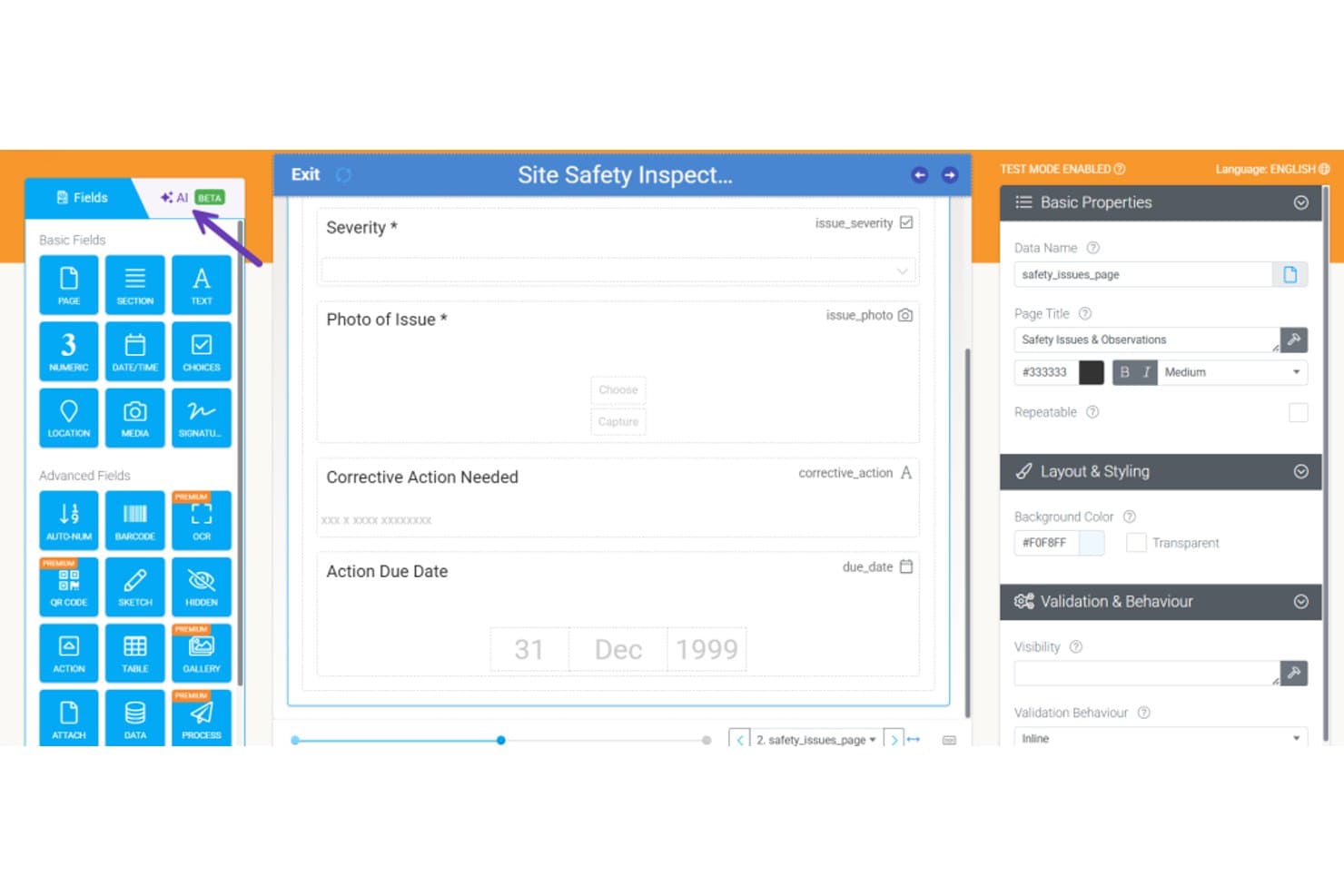
Appenate lets users build safety inspection forms with drag-and-drop fields. Appenate is a no-code mobile app builder purpose-built for field teams, offering drag-and-drop form creation, offline data capture, AI-assisted form generation, and automated workflows for inspections, audits, and job dispatch.
Who Is Appenate Best For?
Appenate is a strong fit for field service and industrial teams—think construction, mining, and manufacturing—that need to replace paper-based inspections, audits, and checklists with offline-capable mobile apps.
Why I Picked Appenate
I picked Appenate as one of the best because it does something most no-code platforms don't: it's built specifically for digitizing field data capture workflows, not retrofitted for it. I love the AI Photo Fill feature, which lets field workers photograph a paper form and have it populate the digital fields automatically. Paired with native offline capture across iOS, Android, and Windows, Appenate handles real field conditions where connectivity drops mid-inspection.
Appenate Key Features
- Drag-and-drop form builder: A visual editor that lets non-technical users construct data-capture apps using field types like GPS, barcode scanning, NFC, signatures, and repeatable tables.
- Sync automation engine: A no-code workflow tool that triggers chained actions—such as document generation, data pushes, and email sends—based on form submissions, schedules, or incoming webhooks.
- Distill BI dashboards: A built-in analytics layer that converts captured field data into interactive dashboards and lets you query results against your internal SOPs.
- Multi-environment support: Separate environments per department, with the Enterprise Toolkit enabling multiple company environments and syncing of apps, documents, and data between them.
Appenate Integrations
Appenate offers native integrations with Salesforce, NetSuite, Xero, QuickBooks, Google Sheets, Snowflake, Google BigQuery, and Microsoft ecosystem tools including SharePoint and Azure. It also connects to SQL Server, MySQL, and PostgreSQL, with a REST API, webhooks, and Zapier support.
Pros and Cons
Pros:
- Dedicated onboarding support helps field deployments
- Paper-form photo capture reduces setup time
- Offline mobile capture works without connectivity
Cons:
- No version control or custom code
- Narrow scope limits general app building
Learn more about Appenate: Best for AI-assisted enterprise app development
- Free demo available
- $40/user/month
Visit WebsiteCustomer Rating:4.7/5
Studio Creatio's application hub provides a consolidated view of all templates, connectors, and apps. Creatio Studio is on this list because it blends no-code design with AI support, making it a solid fit for building enterprise-grade apps fast. When I work with operations or IT teams who need to automate complex workflows or prototype department-specific systems, this is one of the few platforms where AI-generated suggestions and process mapping really speed things up.
What I especially appreciate is how easily teams can drag and drop logic, integrate with existing systems, and adapt processes on the fly. It stands out for guided process modeling and the way you can visually design both simple and intricate business applications—with minimal technical overhead.
Creatio Studio’s Best For
- Enterprise IT or operations teams building custom workflow apps
- Organizations using AI to automate and optimize business processes
Creatio Studio’s Not Great For
- Small teams with simple task or project needs
- Anyone wanting prebuilt app templates with minimal customization
What sets Creatio Studio apart
Creatio Studio is focused on letting business users build workflow-driven apps visually, without diving into code or scripts. It expects organizations to define business processes first, then map those processes into automations and app interfaces. Unlike ClickUp or Airtable, which lean toward flexible task management, Creatio Studio frames everything around process design and automation from the start.
Tradeoffs with Creatio Studio
Creatio Studio optimizes for structured process design, but you give up the simplicity and quick-start templates that lighter no-code tools provide. This means small teams or less technical users can find the setup and onboarding slower.
Pros and Cons
Pros:
- Drag-and-drop interface
- Process and workflow automation features
- Minimum customization required
Cons:
- Some users may find building automation workflows to be complicated
- Learning curve for those unfamiliar with no-code development
Learn more about Creatio AI Studio: Best for turning spreadsheets into mobile apps
- Free plan available
- From $19/month (billed annually)
Visit WebsiteCustomer Rating:4.7/5
Here's an example of designing an app using Glide's pre-made templates feature. Glide earns its spot because it’s the first platform I think of when a team needs to build mobile apps from spreadsheets fast, without touching code. You connect your Google Sheets or Excel data, then Glide turns that into a working app that updates as your spreadsheet changes. I like how you can quickly create user interfaces, add logic, and publish directly to mobile—all without developer resources. This is what I recommend when someone hits scaling limits with static spreadsheets but isn’t ready to bring in a developer yet.
Glide’s Best For
- Turning Google Sheets or Excel into mobile apps
- Non-technical teams needing custom internal tools quickly
Glide’s Not Great For
- Complex apps needing custom coding or APIs
- Large-scale enterprise apps with advanced security needs
What sets Glide apart
Glide treats your spreadsheet as the single source of truth, letting you create mobile-first apps that reflect changes in real time. Instead of requiring any code or a full dev cycle, you just connect your sheet and start configuring the interface. Unlike AppSheet or Mendix, which get heavy on logic and integrations, Glide stays focused on simple data-driven apps.
Tradeoffs with Glide
Glide optimizes for fast, no-code app setup with spreadsheets, but complex business logic or advanced backend customization is out of reach. Teams needing highly specialized integrations or granular controls usually hit limits fast.
Pros and Cons
Pros:
- Variety of templates catering to different needs
- Ease of use with a user-friendly interface
- Direct integration with Google Sheets for real-time updates
Cons:
- Dependency on Google Workspace for extended integrations
- Advanced customizations might require a learning curve
- Limited to Google Sheets for backend data
Learn more about Glide: 4Best for scalable backends
Xano
- Free plan available
- From $85/month (billed annually)
Visit WebsiteCustomer Rating:4.8/5
Xano provides a no-code API builder that allows users to create business logic without writing code. Xano earns its spot because it takes the complexity out of launching scalable, no-code backends. I’ve seen teams hit bottlenecks with growth on other platforms—Xano unlocks API customization and workload scaling when you need it. I appreciate its real database and serverless logic, so you’re not boxed in by web-only CRUD tools.
What stands out is how fast you can build and iterate complex workflows, even as demands change.
Xano’s Best For
- Product teams building scalable no-code APIs and workflows
- Apps that outgrow web-only database backends
Xano’s Not Great For
- Non-technical users needing only simple form builders
- Teams that never plan to customize backend logic
What sets Xano apart
Xano takes the backend work you’d do with Firebase or custom APIs, but lets you work visually and without code. It expects you to define business logic, database schema, and API endpoints all in one place, which I see working best for teams building web or mobile apps who want real control over backend decisions. Unlike Airtable or Bubble, which favor frontend-first, Xano is aimed at people building structured, scalable systems behind the scenes.
Tradeoffs with Xano
Xano optimizes for backend power and flexibility, but the interface and concepts require some understanding of API design and relational data, so early-stage founders or non-technical builders can get stuck.
Pros and Cons
Pros:
- Pre-made templates are available
- Good API management features
- Xano is highly scalable
Cons:
- Limited ability to customize the base infrastructure
- Limited frontend capabilities
Learn more about Xano: Best for database-driven application design
- Free plan + free demo + 15-day trial available
- From $8/user/month (billed annually)
Visit WebsiteCustomer Rating:4.3/5
Here's the intuitive drag-and-drop builder feature in Zoho Creator. Zoho Creator lands on my list because it's one of the few platforms that makes designing database-driven applications genuinely approachable without code. When teams need to build tailored apps that depend on strong data structuring, role-based access, and automation, I've seen Zoho Creator shine.
What I appreciate most is how you can visually model tables, relationships, and business logic—it's practical for inventory systems, customer portals, or workflow tools that start with complex data.
Zoho Creator’s Best For
- Building custom database-driven applications without code
- Organizations that need data modeling and workflow automation
Zoho Creator’s Not Great For
- Teams expecting full-featured enterprise app development
- Simple project tracking or basic to-do list needs
What sets Zoho Creator apart
Zoho Creator focuses on letting you build database-driven apps without needing to touch code. Unlike monday.com, which emphasizes visual boards, I find Zoho Creator expects you to start by modeling your data and relationships first and then layer on workflows. This fits organizations that want to digitize forms, approvals, or internal systems and have unique data needs rather than adopting a generic, out-of-the-box model.
Tradeoffs with Zoho Creator
Zoho Creator optimizes for data modeling and workflow logic, but you give up the visual flexibility and templates that tools like Glide or Airtable offer. This makes startup slower for teams that want to quickly create visual-first apps instead of building up from structured data.
Pros and Cons
Pros:
- Versatile integrations, especially within the Zoho ecosystem.
- User-friendly interface that suits both experts and newcomers.
- Robust emphasis on database-driven application creation.
Cons:
- As with other SaaS tools, costs can add up when scaling for larger teams.
- External integrations might be more limited compared to other no-code platforms.
- While the platform is intuitive, some advanced functionalities might have a steeper learning curve.
Learn more about Zoho Creator: Best for visual web application building
- Free plan + free trial available
- From $29/month (billed annually)
Visit WebsiteCustomer Rating:4.4/5
Here's the drag-and-drop interface feature in Bubble. Bubble is on my shortlist because it's the most capable platform I know for building fully custom web applications visually, no code needed. When teams outgrow basic website builders and need to design real workflows, dynamic databases, or web-app UX, Bubble stands out for its pixel-level layout controls and database-driven logic.
What I appreciate is how you can drag and drop almost any UI pattern, set up detailed workflows, and publish production-ready SaaS tools or client portals without touching the codebase.
Bubble’s Best For
- Building custom SaaS, portals, or marketplaces visually
- Teams needing advanced UI control and workflow logic
Bubble’s Not Great For
- Simple landing pages or brochure sites
- Anyone needing traditional mobile apps packaged for app stores
What sets Bubble apart
Bubble approaches web app development by putting pixel-level layout, logic, and database design into your hands without writing code. Unlike something like Webflow, which focuses primarily on website design, Bubble expects you to architect real application logic and dynamic workflows. In practice, this works well if you want to build complex internal tools or client-facing apps without learning a framework.
Tradeoffs with Bubble
Bubble prioritizes flexibility and custom logic, but that complexity means the learning curve is higher than most visual builders. If you want to quickly launch a simple site, this will feel like too much tool for the job.
Pros and Cons
Pros:
- Vast library of plugins to extend app capabilities.
- Real-time changes allow for immediate feedback and adjustments.
- Drag-and-drop interface simplifies the application development process.
Cons:
- The platform could be overwhelming for some due to its extensive features.
- While versatile, there might be some limitations compared to traditional coding.
- There might be a learning curve for absolute beginners.
 Best for creating interactive mobile and web apps
- 14-day free trial
- From $65/month
Visit WebsiteCustomer Rating:3.5/5
Here are the pre-built components in Adalo. Adalo is on my list because it gives you a visual way to create interactive mobile and web apps without code. I recommend it when you want custom logic and data-driven screens that still feel native on both platforms.
I like how its component marketplace lets you bolt on things like payments and user authentication right where you need them. I found it easy to pull in live data or trigger custom workflows during testing, which comes up a lot for internal tools or startup prototypes.
Adalo’s Best For
- Creating fully custom mobile or web apps visually
- Teams building MVPs, prototypes, or internal tools fast
Adalo’s Not Great For
- Complex apps with advanced backend logic or APIs
- Developers needing full code export or open architectures
What Sets Adalo Apart
Adalo is designed for building interactive apps visually, focusing heavily on rapid creation and customization. Unlike tools like Glide, which lean toward spreadsheet-driven app creation, Adalo gives you full control over layout, user experience, and database design. This works well when you need precise interaction and interface choices instead of staying within rigid templates.
Tradeoffs with Adalo
Adalo optimizes for hands-on design and flexibility, but you give up the deep extensibility and code-level control found in more technical no-code platforms. That can limit how far you can scale app logic or connect to custom backend systems.
Pros and Cons
Pros:
- Rich library of pre-built templates aiding in quick project turnaround.
- Versatile platform supporting both web and mobile app creation.
- User-friendly drag-and-drop interface for easy application development.
Cons:
- Depending on the project, external integrations might be essential for full functionality.
- Some advanced features might require a slight learning curve.
- Premium features come at a higher cost.
Learn more about Adalo: Best for dynamic form-based applications
- Free plan available
- From $34/user/month (billed annually)

Here's a screenshot of the app builder page in Jotform. Jotform Apps is my pick for projects where forms aren’t just data entry—they’re the application itself. When teams use conditional logic, signatures, and integrated calculations, this becomes a real alternative to traditional app builders. I appreciate how you can launch workflows, gather approvals, and distribute apps without a line of code, all centered on customized forms.
Jotform Apps’s Best For
- Non-technical users needing form-driven custom apps
- HR, education, and service teams capturing and processing data
Jotform Apps’s Not Great For
- Building complex, multi-user business logic applications
- Teams needing advanced internal automations or external API calls
What sets Jotform Apps apart
Jotform Apps approaches app building like working with forms: you piece together logic, workflows, and data capture using the same form-centric approach they’ve refined for years. Instead of trying to mimic something like Glide or Bubble, this toolkit assumes your main need is to create interactive, process-driven forms that also act as standalone apps.
In practice, I see this working well when your workflow is built around approvals, signatures, and rich field types but doesn’t need deep backend logic.
Tradeoffs with Jotform Apps
Jotform Apps optimizes for quickly building form-based solutions, but as a result, app logic and automation depth are limited compared to full app builders. If you hit those limits, you can’t extend functionality much beyond what’s built in.
Pros and Cons
Pros:
- Strong integrations, notably Salesforce and Slack
- Real-time feedback during form design
- Intuitive drag-and-drop interface
Cons:
- Learning curve for certain functionalities
- Limited customization features in the base plan
- Advanced features might require CSS know-how
Learn more about Jotform Apps: Best for business solutions within the Microsoft ecosystem
- Free plan available
- From $20/user/month (billed annually)

Here's the Microsoft Power Apps studio screenshot. Microsoft PowerApps makes my shortlist because it's a go-to for organizations already invested in Microsoft 365 and Azure. I like how you can quickly spin up apps that pull from SharePoint, Dataverse, or Dynamics 365 without coding. When teams want to automate forms, approvals, or field data collection inside their existing Microsoft workflows, PowerApps is usually the right fit.
What stands out for me is how you can customize user access and data connections with granular security controls, all managed through the same ecosystem.
PowerApps’ Best For
- Organizations invested in Microsoft 365 and Azure
- Building business apps that use internal Microsoft data
PowerApps’ Not Great For
- Teams needing complex apps outside the Microsoft stack
- Users wanting lots of prebuilt industry-specific templates
What sets PowerApps apart
PowerApps treats business app creation as something you add directly into existing Microsoft systems rather than as a standalone process. I notice that most people use it to bolt workflows onto SharePoint, Teams, or Dataverse without leaving the familiar Microsoft environment. Unlike tools like AppSheet or Bubble, it assumes your data and users already live in Microsoft 365. This goes over well when you want apps to sit inside those productivity tools.
Tradeoffs with PowerApps
By optimizing for Microsoft-aligned workflows, it limits your reach and flexibility outside that ecosystem, so building for non-Microsoft platforms or integrating with external APIs usually takes more work.
Pros and Cons
Pros:
- Offers a range of pre-built templates, speeding up the development process.
- No-code application development platform, making it accessible for users with minimal coding experience.
- Robust integration with Microsoft services such as Excel and Dynamics 365.
Cons:
- Customizations outside the Microsoft suite might require additional connectors or know-how.
- While it has extensive functionality, it may be overkill for very small business needs.
- Learning curve might be slightly steep for those new to the Microsoft ecosystem.
Learn more about Microsoft PowerApps:

Here's the screenshot of the main page of Google App AppSheet. I picked Google AppSheet for teams that want to automate business processes without code or complex setup. What really sets AppSheet apart is how you can build apps that trigger actions (like approvals, alerts, or document generation) based on data updates across Google Workspace and beyond.
I've seen organizations create workflows that watch shared sheets or inventory forms, automatically kick off steps, and keep processes moving without IT involvement. I especially appreciate how its event-driven automation gives you real control over cross-system processes—no scripting needed.
AppSheet’s Best For
- Automating business processes tied to Google Workspace data
- Non-technical teams building workflow apps without code
AppSheet’s Not Great For
- Developers needing advanced customization or complex logic
- Organizations requiring strict, granular access control across apps
What sets AppSheet apart
AppSheet is built for people who want to automate processes by connecting to data they already use, like Google Sheets or Drive, without ever writing code. Instead of guiding you through abstract app building, it starts with existing business information and lets you layer on actions and workflows as needed.
Compared to options like Zapier, AppSheet expects you to make actual apps that combine data, forms, and triggers in a single workspace, not just wire up individual automations.
Tradeoffs with AppSheet
AppSheet optimizes around no-code simplicity, which means you give up the kind of deep customization and broad system control that come with open frameworks or traditional low-code platforms.
Pros and Cons
Pros:
- User-friendly interface, accommodating both seasoned developers and novices.
- Real-time data synchronization ensures updated information for all users.
- Integrated closely with Google services, offering easy data accessibility.
Cons:
- Some advanced integrations or features might necessitate additional costs.
- Advanced functionalities might require deeper know-how.
- While powerful, there might be a learning curve for absolute beginners.
Learn more about Google App AppSheet:
Alte platforme de dezvoltare fără cod de luat în considerare
Mai jos este o listă cu platforme suplimentare de dezvoltare fără cod pe care le-am inclus pe lista scurtă, dar care nu au ajuns în primele 10. Merită cu siguranță să le analizați.
- 11WebflowBest for web design without writing code
- 12ServiceNow App EngineBest for scalable applications
- 13Base44Best for natural language app creation
- 14ThunkableBest for drag-and-drop mobile app creation
- 15ZeroqodeBest for building with pre-made templates
- 16Codeless ONEBest for enterprise application development
- 17QuickbaseBest for business application development
- 18AppianGood for integrated low-code automation
- 19AirtableGood for flexible database-driven projects
- 20MendixGood for enterprise-grade application development
- 21Landbot.ioGood for conversational website experiences
- 22OutgrowGood for interactive content like quizzes and calculators
- 23AppMySiteGood for converting websites into apps
- 24QuixyGood for no-code process automation
- 25CaspioGood for custom database web apps
- 26Betty BlocksGood for rapid app deployment
- 27SoftrGood for turning Airtable bases into web apps
- 28KissflowGood for streamlined workflow automation
- 29Appy PieGood for quick mobile app creation
- 30TadabaseGood for custom data-driven web applications
Recenzii asociate ale aplicațiilor software IT
Dacă încă nu ați găsit aici ceea ce căutați, consultați aceste instrumente alternative pe care le-am testat și evaluat.
- Software de monitorizare a rețelei
- Software de monitorizare a serverelor
- Soluții SD-WAN
- Instrumente de monitorizare a infrastructurii
- Analizor de pachete
- Instrumente de monitorizare a aplicațiilor
How I Evaluate No-Code Development Platforms
From IT teams building internal dashboards to DevOps leads automating approval flows, I look for two things: core baseline capabilities a tool must have, and what truly differentiates the best.
Core Functionality (Table Stakes For This List)
When I'm selecting tools for my list, I rank each one on a scale from 0 (does not offer the functionality) to 5 (excels in this area) for each core functionality listed below. Then, I calculate the tool's total score into a percentage. Each tool needs to achieve a minimum total score of 75% to be considered for inclusion.
- Visual Development Interface: I evaluate whether the drag-and-drop builder covers UI layout, data binding, and logic—not just screen design that still requires backend coding.
- Pre-Built Templates & Components: A solid library of reusable elements like form fields, charts, and table views saves real build time on common apps such as inventory trackers or request portals.
- Workflow & Logic Automation: I look for visual workflow builders that handle multi-step processes—things like approval chains, conditional routing, and scheduled triggers.
- Data Management & Integration: Connecting to external databases, REST APIs, and tools like Salesforce or Google Sheets should be straightforward and well-documented.
- Multi-Platform Deployment: I check whether a single project can ship as both a responsive web app and a native mobile app without rebuilding screens from scratch.
- User Access & Role Management: Built-in authentication and granular role permissions matter, especially for internal apps where different teams need different data visibility.
Once I have a list of tools that meet this criteria, I consider what sets each platform apart.
Differentiating Factors (What Sets Vendors Apart)
Here's how I compare and contrast different vendors:
Standout Features
AI-assisted development is a major differentiator right now. I look for platforms where natural language prompts can generate working app layouts or logic flows, which drastically cuts build time for common internal tools. Version control and staging environments also matter—especially when multiple teams push updates to production apps. Custom code extensibility rounds things out. Platforms like Retool and Appsmith let you drop in JavaScript when the visual builder hits its limits, which gives IT teams a safety net for edge cases.
Beyond Features
Governance and IT oversight are top of mind when citizen developers start building across departments. I evaluate whether a platform offers centralized admin controls and audit trails so IT teams can maintain visibility without slowing builders down. Compliance certifications like SOC 2 Type II and GDPR readiness also weigh heavily, especially for apps handling customer or employee data. Pricing transparency matters too—I check whether licensing scales predictably as more users or business units adopt the platform, since surprise cost jumps can derail adoption fast.
Cum să alegeți platformele de dezvoltare fără cod
Este ușor să vă pierdeți în liste lungi de funcții și structuri complexe de prețuri. Pentru a vă ajuta să rămâneți concentrat în timp ce parcurgeți procesul unic de selecție a software-ului, iată o listă de verificare a factorilor de care trebuie să țineți cont:
| Factor | Aspecte de luat în considerare |
|---|---|
| FactorScalabilitate | Aspecte de luat în considerareAsigurați-vă că platforma poate gestiona un număr crescut de utilizatori și nevoi tot mai mari de date fără probleme de performanță. |
| FactorIntegrări | Aspecte de luat în considerareCăutați compatibilitate cu CRM-ul, ERP-ul și alte sisteme de bază pentru afaceri existente. |
| FactorPosibilități de personalizare | Aspecte de luat în considerareEvaluați cât de ușor puteți modifica șabloanele și fluxurile de lucru pentru a se potrivi proceselor specifice ale companiei dumneavoastră. |
| FactorUșurința utilizării | Aspecte de luat în considerarePlatforma ar trebui să aibă o interfață intuitivă de tip glisare și fixare și o curbă de învățare minimă. |
| FactorBuget | Aspecte de luat în considerareComparați planurile tarifare pentru a vă asigura că obțineți combinația potrivită de funcții și locuri pentru utilizatori în limita bugetului dumneavoastră. |
| FactorMăsuri de securitate | Aspecte de luat în considerareVerificați dacă platforma oferă criptarea datelor, acces bazat pe roluri și conformitate cu standardele din industrie. |
| FactorCompatibilitate cu dispozitivele mobile | Aspecte de luat în considerareAsigurați-vă că platforma acceptă designul adaptiv și compatibilitatea între platforme. |
| FactorPermisiuni pentru utilizatori | Aspecte de luat în considerareCăutați roluri detaliate pentru utilizatori și setări de acces pentru a controla vizibilitatea datelor și drepturile de editare. |
Tendințe în platformele de dezvoltare fără cod
În cercetarea mea, am colectat nenumărate actualizări de produse, comunicate de presă și jurnale de lansare de la diferiți furnizori de platforme de dezvoltare fără cod și de platforme de dezvoltare cu cod redus. Iată câteva dintre tendințele emergente pe care le urmăresc:
- Dezvoltare bazată pe inteligență artificială: Platformele integrează inteligența artificială pentru a automatiza logica, a sugera îmbunătățiri și a îmbunătăți experiența utilizatorilor prin design predictiv și automatizare inteligentă.
- Flexibilitate prin glisare și plasare: Tot mai multe platforme își îmbunătățesc funcțiile de glisare și plasare, permițând o personalizare mai amplă fără a necesita cunoștințe de programare.
- Roluri avansate pentru utilizatori: Instrumentele oferă setări de permisiuni mai granulare și acces bazat pe roluri pentru a se adapta structurilor de afaceri complexe.
- Implementare pe mai multe platforme: Cererea în creștere pentru compatibilitate cu platformele web, mobile și desktop determină platformele să își extindă opțiunile de implementare.
- Analize integrate: Furnizorii integrează direct în platforme instrumente de vizualizare a datelor și de raportare pentru a-i ajuta pe utilizatori să monitorizeze performanța și să optimizeze fluxurile de lucru.
Ce sunt platformele de dezvoltare fără cod?
Platformele de dezvoltare fără cod sunt instrumente software care le permit utilizatorilor să creeze aplicații fără să scrie cod. Profesioniștii din mediul de afaceri, managerii de produs și dezvoltatorii cetățeni le folosesc de obicei pentru a dezvolta rapid aplicații și pentru a reduce dependența de echipele tehnice.
Interfețele de glisare și plasare, șabloanele predefinite și funcțiile de automatizare a fluxurilor de lucru contribuie la simplificarea procesului de dezvoltare. Aceste platforme asigură implementare rapidă, economii de costuri și inovație sporită, fiind valoroase pentru companiile care doresc să se extindă și să se adapteze rapid. Platformele moderne de inteligență artificială fără cod duc acest proces mai departe prin automatizarea sarcinilor complexe care necesitau anterior expertiză tehnică.
Caracteristicile platformelor de dezvoltare fără cod
Atunci când selectați platforme de dezvoltare fără cod, urmăriți următoarele caracteristici esențiale:
- Interfață de glisare și plasare: Le permite utilizatorilor să creeze vizual aplicații fără cunoștințe de programare, accelerând dezvoltarea.
- Șabloane predefinite: Oferă cadre de aplicații gata de utilizare pentru a accelera implementarea.
- Integrarea datelor: Permite conectarea la baze de date existente, API-uri și aplicații terțe.
- Fluxuri de lucru personalizate: Permite automatizarea proceselor de afaceri prin reguli bazate pe logică.
- Design adaptiv: Asigură funcționarea aplicațiilor pe dispozitive desktop și mobile.
- Permisiuni pentru utilizatori: Controlează nivelurile de acces și rolurile pentru a menține securitatea datelor.
- Controlul versiunilor: Urmărește și gestionează modificările pentru a evita conflictele și a menține consecvența.
- Analize și raportare: Oferă informații despre performanța aplicației și comportamentul utilizatorilor.
- Scalabilitate: Asigură faptul că platforma poate gestiona volume în creștere de utilizatori și date.
- Funcționalitate offline: Permite aplicațiilor să funcționeze fără conexiune la internet și să se sincronizeze ulterior.
Beneficiile platformelor de dezvoltare fără cod
Implementarea platformelor de dezvoltare fără cod oferă mai multe beneficii echipei și companiei dumneavoastră. Iată câteva dintre acestea:
- Dezvoltare mai rapidă: Accelerează crearea aplicațiilor cu instrumente de glisare și plasare și șabloane predefinite.
- Costuri mai mici: Reduce necesitatea unor resurse de dezvoltare costisitoare și a unor cicluri lungi de dezvoltare.
- Le oferă posibilități și celor care nu sunt dezvoltatori: Permite utilizatorilor din cadrul companiei să creeze aplicații fără expertiză în programare.
- Colaborare îmbunătățită: Permite echipelor tehnice și non-tehnice să lucreze mai eficient împreună.
- Scalabilitate: Se adaptează nevoilor în creștere ale companiei fără a necesita reconstruirea de la zero.
- Flexibilitate sporită: Fluxurile de lucru personalizate și opțiunile de automatizare permit soluții adaptate.
- Securitate îmbunătățită: Permisiunile integrate și criptarea datelor protejează informațiile sensibile.
Costurile și prețurile platformelor de dezvoltare fără cod
Selectarea platformelor de dezvoltare fără cod necesită înțelegerea diferitelor modele de preț și planuri disponibile. Costurile variază în funcție de caracteristici, dimensiunea echipei, suplimente și alți factori. Tabelul de mai jos prezintă pe scurt planurile obișnuite, prețurile medii ale acestora și caracteristicile incluse de regulă în platformele de dezvoltare fără cod:
Tabel comparativ al planurilor pentru platformele de dezvoltare fără cod
| Tipul planului | Preț mediu | Caracteristici comune |
|---|---|---|
| Tipul planuluiPlan gratuit | Preț mediu$0 | Caracteristici comuneȘabloane de bază, un număr limitat de locuri pentru utilizatori și integrări restricționate. |
| Tipul planuluiPlan personal | Preț mediu$10–$30/utilizator/lună | Caracteristici comuneȘabloane personalizabile, automatizare de bază și integrări standard. |
| Tipul planuluiPlan pentru companii | Preț mediu$30–$100/utilizator/lună | Caracteristici comuneAutomatizare avansată, asistență pentru mai mulți utilizatori, securitate îmbunătățită și instrumente de raportare. |
| Tipul planuluiPlan pentru întreprinderi | Preț mediu$100+/utilizator/lună | Caracteristici comuneLocuri nelimitate pentru utilizatori, securitate avansată, asistență dedicată și funcții de conformitate. |
Întrebări frecvente despre platformele de dezvoltare fără cod
Iată câteva răspunsuri la întrebările frecvente despre platformele de dezvoltare fără cod:
Pot platformele fără cod să gestioneze aplicații de afaceri complexe?
Da, multe platforme fără cod au evoluat pentru a sprijini aplicații de afaceri complexe. Acestea oferă funcții avansate, precum integrări cu diverse surse de date, autentificarea utilizatorilor și automatizarea fluxurilor de lucru. Cu toate acestea, nivelul de complexitate pe care îl pot gestiona variază în funcție de platformă, prin urmare este esențial să vă evaluați cerințele specifice și să alegeți o platformă care corespunde nevoilor afacerii dumneavoastră.
Cum asigură platformele fără cod securitatea datelor și conformitatea?
Platformele fără cod de încredere implementează măsuri de securitate solide, inclusiv criptarea datelor, autentificarea utilizatorilor și audituri de securitate periodice. Unele platforme respectă, de asemenea, standarde și reglementări din industrie, precum GDPR sau HIPAA. Este esențial să verificați funcțiile de securitate și certificările de conformitate ale platformei pentru a vă asigura că acestea îndeplinesc standardele organizației dumneavoastră.
Se pot integra platformele fără cod cu sistemele și bazele de date existente?
Da, majoritatea platformelor fără cod oferă posibilități de integrare cu sistemele și bazele de date existente prin intermediul API-urilor sau al conectorilor integrați. Acest lucru vă permite să conectați aplicațiile cu alte instrumente și servicii, facilitând transferul neîntrerupt al datelor și îmbunătățind funcționalitatea. Verificați întotdeauna opțiunile de integrare ale unei platforme pentru a vă asigura de compatibilitatea cu sistemele actuale.
Care sunt limitările platformelor de dezvoltare fără cod?
Deși platformele fără cod oferă dezvoltare rapidă și ușurință în utilizare, acestea pot avea limitări în ceea ce privește personalizarea și scalabilitatea, comparativ cu programarea tradițională. Funcționalitățile complexe pot fi dificil de implementat, iar performanța poate deveni o problemă în cazul aplicațiilor de mari dimensiuni. Este important să evaluați acești factori în funcție de cerințele proiectului dumneavoastră.
Cum gestionează platformele fără cod scalabilitatea pe măsură ce afacerea mea se dezvoltă?
Scalabilitatea variază în funcție de platforma fără cod. Unele sunt concepute pentru a sprijini dezvoltarea, oferind funcții care permit gestionarea unui volum mai mare de date și a unui număr crescut de utilizatori. Cu toate acestea, altele pot fi mai potrivite pentru aplicații de dimensiuni mici și medii. Evaluați opțiunile de scalabilitate ale unei platforme, precum optimizarea performanței și suportul pentru infrastructură, pentru a vă asigura că aceasta poate crește odată cu afacerea dumneavoastră. O altă opțiune, în funcție de nevoile dumneavoastră, este să colaborați cu o companie de dezvoltare, precum un furnizor de servicii de dezvoltare a aplicațiilor multiplatformă.
Există opțiuni gratuite de platforme fără cod?
Da, multe platforme fără cod oferă planuri gratuite pentru a atrage utilizatori. Aceste planuri gratuite vin adesea cu limitări, precum filigrane de branding, mai puține funcții sau limite privind numărul de utilizatori ori de vizitatori ai aplicației. Platforme precum Bubble și Glide au niveluri gratuite populare, ideale pentru început.
Am nevoie de cunoștințe tehnice pentru a utiliza eficient o platformă de dezvoltare fără cod?
Platformele fără cod sunt concepute pentru utilizatori cu puține cunoștințe tehnice sau fără cunoștințe tehnice, oferind interfețe intuitive și funcționalități de tip glisare și plasare. Cu toate acestea, o înțelegere de bază a logicii aplicațiilor și a structurilor de date poate fi utilă pentru crearea unor aplicații mai sofisticate. Unele platforme oferă, de asemenea, resurse și tutoriale pentru a-i ajuta pe utilizatori să înceapă.