

Cele mai bune instrumente de analiză a codului îi ajută pe dezvoltatori să identifice erorile din timp, să îmbunătățească calitatea codului și să aplice automat standardele de programare, astfel încât problemele să nu ajungă în mediul de producție. Atunci când depanați erori neclare, încercați să identificați defecte ascunse în baze de cod extinse sau gestionați stiluri de cod neuniforme între echipe, menținerea calității la scară largă devine frustrantă și consumatoare de timp.
Platforma potrivită de analiză a codului automatizează verificările, evidențiază problemele reale și menține echipele concentrate pe scrierea unui cod mai curat și mai fiabil. În calitate de director de tehnologie, cu peste 20 de ani de experiență în testarea și evaluarea instrumentelor de dezvoltare în fluxuri de lucru active, am identificat soluțiile de top care ajută echipele să lucreze mai rapid fără a sacrifica calitatea. Fiecare recenzie acoperă funcțiile, avantajele și dezavantajele, precum și cazurile de utilizare optime, pentru a vă ajuta să alegeți instrumentul potrivit pentru fluxul dumneavoastră de lucru.
Why Trust Our Software Recommendations
6,700+
Reviews
20
Industry experts
16+
Evaluation factors
14
Years
Our team has been testing and reviewing software since 2012. As tech leaders ourselves, we know how difficult—and important—it is to choose the right software.
For this guide, we evaluated tools using hands-on testing and independent research, scoring tools using our selection criteria.
Our reviews reflect our human editorial judgment, not a sales pitch.
Expert reviewers:
- Paulo Gardini MiguelTech Director
 Tim FisherVP of AI
 Gabriel RosasTech Lead & Software Architect
 Christhian GruhnTech Lead & Platform Architect

Tabel comparativ al instrumentelor de analiză a codului
Acest tabel comparativ rezumă detaliile privind prețurile pentru selecțiile mele de top de instrumente de analiză a codului.
Sorted by: Default
| Tool | Starting Price | Website | |
|---|---|---|---|
Best for next-gen code reviews | 4.3 out of 5 | $300/month Free plan + free demo available | Book Demo |
Best for detecting supply chain threats | Not rated | €3,300/year Free plan + free demo available | Website |
Best for AI-driven code analysis | 4.5 out of 5 | $200/month Free plan available | Book Demo |
Best for in-repo AI security remediation | 4.7 out of 5 | $1,000/dev/year Free demo available | Website |
Best for AI-driven vulnerability detection | Not rated | $34/developer/month Free plan available | Book Demo |
Best for security testing | 4.4 out of 5 | $25/contributor/month Free plan + free demo available | Website |
Best for technical debt management | 4.6 out of 5 | $21/month Enterprise | Website |
Best for advanced analysis | 4.4 out of 5 | $24/user/month 14-day free trial + free plan available | Website |
Best for CI/CD integrations | 4.5 out of 5 | $18/user/month 14-day free trial + free plan + free demo available | Website |
Best open-source code analyzer | Not rated | Open source project and available for free. Free | Website |


Recenzii ale celor mai bune instrumente de analiză a codului
Mai jos sunt rezumatele mele detaliate ale celor mai bune instrumente de analiză a codului care au ajuns pe lista mea scurtă. Recenziile mele oferă o privire detaliată asupra funcțiilor principale, avantajelor și dezavantajelor, integrărilor și cazurilor de utilizare ideale ale fiecărui instrument, pentru a vă ajuta să îl găsiți pe cel mai potrivit pentru dumneavoastră.
 Best for next-gen code reviews
- Free plan + free demo available
- From $300/month
Visit WebsiteCustomer Rating:4.3/5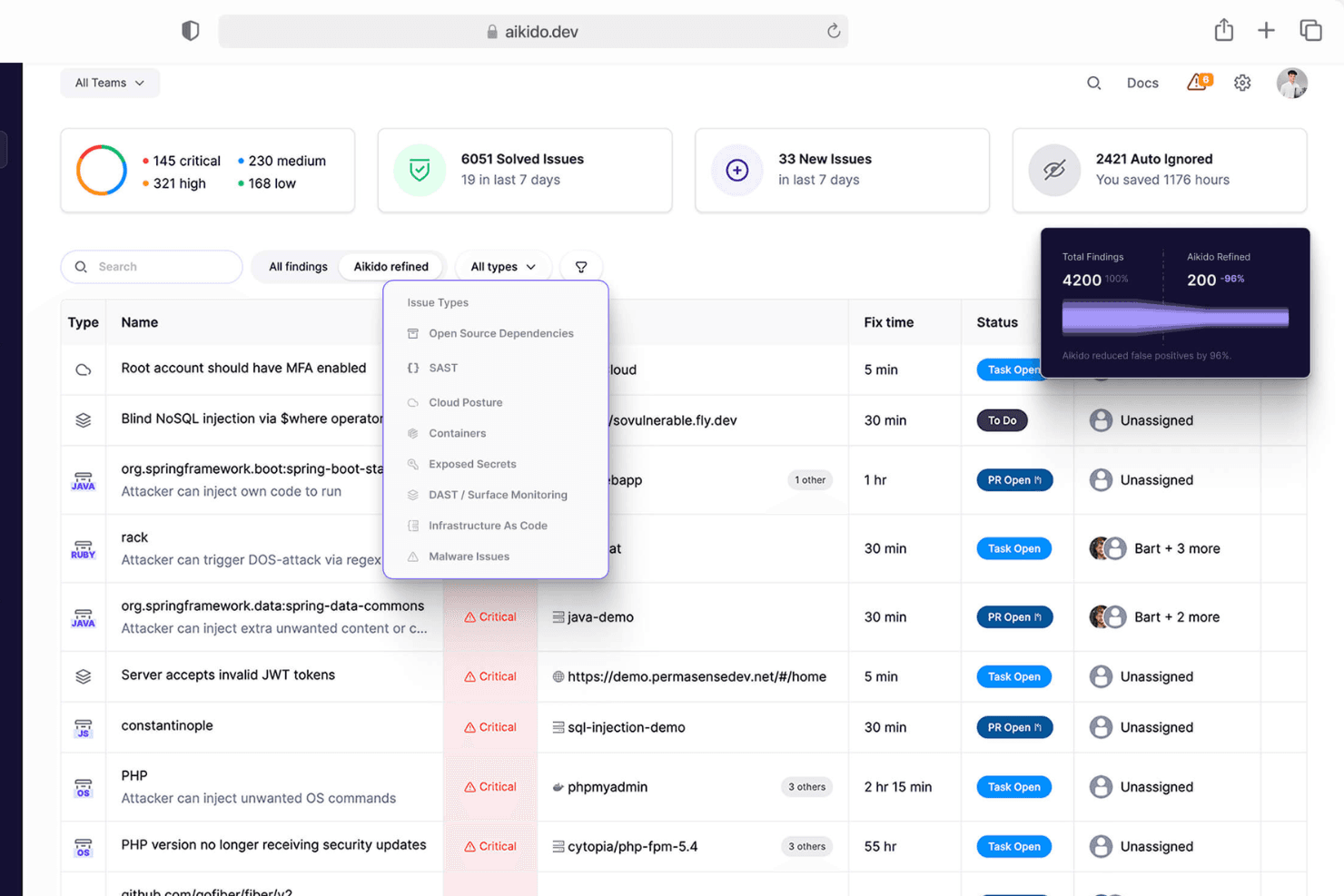
Aikido Security provides a unified dashboard to triage and filter issues by type, severity, and scan source. Aikido Security is a DevSecOps platform that provides comprehensive security solutions for both code and cloud environments.
Why I picked Aikido Security: Aikido combines next-gen code quality checks with static application security testing (SAST) in one platform, helping developers catch both bugs and vulnerabilities early. Its AI-powered reviews flag maintainability and code quality issues while detecting critical flaws like SQL injection, cross-site scripting (XSS), and buffer overflows. Powered by trusted open-source scanners like Bandit, Opengrep (replacing Semgrep), and Gosec, alongside Aikido’s proprietary AI-driven engines, the platform delivers deep, accurate, and actionable analysis.
Aikido Security Standout Features and Integrations:
Features that also make Aikido stand out are its cloud posture management (CSPM) capabilities that detect cloud infrastructure risks across major cloud providers and its secrets detection feature that prevents unauthorized access by checking your code for leaked and exposed API keys, passwords, certificates, and encryption keys.
Integrations include Amazon Web Services (AWS), Google Cloud, Microsoft Azure Cloud, Drata, Vanta, AWS Elastic Container Registry, Docker Hub, Jira, Asana, and GitHub.
Pros and Cons
Pros:
- Offers a comprehensive dashboard and customizable reports
- Provides actionable insights
- User-friendly interface
Cons:
- Custom SAST rules must be enabled by Aikido
- Unfixed CVEs excluded by default in ephemeral container scans
Learn more about Aikido Security: Best for detecting supply chain threats
- Free plan + free demo available
- From €3,300/year (billed annually)

Xygeni dashboard showing prioritized application security risks across code, dependencies, CI/CD, secrets, and IaC. Xygeni is an AI-powered application security platform that combines SAST, software composition analysis (SCA), secrets detection, malicious code scanning, IaC analysis, CI/CD security, and supply chain risk monitoring. Code analysis is performed client-side, so source code is not uploaded to Xygeni. The platform can be deployed as SaaS, on-premises, or air-gapped.
Who Is Xygeni Best For?
Xygeni is a strong fit for security-focused engineering teams at mid-size to enterprise organizations that need unified visibility across application code, dependencies, and CI/CD pipelines.
Why I Picked Xygeni
I've included Xygeni in this list because it combines traditional application security testing with malicious code detection, software supply chain monitoring, and AI-assisted remediation workflows. In addition to identifying vulnerabilities in proprietary code and open-source dependencies, the platform helps teams prioritize findings through AI Triage and generate remediation suggestions using AI AutoFix. I also like that it combines reachability and exploitability analysis with broader application security visibility, helping teams focus on higher-priority risks.
Xygeni Key Features
- AI-powered SAST: Detects vulnerabilities including SQL injection, cross-site scripting (XSS), insecure authentication, authorization issues, and memory-related weaknesses.
- Malicious code detection: Identifies potentially malicious code patterns such as backdoors, trojans, reverse shells, obfuscated execution, masqueraded files, and registry tampering. It also analyzes new open-source package versions as they are published to npm, PyPI and Maven, flagging known malicious packages.
- AI Triage: Uses factors such as reachability, exploitability, internet exposure, and business impact to help prioritize security findings.
- AI AutoFix: Generates fixes and opens them as pull requests. For dependency upgrades, it shows which parts of the code the new version could break before merging.
- Code quality: Measures code smells, complexity, duplication and maintainability, with quality gates on pull requests.
Xygeni Integrations
Xygeni integrates with GitHub, GitLab, Bitbucket, Azure DevOps (including Azure DevOps Server on-premises), Jenkins, CircleCI, and other SCM and CI/CD platforms. It also supports Jira, GitHub Issues, Slack, and Microsoft Teams for workflow management and notifications. IDE integrations are available for Visual Studio Code, Visual Studio, Eclipse, IntelliJ IDEA, other JetBrains IDEs, Cursor, and Windsurf. The platform also provides REST API access and MCP server support for custom integrations and automation workflows. SSO is available with Okta and Microsoft Entra ID.
Pros and Cons
Pros:
- Code quality analysis with quality gates on pull requests
- Real-time malicious open-source package detection
- Filters noise to surface exploitable risks
Cons:
- Complex CI/CD setups need manual tuning
- Limited dashboard and report customization
Learn more about Xygeni: Best for AI-driven code analysis
- Free plan available
- From $200/month
Visit WebsiteCustomer Rating:4.5/5
Zeropath offers a comprehensive dashboard for monitoring code security. Zeropath is an AI-driven Static Application Security Testing (SAST) platform that appeals to businesses and professionals seeking to enhance code security and streamline their software development processes. With its ability to identify and automatically fix vulnerabilities, Zeropath is particularly suited for teams that prioritize security without compromising on speed. By minimizing false positives and integrating seamlessly with popular development platforms, it transforms security from a potential bottleneck into a catalyst for safer, faster code deployment.
Why I Picked Zeropath
I picked Zeropath because it stands out with its AI-driven approach to code analysis, offering unique capabilities that are crucial for modern development teams. The platform's rapid scanning capabilities, completing pull-request scans in under 60 seconds, ensure that your team receives timely feedback without disrupting the development workflow. Additionally, Zeropath's automated patch generation, refined through natural language prompts, addresses vulnerabilities efficiently, allowing your team to focus on innovation rather than manual fixes.
Zeropath Key Features
In addition to its standout capabilities, Zeropath offers several other features that make it a valuable tool for code analysis:
- Secrets Detection: Scans your repos for leaked tokens and keys.
- Comprehensive Language Support: Offers support for multiple programming languages, enhancing its versatility across different projects.
- Policy Enforcement: Allows you to write natural language rules and enforce them across your codebase.
- Integration with Version Control Systems: Seamlessly integrates with popular systems like GitHub and GitLab, providing real-time feedback during the development cycle.
Zeropath Integrations
Integrations include GitHub, GitLab, Bitbucket, Azure Pipelines, VS Code, CircleCI, and Docker.
Pros and Cons
Pros:
- Gives you clear fixes that speed up your security reviews.
- Cuts down noisy findings so your team can focus on real issues.
- It catches logic flaws and hidden risks you might miss in normal scans.
Cons:
- You may need time to adjust your workflow around its automation.
- Potential for missed vulnerabilities if AI is not configured correctly.
Learn more about Zeropath: Best for in-repo AI security remediation
- Free demo available
- Up to $1,000/dev/year (billed annually)
Visit WebsiteCustomer Rating:4.7/5
Mend.io dashboard showing a high-severity SQL injection (CWE-89) vulnerability with highlighted vulnerable code and remediation details. Mend.io is a code analysis platform that helps you catch security vulnerabilities and license issues in both proprietary and open-source code. It combines static application security testing (SAST) with software composition analysis (SCA) to give you visibility into your application risks as you build.
Why I picked Mend.io: I added Mend.io to this list because it tackles two pain points that many security teams struggle with—slow scans and noisy results. Its static analysis engine runs 10x faster than traditional SAST tools and focuses on surfacing new issues introduced since your last commit. That way, you can stay focused on fixing what matters instead of sorting through stale alerts. I also like its AI-powered remediation, which suggests fixes that you can apply with a single click to cut down mean time to resolution.
Mend.io Standout Features and Integrations:
Features include license compliance management for open-source packages, container image scanning, and risk analysis for AI-generated code components. It also offers role-based access controls, audit-ready reporting, and API access for custom integrations.
Integrations include Azure DevOps, Bitbucket Cloud, GitHub.com, GitHub Enterprise, GitLab, Mend for Azure Repos, Mend for Bitbucket Data Center, and Mend for GitLab.
Pros and Cons
Pros:
- Covers proprietary and open-source code
- AI-powered single-click remediation
- Faster scans than traditional SAST
Cons:
- Limited language and package support
- Setup may require configuration
Learn more about Mend.io: Best for AI-driven vulnerability detection
- Free plan available
- From $34/developer/month

Corgea flags a high-risk SQL injection issue and suggests a secure, parameterized code fix directly within a pull request. Corgea is built for developers and security professionals who want a smarter way to analyze code. It tackles the problem of finding and fixing vulnerabilities by bringing AI-driven analysis directly into your existing workflow. Because it understands the context of your code, Corgea cuts down on false positives and produces fixes you can actually use. That makes it a good fit for teams that want to improve security without dealing with the noise and inefficiencies common in traditional tools.
Why I Picked Corgea
I picked Corgea because it uses AI-native SAST to catch vulnerabilities that traditional tools often miss, including business logic flaws and more complex code issues. It relies on large language models to understand code context, which reduces false positives by a lot. On top of that, its automated triaging and context-aware detection don’t just flag issues; they provide actionable fixes. For teams focused on security, that makes Corgea a more efficient and practical option.
Corgea Key Features
In addition to its AI-native SAST capabilities, Corgea offers several other features that enhance its utility as a code analysis tool:
- Dependency Scanning: Automatically identifies vulnerabilities in third-party dependencies across 25+ programming languages.
- Infrastructure as Code (IaC) Scanning: Detects security misconfigurations and exposed secrets in infrastructure code before deployment.
- Secret Scanning: Finds hardcoded credentials and sensitive information using pattern matching and AI-powered contextual understanding.
- AI-Powered Remediation: Generates context-aware fixes for vulnerabilities by analyzing code patterns and security controls.
Corgea Integrations
Native integrations are not currently listed by Corgea.
Pros and Cons
Pros:
- Business logic flaw detection
- Automatic secure code fixes
- AI-driven vulnerability detection
Cons:
- AppSec-focused, not full stack
- No runtime protection features
Learn more about Corgea: Best for security testing
- Free plan + free demo available
- From $25/contributor/month
Visit WebsiteCustomer Rating:4.4/5
Snyk dashboard showing a summary of all coding issues. Snyk is a developer security platform that offers real-time scanning and analysis for your code. It also offers git repository integration, which allows you to prioritize issues across your projects.
Why I picked Snyk: I put Snyk on this list because it boasts impressive security features. The first is that its DeepCode AI tool pulls up a list of quick fixes as it identifies issues. You can review and implement these fixes from your integrated development environment (IDE). The second is that Snyk gives each issue a risk score, so you can prioritize issues and make your code more secure.
Snyk Standout Features and Integrations:
Features that make Snyk an excellent code analysis tool include container scanning that checks for vulnerabilities in container images and live code tracking that validates your code as you work. I liked that I could even check my code when I was away from my desk when I tested it.
Integrations are available natively for CI/CD tools like Jenkins, Azure Pipelines, and Bitbucket Pipelines. There are also plugins for IDE tools like Eclipse, PhpStorm, and Visual Studio.
Pros and Cons
Pros:
- User interface is easy to navigate
- Offers continuous integration, continuous delivery (CI/CD) pipeline integration
- Easy to integrate and setup
Cons:
- Free plan limited to 100 tests per month
- Slower scan times
Learn more about Snyk Code: Best for technical debt management
- Enterprise (Pricing Upon Request)
- $21/month
Visit WebsiteCustomer Rating:4.6/5
CodeScene analyzes code health trends, identifies hotspots, and provides actionable insights for improving code quality. CodeScene is a code analysis and visualization tool designed to help development teams identify technical debt, improve code quality, and enhance team productivity.
Why I picked CodeScene: I like its ability to identify hotspots within your codebase. These hotspots are areas that undergo frequent changes and may harbor hidden risks. By pinpointing these critical sections, CodeScene allows your team to focus maintenance efforts where they matter most. The tool also visualizes how individual authors and teams impact your code, from file ownership to output metrics. This insight helps you understand the human factors influencing code quality, facilitating better collaboration and knowledge sharing.
CodeScene Standout Features and Integrations:
Features include automated code reviews that integrate with your pull requests, providing real-time feedback on code quality issues. CodeScene's IDE extension offers instant code quality feedback within your development environment, helping you detect and fix issues early. Additionally, the tool provides code coverage analysis, combining coverage metrics to identify and mitigate high-risk areas in your codebase.
Integrations include Jira, Trello, Azure DevOps, GitHub Issues, GitLab, YouTrack, Slack, and REST API.
Pros and Cons
Pros:
- Offers visualizations that make complex data easy to understand
- Provides actionable insights into code quality and team dynamics
- Helps identify and prioritize technical debt effectively
Cons:
- Most integrations are only available on higher-tier plans
- Configuration can be complex for certain setups
Learn more about CodeScene: Best for advanced analysis
- 14-day free trial + free plan available
- From $24/user/month (billed annually)
Visit WebsiteCustomer Rating:4.4/5
CodeRabbit offers an AI-driven code review interface for analyzing TypeScript code. CodeRabbit is an AI-powered tool designed to enhance the code review process. By automating reviews and offering intelligent insights, it helps developers catch and fix issues more quickly and efficiently.
Why I picked CodeRabbit: I picked CodeRabbit because of its advanced analysis capabilities. The tool uses static analyzers and AI reasoning, which means it doesn't just find bugs but understands the code's structure. This results in a more thorough review with less noise, helping your team focus on what truly matters. Plus, its automated reporting feature generates useful release notes and daily reports, keeping everyone in the loop without extra effort.
CodeRabbit Standout Features and Integrations:
Features include agentic chat, which lets you interact and automate tasks like code generation and feedback resolution, making your workflow more cohesive. The tool also offers simple PR summaries that provide a concise overview of changed files and descriptions, helping you quickly grasp what's been modified. Additionally, CodeRabbit includes automated issue identification, ensuring that discrepancies are highlighted and addressed promptly.
Integrations include GitHub, GitLab, Azure DevOps, Jira, Linear, Mercury, Writer, Abnormal Security, Ashby, Chegg, Sisense, and Groupon.
Pros and Cons
Pros:
- Provides instant feedback on code, identifying hallucinations, logic gaps, vulnerabilities, and missing tests
- Users can review AI-generated code line by line before committing, ensuring thorough checks
- CodeRabbit CLI allows for AI code reviews directly in the terminal
Cons:
- May not fully grasp complex codebases, which might result in inaccuracies, affecting the reliability of feedback
- ome users may find the initial setup and integration process with repositories to be cumbersome
Learn more about CodeRabbit: Best for CI/CD integrations
- 14-day free trial + free plan + free demo available
- From $18/user/month (billed annually)
Visit WebsiteCustomer Rating:4.5/5
Codacy lets you view key code quality metrics from one location. Codacy is a code analysis tool that automates code reviews. It analyzes your source code and highlights issues as you work, allowing you to develop more efficient software. The platform supports over 40 programming languages and frameworks out of the box.
Why I picked Codacy: I selected Codacy because it integrates well with CI workflows—a DevOps practice of merging code changes into a repository. Integrating Codacy with GitHub allowed me to get instant feedback on my code, so I could quickly fix any issues. Another reason I picked Codacy is that it helps standardize code quality by automatically blocking pull requests that don’t meet certain standards.
Codacy Standout Features and Integrations:
Features that I liked about Codacy are the ability to set custom rule sets. Codacy has hundreds of rules available, but you can also upload your own configuration file. This makes it easy to apply specific conditions to a code base and maintain code quality across all teams.
Integrations are available natively with GitHub, GitLab, and Bitbucket. Native integrations are also available for Jira and Slack.
Pros and Cons
Pros:
- Adheres to SOC2 security standards
- Simple to integrate into coding workflows
- Provides helpful code quality reports
Cons:
- Not able to export code patterns
- Doesn’t integrate with Lombok, a Java library that reduces boilerplate code
Learn more about Codacy:

Using PMD to find duplicate code. PMD is an open-source tool that provides static analysis for programming languages like JavaScript, Apex, and XML. It’s available for Windows, macOS, and Linux.
Why I picked PMD: Most code analysis tools require a paid license or offer limited functionality on their free plans. But the reason I picked PMD is because it’s open-source software, which makes it a cost-effective alternative to paid options.
PMD Standout Features and Integrations:
Features that I liked when working with PMD include its built-in checks that allow you to configure rules for different languages to enforce coding standards. The tool also includes Copy/Paste Detector (CPD), which helps you identify duplicate code in your code base.
Integrations are available with popular IDEs like Eclipse, JDeveloper, and Gradle via plugins.
Pros and Cons
Pros:
- Free and open-source
- Able to deal with false positives well
- Can detect duplicate code in various programming languages
Cons:
- Coding feedback isn’t provided in real-time
- Configuring PMDs analysis rules can be complicated
Learn more about PMD:
Alte instrumente de analiză a codului
Mai există câteva instrumente de analiză a codului care nu au ajuns chiar pe lista mea, dar merită analizate mai atent:
- 11QodanaBest for supporting many programming languages
- 12Synopsys CoverityBest for DevOps teams
- 13Fortify Static Code Analyzer (SCA)Best for enterprise security
- 14Veracode Static AnalysisBest for vulnerability scanning and coverage
- 15Code Climate QualityBest for GitHub users
- 16JSHintBest for managing code complexity
- 17SemgrepBest for accurate static analysis
- 18CAST HighlightBest for performing software assessments at scale
- 19InferBest for mobile developers
- 20PVS-StudioBest for game developers
- 21SourceryBest for real-time feedback in IDEs
- 22SentryBest for AI-driven debugging
- 23SonarQubeBest for code quality maintenance
- 24DerScannerBest for source code and binaries
- 25DeepSourceBest issue and security reporting features
- 26Helix QACBest for ensuring security compliance
- 27CodeSonarBest integration capabilities
- 28FindBugsBest for finding defects in Java code
- 29SemmleBest for securing Internet of Things (IoT) devices
Recenzii asociate ale software-ului IT
Dacă încă nu ați găsit aici ceea ce căutați, consultați aceste instrumente alternative pe care le-am testat și evaluat.
- Software de monitorizare a rețelei
- Software de monitorizare a serverelor
- Soluții SD-WAN
- Instrumente de monitorizare a infrastructurii
- Analizor de pachete
- Instrumente de monitorizare a aplicațiilor
How I Evaluate Code Analysis Tools
I split my evaluation into baseline criteria—like multi-language SAST and CI/CD integration—and differentiators like AI-powered fixes and SCA that separate the best tools from the rest.
Core Functionality (Table Stakes For This List)
When I'm selecting tools for my list, I rank each one on a scale from 0 (does not offer the functionality) to 5 (excels in this area) for each core functionality listed below. Then, I calculate the tool's total score into a percentage. Each tool needs to achieve a minimum total score of 75% to be considered for inclusion.
- Static Code Analysis: I evaluate the depth of analysis each tool performs—whether it goes beyond basic linting to offer data-flow and control-flow analysis that catches real bugs before they hit production.
- Multi-Language Support: A polyglot codebase is the norm, so I check how many mainstream languages each tool covers and whether it handles frameworks like React, Spring, or .NET natively.
- Security Vulnerability Detection: I look for clear mapping to OWASP Top 10 and CWE entries with severity ratings, plus remediation guidance that helps developers fix issues rather than just flag them.
- CI/CD & IDE Integration: Each tool should plug into the platforms your team already uses—GitHub, GitLab, Jenkins, Azure DevOps—and ideally surface findings right inside VS Code or IntelliJ.
- Custom Rules & Policies: Teams have their own standards, so I evaluate whether you can create, modify, and share rule sets or quality gates tailored to your org's coding conventions.
- Reporting & Dashboards: I look for dashboards that track trends over time—defect density, remediation rates, hotspot files—so engineering leads and security teams can measure progress, not just find problems.
Once I have a list of tools that meet this criteria, I consider what sets each platform apart.
Differentiating Factors (What Sets Vendors Apart)
Here's how I compare and contrast different vendors:
Standout Features
Software composition analysis is a big one—I check whether a tool scans open-source dependencies for known CVEs alongside your first-party code, since most modern apps rely heavily on third-party libraries. AI-powered fix suggestions also matter, especially when a tool recommends specific remediation steps right inside a pull request. I also evaluate whether a tool catches hardcoded secrets and IaC misconfigurations in Terraform or Kubernetes files, which closes a gap that pure SAST tools often leave open.
Beyond Features
Developer experience is something I weigh heavily—tools with high false-positive rates erode trust fast, and teams end up ignoring findings altogether. I also look at deployment flexibility, since some organizations can't send source code to a SaaS platform and need self-hosted or air-gapped options. Pricing transparency matters too; I check whether a vendor charges per developer, per repo, or per line of code, because the wrong model can make costs unpredictable as your team scales.
Cum să alegeți instrumentele de analiză a codului
Este ușor să vă pierdeți în liste lungi de funcții și structuri complexe de prețuri. Pentru a vă ajuta să rămâneți concentrați în timp ce parcurgeți procesul unic de selecție a software-ului, iată o listă de verificare a factorilor de care trebuie să țineți cont:
| Factor | Aspecte de luat în considerare |
|---|---|
| FactorScalabilitate | Aspecte de luat în considerareAsigurați-vă că instrumentul poate gestiona baze de cod extinse și mai mulți utilizatori simultan fără a încetini analiza. |
| FactorIntegrări | Aspecte de luat în considerareAsigurați-vă că instrumentul se integrează cu fluxul dumneavoastră CI/CD, sistemele de control al versiunilor și instrumentele de gestionare a proiectelor. |
| FactorPosibilități de personalizare | Aspecte de luat în considerareCăutați opțiuni pentru modificarea regulilor de analiză, a pragurilor și a formatelor de raportare, astfel încât să corespundă fluxului de lucru al echipei dumneavoastră. |
| FactorUșurință în utilizare | Aspecte de luat în considerareInstrumentele de vizualizare a codului oferă interfețe ușor de navigat, cu instruire minimă și configurare rapidă. |
| FactorBuget | Aspecte de luat în considerareEvaluați costurile licențelor, nivelurile de funcții și orice taxe suplimentare pentru funcții premium sau asistență. |
| FactorMăsuri de securitate | Aspecte de luat în considerareVerificați existența criptării, gestionarea securizată a datelor și conformitatea cu standardele de securitate. |
| FactorAcuratețe | Aspecte de luat în considerareAlegeți un instrument cu o rată scăzută de rezultate fals pozitive și recomandări clare, aplicabile. |
| FactorRaportare | Aspecte de luat în considerareCăutați rapoarte detaliate, cu informații clare, date istorice și analiză a tendințelor. |
Tendințe în instrumentele de analiză a codului
În cercetarea mea, am consultat nenumărate actualizări de produse, comunicate de presă și jurnale de lansări de la diferiți furnizori de instrumente de analiză a codului. Iată câteva dintre tendințele emergente pe care le urmăresc:
- Analiză asistată de IA: Instrumentele folosesc din ce în ce mai mult învățarea automată pentru a detecta tipare și a sugera remedieri, îmbunătățind acuratețea și reducând rezultatele fals pozitive.
- Securitate mutată în etapele inițiale: Tot mai multe platforme integrează verificările de securitate mai devreme în ciclul de dezvoltare pentru a identifica vulnerabilitățile înainte de implementare.
- Soluții bazate pe cloud: Analiza codului bazată pe cloud devine tot mai populară datorită scalabilității sale și capacității de a se integra cu mediile de dezvoltare la distanță.
- Profilarea performanței: Instrumentele mai noi oferă informații mai detaliate despre execuția codului și utilizarea resurselor pentru a contribui la îmbunătățirea performanței.
- Extinderea limbajelor: Tot mai multe instrumente adaugă suport pentru limbaje de programare de nișă și emergente, pentru a răspunde nevoilor diverse de dezvoltare.
Ce sunt instrumentele de analiză a codului?
Instrumentele de analiză a codului examinează codul sursă pentru a găsi erori, vulnerabilități de securitate și probleme de performanță înainte de implementare. Dezvoltatorii, inginerii QA și profesioniștii DevOps folosesc aceste instrumente pentru a menține un cod mai curat și mai fiabil și pentru a reduce timpul petrecut cu verificările manuale.
Scanarea automată, analiza statică și dinamică și funcțiile de feedback în timp real ajută la identificarea erorilor de codare, la aplicarea standardelor și la îmbunătățirea calității generale a codului. În ansamblu, aceste instrumente facilitează scrierea unui cod mai bun într-un timp mai scurt și menținerea stabilității pe termen lung în cadrul proiectelor.
Funcțiile instrumentelor de analiză a codului
Atunci când alegi instrumente de analiză a codului, urmărește următoarele funcții esențiale:
- Analiză statică a codului: Această funcție scanează codul sursă fără a-l executa, ajutându-te să identifici din timp erori, probleme de cod și vulnerabilități în procesul de dezvoltare. Este perfectă pentru a detecta problemele înainte ca acestea să ajungă vreodată în mediul de producție.
- Integrarea cu mediile de dezvoltare: Cu această funcție, poți lucra chiar în locul în care scrii cod. Aceste instrumente se integrează adesea perfect în mediile de dezvoltare integrate populare, permițându-ți să remediezi problemele și să vezi sugestii în timp real, fără să comuți între programe.
- Raportare automată: Vei primi analize detaliate ale calității codului, complexității sau conformității, direct în căsuța de e-mail sau în tabloul de bord. Aceste rapoarte te ajută să urmărești progresul, să identifici tendințele și să menții echipa la curent.
- Valori și informații despre cod: Această funcție cuantifică aspecte precum complexitatea ciclomatică, duplicarea codului și ușurința întreținerii. Valorile oferă o imagine clară asupra locurilor în care ar putea apărea probleme, astfel încât să poți viza îmbunătățirile.
- Suport pentru mai multe limbaje: Dacă lucrezi cu mai multe limbaje de programare, această funcție este extrem de utilă. Instrumentele bune analizează totul, de la Java și Python până la JavaScript, permițându-ți să acoperi întreaga bază de cod.
- Seturi de reguli personalizabile: Poți adapta regulile de analiză pentru a corespunde standardelor de codare ale echipei sau cerințelor proiectului. Astfel, nu ești limitat la recomandări universale, ci primești îndrumări potrivite obiectivelor tale specifice.
- Detectarea vulnerabilităților de securitate: Caută instrumente care semnalează amenințările de securitate cunoscute, precum injecțiile SQL sau depășirile de buffer, pentru a putea aborda riscurile înainte ca acestea să facă aplicația vulnerabilă.
- Integrarea cu sistemele de control al versiunilor: Această funcție permite rularea automată a analizei codului la commituri noi sau la solicitări de extragere, asigurându-se că în depozitele partajate ajunge doar cod curat și verificat.
- Funcții de colaborare: Unele instrumente facilitează atribuirea problemelor de cod, lăsarea comentariilor sau urmărirea remedierilor în cadrul echipei. Totul ține de coordonare și responsabilitate.
Funcții IA comune ale instrumentelor de analiză a codului
Pe lângă funcțiile standard ale instrumentelor de analiză a codului enumerate mai sus, multe dintre aceste soluții integrează IA cu funcții precum:
- Predicția inteligentă a erorilor: Folosind date istorice, IA prezice unde este probabil să apară erori, astfel încât să îți poți concentra proactiv testele și verificările asupra zonelor cu cele mai mari riscuri.
- Sugestii automate pentru verificarea codului: IA îți analizează codul și oferă feedback instantaneu, adaptat contextului, precum și sugestii de îmbunătățire, ajutându-te să îți perfecționezi baza de cod cu mai puțin efort manual.
- Detectarea amenințărilor de securitate: Motoarele bazate pe IA identifică amenințări de securitate subtile și emergente recunoscând tipare atât în codul tău, cât și în surse actualizate de informații despre amenințări.
- Recomandări inteligente de restructurare: Primești propuneri personalizate pentru restructurarea codului, care îmbunătățesc lizibilitatea, ușurința întreținerii sau performanța, toate sugerate de IA pe baza obiceiurilor tale unice de programare.
- Analiză independentă de limbaj: IA extinde analiza la limbaje de nișă sau mai puțin obișnuite prin adaptarea verificărilor sale, reducând punctele oarbe pe care instrumentele tradiționale le-ar putea omite.
Beneficiile instrumentelor de analiză a codului
Implementarea instrumentelor de analiză a codului oferă mai multe beneficii pentru echipa și afacerea ta. Iată câteva dintre avantajele pe care le poți anticipa:
- Calitate îmbunătățită a codului: Identifică din timp erorile și ineficiențele, ajutând dezvoltatorii să scrie un cod mai curat și mai eficient.
- Depanare mai rapidă: Reduce timpul petrecut pentru identificarea și remedierea problemelor, oferind informații clare și utile.
- Securitate îmbunătățită: Detectează din timp vulnerabilitățile și problemele de securitate, minimizând riscul breșelor.
- Ușurință sporită în întreținere: Ajută la menținerea unui cod organizat și consecvent, făcând actualizările viitoare mai ușoare și mai rapide.
- Productivitate crescută a echipei: Instrumentele automate de verificare a codului pot efectua verificări și pot oferi feedback repetitiv, permițând dezvoltatorilor să se concentreze asupra sarcinilor cu valoare ridicată.
- Suport pentru conformitate: Asigură respectarea standardelor din industrie și a bunelor practici prin semnalarea potențialelor încălcări.
- Economii de costuri: Reduce datoria tehnică și remedierile costisitoare de după lansare prin îmbunătățirea calității codului încă de la început.
Costurile și prețurile instrumentelor de analiză a codului
Selectarea instrumentelor de analiză a codului necesită înțelegerea diferitelor modele și planuri de tarifare disponibile. Costurile variază în funcție de funcții, dimensiunea echipei, suplimente și alți factori. Tabelul de mai jos rezumă planurile comune, prețurile lor medii și funcțiile incluse de obicei în soluțiile de analiză a codului:
Tabel comparativ al planurilor pentru instrumentele de analiză a codului
| Tipul planului | Preț mediu | Funcții comune |
|---|---|---|
| Tipul planuluiPlan gratuit | Preț mediu$0/user/month | Funcții comuneAnaliză de bază a codului, suport limitat pentru limbaje și fără raportare avansată. |
| Tipul planuluiPlan personal | Preț mediu$10–$30/user/month | Funcții comuneSuport extins pentru limbaje, reguli personalizate și setări individuale pentru utilizatori. |
| Tipul planuluiPlan pentru companii | Preț mediu$30–$100/user/month | Funcții comuneColaborare în echipă, integrare CI/CD, feedback în timp real și raportare avansată. |
| Tipul planuluiPlan pentru întreprinderi | Preț mediu$100+/user/month | Funcții comuneSecuritate la nivel de întreprindere, verificări de conformitate, utilizatori nelimitați și asistență dedicată. |
Întrebări frecvente despre instrumentele de analiză a codului
Iată câteva răspunsuri la întrebările frecvente despre instrumentele de analiză a codului: