

Corgea Review: Pros, Cons, Features & Pricing
Dealing with a growing backlog of security alerts and wondering if Corgea is the AppSec platform that can actually fix vulnerabilities for you? This review breaks down its features, strengths, and limitations so you can quickly decide if it fits your team’s workflow and security goals.

We review tools independently, and commissions help fund our testing. See our transparency policy, our methodology, or suggest a tool.
Security alerts keep piling up, developers keep shipping, and the gap between finding vulnerabilities and fixing them keeps getting wider.
Many AppSec platforms promise to detect and fix issues automatically, but it makes sense to pause and take a closer look at specific features before committing time and budget.
In this Corgea review, I break down how the platform works, what problems it solves, and where it fits compared to other tools so you can decide if it is worth adopting.
Corgea Evaluation Summary

0/5
- From $34/developer/month
- Free plan available
Why Trust Our Software Recommendations
6,700+
Reviews
20
Industry experts
16+
Evaluation factors
14
Years
Our team has been testing and reviewing software since 2012. As tech leaders ourselves, we know how difficult—and important—it is to choose the right software.
For this guide, we evaluated tools using hands-on testing and independent research, scoring tools using our selection criteria.
Our reviews reflect our human editorial judgment, not a sales pitch.
Expert reviewers:
- Paulo Gardini MiguelTech Director
 Tim FisherVP of AI
 Gabriel RosasTech Lead & Software Architect
 Christhian GruhnTech Lead & Platform Architect

Corgea Overview
Corgea is an AI-driven application security platform that helps development and security teams detect, prioritize, and fix vulnerabilities.
Rather than operating as a standalone security tool, Corgea integrates with repositories, CI pipelines, and developer environments to continuously scan code, identify real risks, and generate remediation suggestions.
By combining automated scanning, alert prioritization, and AI-generated fixes, the platform reduces manual security work. It helps teams ship secure code faster without slowing development.
One area where Corgea stands out is its ability to detect complex application-layer vulnerabilities, including business logic and authorization issues, while providing contextual analysis that helps reduce unnecessary security alerts.
Pros
- AI-generated security fixes help reduce manual remediation work.
- Strong automation helps streamline vulnerability detection, prioritize actionable findings, and reduce time spent reviewing low-value alerts.
- Built to integrate into developer workflows and existing toolchains.
Cons
- Primarily designed for technical teams.
- Newer vendor with a limited track record.
- Reporting and analytics are limited to higher-tier plans, so teams that need deeper visibility may have to upgrade sooner.
Is Corgea Right For Your Needs?
Who Would be a Good Fit for Corgea?
Corgea is built for modern software teams that want security built into their development workflow without slowing releases. If your team ships frequently and relies on CI/CD, Corgea helps automate vulnerability detection, triage, and remediation so security can scale alongside development.
- Fast-Moving Software Development TeamsFrequent release teams benefit from continuous scanning and auto-fix, which detect vulnerabilities and generate remediation pull requests automatically.
- DevOps and CI/CD-Driven WorkflowsTeams using GitHub, GitLab, Jenkins, or Azure DevOps benefit from native integrations that run security checks directly in pipelines and pull requests.
- Teams With Large Security BacklogsAuto-triage helps engineering and security teams prioritize real risks and reduce false positives.
- Companies Using Open-Source DependenciesTeams that rely on third-party libraries benefit from OSS dependency scanning that detects vulnerable packages early.
- Organizations Handling Sensitive DataBusinesses working with personal or healthcare data benefit from using PII/PHI and secret scanning to detect exposed sensitive information.
- Security Teams Supporting Developer ProductivityPolicies and automated remediation help AppSec and DevSecOps teams enforce security standards with minimal manual effort.
Who Would be a Bad Fit for Corgea?
Corgea targets modern development teams with active CI/CD workflows and dedicated engineering resources. If your organization doesn’t regularly ship software, lacks technical infrastructure, or needs highly specialized enterprise security tooling, Corgea is unlikely to be a strong fit.
- Non-Software or Offline BusinessesOrganizations that don’t build or maintain software won’t benefit from Corgea’s code scanning and CI/CD integrations, which are built specifically for development workflows.
- Teams Without CI/CD or Version Control WorkflowsCorgea relies on pipeline and repository integrations, so teams not using tools like GitHub, GitLab, or CI/CD pipelines won’t fully benefit from the platform.
- Very Small Teams With Minimal Security NeedsSmall teams with simple applications may find Corgea’s automation and advanced scanning features unnecessary compared to lighter security tools.
- Organizations Needing Deep Security CustomizationTeams requiring highly specialized or heavily customized security tooling may find Corgea’s policy and customization options too limited.
- Non-Technical or Business-Only TeamsCorgea is built for developers and security engineers, so teams without technical expertise may struggle to use the platform effectively.
Our Review Methodology
How We Test & Score Tools
We’ve spent years building, refining, and improving our software testing and scoring system. The rubric is designed to capture the nuances of software selection and what makes a tool effective, focusing on critical aspects of the decision-making process.
Below, you can see exactly how our testing and scoring works across seven criteria. It allows us to provide an unbiased evaluation of the software based on core functionality, standout features, ease of use, onboarding, customer support, integrations, customer reviews, and value for money.
Core Functionality (25% of final scoring)
The starting point of our evaluation is always the core functionality of the tool. Does it have the basic features and functions that a user would expect to see? Are any of those core features locked to higher-tiered pricing plans? At its core, we expect a tool to stand up against the baseline capabilities of its competitors.
Standout Features (25% of final scoring)
Next, we evaluate uncommon standout features that go above and beyond the core functionality typically found in tools of its kind. A high score reflects specialized or unique features that make the product faster, more efficient, or offer additional value to the user.
We also evaluate how easy it is to integrate with other tools typically found in the tech stack to expand the functionality and utility of the software. Tools offering plentiful native integrations, 3rd party connections, and API access to build custom integrations score best.
Ease of Use (10% of final scoring)
We consider how quick and easy it is to execute the tasks defined in the core functionality using the tool. High scoring software is well designed, intuitive to use, offers mobile apps, provides templates, and makes relatively complex tasks seem simple.
Onboarding (10% of final scoring)
We know how important rapid team adoption is for a new platform, so we evaluate how easy it is to learn and use a tool with minimal training. We evaluate how quickly a team member can get set up and start using the tool with no experience. High scoring solutions indicate little or no support is required.
Customer Support (10% of final scoring)
We review how quick and easy it is to get unstuck and find help by phone, live chat, or knowledge base. Tools and companies that provide real-time support score best, while chatbots score worst.
Customer Reviews (10% of final scoring)
Beyond our own testing and evaluation, we consider the net promoter score from current and past customers. We review their likelihood, given the option, to choose the tool again for the core functionality. A high scoring software reflects a high net promoter score from current or past customers.
Value for Money (10% of final scoring)
Lastly, in consideration of all the other criteria, we review the average price of entry level plans against the core features and consider the value of the other evaluation criteria. Software that delivers more, for less, will score higher.
Core Features
AI Application Security Scanning
This capability forms the foundation of the platform. Every other feature depends on accurate detection, so strong scanning enables Corgea to provide meaningful triage and remediation.
OSS Dependency Scanning
Modern applications rely heavily on open source software. Supply chain security reduces real-world risk and prevents attacks from compromised packages.
Secret Detection
Credential exposure remains one of the most common causes of breaches. Detecting secrets in code prevents credential leaks and security incidents.
Malware Detection
Corgea scans code and dependencies to detect malicious or injected code that could compromise applications, infrastructure, or development environments.
AI Auto Triage
Security teams often struggle with large volumes of alerts. Reducing noise and highlighting real risks lets teams move faster and make better decisions.
AI Auto Fix
Many security tools stop at detection. Corgea closes the gap between finding vulnerabilities and fixing them.

Standout Features
In Editor Security Fixes
Corgea provides a Visual Studio Code extension that allows developers to review and apply security fixes directly inside their editor while they write code.
Source and Sink Analysis
This deeper context helps Corgea identify complex security issues, including business logic flaws and authorization vulnerabilities that traditional pattern-based scanners can miss. By analyzing how data moves through an application, the platform provides more relevant findings and helps reduce alert noise so teams can focus on issues that matter most.

Ease of Use
Corgea fits directly into existing developer workflows, making it easy to adopt without major process changes.
You can connect repositories, run scans through CI pipelines, and receive fixes directly in pull requests, so security becomes part of your normal development cycle instead of a separate task.
With CLI and API support for automation, teams can integrate scanning and remediation quickly and keep development moving without extra overhead.

Onboarding
Corgea provides a quickstart guide that lets teams connect their repositories and begin scanning in minutes.
Documentation states you can get started in less than five minutes by installing the GitHub app and connecting your code. The documentation also walks teams through configuration, customization, applying fixes, and managing team access, giving users a clear step-by-step path from setup to ongoing use.
With built-in guides, tutorials, and API documentation available for deeper integrations and automation, teams have multiple resources to support both initial setup and long term adoption.

Customer Support
Corgea provides support through a contact form for direct inquiries and a knowledge hub with documentation, guides, and resources to help teams troubleshoot and learn independently. The platform also offers custom demos that explain workflows and features during evaluation.

Integrations
Corgea offers native integrations with developer tools and workflows, including GitHub, GitLab, Azure DevOps, Jenkins, Visual Studio Code, Visual Studio, and a CLI for automation.
It also connects with tools like Jira, Slack, Zapier, and SAML-based identity providers, helping teams embed security directly into repositories, pipelines, chat, and ticketing systems.
An API is available for teams that want to build custom integrations or automate security workflows further.

Value for Money
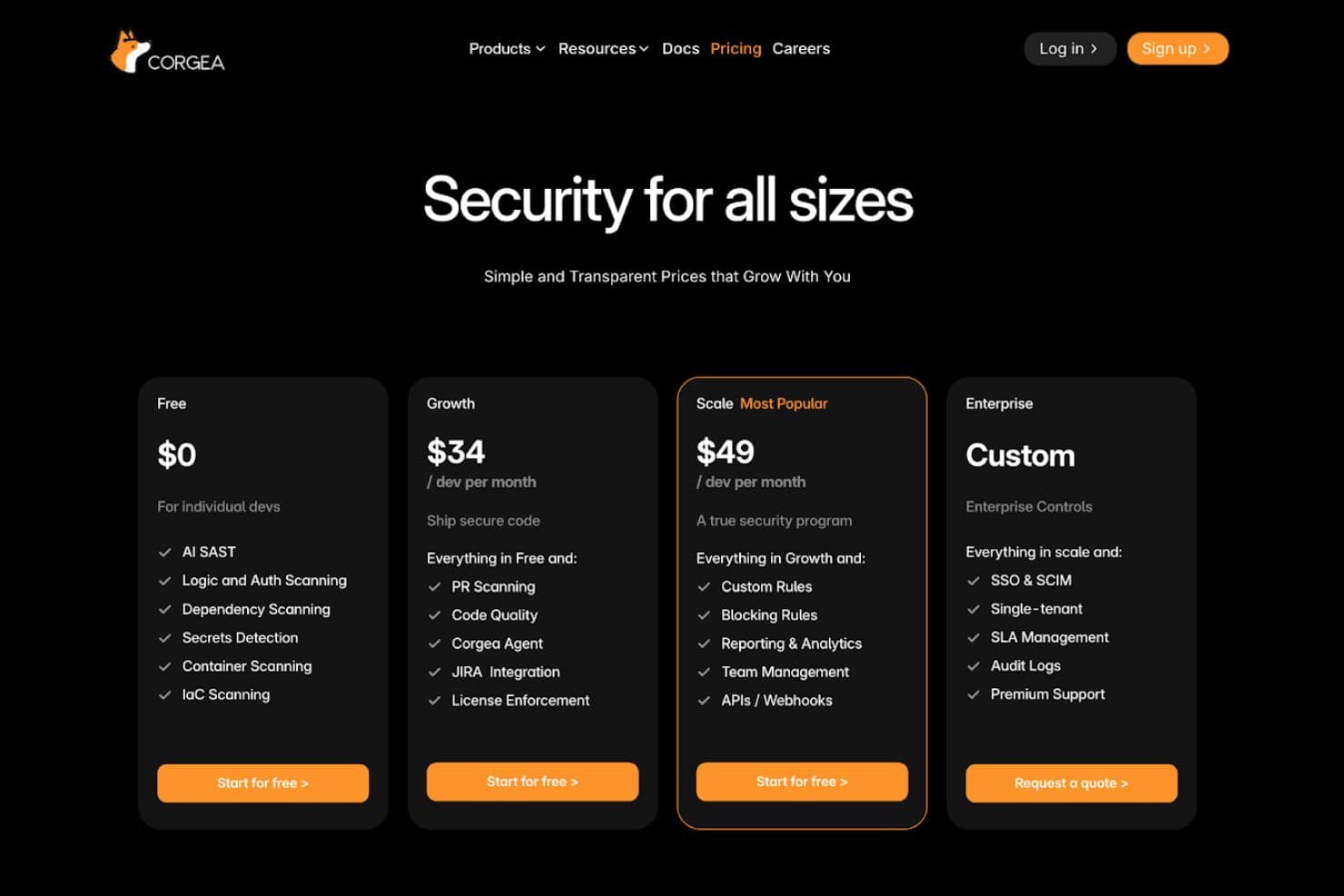
Corgea uses a tiered pricing model that lets teams start with core security scanning and expand into automation, integrations, and enterprise governance as they grow.
- Free: Includes AI SAST, logic and auth scanning, dependency scanning, secrets detection, container scanning, and IaC scanning for individual developers and small teams.
- Growth: Adds pull request scanning, code quality checks, Jira integration, and license enforcement to support team workflows.
- Scale: Introduces custom rules, blocking rules, reporting and analytics, team management, APIs, and webhooks for a more complete security program.
- Enterprise: Provides SSO, SCIM, single tenant deployment, SLA management, audit logs, and premium support for enterprise environments.
This structure makes it easy to begin with essential features and upgrade as security and compliance needs increase.
Corgea Specs
- 2-Factor Authentication: No
- Access Management: No
- Anti-Virus: No
- API: Yes
- Audit Management: No
- Audit Trail: No
- Batch Permissions & Access: No
- Compliance Tracking: No
- Dashboard: Yes
- Data Export: Yes
- Data Import: Yes
- DDoS Protection: No
- External Integrations: Yes
- File Sharing: No
- File Transfer: No
- Firewall: No
- Incident Management: Yes
- Malware Protection: No
- Multi-User: Yes
- Notifications: Yes
- Password & Access Management: No
- Policy Management: Yes
- Real-time Alerts: Yes
- Report & Compliance: Yes
- Risk Assessment: Yes
- Security Migration: No
- Threat Detection: No
- Workflow Management: Yes
Corgea FAQs
Corgea Company Overview & History
Corgea, founded by Ahmad Sadeddin, is a San Francisco-based cybersecurity startup founded in 2023 that builds an AI-driven platform to automate vulnerability detection, triage, and remediation for modern development teams.
The company focuses on helping developers secure applications more efficiently by reducing false positives and accelerating remediation workflows.
Corgea Major Milestones
- 2023: Corgea was founded in California.
- 2024: Raised USD 2.6 million in seed funding from prominent investors.