

As melhores plataformas de desenvolvimento sem código ajudam as equipas a disponibilizar aplicações mais rapidamente, permitindo que utilizadores não técnicos criem, personalizem e implementem aplicações sem escrever código. Permitem às organizações acelerar projetos digitais, integrar sistemas existentes e reduzir a dependência de recursos limitados de desenvolvimento.
Muitas equipas começam a procurar soluções sem código depois de terem dificuldades em criar ferramentas internas sem o apoio de programadores, perderem horas a atualizar manualmente folhas de cálculo que não acompanham o crescimento ou gerirem várias aplicações desligadas que não conseguem partilhar dados. Estes problemas atrasam as operações e dificultam o avanço das unidades de negócio ao ritmo necessário.
Trabalhei com equipas de produto que adotaram plataformas sem código para substituir fluxos de trabalho antigos, testei o desempenho destas ferramentas em ambientes de produção reais e avaliei a sua flexibilidade no suporte a integrações entre ecossistemas SaaS e empresariais. Estas experiências deram-me uma visão clara de quais as plataformas que capacitam utilizadores não técnicos sem sacrificar a escalabilidade ou o controlo.
Neste guia, ficará a saber quais as plataformas de desenvolvimento sem código que oferecem as opções de personalização mais práticas, que se integram eficazmente com sistemas empresariais modernos e que ajudam a sua organização a avançar mais rapidamente sem depender exclusivamente dos recursos de engenharia.
Why Trust Our Software Recommendations
6,700+
Reviews
20
Industry experts
16+
Evaluation factors
14
Years
Our team has been testing and reviewing software since 2012. As tech leaders ourselves, we know how difficult—and important—it is to choose the right software.
For this guide, we evaluated tools using hands-on testing and independent research, scoring tools using our selection criteria.
Our reviews reflect our human editorial judgment, not a sales pitch.
Expert reviewers:
- Paulo Gardini MiguelTech Director
 Tim FisherVP of AI
 Gabriel RosasTech Lead & Software Architect
 Christhian GruhnTech Lead & Platform Architect

Tabela Comparativa de Plataformas de Desenvolvimento Sem Código
Esta tabela comparativa resume os detalhes de preços das minhas principais escolhas de plataformas de desenvolvimento sem código:
| Tool | Best For | Trial Info | Price | ||
|---|---|---|---|---|---|
| 1 | Best for digitizing field data capture workflows | Free trial + free demo available | From $20/user/month (billed annually) | Website | |
| 2 | Best for AI-assisted enterprise app development | Free demo available | $40/user/month | Website | |
| 3 | Best for turning spreadsheets into mobile apps | Free plan available | From $19/month (billed annually) | Website | |
| 4 | Best for scalable backends | Free plan available | From $85/month (billed annually) | Website | |
| 5 | Best for database-driven application design | Free plan available; 15-day free trial | Pricing upon request | Website | |
| 6 | Best for visual web application building | Free plan + free trial available | From $29/month (billed annually) | Website | |
| 7 | Best for creating interactive mobile and web apps | 14-day free trial | From $65/month | Website | |
| 8 | Best for dynamic form-based applications | Free plan available | From $34/user/month (billed annually) | Website | |
| 9 | Best for business solutions within the Microsoft ecosystem | Free plan available | From $20/user/month (billed annually) | Website | |
| 10 | Best for automating business processes | Website |


Avaliações das 10 Melhores Plataformas de Desenvolvimento Sem Código
Seguem-se os meus resumos detalhados das melhores plataformas de desenvolvimento sem código que entraram na minha lista. As minhas avaliações apresentam uma análise detalhada das principais funcionalidades, vantagens & desvantagens, integrações e casos de utilização ideais de cada ferramenta, para o ajudar a encontrar a melhor opção para si.
 Best for digitizing field data capture workflows
- Free trial + free demo available
- From $20/user/month (billed annually)
Visit WebsiteCustomer Rating:4.5/5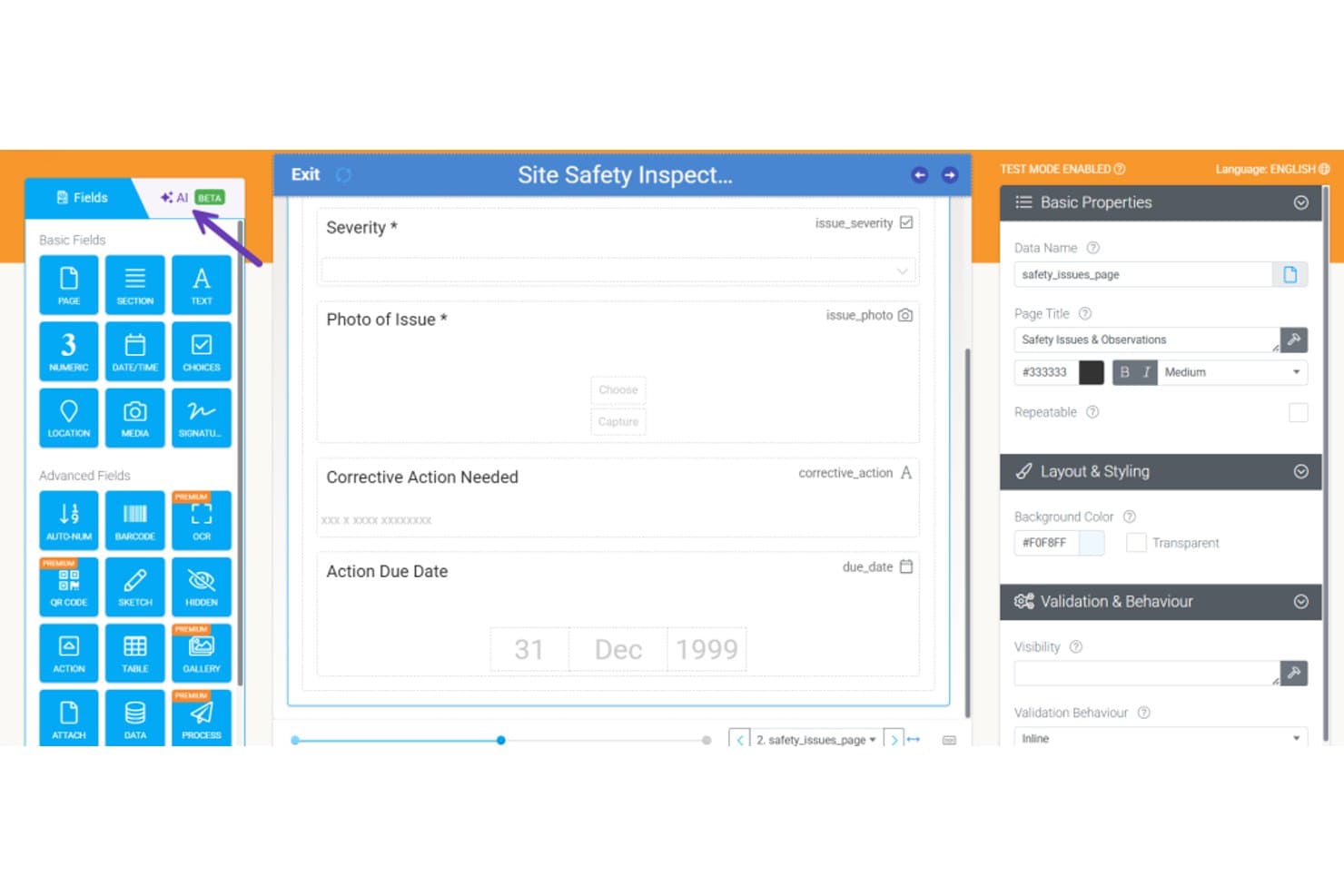
Appenate lets users build safety inspection forms with drag-and-drop fields. Appenate is a no-code mobile app builder purpose-built for field teams, offering drag-and-drop form creation, offline data capture, AI-assisted form generation, and automated workflows for inspections, audits, and job dispatch.
Who Is Appenate Best For?
Appenate is a strong fit for field service and industrial teams—think construction, mining, and manufacturing—that need to replace paper-based inspections, audits, and checklists with offline-capable mobile apps.
Why I Picked Appenate
I picked Appenate as one of the best because it does something most no-code platforms don't: it's built specifically for digitizing field data capture workflows, not retrofitted for it. I love the AI Photo Fill feature, which lets field workers photograph a paper form and have it populate the digital fields automatically. Paired with native offline capture across iOS, Android, and Windows, Appenate handles real field conditions where connectivity drops mid-inspection.
Appenate Key Features
- Drag-and-drop form builder: A visual editor that lets non-technical users construct data-capture apps using field types like GPS, barcode scanning, NFC, signatures, and repeatable tables.
- Sync automation engine: A no-code workflow tool that triggers chained actions—such as document generation, data pushes, and email sends—based on form submissions, schedules, or incoming webhooks.
- Distill BI dashboards: A built-in analytics layer that converts captured field data into interactive dashboards and lets you query results against your internal SOPs.
- Multi-environment support: Separate environments per department, with the Enterprise Toolkit enabling multiple company environments and syncing of apps, documents, and data between them.
Appenate Integrations
Appenate offers native integrations with Salesforce, NetSuite, Xero, QuickBooks, Google Sheets, Snowflake, Google BigQuery, and Microsoft ecosystem tools including SharePoint and Azure. It also connects to SQL Server, MySQL, and PostgreSQL, with a REST API, webhooks, and Zapier support.
Pros and Cons
Pros:
- Dedicated onboarding support helps field deployments
- Paper-form photo capture reduces setup time
- Offline mobile capture works without connectivity
Cons:
- No version control or custom code
- Narrow scope limits general app building
Learn more about Appenate: Best for AI-assisted enterprise app development
- Free demo available
- $40/user/month
Visit WebsiteCustomer Rating:4.7/5
Studio Creatio's application hub provides a consolidated view of all templates, connectors, and apps. Creatio Studio is on this list because it blends no-code design with AI support, making it a solid fit for building enterprise-grade apps fast. When I work with operations or IT teams who need to automate complex workflows or prototype department-specific systems, this is one of the few platforms where AI-generated suggestions and process mapping really speed things up.
What I especially appreciate is how easily teams can drag and drop logic, integrate with existing systems, and adapt processes on the fly. It stands out for guided process modeling and the way you can visually design both simple and intricate business applications—with minimal technical overhead.
Creatio Studio’s Best For
- Enterprise IT or operations teams building custom workflow apps
- Organizations using AI to automate and optimize business processes
Creatio Studio’s Not Great For
- Small teams with simple task or project needs
- Anyone wanting prebuilt app templates with minimal customization
What sets Creatio Studio apart
Creatio Studio is focused on letting business users build workflow-driven apps visually, without diving into code or scripts. It expects organizations to define business processes first, then map those processes into automations and app interfaces. Unlike ClickUp or Airtable, which lean toward flexible task management, Creatio Studio frames everything around process design and automation from the start.
Tradeoffs with Creatio Studio
Creatio Studio optimizes for structured process design, but you give up the simplicity and quick-start templates that lighter no-code tools provide. This means small teams or less technical users can find the setup and onboarding slower.
Pros and Cons
Pros:
- Drag-and-drop interface
- Process and workflow automation features
- Minimum customization required
Cons:
- Some users may find building automation workflows to be complicated
- Learning curve for those unfamiliar with no-code development
Learn more about Creatio AI Studio: Best for turning spreadsheets into mobile apps
- Free plan available
- From $19/month (billed annually)
Visit WebsiteCustomer Rating:4.7/5
Here's an example of designing an app using Glide's pre-made templates feature. Glide earns its spot because it’s the first platform I think of when a team needs to build mobile apps from spreadsheets fast, without touching code. You connect your Google Sheets or Excel data, then Glide turns that into a working app that updates as your spreadsheet changes. I like how you can quickly create user interfaces, add logic, and publish directly to mobile—all without developer resources. This is what I recommend when someone hits scaling limits with static spreadsheets but isn’t ready to bring in a developer yet.
Glide’s Best For
- Turning Google Sheets or Excel into mobile apps
- Non-technical teams needing custom internal tools quickly
Glide’s Not Great For
- Complex apps needing custom coding or APIs
- Large-scale enterprise apps with advanced security needs
What sets Glide apart
Glide treats your spreadsheet as the single source of truth, letting you create mobile-first apps that reflect changes in real time. Instead of requiring any code or a full dev cycle, you just connect your sheet and start configuring the interface. Unlike AppSheet or Mendix, which get heavy on logic and integrations, Glide stays focused on simple data-driven apps.
Tradeoffs with Glide
Glide optimizes for fast, no-code app setup with spreadsheets, but complex business logic or advanced backend customization is out of reach. Teams needing highly specialized integrations or granular controls usually hit limits fast.
Pros and Cons
Pros:
- Variety of templates catering to different needs
- Ease of use with a user-friendly interface
- Direct integration with Google Sheets for real-time updates
Cons:
- Dependency on Google Workspace for extended integrations
- Advanced customizations might require a learning curve
- Limited to Google Sheets for backend data
Learn more about Glide: 4Best for scalable backends
Xano
- Free plan available
- From $85/month (billed annually)
Visit WebsiteCustomer Rating:4.8/5
Xano provides a no-code API builder that allows users to create business logic without writing code. Xano earns its spot because it takes the complexity out of launching scalable, no-code backends. I’ve seen teams hit bottlenecks with growth on other platforms—Xano unlocks API customization and workload scaling when you need it. I appreciate its real database and serverless logic, so you’re not boxed in by web-only CRUD tools.
What stands out is how fast you can build and iterate complex workflows, even as demands change.
Xano’s Best For
- Product teams building scalable no-code APIs and workflows
- Apps that outgrow web-only database backends
Xano’s Not Great For
- Non-technical users needing only simple form builders
- Teams that never plan to customize backend logic
What sets Xano apart
Xano takes the backend work you’d do with Firebase or custom APIs, but lets you work visually and without code. It expects you to define business logic, database schema, and API endpoints all in one place, which I see working best for teams building web or mobile apps who want real control over backend decisions. Unlike Airtable or Bubble, which favor frontend-first, Xano is aimed at people building structured, scalable systems behind the scenes.
Tradeoffs with Xano
Xano optimizes for backend power and flexibility, but the interface and concepts require some understanding of API design and relational data, so early-stage founders or non-technical builders can get stuck.
Pros and Cons
Pros:
- Pre-made templates are available
- Good API management features
- Xano is highly scalable
Cons:
- Limited ability to customize the base infrastructure
- Limited frontend capabilities
Learn more about Xano: Best for database-driven application design
- Free plan available; 15-day free trial
- Pricing upon request
Visit WebsiteCustomer Rating:4.3/5
Here's the intuitive drag-and-drop builder feature in Zoho Creator. Zoho Creator lands on my list because it's one of the few platforms that makes designing database-driven applications genuinely approachable without code. When teams need to build tailored apps that depend on strong data structuring, role-based access, and automation, I've seen Zoho Creator shine.
What I appreciate most is how you can visually model tables, relationships, and business logic—it's practical for inventory systems, customer portals, or workflow tools that start with complex data.
Zoho Creator’s Best For
- Building custom database-driven applications without code
- Organizations that need data modeling and workflow automation
Zoho Creator’s Not Great For
- Teams expecting full-featured enterprise app development
- Simple project tracking or basic to-do list needs
What sets Zoho Creator apart
Zoho Creator focuses on letting you build database-driven apps without needing to touch code. Unlike monday.com, which emphasizes visual boards, I find Zoho Creator expects you to start by modeling your data and relationships first and then layer on workflows. This fits organizations that want to digitize forms, approvals, or internal systems and have unique data needs rather than adopting a generic, out-of-the-box model.
Tradeoffs with Zoho Creator
Zoho Creator optimizes for data modeling and workflow logic, but you give up the visual flexibility and templates that tools like Glide or Airtable offer. This makes startup slower for teams that want to quickly create visual-first apps instead of building up from structured data.
Pros and Cons
Pros:
- Versatile integrations, especially within the Zoho ecosystem.
- User-friendly interface that suits both experts and newcomers.
- Robust emphasis on database-driven application creation.
Cons:
- As with other SaaS tools, costs can add up when scaling for larger teams.
- External integrations might be more limited compared to other no-code platforms.
- While the platform is intuitive, some advanced functionalities might have a steeper learning curve.
Learn more about Zoho Creator: Best for visual web application building
- Free plan + free trial available
- From $29/month (billed annually)
Visit WebsiteCustomer Rating:4.4/5
Here's the drag-and-drop interface feature in Bubble. Bubble is on my shortlist because it's the most capable platform I know for building fully custom web applications visually, no code needed. When teams outgrow basic website builders and need to design real workflows, dynamic databases, or web-app UX, Bubble stands out for its pixel-level layout controls and database-driven logic.
What I appreciate is how you can drag and drop almost any UI pattern, set up detailed workflows, and publish production-ready SaaS tools or client portals without touching the codebase.
Bubble’s Best For
- Building custom SaaS, portals, or marketplaces visually
- Teams needing advanced UI control and workflow logic
Bubble’s Not Great For
- Simple landing pages or brochure sites
- Anyone needing traditional mobile apps packaged for app stores
What sets Bubble apart
Bubble approaches web app development by putting pixel-level layout, logic, and database design into your hands without writing code. Unlike something like Webflow, which focuses primarily on website design, Bubble expects you to architect real application logic and dynamic workflows. In practice, this works well if you want to build complex internal tools or client-facing apps without learning a framework.
Tradeoffs with Bubble
Bubble prioritizes flexibility and custom logic, but that complexity means the learning curve is higher than most visual builders. If you want to quickly launch a simple site, this will feel like too much tool for the job.
Pros and Cons
Pros:
- Vast library of plugins to extend app capabilities.
- Real-time changes allow for immediate feedback and adjustments.
- Drag-and-drop interface simplifies the application development process.
Cons:
- The platform could be overwhelming for some due to its extensive features.
- While versatile, there might be some limitations compared to traditional coding.
- There might be a learning curve for absolute beginners.
 Best for creating interactive mobile and web apps
- 14-day free trial
- From $65/month
Visit WebsiteCustomer Rating:3.5/5
Here are the pre-built components in Adalo. Adalo is on my list because it gives you a visual way to create interactive mobile and web apps without code. I recommend it when you want custom logic and data-driven screens that still feel native on both platforms.
I like how its component marketplace lets you bolt on things like payments and user authentication right where you need them. I found it easy to pull in live data or trigger custom workflows during testing, which comes up a lot for internal tools or startup prototypes.
Adalo’s Best For
- Creating fully custom mobile or web apps visually
- Teams building MVPs, prototypes, or internal tools fast
Adalo’s Not Great For
- Complex apps with advanced backend logic or APIs
- Developers needing full code export or open architectures
What Sets Adalo Apart
Adalo is designed for building interactive apps visually, focusing heavily on rapid creation and customization. Unlike tools like Glide, which lean toward spreadsheet-driven app creation, Adalo gives you full control over layout, user experience, and database design. This works well when you need precise interaction and interface choices instead of staying within rigid templates.
Tradeoffs with Adalo
Adalo optimizes for hands-on design and flexibility, but you give up the deep extensibility and code-level control found in more technical no-code platforms. That can limit how far you can scale app logic or connect to custom backend systems.
Pros and Cons
Pros:
- Rich library of pre-built templates aiding in quick project turnaround.
- Versatile platform supporting both web and mobile app creation.
- User-friendly drag-and-drop interface for easy application development.
Cons:
- Depending on the project, external integrations might be essential for full functionality.
- Some advanced features might require a slight learning curve.
- Premium features come at a higher cost.
Learn more about Adalo: Best for dynamic form-based applications
- Free plan available
- From $34/user/month (billed annually)

Here's a screenshot of the app builder page in Jotform. Jotform Apps is my pick for projects where forms aren’t just data entry—they’re the application itself. When teams use conditional logic, signatures, and integrated calculations, this becomes a real alternative to traditional app builders. I appreciate how you can launch workflows, gather approvals, and distribute apps without a line of code, all centered on customized forms.
Jotform Apps’s Best For
- Non-technical users needing form-driven custom apps
- HR, education, and service teams capturing and processing data
Jotform Apps’s Not Great For
- Building complex, multi-user business logic applications
- Teams needing advanced internal automations or external API calls
What sets Jotform Apps apart
Jotform Apps approaches app building like working with forms: you piece together logic, workflows, and data capture using the same form-centric approach they’ve refined for years. Instead of trying to mimic something like Glide or Bubble, this toolkit assumes your main need is to create interactive, process-driven forms that also act as standalone apps.
In practice, I see this working well when your workflow is built around approvals, signatures, and rich field types but doesn’t need deep backend logic.
Tradeoffs with Jotform Apps
Jotform Apps optimizes for quickly building form-based solutions, but as a result, app logic and automation depth are limited compared to full app builders. If you hit those limits, you can’t extend functionality much beyond what’s built in.
Pros and Cons
Pros:
- Strong integrations, notably Salesforce and Slack
- Real-time feedback during form design
- Intuitive drag-and-drop interface
Cons:
- Learning curve for certain functionalities
- Limited customization features in the base plan
- Advanced features might require CSS know-how
Learn more about Jotform Apps: Best for business solutions within the Microsoft ecosystem
- Free plan available
- From $20/user/month (billed annually)

Here's the Microsoft Power Apps studio screenshot. Microsoft PowerApps makes my shortlist because it's a go-to for organizations already invested in Microsoft 365 and Azure. I like how you can quickly spin up apps that pull from SharePoint, Dataverse, or Dynamics 365 without coding. When teams want to automate forms, approvals, or field data collection inside their existing Microsoft workflows, PowerApps is usually the right fit.
What stands out for me is how you can customize user access and data connections with granular security controls, all managed through the same ecosystem.
PowerApps’ Best For
- Organizations invested in Microsoft 365 and Azure
- Building business apps that use internal Microsoft data
PowerApps’ Not Great For
- Teams needing complex apps outside the Microsoft stack
- Users wanting lots of prebuilt industry-specific templates
What sets PowerApps apart
PowerApps treats business app creation as something you add directly into existing Microsoft systems rather than as a standalone process. I notice that most people use it to bolt workflows onto SharePoint, Teams, or Dataverse without leaving the familiar Microsoft environment. Unlike tools like AppSheet or Bubble, it assumes your data and users already live in Microsoft 365. This goes over well when you want apps to sit inside those productivity tools.
Tradeoffs with PowerApps
By optimizing for Microsoft-aligned workflows, it limits your reach and flexibility outside that ecosystem, so building for non-Microsoft platforms or integrating with external APIs usually takes more work.
Pros and Cons
Pros:
- Offers a range of pre-built templates, speeding up the development process.
- No-code application development platform, making it accessible for users with minimal coding experience.
- Robust integration with Microsoft services such as Excel and Dynamics 365.
Cons:
- Customizations outside the Microsoft suite might require additional connectors or know-how.
- While it has extensive functionality, it may be overkill for very small business needs.
- Learning curve might be slightly steep for those new to the Microsoft ecosystem.
Learn more about Microsoft PowerApps:

Here's the screenshot of the main page of Google App AppSheet. I picked Google AppSheet for teams that want to automate business processes without code or complex setup. What really sets AppSheet apart is how you can build apps that trigger actions (like approvals, alerts, or document generation) based on data updates across Google Workspace and beyond.
I've seen organizations create workflows that watch shared sheets or inventory forms, automatically kick off steps, and keep processes moving without IT involvement. I especially appreciate how its event-driven automation gives you real control over cross-system processes—no scripting needed.
AppSheet’s Best For
- Automating business processes tied to Google Workspace data
- Non-technical teams building workflow apps without code
AppSheet’s Not Great For
- Developers needing advanced customization or complex logic
- Organizations requiring strict, granular access control across apps
What sets AppSheet apart
AppSheet is built for people who want to automate processes by connecting to data they already use, like Google Sheets or Drive, without ever writing code. Instead of guiding you through abstract app building, it starts with existing business information and lets you layer on actions and workflows as needed.
Compared to options like Zapier, AppSheet expects you to make actual apps that combine data, forms, and triggers in a single workspace, not just wire up individual automations.
Tradeoffs with AppSheet
AppSheet optimizes around no-code simplicity, which means you give up the kind of deep customization and broad system control that come with open frameworks or traditional low-code platforms.
Pros and Cons
Pros:
- User-friendly interface, accommodating both seasoned developers and novices.
- Real-time data synchronization ensures updated information for all users.
- Integrated closely with Google services, offering easy data accessibility.
Cons:
- Some advanced integrations or features might necessitate additional costs.
- Advanced functionalities might require deeper know-how.
- While powerful, there might be a learning curve for absolute beginners.
Learn more about Google App AppSheet:
Outras Plataformas de Desenvolvimento Sem Código a Considerar
Segue-se uma lista de plataformas de desenvolvimento sem código adicionais que incluí na minha seleção, mas que não chegaram às 10 melhores. Vale definitivamente a pena conhecê-las.
- 11WebflowBest for web design without writing code
- 12ServiceNow App EngineBest for scalable applications
- 13Base44Best for natural language app creation
- 14ThunkableBest for drag-and-drop mobile app creation
- 15ZeroqodeBest for building with pre-made templates
- 16Codeless ONEBest for enterprise application development
- 17QuickbaseBest for business application development
- 18AppianGood for integrated low-code automation
- 19AirtableGood for flexible database-driven projects
- 20MendixGood for enterprise-grade application development
- 21Landbot.ioGood for conversational website experiences
- 22OutgrowGood for interactive content like quizzes and calculators
- 23AppMySiteGood for converting websites into apps
- 24QuixyGood for no-code process automation
- 25CaspioGood for custom database web apps
- 26Betty BlocksGood for rapid app deployment
- 27SoftrGood for turning Airtable bases into web apps
- 28KissflowGood for streamlined workflow automation
- 29Appy PieGood for quick mobile app creation
- 30TadabaseGood for custom data-driven web applications
Avaliações de Software de TI Relacionado
Se ainda não encontrou aqui o que procura, consulte estas ferramentas alternativas que testámos e avaliámos.
- Software de Monitorização de Redes
- Software de Monitorização de Servidores
- Soluções SD-WAN
- Ferramentas de Monitorização de Infraestruturas
- Analisador de Pacotes
- Ferramentas de Monitorização de Aplicações
How I Evaluate No-Code Development Platforms
From IT teams building internal dashboards to DevOps leads automating approval flows, I look for two things: core baseline capabilities a tool must have, and what truly differentiates the best.
Core Functionality (Table Stakes For This List)
When I'm selecting tools for my list, I rank each one on a scale from 0 (does not offer the functionality) to 5 (excels in this area) for each core functionality listed below. Then, I calculate the tool's total score into a percentage. Each tool needs to achieve a minimum total score of 75% to be considered for inclusion.
- Visual Development Interface: I evaluate whether the drag-and-drop builder covers UI layout, data binding, and logic—not just screen design that still requires backend coding.
- Pre-Built Templates & Components: A solid library of reusable elements like form fields, charts, and table views saves real build time on common apps such as inventory trackers or request portals.
- Workflow & Logic Automation: I look for visual workflow builders that handle multi-step processes—things like approval chains, conditional routing, and scheduled triggers.
- Data Management & Integration: Connecting to external databases, REST APIs, and tools like Salesforce or Google Sheets should be straightforward and well-documented.
- Multi-Platform Deployment: I check whether a single project can ship as both a responsive web app and a native mobile app without rebuilding screens from scratch.
- User Access & Role Management: Built-in authentication and granular role permissions matter, especially for internal apps where different teams need different data visibility.
Once I have a list of tools that meet this criteria, I consider what sets each platform apart.
Differentiating Factors (What Sets Vendors Apart)
Here's how I compare and contrast different vendors:
Standout Features
AI-assisted development is a major differentiator right now. I look for platforms where natural language prompts can generate working app layouts or logic flows, which drastically cuts build time for common internal tools. Version control and staging environments also matter—especially when multiple teams push updates to production apps. Custom code extensibility rounds things out. Platforms like Retool and Appsmith let you drop in JavaScript when the visual builder hits its limits, which gives IT teams a safety net for edge cases.
Beyond Features
Governance and IT oversight are top of mind when citizen developers start building across departments. I evaluate whether a platform offers centralized admin controls and audit trails so IT teams can maintain visibility without slowing builders down. Compliance certifications like SOC 2 Type II and GDPR readiness also weigh heavily, especially for apps handling customer or employee data. Pricing transparency matters too—I check whether licensing scales predictably as more users or business units adopt the platform, since surprise cost jumps can derail adoption fast.
Como Escolher Plataformas de Desenvolvimento Sem Código
É fácil ficar atolado em longas listas de funcionalidades e estruturas de preços complexas. Para o ajudar a manter o foco enquanto analisa o seu processo específico de seleção de software, segue-se uma lista de verificação dos fatores a ter em conta:
| Fator | O que considerar |
|---|---|
| FatorEscalabilidade | O que considerarCertifique-se de que a plataforma consegue lidar com um maior volume de utilizadores e necessidades de dados crescentes sem problemas de desempenho. |
| FatorIntegrações | O que considerarProcure compatibilidade com o seu CRM, ERP e outros sistemas empresariais essenciais existentes. |
| FatorPersonalização | O que considerarAvalie a facilidade com que pode modificar modelos e fluxos de trabalho para os adaptar aos seus processos empresariais específicos. |
| FatorFacilidade de utilização | O que considerarA plataforma deve ter uma interface intuitiva de arrastar e largar e uma curva de aprendizagem reduzida. |
| FatorOrçamento | O que considerarCompare os planos de preços para garantir que obtém a combinação certa de funcionalidades e licenças de utilizador dentro do seu orçamento. |
| FatorMedidas de segurança | O que considerarVerifique se a plataforma oferece encriptação de dados, acesso baseado em funções e conformidade com as normas do setor. |
| FatorSuporte para dispositivos móveis | O que considerarCertifique-se de que a plataforma suporta um design responsivo e compatibilidade entre plataformas. |
| FatorPermissões de utilizador | O que considerarProcure funções de utilizador e definições de acesso granulares para controlar a visibilidade dos dados e os direitos de edição. |
Tendências nas plataformas de desenvolvimento sem código
Na minha investigação, consultei inúmeras atualizações de produtos, comunicados de imprensa e registos de lançamentos de diferentes fornecedores de plataformas de desenvolvimento com pouco código e sem código. Eis algumas das tendências emergentes que estou a acompanhar:
- Desenvolvimento orientado por IA: As plataformas estão a integrar IA para automatizar a lógica, sugerir melhorias e melhorar a experiência do utilizador através de design preditivo e automatização inteligente.
- Flexibilidade de arrastar e largar: Cada vez mais plataformas estão a melhorar as capacidades de arrastar e largar, permitindo uma maior personalização sem exigir conhecimentos de programação.
- Funções de utilizador avançadas: As ferramentas estão a oferecer definições de permissões mais granulares e acesso baseado em funções para acomodar estruturas empresariais complexas.
- Implementação entre plataformas: A crescente procura de compatibilidade com a Web, dispositivos móveis e computadores está a levar as plataformas a expandir as opções de implementação.
- Análise integrada: Os fornecedores estão a incorporar diretamente nas plataformas ferramentas de visualização de dados e elaboração de relatórios para ajudar os utilizadores a monitorizar o desempenho e a otimizar os fluxos de trabalho.
O que são as plataformas de desenvolvimento sem código?
As plataformas de desenvolvimento sem código são ferramentas de software que permitem aos utilizadores criar aplicações sem escrever código. Os profissionais de negócios, gestores de produto e programadores cidadãos utilizam-nas normalmente para desenvolver aplicações rapidamente e reduzir a dependência das equipas técnicas.
As interfaces de arrastar e largar, os modelos pré-construídos e as funcionalidades de automatização de fluxos de trabalho ajudam a simplificar o processo de desenvolvimento. Estas plataformas permitem uma implementação rápida, poupança de custos e maior inovação, o que as torna valiosas para empresas que procuram crescer e adaptar-se rapidamente. As modernas plataformas de IA sem código vão mais longe ao automatizar tarefas complexas que anteriormente exigiam conhecimentos técnicos.
Funcionalidades das plataformas de desenvolvimento sem código
Ao selecionar plataformas de desenvolvimento sem código, esteja atento às seguintes funcionalidades principais:
- Interface de arrastar e largar: Permite aos utilizadores criar aplicações visualmente sem conhecimentos de programação, acelerando o desenvolvimento.
- Modelos pré-construídos: Disponibiliza estruturas de aplicações prontas a utilizar para acelerar a implementação.
- Integração de dados: Permite a ligação a bases de dados, APIs e aplicações de terceiros existentes.
- Fluxos de trabalho personalizados: Suporta a automatização de processos empresariais com regras baseadas em lógica.
- Design responsivo: Garante que as aplicações funcionam em computadores e dispositivos móveis.
- Permissões de utilizador: Controla os níveis de acesso e as funções para manter a segurança dos dados.
- Controlo de versões: Regista e gere alterações para evitar conflitos e manter a consistência.
- Análise e relatórios: Fornece informações sobre o desempenho da aplicação e o comportamento dos utilizadores.
- Escalabilidade: Garante que a plataforma consegue lidar com volumes crescentes de utilizadores e dados.
- Funcionalidade offline: Permite que as aplicações funcionem sem ligação à Internet e sincronizem os dados posteriormente.
Vantagens das plataformas de desenvolvimento sem código
A implementação de plataformas de desenvolvimento sem código proporciona várias vantagens para a sua equipa e para a sua empresa. Eis algumas das que pode esperar:
- Desenvolvimento mais rápido: Acelera a criação de aplicações com ferramentas de arrastar e largar e modelos pré-construídos.
- Custos mais baixos: Reduz a necessidade de recursos de desenvolvimento dispendiosos e de ciclos de desenvolvimento longos.
- Capacita os não programadores: Permite aos utilizadores empresariais criar aplicações sem conhecimentos de programação.
- Colaboração melhorada: Permite que as equipas técnicas e não técnicas trabalhem em conjunto de forma mais eficaz.
- Escalabilidade: Adapta-se às necessidades crescentes da empresa sem ser necessário reconstruir tudo de raiz.
- Maior flexibilidade: Os fluxos de trabalho personalizados e as opções de automatização permitem criar soluções adaptadas.
- Segurança reforçada: As permissões integradas e a encriptação de dados protegem informações sensíveis.
Custos e preços das plataformas de desenvolvimento sem código
A seleção de plataformas de desenvolvimento sem código requer uma compreensão dos vários modelos de preços e planos disponíveis. Os custos variam consoante as funcionalidades, o tamanho da equipa, os complementos, entre outros fatores. A tabela abaixo resume os planos comuns, os respetivos preços médios e as funcionalidades normalmente incluídas nas plataformas de desenvolvimento sem código:
Tabela comparativa de planos para plataformas de desenvolvimento sem código
| Tipo de plano | Preço médio | Funcionalidades comuns |
|---|---|---|
| Tipo de planoPlano gratuito | Preço médio$0 | Funcionalidades comunsModelos básicos, número limitado de utilizadores e integrações restritas. |
| Tipo de planoPlano pessoal | Preço médio$10–$30/utilizador/mês | Funcionalidades comunsModelos personalizáveis, automatização básica e integrações padrão. |
| Tipo de planoPlano empresarial | Preço médio$30–$100/utilizador/mês | Funcionalidades comunsAutomatização avançada, suporte para vários utilizadores, segurança reforçada e ferramentas de relatórios. |
| Tipo de planoPlano empresarial avançado | Preço médio$100+/utilizador/mês | Funcionalidades comunsNúmero ilimitado de utilizadores, segurança avançada, suporte dedicado e funcionalidades de conformidade. |
Perguntas frequentes sobre plataformas de desenvolvimento sem código
Aqui ficam algumas respostas a perguntas frequentes sobre plataformas de desenvolvimento sem código:
As plataformas sem código conseguem lidar com aplicações empresariais complexas?
Sim, muitas plataformas sem código evoluíram para suportar aplicações empresariais complexas. Oferecem funcionalidades avançadas, como integrações com várias fontes de dados, autenticação de utilizadores e automatização de fluxos de trabalho. No entanto, a complexidade que conseguem suportar varia consoante a plataforma, pelo que é essencial avaliar os seus requisitos específicos e escolher uma plataforma alinhada com as necessidades da sua empresa.
Como é que as plataformas sem código garantem a segurança e a conformidade dos dados?
As plataformas sem código de confiança implementam medidas de segurança robustas, incluindo encriptação de dados, autenticação de utilizadores e auditorias de segurança regulares. Algumas plataformas também cumprem normas e regulamentos do setor, como o RGPD ou a HIPAA. É fundamental analisar as funcionalidades de segurança e as certificações de conformidade da plataforma para garantir que cumprem as normas da sua organização.
As plataformas sem código podem integrar-se com sistemas e bases de dados existentes?
Sim, a maioria das plataformas sem código disponibiliza capacidades de integração com sistemas e bases de dados existentes através de APIs ou conectores incorporados. Isto permite ligar as suas aplicações a outras ferramentas e serviços, facilitando um fluxo de dados contínuo e melhorando a funcionalidade. Verifique sempre as opções de integração de uma plataforma para garantir a compatibilidade com os seus sistemas atuais.
Quais são as limitações das plataformas de desenvolvimento sem código?
Embora as plataformas sem código proporcionem um desenvolvimento rápido e facilidade de utilização, podem apresentar limitações ao nível da personalização e da escalabilidade em comparação com a programação tradicional. Pode ser difícil implementar funcionalidades complexas e o desempenho pode constituir um problema em aplicações de grande escala. É importante avaliar estes fatores com base nos requisitos do seu projeto.
Como é que as plataformas sem código lidam com a escalabilidade à medida que a minha empresa cresce?
A escalabilidade varia consoante as plataformas sem código. Algumas foram concebidas para suportar o crescimento, disponibilizando funcionalidades que acomodam um maior volume de dados e uma maior carga de utilizadores. No entanto, outras podem ser mais adequadas para aplicações de pequena ou média dimensão. Avalie as opções de escalabilidade de uma plataforma, como a otimização do desempenho e o suporte de infraestrutura, para garantir que pode crescer com a sua empresa. Outra opção, consoante as suas necessidades, é trabalhar com uma empresa de desenvolvimento, como um prestador de serviços de desenvolvimento de aplicações multiplataforma.
Existem opções gratuitas de plataformas sem código?
Sim, muitas plataformas sem código disponibilizam planos gratuitos para atrair utilizadores. Estes planos gratuitos incluem frequentemente limitações, como marcas de água da marca, menos funcionalidades ou limites ao número de utilizadores ou visitantes da aplicação. Plataformas como a Bubble e a Glide têm níveis gratuitos populares para começar.
Preciso de conhecimentos técnicos para utilizar eficazmente uma plataforma de desenvolvimento sem código?
As plataformas sem código foram concebidas para utilizadores com pouca ou nenhuma experiência técnica, apresentando interfaces intuitivas e funcionalidades de arrastar e largar. No entanto, ter uma compreensão básica da lógica das aplicações e das estruturas de dados pode ser benéfico para criar aplicações mais sofisticadas. Algumas plataformas também disponibilizam recursos e tutoriais para ajudar os utilizadores a começar.