Every year, companies spend heavily on digital transformation. They improve ERP systems, cloud platforms, and internal software. But the moment a product reaches the factory floor, a package moves through a warehouse, or a container enters a yard, that digital visibility often goes dark. From there, teams are often left relying on manual checks, delayed updates, best guesses, and human judgment. In simple terms, there is still too much leakage between software systems and physical operations.
Roboflow is the platform purpose-built to close that gap. It's the computer vision stack that more than 1 million developers use to move pixels into production: Roboflow Universe for forkable starting datasets, Roboflow Workflows for building inspection pipelines without custom ML code, and Roboflow Inference for running those pipelines at the edge or in the cloud. With that end-to-end foundation in place, the real starting question isn't whether vision AI can close your operational visibility gap. It's which use case your team should pick first if you want measurable value, not just an interesting demo.
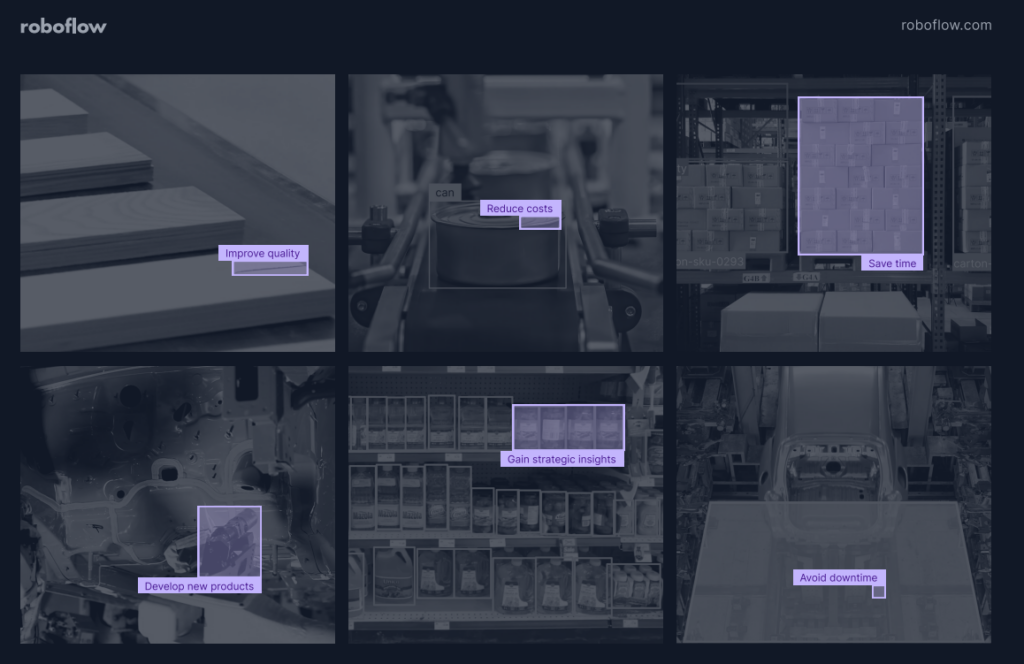
Here is a practical framework for finding that first use case, especially one that fits a real deployment plan and can move the needle on your P&L.
Proven Framework for Identifying How to Get the Most From AI
1. Catalog Your "Visual Business Units"
The biggest mistake many companies make is looking for one AI solution that can solve everything. Instead, start by breaking your operation into clear stages, from raw materials to final distribution, and list the main functions or business units in each stage. This helps you see where visual checks already happen, and where vision AI may actually help.
For a manufacturer, this might look like the following across four operational areas:
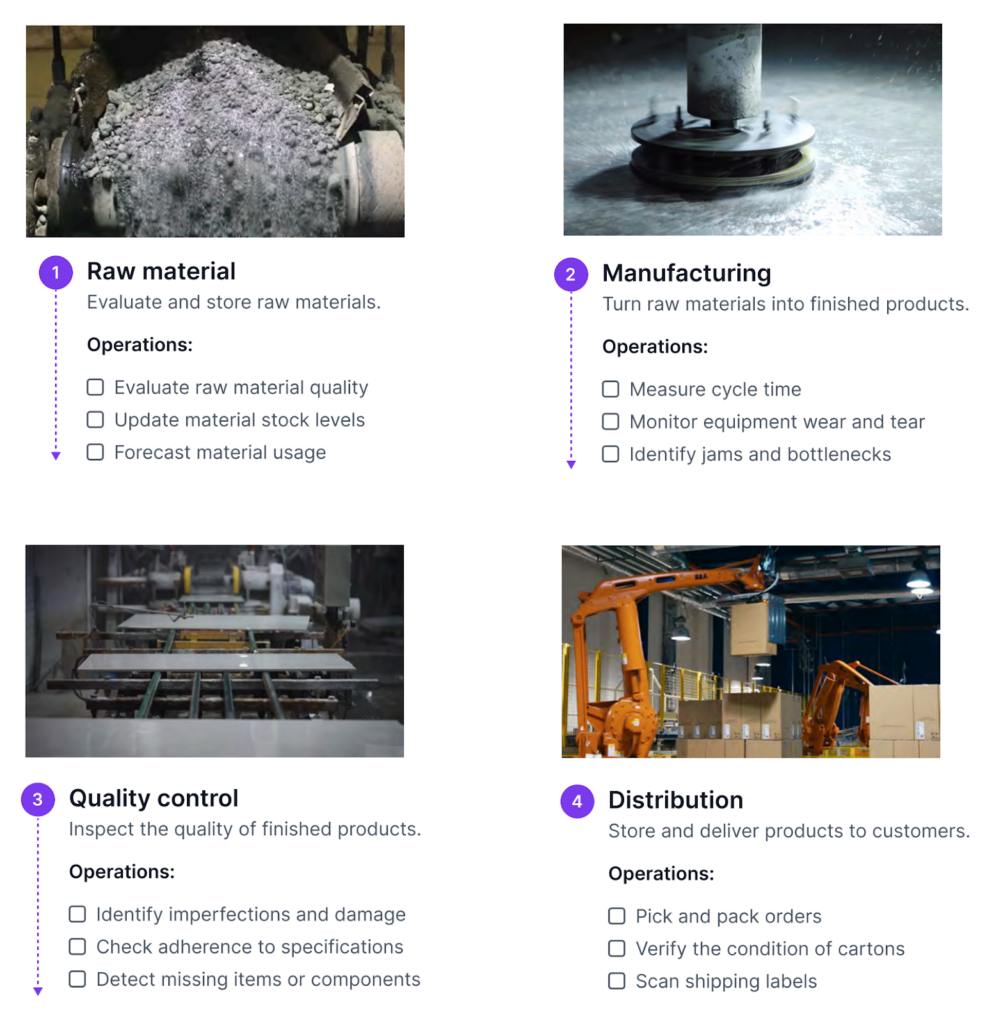
- Raw materials: Are incoming materials labeled correctly and within specification? At this stage, checks are often done manually. A vision system can verify labels and update the inventory system automatically.
- Production: Is the kiln causing real-time deformation of the clay? A vision system can track this during production and help identify process drift or equipment wear before a breakdown occurs.
- Quality control: Is there a small surface defect, such as a 1 mm scratch, that may be overlooked during manual inspection?
- Distribution: Are the correct items being picked, are cartons in acceptable condition, and are shipping labels accurate before shipment?
The goal at this stage is to build a complete list, not to rank the ideas yet. Walk the floor, talk to line managers, and ask one simple question, “What visual task causes the most downstream damage when it goes wrong?” That answer is often the best place to start.
Want to learn more about Roboflow?
2. The 4-Point Suitability Filter
Once you have a list of candidate use cases, the next step is to assess which ones are actually well-suited for computer vision. Not every visual task benefits from automation. At Roboflow, we look for four key signals used to identify whether a problem is a strong fit for computer vision. These criteria help highlight the use cases where vision AI is most likely to deliver more consistent and scalable results than manual processes.
- Actionability: Does the visual information trigger a clear next action? Vision AI pays off when each detection routes into an alert, a database update, or a downstream process, not just a dashboard. Roboflow Workflows chains detection, logic, and output blocks into one pipeline that pushes results straight to Slack, a webhook, or your inventory system.
- Volume: Does this check happen at a very high frequency, like 30,000 times a day? People inspect well for the first hour and miss things by the fifth. Roboflow Inference is built for that gap: it runs hosted on a Roboflow-managed GPU or deployed to your own server, processing thousands of frames per minute without the fatigue curve.
- Feasibility: Does the task need eyes inside a 200°C kiln, on the side of a moving truck, or in a yard with no reliable connectivity? Roboflow Inference runs at the edge on devices like the NVIDIA Jetson, so the model can sit on the camera itself and keep running even when the network drops.
- Subjectivity: Do two inspectors grade the same product differently on a bad day? Variation between shifts and sites is the hidden tax on manual QA. Roboflow Annotate lets your team build a single consistent labeling standard, and the model trained on those labels applies that standard the same way to every frame, every shift, every site.
3. The High Value, Low Complexity Quadrant
Once you have filtered your candidate use cases using the four-point suitability criteria, the next step is to group them by priority and identify which ones may not be worth pursuing. To do this, you need to evaluate both the complexity and the value of each use case.
A simple way to visualize this is with a 2x2 grid divided into quadrants. On the X-axis, measure complexity, which means how much friction exists between the idea and actual deployment. On the Y-axis, measure value, which means the real impact the use case can have on the business and the P&L.
To place each use case in the right quadrant, you need to look at the key factors that influence both axes.
Defining Value:
- Direct: This refers to immediate and measurable business impact. For example, reducing operational costs through automation, lowering waste or rework, or increasing output. These benefits can usually be quantified clearly in terms of savings or revenue.
- Indirect: These are improvements that may not show immediate financial impact but still add value over time. This can include better visibility into operations, improved decision-making, smoother processes, or higher customer satisfaction.
- Strategic: This focuses on long-term advantage. It includes enabling new capabilities, entering new markets, or solving problems that were previously too expensive or difficult to monitor manually.
Defining Complexity:
- Infrastructure: Do you already have the right cameras and compute in place? This includes checking whether new cameras are needed and whether your current edge hardware can handle the required processing load.
- Modeling: Is this a problem that can be addressed with an existing or foundation model, or does it require a custom model for a highly specialized industrial task?
- Data Readiness: This is often the most important factor. Do you have a strong set of high-quality training data that truly matches your production environment?
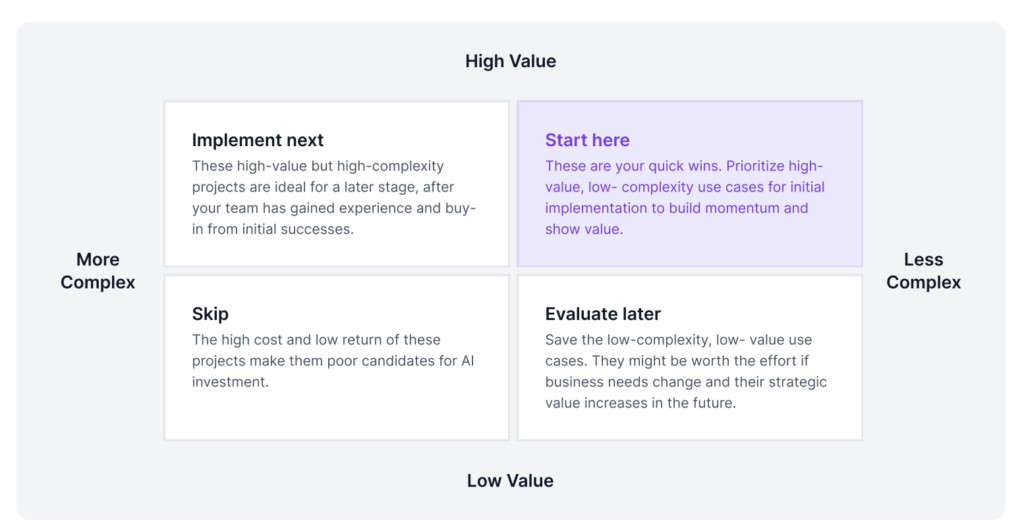
Start in the upper-right quadrant and look for the quick wins, the use cases that are high in value and low in complexity. These are often the best places to begin because the team needs to build practical deployment experience first.
Take the canonical example: catching 80% of defects on a production line can save a manufacturer roughly $4 million a year in replacement costs. The reason a use case like this can move quickly from idea to production is that Roboflow removes the three barriers that usually slow teams down. The data barrier is lower because Roboflow Universe provides pre-labeled datasets that teams can fork and build on, rather than collecting thousands of images from scratch. The labeling effort shrinks because Roboflow Annotate lets a team add their own site-specific images to match real floor conditions and label with AI-assisted annotation tools, rather than labeling an entire dataset by hand. And the deployment barrier drops because Roboflow Deploy supports direct deployment to edge hardware, so the model can run on equipment already installed on the line with no new infrastructure required.
These early successes do more than save money. They also build internal confidence, strengthen support for future investment, and make it easier to take on more complex initiatives later.
4. Choosing Your Deployment Blueprint
Once you have identified the right project, the next step is to choose the deployment architecture. This means deciding how the system should run in production based on the needs of the use case. Learn more about deployment with Roboflow here.
| Deployment Strategy | Choose This If... | Roboflow Advantage |
|---|---|---|
| Deployment StrategyEdge | Choose This If...You need <10ms latency for high-speed lines (100+ FPS) or have zero connectivity. | Roboflow AdvantageRoboflow Inference Server runs on common edge hardware such as NVIDIA Jetson devices, x86 servers, or any device that supports Docker. This makes it possible to run inspection models locally on the production line, with low latency and without sending images out to the cloud, which is often required for air-gapped facilities. |
| Deployment StrategyCloud | Choose This If...You are doing batch processing or high-level inventory audits across 50 sites. | Roboflow AdvantageThe Roboflow Hosted API provides managed inference through a serverless cloud endpoint. Teams running large batch jobs, such as nightly inventory audits across many sites, can send their images to a single endpoint and have Roboflow handle the GPU capacity behind the scenes. |
| Deployment StrategyHybrid | Choose This If...You need real-time response at the edge, while also using centralized analytics or management in the cloud. | Roboflow AdvantageRoboflow Workflows lets teams define a single inspection pipeline that can run both at the edge and through the Hosted API for cloud-side analytics. New model versions trained in Roboflow Train can then be rolled out to the edge nodes through the same pipeline, which keeps central management and local execution in sync. |
Making the World Programmable
The path from working prototype to reliable site-wide production rarely runs in a straight line. Real vision systems run on a loop: collect new examples from the field, retrain the model, redeploy to the edge, and monitor what still gets through. Each of those stages maps to a specific part of the Roboflow platform. Roboflow Annotate handles the collection and labeling. Roboflow Train rebuilds the model on the updated dataset. And Roboflow Inference or the Hosted API pushes the new version back into production, whether at the edge or in the cloud.
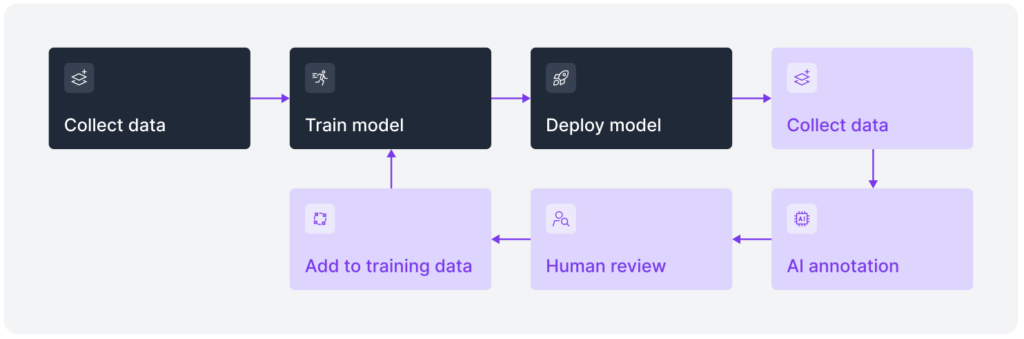
This is important because real-world environments are not all the same. Every facility, every production line, and every logistics yard has its own operating conditions and technical constraints. In one place, the challenge may be low-light conditions. In another, it may be high-speed throughput, changing product layouts, or strict data sovereignty requirements. A system that works well in one setting may still need adjustment before it can work reliably in another.
That is where a platform like Roboflow becomes valuable. All of those stages operate within a single project, with shared dataset versions and a single model registry. When a new failure case appears at one site, the updated model can roll out to every deployment through the same pipeline, with no need to export data to a separate tool or update each edge device individually.
Talk to a Roboflow AI expert today to apply these prioritization principles to your own technical challenges and start building your vision-native future.