


At first, it works. Employees send requests. Someone from IT replies. Problems get solved.
But volume compounds quickly. Every employee contacts the help desk about 1.25 times per month. In a 1,000-person organization, that’s roughly 1,250 requests monthly.
And as volume grows, the setup starts breaking down. Without clear ownership, requests can be delayed or overlooked. Engineers may need to manually route emails to the appropriate person, and managers often don’t have a reliable view of request status or progress.
This is when ITSM becomes necessary. Not because IT teams need more tools, but because they need structure.
Modern IT teams use {{deeplink:3981:[Hiver]:itsm_spotlight}} to centralize IT requests, automate routing, enforce SLAs, and track every request from intake to resolution. In this guide, I’ll show exactly how.
What is ITSM (and what IT teams actually need from it)
IT service management, or ITSM, is the process IT teams use to manage internal technology requests in a structured way.
This covers a wide range of everyday operational requests, such as:
- Granting access to tools and systems
- Provisioning laptops and other devices
- Installing or configuring software
- Troubleshooting technical issues
- Handling onboarding and offboarding requests
- Maintaining records for compliance and audits
Traditional ITSM tools were designed to help with this, but they often require heavy setup, complex workflows, and ongoing maintenance. Many IT teams want a simpler approach that works with their existing communication channels instead of forcing employees into entirely new systems.
A more practical approach is to bring ITSM structure into the tools teams already use.
With Hiver, IT teams can turn their existing shared inbox into a fully structured service desk. Every request becomes trackable, assignable, and visible, with built-in automation, SLA tracking, and collaboration. This allows teams to introduce the discipline of ITSM without forcing employees to adopt new systems or adding unnecessary complexity.
The result is simple: IT teams gain the clarity, accountability, and scalability of ITSM, while continuing to work from familiar workflows.
How IT teams use Hiver as an ITSM platform
Here’s how IT teams use Hiver to run day-to-day ITSM operations.
Step 1: Centralize all IT requests into a shared service desk
Most IT teams already receive requests through a shared address like it@company.com. Employees use it to request access, report issues, or ask for help with devices and software.
But without structure, these requests quickly become difficult to track. Emails get buried, ownership is unclear, and IT teams often have to ask basic questions like, “Who is handling this?” or “Is this resolved?”
Hiver turns this common inbox into a structured IT service desk. Each request becomes a trackable service conversation with a clear owner, status, priority, and history.
This creates immediate operational clarity. As Nathan Strang, Ocean Freight Operations Manager at Flexport, explains:
“With Hiver, we’ve stopped missing emails, and I have better visibility into their resolution. It’s essentially like having an additional person on my team.”
Instead of managing scattered email threads, IT teams can use Hiver to operate from a centralized service queue with full visibility.
Step 2: Automatically assign IT requests to the right person
Once requests are centralized, the next challenge is triage. In many IT teams, someone manually reviews incoming requests and forwards them to the appropriate person. This slows response times and creates unnecessary operational overhead.
Hiver allows IT teams to automate request assignment using workflows. For example, VPN access requests can be routed to security, hardware issues to device support, and password resets to IT support. Requests can also be distributed evenly using a round robin assignment.
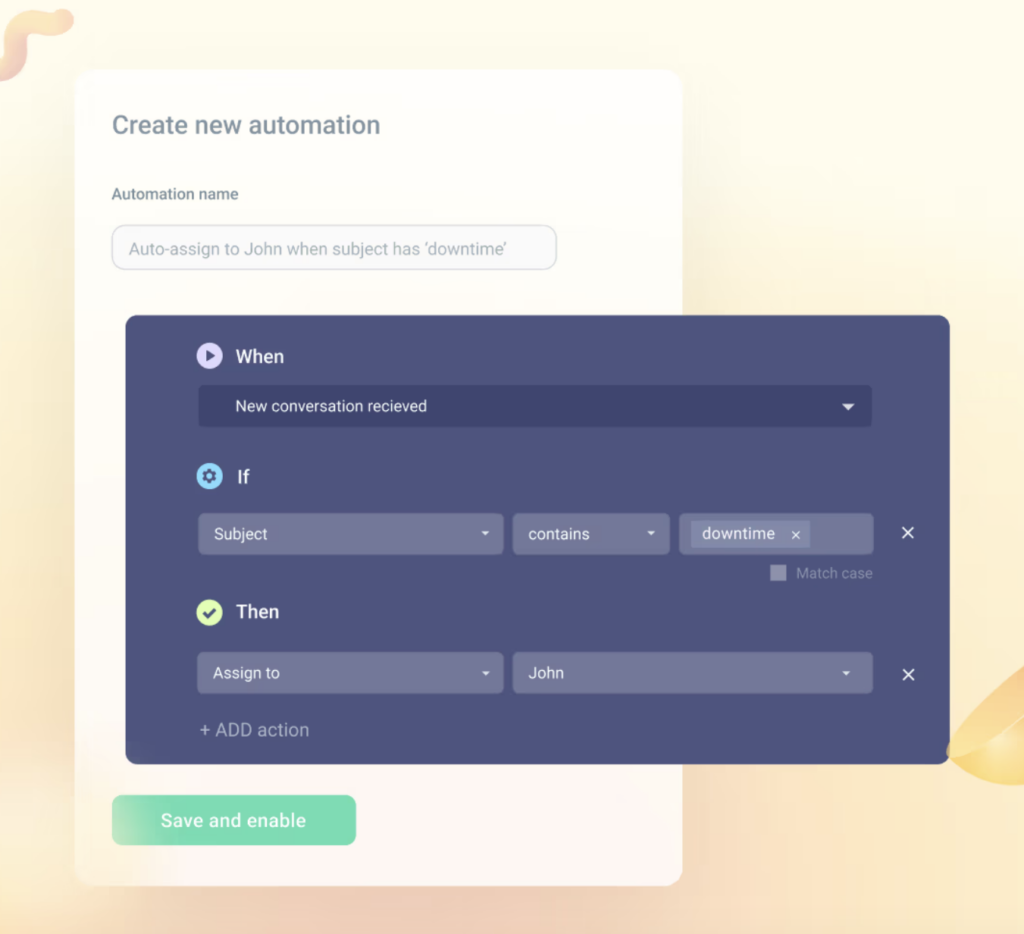
For example, the Operations division at Travelist handles hundreds of internal requests each week across multiple departments. After implementing more than 250 automation rules in Hiver, repetitive actions such as categorization, assignment, and routing now happen automatically. Manual triage dropped by 40%, saving approximately 8 hours of routine work every week for team leads.
Step 3: Track SLAs and ensure requests are handled on time
IT teams often set response and resolution targets for requests like access provisioning, password resets, or hardware support. Without structured tracking, enforcing these timelines becomes difficult, especially as request volume grows.
Hiver allows teams to define SLA policies and automatically track deadlines, ownership, and response status. This makes it easy to see which requests need attention and prevents issues from being overlooked.
For example, before onboarding Hiver, the Office of Sponsored Programs at Boise State University struggled to meet its two-business-day SLA and frequently missed deadlines. After adopting Hiver, complaints dropped significantly. As Matt Smith explains:
“We used to receive complaints from sponsors, faculty members, administrators, and others, asking why employees (who were on leave) hadn't responded to emails in a timely fashion. Since we started using Hiver, I have rarely received complaints. I believe the combination of visibility and accountability provided by Hiver has directly contributed to this improved service level.”
With clear ownership and SLA visibility, teams no longer rely on manual follow-ups to keep requests on track.
Step 4: Enable collaboration across IT, security, and other teams
Many IT requests cannot be resolved by one person alone. Access provisioning may require approval from security, software issues may need engineering input, and device replacements may involve vendors. Without a structured system, this coordination often happens through forwarded emails or separate chat conversations, which makes it hard to track progress.
Hiver allows IT teams to collaborate directly within the request using internal notes and mentions. Team members can ask for approvals, share context, or involve other stakeholders without forwarding emails or switching tools. All communication stays attached to the original request.
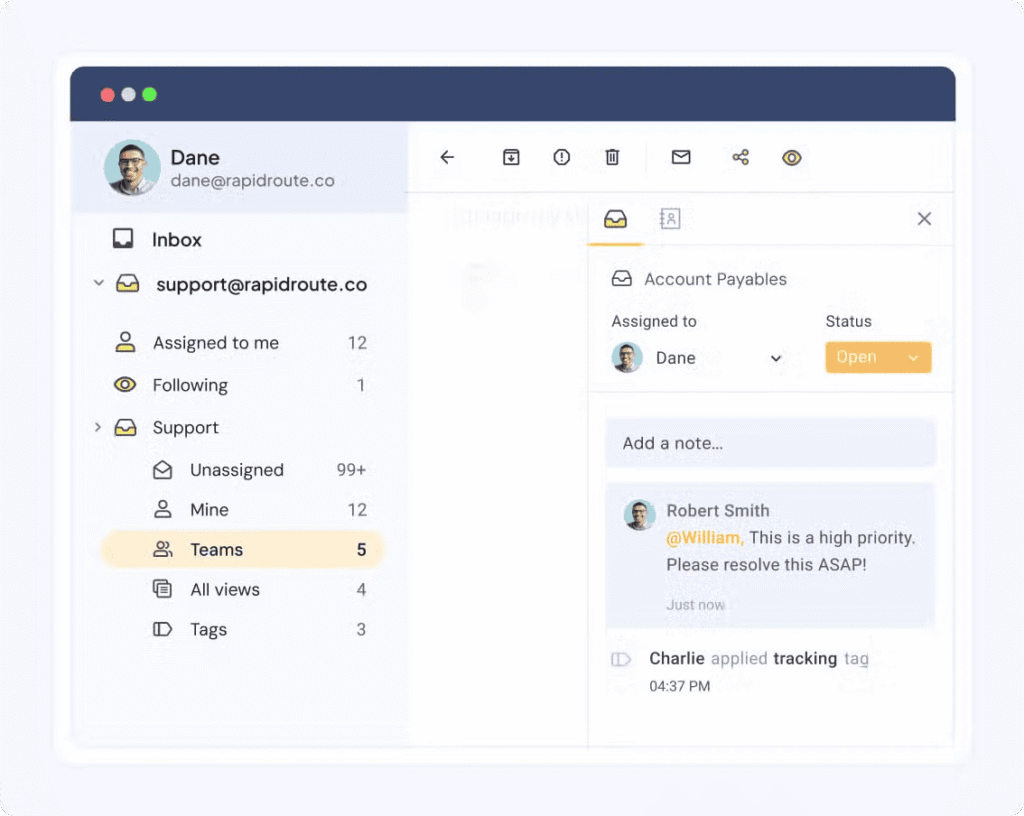
This ensures continuity. Anyone reviewing the request can see what has already been done, who is involved, and what the next step is. It also reduces delays caused by lost context or fragmented communication.
Step 5: Automate repetitive IT workflows using AI and automation
A large portion of IT requests are repetitive. Password resets, access requests, software installations, and routine troubleshooting often follow predictable patterns. Handling these manually consumes valuable time and slows down response cycles.
Hiver allows teams to automate categorization, assignment, routing, and follow-ups using workflows and AI. For example, if an employee reports an access issue, Hiver can automatically identify the request type, assign it to the correct team, and apply relevant tags without manual intervention.
AI also assists agents during resolution. Instead of writing responses from scratch, IT teams can use AI-powered drafting to generate contextual replies based on the request history and past resolutions. At the same time, Hiver can surface relevant knowledge base articles or internal documentation directly within the conversation, helping agents quickly find accurate answers without switching tools. This reduces response time while ensuring employees receive consistent, reliable support.
At 1% for the Planet, the membership team uses Hiver to manage all member communication through a centralized workspace instead of individual inboxes. Incoming requests are automatically routed based on topic, workload, or time zone, ensuring global queries are handled without manual handoffs. The team relies on automation to categorize requests, templates to standardize common responses, internal notes for real time collaboration, and a shared knowledge base to quickly surface accurate information during conversations.
These workflows help the team handle seasonal surges of 100+ daily requests efficiently while maintaining full visibility into ongoing work. As a result, response times improved from 3–4 days to just 48 hours, and the team scaled support operations without adding operational overhead.
Step 6: Integrate IT workflows with tools like Jira and asset management systems
IT teams rarely work in isolation. Resolving requests often involves creating engineering tickets, checking asset records, or updating internal systems. Switching between tools to do this manually slows down resolution and increases the risk of missed updates.
Hiver integrates with tools like Jira and other internal systems, allowing IT teams to take action directly from the request. For example, if an employee reports a software bug, the IT team can create a Jira issue from the same conversation and link it to the request. This keeps both systems aligned and ensures progress is tracked.
This reduces context switching and makes it easier to manage incidents, escalations, and technical issues without losing visibility.
Step 7: Track IT team performance and workload using analytics
As IT request volume grows, visibility becomes essential. IT leaders need to understand how quickly requests are handled, where delays occur, and how workload is distributed across the team.
Hiver provides analytics that track key metrics such as first response time, resolution time, SLA compliance, and request volume. Managers can identify bottlenecks, monitor team performance, and make informed decisions about staffing and process improvements.
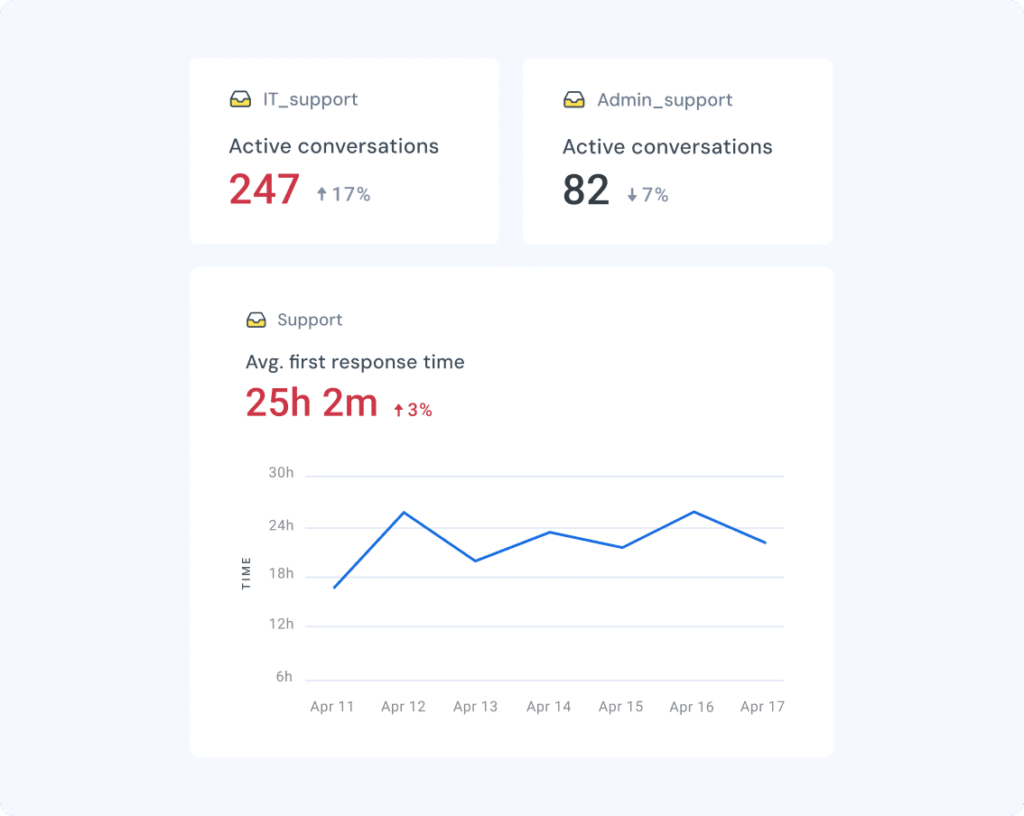
In fact, Clutter’s People Team brought down response times by 25% and saves 25 hours each month using {{deeplink:3981:[Hiver’s analytics]:reporting_analytics}} and assignment tracking. This gives them clear visibility into workload and ensures every request is assigned and tracked properly.
Real-world ITSM use cases Hiver supports
ITSM is not a single workflow. It supports a wide range of internal IT operations, from onboarding new employees to resolving incidents and managing access.
Hiver allows IT teams to manage all of these workflows in one place, with clear ownership, automation, and tracking.
Here are some of the most common ITSM workflows IT teams manage using Hiver.
- Employee onboarding and offboarding: Track account setup, device provisioning, and secure access removal across teams.
- Access and permission management: Handle application, system, and shared drive access requests with clear ownership and status tracking.
- Incident and technical issue management: Route, prioritize, and resolve internal IT issues like login failures, outages, and software errors.
- Device provisioning and lifecycle management: Manage laptop requests, hardware replacements, upgrades, and asset-related requests end-to-end.
- Software installation and license requests: Track approvals, installations, and software access requests in a centralized queue.
- Compliance and audit tracking: Maintain a searchable record of requests, ownership, actions, and resolution history for audits.
Why IT teams choose Hiver instead of traditional ITSM tools
Traditional ITSM platforms were designed to bring structure to IT operations, but they often introduce their own operational overhead.
Implementation can take weeks or months, workflows require ongoing maintenance, and adoption can be inconsistent when employees are required to use unfamiliar tools.
This is one of the reasons many teams move away from traditional help desk platforms toward simpler, more operationally aligned solutions.
We tested Freshdesk and Salesforce, but they were too complex for us. Hiver struck the right balance — simple enough for daily use, structured enough to track everything.

Hiver takes a different approach. It allows IT teams to introduce structured service management without disrupting how requests are already submitted or handled.
Faster deployment and time to value
Traditional {{deeplink:3981:[ITSM systems]:it_service_management_spotlight_2}} often require significant configuration before they can be used effectively. Workflows, queues, forms, and integrations must be set up in advance.
With Hiver, IT teams can convert an existing IT support address into a structured service desk within 15-20 minutes. Requests begin flowing into a trackable system immediately, allowing teams to improve visibility and ownership without a lengthy rollout.
Higher adoption across employees and IT teams
One of the most common challenges with ITSM platforms is adoption. Employees may continue sending requests through email or chat instead of using formal portals, which creates fragmented workflows.
Hiver allows IT teams to manage requests from existing communication channels. This reduces friction and ensures requests are captured consistently without requiring behavior change across the organization.
Lower operational overhead and maintenance
Traditional ITSM systems often require dedicated administrators to manage workflows, permissions, and ongoing changes.
Hiver simplifies this by allowing IT teams to manage routing, ownership, and workflows without heavy administrative overhead. This makes it easier for lean IT teams to maintain structured service management without additional complexity.
Automation without complex configuration
Automation is critical for scaling IT operations, but configuring automation in traditional systems can be time-consuming.
Hiver allows teams to automate assignment, tagging, routing, and responses using simple workflow rules and AI. This reduces manual effort and improves operational efficiency without requiring complex configuration.
Clear visibility without operational complexity
IT leaders need visibility into request volume, response times, and workload distribution. Traditional systems provide this, but often require complex setup and reporting configuration.
Hiver provides built-in analytics that allow IT teams to monitor service performance and workload without additional setup. This enables teams to maintain consistent service delivery and identify areas for improvement.
{{deeplink:3981:[Try Hiver for free]:itsm_spotlight}} and see how quickly your IT team can centralize requests, automate routing, and improve service reliability.