

I denne artikkelen deler jeg mine beste valg innen programvare for kravhåndtering. Jeg har testet og vurdert hver av dem uavhengig, slik at du kan stole på innsikten min. Målet mitt er å hjelpe deg med å finne et verktøy som forenkler prosessene dine og øker teamets produktivitet.
Du får en objektiv gjennomgang av hver programvareløsning, med fokus på funksjoner, fordeler og ulemper. Enten du er et lite team eller en stor virksomhet, finnes det noe her for deg. La oss se nærmere på alternativene og finne den riktige løsningen for dine behov.
Why Trust Our Software Recommendations
6,700+
Reviews
20
Industry experts
16+
Evaluation factors
14
Years
Our team has been testing and reviewing software since 2012. As tech leaders ourselves, we know how difficult—and important—it is to choose the right software.
For this guide, we evaluated tools using hands-on testing and independent research, scoring tools using our selection criteria.
Our reviews reflect our human editorial judgment, not a sales pitch.
Expert reviewers:
- Paulo Gardini MiguelTech Director
 Tim FisherVP of AI
 Gabriel RosasTech Lead & Software Architect
 Christhian GruhnTech Lead & Platform Architect

Sammenligningstabell for programvare for kravhåndtering
Denne sammenligningstabellen oppsummerer prisopplysningene for mine beste utvalg av programvare for kravhåndtering:
| Tool | Best For | Trial Info | Price | ||
|---|---|---|---|---|---|
| 1 | Best with unlimited collaborators included | 30-day free trial + free demo available | From $995/year (billed annually) | Website | |
| 2 | Best for large-scale project management | 30-day free trial + free demo available | Pricing upon request | Website | |
| 3 | Best for medical device regulatory compliance | Free demo available | Pricing upon request | Website | |
| 4 | Best for requirements management customizability | Free demo available | Pricing upon request | Website | |
| 5 | Best for end-to-end traceability | Free trial available | From $520/user/year | Website | |
| 6 | Best for enterprise-level customizability | 30 days free trial | Pricing available upon request | Website | |
| 7 | Best for out-of-box API integrations | 30-day free trial + free demo available | Pricing upon request | Website | |
| 8 | Best with an ITSM help desk | Free plan + 14-day free trial available | From $25/user/month | Website | |
| 9 | Best for scalable deployments | Free demo available | Pricing upon request | Website | |
| 10 | Best for traceability features | Pricing upon request | Website |


Anmeldelser av den beste programvaren for kravhåndtering
 Best with unlimited collaborators included
- 30-day free trial + free demo available
- From $995/year (billed annually)
Visit WebsiteCustomer Rating:4.6/5
Requirements Portal interface with requirement IDs, traceability methods, and verification status tracking in table view. Requirements Portal has earned a place on my shortlist because it does one thing I don’t see from most other tools: it doesn’t limit your ability to involve stakeholders. When I see teams who need broad input—sometimes dozens of reviewers, approvers, or subject matter experts—I look here first.
I appreciate how Requirements Portal lets you add unlimited collaborators on requirements without forcing you into a pricey tier or unique licensing. It’s best when your product or project spans lots of departments or client groups, and you want to give everyone visibility without hassle.
Requirements Portal’s Best For
- Product and engineering teams involving many external or non-technical stakeholders
- Organizations that need unlimited contributors reviewing or approving requirements
Requirements Portal’s Not Great For
- Teams that want built-in task management or agile boards
- Organizations seeking advanced reporting or analytics features
What Sets Requirements Portal Apart
Requirements Portal works well for teams who involve a lot of stakeholders in requirements gathering. Unlike Jira, which requires a seat for each contributor, this tool lets you include as many collaborators as you need without extra costs or complex user management. In practice, I see product groups and business analysts use it to streamline review cycles and collect feedback across departments. It’s focused on transparency and shared context rather than granular task or sprint management.
Tradeoffs With Requirements Portal
Requirements Portal optimizes for open, flexible contribution—but that means it isn’t designed for managing execution or sprints. You lose out on built-in task tracking and advanced workflow automation, so teams still need another tool for delivery work.
Pros and Cons
Pros:
- Real-time sync with schematic and PCB data
- Built-in review and approval workflows
- AI-powered requirements breakdown and suggestions
Cons:
- Not suitable for non-electronics project teams
- Limited integrations outside the Altium ecosystem
Learn more about Requirements Portal: Best for large-scale project management
- 30-day free trial + free demo available
- Pricing upon request

A look at the projects tab from Jama Software showcasing the testing status overview. Jama Software lands on my list because it’s the tool I see large organizations turn to when requirements get complicated fast. Teams with dozens of contributors and evolving priorities use Jama Software to track requirements, manage versioning, and keep traceability clear during giant projects.
What I appreciate is how Jama Software handles end-to-end traceability and impact analysis. When you need to document complex relationships, align multiple teams, and keep ahead of compliance, this platform holds up.
Jama Software’s Best For
- Large enterprises managing complex, high-stakes engineering projects
- Teams requiring strict requirements traceability and regulatory compliance
Jama Software’s Not Great For
- Small teams needing lightweight or informal requirements tracking
- Projects without heavy documentation or traceability needs
What Sets Jama Software Apart
Jama Software treats requirements management as a structured, audit-ready process instead of a casual to-do list. Unlike Jira, which often gets stretched to handle requirements through plugins or workarounds, Jama builds traceability and impact analysis into its core workflow. In practice, this works best when you’re dealing with regulated environments or complex product development that can’t risk missed details.
Tradeoffs With Jama Software
It optimizes for thorough documentation and traceability, but the complexity adds significant onboarding time and overhead. For projects without strong compliance or traceability pressure, this extra friction can slow teams down.
Pros and Cons
Pros:
- Interface is designed for overseeing large-scale projects
- Real-time collaboration ensures timely decision-making
- Comprehensive traceability aids in keeping track of project details
Cons:
- Some users might find the pricing on the higher side
- Initial setup can be somewhat intricate
- Might be too extensive for smaller projects
Learn more about Jama Software: Best for medical device regulatory compliance
- Free demo available
- Pricing upon request
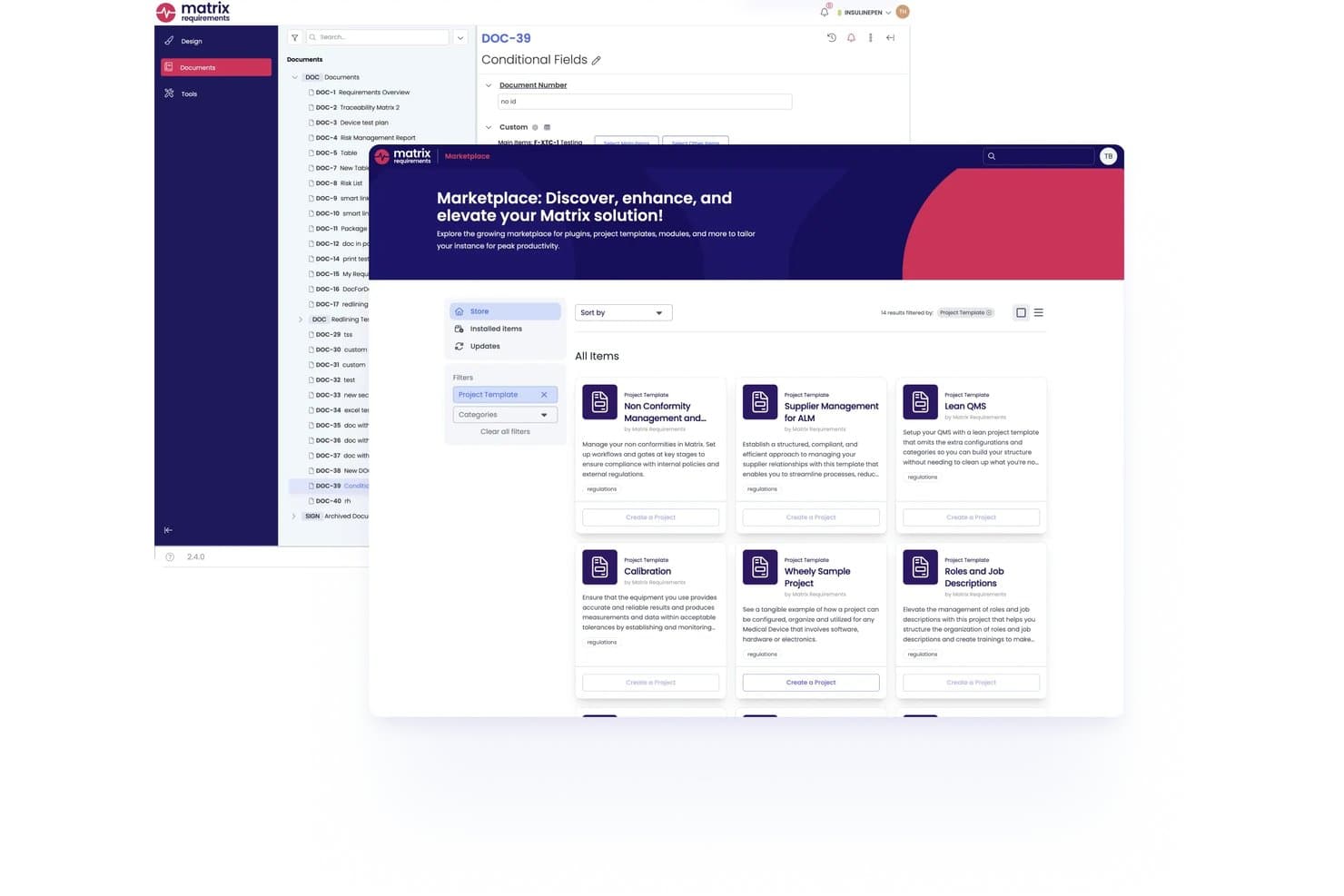
Matrix Req offers a built-in Marketplace where users can discover and install project templates, plugins, and modules directly within the platform. Matrix Req is a requirements management platform built specifically for medical device development, combining design control, risk management, end-to-end traceability, and test management within a single regulatory-ready environment.
Who Is Matrix Req Best For?
Matrix Req is a strong fit for QA and regulatory affairs teams in medical device, SaMD, and IVD companies navigating FDA or EU MDR compliance requirements.
Why I Picked Matrix Req
Matrix Req earns its spot on my shortlist because it treats regulatory compliance as architecture, not an afterthought. I particularly like the built-in Compliance Checker, which maps your documentation against standards like ISO 14971 and IEC 62304 and flags gaps before a submission. Its branch management also lets you maintain distinct requirement variants for different markets (EU MDR vs. FDA, for example) without duplicating the entire project structure.
Matrix Req Key Features
- Reusable requirements base library: Store and manage reusable requirement modules for rapid creation of new product variants.
- Bidirectional traceability matrix: Connect requirements to design, test, and risk artifacts with live, visual traceability.
- Automated audit trail and versioning: Track every change, approval, and comment with a full history and compliance-ready logs.
- Native ALM integrations: Sync requirements and links with Jira, Azure DevOps, GitHub, and GitLab for unified team workflows.
Matrix Req Integrations
Matrix Req offers native integrations with Jira, Azure DevOps, GitHub, GitLab, Confluence, TFS, Broadcom Rally, Phabricator, YouTrack, and Slack. An API is available for custom integrations.
Pros and Cons
Pros:
- Variant management for multi-region product requirements
- Built-in compliance checks for FDA and ISO
- End-to-end traceability for regulated industries
Cons:
- Pricing details not transparently available
- User interface can be unintuitive
Learn more about Matrix Req: Best for requirements management customizability
- Free demo available
- Pricing upon request
Visit WebsiteCustomer Rating:4.7/5
reqSuite® rm provides a single source of truth for all requirements and related data, ensuring consistency and accuracy throughout the project. reqSuite® rm stands out to me because of how flexible it gets as requirements grow more complex than typical templates can handle. I'd use reqSuite if you're a wall with standard requirements tools and need more custom workflows, document structures, or metadata fields.
One thing I appreciate is the level of control I get setting up requirement types and traceability rules. If you work in regulated environments or need a requirements process that fits your organization, not the other way around, this is where reqSuite® rm starts to shine.
reqSuite® rm's Best For
- Regulated industries needing custom requirements models and traceability
- Teams that outgrow fixed templates and need adaptable requirements processes
reqSuite® rm's Not Great For
- Small projects with simple requirements or minimal documentation needs
- Teams wanting a lightweight tool with minimal configuration
What sets reqSuite® rm apart
reqSuite® rm is built for organizations that need requirements management tailored to their own language and processes. It lets you define custom requirement types, workflows, and rules so you’re not bound by a preset framework. Unlike tools like Jira, which require workarounds for nonstandard needs, reqSuite® rm expects users to adapt the tool to fit their methodology. This works best in regulated, process-heavy environments where one-size-fits-all approaches fall short.
Tradeoffs with reqSuite® rm
By focusing on configurability and structure, reqSuite® rm makes setup and ongoing administration heavier. If you need a quick-start tool or want something lightweight, that level of depth can slow initial projects down.
Pros and Cons
Pros:
- Automatic checks for links and dependencies
- Version control features
- Highly configurable platform
Cons:
- Reporting graphical configuration could be modernized
- Data export feature could be improved
Learn more about reqSuite® rm: Best for end-to-end traceability
- Free trial available
- From $520/user/year
Visit WebsiteCustomer Rating:4.6/5
ReqView's interface organizes project requirements, documents, risks, and tests in one place. ReqView earns its spot on my list because it delivers on end-to-end traceability in a way most tools just can’t match. I tend to recommend it whenever a project needs rock-solid tracking of requirements changes, test coverage, and up-to-date trace matrices.
In my experience, ReqView’s bidirectional traceability and detailed versioning make a real difference on regulated projects or safety-critical systems. I appreciate how quickly you can link requirements, risks, and verification steps, then generate clear traceability reports without extra effort.
ReqView’s Best For
- Teams in regulated industries needing up-to-date requirement traceability
- Engineering groups tracking requirements, risks, and verification in detail
ReqView’s Not Great For
- Teams wanting visual boards or simplified task tracking
- Organizations needing heavy project planning or resource management features
What Sets ReqView Apart
ReqView centers everything around structured, document-driven requirements management. It expects you to approach requirements with traceability in mind and gives you fine-grained linking between each requirement, risk, and test case. Unlike something like Jira, which is optimized for user stories and iterative task management, ReqView sticks closer to document-based workflows common in regulated product development.
This tends to work well for teams that need to generate full trace matrices and demonstrate compliance, rather than just tracking day-to-day project tasks.
Tradeoffs with ReqView
ReqView optimizes for thorough traceability and documentation, but that focus means you lose visual project planning and simplified task management. In practice, this makes it cumbersome for teams looking for fluid, high-level project coordination.
Pros and Cons
Pros:
- Easy to setup and use
- Flexible project structure, customizable attributes and views
- Good customer support
Cons:
- Real-time collaboration is not yet implemented
- Coding skills needed for customization of export templates
Learn more about ReqView: Best for enterprise-level customizability
- 30 days free trial
- Pricing available upon request
Visit WebsiteCustomer Rating:4.7/5
Along with recording product requirements, users can keep track of traceability, defects, and verification. Visure Requirements makes my shortlist because it’s the tool I reach for when teams need heavy customizability to fit unique enterprise processes. I’ve seen organizations use it to create highly specific workflows, enforce distinct project templates, and manage complex compliance requirements all in one platform.
What stands out for me is the way Visure lets you design traceability matrices and enforce standards like DO-178C or ISO 26262 from the ground up. When requirements complexity rises and out-of-the-box tools just don’t cut it, this is what I recommend.
Visure Requirements’ Best For
- Large organizations with strict compliance or industry-specific standards
- Teams that need custom workflows and deep traceability for complex projects
Visure Requirements’ Not Great For
- Small teams with basic requirements management needs
- Groups seeking minimal setup or lightweight, ready-made workflows
What Sets Visure Requirements Apart
Visure Requirements stands out for the way it lets you define your own workflows and data structures from scratch. Unlike tools like Jira, which expect you to adapt your process to the product, here you build the system around how you already work. This makes the most sense when you have strict compliance rules or traceability needs that off-the-shelf tools miss. In practice, you’re shaping every stage—from requirements capture to reporting—to align with industry standards or internal processes.
Tradeoffs with Visure Requirements
You get maximum control, but that depth means setup and changes demand much more effort. If you want something you can just configure and launch, this won’t be a fit.
Pros and Cons
Pros:
- Strong Word and Excel integration
- AI-driven quality checks for requirements
- Flexible for agile and waterfall projects
Cons:
- Customization requires training for admins
- Interface may feel overwhelming at first
Learn more about Visure Requirements: Best for out-of-box API integrations
- 30-day free trial + free demo available
- Pricing upon request
Visit WebsiteCustomer Rating:4.3/5
Identify, manage, and track requirements across the lifecycle with codebeamer. Reduce costs, risks, and delivery times in product development. codebeamer makes my list because it's one of the few platforms that solves real API integration barriers right out of the box. I bring this up most when teams depend on syncing requirements with legacy or third-party tools and have no time for custom connector work.
My experience with codebeamer tells me it excels when you need to keep requirements, test cases, and traceability perfectly aligned across multiple software ecosystems. It's especially solid for regulated industries where integration points aren't negotiable, and I've always appreciated how it reduces the friction of combining data from across the product lifecycle.
codebeamer’s Best For
- Teams in regulated industries needing API-based requirements traceability
- Organizations with complex toolchains relying on real-time data sync
codebeamer’s Not Great For
- Teams that want a lightweight, out-of-the-box requirements solution
- Groups without integration needs or who avoid customization entirely
What Sets codebeamer Apart
What I find unique about codebeamer is how much it prioritizes API connectivity and integration with existing development environments. Instead of forcing you into a locked requirements-tracking silo the way Jira sometimes does, it expects you’ll need live connections with other tools and systems.
This works best when you want requirements, tests, and release data automatically synced across multiple platforms—especially in highly regulated industries where traceability is a core need.
Tradeoffs with codebeamer
By focusing on deep integrations and flexibility, codebeamer introduces setup complexity and a technical learning curve. That means teams looking for a plug-and-play solution without ongoing configuration tend to have a tougher time getting started.
Pros and Cons
Pros:
- Highly configurable workflows and templates
- Gapless traceability across development lifecycle
- Strong support for regulated industries
Cons:
- Interface may seem dated to new users
- Setup can feel complex at first
Learn more about codebeamer: Best with an ITSM help desk
- Free plan + 14-day free trial available
- From $25/user/month
Visit WebsiteCustomer Rating:4/5
Jira Service Management lets you address project and team requirements in a unified dashboard for full operational transparency. Jira Service Management stands out for teams that need built-in ITSM features alongside requirements management. I picked it because service teams can tie change requests, incidents, and tasks right back to requirements, making it fit shops juggling both delivery and support. What I like is how we can link requirements to service tickets, so when someone files a request or disruption, you see the impact immediately. This works best when requirements, incidents, and changes need to stay connected for large, process-heavy organizations.
Jira Service Management’s Best For
- ITSM teams who need requirements linked with service tickets and incidents
- Enterprises managing requirements alongside change management and support processes
Jira Service Management’s Not Great For
- Software teams focused solely on product development requirements
- Small teams that don’t need ITSM workflows tightly integrated with requirements
What Sets Jira Service Management Apart
Jira Service Management is built on the idea that ITSM and requirements management should happen together, not in separate silos. Unlike stand-alone requirements tools like Jama Connect, it expects you to map requirements, incidents, changes, and requests in a single workflow. This works best when stakeholders need to see upstream and downstream impact—the way work shifts as requirements trigger changes or support tickets. I see it work well in large companies with strict approvals and audit trails.
Tradeoffs with Jira Service Management
It’s optimized for process-heavy environments, which means you get lots of structure and controls. As a result, pure product teams find the extra ITSM layers add overhead that slows down requirements gathering and iteration.
Pros and Cons
Pros:
- Links requirements with bugs or requests
- SLA tracking keeps requests on schedule
- Flexible workflows for IT and dev teams
Cons:
- Customization requires admin knowledge
- Setup can be complex for new users
Learn more about Jira Service Management: Best for scalable deployments
- Free demo available
- Pricing upon request

Here's a screenshot of the IBM Engineering Requirements Management DOORS Next dashboard. IBM Engineering Requirements Management "DOORS Next" stands out to me whenever I see organizations with extensive compliance needs and huge volumes of requirements that evolve over time. When teams start running into traceability and audit challenges, this is the tool I tend to recommend—they can map every requirement to tests, risks, and designs at scale.
I appreciate how it handles baselining and change management for complex multi-stakeholder projects, where lots of people contribute and requirements shift often. It's got strong support for enterprise-scale regulatory initiatives—teams can trace every requirement from idea to release, and verify coverage as regulations update.
DOORS Next is Best For
- Large enterprises managing extensive requirements across multiple products or regulatory initiatives
- Teams that need end-to-end traceability and audit trails for compliance-driven projects
DOORS Next is Not Great For
- Small teams looking for lightweight or informal requirements tracking
- Organizations that want modern, highly visual interfaces over process rigor
What Sets DOORS Next Apart
What stands out to me is how DOORS Next is built for situations where traceability matters more than speed. It expects large groups to define requirements early and maintain rigorous control as changes happen, unlike tools like Jira that focus more on tracking issues and sprints. In practice, this approach makes it work best for industries with strict compliance or auditing needs—think aerospace or regulated manufacturing.
Tradeoffs with DOORS Next
It optimizes for process rigor and traceable documentation, but that formal structure means onboarding takes longer and quick pivots feel slow. For teams that need to adapt requirements frequently or want a more visual, dynamic environment, it often feels too rigid.
Pros and Cons
Pros:
- Supports real-time collaboration which facilitates teamwork
- Comprehensive dashboards provide a detailed overview of projects
- Robust scalability ensures the tool is fit for all project sizes
Cons:
- Licensing and setup can be more complex than simpler alternatives
- Might be overkill for very small-scale projects
- A steeper learning curve compared to some other tools
Learn more about IBM Engineering Requirements Management DOORS Next:

The Micro Focus Dimensions RM offers a role-based dashboard that provides users with status updates and progress reports. Micro Focus Dimensions RM stands out on my shortlist because of how well it handles requirements traceability. When I’ve worked on projects with hundreds of moving parts, I’ve seen tracking dependencies and changes go from manageable to chaotic fast.
I really appreciate this tool's fine-grained auditing and live visualization of trace relationships. Teams are able to surface upstream and downstream impacts instantly, which is exactly what we need when regulatory or safety standards are on the line.
Micro Focus Dimensions RM's Best For
- Highly regulated industries needing requirements traceability and compliance
- Large organizations managing complex, multi-team software or systems projects
Micro Focus Dimensions RM's Not Great For
- Small teams with simple or informal requirements management needs
- Teams that want lightweight, highly visual, or Kanban-style workflows
What Sets Micro Focus Dimensions RM Apart
Micro Focus Dimensions RM builds traceability into every step, making it ideal when you need precise, auditable requirements control. Unlike tools like Jira, which add traceability with plugins or customizations, Dimensions RM is designed to map dependencies and changes from the start. This works best when you’re dealing with regulated environments or complex system development and can't leave gaps in your requirements lineage.
Tradeoffs With Micro Focus Dimensions RM
Dimensions RM is built for environments where traceability takes priority, but that often means slower onboarding and heavier process. If you need quick changes or informal collaboration, the formality here tends to slow the work down.
Pros and Cons
Pros:
- Robust version control ensures clear documentation of every change
- Integrates with a variety of popular development and testing tools
- Deep dive traceability features for comprehensive tracking
Cons:
- Potential for integration challenges with non-standard tools or platforms
- Some features may be too complex for smaller teams or projects
- May require a learning period for teams unfamiliar with its interface
Learn more about Micro Focus Dimensions RM:
Annen programvare for kravhåndtering
Nedenfor finner du en liste over ytterligere programvare for kravhåndtering som jeg tok med på kortlisten, men som ikke kom blant de 12 beste. Disse er absolutt verdt å se nærmere på.
- 11TricentrisBest for test integration
- 12Visure SolutionsBest for robust integrations
- 13Doc SheetsBest for scalability
- 14ValispaceBest for engineering teams
- 15OliveBest for real-time collaboration
- 16OrcanosBest for compliance-focused projects
- 17PolarionBest for product lifecycle management
- 18InnoslateBest for lifecycle management
- 19AccompaBest for user-friendly dashboards
- 20Modern RequirementsBest for collaboration in Azure DevOps
- 21PractiTestBest fortest and requirements alignment
- 22SpiraTeamBest forintegrated project management
- 23Sparx Systems Enterprise ArchitectBest forvisual modeling and design
- 24Micro Focus ALM Quality CenterBest forend-to-end quality management
- 25Modern Requirements4DevOpsBest forDevOps and Azure DevOps integration
- 26codebeamer RMBest forAgile and DevOps teams
Relaterte anmeldelser av programvare og verktøy
Hvis du fortsatt ikke har funnet det du leter etter her, kan du se nærmere på disse andre typene verktøy som vi har testet og vurdert.
- Programvare for nettverksovervåking
- Programvare for serverovervåking
- SD-WAN-løsninger
- Verktøy for infrastrukturovervåking
- Pakkesniffer
- Verktøy for applikasjonsovervåking
How I Evaluate Requirements Management Software
I split every evaluation into two layers: baseline criteria—think bidirectional traceability and formal baselining—and differentiators like compliance templates or OSLC integration.
Core Functionality (Table Stakes For This List)
When I'm selecting tools for my list, I rank each one on a scale from 0 (does not offer the functionality) to 5 (excels in this area) for each core functionality listed below. Then, I calculate the tool's total score into a percentage. Each tool needs to achieve a minimum total score of 65% to be considered for inclusion.
- Requirements Capture & Hierarchy: I evaluate how each tool structures requirements—whether you can build parent-child trees, assign custom attributes, and import from Word or CSV sources.
- End-to-End Traceability: Linking a requirement down to test cases, design specs, and defect matters, so I can check for bidirectional trace matrices and suspect-link detection.
- Version Control & Baselining: I look for full revision history per requirement, the ability to snapshot baselines before a release, and side-by-side comparison between baselines.
- Change & Impact Analysis: When a single requirement shifts mid-sprint, the tool should flag every affected artifact. I evaluate how each platform surfaces downstream impact.
- Collaboration & Review Workflows: Stakeholder sign-off cycles are a core part of the process, so I check for structured review assignments, threaded comments, and electronic approvals.
- Integrations With Dev & Test Tools: I look at native connections with platforms like Jira, Azure DevOps, and common test management tools, plus API and ReqIF support for broader toolchains.
Once I have a list of tools that meet this criteria, I consider what sets each platform apart.
Differentiating Factors (What Sets Vendors Apart)
Here's how I compare and contrast different vendors:
Standout Features
AI-assisted authoring is a big differentiator—I check whether a tool can flag ambiguous or duplicate requirements during drafting, which saves hours of manual review. Reusable requirement libraries also matter a lot when teams manage product variants or multi-program portfolios. I evaluate how well each platform supports live test coverage dashboards, since seeing verification gaps in real time beats running static reports after the fact. For regulated teams, configurable compliance templates tailored to standards like ISO 26262 or DO-178C can cut weeks off audit prep.
Beyond Features
Deployment flexibility is something I always evaluate—teams handling ITAR-controlled data or sensitive IP often need on-premise or single-tenant hosting, and not every vendor supports that. I also look at implementation and migration support, especially for organizations moving off legacy platforms like DOORS Classic or out of sprawling Excel spreadsheets. Industry and regulatory fit matter too. A tool pre-configured for medical device or aerospace standards saves your team from building validation workflows from scratch. These factors shape long-term success just as much as the feature set itself.
Slik velger du programvare for kravhåndtering
Det er lett å gå seg vill i lange funksjonslister og kompliserte prismodeller. For å hjelpe deg med å holde fokus mens du går gjennom den unike prosessen med å velge programvare, har jeg laget en sjekkliste over faktorer du bør ha i tankene:
| Faktor | Hva bør du vurdere? |
|---|---|
| FaktorSkalerbarhet | Hva bør du vurdere?Vil verktøyet vokse sammen med teamet ditt? Vurder om det kan håndtere flere prosjekter eller brukere etter hvert som behovene dine øker. Se etter tydelige oppgraderingsmuligheter i prismodellen. |
| FaktorIntegrasjoner | Hva bør du vurdere?Kan det kobles sammen med de eksisterende verktøyene dine? Sørg for at det støtter programvaren teamet ditt allerede bruker, som Jira eller Slack, for å unngå forstyrrelser i arbeidsflyten. |
| FaktorTilpasningsmuligheter | Hva bør du vurdere?Kan du tilpasse det til prosessene dine? Undersøk om du kan justere arbeidsflyter, maler og felt slik at de passer teamets behov, uten omfattende teknisk støtte. |
| FaktorBrukervennlighet | Hva bør du vurdere?Er grensesnittet intuitivt for alle brukere? Et enkelt design kan redusere opplæringstiden og forbedre bruken. Se etter demonstrasjoner eller prøveperioder for å teste brukervennligheten selv. |
| FaktorImplementering og opplæring | Hva bør du vurdere?Hvor raskt kan teamet ditt komme i gang? Vurder ressursene som kreves til oppsett og opplæring. Tilgang til veiledninger og brukerstøtte kan gjøre overgangen enklere. |
| FaktorKostnad | Hva bør du vurdere?Passer det inn i budsjettet ditt uten skjulte gebyrer? Sammenlign totalkostnadene, inkludert lisenser, opplæring og brukerstøtte, med budsjettgrensene dine og forventet avkastning på investeringen. |
| FaktorSikkerhetstiltak | Hva bør du vurdere?Beskytter det dataene dine? Vurder sikkerhetstiltakene som er på plass, for eksempel kryptering og brukertillatelser, for å sikre datasikkerheten. |
Hva er programvare for kravhåndtering?
Programvare for kravhåndtering brukes til å registrere, dokumentere og spore prosjektkrav gjennom hele livssyklusen. Ingeniører, prosjektledere og forretningsanalytikere bruker vanligvis disse verktøyene for å sikre at prosjekter oppfyller de tiltenkte målene og holder seg på rett spor. Sporbarhet, endringshåndtering og samarbeidsfunksjoner støtter effektiv kommunikasjon og tilpasningsevne på tvers av team. Disse verktøyene bidrar til å opprettholde klarhet og organisering, noe som til syvende og sist forbedrer prosjektets suksess og samsvar med forretningsmålene.
Funksjoner
Når du velger programvare for kravhåndtering, bør du se etter følgende viktige funksjoner:
- Sikkerhetstiltak: Beskytter sensitive prosjektdata med funksjoner som kryptering og brukertillatelser, noe som sikrer samsvar og dataintegritet. Ved å velge egenskapene som samsvarer best med ditt bruksområde, kan du håndtere kompleksiteten i prosjektkravene bedre og oppnå vellykkede resultater.
- Sporbarhet: Sikrer at alle krav spores gjennom hele prosjektets livssyklus, og gir ansvarlighet og samsvar med prosjektmålene.
- Endringshåndtering: Bidrar til å håndtere og dokumentere endringer i kravene, og reduserer risikoen for misforståelser og prosjektforsinkelser.
- Samarbeidsverktøy: Tilrettelegger for kommunikasjon mellom interessenter, slik at team kan samarbeide effektivt og ta informerte beslutninger.
- Tilpasningsmuligheter: Lar deg tilpasse arbeidsflyter, maler og felt slik at de passer teamets spesifikke prosesser og behov.
- Konsekvensanalyse: Vurderer effekten av endringer i kravene på prosjektet, og hjelper deg med å redusere risikoer og ta datadrevne beslutninger.
- Oppdateringer i sanntid: Gir oppdatert informasjon om prosjektstatus, slik at alle teammedlemmer har de nyeste dataene når beslutninger skal tas.
- Versjonskontroll: Håndterer ulike versjoner av kravene for å opprettholde konsistens og spore endringer over tid.
- Rapportering og analyse: Gir innsikt i prosjektresultater og kravstatus, og støtter strategisk planlegging og gjennomføring.
Fordeler
Implementering av programvare for kravhåndtering gir flere fordeler for teamet og virksomheten din. Her er noen av fordelene du kan se frem til:
- Sikkerhet: Beskytter prosjektdataene dine med sikkerhetstiltak som kryptering og brukertillatelser, noe som sikrer samsvar og dataintegritet. Programvare for kravhåndtering effektiviserer prosjektgjennomføringen, men gir også et robust rammeverk for å håndtere endringer, sikre kvalitet og levere verdi.
- Bedre prosjektsamsvar: Holder alle interessenter informert og samkjørt med prosjektmålene gjennom sporbarhet og samarbeidsverktøy.
- Redusert risiko: Minimerer prosjektrisiko med funksjoner for endringshåndtering og konsekvensanalyse som håndterer oppdateringer av krav effektivt.
- Bedre kommunikasjon: Tilrettelegger for bedre kommunikasjon mellom teammedlemmer og interessenter, takket være oppdateringer i sanntid og samarbeidsfunksjoner.
- Økt effektivitet: Øker produktiviteten ved å automatisere rutineprosesser og tilby tilpassbare arbeidsflyter som er skreddersydd etter behovene dine.
- Datadrevne beslutninger: Gir teamet ditt mulighet til å ta informerte beslutninger med tilgang til rapporterings- og analyseverktøy som gir innsikt i prosjektresultater.
Kostnader og priser
Å velge programvare for kravhåndtering krever en forståelse av de ulike prismodellene og abonnementene som er tilgjengelige. Alternativene varierer fra gratis verktøy for kravhåndtering til start-, profesjonelle og bedriftsabonnementer. Kostnadene varierer basert på funksjoner, teamstørrelse, tillegg og mer.
Tabellen nedenfor oppsummerer vanlige abonnementer, gjennomsnittsprisene deres og typiske funksjoner som er inkludert i løsninger for kravhåndtering:
Sammenligningstabell for programvare for kravhåndtering
| Plantype | Gjennomsnittspris | Vanlige funksjoner |
|---|---|---|
| PlantypeGratis | Gjennomsnittspris$0 | Vanlige funksjonerGrunnleggende kravhåndtering, begrenset antall brukere, grunnleggende samarbeidsverktøy, tilgang til brukerstøtte i fellesskapet |
| PlantypeStartpakke | Gjennomsnittspris$10 - $25/bruker/måned | Vanlige funksjonerForbedrede samarbeidsverktøy, flere brukere, grunnleggende rapportering og analyse, e-poststøtte |
| PlantypeProfesjonell | Gjennomsnittspris$25 - $50/bruker/måned | Vanlige funksjonerAvansert kravsporing, integrasjonsmuligheter, omfattende rapportering og analyse, prioritert e-poststøtte |
| PlantypeBedrift | GjennomsnittsprisTilpasset pris | Vanlige funksjonerTilpassbare arbeidsflyter, ubegrenset antall brukere, avanserte sikkerhetsfunksjoner, dedikert brukerstøtte, alternativer for lokal installasjon, fullstendige integrasjonsmuligheter, KI-drevet innsikt |
Vanlige spørsmål om kravhåndteringsprogramvare
Her er noen svar på vanlige spørsmål om kravhåndteringsprogramvare:
Hvordan håndterer kravhåndteringsprogramvare endringer?
Kravhåndteringsprogramvare inneholder vanligvis funksjoner for endringshåndtering som brukes til å spore og dokumentere endringer. Den hjelper deg med å vurdere endringenes innvirkning på prosjektet og sikrer at alle oppdateringer kommuniseres til interessentene, slik at prosjektet holder seg samordnet og risikoen reduseres.
Hvordan sikrer du sporbarhet i kravhåndteringsprogramvare?
Sporbarhet sikres ved å koble kravene til opphavet deres og spore dem gjennom hele prosjektets livssyklus. Dette hjelper teamet ditt med å bekrefte at alle krav er oppfylt, og gir et tydelig revisjonsspor som er avgjørende for samsvar og ansvarlighet.
Hva bør du vurdere når du integrerer kravhåndteringsprogramvare?
Når du integrerer kravhåndteringsprogramvare, bør du vurdere kompatibilitet med eksisterende verktøy som Jira eller Slack. Sørg for at programvaren støtter datamigrering og tilbyr API-er for sømløs tilkobling. Denne integrasjonen bidrar til å opprettholde kontinuitet i arbeidsflyten og forbedrer samarbeidet på tvers av team.
Hvordan kan kravhåndteringsprogramvare støtte samsvar?
Kravhåndteringsprogramvare støtter samsvar ved å tilby funksjoner som revisjonsspor, versjonskontroll og sporbarhet. Disse verktøyene hjelper teamet ditt med å dokumentere prosesser, spore endringer og sikre at alle regulatoriske krav er oppfylt, slik at risikoen for manglende samsvar reduseres.