

Hvis teamet ditt noen gang har håndtert sammenslåingskonflikter som forsinket en sprint, eller sett timevis med arbeid forsvinne på grunn av dårlig versjonssporing, vet du allerede hvorfor det er viktig å velge riktig verktøy for kildekodehåndtering (SCM). Enten du jobber alene eller i et globalt distribuert team, kan det fort bli rotete å håndtere kodebidrag, spore endringer og håndheve beste praksis.
Jeg har jobbet tett med utviklingsteam for å evaluere og implementere SCM-verktøy som faktisk forbedrer samarbeidet og reduserer friksjon. Jeg har testet disse verktøyene i den virkelige verden, ikke bare i et sandkassemiljø, og jeg vet hvilke funksjoner som gjør hverdagen enklere, sammenlignet med funksjoner som bare legger til flere knapper.
I denne veiledningen går jeg gjennom SCM-verktøyene som utmerker seg når det gjelder pålitelighet, brukervennlighet og støtte for samarbeid. Enten du vedlikeholder et monorepo eller håndterer mikrotjenester, vil disse anbefalingene hjelpe deg med å administrere kodebasen din med større trygghet.
Why Trust Our Software Recommendations
6,700+
Reviews
20
Industry experts
16+
Evaluation factors
14
Years
Our team has been testing and reviewing software since 2012. As tech leaders ourselves, we know how difficult—and important—it is to choose the right software.
For this guide, we evaluated tools using hands-on testing and independent research, scoring tools using our selection criteria.
Our reviews reflect our human editorial judgment, not a sales pitch.
Expert reviewers:
- Paulo Gardini MiguelTech Director
 Tim FisherVP of AI
 Gabriel RosasTech Lead & Software Architect
 Christhian GruhnTech Lead & Platform Architect

Sammenligningstabell for SCM-verktøy
Denne sammenligningstabellen oppsummerer prisdetaljene for mine beste utvalgte SCM-verktøy:
| Tool | Best For | Trial Info | Price | ||
|---|---|---|---|---|---|
| 1 | Best for Git and SVN teams in one platform | 30-day free trial and free plan available | From $35/month | Website | |
| 2 | Best for multi-VCS teams in air-gapped environments | 30-day free trial | From $75/user/year (billed annually) | Website | |
| 3 | Best for multi-VCS teams on managed cloud | 14-day free trial | From $12.50/user/month | Website | |
| 4 | Best for game dev and artist team workflows | Free plan available | From $38/seat/month | Website | |
| 5 | Best for self-hosted Git on minimal infrastructure | 30-day free trial | From $9.50/user/month (billed annually) | Website | |
| 6 | Best for AI-native code review at scale | 30-day free trial | From $21/user/month | Website | |
| 7 | Best for Atlassian-stack code traceability | Free plan available | From $3.65/user/month | Website | |
| 8 | Best for all-in-one DevSecOps source control | Free plan available; 30-day free trial | From $29/user/month (billed annually) | Website | |
| 9 | Best for pre-merge code review at scale | 30-day free trial | From $18,000/year (billed annually) | Website | |
| 10 | Best for Microsoft-stack development teams | Free plan available | From $6.00/user/month | Website |


Anmeldelser av de beste SCM-verktøyene
Nedenfor finner du mine detaljerte sammendrag av de beste SCM-verktøyene som kom med på kortlisten. Anmeldelsene mine gir en detaljert gjennomgang av de viktigste funksjonene, fordelene & ulempene, integrasjonene og ideelle bruksområdene for hvert verktøy, slik at du kan finne det som passer best for deg.
 Best for Git and SVN teams in one platform
- 30-day free trial and free plan available
- From $35/month
Visit WebsiteCustomer Rating:4.5/5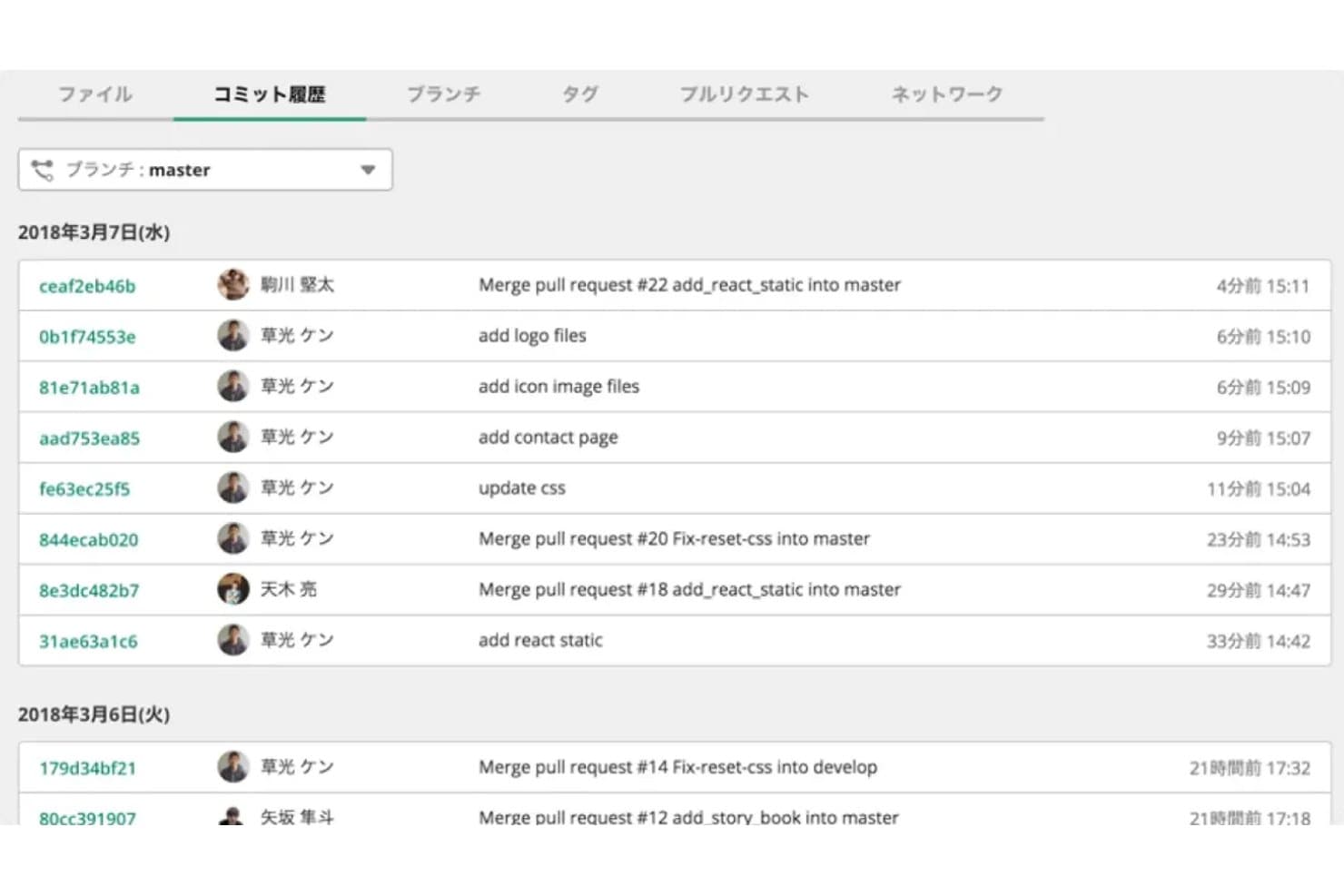
Backlog displays a full Git commit history with author and timestamps. Backlog is a project management and source code management platform that combines Git and SVN repository hosting with built-in issue tracking, pull request workflows, and branch management.
Who Is Backlog Best For?
Backlog fits teams that run Git and SVN side by side, especially those mid-transition from centralized to distributed version control who need issue tracking built into the same tool.
Why I Picked Backlog
Backlog earns its spot on my shortlist because it's one of the few SCM tools that genuinely supports Git and SVN side by side, in the same platform, on the same project. I like that commits link directly to issues without any plugin setup, so when a developer pushes a fix to a protected branch, the trail from code to work item is already there. Teams mid-transition from SVN don't have to split their workflow across two tools while they migrate.
Backlog Key Features
- Protected branches: Admins can restrict write and delete access to specific branches, assigning permissions at the user or team level.
- Pull request workflow: Git repositories support PR-based merges with inline commenting, side-by-side diffs, reviewer assignments, and approve/reject actions.
- Enterprise access controls: SAML SSO, SCIM provisioning, Active Directory integration, IP allowlisting, and audit logs are available on Enterprise plans.
- Flat per-account pricing: Standard, Premium, and Enterprise plans support unlimited users, so costs don't scale with headcount.
Backlog Integrations
Backlog offers documented integrations with Jenkins, Slack, Microsoft Teams, Google Chat, Cacoo, Google Drive, Microsoft OneDrive, Dropbox, and LambdaTest. GitHub Actions connectivity, OAuth 2.0 REST API, and webhooks support custom CI/CD workflows.
Pros and Cons
Pros:
- Flat pricing allows unlimited users per plan
- Combines code management with issue tracking
- Supports both Git and SVN workflows
Cons:
- Pull request workflow limited to Git only
- No built-in CI/CD or security scanning
Learn more about Backlog: Best for multi-VCS teams in air-gapped environments
- 30-day free trial
- From $75/user/year (billed annually)
Visit WebsiteCustomer Rating:4.8/5
RhodeCode lets users leave inline code review comments on pull requests. RhodeCode is a self-hosted source code management platform that supports Git, Mercurial, and SVN repositories from a single interface, with built-in code review, access control, and AI-assisted pull request analysis.
Who Is RhodeCode Best For?
RhodeCode is a strong fit for engineering teams in defense, fintech, or regulated industries that need to manage Git, Mercurial, and SVN repositories behind a firewall.
Why I Picked RhodeCode
RhodeCode earns its spot on my shortlist because it's one of the few SCM platforms that handles Git, Mercurial, and SVN from a single interface, which matters a lot when your team is mid-migration and can't afford to drop legacy repos. I also like that its RCstack Docker installer runs fully offline, so teams in air-gapped environments aren't forced into cloud dependency. The AI-assisted code review, which supports local model deployments, means sensitive code never leaves your network.
RhodeCode Key Features
- Branch permissions and merge enforcement: Protects branches from force-push and requires code review approval before any changes can merge.
- Artifacts Management System: Stores binary files like build outputs and logs outside version control, with ACL-controlled access and unlimited file size support.
- Automatic reviewer selection: Assigns reviewers to pull requests based on configurable rules tied to file paths, teams, or individuals.
- Audit logs and activity reports: Records access and repository activity across your environment to support compliance and security investigations.
RhodeCode Integrations
RhodeCode integrates with Jenkins, TeamCity, Travis CI, JIRA, Slack, Redmine, Trello, and GitHub Issues. Its JSON-RPC API and webhooks support custom CI/CD connections and repository automation.
Pros and Cons
Pros:
- AI-assisted code review runs fully on-premises
- Air-gapped deployment for regulated environments
- Manages Git, Mercurial, and SVN together
Cons:
- User interface feels dated and clunky
- No built-in CI/CD pipeline
Learn more about RhodeCode: Best for multi-VCS teams on managed cloud
- 14-day free trial
- From $12.50/user/month
Visit WebsiteCustomer Rating:4.2/5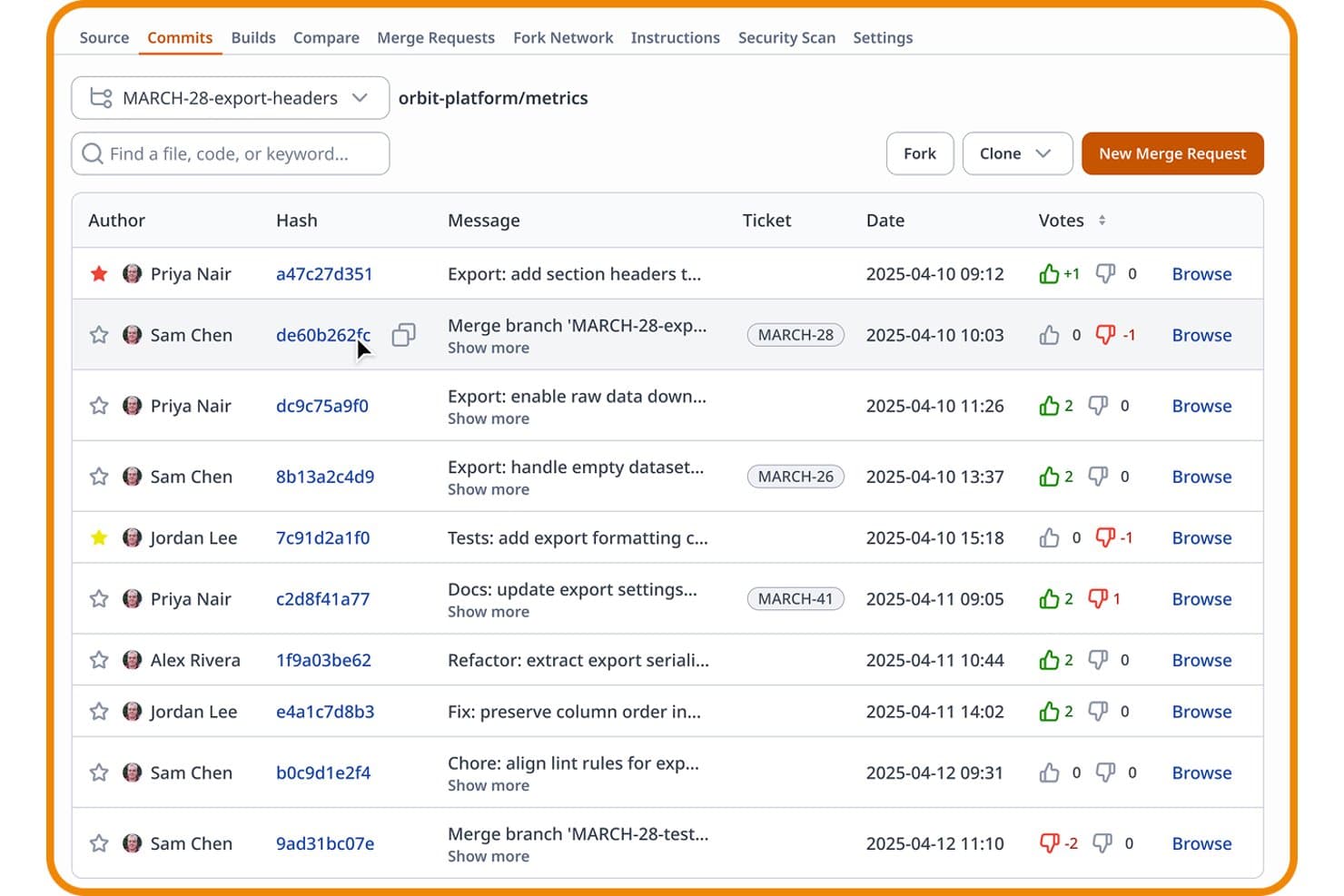
Assembla lets users track commits, votes, and tickets in one view. Assembla is a managed SCM platform that supports Git, SVN, and Perforce in a single hosted environment, with built-in code review workflows, access controls, project management, and integrations for CI/CD pipelines.
Who Is Assembla Best For?
Assembla is a strong fit for engineering teams in gaming, VFX, and regulated industries that run Git, SVN, and Perforce side by side and need one managed platform to handle all three.
Why I Picked Assembla
I've included Assembla in my top picks because it's one of the only managed SCM platforms that runs Git, SVN, and Perforce under one roof, which is genuinely rare. I love that SVN teams get pull requests, file locking, and shelving without migrating away from their existing workflow, while Perforce gets globally replicated edge instances on AWS for low-latency commits across game studios and VFX pipelines. Tickets link directly to commits and merge requests across all three VCS types, so traceability doesn't break when your team isn't Git-only.
Assembla Key Features
- Secret scanning: Assembla scans every commit automatically to detect hardcoded API keys and passwords before they reach production.
- Branch protection and merge request approvals: You can enforce required reviewer sign-offs and server-side hooks across Git, SVN, and Perforce repositories before any merge goes through.
- Built-in sprint and Kanban boards: Growth and Custom Cloud plans include sprint planning, backlog management, burndown charts, and Kanban cardwalls directly in the platform.
- SAML 2.0 SSO with RBAC and IP allowlisting: Assembla supports Active Directory and LDAP integration alongside granular role-based permissions and network-level access restrictions.
Assembla Integrations
Assembla offers eight documented native integrations, including Jenkins, Travis CI, GitHub, Slack, Jira, TestRail, Trello, and Zapier. Its REST API and webhooks support custom CI/CD workflows and automation.
Pros and Cons
Pros:
- Secret scanning on every code commit
- Project management built into the platform
- Runs Git, SVN, and Perforce together
Cons:
- No permanent free plan offered
- No native CI/CD pipeline tools
Learn more about Assembla: Best for game dev and artist team workflows
- Free plan available
- From $38/seat/month
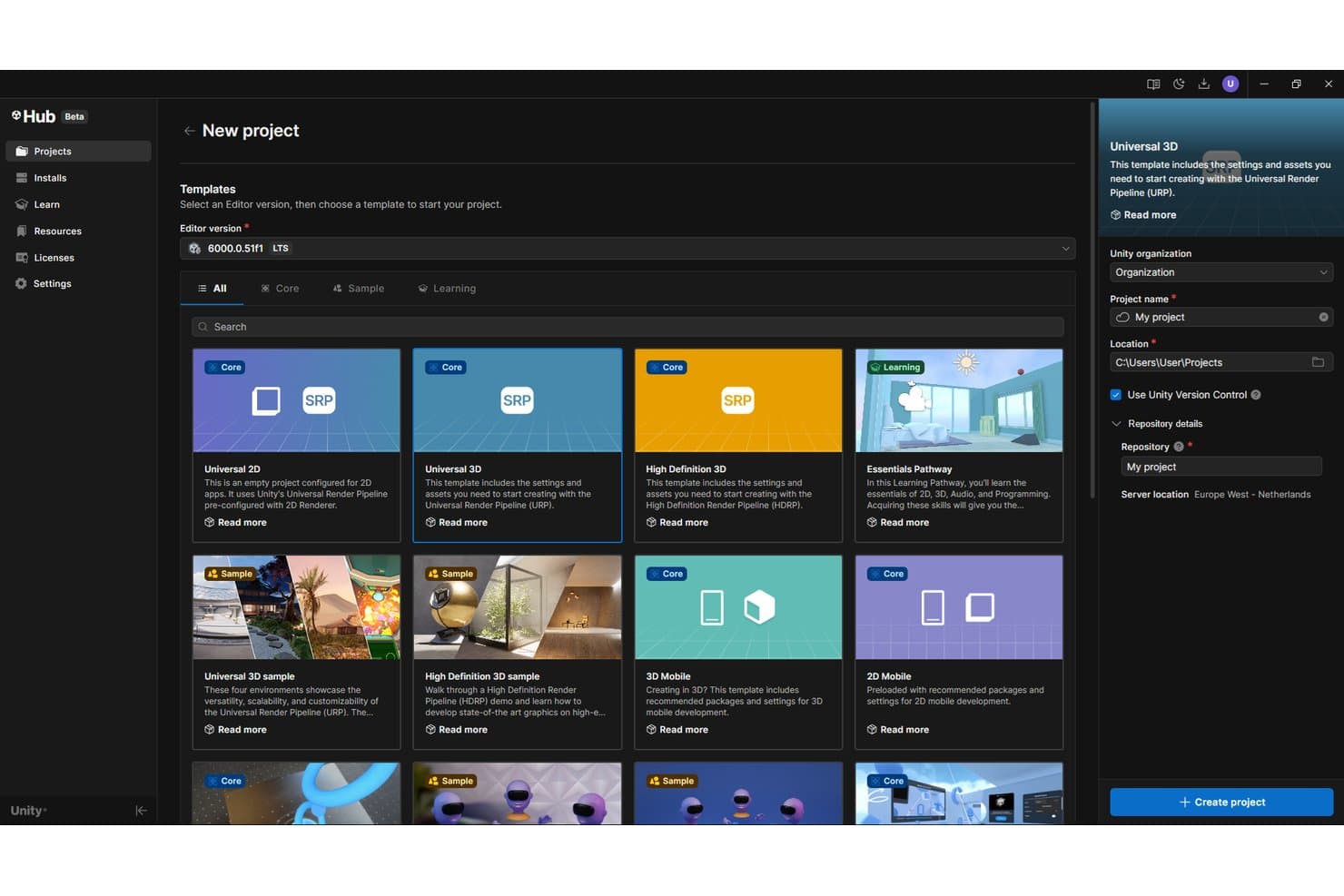
Unity Version Control lets users create projects with version control enabled by default. Unity Version Control is a distributed version control system built for game studios and mixed developer-artist teams, offering branching and merging, file locking, large binary asset handling, and automated merge workflows via MergeBot.
Who Is Unity Version Control Best For?
Unity Version Control is a strong fit for game studios and interactive media teams that manage large binary assets and mixed developer-artist workflows in the same repository.
Why I Picked Unity Version Control
Unity Version Control earns its spot on my shortlist because no other SCM tool handles the artist-developer split as cleanly. I love the Gluon client specifically: artists lock and check in binary assets directly without touching the full repo, while programmers run parallel branching workflows in the same codebase. Smart Locks travel across branches automatically, so a locked character rig stays locked even after a branch merge, which is a conflict scenario Git-based tools simply can't resolve natively.
Unity Version Control Key Features
- SemanticMerge: A language-aware diff and merge tool that resolves conflicts at the method and function level, reducing false positives during code merges.
- Visual Branch Explorer: A timeline-based GUI that displays branch history, merges, and changesets across your entire repository.
- MergeBot automation: Configurable bots that automatically merge task branches after conditions like CI build status or code review approval are met.
- Multisite server replication: Two or more on-premises servers sync across geographic locations, giving distributed teams low-latency access to a shared repository.
Unity Version Control Integrations
Unity Version Control offers documented integrations with Jenkins, TeamCity, Bamboo, Unity Build Automation, Jira, and Slack. Its REST API supports custom automation and webhooks, while GitSync and GitServer provide Git interoperability.
Pros and Cons
Pros:
- Smart Locks prevent asset overwrite conflicts
- Artist and developer workflows in one repository
- Handles large binary files natively
Cons:
- Smaller integration ecosystem than Git-based tools
- Limited code review refinement for text assets
Learn more about Unity Version Control: Best for self-hosted Git on minimal infrastructure
- 30-day free trial
- From $9.50/user/month (billed annually)
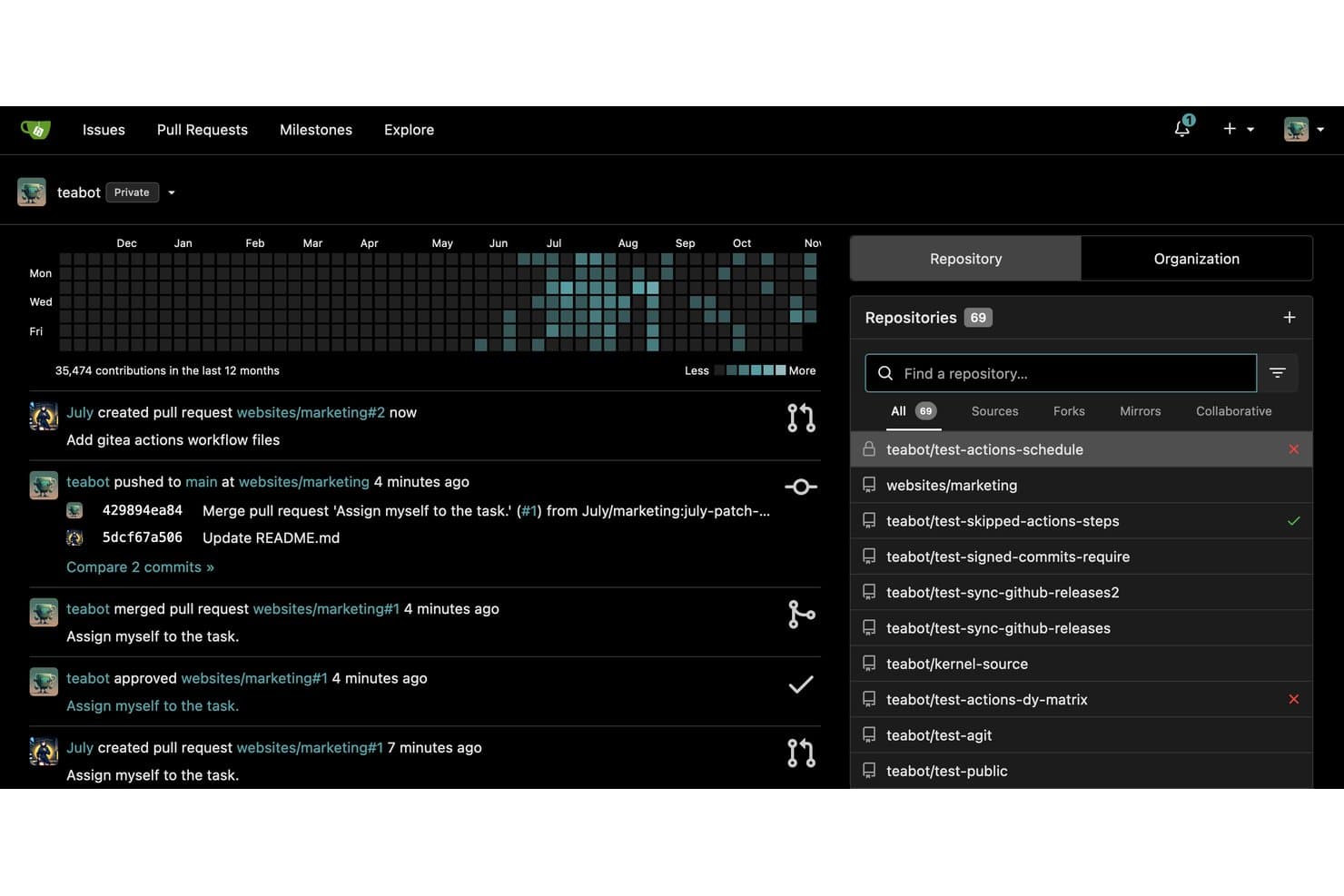
Gitea centralizes repository management and activity tracking in one dashboard. Gitea is a self-hosted Git platform that bundles code hosting, pull request-based code review, built-in CI/CD via Gitea Actions, issue tracking, Kanban boards, and a multi-format package registry into a single lightweight binary.
Who Is Gitea Best For?
Gitea is a strong fit for platform and infrastructure teams that need full Git hosting on constrained or air-gapped infrastructure without the overhead of heavier platforms.
Why I Picked Gitea
Gitea earns its spot on my shortlist because it packs full Git hosting, Gitea Actions (GitHub Actions-compatible CI/CD), built-in issue tracking, and a 20+ format package registry into a single Go binary that runs on as little as 150–200MB of RAM. I picked it specifically for teams operating in air-gapped or resource-constrained environments where spinning up a GitLab instance simply isn't realistic. Branch protection rules cascade organization-wide, and the entire platform deploys without external dependencies.
Gitea Key Features
- Branch protection rules: Set conditions that must be met before code can be merged into protected branches, including required approvals and status checks.
- AGit workflow: Submit patches for review without forking a repository, letting contributors open pull requests directly from their local branch via a single push.
- Multi-format package registry: Host and serve packages across 20+ formats—including npm, PyPI, Maven, Helm, and Docker/OCI—from within the same instance as your code.
- Kanban project boards: Organize issues and pull requests into visual board columns to track development progress across sprints or milestones.
Gitea Integrations
Gitea integrates with Drone, Woodpecker CI, Argo CD, Jenkins, Slack, Discord, Microsoft Teams, and Lark, with REST API and webhooks for custom CI/CD connections.
Pros and Cons
Pros:
- Full-featured Git hosting in a single binary
- GitHub Actions-compatible CI/CD workflows included
- Runs on minimal server resources
Cons:
- Enterprise features locked behind paid plan
- No native AI-assisted code review
Learn more about Gitea: Best for AI-native code review at scale
- 30-day free trial
- From $21/user/month
Visit WebsiteCustomer Rating:4.8/5
Here's the code management feature in GitHub. GitHub is a Git-native SCM platform that combines repository hosting, branching and merge workflows, pull request-based code review, CI/CD via GitHub Actions, and AI-assisted development through GitHub Copilot.
Who Is GitHub Best For?
GitHub is a strong fit for engineering teams that need AI-assisted code review, security scanning, and CI/CD baked into a single platform.
Why I Picked GitHub
GitHub earns its spot as one of the best on my shortlist because its AI-native code review is genuinely built into the pull request workflow, not bolted on. I love that Copilot functions as an actual reviewer: it flags issues, suggests fixes, and auto-generates corrections for roughly 90% of detected alert types via Copilot Autofix. Pair that with merge queues and CODEOWNERS, and you get a policy-enforced review pipeline that scales cleanly across hundreds of repositories.
GitHub Key Features
- GitHub Actions: A native CI/CD platform that lets you build, test, and deploy code using YAML-based workflows triggered by push events, pull requests, schedules, or manual dispatch.
- GitHub Advanced Security: An add-on suite that includes CodeQL SAST scanning, secret scanning with push protection, and Dependabot automated dependency updates run directly within pull requests.
- Enterprise Managed Users (EMU): A provisioning model that ties developer accounts to your identity provider, giving your IT team full lifecycle control over user access via SAML SSO and SCIM.
- GitHub Projects: A built-in project tracking tool with table, board, and roadmap views, custom fields, and workflow automation for managing issues and pull requests across repositories.
GitHub Integrations
GitHub offers native integrations with Jira and Slack, plus Marketplace integrations for Jenkins, CircleCI, Azure Pipelines, Snyk, and Datadog. REST and GraphQL APIs, webhooks, and GitHub Apps support custom SCM, CI/CD, security, and workflow connections.
Pros and Cons
Pros:
- Strong compliance for regulated industries
- End-to-end platform from repo to deployment
- AI-based code review flags and corrects issues
Cons:
- Lacks built-in DORA metrics dashboard
- YAML workflow files require scripting expertise
 Best for Atlassian-stack code traceability
- Free plan available
- From $3.65/user/month
Visit WebsiteCustomer Rating:4.5/5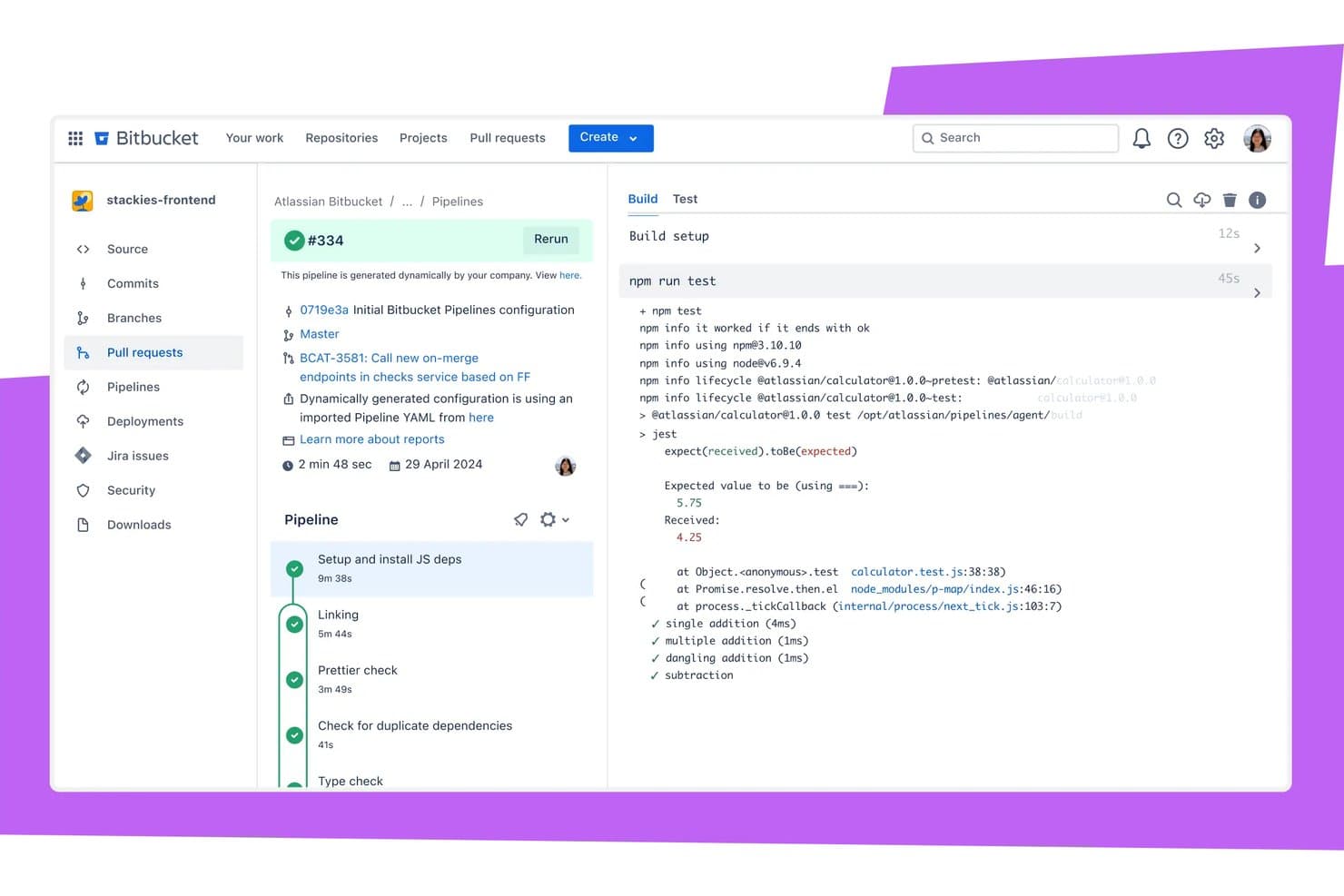
Bitbucket surfaces test failures inline within pipeline build logs. Bitbucket is a Git-based source code management and collaboration platform that combines repository hosting, branching workflows, pull request reviews, built-in CI/CD pipelines, and native DevSecOps scanning in one tool.
Who Is Bitbucket Best For?
Bitbucket is the right fit for engineering teams already running on Jira, Confluence, or other Atlassian tools who need code traceability built directly into their existing workflow.
Why I Picked Bitbucket
Bitbucket earns its spot on my shortlist because of how tightly it connects code to work across the Atlassian stack. When a developer commits using a Jira issue key, that commit automatically updates the issue status, and the branch, build, and deployment status all surface directly on the Jira ticket. I also like the Code Insights feature, which pulls security scan results into pull requests and can block merges when vulnerabilities are found, keeping traceability from code to production airtight.
Bitbucket Key Features
- Native DevSecOps scanning: Built-in Pipes detect secrets, IaC misconfigurations, and dependency vulnerabilities directly within Bitbucket Pipelines.
- Enforced merge checks: Premium plan lets admins block pull request merges until builds pass, required approvals are met, and comments are resolved.
- Rovo Dev AI agent: Summarizes build failures, generates deployment notes, and links findings to Jira issues without leaving Bitbucket.
- Self-hosted runners: Teams can connect their own infrastructure to Bitbucket Pipelines, with up to 100 standard runners available at no additional cost.
Bitbucket Integrations
Bitbucket offers native integrations with Jira Software, Jira Service Management, Confluence, Jenkins, AWS, Azure, and Google Cloud, plus 50+ Pipes. REST APIs and webhooks support custom integrations and CI/CD workflows.
Pros and Cons
Pros:
- Hybrid deployment options for cloud and data center
- Built-in DevSecOps scanning and PR blocking
- Deep Jira integration for code traceability
Cons:
- Performance issues with very large repositories
- SAML SSO requires a separate subscription
Learn more about Bitbucket: Best for all-in-one DevSecOps source control
- Free plan available; 30-day free trial
- From $29/user/month (billed annually)
Visit WebsiteCustomer Rating:4.5/5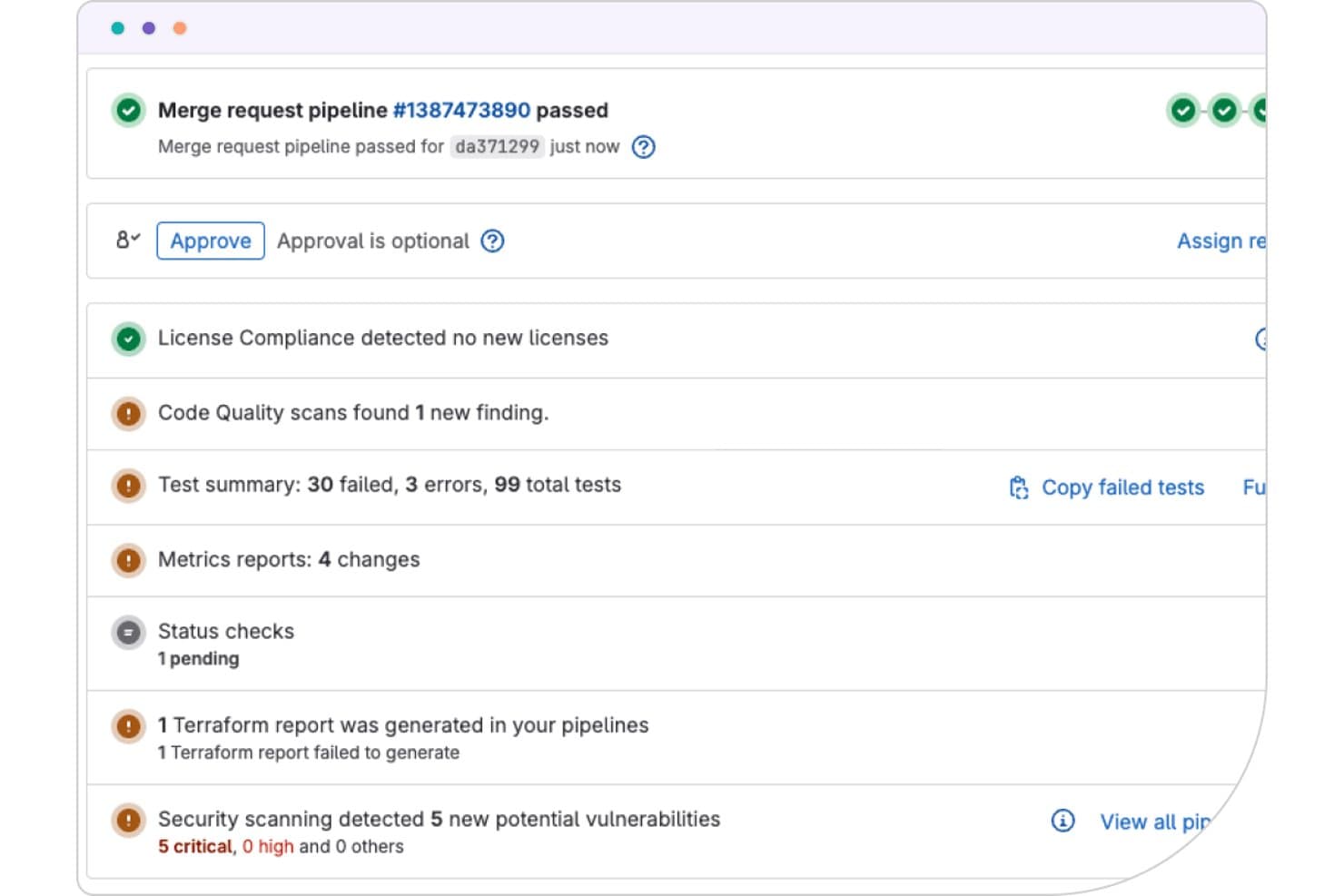
GitLab surfaces security, test, and compliance results inline on merge requests. GitLab is a DevSecOps platform that unifies source code management, CI/CD pipelines, security scanning, and project planning in a single application.
Who Is GitLab Best For?
GitLab suits DevOps and platform engineering teams that want source control, CI/CD, and security scanning in one place instead of stitching together separate tools.
Why I Picked GitLab
GitLab earns its spot on my shortlist because it's the only SCM tool that ships source control, CI/CD, and security scanning as a single application rather than a patchwork of connected services. I'm particularly impressed by its native security suite: SAST, DAST, container scanning, and secret detection all surface findings directly inside merge requests. Merge trains are another standout, keeping the main branch green even under high-volume commit loads.
GitLab Key Features
- Merge trains: Sequentially test and merge queued changes to keep the main branch stable under high commit volumes.
- DORA4 metrics dashboard: Track deployment frequency, lead time, change failure rate, and time to restore directly within the platform.
- Value stream analytics: Visualize and measure each stage of your SDLC to identify where work slows down.
- GitLab Duo agent platform: Lets AI agents autonomously open merge requests, run code reviews, and remediate vulnerabilities within your existing governance framework.
GitLab Integrations
GitLab integrates with Jira, Jenkins, Kubernetes, AWS, Google Cloud, Azure, JetBrains, VS Code, Slack, and Checkmarx through documented integrations and its partner ecosystem. REST and GraphQL APIs support custom workflows.
Pros and Cons
Pros:
- Deploys across SaaS, self-hosted, and government clouds
- Security scanning results embedded in merge requests
- Native CI/CD and DevSecOps in one tool
Cons:
- Code review pane lacks file-type filtering
- User interface can feel cluttered
 Best for pre-merge code review at scale
- 30-day free trial
- From $18,000/year (billed annually)
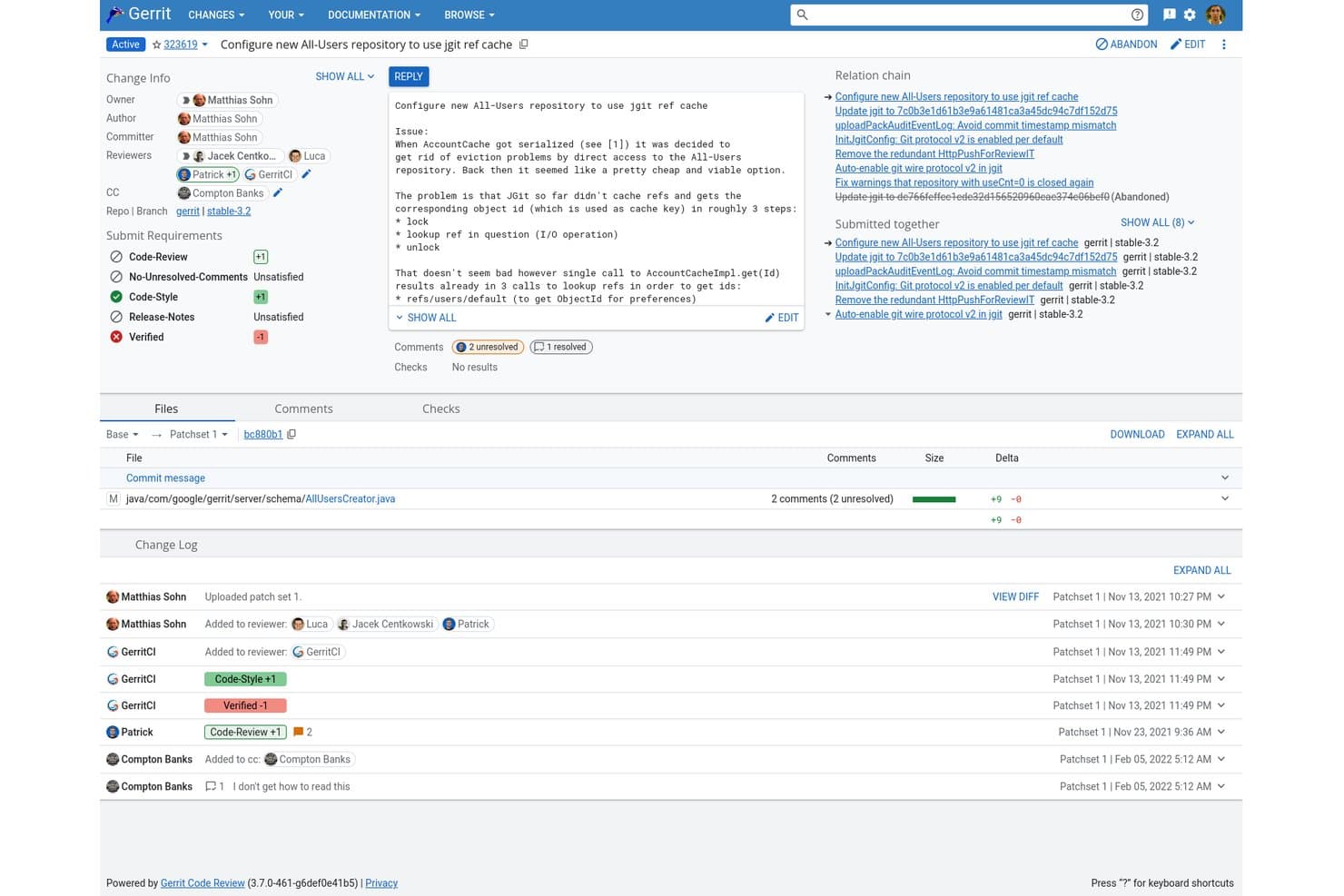
Gerrit centralizes code review, comments, and CI checks in one view. Gerrit is an open-source, Git-native code review platform that combines patchset-based pre-merge review, granular reference-level access control, flexible repository hosting, and CI/CD integrations via a rich plugin ecosystem.
Who Is Gerrit Best For?
Gerrit is the go-to choice for platform and DevOps engineers running Git at enterprise scale, where strict pre-merge gating and granular access control are non-negotiable.
Why I Picked Gerrit
Gerrit earns its spot on my shortlist because its patchset-based review model is purpose-built to enforce pre-merge quality gates at a scale most platforms can't match. I love how configurable approval labels and submit requirements let teams define exactly what "ready to merge" means, down to requiring a
non_authorvote. Active-active clustering and multi-site replication mean it handles codebases like AOSP without breaking a sweat.Gerrit Key Features
- Multi-site global replication: Gerrit replicates repositories across geographically distributed primary nodes using Kafka and Zookeeper plugins, keeping distributed teams in sync.
- OAuth Bearer token authentication: Time-limited, revocable, scoped tokens replace long-lived HTTP passwords, giving you tighter control over API and service user access.
- Gerrit Flows automation: An experimental rules engine that triggers actions on changes when defined conditions are met, letting you automate repetitive review workflow steps.
- Active-active clustering: Gerrit supports multi-primary active-active cluster configurations with zero-downtime upgrades, keeping your SCM environment available during maintenance windows.
Gerrit Integrations
Gerrit integrates with Jenkins, Zuul CI, GitHub Actions, Kafka, Zookeeper, LDAP, OAuth, and Kubernetes. It supports 100+ community plugins plus REST API and webhooks for custom CI/CD integrations.
Pros and Cons
Pros:
- Proven reliability at enterprise monorepo scale
- Reference-level ACLs for granular access control
- Patchset-based reviews enforce strict pre-merge quality
Cons:
- Complex Git workflow differs from pull requests
- No built-in issue tracking or security scanning
Learn more about Gerrit: Best for Microsoft-stack development teams
- Free plan available
- From $6.00/user/month
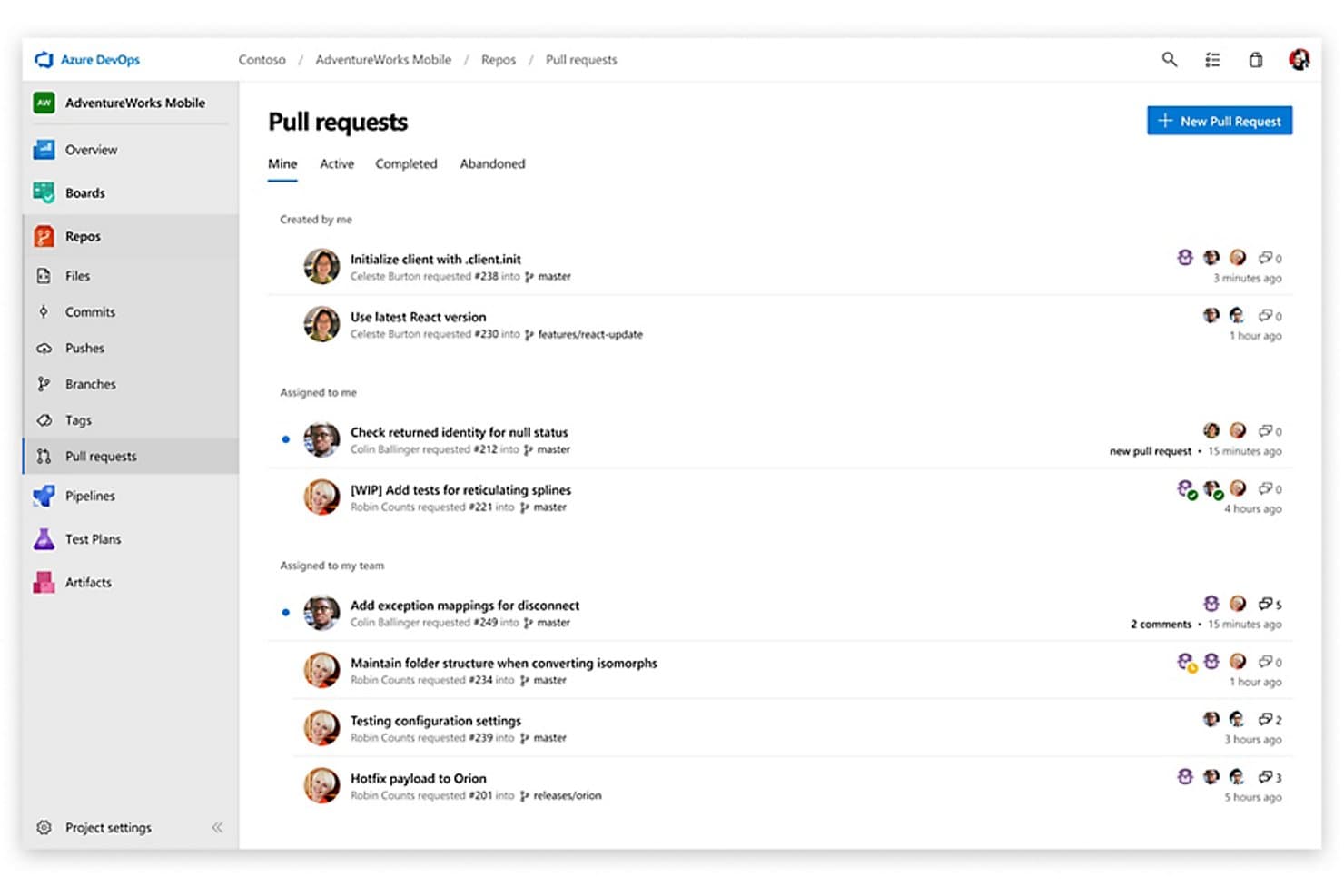
Azure Repos centralizes pull request tracking across branches and team members. Azure Repos is Microsoft's source control management solution within the Azure DevOps suite, offering Git and TFVC repository hosting, configurable branch policies, pull request workflows, and native CI/CD integration through Azure Pipelines.
Who Is Azure Repos Best For?
Azure Repos is the natural fit for teams already running on Microsoft tools like Azure, Visual Studio, and Microsoft Entra ID who want their source control, CI/CD, and work tracking under one roof.
Why I Picked Azure Repos
Azure Repos earns its spot on my list because it's the only SCM tool built natively into a full SDLC suite designed around Microsoft's ecosystem. I love how branch policies tie directly into Azure Pipelines build validation, so a failing CI run physically blocks a merge without any external configuration. Pair that with Scalar for monorepo performance and GitHub Advanced Security's CodeQL scanning surfaced right inside the PR workflow, and Microsoft-stack teams get tight code governance without bolting on separate tooling.
Azure Repos Key Features
- Dual version control support: Azure Repos lets teams host both Git and TFVC repositories within the same project, supporting distributed and centralized workflows side by side.
- GitHub Advanced Security scanning: Built-in CodeQL static analysis, dependency vulnerability scanning, and secret push protection surface security findings directly inside the PR workflow.
- Automatic reviewer assignment: Branch policies can assign code reviewers automatically based on changed file paths, so the right people are looped in without manual intervention.
- Azure Boards work item linking: Commits, branches, and PRs can be linked to Azure Boards work items, with branch policies able to enforce that every PR references at least one tracked item.
Azure Repos Integrations
Azure Repos offers native integrations across the Microsoft ecosystem, including Azure Boards, Azure Pipelines, Azure Artifacts, Azure Test Plans, Visual Studio, and Microsoft Entra ID. Its REST API, CLI, webhooks, and Marketplace integrations connect with Jenkins, CircleCI, GitHub Actions, and other tools.
Pros and Cons
Pros:
- Built-in security scanning and secret protection
- Deep Azure and Microsoft ecosystem integration
- Dual Git and TFVC version control support
Cons:
- Advanced security features are SaaS-only
- Pull request UX lags behind competitors
Learn more about Azure Repos:
Andre SCM-verktøy
Her er noen flere alternativer for SCM-verktøy som ikke kom med på kortlisten, men som likevel er verdt å ta en titt på:
- 11ForgejoBest for self-hosted Git with zero licensing cost
- 12PerforceBest for large binary and monorepo version control
- 13Rational ClearCaseBest for source control
- 14SubversionBest for centralized version control in regulated teams
- 15AWS CodeCommitBest for AWS-native IAM-governed source control
- 16GitKrakenBest for AI-native Git workflows across any host
- 17Fossil SCMBest for audit-ready source control in air-gapped teams
- 18CodebergBest for open-source teams avoiding vendor lock-in
- 19Micro Focus AccuRevBest for version control
How I Evaluate SCM Tools
I split my evaluation into two layers: baseline requirements like version control and branch policies, and differentiators like security scanning and CI/CD depth.
Core Functionality (Table Stakes For This List)
When I'm selecting tools for my list, I rank each one on a scale from 0 (does not offer the functionality) to 5 (excels in this area) for each core functionality listed below. Then, I calculate the tool's total score into a percentage. Each tool needs to achieve a minimum total score of 75% to be considered for inclusion.
- Version Control: I value tools that offer built-in security scanning like SAST, DAST, and secret detection within the SCM workflow, ensuring vulnerabilities are caught early. Advanced version control features that support large monorepos with sparse checkouts and LFS are essential for handling enterprise-scale codebases efficiently.
- Branching & Merging: I look for branching models that integrate AI-assisted development features such as automated PR summaries and intelligent review assistance to accelerate workflows and reduce reviewer fatigue, alongside strong merge strategies and conflict detection.
- Repository Hosting: I prioritize hosting options that offer SaaS, self-hosted, and hybrid deployments with compliance certifications like SOC 2 and ISO 27001, plus geographic data residency to meet enterprise needs. Support for air-gapped or on-premise installations is a crucial factor for regulated environments.
- Access Control & Permissions: I focus on granular permissions with enterprise-grade identity management, including SSO, SAML, and SCIM provisioning, ensuring secure and compliant access across departments managing sensitive codebases.
- Code Review Workflows: I expect robust pull request functionality integrated with AI-driven enhancements, required reviewers, inline commenting, and status checks to facilitate thorough, collaborative reviews beyond basic approvals.
- CI/CD & DevOps Integrations: I assess tools for their ecosystem integrations with IDEs, project management, and observability platforms, plus robust APIs and webhook support for custom automation. Native CI/CD features and reliable scalability with global CDN support also play a critical role in seamless pipeline management.
Once I have a list of tools that meet this criteria, I consider what sets each platform apart.
Differentiating Factors (What Sets Vendors Apart)
Here's how I compare and contrast different vendors:
Standout Features
Built-in security scanning is a big differentiator. Tools that catch dependency vulnerabilities or leaked secrets inside the SCM workflow save teams from bolting on separate SAST tools. I also evaluate AI-assisted development features like code suggestions and automated PR summaries, which reduce review fatigue on high-volume repos. Code search and engineering insights round things out—DORA metrics and contributor analytics help team leads spot bottlenecks before they slow down delivery.
Beyond Features
Deployment flexibility matters a lot—some teams need SaaS, while others in regulated industries require self-hosted or air-gapped installations. I check whether a vendor offers both options. Compliance certifications like SOC 2 and ISO 27001 also carry weight, especially for teams handling sensitive IP or working under strict audit requirements. Pricing structure is another factor I evaluate closely, since per-user models can balloon fast for growing engineering orgs. A generous free tier for smaller teams or open-source projects is a meaningful differentiator.
Slik velger du et SCM-verktøy
Det er lett å gå seg vill i lange funksjonslister og komplekse prismodeller. For å hjelpe deg med å holde fokus mens du går gjennom den unike prosessen din for valg av programvare, får du her en sjekkliste over faktorer du bør ha i tankene:
| Faktor | Hva du bør vurdere |
| Skalerbarhet | Sørg for at verktøyet kan vokse med teamet ditt. Vurder om det kan håndtere økende kodebaser og flere brukere uten ytelsesproblemer. |
| Integrasjoner | Kontroller om det integreres med de eksisterende verktøyene dine, for eksempel CI/CD-pipelines, prosjektstyringsprogramvare og andre viktige plattformer du bruker. |
| Tilpasningsmuligheter | Se etter funksjoner som lar deg tilpasse arbeidsflyter og dashbord slik at de passer teamets prosesser og preferanser. |
| Brukervennlighet | Vurder hvor intuitivt verktøyets grensesnitt er. Et brukervennlig design kan redusere læringskurven og hjelpe teamet med å ta det raskt i bruk. |
| Budsjett | Tilpass kostnadene for verktøyet til budsjettet ditt. Vurder både innledende kostnader og løpende utgifter, og sørg for at de passer inn i den økonomiske planen din. |
| Sikkerhetstiltak | Gå gjennom sikkerhetstiltakene som er på plass. Sørg for at det tilbyr funksjoner som kryptering, tilgangskontroller og samsvar med bransjestandarder. |
| Støtte & opplæring | Vurder tilgjengeligheten av kundestøtte og opplæringsressurser som kan hjelpe teamet med å bruke verktøyet effektivt og løse eventuelle problemer raskt. |
| Ytelse | Vurder hvor godt verktøyet fungerer under belastning. Det bør være pålitelig og stabilt, også i perioder med høy bruk, slik at prosjektene dine holder fremdriften. |
Trender innen SCM-verktøy
I undersøkelsen min hentet jeg inn utallige produktoppdateringer, pressemeldinger og utgivelseslogger fra ulike leverandører av SCM-verktøy. Her er noen av trendene som vokser frem, og som jeg følger med på:
- Skybasert utvikling: Flere SCM-verktøy går over til skybaserte arkitekturer, slik at team kan samarbeide i sanntid fra hvor som helst. Denne trenden hjelper virksomheter med å redusere infrastrukturkostnadene og forbedre tilgjengeligheten, og leverandører som GitHub og GitLab tilbyr robuste skybaserte løsninger. Git-alternativer finnes også for IT-team som ikke arbeider innenfor Git-rammeverket.
- AI-drevet innsikt: Leverandører integrerer AI for å tilby prediktiv innsikt og forslag til forbedring av kodekvaliteten. Dette hjelper team med å oppdage potensielle problemer tidlig og forbedre kodeeffektiviteten. Noen verktøy tilbyr for eksempel nå AI-drevne funksjoner for kodegjennomgang som fremhever feil og foreslår forbedringer.
- Forbedrede sikkerhetsfunksjoner: I takt med økende cybertrusler fokuserer SCM-verktøy i større grad på sikkerhet. Funksjoner som innebygd sårbarhetsskanning og samsvarskontroller blir stadig mer standard. Verktøy som Azure DevOps innlemmer disse funksjonene for å beskytte kodebaser mot potensielle datainnbrudd.
- DevOps-integrasjon: Integrasjonen mellom SCM-verktøy og DevOps-praksiser blir tettere. Denne trenden støtter kontinuerlig integrasjon og leveranse, noe som gjør det enklere for team å distribuere endringer raskt. Plattformer som Bitbucket forbedrer DevOps-funksjonene sine for å støtte denne trenden.
- Støtte for mikrotjenester: Etter hvert som flere selskaper tar i bruk mikrotjenestearkitekturer, utvikles SCM-verktøyene for å støtte disse miljøene. Dette gjør det mulig for utviklere å administrere flere kodebaser effektivt. Løsninger som AWS CodePipeline tilpasses for å dekke dette økende behovet.
Hva er et SCM-verktøy?
Et SCM-verktøy er programvare som brukes til kildekodehåndtering og sporing av endringer i programvareutviklingsprosjekter. Utviklere, DevOps-ingeniører og IT-fagfolk bruker vanligvis disse verktøyene til å samarbeide om kode og opprettholde versjonskontroll.
Funksjoner som versjonskontroll, grenstyring og kodegjennomgang bidrar til samarbeid og opprettholdelse av kodekvaliteten. Samlet sett gir disse verktøyene viktig støtte for effektive og organiserte prosesser innen programvareutvikling.
Funksjoner
Her er de viktigste funksjonene alle gode SCM-verktøy bør ha:
- Grenhåndtering: Gjør det mulig for utviklere å arbeide med ulike funksjoner eller feilrettinger samtidig uten å påvirke hovedkodebasen.
- Kodegjennomgang: Tilrettelegger for fagfellevurderinger for å sikre kodekvalitet og oppdage potensielle problemer tidlig.
- Konfigurasjonsstyring: Administrerer og opprettholder konsistente konfigurasjoner på tvers av utviklingsmiljøer.
- Integrasjonsstøtte: Kobler sømløst sammen med andre verktøy, som CI/CD-pipelines og prosjektstyringsprogramvare, for å forbedre arbeidsflyteffektiviteten.
- Versjonskontrollverktøy: Sporer endringer i kode over tid og hjelper team med å administrere og gå tilbake til tidligere versjoner ved behov.
- Sikkerhetsfunksjoner: Tilbyr innebygde verktøy for sårbarhetsskanning og samsvarskontroller for å beskytte kodebaser.
- Automatiserte arbeidsflyter: Effektiviserer repetitive oppgaver, reduserer manuelt arbeid og øker produktiviteten.
- Analyse og rapportering: Gir innsikt i kodeytelse og teamets produktivitet gjennom detaljerte rapporter.
- Skalerbarhet: Støtter vekst ved å håndtere flere brukere og større kodebaser effektivt etter hvert som teamet utvides.
- Samarbeid i sanntid: Gjør det mulig for teammedlemmer å arbeide med kode samtidig, noe som forbedrer kommunikasjonen og reduserer forsinkelser.
Fordeler
Implementering av et SCM-verktøy gir flere fordeler for teamet og virksomheten din. Her er noen av fordelene du kan se frem til:
- Forbedret samarbeid: Funksjoner for samarbeid i sanntid gjør det mulig for teamet å arbeide effektivt sammen, redusere forsinkelser og forbedre kommunikasjonen.
- Forbedret kodekvalitet: Prosesser for kodegjennomgang bidrar til å opprettholde høye kodestandarder ved å oppdage feil og foreslå forbedringer.
- Effektiv versjonsstyring: Versjonskontrollsystemer lar deg spore endringer og gå tilbake til tidligere versjoner, noe som sikrer stabilitet og konsistens i prosjektene dine.
- Økt produktivitet: Automatiserte arbeidsflyter reduserer manuelle oppgaver og frigjør tid slik at teamet kan konsentrere seg om viktigere utviklingsarbeid.
- Skalerbarhet: Støtter team i vekst ved å håndtere flere brukere og større kodebaser uten ytelsesproblemer.
- Bedre sikkerhet: Innebygde sikkerhetsfunksjoner, som sårbarhetsskanning, bidrar til å beskytte kodebasen mot potensielle trusler.
- Innsiktsfull analyse: Detaljert analyse og rapportering gir verdifull innsikt i teamets ytelse og kodeeffektivitet, noe som legger grunnlaget for bedre beslutninger.
Kostnader og priser
Når du velger et SCM-verktøy, må du forstå de ulike prismodellene og abonnementene som er tilgjengelige. Kostnadene varierer basert på funksjoner, teamstørrelse, tillegg og mer. Tabellen nedenfor oppsummerer vanlige abonnementer, gjennomsnittsprisene deres og typiske funksjoner som er inkludert i SCM-verktøyløsninger:
Sammenligningstabell for SCM-verktøyabonnementer
| Abonnementstype | Gjennomsnittspris | Vanlige funksjoner |
| Gratisabonnement | $0 | Grunnleggende versjonskontroll, begrenset antall brukere og viktige samarbeidsverktøy. |
| Personlig abonnement | $5-$25 /bruker /måned | Forbedret versjonskontroll, grenhåndtering og grunnleggende kodegjennomgang. |
| Forretningsabonnement | $30-$60 /bruker /måned | Avanserte verktøy for kodegjennomgang, sikkerhetsfunksjoner og integrasjonsstøtte. |
| Storbedriftsabonnement | $70-$100 /bruker /måned | Omfattende analyse, omfattende tilpasningsmuligheter og dedikert støtte. |
Vanlige spørsmål
Her er noen svar på vanlige spørsmål om SCM-verktøy:
Hvordan støtter SCM-verktøy DevOps-praksiser?
SCM-verktøy spiller en avgjørende rolle i DevOps ved å legge til rette for kontinuerlig integrasjon og kontinuerlig distribusjon (CI/CD). De bidrar til å administrere kodeendringer, automatisere arbeidsflyter og muliggjøre samarbeid mellom teammedlemmer. Denne integrasjonen støtter raskere lanseringer og mer pålitelig programvarelevering, i tråd med DevOps-målene.
Kan SCM-verktøy håndtere prosjekter i stor skala?
Ja, mange SCM-verktøy er utviklet for å skalere i takt med teamets behov. De kan håndtere store kodebaser og mange bidragsytere på en effektiv måte. Funksjoner som grenadministrasjon og versjonskontroll sørger for at selv komplekse prosjekter forblir organiserte og håndterbare, noe som gjør dem egnet for drift i stor skala.
Hvilke sikkerhetstiltak finnes i SCM-verktøy?
SCM-verktøy inkluderer ofte sikkerhetsfunksjoner som tilgangskontroller, kryptering og revisjonsspor for å beskytte kodebasen din. I tillegg kan mange av dem integreres med programvare for nettverksautomatisering for omfattende overvåking. Disse tiltakene bidrar til å forhindre uautorisert tilgang og sikre samsvar med bransjestandarder. De gir trygghet ved å beskytte immaterielle rettigheter og sensitiv informasjon.
Hvordan integreres SCM-verktøy med annen programvare?
SCM-verktøy tilbyr vanligvis integrasjoner med ulike plattformer for utvikling og prosjektstyring. Denne tilkoblingen muliggjør sømløs datautveksling og bedre effektivitet i arbeidsflyten. Ved å integreres med verktøy som CI/CD-pipelines og problemsporere bidrar SCM-løsninger til å effektivisere utviklingsprosessene. På nettverks- og distribusjonssiden kan RMM-programvare være et utmerket tillegg til teknologistakken for kodehåndtering.
Er det kostnader forbundet med bruk av SCM-verktøy?
Selv om enkelte SCM-verktøy tilbyr gratisabonnementer, medfører avanserte funksjoner og støtte for større team vanligvis en kostnad. Prismodellene varierer, og er ofte basert på antall brukere eller tilgang til funksjoner. Det er viktig å vurdere prisstrukturen opp mot teamets behov og budsjett for å sikre at man får god verdi for pengene.
Hvilke opplæringsressurser er tilgjengelige for SCM-verktøy?
Mange SCM-leverandører tilbyr en rekke opplæringsressurser, inkludert veiledninger, dokumentasjon, webinarer og brukerfora. Disse ressursene hjelper brukerne med å komme raskt og effektivt i gang. Tilgang til omfattende opplæringsmateriell kan gjøre innføringsprosessen betydelig enklere og forbedre bruken av verktøyet.