

Hendelseshåndtering kan være en stor utfordring for teknologiteam. Når et uventet problem forstyrrer arbeidsflyten, teller hvert sekund. Det er her programvare for hendelseshåndtering kommer inn i bildet og hjelper deg med å håndtere problemer raskt og effektivt.
Etter min erfaring kan det å finne riktig verktøy utgjøre hele forskjellen for å holde driften i gang uten problemer. Jeg har testet og vurdert ulike alternativer for å gi deg et grundig undersøkt utvalg av de beste tilgjengelige løsningene.
I denne artikkelen deler jeg mine beste anbefalinger og fremhever deres unike funksjoner og fordeler. Du får innsikt i hvordan disse verktøyene kan hjelpe teamet ditt med å forbedre responstidene og styrke samarbeidet, slik at dere er klare for det som måtte komme.
Why Trust Our Software Recommendations
6,700+
Reviews
20
Industry experts
16+
Evaluation factors
14
Years
Our team has been testing and reviewing software since 2012. As tech leaders ourselves, we know how difficult—and important—it is to choose the right software.
For this guide, we evaluated tools using hands-on testing and independent research, scoring tools using our selection criteria.
Our reviews reflect our human editorial judgment, not a sales pitch.
Expert reviewers:
- Paulo Gardini MiguelTech Director
 Tim FisherVP of AI
 Gabriel RosasTech Lead & Software Architect
 Christhian GruhnTech Lead & Platform Architect

Sammenligningstabell for programvare for hendelseshåndtering
Denne sammenligningstabellen oppsummerer prisopplysningene for mine beste utvalgte programmer for hendelseshåndtering:
| Tool | Best For | Trial Info | Price | ||
|---|---|---|---|---|---|
| 1 | Best for business continuity | Free demo available | Pricing upon request | Website | |
| 2 | Best for automated incident management | 14-day free trial | From $19/user/month (billed annually) | Website | |
| 3 | Best for real-time incident detection | 30-day free trial + free demo available | From $129/technician/month (billed annually) | Website | |
| 4 | Best for reducing IT workloads with AI | Free trial available | From $89/agent/month | Website | |
| 5 | Best for customer service | Free trial available | From $75/user/month | Website | |
| 6 | Best for compliance needs | Free demo available | Pricing upon request | Website | |
| 7 | Best for integrating threat hunting | Free trial + free demo available | Pricing upon request | Website | |
| 8 | Best for AI-powered incident resolution | Free demo available | From $20/user/month | Website | |
| 9 | Best for log management | 30-day free trial + free demo | Pricing upon request | Website | |
| 10 | Best for IT auto-remediation workflows | Free demo available | Pricing upon request | Website |


Anmeldelser av den beste programvaren for hendelseshåndtering
Nedenfor finner du mine detaljerte sammendrag av den beste programvaren for hendelseshåndtering som kom med på kortlisten min. Anmeldelsene mine gir en detaljert oversikt over de viktigste funksjonene, fordeler \u0026 ulemper, integrasjoner og ideelle bruksområder for hvert verktøy, slik at du kan finne det som passer best for deg.
 Best for business continuity
- Free demo available
- Pricing upon request
Visit WebsiteCustomer Rating:4.3/5
Preparis' incident management dashboard provides a detailed overview of incidents across the organization. Preparis is an incident management platform designed for IT teams and business leaders who need to coordinate emergency response, streamline communication, and maintain operational resilience during disruptions.
Who Is Preparis Best For?
Preparis is a strong fit for mid-size to enterprise organizations that need a structured approach to business continuity planning and emergency response coordination.
Why I Picked Preparis
Preparis earns its spot on my shortlist because it's one of the few incident management tools built specifically around business continuity as a discipline, not just as a feature. I like how the Preparis Planner walks teams through building fully customizable continuity plans, including business impact analysis (BIA), risk assessments, and compliance reporting, all in a single guided workflow. When an incident occurs, the Incident Manager module lets my team set up a virtual war room, distribute action lists to stakeholders, and track recovery progress through real-time dashboards. I find the 360° visibility into incident status useful when coordinating responses across multiple teams or locations.
Preparis Key Features
- Bi-directional emergency messaging: Send alerts to employees by location, department, group, or role through their preferred channel, and track responses in a single dashboard.
- Geofence-based location alerting: Draw real-time geofences or use predefined ones to push location-based notifications to employees in the field or working remotely.
- Cloud and offline document sharing: Store and share continuity documents in a way that keeps them accessible even when your building is unavailable or servers are offline.
- Online training and knowledge center: Access over 100 threat-specific training topics and certify crisis teams on emergency response protocols directly within the platform.
Preparis Integrations
Preparis offers native integrations with Everbridge, Alertus, and Singlewire, and provides an API for custom integrations.
Pros and Cons
Pros:
- Emergency notification systems
- Effective crisis management plans
- Intuitive dashboard design
Cons:
- Potential delays in notifications
- Not ideal for small teams
Learn more about Preparis: Best for automated incident management
- 14-day free trial
- From $19/user/month (billed annually)
Visit WebsiteCustomer Rating:4.6/5
Manage incidents from various channels on one dashboard. Freshservice is a cloud-based IT service management platform designed for IT teams in businesses of all sizes who need to centralize incident response, automate workflows, and improve visibility across their IT operations.
Who Is Freshservice Best For?
Freshservice is a strong fit for mid-sized to enterprise IT teams that need a structured, ITIL-aligned approach to managing incidents, service requests, and IT operations in one place.
Why I Picked Freshservice
I picked Freshservice as one of the best for automated incident management because of how far its automation reaches across the incident lifecycle. I like that when an alert comes in, Freddy AI correlates signals from monitoring tools, auto-routes the ticket to the right team based on availability and workload, and can spin up a war room with full context—all without manual intervention. My team uses the no-code workflow builder to set up automated escalations, SLA triggers, and on-call rotations, so the right people are looped in at the right time. AI-generated postmortems after each incident capture root causes automatically, feeding real learnings back into prevention instead of manual reports.
Freshservice Key Features
- SLA management: Create custom SLA policies, auto-escalate priority tickets, and track compliance against service targets.
- Omnichannel support: Manage incidents submitted via email, Slack, Microsoft Teams, or a self-service portal from a single agent view.
- Alert management: Consolidate alerts from multiple monitoring sources into one view and reduce noise using AI-assisted filtering.
- CMDB integration: Link incidents directly to affected assets and configuration items to give responders full infrastructure context.
Freshservice Integrations
Freshservice offers over 1,200 native integrations, including Microsoft Teams, Slack, Jira, Azure AD, TeamViewer, and SecPod, with connector apps, flexible APIs, and low-code tools available for custom integrations.
Pros and Cons
Pros:
- Insightful reports and analytics on incident trends and performance
- Can refer to historical data with its AI engine called Freddy
- Customizable service level agreements (SLAs) and escalation rules
Cons:
- Can get expensive as the number of agents increases
- Steep learning curve
Learn more about Freshservice: Best for real-time incident detection
- 30-day free trial + free demo available
- From $129/technician/month (billed annually)
Visit WebsiteCustomer Rating:4.6/5
Atera offers ticket automation features to streamline helpdesk operations. Atera is an all-in-one IT management platform built for managed service providers and internal IT teams who need to monitor, detect, and resolve incidents across multiple devices and environments from a single dashboard.
Who Is Atera Best For?
Atera is a strong fit for MSPs and IT departments that manage distributed endpoints and need a unified platform for monitoring, ticketing, and remote support.
Why I Picked Atera
Atera earns its spot on my shortlist because of how tightly its real-time monitoring and alerting capabilities are woven into the incident response workflow. I like that the Atera agent continuously tracks device metrics—CPU, RAM, disk usage, network bandwidth, and Windows events—and fires alerts the moment something crosses a threshold you define. That means my team isn't waiting for a user to call in a problem; we're already looking at it before they notice. The AI Copilot layer takes this further by proactively analyzing those alerts and suggesting resolutions, which cuts the time between detection and action considerably.
Atera Key Features
- Helpdesk and ticketing: Manage, track, and respond to end-user support requests from a centralized ticketing system with AI-powered auto-tagging and ticket automation.
- Patch management: Automate patch deployment for Windows, Mac, and Linux devices across your environment on a defined schedule or on demand.
- Network discovery: Scan your monitored networks to identify all connected devices, open ports, and potential CVEs, including unauthorized assets.
- IT automation: Build automation profiles to handle repetitive tasks—like software installation and onboarding—across newly added or existing devices.
Atera Integrations
Atera offers native integrations with Splashtop, TeamViewer, ScreenConnect, AnyDesk, HubSpot, Slack, WhatsApp, Microsoft Teams, Google (for SSO), Azure Active Directory, and Okta, and provides an API for custom integrations.
Pros and Cons
Pros:
- Pay-per-technician pricing model
- Unified platform for RMM, PSA, and help desk
- Built-in AI support for ticket management and troubleshooting
Cons:
- Mobile app has fewer features than desktop version
- Limited customization of workflows
 Best for reducing IT workloads with AI
- Free trial available
- From $89/agent/month
Visit WebsiteCustomer Rating:4.5/5
SysAid ITSM performance dashboard visualizing ticket volumes, SLA indicators, and MTTR trends across support channels. SysAid is an IT service management platform built for IT teams in midsize to large organizations who need to centralize incident tracking, automate workflows, and manage IT assets to keep systems running smoothly.
Who Is SysAid Best For?
SysAid is a strong fit for midsize to large IT departments that need a structured ITSM platform with built-in automation to handle high volumes of incidents and service requests.
Why I Picked SysAid
I picked SysAid as one of the best because of how far its AI goes in taking work off your team's plate. What I find genuinely impressive is that SysAid's AI agents don't just surface suggestions—they take action. Examples include resolving duplicate tickets, unlocking user accounts, assigning Microsoft 365 licenses, and flagging assets with warranty expirations—all of which happen automatically without manual intervention. SysAid Copilot adds another layer by giving IT agents instant ticket context, AI-drafted replies, and a conversational interface for querying service data—so even complex incidents get moving faster. The platform claims to automatically resolve more than 60% of incidents before they ever become tickets, which, in my experience, is the kind of deflection that changes how a service desk operates day to day.
SysAid Key Features
- Self-service portal: A customizable portal where employees submit tickets, track progress, and search a knowledge base without contacting IT directly.
- No-code workflow builder: A drag-and-drop interface for building multi-step ticket routing, escalation, and approval workflows without writing code.
- ITIL-aligned incident classification: Tickets are automatically categorized using historical data, sentiment analysis, and metadata to route them through structured ITIL workflows.
- SLA-based ticket prioritization: Applies SLA thresholds, urgency scoring, and risk levels to automatically set due dates and reassign tickets before breaches occur.
SysAid Integrations
SysAid offers native integrations across the Microsoft ecosystem, including Microsoft 365 and Azure, as well as integrations with Jira, Slack, Google Workspace, Okta, Salesforce, and Zapier. An API is available for custom integrations.
Pros and Cons
Pros:
- Workflow automation enhances process efficiency
- Real-time analytics improve performance monitoring
- AI automation streamlines ticket handling
Cons:
- Implementation setup process often slow
- Interface design appears slightly outdated


Salesforce Service Cloud is a multifaceted customer service platform integrating AI and omnichannel support. Salesforce Service Cloud is a CRM platform tailored for customer service teams aiming to boost customer satisfaction and loyalty.
Why I picked Salesforce Service Cloud: It's designed for customer service, integrating marketing and sales with service functions to enhance customer interactions. You can manage customer cases efficiently with its case management tools. The platform's knowledge base helps your team resolve issues faster. Its customizable dashboards give you insights into customer service performance, aiding in decision-making.
Standout features & integrations:
Features include case management, which allows you to track and resolve customer issues efficiently, a knowledge base that speeds up issue resolution, and customizable dashboards that provide insights into service performance. The platform also supports multi-channel customer interactions.
Integrations include Slack, Microsoft Teams, Google Workspace, Mailchimp, HubSpot, Zendesk, QuickBooks, Dropbox, DocuSign, and PayPal.
Pros and Cons
Pros:
- Unified platform for customer interactions
- Customizable dashboards
- Multi-channel support
Cons:
- Requires training for new users
- Limited out-of-the-box features
Learn more about Agentforce Service (formerly Service Cloud):

The software allows you to manage incidents and other non-conformities, making the process an integral component of your GRC program. Corporater is a business management platform designed for organizations that prioritize compliance and regulatory adherence.
Why I picked Corporater: It's focused on compliance needs, offering features to manage incidents, audits, and risk assessments. You can align your operations with regulatory requirements using its compliance tracking tools. The platform's risk assessment capabilities help you identify and mitigate potential threats. Customizable dashboards provide insights into compliance performance, aiding in strategic planning.
Standout features & integrations:
Features include compliance tracking that helps your team meet regulatory standards, risk assessment for identifying potential threats, and customizable dashboards for insights into compliance performance. The tool also supports audit management to ensure thorough evaluations.
Integrations include Microsoft 365, Salesforce, SAP, Oracle, Google Workspace, IBM, ServiceNow, Jira, Slack, and Tableau.
Pros and Cons
Pros:
- Effective risk assessment
- Supports audit management
- Tailored for compliance needs
Cons:
- Requires training for new users
- Limited out-of-the-box features
Learn more about Corporater: Best for integrating threat hunting
- Free trial + free demo available
- Pricing upon request

Heimdal provides automated patch management for enhanced security. Heimdal gives IT and security teams a unified platform to detect, respond to, and manage incidents across endpoints and networks, helping organizations reduce risk and automate threat response in complex environments.
Who Is Heimdal Best For?
Heimdal is a strong fit for mid-size to enterprise security and IT operations teams that need a centralized platform to manage threats across complex, multi-layered environments.
Why I Picked Heimdal
Heimdal earns its spot on my shortlist because its Threat-hunting and Action Center (TAC) brings threat hunting directly into the incident management workflow—something most tools treat as a separate process. I like how the TAC uses the Extended Threat Protection (XTP) engine alongside the MITRE ATT&CK framework to detect anomalous behavior at the device level, giving my team real forensic context rather than just raw alerts. The one-click Action Center lets us execute responses like quarantine, scanning, and endpoint isolation without jumping between tools. The built-in User and Entity Behavior Analytics (UEBA) tracks identity-based threats across Microsoft 365, so we're covering both endpoint and user-level incidents from the same platform.
Heimdal Key Features
- Patch & Asset Management: Automatically tests, sanitizes, and deploys OS and third-party patches across Windows, macOS, and Linux for 350+ applications.
- Ransomware Encryption Protection (REP X): Uses four real-time detection engines—encryption, rename, shadow copy, and canary—to block ransomware before file encryption begins.
- Privileged Access Management (PAM): Controls and monitors privileged account access to prevent unauthorized access and lateral movement across your environment.
- DNS security: Blocks web-based threats, malware, and data exfiltration attempts at the network level using AI/ML-powered threat intelligence.
Heimdal Integrations
Heimdal offers native integrations across the Microsoft ecosystem, including Microsoft 365, Azure, and core business applications, as well as integrations with Splunk, ServiceNow, and Zapier. An API is available for custom integrations.
Pros and Cons
Pros:
- Detailed asset and license visibility
- Strong vulnerability and threat detection
- Automates patching across endpoints
Cons:
- Interface requires onboarding time
- No native integrations available
Learn more about Heimdal: Best for AI-powered incident resolution
- Free demo available
- From $20/user/month
Visit WebsiteCustomer Rating:4.8/5
Rootly integrates with Slack to automate incident communication and updates. Rootly is an incident management platform built for IT teams and SREs who need to automate response workflows, coordinate across channels, and reduce downtime during service disruptions.
Who Is Rootly Best For?
Rootly is a strong fit for engineering-led organizations and SRE teams at mid-size to enterprise companies that need structured, automated incident response at scale.
Why I Picked Rootly
Rootly earns its spot on my shortlist because of how its AI SRE agent handles root cause analysis. When an incident fires, Rootly's AI cross-references active alerts, recent code changes, and historical incidents to surface probable root causes with confidence scores—so my team isn't starting from scratch at 2 a.m. I also like that it doesn't just tell you what's broken; it shows the reasoning behind its suggestions and offers specific fixes, making it easier to act quickly. On top of that, the Rootly MCP server lets engineers resolve production incidents directly from their IDE in tools like Cursor or Windsurf, cutting the context-switching that slows down response times.
Rootly Key Features
- Automated workflow builder: Build no-code incident response workflows that trigger actions like role assignments, Slack channel creation, and stakeholder notifications the moment an incident is declared.
- Vacation-aware on-call scheduling: Rootly's scheduling engine accounts for PTO and lets engineers request shift coverage in one click, with AI finding and assigning substitutions automatically.
- Automated post-incident retrospectives: Rootly auto-generates incident timelines and structured post-incident review docs, pulling in context from the incident without manual copy-pasting.
- Status page automation: Rootly updates customer-facing status pages in real time as incident severity and status change, without requiring manual updates from the response team.
Rootly Integrations
Rootly offers 70+ native integrations, including Slack, Jira, ServiceNow, PagerDuty, Datadog, AWS CloudWatch, GitHub, Zoom, Microsoft Teams, Google Cloud, and Zapier. An API is also available for custom integrations.
Pros and Cons
Pros:
- Automated retrospectives with AI summaries
- Integrates with Slack and Teams
- AI-driven automation for incident response
Cons:
- Limited integration list publicly available
- Enterprise pricing requires custom quote
Learn more about Rootly: Best for log management
- 30-day free trial + free demo
- Pricing upon request
Visit WebsiteCustomer Rating:4.5/5
ManageEngine EventLog Analyzer's Incident Workbench feature provides a detailed view of incidents, helping in thorough investigation and resolution. ManageEngine EventLog Analyzer is a log management tool designed for IT administrators and security professionals. It helps in monitoring, managing, and auditing network logs to ensure compliance and enhance security.Who Is ManageEngine EventLog Analyzer Best For?
ManageEngine EventLog Analyzer is a strong fit for IT security and compliance teams in midsize to enterprise organizations managing high volumes of log data across distributed infrastructure.
Why I Picked ManageEngine EventLog Analyzer
Log management is where ManageEngine EventLog Analyzer stands out. I like how it centralizes log collection from a wide range of sources—Windows event logs, syslogs, application servers, databases, and perimeter devices—so my team isn't jumping between systems to piece together what happened during an incident. The log forensics feature is particularly useful: when a security breach occurs, I can run correlation reports and trace the root cause directly from the log data, without needing a separate investigation tool. Real-time event correlation and instant alerting via email or SMS mean my team catches anomalies as they happen, not hours later.
ManageEngine EventLog Analyzer Key Features
- Threat intelligence: Detects malicious IP traffic entering your network using real-time updates from a global IP threat database.
- File integrity monitoring: Sends instant alerts when critical changes are made to confidential files and folders.
- Network device monitoring: Tracks web traffic, configuration and rule updates across perimeter devices with pre-built reports.
- Compliance management: Generates audit-ready reports for mandates including PCI DSS, GDPR, FISMA, ISO 27001, and SOX.
ManageEngine EventLog Analyzer Integrations
ManageEngine EventLog Analyzer offers native integrations with ServiceNow, Jira, Splunk, ManageEngine ServiceDesk Plus, ManageEngine OpManager, and an API for custom integration.
Pros and Cons
Pros:
- Extensive reporting capabilities
- Real-time log monitoring
- Customizable alert system
Cons:
- Occasional delays in report generation
- Resource-intensive on large networks
Learn more about ManageEngine EventLog Analyzer: 10Best for IT auto-remediation workflows
Resolve
- Free demo available
- Pricing upon request
Visit WebsiteCustomer Rating:5/5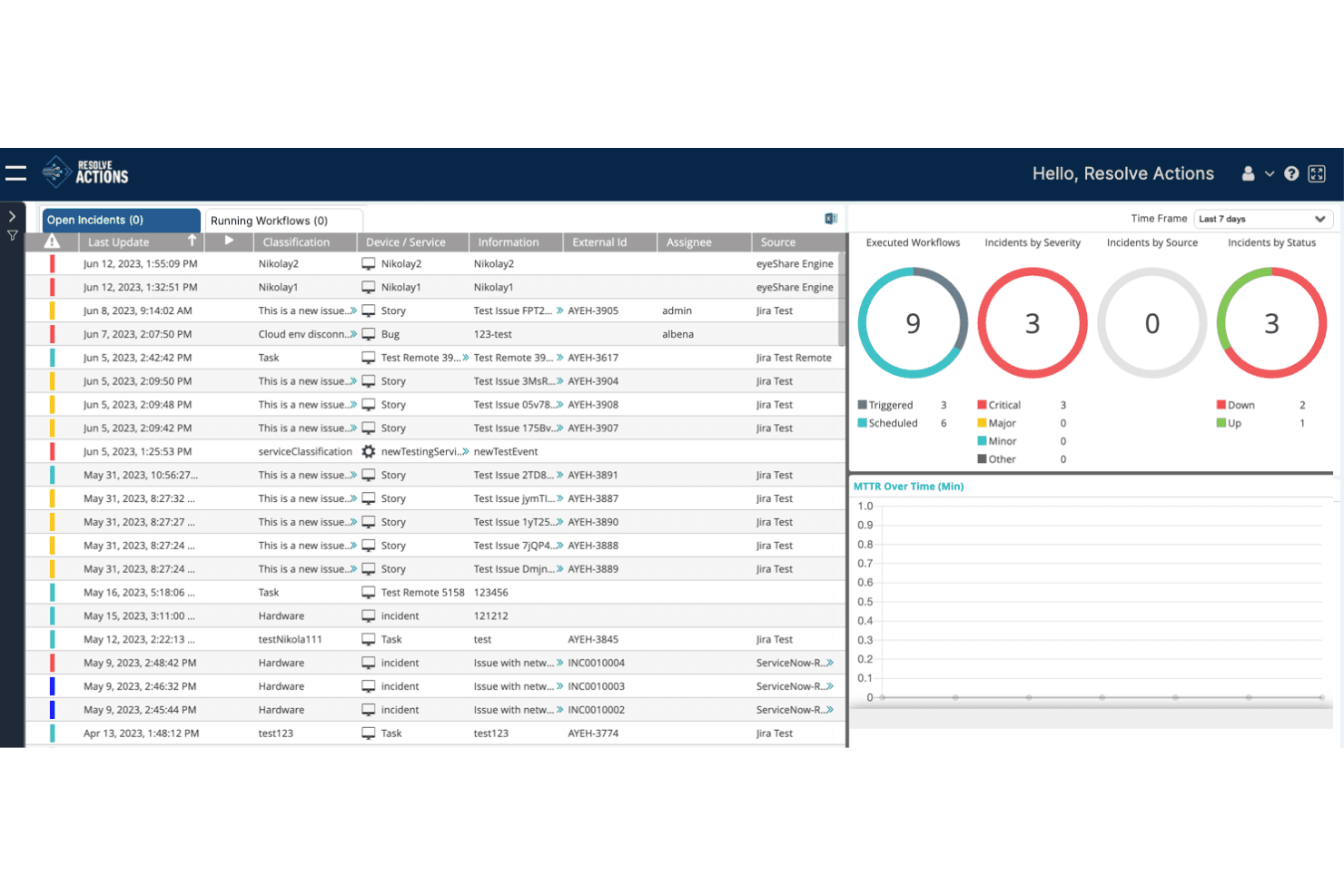
Resolve Actions centralizes incident management with workflow tracking and analytics. Resolve is an AI-driven IT automation and orchestration platform that handles incident detection, alert triage, automated runbook execution, and closed-loop remediation through agentic workflows and self-healing infrastructure.
Who Is Resolve Best For?
Resolve is a strong fit for IT operations managers and enterprise infrastructure teams focused on reducing ticket volume through automated remediation rather than manual incident coordination.
Why I Picked Resolve
I picked Resolve as one of the best because its closed-loop auto-remediation goes further than most tools in this space. Where other platforms alert your team to act, Resolve's automated runbooks handle the full cycle: alert triage, diagnosis, fix execution, and ticket closure without human touch. I'm particularly impressed by its self-healing infrastructure capability, which can drop alarm acknowledgement time from over 1,800 minutes to under one minute for known failure patterns.
Resolve Key Features
- AI alert correlation and noise filtering: Resolve enriches and correlates incoming alerts to suppress false positives before they reach your operations team.
- Automation Exchange workflow library: Access 5,000+ pre-built automation templates covering incident triage, service restarts, configuration rollbacks, and more.
- AgentLab custom AI agent builder: Build and deploy scoped AI agents with governance guardrails, approval workflows, and defined operational boundaries.
- Bi-directional ITSM synchronization: Resolve maintains live, two-way sync with ServiceNow and Jira throughout the incident lifecycle, keeping your system of record current without manual updates.
Resolve Integrations
Resolve offers 500+ integrations across ITSM, monitoring, cloud, and collaboration, including ServiceNow, Jira, Datadog, Splunk, AWS, Microsoft Azure, Slack, and Microsoft Teams.
Pros and Cons
Pros:
- Extensive prebuilt workflow and automation options
- Real-time triage and alert noise suppression
- Automated incident remediation without human intervention
Cons:
- Lacks built-in postmortem and SLO tools
- No native on-call scheduling or paging
Learn more about Resolve:
Andre alternativer for programvare for hendelseshåndtering
Her er noen flere alternativer for programvare for hendelseshåndtering som ikke kom med på kortlisten min, men som likevel er verdt å se nærmere på:
- 11OpsgenieBest for on-call management
- 12ServiceNowBest for enterprise solutions
- 13AlertOpsBest for real-time alerts
- 14New RelicBest for performance monitoring
- 15BigPandaBest for AIOps capabilities
- 16Jira Service ManagementBest for cross-team incident handling
- 17ClickUpBest for team collaboration tools
- 18incident.ioBest for fast incident response
- 19Mantis Bug TrackerBest for bug tracking
- 20xMattersBest for automated incident response
- 21FireHydrantBest for post-incident reviews
- 22SolarWinds IT Service Desk SoftwareBest for AI-driven service automation
- 23Rippling ITBest for device management integration
- 24ManageEngine ServiceDesk PlusBest for ITIL-aligned processes
- 25Mitratech AlyneBest for compliance-focused teams
- 26ManageEngine ServiceDesk PlusBest for IT service desk
- 27LogicGateBest for risk management integration
- 28SquadcastBest for SRE and DevOps teams
- 29MoogsoftBest for AI-driven insights
- 304meBest for enterprise service management
- 31OnPageBest for secure messaging
- 32Splunk On-CallBest for incident alerting
- 33BetterStackBest for monitoring and alerting
- 34Zero Incident FrameworkBest for predictive analytics
How I Evaluate Incident Management Software
I evaluate incident management tools across two layers: the baseline every tool must have—real-time alerting, on-call scheduling—and the differentiators that matter for SRE and DevOps teams.
Core Functionality (Table Stakes For This List)
When I'm selecting tools for my list, I rank each one on a scale from 0 (does not offer the functionality) to 5 (excels in this area) for each core functionality listed below. Then, I calculate the tool's total score into a percentage. Each tool needs to achieve a minimum total score of 65% to be considered for inclusion.
- Real-Time Alerting & Routing: I check whether alerts reach the right responder fast across SMS, push, email, and voice—especially during cascading failures where minutes of delay compound downtime.
- On-Call Scheduling & Escalation: Good tools let you build multi-tier rotations with follow-the-sun coverage, override calendars, and automatic escalations when an acknowledgment window expires.
- Incident Lifecycle Management: I look for structured workflows that move an incident from detection through triage, severity assignment, active response, and resolution with clear status tracking at each stage.
- Collaboration & Communication: Teams need built-in war rooms or bi-directional ChatOps with tools like Slack and Microsoft Teams so responders can coordinate without switching contexts mid-incident.
- Postmortem & Analytics: I evaluate whether the platform supports post-incident timelines, root cause templates, and metrics like MTTA and MTTR that help teams spot recurring patterns across services.
- Tool Integrations: The platform should connect natively with your existing monitoring, APM, logging, and ITSM stack—tools like Datadog, Prometheus, Jira, and ServiceNow are common anchors I expect to see.
Once I have a list of tools that meet this criteria, I consider what sets each platform apart.
Differentiating Factors (What Sets Vendors Apart)
Here's how I compare and contrast different vendors:
Standout Features
AI-powered noise reduction is a big one for me. During a major outage, a single failing service can generate hundreds of duplicate alerts—tools that correlate and suppress that noise let responders focus on the actual problem. I also look for auto-remediation runbooks that can restart services or trigger rollbacks for known failure modes without waiting on a human. Service dependency mapping rounds this out by showing upstream and downstream impact, which helps teams prioritize when multiple services degrade at once.
Beyond Features
Reliability matters more here than in most software categories—your incident management platform can't go down during the outage it's supposed to help you resolve. I check for uptime SLAs backed by multi-region failover and infrastructure independent of major cloud providers. Pricing structure is another area I evaluate closely, since per-responder models scale very differently than per-user or per-incident pricing as your on-call teams grow. For teams in regulated environments, I also look at compliance posture, including SOC 2 Type II, HIPAA, and SSO/SAML support.
Slik velger du programvare for hendelseshåndtering
Det er lett å gå seg vill i lange funksjonslister og komplekse prisstrukturer. For å hjelpe deg med å holde fokus mens du går gjennom den unike prosessen din for valg av programvare, får du her en sjekkliste over faktorer du bør ha i mente:
| Faktor | Hva du bør vurdere |
| Skalerbarhet | Sørg for at programvaren kan vokse med teamet ditt. Se etter løsninger som håndterer et økende antall brukere og hendelser uten at det går ut over ytelsen. |
| Integrasjoner | Kontroller om programvaren integreres med de eksisterende verktøyene dine, for eksempel Slack, Jira eller AWS. Sømløs integrasjon kan spare tid og redusere manuelt arbeid for teamet ditt. |
| Tilpasningsmuligheter | Vurder om verktøyet lar deg tilpasse arbeidsflyter og varsler etter dine spesifikke behov. Denne fleksibiliteten kan øke effektiviteten og brukertilfredsheten. |
| Brukervennlighet | Evaluer brukergrensesnittet og navigasjonen. Et verktøy som er enkelt å bruke, reduserer opplæringstiden og hjelper teamet ditt med å reagere raskere på hendelser. |
| Budsjett | Sammenlign kostnadene med budsjettet ditt. Vurder verdien som tilbys på ulike prisnivåer, samt eventuelle skjulte kostnader som kan påvirke økonomien din. |
| Sikkerhetstiltak | Se etter funksjoner som datakryptering og tilgangskontroller. Disse sikkerhetstiltakene er avgjørende for å beskytte sensitiv informasjon under hendelseshåndtering. |
| Brukerstøtte | Vurder tilgjengeligheten og kvaliteten på kundestøtten. Pålitelig brukerstøtte kan være avgjørende under en hendelse når du trenger rask hjelp. |
| Rapportering | Se etter omfattende rapporteringsverktøy som gir innsikt i hendelsestrender og teamets ytelse. Denne innsikten kan bidra til forbedringer. |
Trender innen programvare for hendelseshåndtering
I researchen min hentet jeg inn utallige produktoppdateringer, pressemeldinger og utgivelseslogger fra ulike leverandører av programvare for hendelseshåndtering. Her er noen av de nye trendene jeg følger med på:
- AI-drevet innsikt: Mange verktøy bruker nå AI til å analysere hendelsesdata og forutsi fremtidige problemer. Dette hjelper team med å forberede seg bedre og reagere raskere. Leverandører som Moogsoft integrerer AI for å tilby prediktiv analyse og smartere varslingssystemer.
- Samarbeid i sanntid: Det er en utvikling mot å integrere kommunikasjonsverktøy i sanntid i plattformer for hendelseshåndtering. Denne trenden forbedrer teamkoordineringen under hendelser og legger til rette for raskere løsninger. Verktøy som incident.io bygger inn chattefunksjoner direkte i plattformene sine.
- Varsling med kontekst: I stedet for å bombardere team med varsler, tilbyr ny IT-varslingsprogramvare kontekstrike varsler. Dette hjelper team med å prioritere og håndtere de mest kritiske problemene først. Opsgenie tilbyr for eksempel varsler som inneholder relevante hendelsesdetaljer, slik at tiltak kan iverksettes raskere.
- Analyse etter hendelser: Flere verktøy fokuserer nå på omfattende funksjoner for gjennomgang etter hendelser. Disse funksjonene hjelper team med å lære av tidligere hendelser og forbedre fremtidige tiltak. FireHydrant tilbyr detaljerte rapporter etter hendelser for å støtte kontinuerlig forbedring.
- Brukersentrerte kontrollpaneler: Det legges stadig større vekt på tilpassbare kontrollpaneler som er tilpasset individuelle brukerroller. Dette gir brukerne rask tilgang til relevante data. Leverandører som ServiceNow tilbyr kontrollpaneler som brukerne kan tilpasse etter sine spesifikke behov.
Hva er programvare for hendelseshåndtering?
Programvare for hendelseshåndtering er et verktøy som hjelper organisasjoner med å spore, håndtere og løse hendelser effektivt. IT-fagfolk, DevOps-team og medarbeidere innen kundestøtte bruker vanligvis disse verktøyene for å minimere nedetid og forbedre tjenestenes pålitelighet.
Automatiserte arbeidsflyter, samarbeid i sanntid og funksjoner for kontekstuell varsling bidrar til rask respons og effektiv kommunikasjon under hendelser. Samlet sett forbedrer disse tjenestene for respons på cyberhendelser driftseffektiviteten og sikrer raskere gjenoppretting etter avbrudd.
Funksjoner i programvare for hendelseshåndtering
Når du velger programvare for hendelseshåndtering, bør du se etter følgende viktige funksjoner:
- Automatiserte arbeidsflyter: Effektiviser håndteringen av hendelser ved å automatisere rutineoppgaver, slik at teamet ditt kan fokusere på mer komplekse problemer.
- Samarbeid i sanntid: Forbedre kommunikasjonen i teamet under hendelser, sørg for at alle er på samme side, og reduser løsningstiden.
- Kontekstbasert varsling: Send varsler med relevante detaljer for å hjelpe med å prioritere og håndtere de mest kritiske problemene først.
- Analyse etter hendelser: Gi innsikt i tidligere hendelser for å støtte kontinuerlig forbedring og bedre håndtering i fremtiden.
- Tilpassbare dashbord: Gjør det mulig for brukere å tilpasse visningen sin for å få rask og effektiv tilgang til de mest relevante dataene.
- KI-drevet innsikt: Bruk kunstig intelligens til å analysere data og forutsi mulige fremtidige hendelser, slik at beredskapen forbedres.
- Varsler i flere kanaler: Sørg for at varsler når teamet ditt gjennom ulike kommunikasjonskanaler, slik at alle holdes informert.
- Skalerbarhet: Håndter voksende team og et økende antall hendelser uten at det går på bekostning av ytelse eller effektivitet.
- Integrasjonsmuligheter: Koble til eksisterende verktøy som Slack, Jira og AWS for å skape en helhetlig arbeidsflyt i organisasjonen din.
- Brukervennlig grensesnitt: Forenkle navigeringen og reduser læringskurven, slik at teamene raskt kan ta i bruk programvaren.
Fordeler med programvare for hendelseshåndtering
Implementering av programvare for hendelseshåndtering gir flere fordeler for teamet og virksomheten din. Her er noen av fordelene du kan se frem til:
- Raskere responstider: Automatiserte arbeidsflyter og sanntidsvarsler hjelper teamet ditt med å håndtere hendelser raskt, slik at nedetiden minimeres.
- Forbedret kommunikasjon: Samarbeidsverktøy i sanntid sørger for at alle i teamet ditt holdes informert og koordinert under hendelser.
- Bedre prioritering: Kontekstbasert varsling hjelper teamet ditt med å fokusere på de mest kritiske problemene først, noe som øker effektiviteten.
- Innsiktsfull analyse: Gjennomganger etter hendelser gir verdifull innsikt i trender knyttet til hendelser og støtter kontinuerlig forbedring.
- Forbedret beredskap: KI-drevet innsikt og prediktiv analyse hjelper teamet ditt med å forutse problemer før de oppstår.
- Skreddersydd brukeropplevelse: Tilpassbare dashbord og brukervennlige grensesnitt gjør det enklere for teamet ditt å navigere i og bruke programvaren effektivt.
Kostnader og priser for programvare for hendelseshåndtering
Ved valg av programvare for hendelseshåndtering er det nødvendig å forstå de ulike prismodellene og tilgjengelige abonnementene. I tillegg til større aktører som Jira bør du vurdere alternativer til Jira Service Management for å finne det som passer best til budsjettet ditt. Kostnadene varierer basert på funksjoner, teamstørrelse, tillegg og mer. Tabellen nedenfor oppsummerer vanlige abonnementer, gjennomsnittsprisene deres og typiske funksjoner som inngår i løsninger for hendelseshåndtering:
Sammenligningstabell for abonnementer på programvare for hendelseshåndtering
| Abonnementstype | Gjennomsnittspris | Vanlige funksjoner |
| Gratisabonnement | $0 | Grunnleggende hendelsessporing, begrensede varsler og viktig rapportering. |
| Personlig abonnement | $5-$25/bruker/måned | Avanserte varsler, tilpassbare dashbord og integrasjon med utvalgte verktøy. |
| Forretningsabonnement | $30-$60/bruker/måned | Samarbeid i sanntid, detaljert analyse og varsler i flere kanaler. |
| Enterprise-abonnement | $70-$100/bruker/måned | Full tilpasning, KI-drevet innsikt, analyse etter hendelser og prioritert kundestøtte. |
Vanlige spørsmål om programvare for hendelseshåndtering
Her er noen svar på vanlige spørsmål om programvare for hendelseshåndtering:
Hvordan kan programvare for hendelseshåndtering redusere risikoer på arbeidsplassen?
Programvare for hendelseshåndtering kan hjelpe teamet ditt med å identifisere og håndtere potensielle risikoer før de eskalerer. Ved å gi varsler i sanntid og detaljerte rapporter sørger programvaren for at teamet ditt er oppmerksomt på eventuelle problemer når de oppstår. Denne proaktive tilnærmingen bidrar til å opprettholde et tryggere arbeidsmiljø og minimerer forstyrrelser.
Hvordan sørger programvare for hendelseshåndtering for overholdelse av regelverket?
Disse verktøyene holder oversikt over frister og krav knyttet til regelverk, slik at teamet ditt kan holde tritt med bransjestandarder. De leveres ofte med innebygde maler og sjekklister for regelverk som OSHA, noe som gjør det enklere for teamet ditt å sikre overholdelse. Dette reduserer risikoen for bøter og sørger for at driften går smidig.
Hvilke verktøy er best for automatisering av utbedring av hendelser?
Automatisering av utbedring av hendelser kan spare teamet ditt for tid og redusere menneskelige feil. Verktøy som SIEM-systemer og SOAR-plattformer brukes ofte til dette formålet. De bidrar til å prioritere og løse hendelser automatisk, slik at teamet ditt kan konsentrere seg om mer komplekse oppgaver som krever menneskelig inngripen.
Hvordan integreres programvare for hendelseshåndtering med andre verktøy?
De fleste programvareløsninger for hendelseshåndtering tilbyr integrasjoner med populære verktøy som Slack, Jira og AWS. Disse integrasjonene gjør det mulig for teamet ditt å effektivisere arbeidsflyter og sørge for at informasjon deles på tvers av plattformer. Denne tilkoblingen øker effektiviteten og sørger for at alle teammedlemmer har samme informasjon.
Hva er forskjellen mellom problemhåndtering og hendelseshåndtering?
Hendelseshåndtering fokuserer på å løse umiddelbare problemer for å gjenopprette tjenesten raskt, mens problemhåndtering har som mål å identifisere og løse den underliggende årsaken til gjentakende problemer. Hendelseshåndtering er reaktiv og håndterer hendelser når de oppstår, mens problemhåndtering er proaktiv og forebygger fremtidige hendelser.
Hvordan prioriterer man flere hendelser som oppstår samtidig?
Prioritering av hendelser innebærer å vurdere hvilken innvirkning de har, og hvor mye det haster å håndtere dem. Programvare for hendelseshåndtering tilbyr verktøy for å kategorisere og prioritere hendelser basert på forhåndsdefinerte kriterier. Dette hjelper teamet ditt med å håndtere de mest kritiske problemene først, slik at de mest betydelige forstyrrelsene løses raskt.